window AUDI S3 2015 Owners Manual
[x] Cancel search | Manufacturer: AUDI, Model Year: 2015, Model line: S3, Model: AUDI S3 2015Pages: 310, PDF Size: 76.15 MB
Page 11 of 310
M N
0 > co ...... \!) ..,.,
M ..,., ......
CD
@
®
©
®
®
(J)
®
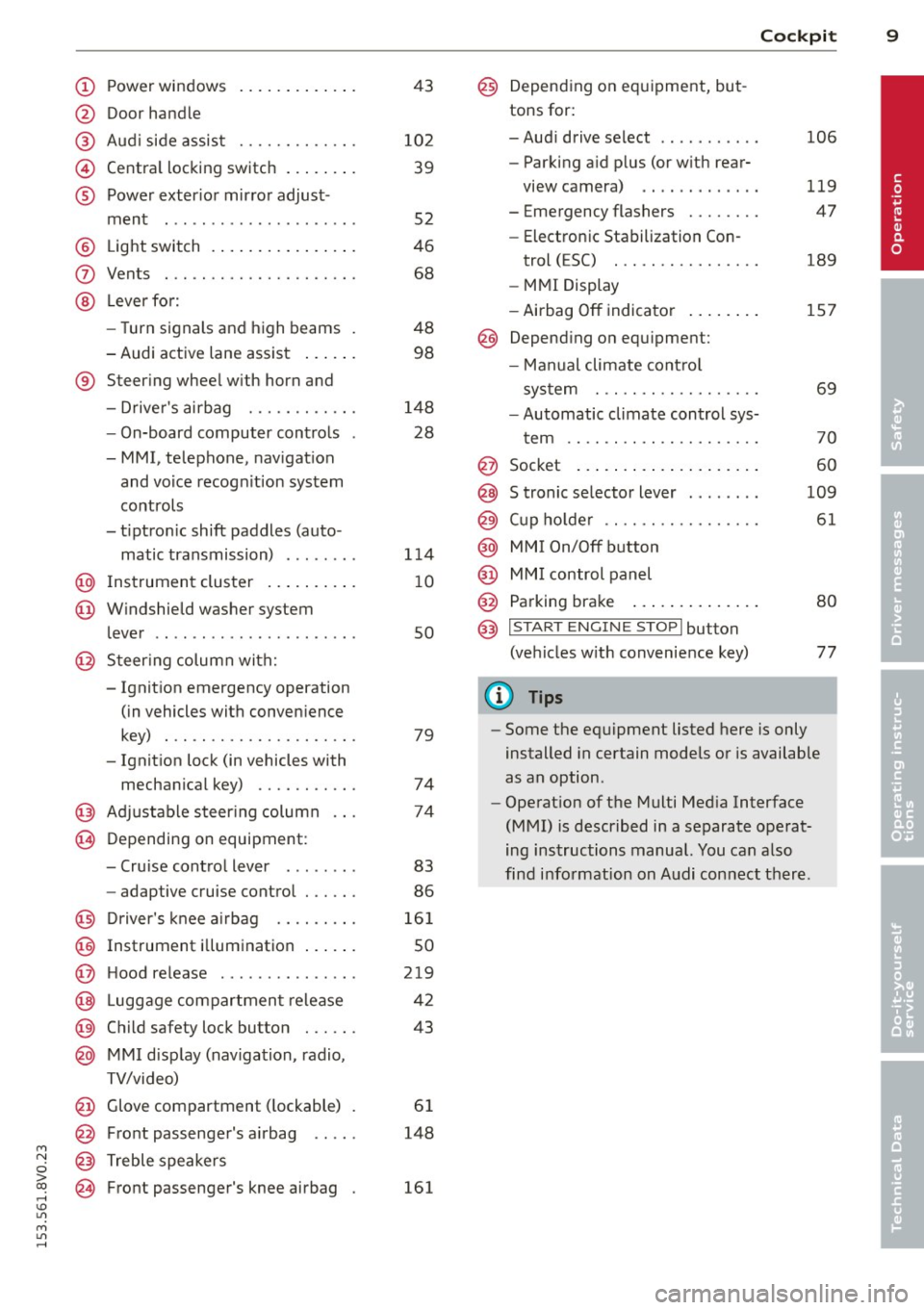
Power windows
Door handle
Aud i side assist
........ .... .
Centra l locking switch ... .. .. .
Powe r exter ior mirror adjust
ment
.. ... .............. ..
Light switch
Vents
L ever fo r:
- Turn signals and high beams
- Audi active lane assist ... .. .
® Steer ing wheel w ith horn and
- Drive r's airbag ....... .. .. .
- On-board computer controls
- MMI, telephone, nav igat ion
and voice recogn it ion system
controls
- tiptron ic shift paddles (auto-
matic transmission) ....... .
@ Instrument cluster .. ... .. .. .
@ W indshield washer system
l ever
' .. ... .............. . .
@ S teer ing column with:
- Ignit ion emergency operation
(in vehicles with conven ience
key) . .. ................. .
- Ignit ion lock (in vehicles with
mechanical key) ...... .. .. .
@ Adjustable s teer ing column
@ Depending on equipment :
- Cruise contro l lever . ...... .
- adaptive cruise contro l ... .. . 4
3
10 2
39
52
46
68
48 98
148 28
1 14
1 0
so
79
74
74
83
86
@ D river's knee a irbag . . . . . . . . . 161
@ Instrument i llumination . . . . . . 50
@ H ood re lease . . . . . . . . . . . . . . . 219
@ Lugg age compartmen t release 42
@ Child safety lock button . . . . . . 43
@ MMI d isp lay (navigation , radio,
TV/video)
@ Glove compartment ( lockable)
@ Front passenger's airbag .. .. .
@ Treble speakers
@ Front passenger's knee airbag 61
148
161
Cockpi t 9
@) Depending on eq uipment, but
tons for:
- Aud i drive select
- Parking a id p lus (or w ith rear-
view camera) .. . ... ...... .
- Emergency flashers ....... .
- Electron ic Stabilization Con-
trol ( ESC) . .. .... ........ .
- MMI Display
- Airbag
Off indicator ..... .. .
@ Depend ing on equ ipment:
- Manual climate cont ro l
system
- Automatic climate contro l sys
t em
. . .. .. .. .... .........
@ Socket
@ S tronic se lector lever ....... .
@ Cup ho lder .. .. .. . ......... .
@ MMI On/Off button
@ MM I control panel
@ Parking brake ... . ... ...... .
@ I START ENGI NE STOPI button
(ve hicles w ith convenience key)
(D Tips
106
119
47
189
157
69
70
60
109
61
80
77
- Some the eq uipment listed here is only
installed in certain models or is available
as an option.
- Operat ion of the Multi Med ia Interface
(MMI) is described in a separate operat
ing instructions manual. You can a lso
find info rmation on A udi con nect ther e.
•
Page 37 of 310
M N
0 > co ,...., \!) ..,.,
M ..,., ,....,
Opening and closing
Central locking
Key set
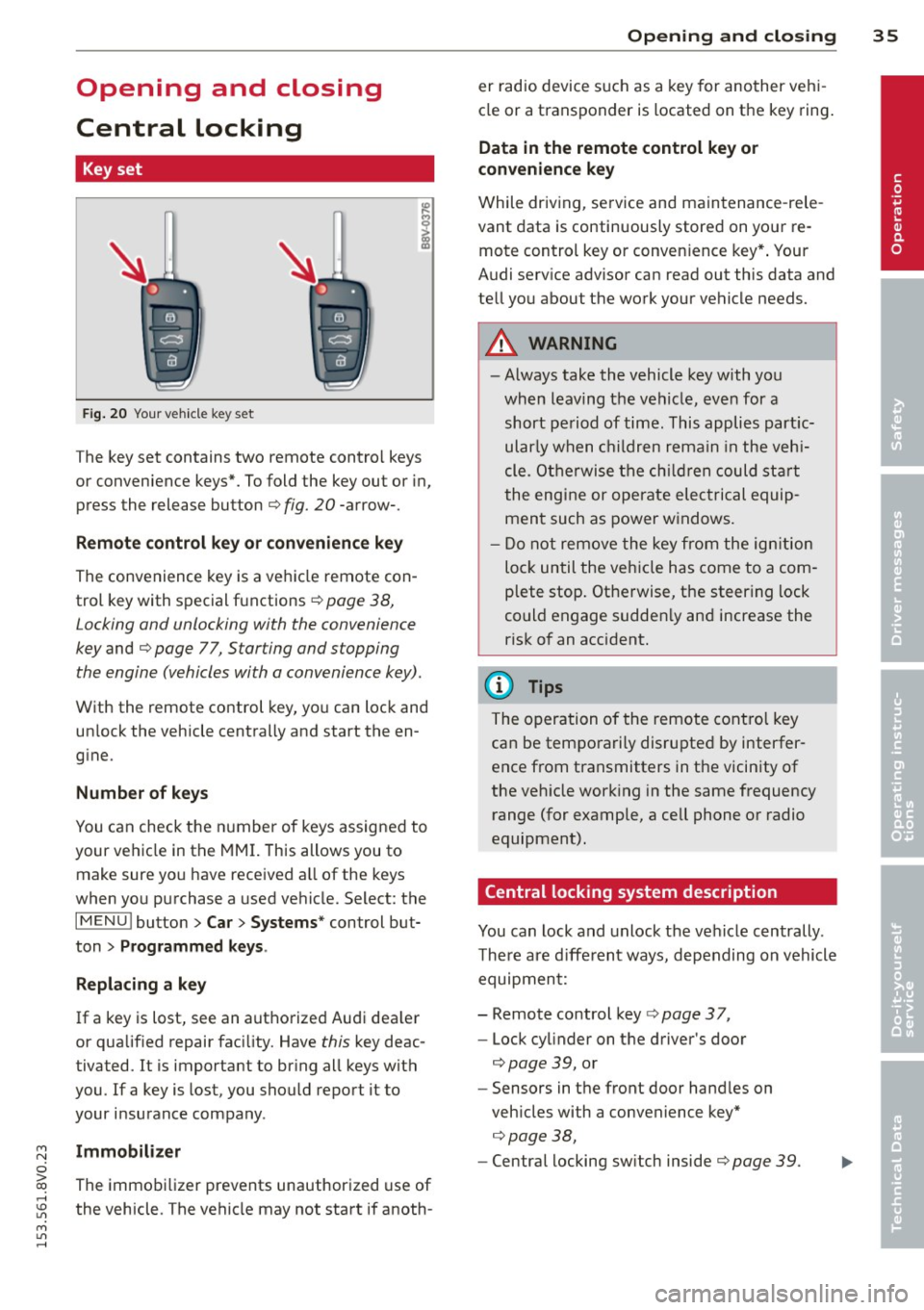
Fig . 20 Your vehicle key set
The key set contains two remote contro l keys
or convenience keys*. To fold the key out or in,
press the release button
q fig. 20 -arrow-.
Remote control key or convenience key
The convenience key is a vehicle remote con
trol key with special functions
q page 38,
Locking and unlocking with the convenience
key and q page 77, Star ting and stopping
the engine (vehicles with a convenience key).
With the remote control key, you can lock and
un lock the vehicle centrally and start the en
g ine.
Number of keys
You can check the number of keys assigned to
your vehicle in the
MMI. T his allows you to
make sure you have received a ll of the keys
when you purchase a used vehicle. Select: the
I MENU I button > Car> Systems* control but
ton
> Programmed keys.
Replacing a key
If a key is lost, see an authorized Audi dea ler
or qualified repair facility. Have
this key deac
tivated. It is important to br ing all keys with
you.
If a key is lost, you should report it to
your insurance company .
Immobilizer
The immobilizer prevents unauthorized use of
the vehicle . The vehicle may not start if anoth -
Opening and closing 35
er radio device such as a key for another veh i
cle or a transponder is located on the key ring.
Data in the remote control key or
convenience key
While driving , service and maintenance -rele
vant data is continuously stored on your re
mote control key or convenience key*. Your
Audi serv ice advisor can read out this data and
tell you about the work your vehicle needs.
_& WARNING
- Always take the vehicle key with you
when leaving the vehicle, even for a
short period of time. This applies partic
ularly when children remain in the vehi
cle . Otherwise the children could start
the engine or operate electrical equip
ment such as power windows.
- Do not remove the key from the ignition
lock until the vehicle has come to a com
plete stop. Otherwise, the steering lock
could engage sudden ly and increase the
risk of an accident.
{i) Tips
The operation of the remote control key
can be temporarily disrupted by interfer
ence from transmitters in the vicinity of
the veh icle working in the same frequency
range (for example, a cell phone or radio
equipment).
Central locking system description
You can lock and unlock the vehicle centrally .
There are different ways, depending on vehicle
equipment:
- Remote control key
q page 3 7,
- Lock cylinder on the driver's door
qpage 39, or
- Sensors in the front door handles on
veh icles with a convenience key*
q page 38,
-Central locking sw itch inside q page 39. •
Page 45 of 310
....,
N
0 > co
rl I.O
"' ....,
"' rl
.. To turn off, turn the ignition key opposite
the direction of the arrow .
When the child safety locks are activated, the
inside door handles do not work and the doors
can only be opened from the outside.
The ch ild safety lock only f unctions on the
door in whi ch it was act ivated.
Power windows
Controls
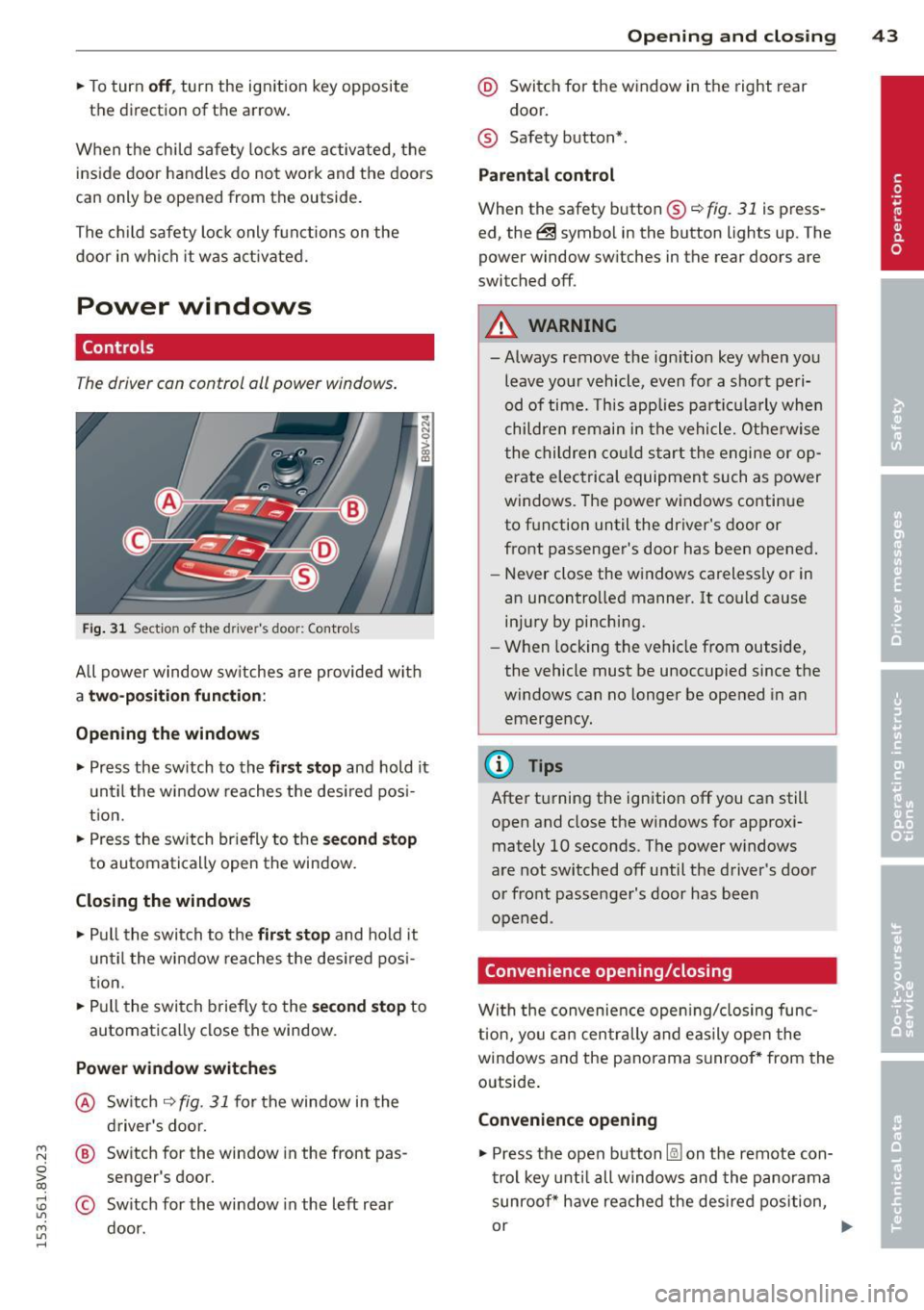
T he driver can control oil power windows .
Fig. 31 Sectio n of the drive r's d oor: Control s
All power window sw itches are provided with
a two-position function :
Opening the windows
.. Press the sw itch to the fir st stop and hold it
until the window reaches the desired pos i
tion.
.. Press the sw itch br iefly to the
second stop
to automatically open the window.
Closing the windows
.. Pull the switch to the first stop and hold it
until the window reaches the des ired posi
t ion .
.. Pull the switch briefly to the
second stop to
automatically close the window.
Power window switches
@ Switch ~ fig. 31 for the window in the
driver's door.
@ Switch for the window in the front pas
senger 's door.
© Sw itch for the window in the left rear
door.
Opening and closing 43
@ Switch for the window in the right rear
door.
® Safety button* .
Parental control
When the safety button®~ fig. 31 is press
ed, the@symbol in the button lights up. The
power window sw itches in the rear doors are
switched off.
A WARNING
-Always remove the ign ition key when you
leave your vehicle, even for a short peri
od of time. This applies particula rly when
children remain in the vehicle. Otherwise
the children could sta rt the engine or op
erate electrical equipment such as power
windows. The power windows continue
to function until the driver's door or
front passenger's door has been opened.
- Never close the windows carelessly or in
an uncontrolled manner. It could cause injury by pinching.
- When locking the vehicle from outside,
the vehicle must be unoccupied since the
windows can no longer be opened in an
emergency.
(D Tips
After turning the ignition off you can still
open and close the windows for approxi
mately 10 seconds. The power windows
are not switched off until the driver's door
or front passenger's door has been
opened .
Convenience opening/closing
With the convenience opening/closing func
t ion, you can centrally and easily open the
windows and the panorama sunroof* from the
outside.
Convenience opening
.. Press the open button l@J on the remote con
trol key until all windows and the panorama
sunroof* have reached the desired position,
or .,,.
Page 46 of 310
44 Opening and clo sing
• Hold the key in the driver's door lock until all
windows and the panorama sunroof* have
reached the desired position .
Conveni ence closing
• Hold the key in the d river's door lock i n the
lock pos ition until a ll wi ndows and the pan
o rama sunroo f* are closed .
Convenience closing with the convenience
key*
• To uch the sensor* on one of the front door
h and les and cont in u e touching it unt il all of
the windows and the panorama s unroof* are
closed . Do not place your hand in the door
hand le when doing th is.
Adjusting the convenience opening in the
MMI
• Se lect : the I MENU ! button> Car> Systems *
control button > Vehicle sett ings > Central
locking > Long -press to open windows
To enab le convenience opening of the win -
dows and the roo f*, the
Front windows , Rear
w indows *
and Roof* functions must be
sw itched
On .
A WARNING
-Never close the windows or pano rama
sunroof* carel essly or in an uncontro lled
m ann er, be cause th is increases the risk
o f i njury.
- Fo r se curity reasons, the windows can
only be opened with the remote c ontro l
k ey at a maxim um dis tance of ap proxi
ma tely 6 feet ( 2 meters) from the ve hi
cle .
- Pa y att ention when using the lock cyli n
der to close the windows and t he panora
ma sunroof* so that no one is pinche d.
Clos ing stops whe n the key is moved into
the start ing pos ition.
Correcting power window malfunctions
After disconnecting the vehicle battery , the
one-touch up and down feature must be acti vated again .
• Pull the power window switch u ntil the win
dow is completely ra ised .
• Release the sw itch and pull it agai n for at
l e ast one s econd .
Panorama sunroof
Description
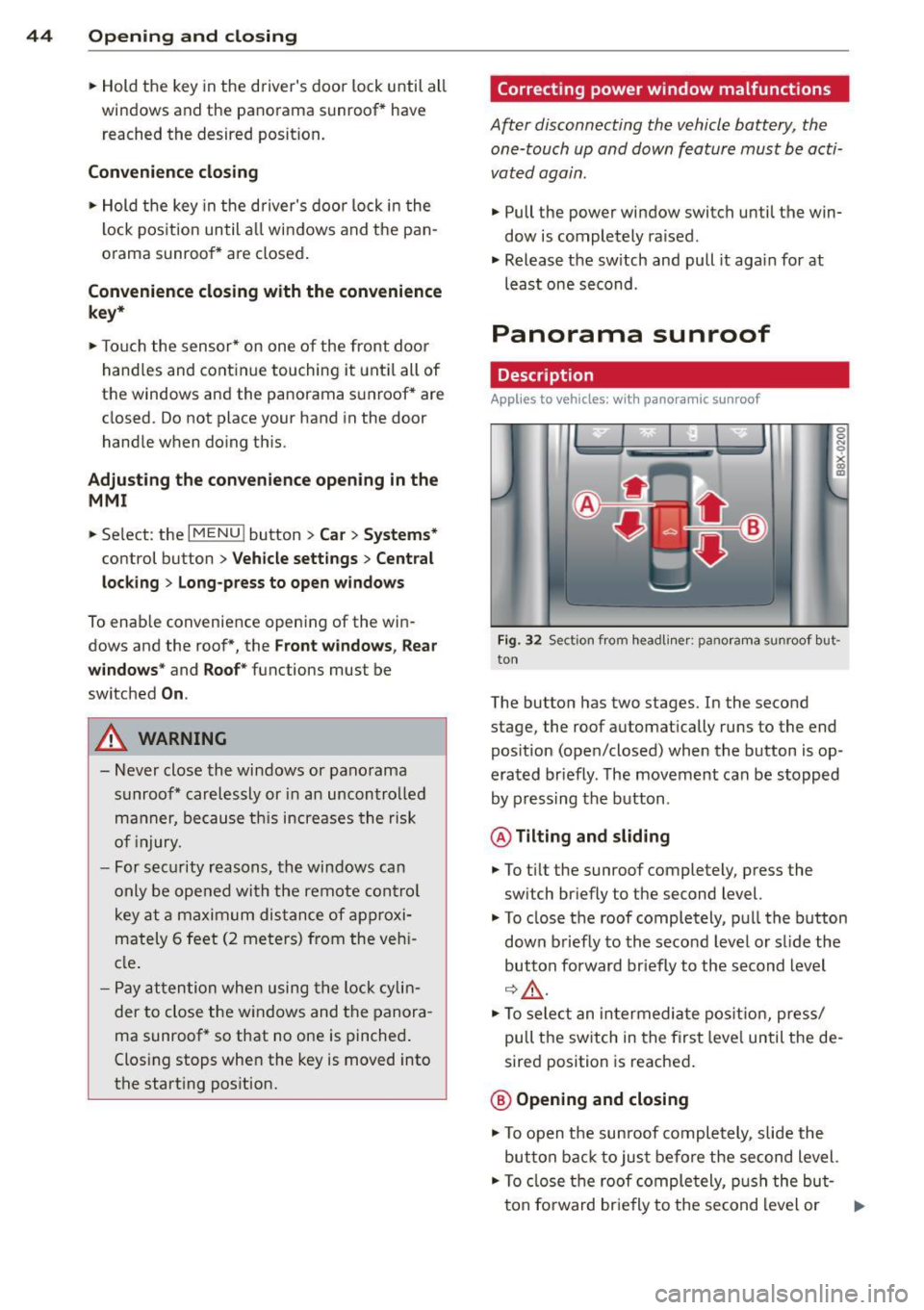
Applies to vehicles: with panoramic sunroof
Fig. 32 Sect io n fr om headli ner: pano ra m a s unroof but
to n
The butto n has two stages . In the second
stage, the roof automat ically runs to the end
pos ition (open/closed) when the button is op
era ted br iefly . T he movement ca n be s topped
by pressing the b utton .
@Tilting and sliding
• To t ilt the sunroof completely , press the
sw itch br iefly to the second level.
• To close t he roof completely, pu ll the button
down b riefly to the seco nd leve l or s lide the
button forward br iefly to the s econd level
~~-
.. To se le ct an in termedia te pos it ion , press/
pull t he sw itch in the firs t leve l until the de
sired position is reached .
@ Opening and closing
• To open t he su nroof completely, sli de the
button bac k to ju st befo re the second level.
• To close t he roof comple tely, p ush the but-
t on fo rward br ie fly to the se cond level or .,..
Page 53 of 310
M N
0 > co ,...., \!) ..,.,
M ..,., ,....,
A WARNING
-The ra in sensor is only intended to assist
the driver. The driver is still responsible
for manually sw itching the w ipers on ac
cording to the v is ibility conditions.
- The windshield may not be treated w ith
water-repe lling windshield coat ing
agents. Unfavorable conditions, such as
wetness, darkness o r low sun, can result
in increased glare. W iper blade chatter is
also possible.
- Properly functioning windshie ld w iper
blades are requi red fo r a clear view and
safe driving~
page 51, Replacing
front windshield wiper blades .
(D Note
-In case of frost, make sure the wind
shield wiper b lades are not frozen to the
windsh ield . Sw itching on the windshield
wipers when the blades are frozen to the
windsh ield can damage the wiper blades.
- Prior to using a car wash, the windshield
wipe r system must be switched
off (lever
in position 0). This prevents unintention
al sw itching on and damage to the wind
s h ield wiper system.
- Do not use the wipers to remove ice from
the windows. Using windshie ld w ipers as
i ce scrapers destroys the wiper b lades.
(D Tips
- The windshield wipe rs switch off when
t h e ignit ion is turned
off. You can acti
vate the windshield wipers after the igni
tion is switched back on by moving the
windsh ield wiper leve r to any pos ition.
- Worn or dirty windsh ie ld w iper blades
r esult in streak ing. This can affect the
r ain senso r funct ion. Check your wind
s hi eld wipe r blades regularly.
- The washer fluid nozzles in the w ind
s hi eld washer system are heated* at low
temperatures when the ig nit ion is on.
- When stopping temporar ily, e.g. at a
traff ic light, the se t speed of the w ind- Light
s and Visi on 5 1
shield w ipers is automatically reduced by
one speed.
- In vehi cles w ith an MMI, you can switch
the rain senso r or
off in the Driver assi s
tance
menu.
Cleaning windshield wiper blades
Clean the wiper b lades when you see w iper
streaks . Use a soft clot h and a glass cleaner .
.,. Place the windshie ld wiper arms in the serv
ice pos ition
~ page 51.
.,. Fold the windshie ld w iper arms away from
the windshield.
A WARNING
Di rty windsh ield wiper b lades can impair
v ision, which increases the r isk of an acci
dent.
(D Note
If you see streaks again after clean ing the
wiper blades, the blades must be replaced
~page 51.
Replacing front windshield wiper blades
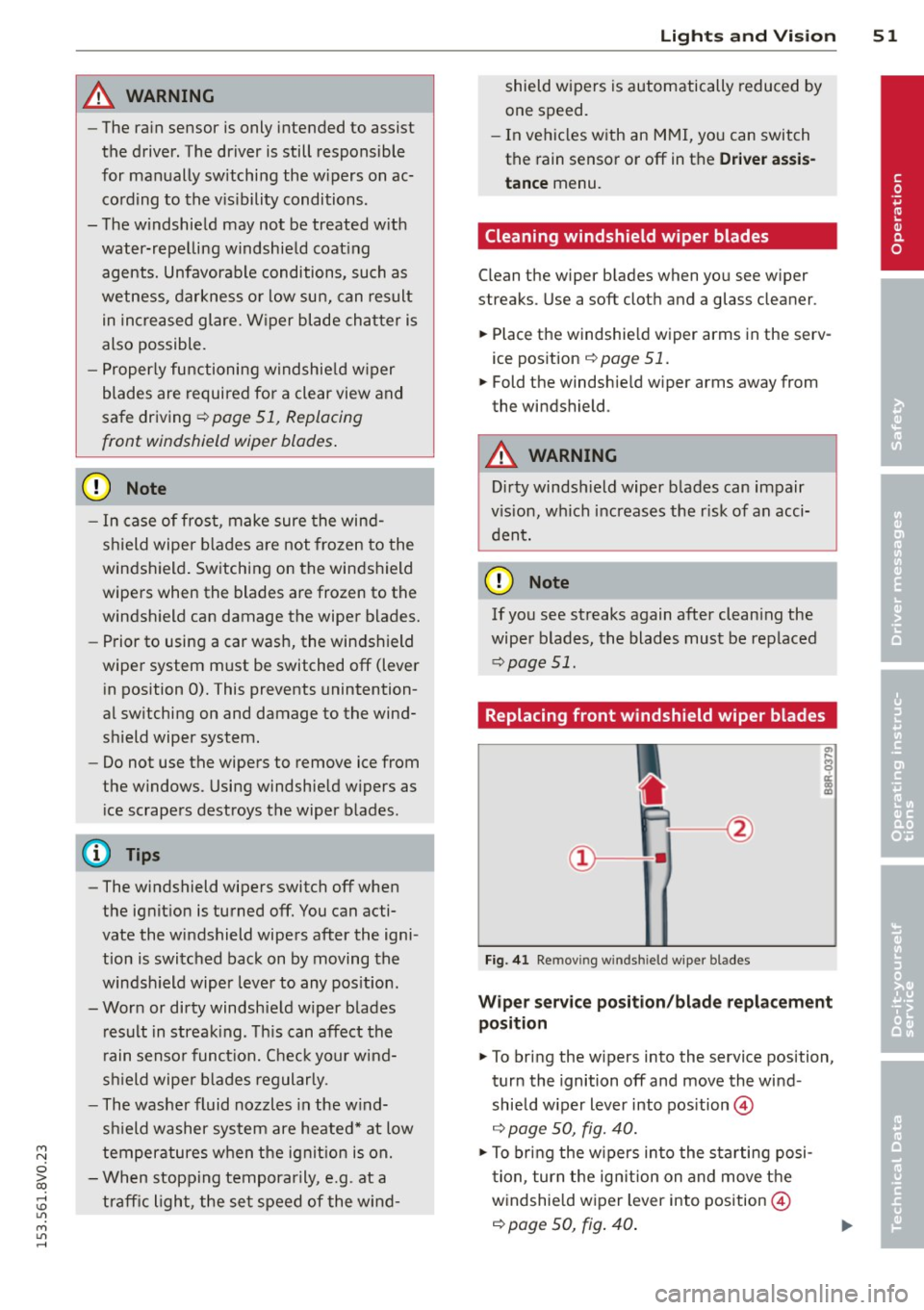
Fig. 41 Remov ing w indsh ie ld wipe r blades
Wiper servic e posit ion /bl ade repl ace ment
position
.,. To bri ng the w ipers into the service position,
tur n the ignition
off and move the wind
shield w iper lever into pos ition @
~ page 50, fig. 40.
.,. To bring the w ipers into the starting posi
t ion, tur n the ig nition on and move t he
w indshie ld w iper lever into position @
~ page 50, fig. 40 .
•
Page 55 of 310
....,
N
0 > co
rl I.O
"' ....,
"' rl
The mirror goes back into its original position
once you drive forward faster tha n 9 mph
(15 km/h) or turn the ign ition
off .
Folding mirr ors in and out
To fold the mirrors i n w ith the knob, turn the
knob in the
&l pos it ion .
To fold the m irrors out, turn the knob in the
q or
P or O position.
You can set in the MMI if the mirrors should
fold in when locking the vehicle or not
~ page 40 . When you lock the vehicle, the
m irrors fold in . When you start the ignit ion,
the mirrors fold out .
_& WARNING
Curved mirror surfaces (convex or asphe
ric*) enlarge the field of vision. However,
they make objects in the mirror appear sma ller and farther away. Your may est i
mate incorrectly when you use these m ir
rors to gauge your d istance from the
vehicles behind you when changing lanes -
accident risk!
(D Note
- For vehicles with power folding exterior
mirrors*: If the m irror housing was
moved by outside forces (such as an im
pact when maneuvering), you must use
the power folding function to fold the mir ror a ll the way out. You will hear a
l oud noise when the mi rrors are latched
back in place. The mirror housing must
not be moved back into place by hand
because this would affect the mirror
mechan ism.
- Applies to vehicles witho ut power fold
i ng exterior mirro rs:
If the mirror hous
ing was moved by outside forces (s uch as
i n impact d uring maneuvering), you
must move the mirror housing back into
place by hand.
- If you wash the vehicle in an automatic
car wash, you must fold the exterior m ir
rors in to reduce the r isk of damage to
the mi rrors. Never fold power foldi ng ex-
-
Ligh ts and Visi on 5 3
terior mirrors by hand . On ly fold them in
and out using the power controls.
a) Tips
If t h e power ad justmen t fa ils, bot h mir
rors can be adjusted by hand by pressing
on the edge of the mirror surface.
Dimming the mirrors
Your vehicle is equipped with a manual or au
tomatic* dimming reorview mirror.
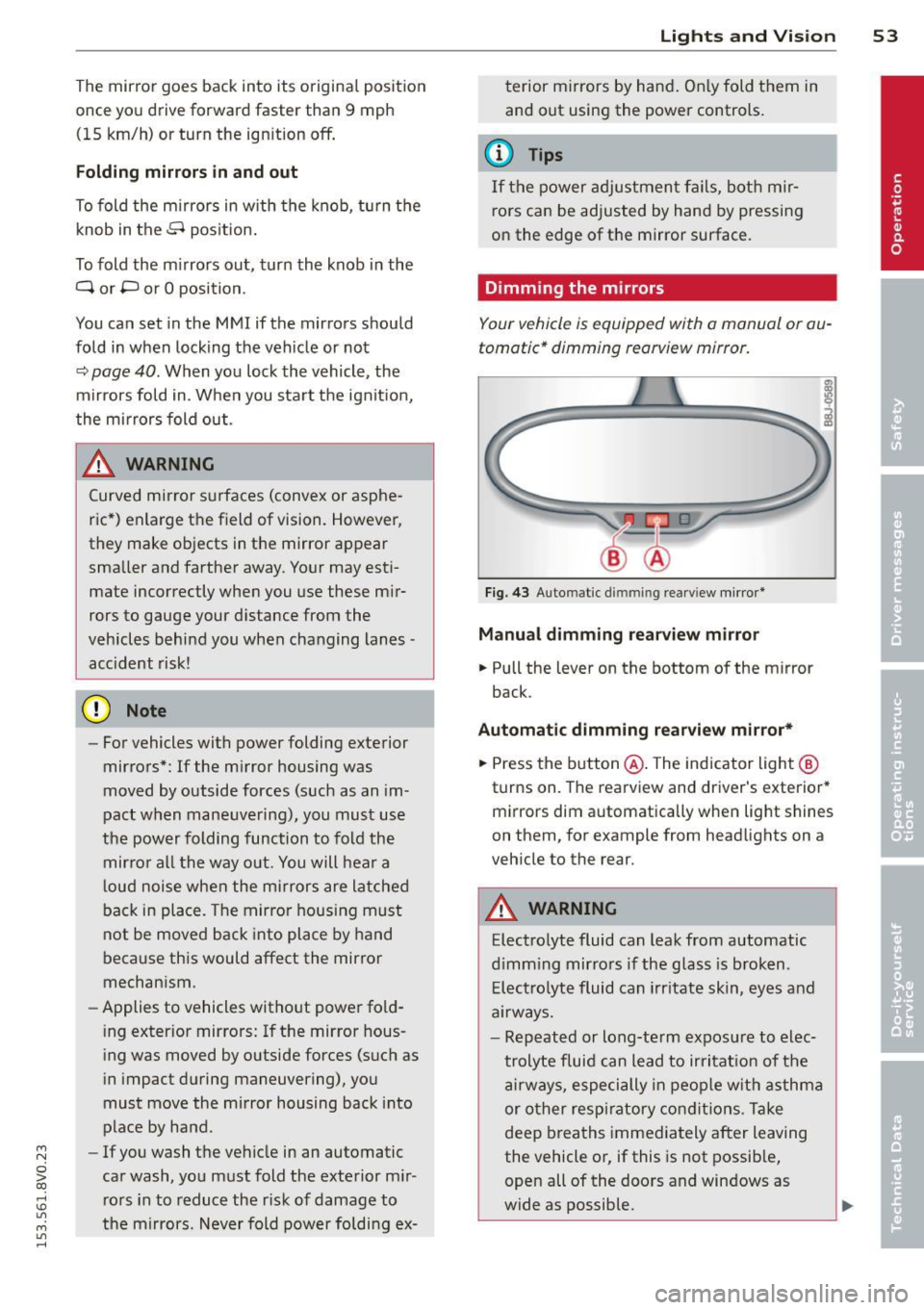
F ig. 43 Auto mat ic d immin g rea rv iew mi rror *
Manu al dimming rear view mirror
.,. Pull the lever on the bottom of the mirror
back.
Automat ic dimming rearview mirror*
.,. Press the b utton @. The indicator light @
turns on. The rearview and driver 's exterior*
m irrors dim automatically when light shines
on them, for example from headlights on a
veh icle to the rear.
A WARNING
Elect ro lyte fluid can leak from automatic
d imm ing mirro rs if the glass is b roken .
E lec tro lyte fluid can irr itate skin, eyes and
a ir ways.
- Repeated or long-te rm expos ure to elec
trolyte fluid can lead to irritat io n of the
a irways, especially in peop le w it h asthma
or other resp iratory co ndit ions . T a ke
deep breaths immediately after leaving
the vehicle or, if this is not possib le,
open all of the doors and windows as
wide as possible.
Page 58 of 310
56 Seat s a nd s tor ag e
Seats and storage
General information
Important information
& WARNING
Refer to the chapter Driving Safely
r::!>poge 125, Driving safety for important
information, t ips, suggestions and warn
ings that you should read and follow for
your own safety and the safety of your pas sengers.
Why is your seat adjustment so important?
The safety belts and the airbag system con
only provide maximum protection if the front
seats ore correctly adjusted.
There are various ways of adjusting the front
seats to provide safe and comfortable support
for the driver and the front passenger. Adjust
your seat properly so that :
- you can easily and quickly reach all the
switches and controls in the instrument
panel
- your body is properly supported thus reduc
ing physical stress and fatigue
- the safety belts and airbag system can offer
maximum protection
r::!> page 144 .
In the following sections, you will see exactly
how you can best adjust your seats .
There are special regulations and instructions
for insta lling a child seat on the front pas
senger's seat. Always follow the information regarding child safety provided in
r::!> page 170, Child Safety .
& WARNING
Incorrect seating position of the dr iver and
all other passengers can result in serious
personal in jury.
- Always keep your feet on the f loor when
the vehicle is in motion - never p ut your
feet on top of the instrumen t panel, out of the window or on top of the seat c
ush
ion. This applies espec ially to the passen
gers. If your seating position is incorrect,
you increase the risk of injury in the case
of sudden braking or an accident .
If the
airbag inflates and the seating position is incorrect, this could result in pe rsonal
inj ury or even death.
- It is important for both the drive r and
front passenger to keep a distance of at least 10 inches ( 25 cm) between them
selves and the steering wheel and/or in
strument panel. If you're sitting any
closer than this, the airbag system can not protect you properly. In addition, the
front seats and head restraints must be
adjusted to your body height so that they
can give you max imum protect ion.
- Always try to keep as much distance as
possible between yourself and the steer
ing wheel o r instrument panel.
- Do not adjust the driver's or front pas
senger's seat whi le the vehicle is moving.
Your seat may move unexpectedly, caus
ing sudden loss of veh icle cont ro l and
pe rsonal injury. If you adjust yo ur seat
while the veh icle is moving, yo u are ou t
of posit ion .
Driver's seat
The correct seat position is important for safe
and relaxed driving.
We recommend that you adjust the dr iver's
seat in the fo llow ing manne r:
.. Adjust the seat in fore and aft direction so
that you can easily push the peda ls to the
floor wh ile keeping your knees sl ightly bent
c::> &. in Why is your seat adjustment so im
portant? on page 56.
.. Ad just the bac krest so tha t when you sit
w ith your back against the backrest, you can
still grasp the top of the steering wheel.
.. For adjustab le head restraints: adjust the
head restra int so the upper edge is as even
as poss ible with the top of your head. If that
is not possible, try to adjust the head ..,.
Page 70 of 310
68 Warm and cold
Warm and cold Climate control system
Description
Different systems cou ld be installed.
- manual climate control system* or
- automatic climate control system*
The
climate control system* cools and re
moves humidity from the air in the vehicle in
terior. It is the most effective when the win
dows and panorama sunroof* are closed. If
there is a build-up of heat inside the vehicle,
ventilation can help to speed up the cooling
process . For this reason, the windows and
panorama sunroof can be opened from the
outside .
9 page 43, Convenience opening/
closing
Pollutant filter
T he pollutant filter removes pollutants such
as dust and pollen from the air .
Key recognition
You can store various settings for the manua l
and automatic
climate control system* and
assign them to the key being used .
A WARNING
Poor visibility can lead to accidents.
- For safer driving, keep all windows free
of ice, snow and fog .
- Become familiar as quickly as possible
with the correct use and function of the cl imate control system, especially with
the defrosting and defogg ing funct ion .
- When the temperature is below freezing,
only use the windsh ield washer system
after the w indshield has been warmed by the cl
imate control system . The washer
fluid could freeze on the windshield and
impair visibility.
(D Note
- If you suspect that the climate control
system is damaged, switch the system
off to prevent further damage and have
it checked by an authorized Audi dealer
or authorized Audi Service Facility.
- Repairs to the Audi climate control sys
tem require special technical knowledge
and special tools. See an authorized Audi
dealer or authorized Audi Serv ice Facility .
® For the sake of the environment
Reducing the amount of fuel used also re
duces the amount of pollutants that enter
the air.
(D Tips
- To prevent interference with the heating
and cooling output and to prevent the
w indows from fogging over, the air in
take in front of the windshield must be
free of ice, snow or leaves.
- Condensation from the cooling system*
can dr ip and form a puddle of water un
der the vehicle. This is normal and does
not mean there is a leak.
- T he energy management system may
switch the seat heating* or rear window
defroster off temporari Ly . These systems
are available again as soon as the energy
balance has been restored.
- The flows through the vents under the
rear window. Make sure the openings are
not covered when placing clothing on the
luggage compartment cover.
Page 71 of 310
....,
N
0 > co
rl I.O
"' ....,
"' rl
Climate control system controls
App lies to ve hicles: with manu al cl im ate c ontrol syst em
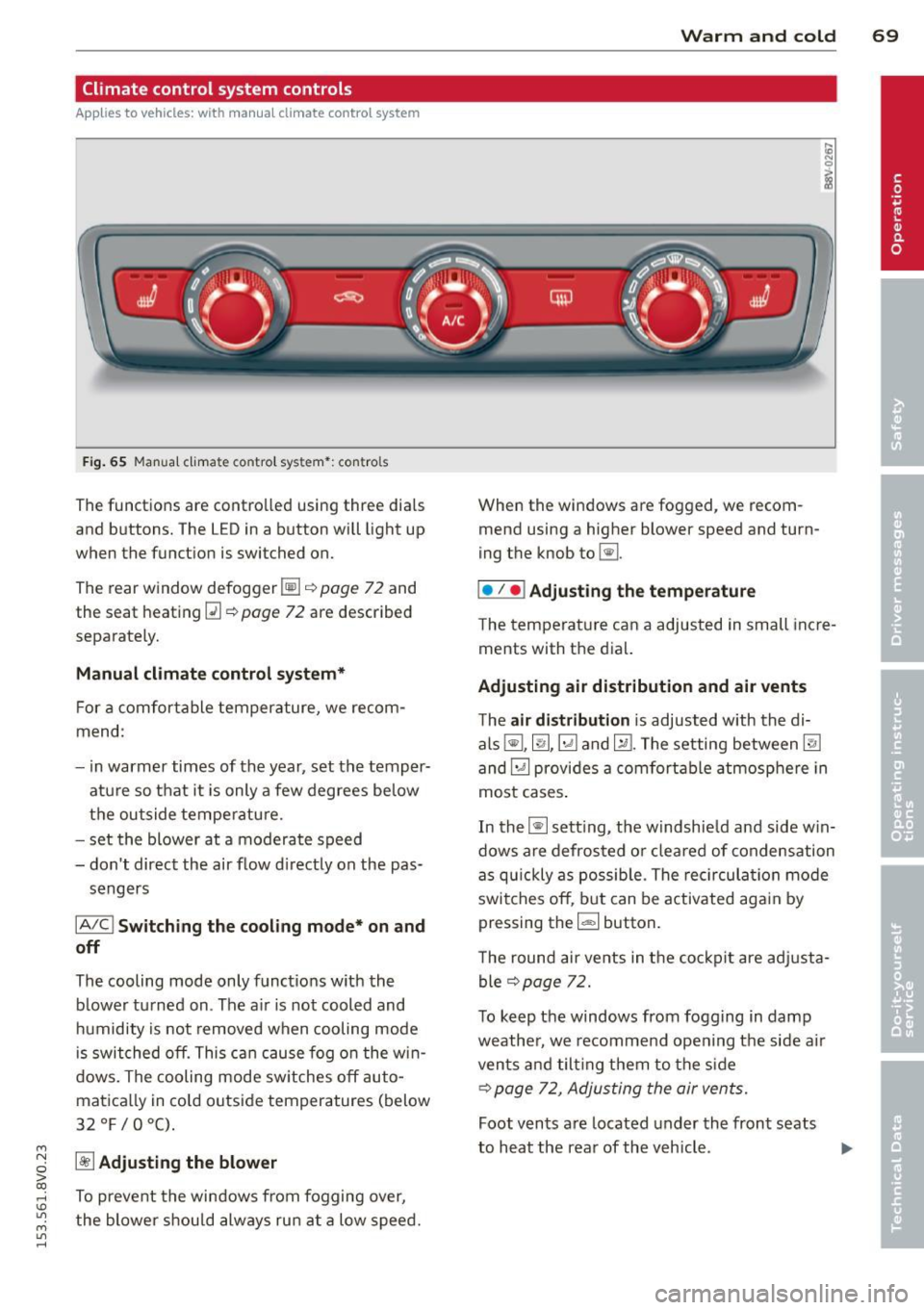
F ig . 65 Man ual cl ima te con tro l sy ste m•: con tro ls
The functions are contro lled using three dia ls
and buttons. The L ED in a button will light up
when the function is switched on.
The rear window defogger~¢
page 72 and
the seat heating~
c::> page 72 are described
separate ly.
Manual climat e control sy stem*
For a comfortable temperature, we recom
mend :
- in warmer times of the yea r, set the temper
atu re so that it is only a few degrees be low
the outside tempe ratu re.
- set the blower at a moderate speed
- don't direct the air flow d irectly on the pas-
sengers
IA/C l Switching the cooling mode* on and
off
The cooling mode only f unct ions w ith the
b lower turned on . The a ir is not cooled and
h umidity is not removed when cooling mode
i s swit ched off. This c an cause fog o n the w in
dows. The cooling mode sw itches off auto
matica lly in co ld outside temperatures (below
32°F/0°C) .
~ Adjusting the blower
To prevent the windows from fogging over,
the blower shou ld always ru n at a low speed .
W arm and cold 69
When the w indows are fogged , we recom
mend using a h igher blowe r speed and tu rn
ing t he knob to~-
I• I • I Adjusting the temperature
T he tempera ture can a adjusted in small inc re
ments with t he dial.
Adjusting air distribution and air vents
The air di stribution is adjusted with the di
als ~'~ .~ and ~-The setting between
@J
and~ provides a comf ort abl e atmosphere in
most cases .
In the~ setting, the windshie ld and side w in
dows are defros ted o r cleared of condensation
as q uickly as possib le . The rec ircul ation mode
switche s off , b ut can be activated aga in by
pressing the
l d;) I button.
T he round air ve nts in t he coc kp it are adj usta
ble
¢ page 72.
T o keep the windows from fogg ing in damp
weathe r, we recomme nd open ing the side a ir
vents and tilt ing them to the s ide
c::> page 7 2 , Adjusting the air vents.
Foot vents a re located under the front seats
to h eat the rear of the veh icle . ...,
Page 72 of 310
70 Warm and cold
1- 1 Sw itching r ecircul ation mode on and
off
In recirculation mode, the air inside the vehi
cle is circu lated and filtered. This prevents the
unfiltered air outside the vehicle from enter ing the vehicle inter ior. We recommend
switch ing recirculation mode on when driving
through a tunnel or when sitt ing in traffic
c::> ,& .
Automatic climate control system controls
App lies to vehicles: with a utomat ic climate contro l system
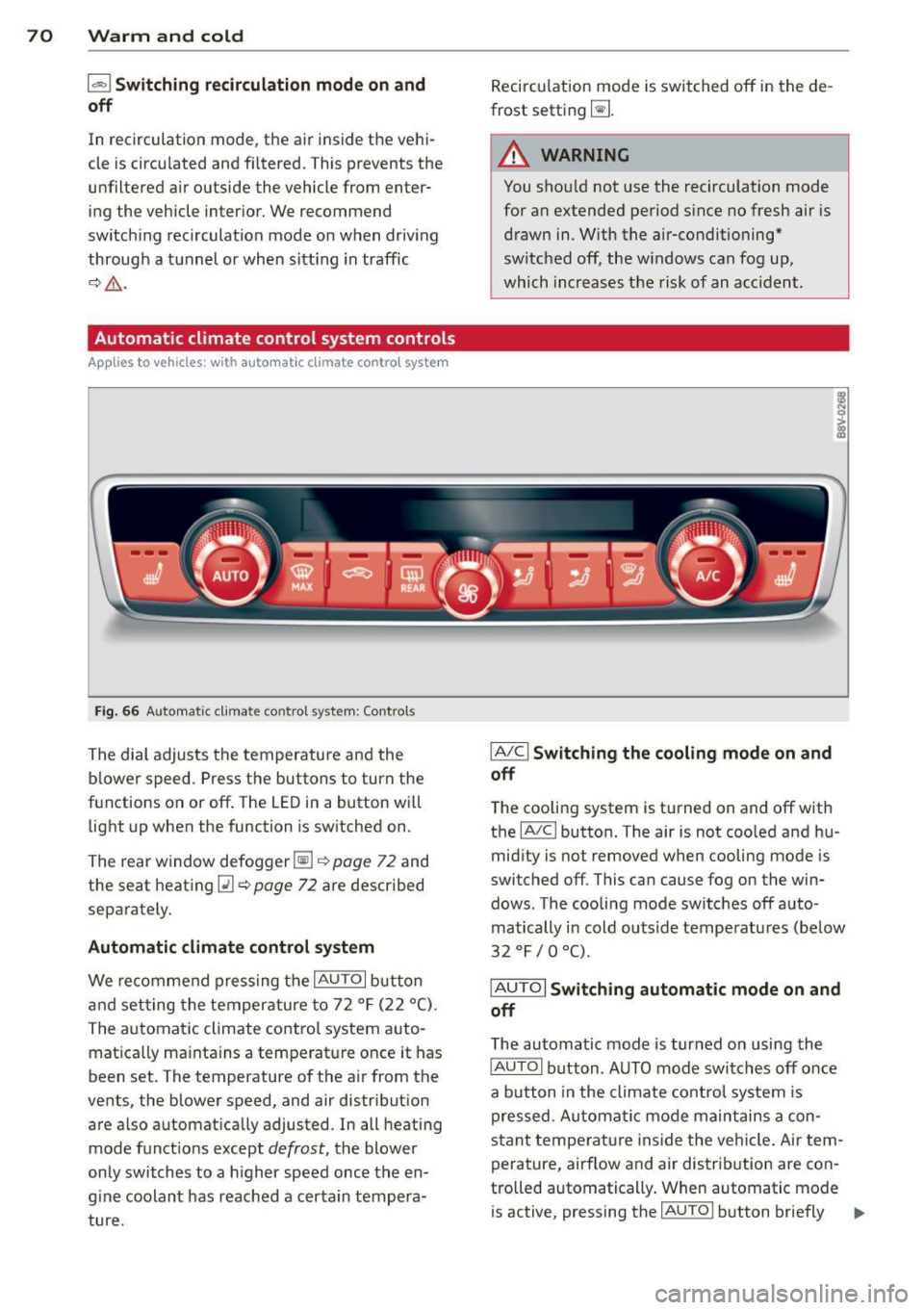
Fig . 66 A ut oma tic cl ima te co ntro l sy ste m: Control s
The dial adjusts the temperature and the
blower speed. Press the buttons to turn the
functions on or off . T he LED in a button w ill
light up when the function is sw itched on .
The rear window defogger~
c::> page 72 and
the seat heating
Q] c::> page 72 are described
separately.
Automatic climate control syst em
We re commend pressing the IAU TO I button
and setting the temperature to 72
° F (22 °() .
The automatic climate control system auto
matica lly ma inta ins a temperature once it has
been set. The temperature of the air from the
vents, the blower speed, and air distribution
are also automat ically adju sted . In all heat ing
mode funct ions except
defrost, the blower
only switches to a h igher speed once the en
g ine coolant has reached a certa in tempera
ture . Recirculation mode is switched off in the de
frost setting ~-
.&_ WARNING
-You shou ld not use the recirculation mode
for an extended period s ince no fresh air is
drawn in. With the air-conditioning*
switched off, the w indows can fog up,
which increases the risk of an acc ident .
IA/ Cl Switching th e cooling mode on and
off
T he cooling system is turned on and off with
the
IA/C l button. The air is not coo led and hu
mid ity is not removed when cooling mode is
switched off . This can cause fog on the win
dows . The cooli ng mode switches off auto
matically i n cold outside temperatu res (be low
32 °F / 0 °() .
IAUTOI Switch ing automatic mode on and
off
The automatic mode is turned on using the
IAUTOI button . AUTO mode switches off once
a b utton in the climate control system is
pressed . Automatic mode maintains a con
sta nt temperature ins ide the ve hicle . Air tem
perature, airflow and air d istribution are con
trolled automatically . When automatic mode
is active, pressing the
IAU TO I button briefly IJJ,-