engine oil AUDI S3 2015 Owners Manual
[x] Cancel search | Manufacturer: AUDI, Model Year: 2015, Model line: S3, Model: AUDI S3 2015Pages: 310, PDF Size: 76.15 MB
Page 4 of 310
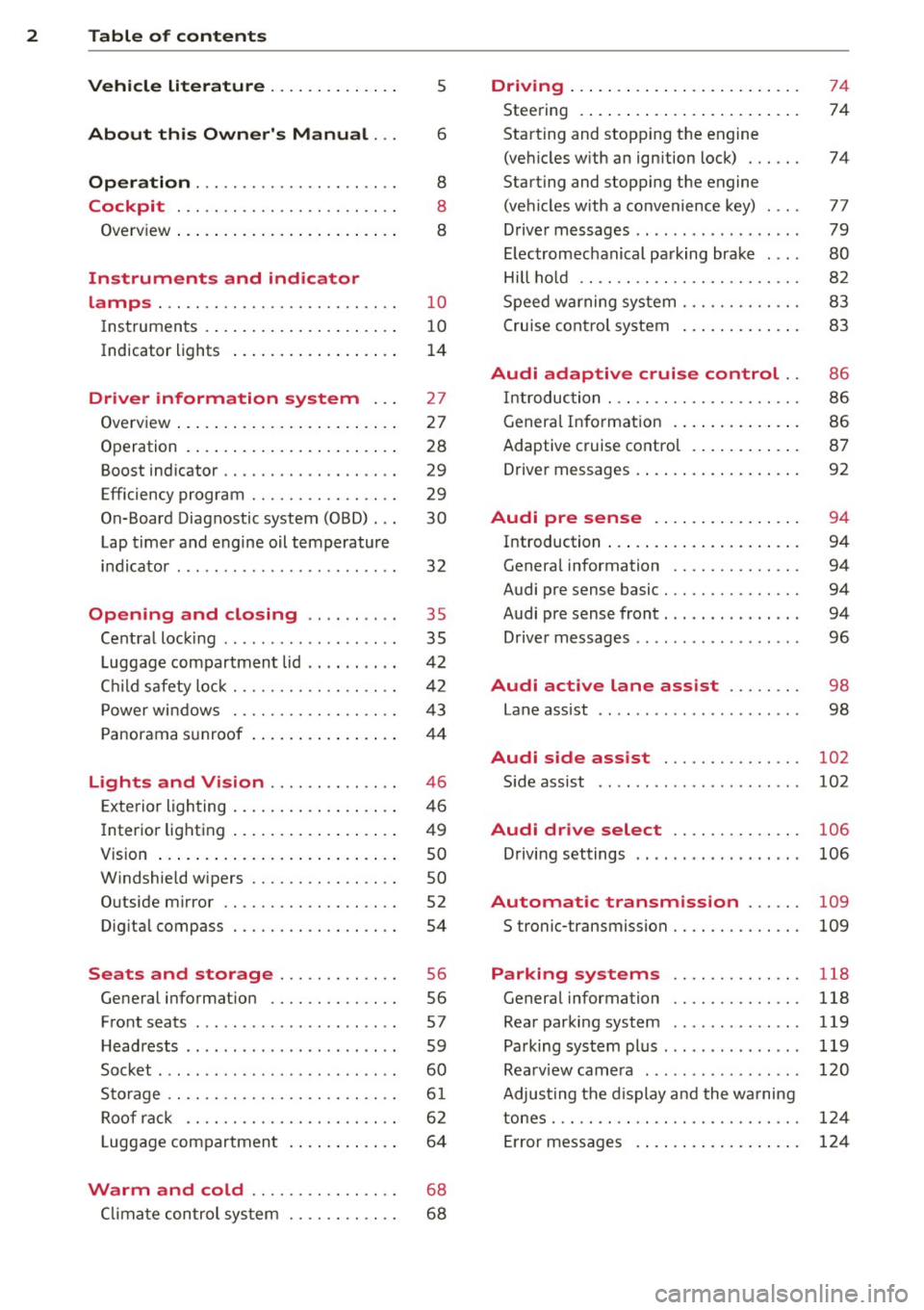
2 Table of contents Vehicle literature .. .. .. .. .. ... .
About this Owner's Manual ...
Operation .............. .... ... .
Cockpit ... ............. .... .. . .
Ove rv iew ... ... .. ..... ... .. .. ... .
Instruments and indicator
lamps ..... ............. .. .. .. . .
Ins truments . .. .. ..... ... .. .. ... .
Indicator lights ....... ... .. .. ... .
Driver information system .. .
Overview ... ... .. ..... ... .. .. ... .
Operation . .... .. ..... ... .. .. ... .
Boost indicator ........... .... ... .
Efficiency program ........ .. .. .. . .
On-Board Diagnostic system (OBD) . . .
Lap timer and engine oil temperature
indicator ............. ........ .. .
Opening and closing .. .. .. .. . .
Ce ntra l locking ................ .. .
L uggage compartmen t lid ... ... .. . .
C hil d safety lo ck ........ .. .. .. .. . .
P owe r wi ndows .......... .. .. .. . .
5
6
8
8
8
10
1 0
1 4
27
2 7
28
29
29
30
32
35
35
4 2
42
43
P anorama s unroof . . . . . . . . . . . . . . . . 4 4
Lights and Vision ............. .
Exte rior ligh ting ....... ... .. .. ... .
I nter ior light ing .. ..... ... .. .. ... .
V1s 1on ..... ... .. ..... ... .. .. ... .
W indshie ld wipers ........ .. .. ... .
O utside mirror ............... ... .
Dig ita l compass .......... .... ... .
Seats and storage ....... .. ... .
General i nformat ion ............. .
F ront seats ........... .... .... .. .
H eadrests .. ................ ... . .
Socket ... .. ... .... ...... .. .. .. . .
S to rage .... ... .......... .. .. .. . .
Ro of r ack .. ............. ....... .
L uggage compartmen t .. .. .. .. .. . .
46
46
4 9
so
so
52
54
56
56
57
59
60
6 1
6 2
6 4
Warm and cold . . . . . . . . . . . . . . . . 68
C lima te control sys tem . . . . . . . . . . . .
6 8
Driving ... .... .. ... .. ..... .... . .
Stee ring .. .... .. .. ... ..... ... .. .
Starting and stopp ing t he engine
(ve hicles with an ign ition lock) ... .. .
Starting and stopp ing th e engine
(ve hicles w ith a convenience key) ... .
Drive r m essages .. ... .. ....... ... .
El ectromechanical pa rking brak e ... .
Hill ho ld .. .. .. . .............. .. .
S peed w arning system .......... .. .
C ruise con tro l system .. ..... ... .. . 74
74
74
77
79
80
82
83
8 3
Audi adaptive cruise control .. 86
In troduc tion ..... ............... .
Genera l Info rmation . .. ..... ... .. .
Adaptive cruise contro l ...... .... . .
Drive r messages . .... .. ..... ... .. .
Audi pre sense .. .... .... ... .. .
Introduction ..... ... .. ..... .... . .
Genera l information ........... .. .
Audi pre sense basic .............. .
Audi pre sense front .............. .
Driver messages ................. .
Audi active lane ass ist ..... .. .
Lane assist .. .. ............ ..... . 86
8
6
87
92
94
94
94
94
94
96
98
98
Audi side assist . . . . . . . . . . . . . . . 102
Side assist ...... ............... .
Audi drive select ............. .
Driving settings ................. .
Automatic transmission ..... .
S tronic-transmiss ion ........... .. .
Parking systems
General information ........... .. .
Rea r parki ng system ............. .
Pa rking sys tem plus .............. .
Rea rv iew camera .... .. ....... ... .
Adju sting t he d isplay a nd the wa rning
tones . .... .... ................. .
Er ror messages . ... ... ..... ... .. .
102
106
106
109
109
118
118
119
119
120
124
124
Page 14 of 310
12 Instrum ent s and indicator lamp s
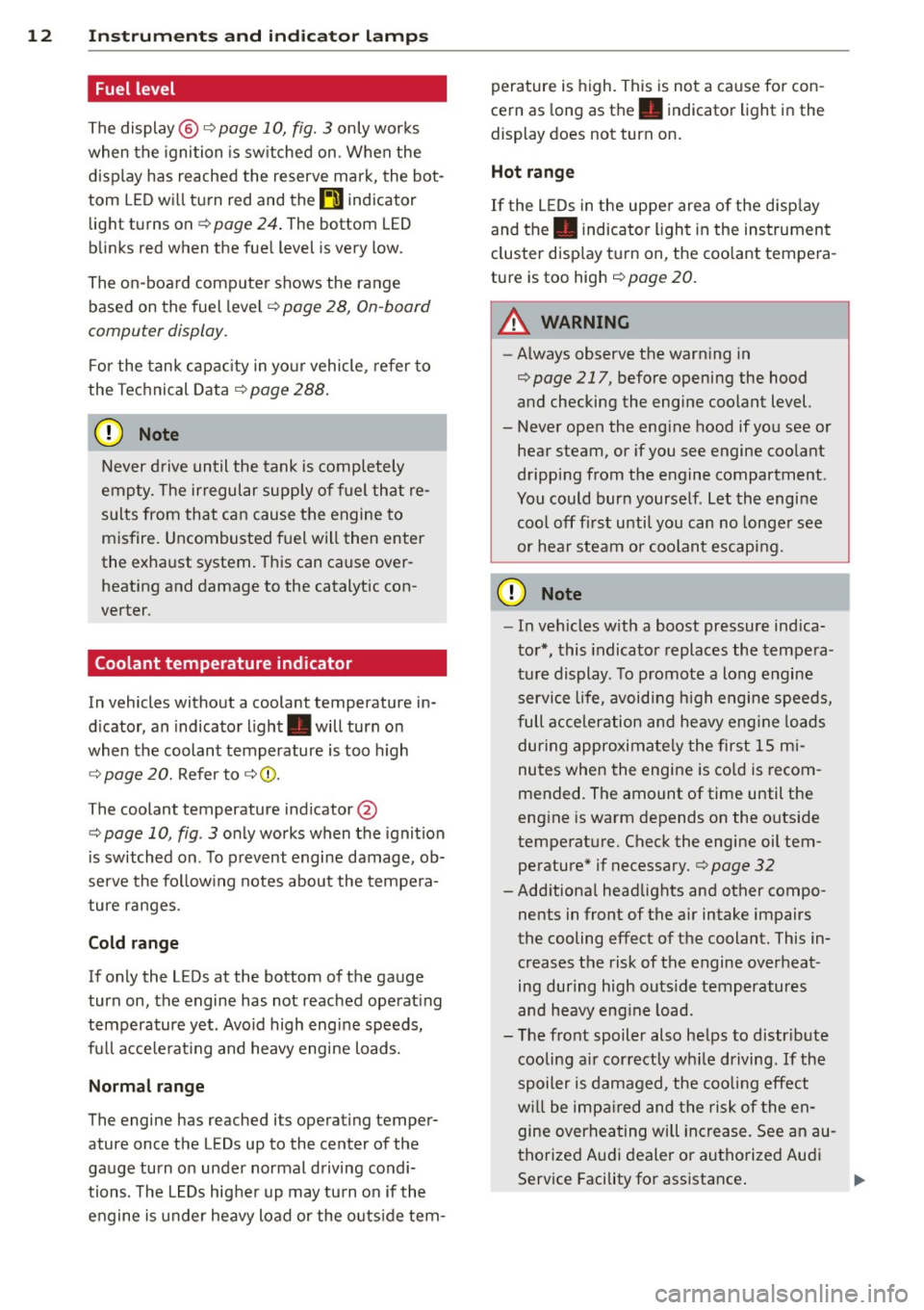
Fuel level
The display@ Q page 10, fig. 3 only works
when the ignition is sw itched on . When the
d isplay has reached the reserve mark, the bot
tom LED wi ll turn red and the
tD indicator
light turns on
Q page 24 . The bottom LED
blinks red when the fue l level is very low .
The on -board computer shows the range
based on the fuel leve l
Q page 2 8, On-board
computer display.
F or the tank capac ity in yo ur vehicle , refer to
the Tec hnical Data
Q page 288.
CJ) Note
Never d rive until the tank is completely
empty. The irregular supp ly of fuel that re
sults from that can cause the engine to
misfire. Uncombusted f uel will then enter
the exha ust system. This can cause over
heating and damage to the catalytic con
verter .
Coolant temperature indicator
In vehicles without a coolant temperature in
d icator , an indicator l ight . will turn on
when the coolant temperature is too h igh
Q page 20. Refer to Q Q) .
The coolant temperature ind icator @
c::> page 10, fig . 3 only works when the ignition
is switched on . T o prevent engine damage, ob
serve the fo llow ing notes about the tempe ra
ture ranges.
Cold range
If only the LEDs at the bottom of the gauge
turn on, the engine has not reached operat ing
temperature yet . Avoid high engine speeds,
fu ll acce le rat ing and heavy engine loads.
Norm al range
The engine has reached its operating temper
ature once the LEDs up to the center of the
gauge turn on under normal driving condi
tions. The L EDs higher up may turn on if the
engine is under heavy load or the o uts ide tern- perature is h
igh. This is not a cause for con
cern as long as th e . indicator light in the
display does not turn on.
Hot range
If the L EDs in the upper area of the disp lay
and the. indicator light in the instrument
cluster disp lay t urn on , the coo lant tempera
ture is too high
c::> page 20.
A WARNING
I-
- Always observe the warn ing in
c::> page 217, before opening the hood
and checking the engine coolant level.
- Never open the eng ine hood if you see or
hear steam, or if you see engine coo lant
dripping from the engine compartment.
You could burn yourse lf . Let the engine
coo l off f irst unti l yo u can no longe r see
or hea r steam or coolan t escap ing.
Q) Note
- In vehicles w ith a boost pressure indica
to r*, this indicator replaces the tempe ra
t ur e display. To promote a long engine
service life, avoiding h igh engine speeds,
full acceleration and he avy eng ine lo ads
during approximately the first 15 m i
nutes when the engine is co ld is recom
mended. The amount of time until the
eng ine is warm depends on the outside
temperat ure. Check the engine oil tem
perature* if necessary.
c::> page 32
- Add itiona l head lights and other compo
nents in front of the air intake impairs
the cooling effect of t he coolant. This in
creases the risk of the engine overheat
ing during high outs ide temperatures
and heavy eng ine load.
- T he front spoiler also he lps to d istr ibute
cooling ai r correctly wh ile driving. If the
spoiler is damaged, the coo ling effect
w ill be imp aired and the risk of the en
gine overhea ting will increase . See an au
thorized Audi dealer or autho rized Audi
Service Facility for assistance . ...,
Page 15 of 310
....,
N
0 > co
rl I.O
"' ....,
"' rl
@ Tips
Diesel engines: Due to the high efficiency
o f t hese engines, the eng ine may not al
ways reach operating temperature in cold
outs ide temperatur es. T his is normal a nd
not a cause for co nce rn.
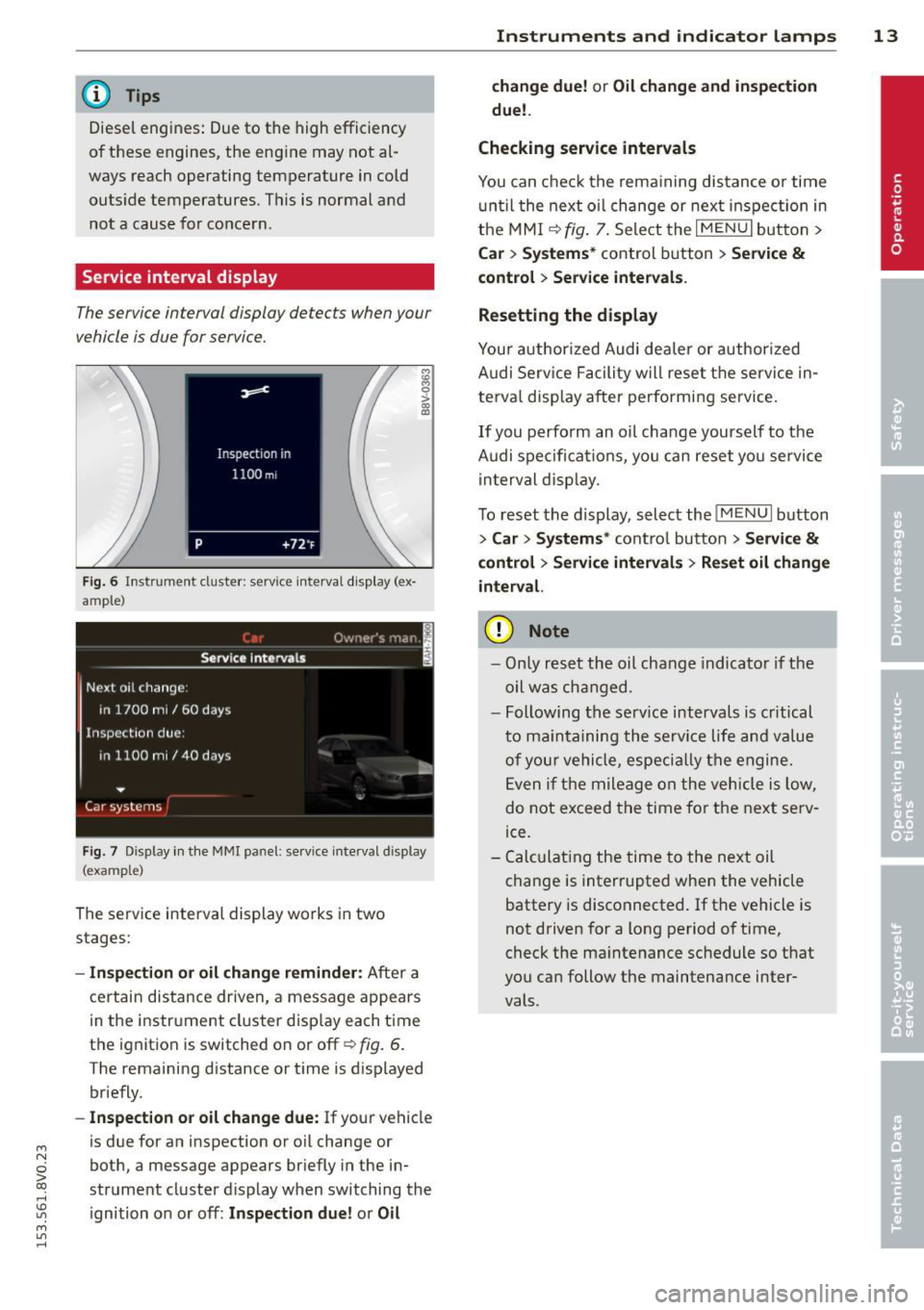
Service interval display
The service interval display detects when your
vehicle is due for service.
F ig . 6 In stru ment cluste r: serv ice inte rval d isp lay (ex
ample)
F ig . 7 Display in the MMI panel: service interva l display
(example)
The se rv ice interva l display wo rks in two
stages:
- In spection or oil change reminder: A ft er a
c e rt a in dis tance dr iven, a message a ppears
in t he i nstr ument cluster d isp lay each t ime
t h e i gnition is switched on or off~
fig. 6.
The remaining distance or t im e is d isplayed
br iefly.
- Inspection or oil change due : If your vehicle
is due for an inspection or o il change or
bot h, a message appears br iefly in the in
strument cluster display when switching the
ignition o n or off:
Inspection due! or Oil
Instruments and indicator lamps 13
change due! or Oil change and inspection
due!.
Checking service intervals
You can check th e rema ining dis tance o r time
u nti l the next o il change or nex t inspec tion in
t h e MM I
~ fig. 7. Sele ct the I M ENU I but to n >
Ca r > Systems * control button > Service &
control > Ser vice intervals .
Resetting the display
Y ou r auth or ized Audi dea ler or author ized
A udi Se rv ice F acili ty w ill reset the service in
te rva l display a fter performi ng service.
If you perfo rm an oil ch ange yourself to the
A udi spe cifica tions , yo u can reset you servi ce
i n terval disp lay.
T o reset t he di splay, select the
I ME NU I bu tton
> Car > System s* cont ro l button > Service &
control > Service intervals > Re set oil change
interval.
(D Note
- On ly r eset t he oil cha nge i ndicat or if th e
oi l was cha nged.
- Following t he serv ice intervals is critical
t o m ain ta ining the se rv ic e life a nd value
of your v ehicle, especi ally th e e ngine.
E ven i f the mileage on the vehicle is low,
do n ot exceed t he time fo r th e nex t serv
ice.
- C alcula ting the time to the next oil
ch ange is inter rupted whe n the vehicle
battery is disconnected. If t he vehicle is
n ot d riven for a long pe riod o f time,
check the ma intenance sc hedule so t hat
yo u ca n follow the maintena nce inter
vals.
Page 17 of 310
M N
0 > co ,...., \!) 1.1'1
M 1.1'1 ,....,
or
or
or
or
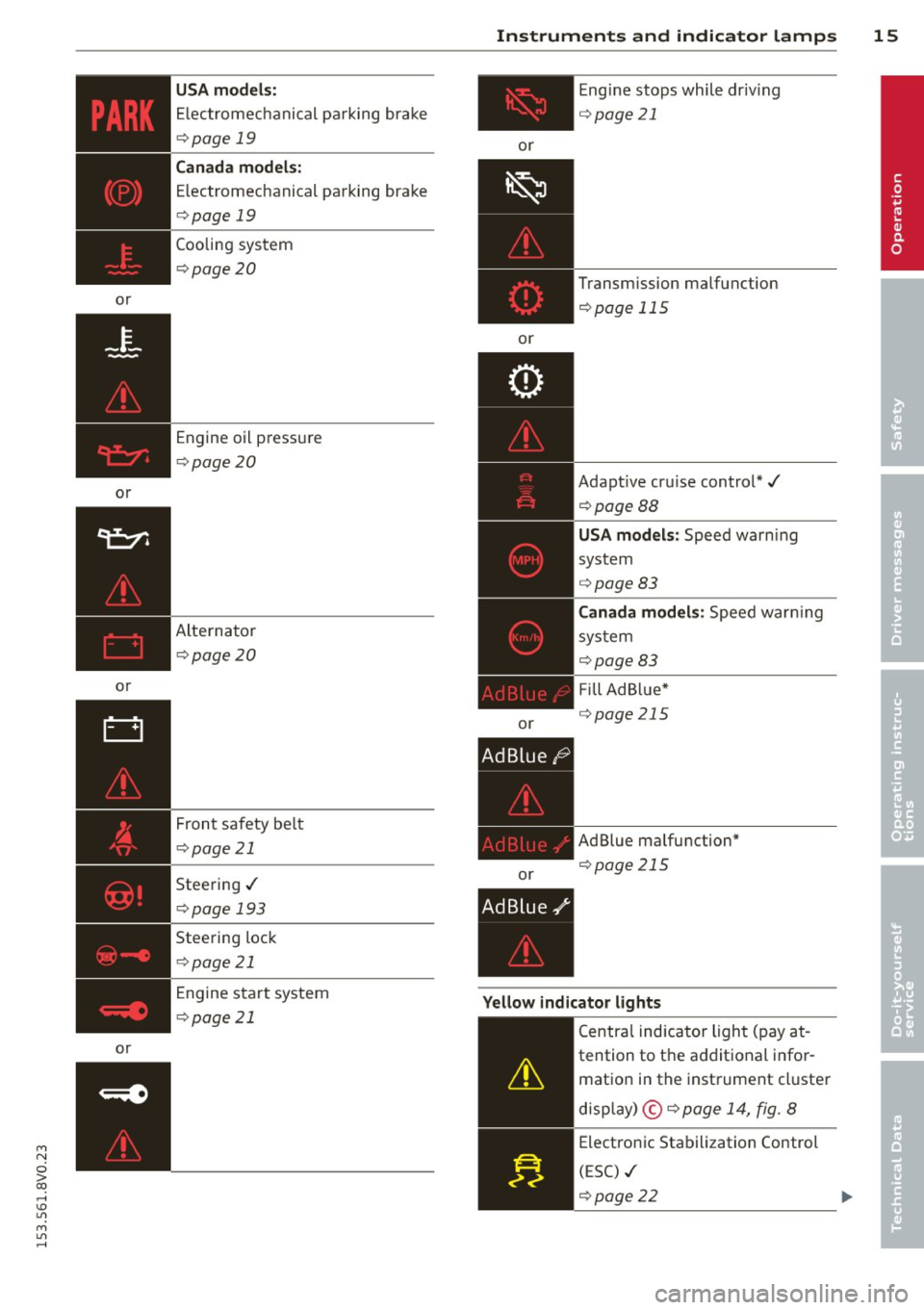
USA models:
Electromechanical parking brake
i:::> page 19
Can ada mode ls:
E lectromechanical parking brake
c::> page 19
Cooling system
c::>page 20
Engine oil pressure
c::>page20
Alternator
~page 20
Front safety be lt
c::> page 21
Steering./
c::>page 193
Steering lock
c::>page 21
Engine start system
c::>page 21
Instrum ent s an d indicator lamp s 15
or
or
or
or E
ngine stops while driv ing
i:::>page 21
Transmission malfunction
c::> page 115
Adaptive cru ise control*./
c::>pageBB
USA mode ls: Speed warn ing
system
c::> page 83
C ana da m odel s: Speed warn ing
sys tem
i:::>page83
F ill Ad Blue*
c::> page 21 S
AdBlue malfunction*
c::> page 215
Yellow indi cato r light s
-------------
Centra l indicator light (pay at -
tention to the additional infor
mation in the instrument cluster
disp lay) ©
c::> page 14, fig. 8
Electronic Stabilization Control
(ESC) ./
c::> page 22
•
Page 18 of 310
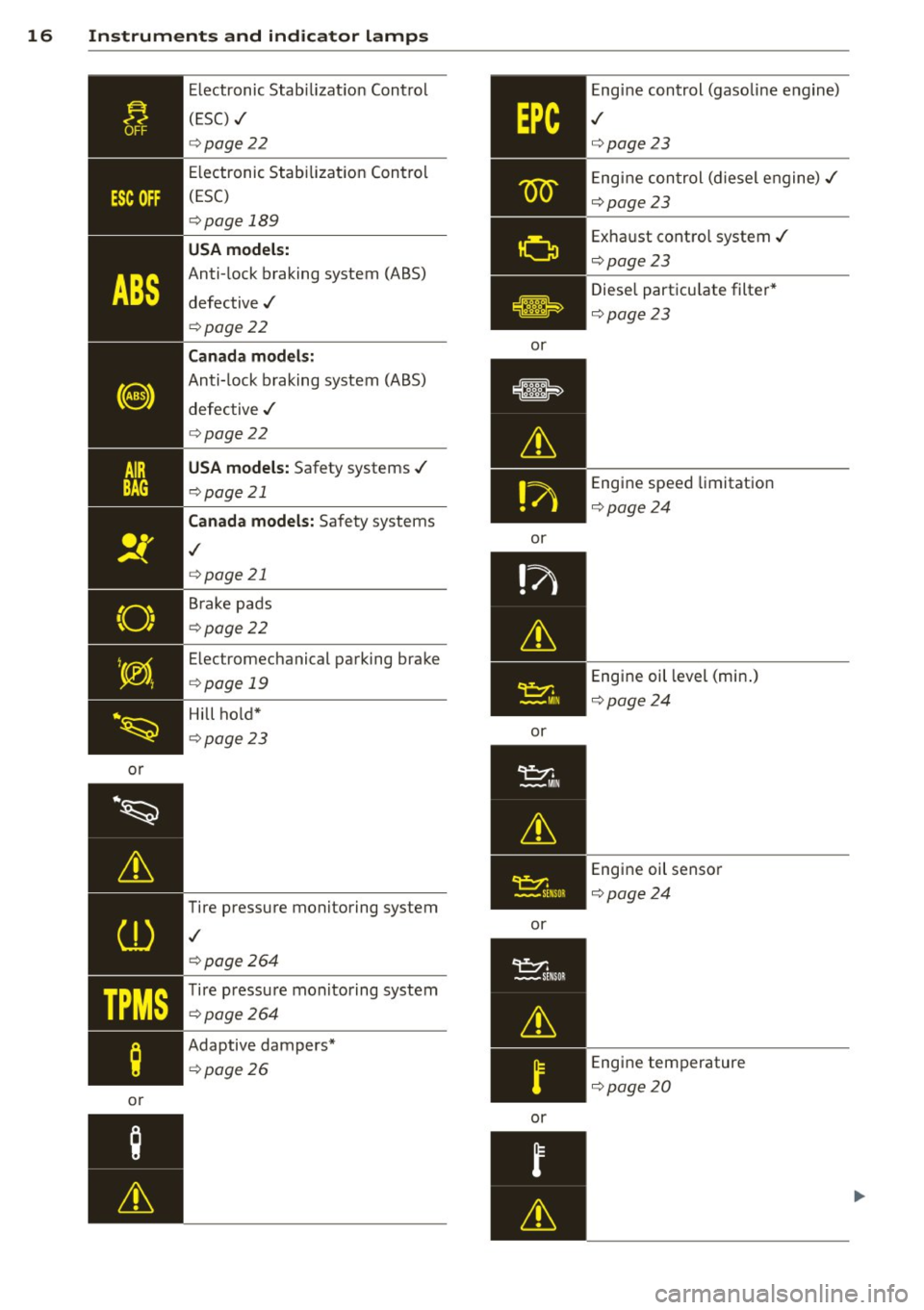
16 Instruments and indicator lamps
or
~~
&
CD
TPMS
;
or Electronic
Stabilizat ion Control
(ESC) ../
c:>page22
Electronic Stabilization Control
(ESC)
c:> page 189
USA models:
Anti-lock braking system (ABS)
defective../
c:> page22
Canada models:
Anti-lock braking system (ABS)
defective ../
c:>page22
USA models: Safety systems ../
c:>page 21
Canada models: Safety systems
,I
c:>page 21
Brake pads
c:>page22
Electromechanical parking brake
c:>page 19
Hill ho ld*
c:>page23
Tire pressure monitoring system
,I
c:> page264
Tire pressure monitoring system
c:>page264
Adaptive dampers*
c:>page26
or
or
or
or
or E
ngine control (gasoline e ngine)
,I
c:>page23
Eng ine control (diesel engine)../
c:>page23
Exhaust control system../
Qpage23
Diesel particu late filter*
Q page23
Engine speed limitation
Qpage24
Engine oil level (min.)
Q page24
Engine oil sensor
Qpage24
Engine temperature
Qpage20
Page 22 of 310
20 Instruments and indicator lamps
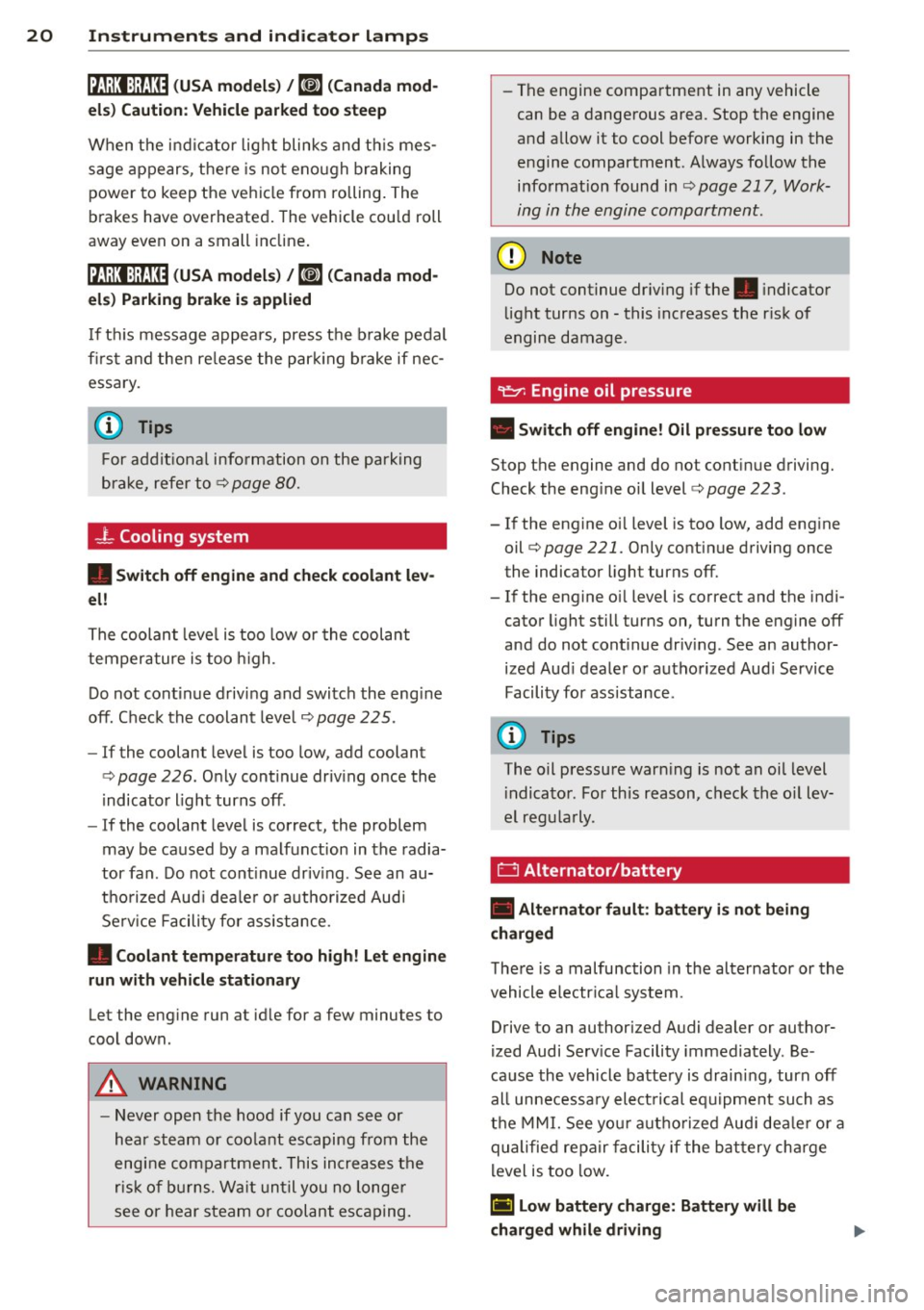
ltJ;):t :1;034 ( USA model s) / ml (Canada mod
els) Caution : Vehicle parked too steep
When t he i nd ic ator light blinks and th is mes
sage appears, t here is no t eno ugh braking
power to keep the ve hicl e from rolling . The
b rakes have overheate d. The vehicle cou ld roll
away even on a small incline .
ltJ;)i:j;lJ34 ( USA model s) / ml (Canada mod
els) Parking brake is applied
I f t his message appea rs, press t he b rake pedal
fi rst and then re lease the par king brake if nec
essa ry.
@ Tips
F or addit ional info rmation on the pa rk ing
brak e, refer t o¢
page 80.
...L Cooling system
• Switch off engine and check coolant lev
el!
T he coolant leve l is too low or the coolant
temper ature is too high .
D o not cont inue d riving and swi tc h the eng ine
o ff. C hec k the coolant leve l¢
page 225 .
-If the coolant leve l is too low, add coolant
<=> page 226 . O nly con tinue driv ing o nce the
indicator light turns off.
- If the coolant leve l is correct, the problem
may be ca used by a ma lf u nction in the radia
tor fan . D o not cont inue driv ing . See an au
t h o rized Aud i dea le r or a uth o riz ed Aud i
Se rv ic e Fa cili ty for ass ist ance.
• Coolant temperature too high! Let engine
run with vehicle stationary
Let the eng ine run at id le for a few minutes to
coo l down .
A WARNING
- Never op en the hood if you ca n se e or
h ear st ea m or coo la nt escaping from the
eng ine com pa rtm ent. This in cre ases t he
r isk of burn s. Wai t unti l you no longe r
see o r hear steam o r cool ant esca ping.
-
'
- The engine compa rtment in any vehicle
can be a dangerous area. Stop the engine
a nd allow it to cool befo re working in the
e ng ine compartment. A lways foll ow the
info rmation found in
~ page 217, Work
ing in th e engin e compartm ent.
(D Note
Do n ot cont inue dr iv ing if the . indicato r
lig ht tur ns on -this inc reases the r isk o f
engine damage.
"1::::7: Engine oil pressure
• Switch off engine! Oil pres sure too low
St op t he engine and do not cont inue drivi ng.
Check the eng ine oi l level
r=> page 223 .
- If the engine o il level is too low, add eng ine
oil
r=> page 221. Only co nti nu e driving once
the indicator light turns off.
- If the engine o il level is co rrect and the indi
cator light still turns on, turn the eng ine off
and do not cont inue driv ing . See an author
ized Aud i deale r or au tho rized Aud i Service
Facili ty for ass ista nce.
(i) Tips
The oil pressu re war ning is not an oi l level
i ndica to r. For th is reason, c hec k t he o il lev
e l reg ularly .
' 0 Alternator/battery
• Alternator fault: battery is not being
charged
The re is a malfunction in the alternator or th e
vehicle e lectr ica l system .
Drive to an authorized Audi dealer or author
ized Audi Serv ice Facility immediately . Be
ca use the v ehicl e batte ry is drain ing , turn off
all unnecessa ry el ectrical eq uipm ent such as
t h e M MI. See yo ur aut ho rized Aud i de aler o r a
qualifie d repa ir fa cili ty if the b attery ch arge
l evel is too low .
(•) low battery charge: Battery will be
charged while driving
Page 26 of 310
24 Instruments and indicator lamps
the filter. The indicator light will turn off
when the cleaning has completed successful
ly.
If the indicator light does
not turn off, drive
immediately to an authorized Audi dealer or
authorized Audi Service Facility to have the
malfunction corrected .
.&_ WARNING
Always adapt your speed to the current
weather, road and traffic conditions. You
should never disobey traffic laws in order
to follow driv ing recommendations .
(D Tips
For additional information on the diese l
particulate f ilter, refer to¢
page 199.
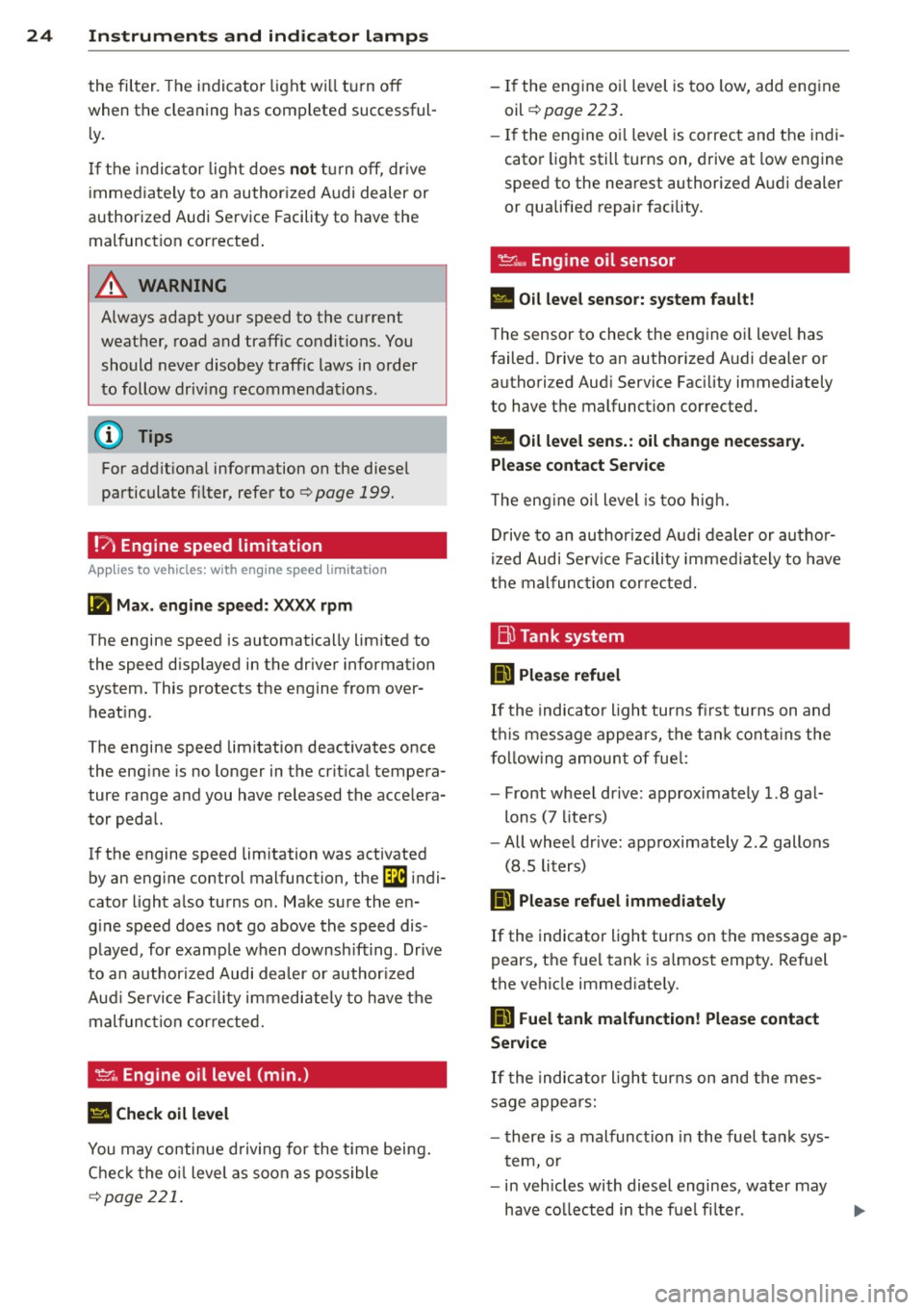
!?i Engine speed limitation
App lies to vehicles: with engine speed limitation
Ill Max. engine speed: XXXX rpm
-
The engine speed is automatically limited to
the speed displayed in the driver information
system. This protects the engine from over
heating .
The engine speed limitation deactivates once
the engine is no longer in the c ritical tempera
ture range and you have released the accelera
tor pedal.
If the engine speed limitation was activated
by an engine control malfunction, the
Di indi
cator light also turns on. Make sure the en
g ine speed does not go above the speed dis
played, for example when downsh ifting . Drive
to an authorized Audi dealer or author ized
Aud i Service Facility immediately to have the
malfunction corrected.
~"' Engine oil level (min.)
l!I Check oil level
You may continue driving for the time being.
Check the oil level as soon as possible
¢page 221.
-If the engine oi l level is too low, add engine
oil
¢ page 223.
-If the engine oi l level is correct and the indi
cator light still turns on, drive at low engine
speed to the nearest authorized Audi dealer
or qualif ied repair facility .
~w, Engine oil sensor
• Oil level sensor: system fault!
The sensor to check the engine oi l level has
failed. Drive to an author ized Audi dealer or
authori zed Aud i Service Facility immediately
to have the malfunction corrected.
• Oil level sens.: oil change necessary.
Please contact Service
T he eng ine oi l level is too high.
Drive to an authorized Audi dealer or author
ized Audi Serv ice Fac ility imm ediately to have
the malfunction corrected.
Bl Tank system
D Please refuel
If the indicator light turns first turns on and
t his message appears, the tan k contains the
following amount of fuel:
- Front wheel dr ive : approximately 1.8 gal
lons (7 liters)
- All wheel dr ive : approximately 2.2 gallons
(8 .5 liters)
II] Please refuel immediately
If the indicator light turns on the message ap
pears, the fuel tank is almost empty. Refuel
the vehicle immed iate ly.
D Fuel tank malfunction! Please contact
Service
If the indicator l ight turns on and the mes
sage appea rs:
- there is a malfunction in the fuel tank sys
tem, or
- in vehicles with diesel engines, water may
have collected in the fuel fi lter.
Page 30 of 310
28 Driver information system
On-board computer display
The on-boa rd compute r display monitors the
different memory levels:
- Sho rt-term memo ry (on-board computer 1)
- Long-term memory (on-board computer
2)
-Efficiency program
The fo llow ing information can be displayed in
on-boa rd computer
1 and 2 one after the oth
er.
- Date
- Estimated range based on current fuel leve l
- T rave l time
- Average consumption
- Average speed
- Distance
- Current fuel consumption
- Engine oil temperature indicator*
On-board computer D (short-term
memory)
The sho rt-term memory co llects driving infor
mation from the time the ignit ion is switched
on until it is switched off. If you continue dr iv
ing
within two hours after switching the igni
tion off, the new values are included when cal
culating the current trip information. If stop ped for more the two hours, the short term
memory is automatically erased once you be
g in driving .
On-board computer fJ (long-term
memory)
Unlike the short-term memory, the long-term
memory is not erased automatically. You can
select the time period for evaluating trip in
formation yourself.
Efficiency program~
The efficiency program can help you to use
less fuel ~
page 29 .
(D Tips
-The on-board computer is controlled by
the left button f ields on the mult ifunc
t ion steering wheel. -
For information on using the other but
ton f ields, such as the audio, telephone*
and navigation* funct ions, see the MMI
owner's manual.
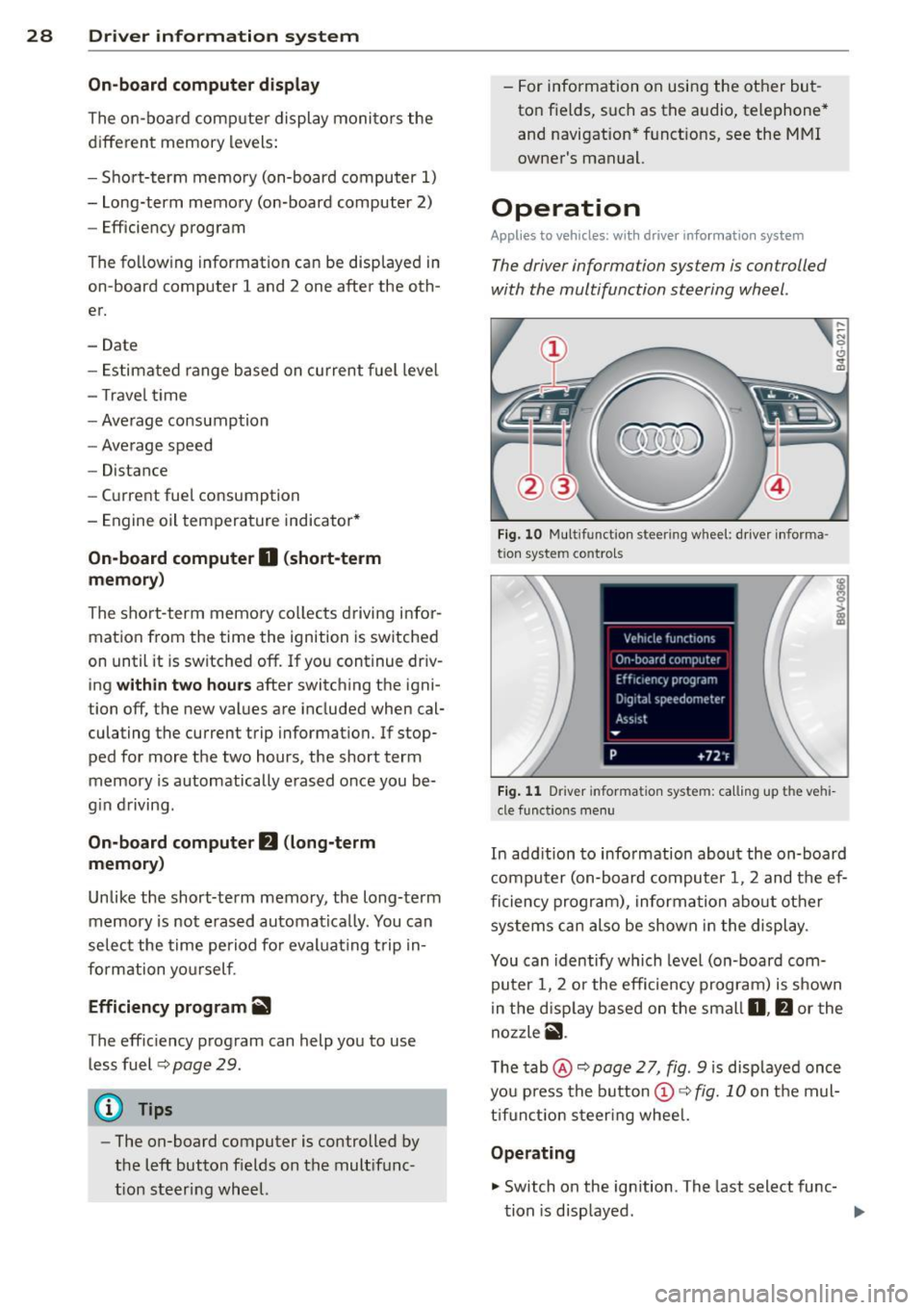
Operation
Appl ies to vehicles: wit h driver informatio n system
The driver information system is con trolled
with the multifunction steering wheel .
Fig. 10 Multi funct ion s teer ing w heel : driver informa ·
tio n syste m controls
Fig. 11 D river informa tion syste m: call ing up t he ve hi
cle func tion s men u
In add ition to info rmation about the on-board
computer (on-board computer 1 , 2 and the ef
ficiency program), information about other
systems can also be shown in the display .
You can identify which level (on-board com
puter 1, 2 or the efficiency program) is shown
in the d isp lay based on the small
0, fJ or the
nozzle
ii .
The tab@~ page 2 7, fig. 9 is displayed once
you press the button
(D ~ fig. 10 on the mul
tifunction steering wheel.
Operating
.,. Switch on the ignition . T he last select func-
tion is displayed . ..,_
Page 34 of 310
32 Driver information system
Lap timer and engine
oil temperature
indicator
Introduction
Applies to vehicles: with lap timer (S mode ls)
The engine oil temperature is only shown in
the lap timer disp lay .
Lap timer
You can record and evaluate lap times with
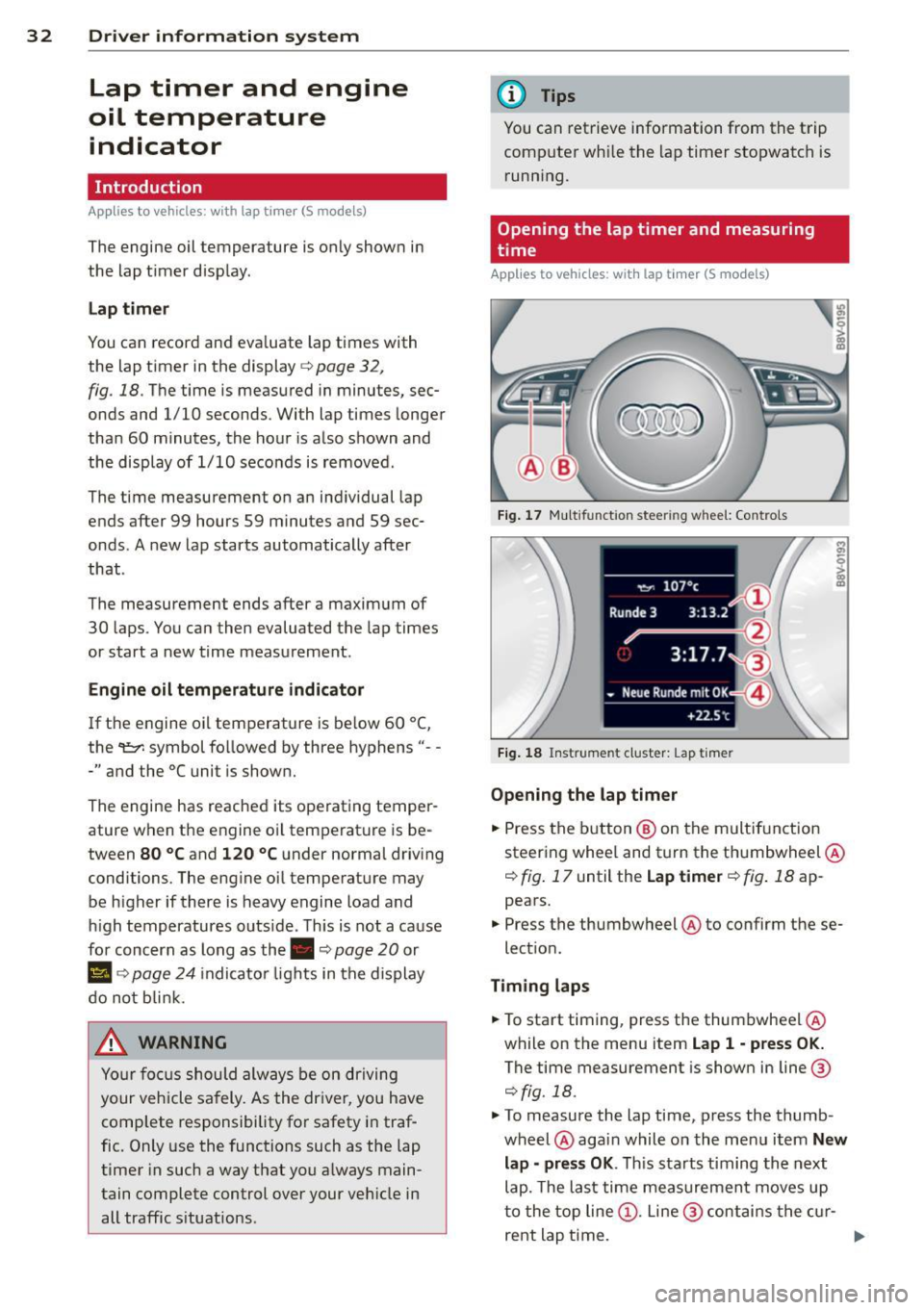
the lap timer in the display
c:> page 32 ,
fig . 18. The time is measured in minutes, sec
onds and 1/10 seconds. With lap times longer
than 60 minutes, the hour is also shown and
the display of 1/10 seconds is removed .
The time measurement on an individual lap
ends after 99 hours 59 minutes and 59 sec
onds . A new lap starts automatically after
that .
The measu rement ends after a maximum of
30 laps . You can then evaluated the lap times
or start a new time measurement .
Engine oil temperature indicator
If the engine oil temperature is be low 60 ° (,
the 't::7-symbol followed by three hyphens" --
-" and the °C uni t is shown.
The engine has reached its operating temper
ature when the engine oil temperature is be
tween
80 °C and 120 °C under normal driving
conditions. The engine oil temperature may be h igher if there is heavy engine load and
high temperatures outs ide. This is not a cause
for concern as long as the.
c:> page 20 or
Ill c:> page 24 indicator lights in the display
do not b link.
.&, WARNING
Your focus should always be on driving
your vehicle safely. As the dr iver, you have
complete responsibility for safety in traf
fic. Only use the functions such as the lap
timer in such a way that you a lways main
tain complete control over your veh icle in
all traffic situations .
(D Tips
You can retrieve information from the trip
computer wh ile the lap timer stopwatch is
running.
Opening the lap timer and measuring
time
Applies to vehicles: with lap timer (S models)
Fig. 17 Mult ifun ction stee ring w hee l: Con trols
Fig. 18 Instrume nt clust er: L ap timer
Opening the lap timer
... Press the button® on the multif unction
steering whee l and turn the thumbwheel @
¢ fig. 17 until the Lap timer ¢ fig. 18 ap
pears .
... Press the thumbwheel @to confirm these
lect ion.
Timing laps
... To start timing, press the thumbwheel @
while on the menu item
Lap 1 -press OK.
The time measurement is shown in line@
¢fig. 18.
... To measure the lap time, press the thumb
wheel @again while on the menu item
New
lap -press OK. This starts t iming the next
lap. The last time measurement moves up
to the top line@. Line @ contains the cur-
rent lap time. ..,.
Page 45 of 310
....,
N
0 > co
rl I.O
"' ....,
"' rl
.. To turn off, turn the ignition key opposite
the direction of the arrow .
When the child safety locks are activated, the
inside door handles do not work and the doors
can only be opened from the outside.
The ch ild safety lock only f unctions on the
door in whi ch it was act ivated.
Power windows
Controls
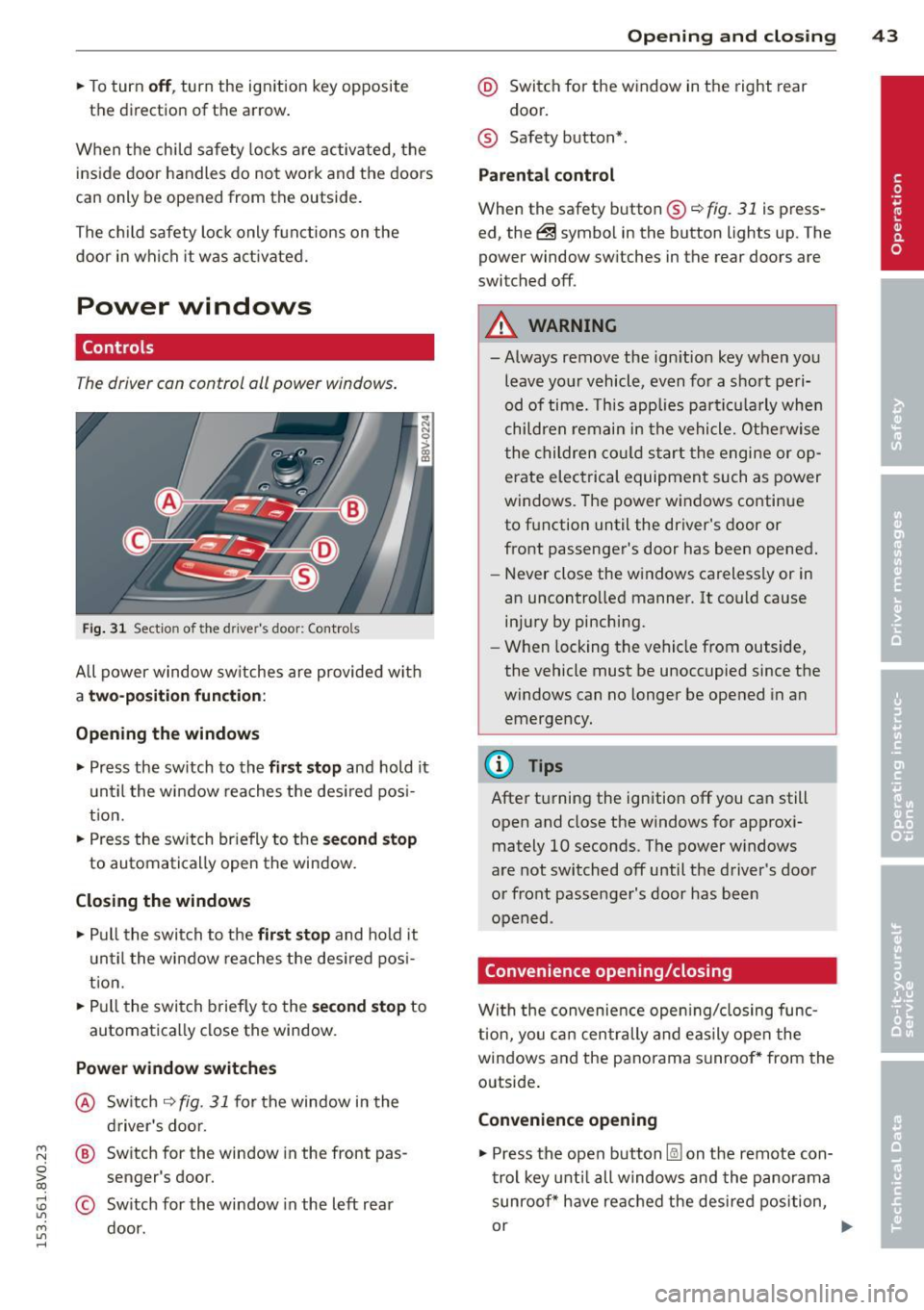
T he driver can control oil power windows .
Fig. 31 Sectio n of the drive r's d oor: Control s
All power window sw itches are provided with
a two-position function :
Opening the windows
.. Press the sw itch to the fir st stop and hold it
until the window reaches the desired pos i
tion.
.. Press the sw itch br iefly to the
second stop
to automatically open the window.
Closing the windows
.. Pull the switch to the first stop and hold it
until the window reaches the des ired posi
t ion .
.. Pull the switch briefly to the
second stop to
automatically close the window.
Power window switches
@ Switch ~ fig. 31 for the window in the
driver's door.
@ Switch for the window in the front pas
senger 's door.
© Sw itch for the window in the left rear
door.
Opening and closing 43
@ Switch for the window in the right rear
door.
® Safety button* .
Parental control
When the safety button®~ fig. 31 is press
ed, the@symbol in the button lights up. The
power window sw itches in the rear doors are
switched off.
A WARNING
-Always remove the ign ition key when you
leave your vehicle, even for a short peri
od of time. This applies particula rly when
children remain in the vehicle. Otherwise
the children could sta rt the engine or op
erate electrical equipment such as power
windows. The power windows continue
to function until the driver's door or
front passenger's door has been opened.
- Never close the windows carelessly or in
an uncontrolled manner. It could cause injury by pinching.
- When locking the vehicle from outside,
the vehicle must be unoccupied since the
windows can no longer be opened in an
emergency.
(D Tips
After turning the ignition off you can still
open and close the windows for approxi
mately 10 seconds. The power windows
are not switched off until the driver's door
or front passenger's door has been
opened .
Convenience opening/closing
With the convenience opening/closing func
t ion, you can centrally and easily open the
windows and the panorama sunroof* from the
outside.
Convenience opening
.. Press the open button l@J on the remote con
trol key until all windows and the panorama
sunroof* have reached the desired position,
or .,,.