ignition AUDI S3 2016 User Guide
[x] Cancel search | Manufacturer: AUDI, Model Year: 2016, Model line: S3, Model: AUDI S3 2016Pages: 328, PDF Size: 81.78 MB
Page 37 of 328
,....,
N
0 > co ,....,
Central locking
Key set
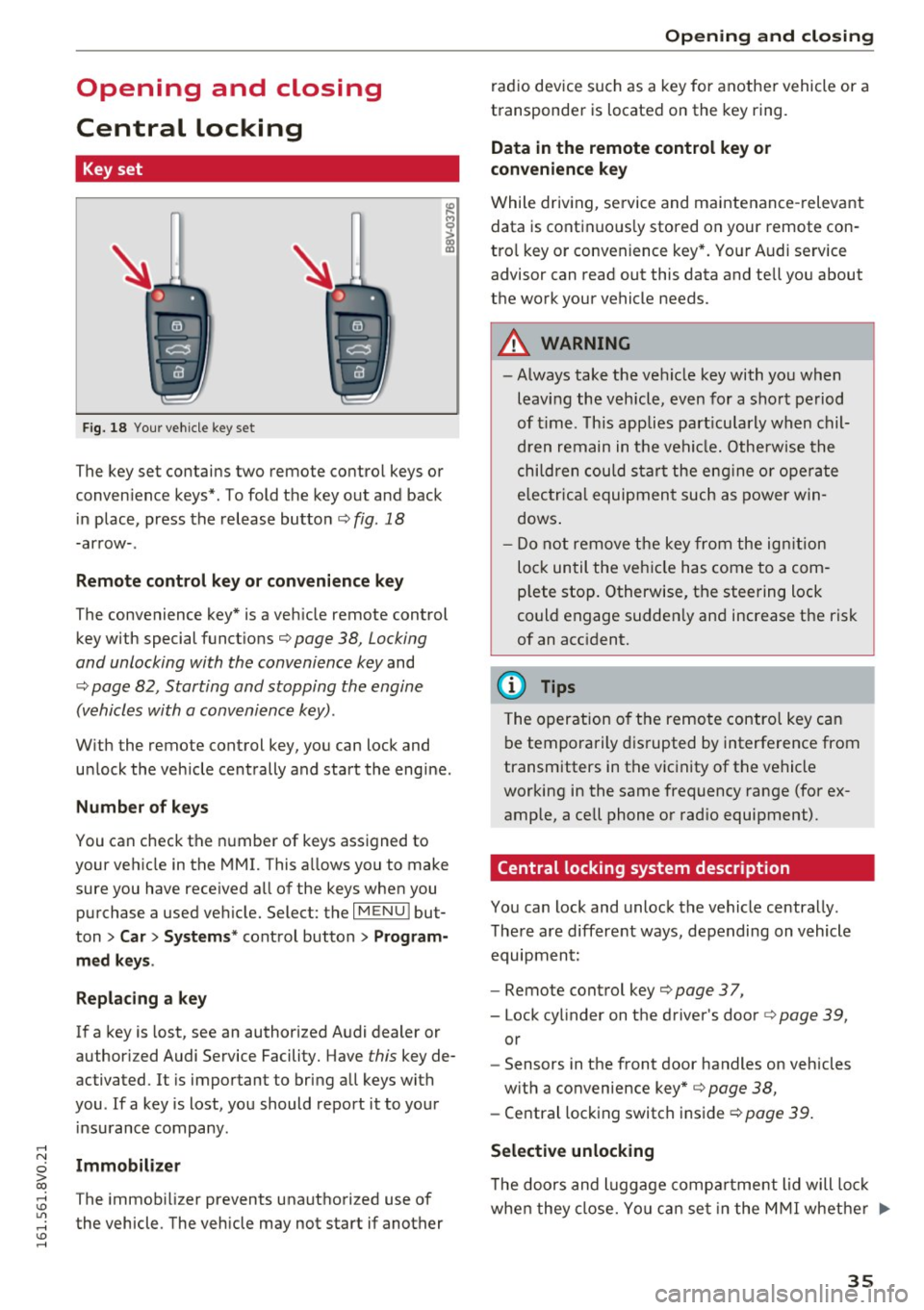
Fig. 18 Your vehicle key set
The key set contains two remote control keys or
conven ience keys*. To fold the key out and back
in place, press the release button¢
fig. 18
-arrow-.
Remote control key or convenience key
The convenience key* is a vehicle remote control
key with special functions¢
page 38, Locking
and unlocking with the convenience key
and
¢ page 82, Starting and stopping the engine
(vehicles with a convenience key).
With the remote control key, you can lock and
unlock the vehicle centrally and start the engine.
Number of keys
You can check the number of keys assigned to
your vehicle in the MMI. This a llows you to make
sure you have received all of the keys when you purchase a used vehicle. Select: the
I MENU I but
ton
> Car> Systems* control button > Program
med keys .
Replacing a key
If a key is lost, see an authorized Audi dealer or
authorized Audi Service Facility. Have
this key de
activated.
It is important to bring all keys with
you . If a key is lost, you should report it to your
insurance company.
Immobilizer
The immobilizer prevents unauthorized use of
the vehicle. The vehicle may not start if another
Opening and closing
radio device such as a key for another vehicle or a
transponder is located on the key ring.
Data in the remote control key or
convenience key
While driving, service and maintenance-relevant
data is continuous ly stored on your remote con
tro l key or conven ience key*. Your Audi service
advisor can read out this data and tell you about
the work your vehicle needs.
A WARNING
-- Always take the vehicle key with you when
leaving the vehicle, even for a short period
of time. This applies particularly when chil
dren remain in the vehicle. Otherwise the
children could start the engine or operate
electrica l equipment such as power win
dows .
- Do not remove the key from the ignition
lock until the vehicle has come to a com
p lete stop. Otherwise, the steering lock
could engage sudden ly and increase the risk
of an accident.
(D Tips
The operation o f the remote control key can
be temporarily disrupted by interference from
transmitters in the vicinity of the vehicle
working in the same frequency range (for ex
ample, a cell phone or radio equipment).
Central locking system description
You can lock and unlock the vehicle centrally.
There are different ways, depending on vehicle
equipment:
- Remote control key
c:> page 3 7,
- Lock cylinder on the driver's door c:>page 39,
or
- Sensors in the front door handles on vehicles
with a convenience key*
c:> page 38,
- Central locking switch inside c:> page 39.
Selective unlocking
•
The doors and luggage compa rtment lid will lock
when they close. You can set in the MMI whether ..,.
35
Page 38 of 328
Opening and clo sin g
only the driver 's door or the entire vehicle should
un lock when unlocking
r::!;> page 39 .
Automatic locking (Auto Lock )
The Auto Lock function locks all doors and the
luggage compartment lid once the speed has
ex
ceeded approx imately 9 mph (15 km/h).
The car is unlocked again once the ign ition key is
removed. In addition, the vehicle can be u nlocked
if the opening function in the power locki ng sys
tem sw itch is used or one of the door handles is
pulled .
I n the event of a crash with a irbag deployment ,
the doors automat ica lly unlock to allow access to
the vehicle.
Ant i-theft alarm s yst em *
If t he ant i-theft alarm system detects a veh icle
break-in, audio and v isual warning signals are
tr iggered .
The ant i- theft alarm system turns on automati
cally when you lock the vehicle .
It deactivates
when unlocking using the remote control key or
by touc hing the sensor on the door handle (con
ven ience key).
To sw itch the ala rm off, press the@ button o n
the remote control key or convenience key or
sw itch the ignition on. The a la rm also stops auto
mat ica lly after a certain amount of time.
Tu rn sign als
The turn s ignals flash tw ice when you unlock the
vehicle and flash once when you lock the vehicle .
If they do not f lash, one of the doors, the lug
gage compartment lid or the hood is not locked
or the ignition is still sw itched on (the latter ap
plies to veh icles with a convenience key) .
Unintentionally loc king your se lf out
The fo llowing conditions prevent you from lock
ing your remote control key in the vehicle :
- The vehicle does not lock with the central lock
ing switch if the driver 's door is op en
r::!;> page 39.
-On vehicles with a convenience key* , the lug
gage compartment lid un locks again after clos-
36
ing if the most recent ly used key is in the lug
gage compartment.
To avo id accidentally locking yourself out, do not
l ock your vehicle with the remote control key or
convenience key* until all doors and the luggage
compartment lid ar e closed.
{!) Tips
- Do not leave va luables unattended in the ve
hicle. A locked vehicle is not a safe!
- If the LED in the upper e dge of the drive r's
door turns on for about 30 seconds after
the vehicle is locked, there is a malfunction in the power locking or the anti-theft a larm
system *. Have the problem corrected by an
authorized Audi dealer or authorized Audi
Service Facility.
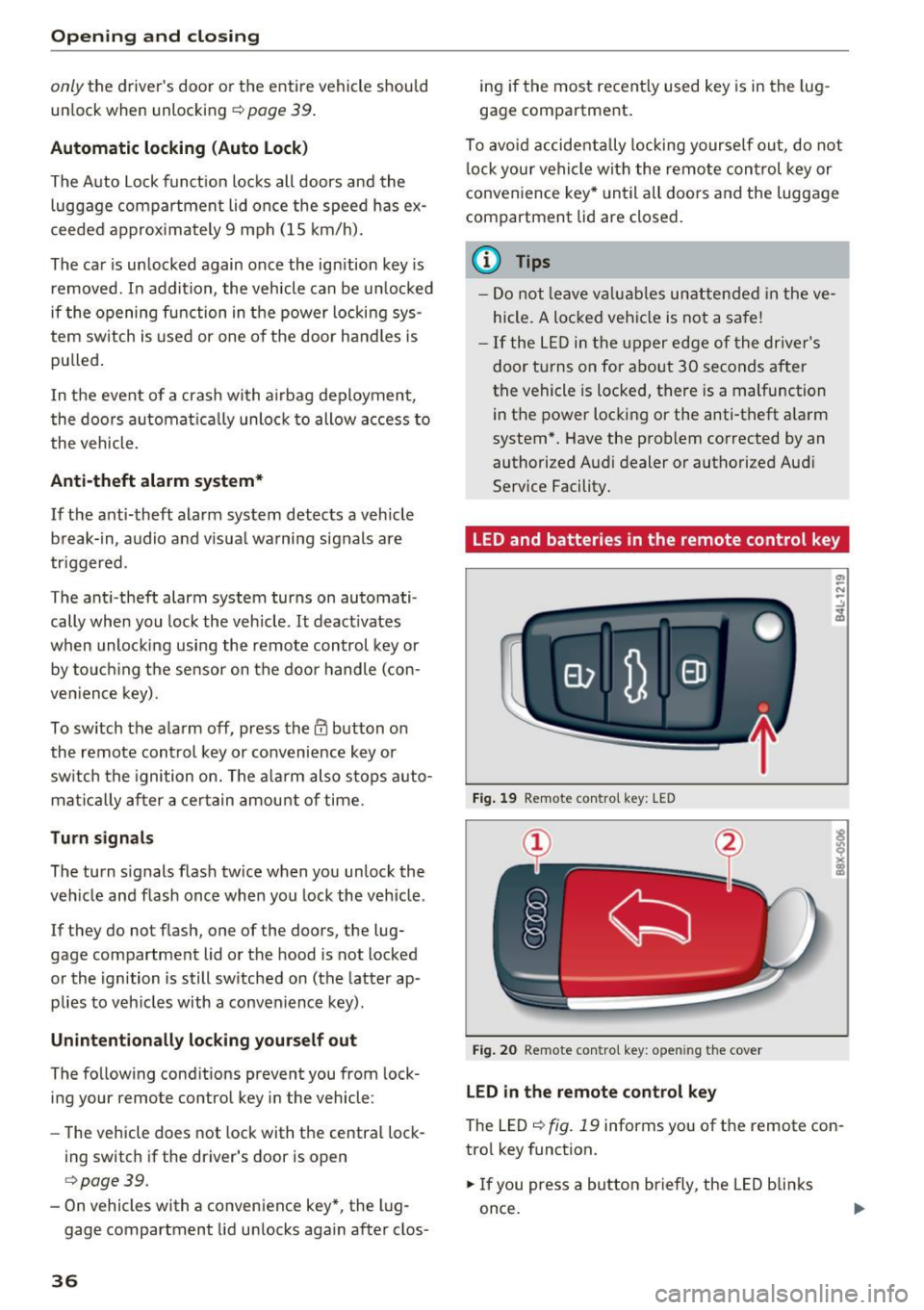
LED and batteries in the remote control key
Fig . 19 Remote con tro l key: LED
Fig . 20 Remote contro l key: o penin g the cover
LED in th e re mot e co nt rol k ey
The LED r=> fig. 19 informs you of the remote con
trol key function.
.. If you press a button briefly , the LED blinks
once.
Page 44 of 328
Opening and clo sin g
- Never drive with the luggage compartment
lid ajar or open, because poisonous gases
can enter the vehicle interior and create the
risk of asphyxiation .
- Never leave your vehicle unattended when
the luggage compartment lid is open. A
child could climb into the vehicle thro ugh
the luggage compartment. If the luggage
compartment lid was then closed, the child
would be trapped in the vehicle and unable
to es cape. To reduce the risk of inju ry, do
not allow ch ildre n to p lay in or around the
vehicle. A lways keep the luggage compart
ment lid and the doors closed when the ve
hicle is not in use.
- Always make sure no one is in the luggage
compartment lid's range of motion when it
is closing, especially near the h inges. Fin
gers or hands could be pinched .
(D Tips
-When the vehicle is locked, the luggage
compartment lid can be unlocked separately by p ressing the
l.::s l button on the remote
control key. The luggage compartment lid l ocks automatically when it is closed again .
- In case of an emergency or a faulty handle,
the luggage compartment lid can be opened
from the inside
o page 42 .
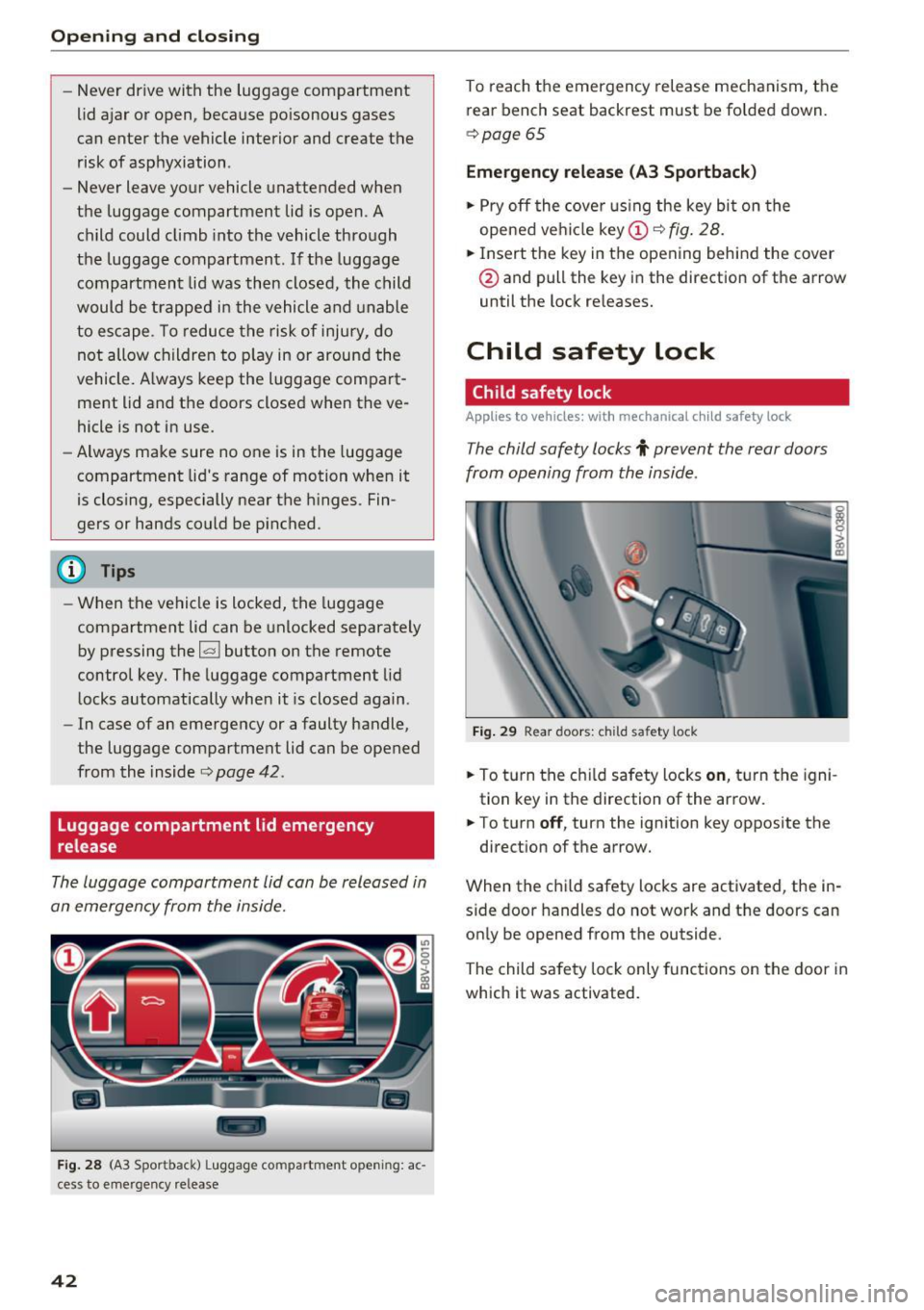
luggage compartment lid emergency
release
The luggage compartment lid can be released in
an emergency from the inside.
-
F ig. 28 (A3 Spor tback) L uggage co mpa rtment open ing: ac
cess to emergency re lease
42
To reach the emergency release mechanism, the
rear bench seat backrest must be folded down.
o page 65
Emergency release (A3 Sportback )
.. Pry off the cove r using the key bi t on the
opened ve hicl e
key
@ and pull the key in the direction of the arrow
until the lock re leases.
Child safety lock
Child safety lock
Applies to vehicles: with mechanical child safety lock
The child safety locks t prevent the rear doors
from opening from the inside.
Fi g. 29 Rea r doo rs : ch ild sa fety lock
.. To t urn the ch ild safety locks on , tu rn the igni
tion key in the direction of the ar row.
.. To turn
off , turn the ignition key opposite the
direct ion of t he arrow.
When the child safety locks are activated, the in
s ide door handles do not work and the doors can
on ly be opened from the outside.
The child sa fety lock only func tions on the door in
which it was activated.
Page 45 of 328
.... N
0 > CX)
rl I.Cl U"I
rl I.Cl ....
Power windows
Controls
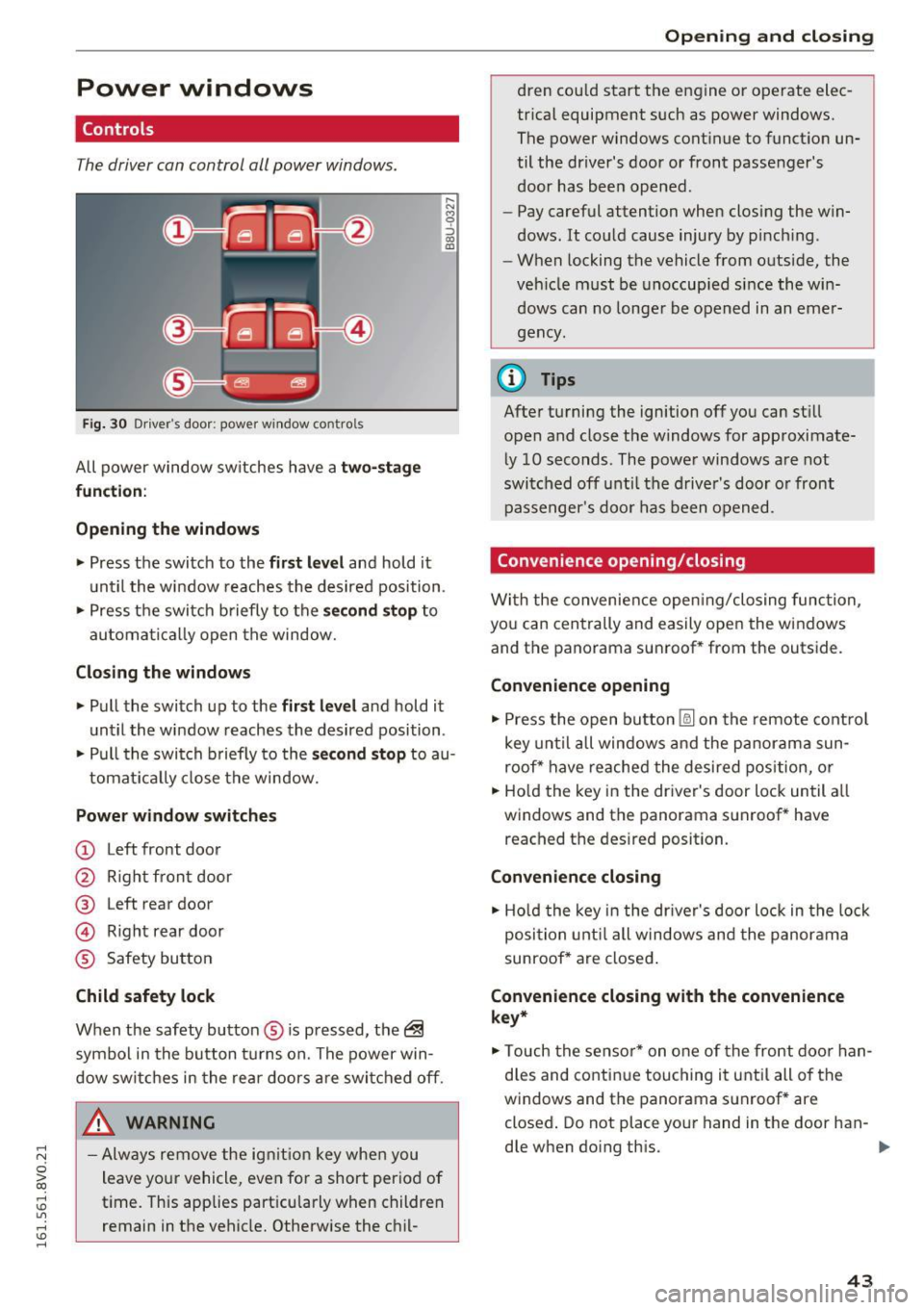
The driver can control all power windows.
Fig. 30 Driver 's doo r: powe r w in dow contro ls
All power window sw itches h ave a two- stage
function :
Opening the windows
,-. N M 0
:::i co co
• Press the switch to the first level and hold it
u nti l the w indow reaches the desire d position .
• Press t he swi tch b riefly to the
second stop to
au toma tically open the window.
Closing the windows
• Pull the swi tch up to the first lev el and hold it
u ntil the w indow reaches the desired position .
• Pull the swi tch b rief ly to the
s econd stop to au-
tomat ically close the window.
Power window switches
(D Left front doo r
@ Righ t fr ont door
@ Left rear door
© Right rear door
® Safety bu tton
Child safety lock
When the safety button ® is p ressed, the~
s ymbol in t he button t urns on. The power win
dow switc hes in the re ar doors a re swi tched off.
A WARNING
-Always re move the ign it io n key whe n you
leave yo ur vehicle, eve n for a short period of
t ime. This app lies part icu larly when children
remain in the vehicle. Otherwise the c hil-
Open ing and closing
dren cou ld start the e ngine o r operate elec
tr ica l equipment such as power windows.
The power windows cont inue to funct io n un
til the driver's door or fron t passenger's
door has bee n opened.
- Pay careful attention when closi ng the w in
dows. It co uld cause injury by p inch ing .
- When locking the vehicle from outside, the
ve hicle must be unoccup ied si nce the win
dows can no longe r be o pened in an emer
gency.
@ Tips
A fter tu rning the ignition off you can st ill
open and close the windows for approximate
ly 10 seconds. The power windows are not
sw itched off unti l the drive r's doo r or front
passe nger 's doo r has been opened.
Convenience opening /closing
Wi th the convenience ope ning/closing func tion,
yo u ca n cen tral ly and easily open the windows
and the panorama sun roof * from the outs ide.
Convenience opening
• Press the open button [fil] on t he remote cont rol
key u ntil all wind ows and the pa norama sun
roof* have reached the desired pos ition, o r
• Ho ld the key in the dr iver's door lo ck until a ll
windows and the panorama s unroof* have
reached t he des ired position.
Convenience closing
• Ho ld the key in the dr iver's door lo ck in the lock
position unt il a ll w in dows an d t he panor am a
sunroof* a re closed .
Convenience closing with the convenience
key*
• Touch the sen so r* on o ne of the front door han
d les and co nti nu e touching it until all of the
windows and the panorama s unroof* are
closed . Do not place you r hand in the door han
dle when do ing th is .
43
Page 46 of 328
Opening and clo sin g
Adju st ing the con venien ce op en ing in the
MMI
.. Select: the I MENU ! button >Car > Sys tems*
control button > Vehicle sett ings > Central
l oc king > Lo ng -p res s to open w indows
To enable convenience opening of the w indows
and the roof*, the
front wind ow , rea r wind ow *
and roof * functions must be switched on.
A WARNING
-Never close the windows or panorama sun
roof* careless ly or in an uncontrolled man
ner, because this increases the risk of injury .
- For security reasons, the windows can only
be opened with the remote control key at a
maximum d istance of approximately 6 feet
(2 mete rs) from the vehicle.
- Pay attention when using the lock cylinder
to close the windows and the panorama
s u nroof* so that no one is pinched. Closing
stops when the key is moved into the start
ing position .
Correcting power window malfunctions
-
After disconnecting the vehicle battery, the one
touch up and down feature must be activated
again.
.. Pull the power window sw itch until the w indow
is comp letely raised.
... Release the sw itch and pull it agai n for at least
one second.
Panorama roof
Description
App lies to veh icles : with panoramic sunroof
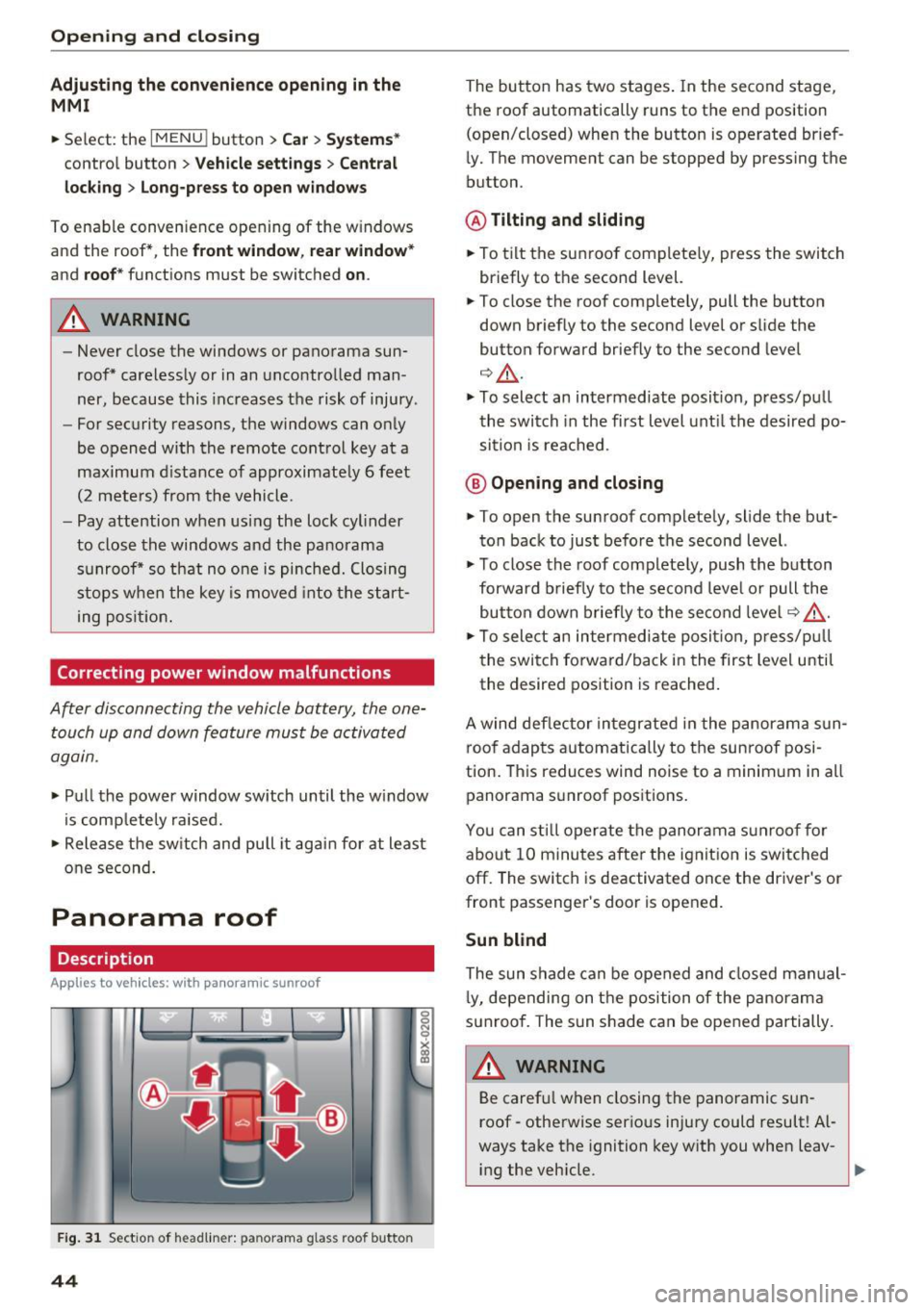
Fig . 3 1 Sect ion of head liner: panorama glass roof butto n
44
The button has two stages . In the second stage,
the roof automatically runs to the end position
(open/closed) when the button is operated brief
ly. The movement can be stopped by pressing the
button.
@ Tilting and sliding
.. To tilt the sunroof completely, press the switch
briefly to the second level.
.. To close the roof completely, pull the button
down briefly to the second level or s lide the
button forward briefly to the second level
Q &_.
.. To select an intermediate position, press/pu ll
the switch in the first level until the desired po
sition is reached .
@ Opening and closing
.. To open the sunroof completely, slide the but
ton back to just befo re the second level.
.. To close the roof complete ly, push the button
forward b riefly to the second leve l or pull the
button down briefly to the second leve l¢ ,& .
.. To sele ct an intermediate posit ion, p ress/pu ll
the switch forward/back in the first level until
the desired position is reached.
A wind def lector integrated in the panorama sun
roof adapts automatically to the sunroof posi
tion. Th is reduces wind noise to a minimum in all
panorama s unroof positions.
You can sti ll operate the panorama sunroof for
about 10 minutes after the ignit ion is switched
off. The switch is deactivated once the driver's or
front passenger's door is opened.
Sun blind
The sun shade can be opened and closed manual
l y, depending on the position of the panorama
sunroof. The sun s hade can be opened partially.
A WARNING
Be caref ul when closing the panoramic sun
roof - otherwise serious injury could result! Al
ways take the ignition key with you when leav-
-
ing the veh icle. ti,.
Page 48 of 328
Lights and Vision
Lights and Vision
Exterior lighting
Switching lights on and off
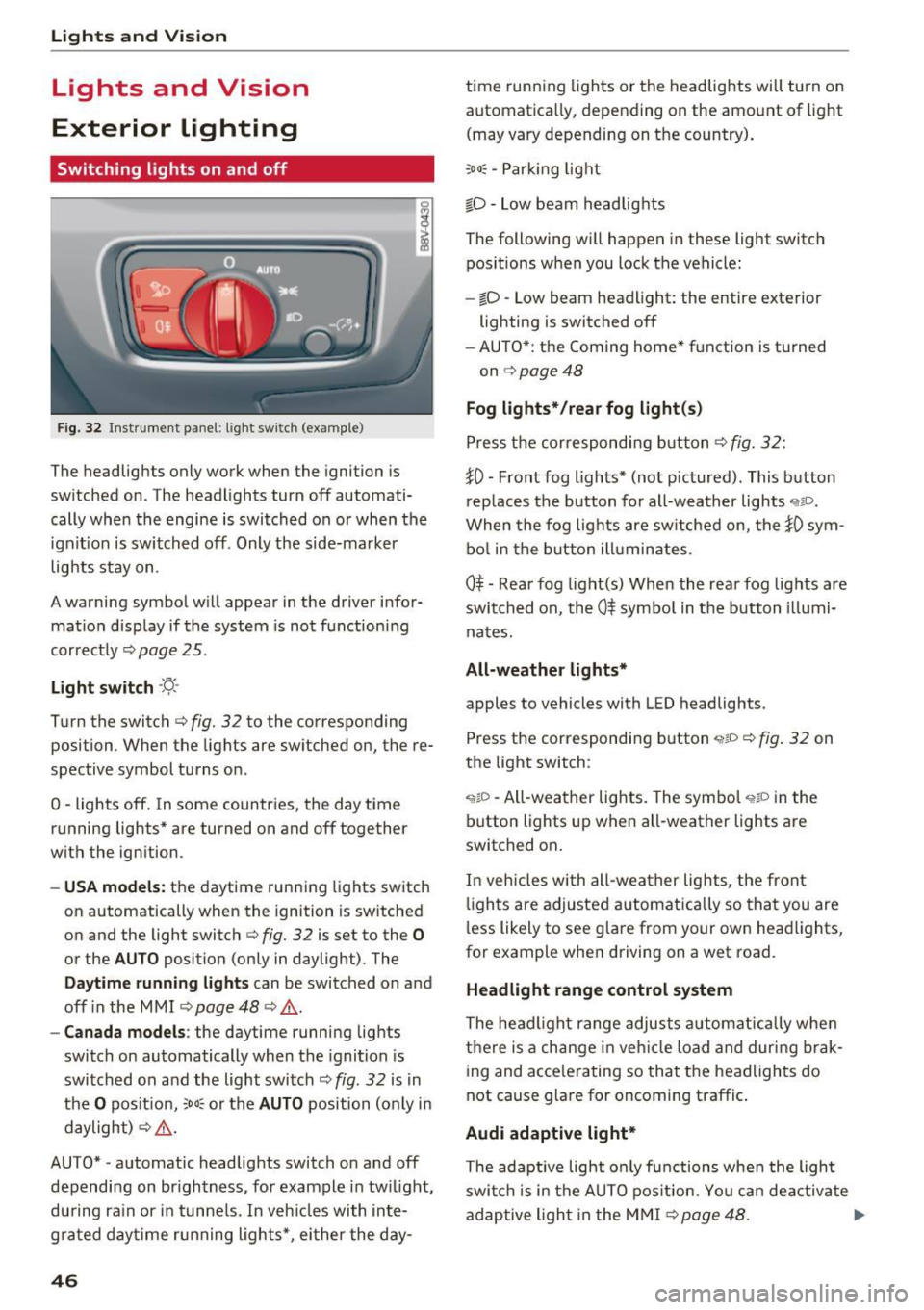
Fig. 32 Instrument pa nel: lig ht sw it c h (ex am ple)
I
The headlights only work when the ignition is
sw itched on . The headlights turn off automati
cally when the engine is switched on or when the
ignit ion is switched off . Only the side-marker
lights stay on .
A warning symbol w ill appear in the driver infor
mat ion disp lay if the system is not functioning
correctly ¢page 25.
Light switch ·f!-·
Turn the switch¢ fig. 32 to the corresponding
posi tion . When the ligh ts are sw itched on, the re
spective symbol turns on .
O -lights off . In som e countr ies, th e day tim e
r unning lights * are turned on and off together
with the ign ition.
- USA mode ls: the daytime running lights switch
on automatically when th e ignition is switched
on and the light switch ¢ fig. 32 is set to the
0
or the AUTO position (only in daylight) . The
Daytime runn ing lights can be switched on and
off in the MMI ¢ page 48 ¢
,&..
-Canad a models : the daytime runni ng lights
switch on automatically when the ignit ion is
switched on and the light switch¢ fig . 32 is in
the
O pos it ion, :oo~ or the AUTO position (only in
daylight)
~ ,&. .
AU TO* -automatic headlights switch o n and off
dependi ng on br igh tness, for example in tw ilight,
du ring ra in or in tunne ls. In veh icles with inte
g ra ted day time r unning lights*, ei ther the day-
46
time runn ing lights or the headlights will turn on
automatica lly, depending on the amount of light
(may vary depending on the country) .
;oo~ -Par king light
iD -low beam headlig hts
The following w ill happen in these light switch
pos itions when you lock the vehicle:
- io -Low beam headlight: the entire exterior
lighting is switched off
- AU TO* : the Coming home* f unction is turned
on ¢page48
Fog lights* /rear fog light (s )
Press the cor respondi ng b utton ¢fig. 32:
~0 -Front fog ligh ts* (not pictured) . This b utton
r ep laces the b utton for all-weath er lights
"1io.
When the fog lig hts are sw itched on, the }0 sym
bo l in the b utton ill uminates.
0$ -Rear fog light(s) When the rear fog lights are
swi tched on, the
0$ symbo l in the b utton illumi
na tes.
All-weather lights*
apples to vehicles with L ED headlights .
Press the correspondi ng button
'wlD ~ fig . 32 on
the light switch :
'?IP -All-wea ther lights. The symbo l "1$D in the
button lights up when all-weather lights are
switched on .
In vehicles with all-wea ther lights , the front
li g ht s are adjusted automatically so that you are
l ess likely to see g lare from your own head lights,
for example when driving on a wet road.
Headlight range control system
The head light range adjusts a utom atically whe n
there is a change in vehicl e load and during brak
ing and acce lerating so that the headlights do
not cause g la re for oncoming traffic .
Audi adaptive light*
The adaptive light only functions when the ligh t
swi tch is in the AU TO pos it ion. Yo u can de activate
adaptive ligh t in the M MI
~ page 48. .,.
Page 49 of 328
.... N
0 > CX)
.... I.Cl U"I
.... I.Cl ....
When switched on, adaptive light adjusts to
curves depending on the vehicle speed and steering wheel angle. This provides better lighting
through the curve. The system operates in a
speed range from approximately 6 mph (10 km/
h) to 68 mph (110 km/h).
Static cornering light* (vehicles with adaptive
light) -the cornering light switches on automati
cally when the steering wheel is turned at acer
tain angle at speeds up to approximately 44 mph
(70 km/h) and when the turn signal is activated
at speeds up to approximately 25 mph (40 km/
h). The area to the side of the vehicle is illuminat
ed better when turning.
Speed dependent light distribution* -The speed
dependent light distribution adapts the light in
towns and on highways or expressways . Intersec
tions can also be illuminated on vehicles with a
navigation system* .
Highway light function*
(Vehicles with adaptive light or LED headlights) -
This function adapts the lighting for highway
driving based on vehicle speed .
& WARNING
-Automatic headlights* are only intended to
assist the driver. They do not relieve the
driver of responsibility to check the head
lights and to turn them on manually accord
ing to the current light and visibility condi
tions. For example, fog cannot be detected by the light sensors . So always switch on the
low beam under these weather conditions
and when driving in the dark
io.
-Accidents could occur if you cannot see the
road ahead of you well and if others on the
road cannot see you . Always switch your
headlightsonsothatyoucanseetheroad
ahead of you and others can see your vehicle
from behind.
- The rear fog lights should only be turned on
in accordance with traffic regulations, to
prevent glare for traffic behind your vehicle .
-If the battery has been discharging for a
while, the parking lights may switch off au
tomatically to conserve the battery charge
Lights and Vision
for the next time the engine is started. Al·
ways make sure your vehicle complies with
legal regulations regarding sufficient and
safe lighting when parking it. Avoid using
the parking lights for several hours.
- Please observe legal regulations when using
the lighting systems described .
@ Tips
-The light sensor for the automatic head
lights* is in the rearview mirror mount.
Therefore, do not place any stickers in this
area on the windshield.
- Some functions of the exterior lighting can
be adjusted
¢ page 48 .
-If you turn off the ignition while the exterior
lights are on and open the door, you will
hear a warning tone.
- In some market-specific versions, the tail
lights do not turn on when switching on the
daytime running lights .
- In cool or damp weather, the inside of the
headlights, turn signals and tail lights can
fog over due to the temperature difference
between the inside and outside. They will
clear shortly after switching them on. This
does not affect the service life of the light
ing.
- A message will appear in the instrument
cluster if there is a malfunction in the light
sensor
¢ page 25.
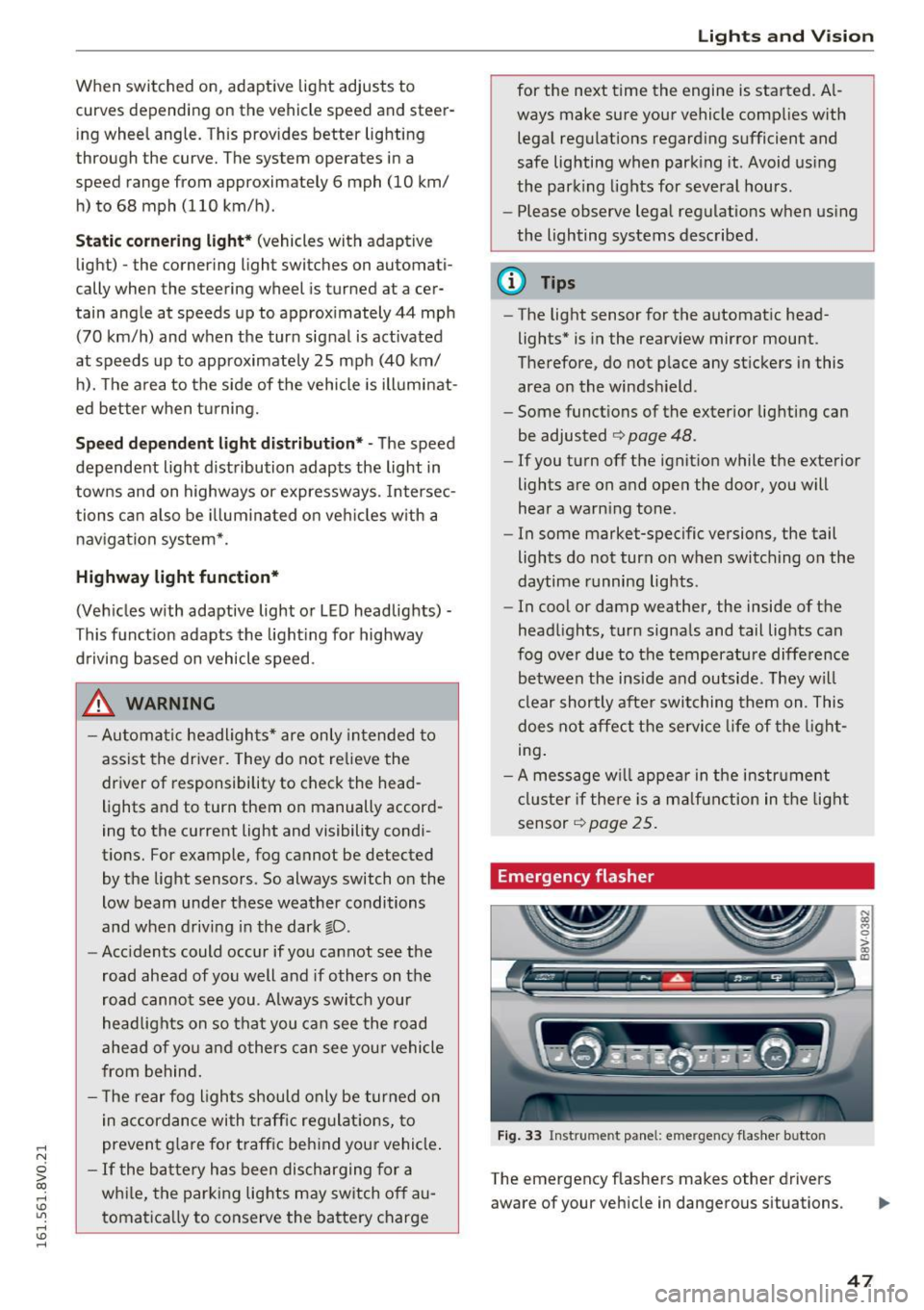
Emergency flasher
Fig. 33 Inst rume nt panel: e merge ncy flasher butto n
The emergency flashers makes other drivers
aware of your vehicle in dangerous situations .
N Cl) M 0
> Cl) (0
47
Page 50 of 328
Lights and Vision
.,. Press the~ button to switch the emergency
flashers on or off.
You can indicate a lane change or a turn whe n the
emergency f lashers are sw itched on by using the
turn signal lever. The emergency flashers stop
temporarily .
The emergency flashers also work when the igni
tion is turned off.
(0, Tips
You s hou ld sw itch the emergency flashers on
if:
- You are the last car in a traff ic jam so that
a ll other vehicles appro ach ing from be hind
can see yo u, or if
- You r vehicle has bro ke n down or you are
having an eme rgency, or if
- Y our vehicle is being towed or if you a re
tow ing another vehicle .
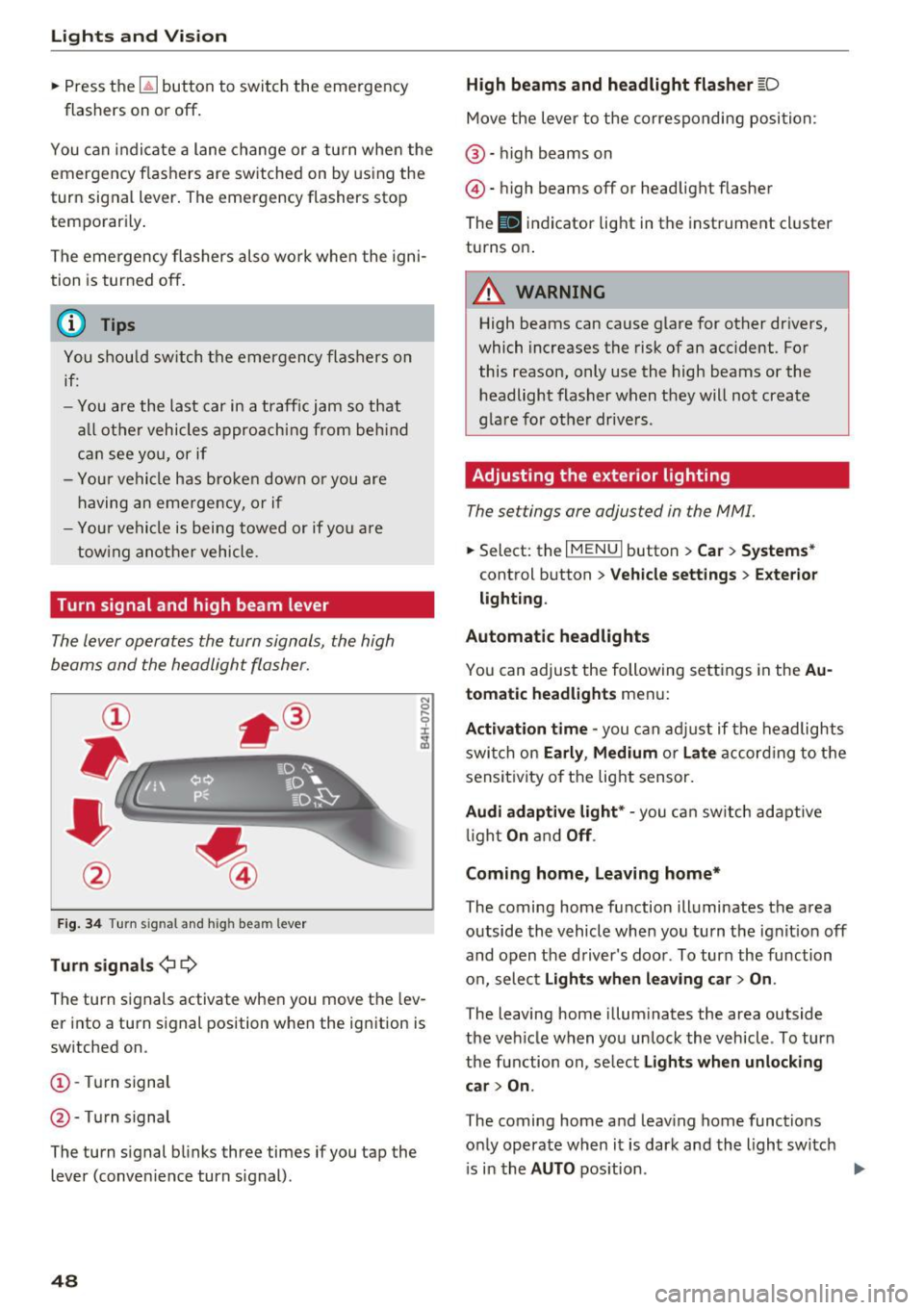
Turn signal and high beam lever
The lever operates the turn signals, the high
beams and the headlight fla sher.
F ig. 34 Turn signal and h igh bea m lever
Tu rn signal s¢¢
N
0
.... 9 ::i:
;ii
The turn signals activate when you move the lev
er into a turn signal position when the ignition is
sw itched on.
(D -Turn signal
@ -Turn signal
The turn signal blinks three times if you tap the
lever (conven ience turn s ignal).
48
High beams and headlight flasher [D
Move the lever to the corresponding position:
@ -high beams on
@-high beams off or headlight flasher
The
II i ndicator light in the instrument cl uster
turns on.
A WARNING
High beams can cause glare for other drivers,
which increases the risk of an accident. For
this reason, only use the high beams or the
headlight flasher when they will not create
gla re for othe r drive rs .
Adjusting the exterior lighting
The settings are adjusted in the MMI.
.,. Select : the I MENU I button > Car > Systems *
control button > Vehicle settings > Exte rior
light ing .
Automatic headlights
Yo u can adjust the following settings in the Au
tomati c headlights
menu:
Activation time -you can ad ju st if the headlights
swi tch on
Early , Medium or Late acco rd ing to t he
sensi tivity of the light sensor.
Audi adaptive light * -you can sw itch adaptive
li gh t
On an d Off .
Coming home, Leaving home*
The coming home f unction illuminates the area
outside the vehicle when you turn the ignition off
and open the driver 's door . To turn the function
o n, select
Lights when leaving car > On .
The leaving home illum inates the area outside
the ve hicle when you unlock the vehicle . To turn
the function on, se lec t
Lights when unlocking
car > On .
The coming home and leav ing home functions
o nl y operate when it is dark and the light sw itch
i s in the
AUTO pos ition . ..,.
Page 51 of 328
.... N
0 > CX)
.... I.Cl U"I
.... I.Cl ....
Daytime running lights*
USA models :
the daytime running lig hts can be
switched on or off using the MMI. Sele ct
On or
Off .
Canada models :
this function ca nno t be switched
off. They activate au tom atically e ach time the ig
n it ion is swi tched o n. Th is menu item is shown
with a "gray backgro und" .
Travel mode*
The headlig ht beam is asymmetrical. This pro
v id es s tronge r illu mination on the side of the
r oad on whi ch you are driving. In ve hicles w it h
Xenon headlights* with turning light* or LED
headlight s*,
you must adjust the head lights
when yo u are driv ing in a co untry whe re the tra f
f ic direction is opposite from your own country.
Otherw ise, oncoming traffic will be blinded by
the glare from t he headlights . An adjustment is
not needed in vehicles with Xenon head lights
witho ut t urning lights .
To prevent glare:
- Travel mode must be activated in vehicles wit h
Xenon headlights * and turning light* or LED
headlights*. Select: the
I MENU I button> Car >
Systems *
control button > Vehicle settings >
Exterior lighting > light for driving on left , for
example .
After you have adjusted the headlights, the fol
l owing message will appear:
l'iD Headlight converter active for driving on
left. Range reduced!
(D Tips
When travel mode is activa ted, a d is pl ay in
the dr iver information system in dicates this
each time you switch the ignition on .
Lights and Vision
Interior lighting
Front and rear interior lighting front
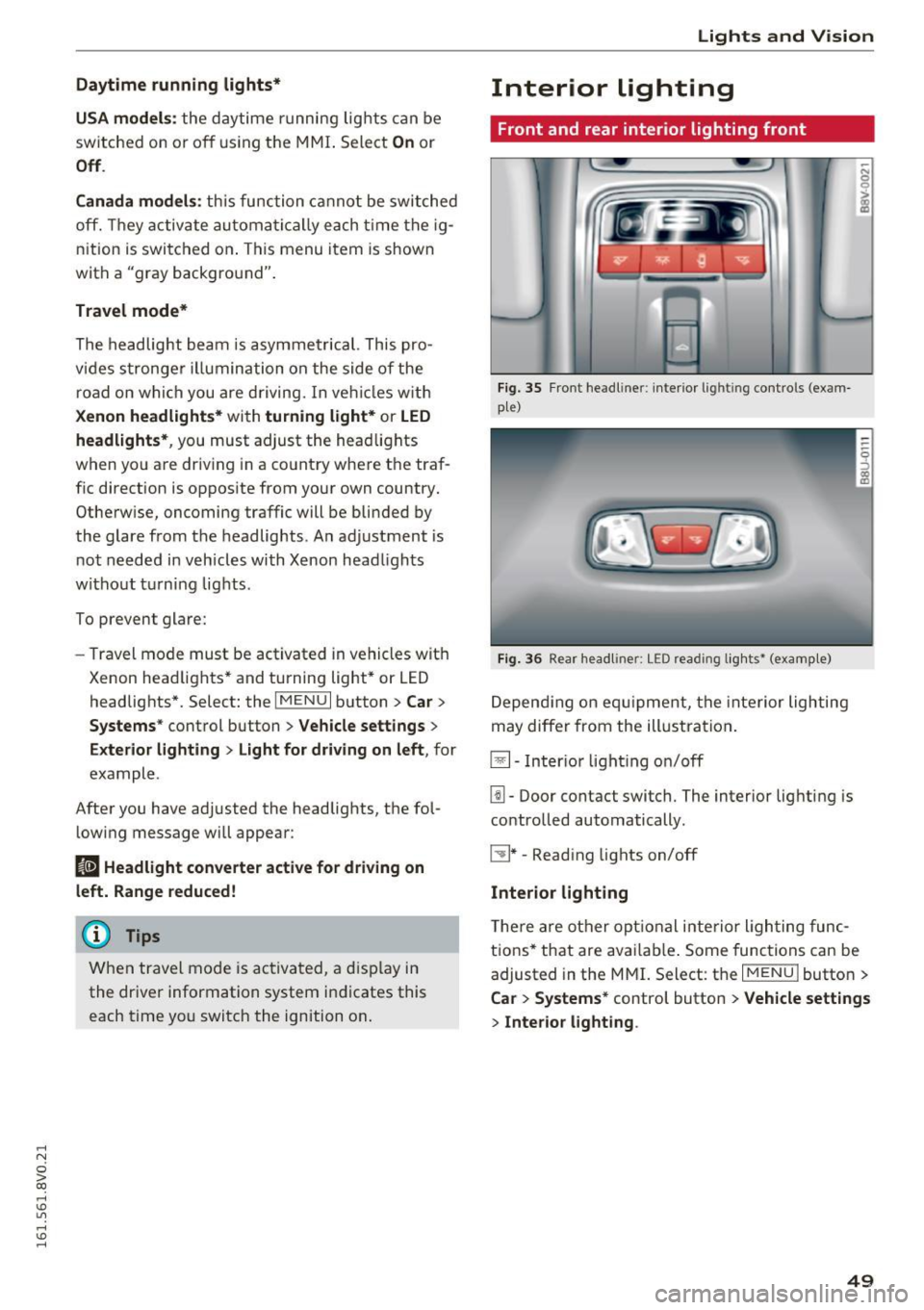
Fig. 35 Front headli ner: interio r lig htin g con trols (exam
pl e)
Fi g. 36 Rea r head li ner : LED read ing lig hts* (examp le)
D epend ing on e quipme nt, the interior lighting
may diffe r from the ill ustra tion .
~- Inter io r ligh ting o n/off
[j]. Door contact switch. The interior lig hting is
contro lled automatically .
C:!J * -Read ing lights on/off
Interior lighting
T he re a re ot her op tion al i nte rior ligh ting func
tions* that are ava ilab le . Some func tions can be
adjusted in the MM
I. Select: the IM ENU I butto n >
Ca r > Systems* control button > Vehicle settings
> Interior lighting .
49
Page 52 of 328
Lights and Vision
Instrument illumination
The brightness of the instrument cluster and the
center console can be adjusted .
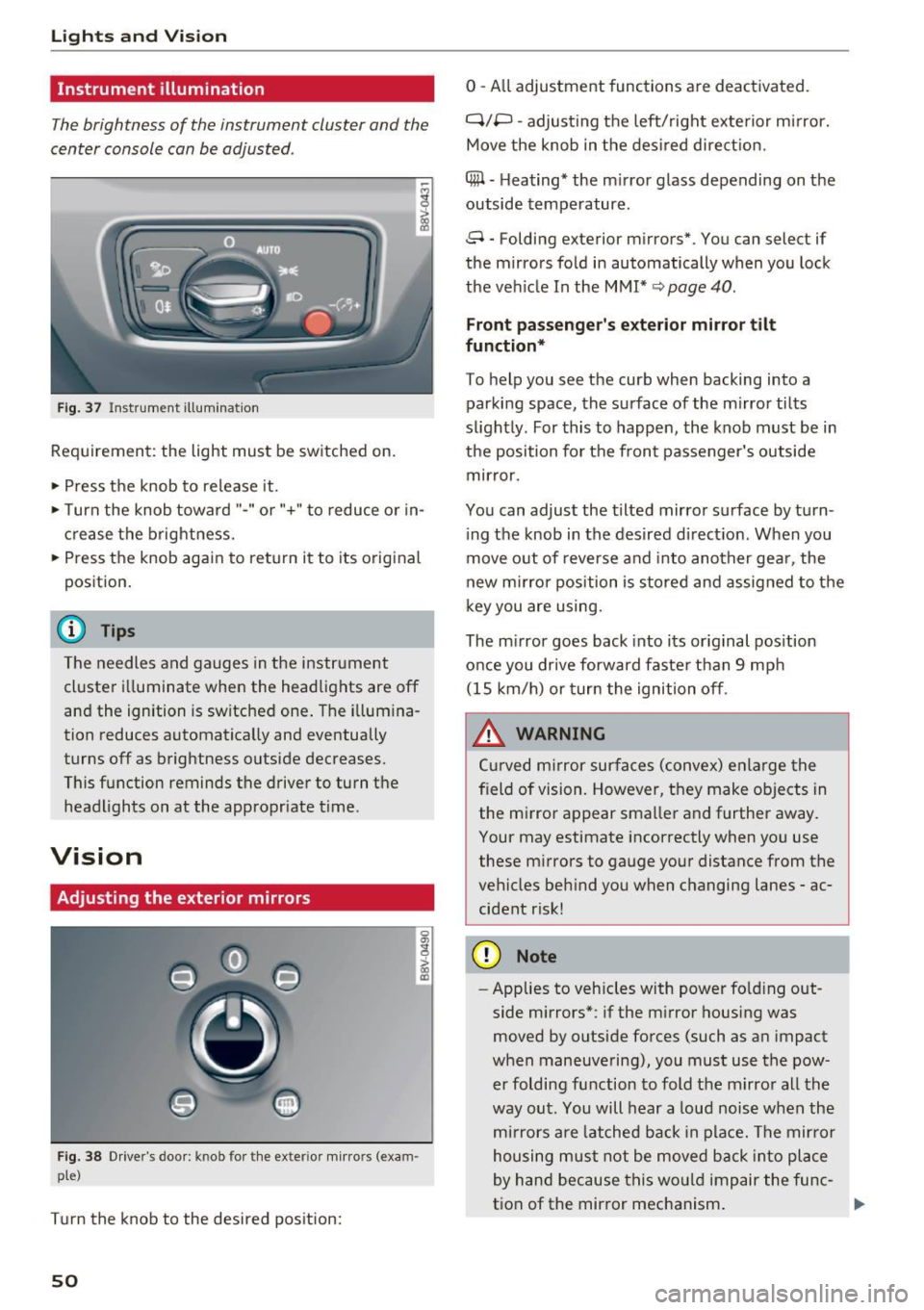
Fig. 37 Instrument ill umination
Requirement: the light must be switched on.
~ Press the knob to release it .
~ Turn the knob toward"-" or"+" to reduce or in
crease the brightness.
~ Press the knob again to return it to its original
position.
(D Tips
The needles and gauges in the instrument cluster illuminate when the headlights are off
and the ignition is switched one. The illumina
tion reduces automatically and eventually
turns off as brightness outside decreases.
This function reminds the driver to turn the
headlights on at the appropriate time.
Vision
Adjusting the exterior mirrors
Fig. 38 Driver's door: knob for the ex ter ior mirrors (exam
ple)
Turn the knob to the desired position:
50
0 - All adjustment functions are deactivated.
q;p -adjusting the left/right exterior mirror.
Move the knob in the desired direction.
4#1 -Heating* the mirror glass depending on the
outside temperature.
8 -Folding exterior mirrors*. You can select if
the mirrors fold in automatically when you lock
the vehicle In the
MMI* ~ page 40.
Front passenger's exterior mirror tilt
function*
To help you see the curb when backing into a
parking space, the surface of the mirror tilts
slightly. For this to happen, the knob must be in
the position for the front passenger's outside mirror.
You can adjust the tilted mirror surface by turn ing the knob in the desired direction . When you
move out of reverse and into another gear, the
new mirror position is stored and assigned to the
key you are using.
The mirror goes back into its original position
once you drive forward faster than 9 mph (15 km/h) or turn the ignition off.
.&, WARNING
Curved mirror surfaces (convex) enlarge the
field of vision. However, they make objects in the mirror appear smaller and further away.
Your may estimate incorrectly when you use
these mirrors to gauge your distance from the
vehicles behind you when changing lanes -ac
cident risk!
(D Note
- Applies to vehicles with power folding out
side mirrors*: if the mirror housing was
moved by outside forces (such as an impact
when maneuvering), you must use the pow er folding function to fold the mirror all the
way out. You will hear a loud noise when the
mirrors are latched back in place. The mirror
housing must not be moved back into place
by hand because this would impair the func
tion of the mirror mechanism.
-