ignition AUDI S3 2016 Service Manual
[x] Cancel search | Manufacturer: AUDI, Model Year: 2016, Model line: S3, Model: AUDI S3 2016Pages: 328, PDF Size: 81.78 MB
Page 104 of 328
e-tron
overhangs, carports or similar structures . Switch
the ignition
off. Have the problem corrected by
an author ized Audi dealer or authorized A udi
Serv ice Facility .
• Elec tric s ystem: o verheated. Safel y park ve
hicle and check coo lant
The coolan t leve l is too low or the coolant tem
pera ture is too high .
S top the vehicle in the outdoo rs as soon as it is
safe ly possible . Switch the ignition off.
Read the important safety precautions ¢.&.
in
Coolant on page 109 and check the coolant level
¢page 108.
If the coolant level is OK, the malfunction may be
caused by the system overheating . Let the vehi
cle's electric drive system cool down for some
time .
If the message turns
off after cooling down and
sw itching the ign ition back on, you ca n continue
driving. Contact an author ized Audi dealer or au
thor ized A udi Se rvice Facility immed iate ly to have
the ma lf u nction co rrected.
If the indicator lig ht stays on, contact an author
ized A ud i dealer or authorized Aud i Serv ice Faci li
ty .
Bil Drive system : sys tem fault! Pleas e contact
work shop
There is a malfunction in the plug-in hybrid sys
tem. Drive to an authorized Audi dealer or au
thor ized Audi Service Facility immediate ly to have
the ma lfunction corrected .
II Drive sy stem: system fault! Restart not po s·
sible. Ple ase contact wo rkshop
There is a mal func tion in the plug -in hybrid sys
tem . Do not open the engine compartment lid .
Drive to an a uth orized Aud i dea le r or authorized
Aud i Serv ice Facility immediately to have the
malfunct io n corrected.
II Batter y temperature too low . Engine start
not possible . See owner's manual
The outside temperature is too low. The vehicle
can no longer start at temperat ures below -18 °F
102
(- 28 °C) . Contact your author ized Audi dealer or
autho rized Audi Service Facility.
POWER LIMIT Warning! Limited power
If the indicator l ight turns on and this message
appears , there may be an engine cont rol mal
funct ion. The
(m ind icator light in t he instr u
ment clus ter a lso turns on. The e ng ine o utput is
reduced. Dr ive to an a utho rized Audi dea ler or
autho rized Audi Service Facility immedia tely to
have the malfunction corrected.
II e -tron mode : EV curr ently unavailable
This message appears w hen the 1-,$ 1 button is
pressed and the conditions for e lectric drive
mode are no t me t.
IIJ Vehicle sound: malfunction! Pedestrians
cannot h ear vehicle. P lease contact Service
if the indicator light t urns on and this message
appears, pedestrians and bicyclists can no longer
hear the vehicle when it is driving in electric
mode. Turn off the veh icle and switch to dr iv ing
with the gasoline e ngine . To activate the gasoli ne
engine, select the
Charge batt ery mode
¢page 103 with the kl"I button. Drive to a n au
tho rized Audi dea le r or a uthorized Audi Service
Facility immediate ly to have the malfunction cor
rected.
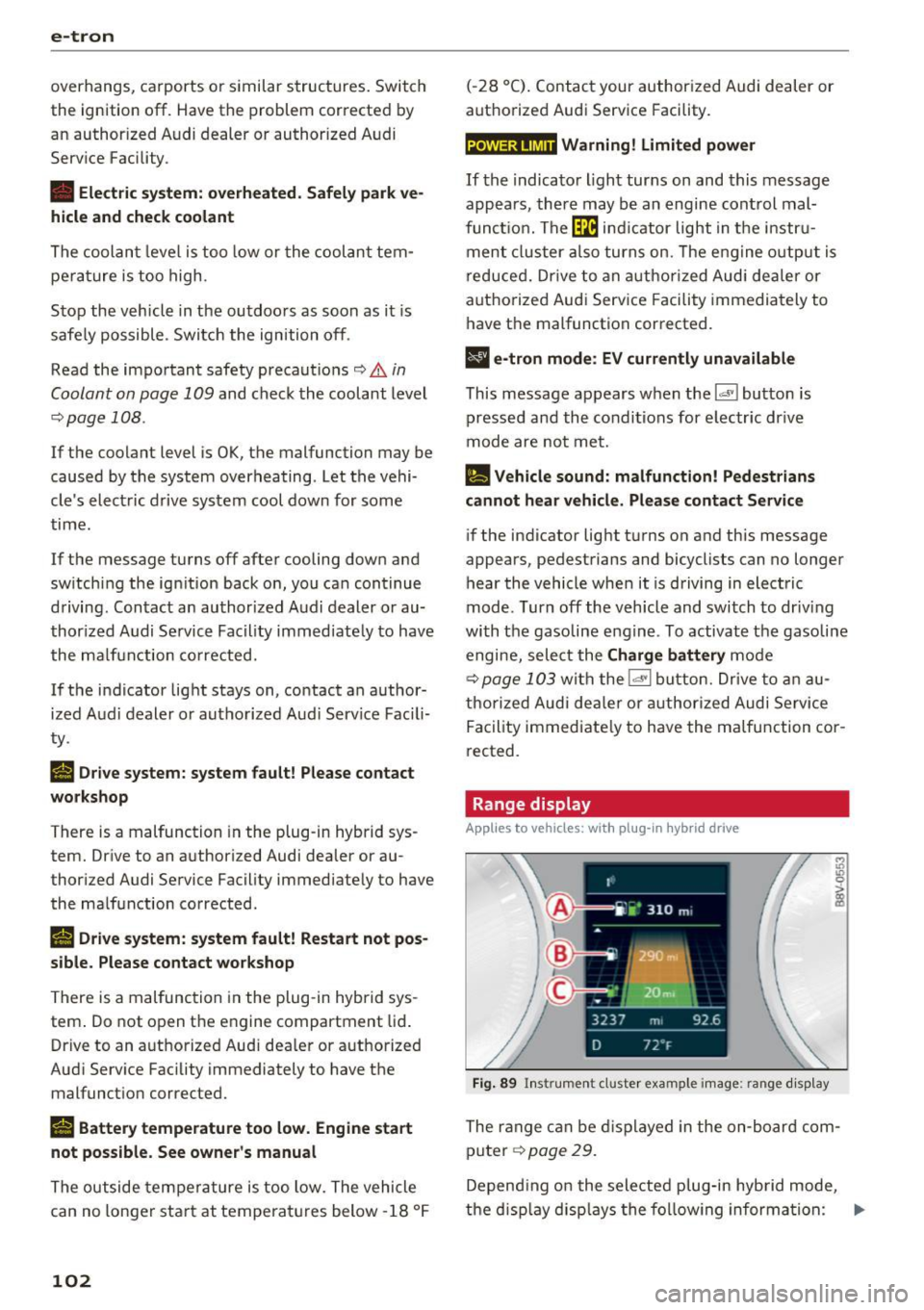
Range display
Applies to vehicles: wit h pl ug-in hy brid drive
Fig. 89 Ins trument cluster example image: range disp lay
The range can be d isplayed in the on -board com
p uter ¢
page 29.
Depend ing o n the selected p lug-in hybrid mode,
the d isp lay disp lays the follow ing informa tion:
Ill>
Page 110 of 328
e-tron
Additional information about the vehicle tool kit may be found under
c::, page 280 and informa
tion about the tire mobility kit under
c:> poge281 .
(D Tips
The vehicle must not be operated without the
tire repair set.
Vehicle transport
Applies to veh icles: w ith plug- in hybrid drive
The following contains information you should
know about transporting your vehicle.
The MQB-A lithium-ion battery system equipped
in your vehicle is composed of SANYO 12 U F 261
591 type batteries and has it passed test 38.3 in
accordance with the UN Tests and Criteria hand book. The vehicle may be transported with the
battery installed as conventional class 9 hazard
ous materials without additional offic ial consent
for air and sea transportation (current law ICAO
TI and IMDG-Code 01.01.2012) .
Jump starting and 12 volt battery
Applies to veh icles: with plug -in hybrid drive
Fig. 96 Engine compartment: connectors for a charger and
j ump start cables
The vehicle is equipped with one 12 vo lt battery
and one high-voltage battery.
If the 12 volt battery is drained, it can be charged
with a charger or you can jump start the vehicle
using another vehicle battery in the same way as
a conventional vehicle .
Note the information on charging the battery
¢
page 249 and for jump starting the vehicle
c:>poge297 .
108
.,. Open the hood¢ page 23 7.
.,. Remove the fuse box cover @ to access the
positive terminal
0 c::> page 239.
.,. Clamp the terminal clamps from the charging
device or jump start cable to the positive termi
nal
0 and to the body ground point 0-
(D Note
You must not give a jump start with your vehi
cle. This could cause s ignificant damage to
the electrical system in your veh icle.
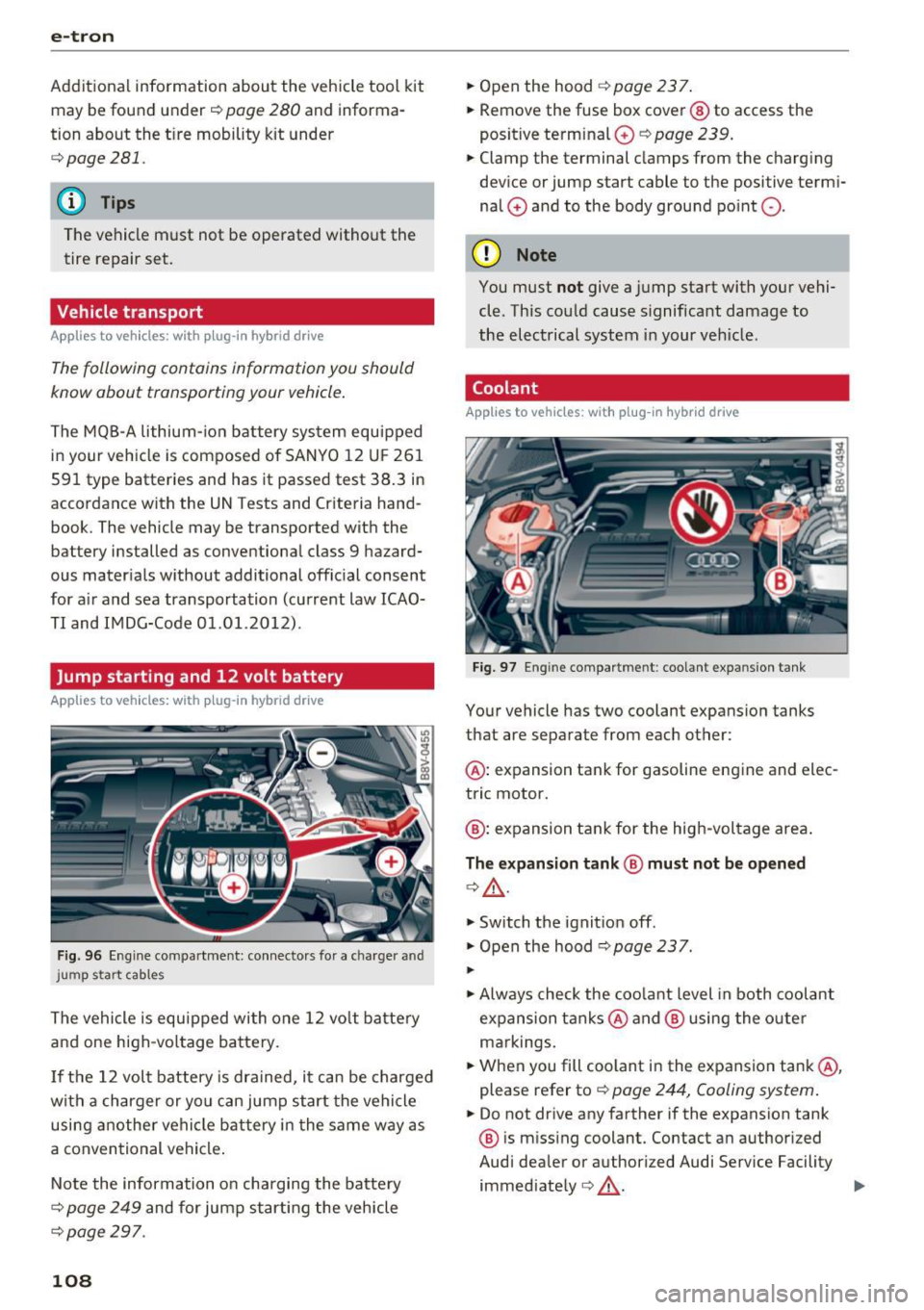
Coolant
App lies to vehicles: with plug-in hybrid drive
Fig. 97 Engine compartme nt: coolant expa nsion tank
Your vehicle has two coolant expansion tanks
that are separate from each other:
@ : expansion tank for gasoline engine and elec
tric motor.
@ : expansion tank for the high-voltage area .
The expansion tank@ must not be opened
c:>&_ .
.,. Switch the ignition off .
.,. Open the hood
c:> poge 237.
...
.,. Always check the coolant level in both coolant
expansion tanks @ and @ using the outer
markings.
.,. When you fill coolant in the expansion tank@,
please refer to
c::> page 244, Cooling system.
.,. Do not drive any farther if the expansion tank
@ is missing coolant. Contact an authorized
Audi dealer or authorized Audi Service Facility immediately ¢&_ . ..,.
Page 126 of 328
e-tron
(D Tips
-You can set the timer a maximum of 7 days
in advance.
- You can operate the climate control in the
vehicle interior when the high-voltage bat
tery is charging using the charging timer
c>page 116.
-Make sure the time and date match in the
MMI settings so that the timer can function
properly. Refer to the MMI Operating Man
ual for setting the date and time.
- The auxiliary heating or auxiliary heating/
air conditioning* can run longer after the
departure time is reached.
Audi connect e-tron
services
General information
A pp lies to ve hicles : w ith plug- in hy brid drive
With Audi connect e-tron services l), you can ac
cess various information or control individual
functions remotely using mobile devices (such as
a smartphone) or a web portal.
To use Audi connect e-tron services
l), please
note the following:
- You will need to register for Audi connect e
tron services at
myaudiconnect .com. You can
access and manage e-tron services and features
at
etron.audiusa.com. If you need assistance
with your Audi A3 e-tron EV services, you can
contact customer service at 844-573-8766.
- Your mobile devices must be compatible.
A WARNING
Read and follow the safety precautions in
your MMI Operating Manual.
l) Wireless serv ice is provided by a thir d- part y provider.
-
Please contact your dea le r or call 877 -505 -2834 for more
informat ion about your carrier. Co nnected dev ices may
not be 4G -capab le. Full speeds avai lable but may be
slowed due to excessive usage, locatio n, coverage and
othe r factors. Coverage not available everyw here . See cov
erage map for your Audi co nnect data carrier for more in
format ion.
124
· Vehicle data
App lies to vehicles : wi th plug-i n hybrid drive
The Dr iver Information System collects data un
der certain conditions and sends it to a server.
When data is stored, you can data such as the ex
amples listed below using the Audi connect e
tron services:
- Duration of the drive in hours and minutes,
- average speed driven in mph (km/h),
- distance driven in miles (km),
- average electric consumption .
For additional information on the Driver Informa
tion System, refer to
c> page 28, Driver informa
tion system.
Doors and lights
App lies to v ehicl es: wi th plug-in hybrid drive
You can access and display the current status of
the following vehicle data on your mobile devices
without having to be inside the vehicle.
- If the vehicle doors and lids are open/closed,
- If the parking l ights are on/off.
For additional information on opening and clos
i ng the doors or for the vehicle light ing, refer to
c> page 3 5, Opening and closing or to c> page 46,
Exterior lighting.
(D Tips
-If the high-voltage battery is not charged,
the amount of access requests is limited to
15 after switching off the ignition. This
helps conserve the 12 volt vehicle battery.
You cannot contro l functions or access in
formation if the charge level of the 12 volt
vehicle battery is too low.
- If at least two minutes have passed after
the last time the ignition was switched off,
Page 127 of 328
,....,
N
0 > co ,....,
as needed after switching the ignition on/
off again.
Vehicle status
Applies to vehicles: with plug- in hybrid drive
You can access various vehicle statuses using the
services, such as:
- high-voltage battery charge level,
- electric range,
- mileage,
- next inspection.
For addit ional information, refer to¢
page 101,
Power meter overview
and ¢ page 102, Range
display.
A WARNING
Do not be misled by the status report displays
by ignor ing messages and/or illuminated
warning and indicator lights in the vehicle.
This could lead to break downs in on the road,
accidents and serious injuries.
@ Tips
- If the high-voltage battery is not charged,
the amount of access requests is limited to
15 after switching off the ignition. This
helps conserve the 12 volt vehicle battery.
You cannot control functions or access in
formation if the charge level of the 12 volt
vehicle battery is too low.
- If at least two minutes have passed after
the last time the ign ition was switched off,
you can reset the access counter back to "0"
as needed after switching the ignition on/
off again .
Vehicle position
Applies to vehicles: with plug -in hybrid drive
The vehicle collects data under certa in conditions
and sends it to a server.
When data is stored, you can data such as the ex
amples listed below using the Audi connect e
tron services:
- Vehicle location display
e-tron
-Display of one's own location
- Route to your vehicle
If your mob ile dev ice also has a navigation func
tion, you can nav igate to your last known parking
location .
For example, you have the option to show the
route to your vehicle and to send the correspond
i ng locations.
(D Tips
- The new parking locat ion cannot be deter
m ined with this service if the vehicle is
moved after shutting the vehicle off and
w ithout switching the ignition on and off
again, for example when being towed or if
the vehicle is stolen .
-If the vehicle is moved and shut off again
using the second key, for example, the new
park position is transmitted to the
server af
ter removing the key.
Charging
Applies to vehicles: with plug- in hybrid drive
You can contro l and access the high-voltage bat
tery ch arging process remotely using these
serv
ices. You have the following options:
- check the battery charge level,
- start/end the charging process,
- program the charging t imer with/without cl i-
mate control,
- deactivate/activate the charging timer.
For additional information, refer to¢
page 112,
Charging the battery with the Audi e-tron charg
ing system.
A WARNING
Only perform charging functions on the high
voltage battery if the vehicle is shut off cor
rectly, is connected to a suitable socket and if
the ignition is switched off.
125
Page 134 of 328
Assist Switching off completely
.,. Press the leve r into position @(clicked into
place), or
.,. Switch the ignition off.
The speed you sto red w ill be retained if the cruise
control has been switched off tempora rily . To re
sume the stored speed, re lease the brake pedal
and pu ll the lever into position
(D .
The stored speed is erased when the cruise con
trol is sw itched off comp letely or the ignit ion is
switched off .
A WARNING
You should only resume the stored speed if it
is not too high for existing traffic conditions.
Otherwise you risk an accident .
@ Tips
-If the brakes become too heated whi le driv
ing, the cruise control switches off. If this
happens while driving downhill, you can re
lieve the brakes by shifting into a lower
gear.
- When the cruise control is activated, ESC
sport mode cannot be switched on.
Audi adaptive cruise control
Description
Applies to vehicles: w ith Audi adaptive cruise control
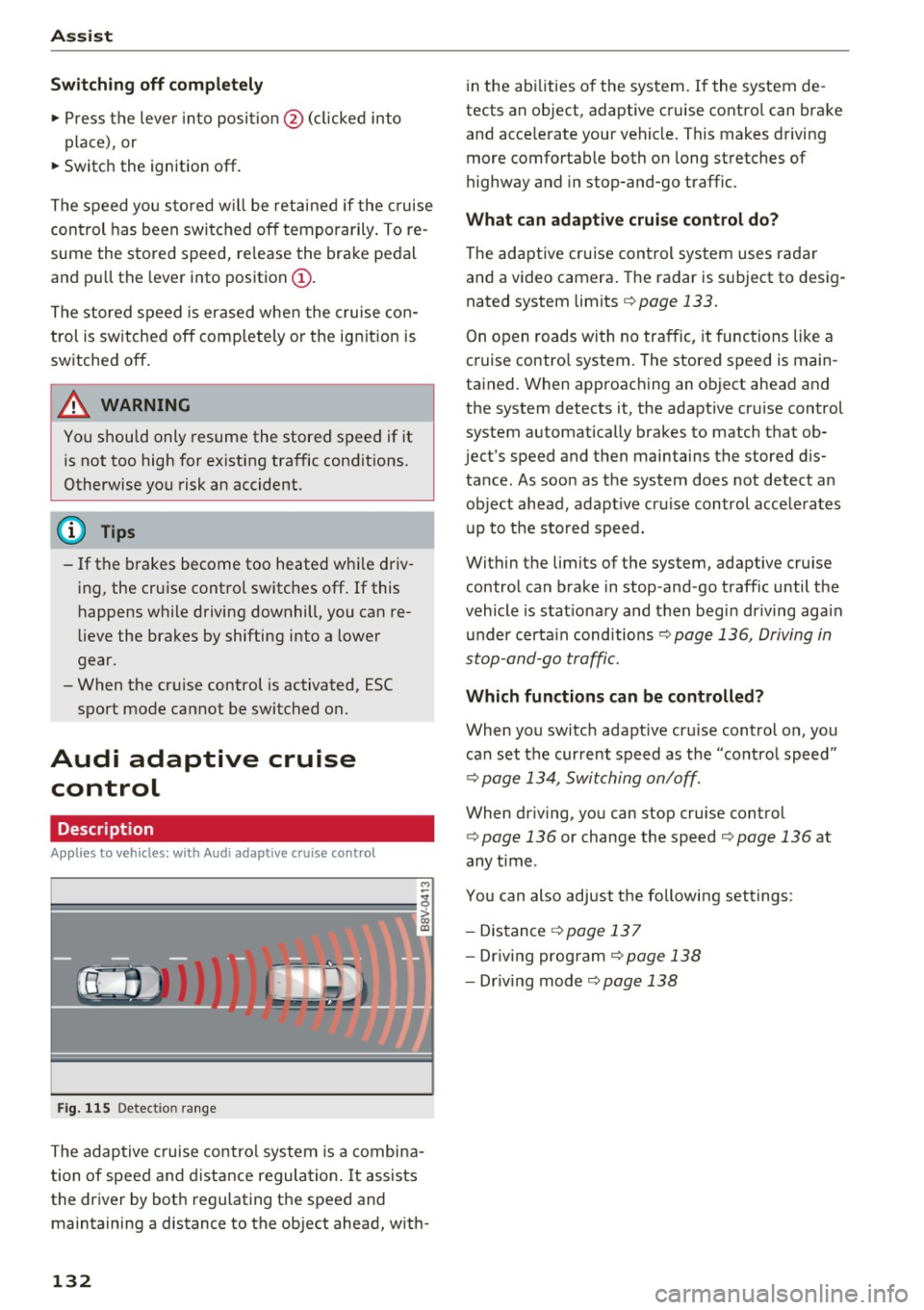
Fig. 115 Detect ion range
The adaptive cruise control system is a combina
tion of speed and distance regulation .
It assists
the driver by both regulating the speed and
maintaining a distance to the object ahead, with-
132
in the abilities of the system. If the system de
tects an object, adaptive cruise contro l can brake
and acce lerate your vehicle. This makes driving
more comfortable both on long stretches of
highway and in stop-and-go traffic.
What can adaptive cruise control do?
The adaptive cruise control system uses radar
and a video camera. The radar is subject to desig
nated system limits
i=> page 133 .
On open roads with no traffic , it functions like a
cruise contro l system. The stored speed is main
tained. When approaching an object ahead and
the system detects it, the adapt ive cr uise control
system automatically brakes to match that ob
ject's speed and then maintains the stored dis
tance . As soon as the system does not detect an
object ahead, adapt ive cr uise control acce lerates
up to the stored speed.
Within the limits of the system, adaptive cruise control can brake in stop -and -go traffic until the
vehicle is stat ionary and then begin driving agai n
under certain cond itions
i=> page 136, Driving in
stop-and-go traffic.
Which functions can be controlled?
When you switch adapt ive cru ise control on, you
can set the current speed as the "control speed"
i=> page 134, Switching on/off.
When dr iving, you can stop cruise control
i=> page 136 or change the speed c> page 136 at
any time .
You can also adjust the following settings :
- Distance
i=> page 137
-Dr iv in g program i=> page 138
-Dr iving mode c> page 138
Page 140 of 328
Ass is t
- Always follow applicable traffic laws, use
common sense and select a distance to
vehicles ahead that takes the current traffic,
road and weather conditions into account .
(D Tips
Distan ce 3
is set automatically each time you
switch the ignition on. If you would like to set
another d istance as the standard setting, you
can have the
Ad apti ve cruis e control menu
added or enabled by an authorized Aud i dea l
er or author ized Audi Se rvice Facility.
Setting the driving program
Applies to vehicles: with Audi adaptive cruise control
A adaptive cru ise cont rol d riving program is ad
justable on veh icles w ithout A udi drive selec t*.
• In the MMI, se lect: the
I MENU I b utton > C ar >
Sy stem s*
cont rol button > Drive r assi stance >
Adaptiv e crui se c ontrol > Driving program >
Comfort /S tandard /Dynami c.
Selecting the driving mode
Applies to veh icles: with Audi adaptive cruise control
The adaptive cruise contro l dr iving program is ad
justable for vehicles with Audi drive select usi ng
the driving mode.
• Se lect the des ired dr iving mode
C o mfort , Auto ,
Dynamic
o r Indi vidual * with the knob
Qpoge 148 .
Request for driver intervention
Applies to vehicles: with Audi adaptive cruise control
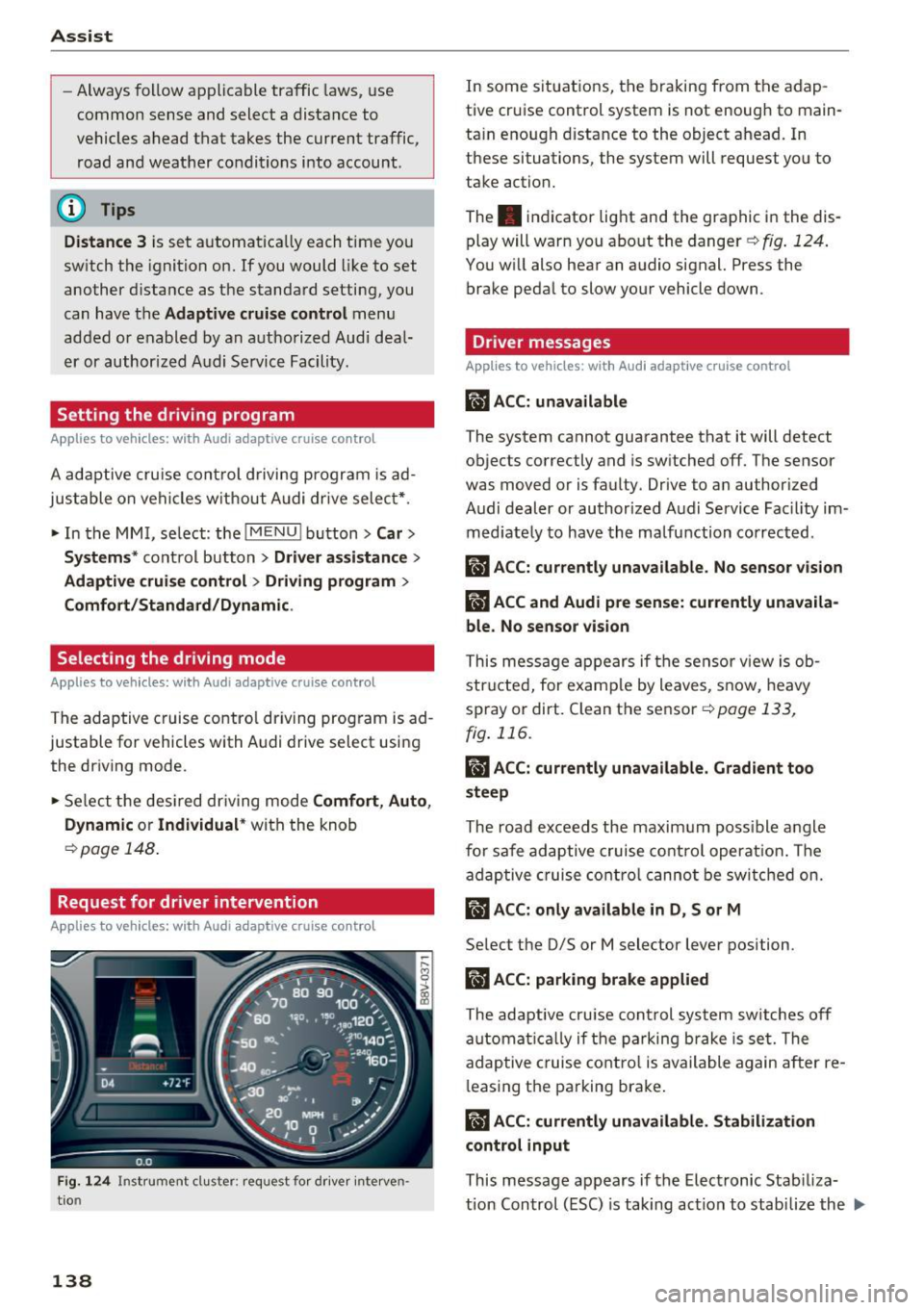
Fig. 1 24 Ins trument cluster: request fo r drive r interven
tio n
138
In some situat ions, the braking from the adap
tive cruise control system is not enough to main
ta in enough distance to the object ahead. In
these situations, the system will request you to
take action.
The . indicator light and the graphic in the dis
play will warn you abo ut the danger
Q fig . 124.
You w ill also hear an audio signal. Press the
brake pedal to slow your vehicle down.
Driver messages
App lies to vehicles: with Audi adaptive cruise control
ill ACC: unavailable
The system cannot guarantee that it will detect
objects correctly and is sw itched
off. The sensor
was moved or is faulty . Drive to an author ized
Audi dealer or authorized Audi Service Fac ility im
med iate ly to have the ma lfunction corrected .
ill ACC: currently una vailable. No sensor v is ion
IIJ ACC and Audi pre sen se: currently una vaila
ble. No sensor vis ion
This message appears if the sensor v iew is ob
structed, for e xamp le by leaves, snow, heavy
spray or dirt. Clean the sensor
c:>page 133,
fig . 116 .
II ACC: currently unavailable . Gradient too
steep
The road exceeds the maxim um poss ible angle
fo r safe adaptive cruise control operat ion. The
adaptive cruise co ntro l canno t be switched on.
ill ACC: only a vailable in D, Sor M
Select the 0/5 or M selector lever position.
IIJ ACC: pa rking brake applied
The adaptive cru ise control system sw itches off
a utomat ica lly if the parking brake is set. The
adaptive c ruise cont ro l is available again after re
l easing the parking brake .
II ACC: currently unavailable . Stabilization
control input
This message appears if the Electronic Stab iliza
tion Con trol (ESC) is taking action to stab ilize the ..,.
Page 155 of 328
.... N
0 > CX)
rl I.Cl U"I
rl I.Cl ....
Switching on/off
App lies to vehicles: with parking system plus
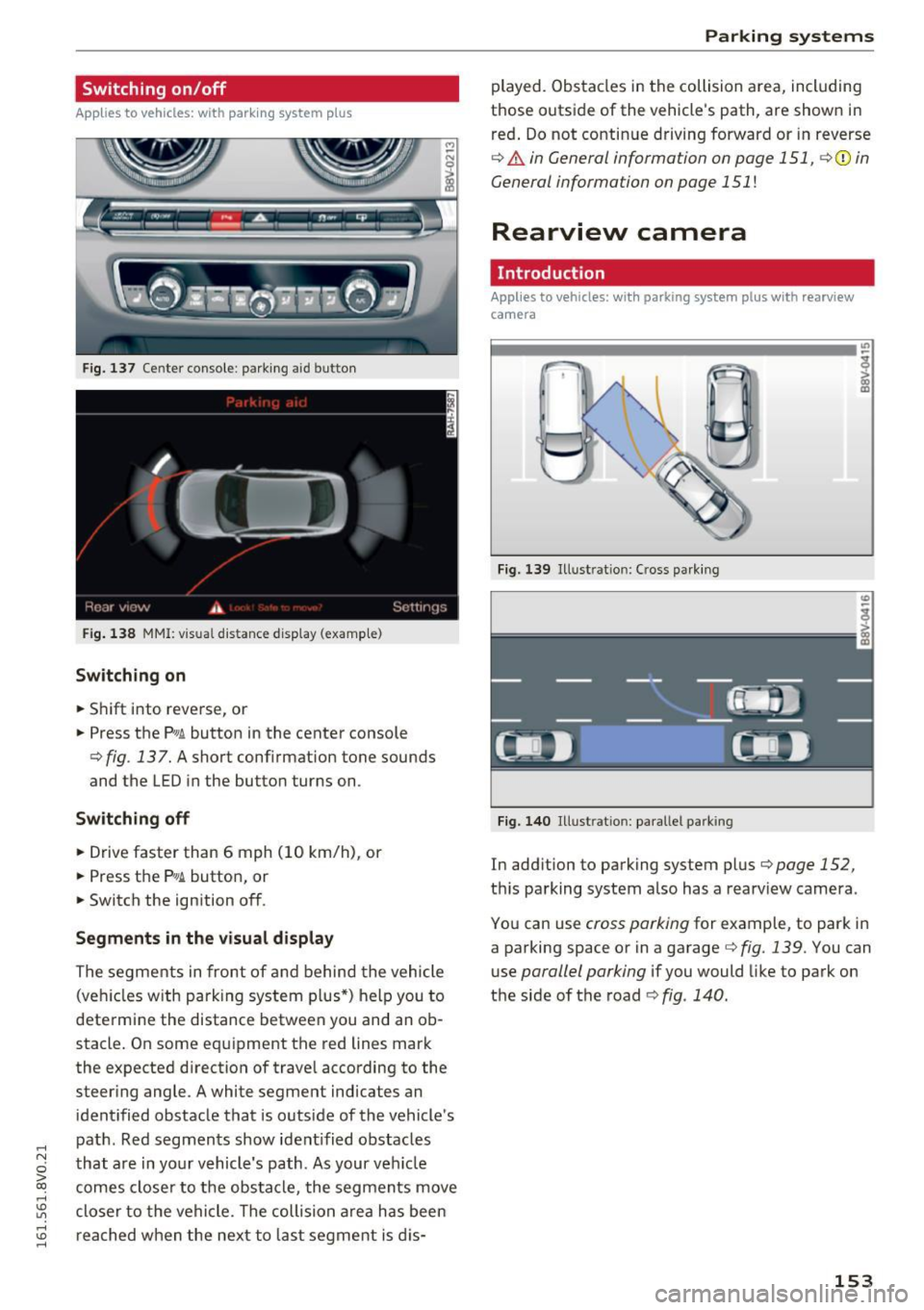
Fig. 137 Center console: parking aid button
Fig. 138 MMI: v is u al distance display (examp le)
Switching on
• Shift into reverse, or
• Press the
Pw .6. button in the center console
¢ fig . 137. A short conf irmation tone sounds
and the LED in the button turns on .
Switching off
• Drive faster than 6 mph (10 km/h), or
• Press the
?1
1.6. button, or
• Switch the ignition off.
Segments in the visual display
The segments in front of and behind the vehicle
(veh icles w ith parking system plus*) help you to
determine the distance between you and an ob
stacle. On some equipment the red lines mark
the expected d irection of travel according to the
steer ing angle . A white segment indicates an
identified obstacle that is outside of the vehicle's
path . Red segments show ident ified obstacles
that are in your vehicle's path . As your veh icle
comes closer to the obstacle, the segments move
closer to the vehicle. The collision area has been
reached when the next to last segment is dis-
Parking systems
played. Obstacles in the collision area, including
those outside of the veh icle's path, are shown in
red. Do not continue driving forward or in reverse
¢ & in General information on page 151 , ¢(i) in
General information on page
151 !
Rearview camera
Introduction
Appl ies to vehicles: with parking system plus with rearview
camera
Fig. 139 Illust ratio n: Cross park ing
Fig. 140 Illust ratio n: paralle l park ing
In add ition to parking system plus¢ page 152,
this parking system also has a rearv iew camera .
You can use
cross parking for example, to park in
a parking space or in a garage ¢
fig. 139 . You can
use
parallel parking if you would like to park on
the side of the road ¢
fig. 140.
153
Page 159 of 328
,....,
N
0 > co ,....,
A ppl ies to vehicles: with parkin g system plus/rearview cam·
era
The display and warning tones con be adjusted in
the MMI.
~ Select: the I MENU ! button >Car > Systems *
control button > Driver assistance > Parking
aid .
Display
On * -
an op tic al d isp lay is shown for the parking
system plus, a rearview camera image is s hown
for parking system plus with rearv iew camera* .
Off -Whe n the par king system is switched off,
only audib le sign als are give n.
Signal tones
Front volume -
volume for the front and side*
a rea
Rear volume -volume for t he rear area
Front frequenc y-frequency for the front and
side * area
Rear frequency -frequency fo r the rear area
Music volume during nav . prompts -the volume
of the a udio/v ideo so urce is lowe red when t he
pa rking system is turned o n.
The new ly selected leve l is demons trated briefly
by the sound generator.
- The warning tones ca n also be adjusted d i
r ec tly from the visua l display or t he rearv iew
cam era image *. Simply pr ess the
Settings
co ntrol bu tton.
- The setti ngs a re auto mat ica lly stored and
ass igned to the remote co ntro l key t hat is in
u se .
Error messages
App lies to vehicles: with par kin g system plus/rearview cam
era
There is an erro r in the system if the LED in the
P111A. button is b linking and you hear a continuous
Parking systems
alarm for a few seconds after sw itch ing on the
par king system or w hen the pa rking system is a l
ready activated. If the error is not cor rected be
fo re you switch off the ignition, the LED in the
Pw ,
button w ill blink the next time you switch on the
park ing system by shifting into reverse.
Parking sy stem plus*
If a sensor is fa ulty, the~ symbol will appear i n
f ront of/behind the vehicle in the MMI display. If
a rear sensor is faulty, only obstacles that are in
areas @and @are shown <=>
page 152, fig. 136.
If a front sensor is fa ulty, only obstacles that are
i n a reas © and @are shown .
Drive to an authorized Audi dealer or authorized
Audi Service Facility immed iate ly to have the
malfu nction corrected.
157
Page 163 of 328
,....,
N
0 > co ,....,
You should only switch sport mode on or switch ESC/ASR off if your driving abilities
and road conditions permi t.
- The stabilization function is limited when
sport mode is sw itched on . T he driving
w heels could spi n and the veh icle cou ld
swerve, espec ially on s lick o r sli ppery road
s u rf aces.
- T here is no veh icle stabilization when ESC/
ASR a re swi tched off.
(D Tips
- ESC/ASR cannot be switched off or sport
mode cannot be sw itched on if t he cru ise
contro l system* or the adaptive c ruise con
tro l* is sw itched on .
- Mal functions in the Audi magnet ic r ide may
make it imposs ible to sw itch the ESC/ASR
off or to switc h sport mode on .
Brakes
New brake pads
New brake pads do not ac hieve the ir full braking
effect during the first 250 mi (400 km) . They
must be "b roken in " fi rs t . However, you can com
pensate for the slightly reduced bra king fo rce by
p ressing firmly o n the brake pedal. Avoid heavy
b raking during the break -in period .
Wear
Brake pad
wear depends largely on the way th e
ve hicl e is driven a nd on operat ing cond itions.
This is especially true if you are d riving frequently
in the c ity and on c urves o r wi th a sporty driving
style.
Operating noise
Noises may occur when bra kin g depend ing on the
speed , braking force and ou ts ide cond it ions s uch
as tempe rature and humidity .
Effect of water and road salt
In certain situations, for example after dr iving
through water, in heavy ra in, after ove rnig ht con
densat ion or after washing your car, the b raking
Intellig ent Technology
effect ca n be reduced by moist ure o r ice on the
bra ke rotors and brake pads . The brakes must be
"d ried" first with a few caref ul brake applica
tions.
At h igher speeds and w ith the wi ndshield wipe rs
tu rned on, the brake pads press against the brake
roto rs fo r a short amount of time. This action
wh ich is not felt by the dr iver happens at reg ular
interva ls and facilit ates a be tter reaction t ime for
the brakes in wet weather .
The braking effect can a lso be reduced if yo u are
driv ing on salted roads and yo u do not app ly the
brakes for long per iods of time . The layer of salt
o n the brake rotors and pads must be wor n off
first whe n the bra kes are applied .
Corrosion
Leaving the vehicle pa rked for long periods of
time, low mileage and avoiding heavy braking
can contribute to corros ion on the brake rotors
and dirty brake pads .
If you usua lly avoid heavy brak ing or if there is
corrosion present, occasiona l heavy brak ing at
high speeds is recommended to clean the b rake
roto rs and pads<=>,& .
Brake system malfunction
if you notice that t he b rake pedal travel has sud
denly gotten larger, t hen a b rake c ircuit may have
failed. Drive to an author iz ed Audi dealer or au
thorized Audi Serv ice Facility immediately to have
t h e problem corrected. On the way there, drive
with red uced speed and keep in mind that a long
bra king d ista nce and increased pressu re on the
br ak e pedal w ill be necessary.
Low brake fluid level
When the brake fluid level is low, malfunctions in
the brake system may occur . The b rake fluid level
i s elec tronica lly monito red .
Brake booster
The brake booster amp lifies the press ure you ap
ply to the brake pedal. It on ly operates wh ile the
engine is run ning o r when the ignition is switched
on (p lug-i n hyb rid dr ive*) . .,.
161
Page 165 of 328
,....,
N
0 > co ,....,
• Do not drive vehicle: steering defective
If th is ind icator light turns on and stays on and
this message appears, the power steering may
h ave fa iled.
Do
not cont inue driving . See an authorized Aud i
dealer or authorized Aud i Serv ice Faci lity for as
sistance.
• Do not dr ive vehicle: steering defective
There is a malfunction in the electronic steering
lock. You cannot turn the ignition on.
Do
not tow your vehicle beca use it cannot be
steered. See an authorized A udi dealer or author
ized Audi Service Facility for assistance.
':r- ij Steering malfunction : you can continue driv
ing
I f the indicator light turns on, the steering whee l
may be more diff icult to move o r more sensitive
than usual. The steering wheel may also be at an
angle when driving st raight.
Drive slowly to an author ized Audi dealer or au
thor ized Audi Service Facility to have the mal
function corrected.
1;11 Steering lock: system fault! Please contact
Service
There is a malfunction in the electronic steering
lock.
Drive to an authorized Aud i dea ler or authorized
Aud i Service Faci lity immediately to have the
malfunct ion corrected.
A WARNING -
Have the system malfunction corrected as
soon as possible by an authorized Audi dealer
or authorized Audi Service Facility, as this in
creases the risk of an accident .
(D Tips
If the . or t~ff indicator light only stays on
for a short time, you may continue dr iv in g.
Intelligent Technology
All wheel drive (quattro)
Applies to vehicles: with all wheel drive
In all wheel drive, all four wheels ore powered.
General information
In all wheel dr ive, the driving power is div ided be
tween all fou r wheels . This happens automatical
ly depending on yo ur driving behavior as well as
the current road conditions . A lso see
c> page 159, Electronic stabilization control
(ESC).
The all whee l drive concept is designed for high
engine power. Yo ur vehicle is exceptionally pow
erfu l and has excellent driving characteristics
both under normal driving conditions and on
snow and ice. Always read and follow safety pre
cautions
c> ,&. .
Winter tires
By using all wheel drive, your vehicle has good
forward motion with standard tires in winter con
ditions. However, in winter we recommend using
winter or all season tires on
all four wheels, be
cause this will improve the
broking effect.
Snow chains
If there are snow chain laws, snow chains must
also be used on veh icles w ith all wheel dr ive
c> page 269, Snow chains.
Replacing tires
For vehicles with a ll wheel d rive, only wheels with
the same rolling circumference should be used .
Avoid wheels with different tread depths
c> poge 260.
Offroad vehicle?
Your Audi is not an offroad vehicle -there is not
enough ground clearance. For this reason, avoid
difficu lt terrain . Also see<=)
page 302.
A WARNING
--Also, in veh icles with all whee l drive, adapt
your driving style to the current road and
traffic cond itions. Do not let the increased
safety prov ided tempt you into taking r isks.
163