transmission AUDI S3 2016 User Guide
[x] Cancel search | Manufacturer: AUDI, Model Year: 2016, Model line: S3, Model: AUDI S3 2016Pages: 328, PDF Size: 81.78 MB
Page 97 of 328

,....,
N
0 > co ,....,
Applies to vehicles: with launch control
The Launch Control Program enables maximum
acceleration .
Requirement: the engine must be at operating
temperature and the steering wheel must not be
turned .
.. With the engine running, press the
l~OFF ! but
ton briefly one time
ll .
.. Pull the selector lever back out of the D/S posi
tion briefly to select the S position, or press it
toward the right into the tiptronic pos ition or
select the
D ynami c driving mode in drive se
lect*
~page 148.
.. Press the b rake peda l firmly wi th you r left foot
and hold it all the way down for at least 1 sec
ond.
.. At the same time, press the gas pedal all the
way down with your right foot until the engine
reaches and stays at a high RPM level.
.. Remove your left foot from the brake.
A WARNING
-Always adapt yo ur driv ing to the traffic flow.
- Only use Launch Control when road and traf-
fic cond itions allow it and other dr ivers will
not be endangered or impacted by you r d riv
ing and the vehicle's accele ration.
- Please note that the drive whee ls can sp in
and the vehicle can break away when sport
mode is swit ched o n, especia lly when the
road is s lippery.
- Once t he vehicle has sta rted moving, press
the
I $? OFF ! button briefly to t urn the sport
mode off.
(D Tips
- The transmiss ion temperature may increase
s ignificantly after using the lau nch cont rol
program.
If that happe ns, the program m ay
l) In vehicles w ith a d river information system, an ESC light
in the instrument cluster stays o n continuous ly and the
message
Stabili za tion contro l (E SC ): sport . Warning! Re·
stricted st abi lity
appears temporar ily.
Autom atic tran sm iss ion
not be ava ilab le for a few minutes. It will be
avai lab le again after a cool-down period.
- Whe n accelerating using the launch contro l
program, all vehicle parts a re su bject to
heavy loads. This can lead to increased
wear.
Emergency mode
Applies to vehicles: wit h S tronic transmiss ion
In the event of o system mo/function, there is on
emergency program.
If all of the selector lever positions are hig hlight
ed with a light background in the instrument
cluster disp lay, there is a system malfunction and
the S tronic transmission is running in the emer
gency program. The vehicle can still be driven in
emergency mode, but only with reduced speed
and not in all gears . In some cases, the vehicle
cannot drive in rever se .
(D Note
If the transm ission runs in emergency mode,
drive to an authorized A udi dealer or author
iz ed Audi Se rvice Facility immed iate ly to have
the malfunc tion corrected.
Transmission malfunction
• Tran smi ssion malfunction ! Pl ea se stop the
vehicle and select P
The re is a ma lfunction in the transmission. Park
the vehi cle secure ly and do not cont in u e driv ing.
See a n author ized Audi dealer or au thori zed A udi
Service Facility for assis tance.
• Tran smission overheating! Plea se stop the
vehicle!
The transmiss ion is too hot and can become dam
aged. Stop and let the transmiss ion cool w ith the
engi ne r unning (at idle) in the P se lector lever po
s it ion. Then the ind icator lig ht and the message .,.
95
Page 98 of 328

Automatic transmission
turn off, drive to an authorized Audi dea ler or au
thorized Audi Service Facility immediate ly to have
the malfunction corrected . If the ind icator light
and the driver message do not turn off, do not
continue driving. See an authorized Audi dealer
or authorized Audi Service Facility for assistance .
rm Transmission malfunction: you can continue
driving
Drive to an autho rized Audi dea ler or authorized
Audi Service Facility immediately to have the
malfunct ion corrected .
rm Transmission malfunction: no reverse gear
(you can continue driving)
Drive to an authorized Aud i dea ler or authorized
Aud i Service Facility immediately to have the
malfunct ion corrected.
[O] Transmission malfunction: You can continue
driving in D until engine off
Drive the vehicle away from moving traffic and
park. See an authorized Audi dealer or authorized
Audi Service Facility for assistance .
rm Transmission overheating! Please adapt
driving style
Continue driving moderately. When the indicator
light turns off, you can continue driving normal
ly .
rm Transmission: Press brake pedal and select
gear again.
If the transmission malfunctions because the
temperature is too high, a message appears
when the transmission is cooled.
96
Selector lever emergency release
App lies to vehicles: wit h S tronic transmission
If the vehicle's power supply fails, the selector
lever can be released in an emergency.
Fig. 86 Se lector leve r: remov ing the cover
Fig. 87 Selector lever: us ing the emergency release to
move out of the Pa rk posit ion
The emergency release mechanism is located in
the right area under the selector lever shift gate.
Using the emergency release can be complicated.
We recommend contacting an authorized Audi
dealer or authorized Audi Service Facility for as
sistance, if necessary .
The screwdr iver from the vehicle tool kit located
i n the luggage compartment is needed to for the
eme rgency release¢
page 280 . Use the flat side
of the reversible screwdriver blade.
Removing the selector lever cover
.,. Set the parking brake(®)¢,& to secure your
vehicle from rolling .
.,. Insert the flat side of the screwdriver s ideways
in the slot near the s hift cover and pry the shift
cover up
¢ fig. 86 .
.,. Pull up the corners of the shift cover carefully
with your hands and fo ld it over the shifter
knob
¢ fig . 87. ..,.
Page 102 of 328
e-tron
serious damage and/or a decrease of the ca
pacity void coverage under the New Vehicle
Limited Warranty.
Starting/driving the vehicle
Applies to veh icles: w ith plug-in hybrid drive
The vehicle is started and stopped with the
I START S TOP I button. Also note the informa
tion here ¢
page 82.
Establishing drive ready mode
See¢.& in Introduction on page 98.
Requ irement: a charging cable must not be con
nected to the vehicle ¢
page 121 and the selec
tor lever must be in the P or
N position.
- Press the brake pedal.
- Press the
I START STOPI button .
When the vehicle enters drive ready mode, the
status message
e-tron READY appears briefly in
the instrument cluster display and the needle in
the power meter points to
READY r:::;, page 101 .
Driving
The vehicle starts with the electric motor after
establishing the drive ready mode and if the con
ditions for electric drive mode have been met
¢page 103.
The conditions to drive are essentially the same
for the automatic transmission : ¢
page 89
You and your passengers should anticipate the
possibility of a sporty acce leration.
Ending drive ready mode
- Place the selector lever in the P position.
- Switch the ignition off with the
le!> START STOPI
button.
Vehicle sound
The vehicle generates electronic vehicle sound at
speeds up to approximately 2S mph (40 km/h) so
that your vehicle can be heard from the outside
when in electric drive mode. The veh icle sound
automatically fades out at higher speeds when
the sounds from the tires and wind start increas
ing .
100
Switching the ignition on/off
You can switch the ignit ion on without establish
ing drive ready mode.
- Press the
I START STOP ! button to switch the
ign ition on and off. Do not press the brake ped
al while doing this.
The needle stays pointing to
OFF@ r:::;, page 101,
fig. 88 when the ignit ion is switched on.
No indicator lights stay turned on when the igni
tion is switched off .
Ignition is switched off automatically
To prevent the battery from draining, the ignition
will switch off automatically under the following conditions:
- The vehicle must have already been driven.
- The vehicle must be stationary.
- The gaso line engine must not be runn ing .
- The driver 's door must be open .
- The driver's safety belt must be unbuckled.
- The brake pedal must not be pressed.
In this case, the activated low beam is replaced
by the parking light. The message
Side marker
lights automatically shut off in 30 minutes. See
owner's manual
appears in the instrument clus
ter display . The parking lights w ill switch off af
ter approximately 30 minutes or when you lock
the vehicle.
If the gasoline engine was not stopped, the mo
tor continues running and the ignition does not
automat ically switch off
r:::;, ,& .
A WARNING
To reduce the risk of poisoning, never allow
the engine to run in confined spaces.
(D Tips
The vehicle cannot start when outside tem
peratures are below-18
°F (-28 °()
r:::;,page 101.
-
Page 131 of 328
,....,
N
0 > co ,....,
turning, stopping and backing up in an area away
from traff ic. Keep practicing until you have be
come completely familiar with the way your vehi
cle-trailer combination behaves and responds.
Backing up is difficult and requires practice.
Backing up with a trailer generally requires steer
ing action opposite to that when backing up your
vehicle without a trailer.
Maintain a greater distance between your vehicle
and the one in front of you. You wi ll need more
room to stop. To compensate for the trailer, you
will need a larger than normal turning radius.
When passing, remember that you cannot accel
erate as fast as you norma lly would because of
the added load. Make sure you have enough room
to pass. After passing, allow plenty of room for
your trailer before changing lanes again.
Avoid jerky starts, sharp turns or rap id lane
changes.
@ Tips
- Do not tow a trailer during the break-in peri
od of your vehicle.
- If you tow a trailer, your Audi may require
more frequent maintenance due to the ex
tra load
¢ page 306.
Parking on a slope
Do not pork on a slope with a trailer. If it cannot
be avoided, do so only ofter doing the following:
When parking:
.. Apply the foot brake .
.. Have someone pla ce chocks under both the ve
hicle and the trailer wheels .
.. With chocks in place, slowly release the brakes
until the wheel chocks absorb the load .
.. Turn the wheels towards the curb .
.. Apply the parking brake .
.. Select the P selector lever position.
When restarting after parking :
.. Apply the foot brake.
.. Start the engine.
.. Select the D/S selector lever position.
Trailer mode
.. Release the parking brake and slowly pull out
and away from the wheel chocks.
.. Stop and have someone retrieve the whee l
chocks.
{!) Tips
If you move the selector lever of the automat
ic transmission to P before applying the park
ing brake and before blocking the wheels, you
may have to use more force later to move the
lever out of the P posit ion.
129
Page 150 of 328
Ass is t
Driver messages
Applies to vehicles: with Audi side assist
If the side assist switches off automatically, a
message appears i n the ins trument cluster dis
p lay .
@j Audi side assist : cur rentl y unav ailable No
s en so r vi sion
The radar senso rs ' vision is affected. Do not cover
the area in front of the sensors with b ike wheels,
stickers, dirt or other objects. Clean the area in
front of the sensors, if necessary~
page 146,
fig. 133.
@j Audi side a ssi st : cur rentl y una vailable
Side assist cannot be switched on tempo rar ily be
cause there is a malfunction (for example, the
battery charge level may be too low).
@j Audi side a ssist: System fault!
The system cannot guarantee that it wi ll detect
ve hicles co rrectly and it is switched off. The sen
sors have been d isp laced or are faulty. Have the
system checked by an authorized Audi dea ler or
authorized Audi Service Facility soon.
Audi drive select (drive settings)
Introduction
Applies to vehicles: with Audi drive select
Audi drive select makes it possible to experience
different types of vehicle settings in one vehicle .
The driver can select from three
C omfort , Auto
and Dynamic modes using the r.1:a button in the
center console or the MMI to switch between a
sporty and a comfortable dr iving mode, for ex
ample . In the
In div idual * mode, the vehicle set
tings can be adjusted to your personal preferen
ces. This makes it possible to combine settings
such as a sporty eng ine set ting with smooth
s teer ing .
A WARNING
Using Audi drive select incorrectly can lead to
collisions, othe r accidents and serious inju
ries .
148
· Description
Applies to vehicles: with Audi drive select
The vehicle setup in each mode depends on the
vehicle's features. However, the eng ine and
steering are a lways affected.
Engine and automatic tr ansmiss ion
Depend ing on the mode, the engine and auto
matic transmission* respond more qu ickly or in a
more ba lanced manner to acce lerato r pedal
movements.
Adaptive damper s (Audi magnetic ride )*
The adaptive dampers use sensors to record in
formation regarding steering movements, brak
i ng and acce le ration operations by the dr iver,
r oad su rface, driving speed, and load. W it h Aud i
drive select you can adjust the adaptive dampers
spo rty (dynamic), comfortable (comfort) or ba l
anced (auto).
Steering
The steering adapts in terms of steering ass is
tance. There are d ifferent modes
c;;:> page 149.
Ind irect steering that moves easi ly as in comfort
mode is especia lly suited to long drives on a high
way. The dynamic mode provides sporty, direct
steering .
For vehicles with progress ive steering* the steer
ing performance is more agi le .
Corn ering light *
The cornering light adjusts when driv ing on
cu rves at speeds between 6 mph (10 km/h) and
68 mp h (110 km/h). The pivoting act ion and the
li gh ting are also adapted to the mode.
Adaptive cruise control*
The behavio r whe n accelerating can be adjusted
from comfortable to sporty, depending on the
Audi drive select mode. Adaptive cr uise control
also responds to the dr iving beh avior of the vehi
cle ahead in a more conservative or sporty man-
ner .
1111>
Page 151 of 328
.... N
0 > CX)
rl
"' U"I
rl
"' ....
@ Tips
In some models, the maximum vehicle speed
can only be reached in the auto and dynamic
modes.
Selecting the driving mode
Appl ies to vehicles: with Audi d rive select
You con choose between comfort, auto, dynamic
and individual* .
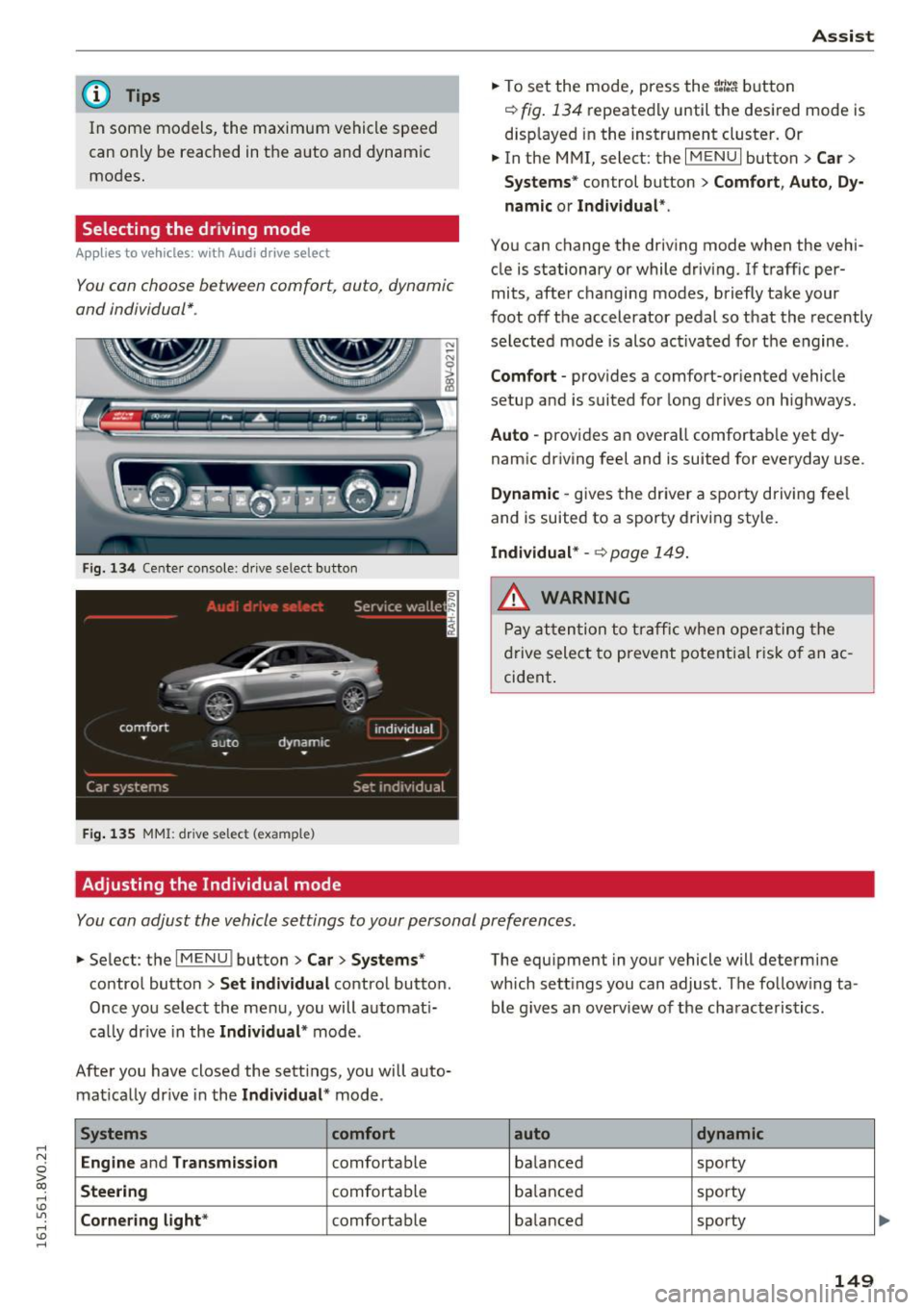
Fig. 134 Cente r console : dr ive select button
F ig. 135 MMI: drive select (example)
Adjusting the Individual mode Assist
.,.
To set the mode, press the r:/tc'i button
~ fig. 134 repeatedly until the desired mode is
displayed in the instrument cluster. Or
.,. In the MMI, select: the
I MENU I button > Car >
Systems"
control button > Comfort, Auto, Dy
namic or Individual *.
You can change the driving mode when the vehi
cle is stationary or while driving. If traff ic per
mits, after changing modes, briefly take your
foot off the accelerator pedal so that the recently
selected mode is also activated for the engine .
Comfort -provides a comfort-or iented vehicle
setup and is suited for long drives o n highways.
Auto -provides an overall comfortab le yet dy
namic driving feel and is suited for everyday use .
Dynamic -gives the driver a sporty driving fee l
and is suited to a sporty driving style.
Individual* -~ page 149.
A WARNING
Pay attention to traffic when operating the
drive select to prevent potential risk of an ac
cident .
You can adjust the vehicle settings to your personal preferences .
.,. Select : the IMENU ! button> Car> Systems*
control button > Set individual control button.
Once you select the menu, you will automat i
cally drive in the
Individual * mode.
After you have closed the sett ings, you will auto
matically drive in the
Individual * mode.
Systems comfort
Engine
and Transmission comfortable
Steering comfortable
Cornering light* comfortable The equipment
in your vehicle will determine
which sett ings you can adjust. The follow ing ta
ble g ives an overview of the characteristics .
auto dynamic
balanced sporty
balanced sporty
balanced sporty
149
Page 257 of 328
be happy to provide more infor
mation.
® Mud and snow capability
"M/5 " or "M+S" indicates the tire
has character istics that make it
suitable for driving on mud and
snow .
& indicates a winter tire .
@Composition of the tire cord
and materials
The number of plies indicates the
number of rubberized fabric lay
ers in the tire. In general: the
more layers , the more weight a
tire can carry . Tire manufacturers
must also specify the materials
used in the tire. These include
steel, nylon, polyester and other
materials.
@ Maximum permitted load
This number indicates the maxi
mum load in kilograms and
pounds that the tire can carry.
@ Uniform tire quality grade
standards for treadwear ,
traction and temperature
resistance
Tread wear, traction and temper
ature ranges
¢ page 271.
~ @ Running direction
g
~ ...
'° V, ....
'° ....
The arrows indicate the running
direction of unidirect ional tires .
Tires and wheels
You must always follow the speci
fied runn ing d irection
¢ page 288 .
@ Maximum permitted
inflation pressure
This number ind icates the maxi
mum pressure to which a tire can
be inflated unde r normal operat
ing conditions.
Glossary of tire and loading
terminology
Accessory weight
means the combined weight (in
excess of those standard items
which may be replaced) of auto
matic transmission , power steer
ing , power brakes, power win
dows, power seats, radio, and
heater, to the extent that these
i tems are available as facto ry-in
stalled equipment (whether in
stalled or not) .
Aspect ratio
means the ratio of the height to
the width of the tire in percent .
Numbers of 55 or lower indicate a
low sidewa ll for improved steer
ing response and better overall
handling on dry pavement. .,.
255
Page 285 of 328
,....,
N
0 > co ,....,
Appl ies to vehicles: W ith t ire repa ir set
.,. Adhe re the sticke r that says "max. SO mph
(max. 80 km/h)" that is p rovided w ith the t ire
mobility k it within the driver's fie ld of vision .
.,. Stop the vehicle after driving for about 10 mi
nutes and check the tire pressure .
.,. lfthe tire pressure is lower than 19 psi (130
kPA), then the tire is too severely damaged. Do
not cont inue driving. See an authorized Audi
dealer or authorized Audi Service Facil ity for as
s istance .
.,. If the t ire pressure is at least 19 psi (130 kPA),
adjus t the tire pressu re to the spec ified value
~ page 263, Tire pressure . Store the tire pres
sures
~page 273, Storing tire pressures . Drive
to the nearest authorized Audi dealer or au
thorized Audi Serv ice Facility to have the tire re
placed.
A WARNING
If the tire pressure is less than 19 psi
(130 kPA) after 10 minutes of d riving, then
the tire is too severely damaged. Do not con
tinue dr iv ing . See an authorized Audi dealer
or autho rized Audi Service Fac ility for assis
t ance.
A WARNING
Pay a ttent ion to the following after repair ing
the tire:
- Do not drive faster than 50 mph (80 km/h).
- Avoid hard acceleration, brak ing sharp ly,
and fast corner ing.
- The veh icle may become mo re difficu lt to
co ntro l.
-If the t ire is too severely damaged, see an
authorized Audi dealer o r autho rized Aud i
Service Facility for assistance .
@ For the sake of the environment
You can give the used t ire sealant bottle to an
author ized Audi dealer or authorized A udi
Serv ice Facility fo r disposal.
Em ergenc y ass is tanc e
{!) Tips
Remember to obtain a new bott le of sealant
from an authorized A udi dealer or authorized
Audi Service Fac ility after repairing a tire.
Replacing wheels
Before changing a wheel
Observe the following precautions for your own
and your passenger's safety when changing a wheel.
.,. After you experience a t ire failure, pull the car
well away from moving traffic and try to reach
le vel grou nd before you stop~,& .
.,. All passengers should
leave the car and move
t o a safe location (for ins tance, behind the
gua rdrail) ~,& .
.,. Engage the
pa rking brake to prevent your vehi
cle from rolling unintentionally ~ .,& .
.,. Move
sele ctor le ver to po sition P ~ .,& .
.,. If you are tow ing a trai ler, unhitch the trailer
from yo ur vehicle .
.,. Take the jack Q page 280 and the spare tire
~ page 289 out of the luggage compartment.
A WARNING
You o r you r passengers could be injured while
changing a whee l if yo u do not follow these
safety precaut ions :
- If you have a fla t tire, move a safe dis tance
off the road. Turn off the eng ine, turn the
emergency f lashers on and use other warn
ing devices to alert other motorists.
- Make sure that passenge rs wai t in a safe
p lace away from the vehicle and well away
from the road and t raffic.
- To help prevent the vehicle from moving suddenly and possib ly slipping off the jack,
always fu lly set the park ing brake and block
the wheel d iagonally opposite the wheel be
ing changed . When one front whee l is lifted
off the ground, placing the Automatic
Transmission i n P (Park) w ill
not prevent the
veh icle from moving.
~
283
Page 295 of 328
.... N
0 > CX)
rl I.Cl U"I
rl I.Cl ....
No. Equipment
F43 Headlights, lighting
F44 all whee l drive
F47 Rear window wiper
F48 Outer noise amplifier
(Plug-in hybrid
drive*)
Starter, clutch sensor, headlight relay coil,
F49 high-voltage battery (Plug-in hybr id
drive*)
F53 Rear window
defogger
The power seats* are protected via
circuit break
ers
that automatically switch on after a few sec
onds after the overload has been reduced.
(D Tips
Note that the following table was accurate at
the time of printing and is subject to change.
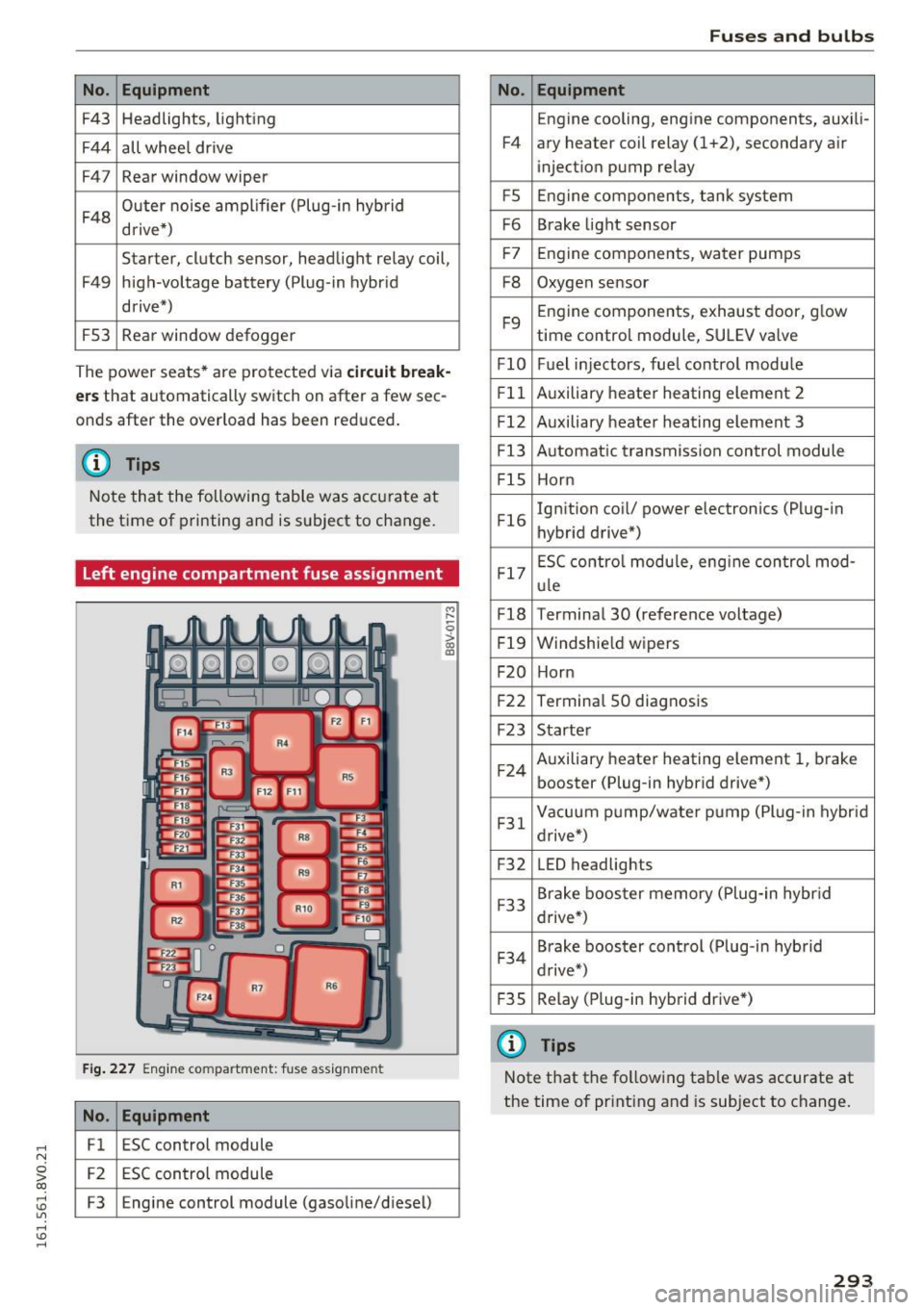
Left engine compartment fuse assignment
Fig. 227 Engine compartment: fuse assignment
No. Equipment
Fl ESC control module
F2 ESC control module
F3 Engine control module (gasoline/d iesel)
M ,-..
0
> co ID
Fuses and bulbs
No. Equipment
Engine cooling, engine components, auxili-
F4 ary heater coil relay (1+2), secondary a ir
injection pump relay
FS Engine components, tank system
F6 Brake light sensor
F7 Engine components,
water pumps
F8 Oxygen sensor
F9 Engine
components, exhaust door, glow
time control module, SULEV va lve
FlO Fuel injectors, fuel control modu le
Fll Auxiliary heater heating element 2
F l2 Auxiliary heater heating element 3
Fl3 Automatic transmission control module
FlS Horn
Fl6 Ignition coil/
power electronics (Plug-in
hybrid drive*)
Fl7 ESC control
module, eng ine control mod -
ule
Fl8 Terminal 30 (reference voltage)
F l9 Windshield wipers
F20 Horn
F22 Termina l 50 diagnosis
F23 Starter
F 24 Auxiliary heater heating element 1,
brake
booster (Plug-in hybrid drive*)
F31 Vacuum
pump/water pump (Plug-in hybrid
drive*)
F32 LED
headlights
F33 Brake booster
memory (Plug-in hybrid
drive*)
F 34 Brake
booster control (Plug -in hybrid
drive*)
F 35 Relay (Plug-in hybrid drive*)
@ Tips
Note
that the fo llowing tab le was accurate at
the time of printing and is subject to change.
293
Page 297 of 328
,....,
N
0 > co ,....,
General
This chapter is intended for trained emergency
crews and working personnel who have the nec
essary tools and equipment to perform these
ope rations.
Starting by pushing or
towing
(D Note
Veh icles with an automatic transmission can
not be started by pushing or towing.
Starting with jumper
cables
If necessary, the engine can be started by con
necting it to the battery of another vehicle.
Plug-in hybrid drive*: the connection points for
the jump start cables vary ¢
page 108.
If the engine should fail to start because of a dis
charged or weak battery, the battery can be con
nected to the battery of
another vehicle, using a
pair of jumper cables to start the engine.
Jumper cables
Use only jumper cables of suffic iently large cross
section
to carry the starter current safely. Refer
to the manufact urer 's specifications.
Use only jumper cables with
insulated term inal
clamps which are distinct ly ma rked:
plus (+) cable in most cases colored red
minus (-) cable
in most cases colored black .
.,&. WARNING -
Plug-in hybrid drive*: you must not give a
jump start with your vehicle. This could cause significant damage to the electrical system in
your vehicle ¢
page 108.
Emergency situations
.,&. WARNING
-
Batteries contain electricity, acid, and gas.
Any of these can cause very serious or fatal in
jury . Follow the instruct ions below for safe
handling of your vehicle's battery.
- Always shield your eyes and avoid leaning over the battery whenever possible.
- A discharged battery can freeze at tempera
tures just below 32 °F (0 °C) . Before con
necting a jumper cable, you must thaw the
frozen battery completely, otherwise it
could explode.
- Do not allow battery acid to contact eyes or
skin. Flush any contacted area with water
immed iate ly.
- Improper use of a booster batte ry to sta rt a
veh icle may cause an exp losion .
- Veh icle batteries generate exp losive gases .
Keep sparks, flames and lit cigarettes away
from batteries.
- Do not try to jump start any vehicle with a
low acid level in the battery .
- The voltage of the booster battery must also
have a 12 volt rat ing. The capacity (Ah) of
the booster battery should not be lower
than that of the discharged battery. Use of
batteries of different voltage or substantial ly different "Ah" rating may cause an explo
sion and personal injury.
- Never charge a frozen battery . Gas trapped
in the ice may cause an explosion.
- Never charge or use a battery that has been
frozen. The battery case may have been
weakened.
- Use of batteries with different voltage or
substantially different Ah rating may cause
an explosion and injury. The capacity (Ah) of
the booster battery should not be lower
than that of the discharged battery .
- Before you check anyth ing in the eng ine
compartment, always read and heed all
WARNINGS
¢page 236.
(D Note
-App lying a higher voltage booster battery
will cause expensive damage to sensitive
295