Parking AUDI S3 2016 Owner's Manual
[x] Cancel search | Manufacturer: AUDI, Model Year: 2016, Model line: S3, Model: AUDI S3 2016Pages: 328, PDF Size: 81.78 MB
Page 101 of 328
,....,
N
0 > co ,....,
mode, the status message
e-"'1 o I r.-.Al"'Y ap
pears briefly in the instrument cluster display
and the needle in the power meter points to
READY ¢page 101.
-Make sure that the selector lever is in the P
position and the ignition is switched off
when leaving the vehicle.
([) Note
-The high-voltage system can be damaged if
the vehicle underbody comes into contact
with the ground. Immediately drive your ve
hicle to an authorized repair facility and
have it inspected.
- The electric drive motor can become very
hot during operation . Do not stop the vehi
cle if there is oil, fuel residue or other flam
mable substances under or next to the vehi
cle.
Special considerations for the high-voltage
battery
Please first read and note the introductory infor
mation and heed the warnings
¢page 98.
All batteries age with use and over time. There
are things you should know about the care of the
high-voltage battery that will help it keep giving
you good service and reliability over time. Please
read and keep the following information in mind
while you enjoy the performance and economy of
your vehicle.
- Be sure to charge the high-voltage battery be
fore leaving the vehicle parked and unused for a
longer period of time. Ideally the high-voltage
battery should have a charge level between
40% and 60% when parked for a long time.
- If the battery charge level is below 3%, never
park the vehicle for more than 21 days without
charging the high-voltage battery. Should you
have to park the vehicle for a long time, make
sure that the charge level is sufficient to help
prevent the battery from aging prematurely.
- Frequent and consecutive charging of the high
voltage battery when the charge level is above
98% can also decrease the capacity of the high-
e-tron
voltage battery. Make sure the charge level is
below 98% when you start the charging proc
ess.
- Should the vehicle be parked for longer than
2 days at temperatures below -13 °F (-25 °(),
the high-voltage battery could freeze and not
be able to provide energy to the electric motor.
The battery will start working again, once it
warms up . The battery can be warmed up when
the outside temperature rises or when the vehi
cle is garaged appropriately. The battery will al
so warm up when being used (switching on the
air conditioner, the heater or by driving the ve
hicle). Should you have to park your vehicle at
very low temperatures for longer than 1 day,
make sure that the high-voltage battery does
not freeze by parking the vehicle in a garage
that is heated or protected from the outside
temperature.
- The high-voltage battery can be damaged and
the capacity can be decreased when the vehicle
is parked for longer than 24 hours when the
ambient temperature is higher than 118 °F
(48 °C). Always make sure that the high-volt
age battery is not exposed to temperatures
above 118 °F (48 °C) for a long time.
- Never park the vehicle in areas that are likely to
be flooded, such as beaches or river banks, and
never drive the vehicle in WATER, on flooded
roads or through water that is higher than the
bottom of the vehicle body. The high-voltage
battery, along with other vehicle components,
can be damaged severely if the high-voltage
battery is exposed to open water especially for
a longer time. However, you can drive through
water on roads under certain conditions
¢ page 77, Driving through water on roads .
Failure to heed any of these requirements can
age the battery prematurely and lead to a perma
nent decrease of the high-voltage battery's ca
pacity.
(D Tips
Always make sure that the high-voltage bat
tery is not exposed to extremely low and high
temperatures as well as to water especially
for a longer time. Failure to protect and care
for the high-voltage battery can lead to
99
Page 102 of 328
e-tron
serious damage and/or a decrease of the ca
pacity void coverage under the New Vehicle
Limited Warranty.
Starting/driving the vehicle
Applies to veh icles: w ith plug-in hybrid drive
The vehicle is started and stopped with the
I START S TOP I button. Also note the informa
tion here ¢
page 82.
Establishing drive ready mode
See¢.& in Introduction on page 98.
Requ irement: a charging cable must not be con
nected to the vehicle ¢
page 121 and the selec
tor lever must be in the P or
N position.
- Press the brake pedal.
- Press the
I START STOPI button .
When the vehicle enters drive ready mode, the
status message
e-tron READY appears briefly in
the instrument cluster display and the needle in
the power meter points to
READY r:::;, page 101 .
Driving
The vehicle starts with the electric motor after
establishing the drive ready mode and if the con
ditions for electric drive mode have been met
¢page 103.
The conditions to drive are essentially the same
for the automatic transmission : ¢
page 89
You and your passengers should anticipate the
possibility of a sporty acce leration.
Ending drive ready mode
- Place the selector lever in the P position.
- Switch the ignition off with the
le!> START STOPI
button.
Vehicle sound
The vehicle generates electronic vehicle sound at
speeds up to approximately 2S mph (40 km/h) so
that your vehicle can be heard from the outside
when in electric drive mode. The veh icle sound
automatically fades out at higher speeds when
the sounds from the tires and wind start increas
ing .
100
Switching the ignition on/off
You can switch the ignit ion on without establish
ing drive ready mode.
- Press the
I START STOP ! button to switch the
ign ition on and off. Do not press the brake ped
al while doing this.
The needle stays pointing to
OFF@ r:::;, page 101,
fig. 88 when the ignit ion is switched on.
No indicator lights stay turned on when the igni
tion is switched off .
Ignition is switched off automatically
To prevent the battery from draining, the ignition
will switch off automatically under the following conditions:
- The vehicle must have already been driven.
- The vehicle must be stationary.
- The gaso line engine must not be runn ing .
- The driver 's door must be open .
- The driver's safety belt must be unbuckled.
- The brake pedal must not be pressed.
In this case, the activated low beam is replaced
by the parking light. The message
Side marker
lights automatically shut off in 30 minutes. See
owner's manual
appears in the instrument clus
ter display . The parking lights w ill switch off af
ter approximately 30 minutes or when you lock
the vehicle.
If the gasoline engine was not stopped, the mo
tor continues running and the ignition does not
automat ically switch off
r:::;, ,& .
A WARNING
To reduce the risk of poisoning, never allow
the engine to run in confined spaces.
(D Tips
The vehicle cannot start when outside tem
peratures are below-18
°F (-28 °()
r:::;,page 101.
-
Page 126 of 328
e-tron
(D Tips
-You can set the timer a maximum of 7 days
in advance.
- You can operate the climate control in the
vehicle interior when the high-voltage bat
tery is charging using the charging timer
c>page 116.
-Make sure the time and date match in the
MMI settings so that the timer can function
properly. Refer to the MMI Operating Man
ual for setting the date and time.
- The auxiliary heating or auxiliary heating/
air conditioning* can run longer after the
departure time is reached.
Audi connect e-tron
services
General information
A pp lies to ve hicles : w ith plug- in hy brid drive
With Audi connect e-tron services l), you can ac
cess various information or control individual
functions remotely using mobile devices (such as
a smartphone) or a web portal.
To use Audi connect e-tron services
l), please
note the following:
- You will need to register for Audi connect e
tron services at
myaudiconnect .com. You can
access and manage e-tron services and features
at
etron.audiusa.com. If you need assistance
with your Audi A3 e-tron EV services, you can
contact customer service at 844-573-8766.
- Your mobile devices must be compatible.
A WARNING
Read and follow the safety precautions in
your MMI Operating Manual.
l) Wireless serv ice is provided by a thir d- part y provider.
-
Please contact your dea le r or call 877 -505 -2834 for more
informat ion about your carrier. Co nnected dev ices may
not be 4G -capab le. Full speeds avai lable but may be
slowed due to excessive usage, locatio n, coverage and
othe r factors. Coverage not available everyw here . See cov
erage map for your Audi co nnect data carrier for more in
format ion.
124
· Vehicle data
App lies to vehicles : wi th plug-i n hybrid drive
The Dr iver Information System collects data un
der certain conditions and sends it to a server.
When data is stored, you can data such as the ex
amples listed below using the Audi connect e
tron services:
- Duration of the drive in hours and minutes,
- average speed driven in mph (km/h),
- distance driven in miles (km),
- average electric consumption .
For additional information on the Driver Informa
tion System, refer to
c> page 28, Driver informa
tion system.
Doors and lights
App lies to v ehicl es: wi th plug-in hybrid drive
You can access and display the current status of
the following vehicle data on your mobile devices
without having to be inside the vehicle.
- If the vehicle doors and lids are open/closed,
- If the parking l ights are on/off.
For additional information on opening and clos
i ng the doors or for the vehicle light ing, refer to
c> page 3 5, Opening and closing or to c> page 46,
Exterior lighting.
(D Tips
-If the high-voltage battery is not charged,
the amount of access requests is limited to
15 after switching off the ignition. This
helps conserve the 12 volt vehicle battery.
You cannot contro l functions or access in
formation if the charge level of the 12 volt
vehicle battery is too low.
- If at least two minutes have passed after
the last time the ignition was switched off,
Page 127 of 328
,....,
N
0 > co ,....,
as needed after switching the ignition on/
off again.
Vehicle status
Applies to vehicles: with plug- in hybrid drive
You can access various vehicle statuses using the
services, such as:
- high-voltage battery charge level,
- electric range,
- mileage,
- next inspection.
For addit ional information, refer to¢
page 101,
Power meter overview
and ¢ page 102, Range
display.
A WARNING
Do not be misled by the status report displays
by ignor ing messages and/or illuminated
warning and indicator lights in the vehicle.
This could lead to break downs in on the road,
accidents and serious injuries.
@ Tips
- If the high-voltage battery is not charged,
the amount of access requests is limited to
15 after switching off the ignition. This
helps conserve the 12 volt vehicle battery.
You cannot control functions or access in
formation if the charge level of the 12 volt
vehicle battery is too low.
- If at least two minutes have passed after
the last time the ign ition was switched off,
you can reset the access counter back to "0"
as needed after switching the ignition on/
off again .
Vehicle position
Applies to vehicles: with plug -in hybrid drive
The vehicle collects data under certa in conditions
and sends it to a server.
When data is stored, you can data such as the ex
amples listed below using the Audi connect e
tron services:
- Vehicle location display
e-tron
-Display of one's own location
- Route to your vehicle
If your mob ile dev ice also has a navigation func
tion, you can nav igate to your last known parking
location .
For example, you have the option to show the
route to your vehicle and to send the correspond
i ng locations.
(D Tips
- The new parking locat ion cannot be deter
m ined with this service if the vehicle is
moved after shutting the vehicle off and
w ithout switching the ignition on and off
again, for example when being towed or if
the vehicle is stolen .
-If the vehicle is moved and shut off again
using the second key, for example, the new
park position is transmitted to the
server af
ter removing the key.
Charging
Applies to vehicles: with plug- in hybrid drive
You can contro l and access the high-voltage bat
tery ch arging process remotely using these
serv
ices. You have the following options:
- check the battery charge level,
- start/end the charging process,
- program the charging t imer with/without cl i-
mate control,
- deactivate/activate the charging timer.
For additional information, refer to¢
page 112,
Charging the battery with the Audi e-tron charg
ing system.
A WARNING
Only perform charging functions on the high
voltage battery if the vehicle is shut off cor
rectly, is connected to a suitable socket and if
the ignition is switched off.
125
Page 131 of 328
,....,
N
0 > co ,....,
turning, stopping and backing up in an area away
from traff ic. Keep practicing until you have be
come completely familiar with the way your vehi
cle-trailer combination behaves and responds.
Backing up is difficult and requires practice.
Backing up with a trailer generally requires steer
ing action opposite to that when backing up your
vehicle without a trailer.
Maintain a greater distance between your vehicle
and the one in front of you. You wi ll need more
room to stop. To compensate for the trailer, you
will need a larger than normal turning radius.
When passing, remember that you cannot accel
erate as fast as you norma lly would because of
the added load. Make sure you have enough room
to pass. After passing, allow plenty of room for
your trailer before changing lanes again.
Avoid jerky starts, sharp turns or rap id lane
changes.
@ Tips
- Do not tow a trailer during the break-in peri
od of your vehicle.
- If you tow a trailer, your Audi may require
more frequent maintenance due to the ex
tra load
¢ page 306.
Parking on a slope
Do not pork on a slope with a trailer. If it cannot
be avoided, do so only ofter doing the following:
When parking:
.. Apply the foot brake .
.. Have someone pla ce chocks under both the ve
hicle and the trailer wheels .
.. With chocks in place, slowly release the brakes
until the wheel chocks absorb the load .
.. Turn the wheels towards the curb .
.. Apply the parking brake .
.. Select the P selector lever position.
When restarting after parking :
.. Apply the foot brake.
.. Start the engine.
.. Select the D/S selector lever position.
Trailer mode
.. Release the parking brake and slowly pull out
and away from the wheel chocks.
.. Stop and have someone retrieve the whee l
chocks.
{!) Tips
If you move the selector lever of the automat
ic transmission to P before applying the park
ing brake and before blocking the wheels, you
may have to use more force later to move the
lever out of the P posit ion.
129
Page 140 of 328
Ass is t
- Always follow applicable traffic laws, use
common sense and select a distance to
vehicles ahead that takes the current traffic,
road and weather conditions into account .
(D Tips
Distan ce 3
is set automatically each time you
switch the ignition on. If you would like to set
another d istance as the standard setting, you
can have the
Ad apti ve cruis e control menu
added or enabled by an authorized Aud i dea l
er or author ized Audi Se rvice Facility.
Setting the driving program
Applies to vehicles: with Audi adaptive cruise control
A adaptive cru ise cont rol d riving program is ad
justable on veh icles w ithout A udi drive selec t*.
• In the MMI, se lect: the
I MENU I b utton > C ar >
Sy stem s*
cont rol button > Drive r assi stance >
Adaptiv e crui se c ontrol > Driving program >
Comfort /S tandard /Dynami c.
Selecting the driving mode
Applies to veh icles: with Audi adaptive cruise control
The adaptive cruise contro l dr iving program is ad
justable for vehicles with Audi drive select usi ng
the driving mode.
• Se lect the des ired dr iving mode
C o mfort , Auto ,
Dynamic
o r Indi vidual * with the knob
Qpoge 148 .
Request for driver intervention
Applies to vehicles: with Audi adaptive cruise control
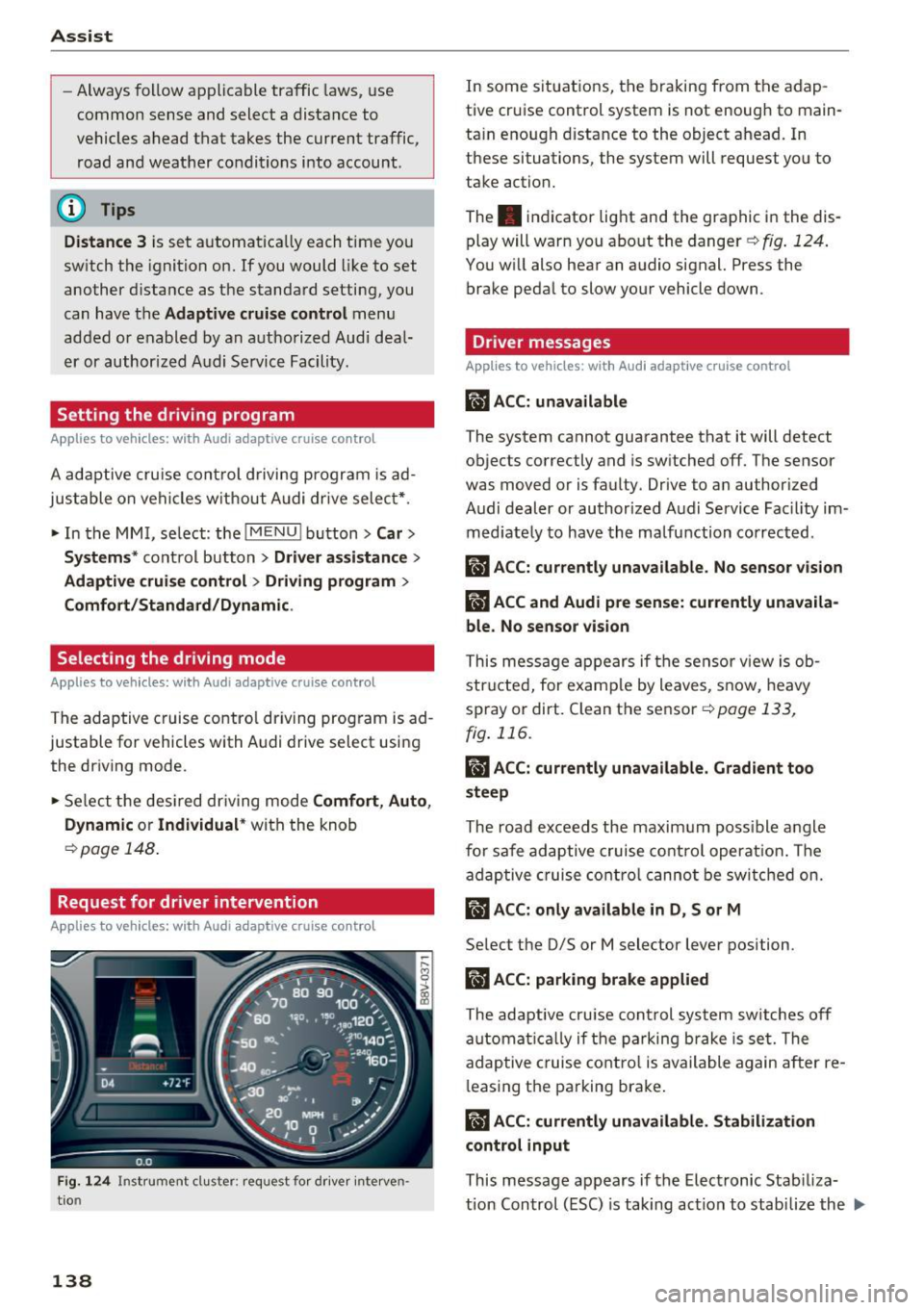
Fig. 1 24 Ins trument cluster: request fo r drive r interven
tio n
138
In some situat ions, the braking from the adap
tive cruise control system is not enough to main
ta in enough distance to the object ahead. In
these situations, the system will request you to
take action.
The . indicator light and the graphic in the dis
play will warn you abo ut the danger
Q fig . 124.
You w ill also hear an audio signal. Press the
brake pedal to slow your vehicle down.
Driver messages
App lies to vehicles: with Audi adaptive cruise control
ill ACC: unavailable
The system cannot guarantee that it will detect
objects correctly and is sw itched
off. The sensor
was moved or is faulty . Drive to an author ized
Audi dealer or authorized Audi Service Fac ility im
med iate ly to have the ma lfunction corrected .
ill ACC: currently una vailable. No sensor v is ion
IIJ ACC and Audi pre sen se: currently una vaila
ble. No sensor vis ion
This message appears if the sensor v iew is ob
structed, for e xamp le by leaves, snow, heavy
spray or dirt. Clean the sensor
c:>page 133,
fig . 116 .
II ACC: currently unavailable . Gradient too
steep
The road exceeds the maxim um poss ible angle
fo r safe adaptive cruise control operat ion. The
adaptive cruise co ntro l canno t be switched on.
ill ACC: only a vailable in D, Sor M
Select the 0/5 or M selector lever position.
IIJ ACC: pa rking brake applied
The adaptive cru ise control system sw itches off
a utomat ica lly if the parking brake is set. The
adaptive c ruise cont ro l is available again after re
l easing the parking brake .
II ACC: currently unavailable . Stabilization
control input
This message appears if the Electronic Stab iliza
tion Con trol (ESC) is taking action to stab ilize the ..,.
Page 153 of 328
.... N
0 > co ....
General information
Applies to vehicles: with rear pa rk in g systems/pa rk in g system
p lus/rearv iew camera
Depending on your vehicle's equipment, various
parking aids will help you when parking and ma
neuvering.
The
rear parking system is an audible parking aid
that warns you of obstacles
behind the vehicle
¢page 152.
The parking system plus assists you when park
ing by audibly and visually indicating objects de
tected
in front of and behind the vehicle
¢ page 152.
The rearview camera shows the area behind the
vehicle in the MMI display . This display assists
you when you are cross or parallel parking. The
parking system plus functions are also available
¢ page 153.
A WARNING ,--
- Always look for traffic and check the area
around your vehicle by looking at it directly
as well. The parking system cannot replace
the driver's attention. The driver is always
responsible when entering or leaving a park
ing space and during similar maneuvers.
- Please note that some surfaces, such as
clothing, are not detected by the system .
- Sensors and cameras have blind spots in
which people and objects cannot be detect
ed . Be especially cautious of small children
and animals .
- Always pay attention to the area around the
vehicle -using the rearview mirror, too .
- The sensors can be displaced by impacts or
damage to the radiator grille, bumper,
wheel housing and the underbody . The park
ing system may become impaired as a re
sult. Have an authorized Audi dealer or au
thorized Audi Service Facility check their
function.
- Make sure the sensors are not obstructed by
stickers, deposits or other materials. If they
are the sensor function could be impaired .
I
Parking systems
For additional information on cleaning, re
fer to¢
page 274.
@ Note
-Some objects are not detected or displayed
by the system under certain circumstances:
- Objects such as barrier chains, trailer draw
bars, vertical poles or fences
- Objects above the sensors such as wall ex
tensions
- Objects with specific surfaces or struc
tures such as chain link fences or powder
snow
- If you continue driving closer to a low-lying
object, it may disappear from the sensor
range . Note that you will no longer be
warned about this obstacle.
- The sensors can be displaced by impacts or
damage to the radiator grille, bumper,
wheel housing and the underbody . The
parking system may become impaired as a
result . Have an authorized Audi dealer or
authorized Audi Service Facility check their
function.
(D Tips
- The system may provide a warning even
though there are no obstacles in the cover
age area in some situations, such as:
- certain road surfaces or for long grass .
- external ultrasonic sources e.g. from
cleaning vehicles.
- heavy rain, snow, or thick vehicle exhaust .
- We recommend that you practice parking in
a traffic-free location or parking lot to be
come familiar with the system. When doing
this, there should be good light and weath
er conditions .
- You can change the volume and pitch of the
signals as well as the display¢
page 157.
-What appears in the MMI display is some
what time-delayed.
- The sensors must be kept clean and free of
snow and ice for the park assist to operate .
151
Page 154 of 328
Parking system s
Rear parking system
Description
Applies to veh icles: w ith rear pa rk in g system
The rear parking system is an audible parking
aid.
Descri ption
There is a sensor in the rear bumper cover . If
these detect an obstacle, audible signals warn
you .
Make sure the sensors are not covered by stick
ers, deposits or any other obstructions as it may
impair the sensor function. For information on
cleaning, refer to¢
page 274.
The range at which the sensors begin to measure
is approximately:
Side rear 3 ft (0.90
m)
Side center 5.2 ft (1.60 m)
The closer
you get to the obstacle, the shorter
the interval between the audible signals .
A con
tinuous tone sounds when the obstacle is less
than approximately
1 foot (0.30 meters) away.
Do not continue backing up¢.&.
in General infor
mation on page 151,
¢0 in General information
on page
151!
If the distance to an obstacle remains constant,
the volume of the distance warning gradually drops after about four seconds (this is not apply
in the continuous tone range).
Activ ating
The parking system activates automatically when
the reverse gear is selected. You will hear a brief
confirmation tone.
15 2
Parking system plus
Description
App lies to vehicles: with parking system plus
The parking system plus provides audio and visu
al signals when parking .
=
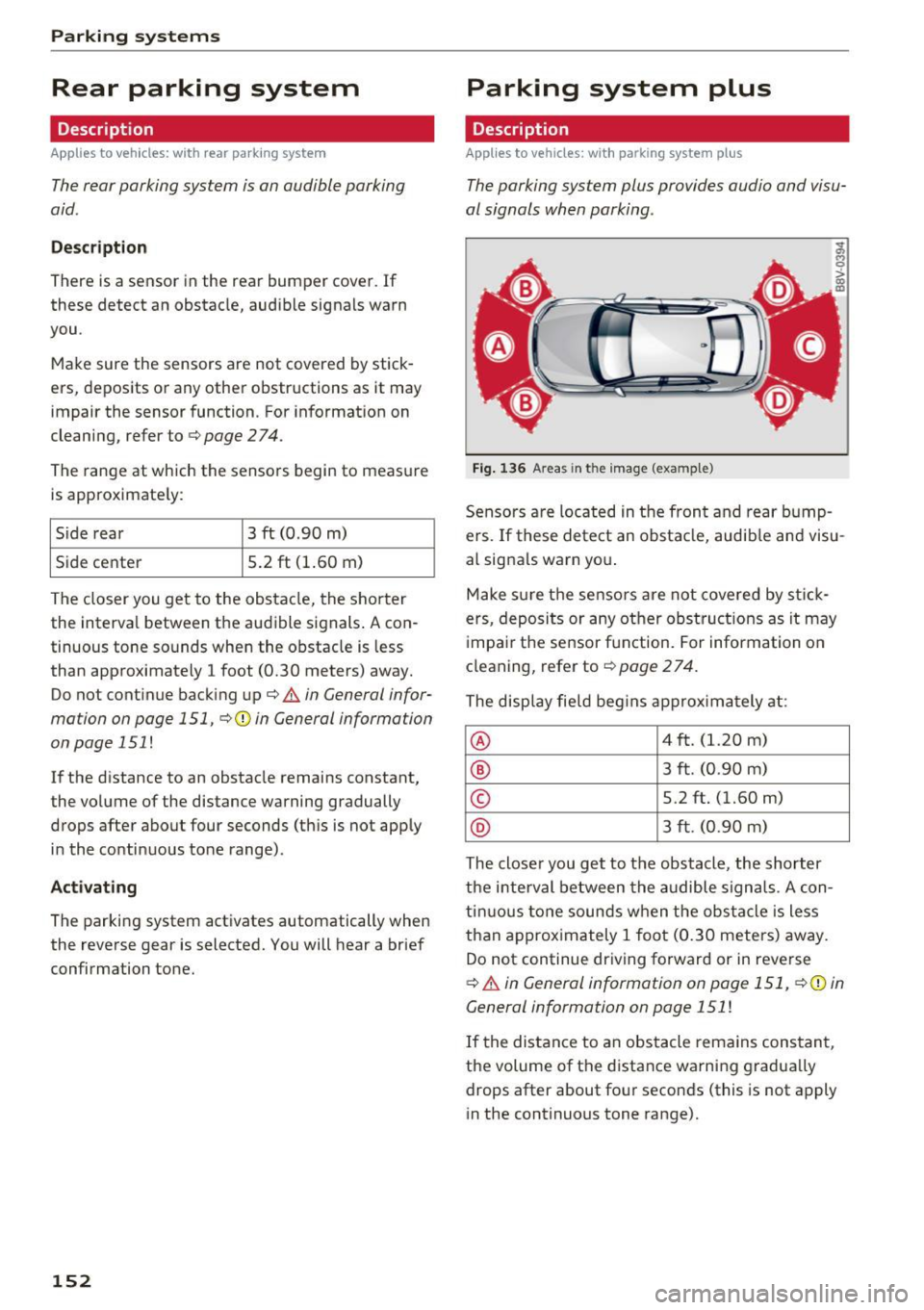
Fig. 136 Areas in t he image (example)
Sensors are located in the front and rear bump
ers. If these detect an obstacle, audible and visu
al signals warn you .
Make sure the sensors are not covered by stick
ers, deposits or any other obstruct ions as it may
impair the sensor function. For information on
cleaning, refer to¢
page 2 74.
The display field begins approx imately at :
® 4 ft. (1.20 m)
® 3 ft. (0.90 m)
© 5.2 ft. (1.60 m)
® 3 ft. (0.90 m)
The closer you get to the obstacle, the shorter
the interval between the audible signals. A con
tinuous tone sounds when the obstacle is less
than approximately 1 foot (0.30 meters) away.
Do not continue driving forward or in reverse
¢.&. in General information on page 151, ¢@) in
General information on page 151
!
If the distance to an obstacle remains constant,
the volume of the distance warning gradually
drops after about four seconds (this is not apply
in the continuous tone range).
Page 155 of 328
.... N
0 > CX)
rl I.Cl U"I
rl I.Cl ....
Switching on/off
App lies to vehicles: with parking system plus
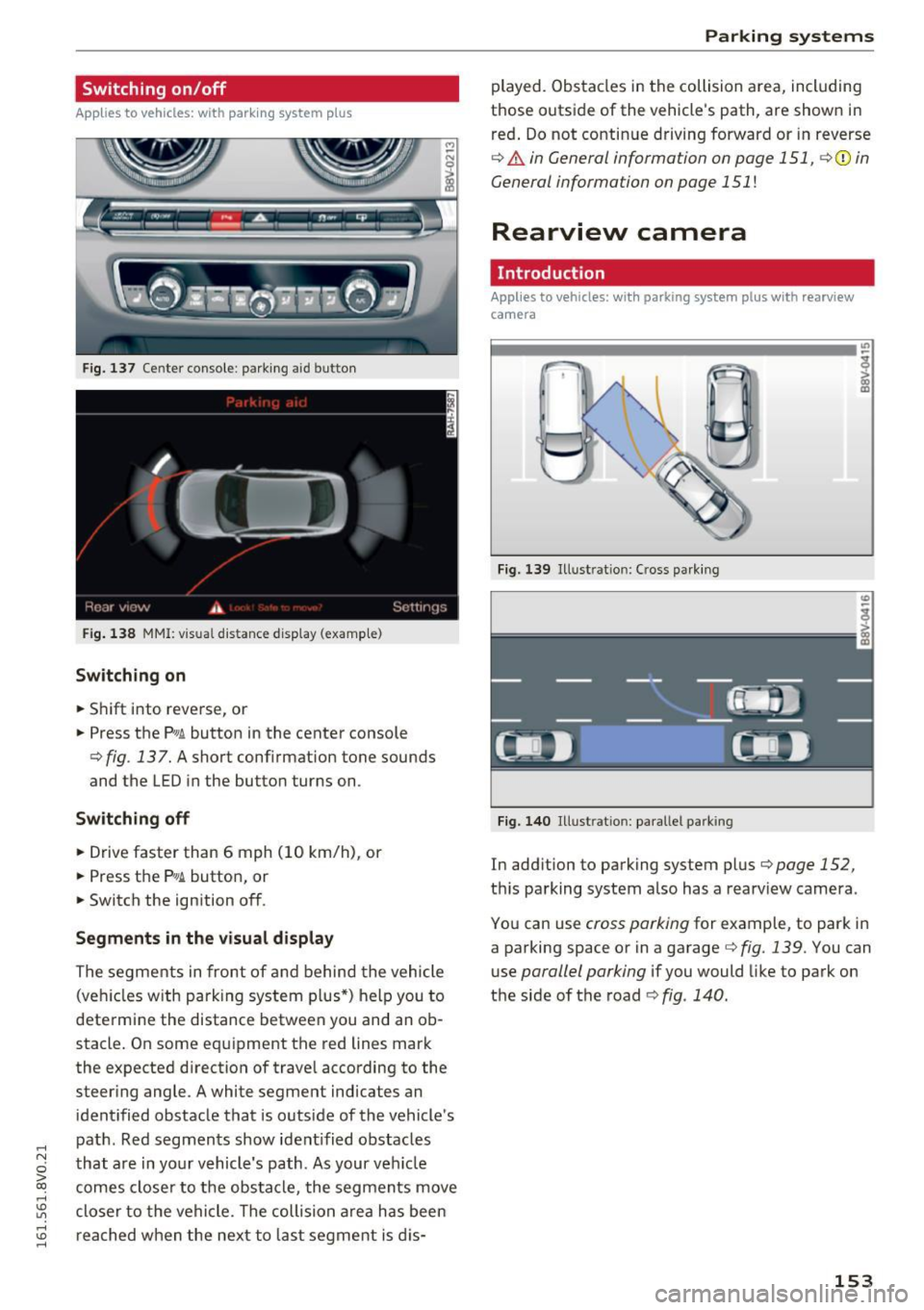
Fig. 137 Center console: parking aid button
Fig. 138 MMI: v is u al distance display (examp le)
Switching on
• Shift into reverse, or
• Press the
Pw .6. button in the center console
¢ fig . 137. A short conf irmation tone sounds
and the LED in the button turns on .
Switching off
• Drive faster than 6 mph (10 km/h), or
• Press the
?1
1.6. button, or
• Switch the ignition off.
Segments in the visual display
The segments in front of and behind the vehicle
(veh icles w ith parking system plus*) help you to
determine the distance between you and an ob
stacle. On some equipment the red lines mark
the expected d irection of travel according to the
steer ing angle . A white segment indicates an
identified obstacle that is outside of the vehicle's
path . Red segments show ident ified obstacles
that are in your vehicle's path . As your veh icle
comes closer to the obstacle, the segments move
closer to the vehicle. The collision area has been
reached when the next to last segment is dis-
Parking systems
played. Obstacles in the collision area, including
those outside of the veh icle's path, are shown in
red. Do not continue driving forward or in reverse
¢ & in General information on page 151 , ¢(i) in
General information on page
151 !
Rearview camera
Introduction
Appl ies to vehicles: with parking system plus with rearview
camera
Fig. 139 Illust ratio n: Cross park ing
Fig. 140 Illust ratio n: paralle l park ing
In add ition to parking system plus¢ page 152,
this parking system also has a rearv iew camera .
You can use
cross parking for example, to park in
a parking space or in a garage ¢
fig. 139 . You can
use
parallel parking if you would like to park on
the side of the road ¢
fig. 140.
153
Page 156 of 328
Parking system s
General information
Applies to veh icles: w ith park ing system p lus with rearview
camera
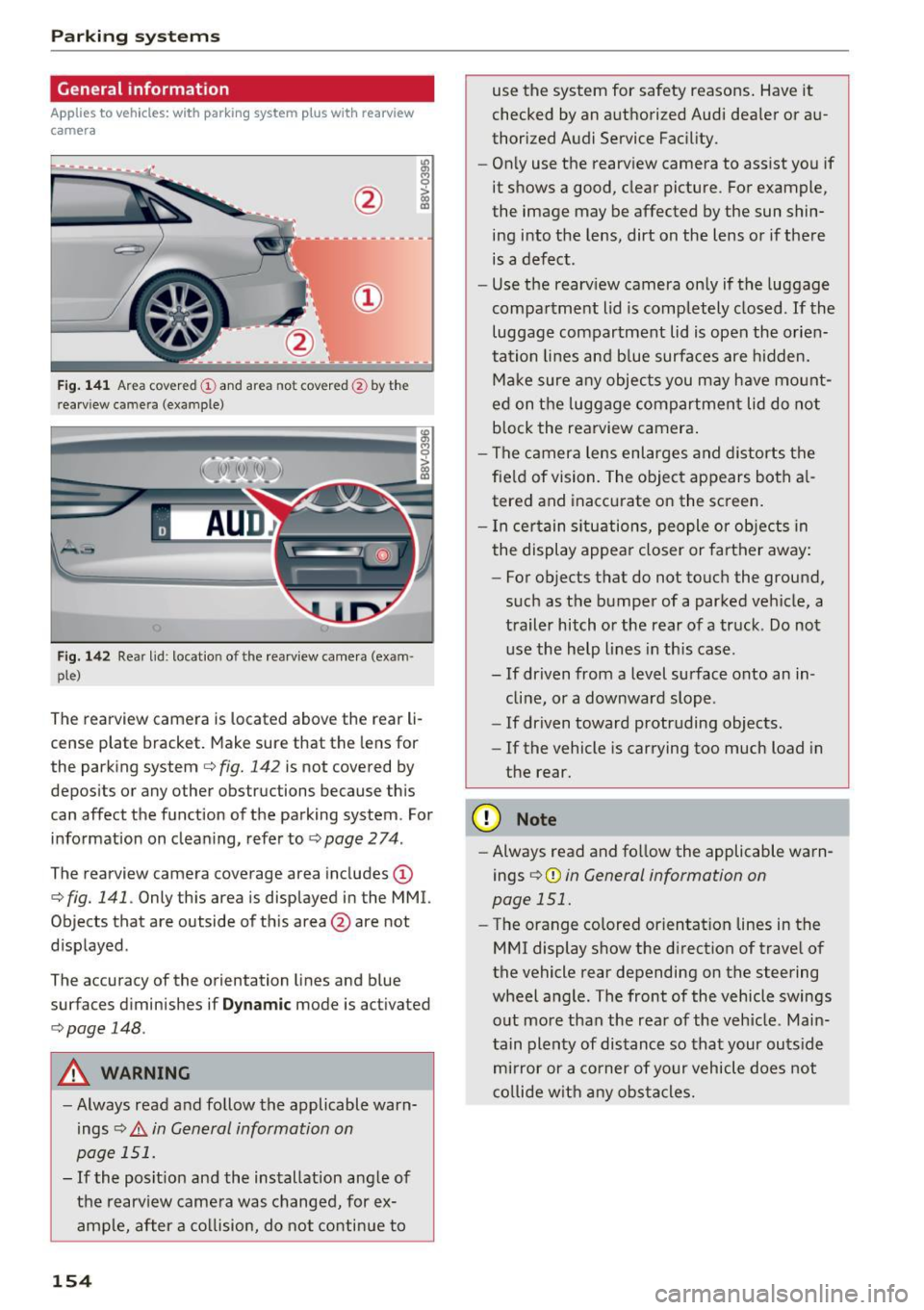
F ig . 14 1 Area covered © and area not covered @by the
r earv iew came ra (example)
Fig. 142 Rear lid : locat io n of the rearview camera (exam ·
ple)
The rearview camera is located above the rear li
cense plate bracket. Make sure that the lens for
the parking system
c.:> fig. 142 is not covered by
depos its or any other obstructions because th is
can affect the function of the parking system . For
information on cleaning, refer to
c.:> page 2 74 .
The rearview camera coverage area includes(!)
c.:> fig. 141. Only this area is displayed in the MMI.
Objects that are outside of th is area @are not
displayed .
The accuracy of the orientation lines and b lue
surfaces d iminishes if
D ynamic mode is activated
¢ page 148.
A WARNING
-Always read and follow the applicable warn
ings
c.:> .&. in General information on
page 151.
- If the posit ion and the installation ang le of
the rearv iew camera was changed, for ex
ample, after a co llision, do not continue to
154
use the system for safety reasons . Have it
checked by an a uthorized Audi dea ler or au
thorized Audi Service Fac ility.
- Only use the rearv iew camera to assist you if
it shows a good, clear picture . For example,
the image may be affected by the sun shin
ing into the lens, dirt on the lens or if there is a defect.
- Use the rearv iew camera on ly if the luggage
compa rtment lid is completely closed.
If the
luggage compartment lid is open the orien
tation lines and b lue surfaces are hidden.
Ma ke sure a ny objec ts you may h ave mo unt
ed on t he luggage compartmen t lid do not
b lock the rearview camera .
- The camera lens enlarges and distorts the
fie ld of vision. The object appears both a l
tered and inaccurate on the screen .
- I n cer tain s itu ations, people or objects in
the display appea r closer or farther away:
- For objects that do not touch the ground,
such as the bumper of a parked vehicle, a
trailer hitch or the rear of a truck . Do not
use the help lines in th is case.
- If dr iven from a level surface onto an in
cline, or a downward slope .
- If driven toward protruding objects.
- If the vehicle is carrying too much load in
the rear .
(D Note
-Always read and fo llow the applicable warn
ings
c.:> (D in General information on
page 151.
- The orange colored orientat ion lines in the
MMI display show the direction of trave l of
the vehicle rear depending on the steering
wheel a ng le . The front of the vehicle swings
o ut more than the rea r of the veh icle. Main
tain plenty of dis tance so that your outs ide
m ir ror or a co rner of your vehicle does not
c o llide w it h any obstacle s.