charging AUDI S3 2016 Owner's Manual
[x] Cancel search | Manufacturer: AUDI, Model Year: 2016, Model line: S3, Model: AUDI S3 2016Pages: 328, PDF Size: 81.78 MB
Page 123 of 328

.. Press the~ button @ r::?vpage 115, fig. 106 on
the control unit.
Unlocking the control unit
Requirement: the P IN must be activated.
.. Press any button on the control unit.
.,. PIN? appears on the display field .
.. Enter the PIN .
.. Press the
IOKI button @.
{O) Tips
-The PIN is deactivated in the factory default
settings.
- If you do not remember your PIN, contact
an authorized Audi dea ler or authorized
Audi Service Fac ility.
- If the first PIN entry differs from the second
ent ry, the first PIN entry is displayed.
- If nothing is entered w ith in 20 seconds of
th is, the set value is not changed.
Indicator Lights and
messages
Applies to vehicles: with plug-in hybrid drive
If the B indicator light turns on, the high-volt
age battery is charging or is already completely
charged.
I f the . indicator light stays on, there is a mal
function in the charging system. Have the prob l em corrected immediately by an authorized Audi
dea ler or authorized Audi Service Facility.
l'I Charging connector still attached. Driving
not possible
This message appears when the charg ing system
is sti ll connected to the veh icle. Remove the con
nector
r::?v page 117, After charging.
1,1 AC charging: currently not possible
This message appears when the charging system
is incompatible. Only charge using the charging
system that is designed for your vehicle.
;::: 1,1 AC charging : system fault! Plea se contact 0
iii Service
e-tron
This message appears if there is a malfunction in
the charging system. Have the prob lem corrected
immediately by an authorized Audi dealer or au
thori zed Audi Service Facility .
Vehicle charging
connector emergency
release
Applies to vehicles: with plug -in hybrid drive
There could be a malfunction if you are not able
to pull the vehicle charging connector out of the
vehicle charging port. You must use the emer
gency release to release the vehicle charging con
nector.
Requirement: the se lector lever must be in the P
position, the vehicle must be unlocked and the
charging process must have been ended or inter
rupted.
.,. Press and hold the immediate charging button
@ r::?vpage 115, fig . 107 .
.. Press the [@l button on the remote control key
at the same time.
.. Remove the connector.
.. Drive to an authorized Audi dealer or author
ized Audi Service Facility immediately to have
the malfunction corrected .
If the charging connector still cannot be removed
after using the emergency release, see an author
ized Audi dealer or authorized Audi Service Facili -
ty for assistance .
Charging unit cover
emergency release
Applies to vehicles: with plug-in hybrid drive
~ Fig. 111 Front of the vehicle: cover emergency release U"I
121
Page 126 of 328
e-tron
(D Tips
-You can set the timer a maximum of 7 days
in advance.
- You can operate the climate control in the
vehicle interior when the high-voltage bat
tery is charging using the charging timer
c>page 116.
-Make sure the time and date match in the
MMI settings so that the timer can function
properly. Refer to the MMI Operating Man
ual for setting the date and time.
- The auxiliary heating or auxiliary heating/
air conditioning* can run longer after the
departure time is reached.
Audi connect e-tron
services
General information
A pp lies to ve hicles : w ith plug- in hy brid drive
With Audi connect e-tron services l), you can ac
cess various information or control individual
functions remotely using mobile devices (such as
a smartphone) or a web portal.
To use Audi connect e-tron services
l), please
note the following:
- You will need to register for Audi connect e
tron services at
myaudiconnect .com. You can
access and manage e-tron services and features
at
etron.audiusa.com. If you need assistance
with your Audi A3 e-tron EV services, you can
contact customer service at 844-573-8766.
- Your mobile devices must be compatible.
A WARNING
Read and follow the safety precautions in
your MMI Operating Manual.
l) Wireless serv ice is provided by a thir d- part y provider.
-
Please contact your dea le r or call 877 -505 -2834 for more
informat ion about your carrier. Co nnected dev ices may
not be 4G -capab le. Full speeds avai lable but may be
slowed due to excessive usage, locatio n, coverage and
othe r factors. Coverage not available everyw here . See cov
erage map for your Audi co nnect data carrier for more in
format ion.
124
· Vehicle data
App lies to vehicles : wi th plug-i n hybrid drive
The Dr iver Information System collects data un
der certain conditions and sends it to a server.
When data is stored, you can data such as the ex
amples listed below using the Audi connect e
tron services:
- Duration of the drive in hours and minutes,
- average speed driven in mph (km/h),
- distance driven in miles (km),
- average electric consumption .
For additional information on the Driver Informa
tion System, refer to
c> page 28, Driver informa
tion system.
Doors and lights
App lies to v ehicl es: wi th plug-in hybrid drive
You can access and display the current status of
the following vehicle data on your mobile devices
without having to be inside the vehicle.
- If the vehicle doors and lids are open/closed,
- If the parking l ights are on/off.
For additional information on opening and clos
i ng the doors or for the vehicle light ing, refer to
c> page 3 5, Opening and closing or to c> page 46,
Exterior lighting.
(D Tips
-If the high-voltage battery is not charged,
the amount of access requests is limited to
15 after switching off the ignition. This
helps conserve the 12 volt vehicle battery.
You cannot contro l functions or access in
formation if the charge level of the 12 volt
vehicle battery is too low.
- If at least two minutes have passed after
the last time the ignition was switched off,
Page 127 of 328
,....,
N
0 > co ,....,
as needed after switching the ignition on/
off again.
Vehicle status
Applies to vehicles: with plug- in hybrid drive
You can access various vehicle statuses using the
services, such as:
- high-voltage battery charge level,
- electric range,
- mileage,
- next inspection.
For addit ional information, refer to¢
page 101,
Power meter overview
and ¢ page 102, Range
display.
A WARNING
Do not be misled by the status report displays
by ignor ing messages and/or illuminated
warning and indicator lights in the vehicle.
This could lead to break downs in on the road,
accidents and serious injuries.
@ Tips
- If the high-voltage battery is not charged,
the amount of access requests is limited to
15 after switching off the ignition. This
helps conserve the 12 volt vehicle battery.
You cannot control functions or access in
formation if the charge level of the 12 volt
vehicle battery is too low.
- If at least two minutes have passed after
the last time the ign ition was switched off,
you can reset the access counter back to "0"
as needed after switching the ignition on/
off again .
Vehicle position
Applies to vehicles: with plug -in hybrid drive
The vehicle collects data under certa in conditions
and sends it to a server.
When data is stored, you can data such as the ex
amples listed below using the Audi connect e
tron services:
- Vehicle location display
e-tron
-Display of one's own location
- Route to your vehicle
If your mob ile dev ice also has a navigation func
tion, you can nav igate to your last known parking
location .
For example, you have the option to show the
route to your vehicle and to send the correspond
i ng locations.
(D Tips
- The new parking locat ion cannot be deter
m ined with this service if the vehicle is
moved after shutting the vehicle off and
w ithout switching the ignition on and off
again, for example when being towed or if
the vehicle is stolen .
-If the vehicle is moved and shut off again
using the second key, for example, the new
park position is transmitted to the
server af
ter removing the key.
Charging
Applies to vehicles: with plug- in hybrid drive
You can contro l and access the high-voltage bat
tery ch arging process remotely using these
serv
ices. You have the following options:
- check the battery charge level,
- start/end the charging process,
- program the charging t imer with/without cl i-
mate control,
- deactivate/activate the charging timer.
For additional information, refer to¢
page 112,
Charging the battery with the Audi e-tron charg
ing system.
A WARNING
Only perform charging functions on the high
voltage battery if the vehicle is shut off cor
rectly, is connected to a suitable socket and if
the ignition is switched off.
125
Page 251 of 328
.... N
0 > CX)
.... I.Cl U"I
.... I.Cl ....
-Always wear gloves and eye protection. Do
not tilt the battery because acid could leak
out of the ventilation openings.
- If you get battery acid in your eyes or on
your skin, immediately rinse with cold wa
ter for several minutes and get medical at
tention .
- If you should ingest any battery acid, seek
medical attention immediately.
- Do not expose the battery to an open flame,
electric sparks or an open light.
- Do not smoke.
- Do not interchange the positive and nega-
tive cab les.
- When working on the battery, be sure not to
short-circuit the terminals with tools or oth
er metal objects. This wou ld cause the bat
tery to heat up very quickly, which could
lead to damage or explosion and personal
injury.
- When a battery is charged, it produces hy
drogen gas which is explosive and could
cause personal injury.
- Always keep the battery well out of the
reach of children.
- Before work is done on the electrical sys
tem, disconnect the negative ground cable.
- Before performing any work on the electri
cal system, switch off the engine and igni
tion as well as any electrical equipment . The
negative cable on the battery must be dis
connected. If you are just going to replace a
light bulb, then it is enough to switch off
the lights.
- Before disconnecting the battery, switch off
the anti-theft alarm system! Otherwise you
will set off the a larm.
- When disconnecting the battery, first dis
connect the negative cable and then the
posit ive cab le.
- Before reconnecting the battery, make sure
all electrical consumers are switched off.
Reconnect the positive cab le first and then
the negative cable . Never interchange the
cables - th is could start a fire!
- Never charge a frozen o r a thawed-out bat
tery. It could explode! If a battery has fro-
Checking and Filling
zen, then it must be replaced. A discharged
battery can freeze over at 32 °F (0 °C).
- Make sure the vent hose is always attached
to the opening on the side of the battery.
- Never use batteries which are damaged.
There is the danger of an exp losion! Always
replace a damaged battery.
_8 WARNING ~
California Proposition 65 Warning:
- Battery posts, term inals and related acces
sories contain lead and lead compounds,
chemicals known to the State of California
to cause cancer and reproductive problems.
Wash hands after handling.
(D Note
-Do not disconnect the vehicle battery when
the ignition is on or when the engine is run
ning, otherwise, you will damage electronic
components in the electrical system.
- If your vehicle is going to stand for a long
period of time without being driven, protect
the battery from "freezing", otherwise it
w ill be damaged and will then have to be re
placed .
Battery charging
Starting the engine requires a well charged bat
tery.
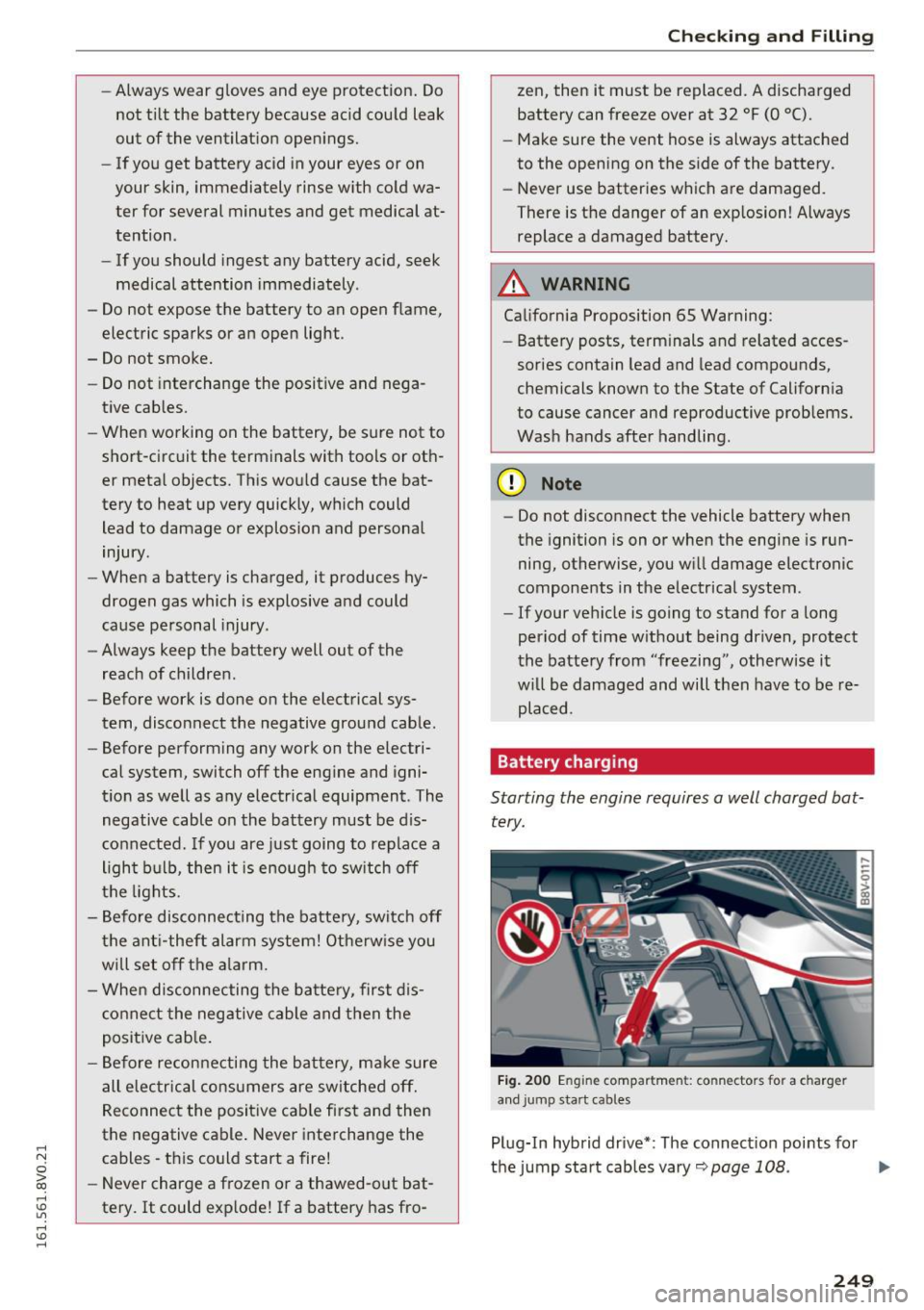
Fig. 200 Eng ine compartmen t: co nnectors fo r a charger
a n d jump start cab les
Plug-In hybrid drive* : The connect ion points for
the jump start cables vary~
page 108. .,.
249
Page 252 of 328
Check ing and F illing
Al ways read and heed all WARNING S below
¢
A and ¢ A in Working on the battery on
page 248.
... Swi tch off the ignition and all electrical con
sumers .
... Make sure the area is well ventilated when you
charge the battery.
... Open the engine hood ¢
page 23 7.
... Open the red cover on the positive pole
¢fig . 200.
... Clamp the cha rge r terminal clamps as instruct
ed on the
batt ery terminal (+ ) and only on the
bo dy ground poin t(·).
... Only now pl ug the mains lead for the charging
equipment into the wall outlet and turn it on
¢£ .
... Make su re the ch arg ing rate is not o ver
3 0 a mp s/ 1 4.8 Volt.
... When the battery is fully charged: Turn the
charg ing equipment off and remove the mains
lead from the wall outlet.
... Now remove the clamps fo r the charging equ ip-
ment .
... Close the red cover on the positive pole.
... Close the hood ¢
page 238.
A discharged battery can freeze at temperatures
of only 32 F
0 (0 °C). A llow a frozen battery to
thaw comp letely before attempt ing to c harge it
¢
.&. . However, we recommend not us ing a
thawed batte ry again because the battery casing
can be cracked due to ice formation and can leak
battery acid.
Battery charging (Ma ximum charging rate of
30 amp s/ 14.8 Volt )
When charging at low voltages (e.g. with a trick
le charger ),
the battery cables do not have to be
d isconnected first. The battery caps should
not
be opened when charging a battery.
It is not necessary to remove the battery from
the lu ggage compartment, and it is also not nec
essary to disconnect the cables.
250
Fast charging the battery (charg ing rat e
abov e 14.8 Volts )
For technical reasons do not use a battery charg
er that uses voltage greater than 14.8 Volts to
charge your veh icle's battery.
A WARNING
Charg ing a battery can be dangerous .
-Always follow the operating instructions
provided by the battery charger manufactur
er when charging your battery .
- Never charge a frozen battery.
It may ex
plode because of gas trapped in the ice. Al
low a frozen battery to thaw out first.
- Do not reuse batteries which were frozen.
The battery hous ing may have cracked and
weakened when the battery froze.
- Charge the battery in a well ventilated area .
Keep away from open flame or electrical
spark. Do not smoke . Hydrogen gas generat
ed by the batte ry is explosive .
- To reduce the danger of explosion, never
connect or d isconnect charger cables while
the charger is ope rating .
- Fast charg ing a battery is dangerous and
should only be attempted by a competent
technician w ith the prope r equipment.
- Batte ry acid that may spill during charging
should be washed off w ith a so lution of
warm water and baking soda to neutra lize
the ac id.
{[) Note
Never use a fast cha rge r as a booster to start
the eng ine. This will se riously damage sensi
tive elec tronic components, such as control
u nits, re lays, ra dio, e tc., as well as the ba ttery
charger.
Battery replacement
The new battery must hove the some specifica
tions and dimensions as the original equipment
battery .
Intelligent energy man agement in yo ur vehicle is
r esponsib le for d istr ib uting the elec trica l energy ..,.
Page 278 of 328
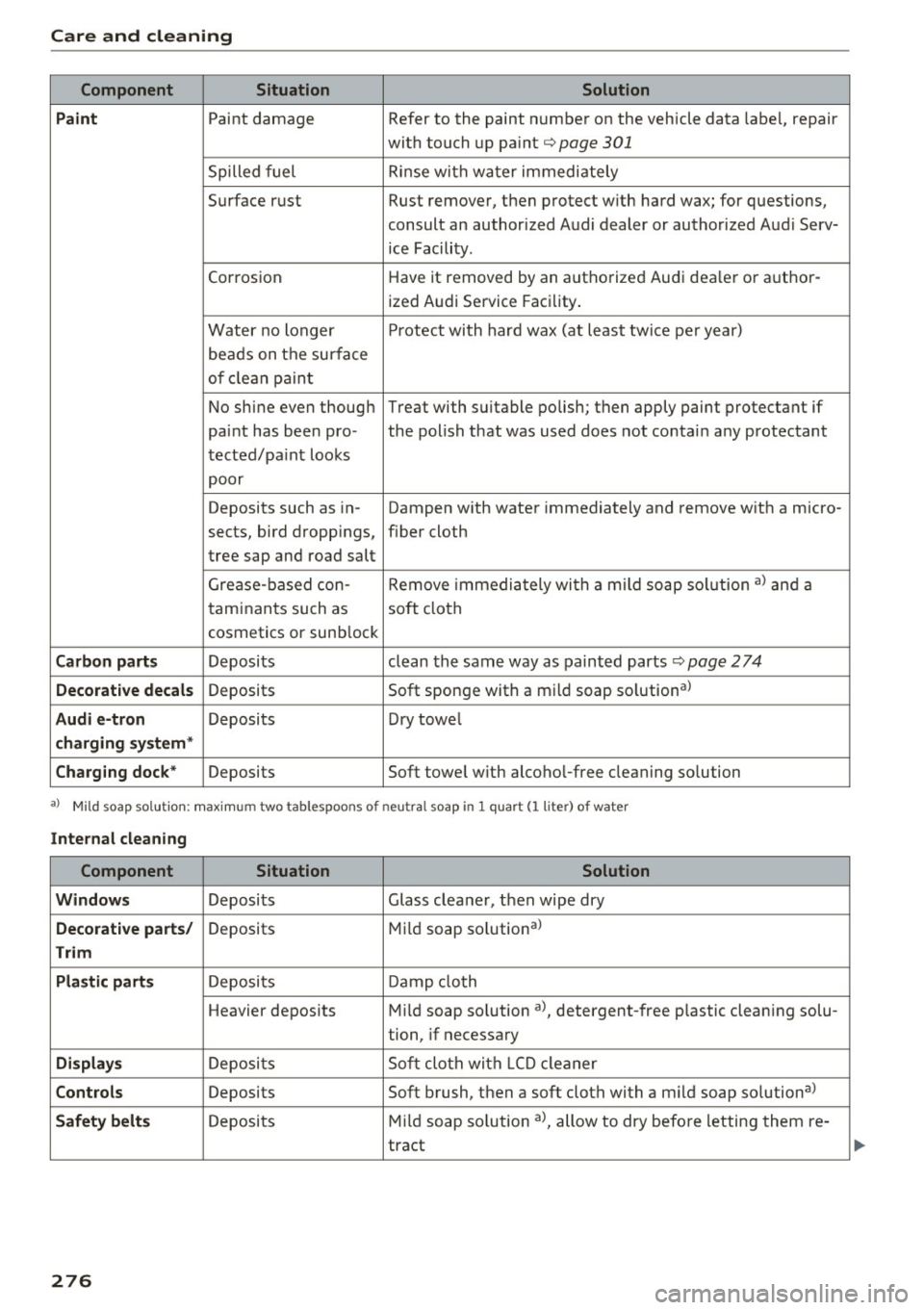
Care and cleaning
Component Situation Solution
Paint
Paint damage Refer to the paint number on the vehicle data label, repair
with touch up paint¢
page 301
Spilled fuel Rinse with water immediately
Surface rust Rust remover, then protect with hard wax; for questions,
consult an authorized Audi dealer or authorized Audi Serv-
ice Facility.
Corrosion Have
it removed by an authorized Audi dea ler or a uthor-
ized A udi Service Facility.
Water no longer Protect with hard wax (at least twice per year)
beads on the surface
of clean paint
No shine even though Treat with suitable polish; then apply paint protectant if
paint has been pro- the polish that was used does not contain any protectant
tected/paint looks
poor
Deposits such as in- Dampen w ith water immediately and remove with a micro-
sects, bird dropp ings, f iber cloth
tree sap and road salt
Grease-based con- Remove immediately wi th a mild soap solution al and a
taminants such as
soft cloth
cosmetics or sunblock
Carbon parts Deposits clean the same way as painted parts¢ page 2 74
Decorative decals Deposits Soft sponge with a mild soap solutional
Audi e-tron Deposits Dry towe l
charging system *
Charging dock*
Deposits Soft towel with alcoho l-free cleaning so lution
a} Mild soa p sol ution: maxim um two tablespoons of neutral soap in 1 quart (I liter) of water
Internal cleaning
Component Situation Solution
Windows
Deposits Glass cleaner, then wipe dry
Decorative parts/ Deposits Mild soap solutional
Trim
Plastic parts
Deposits Damp cloth
Heavier deposits Mild soap so lution al, detergent-free p lastic clean ing solu-
tion, if necessary
Displays Deposits Soft cloth with LCD cleaner
Controls Deposits Soft brush, then a soft cloth with a mild soap solutional
Safety belts Deposi ts Mild soap solution al, allow to dry before letting them re-
tract
276
Page 279 of 328
,..,
N
0 > co ,..,
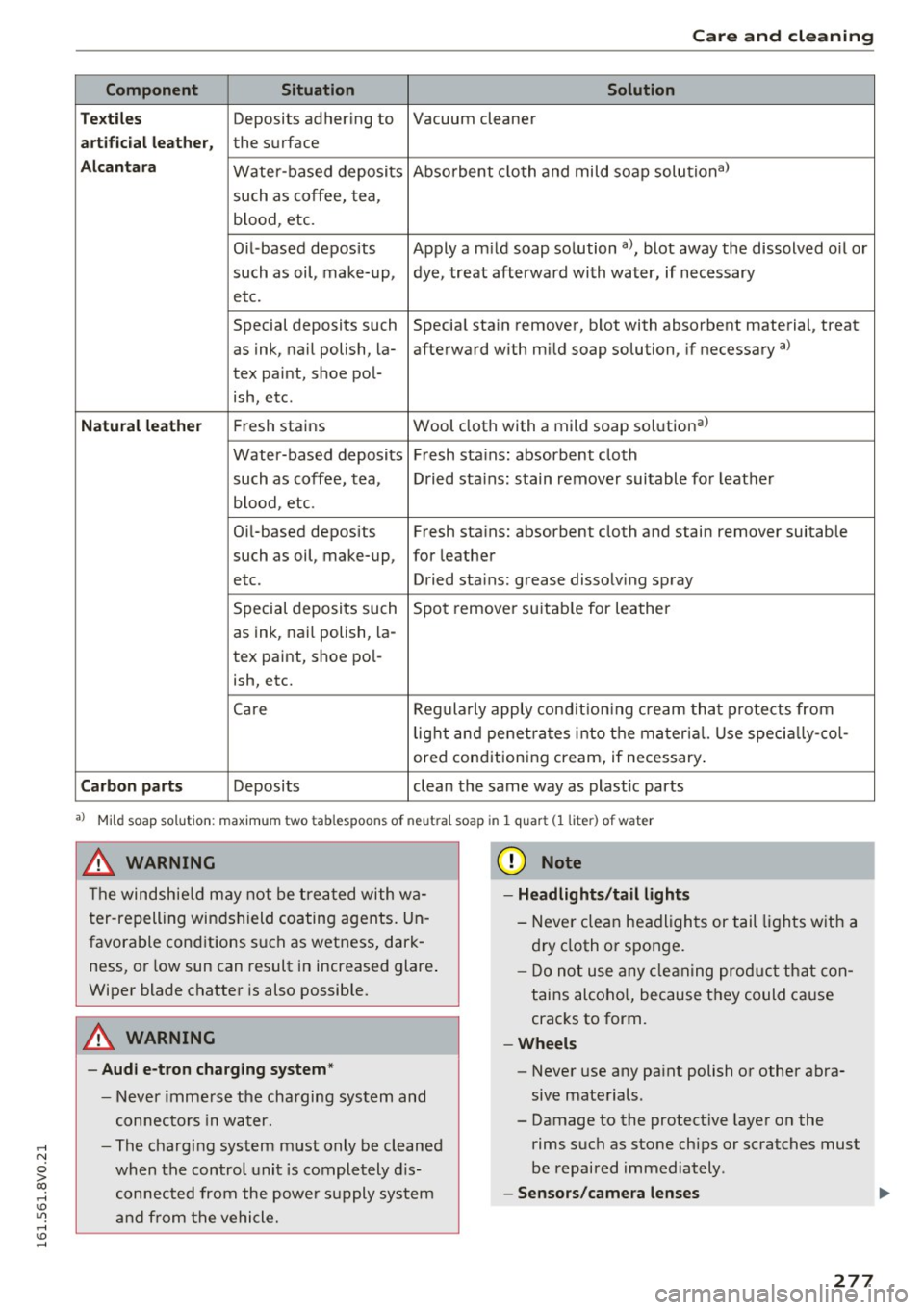
Component Situation Solution
T ex til es
Deposits adhering to Vacuum cleaner
art ificial l eather, the surface
A lcan tara Water-based deposits Absorbent
cloth and mild soap solutiona>
such as coffee, tea,
b lood, etc.
Oil -based deposits Apply a m ild soap solution
a), blot away the dissolved o il or
such as oil, make-up, dye, treat afterward with water, if necessary
etc.
Special deposits such Special stain
remover, blot with absorbent material, treat
as ink, nail polish, la- afterward with mild soap solution, if necessary
a)
tex paint, shoe pol-
ish, etc.
Natu ral le ath er Fresh stains Wool cloth with a mild soap solution a)
Water-based deposits Fresh stains: absorbent cloth
such as coffee, tea, Dried stains : stain
remover suitable fo r leather
b lood , etc.
Oi [-based deposits Fresh stains: absorbent cloth and stain
remover suitable
such as oil, make-up, for leather
etc. Dried stains : grease dissolving spray
Special deposits such Spot remove r suitab le for leather
as ink, nai l polish, la-
tex paint, shoe pol-
ish, etc.
Care Regularly apply condit ion ing c ream that protects from
lig ht and penet rates into the material. Use specia lly-co l-
ored conditioning cream, if necessary .
Carbon part s Deposits clean the same way as plast ic parts
a) Mi ld soap solution: maximum two tablespoons of neutral soap in 1 q uart (1 liter) of water
.8, WARNING
The windshield may not be trea ted with wa
ter-repelling windshield coating agents. Un
favorable cond itions such as wetness, dark
ness, or low sun can result in increased glare.
Wiper blade chatter is also possible.
A WARNING
- Audi e -tron charg ing sy stem *
- Never immerse the charging system and
connectors in water.
- The charging system m ust only be cleaned
when the control unit is completely d is
connected from the powe r su pply system
and from the vehicle.
-
({I) Note
- Hea dlight s/tail lights
- Never clean headlights or tail lights w ith a
d ry cloth or sponge.
- Do not use any cle aning product that con
tains alcoho l, because they could ca use
cracks to form.
-Whe els
- Never use any pa int polish or other abra-
sive materials.
- Damage to the protect ive layer on the
rims such as stone chips or scratches must
be repaired immediately .
-Sensor s/came ra le nses Ill-
277
Page 298 of 328
Emergency situations
electronic components, such as control
units, re lays, radio, etc.
- There must be no electrical contact between
the vehicles otherwise current could already
start to flow as soon as the positive(+) ter minals are connected.
@ Tips
The discharged battery must be properly con
nected to the vehicle's electrical system .
When jump starting or charging the battery,
never connect the negative ground cable to
the battery negative post because the battery
manager system must be able to detect the
battery's state of charge. Always connect the
negat ive g ro und cable to the negative g round
post on the battery manager control unit.
Using jump start cables
Connect the jump start cables in the exact order
described below.
Fig. 228 Engine co mpartment : connectors for ju mp start
cables and a charger
Fig. 229 Jump starting the battery wit h another vehicle:
@ -drained battery, @- starter battery
Plug-in hybrid drive* : the connection points for
the jump start cables vary<=>
page 108.
296
00 ~
5 > 00 ID
The battery is located to the left in the engine
compartment.
Do not jump start a frozen or
thawed battery
¢ A in Starting with jumper ca
bles on page 295 !
Replace the battery. The pro
cedure for connecting jump start cables that is
described next is designed to help jump start
your vehicle.
Vehicle with drained battery :
.,. Read the following carefu lly <=> page 295
.,. Set the parking brake and place the selector
lever in the P position.
.,. Turn the ignition and electr ical equipment off
in both vehicles .
Connecting the negative terminal(-) to the
negative terminal(·) (black)
.,. To reach the battery terminals, flip the battery
cover cap to the side¢
fig. 228 .
1. Clamp the end of the red jump start cab le to
the terminal @¢
fig. 229 on the dead bat
te ry @ ¢
0 in Starting with jumper cables
on page 295.
2. Clamp the other end of the red jump start ca
ble to the terminal @on the charging bat
tery @.
Connect NEGATIVE(-) to NEGATIVE(-)
(black)
3. Clamp the black end of the jump start cable
preferably at the ground point, or on the
negative terminal @ on the charging battery
®·
4. Clamp the other end of the black jump start
cable
only to the ground point © on your
vehicle @
¢0.
5. Route the jump start cables so they cannot
get caught in the moving parts in the engine
compartment.
Starting the engine
6 . Start the engine in the vehicle giving the
charge and let it run at idle.
7. Start the engi ne in the vehicle with the dead
batte ry and wait two to three minutes until it
"runs smoothly".
8. If the engine does not start, stop the starting
procedure after 10 seconds and then repeat
it after approximately 30 seconds. ..,_
Page 313 of 328
,....,
N
0 > co ,....,
refer to Adaptive light . . . . . . . . . . . . . . . . . 46
Aud i connect e-tron services ..... .. .... .
Charg ing . .. .. .. ........... .. .. .... .
Climate control ...... .
..... .. .. .... .
Doors and lights .................... .
Vehicle data
. . ................ ..... .
Vehicle position ................ .... .
Vehicle status
. ............... .. .... .
Aud i drive select
refer to Drive select ............ ..... .
Audi Service Repair Manuals and Literature
Audi side assist
refer to Side assist .......... .. .. .. .. .
AUTO
124
125
126
124
124
125 125
148
306
145
Automatic climate control system . . . . . . . 72
Automatic headlights . . . . . . . . . . . . . . . . . 46
Auto Lock (central locking system) . . . . . . . . 36
Automatic belt retractor . . . . . . . . . . . . . . . 179
Automatic climate control system
refer to Climate control system (automatic) .7.2
Automatic headlights . . . . . . . . . . . . . . . . . . . 46
Automatic post-collision braking system . . 159
Automatic transmission . . . . . . . . . . . . . . . . . 89
Driving tips ... ................ ..... .. 91
Emergency mode . . . . . . . . . . . . . . . . . . . . . 95
Hill descent contro l . . . . . . . . . . . . . . . . . . . 93
Ignition key safety interlock . . . . . . . . . . . . 80
Kick-down · · · · · · · · · · · · · · · · · · · · . .... .. 94
Launch Control -Program . . . . . . . . . . . . . . . 95
malfunction . . . . . . . . . . . . . . . . . . . . . . . . . 90
Selector lever emergency re lease . . . . . . . . 96
Selector lever lock . . . . . . . . . . . . . . . . . . . . 90
Selector lever positions . . . . . . . . . . . . . . . . 89
Shifting manually . . . . . . . . . . . . . . . . . . . . 94
Steering whee l with shift paddles. . . . . . . . 94
S tronic · . .. .. ................ ..... .. 89
tiptronic . . . . . . . . . . . . . . . . . . . . . . . . . . . . 94
Automatic wipe/wash system . . . . . . . . . . . . 52
Auto Safety Hotline . . . . . . . . . . . . . . . . . . . 17 4
Auxiliary climate control 122
Auxiliary heater (vehicles w ith diesel eng ines) .7.5
Auxiliary heating/ air conditioning . . . . . . . 122
Average consumption . . . . . . . . . . . . . . . . . . . 29
Average speed . . . . . . . . . . . . . . . . . . . . . . . . 29
Index
B
Bag hooks . . . . . . . . . . . . . . . . . . . . . . . . . . . . 67
Battery . . . . . . . . . . . . . . . . . . . . . . . . . . . . . 247
Charge level . . . . . . . . . . . . . . . . . . . . . . . . 164
Charging . . . . . . . . . . . . . . . . . . . . 20, 121, 249
Energy management . . . . . . . . . . . . . . . . . 164
Important warnings . . . . . . . . . . . . . . . . . 248
Indicator light . . . . . . . . . . . . . . . . . . . . . . . 20
Jump starting . . . . . . . . . . . . . . . . . . . . . . . 295
Location · · .... .. .. ............... .. 248
Replacing the battery . . . . . . . . . . . . . . . . 250
Win ter operation . . . . . . . . . . . . . . . . . . . . 247
Working on the battery . . . . . . . . . . . . . . . 248
Before driving . . . . . . . . . . . . . . . . . . . . . . . . 166
Belt tensioners . . . . . . . . . . . . . . . . . . . . . . . 182
Blended gasoline . . . . . . . . . . . . . . . . . . . . . 228
B lower
automatic Climate control system . . . . . . . 73
Manual climate control system........ .. 71
Boost . . . . . . . . . . . . . . . . . . . . . . . . . . . . . . . . 30
Booster seats . . . . . . . . . . . . . . . . . . . . . . . . 218
Boost pressure indicator . . . . . . . . . . . . . . . . 30
Brake fluid Chang ing the brake flu id . . . . . . . . . . . . . . 246
Checking the brake fluid level . . . . . . . . . . 246
Brakes · · · · · .. .. .. .. 161
....... ........ ..
Brake ass ist system . . . . . . . . . . . . . . . . . . 159
Brake booster . . . . . . . . . . . . . . . . . . . . . . . 161
Indicator light . . . . . . . . . . . . . . . . . . . . . . . 25
New brake pads . . . . . . . . . . . . . . . . . . . . . 161
Brake system Brake fluid 246
Brake fluid specificat ions for refill and re
placement . . . . . . . . . . . . . . . . . . . . . . . . . 246
Fluid reservoir . . . . . . . . . . . . . . . . . . . . . . 246
Worn brake pads symbol . . . . . . . . . . . . . . . 22
Braking Emergency braking function . . . . . . . . . . . . 87
Indicator light . . . . . . . . . . . . . . . . . . . . . . . 18
Parking brake . . . . . . . . . . . . . . . . . . . . . . . . 85
Starting on inclines . . . . . . . . . . . . . . . . . . . 87
Break-in period . . . . . . . . . . . . . . . . . . . . . . . . 77
Breaking in New tires 260
Bulbs . . . . . . . . . . . . . . . . . . . . . . . . . . . . . . . 294
311
Page 314 of 328
Index
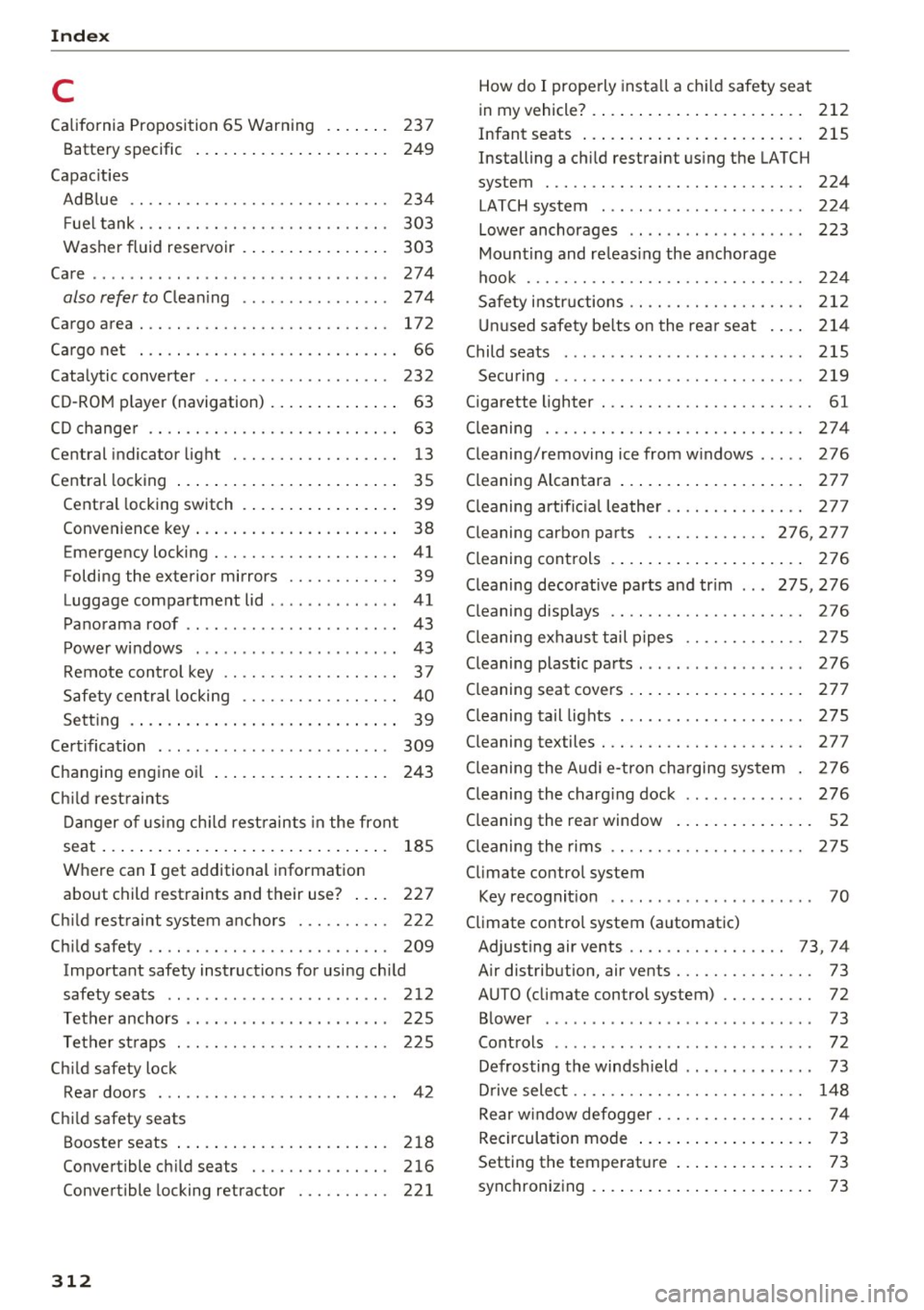
C
California Proposition 65 Warning . . . . . . . 237
Battery specific . . . . . . . . . . . . . . . . . . . . . 249
Capacities AdBlue ............................ 234
F uel tank. . . . . . . . . . . . . . . . . . . . . . . . . . . 303
Washer fluid reservoir . . . . . . . . . . . . . . . . 303
Care . . . . . . . . . . . . . . . . . . . . . . . . . . . . . . . . 274
also refer to Cleaning . . . . . . . . . . . . . . . . 274
Cargo area . .. .. ................... .. . 172
Cargo net . . . . . . . . . . . . . . . . . . . . . . . . . . . . 66
Catalytic converter . . . . . . . . . . . . . . . . . . . . 232
CD-ROM player (navigation) . . . . . . . . . . . . . . 63
CD changer . . . . . . . . . . . . . . . . . . . . . . . . . . . 63
Central indicator light . . . . . . . . . . . . . . . . . . 13
Central locking . . . . . . . . . . . . . . . . . . . . . . . . 35
Central locking switch . . . . . . . . . . . . . . . . . 39
Convenience key . . . . . . . . . . . . . . . . . . . . . . 38
Eme rgen cy locking . . . . . . . . . . . . . . . . . . . . 41
Folding the exterior mirrors . . . . . . . . . . . . 39
Luggage compartment lid . . . . . . . . . . . . . . 41
Panorama roof . . . . . . . . . . . . . . . . . . . . . . . 43
Power windows . . . . . . . . . . . . . . . . . . . . . . 43
Remote control key . . . . . . . . . . . . . . . . . . . 37
Safety central locking . . . . . . . . . . . . . . . . . 40
Setting . . . . . . . . . . . . . . . . . . . . . . . . . . . . . 39
Certification . . . . . . . . . . . . . . . . . . . . . . . . . 309
Changing engine oil . . . . . . . . . . . . . . . . . . . 243
Ch ild restraints
Danger of using child restraints in the front
seat.... ..... .. .. .............. .... 185
Where can I get additional information
about child restraints and their use? . . . . 227
Ch ild restraint system anchors . . . . . . . . . . 222
Child safety . . . . . . . . . . . . . . . . . . . . . . . . . . 209
Important safety instructions for using child
safety seats . . . . . . . . . . . . . . . . . . . . . . . . 212
Tether anchors . . . . . . . . . . . . . . . . . . . . . . 225
Tether straps . . . . . . . . . . . . . . . . . . . . . . . 225
Child safety lock Rear doors . . . . . . . . . . . . . . . . . . . . . . . . . . 42
Child safety seats Booster seats . . . . . . . . . . . . . . . . . . . . . . . 218
Convertible child seats . . . . . . . . . . . . . . . 216
Convertible locking retractor . . . . . . . . . . 221
312
How do I properly install a child safety seat
. h' l 7 212 in my ve ,c e . .. .. .. .. .............. .
Infant seats . . . . . . . . . . . . . . . . . . . . . . . . 215
Installing a child restraint using the LATCH
system ....... .. .. ............... .. 224
LATCH system . . . . . . . . . . . . . . . . . . . . . . 224
Lower anchorages . . . . . . . . . . . . . . . . . . . 223
Mounting and releasing the anchorage
hook .............................. 224
Safety instructions .. .. ............. .. 212
Unused safety belts on the rear seat . . . . 214
Child seats . . . . . . . . . . . . . . . . . . . . . . . . . . 215
Securing ......... .................. 219
Cigarette lighter . . . . . . . . . . . . . . . . . . . . . . . 61
Cleaning ....... .. .. ............... .. 274
Cleaning/removing ice from windows . . . . . 276
Cleaning Alcantara . . . . . . . . . . . . . . . . . . . . 277
Cleaning artific ial leather. . . . . . . . . . . . . . . 277
Cleaning carbon parts . . . . . . . . . . . . . 276, 277
Cleaning controls . . . . . . . . . . . . . . . . . . . . . 276
Cleaning decorative parts and trim . . . 275, 276
Cleaning displays . . . . . . . . . . . . . . . . . . . . . 276
Cleaning exhaust tail pipes . . . . . . . . . . . . . 275
Cleaning plastic parts . . . . . . . . . . . . . . . . . . 276
Cleaning seat covers . . . . . . . . . . . . . . . . . . . 277
Cleaning tail lights . . . . . . . . . . . . . . . . . . . . 275
Cleaning textiles . . . . . . . . . . . . . . . . . . . . . . 277
Cleaning the Audi e-tron charging system . 276
Cleaning the charging dock . . . . . . . . . . . . . 276
Cleaning the rear window . . . . . . . . . . . . . . . 52
Cleaning the rims . . . . . . . . . . . . . . . . . . . . . 275
Climate control system Key recognition . . . . . . . . . . . . . . . . . . . . . . 70
Climate control system (automatic) Adjusting air vents . . . . . . . . . . . . . . . . . 73, 74
Air distribution, air vents . . . . . . . . . . . . . . . 73
AUTO (climate control system) . . . . . . . . . . 72
Blower . . . . . . . . . . . . . . . . . . . . . . . . . . . . . 73
Controls . . . . . . . . . . . . . . . . . . . . . . . . . . . . 72
Defrosting the windshield . . . . . . . . . . . . . . 73
Drive select . . . . . . . . . . . . . . . . . . . . . . . . . 148
Rear w indow defogger ... ........... .. . 74
Recirculation mode . . . . . . . . . . . . . . . . . . . 73
Setting the temperature . . . . . . . . . . . . . . . 73
synchronizing . . . . . . . . . . . . . . . . . . . . . . . . 73