charging AUDI S3 2016 User Guide
[x] Cancel search | Manufacturer: AUDI, Model Year: 2016, Model line: S3, Model: AUDI S3 2016Pages: 328, PDF Size: 81.78 MB
Page 113 of 328

,....,
N
0 > co ,....,
ist.
A WARNING
Incorrect handling of the connector contacts
can cause e lectric shock or fire.
- Do not touch the contacts on the vehicle charging port and on the Audi e-tron charg
ing system .
- Do not insert any objects in the vehicle charg ing port or in the Audi e-tron charging
system .
- Protect the sockets and connectors against
any moisture, water and other flu ids.
A WARNING
Using a damaged or incorrect charging cable
or a damaged or incorrect socket, using the
Audi e-tron charg ing system incorrectly or
disregarding the safety precaut ions could
cause sho rt circu iting, e lectric shoc k, exp lo
sions , fires or burns.
- Do not use the Audi e-t ron c ha rging system
if it is damaged and/or dirty . Check the ca
ble and connector for damage and dirt be
f ore using .
- T he Aud i e-tron charg ing system must only
be connected to sockets that a re insta lled
correctly and that are not damaged as we ll
as to electr ica l installations that have no
faults.
- Do not use any extension cords, cable reels,
power str ips or (travel) adapters.
- Disconnect the Audi e-tron charging system
from the power network during a thunder
storm .
- Do not modify or repair any electrical com
ponents.
- Never immerse the Audi e-tron charging system and connectors in water.
- The Aud i e-tron charging system must only
be cleaned when the control unit is com
pletely disconnected from the power supply
and from the veh icle. Use a dry towel to
clean.
- I f a 110 volt socket is used for charging, on
ly connect one veh icle at a time to the same
e-tron
circuit. Use a different circuit if an add ition
al vehicle needs to be charged at the same
time. Note the maximum permitted current
draw for the c ircuit. Contact a qualified elec
tr ical technician if there is any doubt.
A WARNING '"---
The components in the Audi e-tron charg ing
system can trigger sparks which can cause
flammable or explos ive f umes to ignite .
- To reduce the r isk of explosions, espec ially
in garages, make sure the contro l unit is at
least 19 in ches (SO cm) above the floo r
when charging.
- Do not use the Aud i e-tron charg ing system
in areas at risk for exp losions .
- The Audi e-tron charging system is only suit
ab le for use on Aud i vehicles and veh icles
within the Volkswagen Group. Using the de
vice on vehicles made by another manufac
turer is not authorized .
CI) Note
Make sure that you a lways use the s uitable
power plug prov ided with the A udi e-tron
charging system for the corresponding mar
ket. Contact an authorized Audi dealer o r au
thorized Audi Service Facility for more infor mation.
(D Tips
- For an uninterrupted charging process, we
recommend only charging using sockets
that are connected to a separately protect ed circuit.
- Us ing NEMA sockets w ith a current rat ing of
at least 30 A or industrial sockets in accord
ance with IEC 60309 when charging is rec
ommended .
- When charging the high-voltage battery us
ing household/ industrial sockets, the elec
trical installation can be used at full capaci
ty. Having a qualified electrician regularly inspect the electrical installations that are
used for charg ing is recommended.
111
Page 114 of 328
e-tron
-The vehicle radio and TV systems may have
limited reception when charging the vehi
cle.
Charging at public
charging stations
App lies to vehicles: w ith plug-in hybrid drive and special
charging cable
Use the charging cable supplied at the public
charging station for charging. Contact an author
ized Audi dealer or authorized Audi Service Facili
ty for more information.
• Read the operating instructions at the charging
station to charge the battery.
• Unl ock the vehicle if necessary¢
page 35.
• Make sure that the selector lever is in the P po
sition and drive ready mode is switched off .
• Turn the lock until it is vertical to open the
cov
er on the charging unit r:;> page 115, fig . 108.
• Slide the cover carefully to the side if necessa
ry .
• Remove the lock on the charging port
¢page 115, fig. 109 .
• Remove the cap from the charging cable if nec
essary .
• Connect the cable to the veh icle charging port .
• If a charg ing timer is not set, the charging
process will start automatically depending on
the charging station¢
page 116, Setting the
charging timer.
• The vehicle operating status is indicated by the
status LED@¢
table on page 119.
• Refer to the information under¢ page 117,
After charging
or ¢ page 121 , Vehicle charg
ing connector emergency release.
@ Tips
-It is not possible to charge using the charg
ing timer at some charging stations .
- You can use your Audi e-tron charging sys
tem if there is a household or industrial con
nection availab le at the charging station.
112
Charging the battery
with the Audi e-tron
charging system
Charging system overview
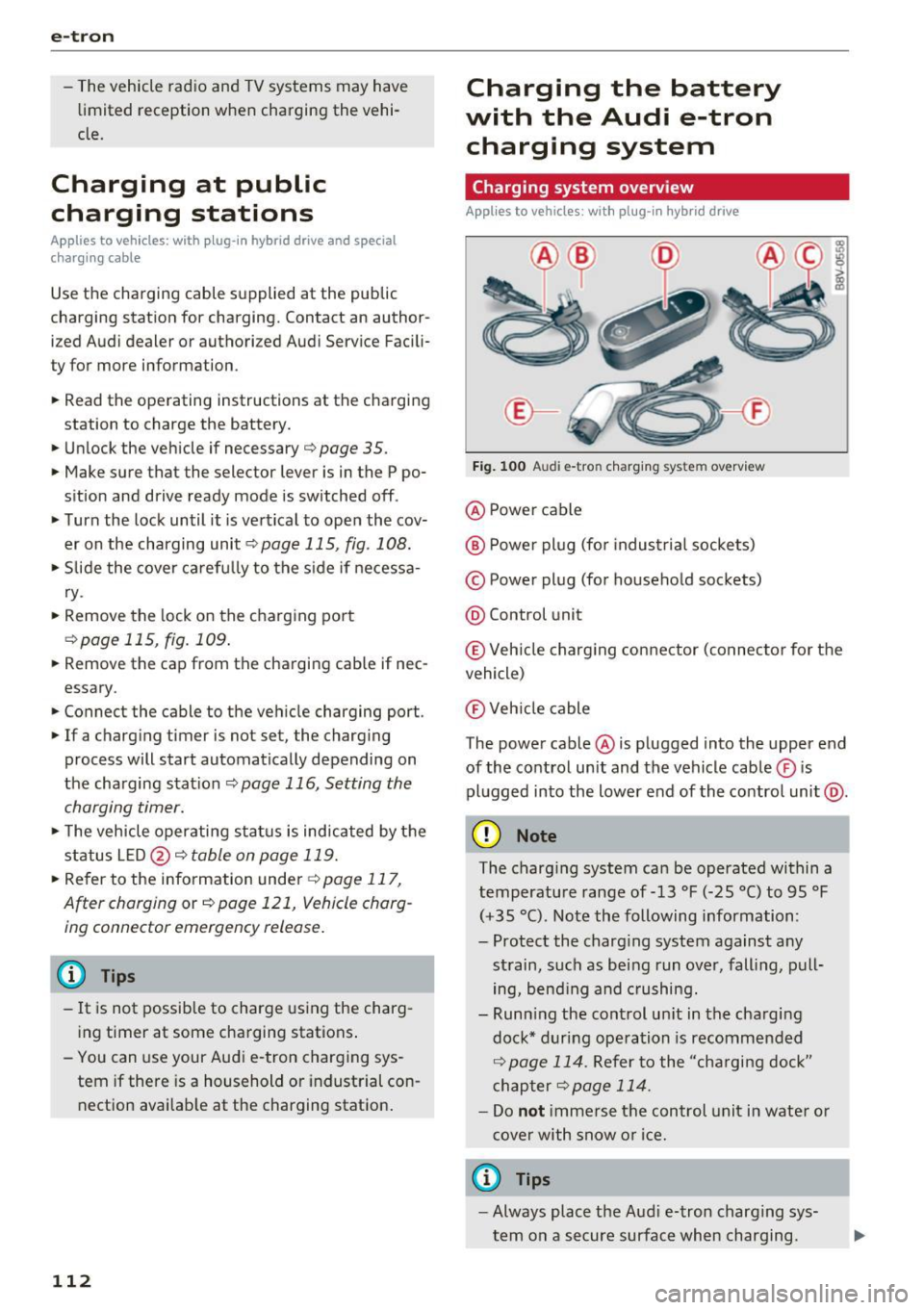
Applies to vehicles : with plug -in hybrid drive
Fig. 100 Audi e-tron c harging system overview
@ Power cable
@ Power plug (for industrial sockets)
© Power plug (for household sockets)
@ Control unit
© Veh icle charging connector (connector for the
vehicle)
® Vehicle cable
The power cable @ is plugged into the upper end
of the control unit and the vehicle cable ® is
plugged into the lower end of the contro l unit @.
(D Note
The charging system can be operated within a
temperature range of-13 °F (-25 °C) to 95 °F
(+35 °C). Note the following information:
- Protect the charg ing system against any
strain, such as being run over, falling, pull
ing, bend ing and crushing.
- Runn ing the control un it in the charging
dock* during operation is recommended
¢ page 114. Refer to the "cha rging dock"
chapter
¢page 114.
-Do not immerse the control unit in water or
cover with snow or ice.
a) Tips
-Always place the Aud i e-tron charging sys
tem on a secure surface when charging.
Page 115 of 328

.... N
0 > CX)
.... I.Cl U"I ,....,
I.Cl ....
-To reduce the risk of overheating during op
eration, do not place the Audi e-tron charg
in g system in d irect sunlight for long peri
ods of time.
- If the temperature inside the control unit
rises above 176 °F (80 °C), the charg ing
process will stop automatically until the
temperature decreases back down to the normal range .
Attaching/changing the power/vehicle
cable
Applies to vehicles: with plug-in hybrid drive
Fig. 101 Contro l unit : loosening the cable
Fi g. 102 Contro l unit : attaching t he ca ble
Requirements:
.,. The charging process for the high -voltage bat
tery must be ended .
.,. The vehicle charging connector must be re
moved from the vehicle charging port.
.,. The power cable must be removed from the
socket.
Loosening the cable
.,. If necessary, loosen the screw ©¢ fig. 101 us
ing the screwdriver provided.
.,. Lift the lever @all the way up .
e-tron
.,. Pull the connecto r@ out just until you feel re
sistance .
.,. Close the lever @unt il it is rest ing on the con-
nector @.
.,. Remove the connector @ completely.
Attaching the cable
.,. Lift the lever @ up slight ly¢ fig. 102.
.,. Insert the connector @ into the control unit
just unti l you feel resistance .
.,. Lift the lever @all the way up.
.,. Insert the connector @ all the way into the
control unit.
.,. Close the lever @ .
.,. Tighten the screw © using the screwdriver pro
vided .
.&_ WARNING
- Always remove the power cable from the
socket before changing the power cable or
vehicle cable.
- Always follow the instructions given when
charging the high -voltage battery. Do not
remove the vehicle charging cable from the
socket during the charging process. End the
charging process before removing the vehi
cle charging cab le from the socket.
- On ly change cab les in a dry environment.
- The Audi e-tron charging system may only
be used as one un it composed of power ca
bles, the control unit and vehicle cable. We
recommend using only cables approved by
Aud i.
113
Page 116 of 328
e-tron
Charging dock
Applies to vehicles: with p lug -in hybrid drive and charging
dock
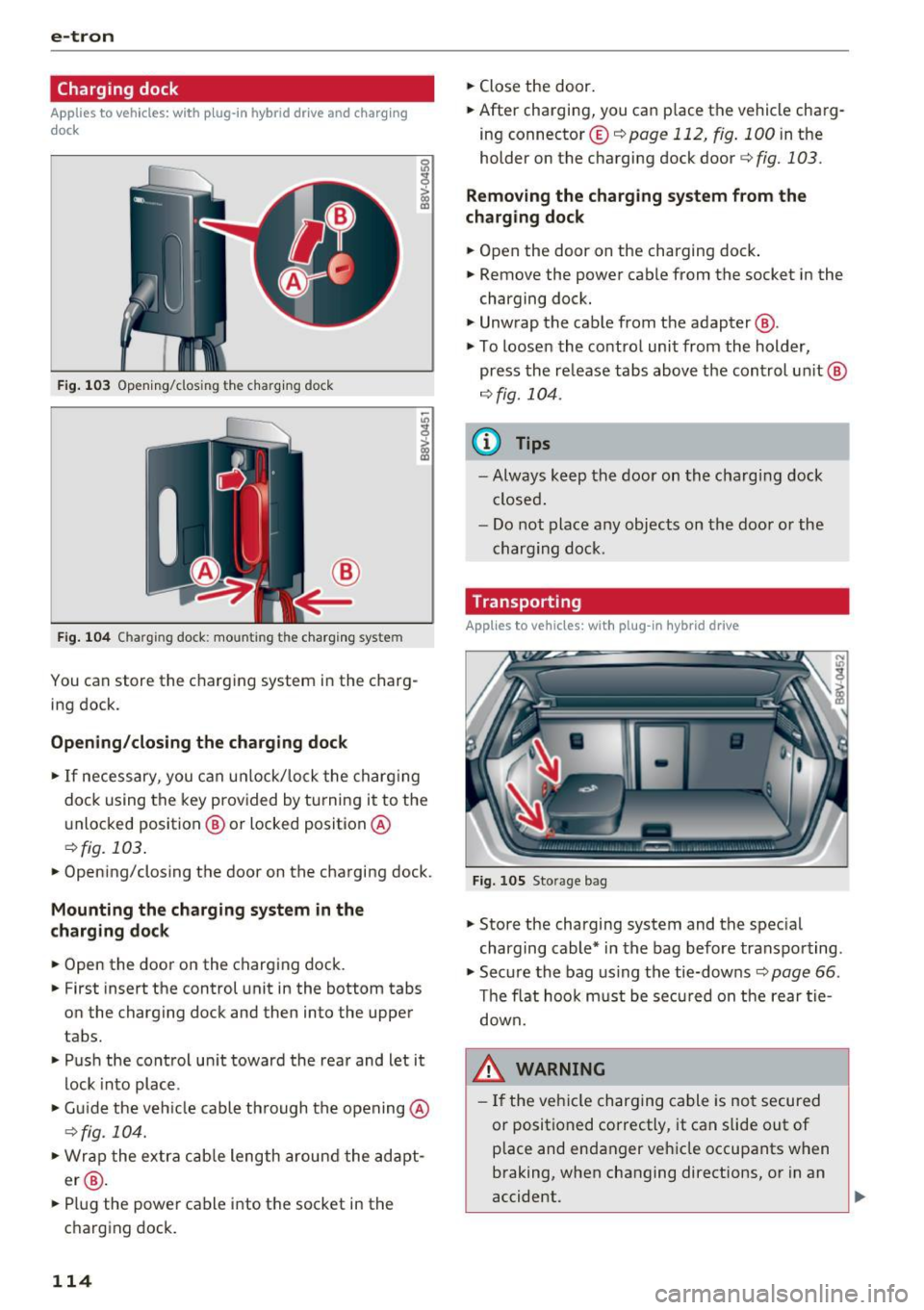
F ig . 1 03 Opening/clos ing t he charg ing dock
®
Fig . 1 04 Charging dock: mounting the ch arging system
You can store the charg ing system in the charg
ing dock.
Opening /closing the charging dock
• If necessary, you can u nlock/lock the charg ing
dock using the key provided by turning it to the
unlocked position @ or locked position @
¢fig. 103.
• Opening/closing the door on the charging dock.
Mounting the cha rging system in the
charging dock
• Open the door on the charging dock.
• First insert the control unit in the bottom tabs
on the charging dock and then into the upper
tabs.
• Push the control un it toward the rea r and let it
lock into place.
• Gu ide the vehicle cable th rough the opening @
¢fig_ 104.
• Wrap the extra c ab le length around the adapt
er @ .
• Plug the power cable into the socket in the
charging dock.
114
• Close the door.
• After charging, you can place the vehicle charg
ing connecto r© ¢
page 112 , fig. 100 in the
holder on the charging dock door¢
fig. 103.
Removing the charging system from the
charging dock
• Open the door on the charging dock .
• Remove the power cable from the socket in the
charging dock.
• Unwrap the cable from the adapter @.
• To loosen the contro l unit from the holder,
press the re lease tabs above the cont rol un it @
r=:> fig. 104.
(D Tips
- Always keep the door on the cha rg in g dock
closed .
- Do not place any objects on the doo r or the
charging dock.
Transporting
Applies to vehicles: with plug-in hybrid drive
Fig. 105 Storage bag
• Store the charging system and the spec ial
charging cable* in the bag before transpo rting.
• Secure the bag us ing the tie-downs¢
page 66.
The flat hoo k m ust be sec ured on t he rear tie
down.
8_ WARNING
- If the veh icle charging cable is no t secured
or positioned correctly, it can slide out of
p lace and endanger ve hicle occupants when
braking, when changing directions, or in an
accident.
Page 117 of 328

.... N
0 > CX)
rl I.Cl U"I ,....,
I.Cl ....
-Never transport the Audi e-tron charging
system or the special charg ing cab le* unse
cured.
- Store the Audi e-tron charging system or
the spec ial charging cable* in the storage
bag in the luggage compartment.
- Always transport the storage bag in the lug
gage compartment and never in the passen ger compartment (for example the seats or
in front of them).
Charging overview
App lies to vehicles: with plug-in hybrid drive
Fig. 106 Charging system: control un it
Fig. 107 Radiator grille: ve hicle charging port a nd button
modu le
The charg ing unit is located behind the Audi r ings
on the front of the vehicle .
@
~ button/LED
® Display field
© Arrow buttons
@ !OK ! button
(D Charging timer button
@ Status LED
@ Immed iate charging button
e-tron
T he meaning of the different status displays for
the charging system and the vehicle can be found
u nder ¢ page 118, Status displays.
_& WARNING
-
There is an error in the control unit if the LED
@ is red . Disconnect the control unit from the
power supply. Refer to th is chapter
¢ page 118, Status displays.
@ Tips
- The device runs a self-test after power has
been restored to the control unit.
- You can activate a PIN for the control unit qpage 120.
- The vehicle cannot be started if a charging connector is connected.
Before charging
Applies to vehicles: with pl ug-in hybrid drive
Fig. 108 Radiator grille: open ing the c harging uni t cover
Fig. 10 9 Radiator grille: charging port cap
.. Unlock the vehicle if necessa ry¢ page 35.
.. Make sure that the selector lever is in the P po
sition and drive ready mode is switched off
qpage 100.
"' Turn the lock until it is vertical to open the cov -
er on the charging un it qfig. 108. ..,.
115
Page 118 of 328
e-tron
"'Slide the cover carefully to the side if necessa
ry.
"' Remove the lock on the charging port
<=>fig . 109.
"'Insert power plug @ or© into the socket
<=>page 112, fig . 100.
"'Plug the vehicle charging connector ©
<=> page 112, fig . 100 into the vehicle charging
port <=>
fig. 109. The charging process starts au
tomat ically if no charging timer is set.
(D Tips
Remove ice and snow from the cover using a
hand brush and solvent-free deicing spray.
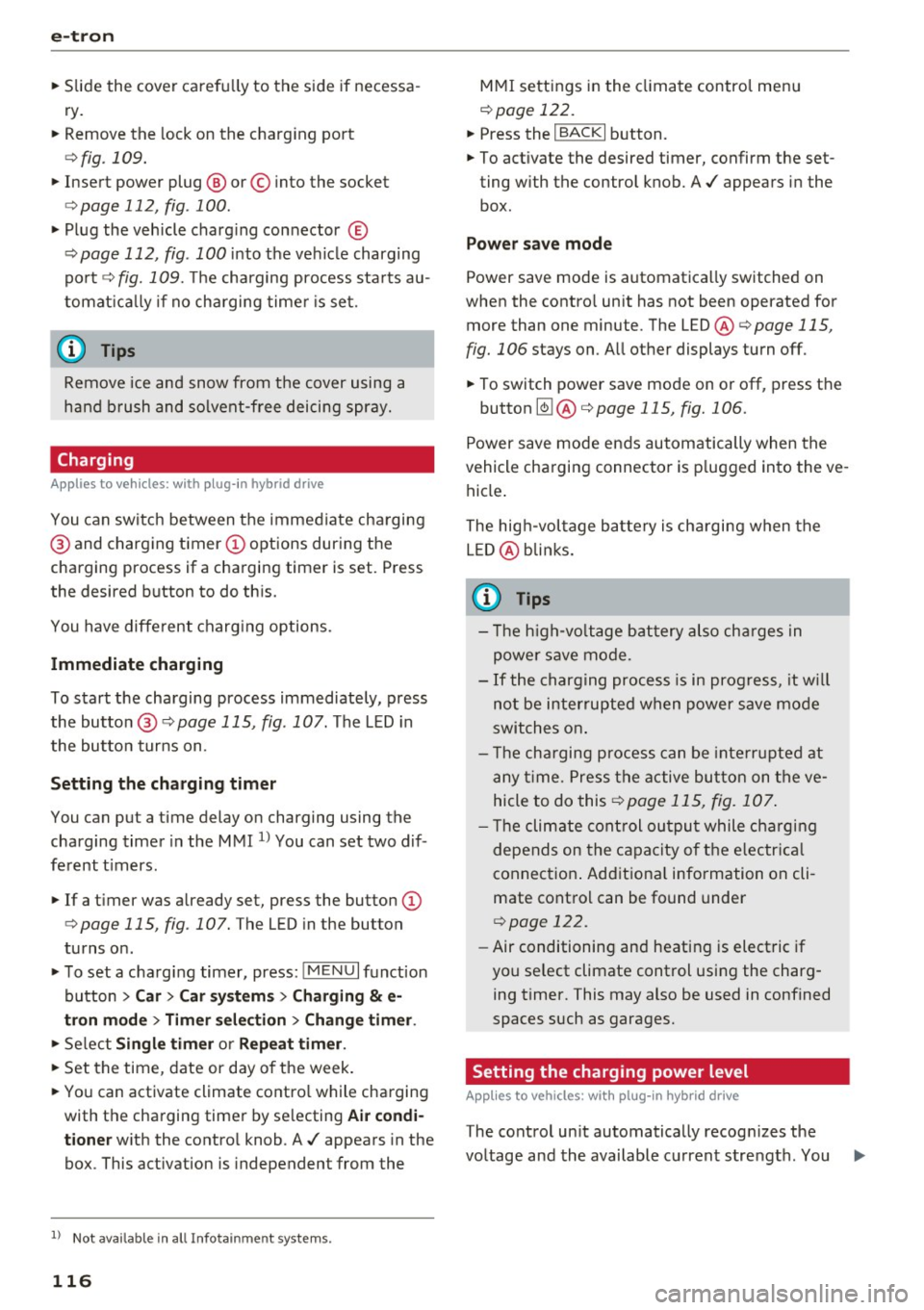
Charging
App lies to veh icles: w ith plug- in hybrid drive
You can switch between the immediate charging
@ and charging timer(!) options during the
charging process if a charging timer is set. Press
the desired button to do this.
You have different charging options.
Immediate charging
To start the charging process immediately, press
the button @<=>page
115, fig. 107. The LED in
the button turns on.
Setting the charging timer
You can put a time delay on charging using the
charging timer in the MMI
l) You can set two dif
ferent t imers.
"'If a timer was already set, press the button
(D
<=>page 115, fig . 107. The LED in the button
turns on .
"'To set a charging timer, press:
IM ENUI function
button
> Car> Car systems > Charging & e
tron mode> Timer selection> Change timer.
"' Select Single timer or Repeat timer.
"' Set the time , date or day of the week.
"' You can activate climate control while charging
with the charging timer by selecting
Air condi
tioner
with the control knob. A./ appears in the
box . This activation is independent from the
l) Not availa ble in all Info ta inm en t system s.
116
MMI settings in the climate control menu
qpoge 122.
"' Press the ~I B_A_C_K~I button.
"' To activate the desired timer, confirm the set
ting with the control knob. A./ appears in the
box.
Power save mode
Power save mode is automatically switched on
when the control unit has not been operated for
more than one minute. The
LED @<=>page 115,
fig. 106
stays on . All other displays turn off.
"' To switch power save mode on or off , press the
button
~ @ ¢page 115, fig. 106.
Power save mode ends automatically when the
vehicle charging connector is plugged into the ve
hicle .
The high-voltage battery is charging when the
LED @blinks.
(D Tips
- Th e high-voltage battery also charges in
power save mode.
- If the charging process is in progress, it will
not be interrupted when power save mode
switches on.
- T he charging process can be interrupted at
any t ime. Press the active button on the ve
hicle to do this
<=>page 115, fig. 107.
- The climate control output while charging
depends on the capacity of the electrical
connection. Additional information on cli
mate control can be found under
<=> page 122.
'
-Air conditioning and heating is electric if
you select climate control using the charg ing timer. This may also be used in confined
spaces such as garages.
Setting the charging power level
App lies to vehicles: wit h pl ug-in hybr id drive
The control unit automatically recognizes the
voltage and the available current strength. You .,.
Page 119 of 328

...... N
0 > CX)
...... I.Cl U"I
...... I.Cl ......
can set whether you would like to charge with the
full or half of the charging power.
• Press the I OKI @¢ page 115, fig. 106 button
on the cont rol unit .
• Enter the P IN if necessary.
• PO WER and SET P IN appear on the disp lay
field.
• Select
POWER using the arrow button@.
• Press the IOKI @ button.
• The charging power display appears . The cur
re nt set value (50% or 100%) is marked w ith a
frame .
• If necessary, change the sett ing us ing the ar
row button © to move downward or upward.
• Press the IOKI @ but ton .
(D Tips
- If a ho usehold socket is used fo r the charg
i ng process, the charging powe r leve l is au
tomatically set to 100% . If multiple electri
ca l cons umers are connected to a circuit,
the charging power may be limited to 50%
when charging with a household socket in
order to relieve the load on the electrical in
stallation. This does not apply to 100/110 V
household sockets since the charging power
would be too low and this would cause the
chargi ng p rocess to end.
- If an industr ial socket is used for the charg
i ng process, the charging power leve l is au
tomatically set to 50% . To receive the max i
mum charging power, the value must be set
to 100% .
- A selected val ue rema ins set unt il the power
cable is connected again .
e-tron
After charging
Applies to vehicles: with plug -in hybrid drive
Fig. 110 Rad iator grille : unlock ing and removing the vehi
c le charging connector
After completing the cha rgi ng or climate cont rol
process, the vehicle enters a sleep mode. No dis
plays are visible on the charging unit du ring this
period .
Deacti vating sleep mode
• Unlo ck the vehicle ~ page 35. Or
• Open the driver's door. Or
• Press the button @ ¢page 115, fig. 107 .
Unlocking the vehicl e charging connector
• Press the release (!)¢ fig. 110.
• Remove the veh icle charg ing connector @.
Closing the ch arging unit
• Put the cap back on the charging port
¢ page 115, fig. 109.
• Carefully slide the cover back in its original po
sition .
• Tu rn the lock to the hor izontal position
¢ page 115, fig. 108.
(D Note
An open or un locked cha rging unit is not dis
played . Check befo re every drive after charg
i ng if the cover is locked .
- If you dr ive with an ope n charging unit,
both the cover and the electronics installed
beh ind it cou ld be damaged .
117
Page 120 of 328

e-tron
Status displays
Applies to vehicles: w ith plug-in hybrid drive
You can check the various operating statuses us- unit@~ page 115, fig. 106 and the status LED
ing the LED@, the disp lay fie ld on the control
@ ~page 115, fig. 107 .
Charging system: control unit
LED on the control
Symbol Error code unit@ Meaning
Solution
Blue Flashes Self test
On Cable inserted correctly
Green Cable inserted and charg-
Flashes
mg
Self test completed sue-
cessfu lly, cable is not con-
White On nected or is is connected Insert the cable correctly.
incorrectly to the vehicle
charging port.
330 or Cable inserted incorrectly Check the cable and
insert
Red On
it correctly or replace the
340 or
fau [ty .
cable.
Disconnect the control
450, 500, unit from the power sup-
460, 200, ply and have the malfunc-
210,260, Red On Error in the control
unit. tion corrected at an au-
410 or thorized Audi dealer or au-
490 thorized Audi Service Fa-
cility
The control unit is over- A
llow the contro l unit to
cool down or operate it in
180,190 Red On heating or not cooled
the specified temperature
enough. range.
Have the malfunction cor-
140,130 Red On Communication to the ve-
rected by an authorized
or470 hide is malfunctioning. Audi dealer or authorized
Audi Service Facility.
300,310, Error in the household in-Have the
electrical instal-
Red On lation checked by a quali-
390 stallation.
fied electrician.
...
118
Page 121 of 328
,....,
N
0 > co ,....,
Symbol Error code LED on the control
unit@ Meaning
Solution
480 Red
110 Red
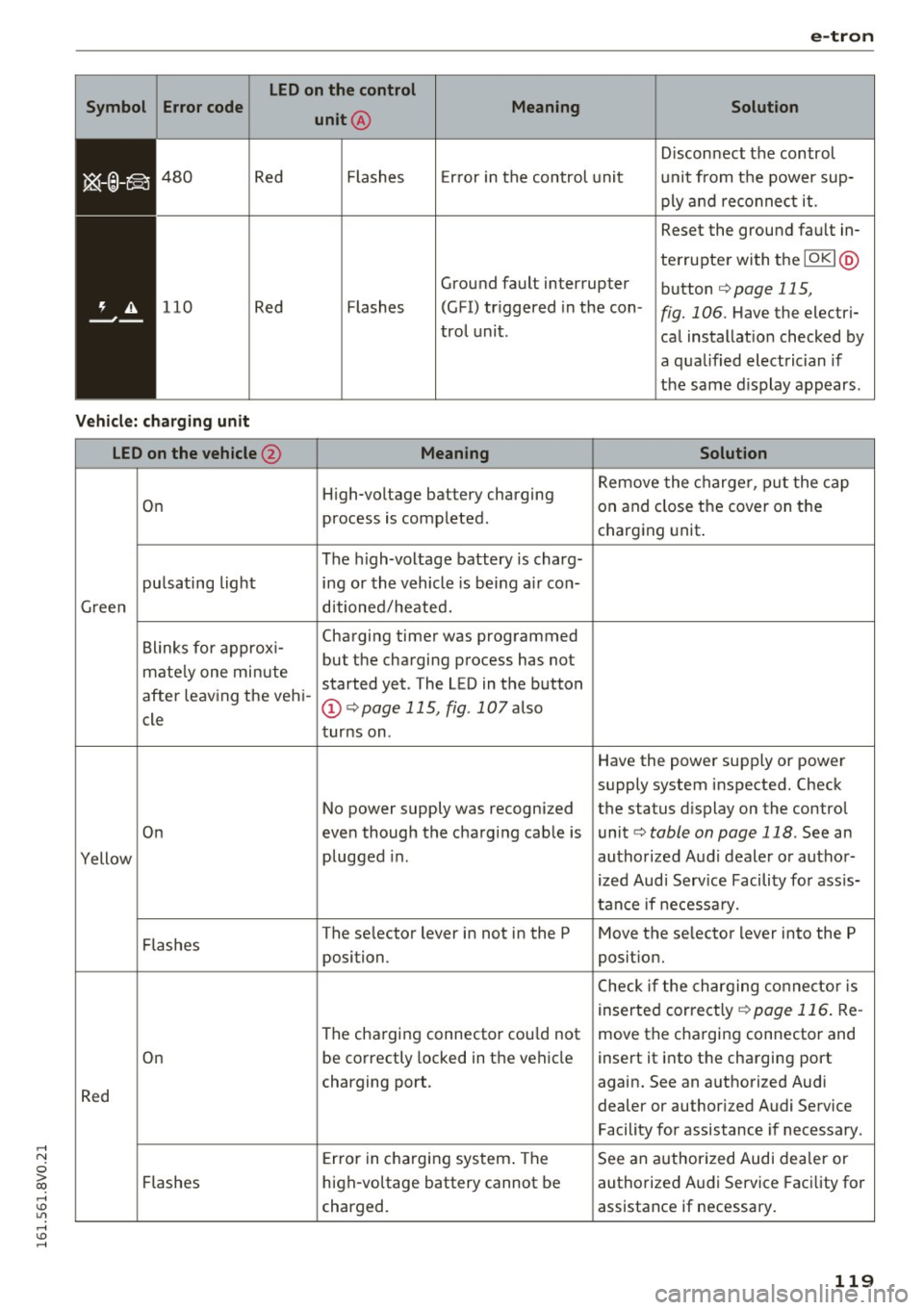
Vehicle: charging unit
LED on the vehicle @
On
pulsating light
Green
Blinks for approxi-
mate ly one min ute
after leaving the vehi-
cle
On
Yellow
Flashes
On
Red
Flashes Flashes
Error in the control unit D
isconnect the control
unit from the power sup
ply and reconnect it.
Flashes Ground fault interrupter
(G FI) triggered in the con
tra l unit . Reset the ground fault in
terrupter with the
IOKI @
button r=>page 115,
fig. 106 .
Have the electri
cal installation checked by
a qualified electrician if
the same d isplay appears .
Meaning Solution
High-voltage battery charging Remove
the charger, put the cap
on and close the cover on the
process is completed .
charging unit.
The high-voltage battery is charg-
ing or the vehicle is being a ir con-
ditioned/heated.
Charging timer was programmed
but the charging process has not
started yet . The LED in the button
@ r=>page 115, fig . 107 also
turns on.
Have the power supply or power
supply system inspected. Check
No power supply was recognized the status display on the control
even though the charging cable is unit
r=> table on page 118 . See an
plugged in . authorized Audi dealer or author-
ized Audi Service Facility for ass is-
tance if necessary.
The se lector lever in not in the P Move the selector lever into the P
position. position.
Check if the charging connector is
inserted correct ly
r=> page 116. Re-
The charging connector cou ld not move the charging connector and
be correctly locked in the vehicle
insert it into the charging port
charging port . again. See an authorized Audi
dealer or authorized Audi Service
Facility for assistance if necessary .
Error in charging system . The See an authorized Audi dealer or
high-voltage battery cannot be authorized Audi Service Facility for
charged. assistance if necessary.
119
Page 122 of 328
e-tron
Charging times
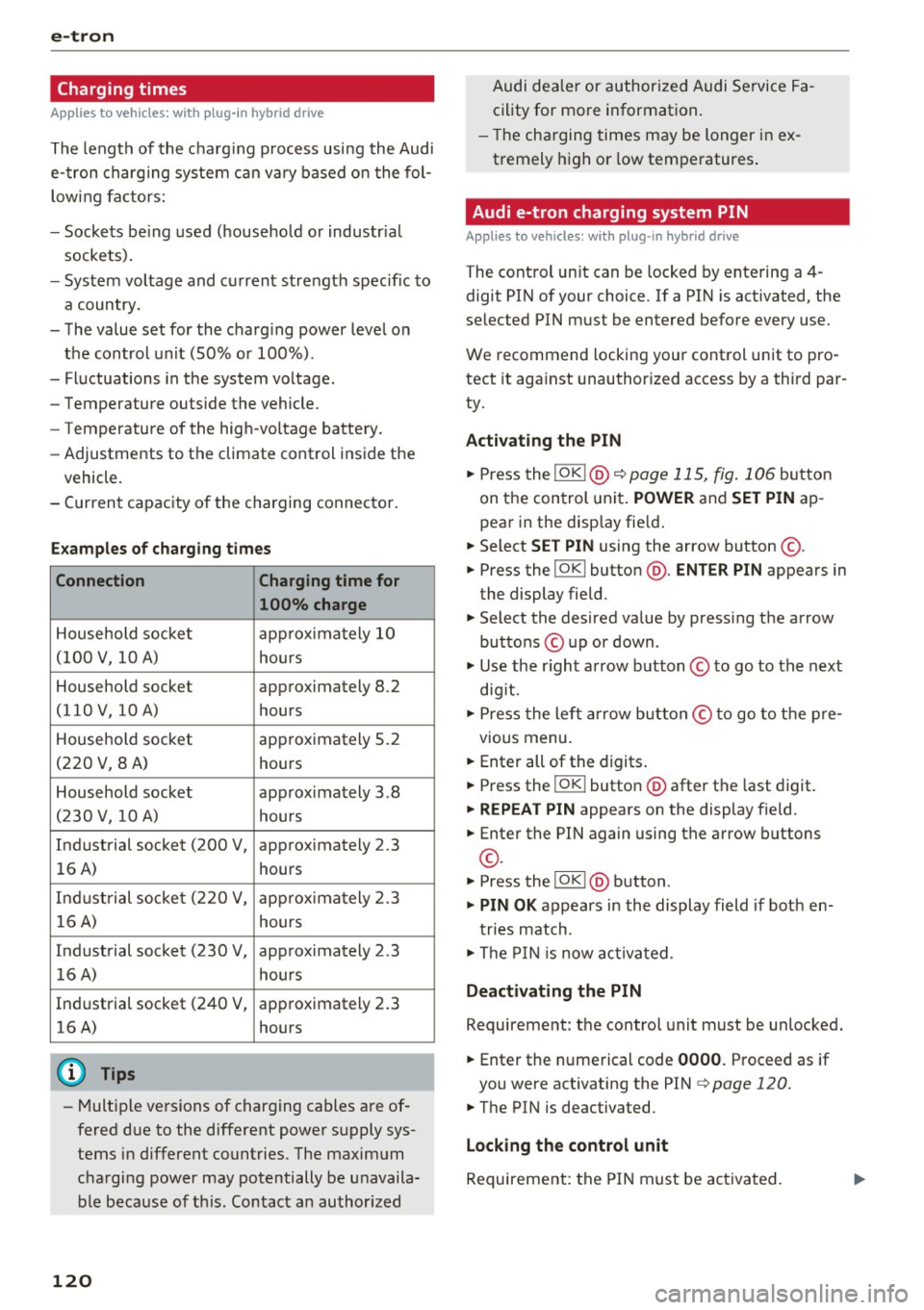
Applies to vehicles: w ith plug-in hybrid drive
The length of the charg ing process using the Audi
e-tron charging system can vary based on the fol
lowing factors:
- Sockets be ing used (household or industrial
sockets).
- System voltage and current strength specific to
a country.
- The value set for the charg ing power level on
the control unit (SO% or 100%) .
- Fluctuations in the system voltage .
- Temperature outside the vehicle.
- Temperature of the high-voltage battery .
- Adjustments to the climate control inside the
vehicle.
- Current capacity of the charging connector.
Examples of charging times
Connection Charging time for
100% charge
Household socket approximately 10
(100 V, 10 A)
hours
Household socket approximately 8 .2
(110 V, 10 A) hours
Household socket approximately 5.2
(220 V, 8 A) hours
Household socket app roximately 3 .8
(230 V, 10 A) hours
Industrial socket (200 V, approximately 2 .3
16 A) hours
Industrial socket (220 V,
approximately 2.3
16 A) hours
Industrial socket (230 V, approximately 2 .3
16 A)
hours
Industrial socket (240 V, approximately 2.3 16 A) hours
(D Tips
-Multiple versions of charging cables are of
fered due to the different power supply sys
tems in different countries. The maximum
charging power may potentially be unavaila
ble because of this. Contact an author ized
120
Audi dealer or authorized Audi Service Fa
cility for more information.
- Th e charging times may be longer in ex
tremely high or low temperatures .
Audi e-tron charging system PIN
Applies to vehicles: with plug-in hyb rid drive
The control unit can be locked by entering a 4 -
digit PIN of your choice. If a PIN is activated, the
selected PIN must be entered before every use.
We recommend locking your control unit to pro
tect it aga inst unauthorized access by a third par
ty.
Activating the PIN
.. Press the I OK !@ ¢ page 115, fig. 106 button
on the control unit.
POWER and SET PIN ap
pear in the disp lay fie ld .
.. Select
SET PIN using the arrow button ©-
.. Press the IOKI button @.
ENTER PIN appears in
the display field .
.. Select the desired value by pressing the arrow
buttons © up or down .
.. Use the r ight arrow button © to go to the next
dig it.
.. Press the left arrow button© to go to the pre-
vious menu.
.. Enter all of the digits.
.. Press the IOKI button @after the last digit.
.. REPEAT PIN appears on the display field .
.. Enter the PIN again using the arrow buttons
©-
.. Press thelOK l@ button .
.. PIN OK appears in the display field if both en-
tries match .
.. The PIN is now activated.
Deactivating the PIN
Requirement: the control unit must be unlocked.
.. Enter the numerical code
0000. Proceed as if
you were activating the PIN¢
page 120.
.. The PIN is deactivated.
Locking the control unit
Requirement: the PIN must be activated.