ECU AUDI S3 SEDAN 2015 User Guide
[x] Cancel search | Manufacturer: AUDI, Model Year: 2015, Model line: S3 SEDAN, Model: AUDI S3 SEDAN 2015Pages: 282, PDF Size: 71.14 MB
Page 90 of 282
Automatic transmission
Launch Control-Program
Applie s to v ehi cles: w ith launch control
The Launch Control Program enables maximum
acceleration .
Requirement: The engine must be at operating
temperature and t he steering wheel must not be
turned.
.,. With the engine running, press the
!~OFFI but
ton briefly one time
l) .
.,. Pull the selector lever back out of the O/S posi
tion briefly to select the S position, or press it
toward the right into the tiptronic position or
select the
Dynamic driving mode in drive se
lect*
~page 112.
.,. Press the brake pedal firmly with your left foot
and hold it all the way down for at least 1 sec
ond.
.,. At the same time, press the gas pedal all the
way down with your right foot until the engine
reaches and stays at a high RPM level.
.,. Remove your left foot from the brake.
_.&. WARNING
- Always adapt your driving to the traffic flow.
- Only use Launch Control when road and traf-
fic conditions allow it and other drivers will
not be endangered or impacted by your driv
ing and the vehicle's acceleration.
- Please note that the drive wheels can spin
and the vehicle can break away when sport
mode is switched on, especially when the
road is slippery.
- Once the vehicle has started moving, press
the
l .1'3 OFF ! button briefly to turn the sport
mode off.
(D Tips
- The transmission temperature may increase
significantly after using the launch control program. If that happens, the program may
1l In vehicles w ith a d rive r infor matio n syste m, a n ESC light
in t he instrument clus ter s tays o n co ntinuo usly and t he
message
Stabilization control (ESC): sport. Warning! Re·
stricted stability
appears temporarily.
88
not be available for a few minutes. It will be
available again after a cool-down period.
- When accelerating using the launch control
program, all vehicle parts are subject to
heavy loads. This can lead to increased wear.
Emergency mode
App lies to vehicles : wi th S t ro ni c t ra nsmi ssio n
In the event of a system malfunction, there is an
emergency program .
If all of the selector lever positions are highlight
ed with a light background in the instrument
cluster display, there is a system malfunction and
the S tronic transmission is running in the emer
gency program. The vehicle can still be driven in
emergency mode, but only with reduced speed
and not in all gears. In some cases, the vehicle
cannot drive in reverse .
(D Note
If the transmission runs in emergency mode,
drive to an authorized Audi dealer or author
ized Audi Service Facility immediately to have
the malfunction corrected.
Transmission malfunction
• Transmission malfunction! Please stop the
vehicle and select P
There is a malfunction in the transmission. Park
the vehicle securely and do not continue driving.
See an authorized Audi dealer or authorized Audi
Service Facility for assistance.
• Transmission overheating! Please stop the
vehicle!
The transmission is too hot and can become dam
aged. Stop and let the transmission cool with the
engine running (at idle) in the P selector lever po
sition. Then the indicator light and the message
turn off, drive to an authorized Audi dealer or au
thorized Audi Service Facility immediately to have.,.
Page 91 of 282
....,
N
0 > co
rl I.O
the malfunction corrected. If the indicator light
and the driver message do not turn off, do not
continue dr iv ing. See an authorized Audi dealer
or authorized Audi Service Facility for assistance .
rm Transmission malfunction: you can continue
driving
Drive to an authorized Aud i dealer or authorized
Aud i Service Facility immediately to have the
malfunction corrected.
rm Transmission malfunction: no reverse gear
(you can continue driving)
Drive to an authorized Aud i dealer or authorized
Audi Service Fac ility immediately to have the
malfunction corrected.
rm Transmission malfunction: You can continue
driving in D until engine off
Drive the vehicle away from moving traffic and
park. See an authorized Audi dealer or authorized
Audi Service Fac ility for assistance.
rm Transmission overheating! Please adapt
driving style
Continue driving moderate ly. When the indicator
light turns off, you can continue driving normally.
rm Transmission: Please press brake pedal and
select gear again
If the transmission malfunctions because the
temperature is too high, a message appears
when the transmission is coo led.
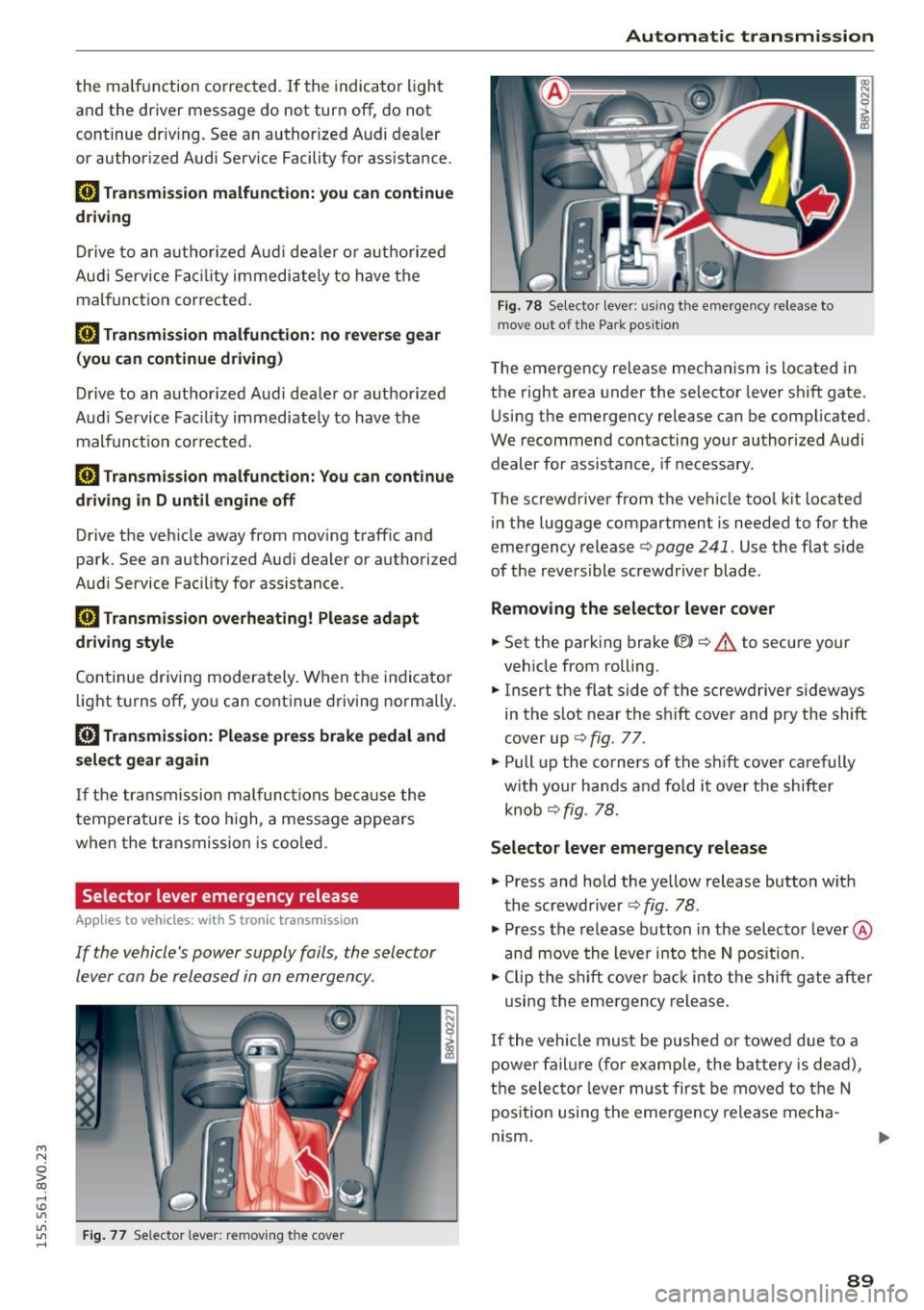
Selector lever emergency re lease
Appl ies to vehicles: with S tronic transm ission
If the vehicle's power supply foils, the selector
lever can be released in an emergency.
"'
"'
"' Fig. 77 Selector lever: removing the cove r rl
Automatic transmission
Fig. 78 Selector lever: u sing the emergency release to
move out of the Park position
The emergency release mechanism is located in
the right area under the selector lever shift gate.
Using the emergency release can be complicated.
We recommend contacting your authorized Audi dealer for assistance, if necessary.
The screwdriver from the vehicle too l kit located
in the luggage compartment is needed to for the
emergency release
c> page 241. Use the flat side
of the reversible screwdriver blade .
Removing the selector lever cover
.. Set the parking brake «Ell c> A to secure your
vehicle from rolling.
.. Insert the flat side of the screwdriver s ideways
in the slot near the shift cover and pry the shift
cover up ¢
fig. 77 .
.. Pull up the co rners of the sh ift cover carefully
with your hands and fo ld it over the shifter
knob ¢
fig. 78.
Selector lever emergency release
.. Press and hold the yellow release button with
the screwdriver ¢
fig. 78.
.. Press the release button in the selector lever ®
and
move the lever into the N position.
.. Clip the shift cover back into the shift gate after
using the emergency release.
If the vehicle must be pushed or towed due to a
power failure (for example, the battery is dead),
the selector lever must first be
moved to the N
position using the emergency release mecha
nism .
89
Page 92 of 282
Automatic transmi ssion
A WARNING
Only move the se lector lever out of the P posi
tion when the parking brake is set . If that
does not work, secure the vehicle w ith the
brake pedal. Otherw ise, the vehicle could
start to move uni ntentionally when the sele c
t o r l ever is moved out of the P pos ition.
90
Page 93 of 282
M N
0 > co ,...., \!) ..,.,
..,.,
..,., ,....,
Trailer mode Driving with a trailer
General information
Your Audi was designed primarily for passenger
transportation .
If you plan to tow a tra iler, p lease remember that
the additiona l load will affect d urability, econo
my and performance .
T railer towing not on ly places more stress on the
vehicle, it a lso calls for more concentrat ion from
the dr iver .
F or this reason, a lways fo llow the operating and
d riving instructions provided and use common
sense.
Technical requirements
Traile r hitch
Use a weight-carrying hitch conforming to the
gross trailer we ight. The hitch must be suitable
for your vehicle and trai ler and must be mounted
securely on the veh icle 's chassis at a technically
sound
location . Use on ly a tra iler hitc h with a re
movable ba ll mou nt. Always chec k w ith the t ra il
e r hitch m anu fac tur er to make sure that you a re
using the co rrec t hitch.
Do not use a bumper hitch .
The hitch must be installed in such a way that it
does not i nterfere wit h the impact -absorbi ng
bumper system. No mod ificat ions should b e
mad e to the vehicle exhaust and brake systems .
Fr om time to t ime, c hec k t hat a ll h itch mou nti ng
bo lts remain sec urely fastened .
When you are no t tow ing a trailer,
remove the
trai ler hitch ball mount . Th is prevents the hitc h
fr om caus ing damage should you r vehicle be
s truck from behind~,&. .
Trailer brakes
If yo ur tra iler is equipped w it h a braking system,
check to be s ure that it conforms to all regu la
tions.
Trailer mode
T he trailer hyd raulic brake system must not be di
rect ly connected to the ve hicle's hydraulic b rake
system .
Safety chains
Always use s afe ty chains be tween your ve hicle
and the tra ile r.
Trailer lights
Tra ile r li ghts must meet all regulations. Be sure
to check w it h your Aud i dea le r fo r corr ect w irin g,
swi tches and relays.
Mirrors
If you a re unable to see the traffic behind you us
i ng the regular o uts ide mirrors, then you
must in
sta ll extended mirrors .
It is importa nt that you
always have clea r vision to the rea r.
_&. WARNING
Afte r removing the trailer hit ch, d o no t store
i t in yo ur vehicle. In ca se of sudden br akin g,
the hitch could fly fo rward and inju re you or
your passengers.
Operating instructions
Maximum traile r weight
A trai le r fo r you r vehicle is limited to a typi cal
class 1 or class 2 trai le r.
Trailer load distribution
B e sure the load in the t raile r is held secure ly in
pla ce to p revent it from shift ing forward, back
ward or sideways .
Never allow a pas senger to ride in a trailer~.&.
in Driving instructions on page 92.
Engine cooling system
Towing a trailer makes the engine work harder . It
is important tha t the cooling system 's pe rform
ance is up to the additional load. Make s ure that
the coo ling system has enoug h flu id.
Tire pressure
When towing a trailer, inflate the tires of your ve-
hicle to the cold tire pressure listed under "Full
lilJJ..
91
Page 107 of 282
M N
0 > co ,...., \!) ..,.,
..,.,
..,., ,....,
-Please note that the sensor does not always
detect all objects. This increases the risk of a
collision.
- Pre sense front does not react to people or
animals or objects that are crossing the ve
hicle's path or are difficult to detect
¢ page 97.
-Reflective objects such as guard rails or the
entrance to a tunnel, heavy rain and ice can
affect the funct ion of the radar sensor and
the system's ability to detect a collision risk .
- Lack of attention can lead to collisions, oth
er accidents and serious injuries. pre sense
front is an assistance system and cannot
prevent a collision by itself. The driver must
always intervene . The driver is always re
sponsible for braking at the right time.
- Always pay attention to traffic, even when
pre sense front is switched on . Always be
ready to intervene and take over complete
control of the vehicle whenever it is neces
sary. Always follow traffic laws regarding
maintaining a safe distance between your
vehicle and vehicles ahead.
- pre sense front works within certain limits
and cannot react to situations that are out
side of the system limits, such as when ap
proaching a stationary vehicle or a station
ary obstacle (the end of a traffic jam or ave
hicle that has broken down).
- Always keep in m ind that the radar sensor
for pre sense front only works w ith in de
fined detection zones, which means other
vehicles may not always be detected correct
ly.
- The function and range of the radar sensor
can be impaired by rain, snow and heavy
mist. Vehicles ahead may not be detected
right away, or not detected at a ll.
- Reflective surfaces such as guard rails or en
trances to tunnels may impair the function
of the radar sensor.
(D Note
The sensor can be disp laced by impacts or
damage to the bumper, whee l hous ing and
underbody. The pre sense front sensor can be
damaged by this . Have an authorized Audi
Assist
dealer or authorized Audi Service Facility
check their function.
(D Tips
- You can cancel the braking with increasing
force that is initiated by the system by brak
ing yourself, by acce lerating noticeably or by
swerving .
- For information on driver messages about
pre sense, refer to ¢
page 106.
- Keep in mind that pre sense front can brake
unexpectedly. Always secure any cargo or
objects that you are transporting to reduce
the risk of damage or injury .
- Certain pre sense front functions switch
off
when ESC is switched off (sport mode) or
when driving in reverse.
- The pre sense front functions are not availa
ble if there is a malfunction in the adaptive
cruise control* system
¢page 102 or
¢ page 106.
-Keep in mind that pre sense front can brake
abruptly. Always secure cargo or objects
that you transport to reduce the risk of
damage or injury .
Settings in the Infotainment system
Applies to vehicles : wi th Audi pre sense front or A ud i ada ptive
cruise co ntrol
.,. In the MMI, select: the I MENU I button >C ar>
Systems*
car > Driver assistance > Audi pre
sense .
Switching the system on and off
Audi pre sense (Sys tem): if the system is switch
ed
off, it switches on again automatically once
the ignition is switched on again.
System -Switch Audi pre sense On-Off . With
this, you can switch the prewarning and the brak ing intervention from Audi pre sense on or
off.
Early warning -The distance and approach warn
ings can be switched
On /Off.
(D Tips
-If you restrict or switch off the ESC, the pre
sense also switches itse lf off ¢
page 124 .
105
Page 133 of 282
....,
N
0 > co
rl I.O
"'
"'
"'
rl
.. Make sure that a ll windows are clean and afford
good visibility to the outside .
.. Secure all luggage and other items carefully
r=> page 59, r=> page 59.
.. Make sure that nothing can interfere with the
pedals.
.. Adjust front seat, head restraint and mirrors
correct ly for your he ight.
.,. Instruct passengers to adjust the head re
stra ints according to their he ight .
.. Make sure to use the right child restraint cor
rect ly to protect children
r=> page 172, Child
safety .
.. Sit properly in your seat and make sure that
your passengers do the same
r=> page 54, Front
seats .
.. Fasten your safety belt and wear it proper ly. Al
so instruct your passengers to fasten their safe
ty belts p roperly
r=> page 140.
What impairs driving safety?
Safe driving is directly related to the condition of
the vehicle, the driver as well as the driver 's abili
ty to concentrate on the road without being dis
tracted.
The driver is respons ible for the safety of the ve
h icle and all of its occupants.
If your ability to
d rive is impaired, safety r isks for everybody in the
veh icle increase and you also become a hazard to
eve ryone else on the road
r=> &, . Therefo re:
.. Do not let you rself be distracted by passengers
or by using a cellular telephone .
.. NEV ER dr ive when your dr iv ing abili ty is im
paired (by medicat ions, alcohol, drugs, etc.).
.. Observe all traffic laws, rules of the road and
speed limits and plain common sense.
.. ALWAYS adjust your speed to road, traffic and
weather conditions.
.. Take frequent breaks on long trips. Do not dr ive
for more than two hours at a stretch .
.,. Do NOT drive when you are t ired, under pres
su re or when you a re stressed.
Dri vin g s afe ty
A WARNING
-Impaired dr iving safety increases the risk of
serious personal injury and death wheneve r a
vehicle is being used .
Correct passenger
seating positions
Proper seating position for the driver
The proper driver seating position is important
for safe, relaxed driving.
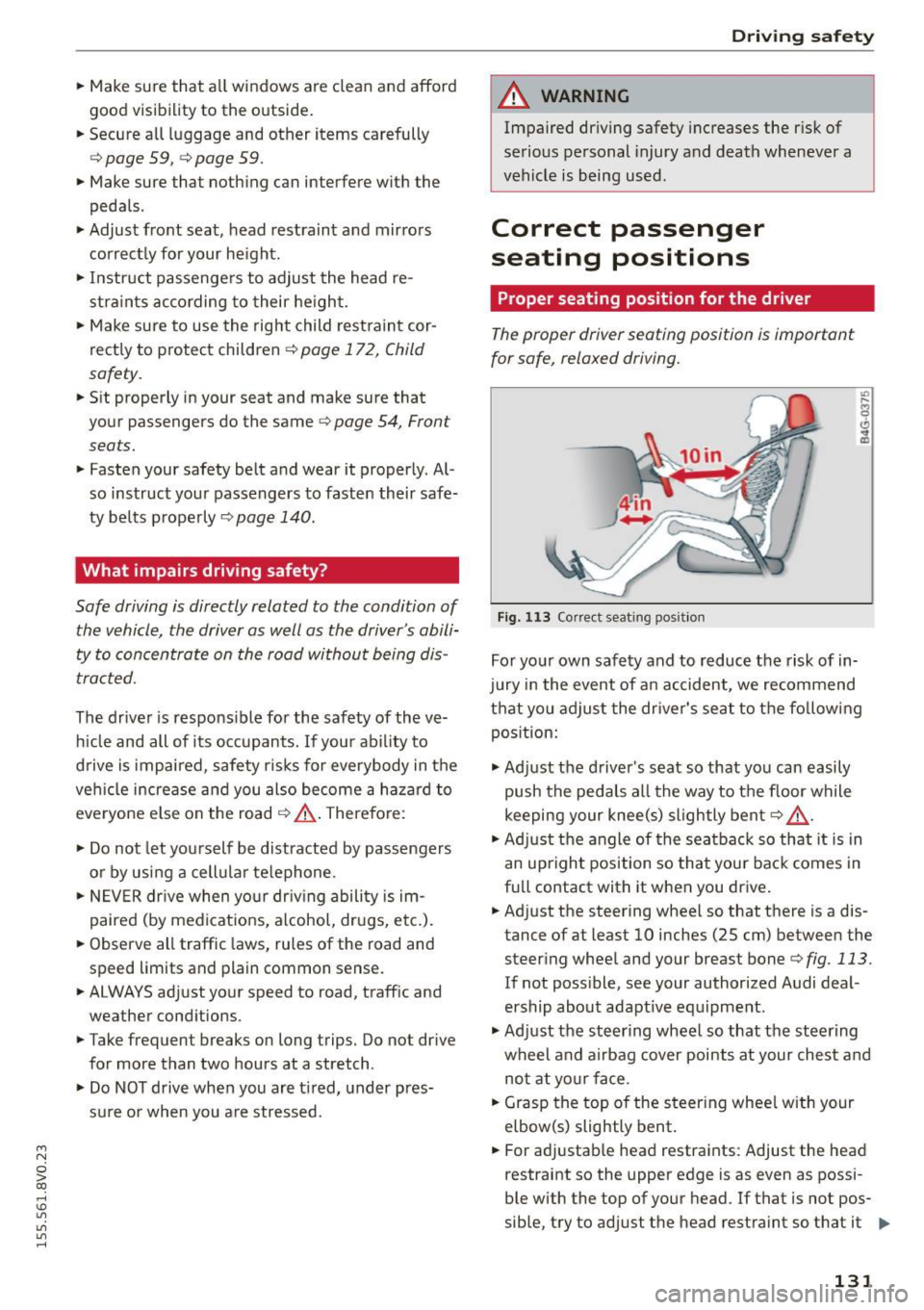
F ig , 1 13 Correct seating pos it ion
For yo ur own safety and to reduce the risk of in
jury in the event of a n accident, we recommend
that you adjust the dr iver's seat to the fo llowing
pos ition:
.,. Ad just the driver's seat so that you can easily
push the pedals all the way to the floor while
keeping your knee(s) slightly bent
r=> &, .
.. Ad just t he angle of the seatbac k so that it is in
an upright position so that your back comes in
full contact with it when you drive .
.. Adjust the steering whee l so that there is a dis
tance of at least 10 inches (25 cm) between the steering wheel and your breast bone
r=> fig. 113.
If not poss ible, see your authorized Audi deal
ership about adapt ive eq uipment.
.,. Ad just the steering wheel so that the steering
wheel and airbag cover points at your che st a nd
no t at yo ur face .
.. Grasp the top of the steer ing whee l with your
elbow(s) slightly bent .
.. For adjustab le head restraints: Adjust the head
restraint so the upper edge is as even as possi-
ble with the top of your head . If that is not pos
sible, try to adj ust the head restraint so that it .,.
131
Page 135 of 282
M N
0 > co ,...., \!) 1.1"1
1.1"1
1.1"1
,....,
seriously injured or killed by the airbag as it
unfolds. To help reduce the risk of serious per
sonal injury:
- Passengers must always sit in an upright po
sition and never lean against or place any
part of their body too close to the area
where the airbags are located.
- Passengers who are unbelted, out of posi
tion or too close to the airbag can be seri ously injured by an airbag as it unfolds with
great force in the blink of an eye.
- Always make sure that there are at least 10 inches (25 cm) between the front pas
senger's breastbone and the instrument panel.
- Always make sure that there are at least
4 inches (10 cm) between the front passen
ger's knees and the lower part of the instru
ment panel.
- Each passenger must always sit on a seat of
their own and properly fasten and wear the
safety belt belonging to that seat.
- Before driving, always adjust the front pas
senger seat properly.
- For adjustable head restraints: before driv
ing, always also adjust the head restraints
properly.
- Always keep your feet on the floor in front
of the seat. Never rest them on the seat, in
strument panel, out of the window, etc. The
airbag system and safety belt will not be
able to protect you properly and can even in
crease the risk of injury in a crash.
- Never drive with the backrest reclined or
tilted far back! The farther the backrests are
tilted back, the greater the risk of injury due
to incorrect positioning of the safety belt
and improper seating position.
- Children must always ride in child seats
<=> page 172. Special precautions apply
when installing a child seat on the front pas
senger seat
r=> page 148.
Driving safety
Proper seating positions for passengers in
rear seats
Rear seat passengers must sit upright with both
feet on the floor consistent with their physical
size and be properly restrained whenever the ve
hicle is in use.
To reduce the risk of injury caused by an incorrect
seating position in the event of a sudden braking
maneuver or an accident, your passengers on the
rear bench seat must always observe the follow
ing :
.,. For adjustable head restraints: adjust the head
restraint so the upper edge is as even as possi
ble with the top of your head. If that is not pos
sible, try to adjust the head restraint so that it
is as close to this position as possible
<=>page 134 .
.,. Keep both feet flat in the footwell in front of
the rear seat .
.,. Fasten and wear safety belts properly
Qpage 143 .
.,. Make sure that children are always properly re
strained in a child restraint that is appropriate
for their size and age
Q page 172.
A WARNING
P assengers who are improperly seated on the
rear seat can be seriously injured in a crash.
- Each passenger must always sit on a seat of
their own and properly fasten and wear the
safety belt belonging to that seat.
- Safety belts only offer maximum protection
when the safety belts are properly posi
tioned on the body and securely latched. By not sitting upright, a rear seat passenger in
creases the risk of personal injury from im properly positioned safety belts!
- For adjustable head restraints: always ad
just the head restraint properly so that it can give maximum protection.
133
Page 137 of 282
M N
0 > co ,...., \!) 1.1'1
1.1'1
1.1'1
,....,
-never sit on the edge of the seat
- never si t sideways
- never lea n out the w indow
- never p ut yo ur feet out the window
- never put yo ur feet on the instrument panel
- never rest your feet on the seat cushion or back
of the seat
- never ride in the footwe ll
- never ride in the cargo area
&_ WARNING
Improper seat ing positions increase the risk
of serious personal injury and death whenever
a vehicle is be ing used.
- Always make sure that all vehicle occupants
stay in a proper seating position and are
properly restrai ned whenever the vehicle is
being used.
Driver's and front
passenger's footwell
Important safety instructions
App lies to vehicles: with knee airb ags
&_ WARNING
Always ma ke sure that the knee a irbag can in
flate without interference. Objects between
yourself and the airbag can increase the r isk
of injury in an accident by interfering with the
way the airbag deploys or by being pushed in to you as the airbag deploys.
- No persons (chi ldren) or animals should ride
in the footwe ll in front of the passenger
seat.
If the airbag dep loys, this can result in
serious or fatal injuries.
- No objects of any kind shou ld be carried in
the footwe ll area in front of the dr iver's or
passenger's seat. Bulky objects (shopp ing
bags, for example) can hamper or prevent
proper deployment of the airbag . Small ob
jects can be th rown thro ugh the vehicle if
the a irbag deploys and injure you o r you r
passengers.
Dr ivin g s afet y
Pedal area
Pedals
The pedals must always be free to move and
must never be interfered with by a floor mat or
any other object.
Make sure that a ll peda ls move freely without in
terference and that nothing prevents them from
r eturning to the ir original positions.
Only use f loor mats that leave the pedal area free
and can be secured with floor mat fasteners.
If a brake circ uit fa ils, increased brake pedal trav
el is required to bring the vehicle to a full stop.
&_ WARNING
--
Pedals that cannot move free ly can cause loss
of vehicle control and increase the risk of ser i
ous injury .
- Never p lace any objects in the driver's foot
well. An object could get into the pedal area
and interfere with pedal function. In case of
sudden braking o r an accident, you would
not be able to b rake or accelera te!
- Always make sure that nothing can fall or
move into the d river 's footwell.
Floor mats on the driver side
Always use floor mats that can be securely at
tached to the floor mat fasteners and do not in
terfere with the free movement of the pedals.
.. Make sure that the floor mats are properly se
cured and cannot move and inte rfere with the
pedals
~ A .
Use only floor mats that leave the pedal area un
obstructed and that are firmly secured so that
they cannot sl ip out of position . You can obta in
s ui table floor mats from your authorized Aud i
Dealer .
Floor mat fasteners are insta lled in your Audi.
Floor mats used in yo ur vehicle must be attached
to these fasteners. Properly securing the floor .,..
13 5
Page 138 of 282
Driving safet y
mats wi ll prevent them from sliding into posi
tions that cou ld interfere with the peda ls or im
pa ir safe operation of your vehicle in other ways .
A WARNING
Pedals that cannot move freely can result in a
loss of vehicle control and increase the risk of
serious persona l injury .
- Always make sure that floor mats are prop
erly secured .
- Never place or insta ll floor mats or other
floor coverings in t he veh icle that cannot be
properly secured in place to prevent them
from slipping and inte rfering w ith the ped
als or the ability to control the veh icle .
- Never place or insta ll floor mats or other
floor coverings on top of already installed
floor mats. Additiona l floo r mats and other
c overings w ill reduce the si ze of the pedal
area and interfere w ith the pedal s.
- Always proper ly reinstall and secu re floor
mats that have been take n ou t for clean ing .
- Always make sure that objects cannot fa ll
in to the dr iver footwell while the veh icle i s
moving. Obje cts can be come trapped unde r
the brake pedal an d accelerator peda l caus
ing a loss of vehicle cont ro l.
Storing cargo correctly
Loading the luggage compartment
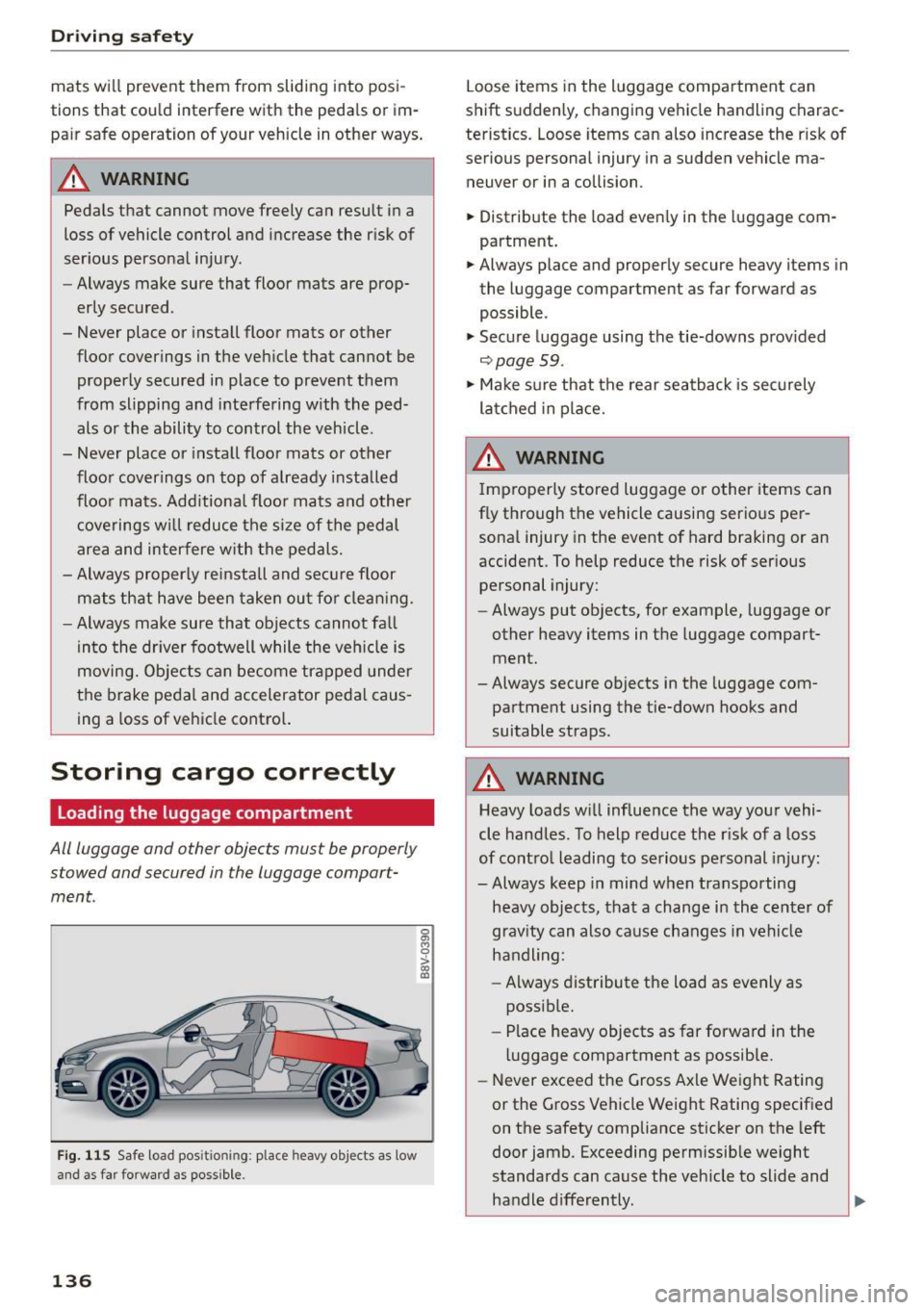
All luggage and other objects must be properly
s towed and secured in the luggage compart
ment.
F ig . 11 5 Safe load pos it io nin g: place heavy objects as low
an d a s far for ward as possib le .
136
Loose items in the luggage compa rtment can
shift suddenly, changing vehicle handling charac
teristics. Loose items can also increase the r isk o f
serious persona l injury in a sudden vehicle ma
neuver or in a collision.
.,. Distribute the load even ly in the luggage com
partment.
.,. Always place and properly secure heavy items in
the luggage compartment as far forward as
possible .
.,. Secure luggage using the tie-downs prov ided
~ page 59.
.,. Ma ke s ure that the rear seatback is securely
la tc hed in place.
A WARNING
I mproperly stored luggage or other items can
fly through the vehicle causing serio us per
sona l injury in the event o f hard braking or an
accident. To help reduce the risk of ser ious
personal injury:
- Always put objects, for example, luggage or
other heavy items in the luggage compart
ment.
- Always secure objects in the luggage com
partment using the tie-down hooks and
suitable straps.
A WARNING
H eavy loads wi ll influence the way your vehi
cle handles . To help reduce the r isk of a loss
of contro l leading to se rio us pe rsonal injury:
-Always keep in mind when transpo rting
heavy objects, tha t a change i n the center of
grav ity can also cause changes in vehi cle
h a ndli ng:
- Always distribute the load as evenly as
possib le.
- Place heavy objects as far forward in the
luggage compartment as possib le.
- Never exceed the Gross Axle Weight Rating
or the Gross Vehicle Weight Rating specif ied
on the safety compliance sticker on the left
door jamb. Exceeding permissib le weight
standards can cause the veh icle to slide and
handle d ifferently. ,...
Page 139 of 282
M N
0 > co ..... \!) 1.1"1
1.1"1
1.1"1
.....
-Please observe information on safe driving
~page 130.
A WARNING
To help prevent poisonous exhaust gas from
being drawn into the vehicle, always keep the
rear lid closed while driving .
- Never transport objects larger than those
fitting completely into the luggage area be
cause the rear lid cannot be fully closed.
- If you absolutely must drive with the rear lid
open, observe the following notes to reduce
the risk of poisoning:
- Close all windows,
- Close the power roof*,
- Open all air outlets in the instrument pan-
el,
- Switch off the air recirculation,
- Set the fresh air fan to the highest speed.
A WARNING
Always make sure that the doors, all windows,
the power roof* and the rear lid are securely
closed and locked to reduce the risk of injury
when the vehicle is not being used.
-After closing the rear lid, always make sure
that it is properly closed and locked.
- Never leave your vehicle unattended espe
cially with the rear lid left open . A child
could crawl into the vehicle through the lug
gage compartment and close the rear lid be
coming trapped and unable to get out. Be
ing trapped in a vehicle can lead to serious
personal injury.
- Never let children play in or around the vehi
cle.
- Never let passengers ride in the luggage
compartment. Vehicle occupants must al
ways be properly restrained in one of the ve hicle's seating positions.
(D Tips
- Air circulation helps to reduce window fog
ging. Stale air escapes to the outside
through vents in the trim panel. Be sure to keep these slots free and open.
Driving safety
-The tire pressure must correspond to the
load. The tire pressure is shown on the tire
pressure label. The tire pressure label is lo
cated on the driver's side B-pillar. The tire
pressure label lists the recommended cold
tire inflation pressures for the vehicle at its
maximum capacity weight and the tires that
were on your vehicle at the time it was man ufactured. For recommended tire pressures
for normal load conditions, please see chap
ter ~
page 224.
' Tie-downs
The luggage compartment is equipped with four
tie-downs to secure luggage and other items.
Use the tie-downs to secure your cargo properly
~page 136, Loading the luggage compartment.
In a collision, the laws of physics mean that even
smaller items that are loose in the vehicle will
become heavy missiles that can cause serious in
jury. Items in the vehicle possess energy which
vary with vehicle speed and the weight of the
item. Vehicle speed is the most significant factor.
For example, in a frontal collision at a speed of
30 mph (48 km/h) , the forces acting on a 10-lb
(4.5 kg) object are about 20 times the normal
weight of the item. This means that the weight
of the item would suddenly be about
200 lbs. (90 kg). You can imagine the injuries
that a 200 lbs. (90 kg) item flying freely through
the passenger compartment could cause in a col
lision like this.
A WARNING
-Weak, damaged or improper straps used to
secure items to tie-downs can fail during hard
braking or in a collision and cause serious per
sonal injury .
- Always use suitable mounting straps and
properly secure items to the tie-downs in
the luggage compartment to help prevent
items from shifting or flying forward as dan
gerous missiles.
- When the rear seat backrest is folded down,
always use suitable mounting straps and
properly secure items to the tie-downs in
137