key AUDI S3 SEDAN 2015 User Guide
[x] Cancel search | Manufacturer: AUDI, Model Year: 2015, Model line: S3 SEDAN, Model: AUDI S3 SEDAN 2015Pages: 282, PDF Size: 71.14 MB
Page 39 of 282
....,
N
0 > co
rl I.O
"'
"'
"'
rl
Unlocking/locking with the key
In the event that the power locking system fails,
the driver's door can locked and unlocked using
the door lock.
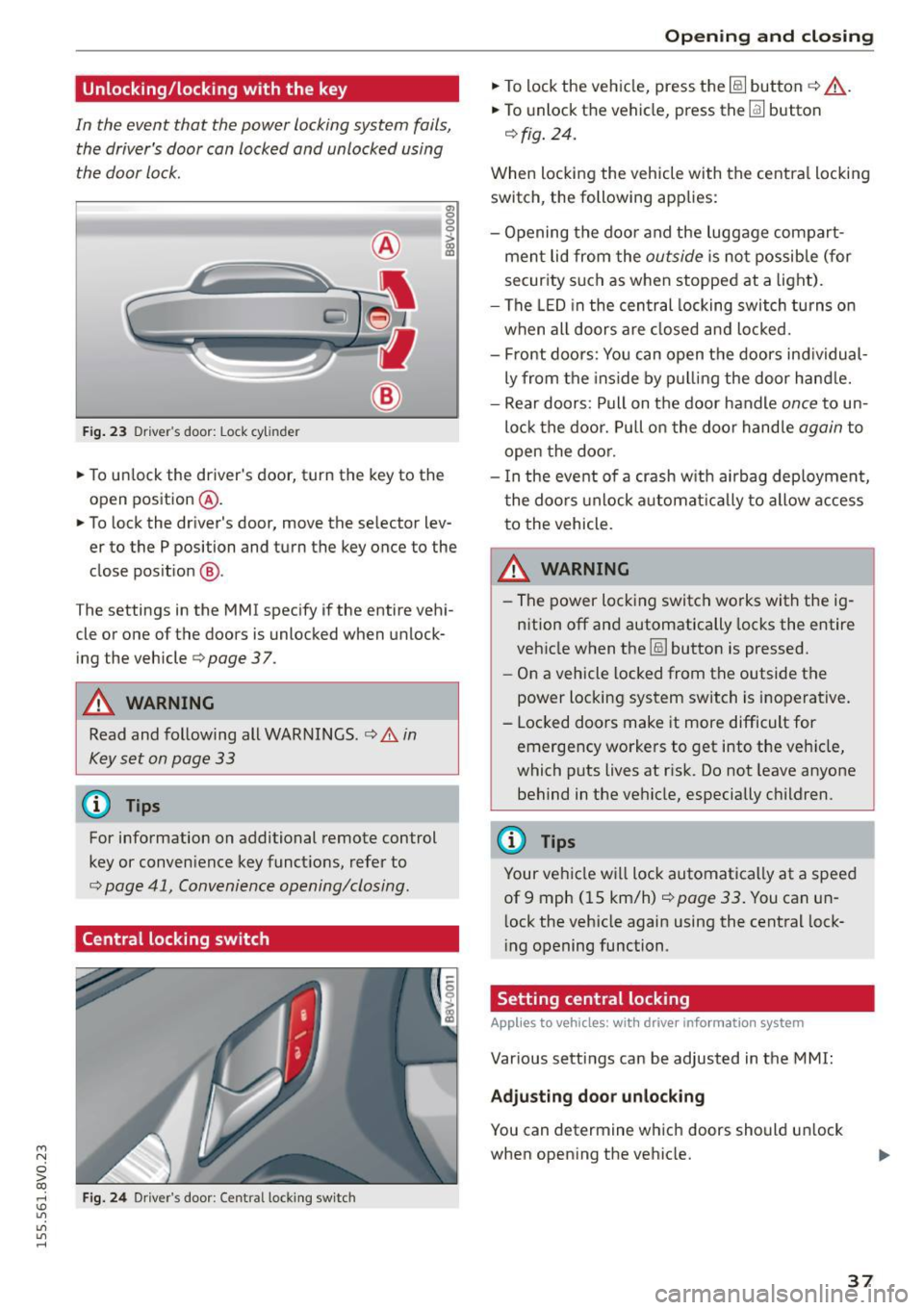
F ig . 23 Dr ive r's door: Lock cylinder
• To un lock the driver's door, turn the key to the
open position
® ·
a, 0 0 0 :> Q) a,
• To lock the driver's door, move the selector lev
er to the P position and turn the key once to the
close pos it ion
® ·
The settings in the MMI specify if the entire vehi
cle or one of the doors is unlocked when unlock
ing the vehicle
c:::> page 3 7.
A WARNING
Read and following all WARNINGS. c:::> &. in
Key set on page 33
@ Tips
For information on additional remote control
key or conven ience key functions, refer to
c::> page 41, Convenience opening/closing .
Central locking switch
Fig. 24 Dr iver 's door : Centra l lock ing switch
Open ing and clo sing
• To lock the vehicle, press the~ button c:::> .&_.
• To unlock the vehicle, press the~ button
c:::>fig. 24.
When loc king the vehicle with the centra l locking
switch, the following app lies:
- Opening the door and the luggage compart
men t lid from the
outside is not possible (for
secur ity such as when stopped at a light).
- The LED in the central locking switch tu rns o n
when all doors are closed and loc ked.
- Front doo rs: You can open the doors ind ividual
ly from the ins ide by p ulling the door hand le.
- Rear doors: Pull on t he door handle
once to un
lo ck the doo r. Pull on the doo r handle
again to
open the doo r.
- I n the event of a crash w it h ai rbag deploymen t,
t he doo rs unlock a utoma tically to allow access
to the vehicle.
_&. WARNING
- The power locking switch wo rks with the ig
n ition off an d automatically locks the entire
veh icle when the~ button is pressed.
- On a vehicle locked from the outside the
power loc king system switch is inoperative.
- Locked doors make it more difficult for emergency workers to get into the ve hicle,
which puts lives at ris k . Do not leave anyone
behind in the ve hicle, especially c hildren.
(D Tips
Your ve hicle w ill lock automatica lly at a speed
of 9 mph ( 15 km/h)
c::> page 33 . You can un
l ock the vehicle again using the central lock
i ng opening function.
Setting central locking
Applies to vehicles: with drive r in fo rmat io n system
Var ious settings can be adjusted in the MMI:
Adju sting door unlocking
You can determine wh ich doors should u nlock
when open ing the vehicle.
37
Page 40 of 282
Opening and closing
"'Select: the IMENU ! button> Car> Systems*
control button > Vehicle settings > Central
locking > Door unlocking.
Selecting All and pressing the~ button on the
remote control key unlocks the entire vehicle.
If you select
Driver and then press the~ button
on the remote control key, only the driver's door
will unlock. In vehicles with a convenience key,
only the front door whose handle you pull will
unlock. If you press the~ button twice, the en
tire vehicle will unlock. If you press the~ button,
the entire vehicle will always lock.
Folding* the exterior mirrors
"'Select: the IMENU ! button> Car> Systems*
control button > Vehicle settings > Central
locking > Fold mirrors when locking.
For more
information, refer to
c:> page 47, Adjusting
the exterior mirrors.
If you select On, the outside mirrors will fold in
automatically when you press the~ button on
the remote control key
i:> page 47.
Tone when locking
"'Select : the IMENU ! button> Car> Systems*
control button > Vehicle settings > Central
locking> Tone when locking.
When checked off./, a tone will sound when you
lock the vehicle.
If you press the~ button twice, the entire vehi
cle will lock. There is a locking tone at the same
time
1l .
Electronic immobilizer
The immobilizer prevents unauthorized use of
your vehicle.
A microchip in the key automatically deactivates
the electronic immobilizer when the key is locat
ed in the vehicle.
If you remove the key from the
vehicle, the electronic immobilizer activates
again automatically.
l) Thi s fu nct io n is not availabl e in all cou ntri es .
38
A WARNING ,_ -
Always take the key with you whenever you
leave your vehicle. The electronic immobilizer
can be deactivated with the key, so this could
make it possible for unauthorized persons to
start the engine and operate vehicle systems
such as the power windows or sunroof. This
can increase the risk of serious injury.
(D Tips
-The vehicle cannot be started if an unau
thorized key is used.
It may not be possible
to start the vehicle under certain circum
stances, for example if there is another ra
dio module like the key from another vehicle
or a transponder on the same keychain.
- For an explanation on conformity with the
FCC regulations in the United States and the
Industry Canada regulations, refer to
i:>page 265.
Safety central locking
App lies to vehicles : wi th safe ty cen tral lock ing
Safety central locking provides the possibility, to
only unlock the driver's door and the fuel filler
door. The rest of the vehicle remains locked.
Unlocking the driver's door and the fuel filler
door
"' Press the remote control key or convenience key
Ifill button once or turn the key once in the open
ing direction.
Unlocking all doors, the luggage
compartment lid and the fuel filler door
"' Press the remote control key or convenience key
Ifill button twice within five seconds or turn the
key
twice within five seconds in the opening di
rection.
When unlocking just the driver's door, the anti
theft alarm system* is also immediately deacti
vated.
In vehicles with an MMI, you can directly adjust
the safety central locking
c:> page 3 7.
Page 41 of 282
....,
N
0 > co
rl I.O
"'
"'
"'
rl
Front passenger's door and rear doors
emergency locking
All door s must be locked separately if the power
lo cking system fails .
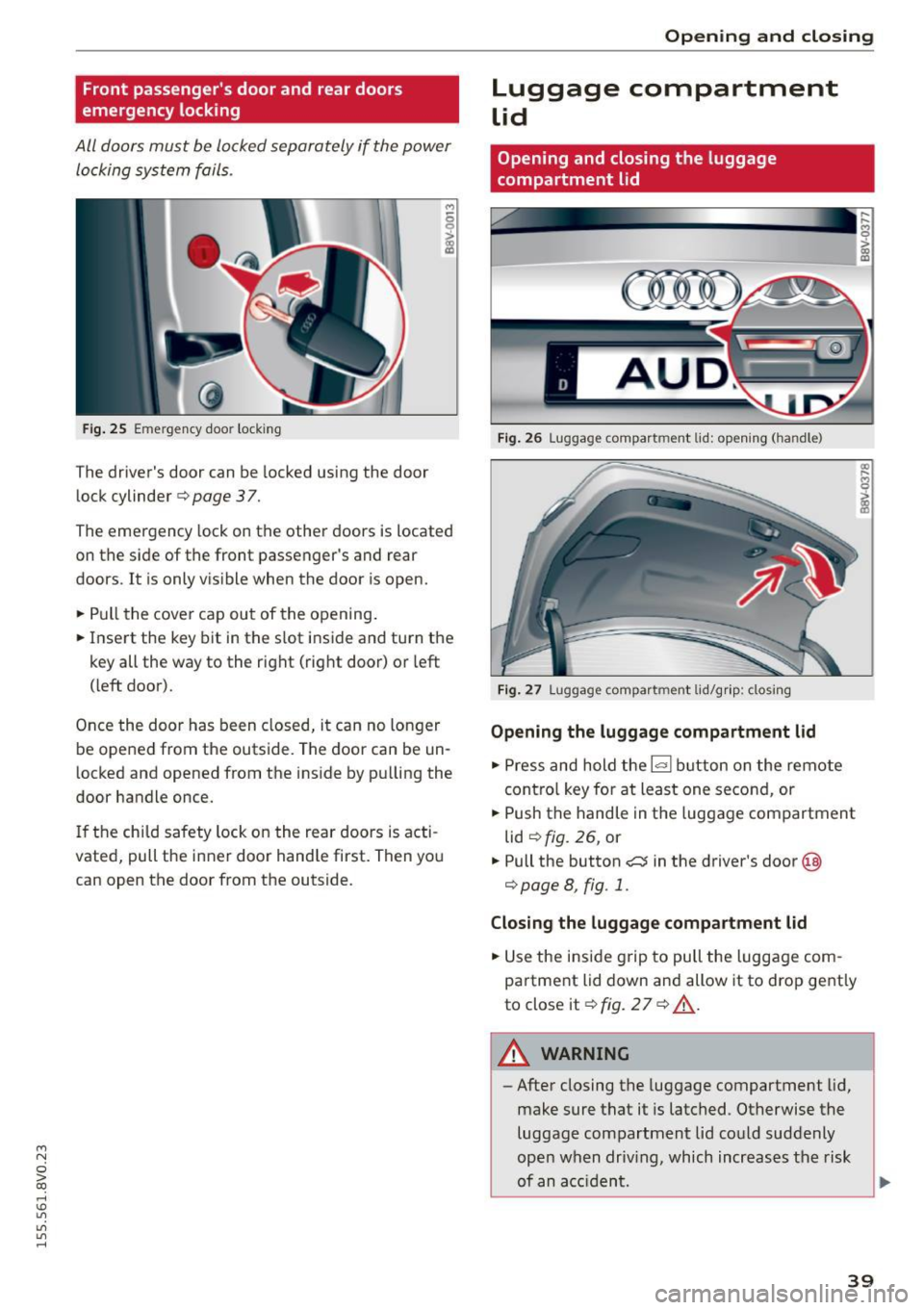
Fig. 25 Em ergenc y doo r locki ng
The driver's door can be lo cked using the door
lock cylinder
¢ page 37.
,.,
6
i
The emergency lock on the other doors is located
on the side of the front passenger's and rear
doo rs. I t is only vis ible when the door is open.
• Pull the cover cap out of the opening .
• Insert the key bit in the slot inside and turn the
key all the way to the right (right door) or left
( left door).
Once the doo r has been closed, it can no longer
be ope ned from the outside. The door can be un
l ocked and opened from the inside by p ulling the
door handle once.
I f the chi ld safety lock on the rear doors is acti
vated, pull the inner door hand le first. Then you
can open the door from the outside .
Opening and clo sing
Luggage compartment
Lid
Opening and closing the luggage
compartment lid
Fig . 26 Lugg age compart men t lid : op en ing ( han dle )
F ig . 27 Lugg age compart ment lid/gr ip : clo sing
Opening the luggage compartment lid
• Press and hold the~ button on the remote
contro l key for at least one second, or
• Push the handle in the luggage compartment
lid
¢ fig . 26, or
• Pull the button
c::::::; in the driver 's door @
¢ page 8, fig . 1.
Closing the luggage compartment lid
• Use the inside g rip to pull the luggage com
partment lid down and allow it to drop gently
to close it¢
fig. 2 7 ¢ ,&. .
A WARNING
-
-After closing the luggage compartment lid,
make sure that it is latched . Otherwise the
luggage compartment lid co uld suddenly
open when driv ing, which increases the risk
of an a cc iden t.
39
Page 42 of 282
Opening and closing
- Never drive with the luggage compartment
lid ajar or open , because po isonous gases
can enter the vehicle interior and create the
risk of asphyxiation .
- Never leave your vehicle unattended when
the luggage compartment lid is open. A
child could climb into the vehicle through
the luggage compartment. If the luggage
c ompartm ent lid was the n closed, the child
would be trapped in t he ve hicle and u nable
to escape. To reduce the risk of injury, do
not allow c hildren to play in or a rou nd the
vehicle. A lways keep the luggage compart
ment lid and the doors closed when the ve
hicle is not in use.
- Always make sure no one is in the luggage
compartment lid 's range of motion when it
is closing, especially nea r the hinges. F in
gers or hands co uld be p inched .
(D Tips
-W hen the vehicle is locked, the luggage
compartment lid can be unlocked separately by p ress ing the
1~ 1 button on the remote
contr ol key. When the luggage compart
ment lid is closed aga in, it locks a utomat i
ca lly.
- In case of an emergency o r a faulty hand le ,
the luggage compartment lid can be opened
from the ins ide
c::> pag e 240 .
Child safety Lock
Child safety lock
Applies to vehicles: w ith mec han ical child safety lock
The child safety locks t prevent the rear doors
from opening from the inside.
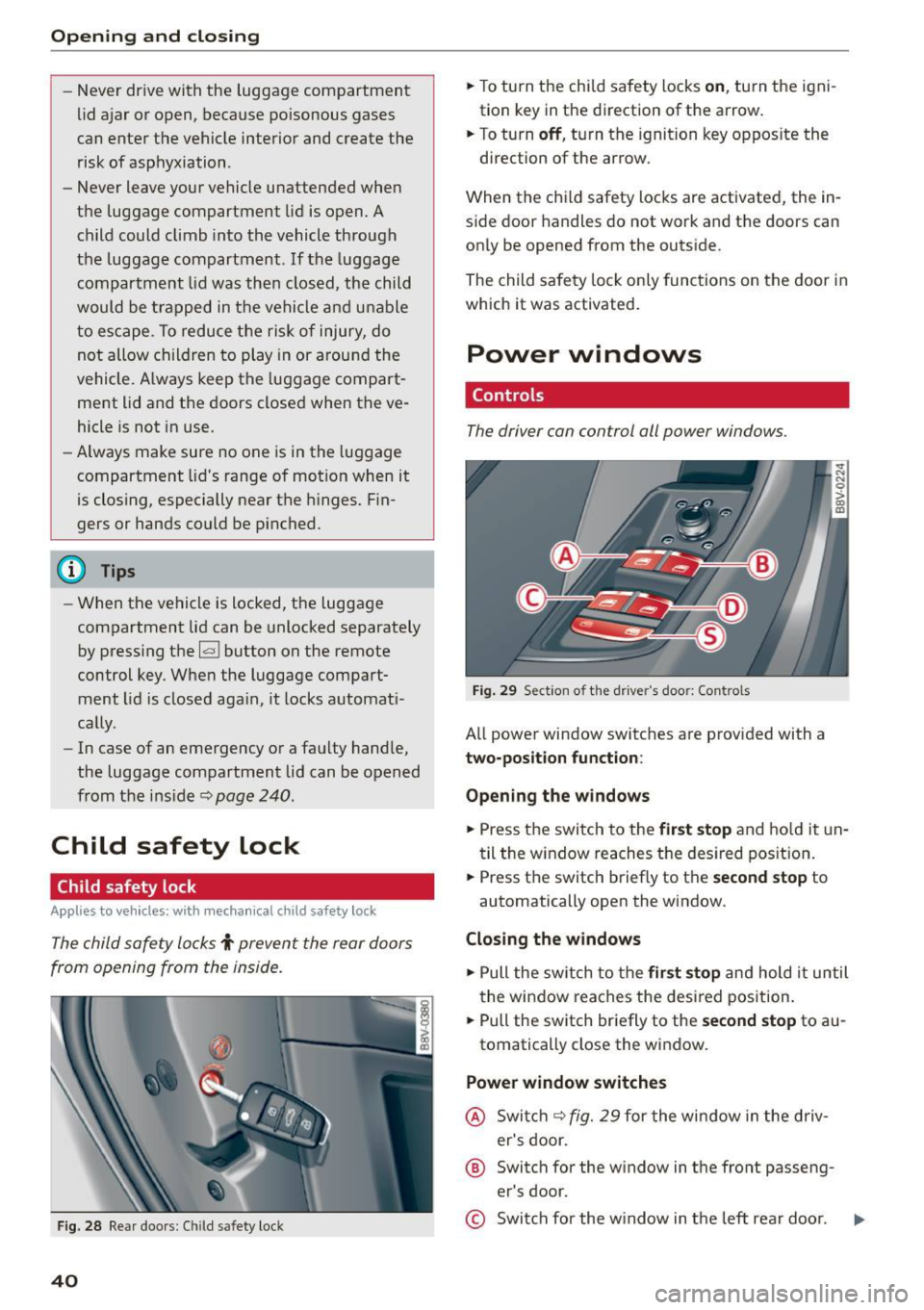
F ig . 2 8 Rear doo rs: C hild safety loc k
40
.,. To turn the child safety locks on , turn the igni
tion key in the direction of the arrow .
.,. To turn
off , turn the ignition key oppos ite the
direction of the arrow.
When the ch ild safety loc ks are activated, the in
side door handles do not work and t he doors can
on ly be opened from the outs ide.
The child sa fe ty lo ck only func tions on the door i n
which it was activated.
Power windows
Controls
The driver can control all power windows .
Fig. 29 Section of th e d river 's doo r: Co ntro ls
All powe r window switc hes are prov ided with a
two-position function :
Opening the window s
.,. Press the switch to the first stop and ho ld it un
til the w indow reaches t he des ired pos it ion .
.,. Press the switch briefly to the
second stop to
automatically open the window.
Closing the windows
.,. Pull the sw itch to th e first stop a n d hold it until
t he win dow reaches the des ired pos ition .
.,. Pull the switch br iefly to the
se cond stop to au
tomatically close the w indow.
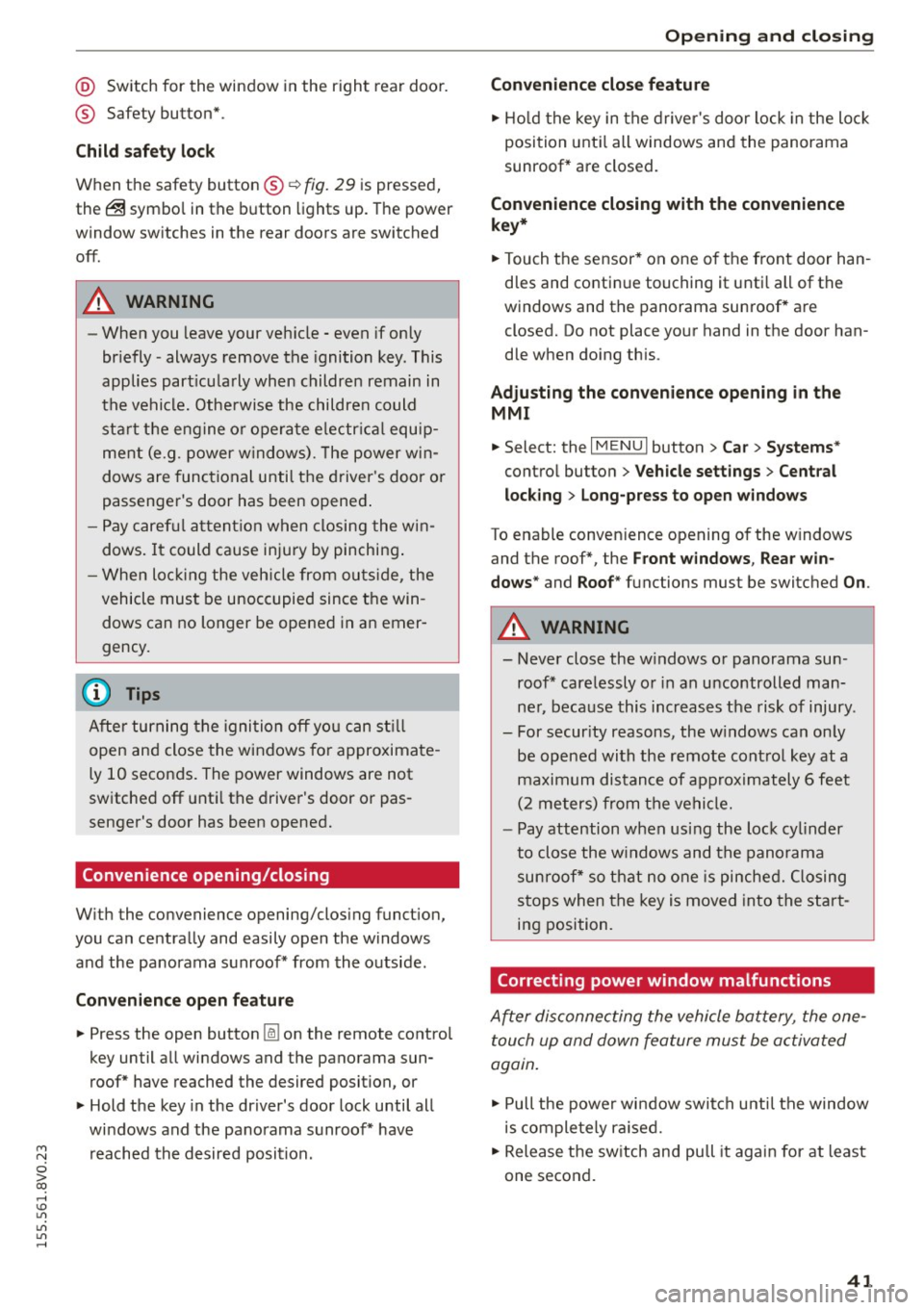
Power window switches
@ Swi tch c::> fig. 29 for the wi ndow in the driv
er's door.
® Switch for the w indow in the front passeng
er's door.
© Swi tch for the w indow in t he left rear doo r.
Page 43 of 282
M N
0 > co ,...., \!) 1.1'1
1.1'1
1.1'1
,....,
@ Switch for the window in the right rear door.
® Safety button* .
Child safety lock
When the safety button®~ fig. 29 is pressed,
the@ symbol in the button lights up. The power
window switches in the rear doors are switched
off.
A WARNING
- When you leave your vehicle - even if only
br iefly -always remove the ignition key. This
applies part icularly when children remain in
the vehicle. Otherwise the children could start the engine or operate e lectr ica l equip
ment (e.g. power windows). The power win
dows are functional until the driver 's door o r
passenger's door has been opened .
- Pay caref ul attent ion when closing the win
dows.
It could cause injury by pinching .
- When locking the veh icle from outs ide, the
vehicle must be unoccupied since the win
dows can no longer be opened in an emer
gency.
-
(D Tips
After turning the ignition off you can st ill
open and close the windows for approximate
ly 10 seconds. The power windows are not
switched off unti l the driver's door or pas
senger's door has been opened.
Convenience opening/closing
With the convenience opening/closing funct ion,
you can centrally and easily open the windows and the panorama sunroof* from the outside.
Con veni enc e op en f eatur e
.. Press the open button Iii on the remote control
key until all windows and the panorama sun
roof* have reached the desired position, or
.. Hold the key in the driver's door lock until all
windows and the panorama sunroof* have
reached the desired position.
Op ening and cl osing
Conven ience clo se feature
.. Ho ld the key in the driver's door lock in the lock
position unti l all windows and the panorama
sunroof* are closed.
Con venienc e closing wi th the convenience
key*
.. Touch the sensor * on one of the front door han
dles and contin ue touching it until all of the
windows and the panorama sunroof* are
closed. Do not place your hand in the door han
dle when doing th is .
Adju sting the con venience opening in the
MMI
.. Select: the I MENU I button >Car> Sys tems*
control button > Vehicle se ttings > Cent ral
loc king > Long-pr ess to open w indo ws
To enable convenience opening of the w indows
and the roof*, the
Front windo ws, Rear win
do ws*
and Roo f* functions must be switched On.
A WARNING
- Never close the w indows or panorama sun
roof* care lessly or in an uncontrolled man
ner, because this increases the risk of injury.
- For secur ity reasons, the w indows can only
be opened with the remote control key at a
maximum distance of approximately 6 feet
(2 meters) from the vehicle.
- Pay attention when using the lock cylinder
to close the w indows and the panorama
sunroof* so that no one is pinched. Closing
stops when the key is moved into the start
ing position.
Correcting power window malfunctions
After disconnecting the vehicle battery, the one touch up and down feature must be activated
again .
.,. Pull the power wi ndow switch until the window
is completely ra ised.
.. Release the switch and pull it again for at least
one second.
4 1
Page 44 of 282
Opening and closing
Panorama sunroof
Description
Applies to vehicles: with panoramic sunroof
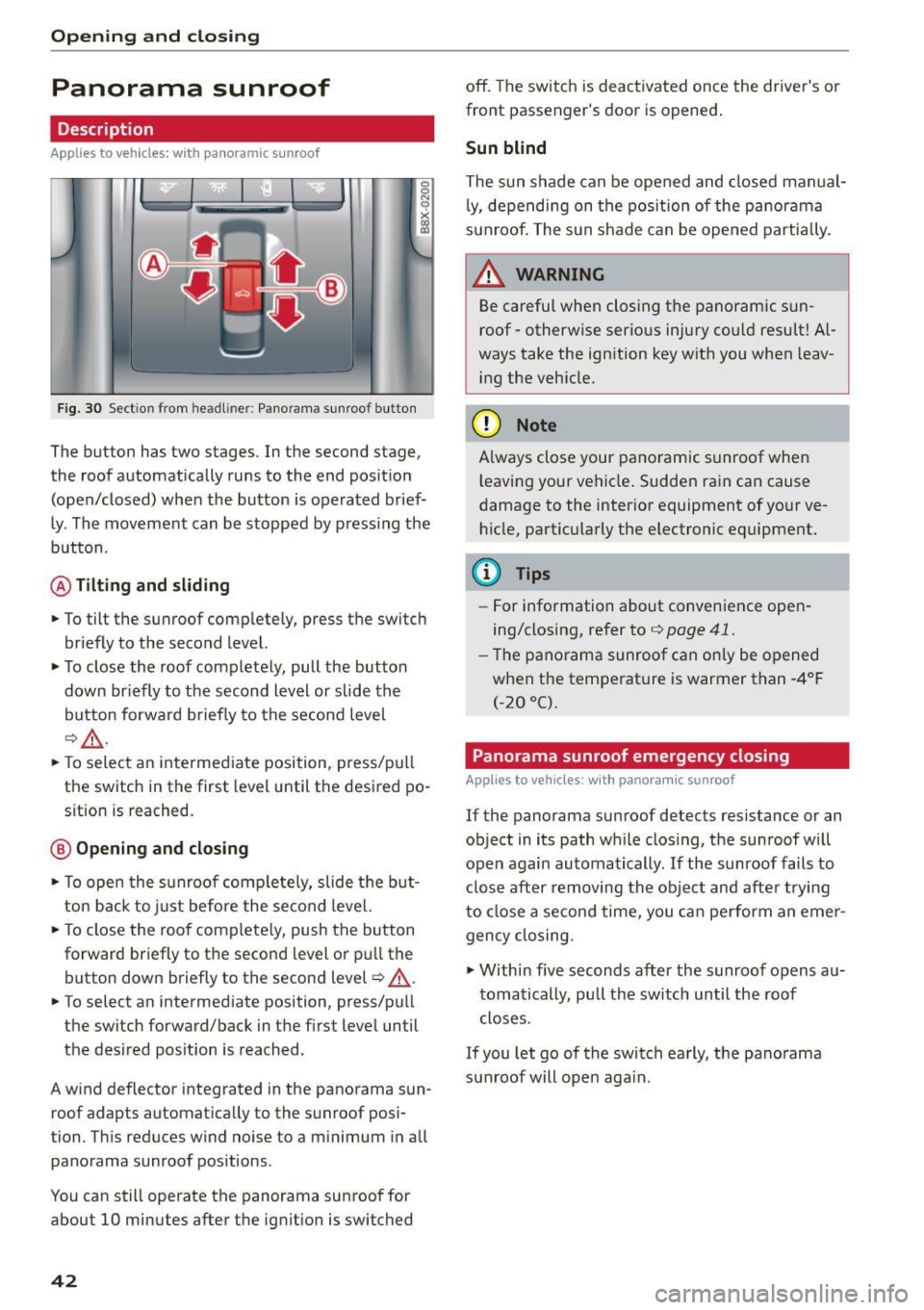
Fig. 3 0 Sectio n from headl iner: Pano rama su nroo f button
The button has two stages. In the second stage,
the roof automatically runs to the end pos it ion
(open/closed) when the bu tton is operated brief
ly . The movement can be stopped by press ing the
button.
@ Tilting and sliding
.,. To tilt the sunroof comp lete ly, press the switch
br iefly to the second level.
.,. To close the roof completely, pull the button
down br iefly to the second level or slide the
bu tton forw ard brief ly to the second level
¢ ,& .
.,. To select an intermed iate position, press/pull
the switch in the first level until the desired po
s ition is reached.
@ Opening and closing
.,. To ope n the s unroof complete ly, slide t he but
t on back to just before the seco nd leve l.
... To close the roo f complete ly, push the button
forward briefly to t he second level o r pull the
button down briefly to the second level¢,& .
... To select an intermed iate position, press/pu ll
the switch forward/back in the first level until
the des ired pos ition is reached.
A wind deflector integrated in the panorama sun
roof adapts automat ica lly to the sunroof posi
tion . T his reduces w ind no ise to a m inimum in a ll
panorama sunroof positions.
You can still operate the panorama sunroof for
about 10 minutes after the ignit ion is switched
42
off. The switch is deac tivated once the driver's or
front passenger's door is opened .
Sun blind
The sun shade can be opened and closed man ual
l y, de pending on the position of the pa no ra ma
sun roof. The s un shade can be ope ned partia lly.
_& WARNING
Be careful when closing the pano ramic sun
roof -otherwise serio us inju ry cou ld resu lt! A l
ways take the ign ition key with you when leav
i ng the veh icle.
@ Note
A lways close your pano ramic s unroof whe n
l eaving your vehicle . Sudden rain can cause
damage to the inter io r equipment of your ve
h icle, partic ula rly the electronic equipment .
(D Tips
-For information about convenience open
ing/closing, refer to¢
page 41.
-Th e pano rama sunroof can on ly be o pened
when the temperat ure is warmer than -4°F
(-20 °().
Panorama sunroof emergency closing
Applies to vehicles: with panoramic sunroof
If the panorama sunroof detects res istance or an
object in its path w hile clos ing, the sunroof w ill
open again automatically. If the sunroof fails to
clos e after removing the obje ct and afte r trying
to close a second time, you ca n pe rform an eme r
gency closing.
.,. Within five seconds after the sunroof opens au
toma tically, pull the sw itch until the roof
closes .
If you let go of the switch early, the panorama
sun roof will open aga in .
Page 49 of 282
....,
N
0 > co
rl I.O
"'
"'
"'
rl
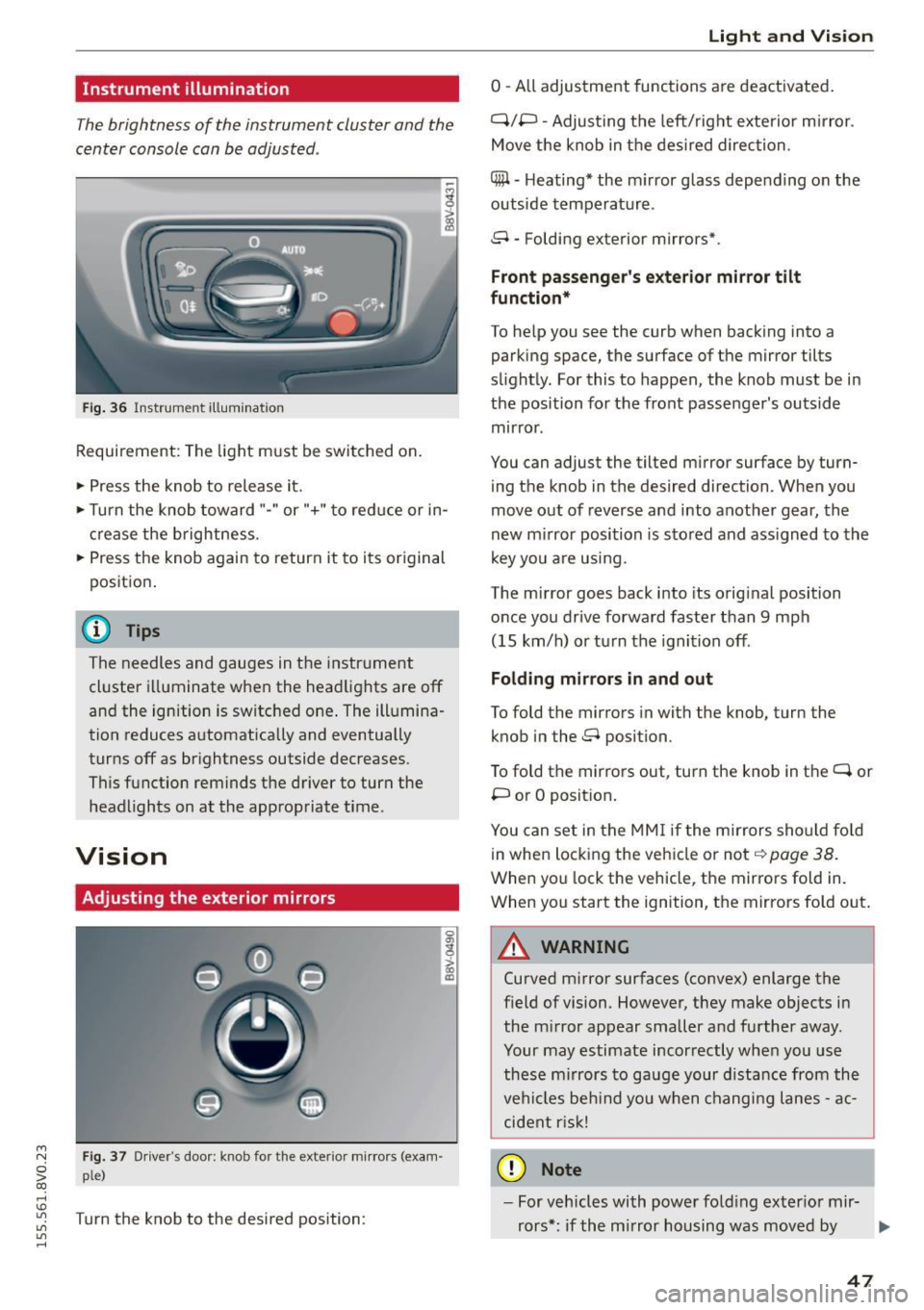
Instrument illumination
The brightness of the instrument cluster and the
center console can be adjusted .
Fig. 36 Instrument illum ination
Requirement: The light must be switched on.
.. Press the knob to release it.
.. Turn the knob toward"-" or"+" to red uce or in
crease the brightness.
.. Press the knob again to return it to its original
posit ion .
@ Tips
The needles and gauges in the instrument
cluster illuminate when the headlights are off
and the ignition is switched one . The illumina·
tion reduces automatically and eventually
turns off as br ightness outside decreases.
This function reminds the driver to turn the
headlights on at the appropriate time .
Vision
Adjusting the exterior mirrors
Fig. 37 Driver's door: knob for the exterior mirrors (exam
ple)
Turn the knob to the desired position:
0
g
> a, (X)
Light and Visio n
0 -A ll adjustment functions are deactivated .
Q/P -Adjusting the left/rig ht exterior mirror.
Move the knob in the des ired direction.
C@ · Heating* the m irror glass depending on the
outside temperature.
8 • Folding exterior mirrors*.
Front pa ss e ng er's ex te rior mirror tilt
functio n*
To help you see the curb when backing into a
parking space, the surface of the mirror tilts
slight ly. For this to happen, the knob must be in
the position for the front passenger's outside
mirror .
You can adjust the tilted mirror surface by turn·
i ng the knob in the desired direction . When you
move out of reverse and into another gear, the
new m irror position is stored and ass igned to the
key yo u are us ing .
The mirror goes back into its orig inal position
once you drive forward faster than 9 mph
(15 km/h) o r turn the ignition off.
Folding m ir rors in and out
To fold the mirrors in with the knob, turn the
knob in the 8 position.
To fold the mirrors out, turn the knob in the
q or
P or O posit ion .
You can set in the MM I if the mirrors sho uld fo ld
in when locking the vehicle or not
q page 38.
When you lock the vehicle, the mirrors fold in.
When you start the ignition, the mirrors fold out.
A WARNING -,.
Curved m irror surfaces (convex) enlarge the
field of vision. However, they make objects in
the m irror appear smaller and further away.
Your may estimate incorrectly when you use
these m irrors to gauge your d istance from the
vehi cles be hind you when changi ng lanes -ac·
cident risk!
@ Note
- For vehicles with power fo ld ing exter ior mir·
rors*: if the mirror housing was moved by
IJI,-
47
Page 57 of 282
....,
N
0 > co
rl I.O
"'
"'
"'
rl
Power seat adjustment
Applies to vehicles: with power adjustable seats
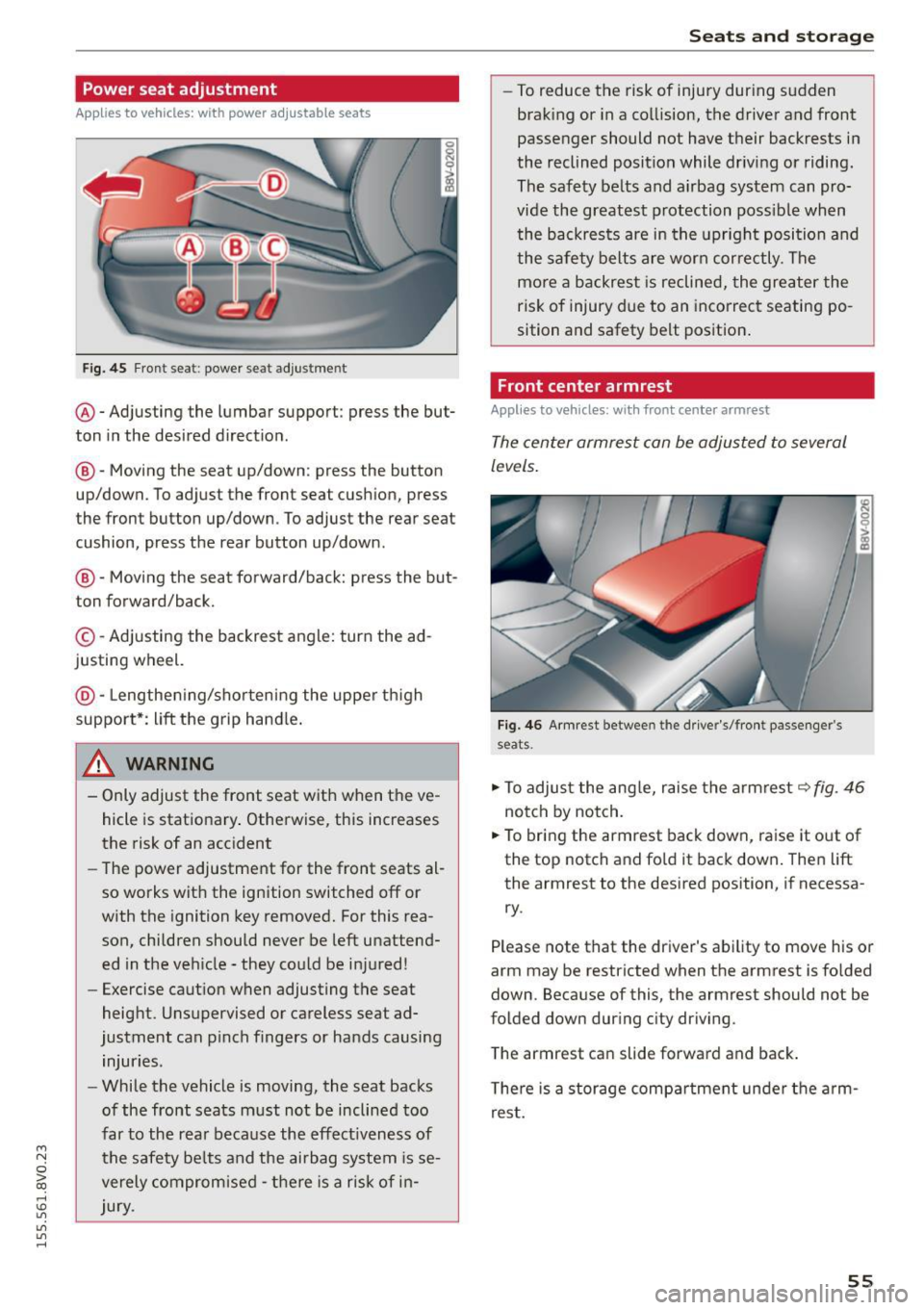
Fig. 45 Front seat: power seat adjus tment
@ -Adjusting the lumbar support: press the but
ton in the desired direction .
®-Moving the seat up/down: press the button
up/down. To adjust the front seat cush ion, press
the front button up/down . To adjust the rear seat
cushion, press the rear button up/down.
@ -Moving the seat forward/back: press the but
ton forward/back.
© -Adjusting the backrest angle: turn the ad
justing wheel.
@ -Lengthening/shortening the upper thigh
support*: lift the grip hand le.
A WARNING
- Only adjust the front seat with when the ve
hicle is stationary . Otherwise, this increases
the risk of an accident
- The power adjustment for the front seats al
so works with the ignition switched off or
with the ignition key removed. For this rea
son, children should never be left unattend ed in the vehicle - they could be injured!
- Exercise caution when adjusting the seat
height. Unsupervised or careless seat ad
justment can pinch fingers or hands causing
injuries.
- While the vehicle is moving, the seat backs
of the front seats must not be inclined too
far to the rear because the effect iveness of
the safety be lts and the airbag system is se
verely compromised -there is a risk of in
jury.
Seats and storage
- To reduce the risk of injury during sudden
braking or in a collision, the driver and front
passenger should not have their backrests in
the reclined position while driving or riding.
The safety belts and airbag system can pro
vide the greatest protection possible when
the backrests are in the upright position and
the safety belts are worn correctly. The
more a backrest is reclined, the greater the
risk of injury due to an incorrect seating po
sition and safety belt position.
Front center armrest
Applies to vehicles: wit h front center armrest
The center armrest can be adjusted to several
levels.
Fig. 46 Armrest between the driver's/front passenger's
seats .
.,.. To adjust the angle, raise the armrest ~fig. 46
notch by notch.
.,.. To bring the armrest back down, raise it out of
the top notch and fold it back down. Then lift
the armrest to the desired position, if necessa
ry.
Please note tha t the driver's ability to move his or
arm may be restricted when the armrest is folded
down. Because of this, the armrest should not be
folded down during city driving.
The armrest can slide forward and back.
There is a storage compartment under the arm
rest.
55
Page 59 of 282
....,
N
0 > co
rl I.O
"'
"'
"'
rl
.. To move the head restraint down, press the
button ®
<::>fig . 49 and slide the head restraint
downward.
Removing the h ead restraints
To remove the head restraints, the backrest m ust
be folded forwa rd partia lly .
.. Remove the screwdrive r from the vehicle too l
k it
9 page 241 .
.. Re lease the backrest<::> page 60 .
.. Press the but ton @ c:? fig. 49 and s lide the head
restraint up as far as it can go<::>
_A .
.. Place the screwdriver in position @ in the
opening, press the button ® and pu ll the head
restraint out of the backrest at the same time
t::>_& .
.. Fold the backrest down unt il it latches securely
t::> .A in Increasing the size of the luggage
compartment on page 60 .
Installing the head re st ra int s
To install the head restraints, the backrest must
be folded forward partially .
.. Re lease the backrest <::>
page 60 .
.. Slide the posts on the head restra int down into
the guides until you feel the posts click into
place. You should not be able to pull the head
restraint out of the backrest .
.,. Fold the backrest down unt il it latches securely
9 .A in Increasing the si ze of the luggage
compartmen t on page 60.
A WARNING
- Only remove the rear seat head restraints
w hen necessary in o rder to i nstall a chi ld
seat . Install the head restraint again imme
diately once the chi ld seat is removed. Driv
ing with the head restraints removed or
head restraints not in the highest position
increases the risk of ser ious injury .
- Read and fo llow ing the WARNINGS in
<::>
page 134.
-
Seats and storage
Socket
Applies to veh icles: w it h socket
Electrical accessories can be connected in the 12
volt socket.
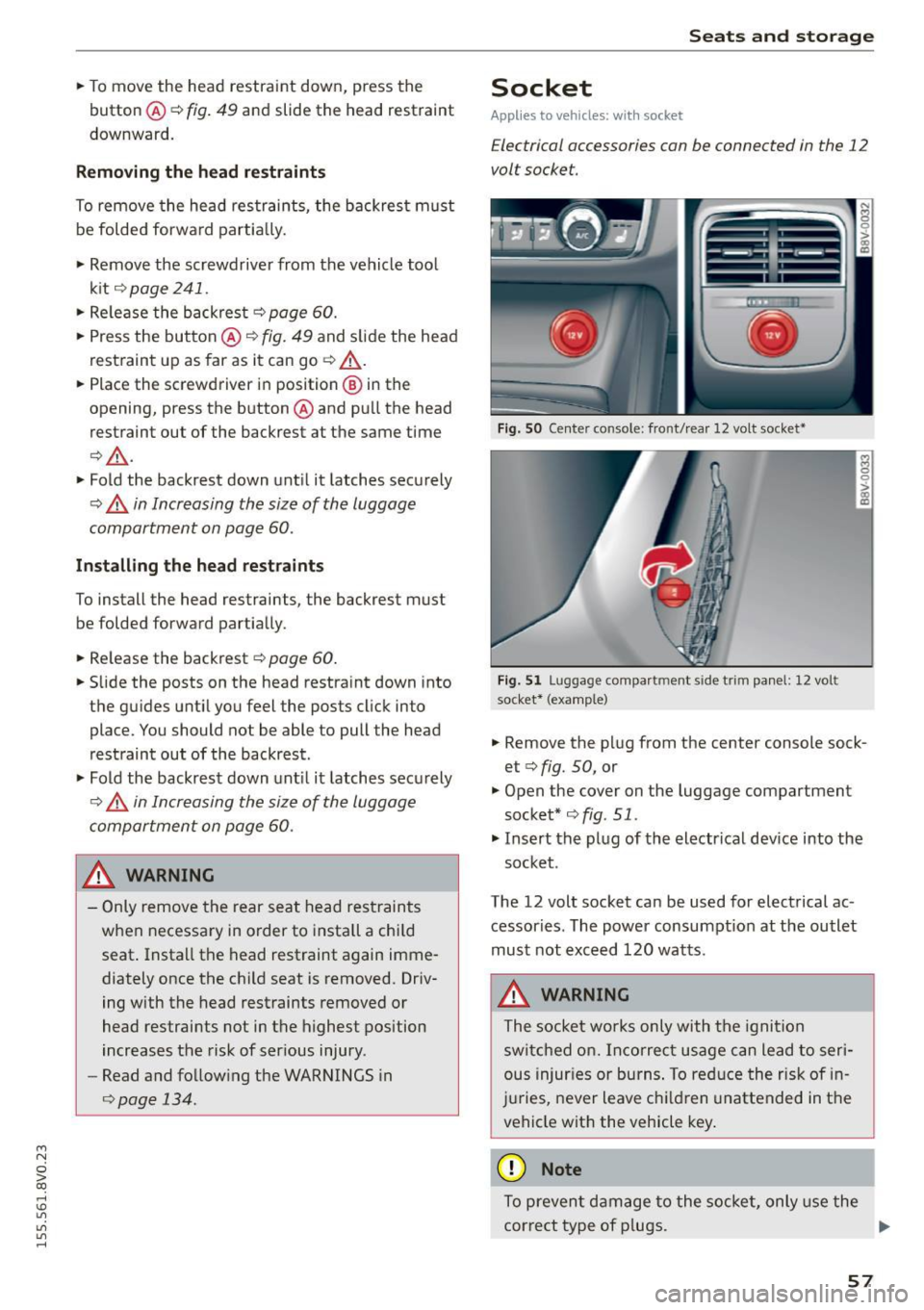
F ig. S O Center co nsole: front/ rear 12 volt socket•
F ig. 5 1 Luggage compartm ent side trim panel: 12 volt
socket* (examp le)
.. Remove the plug from the center console sock
et <::>
fig. 50, or
.,. Open the cover on the luggage compartment
socket* <::>
fig. 51.
.,. Insert the plug of the electrical dev ice into the
socket .
The 12 volt socket can be used for electrical ac
cessories . The power consumpt ion at the outlet
must not exceed 120 watts.
A WARNING
The socket wo rks only with the igni tion
switc hed on. Inco rrect usage can lead to ser i
ous injur ies or burns . To red uce the risk of in
j u ries, never leave c hildren unattended in the
vehicle with the vehicle key .
@ Note
To prevent damage to the socket, only use the
correct type of p lugs. .,,.
57
Page 60 of 282
Seats and storag e
-Never connect devices that generate e lectr i
ca l power such as solar panels or a battery
charger to the 12 volt socket . They can dam
age the veh icle electrical system.
- To prevent damage to the socket, only use
the correct type of plugs.
@ Tips
The vehicle battery drains when accessories
are turned on but the e ngine is off .
Storage
Beverage holders
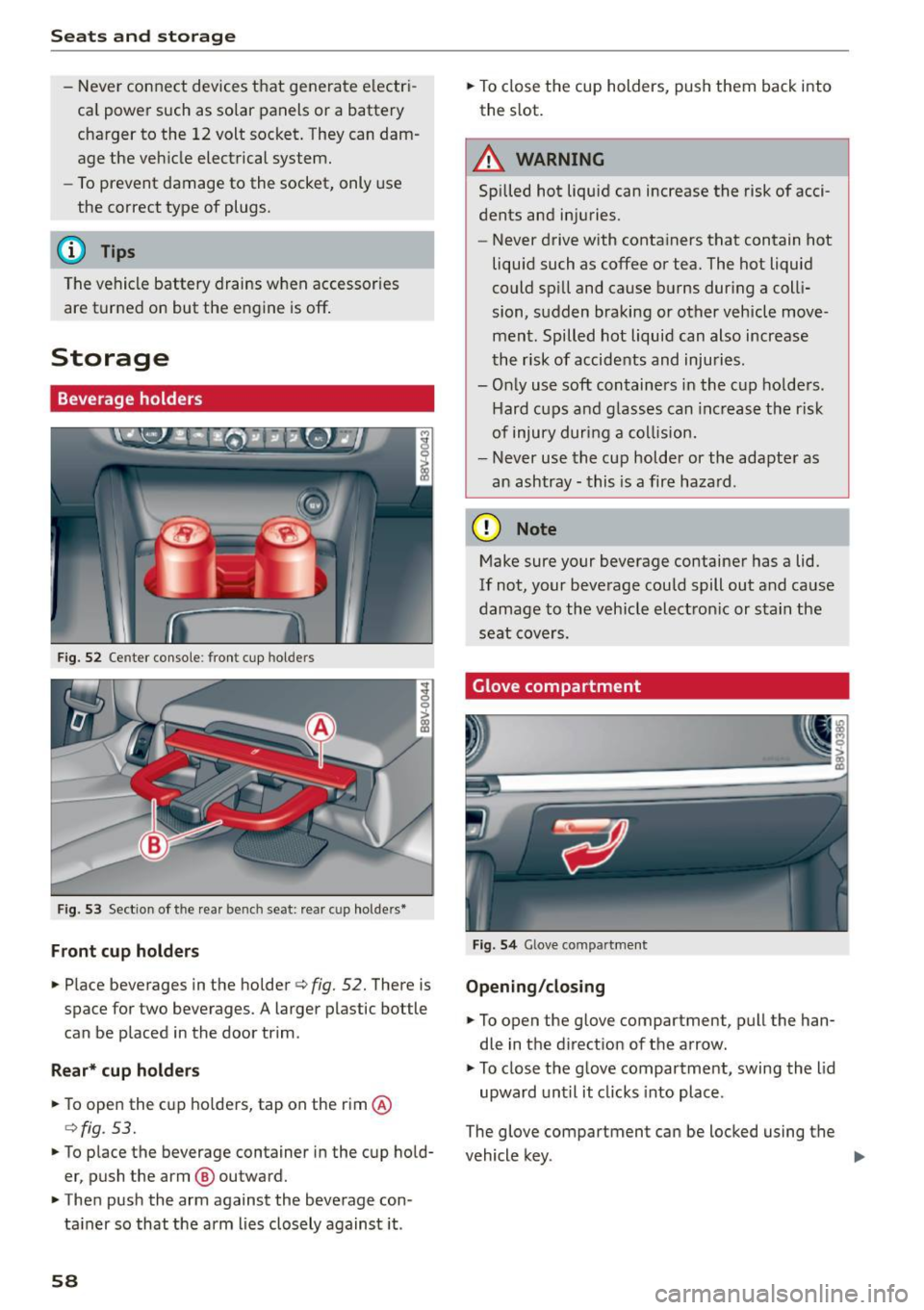
Fig . 52 Ce nter console : front cup hol ders
Fig. 53 Sect io n of the rea r be nch se at: rea r cu p ho lde rs•
F ront cup holder s
.. Place beverages in the holder¢ fig. 52. There is
space for two beverages. A larger plastic bottle
can be p laced in the door trim .
Rear* cup hold ers
.. To open the c up holders, tap on the rim @
¢fig . 53.
.. To place the beverage container in the cup hold
er, push the arm @ outward .
.. Then push the arm against the beverage con
ta iner so that the arm lies closely against it .
58
.. To close t he cup holders, push them back into
the slot.
A WARNING
Spilled hot liquid can increase the risk of acci
dents and injuries.
- Never drive with containers that contain hot
liqu id such as coffee or tea. The hot liquid
could sp ill and cause b urns during a colli
sion, sudden braking or other vehicle move
ment. Spilled hot liquid can also increase
the risk of accidents and injuries .
- Only use soft containers in the c up ho lders.
Hard cups and g lasses can inc rease the risk
of injury during a collision.
- Never use the cup holder or the adapte r as
an ashtray - this is a fire haza rd .
(D Note
Make sure your beverage container has a lid.
If not, your beverage could spill out and cause
damage to the vehicle electron ic or stain the
seat cove rs.
Glove compartment
F ig. 5 4 Glove co mpar tmen t
Opening /cl os ing
.. To open the glove compa rtmen t, pull the han
dle in the d irect ion of the a rrow .
.. To close the glove compartment, swing the lid
upward unt il it clicks into place .
The glove compartment can be locked using the
vehicle key . .,.