tow AUDI S3 SEDAN 2015 Owners Manual
[x] Cancel search | Manufacturer: AUDI, Model Year: 2015, Model line: S3 SEDAN, Model: AUDI S3 SEDAN 2015Pages: 282, PDF Size: 71.14 MB
Page 5 of 282
M N
0 > co ,...., \!) ..,.,
..,.,
..,., ,....,
Adjusting the disp lay and the warning
tones .... .. .. .. .... .... ... .. .. .... . 121
Error messages . . . . . . . . . . . . . . . . . . . . . 121
Intelligent Technology . . . . . . . . . . 122
Notice about data recorded by the Event
Data Recorder and vehicle cont rol
modules . . . . . . . . . . . . . . . . . . . . . . . . . . . 122
Electronic stabilization control (ESC) . . . . 123
Brakes . . . . . . . . . . . . . . . . . . . . . . . . . . . . . 125
Electromechanical steering . . . . . . . . . . . . 126
All wheel drive (quatt ro) . . . . . . . . . . . . . . 127
En ergy management 128
Safety . . . . . . . . . . . . . . . . . . . . . . . . . . . . 130
Driving safety . . . . . . . . . . . . . . . . . . . . 130
Basics . . . . . . . . . . . . . . . . . . . . . . . . . . . . . 130
Correct passenger seating positions..... 131
Driver's and front passenger's footwe ll . . 13 5
Pedal area . . . . . . . . . . . . . . . . . . . . . . . . . . 135
Storing cargo correct ly . . . . . . . . . . . . . . . 136
Reporting Safety Defects . . . . . . . . . . . . . . 138
Safety belt s . . . . . . . . . . . . . . . . . . . . . . 140
General notes . . . . . . . . . . . . . . . . . . . . . . . 140
Why use safety belts? . . . . . . . . . . . . . . . . 141
Safety belts . . . . . . . . . . . . . . . . . . . . . . . . 143
Belt tensioners . . . . . . . . . . . . . . . . . . . . . . 146
Airb ag sy stem . . . . . . . . . . . . . . . . . . . . 148
Important information . . . . . . . . . . . . . . . 148
Front airbags . . . . . . . . . . . . . . . . . . . . . . . 152
Monito ring the Advanced Airbag System . 160
Knee airbags . . . . . . . . . . . . . . . . . . . . . . . . 164
Side airbags . . . . . . . . . . . . . . . . . . . . . . . . 166
Side curtain airbags . . . . . . . . . . . . . . . . . . 169
Child safety . . . . . . . . . . . . . . . . . . . . . . 172
I mportant information . . . . . . . . . . . . . . . 172
Child seats . . . . . . . . . . . . . . . . . . . . . . . . . 178
Securing child seats . . . . . . . . . . . . . . . . . . 182
LATCH system (Lower anchorages and
tethers for children) . . . . . . . . . . . . . . . . . . 185
Additional information . . . . . . . . . . . . . . . 189
Table of contents
Maintenance and Care . . . . . . . . . . .
190
Checking and Filling . . . . . . . . . . . . . 190
Gasoline . . . . . . . . . . . . . . . . . . . . . . . . . . . 190
Diesel f uel . . . . . . . . . . . . . . . . . . . . . . . . . 191
Refueling . . . . . . . . . . . . . . . . . . . . . . . . . . 192
Catalytic co nverter . . . . . . . . . . . . . . . . . . . 194
D ie sel particulate filter . . . . . . . . . . . . . . . 195
Selective catalytic reduction . . . . . . . . . . . 195
En gine compartm ent . . . . . . . . . . . . . . . . . 198
Eng ine oil . . . . . . . . . . . . . . . . . . . . . . . . . . 20 1
Cooling system . . . . . . . . . . . . . . . . . . . . . . 205
Brake fluid . . . . . . . . . . . . . . . . . . . . . . . . . 207
Battery . . . . . . . . . . . . . . . . . . . . . . . . . . . . 208
Windshield washer system . . . . . . . . . . . . 212
Serv ice interval display
212
Tires and wheels . . . . . . . . . . . . . . . . . 214
Wheels . . . . . . . . . . . . . . . . . . . . . . . . . . . . 214
Tire pressure monitoring system . . . . . . . 232
Care and cleaning . . . . . . . . . . . . . . . . 235
General information . . . . . . . . . . . . . . . . . 23S
Car washes . . . . . . . . . . . . . . . . . . . . . . . . . 23S
Cleaning and care information 236
Troubleshooting . . . . . . . . . . . . . . . . . 240
Emergency assistance . . . . . . . . . . . 240
Luggage compartment lid emergency
re lease . . . . . . . . . . . . . . . . . . . . . . . . . . . . 240
General informat ion . . . . . . . . . . . . . . . . . 240
Equipm ent . . . . . . . . . . . . . . . . . . . . . . . . . 241
Replacing wheels . . . . . . . . . . . . . . . . . . . . 241
Spare tire . . . . . . . . . . . . . . . . . . . . . . . . . . 246
Fu se s and bulbs . . . . . . . . . . . . . . . . . . 248
El ectrica l fuses . . . . . . . . . . . . . . . . . . . . . . 24 8
Bulbs. . . . . . . . . . . . . . . . . . . . . . . . . . . . . . 250
Emergency situation s . . . . . . . . . . . . 252
General . . . . . . . . . . . . . . . . . . . . . . . . . . . . 252
Starting by pushing or towing . . . . . . . . . . 252
Starting with jumper cables . . . . . . . . . . . 252
Using jump start cables . . . . . . . . . . . . . . . 253
Towing with a tow truck . . . . . . . . . . . . . . . 254
Raising the vehicle . . . . . . . . . . . . . . . . . . . 256
3
Page 22 of 282
Instruments and indicator lights
If th is message turns off after a little while, the
battery charged enough while driving .
I f the message does no t turn off, have and au
thor ized Audi dealer or au thorized A udi Service
F acility repair the ma lfunction.
t/ll !i.: Safety systems
The II (USA models)/ m (Canada mode ls) indi
cator light monitors the safety systems.
Safety system
If the II (USA mode ls) I m (C anada mode ls) in
d icator light turns on or blinks, there is a mal
function in a safety system.
D rive to an a uth o rized Aud i dea le r or a uth o rized
Aud i Service Fac ility immediately to have the
malfunct ion corrected .
A WARNING
-
Have the safety systems inspected immedi
ately. Otherwise, there is a risk that the sys
tems may not activate d uring a co llision,
wh ich increases the risk of serious injury or
death .
t Front safety belt
The. indicator light stays o n until the driver 's
and front passenge r's safety belts are buckled .
Above a certain speed, there w ill also be a warn
i n g tone .
@ Tips
For add it ional information on safety be lts, re
fe r to
c::> page 140.
~ - Steering lock
• Do not dri ve v ehicle : steerin g defective
There is a malfunct ion in the electron ic steering
lock . You cannot turn the ignition on .
Do
not tow your vehicle because it cannot be
steered . See an authorized Aud i dea ler or author
ized Aud i Service Fac ility for assistance .
20
II!! Steering lock: sy stem fault! Please contact
Serv ice
There is a malfunction in the elec tronic steer ing
l ock.
D rive to an authori zed Audi dealer or authorized
Audi Se rv ice Facility immed iate ly to have the
malfunction cor rec ted.
A WARNING
D o not tow yo ur vehicle when there is a mal
f u nction in the e lectronic steering loc k - this
inc reases the r is k of an accident .
~ Engine start system
• Eng ine start system malfunction. Plea se
contact Ser vice
Do not sw itch the ignition off because you may
not be able to switch it on again.
D rive to an authori zed A udi dealer or au thori zed
Audi Service Facility immed iate ly to have the
malfunction corre cted.
¥ ·1 Engine start system malfunction. Pl ea se
conta ct Servi ce
-
There is a malfunction in the eng ine starting sys
tem .
- Veh icles with ign ition lock
c::> page 73, Auto
matic start malfunction
- Veh icles with convenience key c::> page 76 , Au-
tomatic start malfunction
Drive to an authorized A udi dealer or authorized
A udi Service Facility immed iate ly to have the
malfunction corrected.
~ Engine
• Eng ine stopped : brake ser vo and power
steering not pos sibl e
There is a malfunction in the eng ine or in the fuel
supply sys tem.
More fo rce is needed to steer and bra ke t he mov
i ng vehicle when the engine is stopped. If the ve
hicle is roll ing, try to br ing it to a stop off to the
s ide from moving traffic. See an authori zed Audi .,.
Page 46 of 282
Light and Vision
When switched on, adaptive light adjusts to
curves depending on the vehicle speed and steer·
ing wheel angle . This provides better lighting
through the curve. The system operates in a
speed range from approximately 6 mph (10 km/
h) to 68 mph (110 km/h).
Static cornering light* (vehicles with adaptive
light)· the cornering light switches on automati
cally when the steering wheel is turned at acer
tain ang le at speeds up to approximately 44 mph
(70 km/h) and whe n the turn signal is activated
at speeds up to approximately 25 mph (40 km/
h). The area to the side of the vehicle is illuminat
ed better when tu rning.
Speed depend ent light distribution* -The speed
dependent light distribution adapts the light in
towns and on highways or expressways. In tersec
tions can also be illum inated on veh icles with a
navigat ion system*.
Highway light function*
(Vehicles with adaptive light or LED headlights) -
This function adapts the light ing for highway
driving based on vehicle speed .
..&, WARNING
-Automatic headlights* are only int ended to
assist the driver. They do not relieve the
driver of his responsibility to check the
headlights and to turn them on manually
according to the current light and visibi lity
condit ions. For example, fog cannot be de·
tected by the light sensors . So always switch
on the low beam under these weather con
ditions and when driving in the dark
io.
- Accidents could occur if you can not see the
road ahead of you well and if others on the
road cannot see you . Always switch your
head lightsonsothatyoucanseetheroad
ahead of you and others can see your vehicle
from behind.
- Please observe legal regulations when using
the lighting systems described .
44
(D Note
The rear fog lights shou ld only be turned on in
accordance with traffic regulation, as the lights are bright for following traffic.
@ Tips
-The light sensor for the automatic head
lights * is in the rearview mirror mount.
Therefore, do not place any stickers in this
area on the windshield.
- Some functions of the exterior lighting can
be adjusted
c> page 45.
- If you turn off the ignition whi le the exterior
lights are on and open the door, you will
hear a warning tone.
- In some market-specific versions, the tail
lights do not turn on when switching on the
daytime running lights.
- In cool or damp weather, the inside of the headlights, turn signals and taillights can
fog over due to the temperature difference
between the inside and outside . They will
clear shortly after switching them on. This
does not affect the serv ice life of the light
ing .
- A message will appear in the instrument
cluster if there is a malfunction in the light
sensor
c> page 24.
Emergency flasher
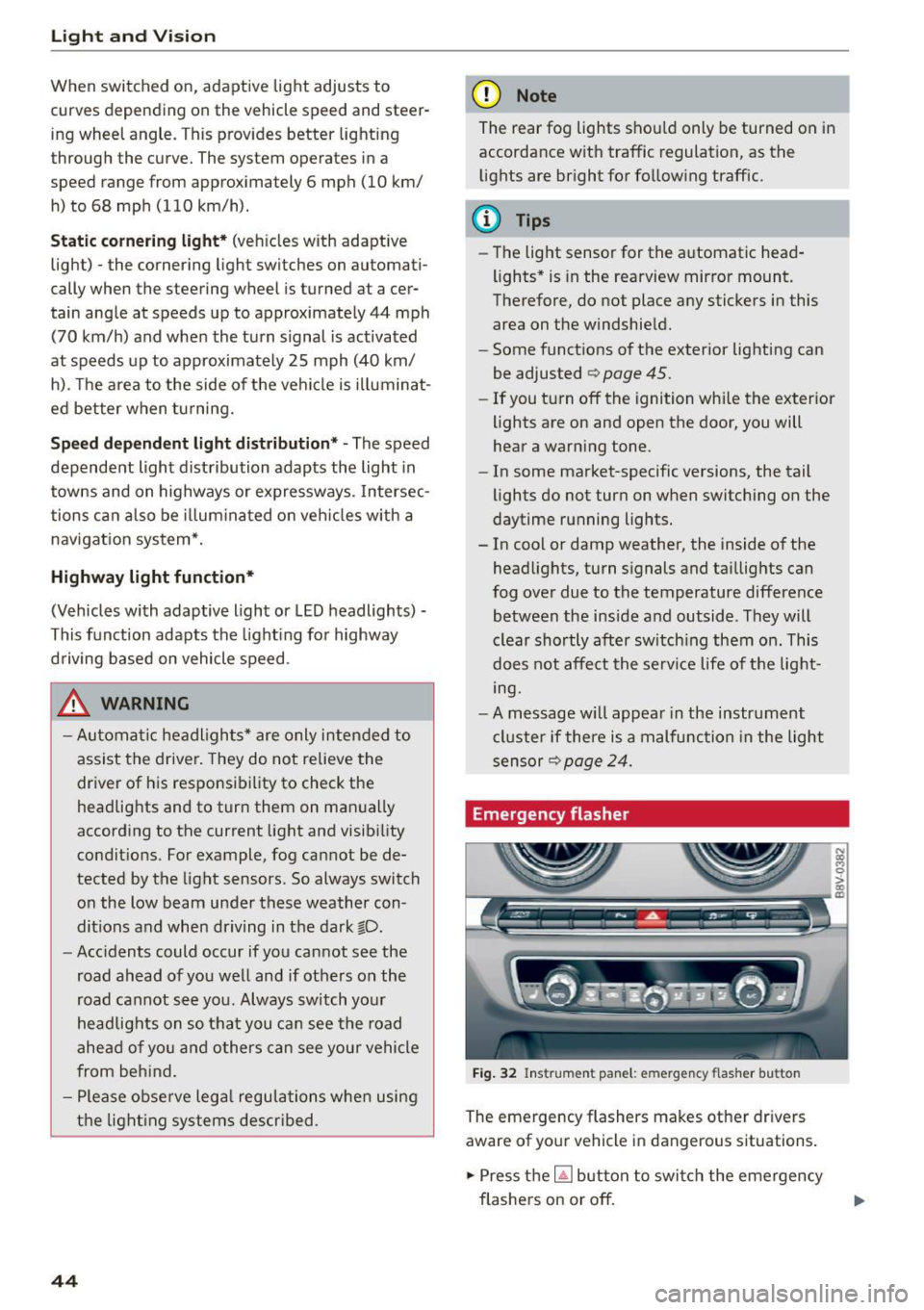
Fig. 32 Ins trumen t panel : em ergenc y flasher bu tton
The emergency flashers makes other dr ivers
aware of your vehicle in dangerous s ituations .
.. Press the~ button to switch the emergency
flashers on or off.
Page 47 of 282
....,
N
0 > co
rl I.O
"'
"'
"'
rl
You can indicate a lane change or a turn when the
emergency flashers are switched on by using the
turn signal lever. The emergency flashers stop
temporari ly.
The emergency flashers also work when the igni
tion is turned off.
@ Tips
Yo u should switch the emergency flashers on
if:
- You are the last car in a traffic jam so that
all other vehicles approaching from behind
can see you, or if
- Your vehicle has broken down or you are
having an emergency, or if
- Your vehicle is being towed or if yo u are
towing another vehicle.
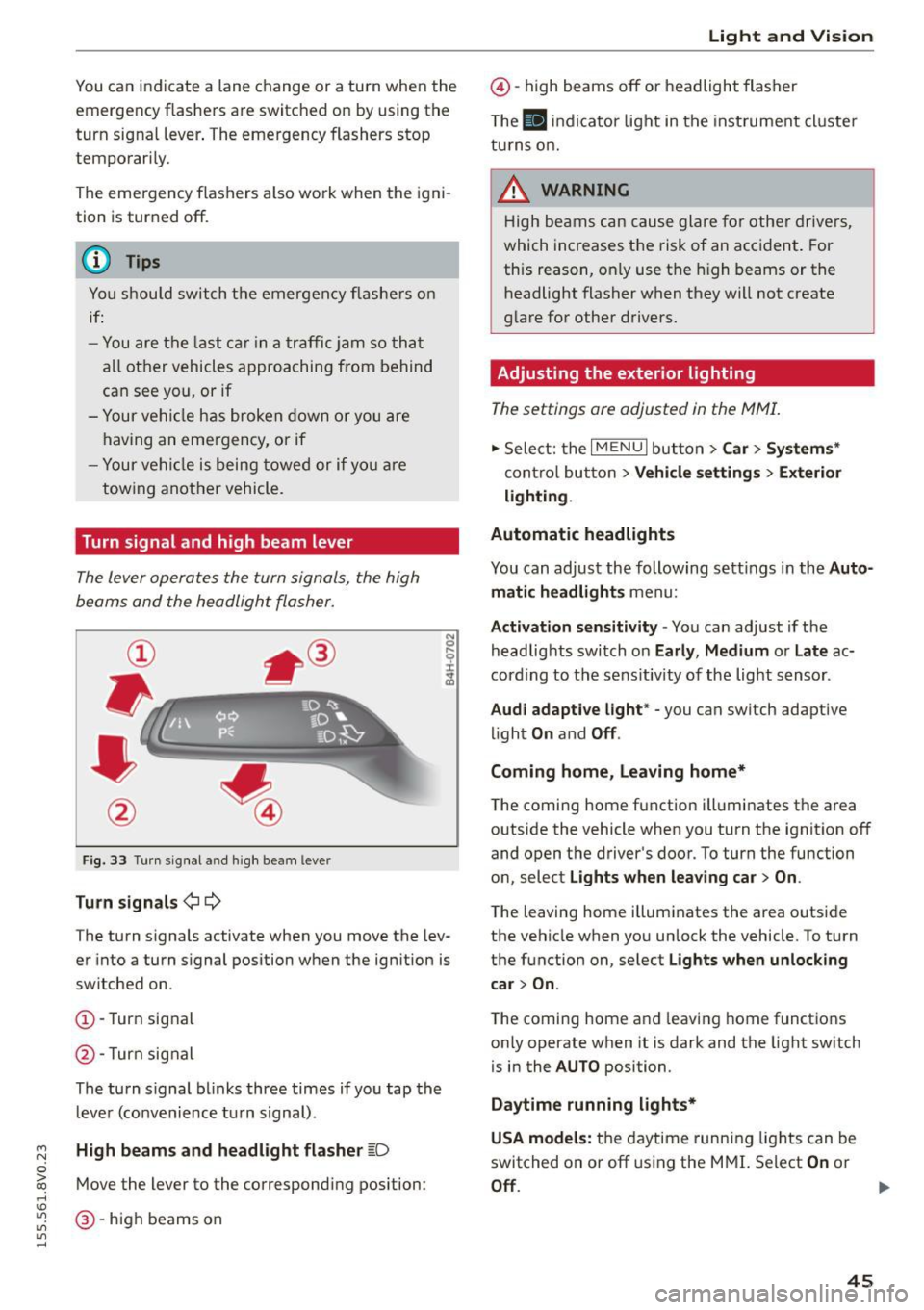
Turn signal and high beam lever
The Lever operates the turn signals, the high
beams and the headlight flasher.
Fig. 33 Turn signal a nd high beam leve r
Turn signals ¢i 9
The turn signals activate when you move the lev
er into a turn s ignal position when the ignition is
switched on.
CD -Turn signal
@ -Turn sig nal
The turn s ignal blinks three times if you tap the
l eve r (convenience tu rn signal) .
High beams and headlight flasher ~D
Move the lever to the correspond ing position :
@-high beams on
Light and Vision
@-high beams off or headlight flasher
Th e
El indicator light in the inst rument cl uste r
turns on.
_& WARNING
High beams can cause glare for other drivers,
which increases the risk of an accident . For
this reason, only use the high beams or the
headlight flasher when they will not create
glare for other drivers.
Adjusting the exterior lighting
The settings are adjusted in the MMI.
.. Select: the I MENU I button > Car> Systems*
cont rol button > Vehicle settings > Exterior
lighting.
Automatic headlights
You can adjust the following sett ings in the Auto
matic headlights
menu:
Activation sensitivity -You can adjust if the
headlights switch on
Early, Medium or Late ac
cording to the sens itiv ity of the light sensor .
Audi adaptive light * -you can switch adaptive
light
On and Off .
Coming home, Leaving home*
The coming home function illuminates the area
outside the vehicle when you turn the ignit ion off
and open the driver's door. To turn the function
on, select
Lights when leaving car > On .
The leaving home illuminates the area outside
the vehicle when you un lock the vehicle. To turn
the function on, select
Lights when unlocking
car > On .
The coming home and leaving home functions
on ly operate when it is dark and the light switch
is in the
AUTO position.
Daytime running lights*
USA models:
the daytime running lights can be
switched on or off using the MMI. Select
On or
Off. ...
45
Page 49 of 282
....,
N
0 > co
rl I.O
"'
"'
"'
rl
Instrument illumination
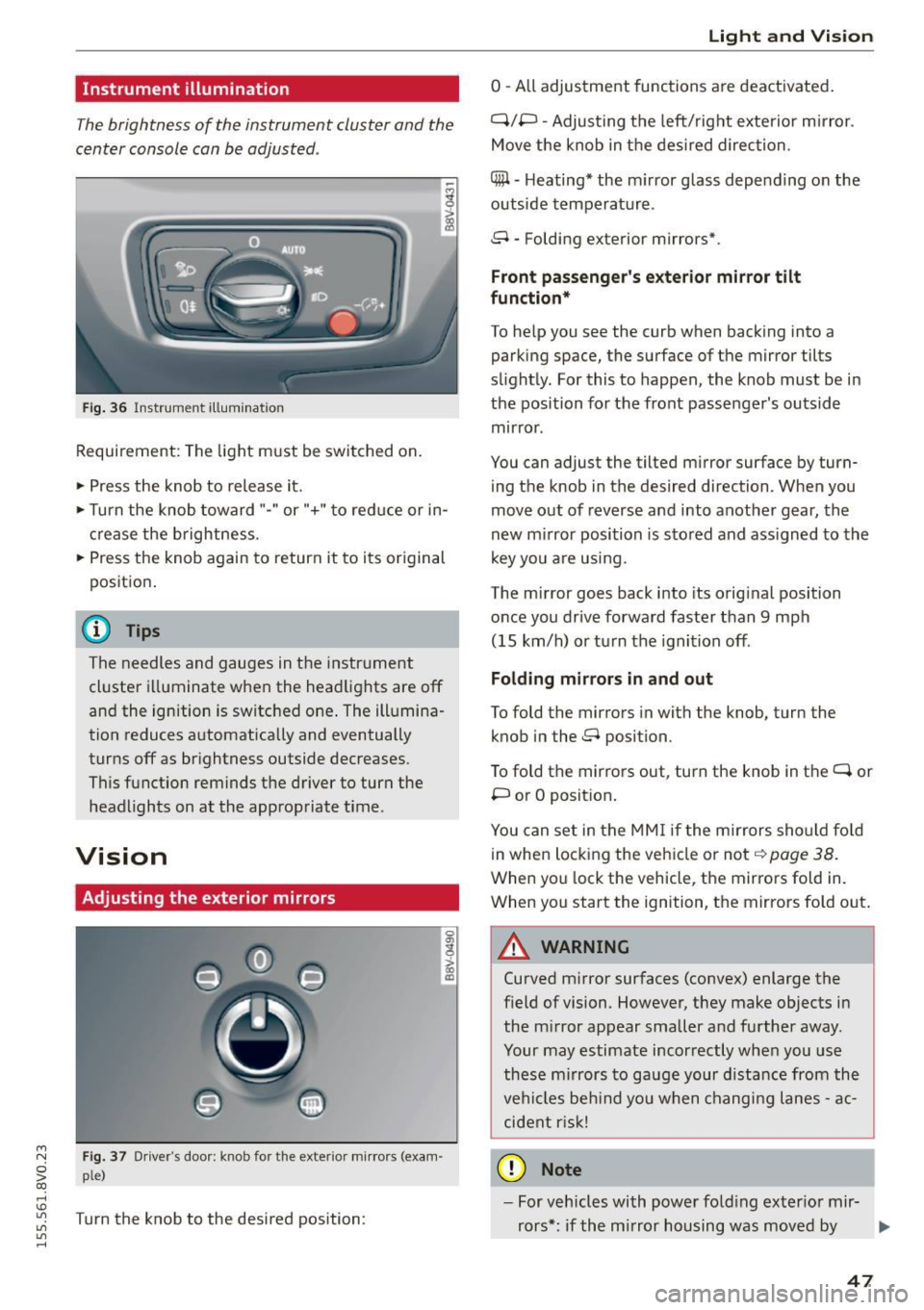
The brightness of the instrument cluster and the
center console can be adjusted .
Fig. 36 Instrument illum ination
Requirement: The light must be switched on.
.. Press the knob to release it.
.. Turn the knob toward"-" or"+" to red uce or in
crease the brightness.
.. Press the knob again to return it to its original
posit ion .
@ Tips
The needles and gauges in the instrument
cluster illuminate when the headlights are off
and the ignition is switched one . The illumina·
tion reduces automatically and eventually
turns off as br ightness outside decreases.
This function reminds the driver to turn the
headlights on at the appropriate time .
Vision
Adjusting the exterior mirrors
Fig. 37 Driver's door: knob for the exterior mirrors (exam
ple)
Turn the knob to the desired position:
0
g
> a, (X)
Light and Visio n
0 -A ll adjustment functions are deactivated .
Q/P -Adjusting the left/rig ht exterior mirror.
Move the knob in the des ired direction.
C@ · Heating* the m irror glass depending on the
outside temperature.
8 • Folding exterior mirrors*.
Front pa ss e ng er's ex te rior mirror tilt
functio n*
To help you see the curb when backing into a
parking space, the surface of the mirror tilts
slight ly. For this to happen, the knob must be in
the position for the front passenger's outside
mirror .
You can adjust the tilted mirror surface by turn·
i ng the knob in the desired direction . When you
move out of reverse and into another gear, the
new m irror position is stored and ass igned to the
key yo u are us ing .
The mirror goes back into its orig inal position
once you drive forward faster than 9 mph
(15 km/h) o r turn the ignition off.
Folding m ir rors in and out
To fold the mirrors in with the knob, turn the
knob in the 8 position.
To fold the mirrors out, turn the knob in the
q or
P or O posit ion .
You can set in the MM I if the mirrors sho uld fo ld
in when locking the vehicle or not
q page 38.
When you lock the vehicle, the mirrors fold in.
When you start the ignition, the mirrors fold out.
A WARNING -,.
Curved m irror surfaces (convex) enlarge the
field of vision. However, they make objects in
the m irror appear smaller and further away.
Your may estimate incorrectly when you use
these m irrors to gauge your d istance from the
vehi cles be hind you when changi ng lanes -ac·
cident risk!
@ Note
- For vehicles with power fo ld ing exter ior mir·
rors*: if the mirror housing was moved by
IJI,-
47
Page 51 of 282
....,
N
0 > co
rl I.O
"'
"'
"'
rl
Sun visors
C1o... ___ J
Fig. 39 Left side: su n viso r
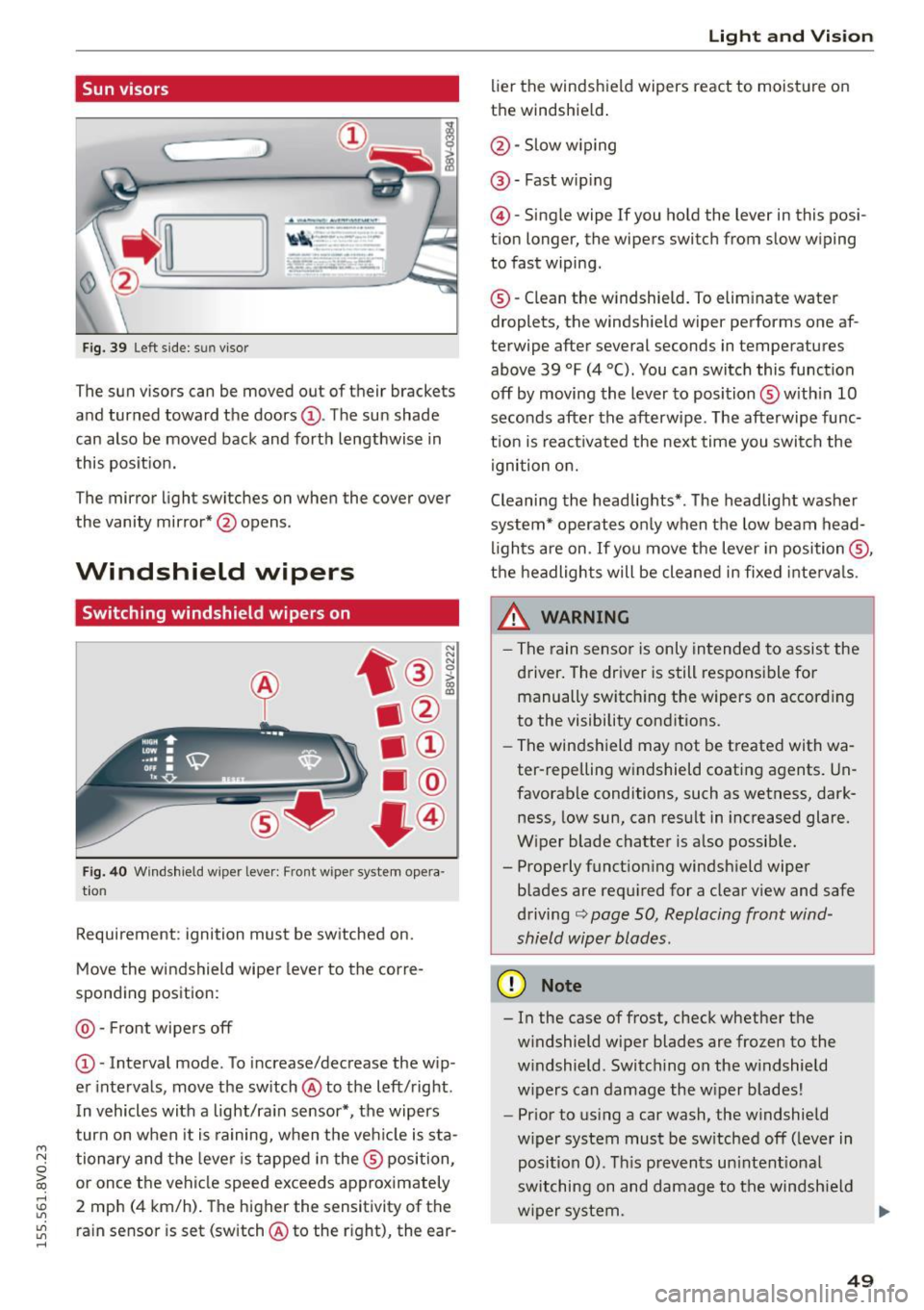
The sun visors can be moved out of their brackets
and turned toward the doors@. The sun shade
can also be moved back and forth lengthwise in
this posit ion.
The mirror light switches on when the cover over
the vanity mirror* @opens .
Windshield wipers
Switching windshield wipers on
Fig. 40 Windshield wiper leve r: Front wiper system opera
tion
Requirement : ignition must be switched on.
Move the windshield wiper lever to the corre
sponding position:
@ -Front wipers off
@ -Interval mode. To increase/decrease the w ip
er intervals, move the switch @to the left/right .
I n vehicles with a light/ra in sensor*, the wipers
turn on when it is ra ining, when the veh icle is sta
tionary and the lever is tapped in the ® position,
or once the vehicle speed exceeds approximately
2 mph (4 km/h). The higher the sensitivity of the ra in sensor is set (switch @to the r ight), the ear-
Light and Visio n
lier the windshield wipers react to moisture on
the windshield .
@-Slow w iping
@ -Fast wip ing
@ -Single wipe If you ho ld the lever in this posi
tion longer, the wipers switch from slow wiping
to fast wiping.
® -C lean the w indshield. To elim inate water
droplets, the windsh ield wiper performs one af
terwipe after several seconds in temperatures
above 39 °F (4 °(). You can switch this function
off by moving the lever to position ® with in 10
seconds after the afterwipe. The afterwipe func
t ion is react ivated the nex t time you switch the
ignition on.
Cleaning the headlights*. The headlight washer
system* operates only when the low beam head
li ghts are on . If you move the lever in position @,
t h e headlights will be cleaned in fixed interva ls .
_& WARNING
- The rain sensor is only intended to assist the
driver. The driver is still responsible for manually switch ing the w ipers on according
to the visibility cond itions.
- The windshield may not be treated with wa
ter-repelling w indshield coat ing agents. Un
favorable conditions, such as wetness, dark
ness, low sun, can result in increased glare.
W iper blade chatter is also possib le.
- Properly function ing windsh ield wiper
b lades are req uired for a clear v iew and safe
driving
c::> page 50, Replacing front wind
shield wiper blades .
(D Note
- In the case of frost, check whether the
windshield wiper blades are fr ozen to the
w indshield. Switching on the w indshield
w ipers can damage the w iper blades!
- Prior to using a car wash, the windshield
w iper system must be sw itched off (leve r in
posit ion 0). T his prevents un intent ional
switching on and damage to the windsh ield
w iper system. .,.
49
Page 61 of 282
....,
N
0 > co
rl I.O
"'
"'
"'
rl
_& WARNING
Always leave the lid on the glove compartment cover closed while driving to reduce the
risk of injury.
Additional storage compartments
There are additional storage compartments,
compartments and holders at other locations in
the vehicle :
- In the upper part of the glove compartment.
- In the center console under the center arm-
rest* .
- On the back of the right front seat . The com
partment* can hold a maximum weight of
2 lbs
(1 kg).
- Garment hooks on the B-pillar ¢
&.
_& WARNING
-Do not place any objects on the instrument
panel. Objects that are not stored securely
can slide around in the vehicle while driving,
when accelerating or braking or when turn
ing.
- Make sure that objects cannot fall out of the
center console storage compartment or oth
er compartments and into the footwell
while driving. These objects could prevent
you from braking or accelerating during sud
den braking maneuvers.
- Garments hung on the hooks must not ob
struct the driver's view. The garment hooks
are only designed for light objects . Do not
hang any garments with hard, sharp or
heavy objects in the pockets on the garment
hooks . These objects could injure vehicle oc
cupants during sudden brak ing or in a colli
sion - especially if the airbags deploy.
- Always keep the glove compartment closed
while driving to reduce the risk of injury dur
ing a collision or heavy brak ing.
- Read and following the WARNINGS in
¢ page 168, Important safety instructions
on the side airbag system.
-Hang garments so that they do not obstruct
the driver's view.
Seats and storage
-The garment hooks should only be used for
light articles of clothing . Do not leave any
heavy or sharp-edged objects in the pockets
that could interfere with the side airbags unfolding and cause injuries in the event of
a collision .
- Do not use coat hangers to hang garments,
because this could reduce the effectiveness
of the side curtain airbags.
- Do not hang any heavy objects on the gar
ment hooks, because they could cause injury
during heavy braking.
- Because of their load capacity, the hooks
should only be used to secure objects that
weigh a max imum of 10 lb (5 kg). Heavy ob
jects will not be secured sufficiently, and
this increases the risk of injury.
luggage compartment
Loading luggage compartment
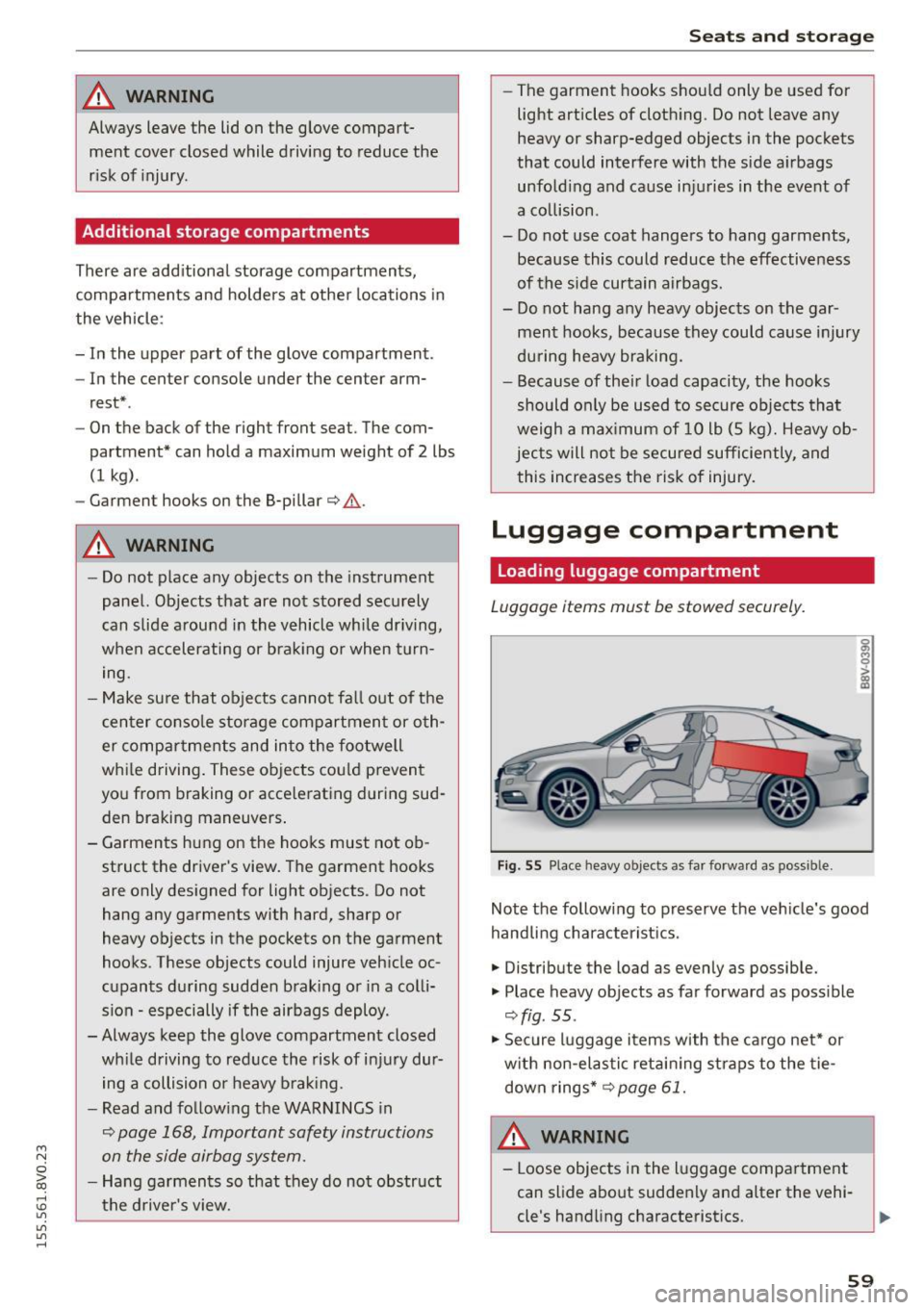
Luggage items must be stowed securely.
Fig. 55 Place heavy objects as far forward as poss ib le.
Note the following to preserve the vehicle's good
handling characteristics .
.,. Distribute the load as evenly as possible.
.,. Place heavy objects as far forward as possible
¢ fig . 55 .
.,. Secure luggage items with the cargo net* or
with non-elastic retaining straps to the tie
down rings* ¢
page 61.
WARNING
-Loose objects in the luggage compartment
can slide about suddenly and alter the vehi
cle's handling characteristics.
59
Page 76 of 282
Driving
& WARNING
-Never allow the engine to run in confined
spaces, because this increases the risk of as
phyxiation.
- Never
remove the ignition key from the igni
tion look while the vehicle is moving . Other
wise the steering lock will engage and you
will not be able to steer the vehicle.
- Please note that the brake booster and pow
er steering only work when the engine is
running . When the engine off, you must use
more force to steer or brake the vehicle. Be
cause the usual steering and braking capa
bility is not available, the risk of accidents or
injuries increases.
- Always take the vehicle key with you when
leaving the vehicle,
even for a short period
of time. This applies particularly when chil
dren remain in the vehicle. Otherwise the
children could start the engine or operate
electrical equipment such as power win
dows .
CT'.) Note
- Avoid high engine speed, full throttle, and
heavy engine load as long as the engine has
not reached operating temperature yet . You
could damage the engine .
- The engine cannot be started by pushing or
towing .
@ For the sake of the environment
Do not let the engine run while parked to
warm up. Begin driving immediately. This re
duces unnecessary emissions.
(D Tips
- If it is difficult to turn the key to position
(D, turn the steering wheel back and forth
slightly to release the steering wheel lock.
- After starting a cold engine, there may be a
brief period of increased noise because the
oil pressure must first build up in the hy
draulic
valve adjusters . This is normal and
not a cause for concern.
- If the battery is disconnected and recon
nected, you have to hold the ignition key in
74
position (D for five seconds for the engine
to start.
- After switching the ignition off, you can only
remove the key when the selector lever is in
the "P" (Park) position. After that, the selec
tor lever is locked.
Stopping the engine with the key
App lies to vehicles : with mechanical ignition loc k
Stopping the engine
.. Bring the vehicle to a full stop .
.. Turn the key to posi tion @.
Releasing the steering lock
Requirement: The selector lever must be in the P
position.
.,. Remove the ignition key in position@
q page 75, fig. 69 q ,&..
.. Turn the steering wheel until you hear the
steering wheel lock.
The locked steering helps prevent vehicle theft.
A WARNING
-
-Never turn off the engine before the vehicle
has come to a complete stop. The full func
tion of the brake booster and the power
steering is not guaranteed. You must use
more force to turn or brake if. Because you
cannot steer and brake as you usually
would, this could lead to accidents and seri
ous injuries.
- Never
remove the ignition key from the igni
tion look while the vehicle is moving . Other
wise, the steering lock could suddenly en
gage and you would not be able to steer the
vehicle.
- Please note that the brake booster and pow
er steering only work when the engine is
running. When the engine off, you must use
more force to steer or brake the vehicle. Be
cause the usual steering and braking capa bility is not available, the risk of accidents or
injuries increases.
- Always take the vehicle key with you when
leaving the vehicle,
even for a short period
of time . This applies particularly when
Page 78 of 282
Driving
Autom ati c s tar t m alfun cti on
If the lll3 (gasoline engine) or II (diese l eng ine)
indicator light turns on when you start the en
gine, there is an automatic start ma lfunction.
To start the engine, press and ho ld the
I START ENGINE STOP! button un til the engine
runs .
Drive to an autho rized Audi dea ler or authorized
Aud i Service Fac ility immediately to have the
mal funct ion corrected.
_& WARNING
- Never allow the engine to run in confined
spaces -danger of asphyxiation.
- Always take the vehicle key with you when
leaving the vehicle, even for a short period
of time . This applies partic ularly when chil
dren remain in the vehicle. Otherw ise the
children could start the engine or operate
electrical equ ipment such as power win
dows.
- Please note that the brake booster and pow
er steering only work when the engine is
running . When the eng ine off, you must use
more force to steer or brake the ve hicle. Be
cause the usual stee ring and bra king capa
bility is not availab le, the risk of accidents o r
injur ies inc reases.
(D Note
- Avoid high eng ine speed, full thrott le, and
heavy engine load as long as the eng ine has
not reached operating temperature yet. You
could damage the engine.
- The engi ne cannot be sta rted by pushing or
tow ing.
@ For the sake of the environment
Do not let the engine run while par ked to
warm up. Beg in d riving immed iately. This re
duces unnecessary emissions.
l ) Th is fun ctio n is not availabl e in all cou ntri es .
76
-
(D Tips
-After starting a cold engine, there may be a
br ief per iod of increased noise because the
oil pressure must first build up in the hy
draulic valve adjusters. This is normal and
not a cause for concern .
- If the . indicator light blinks in the instru
ment cluster before switching the ignition
off, the ignition will not switch on again.
¢page 126
-If you leave your vehicle w ith the ignition
switched on, the ign ition w ill switch off af
ter a certain amou nt of time . Make sure that
elect rical equipment such as the exterio r
lights a re switched off.
Turning the engine off using the
button
Applies to vehicles: with convenience key
... Bring the vehicle to a full stop.
... Move the se lector lever into the P position.
... Press the
I STAR T ENGINE STOP ! button
¢page 75, fig. 69.
Ste ering lo ck1l
The steering locks when yo u turn the engine off
using the
I STAR T ENGINE ST OP !* button, move
the selector lever into the P position and open
the driver's door.
The locked steering he lps prevent ve hicle theft.
Eme rgency off
If it is absolutely necessa ry, the engine can also
be turned off while driving at speeds lower than
6 mph (10 km/h). To switch the engine off, press
the
I START ENGINE STOP! button twice in a row
briefly or press and hold for longer than two sec
onds.
_& WARNING
- Never turn off the engine before the vehicle
has come to a complete stop. The full func
tion of the brake booster and the powe r
steer ing is not guaranteed. You must use
Page 87 of 282
M N
0 > co ,...., \!) ..,.,
..,.,
..,., ,....,
Stopp ing /p ark in g
If the se lector lever is not in the P position when
you open the driver's door, the vehicle cou ld roll.
In vehicles with a convenience key*, the message:
Shift t o P, o ther wis e vehi cle c an roll away .
D oo rs do not lo ck if l ever i s not i n P
appears . You
will also hear a warning tone.
~ Press and ho ld the brake pedal c:> A
~ Set the parking brake.
~ Se lect the P selector lever pos ition.
Stopping on an incline
~ Always press the b rake pedal to hold the vehi
cle in place and prevent it from "rolling back"
c:> A -Do not try to prevent the vehicle from
"rolling back" when a gear is engaged by in
creasing the engine speed
c:> @ .
Starting on an incline in vehicl es without H ill
H old *
~ Set the parking brake.
~ With the driving gear se lected, press the accel
erator pedal carefully. The parking brake releas
es automatically . Requ irement: The door must
be closed .
Starting o n an incline in veh icles with Hill
Hol d*
~ With the driving gear selected, remove your
foot from the brake pedal and press the accel
erator pedal
c:> page 80, Hill hold.
Under certain circumstances, (such as driving in
the mountains or towing a tra iler), it may be use
ful to sw itch temporarily to the manual sh ift pro
gram in order to adjust the gears to the driving
conditions by hand~
page 87.
When parking on a level surface, simply place the
selector lever in the P position. On inclines, acti
vate the parking brake first and then move the
selecto r lever to the P position~
page 78. This
prevents the locking me chanism from being load
ed too heavi ly and wi ll make it easier to move the
selector lever out of the P posit ion .
Aut omatic transm issio n
A WARNING
-The vehicle can roll even when the engine is
sw itched off.
- Unintended vehicle movement can lead to
serious injuries.
- Never leave your vehicle with the engine running while in gear. If you must leave your
veh icle when the engine is running, set the
parking brake and move the selector lever to
the P position.
- Power is still transferred to the wheels when
the eng ine is running at idle. To prevent the
veh icle from "creeping", you must keep your
foot on the brake when the engine is run
n ing and the selec to r l ever is in the D, Sor R
position or "tiptronic" mode is selected .
- Do not inadvertently press the accelera tor
pedal when the vehicle is stationa ry. Other
wise the vehicle will start to move immedi
ately, even if the parking brake is set. This
could res ult in a crash.
- Do not press the accelerator pedal when
changing the se lector lever position while
the vehicle is stationary and the eng ine is
running.
- Never engage the R or P selector level pos i
tions while dr iv ing.
It could cause a crash.
- Before driving down a steep s lope, reduce
your speed and shift into a lower gear with
"t iptronic".
- Do not ride the brakes or press the brake
pedal too often or too long when driving
down a hill. Constant braking causes the
brakes to overheat and substantially re
duces braking performance, increases brak
ing d istance or causes comp lete failure of
the brake system.
- If you must stop on an incline, always hold
the vehicle in place with the foot brake or pa rking brake to prevent it from ro lling
back.
- Never hold the vehicle on an incline with a slipping clut ch. The cl utch opens au tomati
cally when it becomes too hot from the
overload . The
mJ indicator light turns on
and a message appears
c:> page 88 when
the clutch is overloaded .
85