service AUDI S3 SEDAN 2015 User Guide
[x] Cancel search | Manufacturer: AUDI, Model Year: 2015, Model line: S3 SEDAN, Model: AUDI S3 SEDAN 2015Pages: 282, PDF Size: 71.14 MB
Page 25 of 282
M N
0 > co ,...., \!) ..,.,
..,.,
..,., ,....,
If the indicator light does not turn off, drive im
mediately to an authorized Audi dea ler or author
ized Audi Service Facility to have the malfunction
corrected.
_& WARNING
Always adapt your speed to the current
weather, road and traffic conditions. You
should never disobey traffic laws in order to
follow driving recommendations .
@ Tips
For additional information on the diesel par
ticulate filter, refer to¢
page 195.
!7l Engine speed limitation
A pplies to vehicles: with eng ine spee d limitat ion
(II Ma x. engine speed: XXXX rpm
The engine speed is automatically limited to the
speed displayed in the driver information system.
This protects the engine from overheat ing .
The engine speed limitation deactivates once the
engine is no longer in the critical temperature range and you have released the accelerator ped
al once.
If the engine speed limitation was activated by
an engine control malfunction, the~ indicator
light also turns on . Make sure the engine speed
does not go above the speed d isplayed, for exam
ple when downshifting. Drive to an author ized
Aud i dealer or autho rized Aud i Service Facility im
mediately to have the malfunct ion corrected.
~ .. Engine oil level (min.)
l!I Check oil level
You may continue driving for the time being.
Check the oil level as soon as poss ible
¢page 201.
-If the engine oil level is too low, add engine oil
~page 203.
- If the engine oil level is correct and the indica
tor light st ill turns on, drive at low engine
speed to an authorized Audi dealer or author
ized Audi Service Facility .
Instruments and indicator lights
'I::?;."', Engine oil sensor
• Oil level sensor: system fault!
The sensor to check the engine oi l level has
failed. Drive to an author ized Audi dealer or au
thorized Audi Service Facility immediately to have
the malfunction corrected.
• Oil level sens.: oil change necessary. Please
contact Service
The engine oil level is too high.
Drive to an authorized Audi dealer or authorized
Audi Service Facility immediately to have the
malfunction corrected.
(D Note
Refer to the description in the Owner's Man
ual~
page 203, Checking the engine oil level
and¢ page 203, Adding engine oil
D Please refuel
If the indicator light turns first turns on and this
message appears , the tank contains the fol low
ing amount of fuel:
- Front wheel drive: approximate ly 1.8 gallons (7
liters)
- All whee l dr ive: approximately
2.2 gallons (8.5
liters)
Hid Please refuel immediately
If the indicator light turns on the message ap
pears, the fuel tank is almost empty. Refuel the
vehicle immediately.
D Fuel tank malfunction! Please contact Serv
ice
If the indicator light turns on and the message
appears:
- there is a malfunction in the fuel tank system,
or
- in vehicles with diesel engines, water may have
collected in the fuel fi lter.
1111>
23
Page 26 of 282
Instruments and indicator lights
Drive to an authorized Aud i dea ler or authorized
Audi Service Faci lity immediately to have the
malfunct ion corrected .
(D Note
Applies to veh icles with diesel engines: If the
diese l fue l quality is poor , it may be necessary
to have the water drained from the water sep
arator
l) in the fuel filter more often than
specified in the ma intenance schedule. Th is
can help reduce engine malfunct ions.
@ For the sake of the environment
Fuel should never enter the sewer system or
come into contact w ith the ground.
More information on refueling is ava ilable on
page
c:> page 192.
~ Washer fluid level
~ Pl ease add w asher flu id
F ill the washer fluid with the ignition switched
off
c:> page 212.
~~ Windshield wipers
m Wind shield w iper: s yste m fault!
There is a malfunction with the windshield wip
ers.
Dr ive to an a utho rized Aud i dea le r or a uthorized
Audi Service Faci lity immediately to have the
malfunct ion corrected .
~ Defective light bulb warning
Applies to veh icles: w ith driver information system
If the S:i indicator light turns on, a bu lb has
fa iled. The message indicates the location of the
bu lb.
Replace the bu lb immediate ly.
Vehi cle l ight s: syste m fault!
l) Thi s fun ction is not av ailable in all c ountri es.
24
There is a malfunction in the headlights or the
li ght switch . Drive to an authorized Audi dealer or
authorized Aud i Service Fac ility immediately to
have the malfunct ion corrected.
A WARNING
--
- Light bulbs are under pressure and can ex
plode when bulbs are replaced -risk of in
jury .
- With gas-discharge lamps* (xenon head
lights), the high -voltage component must
be handled appropr iately. Otherwise, there
is a risk of fatal injury.
~(D Dynamic Headlight range control system
App lies to vehicles: wit h Xeno n lights
II He adlight r an ge control system: sy ste m
f a ult!
There is a malfunction in the dynamic headlight
r ange contro l system, which may cause glare for
othe r drive rs.
Drive to an authorized Audi dealer or authorized
Audi Service Facility immed iate ly to have the
malfunction corrected.
go Audi adaptive light
App lies to vehicles : wi th Audi adapt ive ligh t
l'!J Audi adaptiv e light : system fault!
There is a malfunction in the adapt ive lights . T he
headlights sti ll function.
Drive to an authori zed Audi dealer or authori zed
Audi Service Facility immed iate ly to have the
malfunction corrected.
@ Light/rain sensor
App lies to vehicles: wit h lig ht/rain sensor
II Automat ic headlight s: s ys tem fault!
El Automat ic wipe rs: s ystem fault !
The light/rain sensor is ma lfunctioning .
Fo r safety reasons, the low beams a re turned on
permanently wi th the switch in
AUTO . You can .,..
Page 27 of 282
....,
N
0 > co
rl I.O
"'
"'
"'
rl
continue to turn the lights on and off using the
light switch. You can still contro l all wiper func
tions that are independent of the rain sensor .
Drive to an autho rized Aud i dea le r or authorized
Audi Service Facility immediate ly to have the
malfunction corrected.
; Adaptive dampers
Applies to vehicles: with Audi drive select
R Suspension: system fault!
There is an adaptive damper ma lfunction.
D rive to an authorized Aud i dea ler or a uthorized
Aud i Service Facility immediate ly to have the
malfunction corrected.
¢¢Turn signals
If the B or DI indicator light blinks, a turn sig
na l is turned on. If both indicator lig hts are blink
ing, the emergency flashers are on.
I n an indicator light blinks twice as fast as usual
then a blinker bulb has failed. Carefully drive to
your authorized Audi dealer immed iate ly to have
the ma lfunction corrected.
(D Tips
For more information on the turn signals, re
fer to
q page 45.
On-Board Diagnostic
system (OBD)
System indicator light (MIL)
The system indicator light (MIL) ¢4 in the instru
ment cluster is part of the On Board Diagnostic
System (OBD II).
The warning/indicator light turns on when the ig nition is switched on and turns off once the en
gine is started and is running in idle at a stab le
speed. Th is ind icates that the MIL is funct ion ing
correctly .
If the light does not turn off after starting the
engine
or turns on while driving, this may indi
cate there is a ma lfunction in the engine. If the
Instruments and indicator lights
indicator turns on, the cata lytic conve rter may be
damaged.
Drive
with reduced engine performance (avoid
high speeds for extended per iods of time and/or
f ast acceleration) and have the malfunction cor
rected . See an authorized Audi dealer or author
ized Audi Serv ice Facility.
T he indicator may turn on if the e lectronic speed
limiter is faulty. For add itiona l information, refer
to
¢ page 94, Electronic speed limiter*.
The MIL may also turn on if the fuel filler cap is
not closed correctly ¢
page 192.
On-Board Diagnostics
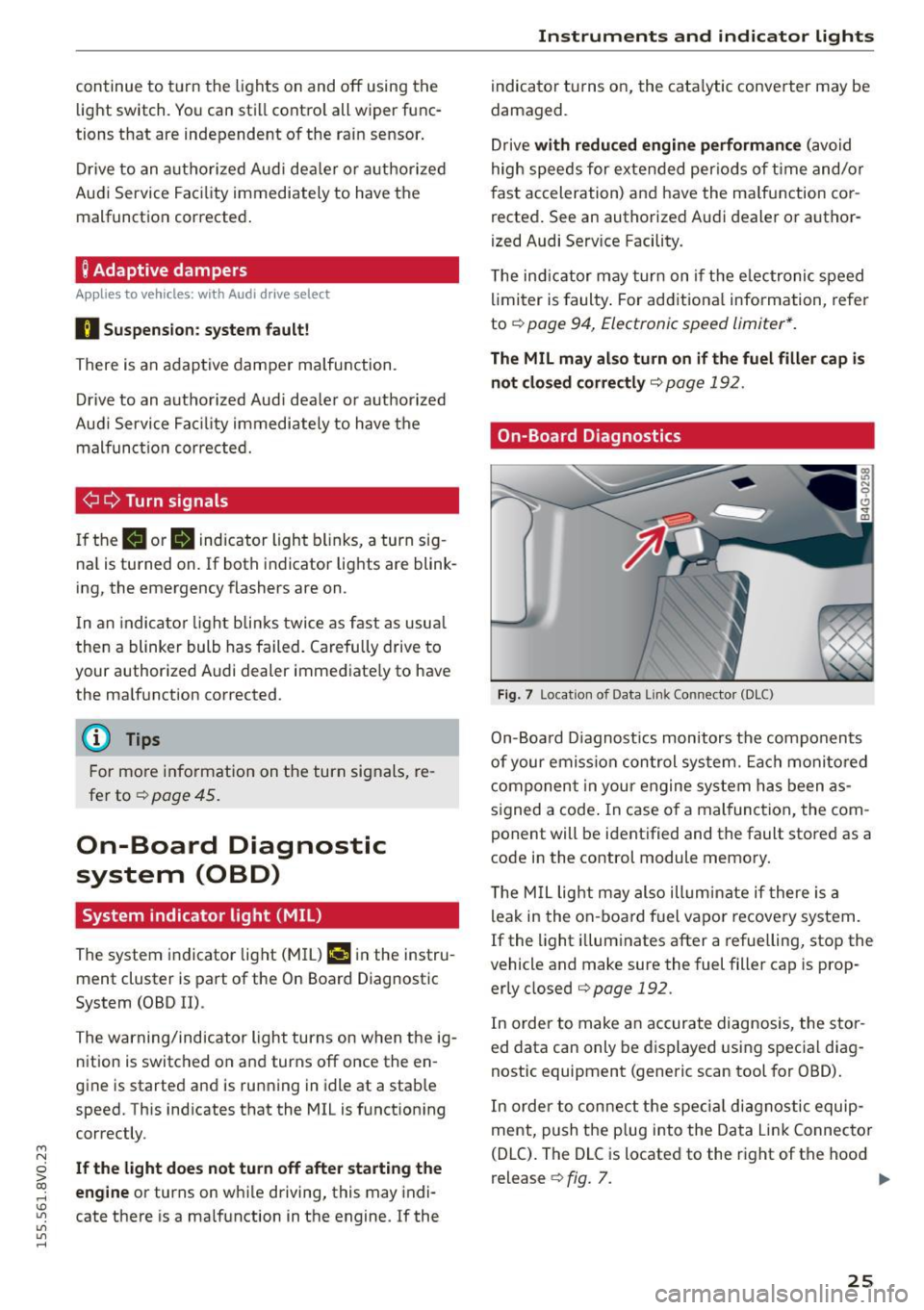
Fig. 7 Location of Data Link Connector (DLC)
On-Board Diagnostics monitors the components
of your emission control system. Each monitored
component in your engine system has been as
s igned a code . In case of a mal function, the com
ponent will be identified and the fault stored as a
code in the control module memory.
T he M IL light may also illuminate if there is a
leak in the on-board fuel vapor recove ry system.
If the light illuminates after a refuelling, stop the
vehicle and make sure the fuel filler cap is prop
erly closed
qpage 192.
In order to make an accurate diagnosis, the stor
ed data can only be displayed using special diag
nostic equipment (generic scan tool for OBD).
In order to connect the special diagnostic equip
ment, push the plug into the Data Link Connector
(DLC). The DLC is located to the right of the hood
release
¢ fig. 7. ..,.
25
Page 28 of 282
Instruments and indicator lights
Your authorized Audi dealer or a qualified service
station can interpret the code and perform the necessary repa ir .
A WARNING
Do not use the diagnostic connector for per
sonal use. Incorrect usage can cause malfunc
tions, wh ich can increase the risk of a co lli
sion!
26
.
Page 29 of 282
....,
N
0 > co
rl I.O
"'
"'
"'
rl
Driver information
system
Overview
App lies to vehicles: with driver information syste m
Fig. 8 Instr ument cluster : dr iver informat ion system (ex
a mp le}
Data is automatically recorded, processed and
d is played in the driver information system . Set
tings for special equipment can be adjusted in
the MMI. Select the
I MENU ! button >Car> Sys
tems* control button.
Introduction
The driver information system is controlled
through the multifunction steering wheel
¢ page 28, fig . 9.
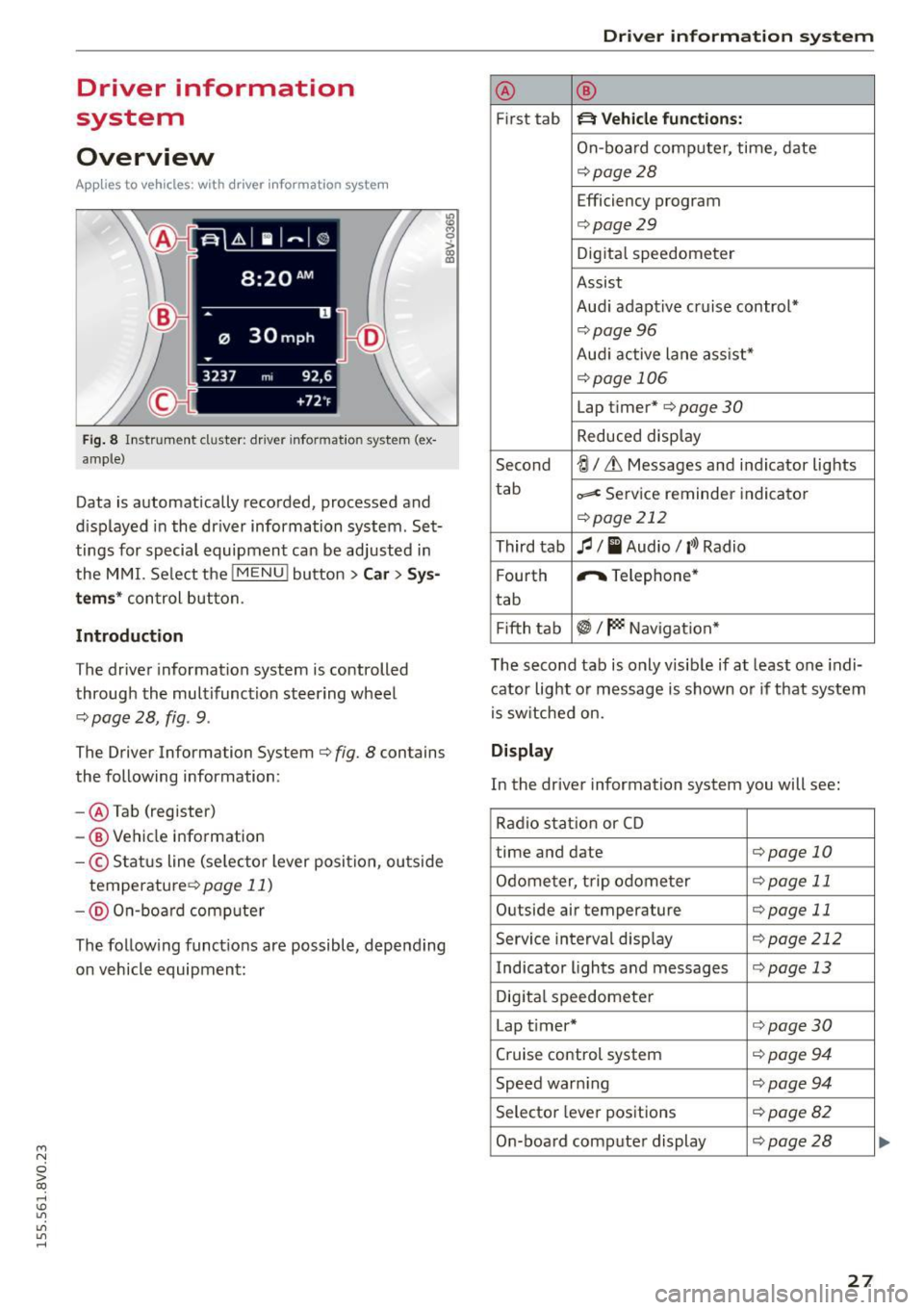
The Driver Information System ¢ fig. 8 contains
the following information:
- @ Tab (register)
-® Vehicle information
-© S tatus line (se lector lever position, ou tside
temperature ¢
page 11)
- @ On-b oar d computer
~ M 0 :> CX) ID
The follow ing funct ions are possible, depending
on vehicle equipment:
Dri ver information system
@ ®
First tab ~ Vehicle functions:
On-board computer, time, date
¢page28
Efficiency program
¢page29
Digital speedometer
Assist
Aud i adaptive cruise control*
¢pag e 96
Audi active lane ass ist*
¢page 106
Lap timer* ¢page 30
Reduced display
Second
-!;1 / Lt Messages and indicator lights
tab
=< Service reminder indicator
¢page 212
Third tab fl I I Audio/ l'>l Radio
F ourth ,.,.
Telephone*
tab
Fifth tab
~I~ Navigation *
The second tab is only visib le if at least one indi
cator light or message is shown or if that system
is switched on.
Display
In the driver information system you will see:
Radio station or CD
time and date
¢page 10
Odometer, trip odometer ¢page 11
Outside air temperature ¢page 11
Service interval disp lay ¢ page 212
Indicator lights and messages ¢page 13
Digital speedometer
Lap t imer*
¢page30
Cruise control system ¢ page 94
Speed warn ing ¢page 94
Selector lever positions ¢page82
On-board computer display ¢page28
27
...
Page 35 of 282
M N
0 > co ,...., \!) 1.1"1
1.1"1
1.1"1
,....,
Opening and closing
Central locking
Key set
Fig. 18 Your vehicle key set
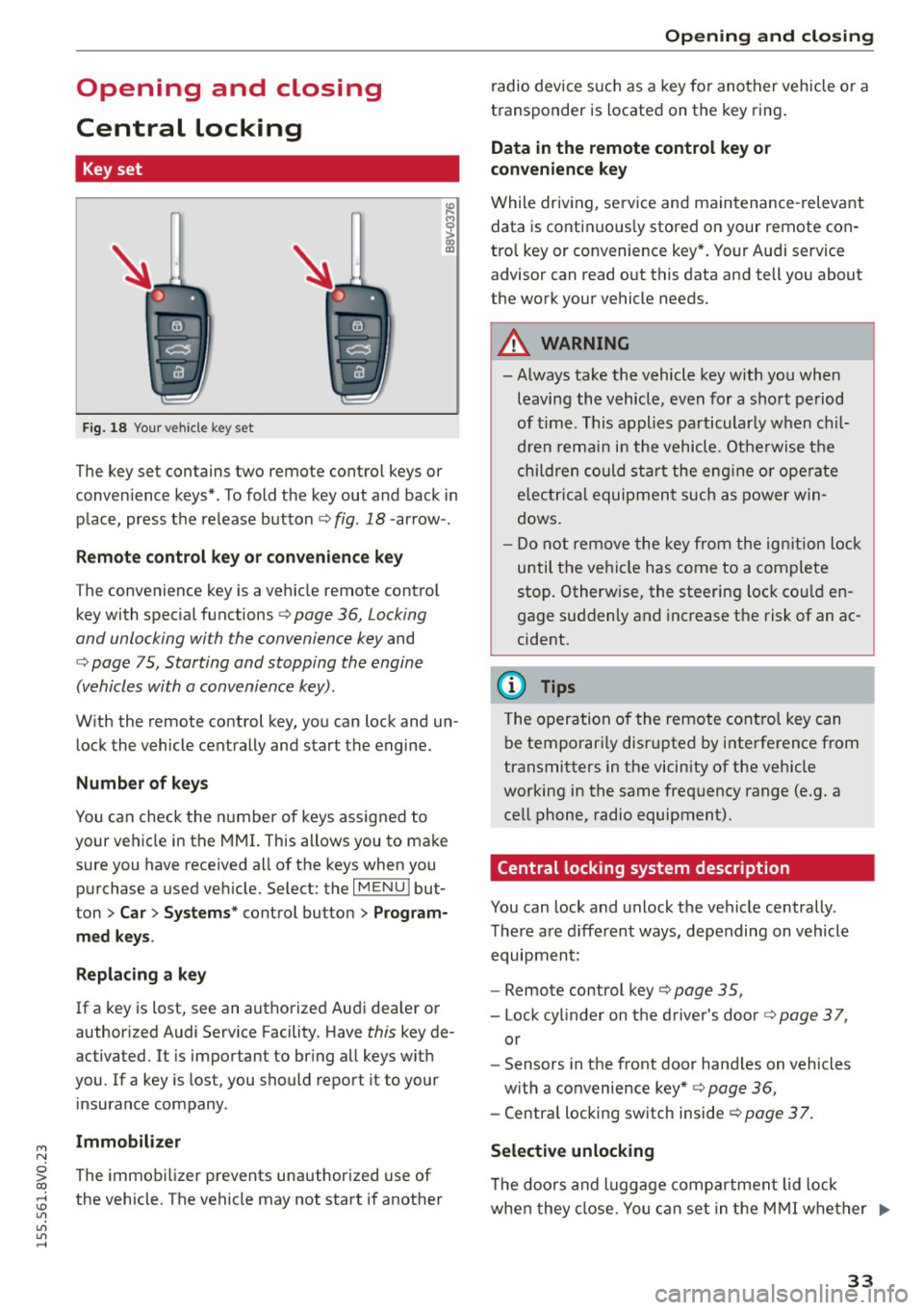
The key set contains two remote control keys or
conven ience keys*. To fold the key out and back in
place, press the release button¢ fig . 18 -arrow- .
Remote control key or convenience key
The convenience key is a vehicle remote contro l
key with special functions¢ page 36, Locking
and unlocking with the convenience key and
¢ page 75, Starting and stopping the engine
(vehicles with a convenience key) .
With the remote control key, you can lock and un
lock the vehicle centrally and start the engine.
Number of keys
You can check the number of keys assigned to
your vehicle in the MMI. This allows you to make
sure you have received all of the keys when you
purchase a used vehicle. Select: the
I MENU I but
ton
> Car> Systems * control button > Program
med keys.
Replacing a key
If a key is lost, see an authorized Audi dealer or
author ized Audi Service Facility. Have this key de
activated. It is important to bring all keys with
you .
If a key is lost, you should report it to your
insurance company.
Immobilizer
The immobilizer prevents unauthorized use of
the vehicle. The vehicle may not start if another
Opening and closing
radio device such as a key for another vehicle or a
transponder is located on the key ring.
Data in the remote control key or
convenience key
While driving, service and maintenance -relevant
data is continuous ly stored on your remote con
trol key or convenience key*. Your Audi service
advisor can read out this data and tell you about
the work your vehicle needs.
A WARNING
-- Always take the vehicle key with you when
leaving the vehicle, even for a short period
of time. This applies particularly when chil
dren remain in the vehicle. Otherwise the
children could star t the engine or operate
electrica l equipment such as power win
dows.
- Do not remove the key from the ignition lock
until the vehicle has come to a complete
stop. Otherw ise, the steering lock could en
gage suddenly and increase the risk of an ac
cident.
(D Tips
The operation of the remote control key can
be temporari ly disrupted by interference from
transmitters in the vicinity of the vehicle
working in the same frequency range (e .g. a
cell phone, radio equipment).
Central locking system description
You can lock and unlock the vehicle centrally.
There are d ifferent ways, depending on vehicle
equipment:
- Remote control key ¢page 35,
- Lock cylinder on the driver's door ¢page 37,
or
- Sensors in the front door hand les on vehicles
with a convenience key* ¢ page 36,
- Central locking switch inside <=:>page 37.
Selective unlocking
T he doors and luggage compa rtment lid lock
when they close. You can set in the MMI whether .,..
33
Page 36 of 282
Opening and closing
only the driver 's door or the entire vehicle should
un lock when unlocking
q page 3 7 .
Automatic locking (Auto L ock )
The Auto Lock funct ion loc ks all doors and the
luggage compartmen t lid once the speed has ex
ceeded approximate ly 9 mph (15 km/h).
The ca r is unlocked aga in once the ignition key is
removed . In add ition, the vehicle can be unlo cked
if the opening function in the power locki ng sys
tem sw itch is used or one o f the door handles is
pu lled .*
Add it io nally, in the event of a cr ash with a irbag
dep loymen t the doors are au tom atic ally un
lo cked to allow access to the vehicle.
Anti-theft alarm system*
If th e a nti-theft alarm system detects a ve hicle
break-in, audio and v is u a l warning s ignals are
tr iggered.
The ant i-theft alarm system tu rns on automati
cally when you lock the veh icle. It deact ivates
wh en unlocking usi ng the remote cont ro l key or
by to uchin g the se nsor on the door handle ( con
ven ience key).
To switch the a larm off, press th em butto n on
the r emote co ntro l key or convenience key or
sw itch the igni tion on. The alarm a lso stops au to
ma tica lly aft er a cer ta in amoun t of time.
Turn signals
W hen you unlock the vehicle, the t urn signa ls
flash twice . W hen you lock the vehicle, the t urn
signals flash once.
If they do not flash, one of the doo rs, the lug
gage compartment lid or the hood is not loc ked
or the ignition is still sw itched on (the la tter ap
plies to veh icles with a convenience key).
Unintentionally locking yourself out
In the following cases there safeguards to pre
ve nt you lock ing you r remote master key in the
ve hicle:
- The vehicle does not lock with the centra l lock
ing switch if the driver's door is open
c> page 37 .
34
-On veh icles with a convenience key*, the l ug
gage compa rtment lid unlocks again after clos
ing if the most recently used key is in the lug
gage compa rtment.
Do not loc k your vehicle w ith the remote control
key or convenience key * until all doors and the
l uggage compartment lid a re closed. In this way
you avoid locking yourse lf out accidentally .
@ Tips
-Do not leave va luab les unattende d in the ve
hicle. A locked veh icle is not a safe!
- If the LE D in the u pper edge of the drive r's
doo r tu rns o n for a bout 30 seconds after
the vehicle is locked, there is a ma lf u nction
in the power locki ng or the anti-theft alarm
system*. Have the problem corrected by an
autho rized Aud i dealer or autho rized Audi
Service Facility .
LED and batterie s in the remote control key
Fi g. 19 Remote con trol key: LED
Fig. 20 Remote con trol key: open ing the cove r
LED in the remote control key
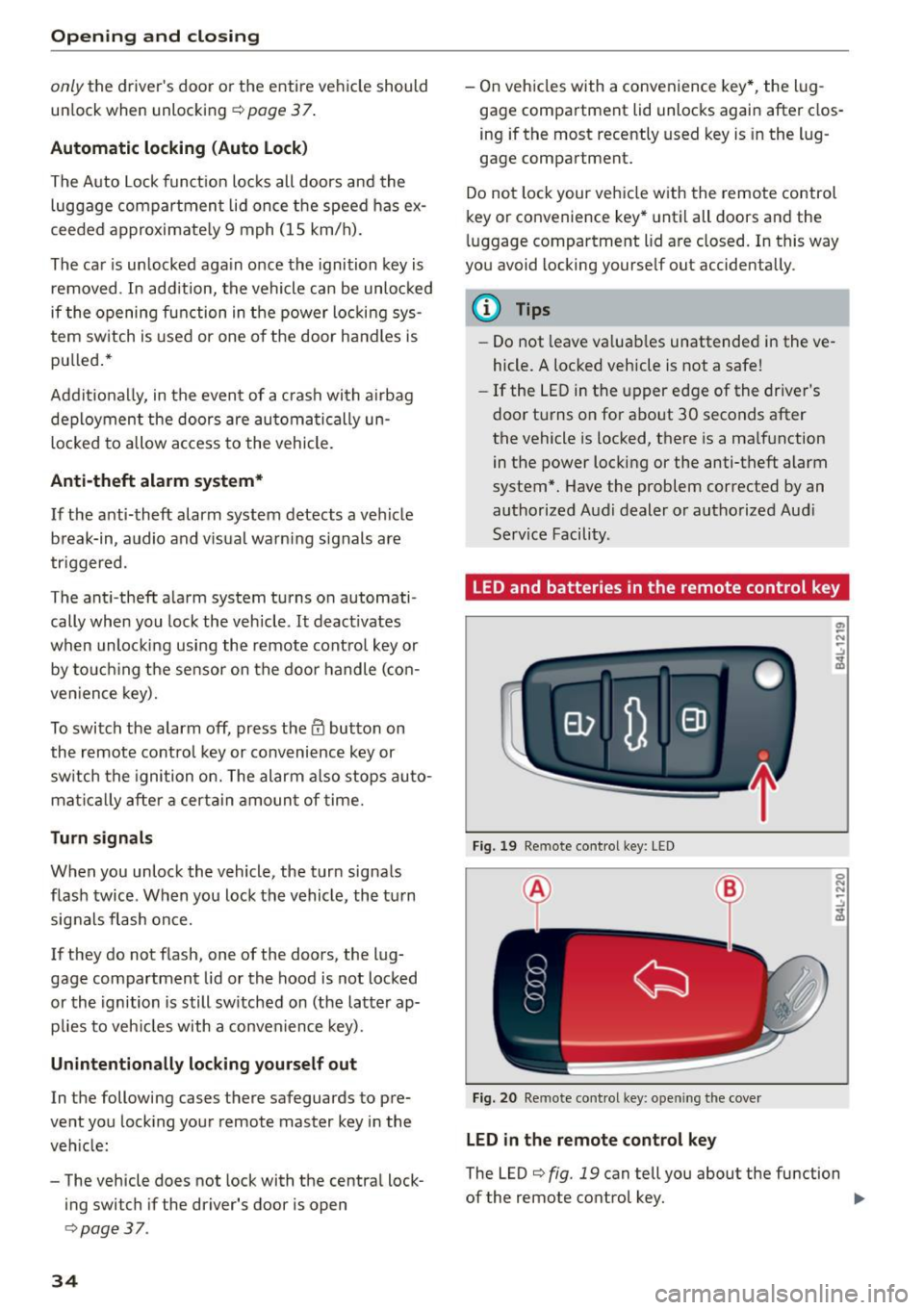
The LED c> fig. 19 can tell you about the fu nction
of the remote control key. ..,_
Page 37 of 282
....,
N
0 > co
rl I.O
"'
"'
"'
rl
• If you press a button quickly, the LED blinks
once .
• If you press a button longer (convenience open
ing*), the LED blinks several times.
• If the LED does not blink, the remote control
key battery is dead. The message=
Please
ch ange ke y batt ery
can also appear in the in
strument cluster d isplay . Replace the battery .
Replacing the remote cont rol ke y batte ry
"Pry off the cover with a co in c;, fig. 20.
• Insert the new battery w ith the" +" facing up .
• Press the cover back onto the key until it clicks
into place .
We recommend having the battery replaced by
an authorized Audi dealer or authorized Audi
Service Fac ility .
@.) For the sake of the environment
Dead batteries must be disposed of using
methods that will not harm the env ironment.
Do not dispose of them i n household trash .
{!) Tips
The replacement battery must meet the same
specifications as the original battery .
Remote control key synchronization
The remote control key must be synch ron ized if
the vehicle does not lock and unlock with the re
mote cont ro l.
• Press the remote control key button
l@J .
• Insert the key in the dr iver door lock within 30
seconds.
• Press the
[m] button o r Im button.
Opening and clo sing
Unlocking/locking by remote control
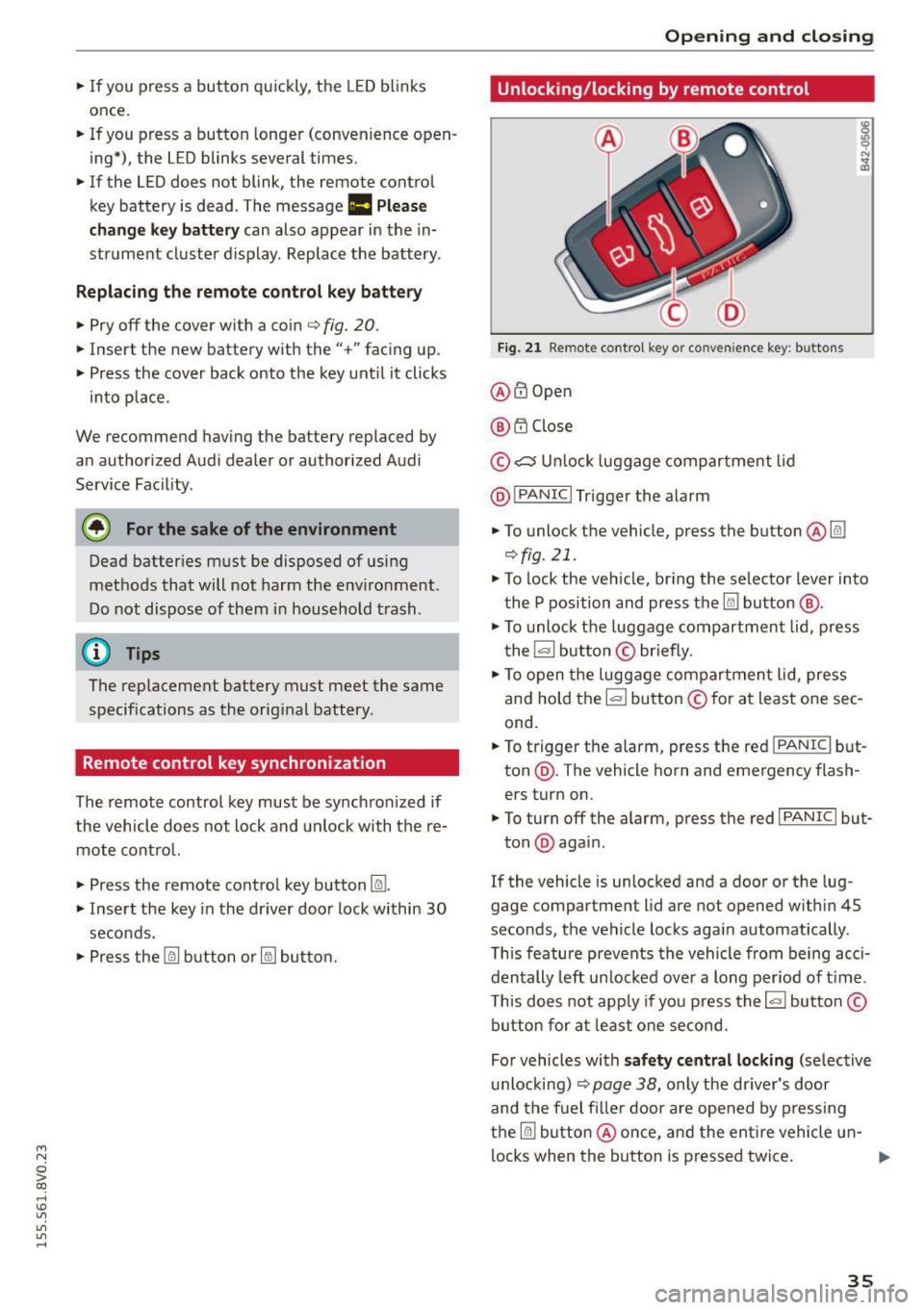
Fig. 2 1 Remote cont rol key o r conven ience key: b uttons
@ @Open
@ t'.D Close
© ,;:::::::, U nlock luggage compartment lid
@ I
PANIC I Trigger the alarm
• To unlock the vehicle, press the button @@:!
¢fig.21 .
• To lock the ve hicle, br ing the selector lever into
the P position and press the
Im button @ .
• To unlock the luggage compartment lid, press
the~ button © briefly .
• To open the luggage compartmen t lid, press
and hold the I= ! button © for at least one sec
ond.
• To trigger the alarm, press the red I
PANIC I but
ton @. The vehicle horn and emergency flash
ers turn on.
• To turn off the alarm, press the red I
PANIC ! but-
ton @again .
If the vehicle is unlocked and a door or the lug
gage compartment lid are not opened w ith in 45
seconds, the vehicle locks aga in automatically .
This feature prevents the vehicle from being acci
dentally left un locked over a long per iod of t ime .
T his does not app ly if you press the~ button©
button for at least one second.
For vehicles with
s af ety ce ntral locking (se lective
u nlocking)
c;, page 38, only the dr iver's door
and the fuel filler door are opened by press ing
the
@I button @once, and the en tire vehicle u n-
locks when the button is pressed twice. ..,.
35
Page 52 of 282
Light and Vi sion
- Do not use the wipers to remove ice from
the windows. Using windshie ld wipers as ice
scrapers destroys the wiper blades.
(D Tips
- The windshield wipers are switched off
when the ignition is turned off. Activate the
windsh ield wipers after the ignition is
switched back on by moving the windsh ield
wiper lever to any pos it ion.
- Worn or dirty windshie ld wiper b lades result
i n streaking. This can affect the rain sensor
funct ion. Check your windshield wiper
blades regularly .
- The washer fluid nozzles in the w indshield
washer system are heated* at low tempera
tures when the ignit io n is on.
- When stopp ing temporarily, such as at a
traffic light, the speed of the windsh ield
wipers automatically reduces by one level.
- In vehicles with an MMI, you can switch the
rain sensor or off in the
Dri ver ass istanc e
menu.
Cleaning windshield wiper blades
Clea n the wiper blades when you see wipe r
s treaks. Use a soft cloth and a glass cleaner.
.., Place the w indshield wiper arms in the serv ice
pos ition ¢
page 50 .
.., Fo ld the windshield wipe r arms away from the
winds hield .
A WARNING
Dirty windshie ld wiper blades can impai r vi
sion , which increases the risk of an accident.
(D Note
If you see streaks aga in after cleaning the
w iper blades, the b lades must be replaced
¢page SO.
so
-
Replacing front windshield wiper blades
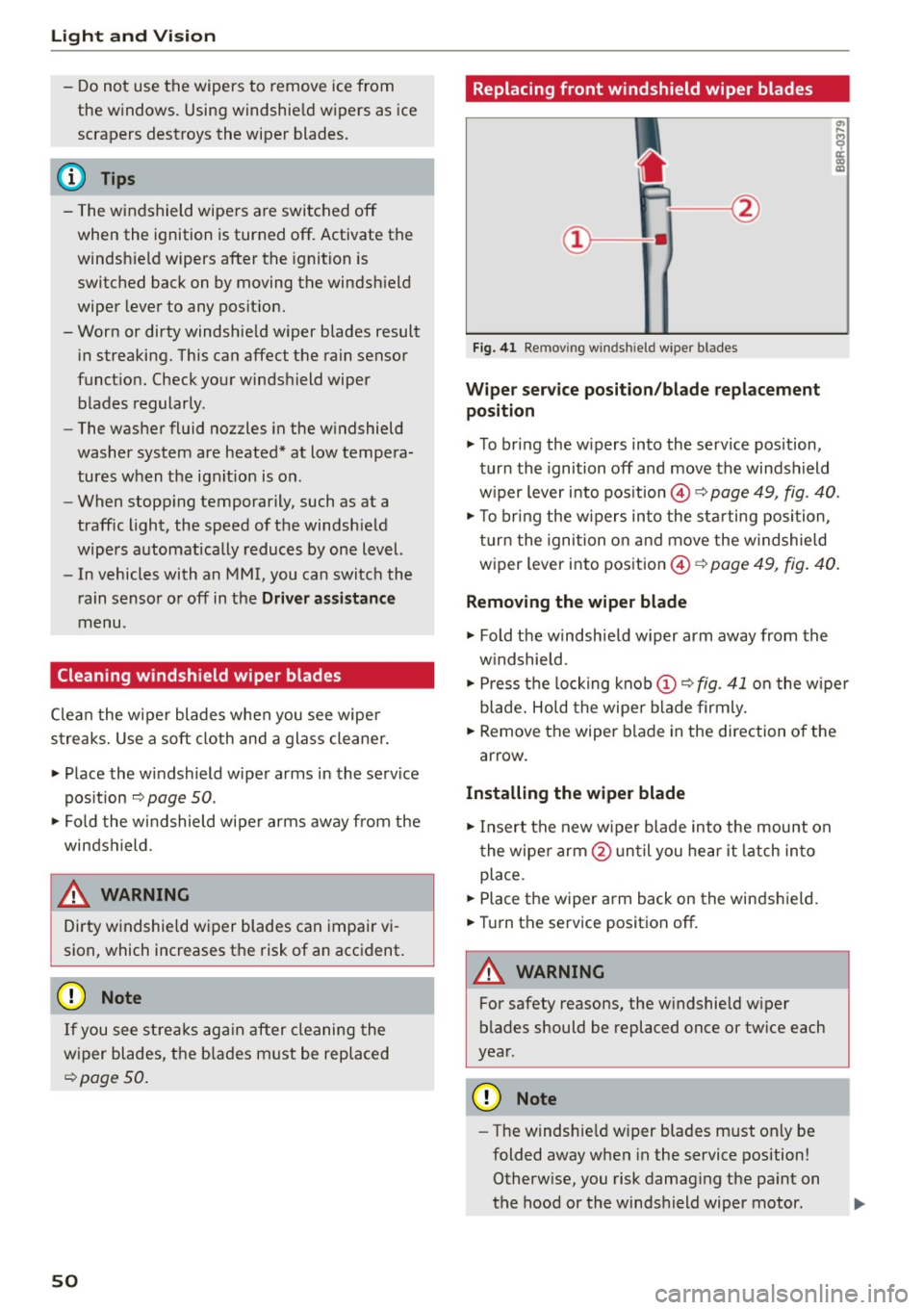
F ig. 41 Re mov ing wind shi eld w iper blades
Wiper service po sit ion /blade repl acement
position
.., To br ing the w ipers into the service pos ition,
turn the ignition off and move the windsh ield
w iper lever into position @¢
page 49, fig. 40.
.., To br ing the w ipers into the sta rting position ,
turn the ignition on and move the w indshield
wiper lever into position ©¢
page 49, fig. 40.
Removing the wiper blade
... Fold the windshie ld w iper arm away from the
w indshield.
.., Press the locking knob
(D C? fig . 41 o n the wiper
blade . Hold the wipe r blade firmly.
... Remove the wiper blade in the direction of the
arrow .
Installing the wipe r blade
.., Insert the new wiper blade into the mount on
the wiper arm @unt il you hear it latch in to
place.
... Place the wiper arm back on the windshield.
... Turn th e service position off .
A WARNING
-
For safety reasons, the w indshie ld w iper
b lades should be replaced once or tw ice each
year .
Q) Note
-The windshie ld w iper blades must only be
folded away when in the service position!
Otherw ise, you risk damag ing the pa int on
the hood or the windshield wiper motor .
Page 53 of 282
....,
N
0 > co
rl I.O
"'
"'
"'
rl
-You should not drive your vehicle or press
the windshie ld wiper lever when the wiper
arms are folded away from the w indshield.
The windshield wipers would move back in
to their original position and could damage
the hood and windshield .
- To prevent damage to the windshield wash
er system, a lways loosen wiper blades that
have frozen to the windsh ield before turn
i ng the wipers on .
- To prevent damage to the wiper blades, do
not apply gasoline, petro leum, th inning
agents or other solvents on the wiper b lades or near them.
- To prevent damage to the wiper arms or
othe r components, do not try to move the
windsh ield wipers by hand.
@ Tips
- Commerc ial hot wax such as the types used
by car washe s make it more difficult t o clean
the w indshie ld.
- You can also use the service pos ition, for ex
ample, if you want to p rotect the w indshie ld
from i cing by us ing a cover.
- You cannot activate the service pos it ion
whe n the hood is open.
Digital compass
Switching the compass on and off
Ap plies to vehicles: w ith digi tal compass
Fig. 4 2 Rearview mirro r: Dig ital compass act ivated
... To turn the compass on or off, press the button
@ until the compass in the mirror appears or
disappears.
Light and Visio n
The dig ita l compass on ly works when the ignit ion
is turned on . The directions a re indicated with ab
breviations:
N (nort h), NE (northeast), E (east),
SE (southeast), S (south), SW (southwest), W
(west), NW (northwest).
You must recalibrate t he compass if it does not
display the correct direct ion
¢ page 52, Cali
brating the compass.
(D Tips
To prevent inaccurate compass readings, do not br ing any remote controls, electrical devi
ces or metallic objects near the mirror.
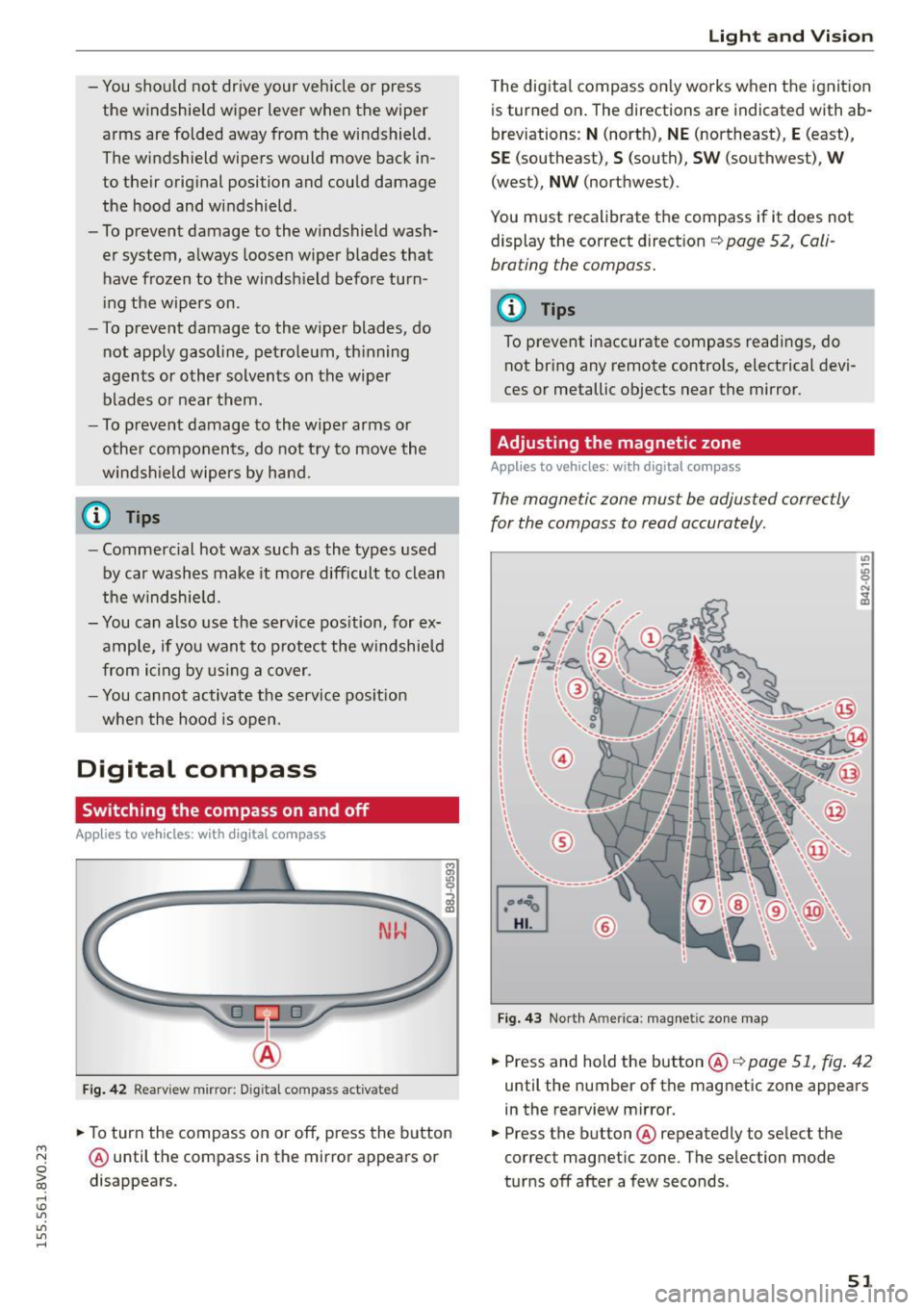
Adjusting the magnetic zone
Appl ies to vehicles: wit h digita l co mp ass
The magnetic zone must be adjusted correctly
for the compass to read accurately.
®
Fig. 4 3 Nor th Ameri ca: magnet ic zone map
... Press and hold the button @ ¢page 51, fig . 42
until the number of the mag netic zone appears
in the rearview mirror .
... Press the butt on @ repeatedly to select the
correct magnetic zone. The se lection mode
tur ns off after a few seconds .
51