battery warning AUDI S3 SEDAN 2017 User Guide
[x] Cancel search | Manufacturer: AUDI, Model Year: 2017, Model line: S3 SEDAN, Model: AUDI S3 SEDAN 2017Pages: 400, PDF Size: 67.32 MB
Page 96 of 400
e-tron
e-tron Plug-in hybrid drive
Introduction
A pp lies to: ve hicles w ith plug -in hybrid drive
General information
The plug- in hybrid drive is a drive concept that al
lows yo u to choose between driving w ith the elec
tr ic moto r, with the gaso lin e engine o r using a
comb inat io n of both.
All work done on the high-voltage system must
only be performed by certified high-voltage tech
n icians at autho rized Aud i dea le rs or authorized
Aud i Serv ice Facilities in accordance with Audi
gu idelines.
The high-voltage system is composed of the fol low ing h igh-vo ltage components: the high-volt
age battery, the powe r electron ics, the e lectr ic
motor, the high-voltage A/C compressor, the
high-vo ltage heater, the charging system and
charging port as well as the orange high-voltage
wiring.
The pedal referred to in this sect ion of the Own
er's Manua l is the equivalent of the acce lerator
pedal (gas pedal) in a standard veh icle.
High-voltage battery
The high-voltage battery is located under the
rear bench seat in the veh icle and does not re
qu ire any maintenance from the driver. Addition
a l information about the high-voltage battery can
be found under
Q page 108 .
A WARNING
The voltage in the high-vo ltage system is life
threatening. Touching a damaged high-volt
age component can result in a fatal e lectr ic
shock. The components in the high-voltage
system are ma rked with a warning label which
wa rns against the h igh-vo ltage.
- The voltage level in the high-voltage system
is still dangerous and potentially life-threat
ening when the ignition is switched off.
- Never perform work on orange high-voltage
cables or on high-voltage components. Only
94
authorized repair facilities that are certified may perform work on the high-voltage sys
tem.
- Never damage, alter or remove the orange
high-voltage cable or disconnect it from the
high-voltage system.
- Never perform any work using c utting, shap
ing or sharp-edged too ls or heat sources
near the h igh-vo ltage system and high-volt
age cables.
- Aud i regulat ions must be followed during
all work performed on the high-voltage sys
tem and h igh-vo ltage components.
- When working on the h igh-vo ltage system
and h igh-voltage compone nts, make sure
the remote cont rol key is kept far enough
away from the vehicle so that there is no
ris k of the ignit ion be ing inadve rten tly
sw itched on.
- Gases that escape from the high-vol tage
b attery can be poisono us or flammable.
- Damage to the high-voltage battery could
cause the h igh-vo ltage battery to leak im
media tely or in the fu ture, and poisonous or
flammab le gases cou ld escape . Do not in
ha le the gases!
- Do not expose yourse lf to any leaking fluids
and do not come into contact with them .
- The high-volt age battery e lectroly te fl uid is
caustic. I f electrolyte fluid comes into con
tact with the sk in, f lush the affected area
for at least 15 minutes with clean water.
Then wash the affected area with soap.
Have the affected area examined by a med i
cal professional.
- In the event of a technical emergency, in
form the responders that the vehicle is
equ ipped with a high-voltage battery.
A WARNING
Never leave the vehicle unattended when in
drive ready
mode ~ page 96 with a gear en
gaged . The veh icle can start moving ("creep
ing") even if the gaso line engine is switched
off, since the e lectr ic motor is still operating.
This may cause collis ions and severe or fatal
-
Page 98 of 400
e-tron
for the high-voltage battery can lead to serious damage and/or a decrease of the capacity
void coverage under the New Vehicle Limited
Warranty.
Starting/driving the vehicle
Applies to: ve hicles w ith plug -in hybrid drive
The vehicle is started and stopped with the
I START STOP I button. Please also read the in
formation under
c::> page 78, Starting the engine .
Establishing drive ready mode
See c::> A in Introduction on page 94.
Requirement: a charging cable must not be con
nected to the vehicle
c::> page 117 and the selec
tor lever must be in the P or N position.
- Press the brake pedal.
- Press the
I STAR T STOPI button .
When the vehicle enters drive ready mode, the
status message
e-tron READY appears briefly in
the instrument cluster display and the needle in
the power meter points to
READY c::> page 97.
Driving
The vehicle starts with the electric motor after
establishing the dr ive ready mode and if the con
ditions for electric drive mode have been met
c::> page 100.
The conditions to drive are essentially the same
as for the automatic transmission
c::> page 85 .
You and your passengers should anticipate the
possibility of a sporty acce leration.
Ending drive ready mode
- Place the selector lever in the P position.
- Switch the ignition off with the
I STAR T STOPI
button.
Vehicle sound
The vehicle generates an electronic engine sound
so that your vehicle can be heard from the out
side when in electr ic drive mode. The veh icle
sound automatically fades out at higher speeds
when the sounds from the tires and wind start in
creasing.
96
Switching the ignition on/off
You can switch the ignition on without establish
ing drive ready mode.
- Press the
I START STOP ! button to switch the
ign ition on and off. Do not press the brake ped
al whi le doing this.
When the ignition is sw itched on, the needle
points at
OFF @c::>page 97, fig. 103 or OFF is
displayed @c::>page97, fig .103.
No indicator lights stay turned on when the igni
tion is switched off .
Ignition is switched off automatically
To prevent the vehicle battery from draining, the
ignition will switch off automatically under the
follow ing cond it ions:
- The vehicle must have already been driven.
- The vehicle is stationary.
- The gasoline engine must not be runn ing .
- The driver's door must be open.
- The driver's safety belt must be unbuckled .
- The brake pedal must not be pressed.
In this case, the activated low beam is replaced
by the parking light. The message
Side marker
lights automatically shut off in
30 minutes. See
owner's manual
appears in the instrument clus
ter display . The parking lights w ill switch off af
ter approx imately 30 minutes or when you lock
the veh icle.
If the gasoline engine was not stopped, the mo
tor continues runn ing and the ignit ion does not
automat ica lly switch off
c::> A .
A WARNING
To reduce the risk of poisoning, never allow
the eng ine to run in confined spaces.
(D Tips
The vehicle cannot start when outs ide tem
peratures are below-18 °F (-28 °C)
c::> page 98.
-
Page 100 of 400
e-tron
The power meter gives feedback about the pa rt ic
ular accelerator pedal position and shows the
cur rent demand
(%) fo r electric ity or fuel rega rd
less of which engine is active.
An economica l driv ing and recupe ra tion range is
shown i n green
r:!> page 101, Energy recovery (re
cuperation). A driving range that is not economi
cal is shown in orange.
CD Ve hicl e no t drive ready (O FF)
@ Recuperation (CHARGE)
® Ve hicl e ready to d rive ( READY) o r
c oastin g
@ Effic ient driving w ith electric moto r
and/or gasoline eng ine (EFFICIEN-
CY)
® Ec onomic driv ing while t he e lectr ic
mot or or g asoline e ng in e is i n th e
p a rt ial power range
® D riving in full power range
0 100 % outp ut
® Boosting -the elect ric motor as-
sists the gasoline engine (BOOST)
® H igh-voltage battery cha rge level
@ EV mo de: a ct ive av , standby, c::§V
or cur rently unavailable. ~v
@ Speed limit for elect ric driv ing in EV
m ode (80 mph/ 130 km/h)
Indicator lights and messages
A pp lies to: ve hicles w ith p lug -in hybr id drive
A lso note the in dica to r li ghts in r:!> page 24.
The gaso line engine is active when the
111 indica
to r ligh t turns o n.
./. Drive system: system fault! Safely park
vehicle
There is a malfunction in the plug-in hybrid sys
tem . T he br ake booster and the powe r steering
may stop wor king. Stop the veh icle immediately
or as soon as possib le . Park the vehicle in a safe
p lace o utdoors that is not near buildi ngs, roof
overhangs, carports o r similar structures . Sw itch
the ig nition off . Have the problem cor rected by
an a uthor ized A udi dealer or au thor ized A udi
S erv ice Facil it y .
98
•• Electric system: overheated. Safely park
vehicle and check coolant
The coolant level is too lo w or the coo lan t tem
p er at ure is too hig h.
Stop t he vehi cle in the o utdoors as soon as it is
safely possib le. Swi tch t he ig nitio n off.
Read the important safety precautions
r:!> .& in
Coolant on page 105 and check the coolant level
r:!> page 104.
If the coolant level is OK, the malfunction may be
ca used by the system ove rheating . Let the vehi
cle's e lectr ic dr ive system coo l dow n for so me
t im e.
If the message turns off after coo ling down and
switching the ignition back on, you can continue
driv ing . Co ntac t an author ized Audi dealer or au
t h orized Audi Serv ice Facili ty immedia tely to have
t h e malfunct io n co rrecte d.
If the indicato r light stays on , contact an autho r
i zed Audi dealer or author ized A udi Se rvice Facili
ty.
11;11 D rive system: system fault! Please con
tact workshop
There is a ma lf u nction in t he p lug -in hy brid sys
tem. D rive to an authorized Aud i deale r or au
thorized Aud i Serv ice Facility immediately to have
the malfunct ion co rrected.
11;11 Drive system: system fault! Restart not
possible. Please contact workshop
There is a ma lf u nction in the plug-in hybrid sys
tem. Do not ope n the hoo d. Drive to an a uth o r
i zed Audi dealer or author ized A udi Se rvice Facili
ty immediate ly to have the malfuncti on correct
ed.
11;11 Battery temperature too low. Engine
start not possible . See owner's manual
The o utsid e tem per atur e is too low. The veh icle
can no longer s tart at tem peratures be low -18 °F
(-28 ° C). Contact an author ized A udi dea ler or au
thorized Audi Serv ice Facility.
•
POWER LIMIT Warning! Limited power
Page 107 of 400
a, a, ..... N
" N ..... 0 N > 00
_& WARNING
-Read and follow t he warn ings in
¢page 316, Working in the engin e com
partment before opening the hood and
che cking the coo lan t level.
- The e xpansion ta nk @ may only be ope ned
and filled by an a uthorized Aud i dea le r or
au tho riz e d Au di Service Fac ility.
- Coo lant can en ter the inside of the high
voltage battery when filling the expa nsion
t an k@ and ca use a short circui t, which in
cr eases the ris k of fire.
Refueling
Opening the fuel filler door
App lies to: ve hicles with plug-in hybrid drive
Fig. 112 Dr ive r's doo r: Butto n il
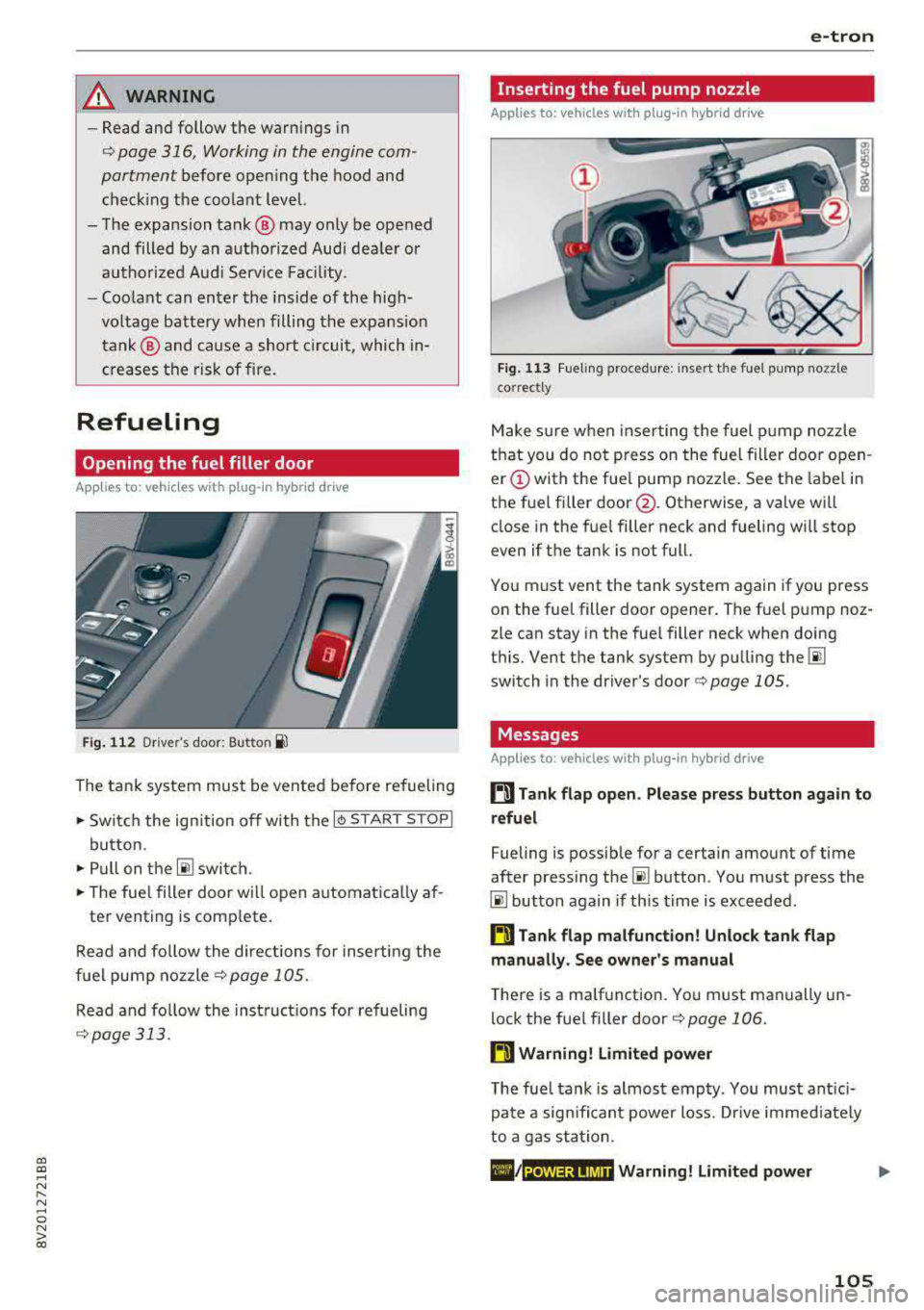
The tan k system must be vented be fore refueling
.. Swi tch the ign ition off with the I
button.
.. Pull on the ~ switch.
.. The fue l filler door wi ll open automatica lly af-
ter venting is com plete .
R ead and fo llow the directions for inserti ng the
f u el pump noz zle
¢ page 105.
Re ad and fo llow the inst ruct ions for re fueling
¢ page 313.
e-tron
Inserting the fuel pump nozzle
Applies to: vehicles with pl ug-in hybrid drive
Fig. 11 3 Fueling proced ure: i nsert t he f uel p ump nozz le
correct ly
M ake s ure w hen inse rting the fuel pump noz zle
t h at you do no t press o n the fuel filler door o pen
er (!) with the fue l pump nozzle . See the label in
the f uel fi ller
door @. Otherwise, a va lve wi ll
close in the fue l filler neck and fueling w ill stop
even if t he tank is not full.
Yo u m ust vent the tank system again if you press
on the fue l filler doo r opener . The fuel p ump noz
zle can stay in the fuel filler neck when doing
t hi s. Vent the tank system by pu lling
the @!
switch in the dr iver 's door ¢ page 105 .
Messages
Applies to: vehicles with pl ug -in hybrid drive
ti Tank flap open . Please press button again to
refuel
Fueling is possib le for a certain amount of time
after press ing
the~ button . Yo u m ust press the
@I button again if th is time is exceeded .
ti Tank flap malfunction! Unlock tank flap
manually . See owner's manual
T he re is a ma lfunction. Yo u must manually un
lock the fue l fi ller door
¢ page 106 .
ti Warning! Limited power
The fue l tank is almos t emp ty . You must ant ici
p at e a sign ifi can t power loss. Drive immed iate ly
t o a ga s st at ion .
POWER LIMIT Warning! Limited power
105
Page 108 of 400
e-tron
The gasoline engine is no longer available be
cause th ere is not enough fuel. Drive immediately
to a gas station.
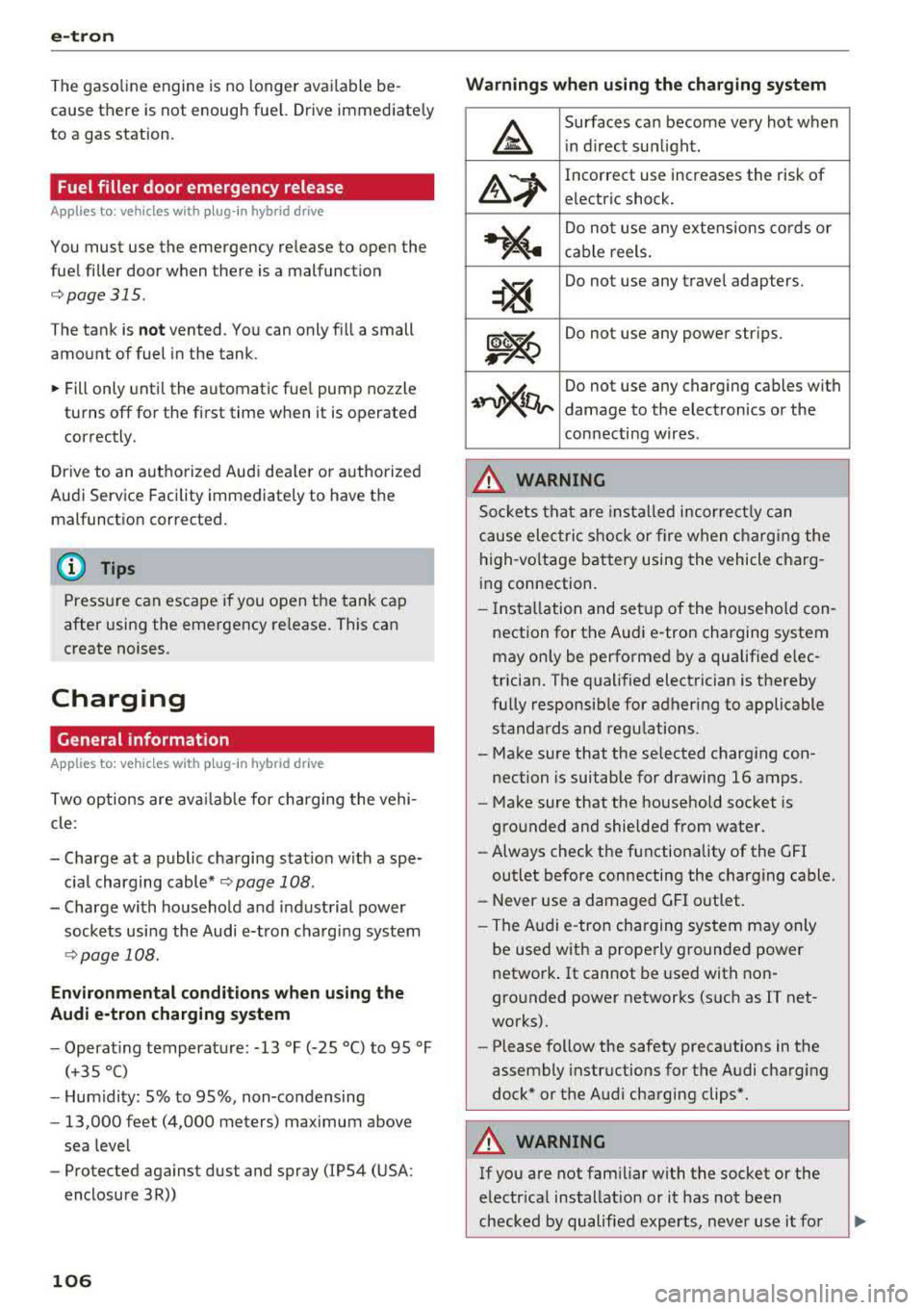
Fuel filler door emergency release
A pp lies to: ve hicles w ith plug- in hy brid drive
You must use the emergency release to open the
fuel filler door when there is a malfunction
c::> page315 .
The tank is not vented. You can only fill a small
amount of fuel in the tank.
~ Fill only until the automatic fuel pump nozzle
turns off for the first time when it is operated
correctly.
Drive to an authorized Audi dealer or authorized
Audi Service Facility immediately to have the
malfunction corrected.
(D Tips
Pressure can escape if you open the tank cap
after using the emergency release. This can
create noises.
Charging
General information
A pp lies to: ve hicles w ith p lug -in hybrid drive
Two options are available for charging the vehi
cle:
- Charge at a public charging station with a spe
cial charging cable*
c::> page 108.
- Charge with household and industrial power
sockets using the Audi e-tron charging system
c::> page 108.
Environmental conditions when using the
Audi e-tron charging system
-Operating temperature : -13 °F (-2 5 °C) to 9 5 °F
(+35 °C)
- Humidity: S% to 95%, non-condensing
- 13,000 feet (4,000 meters) maximum above
sea level
- Protected against dust and spray (IP54 (USA:
enclosure 3 R))
106
Warnings when using the charging system
&
Surfaces can become very hot when
in direct sunlight.
&~
Incorrect use increases the risk of
electric shock.
~"4
Do not use any extensions cords or
cable reels.
~
Do not use any travel adapters.
~~
Do not use any power strips.
~~~
Do not use any charging cables with
damage to the electronics or the
connecting wires.
.&_ WARNING
-
Sockets that are installed incorrectly can
cause electric shock or fire when charging the
high-voltage battery using the vehicle charg
ing connection.
- Installation and setup of the household con
nection for the Audi e-tron charging system
may only be performed by a qualified elec
trician. The qualified electrician is thereby
fully responsible for adhering to applicable
standards and regulations.
- Make sure that the selected charging con nection is suitable for drawing 16 amps .
- Make sure that the household socket is
grounded and shielded from water.
- Always check the functionality of the GFI
outlet before connecting the charging cable.
- Never use a damaged GFI outlet.
- The Audi e-tron charging system may only
be used with a properly grounded power
network. It cannot be used with non
grounded power networks (such as IT net
works).
- Please follow the safety precautions in the
assembly instructions for the Audi charging
dock* or the Audi charging clips*.
.&_ WARNING
If you are not familiar with the socket or the
electrical installation or it has not been
checked by qualified experts, never use it for
Page 111 of 400
a, a, ..... N
" N ..... 0 N > 00
-Using the control unit while operating the
charging dock*
c!;> page 110 or charging
clip*
c!;> page 110 is recommended .
-Do not immerse the control un it in water or
cover with snow or ice.
@ Tips
-Always place the Audi e-tron charging sys
tem on a secure surface when charg ing.
-To reduce the risk of over heat ing during op
eration, do not place the Audi e -t ron cha rg
i ng system in direct sunlight for long per i
ods of time.
-If the temperature inside the control unit r ises above 176 °F (80 °C), the charging
process will stop automatically unt il the
temperature decreases back down to the normal range.
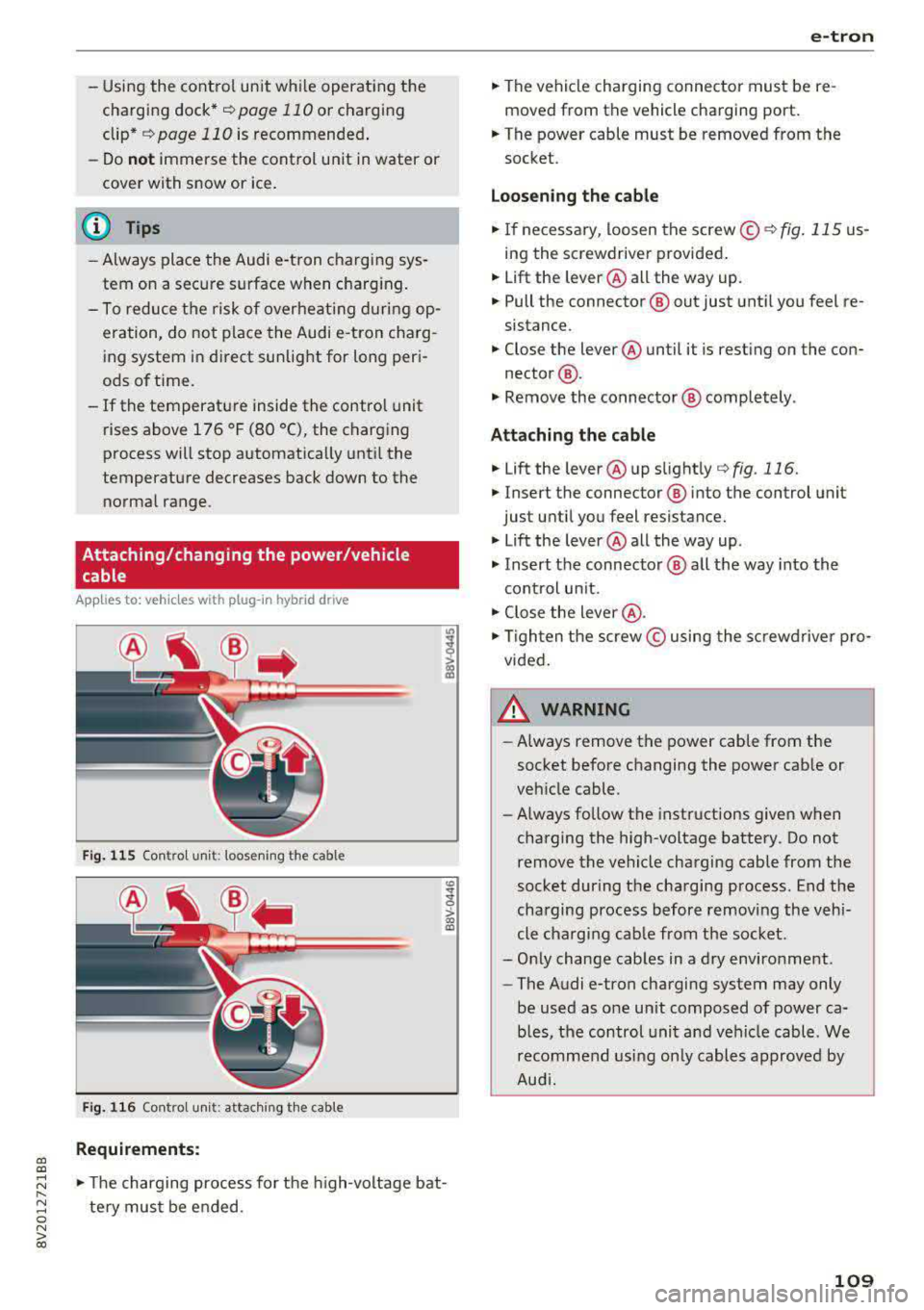
Attaching/changing the power/vehicle cable
A pp lies to: ve hicles with p lug -in hybrid dr ive
Fi g. 11 5 Contro l u ni t: loose nin g the cable
Fig. 116 Co ntro l u ni t: attach ing t he cable
Requirements:
co
~
> ex, a,
.,. The charging process for the high -voltage bat
te ry mus t be e nded .
e-tron
.,. The vehicle charging connector must be re
moved from the vehicle charging port.
.,. The power cable must be removed from the
socket.
Loosening th e cable
.,. If ne cessary, loosen the screw © r::!:>fig . 115 us
ing the screwdriver provided .
.,. Lift the lever@all the way up.
.,. Pull the connector @out just unt il you feel re
sistance.
.,. Close the lever @until it is rest ing on the con-
nector @.
.,. Remove the connector @ completely .
Attaching the cable
.,. Lift the lever @up slight ly c!;> fig. 116.
.,. Insert the connector ® into the control unit
just until you feel resistance .
.,. Lift the lever @all the way up .
.,. Insert the connector @ all t he way into the
cont rol un it.
.,. Close the lever @ .
.,. Tigh ten the screw © using the sc rewdrive r pro
vided .
A WARNING
-
-Always remove the power cable from the
socket before changing the power cab le or
veh icle cable.
- Always follow the instructions given when
charging the high-voltage battery. Do not
remove the vehicle charging cable from the
socket during the charging p rocess . End the
charging process before removing the vehi
cle charging cab le from the socket.
-Only change cab les in a dry enviro nment .
-The Audi e-tron charging system may only
be used as one un it composed of power ca
b les, the control unit and vehicle cable . We
recomme nd usi ng only cables approved by
Aud i.
109
Page 121 of 400
Setting the timer
Appl ies to: ve hicles with p lug -in hybrid drive
By setting the depa rture time, you dete rm ine
when yo ur vehicle shou ld reach the desi red tem
pe rature . You can set the time r in the auxiliary air
conditioning menu in the Infotainment system.
Auxiliary climate control : setting th e timer
• Select: I MENU I button > Veh icl e> left control
button >
Auxiliar y A/C > right cont rol b utton>
Program tim er.
• Set the time and the date .
• Press the I BACK I button.
• Confirm the setting with the control knob to ac-
tivate the timer. A
..f appears in the box.
When you reprogram a timer, the next calendar
day is automatica lly entered in the Infotainment
system . To activate the auxiliary climate control
for the next day, confirm the
setting( ../ in the In
fotainment system).
Error me ssag es
l;c1 -The hig h-voltage battery charge level is too
low to heat/air condition the vehicle using only
e lectric power.
I f one of the fo llow ing symbols appears in the
d isp lay, then you cannot switch on the auxiliary
climate cont rol:
,...c -T here is a system ma lf u nction.
Bu -The fuel level is too low .
(D Tips
-You can set the t imer a maximum of seven
days in advance.
- You can operate the climate control in the
vehicle interior when the high-vo ltage bat
tery is charging using the charging timer
9 page 112 . The climate control output de
pends on the powe r socket capac ity.
- Make su re the time and date match in the
Infotainment system settings so that the
timer can function
p roper ly ~ page 241 .
~ -The aux ilia ry climate control can continue to ....
~ run after the depart ure t ime is reached.
N .... 0 N > 00
e-tron
Cleaning/maintenance
information
Appl ies to : vehicles wi th plug-in hybrid drive
When was hing your vehicle with a pressure wash
er, always follow the operat ing instruct ions pro
vided with the pressure washer . This is especially
i mportant in regard to the pressu re and spray ing
distance. Do not dire ct cleaning spray at the
charg ing unit in the rad iator g rille or at t he
charg ing dock*/charging cl ip *. Keep a d istance of
a t least 16 in (40 cm) .
Do not remove snow and ice with a pressure
washer .
Never use cone nozzles or high pressure nozzles .
The water temperature must not be above 60
°C.
Remove contaminants on the Audi e -tron system
with a dry towel.
Remove contaminants on the charging do ck*/
charg ing clip* wi th a wet towel dampened w ith
alcohol-free clean ing solution .
A WARNING ~
-Never immerse t he Audi e-tron charging
system and connecto rs in water.
- The A udi e -tron charging system must on ly
be cleaned when the control unit is com
p letely disconnected from the power supp ly
and from the vehicle.
(D Note
To dec rease the risk of discoloration, never
clean the c harging doc k*/charging clip * with
harsh cleaning sol utions or so lutions that
contain alcoho l.
119
Page 157 of 400
CXl CXl .... N ,.__
N .... 0 N > 00
Offroad vehicle?
Your Audi is not an offroad vehicle -th ere is not
enough ground clearance . For this reason, avoid
d ifficult terrain.
& WARNING
- Also, in vehicles with all wheel drive, adapt
your driv ing style to the current road and
traff ic conditions. Do not let the increased
safety provided tempt you into taking risks,
because th is increases the r isk of an acci
dent .
-The braking ability of your veh icle is limited
to the tract ion of the wheels . In this way, it
is not diffe rent from a two whee l dr ive vehi
cl e. Do not be tempted to accelerate to a
high speed when the road is slippe ry, be
cause this increases the risk of an accident.
-Note that on wet streets, the front wheels
c an "hyd roplane" if dr iving at speeds that
are too high . Unlike front whee l drive
vehicles, the eng ine does not rev higher su d
denly when the vehicle begins hyd roplaning .
For this reason, adapt your speed to the
road conditions to reduce the risk of an acc i
dent .
Energy management
The starting ability is optimized
The energy management system manages the
electrical energy distribution and optimizes the
availability of electrical energy for starting the
engine .
When a ve hicl e w ith a co nventional energy sys
tem is not d riven for a long time, the vehicle bat
tery is dra ined by equipment (for example, the
immobilizer). In certain circumstances, there
could may not be enough energy to start the en
g ine.
Your veh icle is equipped with an inte lligent ene r
gy managemen t system for d istr ibuting electrici
ty. This significantly improves the starting ability
and inc reases t he vehicle battery life.
Intellig ent Technology
The ene rgy management system Is made up o f
battery diagnosi s, idling cu rrent management ,
and dynamic energy management .
Battery diagnosis
T he battery diagnos is determines the vehicle ba t
te ry c harge level. The sensors de termine the bat
te ry vo ltage, the batte ry cu rrent, and the batte ry
temperat ure. The cur rent charge level and the
performa nee of the vehicle battery a re deter
mined based on this.
Idling current management
T he idling cur rent management decreases the
energy used while parked . With the engine
switched off, it ma nages the energy distribution
to the d ifferent e lectr ica l components . Data from
the battery d iagnosis is taken into account for
th is.
Depending on the vehicle battery charge level,
electr ical eq uipment is switched
off one item af
ter the other to prevent the vehicle battery from dra ining and to ma intain the starting ab ility .
Dynamic energy manag ement
While driving, dynamic ene rgy management dis
t ributes the appropr iate amo unt of energy to the
electrical eq uipment. It contro ls the battery
charge level so that the amount of energy is not
greater than the amount being generated in or
der to maintain an optimal vehicle battery charge
level.
(D Tips
-Energy management cannot overcome the
laws of physics . Note that the charge level
and length of the veh icle bat tery life are
li m ited.
-Whe n the sta rting ability is endangered, the
i•) i n dicator light t urns on r=v pag e 29.
What you should know
Maintaining the starting ability is the highest
priority .
A lot of stress is placed on the veh icle battery
whe n driving short distances, during city driving,
..,.
155
Page 161 of 400
a, a, ..... N
" N ..... 0 N > 00
A WARNING
Adjust the volume of the audio system so that signals from outside the vehicle, such as po
lice and fire sirens, can be heard easily at all
times.
@ Tips
The MMI switches off automatically if the en
gine is not running and the vehicle battery is
low.
Infotainment system
display
Extending/retracting
The Infotainment system d isplay automatically
extends and retracts when you switch the MMI
on and off.
- Manually extending/retracting : press the qi
button@) ¢page 8, fig. 2.
When the MMI is switched off and the display is
retracted, you can operate certain functions us
ing the MMI On/Off knob with the joystick func
tion
¢ page 158 .
{!) Tips
-If the vehicle has a cell phone prep", the In
fotainment system display will automatical ly extend whenever there is an incoming
phone call.
- There may be delays when extending or re
tracting the display.
Multi Media Interface
MMI operation
Selecting and confirming a function
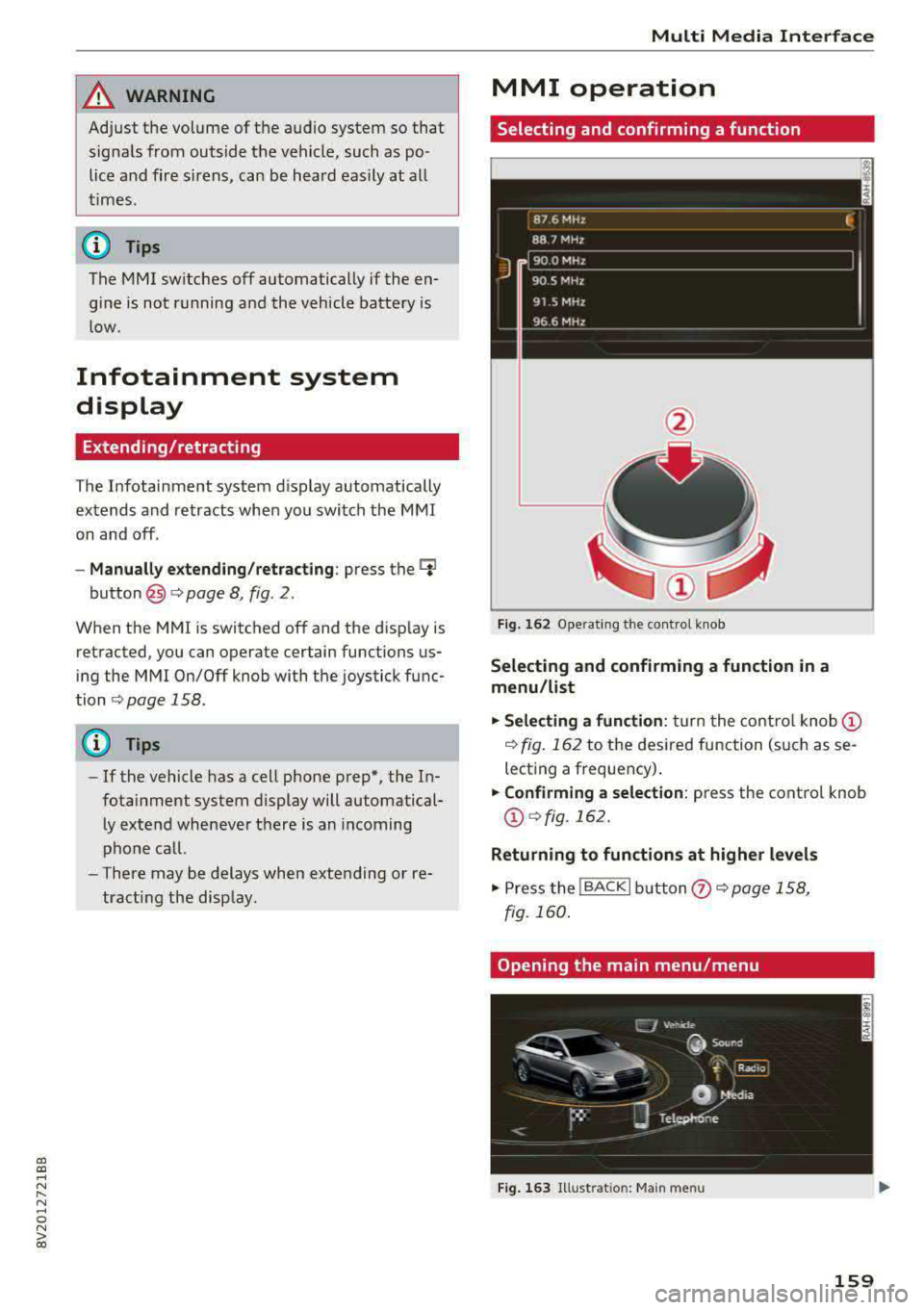
Fig. 162 Operat ing the control knob
Selecting and confirming a function in a
menu /list
.,. Selecting a function: turn the control knob (D
¢ fig. 162 to the desired function (such as se
lecting a frequency) .
.,. Confirming a selection: press the control knob
@¢fig, 162.
Returning to functions at higher levels
.,. Press the !BACKI button (i) ¢page 158,
fig. 160 .
Opening the main menu/menu
Fig. 163 Illustration: Ma in menu
159
Page 200 of 400
Audi connect e-tron ser vic es
Audi connect e-tron
services
Introduction
A pp lies to: ve hicles w ith Audi co nnect e-tro n se rv ic es
With Audi connect e-tron services l), you can ac
cess various information or control individual
functions remotely using mobile dev ices (such as
a smartphone) or a web portal.
- Trip
data¢ page 198.
- Doors and lights ¢ page 198.
-Vehicle status report ¢page 199.
-Car Finder¢ page 199.
- Charging ¢ page 199.
-Climate control ¢page 199.
A WARNING
Also read and follow the instructions regard
ing traffic
safety¢ page 158.
Setup
A pp lies to: ve hicles w ith Audi co nn ect e -tro n serv ices
To use Audi connect e-tron services 1), p lease
note the following:
R equi rements
-An authorized Audi dealer must complete a
one-time activation of Audi connect e-tron serv
ices for your veh icle before you can reg ister on
l ine .
- Then register at
etro n .a udiu sa.com. You can
use and manage the Audi co nnect e-tron serv
ices there .
- If you require ass istance w ith the Audi connect
e-tron services, you can call customer service at
( 844 ) 57 3-8 76 6.
-Your mobile devices must be compatible.
l) The mob ile netwo rk service is offe red by a service provid·
er . You can obtain more infor mation about your mobile
network provider from an authorized Aud i dealer or by
ca ll ing
(877) 505-2834. Connected devices are not al
w ays 4G-comp atible. The availability of a high-speed net
wor k m ay be reduced during peak usage or by your loca
tio n, the reception, and other factors . Network coverage
cannot be guaranteed everyw here. Fo r more informa tion
o n mob ile coverage , see the Audi co nnect overv iew fro m
yo ur mob ile netwo rk prov ider.
19 8
Trip data
App lies to : vehicles wi th Audi connect e -tr on services
The Driver Information System collects data un
der certain conditions and sends it to a server.
When data is stored, you can access va lues such
as these using the service:
- driving durat ion,
- average speed driven,
- distance driven,
- average electric consumption.
For additional information on the Driver Informa
tion System, refer to
¢ page 17, Driver informa
tion system.
Doors and lights
App lies to : vehicles wi th Audi connect e- tron services
You can access and disp lay the current status of
the following vehicle data on your mobile devices
without having to be inside the vehicle.
- If the veh icle doors and lids a re open/closed,
- Park ing lights are on/off.
For additional information on opening and clos
i ng the doors or for the vehicle light ing, refer to
¢ page 34, Opening and closing or to ¢ page 51,
Exterior lighting.
(D Tips
- If the high-voltage battery is not charged,
the amount of access requests is limited to
l S after switch ing off the ign ition. This
helps conse rve the 12 vo lt vehicle battery.
You cannot contro l functions or access in
formation if the charge leve l of the 12 volt
vehicle battery is too low.