buttons AUDI S3 SEDAN 2017 User Guide
[x] Cancel search | Manufacturer: AUDI, Model Year: 2017, Model line: S3 SEDAN, Model: AUDI S3 SEDAN 2017Pages: 400, PDF Size: 67.32 MB
Page 140 of 400
Ass is tance sy stems
If the system is switched on but is not ready to
provide warn ings, one of the following cou ld be
the cause:
- T here is no lane marker line .
- The re levant lane marker lines are not detected
(for example, markings in a constru ction zone
or because they are obstructed by snow , dirt,
water or lighting).
- T he vehicle speed is below the ac tiva tion speed
of approx imately 40 mph (65 km/h).
- T he lane is too narrow or too wide .
- T he curve is too nar row .
- The driver's hands are not on the steering
whee l.
@ Tips
-Make sure the camera 's field of view
¢ fig . 142 is not obst ructed by sticke rs o r
anything else . For informat ion on cleaning,
see
i::> page 347.
- In certain markets: if the system is switched
on, it will sw itch on automat ically each time
the ig nition is swi tched on.
Display in the instrument cluster
Applies to: ve hicles with Audi active lane assist
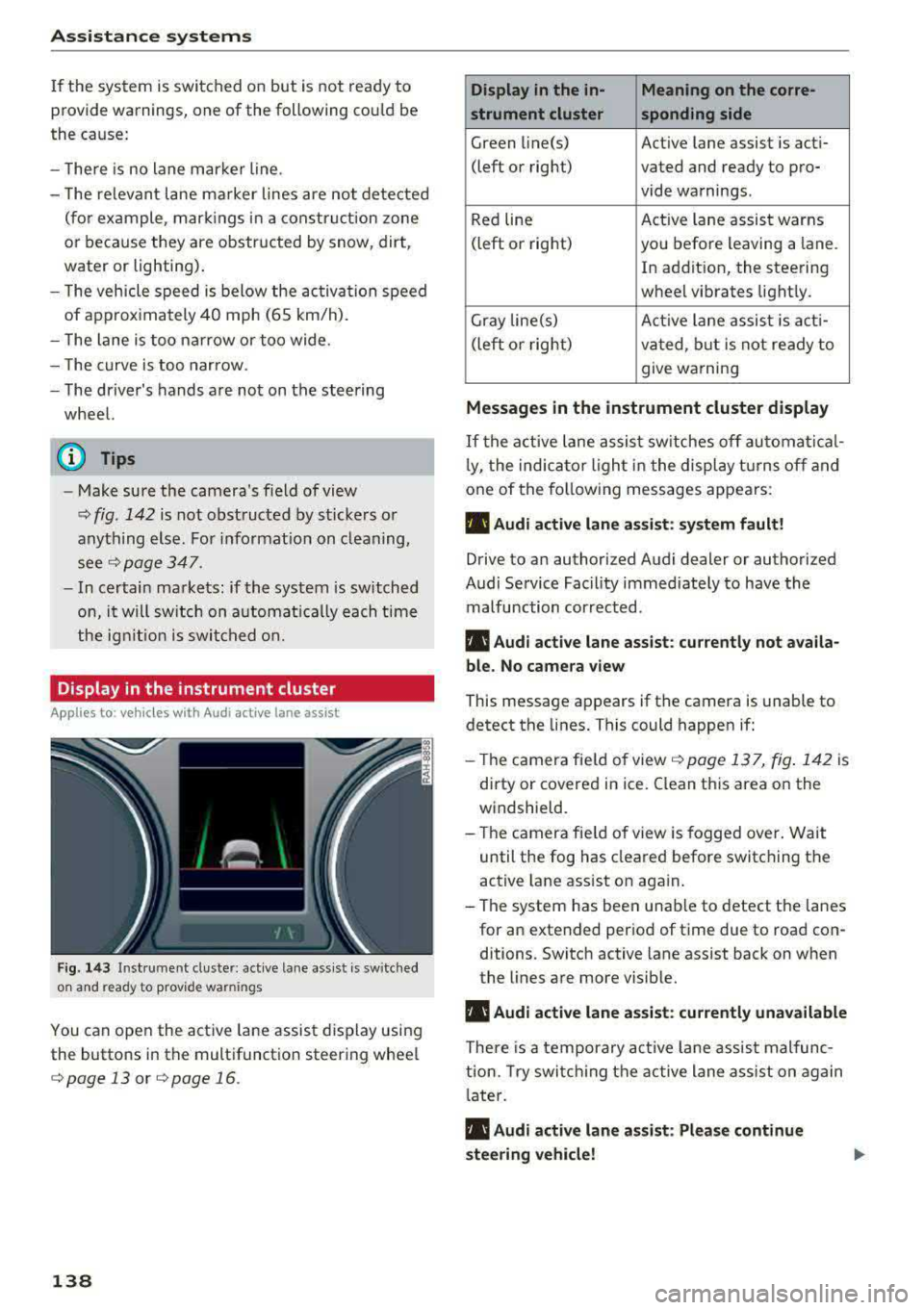
Fig . 14 3 Instrum ent cluste r: act ive lane as sis t is sw itc hed
on and read y to p rov id e wa rnin gs
You can open the act ive lane assist display using
the buttons in the multifunct io n steering wheel
¢ page 13 or ¢ page 16 .
138
Display in the in- Meaning on the corre-
strument cluster sponding side
Green line(s) Act ive lane assist is act i-
(left or right) vated and ready to pro- vide warnings.
Red line Act
ive lane assist warns
(left or right) you befo re leaving a lane.
In addition, the steering
wheel vibrates light ly.
Gray line(s) Active lane assis t is act i-
(left o r right) va ted , b ut is not ready to
give warning
Messag es in the instrument cluster display
If the active lane assist sw itches off au tomati cal
l y, the indica to r li ght in the display t urns off and
one of the fo llow ing messages appears :
• Audi active lane assist: sy stem fault!
Drive to an authori zed Audi dealer or authori zed
Audi Service Facil ity immediate ly to have the
malfunction corrected.
• Audi active lane a ssist : cu rrently not a vaila
bl e. No came ra view
This message appears if the camera is unable to
detect the lines. This could happen if:
- Th e camera fie ld of view
¢ page 137, fig . 142 is
dirty or covered in ice . Clean this area on the
windsh ield.
- The camera fie ld of view is fogged over. Wait
until the fog has cleared before switching the
active lane assist on again.
- The system has been unable to detect the lanes for an extended per iod of time due to road con
ditions . Switch active lane assist back on when
the lines are more visib le.
• Audi active lane a ssist: currently una vailable
There is a temporary act ive la ne assis t malfunc
tion. Try swi tch ing the active lane a ss ist on again
l ate r .
• Audi active lane a ssist : Please continue
steering vehicle!
Page 160 of 400
Multi Media Interface
Multi Media Interface
Traffic safety information
Aud i recommends performing certa in Infotain
ment system functions, such as entering a desti
nation, only when the vehicle is stationary . Al
ways be p repared to stop opera ting the Info tain
ment system i n the interest of your safety and
t he safe ty of other road users.
_& WARNING
Only use the In fotain ment sys tem w hen tra f
fic con ditions permit and always in a way that
allows you to ma inta in complete control ove r
your vehicle.
@ Tips
Cer tain functi ons are no t avail ab le wh ile driv
ing .
Introduction
The Multi Media Interface , or MMI for short,
combines various
systems for communication ,
navigation* and entertainment in your Audi . You
can operate the MMI using the MMI control pan
el, the multifunction steering wheel or the voice
recognition system* .
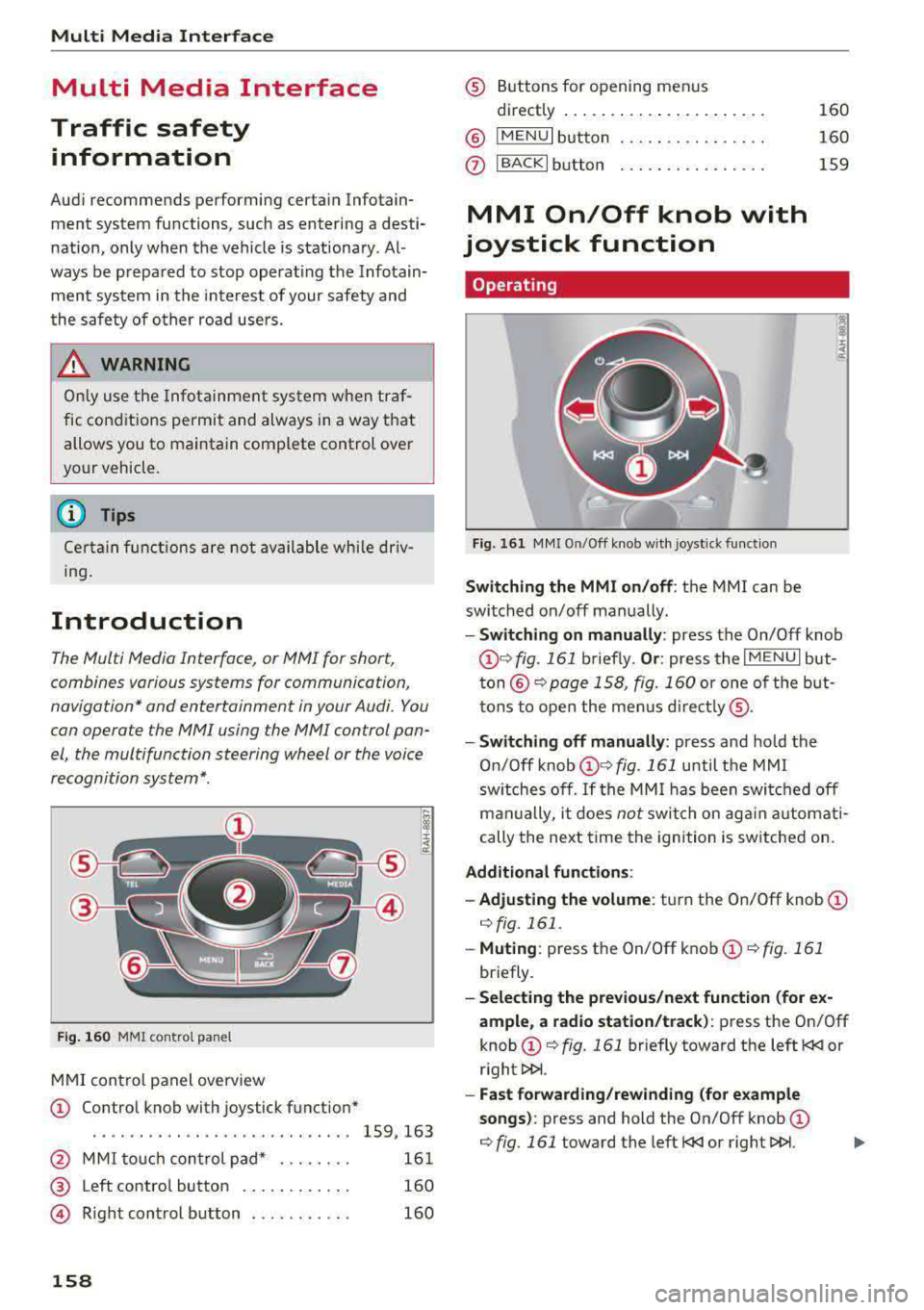
Fig. 16 0 MMI co ntro l panel
M MI cont rol panel overview
CD Contro l knob with joystick function"
. . . . . . . . . . . . . . . . . . . . . . . . . . . . 159, 163
@ MMI to uch con trol pad * . . . . . . . . 161
@ Left contro l button . . . . . . . . . . . . 160
@ R ight cont rol b utton . . . . . . . . . . . 160
158
® Buttons fo r opening men us
directly .... . .. .. .. .... .. .... .
@ IMENU I button
(J) I BACK I button . .. .. .... .. ... . .
MMI On/Off knob with
joystick function
Operating
Fig . 161 MM I On/Off k nob w ith joys tick f unctio n
Switching the MMI on /off : the MMI can be
swi tched on/off man ually. 160
160
159
- Switching on manually : press the On/Off knob
CD ¢ fig. 161 briefly. Or : press the I M ENU I but
ton @ ¢ page 1 58, fig. 160 or one of t he bu t
t ons to ope n the me nus d irectl y® ·
-Switch ing off manually : press and hold the
O n/Off knob
CD ¢ fig. 161 until t he M MI
sw itches off .
If the MM I has been swi tch ed off
m an ually, i t does
not swi tch on ag ai n au tomati
cally the ne xt time the ignition is sw itched on.
Additional function s:
- Adjusting the volume :
turn the On/Off knob CD
¢fig. 161 .
-Muting : press the On/Off knob CD¢ fig. 1 61
briefly.
- Selecting the previous/ne xt function (for ex
ample , a r adio station/t rack) :
press the On/Off
knob
CD ¢ fig. 161 briefly toward the left l
l>!>i .
-Fast forwarding /rewinding (fo r example
songs) :
press and hold the On/Off knob CD
¢ fig. 161 toward the left l
Page 162 of 400
Multi Media Interface
Open ing th e main menu
.. Press the IM ENU I bu tton @ ¢page 158,
fig . 160.
The MMI menus (such as Radio ) are
displayed ¢ fig. 163. Then you can select and
confirm a function using the control knob .
Opening a menu directly
.. Press the applicable b utton to directly open the
men us ® ¢ page 158, fig. 160 in the direction
of the desired menu (such as
I RADIO I ) . Then
you can select and confirm a f unction using the
contro l knob.
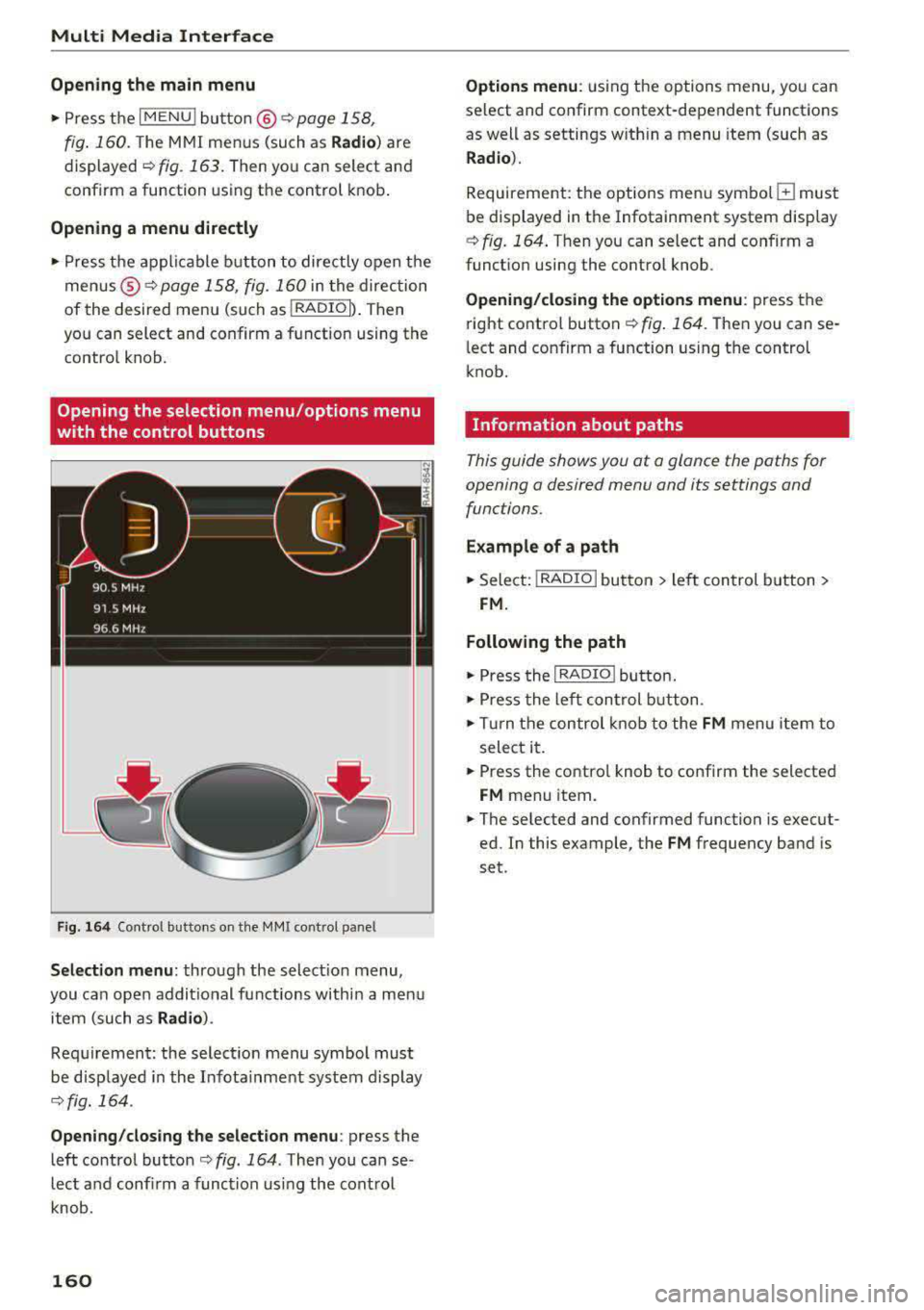
Opening the selection menu /options menu
with the control buttons
F ig . 164 Cont rol butto ns on the MM! control pane l
Selection menu: through the selectio n menu,
you can open addit ional functions within a men u
item (such as
Radio ).
Req uirement: the select ion menu symbol mus t
be disp layed in the Infota inment system display
¢ fig. 164 .
Opening /clos ing th e select ion menu : press the
left contro l button
¢ fig . 164 . Then you can se
lect a nd confi rm a funct ion usi ng the cont rol
knob.
160
Opti ons menu : using the options menu, you can
select and confirm context-dependent functions
as well as settings w ith in a menu item (such as
R ad io ).
Requirement: the options menu symbo l G must
be displayed in the Infotainment system display
¢ fig. 164 . Then you can select and confirm a
funct ion using the control knob.
Opening /clo sing the options menu : press the
right control button
¢ fig . 164. Then you can se
l ect and confirm a function using the control
knob.
Information about paths
This guide shows you at a glance the paths for
opening a desired menu and its settings and
functions .
Example of a path
.. Select: I RADIO I button > le ft control b utton >
FM.
Following the path
.. Press the I RADIO ! button .
.. Press the lef t con trol b utton .
.. Tur n the control knob to the FM menu item to
select it .
.. Press the contro l knob to confirm the selected
FM menu item .
.. The se lected and confirmed function is execut
ed. In this example, the
FM frequency band is
set .
Page 163 of 400
a, a, ..... N
" N ..... 0 N > 00
MMI touch
MMI touch control pad
Appl ies to: ve hicles with MM I touch
You can enter data using handwriting recogni
tion on the MMI touch control pad.
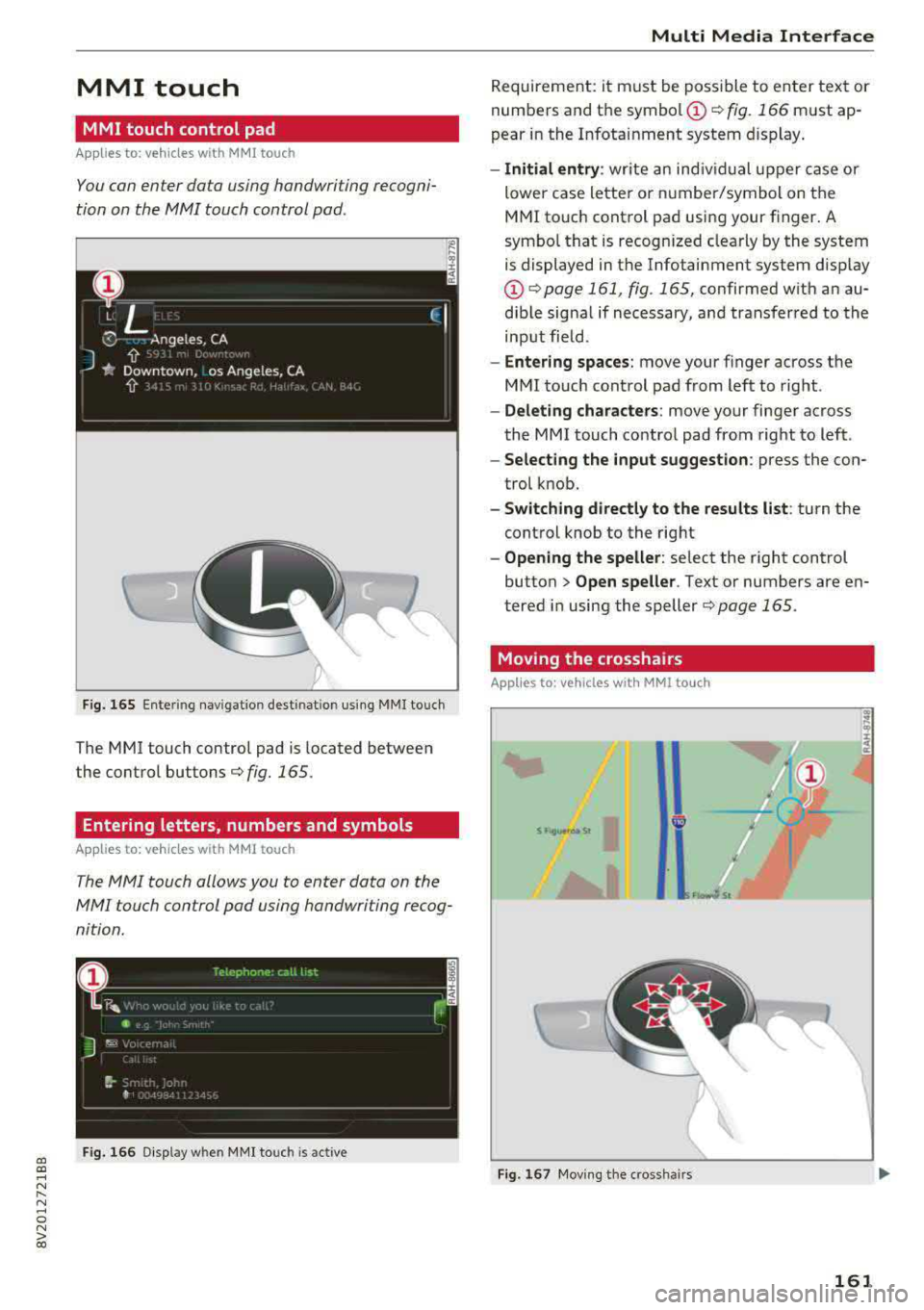
F ig. 165 Ente ring nav igat io n dest inatio n us ing MMI touc h
The MMI touch control pad is located between
the control
buttons¢ fig. 165 .
Entering letters, numbers and symbols
Appl ies to: ve hicles with MMI touch
The MMI touch allows you to enter data on the
MMI touch control pad using handwriting recog
nition.
F ig . 166 Disp lay w hen MM I touch is act ive
Multi Media Interface
R eq uireme nt: i t must be poss ible to en ter tex t or
numbers and t he
symbo l(!) ¢ fig. 166 must ap
pear i n the Infota inment system display .
-Initial entry : write an ind iv id ua l u pper case or
lower case lette r or numbe r/symbol on the
M MI touch cont rol pad usi ng your finger . A
symbo l th at is recogn ized clea rly by the system
is displayed in the Infotainment system disp lay
@ ¢page 161 , fig . 165, confirmed w ith an au
dib le sig na l if necessary, an d transfer red to the
inp ut fiel d.
- Enter ing spaces : move your f inger across t he
M MI touc h cont rol pad from left to right .
-Delet ing characters : move your finge r ac ross
the MMI touch co ntro l pad from right to left .
-Selecting the input suggestion : press the con
trol k nob.
- Switching directly to the results list : turn the
control knob to the rig ht
- Opening the speller : select the right control
button>
Open speller . Text or numbers are en
tered in using the speller
¢page 165.
Moving the crosshairs
App lies to: vehicles wit h MM! to uch
S f 19..,.,0,1 St
Fig . 167 Mov ing the cross hair s
161
Page 248 of 400
System settings
Adjusting the system volume
~ Select : I MENU I bu tton > Sound > left co ntro l
b utt on.
Telephone
App lies to: veh icles w ith telephone
Mute telephone: messages and ringtones are set
to mut e.
Ringtone : see c:;, page 187, Ringtone and volume
settings .
Ringtone volume :
you can adjust t he volume of
the selecte d ringtone by turning the contro l
knob.
Message volume: yo u can ad just the volume of
the not ificat io n for a n incom ing text message by
tur ning the c ontrol knob.
Microphone input level : you ca n adju st the ca ll
volume du ring a phone ca ll by tu rnin g the contro l
knob.
Navigation
Applies to: veh icles with navigation system
Voice guidance: s ee c:;, page 2 09.
Voice guidance during phone call: see
c:>page209 .
Voice guidance volume : you can adjust the vo ice
gu idance volume by tur ning t he control knob .
Or:
you can adjust the vo ice gu idance volume d uring
ac tive rou te g uidance by turning the On/Off
knob .
Enterta inment fader : the volume of aud io play
back can be temporarily lowe red w hen the pa rk
i n g sys tem or vo ice g uidance is ac tive .
Voice recognition system
Applies to: veh icles w ith vo ice recognition system
Command display : see c:;, page 241.
Short dialog : see c:;, page 241.
Volume : seec:> page 241 .
Speech training : see c:;, page 241.
1> Not available in all ve hicles .
246
Parking aid*
Yo u ca n adju st the vol ume of the sig nal t one by
t u rning the co ntro l knob.
- Adjusting th e Front volume : select and con
fir m
High , Medium or Low .
- Adjusting
the Rear volume : select and co nfir m
High , Medium o r Low .
MMI touch*
You can adjust the vol ume of the prompts fo r th e
M MI touch* by turnin g the cont rol knob.
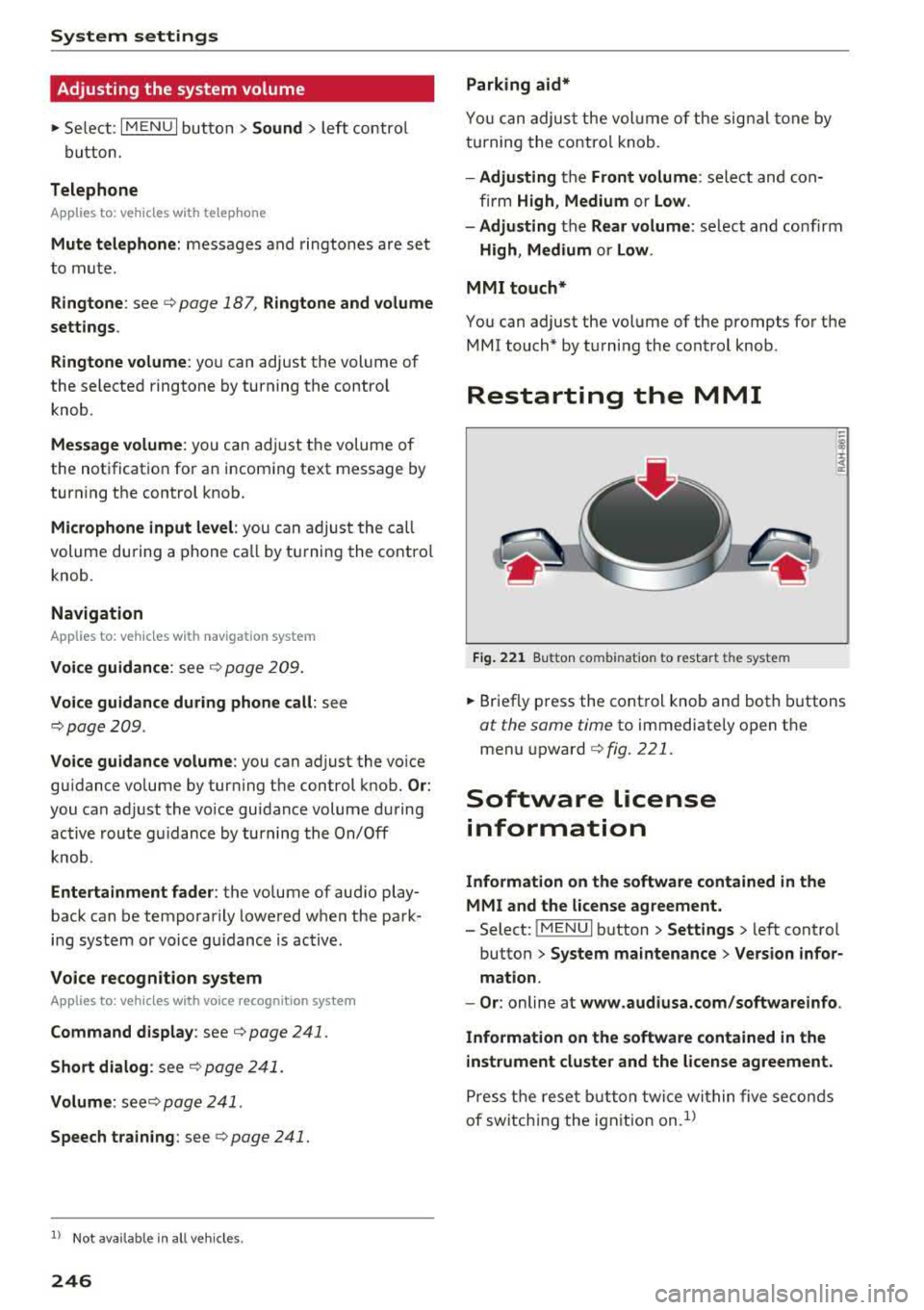
Restarting the MMI
Fig. 221 Butto n comb inat ion to restar t th e sys te m
~ Br ief ly p ress the cont rol knob and both buttons
at the same time to immediate ly o pen t he
menu upward
c:> fig. 221.
Software license
information
Information on the software contained in the
MMI and the license agreement.
- Select: ! ME NUI button> Settings > left cont rol
button >
System maintenance > Version infor
mation.
- Or :
online at www.audiusa.com/softwareinfo .
Information on the software contained in the
instrument cluster and the license agreement.
P ress t he rese t bu tt o n t wice wi thin five se conds
of sw itch ing the ign ition on .
1>
Page 385 of 400
CXl CXl .... N ,.__
N .... 0 N > 00
Audi smartphone interface . . . . . . . . . 239, 243
Audi virtual cockpit
refer to Instrument cluster . . . . . . . . . . . . . 10
AUTO Automatic climate control system . . . . . . . 71
Automatic headlights . . . . . . . . . . . . . . . . . 51
Auto Lock (central locking system) . . . . . . . . 34
Automatic belt retractor . . . . . . . . . . . . . . . 262
Automatic climate control system
refer to Climate control system
(automatic) . . . . . . . . . . . . . . . . . . . . . . 70, 71
Automatic power top
refer to Power top . . . . . . . . . . . . . . . . . . . . 44
Automatic transm iss ion . . . . . . . . . . . . . . . . . 85
Driving tips . . . . . . . . . . . . . . . . . . . . . . . . . . 88
Emergency mode . . . . . . . . . . . . . . . . . . . . . 91
Hill descent control . . . . . . . . . . . . . . . . . . . 89
Kick-down . . . . . . . . . . . . . . . . . . . . . . . . . . . 90
Launch control program . . . . . . . . . . . . . . . 90
Malfunction . . . . . . . . . . . . . . . . . . . . . . . . . 86
Manual shifting (tiptronic mode) . . . . . . . . 90
Selector lever . . . . . . . . . . . . . . . . . . . . . . . . 88
Selector lever emergency release . . . . . . . . 92
Selector lever lock . . . . . . . . . . . . . . . . . . . . 86
Selector lever posit ions . . . . . . . . . . . . . . . . 86
Shift padd les . . . . . . . . . . . . . . . . . . . . . . . . 90
Automatic wipe/wash system . . . . . . . . . . . . 57
Auto Safety Hotline . . . . . . . . . . . . . . . . . . . 255
Auxiliary climate control . . . . . . . . . . . . . . . 118
AUX input . . . . . . . . . . . . . . . . . . . . . . . . . . . 229
Average consumption ............ .... 17, 18
Average speed . . . . . . . . . . . . . . . . . . . . . 17, 18
B
BACK button . . . . . . . . . . . . . . . . . . . . . . . . . 158
Bag hooks . . . . . . . . . . . . . . . . . . . . . . . . . 65, 67
Balance (sound) . . . . . . . . . . . . . . . . . . . . . . 245
Bass (sound) . . . . . . . . . . . . . . . . . . . . . . . . . 245
Battery In the key . . . . . . . . . . . . . . . . . . . . . . . . . . . 35
Jump starting . . . . . . . . . . . . . . . . . . . . . . . 368
also refer to High-voltage battery . . . . . . . 94
also refer to Vehicle battery . . . . . . . . . . . 325
Before driving . . . . . . . . . . . . . . . . . . . . . . . . 247
Belt tensioners . . . . . . . . . . . . . . . . . . . . . . . 265
Blended gasoline . . . . . . . . . . . . . . . . . . . . . 312
Index
Blower
Automatic climate control system . . . . . . . 72
Bluetooth Audio player . . . . . . . . . . . . . . . . . . . . . . . . 225
Connecting a ce ll phone . . . . . . . . . . . . . . 177
Settings . . . . . . . . . . . . . . . . . . . . . . . . . . . 244
Boost . . . . . . . . . . . . . . . . . . . . . . . . . . . . . . . . 11
Booster seats . . . . . . . . . . . . . . . . . . . . . . . . 302
Boost pressure ind icator . . . . . . . . . . . . . . . . 11
Brakes . . . . . . . . . . . . . . . . . . . . . . . . . . . . . . 153
Brake fluid . . . . . . . . . . . . . . . . . . . . . . . . . 325
Electromechanical parking brake . . . . . . . . 83
New brake pads . . . . . . . . . . . . . . . . . . . . . 153
Braking Brake assist . . . . . . . . . . . . . . . . . . . . . . . . 151
Emergency braking function . . . . . . . . . . . . 84
Breaking in New brake pads . . . . . . . . . . . . . . . . . . . . . 153
New engine . . . . . . . . . . . . . . . . . . . . . . . . . 74
New tires . . . . . . . . . . . . . . . . . . . . . . . . . . 335
Browser
refer to Media center . . . . . . . . . . . . . . . . . 231
Bulbs . . . . . . . . . . . . . . . . . . . . . . . . . . . . . . . 366
Buttons Control panel (MMI) . . . . . . . . . . . . . . . . . 158
Multifunct ion steer ing wheel . . . . . . . . 13, 16
Programming (multifunction steering
wheel) . . . . . . . . . . . . . . . . . . . . . . . . . . . . . . 15
C
Cable (USB adapter/AUX connector cable) 228
California Proposition 65 Warning ... .. .. 317
Battery specifi c . . . . . . . . . . . . . . . . . . . . . 326
Call list . . . . . . . . . . . . . . . . . . . . . . . . . . . . . 180
Call options . . . . . . . . . . . . . . . . . . . . . . . . . . 187
Capacities Fuel tank. . . . . . . . . . . . . . . . . . . . . . . . . . . 375
Washer fluid reservoir . . . . . . . . . . . . . . . . 375
Care . . . . . . . . . . . . . . . . . . . . . . . . . . . . . . . . 347
also refer to Cleaning . . . . . . . . . . . . . . . . 347
Car Finder Audi connect e -tron services . . . . . . . . . . . 199
Cargo area . . . . . . . . . . . . . . . . . . . . . . . . . . . 253
Caring for and cleaning leather . . . . . . . . . . 350
Catalytic converter . . . . . . . . . . . . . . . . . . . . 316
CD drive (media drives) . . . . . . . . . . . . . . . . 224
383
Page 386 of 400
Index
Cell phone
refer to Telephone . . . . . . . . . . . . . . . . . . . 177
Ce ntral lock ing . . . . . . . . . . . . . . . . . . . . . . . . 3 4
Certification . . . . . . . . . . . . . . . . . . . . . . . . . 381
C hanging eng ine o il . . . . . . . . . . . . . . . . . . . 322
Changing the scale . . . . . . . . . . . . . . . . . . . . . 1 3
Charge level
Inst rument cluste r . . . . . . . . . . . . . . . . . . . .
97
C harg in g clip. .. .... ........... .... ... 110
C harg ing the battery (mob ile dev ices) . . . . 229
Cha rgi ng (p lug-i n hybrid drive) . . . . . . . . . . 106
Ch ild rest raints
D anger o f using ch ild rest raints in the front
seat . . . . . . . . . . . . . . . . . . . . . . . . . . . . . . .
268
Where can I get additional information
about child rest raints and their use? . . . .
3 11
Ch ild rest raint system a nchors . . . . . . . . . . 306
Ch ild safety . . . . . . . . . . . . . . . . . . . . . . . . . . 292
Important safety instructions for using child
safety sea ts . . . . . . . . . . . . . . . . . . . . . . . .
296
Tether anchors . . . . . . . . . . . . . . . . . . . . . . 309
Tether st raps . . . . . . . . . . . . . . . . . . . . . . . 309
Ch ild safety lock . . . . . . . . . . . . . . . . . . . . . . . 41
C hil d safety sea ts . . . . . . . . . . . . . . . . . . . . . 29 8
Booster seats . . . . . . . . . . . . . . . . . . . . . . . 302
Conve rtible chi ld safety seats . . . . . . . . . . 300
Conve rtible locking retractor . . . . . . . . . . 305
H ow do I p roperly install a child safety seat
. h' l 7 296 in myve 1c e . ..... ........ ......... .
Infant sea ts . . . . . . . . . . . . . . . . . . . . . . . .
298
Insta lling a child restrain t using the LA TC H
system . . . . . . . . . . . . . . . . . . . . . . . . . . . .
308
LA TCH system . . . . . . . . . . . . . . . . . . . . . . 308
Lower ancho rages . . . . . . . . . . . . . . . . . . . 30 7
M ounting and releasing the anchorage
hook . ... .... .. ... .. ..... ... .. .. ...
308
Safety instructions . . . . . . . . . . . . . . . . . . . 296
Secur ing . . . . . . . . . . . . . . . . . . . . . . . . . . . 303
Unused safety belts on the rear seat . . . . 298
Classic v iew . . . . . . . . . . . . . . . . . . . . . . . . . . . 1 5
C lea ning . . . . . . . . . . . . . . . . . . . . . . . . . . . . 34 7
Clean ing/remov ing ice from windows . . . . . 349
Clea ning Alc ant ara . . . . . . . . . . . . . . . . . . . . 3 50
Clea ning artificial leather..... ... ... ... . 350
Cleaning ca rbon parts . . . . . . . . . . . . . 349, 350
Clea ning contro ls . . . . . . . . . . . . . . . . . . . . . 350
Clean ing deco rative parts/trim . . . . . . . . . . 349
384
Cleaning exhaust tail pipes . . . . . . . . . . . . . 349
Cleaning plas tic pa rts . . . . . . . . . . . . . . . . . . 349
Cleaning textiles . . . . . . . . . . . . . . . . . . . . . . 350
C leaning the charg ing clip . . . . . . . . . . . . . . 119
Cleaning the charg ing dock . . . . . . . . . . . . . 119
Cleaning the tail lights . . . . . . . . . . . . . . . . . 348
Cleaning the windshield . . . . . . . . . . . . . . . . . 5 7
Climate control system (automat ic) . . . . . . . 70
Adjusting t he air vents. . . . . . . . . . . . . . . . . 73
A UTO (climate control system) . . . . . . . . . . 71
Description . . . . . . . . . . . . . . . . . . . . . . . . . . 70
D rive select . . . . . . . . . . . . . . . . . . . . . . . . . 143
Key re cognit io n . . . . . . . . . . . . . . . . . . . . . . 70
Operat io n . . . . . . . . . . . . . . . . . . . . . . . . . . . 71
Presetting . . . . . . . . . . . . . . . . . . . . . . . . . . . 70
Sync hroniz ing . . . . . . . . . . . . . . . . . . . . . . . . 7 1
Clock . . . . . . . . . . . . . . . . . . . . . . . . . . . . . . . 241
Closing
Panorama glass roof . . . . . . . . . . . . . . . . . .
43
Power top . . . . . . . . . . . . . . . . . . . . . . . . . . . 44
Windows ....... ..... ........... .... 41
also refer to U nlocking/locking . . . . . . . 36 , 37
Closing/ open ing
refer to Unlock ing/ locking . . . . . . . . . . 36, 37
Cockpit (overview) . . . . . . . . . . . . . . . . . . . . . . 8
Coming home/Leaving home
refer to E ntry/ex it lighting . . . . . . . . . . . . . 53
Command (voice recognition system) . . . . . 170
Compartments . . . . . . . . . . . . . . . . . . . . . . . . 65
Compass in t he m irro r . . . . . . . . . . . . . . . . . . 59
Compliance . . . . . . . . . . . . . . . . . . . . . . . . . . 381
Connec tion manage r 242
Connect ions
refer to Media . . . . . . . . . . . . . . . . . . 222, 230
Cons umer info rmation . . . . . . . . . . . . . . . . . 378
Cons umer Information . . . . . . . . . . . . . . . . . 2 55
Consumption (fuel) . . . . . . . . . . . . . . . . . 17, 18
Contacting NHTSA . . . . . . . . . . . . . . . . . . . . 255
Contacts . . . . . . . . . . . . . . . . . . . . . . . . . . . . 185
Additional d irecto ry . . . . . . . . . . . . . . . . . . 243
Impo rting/export ing . . . . . . . . . . . . . . . . . 18 7
Memo ry c apac ity . . . . . . . . . . . . . . . . . . . . 188
Storing as destination . . . . . . . . . . . . . . . . 20 7
Cont rol buttons (opera ting the MMI) . . . . . 160
Control knob with joystick funct ion (MMI op
eration) . . . . . . . . . . . . . . . . . . . . . . . . . . . . .
163