door lock AUDI S3 SEDAN 2017 User Guide
[x] Cancel search | Manufacturer: AUDI, Model Year: 2017, Model line: S3 SEDAN, Model: AUDI S3 SEDAN 2017Pages: 400, PDF Size: 67.32 MB
Page 57 of 400
a, a, ..... N
" N ..... 0 N > 00
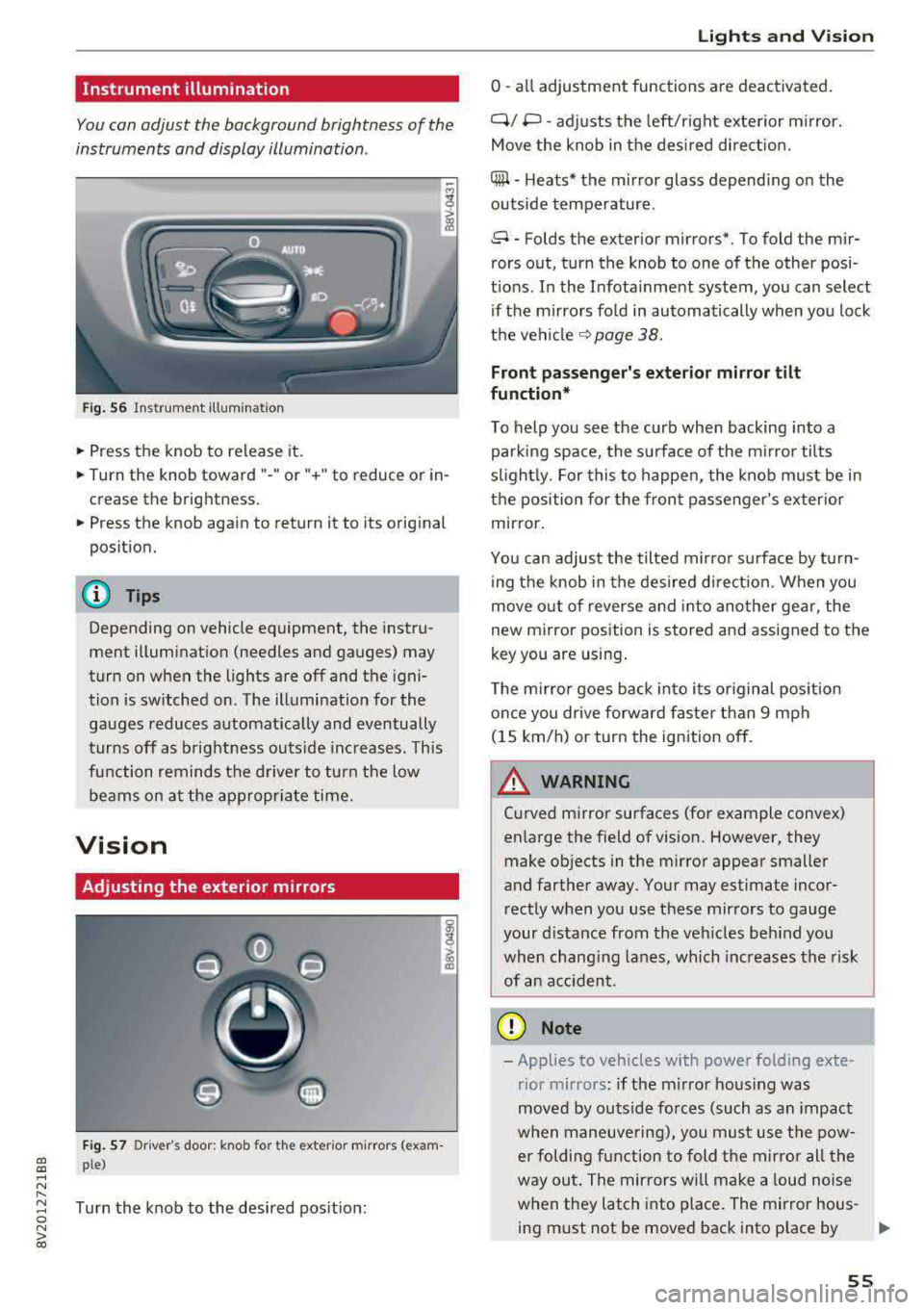
Instrument illumination
You can adjust the background brightness of the
instruments and display illumination .
Fig. 56 Instrumerit illumination
• Press the knob to release it.
• Turn the knob toward"-" or"+" to reduce or in
crease the brightness.
• Press the knob again to return it to its original
position.
(D Tips
Depending on vehicle equipment, the instru
ment illuminat ion (needles and gauges) may
turn on when the lights are off and the igni
tion is sw itched on. The illumination for the
gauges reduces automat ically and eventually
turns off as brightness outs ide inc reases. This
function remind s the d river to turn the low
beams on at the appropr iate time.
Vision
Adjusting the exterior mirrors
F ig . 57 Dr iver's door: knob for t he exter ior m irrors (exam
ple)
Turn the knob to the desired pos it ion:
Lights and V ision
0 -all adjustment functions are deactivated.
Q/ P -adj usts the left/right exte rior m irror.
Move the knob in the des ired direct ion.
C@ -H eats* the mir ror glass depend ing on the
outside temperature .
8 -Folds the exterior mirrors*. To fold the mir
rors out, turn the knob to one of the other posi
t ions. In the Infota inment system, you can select
if the mirrors fo ld in automatically when you lock
the
vehi cle ~ page 38.
Front passenge r's e xterior mirror tilt
function*
To help you see the curb when backing into a parking space, the surface of the m irro r tilts
s li ghtly. For this to happen, the knob must be in
the position for the front passenger's exterio r
mirror.
You can adjus t the tilted mirro r sur face by turn
ing the knob in the desired d irect ion. When you
move out o f reverse and into another gear, the
new mirror position is stored and assigned to the
key you are using .
T he m irror goes back into its or iginal pos ition
once you drive forwa rd faster than 9 mph
(15 km/h) or turn the ignition off.
A WARNING ~
Cu rved mirror surfaces (for example convex)
enlarge the field of vision. However, they make objects in the mirror appear smaller
and farther away. Your may est imate incor
rect ly when you use these mirrors to gauge
your distance from the veh icles beh ind you
when chang ing lanes, which increases the risk
of an accident .
(D Note
-Applies to vehicles with power folding exte
rior mirrors : if the m irro r hous ing was
moved by outs ide forces (such as an impact
w hen maneuve ring), you must use the pow-
er folding function to fold the mirro r all the
way out. The mirrors will make a loud noise
when they latch into place. The mirror hous-
ing must not be moved back into p lace by
II>-
55
Page 67 of 400
a, a, ..... N
" N ..... 0 N > 00
Storing
Cup holders
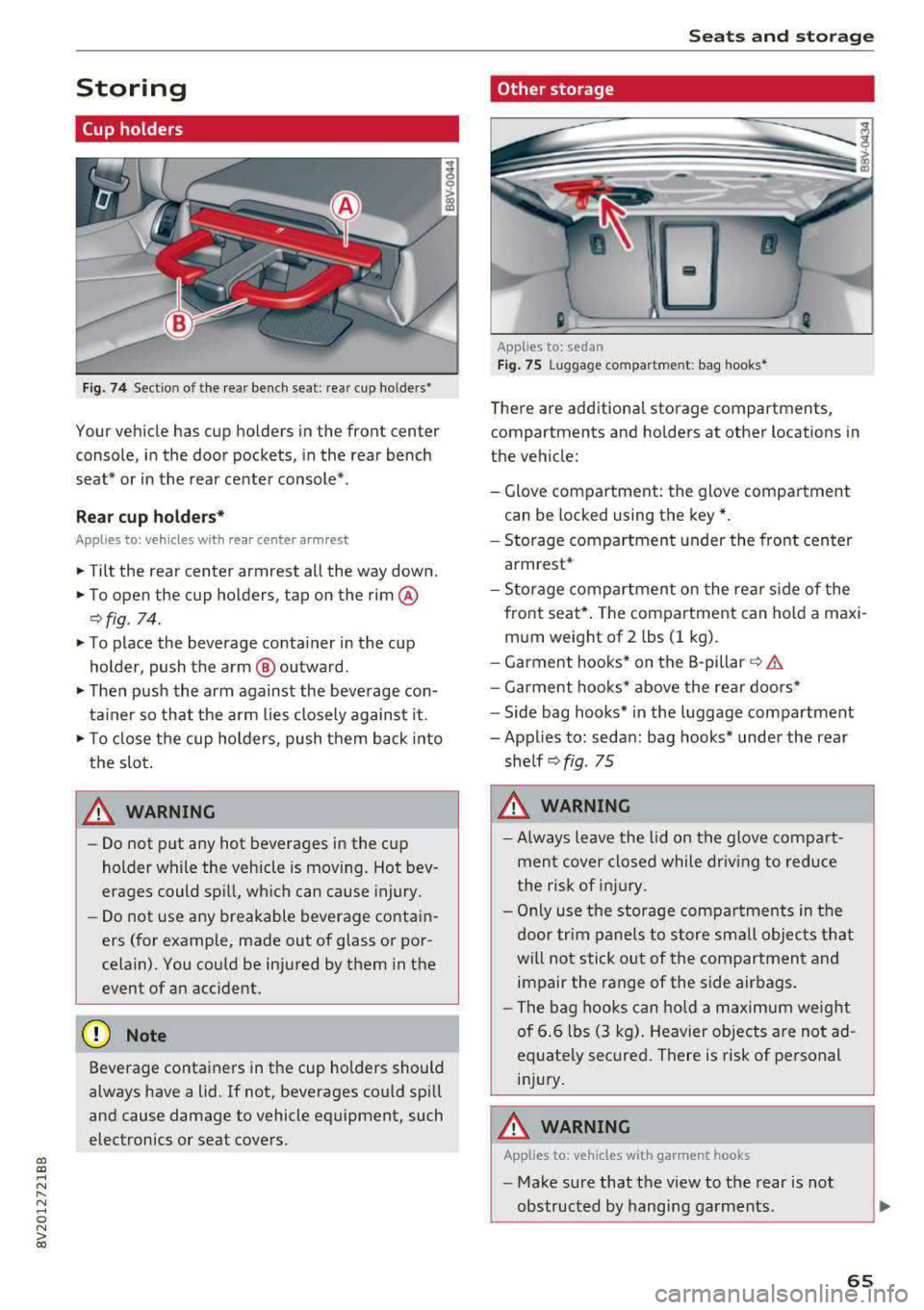
Fig. 74 Sectio n of the rear bench seat : rea r cup ho lders•
Your vehicle has cup holders in the front center
console, in the door pockets, in the rear bench
seat* or in the rear center console*.
Re ar cup ho lders*
Applies to: ve hicles with rear center arm rest
.,. Tilt the rear center armrest all the way down.
.,. To open the cup holders, tap on the rim @
r:=>fig . 74.
.,. To place the beverage co nta iner in the cup
holder , push the arm @ outward .
.,. Then push the arm against the beve rage con
ta iner so that the a rm lies closely against it .
.,. To close the cup holders, push t hem back into
the slot .
A WARNING -
-Do not put any hot beverages in the cup
holder while the vehicle is moving. Hot bev
erages could spill, wh ic h can cause injury.
- Do not use any breakable beverage contai n
ers (for example, made out of glass or por
celain). You co uld be injured by them in the
event of a n accident .
(D Note
Beverage containers in the cup holders should
always have a lid. If not, beverages cou ld sp ill
and cause damage to vehicle equipment, such
electronics or seat covers .
Seats and storage
Other storage
Applies to: sedan
Fig. 75 Lu gga ge compar tm en t: bag hooks *
There are add itiona l storage compartments,
compartments and holders at other locations in
the vehicle:
- Glove compartment: the glove compa rtme nt
can be locked using the key* .
- Storage compartment under the front cen ter
armrest*
- Storage compartment o n the re ar side of the
front seat*. The com partment can hold a maxi
m um weight of 2 lbs (1 kg) .
- Garment hooks* on the B -pillar
r=> &.
- Garment hoo ks* above the rea r doo rs *
- Side bag hooks* in the luggage compartment
- Applies to: sedan : bag hooks* under the rear
she lf
r=> fig . 75
A WARNING
-Always leave the lid on the glove compa rt
men t cover closed while driv ing to red uce
t he risk of injury .
- Onl y use t he storage compa rtme nts in the
door trim panel s to sto re sm all obje cts th at
will not sti ck ou t of the compartmen t and
impair the range of the side air bags .
- Th e bag hoo ks c an ho ld a m aximum weight
of 6.6 lbs (3 kg) . Heavier objects are no t ad
equate ly secured . There is risk of pe rsonal
inj ury.
A WARNING
-App lies to: ve hicles with garment hooks
- Make sure that the view to the rear is not
obs tructed by hangi ng garments .
-
65
Page 81 of 400
If the 'Tj indicator light blinks and the message
Please turn steering wheel appears when switch
ing the ign ition on, the steer ing lock is locking
the steering wheel. In this case, turn the steering
wheel slight ly to the left/right.
Start /Stop system*
See the information in¢ page Bl, Start/Stop
system .
A WARNING
To reduce the risk of poisoning, never allow
the engine to run in confined spaces.
@ Note
Avoid high engine speed, full throttle, and
heavy engine load if the engine has not
reached operating temperature yet. You could
damage the engine.
@ For the sake of the environment
Do not let the engine run while parked to
warm up. Begin driving immediately. This
re
duces unnecessary emissions.
(D Tips
-Some noise after starting the engine is nor
mal and is no cause for concern.
- If you leave your vehicle with the ignition
switched on, the ignition will switch off
af
ter a certa in amount of t ime. Make sure that
electr ica l equ ipment such as the exter ior
lights are switched off.
Stopping the engine
Applies to: veh icles with conve nience key
-
Plug-in hybrid dr ive*: refer to the informat ion un
der ¢ page 96.
.. Bring the vehicle to a full stop.
.. Move the selector lever into the P pos ition.
.. Press the I STAR T ENGINE ST OPI button
¢ page 78, fig. 90 .
CXl CXl .... N r--N .... 0 N > l) This func tion is not avai lable in all countries. 00
D riving
Steering
lock1 )
T he steering locks when yo u turn the engine off
using the
I STA RT ENG INE S TOPI* button, move
the selector lever into the P position and open
the driver's door. The locked steering hel ps pre
vent vehicle theft.
Emergency off function
If it is absolutely necessary, the eng ine can also
be turned off whi le driving at speeds starting at
4 mph (7 km/h). To switch the engine off, press
the
I START ENGINE STOPI button twice in a row
briefly or press and ho ld for longer than two sec
onds.
A WARNING
-- Never turn off the engine before the vehicle
has come to a complete stop. The full func
tion of the brake booster and the power
steer ing is not guaranteed. You must use
mo re force to turn or brake. Because you
cannot steer and brake as you usually
wou ld, this could lead to accidents and seri
ous injuries.
-Always take the key with you whenever yo u
leave your vehicle. Otherwise, the engine
could be started or electrical equipment
such as the power windows could be operat
ed. This can lead to ser ious injury.
- For safety reasons, always park the vehicle
with the selector lever in the P pos ition.
Otherw ise, there is the risk that the vehicle
could roll unintentionally .
(D Note
If the engine has been under heavy load for
an extended period of time, heat builds up in
the engine compartment after the engine is
switched off and there is a r isk of damaging
the engine. For th is reason, let the engine run
for at id le for approximately two minutes
be-
fore shutting it off . ..,.
79
Page 82 of 400
Driving
(D Tips
For up to 10 minutes after stopping the en
gine, the rad iator fan may tu rn on again auto
matically or it may continue to run (even if
the is ignit ion sw itched off) due to the follow
ing reasons :
- The coolant temperat ure is increasing due
to trapped heat.
- If the engine is warm and the engine com partment also heats up from strong sun
li ght .
Messages
Engine runn ing. Warn ing! Turn off ignition be
fore leaving vehicle
This message appea rs and a warn ing tone sounds
if you open the driver's door when the engine is
running.
Pressing start/ stop button again will switch off
engine.
T his message appe ars when you press t he
I START ENGI NE STOP I* button wh ile driving
~ page 79, Emergency off function .
Engine start system: malfun ction! Please con
tact Servi ce
The engine automatic start system has a mal
f un ction. D rive to a n author ized A udi dealer or
author ized Audi Se rvice Fa cility imme diate ly to
h a ve t he m alfu nction co rrected. To st art the en
g ine, turn the key to
pos it ion @ ¢ page 77 or
p ress and ho ld the
I S TAR T ENGINE ST OP I button
until the engine is runn ing .
II Key not recognized. See owner's manual
This message appea rs if the re is no co nvenience
key inside the vehicle or if the system does no t
re cog nize the key. The conve nien ce key may not
be recogn ized, for ex ample, if it is cove red by a n
objec t that
disrupts the s ignal (s uch as a b rief
case), o r if the key batte ry is weak . Elect ronic de
vices s uch as cell phones can also interfere w it h
the s ignal.
T o sti ll be able to sta rt or s top the engi ne, refer
to
~ page 81 .
80
II Remote control key : hold back of key
against the designated area. See owner 's man
ual
I f the indic ator li ght turns on and this message
a ppears, there is a ma lfunction ¢
page 81.
Ill Key not in vehicle?
Ill Remote control key: key not recognized . Is
the key still in the vehicle?
The Ill indicator lig ht t urns on and th is message
appears if the convenience key was removed from
the ve hicle when the e ngine was ru nning . If the
convenience key is no longe r in the veh icle, yo u
cannot sw itch the igni tion on or sta rt the eng ine
o nc e you stop it. You also canno t lo ck t he vehicle
from the o utside.
Please press brake pedal
This message appears if yo u do not step on the
bra ke peda l to start the engine on a ve hicle w ith
an a utomat ic t ra nsmission .
Please select N or P
This mess age appears w hen s tart ing o r stopping
t h e engine i f th e se lec to r l ever is not in the
N or P
pos ition . The engine will not sta rt/sto p.
Turn off ignition before leaving vehicle . Battery
is dis charging
This message appears and a warning tone sounds
i f you open the d rive r's doo r w hen the ig nition is
swi tched on . Sw itch t he igni tion off s o that the
vehicle battery will no t dis charge.
Shift to P, otherwise vehicle can roll away .
Doors do not lock if lever is not in P
This message appears for safety reasons if t he
selector lever for the automatic transmission is not in the
P posi tion afte r th e ignition is switched
off. Move the sele ctor leve r to t he
P posit ion.
Otherwise t he veh icle i s not protec ted fro m roll
i ng and i t cannot be locke d.
Page 86 of 400
Driving
"'To start driving and release the parking brake
automatically, press the accelerator pedal as
usual.
In addition to releasing the parking brake auto
matically, other convenience and safety functions
are available when you start driving
¢ page 85,
Starting from a stop.
Preventing the automatic parking brake
release
The vehicle could begin rolling unintentionally,
dep ending on the hill or if towing a trailer.
"'To prevent the parking brake from releasing au
tomatically, pull and hold
the®> switch and
press the accelerator pedal. The parking brake
remains set and prevents the vehicle from roll
ing backward.
"'You can release the(®) switch again once you
are sure that you are giving enough driving
force to the wheels by pressing the accelerator pedal.
Emergency braking function
You can use the emergency braking function in an emergency situation, or if the standard brake op
eration malfunctions or is disabled .
"'Pull and hold the(®) switch.
"' As soon as you release the ®> switch or acceler-
ate, the braking stops .
Pulling and holding
the®> switch while driving
the vehicle activates the emergency braking func
tion . The vehicle is braked at all four wheels by
activating the hydraulic brake system. The brak ing effect is similar to heavy
braking ¢,&. .
To reduce the risk of activating the emergency
braking by mistake, a warning tone (bu zzer)
sounds when
the(®) switch is pulled. Emergency
braking stops as soon as
the(®) switch is released
or the accelerator pedal is pressed .
Parking
"' Press the brake pedal to stop the vehicle.
"'Pull the®> switch to set the parking brake.
"'Place the selector lever in the P position.
"'Turn the engine off ¢,&. .
84
"'Turn the steering wheel when parking on in
clines so that the wheels will roll into the curb
if the vehicle starts moving.
A WARNING
- Do not press the accelerator pedal inadver
tently if a gear is selected when the vehicle
is stationary and the engine is running . Oth
erwise, the vehicle will start to move imme
diately and this could result in an accident.
- Emergency braking should only be used in
an emergency, when the normal brake pedal has failed or the brake pedal is obstructed.
During emergency braking, your vehicle will
brake similar to heavy braking. ESC and the
associated components (ABS, ASR, EDL)
cannot overcome the laws of physics. In cor
ners and when road or weather conditions
are bad, a full brake application can cause
the vehicle to skid or the rear end to swerve,
which increases the risk of an accident.
- If the power supply fails, you cannot set the
parking brake if it is released . In this case,
park the vehicle on level ground and secure
it by placing the selector lever in the P posi
tion. See an authorized Audi dealer or au
thorized Audi Service Facility for assistance.
-Always take the vehicle key with you when
leaving your vehicle, even for a short period
of time . This applies particularly when chil
dren remain in the vehicle. Otherwise chil
dren could start the engine, release the
parking brake or operate electrical equip
ment such as power windows, which in
creases the risk of an accident.
- No one should remain in the vehicle when it
is locked - especially children. Locked doors
make it more difficult for emergency work
ers to get into the vehicle, which puts lives
at risk .
(D Tips
When stopping at a traffic signal or stopping
in city traffic, you can set the parking brake
manually . The vehicle does not have to be
held with the brake pedal. The parking brake
eliminates the tendency to creep when a se lector lever position is engaged . As soon as
Page 90 of 400
Driving
Driving tips
Applies to: ve hicles w ith a utomat ic tra nsm iss io ns
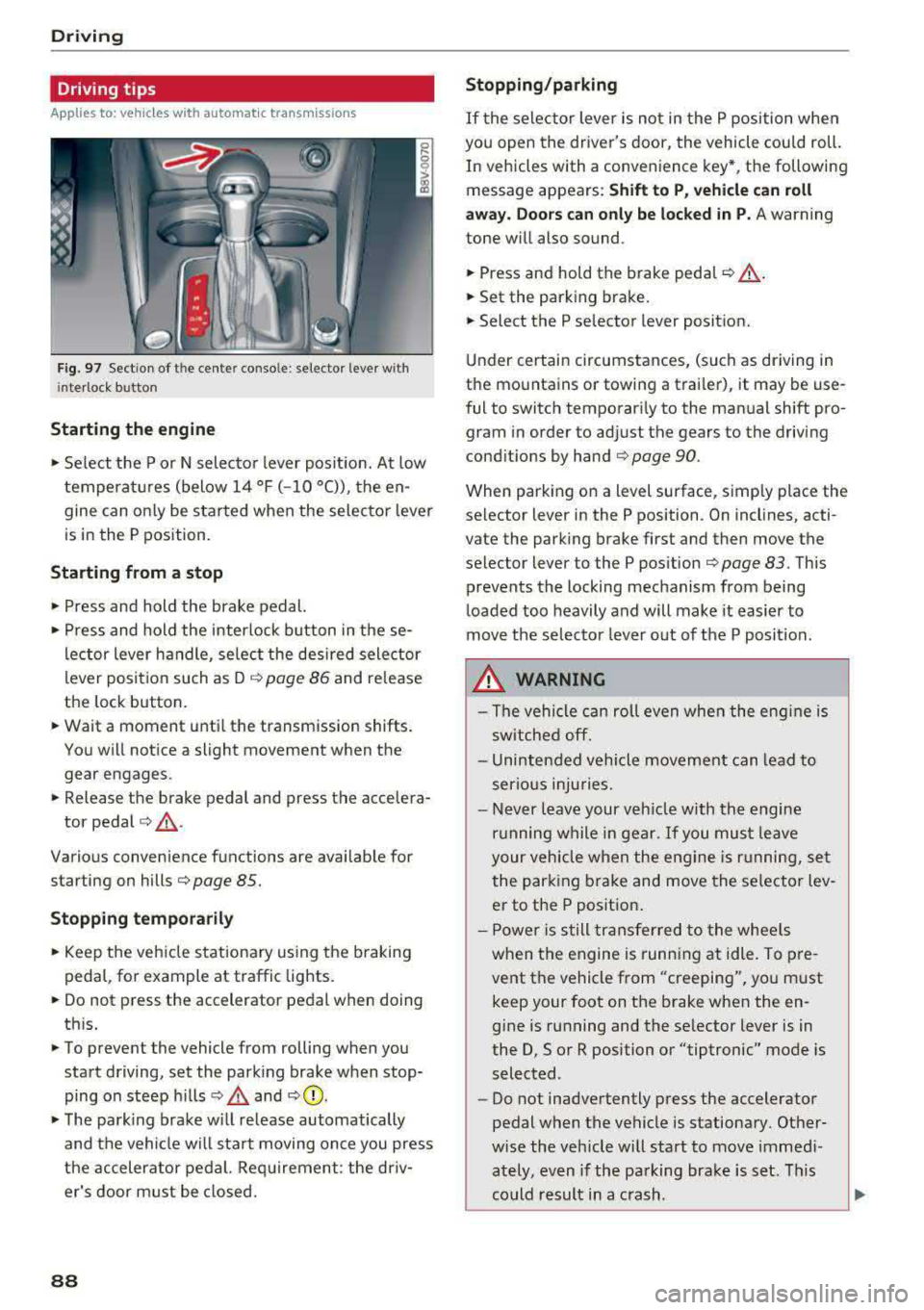
Fig. 97 Sect ion of the cente r conso le : se lector lever w ith
i nte rlock button
Starting the engine
• Se lect the P or N selec to r l ever posit ion. At low
temperat ures (below
14 °F (- 10 °C)), the en
gine can on ly be star ted when the selector lever
is in the P position.
Starting from a stop
• Press and hold the brake pedal.
• Press and hold the interlock button in these
l ector lever handle, se lect the des ired selector
lever posit io n such as D
c::> page 86 and release
the lock button.
• Wait a moment unti l the transmission shifts.
You w ill notice a slight movement when the
gear engages.
• Release the brake pedal and press the accelera-
tor pedal
c::> ,& .
Various convenience functions are ava ilab le for
starting on hills
c:::> page 85.
Stopping temporarily
• Keep the veh icle stationary using the b raking
peda l, for example at traffic lights.
• Do not press the accelerator pedal when doing
th is.
• To prevent the vehicle from rolling when you
start driving, set the park ing brake when stop
ping on steep hills
c::> .& and c::> 0.
• The park ing brake w ill release automatically
and t he veh icle wi ll sta rt moving on ce you press
the accelerator pedal. Req uirement: the driv
er's door m ust be closed.
88
Stopping/parking
If the sele ctor lever is not in the P position w hen
you open the driver's door, the vehicle cou ld roll.
In vehicles with a conven ience key *, the following
message appears:
Shift to P , vehicle can roll
away . Doors can only be locked in P.
A warning
tone w ill also sound.
• Press and hold the brake peda l c::> A.
• Set the parking brake.
• Select the P selector lever posit ion.
U nder certai n circumstances, (such as driving in
t h e mountains or towing a trai ler), it may be use
ful to switch temporar ily to the manual shift pro
gram in order to ad just the gears to the driving
cond it ions by hand
c:::> page 90.
When park ing o n a level sur face, s imply place the
se lector lever in the P position . On inclines, acti
vate the parking brake first and then move the
selector lever to the P pos ition
c:::> page 83 . This
prevents the locking mechanism from being
loaded too heavily and will make it easier to
move the selec tor lever o ut of the P posi tion.
.&_ WARNING
- The vehicle can ro ll even whe n the engi ne is
sw itche d off.
- Unin ten ded vehicle movement can lead to
s e rio us inju ries.
- Never leav e your ve hicle w ith th e engine
r u nning w hile in gear.
If you mus t leave
your veh icle when the eng ine is r unning, se t
the par king brake and move the se lector lev
er to the P position .
- P owe r is s till tran sfer red to the whee ls
when t he engine is runn ing at idle. To pre
vent the vehicle f rom "creeping", yo u m ust
keep your foot on t he brake when the en
gine is running and the se lector lever is in
the D, So r R position or "tiptronic" mode is
selected.
- Do not inadvertently press the accelerator
pedal when the vehicle is stationa ry. Ot her
w ise the veh icle will start to move immed i
ately, even if the parking b ra ke is set. T his
c o uld result in a c rash.
Page 98 of 400
e-tron
for the high-voltage battery can lead to serious damage and/or a decrease of the capacity
void coverage under the New Vehicle Limited
Warranty.
Starting/driving the vehicle
Applies to: ve hicles w ith plug -in hybrid drive
The vehicle is started and stopped with the
I START STOP I button. Please also read the in
formation under
c::> page 78, Starting the engine .
Establishing drive ready mode
See c::> A in Introduction on page 94.
Requirement: a charging cable must not be con
nected to the vehicle
c::> page 117 and the selec
tor lever must be in the P or N position.
- Press the brake pedal.
- Press the
I STAR T STOPI button .
When the vehicle enters drive ready mode, the
status message
e-tron READY appears briefly in
the instrument cluster display and the needle in
the power meter points to
READY c::> page 97.
Driving
The vehicle starts with the electric motor after
establishing the dr ive ready mode and if the con
ditions for electric drive mode have been met
c::> page 100.
The conditions to drive are essentially the same
as for the automatic transmission
c::> page 85 .
You and your passengers should anticipate the
possibility of a sporty acce leration.
Ending drive ready mode
- Place the selector lever in the P position.
- Switch the ignition off with the
I STAR T STOPI
button.
Vehicle sound
The vehicle generates an electronic engine sound
so that your vehicle can be heard from the out
side when in electr ic drive mode. The veh icle
sound automatically fades out at higher speeds
when the sounds from the tires and wind start in
creasing.
96
Switching the ignition on/off
You can switch the ignition on without establish
ing drive ready mode.
- Press the
I START STOP ! button to switch the
ign ition on and off. Do not press the brake ped
al whi le doing this.
When the ignition is sw itched on, the needle
points at
OFF @c::>page 97, fig. 103 or OFF is
displayed @c::>page97, fig .103.
No indicator lights stay turned on when the igni
tion is switched off .
Ignition is switched off automatically
To prevent the vehicle battery from draining, the
ignition will switch off automatically under the
follow ing cond it ions:
- The vehicle must have already been driven.
- The vehicle is stationary.
- The gasoline engine must not be runn ing .
- The driver's door must be open.
- The driver's safety belt must be unbuckled .
- The brake pedal must not be pressed.
In this case, the activated low beam is replaced
by the parking light. The message
Side marker
lights automatically shut off in
30 minutes. See
owner's manual
appears in the instrument clus
ter display . The parking lights w ill switch off af
ter approx imately 30 minutes or when you lock
the veh icle.
If the gasoline engine was not stopped, the mo
tor continues runn ing and the ignit ion does not
automat ica lly switch off
c::> A .
A WARNING
To reduce the risk of poisoning, never allow
the eng ine to run in confined spaces.
(D Tips
The vehicle cannot start when outs ide tem
peratures are below-18 °F (-28 °C)
c::> page 98.
-
Page 107 of 400
a, a, ..... N
" N ..... 0 N > 00
_& WARNING
-Read and follow t he warn ings in
¢page 316, Working in the engin e com
partment before opening the hood and
che cking the coo lan t level.
- The e xpansion ta nk @ may only be ope ned
and filled by an a uthorized Aud i dea le r or
au tho riz e d Au di Service Fac ility.
- Coo lant can en ter the inside of the high
voltage battery when filling the expa nsion
t an k@ and ca use a short circui t, which in
cr eases the ris k of fire.
Refueling
Opening the fuel filler door
App lies to: ve hicles with plug-in hybrid drive
Fig. 112 Dr ive r's doo r: Butto n il
The tan k system must be vented be fore refueling
.. Swi tch the ign ition off with the I
button.
.. Pull on the ~ switch.
.. The fue l filler door wi ll open automatica lly af-
ter venting is com plete .
R ead and fo llow the directions for inserti ng the
f u el pump noz zle
¢ page 105.
Re ad and fo llow the inst ruct ions for re fueling
¢ page 313.
e-tron
Inserting the fuel pump nozzle
Applies to: vehicles with pl ug-in hybrid drive
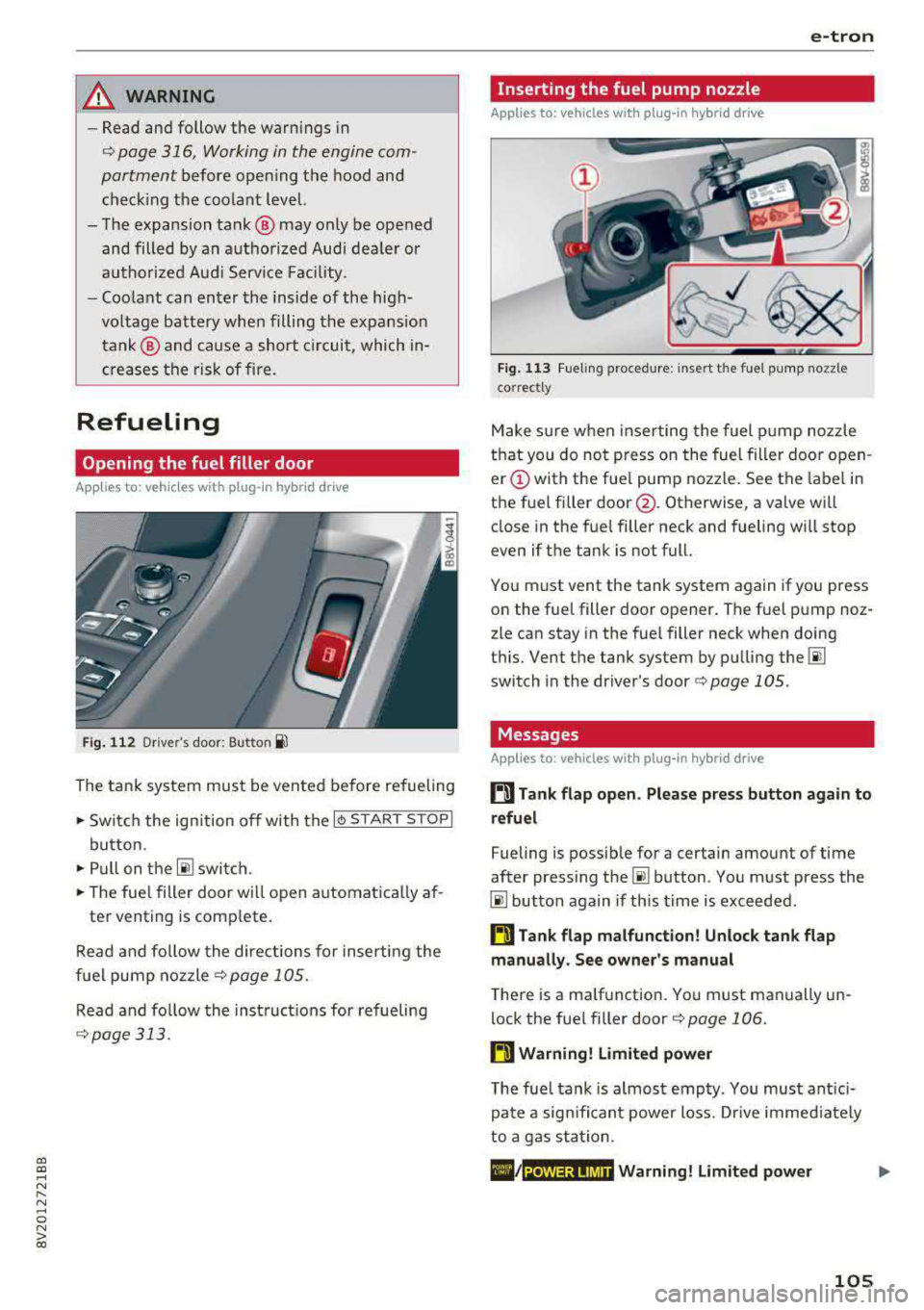
Fig. 11 3 Fueling proced ure: i nsert t he f uel p ump nozz le
correct ly
M ake s ure w hen inse rting the fuel pump noz zle
t h at you do no t press o n the fuel filler door o pen
er (!) with the fue l pump nozzle . See the label in
the f uel fi ller
door @. Otherwise, a va lve wi ll
close in the fue l filler neck and fueling w ill stop
even if t he tank is not full.
Yo u m ust vent the tank system again if you press
on the fue l filler doo r opener . The fuel p ump noz
zle can stay in the fuel filler neck when doing
t hi s. Vent the tank system by pu lling
the @!
switch in the dr iver 's door ¢ page 105 .
Messages
Applies to: vehicles with pl ug -in hybrid drive
ti Tank flap open . Please press button again to
refuel
Fueling is possib le for a certain amount of time
after press ing
the~ button . Yo u m ust press the
@I button again if th is time is exceeded .
ti Tank flap malfunction! Unlock tank flap
manually . See owner's manual
T he re is a ma lfunction. Yo u must manually un
lock the fue l fi ller door
¢ page 106 .
ti Warning! Limited power
The fue l tank is almos t emp ty . You must ant ici
p at e a sign ifi can t power loss. Drive immed iate ly
t o a ga s st at ion .
POWER LIMIT Warning! Limited power
105
Page 112 of 400
e-tron
Charging dock
Applies to: vehicles with plug -in hybrid drive and charging
dock
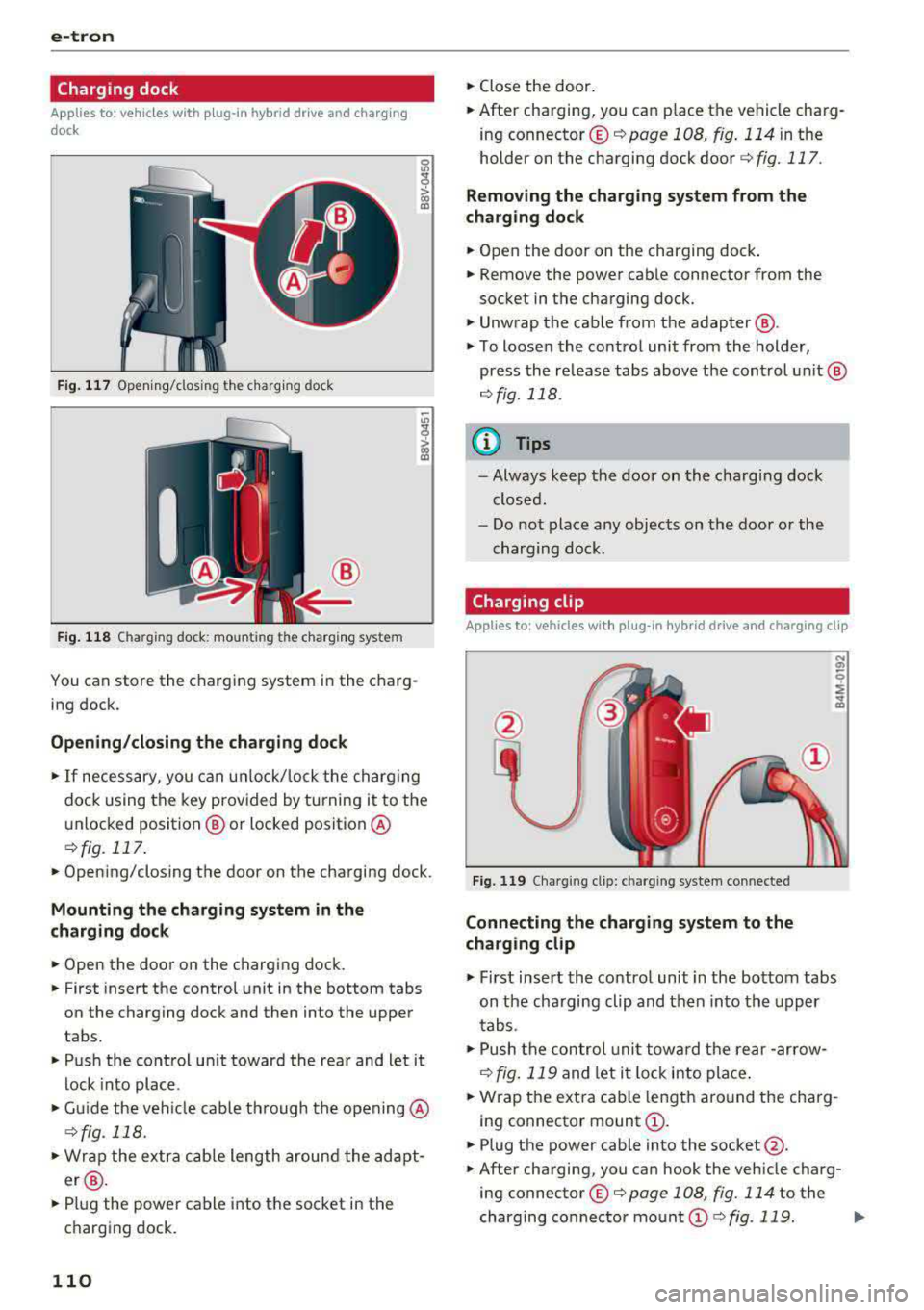
F ig . 11 7 Opening/clos ing t he charg ing dock
®
F ig . 118 Cha rg in g dock : mount ing th e c harg ing sys te m
You can store the charg ing system in the charg
ing dock.
Opening /closing the charging dock
• If necessary, you can u nlock/ lock the charg ing
dock using the key provided by turning it to the
unlocked position @ or locked position @
¢fig. 117 .
• Opening/closing the door on the charging dock.
Mounting the cha rging system in the
charging dock
• Open the door on the charging dock.
• First insert the control unit in the bottom tabs
on the charging dock and then into the upper
tabs.
• Push the control un it toward the rea r and let it
lock into place .
• Guide the vehicle cable th rough the opening @
¢fig _ 118.
• Wrap the extra cab le length around the adapt
er @ .
• Plug the power cable into the socket in the
charging dock .
110
• Close the door.
• After charging, you can p lace the vehicle charg
ing
connector ©¢ page 108 , fig. 114 in the
holder on the charging dock
door ¢ fig. 117.
Removing th e charging system from th e
charging dock
• Open the door on the charging dock .
• Remove the power cable connector from the
socket in the charging dock.
• Unwrap the cable from the adapter @.
• To loosen the contro l unit from the holder,
press the re lease tabs above the cont rol un it @
r=:> fig. 118 .
(D Tips
-Always keep the door on the cha rging dock
closed.
- Do not place any objects on the door or the
charging dock .
Charging clip
Applies to: vehicles with plug-in hybrid drive and charging clip
Fig. 119 Cha rg in g cl ip: c harg ing sys tem co nnected
Connecting the char ging system to the
charging clip
• First insert the control unit in the bottom tabs
on the charging clip and then into the upper
tabs .
• Push the con trol uni t towa rd the rear -ar row
¢ fig. 119 and let i t lock into place .
• Wrap the extra cable length around the charg
ing connector mount
(D .
• Plug the power cable into the socket @.
• After charging, you can hook the vehicle charg
ing
connector ©¢ page 108, fig. 114 to the
charging connector mount
(D ¢ fig . 119. ..,.
Page 116 of 400
e-tron
After charging
Applies to: vehicles with p lug -in hybrid drive
Unlocking the vehicle charging connector
.,. Press the re lease
Closing the charging unit
.,. Put the cap back on the cha rging port
¢ page 112, fig. 124 .
.,. Carefully slide the cove r back in i ts or igina l po
si tion .
.,. T ur n the lock to the horizonta l position
¢ page 11 2, fig . 123.
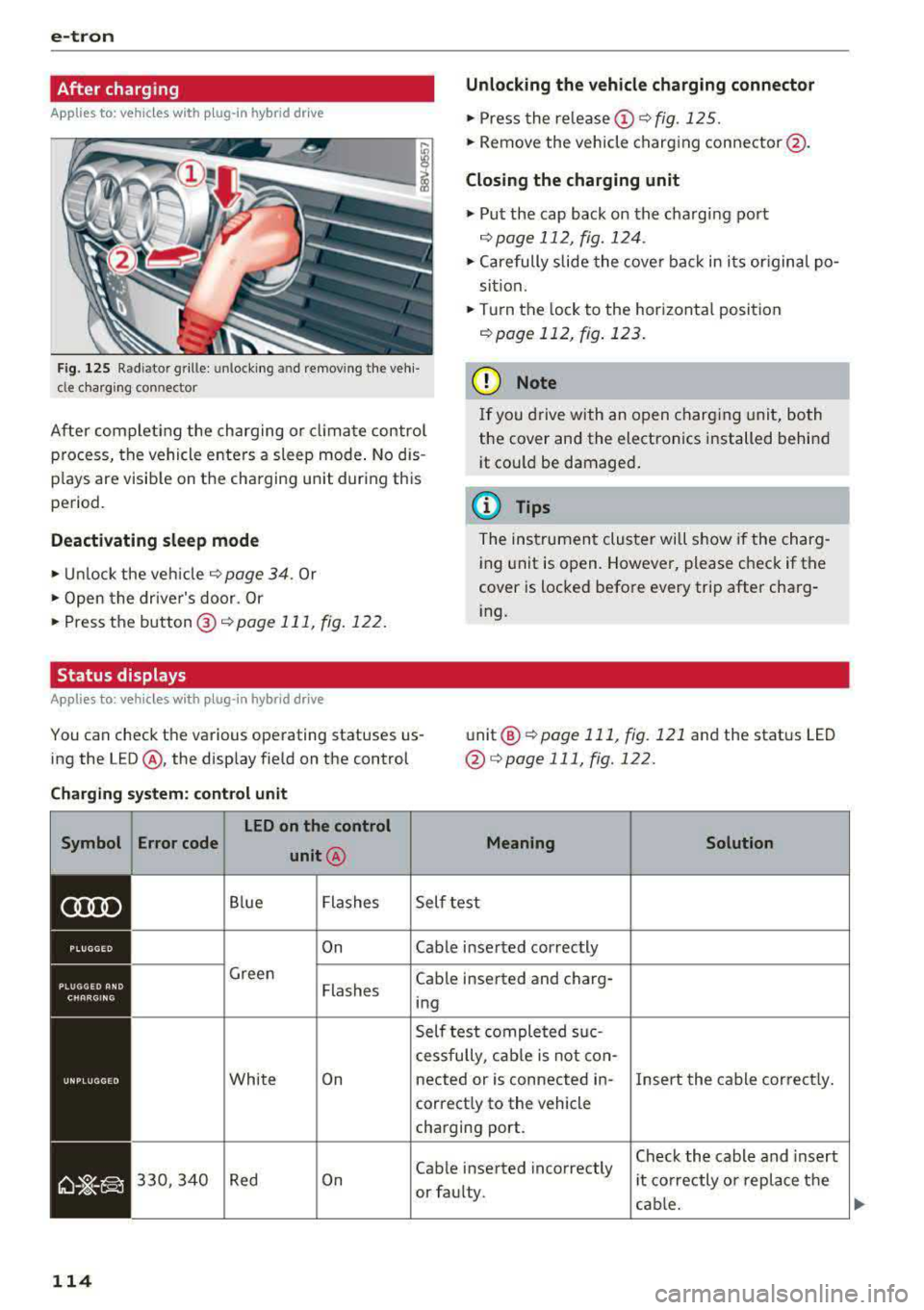
Fig . 12 5 R ad ia tor g rille : unl ocking and re mov ing the ve hi
cl e c harg ing connector
@ Note
After com plet ing the charging or clima te control
p rocess, the vehicle enters a sleep mode . No d is
p lays are visib le on t he cha rging unit dur ing this
pe riod . I
f yo u drive with an o pen charg ing unit, both
the cover and the electronics installed behi nd
i t cou ld be damaged .
(D Tips
Deactivating sl eep mode
.,. Unl ock the vehicle ¢ page 34 . Or
.,. Open the driver's door. Or
.,. Press the b utton @¢ page 111 , fig. 122.
Status displays
Applies to: veh icles with plug-in hybrid drive
T he ins trumen t clu ster wi ll show if the charg
ing unit is open. However, please check if the
cover is locked befo re every trip after cha rg
i ng .
You can check the va rious ope rating statuses us
ing the L ED @ , the disp lay fie ld on the control unit
@
¢ page 111, fig . 121 and the stat us LED
@ ¢page 111, fig.122 .
Charging system : control unit
Symbol Error code LED on the control
unit@
Blue Flashe s
On
Green Flashes
Whi te On
330, 340 Red On
114
Mean ing
Self te st
Cable inse rted correctly
Cable inserted and charg· ing
Self test comple ted s uc
cessfully , cab le is not con-
Solution
nected or is connected in -Insert the cable cor rec tly.
correct ly to the vehicle
charging port.
Cable inserted incorrectly
or fau lty. Chec
k the cable and insert
i t co rrectly o r rep lace t he
cab le.
IJi,,