warning AUDI S3 SEDAN 2017 User Guide
[x] Cancel search | Manufacturer: AUDI, Model Year: 2017, Model line: S3 SEDAN, Model: AUDI S3 SEDAN 2017Pages: 400, PDF Size: 67.32 MB
Page 32 of 400
Cockpit over view
A WARNING
Have the safety systems i nspected immed i
ately . Otherw ise, there is a risk that the sys
tems may not activate during a collision,
wh ich increases the risk of serious injury or
death.
~ Safety belt
The . indicator light stays on unti l the d rive r's
and fron t passenger's safety be lts are buckled .
Above a certain speed, there will also be a wa rn
ing tone.
(D Tips
For add it iona l information on safety be lts ,
see
~ page 258.
@ -Steering lock
• Do not d rive vehicle: steering defecti ve
There is a malfunc tion in the elect ronic stee ring
loc k. You ca nnot t urn the ignition on .
D o
not tow your veh icle because it cannot be
steered . See an authorized A udi dealer or au tho r
i z ed A udi Servi ce Fa cili ty for assistance.
1;11 Steering lock: sy stem fault! Pleas e contact
Servic e
There is a malfunction in the elec tronic steering
lock .
Drive to an a uthor ized Audi dea ler or authori zed
Aud i Serv ice Fa cili ty immediately to have the
malfunct io n corrected.
A WARNING
Do not tow your veh icle when there is a mal
function in the electronic stee ring lock
-this
increases the risk of an accident.
....e Engine start system
M ·I t-:ngin e start system ma lfun ction! Plea se
c ontact Servic e
Do not switch the ignit ion off because you may
not be able to switc h it o n aga in .
30
Drive to an au thorized A udi dealer or authori zed
Audi Se rvice Facility immediate ly to have the
malfunction corrected.
IIJ Engine s tart system malfunction! Plea se
contact Service
There is a ma lf u nction in the engine sta rting sys
tem.
Drive to an authorized Audi dealer or authorized
Audi Se rvice Facility immed iate ly to have the
malfunction corrected .
~ Engine stop while driving
• Engine stopped: brake servo and power
steering not po ssible
There is a ma lfunction in the engine or in t he fuel
s u pp ly system.
More force is needed to steer and brake the mov
i ng vehicle whe n the engi ne is stopped . If the ve
hicle is rolling, t ry to bring it to a stop off to the
s ide from moving traffic. See an author ized Audi
dealer or authori zed A udi Service Fac ility for as
s istance .
A WARNING -
If the engine stops while driving, you will
need to use more force to brake the vehicle.
This increases the risk of an acc ident . There
will still be powe r steering if the ignition is
switched on while the vehicle is ro lling and
there is suff ic ient veh icle battery charge . Oth
e rw ise, you must use greate r force when
steering .
c:::::::> Hood
• Warning! Hood i s no t lo cked. Stop vehicle
and che ck the lo ck
If the indicator light turns on and the message
appears , the hood lock ing mechan ism is not en
gaged co rrectly .
Stop immediately and close the hood
~ page 318 .
Page 35 of 400
CXl CXl .... N ,.__
N .... 0 N > 00
Drive to an authorized Audi dea ler o r a uthorize d
Audi Service Facility immediately to have the
malfunct ion corrected.
·Xf>: · Bulb failure indicator
If the II indicator light turns on, a bulb has
fa iled. The message ind icates the location of the
bulb .
Replace the bulb immediately.
Vehicle light s: sys tem fault!
There is a malfunction in the head ligh ts or the
l ight switch. D rive to an authorized Audi dealer o r
author ized Audi Se rvice Facility immed iate ly to
h ave the ma lf u nction corrected .
A WARNING
-Light bulbs are under pressure and can ex
plode when bulbs are replaced, which in
creases the risk of injury.
-With HID headlights (xenon headlights), the
high-voltage component must be handled
correctly. Otherw ise, there is a risk of fata l
injury.
~()) Dynamic headlight range control
li1 Headlight r ange con trol : sy stem fault!
There is a malfunction in the dynamic headlight
range control system, wh ich may cause glare for
other drivers.
Drive to an autho rized Audi dea ler o r authorized
Aud i Service Facility immediately to have the
malfunct ion corrected.
~O Audi adaptive light
A ppl ies to: ve hicles with Audi a daptive light
mi1 Aud i adapti ve l ight: system fault!
-
There is a malfunction in the adapt ive lights. The
headlights still function.
D rive to an aut ho rized Aud i dea ler or a uthorized
Audi Service Facility immediately to have the
malfunct ion corrected.
Coc kpit o ve rv iew
@f> Light/rain sensor
App lies to : vehicles wi th lig ht/ra in se nsor
!;I Automati c headlight s/wiper s: system fault!
The light/rain sensor is malfunctioning.
The low beams remain switched on at all times
for safety reasons when the light switch is in the
AUTO pos ition. You can cont inue to turn the
li ghts on and off us ing the light switch . You can
st ill control all wiper functions that are inde
pendent of the rain sensor .
Drive to an authorized Audi dealer or authorized
Audi Service Facility immed iate ly to have the
malfunction corrected .
Q Suspension control
Applies to: vehicles wit h suspension cont rol
fl Su spen sion: system fault!
There is a suspension contro l ma lfunction.
Drive to an authorized Audi dealer or authorized
Audi Service Facility immed iate ly to have the
malfunction corrected.
¢ ¢ Turn signals
If the . or B indicator light blinks, a tur n sig
nal is turned on . If both indicato r lights are blink
i ng, the emergency flashers are on.
If an ind icator light blinks tw ice as fast as usual,
a turn signal bu lb has failed. Carefully drive to an
authorized Aud i dealer or a uth orized Aud i Serv ice
Fac ility imme diate ly to have the ma lfunction cor
r ec ted .
33
Page 36 of 400
Opening and closin g
Opening and closing
Central locking
Description
You can lock and un lock the veh icle centrally . You
have the following options:
-Remote control key <=> page 36, or
-Sensors in the front door handles"
<=>page 36, or
-Lock cylinder on the driver's door<=> page 38,
or
-Interior central locking switch <=> page 3 7.
Tu rn sign als
The turn s ignals flash tw ice when you unlock the
vehicle and flash once when you lock the vehicle.
I f they do not f lash, then the ignition may still be
sw itched on or one of the doors , the luggage
compartment, or the hood may be open, for ex
ample.
Autom atic locking (Auto Lock )
The Auto Lock funct ion locks all doors and the
luggage compartment lid once the speed has ex
ceeded approx imately 9 mph (15 km/h).
The vehicle will unlock aga in if the ign ition key is
removed, the opening function in the centra l
lock ing switch is act ivated, or one of the door
handles is operated. The Auto Lock f unct ion can
be switched on and off in the Infotainment sys
tem <=>
page 38.
In the event of a crash with a irbag deployment,
the doors will a lso automat ica lly unlock to allow
access to the vehicle.
Selective door unlocking
The doors and luggage compartment lid w ill lock
when they close. You can set in the Infotainment
system whether
only the driver's door or the en
tire ve hicle should be unlocked when unlocking
<=> page 38.
Unintentionally locking yourse lf out
Only lock your vehicle when all of the doors and
the luggage compartment lid a re closed and the
34
remote control key is not in the vehicle. This
helps to prevent you from locking yourself out
accidenta lly.
The following conditions prevent yo u from lock
ing you r remote control key in the vehicle:
-If the driver's door is open, the vehicle cannot
be locked by press ing the
Iii button on the re
mote contro l key or touching the locking sen
sor* on a doo r.
-If the most recently used convenience key* is in
the luggage compartment, the luggage com
partment lid automatically unlocks again after
closing it.
-If the convenience key* that was last used is de
tected inside the vehicle, then the vehicle will
not be ab le to lock from the outside.
A WARNING
-Always take the veh icle key with you when
leaving the vehicle, even for a short period
of t ime. This applies part icularly when chil
dren remain in the vehicle . Otherwise the
children could start the eng ine or ope rate
electrical equipmen t such as power win
dows.
- No one, especially ch ildren, should stay in
the vehicle when it is loc ked from the out
side, because the windows can no longer be
opened from the
inside ¢ page 38. Locked
doors make it more difficu lt for emergency
workers to get into the vehicle, which puts
lives at risk.
(D Tips
-Do not leave va luables unattended in the ve
hicle. A locked vehicle is not a safe!
-T he LED in the driver's door rail blinks when
you lock the vehicle. If the LED lights up for
approximate ly 30 seconds after locking,
there is a malfunction in the centra l locking
system . Have the problem corrected by an
authorized Audi dealer or authorized Aud i
Service Facility.
Page 38 of 400
Opening and closing
@ Tips
The replacement battery must meet the same
specifications as the orig inal battery in the re
mote control key.
Synchronizing the remote control key
The remote control key must be synchronized if
the vehicle does not lock/unlock with the remote
control.
• Press the remote control key button [@].
• Insert the key in the driver's door lock within 30
seconds¢
page 38 .
• Press the !ill button or~ button.
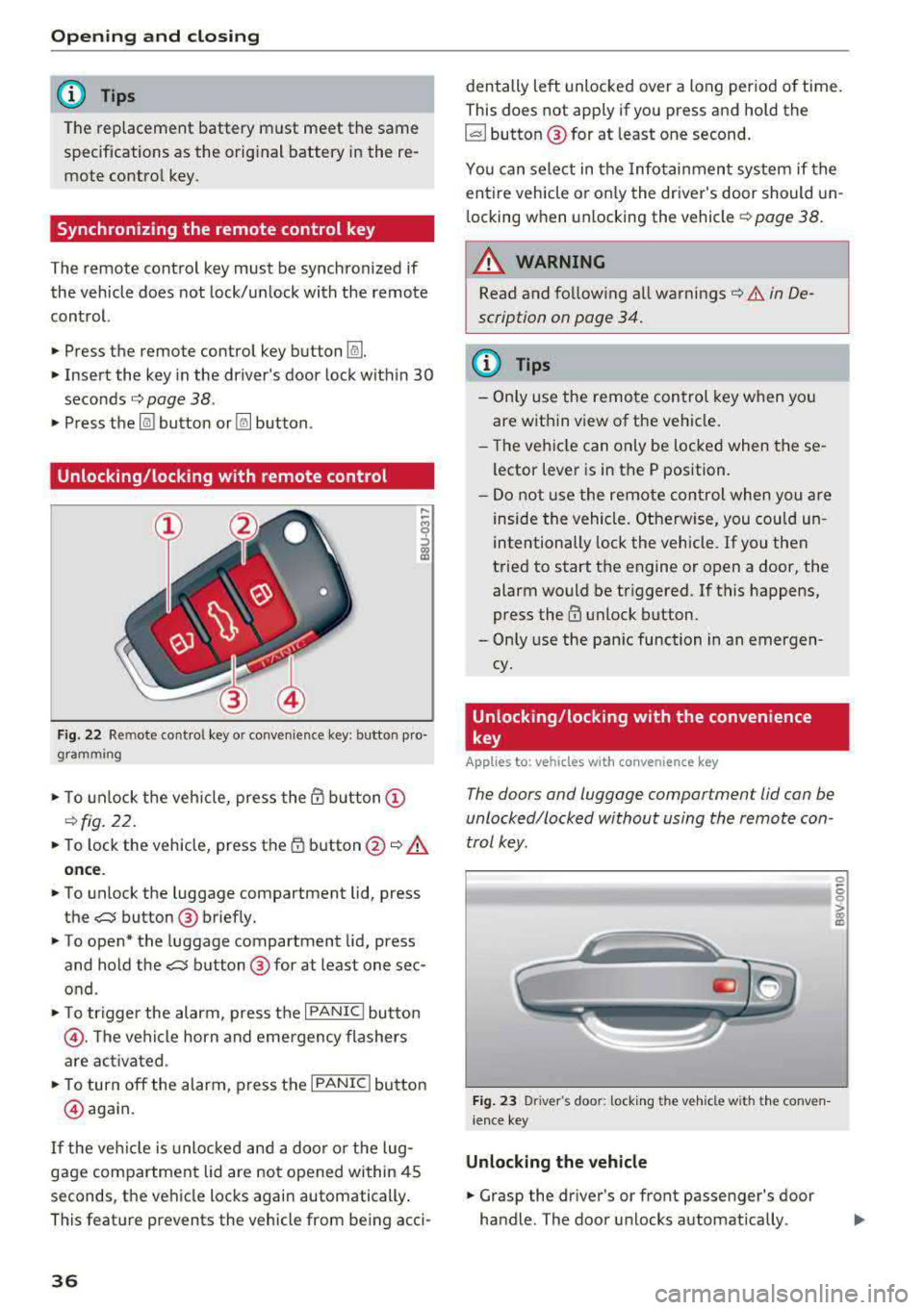
Unlocking /locking with remote control
Fig . 22 Remote contro l key or conven ience key: button pro
gramming
• To unlock the vehicle, press the @ button @
¢fig. 22.
• To lock the vehicle, press the 1D button @~.&.
once .
• To unlock the luggage compartment lid, press
the
,c::j button @ briefly.
• To open* the luggage compartment lid, press
and hold the
,c::j button @ for at least one sec
ond .
• To tr igger the alarm, press the I PANIC I button
@ . The vehicle horn and emergency flashers
are activated .
• To turn off the alarm, press the I PANIC ! button
@ aga in.
If the vehicl e is unlocked and a door o r the lug
gage compartment lid are not opened within 45
seconds, the vehicle locks again automatically .
This feat ure prevents the vehicle from being acci-
36
den tally left unlocked over a long period of time.
This does not apply if you press and hold the
~button ® for at least one second.
You can select in the Infotainmen t system if the
entire vehicle or on ly the driver's door should un
l ocking when unlocking the vehicle ¢
page 38.
A WARNING
Read and fo llowing all warnings¢ .& in De
scription on page 34.
(D Tips
-Only use the remote control key when you
are within view of the veh icle.
-Th e vehicle can only be locked when the se
lector lever is in the P position.
- Do not use the remote control when you are
inside the vehicle. Otherwise, you could un
intentionally lock the vehicle. If you then
tried to start the engine or open a door, the
alarm would be triggered. If this happens,
press
the@ unlock button.
-Only use the panic function in an emergen
cy.
Unlocking /locking with the convenience
key
App lies to: vehicles wit h co nvenience key
The doors and luggage compartment lid can be
unlocked/locked without using the remote con
trol key.
Fig. 23 Driver's door: lock ing t he ve hicle w ith th e conve n
i ence key
Unlocking the vehicle
• Grasp the driver's or front passenger's door
handle. The door unlocks automatically .
-
0
6
I
Page 39 of 400
a, a, ..... N
" N .... 0 N > 00
"'Pull on the door handle to open the door.
Locking the vehicle
"'Place the selector lever in the P position (auto
matic transmissions), or e lse the vehicle will
not be able to lock.
"'To lock the vehicle, close the door and touch
the sensor on the door handle
once ¢ fig. 23,
¢_& .Do not hold the door hand le while doing
this.
Unlocking and locking the vehicle can only be
done at the front doors . The remote contro l key
cannot be more than approx imately 5 ft ( 1.5 m)
away from the door handle. It makes no differ
ence whether the remote control key is in you r
jacket pocket, purse or br iefcase .
If you hold the door handle while locking, this
can impair the locking function .
The door cannot be opened for a br ief period di
rect ly after locking it. This allows you the oppor
tunity to check that the driver's door is locked .
The settings in the Infotainment system deter
mine if the enti re vehicle or only one of the doors
is unlocked when unlocking the vehicle
¢page 38.
A WARNING
Read and following all warnings ¢ A in De
scription on page 34.
(!j) Tips
If your vehicle is left stand ing for a long peri
od of time, note the following:
-The proximity sensor switches off after a
few days to save energy. You then have to pull once on the door handle to unlock the
vehicle and a second time to open it.
-The energy management system gradually turns off unnecessary convenience functions
to prevent the vehicle battery from draining
and to maintain the vehicle's ab ility to start
for as long as possib le . You may not be able
to unlock your vehicle using the convenience
key.
-
Open ing and closing
Central locking switch
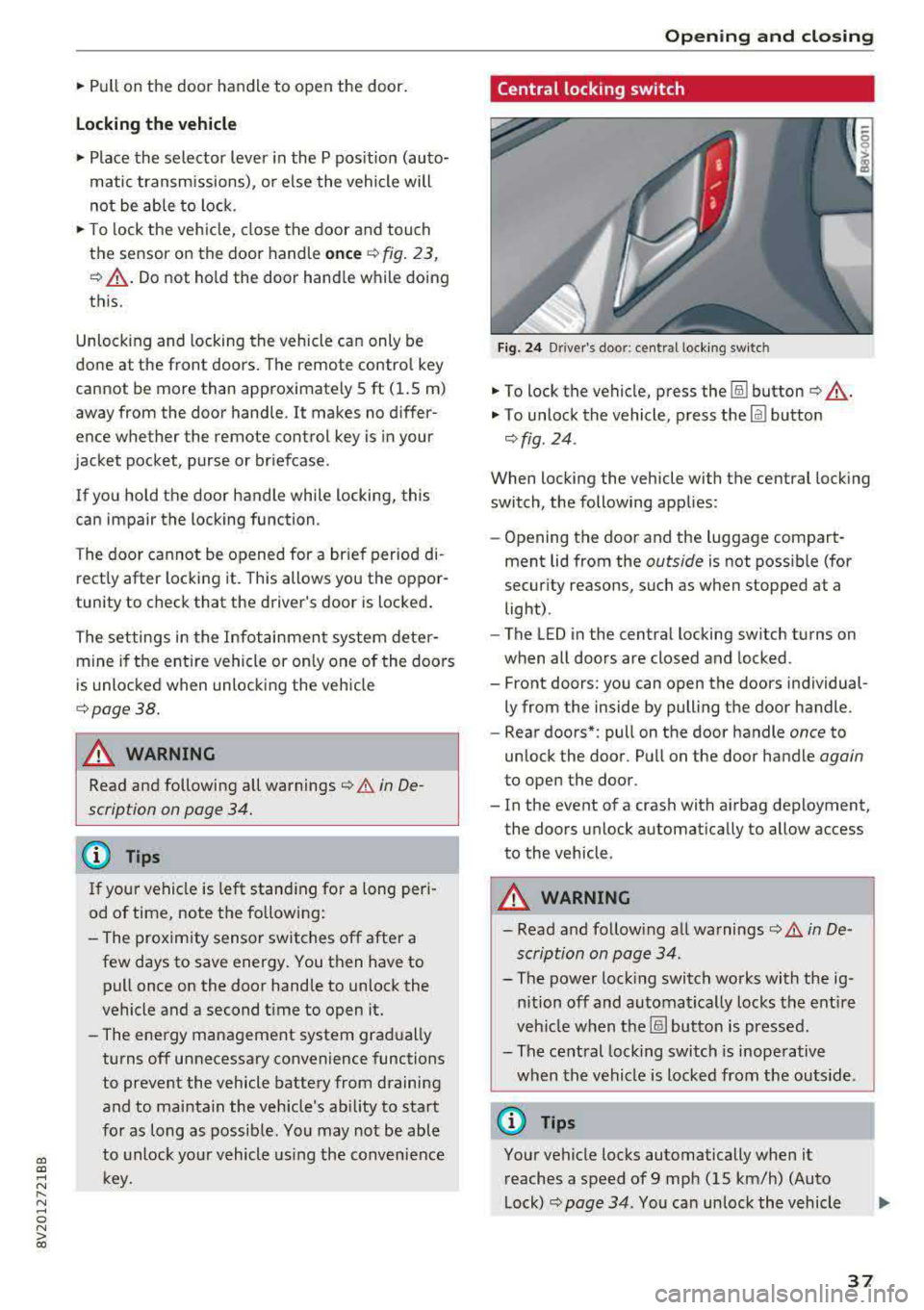
Fig. 24 Drive r's doo r: centra l lock ing switc h
"'To lock the vehicle, press the !ill button ¢_& .
"'To unlock the vehicle, press the Im button
¢ fig . 24.
When locking the vehicle with the central locking
switch, the following applies:
-Opening the door and the luggage compart
ment lid from the
outside is not possible (for
security reasons, such as when stopped at a
light) .
- The L ED in the central locking sw itch turns on
when all doors are closed and locked.
- Front doors: you can open the doors individual ly from the inside by pulling the door handle.
- Rear doors*: pull on the door handle
once to
unlock the door . Pull on the door handle
again
to open the door .
- In the event of a crash with airbag deployment, the doors unlock automatically to allow access
to the vehicle.
A WARNING
-- Read and following all warnings¢ A in De-
scription on page 34 .
- The power locking switch works with the ig
nition off and automatical ly locks the entire
veh icle when the[§] button is pressed.
- The central locking switch is inoperative
when the vehicle is locked from the outs ide.
@ Tips
Your vehicle locks automatically when it
reaches a speed of 9 mph (15 km/h) (Auto
Lock) ¢
page 34. You can unlock the vehicle
37
Page 40 of 400
Opening and clo sin g
again using the ca button in the central
locking switch .
Central locking settings
In the Infotainment system, you can set which
functions are controlled by the central locking
system .
.,. Select in the Infota inment system: I MENU I but
ton
> V ehicle > left contro l button > Ve hicl e
s ettings
> Cent ral lock ing .
Door unlo ckin g
-you can decide if All doors or
only the
Dri ver 's door should unlock. The lug
gage compartment lid also unlocks when
All is
selected. If you se lect
Dri ver 's door in a vehicle
with a convenience key*, only the door whose
handle you pull will unlock.
If you select D riv er 's door , all the doors and lug
gage compartment lid will unlock if you press the
[@] button on the remote control key twice.
long press to open w indow s -the convenience
opening/closing function can be switched on/off
c::>page 42.
Fold mirr ors* -if yo u sw itch the funct io n on, the
exterior m irrors fo ld in automatically when the
ve hicle is locked.
To ne when l ockin g -when checked off./, a tone
will sound when you lock the vehicle
l) .
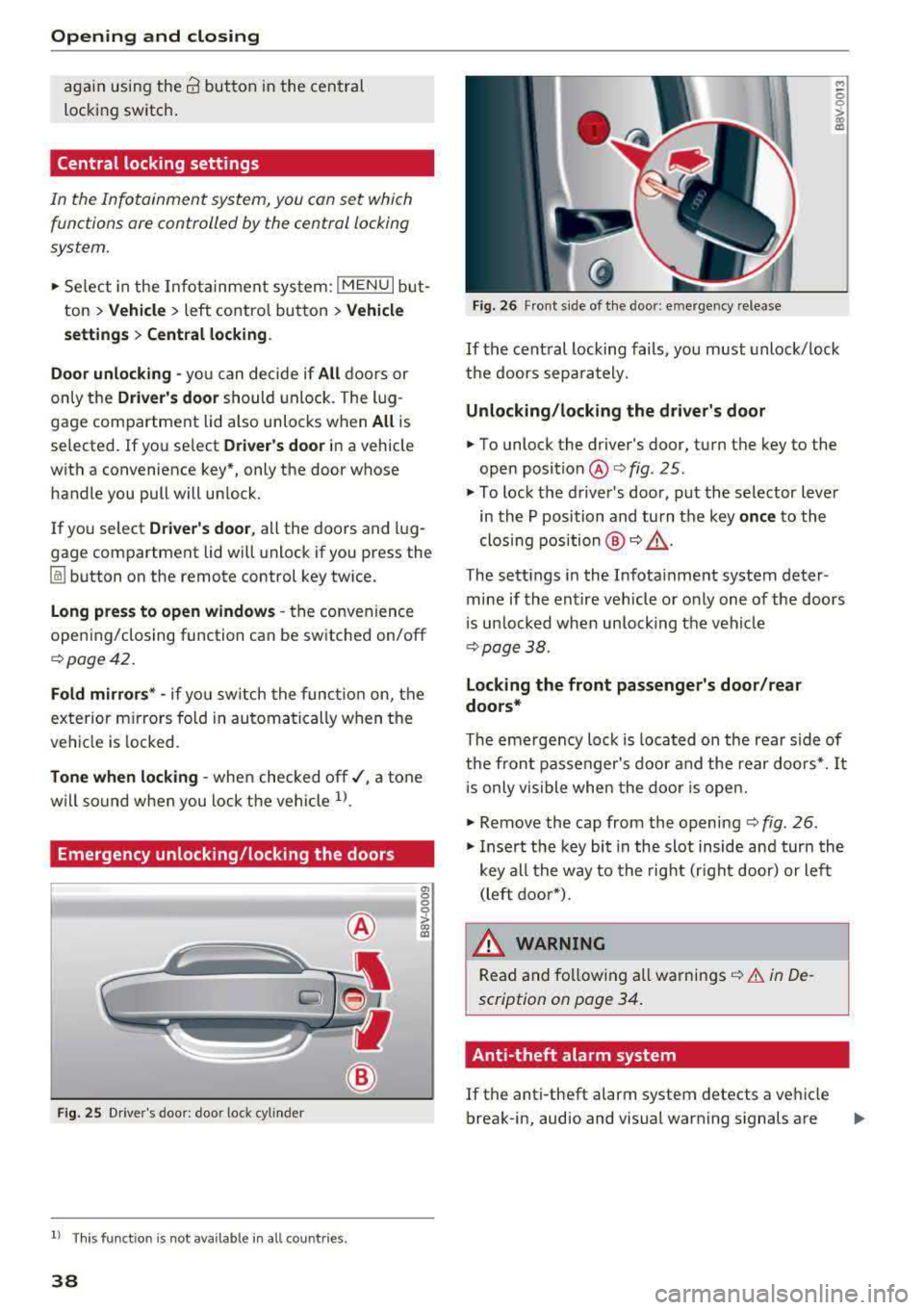
Emergency unlocking/locking the doors
Fig . 25 Driver's doo r: door lock cylinder
l) This function is not availab le in all countries.
38
a, 0 0 0
> 00 a:,
Fig. 26 Front side of the door: emergency release
M ~ 0
~ CX) a,
If the central locking fails, you must unlock/ lock
the doors separately.
Unlocking /lo cking the d riv er 's door
... To unlock the driver's door, turn the key to the
open
position @ofig . 25.
.,. To lock the driver 's door, put the selector lever
in the P position and turn the key
onc e to the
clos ing position @
o A.
The settings in the Infota inment system deter
mine if the entire vehicle or only one of the doors
i s un locked when unlocking the veh icle
c:>page38.
Locking the front pa ssenger 's door /rear
doo rs *
The eme rgency loc k is located on the rear side of
the fron t passenger's door and the rear doo rs*. It
i s only vis ible when the door is open.
... Remove the cap from the opening c::> fig. 26 .
.,. Insert the key bit in the slot inside and turn the
key all the way to the right (right door) or left (left door*).
A WARNING
Read and fo llowing all warnings c::> .&. in De
scription on page 34.
Anti-theft alarm system
If the anti-theft alarm system detects a vehicle
break-in, audio and visual warning signals are
Page 41 of 400
a, a, ..... N
" N ..... 0 N > 00
triggered. The anti-theft alarm system is activat
ed when the vehicle is locked as usua l.
It
switches off when the vehicle is unlocked.
If the a larm is trigge red, it w ill shu t
off automat
ically a fter a ce rtain amount of time . Switch the
ignition on or press the
lil button on the remote
control key to turn
off the alarm.
Luggage compartment
Lid
Opening /closing the luggage compartment
lid
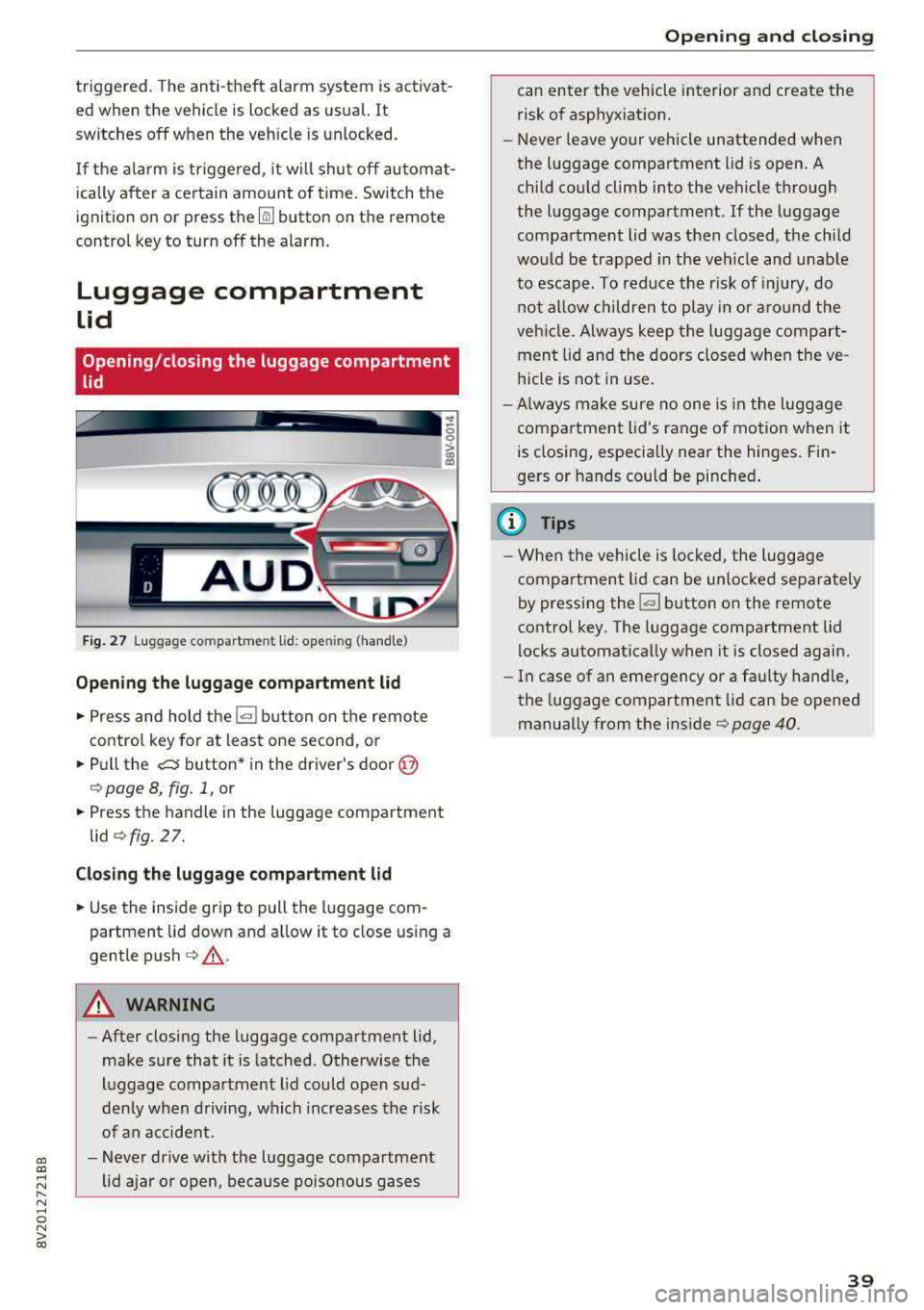
Fig. 27 L uggage compartm ent lid : op enin g (handle)
Opening the luggage compartment lid
• Press and hold the l=I button on the remote
control key for at least one second , or
• Pull the c:s button* in the driver's door @
¢ page 8, fig. 1, or
• Press the handle in the luggage compartment
lid ¢fig. 27.
Closing the luggage compartment lid
• Use the ins ide grip to pull the luggage com
partment lid down and allow it to close using a
gentle push ¢
,&..
A WARNING
-After closing the luggage compartment lid,
make sure that it is latched . Otherwise the
luggage compartment lid could open sud
denly when driving, which increases the risk
of an accident.
- Never drive with the luggage compartment
lid ajar or open, because poisonous gases
Opening and closing
can enter the vehicle interior and create the
risk of asphyx iat ion.
-Never leave your vehicle unattended when
the luggage compartment lid is open. A
child could climb into the veh icle through
the luggage compartment. If the luggage
compa rtment lid was then closed, the child
wou ld be trapped in the veh icle and unable
to escape. To reduce the r isk of injury, do
not a llow children to play in or around the
veh icle. Always keep the luggage compart
ment lid and the doors closed when the ve
hicle is not in use.
- Always make sure no one is in the luggage
compartment lid's range of motion when it
is closing, especially near the hinges . Fin
gers or hands could be pinched.
(D Tips
-When the vehicle is lock ed, the luggage
compartment lid can be unlocked separately
by pressing the
I= I button on the remote
control key . The luggage compartment lid
locks automatically when it is closed again.
- In case of an emergency or a faulty handle,
the luggage compartment lid can be opened
manually from the ins ide ¢
page 40.
39
Page 43 of 400
Child safety lock
App lies to: ve hicles wit h m echan ica l ch ild sa fety locks
The child safety lock prevents the rear doors
from being opened from the inside and the rear
power windows from be operated.
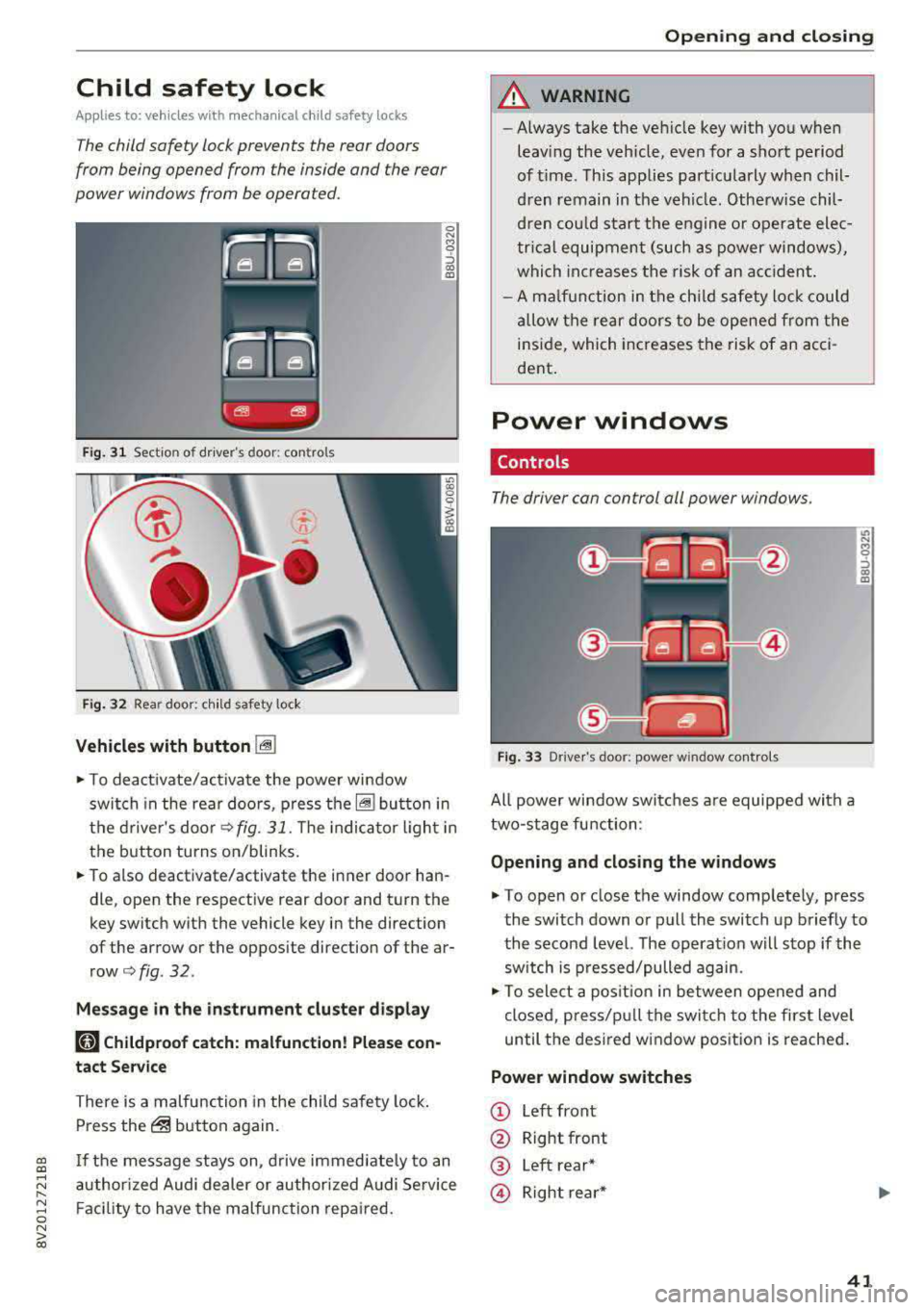
F ig. 31 Section of d river's door: co ntro ls
Fi g. 32 Rear door: c hild safety lock
Vehicles with button I@
0 N M 0 ::, a, !D
~ To deact ivate/ac tivate the powe r wi ndow
switch in the rea r doo rs, p ress
t h e~ bu tton in
the d rive r's
doo r¢ fig. 31. The in dica to r li ght in
the button turns on/blinks.
~ To a lso deactivate/activate the i nner door han
dle, open the respective rear door and t urn the
key switch w ith the vehicle key in the direction
of the arrow or the opposite direction of the ar
row¢
fig. 32 .
Message in the instrument cluster di splay
181 Childproof catch: malfunction! Please con
tact Se rvice
There is a malfunction in the child safety lock .
Press
the@ but ton again.
gi If the message stays on, d rive immed ia te ly to an
;::: a uthor ized Audi de aler or author ized A udi Se rvice
" ~ F aci lity to have the malfunc tion repa ired. 0 N > 00
Open ing and closing
A WARNING
--
- Always take the ve hicle key with yo u when
leav ing the veh icle, even for a sho rt period
of t ime. This applies part icularly when chil
d ren remain in the vehi cle. Otherw is e chil
d re n co uld s tar t th e eng ine o r opera te ele c
t ric al equipment (such as power windows),
whi ch in cr ease s the risk of an a ccident .
- A m alfu nction in the ch ild saf ety lock cou ld
al low t he re a r doors to be ope ned fr om the
i n si de, which incre ases the risk of an acci
dent .
Power windows
Controls
The driver con control oil power windows .
Fig. 3 3 Dr ive r's door: power w indow contro ls
All powe r win dow swi tc h es a re equipped with a
two-stage fu nction:
Opening and closing the w indows
It> N
8 ::, a, !D
~ To open o r close the window comp letely, press
the switch down or pull the switch up briefly to
the second level. The operat ion will s top if the
sw itch is p ressed/pulled again.
~ To sele ct a pos it io n in between opened and
close d, press/p ull the swi tch t o the first level
until t he des ired w indow pos ition is reache d.
Power window switches
CD Left front
@ Right front
® Left rear*
© Right re ar *
41
Page 44 of 400
Opening and closin g
® Central switch* for opening or closing a ll side
windows at the same time
A WARNING
- Always remove the ignition key when you
leave your vehicle, even for a short period of
time. This applies particularly when children remain in the vehicle. Otherwise the chil
dren could start the engine or operate e lec
trical equipment such as power windows,
wh ich increases the r isk of injury. The power
windows continue to function until the dr iv
er's door or front passenger's door has been
opened .
- Pay ca refu l attent ion when closing the win
dows. Pinching cou ld cause serious injuries .
- When locking the vehicle from outside, the
vehicle must be unoccupied since the win
dows can no longer be opened in an emer
gency.
(D Tips
After turning the igni tion off you can still
open and close the windows for approximate ·
ly 10 seconds . The power w indows do not
switch off until the driver's door or front pas
senger's door has been opened.
Convenience opening/closing
App lies to: ve hicles w ith conve nien ce opening/clos ing
-
All of the windows and the panorama glass roof*
can be opened/closed at the same time.
For power top conven ience opening/closing, note
the information
in c:> page 45 .
Convenience opening feature
.,. Press and hold the open butto n[@] on the re
mote control key until all w indows and the pan
o rama g lass roof* have reached the desired po
sition . Or
.,. Hold the key in the driver's door lock unti l all
windows and the panorama glass roof * have
reached the desired pos ition.
42
Convenience closing fe ature
.,. Press the ~ button on the remote cont rol key
until a ll windows and the panorama g lass roof*
are closed
c:> A_ . Or
.,. Applies to: vehicles with convenience key: touch
the sensor on one of the front door handles and
cont inue touching it unti l all of the windows
and the panorama glass roof* are closed. Do
not place your hand in the door handle when
doing this .
.,. Hold the key in the dr ive r's door lock in the lock
position u ntil all w indows and the panorama
glass roof * are closed
c:> A_ .
The function can be sw itched on/off in the Info
ta inment system
c:> poge 38.
A WARNING
- Never close the w indows or panorama glass
roof* ca relessly or in an uncontrolled man
ner, because this increases the risk of injury.
- For secur ity reasons, the windows and the
pano rama g lass roo f* can only be opened
and closed with the remote control key at a
maximum distance of approximately 6.5
feet (2 m) away from the vehicle. Always
pay attention when using
the [@] button to
close the windows and the panorama g lass
roof* so that no one is pinched. The closing
process w ill stop immediately when
the@
button is re leased.
Correcting power window malfunctions
You con reactivate the one -touch up/down func
tion if it malfunctions .
.,. Pull the power window switch until the window
is completely raised .
.,. Release the switch and pull it up aga in fo r at
least one second .
Page 45 of 400
a, a, ..... N
" N ..... 0 N > 00
Panorama glass roof
Description
Applies to: vehicles with panorama glass roof
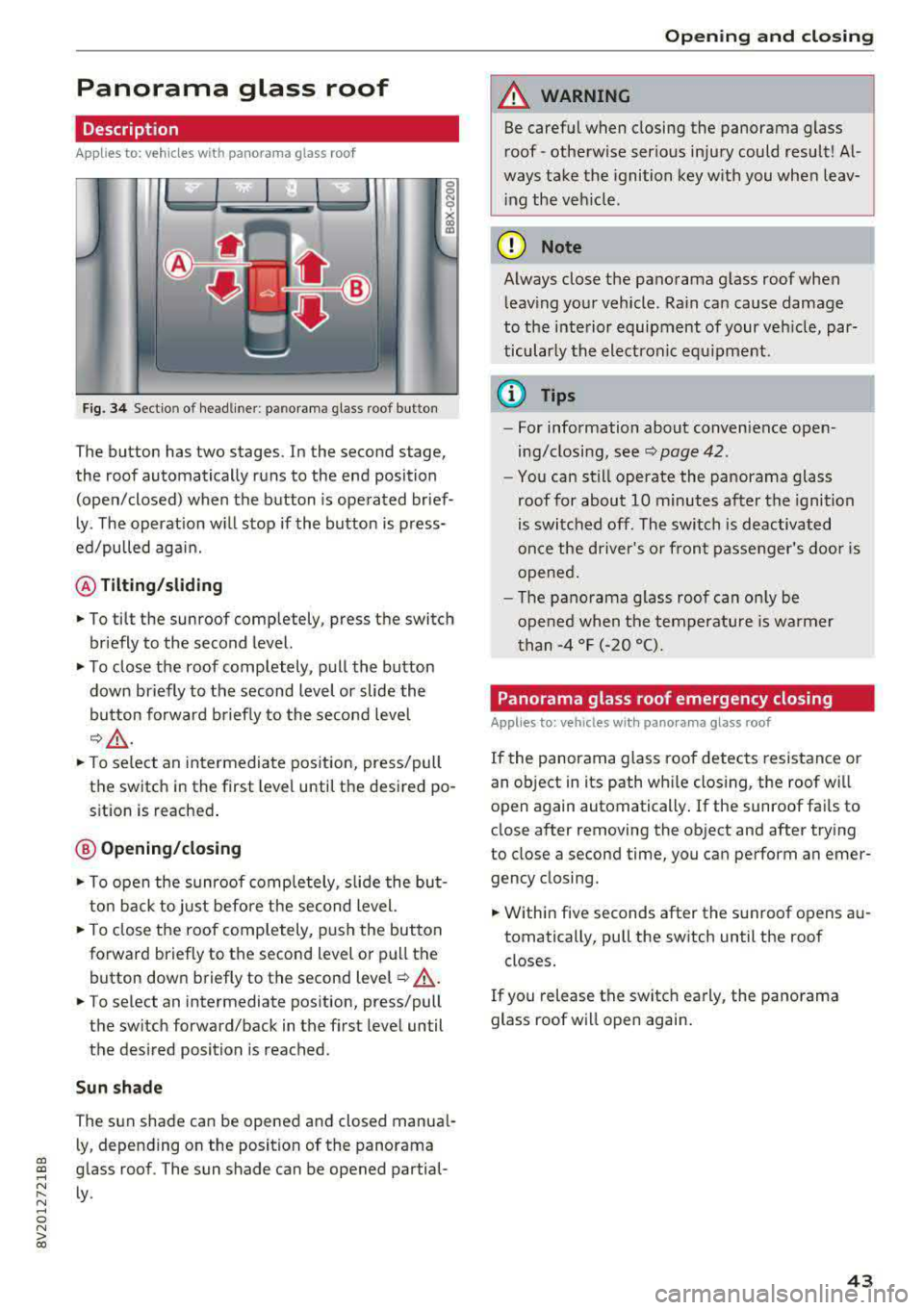
Fig. 34 Sect io n of headliner : p an orama gl ass roo f but ton
The button has two stages. In the second stage,
the roof automatically runs to the end position (open/closed) when the button is operated brief
ly . The operation will stop if the button is press
ed/pulled again.
@ Tilting /sliding
• To tilt the sunroof completely, press the switch
briefly to the second level.
• To close the roof completely, pull the button down briefly to the second level or slide the
button forward briefly to the second level
¢& .
• To select an intermediate position, press/pull
the switch in the first level until the desired po
sition is reached .
@ Opening/closing
.. To open the sunroof completely, slide the but
ton back to just before the second level.
• To close the roof completely, push the button
forward briefly to the second level or pull the
button down briefly to the second level
¢ ,&. .
• To select an intermediate position, press/pull
the switch forward/back in the first level until
the desired position is reached .
Sun shade
The sun shade can be opened and closed manual
ly, depending on the position of the panorama
glass roof . The sun shade can be opened partial
ly .
Open ing and closing
A WARNING
-Be careful when closing the panorama glass
roof -otherw ise serious injury could result! Al
ways take the ignition key with you when leav
ing the veh icle .
(D Note
Always close the panorama glass roof when
leaving your vehicle . Rain can cause damage
to the interior equipment of your vehicle, par
ticularly the electronic equ ipment.
{D Tips
- For information about convenience open
ing/closing, see
¢ page 42.
-You can still operate the panorama glass
roof for about 10 minutes after the ignition
is switched off . The switch is deactivated
once the driver's or front passenger's door is
opened.
- The panorama g lass roof can only be
opened when the temperature is warmer
than
-4 °F (-20 °().
Panorama glass roof emergency closing
Applies to: vehicles wi th pano rama glass roof
If the panorama glass roof detects resistance or
an object in its path wh ile closing, the roof will
open again automatically . If the sunroof fails to
close after removing the object and after trying
to close a second time, you can perform an emer gency closing .
.. Within five seconds after the sunroof opens au
tomatically, pull the switch until the roof closes.
If you release the switch early, the panorama
glass roof will open again .
43