ECO mode AUDI S3 SEDAN 2017 Owner's Manual
[x] Cancel search | Manufacturer: AUDI, Model Year: 2017, Model line: S3 SEDAN, Model: AUDI S3 SEDAN 2017Pages: 400, PDF Size: 67.32 MB
Page 115 of 400
CXl CXl .... N ,.__
N .... 0 N > 00
., To activate the desired timer, conf irm the set
ting with the control knob . A./ appears in the
box .
Preferr ed charg ing t ime
You can spec ify a preferred charging time for the
programmed timer, for example if yo u wou ld like
to use the off-peak rate.
., Se lect : IMENUI button> V ehicl e> left cont rol
button >
C ha rge > right contro l button > Pro
gr am tim er.
Power s ave mode
Powe r save mode is automatically switched o n
when the contro l unit has not been operated for
mo re than one m inute. The
L E D @ ~ page 111,
fig. 121 stays on. All other d isplays turn off.
.. To switch power save mode on or off, press the
~button @ ~page 111, fig. 121 .
Power save mode ends automatically when the
vehicle charging connector is plugged into the ve
h icle.
The high-voltage battery is charging when the
LED @ blinks.
(D Tips
-Air condit ioning and heating is powered
electrically if you select climate control us
i ng the charging timer . This may also be
used in confined spaces such as garages .
-Using the auxiliary air conditioning wh ile
charging can also reduce the charge level of
the high-vo ltage battery.
-The high-voltage battery also charges in
power save mode .
-If the charging process is in progress, it will
not be interrupted when power save mode
switches on.
-The charging process can be interrupted at
any time . Press the active button on the ve
hicle to do
this ~ page 111, fig. 122.
-The cl imate control output wh ile charging
depends on the capacity of the electrical
connection . Additional information on cl i
mate control can be found under
~ page 118.
e-tron
Setting the charging power level
Applies to: vehicles with plug -in hybrid drive
The cont rol un it automatically recognizes the
vo ltage and the available current strength. You
can set whethe r you wou ld like to charge w ith the
f ull or half of the charging power .
., Press the I OKI@ ~ page 111, fig. 121 butto n
on the control unit .
., Enter the PIN if necessary.
., PO WER and SET PIN appear in the disp lay
fie ld .
., Select POWER with the a rrow button ©
., Press the I OK ! button @.
., The charging power disp lay appears. The cur
rent set value (50% or 100%) is marked with a
frame .
., If necessa ry, change the setting using the ar
row button © to move downwa rd or upwa rd.
., Press the I OK I button @.
(D Tips
-If a household socket is used for the charg
ing process, the cha rging power level is au
t oma tically set to 100%. If m ultip le electri
cal consumers are connected to a circu it,
the charging power may be limited to 50%
when charging with a household socket in
order to relieve the load on the electrical in
stallation.
-If an industrial socket is used for the charg
ing process, the charging power level is au
tomatically set to 50%. To rece ive the maxi
mum charging power, the value must be set
to 100% .
-A selected value remains set until the power
cable is connected again .
113
Page 125 of 400
a, a, ..... N
" N ..... 0 N > 00
Assistance systems Electronic speed limiter
Applies to: vehicles with electronic speed lim iter
Your vehicle may be factory equipped with tires
that are rated for a maximum speed of 130 mph
(210 km/h). This is less than the maximum speed
of your vehicle. To reduce the risk of sudden tire
failure and loss of control if the vehicle is operat
ed at excessive speeds, your vehicle also has an
electronic speed lim iter . The electronic speed
limiter prevents your vehicle from going faster
than the tir e speed rating. For more information
¢page 335.
If the engine control unit receives faulty vehicle
road speed s ignals, the Malfunction Indicator
L amp (MIL)
II! will illuminate . If this occurs,
contact the nearest authorized Audi dealer for
assistance .
& WARNING
Always observe the posted speed limits and
adjust your speed to suit prevailing road, traf
fic and weather conditions. Never drive your
vehicle faster than the max imum speed rat ing
of the tires installed.
Speed warning system
Applies to: vehicles with speed warning system
The speed warning system helps you to stay be
low a specified maximum speed that can be set,
changed or deleted in the Infotainment system .
The speed warning system warns you if you are
exceeding the maximum speed that you have set.
A warning tone will sound as soon as your speed
exceeds the stored value slightly . The
101 (USA
models) /
[01 (Canada mode ls) indicator light
and the corresponding message appear in the in
strument cluster display at the same time. The
[OJ (USA models)/ (•j (Canada models) indicato r
light and the message turn
off when the vehicle
speed drops below the stored maximum speed.
Setting a threshold is recommended if you would
like to be reminded when you reach a certain
maximum speed. Situations where you may want
to do so include driving in a country with a gener-
Assistance systems
al speed limit or if there is a specified maximum
speed for winter tires.
Setting the warning threshold
• Select in the Infotainment system: I MENU ! but
ton
> Vehicle > left control b utton > Driver as
sistance
> Speed warning > Manual.
(0 Tips
Regardless of the speed warning system, you
shou ld always monitor your speed using the
speedometer and make sure you are following
the lega l speed limit.
Cruise control system
Switching on
Applies to: vehicles wit h cruise control system
The cruise control system makes it possible to
drive at a constant speed starting at 15 mph (20kmlh) .
0
f
~
0
Fig. 127 Operat ing lever: cruise control system
i;:i N 0 > ... m
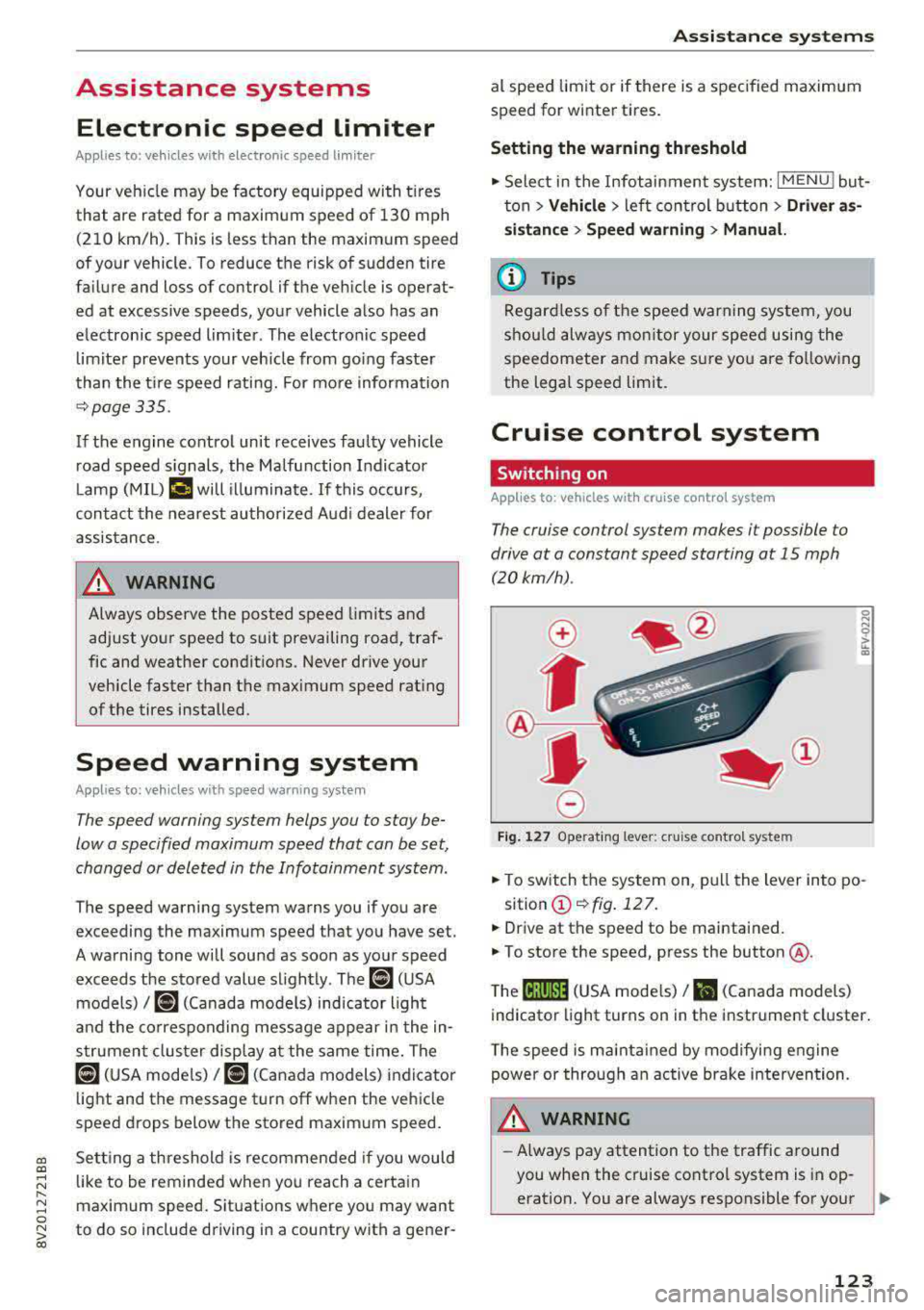
• To switch the system on, pull the lever into po-
sition
(D ¢fig . 127.
• Drive at the speed to be maintained.
.. To store the speed, press the button @.
T he
(ij;jl)~1i (USA mode ls)/ Bl (Canada models)
indicator light turns on in the instrument cluster.
T he speed is maintained by modifying engine
power or through an active brake intervention.
.i\, WARNING
-Always pay attention to the traffic around
-
you when the cruise control system is in op
eration. You are always responsible for your
..,
123
Page 127 of 400
CXl CXl .... N ,.__
N .... 0 N > 00
Switch ing the ign ition o ff will erase the stored
speed .
Switching off automatically
[ij;{ij~i~ (USA model s)11) (Canada models )
Speed control system : currently unavailable.
See owner's manual
The c ruis e contro l syst em was a utomat ica lly
turned off be ca use the system has dete cted a
mal funct ion th at is imp air in g t he cr uise con trol
f u nction. Try switc hing t he cr uise con trol system
on again la ter .
A WARNING
You s hould only resume the stored s peed if it
is not too high for exist ing traffic condit ions.
Otherwise you can increase the r isk of an acci
de nt.
Lap timer
Introduction
Appl ies to : vehicles with lap t imer
You can measure and analyz e lap times with the
lap tim er in the display.
Opening the lap timer
.. Open the first Vehicle tab (t rip computer) using
the
l <1 1> I butto n on the mult ifunct ion steer ing
wheel.
• Applies to: vehicles with analog instrument
cl uster: Press
thP l== I button on the m ultifu nc
t io n s teer ing whee l an d sele ct
Lap timer in t he
me nu.
• Applies to: vehicles with A udi virtual cockpit: on
t h e m ultif unct io n steer ing whee l, select: left
contro l button
> Lap times.
Operating the lap timer
• O n t he mult if u nct io n steer ing whee l, t urn t he
l eft thumbwhee l
0 ¢ page 13 or (D ¢ page 16
until t he desired menu i tem is dis played in the
inst rument cluste r.
• Press the left thumbwhee l to confirm the selec
t ion.
Assistance systems
A WARNING
Your focus shou ld always be on dr iv ing you r
vehicle safe ly . As the driver , you have com
pl ete res pons ibility for safety in traff ic . O nl y
use the functi ons such as the la p tim er in su ch
a way th at yo u always maint ain com plete con
t rol over yo ur vehicle in all traffic situations.
(D Tips
You can retr ieve informa tion from t he tr ip
com puter while t he la p timer stopwa tch is
run nin g.
Lap times and timing
Applies to: vehicles with lap t imer
R eq uireme nt: t he lap tim er mus t be ope n
¢page 1 25.
Timing laps
-
.. To s ta rt tim ing, select Lap 1 -press OK or Start
lap 1
in t he m enu .
• App lies to: veh icles with Audi virtual cockpit: to
s t ar t t im ing au tom atic ally w hen yo u start dr iv
in g, selec t
Start lap 1 by driving off or Start by
driving off
i n the menu .
• To measure t he lap time, select New lap -press
OK or New lap
in the menu . This sta rts tim ing
the next lap at the same t ime.
A fter completing , the difference betwee n the
l ast lap and the p revious best lap t ime will be in
dicated with
a" -"/ . or "+ "/ • .
Pausing timing and displaying a split time
• To i nsert a pause m , sele ct Pause in the menu .
• To cont in ue timing, se lect Press OK to resume
or Resume in the menu.
• To display a sp lit t ime, select Split time in the
menu. The split
time [~] appears for approx i
mate ly 10 seconds in the instr ument cluster.
The tim ing of the current lap continues .
Resetting tim ing
• Using the mult ifunct io n steer ing whee l, select
Reset or Reset times in the menu.
125
Page 146 of 400
Assistance systems
Suspension control (Audi magnetic ride)*
Suspension cont rol uses senso rs to recor d info r
mat io n regarding steering moveme nts, br aking
an d accelerat ion operat ions by the drive r, road
surface, d riving speed, and load. With Audi drive
select you can adjust the s uspension contro l to
sporty (dynamic), comfortable (comfort) or bal
anced (auto) .
Steering
The stee ring adapts in te rms of stee ring assis
tance. The re are differe nt modes
c::> page 144.
Indirect steering that moves easily as in com fort
mode is especially su ited to long drives on a high
way . The dynamic mode p rovides sporty, d irect
s teer ing .
For ve hicles w ith progressive steering * the steer
ing performance is more agi le.
Audi adaptive light*
The illumination on curves in ada ptive lig ht is
a d apted to the selected mode.
Audi adaptive cruise control*
The behavior when a ccele ra ting can be adjus ted
fr om com fort able to sporty, depe nding on the
d rive select mode . Ad aptive cru ise cont rol a lso
res ponds to the driving behavior of the veh icle
ahead in a mo re conse rvative o r spo rty manner .
(D Tips
- In so me mode ls, t he maxim um vehicle
speed can on ly be reache d in the auto an d
d ynam ic modes .
- T he S selec to r l eve r posit ion autom atically
e n gages if t he dynam ic mode is selecte d.
Adjusting the Individual mode
· Selecting the driving mode
Applies to: vehicles wit h Audi drive select
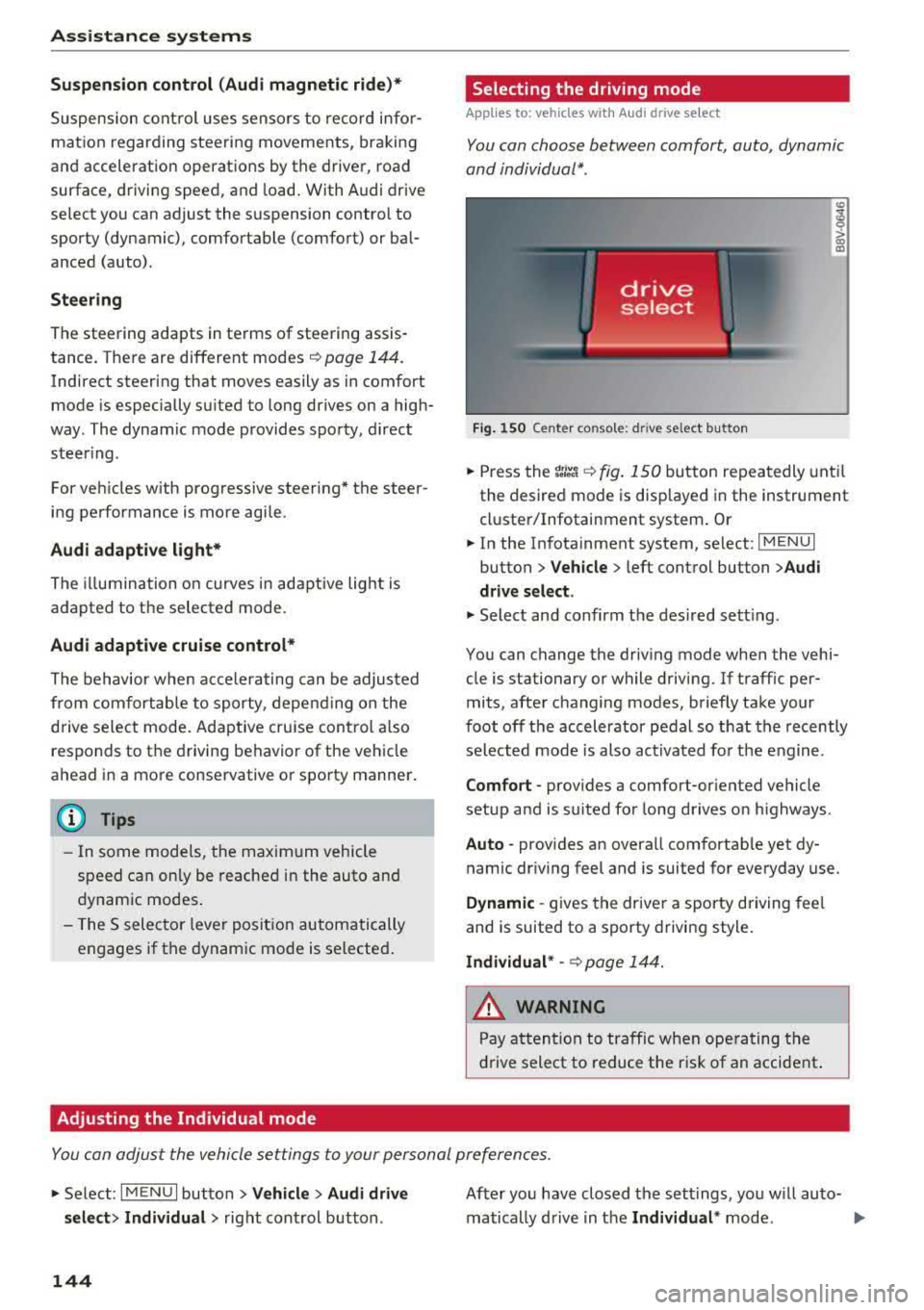
You con choose between comfort, auto , dynamic
and individual* .
> a) m
Fig. 150 Ce nte r co nsole: d rive se lect b utt on
.,. Press the tJi~a c::> fig . 150 button repea tedly unt il
the desired mode is disp layed in the instrument
cl uste r/Infotainment system . Or
.,. In the In fota inment system, se lect: I MEN U I
button > Vehicle > left cont rol button > Audi
drive select .
.,. Select and confirm t he des ired se tting.
You can c hange the driv ing mode whe n the vehi
cle is stationary or while driving. If traff ic per
mits, afte r changing modes, briefly take your
foot off t he acc elerator pedal so t hat the recently
se lected mo de is also act ivated fo r th e e ngine .
Comfort -prov ides a comfort-or iented vehicle
setup a nd is s uited fo r long drives o n highways .
Auto -provides an overa ll comfortab le yet dy
namic dr iv ing feel and is suited for everyday use.
Dynamic -gives the drive r a sporty driving fee l
and is suited to a spo rty driving style.
Individual * -c::> page 1 44.
_& WARNING ~
Pay att entio n to traffi c when ope rating t he
dr ive select to redu ce the r is k of an accident .
Yo u con adjust the vehicle settings to y our personal preferences .
.. Se lect: IM ENU I button> Vehicle > Audi drive
select > Individual >
right cont rol but ton .
144
After yo u have closed t he sett ings, yo u w ill auto
matically drive i n t he
Individual * mod e.
Page 155 of 400
CXl CXl .... N ,.__
N .... 0 N > 00
-There is no vehicle stabilization when ESC/
ASR are switched off.
(D Tips
-ESC/ASR cannot be switched off or sport
mode cannot be switched on if the cruise
control system * or the adaptive cruise con
tro l* is sw itched on.
-Malfunctions in the Audi magnetic ride *
may make it imposs ible to switch the ESC/
ASR off or to switch sport mode on.
Brakes
New brak e pad s
New brake pads do not achieve their full braking
effect during the first 2S0 mi (400 km) . They
must be "broken in" f irst. However, you can com
pensate for the slightly reduced braking force by
pressing firmly on the brake pedal. Avoid heavy
braking during the break-in per iod.
Wear
B rake pad
wear depends largely on the way the
veh icle is driven and on operat ing cond itions.
This is especially true if you are driving frequently
in the c ity and on curves or with a sporty driving
style.
Operat ing no ise
Noises may occur when braking depending on the
speed, braking force and outs ide cond itions such
as temperature and humidity .
Effect of wat er and road salt
In certain situations, for example after driving
through water, in heavy rain, after overnight con
densation or after washing your car, the braking
effect can be reduced by moisture or ice on the brake rotors and brake pads . The brakes must be
"dr ied" first w ith a few careful brake applica
tions .
At higher speeds and with the windsh ield wipers
turned on, the brake pads press against the brake
rotors for a short amount of time. Th is action,
which is not felt by the d river , happens at regular
Intellig ent Technology
interva ls and ensures a better reaction time for
the brakes in wet weather.
T he brak ing effect ca n also be reduced if yo u are
driv ing on sal ted roads and yo u do not app ly the
brakes for long per iods o f time. The layer o f salt
on the brake rotors and pads must be worn off
first when the brakes are applied.
Corrosion
Leav ing the veh icle pa rked for long periods of
time, low mileage and avoiding heavy b raking
can contribute to corrosion on the brake roto rs
and to dirty brake pads .
If you usua lly avoid heavy bra king or if there is
corrosion present, occasiona l heavy brak ing at
high speeds is recommended to clean the brake
rotors and
pads ¢,& .
Brake system malfunction
If you notice that the bra ke pedal travel has sud
denly inc re ased, then a br ake circuit in the dua l
c ircuit b rake system may have malfunctioned.
Drive to an authorized Audi dealer or authorized
Audi Service Facility immediate ly to have the
problem corrected. On the way there, drive with
reduced speed and keep in mind that you will
need a longer distance to stop and you will need
to press the brake pedal harder.
L o w bra ke fluid le ve l
When the brake fluid level is low, malfunctions in
the brake system may occur. The brake fluid level is electronically monitored.
Brake bo oster
The brake boos ter amplifies the p ressure you ap
ply to the brake pedal. It on ly operates whi le the
engine is running or when the ignition is switched
on (p lug-in hybrid dr ive*) .
A WARNING
-Only app ly the brakes for the purpose of
cleaning the brake system when road and
traffic cond itions permit. You must not en
danger other road users. This increases the
risk of an accident.
153
Page 210 of 400
Navigation
Alternative routes
Applies to: ve hicles w ith navigation sys tem
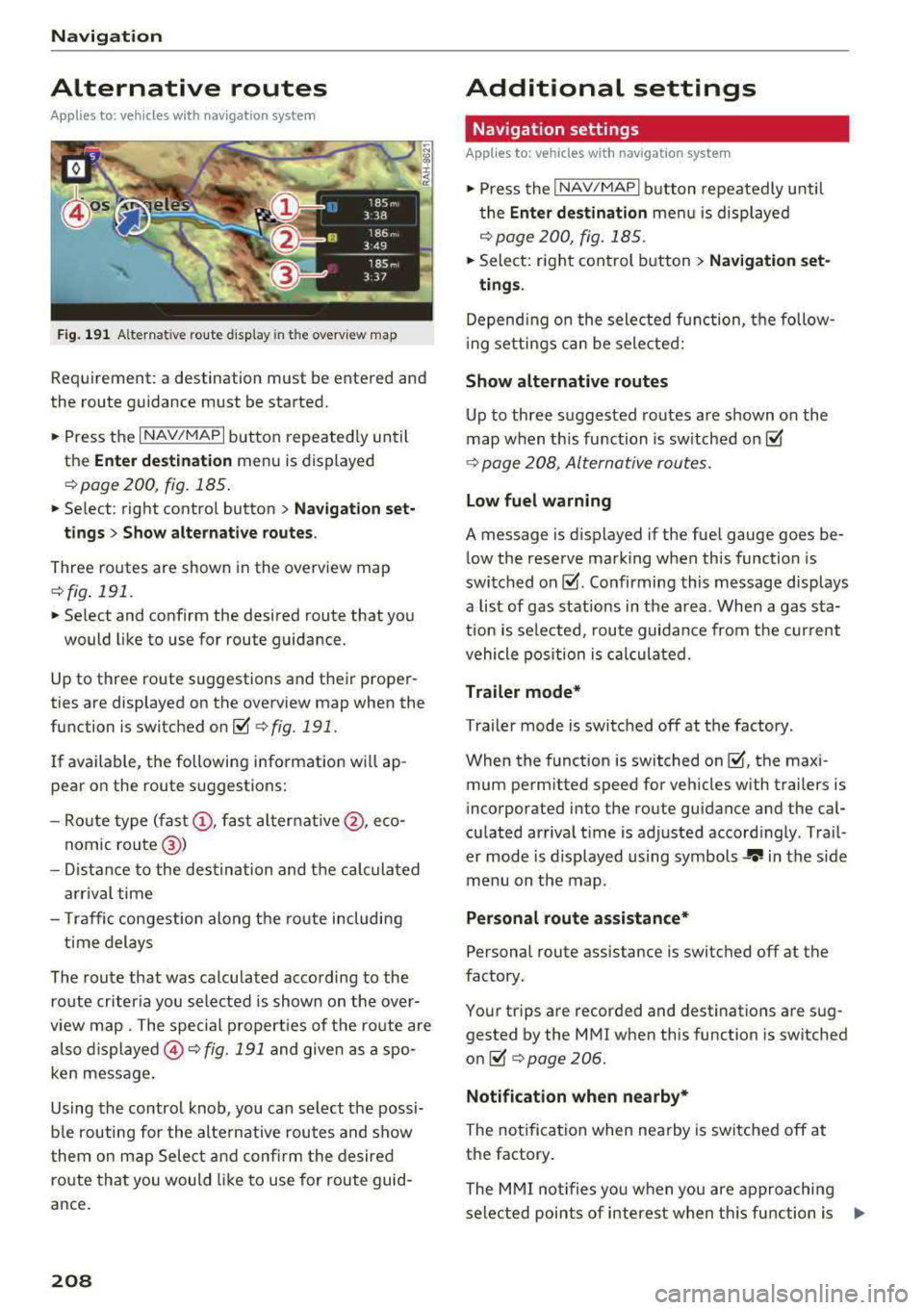
F ig. 191 Alternat ive ro ute disp lay in t he overv iew map
Requirement : a destination must be entered and
the route guidance must be started.
.. P ress the I N AV/MAPI button repeated ly un til
the
Enter destination menu is displayed
r=;, page 2 00, fig. 185 .
.. Select : right contro l button > Navigat ion set-
t ings > Show alternative routes .
Three routes are shown in the overview map
¢fig. 191.
.. Select and confirm the desired route that yo u
would like to use for route guidance.
Up to three route suggestions and their proper
ties are displayed on the overview map when the
function is switched
on~ r=;, fig. 191.
I f available, the following information will ap
pear on the route s uggestions:
- Ro ute type
(fast @, fast a lter nat ive @, eco
nomic
r oute @)
-Dista nce to the des tin ation and t he ca lculated
a rrival time
- T raffic congestion along t he ro ute including
t ime delays
The route that was calculated according to the
ro ute criteria you selected is show n on the over
view map . The special p rope rt ies of t he ro ute are
al so
displayed @¢ fig. 191 and given as a spo
ken message .
Using the contro l knob, you can se lect the possi
b le rou ting for the alte rnative routes and show
t hem on m ap Selec t and confi rm the desire d
route tha t you woul d like to use for route guid
ance .
208
Additional settings
Navigation settings
App lies to: vehicles with navigation sys te m
.. Press the I NAV/MAPI b utton repeatedly u nti l
t he
Enter de stinat ion me nu i s displaye d
¢page 200, fig.18 5 .
.. Sele ct: right con trol b utton> Navigat ion set-
tings .
Depend ing o n the selected fu nction, the follow
i ng settings c an be sele cte d:
Show alternative routes
Up to three suggested routes a re shown o n the
map when th is fu nction is sw itched
on~
r=;, page 208, Alternative routes.
Low fuel warning
A message is d is p layed if the fuel gauge goes be
low the rese rve marking when this function is
swi tched
on~ -Confirming this message displays
a list of gas stations in the a rea . When a gas sta
t ion is se lected, route guida nce from the cur rent
vehicle position is c alcula ted.
Trailer mode*
Tra ile r mode is switched off at the factory .
When the funct ion is switched
on ~-the max i
mum perm itted speed for vehicles with trailers is
incorporated into the route guidance and the cal
cu lated arriva l t ime is adjusted accord ingly . Trai l
er mode is displayed using symbols
-r.'11 in the s ide
m enu on the map .
Personal route assistance*
Personal route assistance is switc hed off at the
factory.
You r trips a re recorded and destinations are sug
gested by the MMI when th is function is sw itched
o n ~ r=;, page 206.
Notificat ion when nearby*
The no tifica tion when nearby is switched off at
the factory .
The M MI no tifies you w hen y ou are a pproachi ng
selected points of interest w hen th is fu nction is
...
Page 240 of 400
Media
Problem Solution
Wi -Fi audio pl ayer* :
audio play- Aud io playback interference can occur on some ce ll phones if the
back interference . Internet connectilon in the vehicle was not established through
the SIM card reader on the MMI control panel and the
mob ile da-
ta
option on the cell phone is switched o n. Deactivate the mobile
dat a
option on your cell phone.
Jukebox *: tracks on the imported When importing
play lists, a ll of the files themse lves must be im-
playlist are g rayed out . ported.
Jukebox *: imported tracks ca nnot If you canno t find impo rted trac ks in t he media center, they may
be played o r fo und . not be supported . Only copy s upported fi les
~ page 235 to the
Juk eb ox .
Wi-Fi aud io pl ay e r*: multiple de- Close the Audi MMI connect app on the connected dev ices (for ex-
vices a re connected to the Wi-Fi ample, smartphones) that a re not being used as the Wi -F i audio
hotspot . A media player (such as a p laye r*. L ikewise, close the UP nP server apps or the media perm is-
smartphone) appears as the sions o n the integrated U PnP/DLNA server. Connec t the desi red
sou rce and cannot be change d. dev ice as a Wi -Fi
:aud io playe r* c::> page 226 .
Online med ia *: connect io n fa iled To establish a connection to the MMI, the MMI connection switch
between the M MI and the
Audi must be switched on in the Audi MMI connect app status scree n.
MMI conn ect app .
Audi music inte rface: contents Reset the Media settings to the factory default settings
that are changed on a mob ile de-
c::> page 242.
vice connected to the Audi music
interface are not displayed in the
med ia ce nter.
Bluetooth audio player *: inte rfer- Playb ack in terference can occur when us ing the Bluetooth audio
ence with track disp lay and au dio player if a music player app from a thi rd party provider is open .
playback. Au
di recommends using the integrated media p layer on your Bl ue-
tooth dev ice (suc h as a smartphone).
Wi-Fi hotspot *: your Wi-Fi device M ake sure the network optim izati on fun ctions are sw itched off in
is d iscon necte d from t he W i- Fi t he Wi-Fi setti ngs or in t he network setti ngs for your W i- Fi dev ice.
hotspot . For add itional info rm ation refer to the user guide for your Wi- Fi
dev ice .
Audi music interface : audio play- Make sure the USB mode MTP is selected in the sett ings on your
back thro ugh the connec ted mo- mob ile device .
bile device is not possib le.
• > A pp lies o nly to M TP dev ices . Doe s no t app ly to Ap ple dev ices and USB mass storage devices .
238
Page 244 of 400
System settings
switched on~, you can say new commands dur
ing announcements. You do not need to wait for
the signal tone (beep) during an announcement.
When the function is switched off
0, you need to
wait for the signa l tone (beep) to say a new com
mand .
Volume: you can adjust the volume of the
prompts by turning the control knob.
Speech training (only when the vehicle is station
ary): you can adapt the voice recognition system
to your voice or pronunciation in order to improve
the system's ability to recogni ze your speech. In
d iv idual training is comprised of 20 speech en
tr ies that consist of commands and sequences of
numbers . You can delete the programmed voice
training with the
Reset individual speech train
ing
function.
Display brightness
Display brightness:
you can adjust the bright
ness of the Infotainment system display by turn
ing the control knob .
Factory settings
The following functions can be reset to the facto
ry default settings :
-Sound settings
- Radio
- Media settings
-Jukebox*
- Directory
- Telephone
- Bluetooth and Wi-Fi*
- Navigation settings*
- Navigation and online memory*
- Speech dialog system*
- Message settings*
- Apps *
- Tool tips
- Audi connect*
- Audi smartphone interface*
You can select the desired functions individually
or all at once with the option
Select all entries .
Select and confirm Restore factory settings.
242
(D Tips
-Make sure that not only the settings were
deleted but also the stored data, if applica
ble .
- If you reset the
Navigation and on line
memory* , Apps* or Audi connect*
to the
factory default settings, the system auto matically restarts after approximately 20
seconds . The Infotainment system display
will be black for several minutes when re
sta rting.
- Please note that the voice recognition sys
tem* is not available in Cabriolets.
Connection manager
Introduction
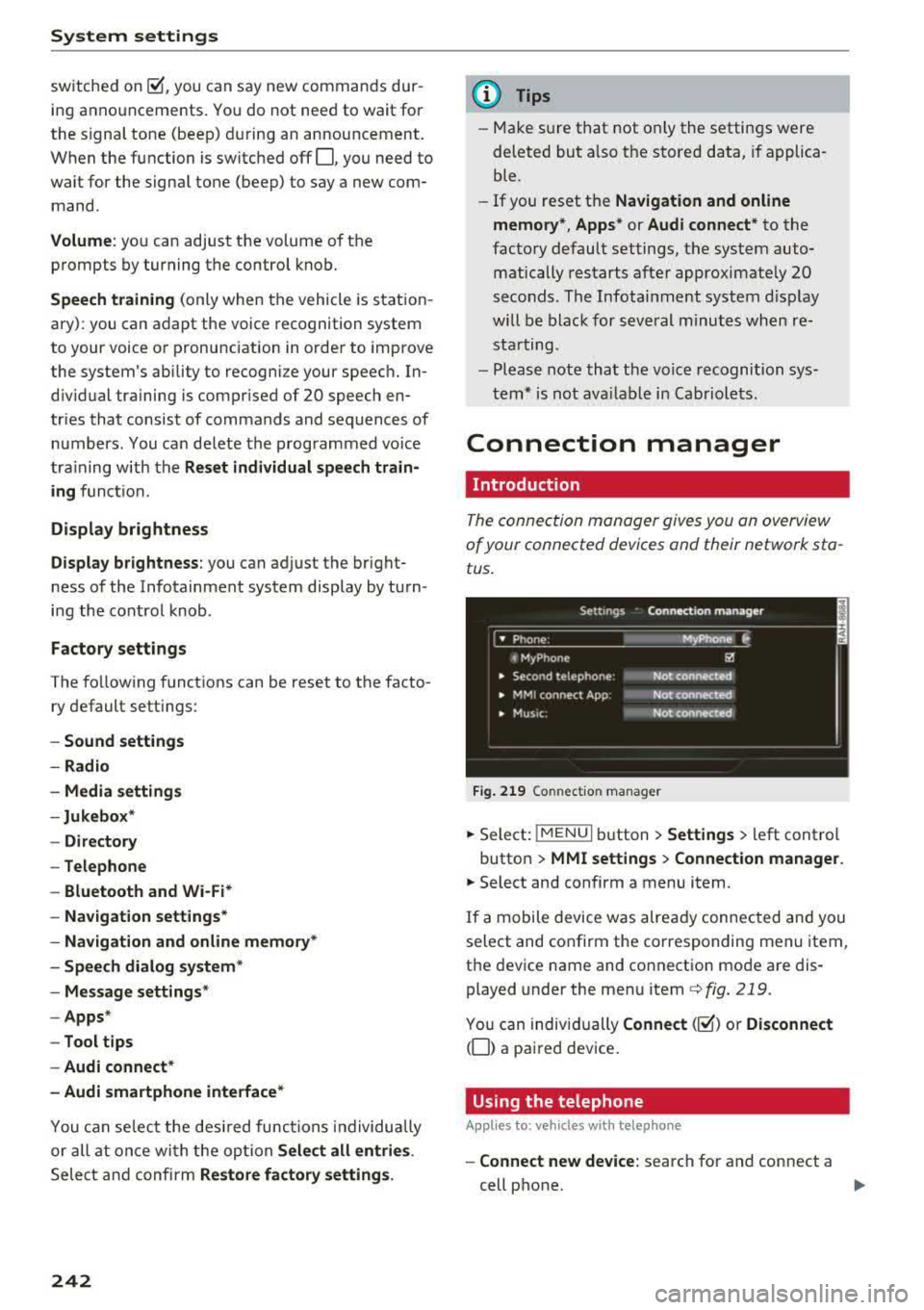
The connection manager gives you an overview
of your connected dev ices and their network sta
tus .
Fig. 219 Connect ion manager
.. Select: !MENU I button> Settings > left control
button >
MMI settings > Connection manager.
.. Select and confirm a menu item.
If a mobile device was already connected and you
select and confirm the corresponding menu item,
the device name and connect ion mode are dis
played under the menu item
c::>fig. 219.
You can individually Connect(~) o r Disconnect
(0) a paired device.
Using the telephone
Appl ies to: vehicles with telephone
-Connect new device: search for and connect a
cell phone.
..,.
Page 284 of 400
Airbag syste m
seat into its rearmost position in the seat's
fore and aft adjustment range, as far away
from the airbag as possible. The backrest must be adjusted to an upright position.
Make sure that the
PA SSEN GER AIR BAG
OFF
light comes on and stays on all the time
whenever the ignition is switched on.
,& WARNING
- If the PA SSENGER AIR BAG OFF light does
not go out when an ad ult is sitting on the
front passenger seat after taking the steps
described above, make sure the adu lt is
properly seated and restrained at one of the
rear seat ing positions.
- Have the airbag system inspected by your
Audi dealer before transporting anyone on
the front passenger seat.
(D Tips
If the capacitive passenger detection system
determines that the front passenger seat is
empty, the fronta l airbag on the passenger
side will be turned off, and the
P ASSE NGER
A IR BAG OFF light will stay on.
Repair , care and disposal of the airbags
Parts of the airbag system are installed at many
d ifferent places on your Aud i. Install ing, remov
ing, servic ing or repa iring a part in an area of the
veh icle can damage a pa rt of an airbag system
and prevent that system from working properly
in a co llision.
There are some important things you have to
know to make sure that the effectiveness of the
system w ill not be impaired and that discarded
components do not cause injury or pollute the
environment .
,& WARNING
Improper care, servicing and repair proce
dures can increase the r isk of personal injury
and death by preventing an airbag from de
ploying when needed or deploying an airbag
unexpectedly:
282
- Never cover, obstruct, or change the steer
ing wheel horn pad or airbag cover or the in
strument panel or modify them in any way.
- Never attach any objects such as cup holders
or telephone mountings to the surfaces cov
ering the a irbag un its.
- For cleaning the horn pad or instrument
panel, use only a soft, dry cloth or one mois
tened w ith plain water. Solvents or cleaners
could damage the airbag cover or change
the st iffness or strength of the material so
that the airbag cannot deploy and protect properly.
- Never repair, adjust, or change any parts of
the airbag system.
- All work on the steering wheel, inst rument
panel, front seats or e lectr ica l system ( in
cluding the instal lation of a udio eq uipment,
cellular telephones and CB radios, etc.)
m ust be performed by a qualified technician
who has the training and specia l equipment
necessary.
- For any work on the airbag system, we strong ly recommend that you see your au
thorized Audi dealer or qualified workshop.
- Never modify the front bumper or parts of
the vehicle body.
-Always make sure that the side airbag can inflate without interference:
- Never install seat covers or replacement upholstery over the front seatbacks that
have not been specif ica lly approved by
A udi.
- Never use additional seat c ushions that
cover the areas where the side airbags in
flate.
- Damage to the orig inal seat cove rs or to
the seam in the area of the s ide airbag
module mus t always be repai red immedi
ate ly by an authorized Audi dealer.
- The a irbag sys tem can deploy on ly once. Af
ter an airbag has been deployed, it m ust be
replaced with new replacement parts de
signed and approved especia lly for your
Audi model version . Replacement of com
plete airbag systems or airbag components
must be performed by qua lified workshops
only . Make sure that any airbag service
Page 297 of 400
CXl CXl .... N r--N .... 0 N > 00
Child restraints and Advanced front airbag
system
Regardless of the child restra int that you use,
make sure that it has been certified to meet Safe
ty Standards and has been certified by its manu
facturer for use with an airbag. Always be sure
that the child restraint is properly installed at
one of the rear seating positions. If in exception
al c ircumstances you must use it on the front
passenger seat, carefully read all of the informa
tion on child safety and Advanced Airbags and
heed all of the applicable WARNINGS. Make cer
tain that the child and child restraint are correct
l y recognized by the capacitive passenger detec
tion system in the front passenger seat, that the
front passenger airbag is turned off, and that the
airbag status is always correctly signaled by the
PASSENGER AIR BAG OFF light.
Many types and models of child restraints have
been available over the years, new models are in
troduced regularly incorporat ing new and im
proved designs and older models are taken out of
product ion. Child restraints are not standardized.
Ch ild restraints of the same type typically have
d ifferent weights and s izes and different "foot
p rints", the siz e and shape of the bottom of the
chi ld restraint that sits on the seat, when they
are installed on a vehicle seat. These differences
make it virtually impossible to certify compliance
with the requirements for advanced airbags with
each and every child restraint that has ever been
sold in the past or will be sold over the course of
the useful life of your veh icle.
For this reason, the United States National High
way Traffic Safety Administration has published a
list of specific type, makes and models of child
restraints that must be used to cert ify compli
ance of the Advanced Airbag System in your vehi
cle with the suppression requirements of Federal
Motor Vehicle Safety Standard 208. These child
restraints are:
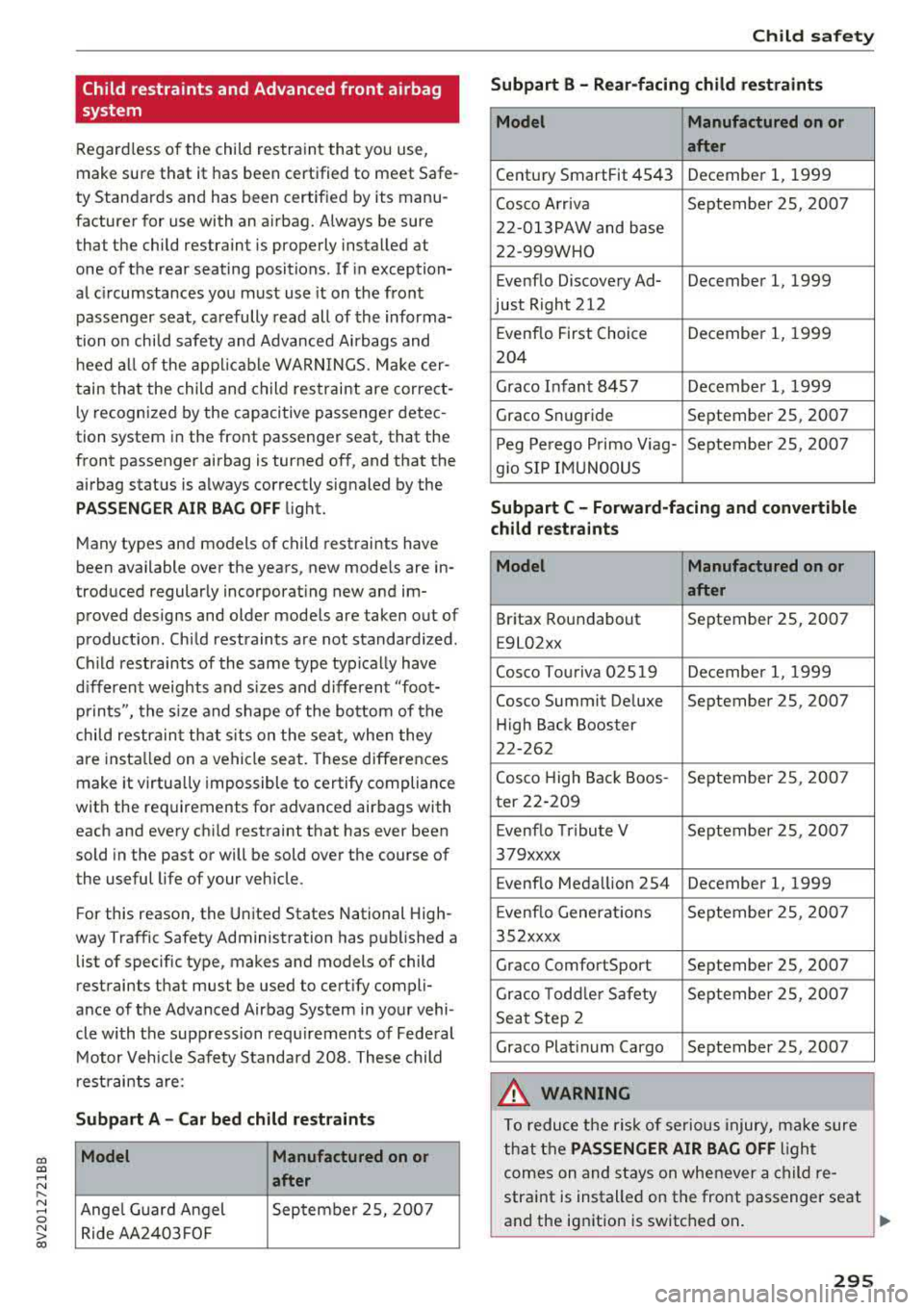
Subpart A -Car bed child restraints
Model Manufactured on or
after
Ange l Guard Angel September 2S, 2007
Ride AA2403FOF
Child safety
Subpart B - Rear-facing child restraints
Model Manufactured on or
after
Century SmartFit 4543 December 1, 1999
Cosco Arriva September 25, 2007
22-013PAW and base
22-999WHO
Evenflo Discovery Ad- December 1, 1999
just Right 212
Evenflo First Choice December 1, 1999
204
Grace Infant 8457 Decembe r 1, 1999
Grace Snugride September 25, 2007
Peg Perego Primo Viag- September 25, 2007
g io SIP IMUNOOUS
Subpart C - Forward-facing and convertible
child restraints
Model Manufactured on or
after
Britax Roundabout September 25, 2007
E9L02xx
Cosco Touriva 02519 December 1, 1999
Cosco Summit De luxe September 25, 2007
High Back Booster
22-262
Cosco High Back Boos- September 25, 2007
ter 22-209
Evenflo Tribute V September 25, 2007
379xxxx
Evenflo Meda llion 254 December 1, 1999
E venflo Generations September 25, 2007
352xxxx
Grace ComfortSport September 25, 2007
Grace Todd le r Safety September 25, 2007
Seat Step 2
Grace Plat inum Cargo September 25, 2007
A WARNING
To reduce the risk of serious injury, make sure
that the
PASSENGER AIR BAG OFF ligh t
comes on and stays on whenever a child re
straint is installed on the front passenger seat
and the ignition is switched on .
..,.
295