check engine light AUDI S3 SEDAN 2017 Owner's Manual
[x] Cancel search | Manufacturer: AUDI, Model Year: 2017, Model line: S3 SEDAN, Model: AUDI S3 SEDAN 2017Pages: 400, PDF Size: 67.32 MB
Page 359 of 400
a, a, ..... N
" N ..... 0 N > 00
_& WARNING
You or your passengers could be injured while
changing a wheel if you do not follow these
safety precautions:
- If you have a flat tire, move a safe distance
off the road. Turn off the engine, turn the emergency flashers on and use other warn
ing devices to alert other motorists.
- Make sure that passengers wait in a safe
place away from the vehicle and well away
from the road and traffic.
- To help prevent the vehicle from moving
suddenly and possibly slipping off the jack,
always fully set the parking brake and block
the wheel diagonally opposite the wheel be
ing changed. When one front wheel is lifted
off the ground, placing the Automatic
Transmission in P (Park) will
not prevent the
vehicle from moving.
- Before you change a wheel, be sure the
ground is level and firm. If necessary, use a
sturdy board under the jack.
- Always store the vehicle tool kit, the jack
and the replaced tire in the luggage com
partment
c:> page 253.
Changing a wheel
When you change a wheel, follow the sequence
described below step-by-step and in exactly that
order.
1. Remove the decorative wheel cover*. For
more details see also
c:> page 357, Decora-
tive wheel covers
or c:> page 358, Wheels
with wheel bolt caps.
2. Loosen the wheel bolts c:> page 358.
3 . Locate the proper mounting point for the
jack and align the jack below that point
c:> page359.
4. Raise the car with the jack c:> page 359.
5. Remove the wheel with the flat tire and then
install
the spare c:> page 360.
6. Tighten all wheel bolts lightly.
7. Lower the vehicle with the jack .
8 . Use the wheel bolt wrench and firmly tighten
all wheel bolts
c:> page 358 .
9. Replace the decorative wheel cover* .
Emergency assistance
_& WARNING
-Always read and follow all WARNINGS and in-
formation
c:> .&. in Raising the vehicle on
page 359
and c:> page 361.
After changing a wheel
A wheel change is not complete without the do
ing the following.
.. Always store the vehicle tool kit, the jack* and
the replaced tire in the lugg age compartment
c:> page 253.
.. Check the tire pressure on the spare wheel im
mediately after mounting it .
.. As soon as possible, have the tightening tor
ques
on all wheel bolts checked with a torque
wrench. The correct tightening torque is
90 ft lb (120 Nm).
.. Have the flat tire replaced as soon as possible.
@ Tips
-If you notice that the wheel bolts are cor
roded and difficult to turn while changing a
tire, they should be replaced before you
check the tightening torque.
- Drive at reduced speed until you have the tightening torques checked.
- After changing a wheel, the tire pressure in
all four tires must be checked/corrected and
the tire pressure monitoring indicator must
be stored in the MMI
c:>page 346.
Decorative wheel covers
Applies to : vehicles wit h decorative w heel covers
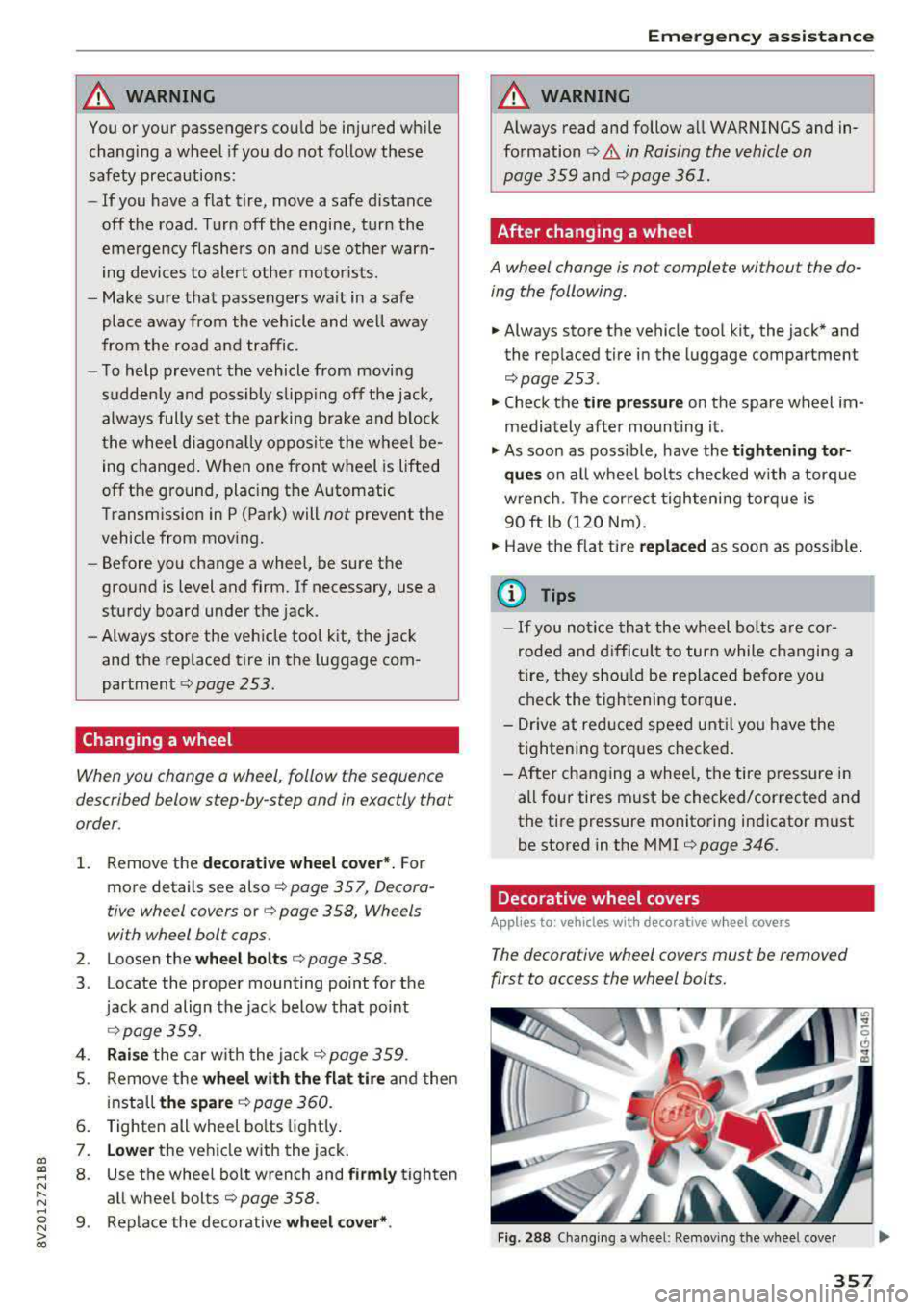
The decorative wheel covers must be removed
first to access the wheel bolts.
Fig. 288 Changing a wheel: Removing the wheel cover
357
Page 366 of 400
Fuses and bulbs
Fuses and bulbs
Fuses
Changing fuses
A fuse that has blown will have me tal strips that
have burned through .
Fig. 2 99 Stee rin g co lu m n a rea : cove r
Fig. 30 0 Left s ide of the engine co mpart ment: fuse cover
The fuses are located behind a cover in the steer
i n g column
area ¢ fig. 299 or under a cover on
the left side of the engine compartment
¢ fig. 300 .
• Switc h the ignition and all e lectr ica l equipment
off.
• Check the following table to see which fuse be
longs to the
equipment ¢ page 365.
• Remove the cover.
• Remove the plastic cl ip from the fuse panel
cove r in the eng ine
compartment ¢ fig. 300 .
• Remove the fuse us ing the plastic clamp.
• Replace the bu rned fuse w ith an identical new
o ne.
• Reinser t the cover.
364
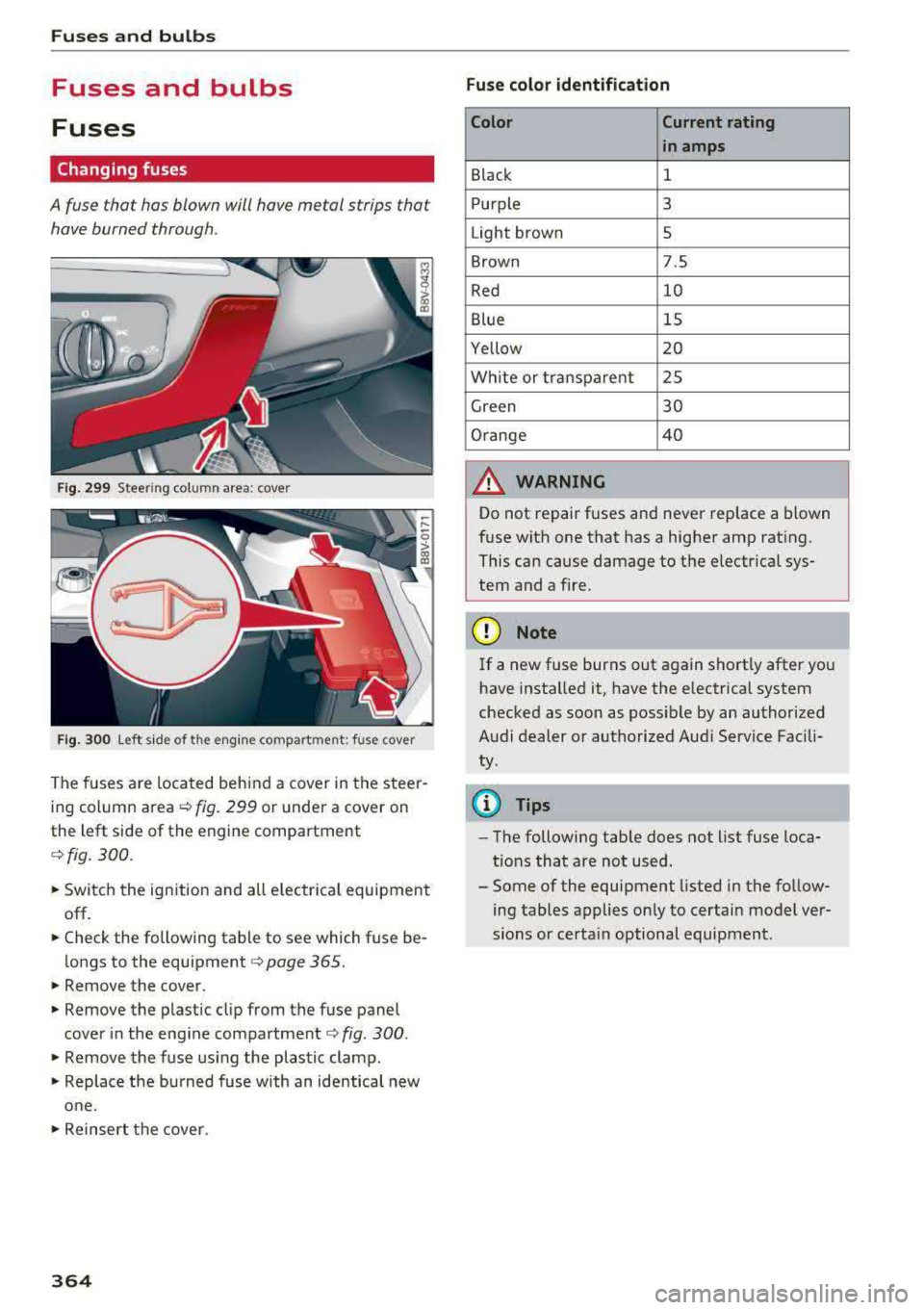
Fuse color identification
Color Current rating
in amps
Black 1
Purple 3
Light brown 5
Brown 7.5
Red 10
Blue 15
Yellow 20
Wh ite or transpa re nt 25
Green 30
Orange 4 0
A WARNING
-
Do not repair fuses and never replace a blown
f u se with one that has a higher amp rat ing.
This can cause damage to the e lectr ica l sys
tem and a fire.
(D Note
If a new fuse burns out again sho rtly after you
h ave installed it, have the electrical system
checked as soon as possible by an authorized
A udi dealer or authorized Aud i Service Fac ili
ty .
(D Tips
-The following table does not list fuse loca
t ions that are not used.
- Some of the equipment listed in the fo llow
ing tables applies on ly to certai n model ver
sions or certa in optional equipment .
Page 372 of 400
Emerg enc y s it uati ons
9. In the ve hicle that is being jump started,
switch the heater fan and rear window de
froster on to reduce any voltage peaks that
may occur when disconnecting the jumper
cables. The headlights must be switched off.
10. With the engines running, remove the cables
i n
reverse order of the way they were instal
l ed. Make sure the cables do not get caught
in mov ing engine components.
11. Sw itch the heater fan and rear w indow de-
froster off.
12. C lose the battery cover .
The battery is vented to the outside so that gases
do not enter the passenger compartment. Make
sure that the connected positive termina l clamps
on the jump start cab le have sufficient contact
with metal.
A WARNING
Follow the warnings and instructions from
the jump start cab le manufacturer to reduce
the risk of ser ious injuries and vehicle dam
age. If you are unsure about anything, call
roads ide ass istance.
- The jump start cables must be long enough
so that the veh icles do not touch.
-
- Route the jump start cables so they cannot
get caught in the moving parts in the engine
compartment.
- Always read and follow the warnings before check ing anything in the engine compart
ment
~page 316.
(D Note
Connecting jump start cables incorrectly can
damage the alternator .
- Always connect the positive terminal(+) to
the positive term inal(+) and the negative
term inal(-) to the negat ive terminal(-) on
the body ground po int, but not the negative
terminal on the battery.
- Make su re the screw plugs on the battery
cells are installed securely. If not, tighten
the plugs before connecting the clamps to
the negat ive termina l on the b attery.
- Please note t hat the connecting p rocess de
scribed below for the jump sta rt cab les is
in-
370 tended for when your vehicle is being jump
started. If you are jump starting another ve
hicle, do not connect the negat ive cab le to
the negative term inal (-) on the dra ined
battery, but rather connect it to a large
metal component that is bolted secure ly to
the engine block, or to the engine block it
self.
If the battery in the vehicle being jump
sta rted is not vented to the outside, there is
a risk of explosion due to hyd rogen gas.
- Make sure that the connected pos itive ter
minal clamps have suff icient contact with
metal.
- Do not use the battery negative terminal fo r
jump starting or a ma lfunction co uld occ ur
in the vehicle electrical system.
Towing with a tow truck
General tips
Your Audi requires special handling for towing.
The following information is to be used by com mercia l tow truck operators who know how to op
erate their equipment safely.
-Never tow your Audi. Towing will cau se dam
age to the engine and t ran smi ssi on.
- Nev er wrap the safet y ch ains or winch cables
aroun d the br ake lines .
- To pr event unne ce ssa ry damag e, your Audi
must be tran sported with a flat be d tru ck .
- To load th e vehicle on to the flat bed , use th e
towing l oop found in the vehicl e tool s and at
t a ch to the front or rear an chorage
.=;,page 371 and ~page 371.
A WARNING
A veh icle being towed is not safe for passen
gers. Never allow anyone to ride in a vehicle
being towed, fo r any reason.
Page 387 of 400
CXl CXl .... N r--N .... 0 N > 00
Convenience key Em ergency operation . . . . . . . . . . . . . . . . . . 81
Starting/stopping the engine . . . . . . . . . . . 78
Unlocking/locking . . . . . . . . . . . . . . . . . . . . 36
Convenience opening/closing . . . . . . . . . . . . 42
Convertible child safety seats . . . . . . . . . . . 300
Convertible locking retracto r
Activating . . . . . . . . . . . . . . . . . . . . . . . . . . 305
Deactiva ting . . . . . . . . . . . . . . . . . . . . . . . . 306
Using to secure a child safety seat . . . . . . 305
Cooling mode Automatic climate control system . . . . . . . 71
Cooling system Adding coolant . . . . . . . . . . . . . . . . . . . . . . 323
Coolant . . . . . . . . . . . . . . . . . . . . . . . . . . . . 323
Coolant level checking . . . . . . . . . . . . . . . . 323
Coolant temperature indicator . . . . . . . . . . 11
Corner ing light . . . . . . . . . . . . . . . . . . . . . . . . 51
Cruise control system . . . . . . . . . . . . . . . . . . 123
Cup holders . . . . . . . . . . . . . . . . . . . . . . . . . . . 65
Current consumption . . . . . . . . . . . . . . . . 17, 18
D
Data connection . . . . . . . . . . . . . . . . . . . . . . 195
Data protection . . . . . . . . . . . . . . . . . . . 196, 222
Data recorder . . . . . . . . . . . . . . . . . . . . . . . . 156
Date .. .. .. .. .. ............... .. .. .. . 241
Date display . . . . . . . . . . . . . . . . . . . . . . . . . 241
Daytime running lights . . . . . . . . . . . . . . . . . 51
Declaration of compliance Audi adaptive cruise control . . . . . . . . . . . 381
Audi side assist . . . . . . . . . . . . . . . . . . . . . 381
Cell phone package . . . . . . . . . . . . . . . . . . 381
Convenience key . . . . . . . . . . . . . . . . . . . . . 381
Electronic immobilizer. . . . . . . . . . . . . . . . 381
H omelink universal remote control . . . . . 381
Remote control key . . . . . . . . . . . . . . . . . . 381
Defrosting (windows) Automatic climate control system . . . . . . . 72
DEF (instrument cluster) . . . . . . . . . . . . . . . . 12
Deluxe automatic climate control
refer to Climate control system
(automatic) . . . . . . . . . . . . . . . . . . . . . . 70, 71
Demo mode
refer to Presentation mode . . . . . . . . . . . . 208
Determining correct load limit . . . . . . . . . . 341
Index
Digital compass . . . . . . . . . . . . . . . . . . . . . . . 59
Digital Rights Management . . . . . . . . . . . . . 222
Dimensions . . . . . . . . . . . . . . . . . . . . . . . . . . 375
Dimming the exterior mirrors . . . . . . . . . . . . 56
Dimming the rearview mirror . . . . . . . . . . . . 56
Directory
refer to Contacts . . . . . . . . . . . . . . . . . . . . 185
Display . . . . . . . . . . . . . . . . . . . . . . . . . . . . . . 13
Cleaning . . . . . . . . . . . . . . . . . . . . . . . . . . . 349
Infotainment system display . . . . . . 159, 242
Instrument cluster. . . . . . . . . . . . . . . . . . . . 16
Multifunction steering wheel . . . . . . . . . . . 13
Distance ... ....................... 17,18
Doors Child safety lock . . . . . . . . . . . . . . . . . . . . . . 41
Door contact switch . . . . . . . . . . . . . . . . . . . 54
Emergency release . . . . . . . . . . . . . . . . . . . . 38
also refer to Unlocking/locking ....... 36, 37
Driver information system . . . . . . . . . . . . . . . 17
Changing views . . . . . . . . . . . . . . . . . . . . . . 13
Economy tips (analog instrument cluster) . 19
Efficiency program . . . . . . . . . . . . . . . . . . . . 19
Energy consumers (Audi virtual cockp it) . . 18
Outs ide temperature display. . . . . . . . . . . . 12
Service interval display . . . . . . . . . . . . . . . 327
Trip computer (analog instrument cluster . 18
Trip computer (Audi virtual cockpit) . . . . . . 17
View . . . . . . . . . . . . . . . . . . . . . . . . . . . . . . . 15
Driver seating position . . . . . . . . . . . . . . . . . 248
Drives
refer to Media . . . . . . . . . . . . . . . . . . 222, 230
Drive select
refer to Audi drive select . . . . . . . . . . . . . . 143
Driving econom ically . . . . . . . . . . . . . . . . . . . 74
Driving safely . . . . . . . . . . . . . . . . . . . . . . . . 247
Driving through water . . . . . . . . . . . . . . . . . . 74
Driving time . . . . . . . . . . . . . . . . . . . . . . . 17, 18
Dust filter
refer to Pollutant filter . . . . . . . . . . . . . . . . 70
DVD drive (media drives)
223
Dynamic volume
refer to System volume . . . . . . . . . . . . . . . 246
E
E-mail . . . . . . . . . . . . . . . . . . . . . . . . . . . . . . 184
385
Page 388 of 400
Index
e-tron Navigation . . . . . . . . . . . . . . . . . . . . . . . . . 216
also refer to Plug-in hybrid drive . . . . . . . . 94
eco mode (automatic climate control system) .7.1
Economical route . . . . . . . . . . . . . . . . . . . . . 208
Efficiency program . . . . . . . . . . . . . . . . . . . . . 19
Electrical accessories
refer to Socket . . . . . . . . . . . . . . . . . . . . . . . 64
Electric drive . . . . . . . . . . . . . . . . . . . . . . . . . . 94
Electric range . . . . . . . . . . . . . . . . . . . . . . . . 216
Electromechanical parking brake . . . . . . . . . 83
E lectromechanica l steering . . . . . . . . . . . . . 154
Electronic Differential Lock (EDL) . . . . . . . . 151
El ectronic immobili zer . . . . . . . . . . . . . . . . . . 35
Electronic speed limiter . . . . . . . . . . . . . . . . 123
Electronic Stabilization Control ( ESC) . . . . . 151
Emergency assistance . . . . . . . . . . . . . . . . . 353
Emergency braking function . . . . . . . . . . . . . 84
Emergency flashers . . . . . . . . . . . . . . . . . . . . 53
Eme rgency starting . . . . . . . . . . . . . . . . . . . 368
Emissions control system
Cata lytic converter . . . . . . . . . . . . . . . . . . . 316
Energy consumers . . . . . . . . . . . . . . . . . . . . . 18
Energy management . . . . . . . . . . . . . . . . . . 155
Engine Coolant . . . . . . . . . . . . . . . . . . . . . . . . . . . . 323
Messages . . . . . . . . . . . . . . . . . . . . . . . . . . . 80
Start/Stop system . . . . . . . . . . . . . . . . . . . . 81
Starting/stopping (button) . . . . . . . . . . . . . 78
Starting/stopping (key) . . . . . . . . . . . . . . . . 77
Starting with jumper cables . . . . . . . . . . . 368
Engine compartment
Opening and closing the hood...... ... . 318
Overview ..... .................. .... 319
Safety precautions . . . . . . . . . . . . . . . . . . . 316
Engine coolant
Radiator fan . . . . . . . . . . . . . . . . . . . . . . . . 324
Engine oil . . . . . . . . . . . . . . . . . . . . . . . . . . . 319
Adding . . . . . . . . . . . . . . . . . . . . . . . . . . . . 321
Changing . . . . . . . . . . . . . . . . . . . . . . . . . . 322
Checking the oil level................. 321
Consumption . . . . . . . . . . . . . . . . . . . . . . . 321
D ipstick .. .. .... ................ 319,321
Oil change interval . . . . . . . . . . . . . . . . . . . 327
O il consumption . . . . . . . . . . . . . . . . . . . . . 320
386
Specification and viscosity............. 319
Temperature display . . . . . . . . . . . . . . . . . .
11
Ent ering characters/numbers (speller) . . . . 165
Entering lette rs (speller) . . . . . . . . . . . . . . . 165
Ente rtainment sliding menu . . . . . . . . . . . . 163
Entry/exit lighting . . . . . . . . . . . . . . . . . . . . . 53
Entry assistance . . . . . . . . . . . . . . . . . . . . . . . 62
Environment Proper disposal of drained engine oil . . . . 322
Unlead ed gasoline . . . . . . . . . . . . . . . . . . . 312
ESC
refer to Electronic Stabilization
Control (ESC) . . . . . . . . . . . . . . . . . . . . . . . 151
Event Data Recorder (EDR) . . . . . . . . . . . . . 156
Expanded view . . . . . . . . . . . . . . . . . . . . . . . . 15
Exterior lighting . . . . . . . . . . . . . . . . . . . . . . . S 1
Exterior mirrors . . . . . . . . . . . . . . . . . . . . . . . 55
Fo lding . . . . . . . . . . . . . . . . . . . . . . . . . . . . . 55
Folding settings . . . . . . . . . . . . . . . . . . . . . . 38
Externa l voice operation . . . . . . . . . . . . . . . . 175
F
Factory default settings
Multi Media Interface . . . . . . . . . . . . . . . . 242
Fader (sound) . . . . . . . . . . . . . . . . . . . . . . . . 245
Fastening Booster seats . . . . . . . . . . . . . . . . . . . . . . . 302
Convertible child safety seats . . . . . . . . . . 300
Infant seats . . . . . . . . . . . . . . . . . . . . . . . . 298
Fast forwarding/rewindi ng (audio/video
file) . . . . . . . . . . . . . . . . . . . . . . . . . . . . . . . . 230
Fast forwarding (audio/video file) . . . . . . . . 230
Fast route . . . . . . . . . . . . . . . . . . . . . . . . . . . 208
Favorites Media ....... ..... .. ............... 232
Navigation . . . . . . . . . . . . . . . . . . . . . . . . . 202
Telephone. . . . . . . . . . . . . . . . . . . . . . . . . . 182
File formats (media drives) . . . . . . . . . . . . . 235
Floor mats . . . . . . . . . . . . . . . . . . . . . . . . . . . 252
Fo lding the rear seats . . . . . . . . . . . . . . . . 67, 68
Foot pedals . . . . . . . . . . . . . . . . . . . . . . . . . . 252
Fo r the sake of the environment
Environmentally-friendly driving . . . . . . . . 74
Leaks ........ ... ... .............. .. 317
Roof rack . . . . . . . . . . . . . . . . . . . . . . . . . . . 69