lights AUDI S3 SEDAN 2017 Owner's Manual
[x] Cancel search | Manufacturer: AUDI, Model Year: 2017, Model line: S3 SEDAN, Model: AUDI S3 SEDAN 2017Pages: 400, PDF Size: 67.32 MB
Page 61 of 400
a, co .... N
" N .... 0 N > 00
_& WARNING
For safety reasons, the windshield wiper
blades should be replaced once or twice each
year .
(D Note
-The windshield wiper blades must only be
folded away when in the service position!
Otherwise, you risk damaging the paint on
the hood or the windshield wiper motor .
- You should not drive your vehicle or press
the windshield wiper lever when the wiper
arms are folded away from the windshield.
The windshield wipers would move back in
to their original position and could damage
the hood and windshield .
@ Tips
- You can also use the service position, for ex
ample, if you want to protect the windshield
from icing by using a cover.
- You cannot activate the service position
when the hood is open .
Replacing rear wiper blade
Applies to: vehicles with rear window wiper
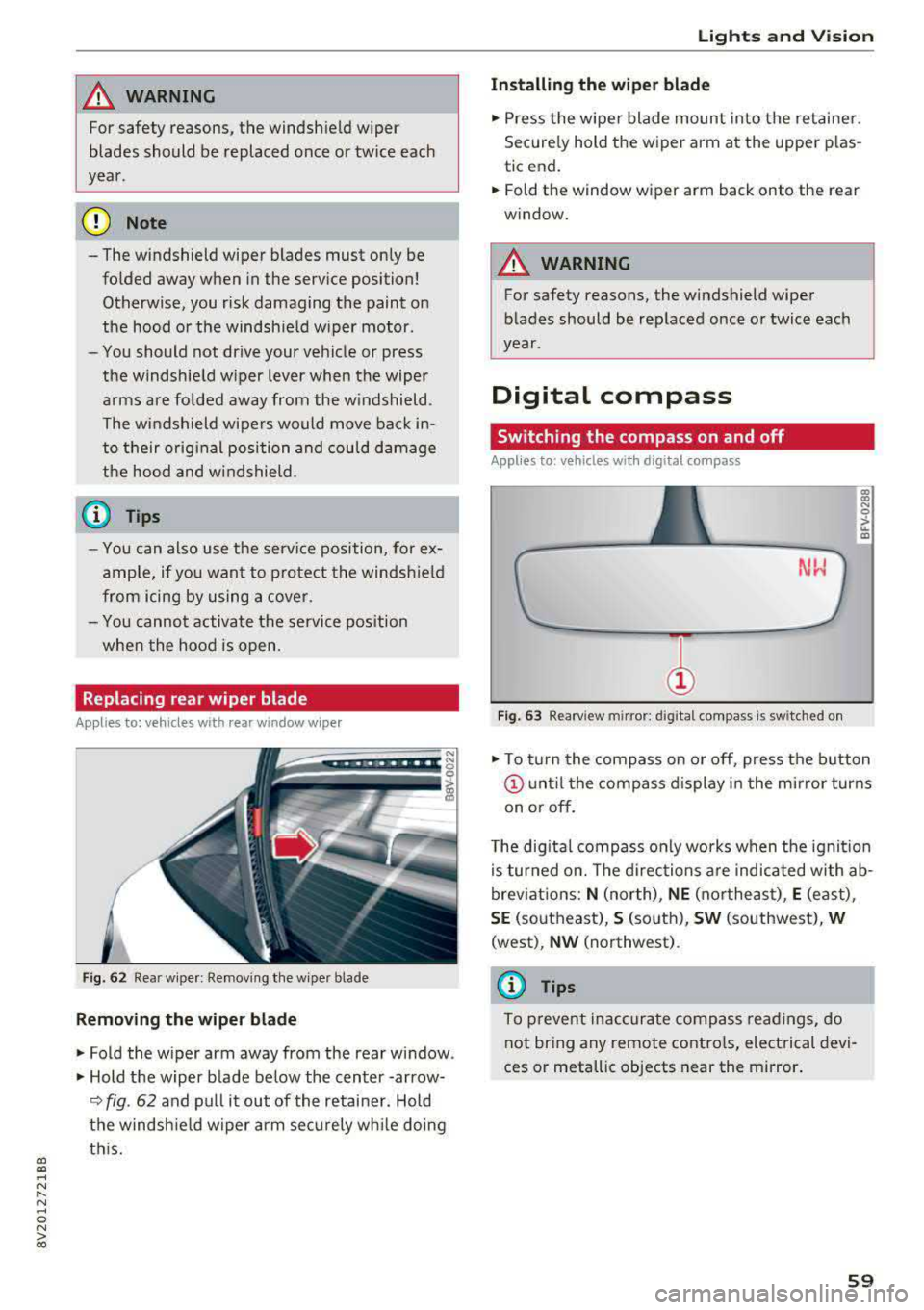
Fig. 62 Rear wiper : Removing the wiper bla de
Removing the wiper blade
"Fold the wiper arm away from the rear window .
" Hold the wiper blade below the center -arrow-
¢ fig. 62 and pull it out of the retainer . Hold
the windshield wiper arm securely while doing
this.
Lights and Vision
Installing the wiper blade
"Press the wiper blade mount into the retainer.
Securely hold th e wiper arm at the upper plas
tic end.
"Fold th e window wiper arm back onto the r ear
window.
_& WARNING
= -
For safety reasons, the windshield wiper
blades should be replaced once or twice each
year .
Digital compass
Switching the compass on and off
Applies to: vehicles with digital compass
Fig. 63 Rearview mir ror : digi tal compa ss is s wit c hed on
gi N 0
> u. m
"To turn the compass on or off, press the button
@until the compass display in the mirror turns
on or off.
The digital compass only works when the ignition
is turned on. The directions are indicated with ab
breviations:
N (north), NE (northeast), E (east) ,
SE (southeast), S (south), SW (southwest), W
(west) , NW (northwest) .
(D Tips
To prevent inaccurate compass readings, do
not bring any remote controls, electrical devi
ces or metallic objects near the mirror.
59
Page 62 of 400
Lights and Vision
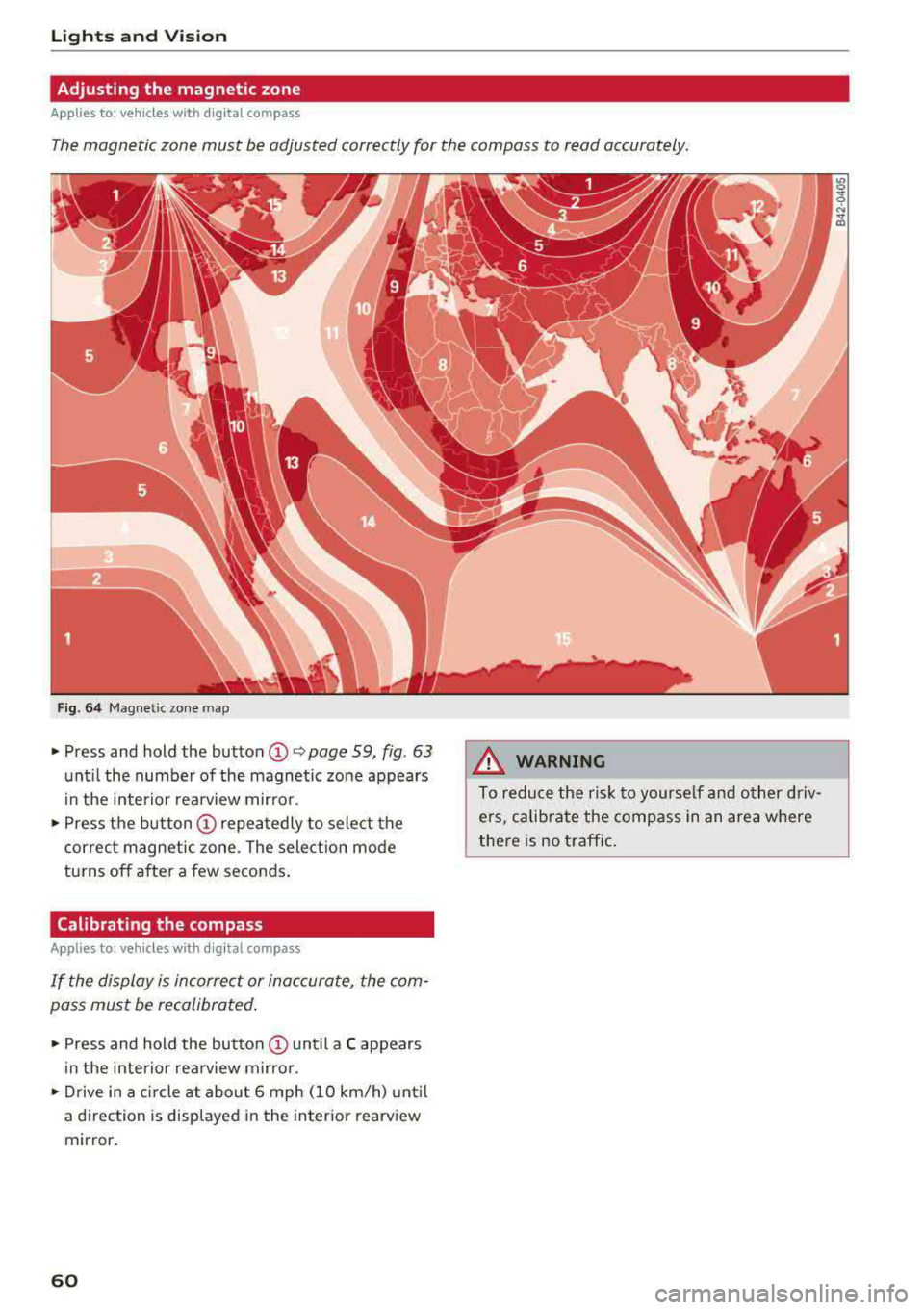
Adjusting the magnetic zone
Applies to: ve hicles w ith d ig ital compass
The magnetic zone must be adjusted correctly for the compass to read accurately.
Fig. 64 Magnetic zone map
• Press and hold the button CD~ page 59, fig. 63
unt il the number of the magnetic zone appears
i n the interior rea rview m irro r.
• P ress the b utton CD repeatedly to select the
correc t magnetic zone . The sele ct ion mode
turns off after a few seconds .
Calibrating the compass
App lies to: ve hicles w ith d ig ital compass
If the display is incorrect or inaccurate, the com
pass must be recalibrated .
• Press and hold the button CD until a C appears
in the inte rio r re arview mir ro r.
• Drive in a circle at about 6 mph ( 10 km/h) unt il
a d irec tion is displayed i n the in ter ior rearv iew
mir ror .
60
A WARNING
To reduce the ris k to yourse lf and o ther driv·
e rs, calibra te the compass in an area where
there is no traffic .
Page 77 of 400
CXl CXl .... N ,.__
N .... 0 N > 00
next traffic light is red. This produces an engine
braking effect, which helps to protect the brakes
and tires and reduces the emissions and fuel con
sumption to zero (fuel shut-off during decelera
tion).
Shift efficiently
An effective way to save fuel is to upshift earlier.
Staying in a gear too long uses fuel unnecessari
ly .
Press down on the accelerator pedal slowly and
avoid "kick-down".
Avoid full acceleration
You should rarely travel at the maximum vehicle
speed. High speeds cause a disproportionately
high increase in fuel consumption, emissions and
traffic noise. Slower driving saves fuel.
Reduce idling time
The Start/Stop system* helps to reduce the idling
time automatically. In vehicles without the Start/
Stop system, it is efficient to switch the engine
off when stopped
at railroad crossings and long
red lights. Depending on the version of the en
gine, stopping the engine for as little as five sec
onds once it has reached operating temperature
still saves more fuel than leaving the engine run ning
-even when taking into account the amount
of extra fuel that is used to restart the engine.
It takes a very long time in idle to warm the en
gine up to operating temperature. Wear and
emissions are especially high in the warm-up
phase. Therefore, you should begin driving im
mediately after starting the engine. Avoid high
RPMs while doing this.
Have maintenance performed regularly
By having maintenance performed regularly on
your vehicle, you can help to reduce fuel con
sumption before you even start to drive. The maintenance condition of your vehicle not only
affects traffic safety and long-term value but al
so impacts
fuel consumption. A poorly main
tained engine can lead to fuel consumption that
is 10% higher than normal.
Driving
Avoid short trips
The engine and emissions control system must
reach their optimal
operating temperature to ef
fectively reduce consumption and emissions.
A cold engine uses a disproportionately high
amount of fuel. The engine reaches operating
temperature and consumption normalizes only
after approximately 2.5 miles (4 km).
Check the tire pressure
To save fuel, make sure the tires are always in
flated to the correct pressure
r=;, page 33 5. The
fuel consumption can increase by S% if the pres
sure is only 0.5 bar too low. Due to the increased
rolling resistance, low tire pressures will also
lead to greater tire
wear and will affect driving
behavior.
Do not drive on
winter tires year-round, as this
will consume up to 10% more fuel.
Eliminate unnecessary weight
Since every kilogram of extra weight increases
fuel consumption, a quick inspection of the lug
gage compartment may be worth it to avoid un
necessary weight.
When not being used, a roof rack should be re
moved to decrease the wind resistance of the ve
hicle. You will save approximately 12% of your
fuel when at speeds from 62-75 mph
(100-120 km/h).
Save energy
The engine drives the generator, which generates
electricity; the fuel consumption also increases
with the demand for electricity. Therefore, switch
electrical equipment off when you no longer
need it. Examples of equipment that uses a lot of
energy are air blowers at a high setting, the rear
window defogger and seat heating*.
(D Note
- Do not leave engine idling unattended after
starting. If warning lights should come on
to indicate improper operation, they would go unheeded. Extended idling also produces
heat, which could result in overheating or
IJ,-
75
Page 81 of 400
If the 'Tj indicator light blinks and the message
Please turn steering wheel appears when switch
ing the ign ition on, the steer ing lock is locking
the steering wheel. In this case, turn the steering
wheel slight ly to the left/right.
Start /Stop system*
See the information in¢ page Bl, Start/Stop
system .
A WARNING
To reduce the risk of poisoning, never allow
the engine to run in confined spaces.
@ Note
Avoid high engine speed, full throttle, and
heavy engine load if the engine has not
reached operating temperature yet. You could
damage the engine.
@ For the sake of the environment
Do not let the engine run while parked to
warm up. Begin driving immediately. This
re
duces unnecessary emissions.
(D Tips
-Some noise after starting the engine is nor
mal and is no cause for concern.
- If you leave your vehicle with the ignition
switched on, the ignition will switch off
af
ter a certa in amount of t ime. Make sure that
electr ica l equ ipment such as the exter ior
lights are switched off.
Stopping the engine
Applies to: veh icles with conve nience key
-
Plug-in hybrid dr ive*: refer to the informat ion un
der ¢ page 96.
.. Bring the vehicle to a full stop.
.. Move the selector lever into the P pos ition.
.. Press the I STAR T ENGINE ST OPI button
¢ page 78, fig. 90 .
CXl CXl .... N r--N .... 0 N > l) This func tion is not avai lable in all countries. 00
D riving
Steering
lock1 )
T he steering locks when yo u turn the engine off
using the
I STA RT ENG INE S TOPI* button, move
the selector lever into the P position and open
the driver's door. The locked steering hel ps pre
vent vehicle theft.
Emergency off function
If it is absolutely necessary, the eng ine can also
be turned off whi le driving at speeds starting at
4 mph (7 km/h). To switch the engine off, press
the
I START ENGINE STOPI button twice in a row
briefly or press and ho ld for longer than two sec
onds.
A WARNING
-- Never turn off the engine before the vehicle
has come to a complete stop. The full func
tion of the brake booster and the power
steer ing is not guaranteed. You must use
mo re force to turn or brake. Because you
cannot steer and brake as you usually
wou ld, this could lead to accidents and seri
ous injuries.
-Always take the key with you whenever yo u
leave your vehicle. Otherwise, the engine
could be started or electrical equipment
such as the power windows could be operat
ed. This can lead to ser ious injury.
- For safety reasons, always park the vehicle
with the selector lever in the P pos ition.
Otherw ise, there is the risk that the vehicle
could roll unintentionally .
(D Note
If the engine has been under heavy load for
an extended period of time, heat builds up in
the engine compartment after the engine is
switched off and there is a r isk of damaging
the engine. For th is reason, let the engine run
for at id le for approximately two minutes
be-
fore shutting it off . ..,.
79
Page 90 of 400
Driving
Driving tips
Applies to: ve hicles w ith a utomat ic tra nsm iss io ns
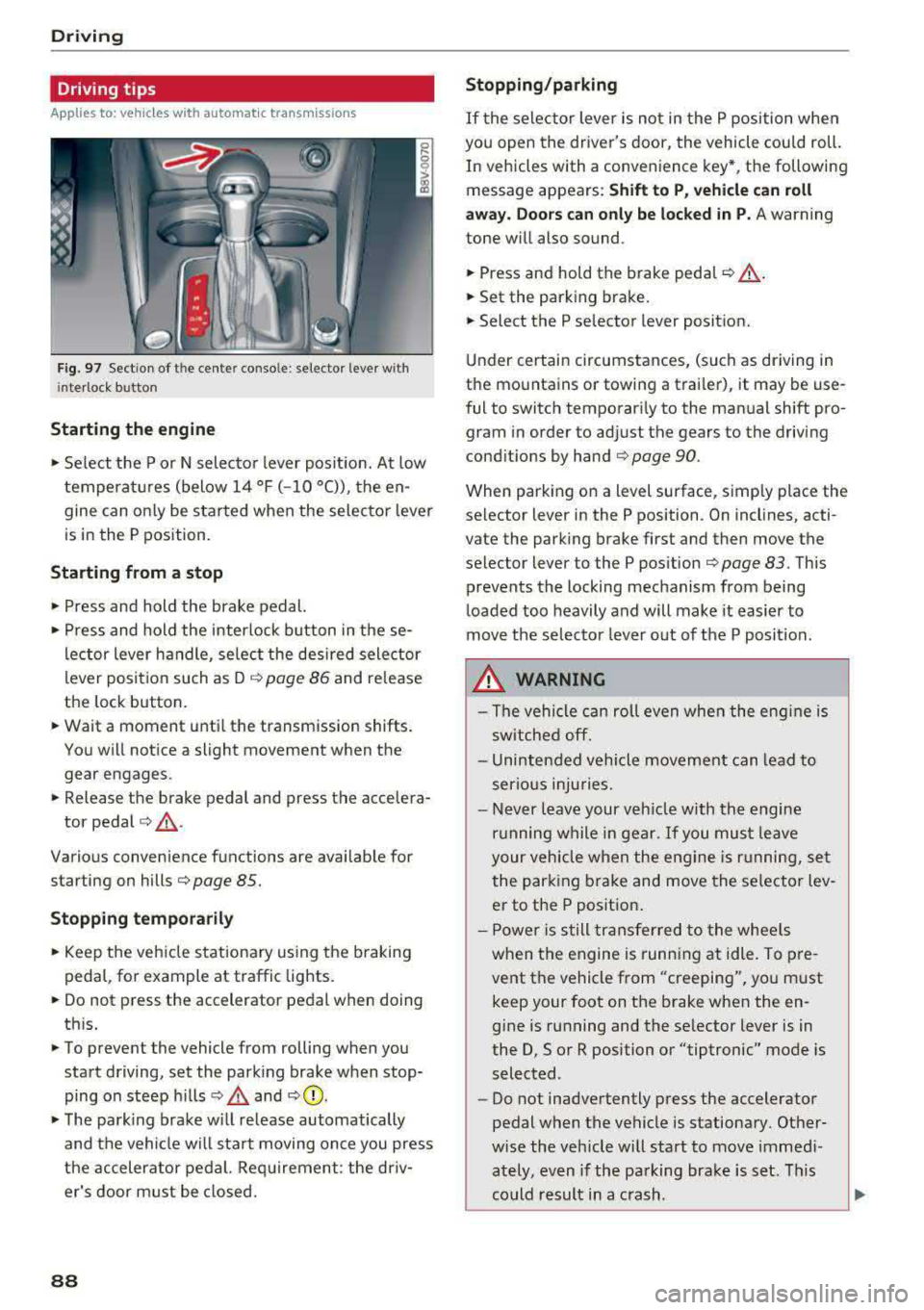
Fig. 97 Sect ion of the cente r conso le : se lector lever w ith
i nte rlock button
Starting the engine
• Se lect the P or N selec to r l ever posit ion. At low
temperat ures (below
14 °F (- 10 °C)), the en
gine can on ly be star ted when the selector lever
is in the P position.
Starting from a stop
• Press and hold the brake pedal.
• Press and hold the interlock button in these
l ector lever handle, se lect the des ired selector
lever posit io n such as D
c::> page 86 and release
the lock button.
• Wait a moment unti l the transmission shifts.
You w ill notice a slight movement when the
gear engages.
• Release the brake pedal and press the accelera-
tor pedal
c::> ,& .
Various convenience functions are ava ilab le for
starting on hills
c:::> page 85.
Stopping temporarily
• Keep the veh icle stationary using the b raking
peda l, for example at traffic lights.
• Do not press the accelerator pedal when doing
th is.
• To prevent the vehicle from rolling when you
start driving, set the park ing brake when stop
ping on steep hills
c::> .& and c::> 0.
• The park ing brake w ill release automatically
and t he veh icle wi ll sta rt moving on ce you press
the accelerator pedal. Req uirement: the driv
er's door m ust be closed.
88
Stopping/parking
If the sele ctor lever is not in the P position w hen
you open the driver's door, the vehicle cou ld roll.
In vehicles with a conven ience key *, the following
message appears:
Shift to P , vehicle can roll
away . Doors can only be locked in P.
A warning
tone w ill also sound.
• Press and hold the brake peda l c::> A.
• Set the parking brake.
• Select the P selector lever posit ion.
U nder certai n circumstances, (such as driving in
t h e mountains or towing a trai ler), it may be use
ful to switch temporar ily to the manual shift pro
gram in order to ad just the gears to the driving
cond it ions by hand
c:::> page 90.
When park ing o n a level sur face, s imply place the
se lector lever in the P position . On inclines, acti
vate the parking brake first and then move the
selector lever to the P pos ition
c:::> page 83 . This
prevents the locking mechanism from being
loaded too heavily and will make it easier to
move the selec tor lever o ut of the P posi tion.
.&_ WARNING
- The vehicle can ro ll even whe n the engi ne is
sw itche d off.
- Unin ten ded vehicle movement can lead to
s e rio us inju ries.
- Never leav e your ve hicle w ith th e engine
r u nning w hile in gear.
If you mus t leave
your veh icle when the eng ine is r unning, se t
the par king brake and move the se lector lev
er to the P position .
- P owe r is s till tran sfer red to the whee ls
when t he engine is runn ing at idle. To pre
vent the vehicle f rom "creeping", yo u m ust
keep your foot on t he brake when the en
gine is running and the se lector lever is in
the D, So r R position or "tiptronic" mode is
selected.
- Do not inadvertently press the accelerator
pedal when the vehicle is stationa ry. Ot her
w ise the veh icle will start to move immed i
ately, even if the parking b ra ke is set. T his
c o uld result in a c rash.
Page 98 of 400
e-tron
for the high-voltage battery can lead to serious damage and/or a decrease of the capacity
void coverage under the New Vehicle Limited
Warranty.
Starting/driving the vehicle
Applies to: ve hicles w ith plug -in hybrid drive
The vehicle is started and stopped with the
I START STOP I button. Please also read the in
formation under
c::> page 78, Starting the engine .
Establishing drive ready mode
See c::> A in Introduction on page 94.
Requirement: a charging cable must not be con
nected to the vehicle
c::> page 117 and the selec
tor lever must be in the P or N position.
- Press the brake pedal.
- Press the
I STAR T STOPI button .
When the vehicle enters drive ready mode, the
status message
e-tron READY appears briefly in
the instrument cluster display and the needle in
the power meter points to
READY c::> page 97.
Driving
The vehicle starts with the electric motor after
establishing the dr ive ready mode and if the con
ditions for electric drive mode have been met
c::> page 100.
The conditions to drive are essentially the same
as for the automatic transmission
c::> page 85 .
You and your passengers should anticipate the
possibility of a sporty acce leration.
Ending drive ready mode
- Place the selector lever in the P position.
- Switch the ignition off with the
I STAR T STOPI
button.
Vehicle sound
The vehicle generates an electronic engine sound
so that your vehicle can be heard from the out
side when in electr ic drive mode. The veh icle
sound automatically fades out at higher speeds
when the sounds from the tires and wind start in
creasing.
96
Switching the ignition on/off
You can switch the ignition on without establish
ing drive ready mode.
- Press the
I START STOP ! button to switch the
ign ition on and off. Do not press the brake ped
al whi le doing this.
When the ignition is sw itched on, the needle
points at
OFF @c::>page 97, fig. 103 or OFF is
displayed @c::>page97, fig .103.
No indicator lights stay turned on when the igni
tion is switched off .
Ignition is switched off automatically
To prevent the vehicle battery from draining, the
ignition will switch off automatically under the
follow ing cond it ions:
- The vehicle must have already been driven.
- The vehicle is stationary.
- The gasoline engine must not be runn ing .
- The driver's door must be open.
- The driver's safety belt must be unbuckled .
- The brake pedal must not be pressed.
In this case, the activated low beam is replaced
by the parking light. The message
Side marker
lights automatically shut off in
30 minutes. See
owner's manual
appears in the instrument clus
ter display . The parking lights w ill switch off af
ter approx imately 30 minutes or when you lock
the veh icle.
If the gasoline engine was not stopped, the mo
tor continues runn ing and the ignit ion does not
automat ica lly switch off
c::> A .
A WARNING
To reduce the risk of poisoning, never allow
the eng ine to run in confined spaces.
(D Tips
The vehicle cannot start when outs ide tem
peratures are below-18 °F (-28 °C)
c::> page 98.
-
Page 100 of 400
e-tron
The power meter gives feedback about the pa rt ic
ular accelerator pedal position and shows the
cur rent demand
(%) fo r electric ity or fuel rega rd
less of which engine is active.
An economica l driv ing and recupe ra tion range is
shown i n green
r:!> page 101, Energy recovery (re
cuperation). A driving range that is not economi
cal is shown in orange.
CD Ve hicl e no t drive ready (O FF)
@ Recuperation (CHARGE)
® Ve hicl e ready to d rive ( READY) o r
c oastin g
@ Effic ient driving w ith electric moto r
and/or gasoline eng ine (EFFICIEN-
CY)
® Ec onomic driv ing while t he e lectr ic
mot or or g asoline e ng in e is i n th e
p a rt ial power range
® D riving in full power range
0 100 % outp ut
® Boosting -the elect ric motor as-
sists the gasoline engine (BOOST)
® H igh-voltage battery cha rge level
@ EV mo de: a ct ive av , standby, c::§V
or cur rently unavailable. ~v
@ Speed limit for elect ric driv ing in EV
m ode (80 mph/ 130 km/h)
Indicator lights and messages
A pp lies to: ve hicles w ith p lug -in hybr id drive
A lso note the in dica to r li ghts in r:!> page 24.
The gaso line engine is active when the
111 indica
to r ligh t turns o n.
./. Drive system: system fault! Safely park
vehicle
There is a malfunction in the plug-in hybrid sys
tem . T he br ake booster and the powe r steering
may stop wor king. Stop the veh icle immediately
or as soon as possib le . Park the vehicle in a safe
p lace o utdoors that is not near buildi ngs, roof
overhangs, carports o r similar structures . Sw itch
the ig nition off . Have the problem cor rected by
an a uthor ized A udi dealer or au thor ized A udi
S erv ice Facil it y .
98
•• Electric system: overheated. Safely park
vehicle and check coolant
The coolant level is too lo w or the coo lan t tem
p er at ure is too hig h.
Stop t he vehi cle in the o utdoors as soon as it is
safely possib le. Swi tch t he ig nitio n off.
Read the important safety precautions
r:!> .& in
Coolant on page 105 and check the coolant level
r:!> page 104.
If the coolant level is OK, the malfunction may be
ca used by the system ove rheating . Let the vehi
cle's e lectr ic dr ive system coo l dow n for so me
t im e.
If the message turns off after coo ling down and
switching the ignition back on, you can continue
driv ing . Co ntac t an author ized Audi dealer or au
t h orized Audi Serv ice Facili ty immedia tely to have
t h e malfunct io n co rrecte d.
If the indicato r light stays on , contact an autho r
i zed Audi dealer or author ized A udi Se rvice Facili
ty.
11;11 D rive system: system fault! Please con
tact workshop
There is a ma lf u nction in t he p lug -in hy brid sys
tem. D rive to an authorized Aud i deale r or au
thorized Aud i Serv ice Facility immediately to have
the malfunct ion co rrected.
11;11 Drive system: system fault! Restart not
possible. Please contact workshop
There is a ma lf u nction in the plug-in hybrid sys
tem. Do not ope n the hoo d. Drive to an a uth o r
i zed Audi dealer or author ized A udi Se rvice Facili
ty immediate ly to have the malfuncti on correct
ed.
11;11 Battery temperature too low. Engine
start not possible . See owner's manual
The o utsid e tem per atur e is too low. The veh icle
can no longer s tart at tem peratures be low -18 °F
(-28 ° C). Contact an author ized A udi dea ler or au
thorized Audi Serv ice Facility.
•
POWER LIMIT Warning! Limited power
Page 119 of 400
CXl CXl .... N r--N .... 0 N > 00
unavailable because of this. Contact an au
thorized Audi dealer or authorized Audi
Service Fac ility for more in format ion .
- Charg ing may take longe r when tempera
tures a re extremely high or low .
- The char ging t ime at pu blic char ging sta
tions may vary from the times given in the
ta ble
¢ table on page 116 .
Audi e-tron charging system PIN
Applies to: ve hicles with p lug- in hybrid drive
The contro l unit can be locked by entering a 4-
d igit PIN of yo ur cho ice. If a PIN is activated, the
selected PIN must be ente red before every use .
We recommend locking yo ur contro l unit to pro
tect it against unautho riz ed access by a third pa r
ty .
Activating the PIN
~ Press t he IOK I@ ¢ page 111, fig . 121 bu tton
on the cont ro l unit.
POWER and SET PIN ap
pear in the display field .
~ Select SET PIN using t he arrow button ©-
~ Press the IOKI b utton @. ENTER PIN appears i n
t h e d isplay field .
~ Select t he des ired value by pressing the arrow
bu ttons © up or dow n.
~ U se the right ar row bu tto n© to go t o th e nex t
digi t.
~ Press t he left ar row bu tto n © to go to the pre -
vio us menu.
~ Ente r all of the d igits .
~ Press t he IOKI b utton @after the last d igit .
~ REPEAT PIN appears in the display field .
~ Enter the PIN again using the arrow buttons
© -
~ Press t he IOKI button @.
~ PIN OK appears in t he di sp lay fie ld if bo th en-
t ries ma tch.
~ Th e P IN is now a ct ivate d.
Deactivating the PIN
Requ irement: The control unit mus t be un locked .
~ Enter the numer ica l code 0000 . Proceed as if
you were act ivat ing the
PIN¢ page 117 .
~ The PIN is deact ivated .
e-tron
Locking the control unit
Requiremen t: T he PIN m ust be activated.
~ Press t he~ button @¢ page 111, fig . 121 o n
t he co ntrol unit.
Unlocking the control unit
Requirement: The PIN m ust be act ivated.
~ Press any button on the contro l unit .
~ PIN? appears in the display field.
~ Enter the P IN .
~ Press the I OK I button @.
(D Tips
-The PIN is deactivated in the factory defa ult
sett ings.
- If you do not remember yo ur PIN, contact
an authorized A udi dealer or autho rized
Audi Service Facility.
- If the first PIN entry differs from the second
entry, the first PIN entry is d isplayed .
- If nothin g is entered within
20 seconds of
this , the set va lue is not changed.
Indicator Lights and
messages
Applies to : vehicles with plug-in hybr id drive
If the . indicator light tu rns o n, the high -volt
age ba tte ry is charging or is already completely
c h arged .
If
the . indicator light stays on, the re is a ma l
funct ion in the charg ing system. Have t he p rob
l em corrected immediately by an a uthor ized Audi
d eal er or authori zed A udi Se rvice Fa cility.
!I Charging connector still attached . Driving
not possible
This message appears w hen the charging system
is still connected to the vehicle. Remove the con
nector
c:> page 114, After charging.
Applies to: vehicles with A udi v irtual cockpit : ii
Incompatible charging system. Please check
charging system
Applies to: vehicles wi th analog instr ument clus -
te r:
ii AC charging: currently not possible IJ,-
117
Page 122 of 400
Trailer towing
Trailer towing
Driving with a trailer
General information
Your Audi was designed primarily for passenger
transportation.
If you plan to tow a trailer, please remember that
the additional load will affect durability, econo
my and performance.
Trailer towing not on ly places more stress on the
ve hicle, it also ca lls for more concentration from
the dr iver.
F or this reason, always follow the operating and
driving instructions provided and use common
sense.
Technical requirements
Trailer hitch
Use a weight-carrying hitch conforming to the
gross tra iler weight. The hitch must be suitab le
for your veh icle and tra iler and must be mounted
securely on the vehicle's chassis at a technically
sound
locat ion . Use on ly a trailer hitch with a re
movable ba ll mount . Always che ck with the t rail
er hitch man ufac tur er to make s ure t hat you are
using the co rrect hi tc h.
Do not use a bumper hitch.
The hitch must be installed in such a way that it
does not interfere with the impact -absorbing
bumper system. No mod ificat ions should be
made to the vehicle exhaust and b rake systems .
Fr om t ime to t ime, che ck tha t all hitch mo unti ng
bol ts rem ain securely f aste ned.
W hen you are not tow ing a tra iler, remove the
tra ile r hitc h ba ll mount . This prevents the hit ch
from caus ing damage s hou ld your veh icle be
s truck from be hind
c> ,&. .
Trailer brakes
If your trailer is equipped with a brak ing system,
check to be su re that it conforms to all regula
tions .
120
The t rai ler hydraulic bra ke system must not be
directly connected to the vehicle's hydraulic
bra ke system.
Safety chains
A lways use s afety chains between you r vehi cle
and t he tra ile r.
Trailer lights
Traile r lights must meet all regula tions . B e s ure
to check w ith your Aud i dea le r fo r cor rect wir ing,
switches and relays .
Mirrors
If you are unable to see t he traffic behind you us
i ng t he regular outs ide mir rors, then yo u
must in
stall extended mirro rs . It is impo rtant that you
always have clear vision to the rear.
&, WARNING
Afte r remov ing the tr ailer hi tch, do not s to re
i t i n yo ur vehicle. In case o f su d den braking,
the hitch could fly fo rwa rd and injure you or
your passengers .
Operating instructions
Maximum trailer weight
A tra iler f or yo ur vehicle is lim ite d to a typical
class 1 or class 2 trailer.
Trailer load distribution
Be sure the load in the t rai le r i s he ld se curely in
pla ce to p revent i t from shi fting forward, bac k
ward or si deways.
Never allow a passenger to ride in a trailer c> &.
in Driving instructions on page 121.
Engine cooling system
Towing a tra iler makes the engine work harder. It
is important that the cooling system's perform
ance is up to the additional load . Make sure tha t
the coo ling system has enoug h flu id.
Tire pressure
When towing a trailer, inf late the tires of your
vehicle to the tire pressure listed under "Full load" on the label
c> page 336. Inflate trailer
Page 123 of 400
CXl CXl .... N ,.__
N .... 0 N > 00
tires to trailer and tire manufacturers' specifica
tions.
Lights
Check to make sure both vehicle and trailer lights
are working p roperly.
Safety chains
Be sure trailer safety chains are properly connect
ed from the tra iler to the hitch on the vehicle.
Leave enough slack in the chains to permit turn
in g corners . When you install safety cha ins, ma ke
sure they w ill not drag on the road when yo u are
driving .
The chains shou ld cross under the trailer tongue
to prevent it from dropping in case of separat ion
from the hitch.
Driving instructions
Driving with a trailer always requires extra care
and consideration.
Weight distribution
Towing a loaded trailer w ith an empty car results
in a highly unstable distribution of weight . If this
cannot be avo ided, drive at very low speeds only
to avoid the risk of losing steering control.
A "balanced" rig is easier to operate and control.
This means that the tow vehicle should be loaded
to the extent possible and permissible, while
keep ing the tra iler as light as possib le under the
circumstances. Whenever possib le, t ransfer
some cargo to the luggage compartment of the
tow vehicle whi le observing tongue load require
ments and vehicle loading considerations .
Speed
The higher the speed, the more difficult it be
comes for the driver to control the rig. Do not
drive at the maximum permissible speed. Reduce
your speed even more if load, weather or wind
conditions are unfavorable
-particu larly when
going downhill.
Reduce vehicle speed
immediately if the trailer
shows the s lightest sign of swaying .
Do not try
to stop the swaying by accelerating.
Tra iler towing
Observe speed limits. In some a reas, speeds for
vehicles towing trailers are lower than for regular
vehicles .
Always apply brakes early. When driving down
hill, shift into a lower gear to use the engine
braking effect to slow the vehicle. Use of the
brakes alone can cause them to overheat and fa il.
Coolant temperature
T he coo lant tempe rature gauge ~ page 11 must
be observed carefully . The coolant temperature
can increase if you drive on long inclines in a low
gear at high engine speeds. Reduce your speed
immediately if the LEDs in the top part of the dis
play turn on.
For more information about indicator lights, re
fer
to . ~page 28.
A WARNING ,-
Anyone not properly restrained in a moving
vehicle is at a much greater risk in an acci
dent. Never let anyone ride in your car who is
not properly wearing the restraints provided
by Aud i.
Trailer towing
information
Important to know
Your vehicle handles differently when towing a
trailer because of the addit ional weight and dif
ferent weight distribution . Safety, performance
and economy will g reatly depend on how careful
ly you load your trailer and operate yo ur rig.
Before you actually tow your trailer, pract ice
turning, stopping and backing up in an area away
from traffic. Keep practic ing until you have be
come complete ly familiar w ith the way your vehi
cle-trailer combination behaves and responds.
Backing up is difficult and requires practice.
Backing up with a t railer genera lly requires steer
i ng action opposite to that when backing up your
vehicle without a tra iler.
Maintain a greater distance between your vehicle
and the one in front of you. You will need more
.,,.
121