radio AUDI S3 SEDAN 2017 Owner's Manual
[x] Cancel search | Manufacturer: AUDI, Model Year: 2017, Model line: S3 SEDAN, Model: AUDI S3 SEDAN 2017Pages: 400, PDF Size: 67.32 MB
Page 229 of 400
a, a, ..... N
" N ..... 0 N > 00
-The loading times for the audio data depend
on the media player used and the number of
files that it contains.
- A maximum of 2,000 entries per directory
are displayed in the MMI.
-Songs downloaded for offline use using mu
sic streaming services are stored on your mobile device (such as a smartphone) and
may be ORM protected. The Wi-Fi audio
player will not play ORM protected files.
-Contact an authorized Audi dealer or au
thorized Audi Service Facility for additional information on the Wi-Fi audio player .
Online media and
Internet radio
Applies to: vehicles with Audi connect (Infotainment)
You can playback and operate various online me
dia services and Internet radio using the MMI .
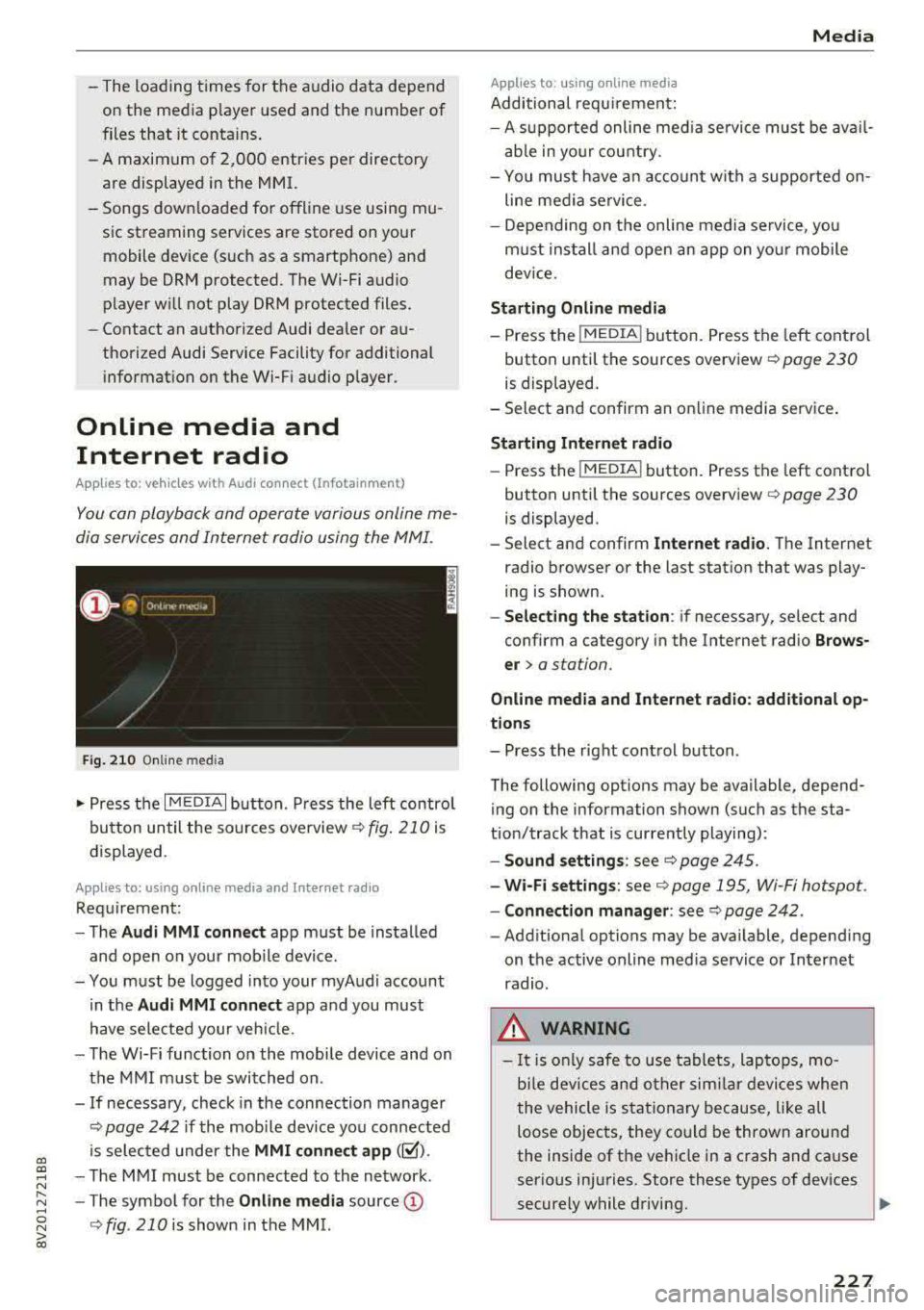
Fig. 210 Online med ia
... Press the I MEDIAi button. Press the left contro l
button until the sources overview
c:> fig. 210 is
displayed.
Applies to: using online media and Internet radio
Requirement:
-The Audi MMI connect app must be installed
and open on your mobile device.
-You must be logged into your myAudi account in the
Audi MMI connect app and you must
have selected your veh icle.
-The Wi-Fi function on the mobile device and on
the MMI must be switched on .
-If necessary, check in the connection manager
c:> page 242 if the mobile dev ice you connected
is selected under the
MMI connect app (~).
-The MMI must be connected to the network .
-The symbol for the Online media source@
<::>fig . 210 is shown in the MMI.
Applies to: using online media
Additional requirement:
Media
-A supported online med ia service must be avail
able in your country.
-You mus t have an account with a supported on
line media service .
-Depending on the on line media service, you
must install and open an app on your mobile
dev ice.
Starting Online media
-Press the I MEDIA i button. Press the left control
button until the sources overview
c:> page 230
is displayed.
-Select and confirm an online media service .
Starting Internet radio
-Press the I MEDIAi button. Press the left control
button until the sources overview
c:> page 230
is displayed.
-Select and confirm Internet radio. The Internet
radio browser or the last station that was play
ing is shown.
-Selecting the station: if necessary, select and
confirm a category in the Internet radio
Brows
er>
a station.
Online media and Internet radio: additional op
tions
-Press the right control button.
The following options may be available, depend ing on the information shown (such as the sta
tion/track that is currently playing):
-Sound settings: see c:> page 245.
-Wi-Fi settings: see c:> page 195, Wi-Fi hotspot.
-Connection manager: see c:> page 242.
-Additional options may be available, depending
on the active online media service or Internet
radio.
_& WARNING
-It is only safe to use tablets, laptops, mo
b ile devices and other similar devices when
the vehicle is stationary because, like all
loose objects, they could be thrown around
the inside of the vehicle in a crash and cause
serious injuries. Store these types of devices
securely while driving.
~
227
Page 230 of 400
Media
-Do not u se any wireless devices on the fro nt
seats within range of the airba gs w hile driv
ing. Also read and follow the warnings in
r=> page 271, Fro nt airbags.
CD Note
- Always follow the information found in ¢ 0
in Wi-Fi hotspot on page 195 .
-Please note that there generally are add i
tiona l costs when using an online media
service account, especially when it is used i nternationally.
{!) Tips
-Depending on the Internet connection and
network traff ic, a connection loss can occur
during p layback of on line media serv ices.
-Online media and Internet radio usage de
pends on the serv ice avai lability of the third
party provider.
- Audi AG simply makes the access to on line
media serv ices possible t hrough the MMI
and does not take any respons ibility for the
contents of the onli ne med ia serv ices .
-Always read the chapter r:> page 196, Audi
connect (Infotainment) general informa tion.
-Depending on the mobile device used, the re
may be interr uptions du ring media playback
and when using the
Audi MMI connect app.
T o avoi d inter ruption s when usi ng a mob ile
device, do no t loc k t he s creen on you r mo
bi le dev ice a nd keep the
Audi MMI connect
app in the foreground .
- Co ntact an a utho rized Audi dea le r or a u
thorized Audi Service Facili ty for additional
informat ion about on line media .
228
Multimedia connections
USB adapter for Audi music interface
You can connect your mobile devices (such as a
smartphone or
MP3 player) to the Audi music in
terface and charge them using a special USB
adapter .
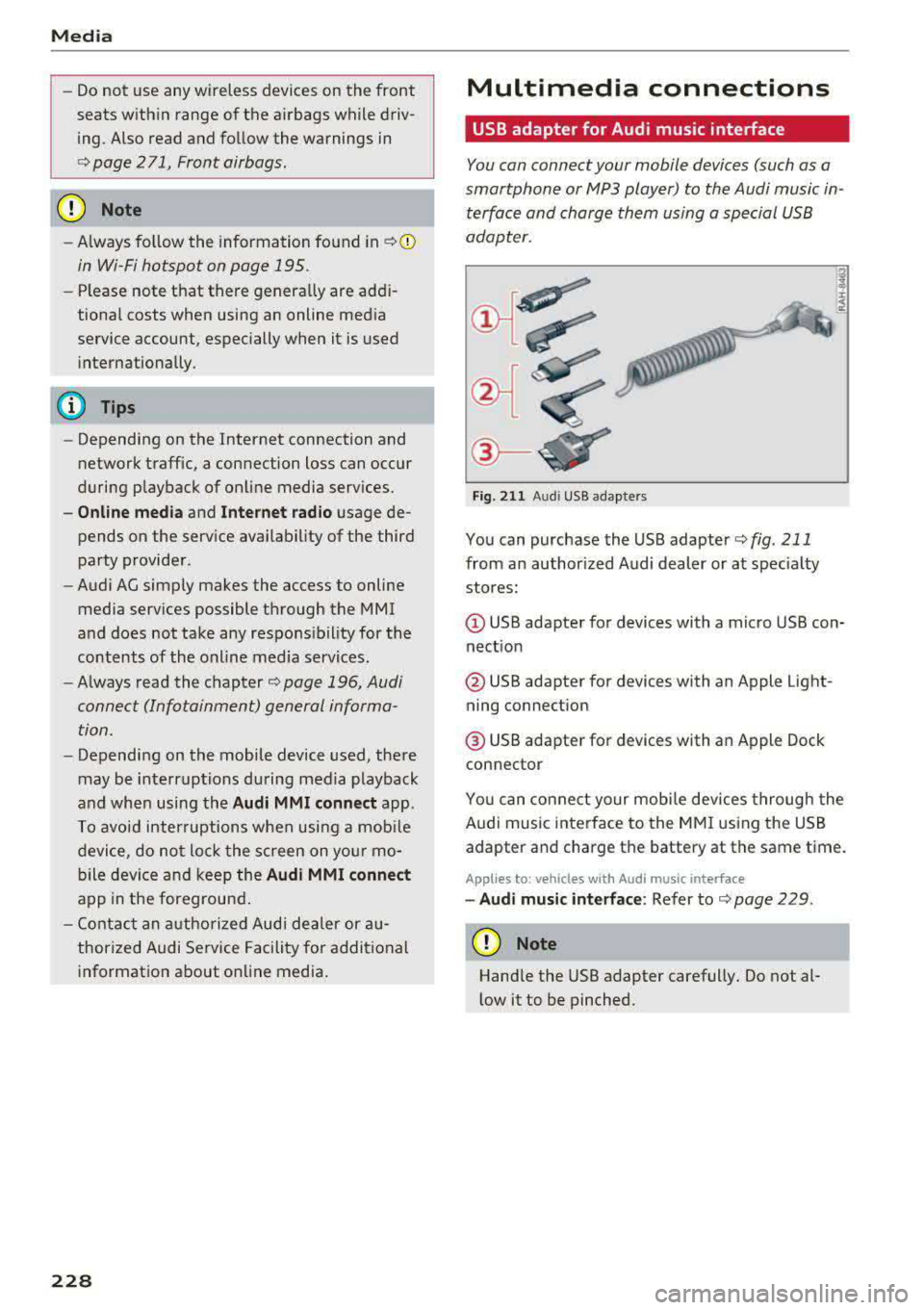
®-
Fig. 2 11 Audi USB adapters
You can purchase the USB adapter ¢ fig . 211
from an author ized Audi dealer or at spec ia lty
stores:
Q) USB adapter for devices with a micro USB con
nect ion
@ USB adapter for devices with an Apple Light
ning connect ion
@ USB adapte r for devices with an Apple Dock
connector
You can conne ct your mob ile dev ices throug h the
Audi music interface to the MM I using the USB
adapter and charge the battery at the same time.
Applies to: vehicles wit h Aud i music interface
-Audi musi c interface : Refer to¢ page 229.
CD Note
Handle the USB adapter carefully. Do not al
l ow it to be pinched .
Page 232 of 400
Media
-Changed content on a mobile device l) that
is connect ed to the Audi music interface
may not be disp layed in the med ia center .
In this case, reset t he
Med ia settings back
to
Factory settings ¢ page 242.
- Video p layback through the Audi music in
terface is only supported if the connected
device is recog nized as a USB storage device
(fo r example a USB s tic k). Apple devices and
M TP devices (s uch as smartphones) a re not
r e cogni ze d as US B storage devices .
- i Pod/iPhone malfunct io ns also affect the
ope ration of the MMI. Reset your iPod/
iPhone if th is happens.
- For importa nt information on operating
your iPod/iPhone, ref er to th e user guide for
the dev ice. Audi re comme nds up dat ing the
i Po d/i Pho ne so ftwa re to t he lates t ve rsion .
- Fo r more information about the Audi music
i nte rfa ce and supporte d device s, check the
A ud i d ata base fo r mobile devices at
www.audiusa.com/bluetooth or contact an
authorized Audi dea le r or a uthorized Audi
Service Fac ility.
Playing media
Accessing media
You can start and operate various media
through th e
MMI control panel.
Fig . 2 13 Diag ra m : p ossibl e sources i n the Med ia m enu
1> A pplies only t o MTP dev ices . Do es not app ly to Ap ple d evi
c e s a nd U SB ma ss sto ra ge de vice s.
2> Depe ndin g o n the DVD , thi s m ay not be pos sib le d urin g
p la y ba ck.
230
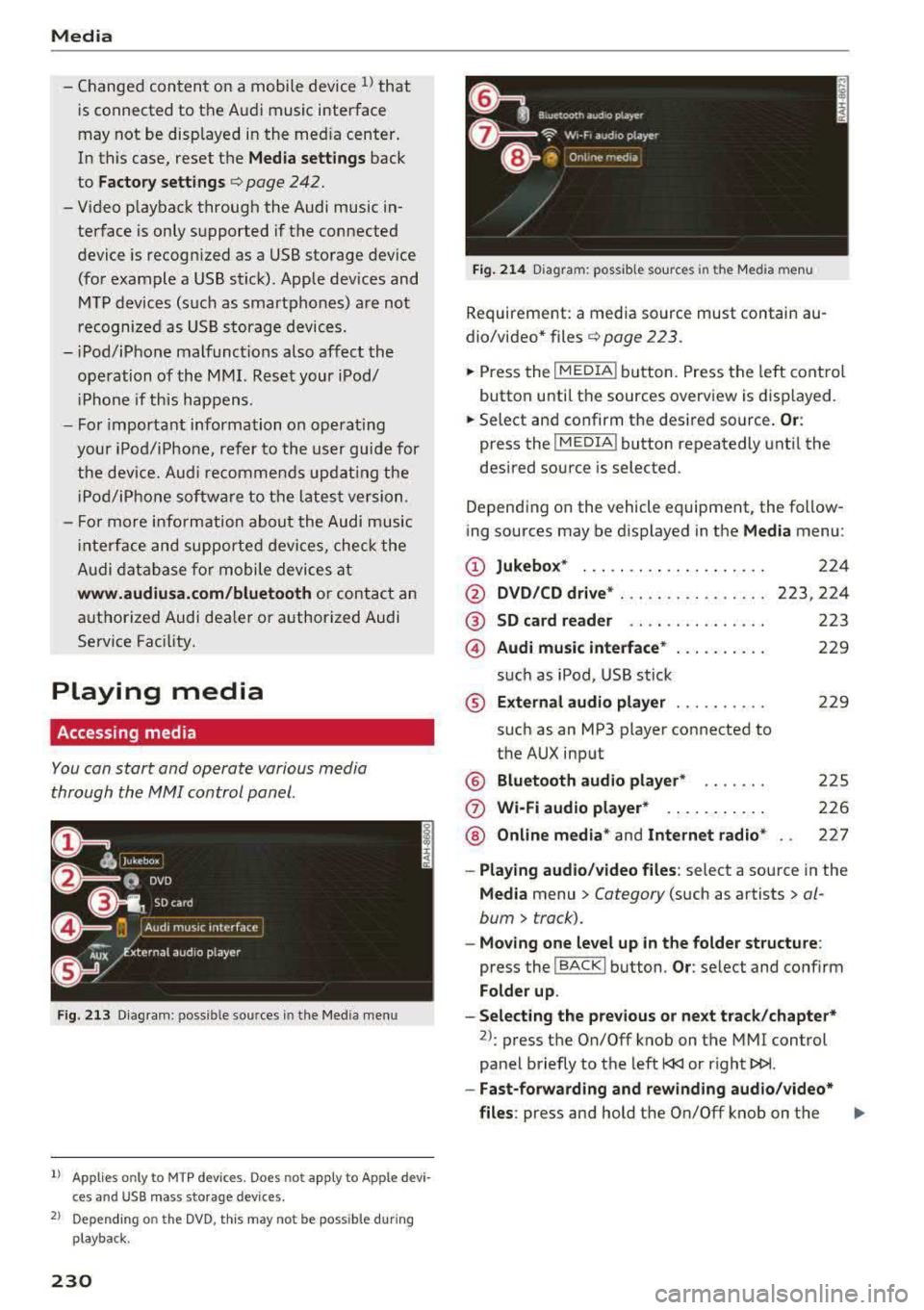
Fi g. 214 D ia gram: possible sour ces i n the Media m en u
Requir ement : a media source must contain au
dio/video*
files ¢ page 2 23 .
.,.. Press the IM EDIA ! button. Press the left cont rol
button unti l t h e sources overview is displayed.
.,.. Select and confirm th e desired source. Or:
press the I MEDIA ! button repeatedly unt il the
desired source is selected .
Depend ing o n the vehicle equipment , the follow
ing sources may be d isplayed in the
Media menu :
(D Jukebo x* ... .. .. .. .. .. .. .... .
@ DVD/CD drive * ... .. .. .. .. .... .
@ SD card re ader ....... ....... .
@ Audi music interface * .. .. . .... .
su ch as iPod , USB st ick
® Extern al audio player ... .. .... .
su ch as an MP3 player connected to
the AUX inp ut
@ Bluetooth audio player* ...... .
(J) Wi-Fi audio player* .... .. .... .
@ Online media * and Internet radio *
224
223,224
223
229
22 9
2 25
226
227
-Playing audio/ video files : select a sourc e in the
Media menu > Category (such as artists > al
bum
> t rack).
-Moving one level up in the folder structu re :
press the I BACK ! button . Or: select and confirm
Fo lder up .
-Selecting the pre vious or ne xt track /chapter*
2>: press t he On/Off knob on the MMI cont rol
panel briefly to the left
l
- Fast-forwarding and rew inding audio /video *
files :
press and hold the On/Off knob on the ..,.
Page 233 of 400
a, a, ..... N
" N ..... 0 N > 00
MMI control panel to the left l
a longer time.
-Pausing or resuming playback: press the On/
Off knob on the MMI control panel briefly.
@ Tips
- You can scroll through long lists quickly by
turning the control knob quickly. The
scroll
ing speed depends on the number of list en
tries.
- For safety reasons, the video image is only
displayed when the vehicle is stationary.
On·
Ly the sound from the video plays while driv
ing.
Media center
Various cat egori es for s electing audio/vid eo*
files ore available in the media center .
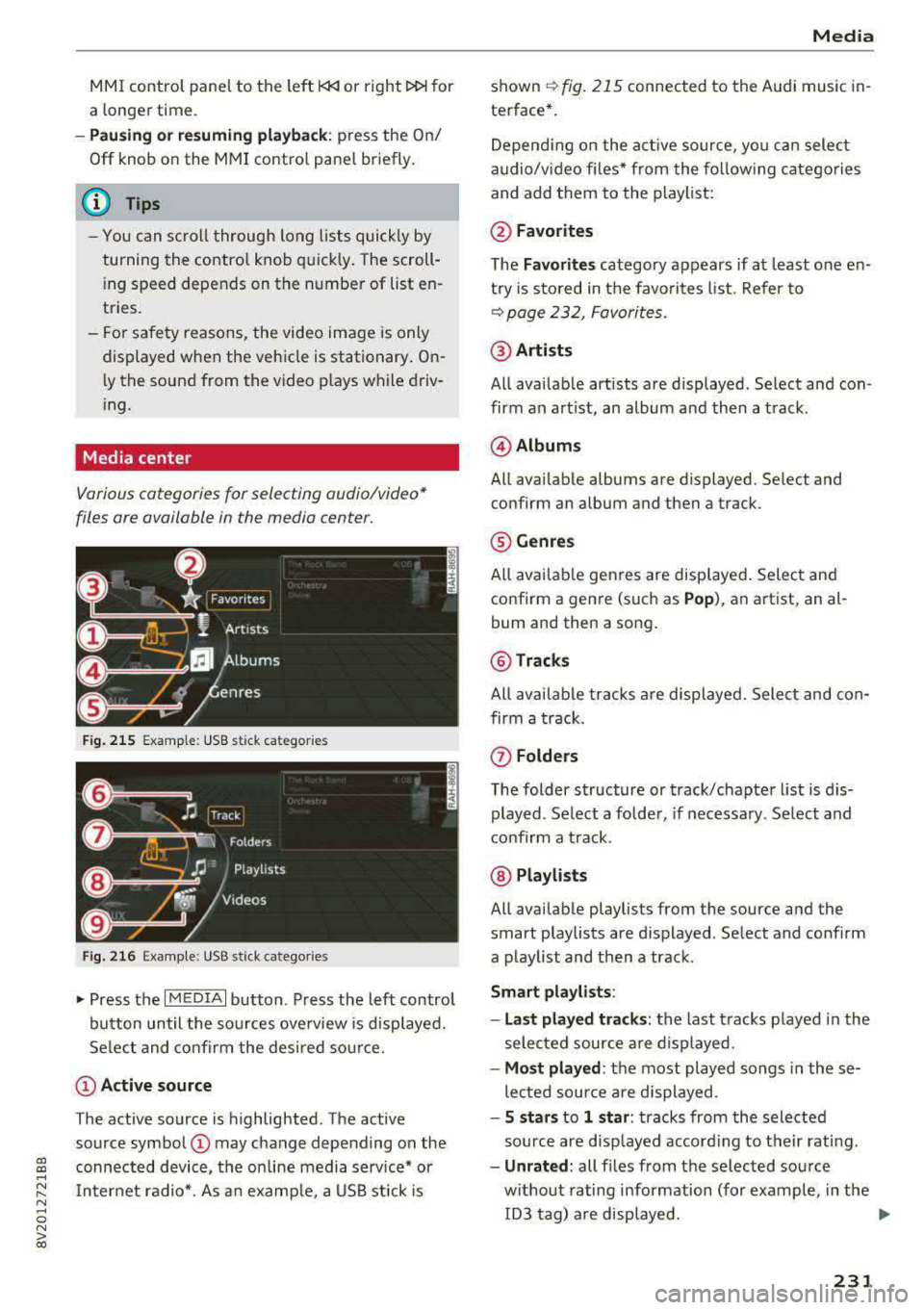
Fig. 215 Example: USB stick ca te gori es
Fig. 216 Example: USB stick ca tegorie s
"'Press the I MEDIAi button . Press the left control
button until the sources overview is displayed.
Select and confirm the desired source.
(D Active source
The active source is highlighted. The active
source symbol
(D may change depending on the
connected device, the on line media service* or
Internet radio*. As an example, a USB stick is
Media
shown ~ fig. 215 connected to th e Audi music in·
terfac e*.
Depending on the active source , you can select
audio/video files* from the following categories
and add them to the playlist:
@Favorites
The Favorites category appears if at least one en·
try is stored in the favorites list. Refer to
~ page 232, Favorites.
@Artists
All available artists are displayed . Select and con ·
firm an artist, an album and then a track.
@ Albums
All available albums are displ ayed . Select and
c onfirm an album and then a tra ck .
® Genres
All available genres are displayed. Select and
confirm a genre (such as
Pop), an artist, an al·
bum and th en a song.
@ Tracks
All available tracks are displayed. Select and con
firm a track.
(f) Folders
The folder structure or track/chapter list is dis
played . Select a folder, if necessary. Select and
confirm a track .
@ Playlists
All available playlists from the source and the
smart playlists are di splayed . Select and confirm
a playlist and then a track .
Smart playlists :
- Last played tracks:
the last tracks played in the
selected source are displayed .
-Most played : the most played songs in these
lected source are displayed .
-5 stars to 1 star: tracks from the selected
source are displayed according to their rating.
- Unrated: all files from the selected source
without rating information (for example, in the ID3 tag) are displayed.
.,.
231
Page 239 of 400
CXl CXl .... N r--N .... 0 N > 00
Media
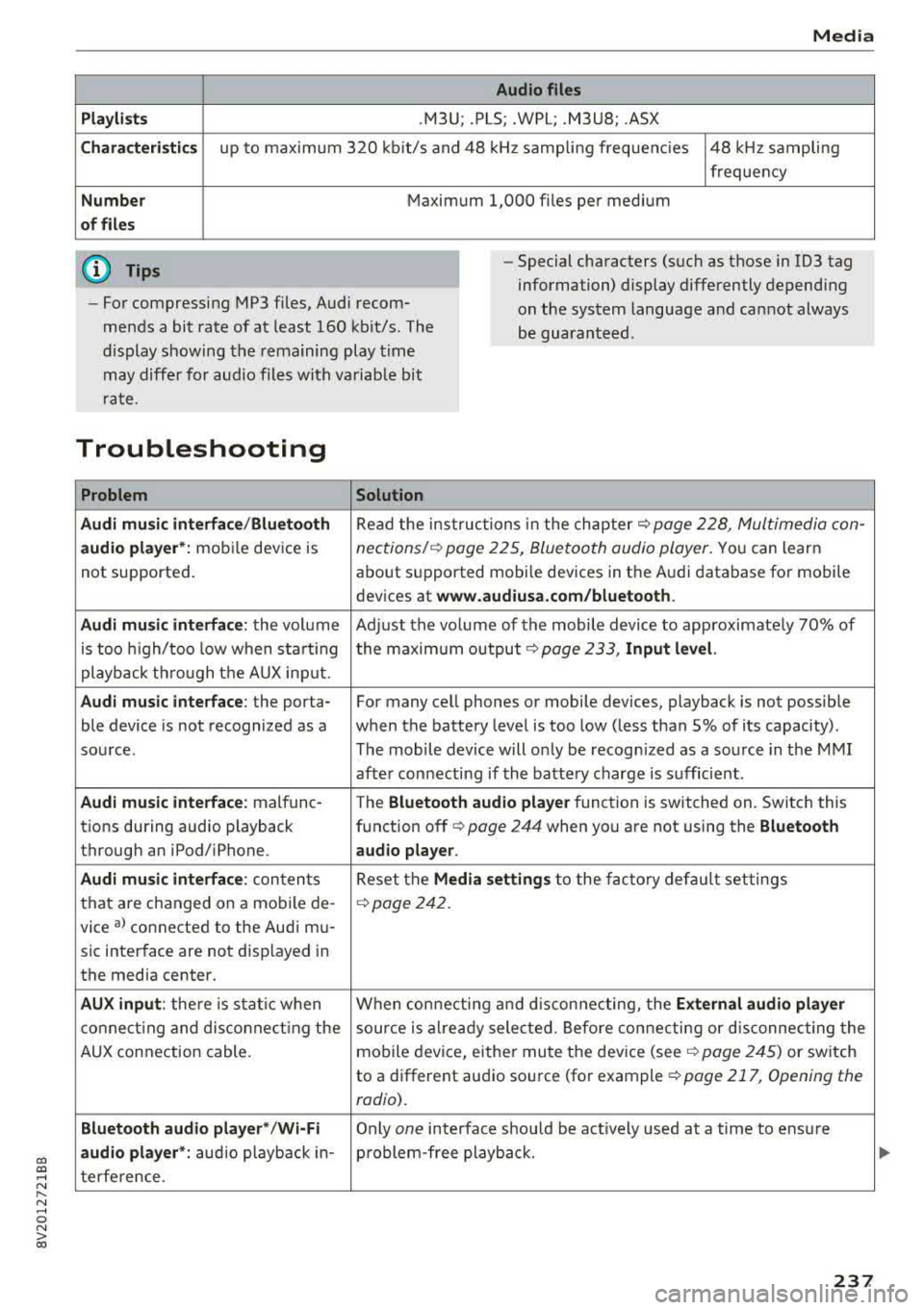
Audio files
Pla ylists
.M3U; .PLS; .WPL; .M3U8; .ASX
Chara cter istic s up to maxim um 320 kb it/s and 48 kHz samp ling freque ncies 48 kHz sampling
frequency
N umber Maximum 1,000 files per medium
of fil es
(D Tips
- For compressing MP3 files, Audi recom
mends a bit rate of at least 160 kb it/s. The
display s howing the remaining play t ime
may diffe r for audio files with va riab le bit
r ate. -
Special characters (such as those in 1D3 tag
information) display differently depend ing
on the system language a nd can not always
be guaran teed .
Troubleshooting
Problem Solution
Audi music interface /Bluetooth
Read the in struc tions in the chapter c::> page 228, Multimedia con-
audio player* :
mobile dev ice is nections/ c::> page 225, Bluetoo th audio player. Yo u can learn
not supported . about s
upported mobi le devices in the A udi database fo r mobile
devices at
www.audiusa.com /bluetooth .
Audi music interface :
the volum e Adjust the volume of the mobile device to approximate ly 70% of
is too high/too low when sta rt ing the maximu m output
9 page 233, Input level.
playb ack th rough t he AUX inp ut.
Audi music interface : the porta- For many cell phones or mobile devices, playback is not possible
ble device is not recognized as a when the battery level is too low (less than 5% of its capacity) .
sou rce. The mobile de·vice will o nly be recogn ized as a so urce in the M MI
afte r con necting if the batte ry charge is sufficient .
Audi music interface : malfunc-
The Bluetooth audio playe r function is switched on. Switch this
t ions during audio playback function off
c> page 244 when you are not using the Bluetooth
through an iPod/ iPhone. audio player .
Audi music interface :
conten ts Reset the M edia setting s to the f acto ry de fau lt set tings
that are changed on a mobile de -
c::>page 242.
vice al connected to the Aud i m u-
sic inter face are not d isplayed in
the media center.
AUX input : there is s tat ic when W hen con necting and disconnec ting, the External audio player
co nne ct ing and dis co nne ct ing the source is alr e a dy sele cted. Befo re con necting or d isconnecting the
AUX connection cable. mo
bile device, either mu te the dev ice (see
c::> page 245) or switch
to a different audio so urce (fo r example
c::> page 217, Opening the
radio) .
Bluetooth audio player* /Wi-Fi
Only on e interface s hou ld be act ively used at a time to ens ure
audio player *: audio playback in- p roblem-free playback.
t e rfe re n ce .
237
Page 244 of 400
System settings
switched on~, you can say new commands dur
ing announcements. You do not need to wait for
the signal tone (beep) during an announcement.
When the function is switched off
0, you need to
wait for the signa l tone (beep) to say a new com
mand .
Volume: you can adjust the volume of the
prompts by turning the control knob.
Speech training (only when the vehicle is station
ary): you can adapt the voice recognition system
to your voice or pronunciation in order to improve
the system's ability to recogni ze your speech. In
d iv idual training is comprised of 20 speech en
tr ies that consist of commands and sequences of
numbers . You can delete the programmed voice
training with the
Reset individual speech train
ing
function.
Display brightness
Display brightness:
you can adjust the bright
ness of the Infotainment system display by turn
ing the control knob .
Factory settings
The following functions can be reset to the facto
ry default settings :
-Sound settings
- Radio
- Media settings
-Jukebox*
- Directory
- Telephone
- Bluetooth and Wi-Fi*
- Navigation settings*
- Navigation and online memory*
- Speech dialog system*
- Message settings*
- Apps *
- Tool tips
- Audi connect*
- Audi smartphone interface*
You can select the desired functions individually
or all at once with the option
Select all entries .
Select and confirm Restore factory settings.
242
(D Tips
-Make sure that not only the settings were
deleted but also the stored data, if applica
ble .
- If you reset the
Navigation and on line
memory* , Apps* or Audi connect*
to the
factory default settings, the system auto matically restarts after approximately 20
seconds . The Infotainment system display
will be black for several minutes when re
sta rting.
- Please note that the voice recognition sys
tem* is not available in Cabriolets.
Connection manager
Introduction
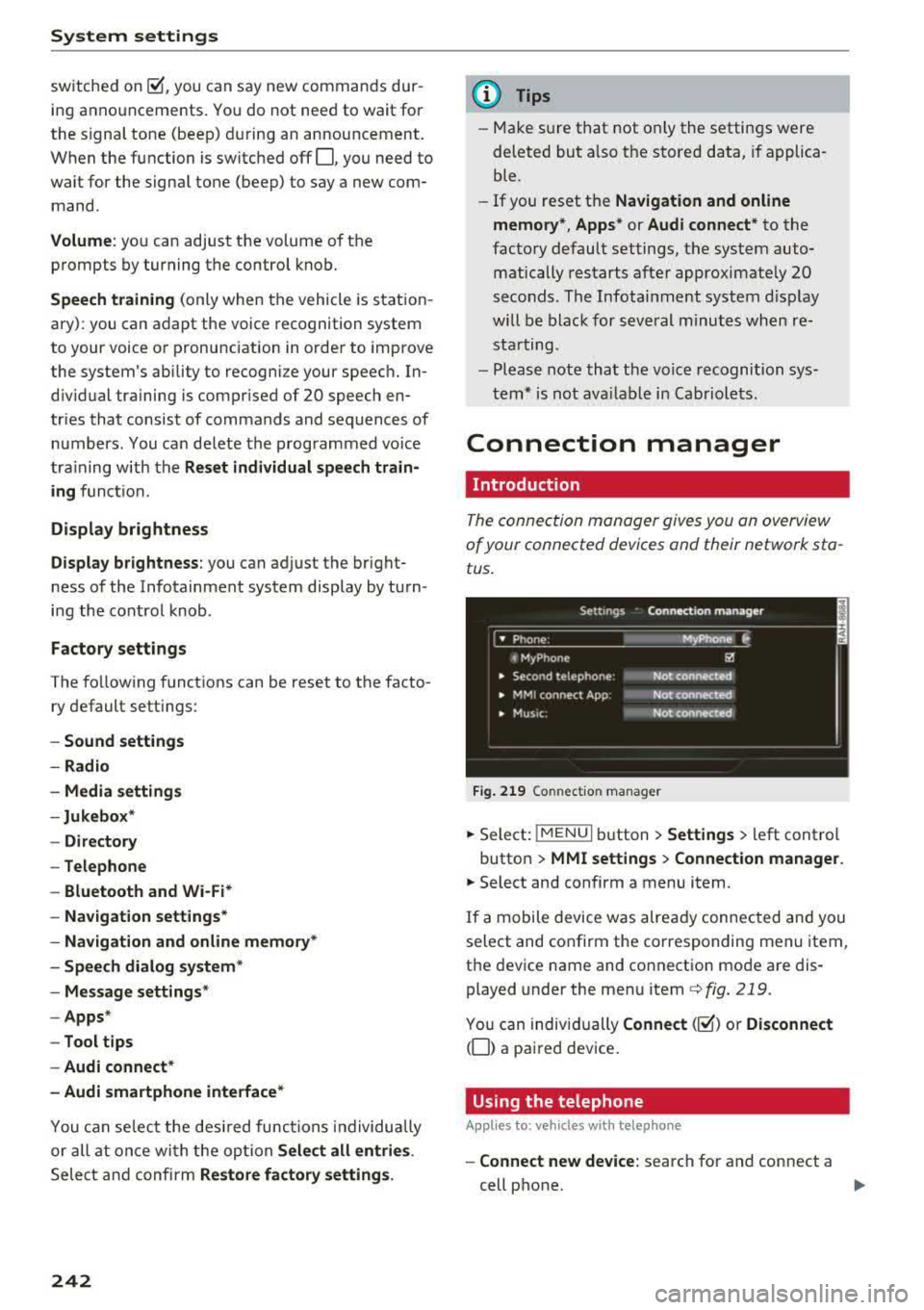
The connection manager gives you an overview
of your connected dev ices and their network sta
tus .
Fig. 219 Connect ion manager
.. Select: !MENU I button> Settings > left control
button >
MMI settings > Connection manager.
.. Select and confirm a menu item.
If a mobile device was already connected and you
select and confirm the corresponding menu item,
the device name and connect ion mode are dis
played under the menu item
c::>fig. 219.
You can individually Connect(~) o r Disconnect
(0) a paired device.
Using the telephone
Appl ies to: vehicles with telephone
-Connect new device: search for and connect a
cell phone.
..,.
Page 284 of 400
Airbag syste m
seat into its rearmost position in the seat's
fore and aft adjustment range, as far away
from the airbag as possible. The backrest must be adjusted to an upright position.
Make sure that the
PA SSEN GER AIR BAG
OFF
light comes on and stays on all the time
whenever the ignition is switched on.
,& WARNING
- If the PA SSENGER AIR BAG OFF light does
not go out when an ad ult is sitting on the
front passenger seat after taking the steps
described above, make sure the adu lt is
properly seated and restrained at one of the
rear seat ing positions.
- Have the airbag system inspected by your
Audi dealer before transporting anyone on
the front passenger seat.
(D Tips
If the capacitive passenger detection system
determines that the front passenger seat is
empty, the fronta l airbag on the passenger
side will be turned off, and the
P ASSE NGER
A IR BAG OFF light will stay on.
Repair , care and disposal of the airbags
Parts of the airbag system are installed at many
d ifferent places on your Aud i. Install ing, remov
ing, servic ing or repa iring a part in an area of the
veh icle can damage a pa rt of an airbag system
and prevent that system from working properly
in a co llision.
There are some important things you have to
know to make sure that the effectiveness of the
system w ill not be impaired and that discarded
components do not cause injury or pollute the
environment .
,& WARNING
Improper care, servicing and repair proce
dures can increase the r isk of personal injury
and death by preventing an airbag from de
ploying when needed or deploying an airbag
unexpectedly:
282
- Never cover, obstruct, or change the steer
ing wheel horn pad or airbag cover or the in
strument panel or modify them in any way.
- Never attach any objects such as cup holders
or telephone mountings to the surfaces cov
ering the a irbag un its.
- For cleaning the horn pad or instrument
panel, use only a soft, dry cloth or one mois
tened w ith plain water. Solvents or cleaners
could damage the airbag cover or change
the st iffness or strength of the material so
that the airbag cannot deploy and protect properly.
- Never repair, adjust, or change any parts of
the airbag system.
- All work on the steering wheel, inst rument
panel, front seats or e lectr ica l system ( in
cluding the instal lation of a udio eq uipment,
cellular telephones and CB radios, etc.)
m ust be performed by a qualified technician
who has the training and specia l equipment
necessary.
- For any work on the airbag system, we strong ly recommend that you see your au
thorized Audi dealer or qualified workshop.
- Never modify the front bumper or parts of
the vehicle body.
-Always make sure that the side airbag can inflate without interference:
- Never install seat covers or replacement upholstery over the front seatbacks that
have not been specif ica lly approved by
A udi.
- Never use additional seat c ushions that
cover the areas where the side airbags in
flate.
- Damage to the orig inal seat cove rs or to
the seam in the area of the s ide airbag
module mus t always be repai red immedi
ate ly by an authorized Audi dealer.
- The a irbag sys tem can deploy on ly once. Af
ter an airbag has been deployed, it m ust be
replaced with new replacement parts de
signed and approved especia lly for your
Audi model version . Replacement of com
plete airbag systems or airbag components
must be performed by qua lified workshops
only . Make sure that any airbag service
Page 332 of 400
Wheel s
® Mud and snow capability
"M/5" or "M+S" indicates the tire
is sui table for driving on mud and
snow.
& indicates a winter tire.
@ Composition of the tire cord
and materials
The number of plies indicates the
number of rubberized fabric lay
ers in the t ire. In general: the
more layers, the more weight a
tire can carry . Tire manufacturers
must also specify the materials
used in the tire. These include
steel, nylon, po lyester and other
materials.
@ Maximum permitted load
This number indicates the maxi
mum load in kilograms and
pounds that the tire can carry .
@Uniform tire quality grade
standards for treadwear,
traction and temperature resist ance
Treadwear, traction and tempera
ture
ranges ¢ page 344.
@ Running direction
The arrows indicate the running
direction of unidirectional t ires .
You must always follow the speci
fied running direction
¢page 361 .
330
@ Maximum permitted
inflation pressure
This number indicates the maxi
mum pressure to which a tire can
be inflated under normal operat
ing condit ions.
Glossary of tire and loading
terminology
Acces sory we ight
means the combined weight (in
excess of those standard items
which may be replaced) of auto matic transmission, power steer
ing, power brakes, power win
dows, power seats, radio, and
heater, to the extent that these
items are available as factory-in
stalled equipment (whether in
stalled or not) .
Aspect ratio
means the ratio of the height to
the width of the tire in percent .
Numbers of 55 or lower indicate a
low sidewall for improved steer
ing response and better overall
handling on dry pavement.
Bead
means the part of the tire that is
made of steel wires, wrapped or
reinforced by ply cords and that is
shaped to fit the r im .
...
Page 357 of 400
a, co ..... N
" N ..... 0 N > 00
-If tire sealant gets in your eyes or on your
sk in, thoroughly rinse the affected area im
med iately with clean water.
- Do not inhale the fumes.
- If you swallow any of the ti re sealant, thor-
oughly rinse your mouth immediately and
drink a lot of water. Do not induce vomiting .
Seek medical attention immediately.
- Change your clothes immediate ly if they get
t ire sealant on them.
- If an allergic reaction occurs, seek immedi
ate medical attention.
- Keep the tire sea lant away from children .
- In vehicles with a ti re pressure monitoring
system *, using tire sealant can results in an
incorrect display or a system malfunction .
Drive carefully to the nearest authorized
Audi dealer or authorized Audi Service Facili
ty.
{!) Tips
- If sealant leaks, allow it to dry in place. Yo u
can then pee l it off like a sticker.
- Note the expiration date on the sealant bot
tle . Replace the tire sea lant at an author
ized Audi dealer or authorized Audi Service
Fac ility.
- Radio reception can be interrupted when operating the compressor*.
- Obey all laws .
Repairing tires
App lies to: ve hicles w ith tire mobility ki t
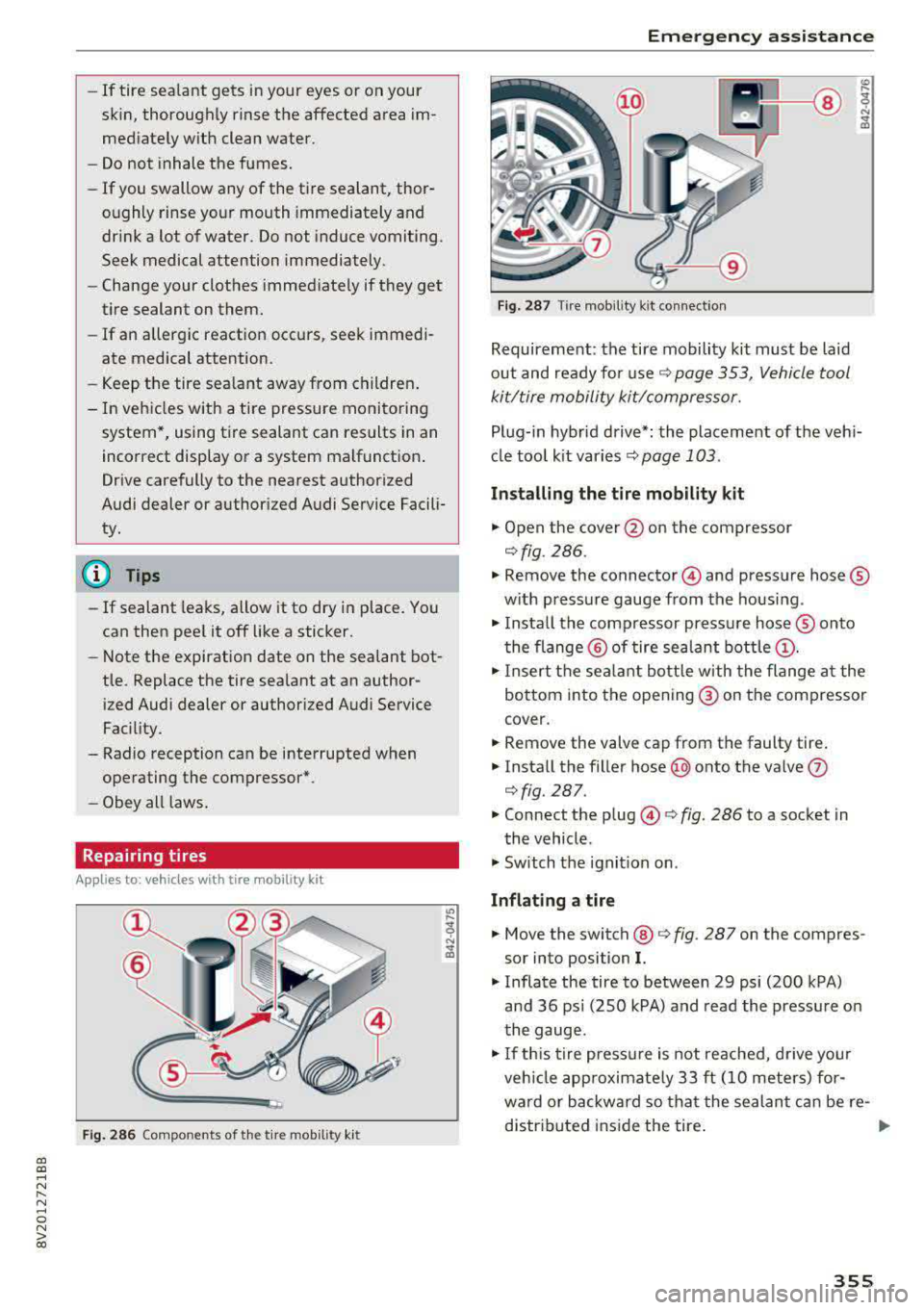
Fig. 286 Components of the t ire mobility kit
Em ergen cy a ssis tanc e
Fig. 287 Tire mobil ity k it connection
Requirement: the tire mobility kit must be laid
out and ready fo r
use ¢ page 353, Vehicle tool
ki t/tire mobility kit/compressor.
Pl ug- in hybrid drive*: the placement of the veh i
cl e tool k it varies
¢ page 103 .
Installing the tire mobility k it
.,. Open the cover @ on the compressor
¢fig. 286.
.,. Remove the connector © and pressure hose ®
w ith pressure gauge from the housing .
.,. Install the compressor pressu re hose ® onto
t he flange @ of tire sea lant
bottle @.
.,. Insert the sea lant bott le with the flange a t the
bo ttom into the opening ® on the compressor
cover .
.,. Remove the valve cap from the faulty tire .
.,. Install the filler hose @onto the valve (J)
¢fig. 287.
.,. Connect the plug ©¢ fig. 286 to a socket in
the vehicle.
.,. Switch the ignit ion on .
Inflating a tire
.,. Move the switch @¢ fig. 287 on the compres
sor into position
I.
.,. Inflate the tire to between 29 psi (200 kPA)
and 36 ps i (250 kPA) and read the pressure on
the gauge .
.,. I f th is ti re press ure is not reached, d rive yo ur
veh icle app roximate ly 33
ft (10 meters) for
ward or backwa rd so tha t the sealant can be re
distr ibuted ins ide the tire .
355
Page 371 of 400
a, a, ..... N
" N ..... 0 N > 00
(D Note
-Applying a higher voltage booster battery
will cause expensive damage to sensitive electronic components, such as control
units, relays, radio, etc.
- There must be no electrical contact between the vehicles as otherwise current could al
ready start to flow as soon as the positive
(+) terminals are connected .
@ Tips
The discharged battery must be properly con
nected to the vehicle's electrical system.
When jump starting or charging the battery,
never connect the negative ground cable to
the battery negative post because the battery
manager system must be able to detect the
battery's state of charge. Always connect the
negative ground cable to the negative ground
post of the battery manager control unit.
Using jump start cables
Connect the jump start cables in the exact order
described below.
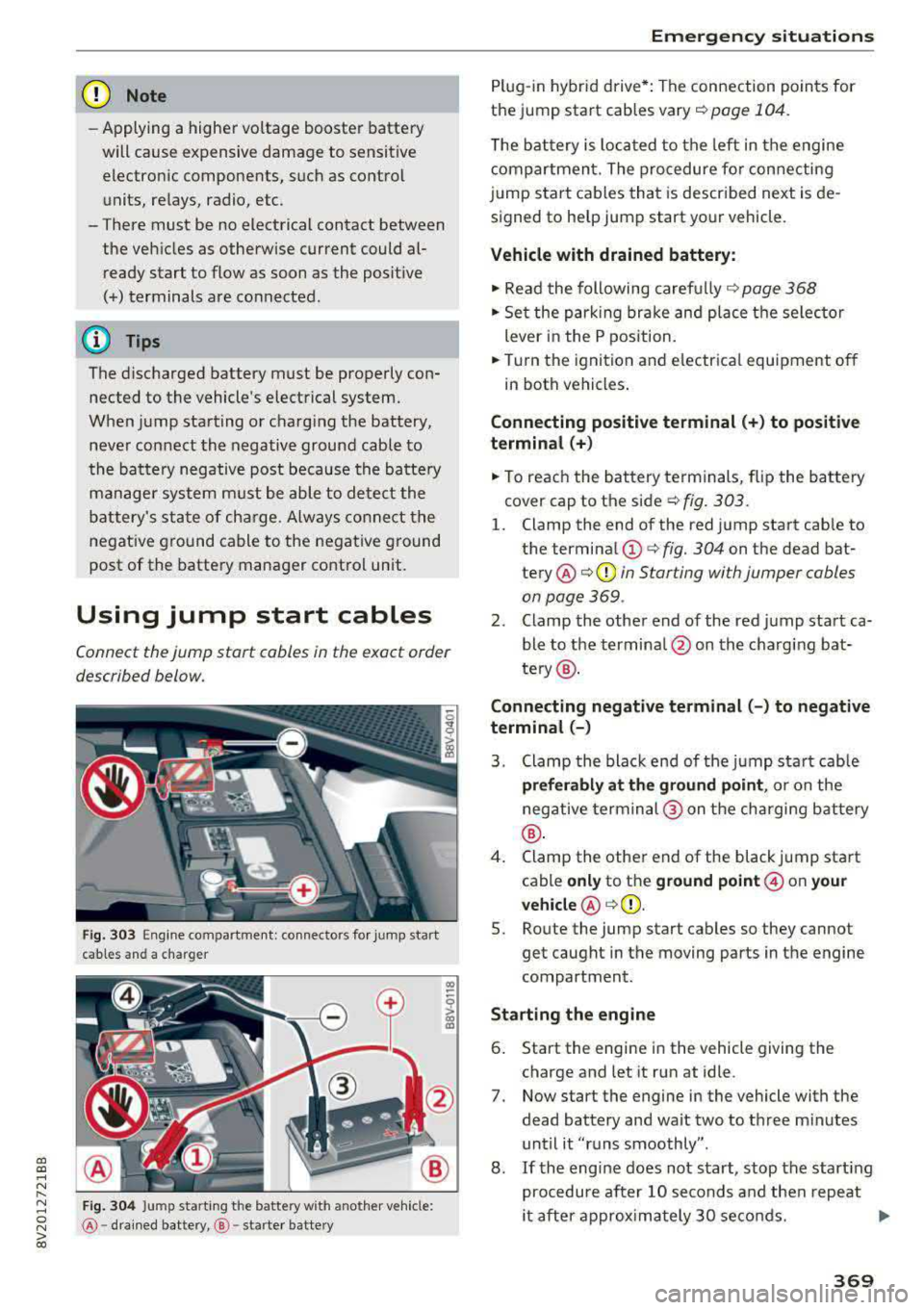
Fig. 303 Engine compartment: connectors for jump start
cables and a charger
Fig . 304 Ju mp starting t he battery wit h another vehicle:
@ -dra in ed battery, @-starter batte ry
Emergency situations
Plug-in hybrid drive*: The connection points for
the jump start cables
vary ¢ page 104.
The battery is located to the left in the engine
compartment. The procedure for connecting
jump start cables that is described next is de
signed to help jump start your vehicle.
Vehicle with drained battery:
.. Read the following carefully 9 page 368
.. Set the parking brake and place the se lector
lever in the P position .
.. Turn the ignition and electrical equipment off
in both vehicles .
Connecting positive terminal(+) to positive
terminal (+)
.. To reach the battery terminals, flip the battery
cover cap to the side¢ fig. 303 .
l. Clamp the end of the red jump start cab le to
the terminal
(D c> fig. 304 on the dead bat
tery @¢ 0 in Starting with jumper cables
on page 369 .
2. Clamp the other end of the red jump start ca
ble to the terminal @on the charging bat
te ry @ .
Connecting negative terminal(-) to negative
terminal (-)
3. Clamp the black end of the jump start cab le
preferably at the ground point, or on the
negative terminal @ on the charging battery
®·
4. Clamp the other end of the black jump start
cable
only to the ground point @ on your
vehicle @c>(D.
5. Route the jump start cables so they cannot
get caught in the moving parts in the engine
compartment.
Starting the engine
6. Start the engine in the vehicle giving the
charge and let it run at idle .
7. Now start the engine in the vehicle with the
dead battery and wait two to three m inutes
until it "runs smoothly" .
8.
If the engine does not start, stop the start ing
procedure after 10 seconds and then repeat
it after approx imately 30 seconds.
Ill>
369