headlight AUDI S3 SEDAN 2018 User Guide
[x] Cancel search | Manufacturer: AUDI, Model Year: 2018, Model line: S3 SEDAN, Model: AUDI S3 SEDAN 2018Pages: 404, PDF Size: 62.3 MB
Page 121 of 404
Outside mirrors
If yo u cannot see the traffic behind the tra iler
with the standard exterior mirrors, then you
must attach additiona l exterior mirrors . Adj ust
them so you have a sufficient visibility behind
you .
Exterior lighting
Follow the legal regulat ions regard ing the light
ing equipment on your trailer . Contact an author
ized Audi dealer or authorized Audi Service Facili
ty for more information.
Before starting to drive, check all lighti ng equip
ment on the hitched trailer.
The headlight range contro l adjusts automatical
l y to the light range of the headl ights.
Safety chains
Make sure the safety chains are correctly applied
when pull ing a trailer . The chains should hang
enough so that the trailer can dr ive around
curves. However, they must not touch the
g ro und .
(D Tips
-Use chocks whe n parking on incl ines if the
trailer is load ed.
- We recommend also hav ing the veh icle in
spected between the inspect ion intervals if
you are towing a trailer frequently.
- Avo id driving with a trailer during the vehi
cle break- in period .
Driving with a trailer
Driving with a trailer requires extra caution.
Speed
Adhere to the legal speed limits. Follow the legal
regulations specific to the country.
As the speed increases, the driving stability of
the trai ler decreases. Therefore you should not
exceed the maximum legal speed limit when
u. there are unfavorable road, weather and/or wind 00
~ conditions . This especially applies when driving
~ downhill.
0 N > 00
Trailer towing
You m ust always reduce your speed as soon as
you notice even the slightest swinging motion of
the tra iler. Never try to "stra ighten out" the tra il
er by acce lerating.
T he weight distribution is very poor if the vehicle
is empty and the trai ler is loaded . However if you
must drive under these circumstances, then dr ive
especially slowly .
Brakes
Brake in a timely manner. Downshift before driv
ing down hill so that t he engine can assist with
braking ~.&. .
When using a trailer w it h overrun brakes, first
brake gently then quickly. This reduces the r isk of
jerking while braking if the trailer wheels lock up .
Engine coolant temperature
Pay attention specifically to the coo lant tempera
ture display when there are high outside temper
a tur es, and when driving on long inclines
~page 11. Shift to a hig her gear in a timely man
ner .
A WARNING
= -
Constant braking causes the brakes to over-
heat and substantially reduces braking per
formance, increases braking distance or caus
es complete failure of the brake system.
119
Page 330 of 404
Check ing and F illing
~ Applies to: vehicles with the vehicle battery in
the engine compartment: open the battery cov
er
¢ fig. 272 .
~ Applies to: vehicles with jump start point(+):
open the cover on the posi tive term inal
¢ fig . 273 .
~ Clamp the charger terminal clamps as instruct
ed on the
p os itiv e t erminal (+ ) and only on the
bo dy ground p oin t(-).
~ Inse rt the powe r cable for the charg ing device
into the socket and switch the device on.
~ At the end of the charging process, switch the
charger off and pull the power cab le out of the
socket.
~ Remove the charger terminal clamps.
~ Applies to: vehicles with the vehicle battery in
the engine compartment: fold the cover back
on the battery correctly .
~ Applies to: vehicles with jump start point(+):
close t he cover on the positive term inal.
~ Close the hood ¢ page 320.
A WARNING
-A highly exp losive mixture of gases can form
when charging batteries . On ly charge the
vehicle battery in well -venti lated areas.
- A drained vehicle battery can freeze at tem
peratures around 32
QF (0 QC). A frozen or
thawed vehicle battery must not be charged
and must not be used anymore. If ice forms,
the battery housing can crack and battery electrolyte can leak out, which increases the
risk of a n explos ion and chemical burns .
Contact an autho rized Aud i deale r or au
tho rized Aud i Serv ice Facility fo r more info r
mation .
-Do not connect o r disconne ct the c ha rg ing
cable while charg ing beca use th is increases
the risk of an exp losion.
(D Tips
-Only charge the vehicle battery through the
con nections in t he e ng ine compartment.
-Read all of the manufacture r's instructions
fo r th e cha rger befo re charg ing t he ve hicle
battery.
32 8
Windshield washer
system
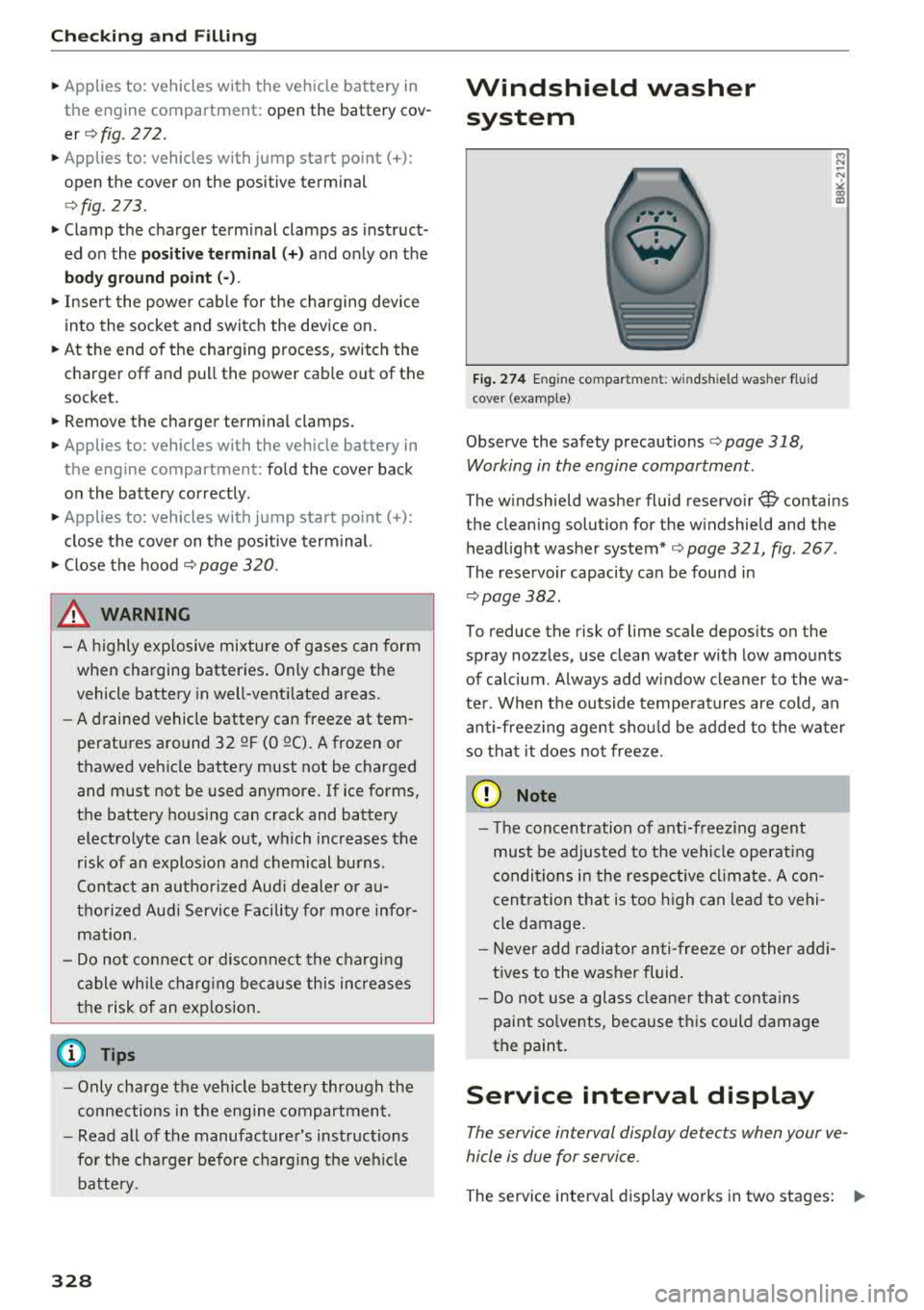
Fig . 274 En gin e compar tmen t: w inds hield was he r fl ui d
cove r (example)
Observe the safety precautions ¢ page 318 ,
Working in the engine compartment .
M N
-N
"' "' m
The windshield washer fluid reservo ir W contains
the cleaning solution for the w indshield and the
headlight washer system*
¢ page 321, fig . 267 .
The reservoir capacity can be found in
¢page 382.
To reduce the risk of lime scale depos its on the
sp ray nozzles, use clean water with low amounts
of calcium . Always add w indow cleaner to the wa
ter . When the outside temperatures are cold , an
ant i-freez ing agent sho uld be added to t he wate r
so that it does no t freeze.
@ Note
-Th e concentration of ant i-freez ing agent
must be adjusted to t he ve hicle operat ing
c ondi tions i n the respective clima te . A con
centration t hat is too high can lead to vehi
cle damage .
-Never add radia to r an ti- free ze o r o ther ad di
t ives to the washer fluid.
-Do not use a glass clea ner th at conta ins
paint so lvents, because t his could damage
the paint.
Service interval display
The service interval display detects when your ve
hicle is due for service .
The service interval display works in two stages: .,.
Page 357 of 404
u. 00 .-< N l' N .-< 0 N > 00
Apply the product using a mic rofiber cloth. To
avoid damaging the paint surface, do not use too
much pressure .
R inse the veh icle t horo u ghly wi th wa ter. Then
clean using a neutra l shampoo and a soft micro
fiber cloth.
R inse the veh icle t horo u ghly again and let it a ir
d ry . Remove any water res idue using a ch amois.
A WARNING
-Only wash the vehicle when the ignition is
off and follow the instructions from the car
wash operator to reduce the risk of acci dents.
-T o reduce the risk of cuts, protect yourself
from sharp metal components when wash ing the underbody or the inside of the wheel
hous ings .
-After wash ing the vehicle, the brak ing effect
may be de layed due to mo isture on the
brake rotors or ice in the w inter . This in
c reases the risk of an acc ident. The brakes
must be d ried fi rst w it h a few careful b rake
app lications.
@ Note
-If you wash t he veh icle in an automatic car
wash, you m ust fold the exterior m irrors in
-
Care and cleaning
to reduce the r isk o f damage to the m irro rs .
Power fo lding exterior mirrors* m ust only
be folded in and o ut using the power fold ing
function.
-T o red uce the risk of paint damage, do not
was h the vehicle in direct s unlight.
-T o red uce the risk of damage, do not was h
the power top * w ith a pressu re washe r.
-T o red uce the risk of damage to the s urface,
do not use insect removing sponges, kitche n
sponges or s imilar items.
-Matte finish painted vehicle components:
-To reduce t he risk of damage to t he sur-
face, do not use pol ish ing agents or hard
wax.
-Neve r use protective wax. It can destroy
the matte finish effect .
-Do not place any st ickers or magnetic
s igns on vehicle parts painted with matte
finish paint. The paint cou ld be damaged
when the stickers or magnets a re re
moved.
@ For the sake of the environment
Only wash the veh icle in facilities spec ia lly de
s igned for that pu rpose. This will reduce the
r isk of di rty wate r contam ina ted with o il from
en te ring the sewe r sys tem.
Cleaning and care information
When clea ning and caring for individua l vehicle
components, refer to the follow ing tables . The
in fo rmat ion conta ined there is s imp ly recom
mendations . Fo r qu est io ns or for components t
h at are not listed, consult an authorized Aud i
dealer or authorized Audi Service Fac il ity. Also
fo llow the information found
in c:> ,& .
Exterior cleaning
Component Situation
Solution
Wind shield wip er
Deposits soft cloth wi th glass cleane r, ~ page 56
blade s
Headlights /
Deposits Soft sponge with a mild soap solutiona)
Tail light s
Sensors /
Deposits Sensors: soft cloth wit
h solvent -free cleaning solution
camera lenses Camera lenses: soft cloth with a lcohol-free cleaning so lu-
tion
Snow/ice Hand br ush/solven t-free de-icing spray
355
Page 359 of 404
u. 00 ... N l' N ... 0 N > 00
Care and cleaning
Component Situation Solution
Di spl ays/ins tru·
Deposits Soft cloth with LCD cleaner
men t clus ter
C o ntro ls
Deposits Soft brush, then a soft cloth with a mild soap solution3>
S af ety be lt s Deposits Mild soap solution al, allow to dry before letting them re-
tract
T ex tile s Deposits adhering to Vacuum cleaner
a
rtificial leather , the surface
Alcanta ra Water-based deposits Absorbent cloth and mild soap solutional
such as coffee, tea,
b lood , etc.
Oil-based deposits Apply a mild soap solution
al, blot away the dissolved oil or
such as oil, make-up, dye, treat afterward with water, if necessary
etc.
Special deposits such
Specia l stain remove r, blot with absorbent material, treat
as ink, nai l polish, la- afterward with mild soap solution, if necessary
a)
tex paint, shoe pol-
ish, etc.
Na tural l eather F resh sta ins Cotton clot h with a m ild soap so lution3l
Water-based deposits Fresh stains: absorbent cloth
such as coffee, tea, Dried stains: stain remover suitable for leather
blood, etc .
Oi l-based deposits Fresh stains : absorbent cloth and stain remover suitable
such as oil, make-up ,
for leather
etc. Dried stains: grease dissolving spray
Special deposits such Spot remove r su itab le for leather
as ink, na il polish, la -
tex paint, shoe po l-
ish, etc .
Care Regularly apply condit ion ing cream that protects from
light and penetrates into the material. Use specia l co lored
cond itioni ng cream, if necessary.
Car bon part s Deposits clean the same way as plast ic parts
a) M ild soap solut ion : max imu m two tablespoons of neutral soa p in 1 quar t (1 liter) of water
A WARNING
The windsh ie ld may not be treated with wa
ter-repell ing wi ndsh ield coating agents. Un
favorable cond it ions su ch as wet ness, dar k
ness, o r low sun can resul t in increased glare.
Wiper blade chatter is also possib le.
(QJ) Note
- Headlights /tail light s
-
-Never clean headlights or tail lights w ith a
dry cloth or sponge.
- Do not use any cleaning product that con
tains alcoho l, because they could cause
cracks to form.
-Wheels
- Neve r use any pa int polish or other abra-
sive mate rials.
- Damage to the protect ive layer o n the
rims such as stone ch ips or sc ratches must
be repai red immediately.
.,.
357
Page 374 of 404
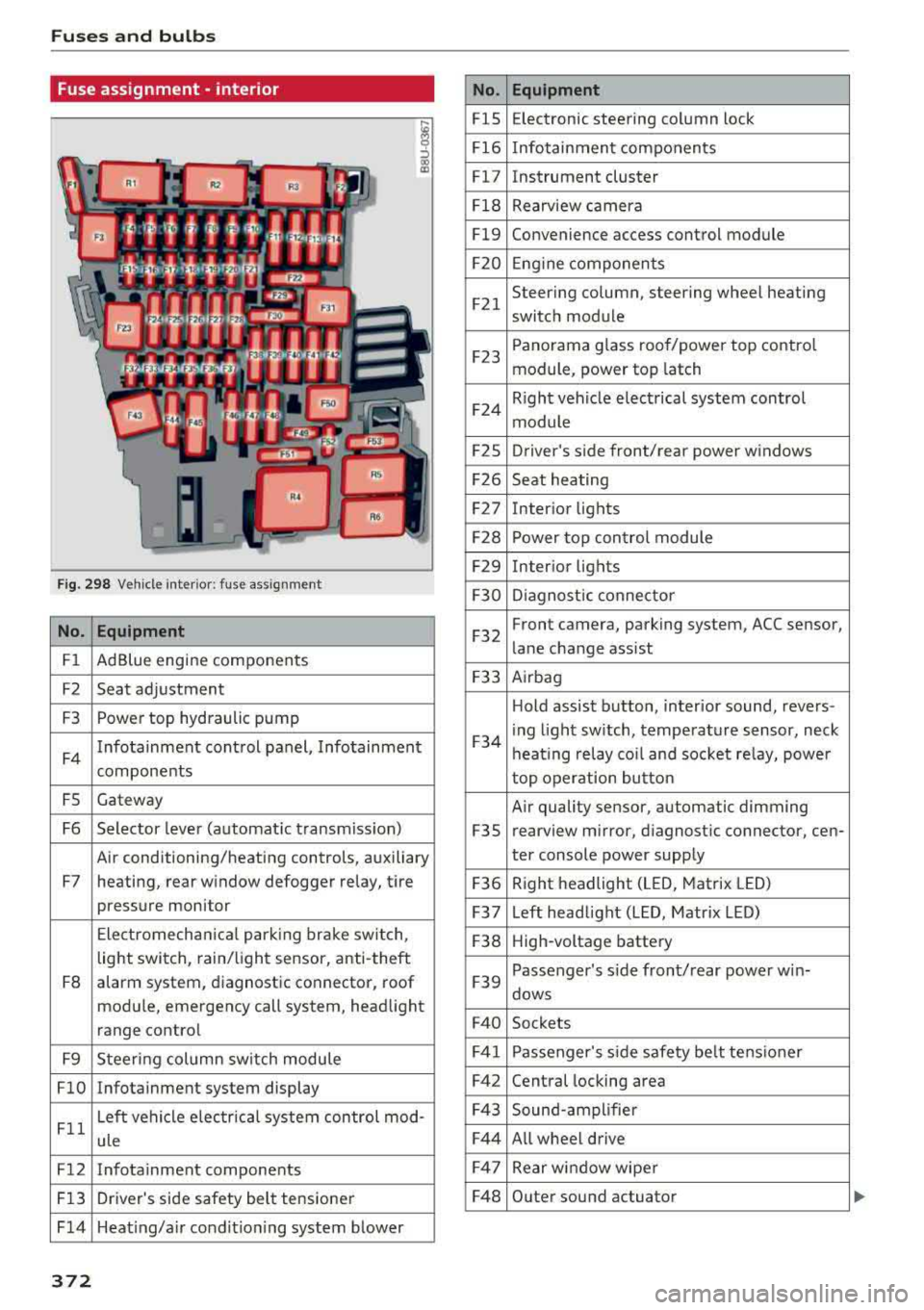
Fuses and bulbs
Fuse ass ignment - interior
ij
::, CX) ID
F ig. 298 Vehicle interior: fuse assignment
No. Equipment
Fl Ad Blue engine components
F2 Seat adjustment
F3 Power top hydraulic pump
F4 Infotainment control panel,
Infotainment
components
FS Gateway
F6 Selector lever (automat ic transm iss ion)
Air conditioning/heating controls, auxiliary
F7 heating, rear window defogger relay, tire pressure monitor
Electromechan ical park ing brake switch,
light switch, rain/light sensor, anti-theft
F8 alarm system,
diagnostic connector, roof
module, emergency call system, head light
range control
F9 Steering col umn sw itch module
FlO Infotainment system display
Fll Left vehicle electrica
l system control mod-
ule
F12 Infotainment components
F13 Driver's side safety belt tensioner
F 14 Heat ing/a ir condit ion ing system blower
372
No . Equipment
FlS Electronic
steering column lock
F16 Infotainment components
Fl7 Instrument cluster
Fl8 Rearview camera
Fl9 Convenience access control module
F20 Engine components
F21 Steering column, steering wheel heating
switch module
F23 Panorama glass
roof/power top control
module, power top latch
F24 R
ight vehicle electrical system control
module
F2S Driver
's side front/rear power windows
F26 Seat heating
F27 Interior
lights
F28 Power top control module
F29 Interior lights
F30 Diagnostic connector
F32 Front camera, parking
system, ACC sensor,
lane change assist
F33 Airbag
Hold assist button, interior sound, revers-
F34 i
ng light sw itch, temperature sensor, neck
heating relay coil and socket relay, power
top operation button
Air quality sensor, automatic dimming
F3S rearview
mirror, diagnostic connector, cen-
ter console power supply
F36 Right
headlight (LED, Matrix LED)
F37 Left headlight (LED, Matrix LED)
F38 High-voltage battery
F39 Passenger
's side front/rear power w in-
dows
F40 Sockets
F41 Passenger's sid e safe ty be lt tens ioner
F42 Central locking area
F43 Sound-amplifier
F44 All wheel drive
F47 Rear window wiper
F48 Outer sound actuator
Page 376 of 404
Fuses and bulb s
front of your car which you can on ly reach
through the engine compartment .
Sheet metal and bulb ho lde rs can have s ha rp
edges that can cause ser ious c uts, parts must be
correct ly taken apart and then properly put back
together to he lp prevent breakage of parts and
long term damage from water that can enter
housings that have not been properly resea led.
F or your safety, we recommend that you have
your authorized Audi dealer replace any bu lbs for
you, s ince your dealer has the proper tools, the
correct bulbs and the expert ise.
Ga s di sch arg e lamps (Xen on li ght s)
Due to the high elect rical voltage, have the bulbs
replaced by a qua lified technic ian . Head lights
with Xenon light are ident ified by the h igh vo lt
age sticker.
LED h eadlight s*
LED headlights require no maintenance . Please
contact your authorized Audi dealer if a bulb
needs to be replaced .
A WARNING
Chang ing Xenon lamps w it h out the necessa ry
equ ipment can cause ser ious perso na l inju ry.
- Bul bs are p ressur ized and can explode when
being changed. Potentia l risk of i njury!
- On vehicles equipped wit h gas discharge
bulbs (Xenon light) life-threatening inju ries
can result from imp roper ha ndl ing of the
high -voltage po rtions of su ch lamps!
- Only yo ur auth o rized Aud i dea le r or q ual i
fied workshop should change the b ulbs in
gas discharge lamps . There a re parts with
sharp edges on the openings and on the
bulb ho lders t hat can cause serious cuts . If
you are uncertain about what to do, have
the work performed by an authorized A udi
dealer or qualified workshop. Serious per
sonal injury may resu lt from improperly per
formed work .
(D Tips
-If you still prefer to rep lace the light bu lbs
yourself, be aware that the engine com part-
374
ment is a hazardous area to work in ¢ & in
Working in the engine comportment on
page 318 .
-It is best to ask your a uthorized Audi dea ler
whenever you want to change a bulb .
Page 379 of 404
LL co ..... N
" N ..... 0 N > co
defroster on to reduce any voltage peaks that may occur when disconnecting the jumper
cables. The headlights must be switched
off.
14. While the engines are running , remove the
cables in
reverse order from the way they
were installed, as described in ¢
page 3 76.
Make sure the cables do not get caught in
moving engine components .
15. Fold the cover back on the battery correct ly .
16. Sw itch the heater fan and rear w indow de
froster
off.
Read and fo llow: ¢.&. in Preparation on
page 375
and ¢ (j) in Preparation on page 375.
(D Note
Do not use the negat ive termina l on the veh i
cle battery for jump star ting. A malfunction
could occ ur in the vehicle electrical system.
@ Tips
- Make sure that the connected positive ter
mina l clamps have sufficient contact with
metal.
- The vehicle battery in your vehicle vents to the outs ide so the battery gases d rain out of
the veh icle.
RS model s: starting the engine
Both jump start cables must be connected in the
correct order!
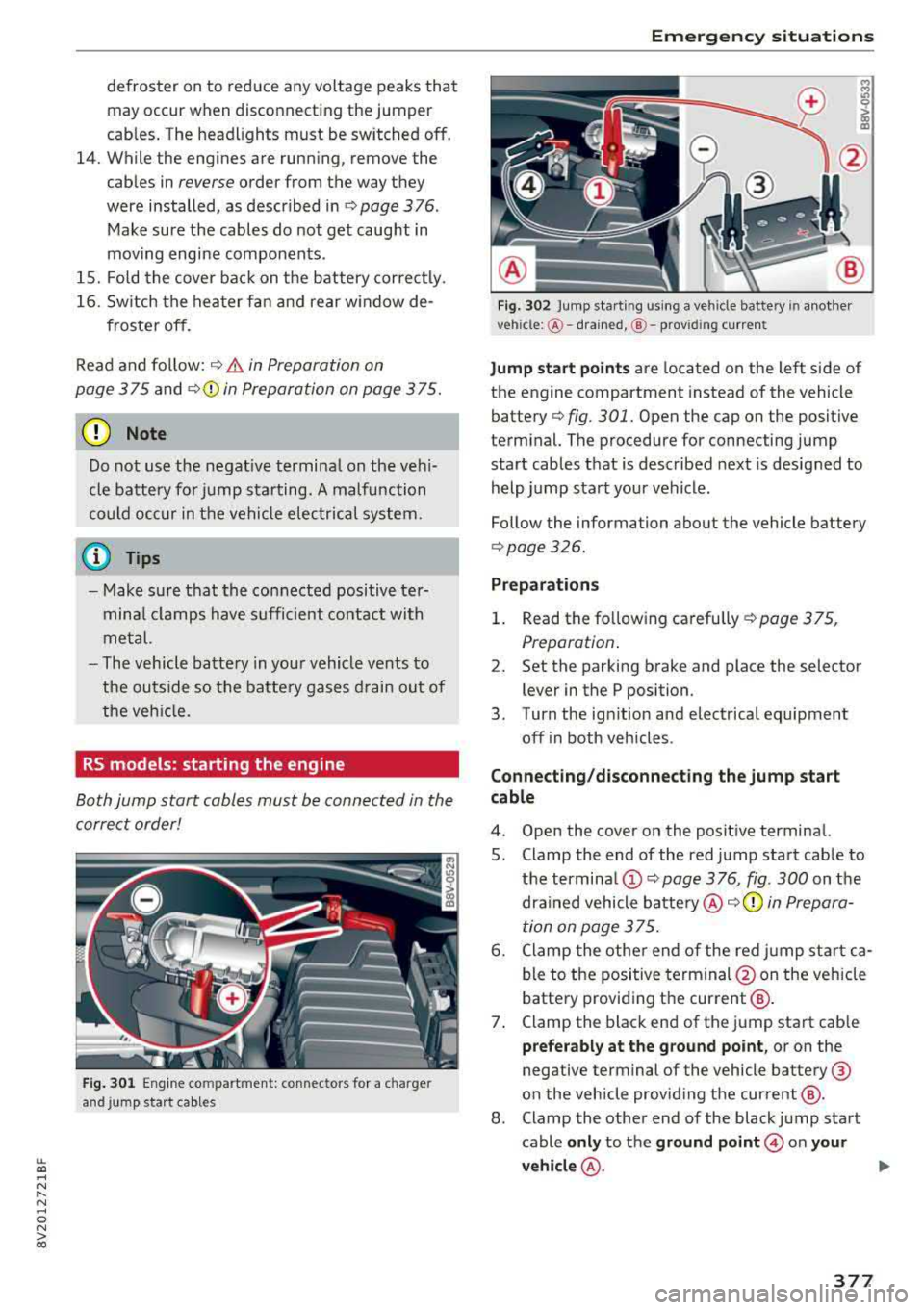
F ig . 301 Engine co mpartment : connector s for a c ha rge r
and jump star t cables
Em erge ncy s itua tions
Fig. 302 Jump star ting using a ve hicle bat tery in anothe r
ve hicl e:@ -drained, @- prov id in g curren t
M
lri 0 > (X) m
Jump sta rt p oin ts are located on the left side of
the engine compartment instead of the vehicle
battery ¢
fig. 301. Open the cap on the positive
terminal. The procedure for connecting jump start cables that is described next is designed to
help jump start your vehicle .
Follow the information about the vehicle battery
¢ page 326.
Pr eparation s
1. Read the follow ing carefully ¢ page 375,
Preparation .
2. Set the parking brake and place the selector
lever in the P position.
3. Turn the ign ition and electrical equipment
off i n both vehicles .
Conn ecting /d is conn ect ing the jum p sta rt
cable
4. Open the cover on the posit ive terminal.
5. Clamp the end of the red jump start cable to the
termina l(!) ¢ page 3 76, fig. 300 on the
drained vehicle
battery @c:;>(Q) in Prepara
tion on page 375.
6. Clamp the other end of the red jump sta rt ca
ble to the positive terminal @on the veh icle
battery providing the current @.
7. Clamp the black end of the jump start cab le
prefer ably at the grou nd point , or on the
negative terminal of the vehicle battery @
on the vehicle providing the current @.
8 . Clamp the other end of the black jump start
cable
only to the gr ound point @ on you r
v e hicl e@ .
.,..
377
Page 380 of 404
Emergency situations
9. Route the jump sta rt cables so they cannot
get caught in the moving parts in the engine
compartment.
Starting the engine
10. First start the engine in the vehicle g iving the
charge and let it run at idle.
11. Now start the engine in the vehicle with the
drained vehicle battery and wait two to three
minutes until it "runs smoothly" .
12.
If the engine does not start, stop the starting
procedure after 10 seconds and then repeat
it after approximately 30 seconds .
13 . In the vehicle that is being jump started,
switch the heater fan and rear w indow de
froster on to reduce any voltage peaks that may occur when disconnecting the jumper
cab les. The headlights must be switched
off.
14. While the engines a re running, remove the
cables in
reverse order from the way they
were installed, as described in ¢
page 3 76.
Make sure the cables do not get caught in
moving engine components.
15 . Close the cap on the positive term inal.
16 . Sw itch the heater fan and rear w indow de
froster
off.
Read and follow: ¢ .&. in Preparation on
page 375
and ¢ (D in Preparation on page 375 .
@ Tips
-Make sure that the connected positive ter
minal clamps have sufficient contact with
metal.
- The vehicle battery in your vehicle vents to
the outs ide so the battery gases drain out of
the veh icle .
Towing with a tow truck
General hint s
Your Audi requires special handling for towing.
The follow ing information is to be used by com
mercial tow truck operators who know how to op
erate the ir equipment safely.
-Never tow your Audi. Towing will cause dam
age to the engine and transmission .
378
-Never wrap the safety chains or winch cables
around the brake lines .
- To prevent unnecessary damage , your Audi
must be transported with a flatbed truck.
- To load the vehicle on to the flatbed, use the
towing loop found in the vehicle tools and at
tach to the front or rear anchorage
¢page 378 and ¢page 379.
A WARNING
A vehicle being towed is not safe for passen
gers . Never allow anyone to ride in a vehicle
being towed, for any reason.
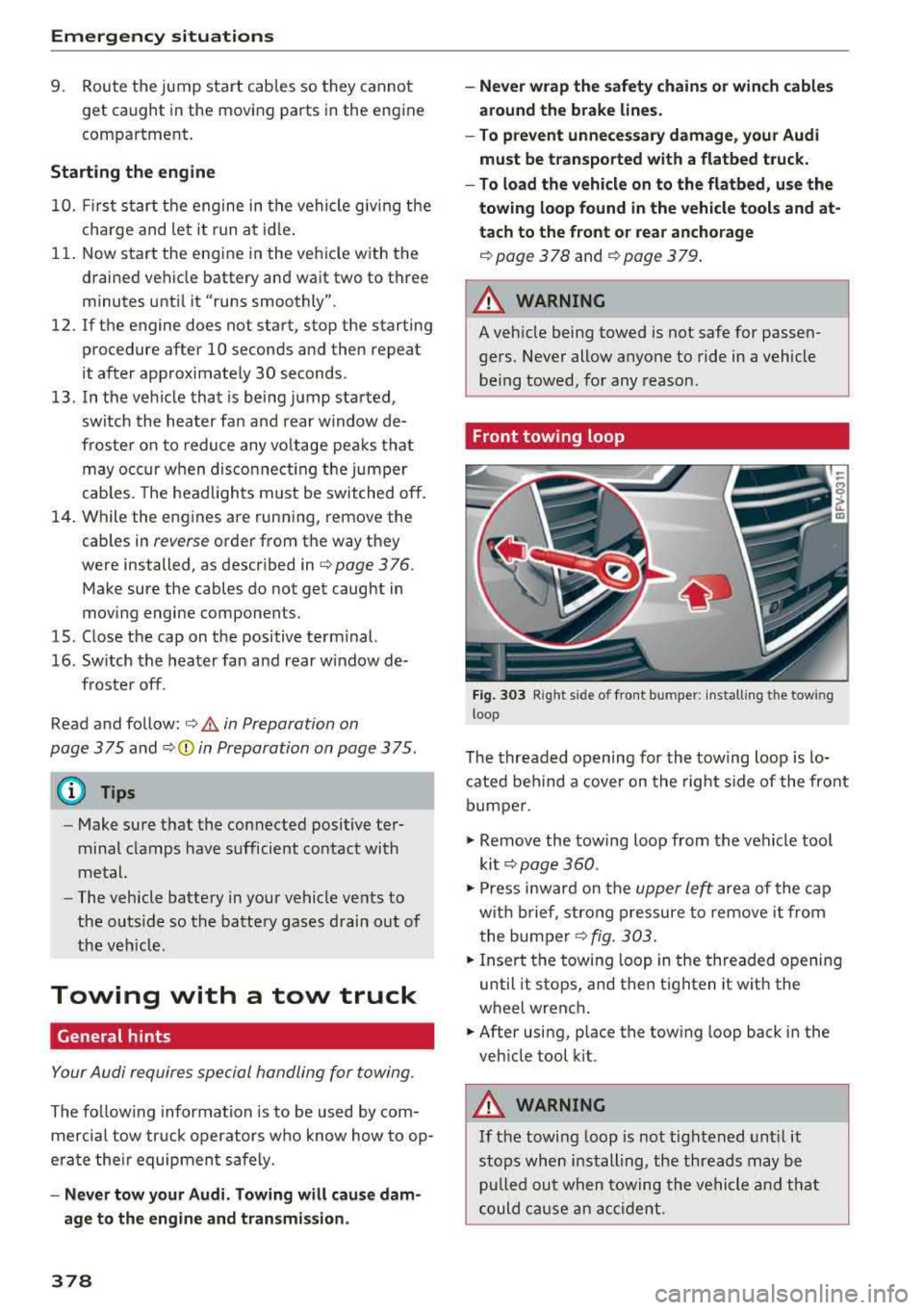
Front towing loop
Fig. 303 Rig ht s ide o f front b umper: install ing the tow ing
loop
The threaded opening for the towing loop is lo
cated behind a
cover on the right side of the front
bumper .
.,,. Remove the towing loop from the vehicle tool
kit ¢
page 360 .
.,,. Press inward on the upper le~ area of the cap
with brief, strong pressure to remove it from
the bumper
¢fig. 303 .
.,,. Insert the towing loop in the threaded opening
until it stops, and then tighten it with the
wheel wrench .
.,,. After using, place the towing loop back in the
vehicle tool kit .
A WARNING
If the towing loop is not tightened until it
stops when installing, the threads may be pulled out when towing the vehicle and that
could cause an accident .
-
Page 384 of 404
Technical data
Capacities
Fuel tank, front wheel drive
Fuel tank, all wheel drive
Plug-in hybrid drive fuel tank
Windshield washer system
Windshield and headlight washer system*
Windshield and headlight washer system*,
S models
Windshield and headlight washer system*,
RS model.s
Weights
"'
~=Cf)== ~== ~= ~~ ~i
=I= = I= = I= c:m>
-
Aud i
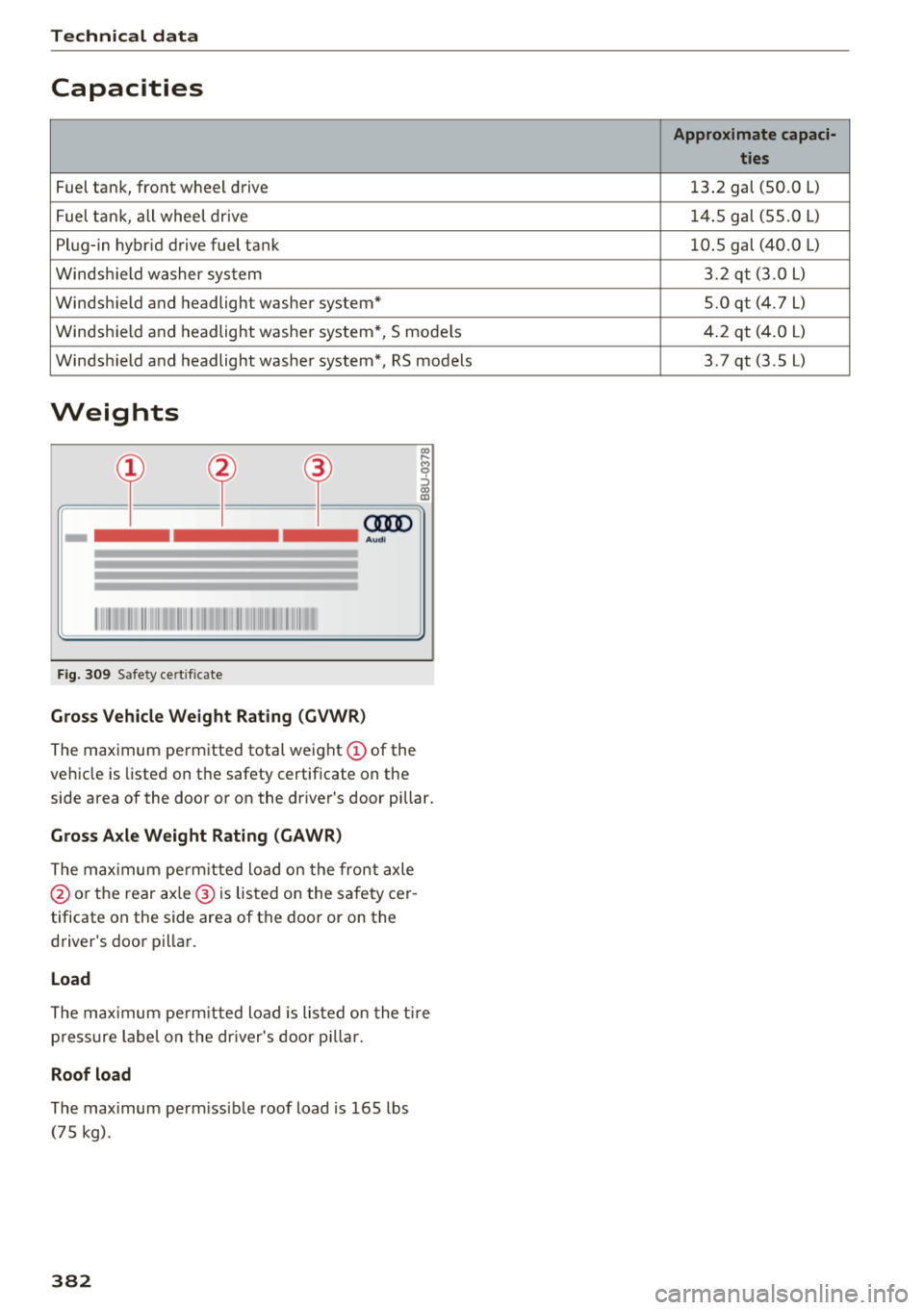
Fig. 309 Safety cert ificate
Gross Vehicle Weight Rating (GVWR)
The maximum permitted total weight (D of the
vehicle is listed on the safety certificate on the
side area of the door or on the driver's door pillar.
Gross Axle Weight Rating (GAWR)
The maximum permitt ed load on the front axle
@ or the rear ax le ® is listed on the safety cer
tificate on the side area of the door or on the
driver's door pillar.
Load
The maximum permitt ed load is listed on the tir e
p ressure labe l on the driver's door pillar .
Roof load
The max imum perm issible roof load is 165 lbs
(75 kg).
382
Approximate capaci- ties
13.2 gal (50.0 L)
14.5 gal (55.0
L)
10.5 gal (40.0 L)
3.2 qt (3.0 L)
5.0 qt (4.7 L)
4.2 qt (4.0
L)
3.7 qt (3.5 L)
Page 390 of 404
Index
Audi pre sense . . . . . . . . . . . . . . . . . . . . . . . 130
Messages . . . . . . . . . . . . . . . . . . . . . . 130, 133
Aud i Service Repair Manuals and Literature 383
Audi side assist . . . . . . . . . . . . . . . . . . . . . . . 136
Cleaning the sensors . . . . . . . . . . . . . . . . . 355
Messages . . . . . . . . . . . . . . . . . . . . . . . . . . 140
Rear cross-traffic assist . . . . . . . . . . . . . . . 139
Audi smartphone interface . . . . . . . . . 241, 245
Aud i virtual cockp it
refer to Instrument cluster . . . . . . . . . . . . . 10
AUTO
Automatic climate control system . . . . . . .
69
Automatic headlights . . . . . . . . . . . . . . . . . 49
Auto Lock (centr al locking system) . . . . . . . . 31
Automatic belt retractor . . . . . . . . . . . . . . . 264
Automatic climate control system
refer to Climate control system
(automatic) . . . . . . . . . . . . . . . . . . . . . .
68, 69
Automatic power top
refer to Power top . . . . . . . . . . . . . . . . . . . . 42
Automatic transmission . . . . . . . . . . . . . . . . . 83
Driving tips . . . . . . . . . . . . . . . . . . . . . . . . . . 86
Emergency mode . . . . . . . . . . . . . . . . . . . . . 89
Hill descent control . . . . . . . . . . . . . . . . . . . 87
Kick -down . . . . . . . . . . . . . . . . . . . . . . . . . . .
88
Launch control program . . . . . . . . . . . . . . . 89
Malfunction . . . . . . . . . . . . . . . . . . . . . . . . . 84
Manual shift ing (tiptronic mode) . . . . . . . . 88
Selector lever . . . . . . . . . . . . . . . . . . . . . . . . 86
Selector lever emergency re lease . . . . . . . . 90
Selector lever lock . . . . . . . . . . . . . . . . . . . . 84
Selector lever positions . . . . . . . . . . . . . . . . 84
Shift padd les . . . . . . . . . . . . . . . . . . . . . . . . 88
Automatic wipe/wash system . . . . . . . . . . . . 55
Auto Safety Hotline . . . . . . . . . . . . . . . . . . .
258
Auxiliary climate contro l . . . . . . . . . . . . . . . 116
AUX input . . . . . . . . . . . . . . . . . . . . . . . . . . . 230
Average consumption ........... .... . 17, 18
Average speed . . . . . . . . . . . . . . . . . . . . . 17, 18
B
BACK button . . . . . . . . . . . . . . . . . . . . . . . . . 154
Bag hooks . . . . . . . . . . . . . . . . . . . . . . . . .
63, 65
Balance (sound) . . . . . . . . . . . . . . . . . . . . . . 247
Bass (sound) . . . . . . . . . . . . . . . . . . . . . . . . . 247
388
Battery
In the key . . . . . . . . . . . . . . . . . . . . . . . . . . .
32
also refer to High-voltage battery . . . . . . . 92
also refer to Vehicle battery . . . . . . . . . . . 326
Before driv ing . . . . . . . . . . . . . . . . . . . . . . . . 249
Belt tensioners . . . . . . . . . . . . . . . . . . . . . . . 267
Blended gasoline . . . . . . . . . . . . . . . . . . . . . 314
Blower
Automat ic climate control system . . . . . . .
70
Bluetooth
Audio player . . . . . . . . . . . . . . . . . . . . . . . .
226
Connecting a cell phone . . . . . . . . . . . . . . 177
Settings . . . . . . . . . . . . . . . . . . . . . . . . . . . 246
Boost . . . . . . . . . . . . . . . . . . . . . . . . . . . . . . . . 19
Booster seats . . . . . . . . . . . . . . . . . . . . . . . . 304
Boost pressure indicator . . . . . . . . . . . . . . . . 19
Brakes . . . . . . . . . . . . . . . . . . . . . . . . . . . . . . 150
Brake assist . . . . . . . . . . . . . . . . . . . . . . . . 148
Brake fluid . . . . . . . . . . . . . . . . . . . . . . . . . 326
Electromechanical parking brake . . . . . . . . 81
Emergency braking function . . . . . . . . . . . . 82
New brake pads . . . . . . . . . . . . . . . . . . . . . 150
Break-in security feature . . . . . . . . . . . . . . . . 36
Breaking in
New brake pads . . . . . . . . . . . . . . . . . . . . .
150
New engine . . . . . . . . . . . . . . . . . . . . . . . . . 72
New tires . .... .. .. .. ............. .. 337
Browser
refer to Media center . . . . . . . . . . . . . . . . . 233
Bulbs . . . . . . . . . . . . . . . . . . . . . . . . . . . . . . . 373
Buttons
Control panel (MMI) . . . . . . . . . . . . . . . . .
154
Multifunction steering wheel . . . . . . . . 13, 16
Programming (multifunction steering
wheel) . . . . . . . . . . . . . . . . . . . . . . . . . . . . . . 15
Switching the Infotainment system display
on/off . . . . . . . . . . . . . . . . . . . . . . . . . . . . .
155
C
Cable (USB adapter/AUX connector cable) 229
California Proposition 65 Warning . . . . . . . 319
Battery specific . . . . . . . . . . . . . . . . . . . . . 327
Call list . . . . . . . . . . . . . . . . . . . . . . . . . . . . . 180
Call options . . . . . . . . . . . . . . . . . . . . . . . . . . 188