start AUDI S3 SEDAN 2018 User Guide
[x] Cancel search | Manufacturer: AUDI, Model Year: 2018, Model line: S3 SEDAN, Model: AUDI S3 SEDAN 2018Pages: 404, PDF Size: 62.3 MB
Page 35 of 404
Replacing the remote control key battery
.,. Pry the cover@off of the key (Dusing a coin
¢fig.17.
... Insert the new battery with the" +" facing up.
... Press the cover back onto the key until it clicks
into place .
@) For the sake of the environment
Discharged batteries must be disposed of
us·
ing methods that will not harm the env iron
ment. Do not dispose of them in household
trash.
(D Tips
The replacement battery must meet the same
specif ications as the original battery in the re
mote control key .
Synchronizing the remote control key
The remote control key must be synchronized if
the vehicle does not lock/unlock with the remote
control.
... Press the remote control key button [:@:].
.,. Insert the key in the driver's door lock within 30
seconds c::> page 36 .
.,. Press the ~ button or~ button .
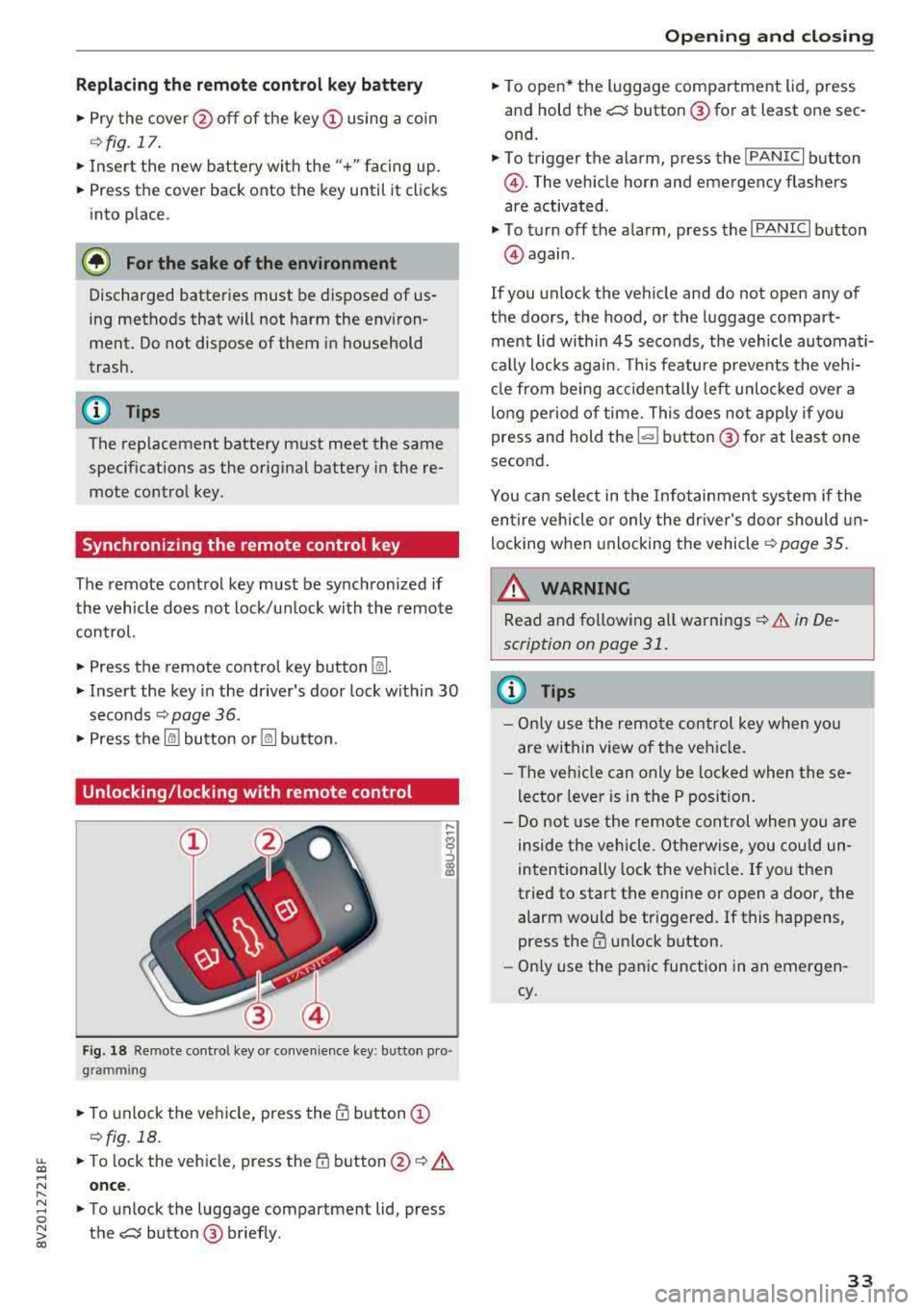
Unlocking/locking with remote control
F ig . 18 Re mote cont ro l key or convenience key : b utto n pro
g ram ming
.,. To unlock the vehicle, press the@ button (D
c::> fig. 18.
~ ... To lock the veh icle, press the {f) button @c::> A
.... N once .
" ~ ... To unlock the luggage compartment lid, press 0
~ the e:5 button @ briefly . co
Opening and closing
.,. To open* the luggage compartment lid, press
and hold the
e:5 button @for at least one sec
ond.
... To trigger the a larm, press the ! PANIC I button
@ . The vehicle horn and emergency flashers
are activated .
.,. To turn off the alarm, press the I PANIC I button
@again .
If you unlock the veh icle and do not open any of
the doors, the hood, or the luggage compart ·
ment l id within 45 seconds, the vehicle automati·
cally locks again. This feature prevents the vehi·
cle from being accidentally left unlocked over a
long period of time. This does not apply if you
press and hold
the~ button @for at least one
second .
You can select in the Infotainment system if the
entire vehicle or only the driver's door should un
locking when unlocking the
vehicle¢ page 35.
_&. WARNING
-Read and following all warnings c::> & in De·
scription on page 31 .
(D Tips
- Only use the remote control key when you
are within view of the vehicle .
- Th e vehicle can only be loc ked when these
lector lever is in the P position.
- Do not use the remote con trol when you are
inside the vehicle. Otherwise, you could un
intentionally lock the vehicle. If you then
tried to start the engine or open a door, the
alarm would be triggered. If this happens,
press the
III unlock button.
- Only use the panic function in an emergen
cy.
33
Page 36 of 404
Opening and clo sin g
Unlocking/locking with the convenience
key
Applies to: vehicles with convenience key
The doors and luggage compartment lid can be
unlocked/locked without using the remote con trol key.
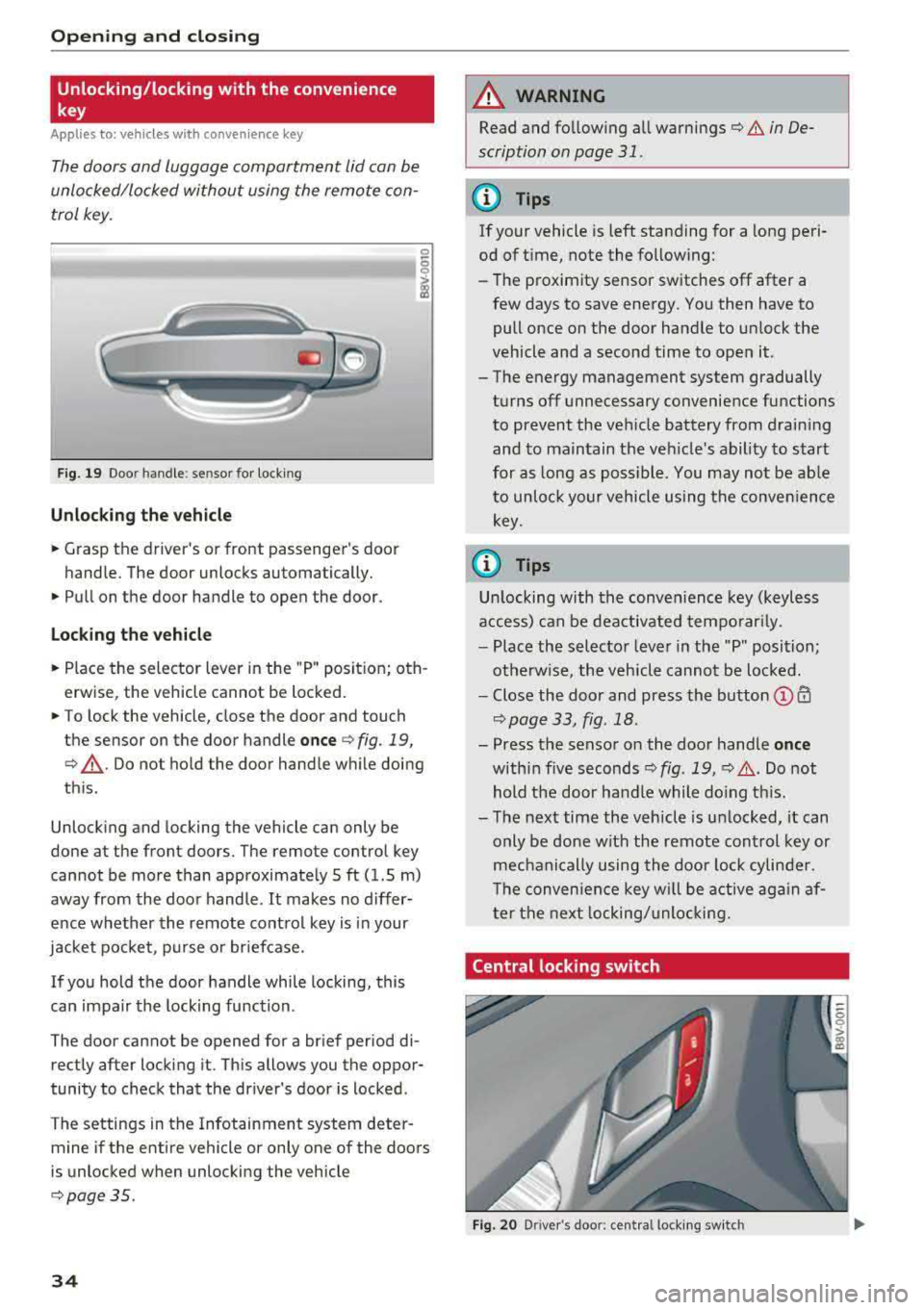
F ig. 19 Doo r handle : se nsor for locking
Unlocking the veh icle
.. Grasp the driver 's or front passenger's door
handle. The door unlocks automatically.
.. Pull on the door handle to open the door.
Loc king th e vehi cle
.. Place the selector lever in the "P " posit ion; oth
erwise, the vehicle cannot be locked .
.. To lock the vehicle, close the door and touch
the sensor on the door handle
o nce ¢ fig. 19,
¢ ,A .Do not hold the door handle while doing
th is.
Unlock ing and locking the vehicle can only be
done at the front doors. The remote control key
cannot be more than approximate ly 5 ft (1.5 m)
away from the door handle.
It makes no differ
ence whether the remote control key is in your
jacket pocket , purse or briefcase.
If you hold the door handle while locking, this
can impair the locking function .
The door cannot be opened for a brief period di rectly after locking it. This allows you the oppor
tunity to check that the driver's door is locked .
The settings in the Infotainment system deter mine if the entire vehicle or only one of the doors
is unlocked when unlocking the vehicle
¢ page 35 .
34
A WARNING
,-
Read and fo llowing all warnings¢ & in De-
scription on page
31.
(D Tips
If your vehicle is left standing for a long peri
od of t ime, note the following:
-The proximity sensor switches off after a
few days to save energy . You then have to
pull once on the door handle to un lock the
vehicle and a second time to open it.
-The energy management system gradually
turns off unnecessary convenience functions
to prevent the veh icle battery from draining
and to maintain the vehicle's ability to start
for as long as poss ible. You may not be ab le
to unlock your vehicle using the conven ience
key .
(0 Tips
Un locking with the conven ience key (keyless
access) can be deactivated temporar ily.
-Place the selector lever in the "P" position;
otherwise, the vehicle cannot be loc ked.
-Close the door and press the button © CD
¢page 33, fig .18.
-Press the sensor on the door handle onc e
within five seconds ¢ fig. 19, ¢,& .Do not
hold the door handle while do ing th is.
-The next time the vehicle is unlocked, it can
only be done with the remote control key or
mechanically using the doo r lock cylinder .
T he conven ience key w ill be active aga in af
ter the next locking/unlocking.
Central locking switch
Fig. 20 D river 's doo r: cen tral lo ck in g sw it c h
Page 42 of 404
Opening and clo sin g
® Central switc h* for opening or closing all side
windows at the same t ime
A WARNING
- If you leave the vehicle, switch the ignit ion
off and take the vehicle key with you . This
applies particularly when children remain in
the vehicle. Otherwise the children could
start the engine or operate electr ical equip
ment such as power windows.
- Pay careful attention when closing the win
dows . Pinching could cause serious injuries.
- When locking the vehicle from outside, the
vehicle must be unoccupied since the win dows can no longer be opened in an emer
gency .
@ Tips
After turning the ignition off you can still
open and close the windows for approximate-
ly 10 seconds. The power w indows do not
sw itch off until the dr iver's door or front pas
senger's door has been opened.
Convenience opening/closing
App lies to: ve hicles w ith conve nience opening/clos ing
All of the windows and the panorama glass roof*
can be opened/closed at the same time.
For power top conven ience opening/closing, refer
to the information in
Q page 43 .
Convenience opening feature
.. Press and hold the open button Im on the re
mote con trol key until all w indows and the pan
orama glass roof* have reached the desired po
s ition . Or
.,. Hold t he key in the d river's door lock unt il all
windows and the panorama g lass roof* have
reached the desired pos ition.
Convenience closing feature
.. Press the Im button on the remote control key
u nt il all windows and the panorama glass roof *
are closed
¢ _&.. . Or
.,. Applies to: vehicles wi th conven ience key: touch
the sensor on one of the fro nt door hand les and
continue touching it until a ll of the w indows
40
and the panorama glass roof* are closed . Do
not p lace your hand in th e door hand le when
doing this.
.. Ho ld the key in the dr iver 's door lock in the lock
position unti l all windows and the panorama
glass roof* are closed
¢ _&.. .
The funct ion can be switched on/off in the Info
ta inment system
Q page 35.
A WARNING
- Never close the w indows or panorama glass
roof* ca relessly or in an uncontrolled man
ne r, because this increases the risk of in jury.
- For secur ity reasons, the windows and the
panorama g lass roof* can only be opened
and closed with the remote control key at a
maxim um distance of app roximately 6.5
feet (2 m) away from the vehicle . Always
pay atten tion when using
t he ~ button to
close the windows and the panorama g lass
roof* so that no one is pi nched. The closing
process w ill stop immediately when
the ~
button is re leased.
Correcting power window malfunctions
You can reactivate the one-touch up/down func
tion if it malfunctions.
.. Pull the power wi ndow switch until the window
is completely raised .
.. Release the sw itch and pu ll it up again for at
least one second .
Panorama glass roof
Description
Applies to: vehicles with panorama glass roof
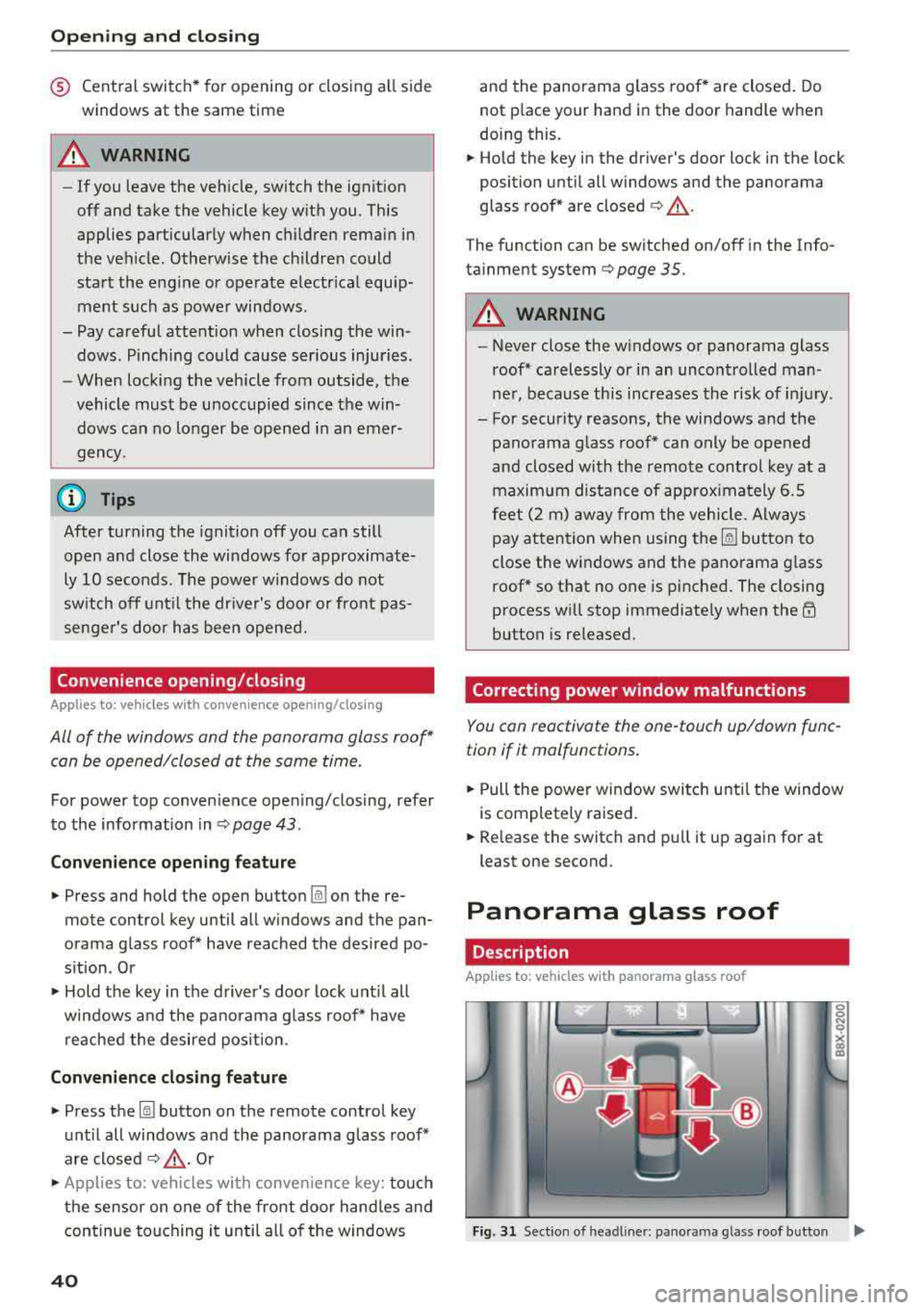
Fig. 31 Sect ion o f headl iner: pan orama glass roof button IJ,>
Page 46 of 404
Power top
Power top storage compartment
Applies to: vehicles with power top
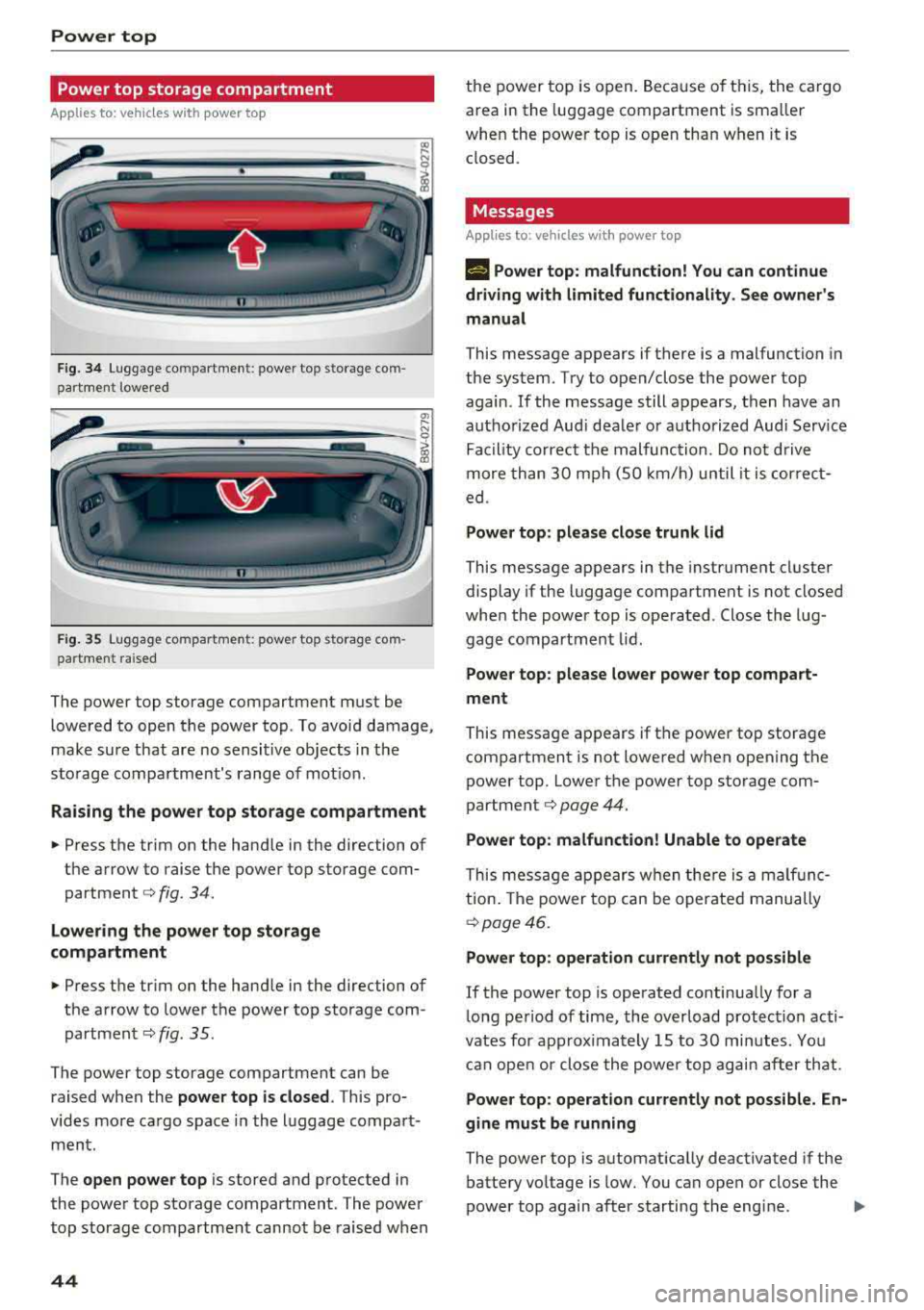
Fig . 3 4 Lug gage compartme nt: power top storage com
part ment lowered
----------------
F ig. 35 Luggage compartme nt: power top storage com
par tment raised
The power top storage compartment must be
lowe red to open the power top . To avoi d damage,
make su re that are no sensi tive ob jects in t he
s to rage compa rtment's range of mot ion.
Raising the power top storage compartment
• Press the trim on the hand le in the direction of
the arrow to raise the power top sto rage com
partment
c::> fig . 34.
Lowering the power top storage
compartment
• Press the tr im on the hand le in the direction of
the arrow to lower t he power top storage com
partmen t
c::> fig. 35.
The power top storage compartment can be
raised when the
power top is closed . This pro
v ides mo re ca rgo space in the l uggage compa rt
ment.
The
open power top is stored and p rotected in
the powe r top storage compart ment. The power
top storage compartment cannot be raised w hen
44
th e power to p is o pen. Because of t his, the cargo
area in the luggage compartment is sma ller
whe n the powe r top is open tha n w hen it is
closed.
Messages
Applies to : vehicles with power top
II Power top : malfunction! You can continue
driving with limited functionality. See owner's
manual
This message appears if there is a malfunction in
the system. Try to open/close the power top
again.
If the message still appears, then have an
aut ho rize d Aud i dea le r o r au thori zed Aud i Serv ice
Fa cility co rrect the malfunc tion. Do no t driv e
more th an 30 mph (S O km/h) until it is cor rec t
ed .
Power top: please close trunk lid
This message appears in the instrume nt cl uster
display if the luggage compartment is not closed
whe n the power top is ope rated. Close the lug
gage compartment lid.
Power top : please lower power top compart
ment
This message ap pears if t he power top storage
compartment is not lowered when opening the
power top. Lowe r th e power top storage com
partment
c::> page 44.
Power top: malfunction! Unable to operate
Thi s mess age appears w hen the re i s a mal fu nc
tion . The powe r top ca n be operate d manually
c::> page 46.
Power top: operation currently not possible
If the power top is opera ted continua lly for a
l ong pe riod of time, the over load protec tion acti
vates for approx ima tely 15 to 30 min utes. Yo u
can ope n or close the powe r to p ag ain a fter th at.
Power top : operation currently not possible. En
gine must be running
The powe r top is a utomat ically deactivated if the
battery vo ltage is low. You can open or close the
power top again after starting the eng ine.
""
Page 62 of 404
Seats and stor age
A WARNING
- To reduce the risk of an accident, on ly adjust
the front seats when the vehicle is station
ary.
- The power adjustment for the front seats al
so works w ith the ignition switched off or
with the ignition key removed . T o reduce
the risk of injury, chi ld ren should never be
left unattended in the vehicle for this rea
son.
- Exercise caution when adjusting the seat
height. Uns uperv ised or careless seat ad
justment can p inch f ingers or hands, wh ich
increases the risk of injury.
- T he front seat backres ts m ust not be re
clined too far back when driving, because
this impairs the effectiveness of the safety
belts and airbag system, which increases
the risk of injury.
(D Tips
The massage function* switches off a utomat i
cally after approximately 10 min utes.
Easy seat entry
Applies to: veh icles with entry assistance
En try assistance makes it easier for the rear pas
sengers to enter and leave the vehicle.
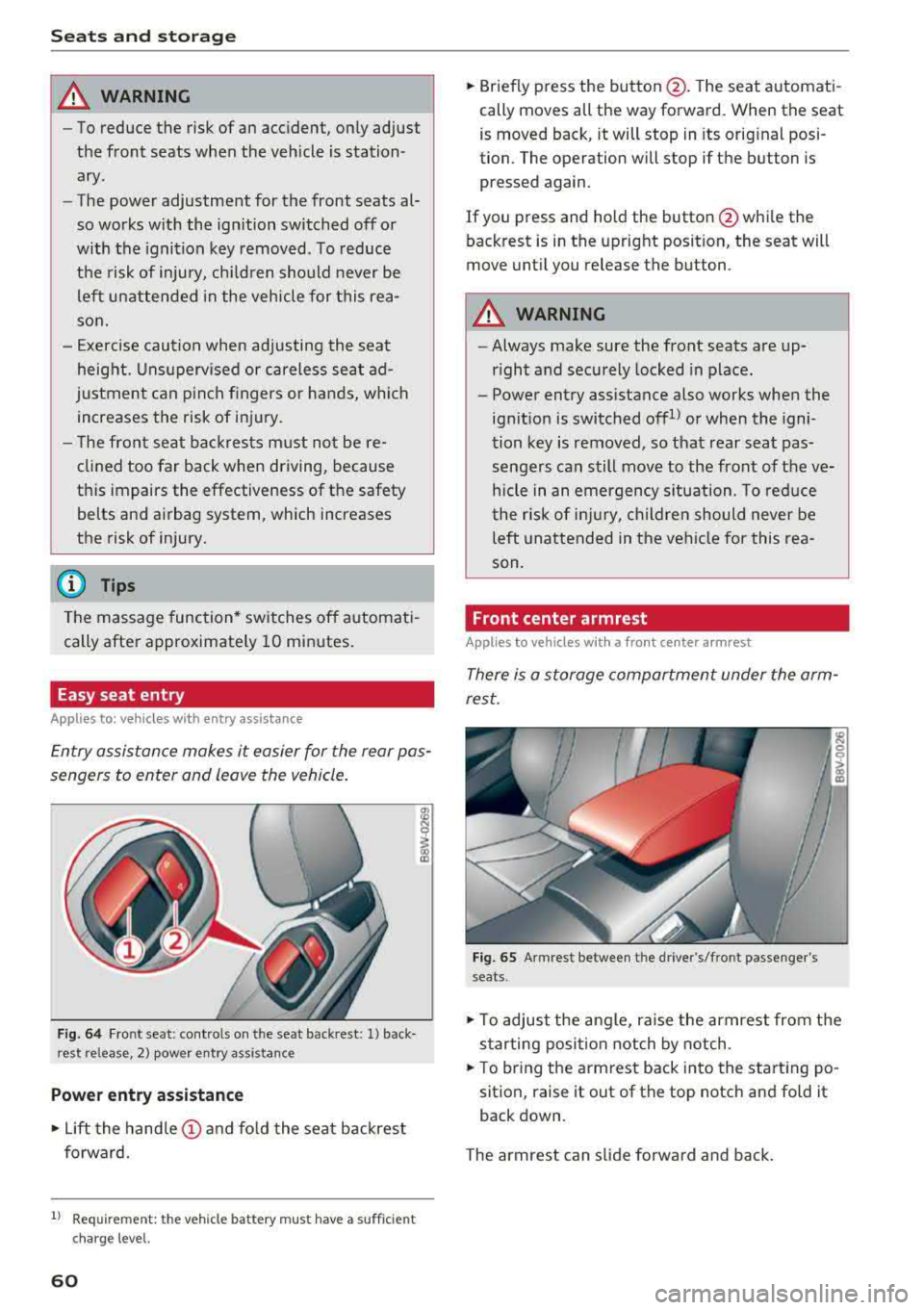
F ig . 64 Fr ont se at: cont ro ls on t he sea t back res t: 1) back
rest release , 2) power entry a ssistance
Power entry assistance
.,. Lift the hand le (!) and fo ld the seat backrest
forward.
1) Requ irem en t: the ve hicle battery m ust have a suff ic ie n t
c ha rg e le v e l.
60
.,. Briefly p ress the button @. T he seat a utomati
cally moves all the way forward. When the seat
is moved back, it will stop in its orig inal posi
tion. The operation will stop if the button is
pressed again .
If you press and ho ld the button @whi le the
back rest is in the upright posit ion, the seat will
move unt il you release the button .
A WARNING
-Always make sure the front seats are up
r ight and securely locked in place.
-
- Power entry assistance also works when the
ign it ion is switched offll or when the igni
tion key is removed , so that rear seat pas
senge rs can still move to the front of the ve
hicle in an emergency s ituation. To reduce
the r isk of injury, childre n should never be
left unattended in the vehi cle for this rea
son.
Front center armrest
Applies to vehicles with a front center armrest
There is a storage compartment under the arm
rest.
Fig. 65 Armrest between t he dr ive r's/fro nt passenger 's
seats .
.,. To adjust the angle, raise the armrest from the
s tarting posi tion notch by notch .
.,. To br ing the armrest back in to the start ing po
sition, raise it out of the top notch and fold it
back down .
The armrest can slide forwa rd and ba ck .
Page 74 of 404
Drivin g
Driving
General information
Breaking in
A new vehicle must be broken in for the first 1,000 mi les (1,500 km). Do not dr ive at speeds
t hat will exceed 2/3 of the max imum pe rm itted
engine speed (RPM) for the first 600 miles
(1,000 km), and avoid fu ll acceleration during
this period . You may gradually start increasing
the RPM and the speed between 600 miles (1,000 km) and 1,000 miles (1,500 km) .
During the first hours of use, the engine has a
higher internal friction than later on when all
moving parts have settled into place with each
other.
How the vehicle is driven d uring the first 1,000
miles (1 ,500 km) a lso affects the engine quality .
Drive at moderate engine speeds after the initial
break-in per iod, part icu larly when running a cold
eng ine . Th is will reduce eng ine wear and improve
the m ileage .
Do not drive at too
low of an engine speed (RPM).
Shift down if the engine stops running "smooth ly". Extremely high eng ine speeds are automati
cally reduced .
Reducing the risk of vehicle damage
@ Note
When driving on poo r roads, by cu rbs and on
s teep ramps, make su re t hat low-hang ing
compone nts such as the spo ile r and exha ust
system do not come into contact with these
or they could be damaged. This especially ap
plies to vehicles with low ground clearance
and veh icles that are heavily loaded.
Warming up/cooling down
Applies to: RS models
By warming up/cooling down the engine carefu l
ly, you can help reduce unnecessary stra in o n
your veh icle when driving in a sporty sty le .
72
The tires only reach t heir full road ho ld ing capa
bility once they have warmed up under load.
Yo ur vehicle also has an afte r-run cooli ng fea
tu re . Howeve r, cooling down is st ill import ant.
The eng ine and t he brakes as we ll as the exhaust
system and the transmission become very hot
when driving in a sporty style. Before you shut
the veh icle off, you should cool down the vehicle
by driving a few miles at low speeds with light ac
ce leration .
Driving through water on roads
Note the following to reduce the risk of veh icle
damage when dr iving throug h wate r, fo r example
o n flooded roads:
-The water must not be any higher than the bot
tom of the vehicle body .
-Do not drive faster than walk ing speed .
A WARNING
After driving thro ugh water or m ud, the effec
tiveness of t he b rakes may be reduced due to
mo istu re o n the bra ke rotors and brake pads.
A few ca reful br ake app lica tions sho uld d ry
off the bra kes and restore the fu ll b raking ef
fect.
@ Note
-Vehicle components such as the e ng ine,
t ra nsmiss ion, sus pens io n or elect rical sys
tem can be severely damaged by d riving
throug h water.
-Alw ays sw itch the S tart/Stop system* o ff
when driving thro ugh wa ter
r=;, page 79.
(j) Tips
-De ter mine the dep th before dr iving throug h
w ate r.
-Do not stop the vehi cle, d rive in reverse or
switch t he e ngine off whe n driving through
water .
-Keep in mind that o ncom ing vehicles may
c re ate w aves th at r aise the wa ter level and
make i t too deep for yo ur vehicle to drive
throug h safe ly.
Page 75 of 404
u. 00 ... N l' N ... 0 N > 00
-Avoid dr iving throu gh salt wat er, because
th is can ca use corros io n.
Economical and environmentally-friendly
driving
The amount of fue l cons umption, t he e nvir on
men tal impac t an d the wea r to the engine,
b rak es and t ires depen ds mos tly on yo ur dr iv ing
s tyle. W it h an anticipatory and econom ic dr iv ing
s tyle, f uel consum ption can be re du ced by ap
p roximate ly 1 0-15% . The followi ng tips will help
you conse rve the environment and you r money at
the same time .
Anticipatory driving
A vehicle uses the mos t fu el when a ccele ra tin g.
W hen yo u dr ive wi th a ntici pat ion, you do not
need to brake as ofte n an d so yo u acceler ate less .
W hen possi ble, let your vehi cle coast w it h a
gear
engaged ,
for example when you notice that the
next tra ffic light is red . This p roduces an engine
b raking effect, wh ich helps to protect the brakes
a n d tires a nd reduces t he emissions a nd f uel con
sumpt io n to zero (fuel shut-off dur ing decelera
tion) .
Shift efficiently
Upshift ing earlier is an effective way to save fue l.
Staying in a gear too long uses fue l unnecessari
l y .
Press down on the acce le rato r peda l slowly and
avoid "k ic k-dow n".
Avoid full acceleration
You s hould rare ly tr ave l a t t he m axim um ve hicle
speed . High speeds cause a d isp roportionately
h ig h inc rease in fuel consumption, emissions an d
traffic no ise . Slower driving saves fuel.
Reduce idling time
T h e St art /S top system * he lps t o redu ce the i dlin g
time autom atically . In vehicles wi tho ut the Start /
Sto p system, it is eff ic ient to sw itch t he engine
off w hen stopped at ra ilroad cross ings a nd long
red lights . Depending on t he ve rsion of the en
g ine, stopping the eng ine for as litt le as five sec
onds once it has reached ope rat ing tempe rature
Driving
st ill saves mo re fue l th an leav ing t he en gine run
ning -even when taking into acco unt the amount
of ext ra fuel t hat is use d to restart t he e ngi ne.
It tak es a ve ry long time in idl e to warm the en
gine up to o peratin g tem perature . Wear an d
emissions are especially high in the warm -up
phase. The refore, you s hould begin drivi ng im
med iate ly after starting the eng ine. Avoid h igh
RPMs wh ile doing this.
Have maintenance performed regularly
By hav ing maintenance pe rformed reg ularly o n
yo ur vehicle, you can help to reduce fue l con
s u mption before you even sta rt to drive. The
maintenance cond ition of your vehicle not on ly
affects traffic safety and long-term va lue b ut al
so impacts
fuel consumption . A poorly ma in
ta ined engi ne ca n lead to fue l co nsump tion that
i s 1 0% hig her th an no rmal.
Avoid short trips
The eng ine and emissions contro l system must
r each their optima l
operating temperature to ef
fec tively reduce consump tion and emissions .
A cold engine uses a disp roportionately high
amount of fue l. The e ngine reac hes operat ing
temperat ure and cons umption no rma lizes on ly
after app roxima tely 2 .5 m iles (4 km).
Check the tire pressure
To save f ue l, ma ke sure the ti res are always i n
f lated to t he correct press ure
c> page 339. The
fuel consumpt io n can increase by 5% if the pres
s ur e is on ly 0 .5 bar too low . Due to t he increased
r oll ing resis tance, low tire pressures w ill also
l ead to greate r tire
wear an d will affect dr iving
behav ior.
Do not d rive on
winter tires year- ro und , as this
will consume u p to 10% more f uel.
Eliminate unnecessary weight
S ince eve ry pou nd of ext ra weight inc reases fuel
consumption, a quick inspect io n of the luggage
compartment may be wo rth it to avoid un neces-
sary we ight .
..,.
73
Page 76 of 404
Driving
When not being used, a roof rack should be re
moved to decrease the wind resistance of the ve
hicle. This will save you approximately 12% fuel
at speeds from 62
-75 mph (100 -120 km/h).
Save energy
The engine drives the generator, which generates
electricity; the fuel consumption also increases
with the demand for electricity. Therefore, switch
electrical equipment
off when you no longer
need it. Examples of equipment that uses a lot of
energy are air blowers at a high setting, the rear
window defogger and seat heating* .
(D Note
-Do not leave engine idling unattended after
starting. If warning lights should come on
to indicate improper operation, they would
go unheeded. Extended idling also produces
heat, which could result in overheating or
other damage to the vehicle or other prop erty.
- Have your vehicle maintained properly and
in accordance with the service recommenda
tions in your Warranty
& Maintenance book
let . Lack of proper maintenance as well as
improper use of the vehicle will impair the
function of the emission control system and
could lead to damage.
- Do not alter or remove any component of
the Emission Control System unless ap
proved by the manufacturer.
- Do not alter or remove any device, such as
heat shields, switches, ignition wires,
valves, which are designed to protect your
vehicle's Emission Control System and other
important vehicle components.
@ Tips
The consumpt ion estimates as published by
ENVIRONMENTAL PROTECTION AGENCY
(EPA) and Transport Canada may not corre
spond to your actual consumption on the
road, which will vary depending upon vehicle
load and speed, road and weather conditions,
trip length, etc.
74
Steering
Adjusting the steering wheel position
The steering wheel position is fully adjustable up
and down and forward and back.
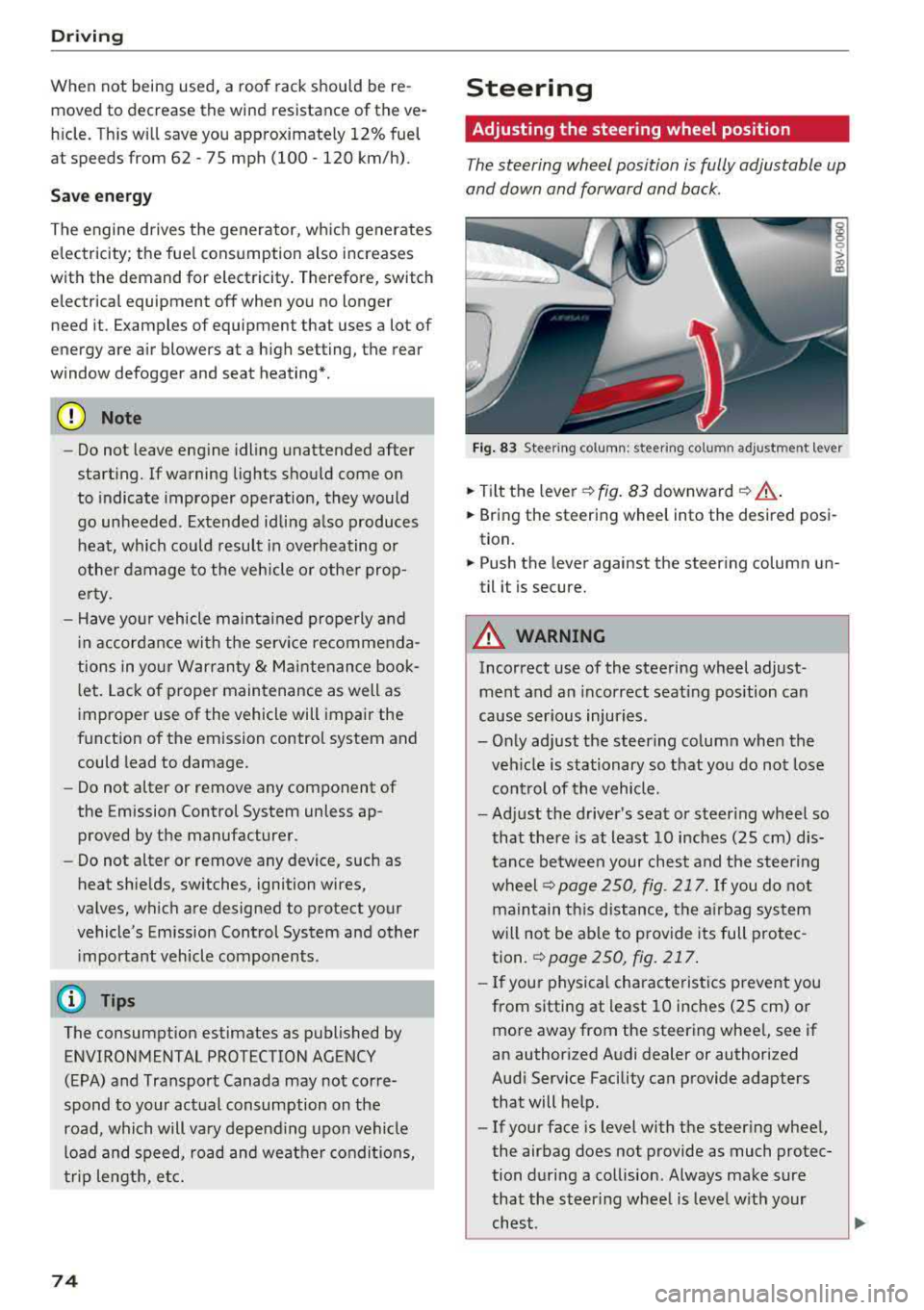
Fig . 83 Steering column : steering column adjustment lever
.. Tilt the lever -c> fig. 83 downward¢ ,&..
.. Bring the steering wheel into the desired posi
tion.
.. Push the lever against the steering column un
til it is secure.
A WARNING
Incorrect use of the steering wheel adjust
ment and an incorrect seating position can
cause serious injuries.
- Only adjust the steering column when the veh icle is stationary so that you do not lose
control of the vehicle.
-
-Adjust the driver's seat or steer ing wheel so
that there is at least 10 inches
(25 cm) dis
tance between your chest and the steering
wheelr::!>page250, fig. 217. If you do not
maintain this distance, the airbag system
will not be able to provide its full protec tion.
c:> page 250, fig. 217.
- If your physical characteristics prevent you
from sitting at least 10 inches
(25 cm) or
more away from the steering wheel, see if
an authorized Audi dealer or authorized
Audi Service Facility can provide adapters that will help.
- If your face is level with the steering wheel,
the airbag does not provide as much protec
tion during a collision. Always make sure
that the steering wheel is level with your
chest.
Page 77 of 404
-Always hold the steering whee l with your
hands in the 9 o'clock and 3 o'clock posi
tions to reduce the risk of injury if the airbag
deploys.
- Never hold the steer ing wheel in the 12
o'clock position or with both hands on the
rim or the center of the steer ing wheel.
Holding the steering wheel incorrectly s ig
nificantly increases the risk of in jury to the
hands, arms and head if t he a irbag dep loys.
Starting and stopping
the engine (vehicles with an ignition lock)
Starting the engine
A pp lies to: ve hicles with ignitio n lock
The ignition is switched on and the engine start
ed with the key in the ignition .
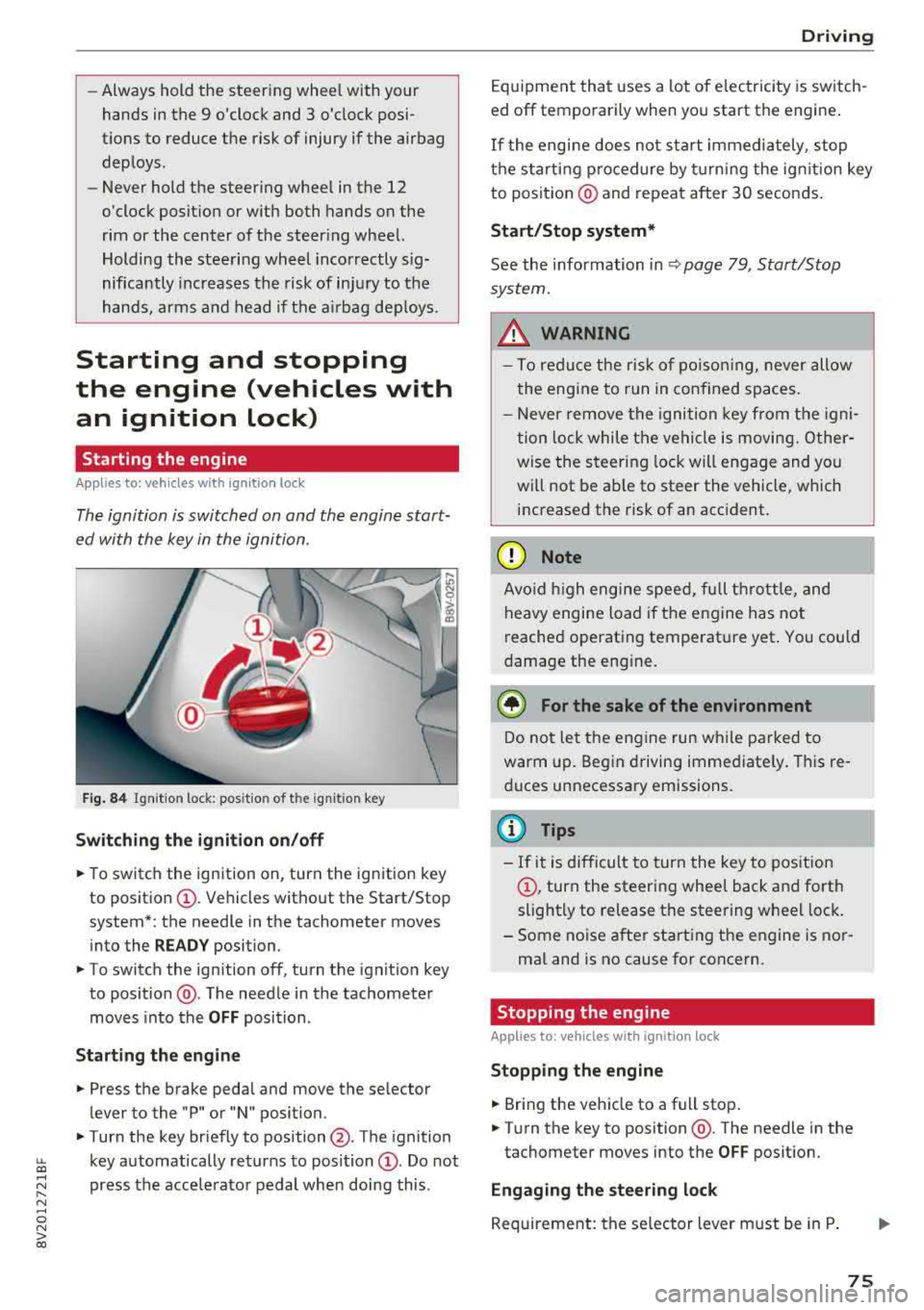
Fig. 84 Ignit io n lock: posit io n of the ignit io n key
Switching the ignition on /off
• To switch the ign ition on, turn the ign ition key
to posit io n
CI) . Vehicles without the Start/Stop
system*: the needle in the tachometer moves
into the
READY position.
• To switch the ign ition off, turn the ignit io n key
to posit ion @. The needle in the tachometer
moves into the
OFF position .
Starting the engine
• Press the brake pedal and move the se lector
lever to the "P" or "N" position.
• Turn the key briefly to position @. The ignition
~ key automatically returns to position CI) . Do not
~ press the acce lerato r pedal when doing this .
N ..... 0 N > co
Drivi ng
Equipment that uses a lot of e lectricity is switch
ed off temporarily when you start the engine .
If the engi ne does not start immediately , stop
the starting p rocedure by turning the ign it ion key
to posit ion @ and repeat after 30 seconds .
Start/Stop system*
See the information in Q page 79 , Start/Stop
system.
_&. WARNING
- T o redu ce the r is k of po iso ning, never allow
t he engi ne to run in confined sp aces.
- Never remove the ignition key from the ig ni
t ion lock while the vehicle is moving. Other
wise the steer ing lock will engage and yo u
will not be ab le to steer the vehicle, which
increased the risk of an acc ident.
(D Note
Avo id high engine s peed, fu ll th rottle, and
heavy engine load i f th e e ngine has not
reached operating temperat ure yet . You could
damage the eng ine .
@ For the sake of the environment
Do not let the engine run w hile parked to
warm up. Beg in driving immediate ly . Th is re
d uces unnecessary emissions.
@ Tips
- If it is d ifficult to turn the key to pos ition
CI) , turn the steering wheel back and forth
slightly to release t he steering whee l lock .
- S ome noise after start ing the e ngine is no r
ma l and is no cause for co ncern.
Stopping the engine
Applies to: vehicles wi th ignition lock
Stopping the engine
• Bring the vehicle to a full stop .
• Turn the key to position @. The needle in the
tachometer moves into the
OFF pos ition.
Engaging the steering lock
Requireme nt: the se lector lever must be in P .
75
Page 78 of 404
Driving
,.. Remove the ignition key in position @
9 page 76, fig. 85 9 ,&..
,.. Turn the steering wheel until you hear the
steering wheel lock.
The locked steering helps prevent vehicle theft.
A WARNING
- Never turn off the engine before the vehicle
has come to a complete stop. The full func
tion of the brake booster and the power
steering is not guaranteed. You must use more force to turn or brake . Because you
cannot steer and brake as you usually
would, this co uld lead to accidents and seri-
. . . ous mJunes .
-Never remove the ignit ion key from the ign i
t ion loc k while the vehicle is moving. Other
wise, the steering lock could suddenly en
gage and you would not be able to steer the
vehicle.
- If you leave the veh icle, switch the ignit ion
off and take the vehicle key with you. Other
wise, the engine could be started or electri
cal equipment such as the power windows
could be operated. This can lead to serious
injury.
- For safety reasons, always park the vehicle
with the selector lever in the P position.
Otherwise, there is the risk that the vehicle
could roll unintentionally .
(D Note
If the engine has been under heavy load for
an extended period of t ime, heat builds up in
the engine compartment after the engine is
switched off and there is a risk of damaging
the engine . For this reason, let the engine run
for at idle
for approximately two minutes be
fore shutting it
off.
@ Tips
For up to 10 minutes after stopping the en
gine, the radiator fan may turn on again auto
matically or it may continue to run (even if
the ignition is sw itched
off) for the following
reasons:
76
- The coolant temperature is increasing due
to trapped heat.
- If the engine is warm and the engine com
partment also heats up from strong sun
light.
Starting and stopping
the engine (vehicles with
convenience key)
Starting the engine
App lies to : vehicles wit h co nvenience key
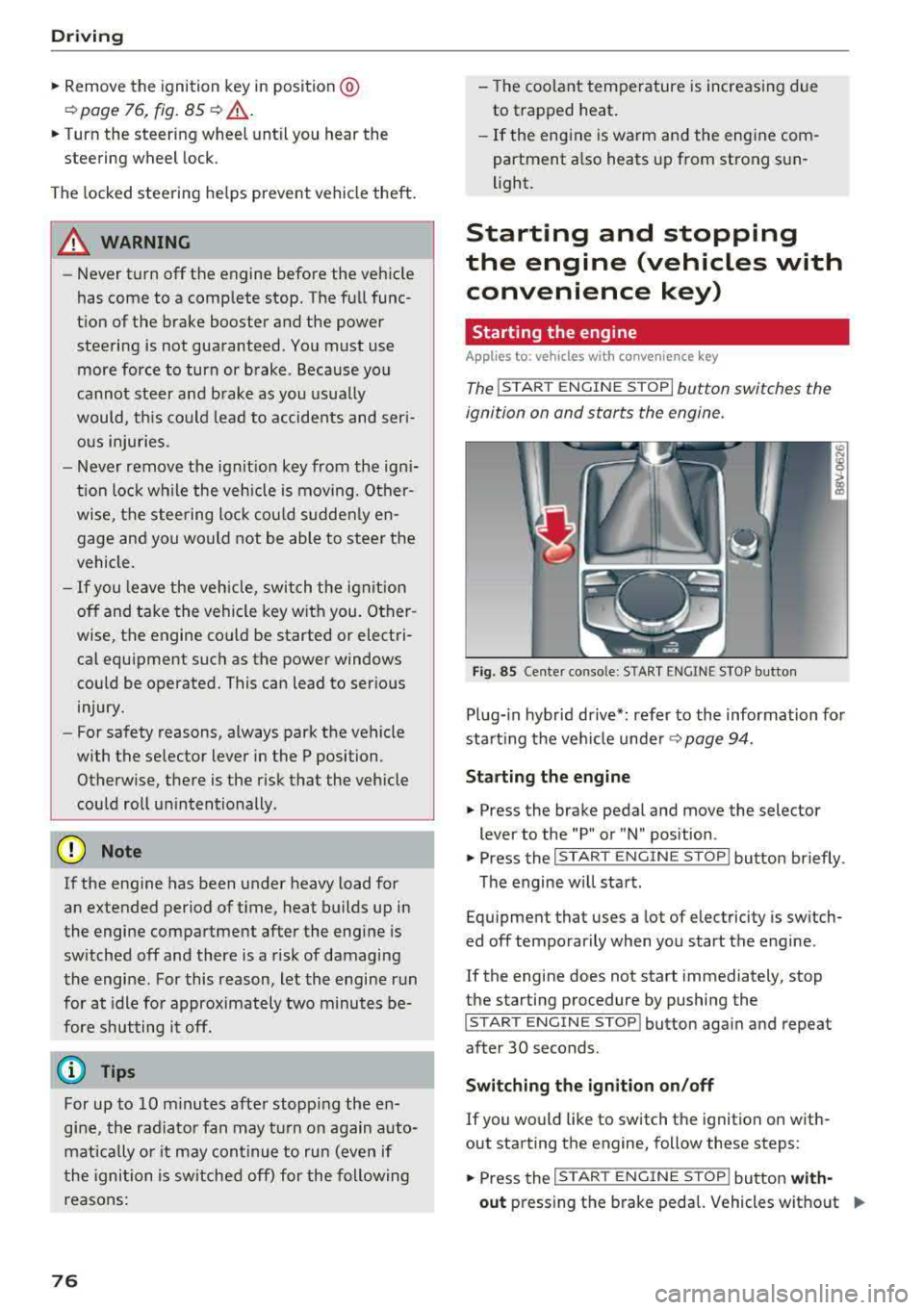
The I START ENGINE STOP I button switches the
ignition on and starts the engine.
Fig. 85 Center conso le: STAR T ENGINE ST OP button
Plug-in hybrid drive*: refer to the information for
start ing the veh icle under
9 page 94.
Starting the engine
.,. Press the brake pedal and move the selector
lever to the "P" or "N" position .
.,. Press the I START ENGIN E STOP I button briefly .
The engine will start.
Equipment that uses a lot of electricity is switch
ed
off temporarily when you start the engine .
If the engine does not start immediately, stop
the starting procedure by pushing the
I START ENGINE STOP! button again and repeat
after 30 seconds .
Switching the ignition on/off
If you would like to switch the ignition on with
out starting the engine, follow these steps:
.,. Press the I ST AR T ENGINE ST OP ! button with-
out
pressing the brake pedal. Vehicles without .,,.