turn signal AUDI S3 SEDAN 2018 User Guide
[x] Cancel search | Manufacturer: AUDI, Model Year: 2018, Model line: S3 SEDAN, Model: AUDI S3 SEDAN 2018Pages: 404, PDF Size: 62.3 MB
Page 220 of 404
Radio
Radio
Opening the radio
The radio supports the FM, AM and SiriusXM*
(satellite radio) bonds. Using the HO Radio re
ceiver also allows you to receive radio stations
on the FM and AM bonds in digital format.
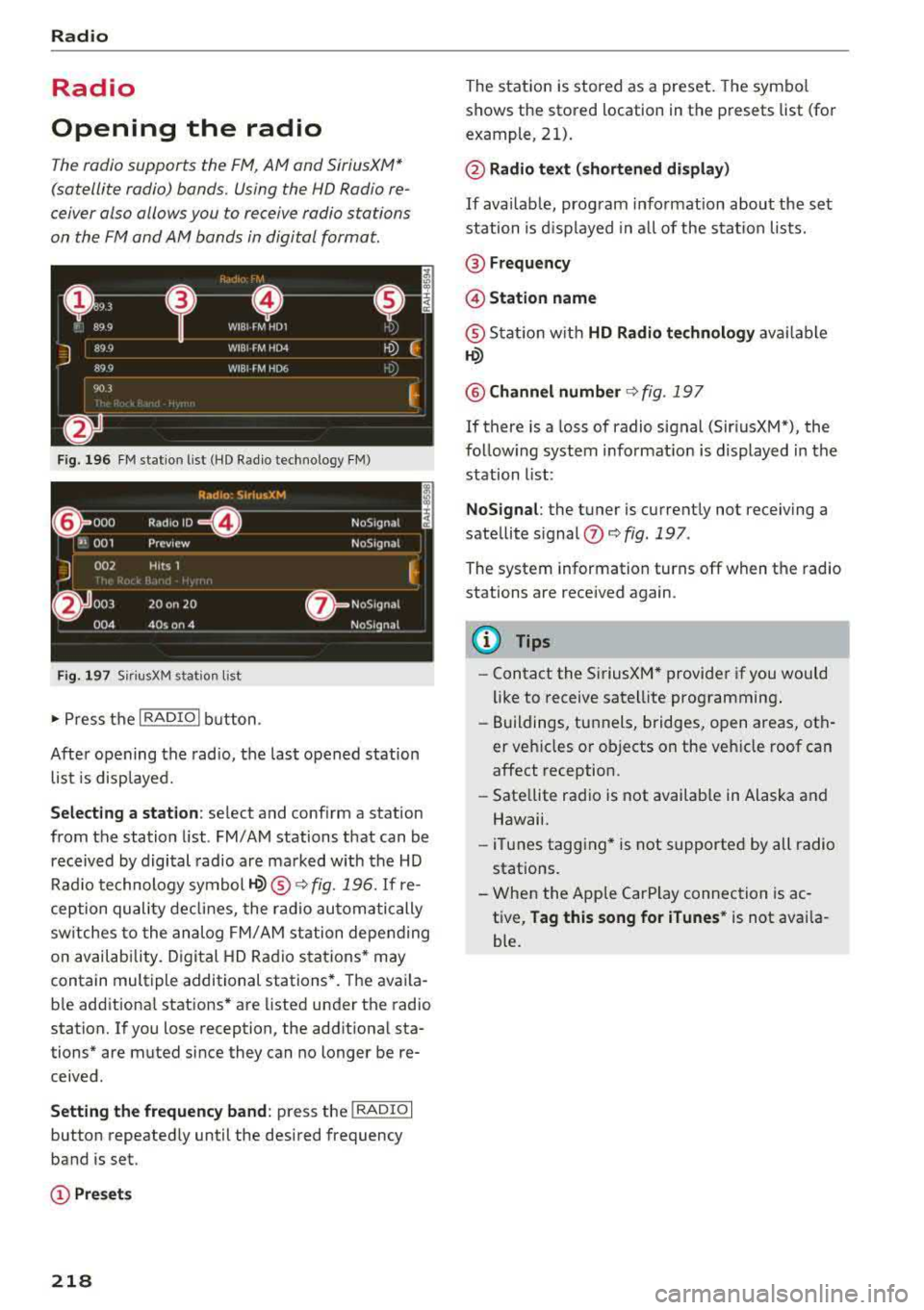
Fig. 196 FM station list (HD Radio technology FM)
Fig. 1 97 Sir iu sXM station lis t
..,. Press t he I RADIO I bu tton .
After opening the radio, t he last opened station
list is displayed.
Selecting a station : select and conf irm a stat ion
from the station list . FM/AM stations that can be
received by digital radio are ma rked with the HD
Rad io technology
symbol ©® ¢ fig. 196. If re
ception quality de clin es, the r ad io automatically
sw itches to the analog FM/ AM station depending
on availab ility. D igital HD Rad io sta tions * may
contain multiple additional stations *. The ava ila
b le add itiona l stations* are listed under the radio
station. If you lose reception, the add itiona l sta
tions* are muted since they can no longer be re
ceived.
Setting the frequency band : press the I RADIO I
button repeatedly until the desired frequency
band is set.
(!) Pre sets
218
The stat ion is stored as a preset. The symbo l
shows the stored location in the presets list (for
example, 21).
@ Radio text (shortened display )
If availab le, prog ram info rmation about the se t
station is d isplayed in a ll of the s tat io n lists.
@ Frequency
@ Station name
® Stat io n w ith HD Radio te chnolog y availa ble
©
@ Channel number ¢ fig. 197
If there is a loss of radio signal (Sir iusXM"), the
follow ing system informat io n is displayed in the
station list:
NoSignal : the tuner is current ly not receiving a
sate llite signal
0 ¢ fig . 197 .
The system information turns off when the radio
stations are received again.
(D Tips
-Contact the Si riusXM* provider if you would
like to receive satell ite programming .
- Buildings, tunnels, bridges, open areas, oth
er veh icles o r objects on the veh icle roof can
affect reception .
- Sate llite radio is not availab le in Alaska and
Hawaii.
- iT unes tagging* is not supported by all radio
stations.
- When the App le CarPlay connection is ac
t ive,
Tag this song for iTunes * is not availa
ble.
Page 245 of 404
u. 00 .-< N l' N .-< 0 N > 00
System settings
Setting the date and
time
You can set the clock time manually or using the
CPS* .
.. Select : IMENUI button> Settings> left control
button >
MMI settings > Date & time.
.. Or : select : IMENUI button> Vehicle> left con-
trol button >
Vehicle settings > Date & time .
Automatic setting
When this function is switched on g, the time
and date are automatically set.
Time
Requirement: the Automatic setting must be
switched
off .
Press the control knob. You can set the Time
manually by turning and pressing the control
knob.
Date
Requirement: the Automatic setting must be
switched
off.
Press the control knob . You can set the Date
manually by turning and press ing the control
knob.
Time zone
When selecting the appropriate time zone, a
sampling of countries in this zone will be listed .
Automatic time zone*
When this function is switched on g, the time
will automatically adjust to the corresponding
time zone.
Automatic daylight saving time*
When this function is switched on g, the time
will automatically switch to daylight saving time .
Time format
If you select 24h, the clock will display, for ex
ample,
13:00 . If you select AM/PM , the clock
will disp lay, for examp le,
1:00 PM .
System settings
Date format
If you select DD.MM.YYYY , the date display will
show, for example ,
31.08.2017. If you select
MM/DD/YYYY , the date display will show, for ex
amp le,
08/31/2017. If you select YYYY-MM
DD ,
the date display will show, for example,
2017-08-31 .
MMI settings
.. Select: !MENU I button> Settings> left control
button >
MMI settings .
Language
You can change the display language as well as
the language for the voice guidance* and voice
recognition system*.
T he number of languages available depends on
the market.
Measurement units
The following measurement units can be set de
pend ing on availability:
Speed , Distance , Tem
perature , Fuel consumption , Volume , Pressure.
Tool tips
When this funct ion is switched on g, your MMI
shows you tips for input . The frequency of how
often it displays decreases with time.
Speech dialog system
Applies to : vehicles wit h voice recog nitio n system
Depend ing on veh icle equipment, the following
funct ions may be ava ilable:
Command display : when this function is switch
ed on
g, the MMI will show you the possible
commands for voice input in the respective
menu.
Short dialog : when this function is switched on
g, a shorter form of the prompts is used .
Command during voice output*: thi s function is
switched on at the factory . W hen this function is
switched on
g, you can say new commands dur-
ing announcements. You do not need to wait for
the signal tone (beep) dur ing an announcement.
When the funct ion is swi tched off
0, you need to Iii>
243
Page 249 of 404
-Ver sio n inf ormation : information on the MMI
software version and the navigation database*
software vers ion is displayed . T he
Softwa re in
form atio n
function a lso provides information
on the softwa re con tained in the MMI and the
l icensing agreement .
Sound settings
The sound distribution and volume of the MMI
can be adjusted individually . The settings depend
on vehicle equipment.
---- 1
J .-.6 . ·,
I
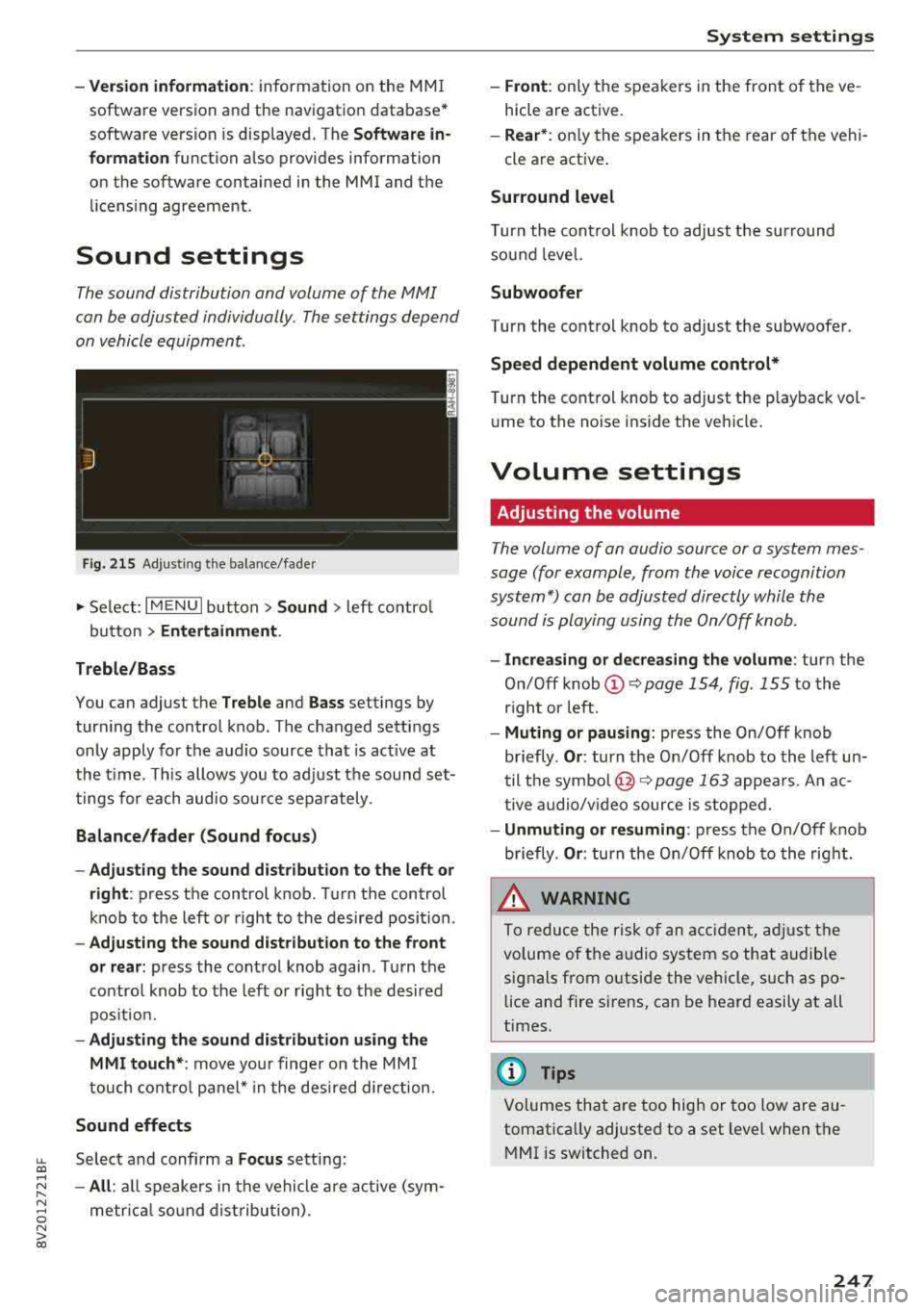
Fi g. 215 Adju sting the balan ce /fade r
.,. Select: I M ENU I button> Sound > left contro l
button
> Ent ertainm ent .
Treb le /Ba ss
You can adjust the Treble and Ba ss settings by
turning the control knob . The changed settings
only apply for the audio source that is act ive at
the t ime. This allows you to ad just the sound set
tings for each audio source separately .
Bal ance /fader (Sound focu s)
- Ad justing th e sou nd d ist ribut ion to the l eft or
right :
press the control k nob . Turn the control
knob to the left or right to the desired position .
-Adju sting t he sou nd d istribution to the fron t
or rear :
press the control knob again . T urn the
contro l knob to the left or right to the desired
pos ition.
- Adju sting the sound d istribution u sing th e
MMI t ouch* :
move your finger on the MM I
touch cont ro l panel* in the desi red direction.
Sound effects
LL Select and confirm a Fo cus setting: co ....
~ - All : all speakers in the vehicle a re a ctive (sym-
~ metr ica l sound dist ribution) . 0 N > co
Sys tem settings
-Front : only the speakers in the front of the ve
hicle are active.
- Rear *: on ly the speakers in the rear of the vehi
cle are active .
Surround level
Turn the cont rol knob to adjust the surround
sound level.
Subwoofer
Turn the control knob to adjust the subwoofer .
Speed dep end ent v olum e cont rol *
Turn the control knob to adjust the p layback vol
u me to the noise ins ide the veh icle.
Volume settings
Adjusting the volume
T he volume of an audio source or a system mes
sage (for example, from the voice recognition
system*) can be adjusted directly while the
sound is playing using the On/Off knob .
-Incr easing or decreas ing the volume : turn the
On/Off
knob @~ page 154, fig . 155 to the
r ight or left .
-Mu ting or pau sin g: press the On/Off knob
briefly .
Or: turn the On/Off knob to the left un
til the
symbo l@ ~ page 163 appea rs . An ac
tive a udio/v ideo source is stopped.
- Unmuting or re suming : press the On/Off knob
briefly .
Or: turn the On/Off knob to the rig ht.
.&_ WARNING
To reduce the risk of an accident, adj ust the
volume of the audio system so that audible
signals from o utside the vehicle, such as po
lice and fire sirens, can be heard easily at all
times.
(D Tips
Volumes that are too high or too low are au
tomatically adjusted to a set level when the
MMI is switched on.
.
247
Page 250 of 404
System settings
Adjusting the system volume
.,. Select : I MENU I button> Sound> left control
button.
Telephone
Applies to: vehicles with telephone
Mute telephone: messages and ringtones are set
to mute.
Ringtone : see c::> page 188, Ringtone and volume
settings .
Ringtone volume:
you can adjust the volume of
the selected ringtone by turning the contro l
knob.
Message volume: you can adjust the volume of
the notification for an incoming text message by
turning the control knob.
Microphone input level : you can adjust the call
volume during a phone call by turning the control
knob.
Navigation
Applies to: vehicles with navigation system
Voice guidance: see c::>page 210.
Voice guidance during phone call: see
c::> page 210.
Voice guidance volume: you can adjust the vo ice
gu idance volume by turning the control knob.
Or:
you can adjust the vo ice guidance volume during
active route guidance by turning the On/Off
knob .
Entertainment fader : the volume of audio play
back can be temporarily lowered when the park
ing system or vo ice gu idance is active .
Voice recognition system
Applies to: vehicles with voice recognition system
Command display : see c::> page 243.
Short dialog : see c::> page 243.
Volume : see c::> page 243 .
Individual speech training : see c::> page 243.
1> Not availa ble in all vehicl es.
248
Parking aid*
You can adjust the volum e of the signal tone by
turning the control knob.
-Adjusting the Front volume: select and con
firm
High , Medium or Low .
- Adjusting
the Rear volume : select and confirm
High , Medium or Low .
MMI touch*
Turn the control knob to adjus t the volume of the
spoken prompts from the
MMI touch* .
Restarting the MMI
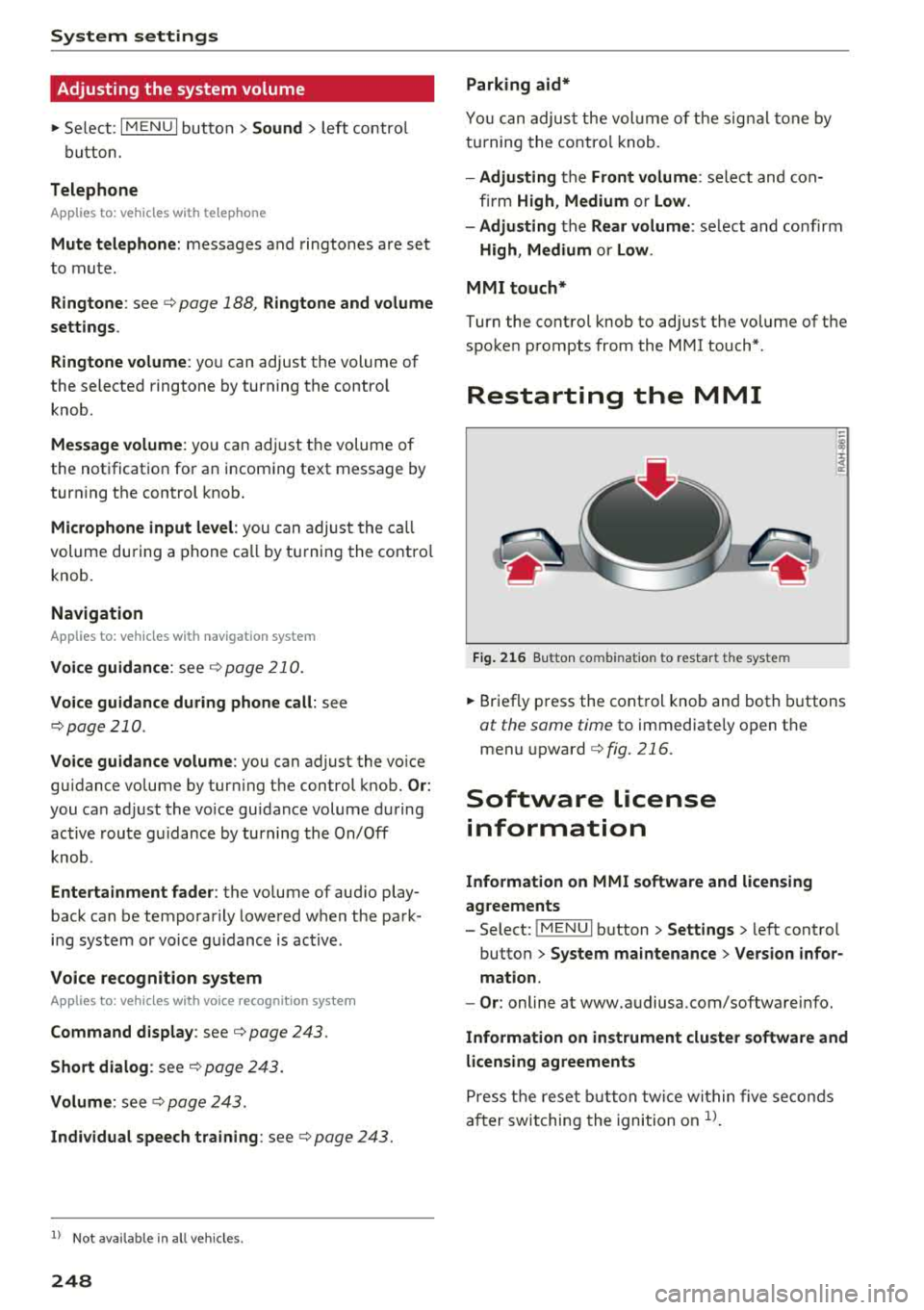
Fig. 216 Button co mbinatio n t o restar t th e sys te m
.,. Briefly press the control knob and both buttons
at the same time to immediately open the
menu upward
c::> fig. 216.
Software license
information
Information on MMI software and licensing
agreements
- Select: ~
I M~E=N~U~ I button >Settings > left control
button>
System maintenance > Version infor
mation.
- Or : online at www.audiusa.com/softwareinfo.
Information on instrument cluster software and
licensing agreements
Press the reset button twice within five seconds
after switching the ignition on
ll.
Page 275 of 404
LL co ..... N
" N ..... 0 N > co
-An improper ly installed child restraint can
interfere with the airbag as it deploys and
seriously injure or even kill the child
-even
with an Advanced Airbag System.
- Always carefully follow the manufacturer's
instructions provided with the child seat or
carrier .
- Always make sure that there is nothing on
the front passenger seat that will cause the capacit ive passenger detection system in
the seat to signal to the Airbag System that
the seat is occupied by a person when it is
not, or to signal that it is occupied by some
one who is heavier than the person actually
sitting on the seat. The presence of addi
tional objects could cause the passenger
front airbag to be turned on when it should be off, or could cause the airbag to work in a
way that is different from the way it would have worked without the object on the seat .
Front airbags
Description of front airbags
The airbag system can provide supplemental
protection to properly restrained front seat occu
pants.
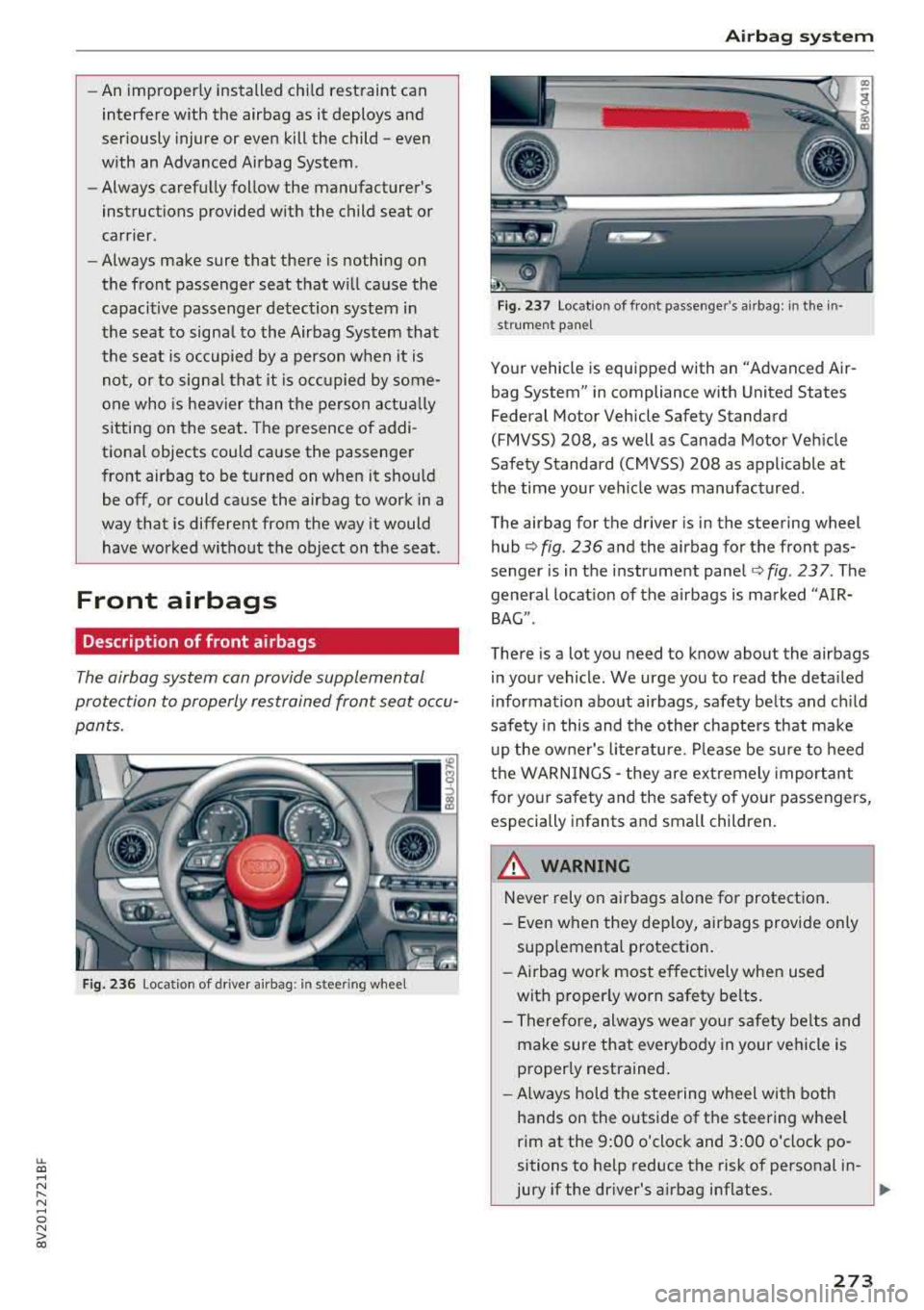
Fig. 236 Loc ation of driver a irbag: in ste .e ring wheel
Airbag system
Fig. 237 Location of front passenger's airbag: in the in
st rum ent panel
Your vehicle is equipped with an "Advanced Air
bag System" in compliance with United States
Federal Motor Vehicle Safety Standard
(FMVSS) 208, as well as Canada Motor Vehicle
Safety Standard (CMVSS) 208 as applicable at
the time your veh icle was manufactured.
The airbag for the driver is in the steering wheel
hub
¢ fig. 236 and the airbag for the front pas
senger is in the instrument panel
¢fig . 237. The
general location of the airbags is marked "AIR
BAG ".
There is a lot you need to know about the airbags
in your vehicle . We urge you to read the detailed
information about airbags, safety belts and child
safety in this and the other chapters that make
up the owner's literature. Please be sure to heed
the WARNINGS
-they are extremely important
for your safety and the safety of your passengers,
especially infants and small children.
_& WARNING
-Never rely on airbags alone for protection .
- Even when they deploy, airbags provide only
supplemental protection.
- Airbag work most effectively when used
with properly worn safety belts.
- Therefore, always wear your safety belts and
make sure that everybody in your vehicle is
properly restrained.
- Always hold the steering wheel with both
hands on the outside of the steering wheel
rim at the 9:00 o'clock and 3:00 o'clock po
sitions to help reduce the risk of personal in-
jury if the driver's airbag inflates.
..,.
273
Page 278 of 404
Airbag syste m
-If you are unrestrained, leaning forward, sit
t ing s ideways or out of pos ition in any way,
your risk of injury is much h igher.
- You will also receive serious injuries and
could even be killed if you are up aga inst the
airbag or too close to it when it inflates -
even with an Advanced
Airbag ¢ page 269.
A WARNING
A child in a rearward -facing child seat instal
led on the front passenger seat will be ser i
ously inju red and can be killed if the front air
bag inflates - even with an Advanced Airbag
System.
- Although the Advanced A irbag System in
yo ur vehicle is designed to tu rn off the front
airbag when a rearward-facing child re
straint has been insta lled on the front pas
senger seat, nobody can absolutely g uaran
tee that deployment is impossible in all con ceivable s ituations that may happen during
the useful life of your vehicle.
- The inflating airbag will hit the child seat or infant carrier w ith great force and will
smash the ch ild seat and child against the
backrest, center armrest, door, or roof .
- Always install rearward-facing ch ild re
straints on the rear seat .
- If you must install a rearward fac ing ch ild
seat on the front passenger seat because of
exceptional c ircumstances and the
PA SSEN
GER AIR BAG OFF
light does not come on
and stay on, immediately insta ll the rear
facing child seat in a rea r seating position
and have the airb ag system inspected by
yo ur Audi dealer .
A WARNING
If, in exceptional circumstances, you must in
stall a forward-facing chi ld restraint on the
front passenger's seat :
- Always make sure the forward -facing seat
has been designed and certified by its man
ufacturer for use on a front seat with a pas
senger front and side a irbag.
276
-
- Never put the fo rward-facing child restraint
up against or very near the instrument pan
el.
- Always move the front passenger seat to
the highest posit ion in the up and down ad
justment range and move it back to the rearmost posit ion in the seat's fore and aft
ad justment range, as far away from the a ir
bag as poss ible, before installing the for
ward-f acing chi ld restrain t.
- Always make sure that the safety be lt upper
anchorage is behind the ch ild rest raint and
not next to o r in fron t of the child rest raint
so th at the s afety be lt will be p roperly posi
tioned.
- Always make sure th at there is noth ing on
the front passenger seat that will cause the
capacitive passenger detection system in
the seat to signal to the Airbag System that
the seat is occup ied by a person when it is
not, or to signal that it is occupied by some
one who is heavier than the person actually
sitt ing on the seat . The presence of addi
tional objects could cause the passenger
front airbag to be turned on when it should
be off, or could cause the airbag to work in a
way th at is differen t from the w ay it wou ld
have worked without the objec t on the seat .
- Ma ke sure th at the
PASSENGER AIR BAG
OFF
li ght comes on and stays on all the time
whenever the ignition is switched on .
Advanced Airbag System components
The front passenger seat in your vehicle has a lot
of very important parts of the Advanced Airbag
System in it. These pa rts include the capacitive
passenger detection system, wir ing, brackets,
and more . T he control unit monitors the system
o n the front passenger seat when the ignit ion is
switched on a nd turns the airbag indicato r light
o n when a malfunction in the one of the system
components is
detected ¢ page 281. Because
t h e fron t passenger sea t contains impo rtan t
parts of the Advanced Ai rbag System , you must
take care to prevent it from being damaged .
Damage to the seat may prevent the Advanced
.,.
Page 282 of 404
Airbag syste m
A WARNING
A child in a rearward-facing child seat instal
led o n the front passenger seat will be ser i
ously injured and can be k ille d if the front air
bag in flate s - even with an Advanced Airbag
System.
- The inflating a irbag w ill hit the child seat or
infant carrier w ith great force and will
smash the ch ild seat and child against the
backrest, cente r arm rest, door or roof.
- Always install rear-facing child seats on the
rea r seat.
- If you must install a rearward fac ing ch ild
seat on the front passenger seat because of
exceptional c ircumstances and the
PASSEN
GER AIR BAG OFF
light does not come on
and stay on, immediately insta ll the rear
facing child seat in a rear seating position and have the airbag system inspected by
your Audi dealer.
A WARNING
-
-
Objects between you and the a irbag w ill in
crease the risk of in jury in a crash by interfer
ing w ith the way the airbag unfolds or by be
ing pushed into you as the a irbag inflates.
- Never hold th ings in your hands or on your
lap when the vehicle is in use .
- Never transport items on or in the area of
the fron t passenger seat . Objects could
move into the area of the front airbags du r
ing bra king or other sudden maneuve rs and
become dangerous projec tiles that c an
ca use serious pe rsonal injury if the a irbags
inflate.
- Never pl ace or attach accessor ies or o ther
objects (such as cup ho lders, te lephone
brackets, large, heavy or bulky objects) on
the doors, over or nea r the area marked
"AIRBAG" on the steering wheel, instru
ment pane l, seat backrests or between
those areas and yourself. These objects could cause injury in a crash, especially
when the airbags infla te.
- Never recline the front passenger's seat to
transport objects . Items can also move into
the a rea of the side airbag o r the front a ir-
280
bag du ring brak ing o r in a sudden maneu
ver. Objects near the airbags can become pro jecti les and cause injury, part icularly
when the seat is reclined .
- Never p lace or transport objects on the
front passenger seat. Objects on the front passenger seat could cause the capacitive
sensor in the seat to signal to ai rbag system
that the seat is occ upied by a person when it
in fact is no t, or that the pe rson on the seat
is he avie r th an he or she act ually is. The
change in electric capacitan ce beca use of
such objects can cause the passenge r front
airbag to be turne d on when it should be
off, or can cause the airbag to work in a way
that is different from the way it would have
wo rked without objects on the seat.
- Always make sure that there is noth ing on
the front passenger seat that will cause the
capacitive passenger detection system in
the sea t to signal to the Airbag System that
the seat is occup ied by a person when it is
not, or to signal that it is occupied by some
one who is heavier th an the person actu ally
si tting on the sea t. The presence of an o b
ject could ca use the passenger front air bag
to be turned on when it should be off, or
could cause the airbag to work in a way that is diffe rent from the way it would have
worked without the object on the seat.
A WARNING
The fine dust created when airbags deploy can
cause breathing prob lems for people with a
h istory of asthma or othe r breath ing cond i
tions .
- To reduce the r isk of breathing p roblems ,
those wi th asthma o r other respiratory con
ditions sho uld get fresh a ir rig ht away by
getting out of the vehi cle or opening win
dows or doors.
- If you are in a co llision in which airbags de
ploy, w ash yo ur hands and f ace with m ild
soap and water be fore eating.
- Be ca refu l not to get the dust into your eyes,
or into any cuts or scratches.
- If the residue sho uld get into your eyes,
flush them w ith wate r.
Page 283 of 404
LL co .... N
" N .... 0 N > co
Monitoring the
Advanced Airbag System
Airbag monitoring indicator light
Two separate indicators monitor the fun ction of
the Advanced Airbag System : the
El ligh t and
t he
PASSENGER AIR BAG OFF light.
The Advanced Airbag System as we ll as the side
a ir bags and side curta in airbags with ejec tion
m it iga tion feat ures ( incl udi ng t he e lectro nic con
tro l unit, sensors and system wiring) are all
monitored co nti nu ously to ma ke sure that they
are funct ion ing prope rly whenever the ignition is
on. Every t ime yo u turn on the ignition, the air
bag system ind icator
light E,lwill come on for a
few seconds (function check).
The system mu st be inspected when the
indicator light
E,I:
- does not come on when the ignit ion is switched
on,
- does not go out a few seconds after you have
switched on the ign ition, o r
- comes on w hile driving.
If an airbag sys tem malf unct ion is de tected, the
indicator light w ill come on to serve as a co nstant
rem inder to have the system inspected immedi
ately .
If a mal function occurs t hat turns the front air
bag on the passenger si de
off, the PASSENGER
AIR BAG OFF
light will come on and stay on
whenever the ignit io n is on.
A WARNING
An airbag system that is not funct ion ing prop
er ly cannot provide supplemental p rotection
in a frontal crash .
- If the airbag indicator light¢
page 26
comes when the vehicle is be ing used, have
the sys te m inspect ed immed iate ly by yo ur
au tho riz ed Au di dealer.
It is possible that
t h e air bag will in flate w hen it i s n ot su p
p osed to, o r will not infla te whe n it s hou ld.
Airbag system
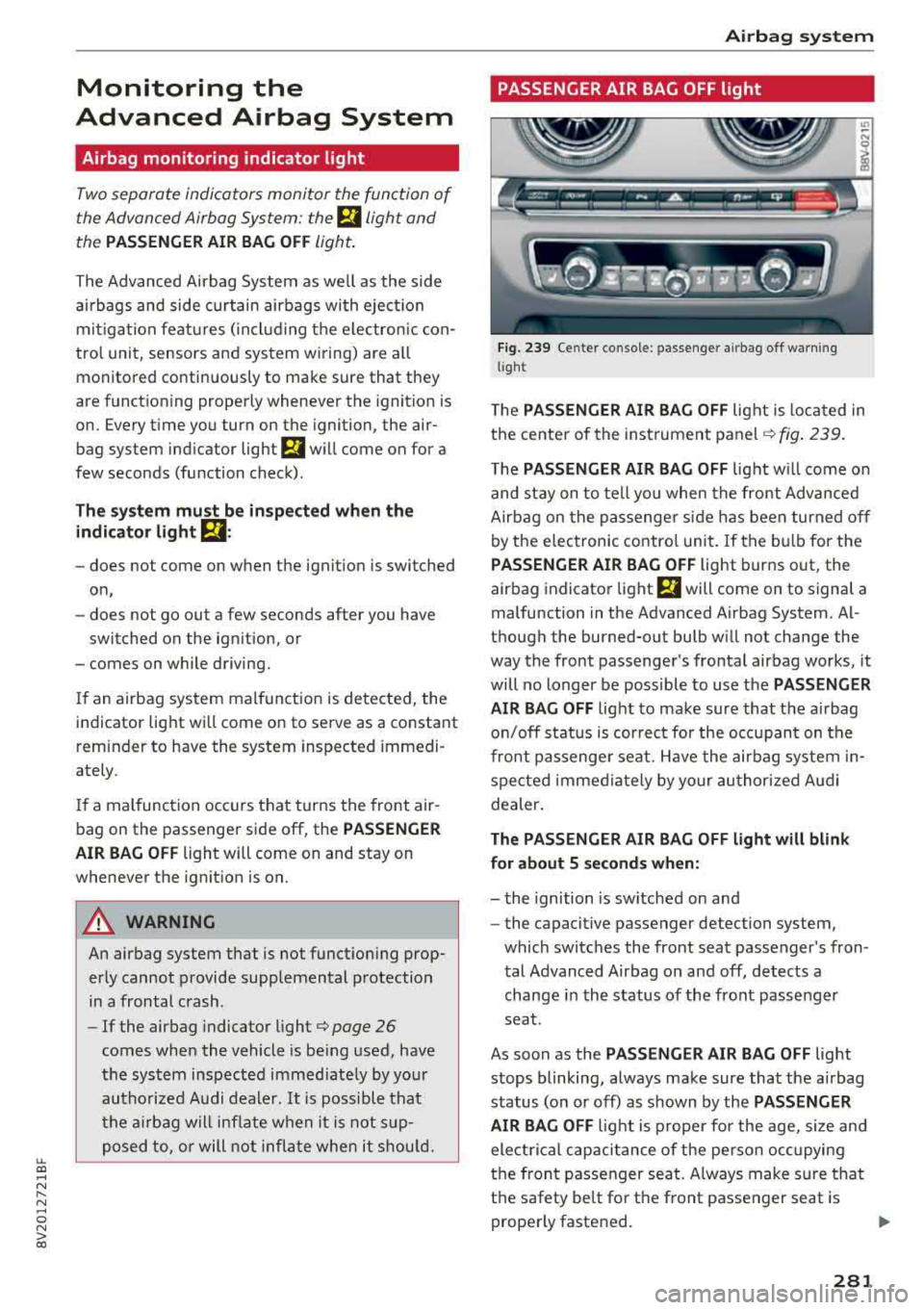
PASSENGER AIR BAG OFF light
Fi g. 239 Center con so le : p asse nger a irbag off wa rning
light
T he PASSENGER AIR BAG OFF lig ht is loc ated in
t h e cente r of the instrume nt
panel ¢ fig. 239.
T he PASSENGER AIR BAG OFF light w ill come o n
and st ay on to te ll yo u when the front Adv anced
Airbag on the passenger sid e has bee n turned o ff
by the e lec tronic contro l unit. If the b ulb for the
PASSENGER AIR BAG OFF light bur ns o ut, the
airbag indicato r light
El will come on to signal a
malfunction in the Advanced A irbag System. Al
t h ough the burned-out bu lb w ill not change the
way the front passenger's fronta l airbag works, it
will no longer be possible to use the
PASSENGER
AIR BAG OFF
light to ma ke sure that the a irbag
o n/off status is cor rec t for the oc cupan t on the
front pas senge r seat. Have the air bag system in
spe cted imme dia tely by your au thori zed A udi
dealer.
The PASSENGER AIR BAG OFF light will blink
for about 5 seconds when:
- the ignition is sw itched on and
- the capacit ive passenger detection system,
which switches the front seat passenger 's fron
t al Advanced Airbag on and
off, detects a
change i n the status of the front passenger
seat.
As soon as the
PASSENGER AIR BAG OFF light
stops blinking, always ma ke sure that the a irbag
status (on or off) as shown by the
PASSENGER
AIR BAG OFF
l ight is p roper for the age, si ze and
ele ctri cal c ap aci tance of the pe rso n oc cupying
t h e front passenger sea t. A lways make s ure that
the safety be lt fo r the front passe nger seat is
prope rly faste ned.
..,.
281
Page 299 of 404
u. 00 .-< N l' N .-< 0 N > 00
Child restraints and Advanced front airbag
system
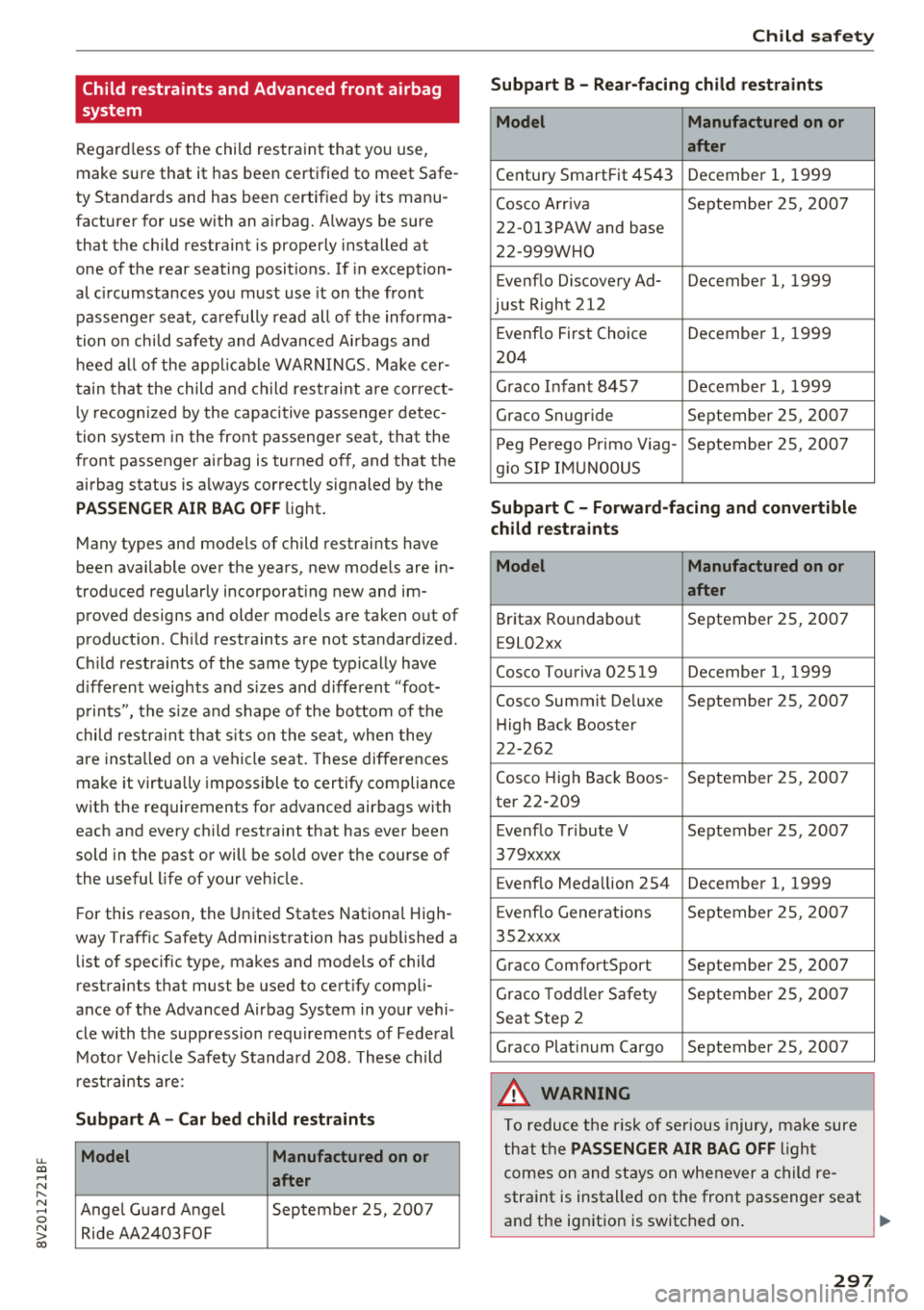
Regardless of the child restraint that you use,
make sure that it has been certified to meet Safe
ty Standards and has been certified by its manu
facturer for use with an airbag. Always be sure
that the child restraint is properly installed at
one of the rear seating positions . If in exception
al c ircumstances you must use it on the front
passenger seat, carefully read all of the informa
tion on child safety and Advanced Airbags and
heed all of the applicable WARNINGS. Make cer
tain that the child and child restraint are correct
l y recognized by the capacitive passenger detec
tion system in the front passenger seat, that the
front passenger airbag is turned off, and that the
airbag status is always correctly signaled by the
PASSENGER AIR BAG OFF light.
Many types and models of child restraints have
been available over the years, new mode ls are in
troduced regularly incorporat ing new and im
proved designs and older models are taken out of
product ion . Child restraints are not standardized .
Ch ild restraints of the same type typically have
different weights and size s and different "foot
prints", the size and sh ape of the bottom of the
chi ld restraint that sits on the seat, when they
are installed on a vehicle seat. These differences
make it virtua lly impossible to certify compliance
with the requirements for advanced airbags with
each and every child restraint that has ever been
sold in the past or will be sold over the course of
the useful life of your veh icle.
F or this reason, the United States National High
way Traffic Safety Administration has published a
list of specific type, makes and models of child
restraints that must be used to certify compli
ance of the Advanced Airbag System in your vehi
cle with the suppression requirements of Federal
Motor Vehicle Safety Standard 208. These child
restraints are:
Subpart A -Car bed child restraints
Model Manufactured on or
after
Ange l Guard Angel September 25, 2007
Ride AA2403FOF
Child safety
Subpart B - Rear-facing child restraints
Model Manufactured on or
after
Century SmartFit 4543 December 1, 1999
Cosco Arriva September 25, 2007
22-013PAW and base
22-999WHO
Evenflo Discovery Ad- December 1, 1999
just Right 212
E venflo First Choice December 1, 1999
204
Graco Infant 8457 December 1, 1999
Graco Snug ride September 25, 2007
Peg Perego Primo Viag- September 25, 2007
g io SIP IMUNOOUS
Subpart C -Forward-facing and convertible
child restraints
Model Manufactured on or
after
Britax Roundabout September 25, 2007
E9L02xx
Cosco Touriva 02519 December 1, 1999
Cosco Summit De luxe September 25, 2007
Hi gh Back Booster
22-262
Cosco High Back Boos- September 25, 2007
ter 22-209
E venflo Tribute V September 25, 2007
379xxxx
Evenflo Medallion 254 December 1, 1999
E venflo Generations September 25, 2007
352xxxx
Graco ComfortSport September 25, 2007
Graco Toddler Safety September 25 , 2007
Seat Step 2
Graco Plat inum Cargo September 25, 2007
A WARNING
To reduce the risk of serious injury, make sure
that the
PASSENGER AIR BAG OFF l ight
comes on and stays on whenever a child re
straint is installed on the front passenger seat
and the ignition is switched on .
~
297
Page 354 of 404
Wheels
~ Adapt your driving style to the situation.
~ Stop as soon as possible and check the tire(s) .
~ If it is possible to continue driving, see an au-
thorized Audi dea ler or authorized Audi Service
Facility immediately and have your tire(s) re
paired or replaced.
A WARNING
Read and follow the important information
and
notes ~ page 350.
Storing new tire pressures
App lies to: ve hicles w ith tire press ure m on itoring system
Correctly stored tire pressure specifications are
necessary for reliable tire pressure monitoring.
-
It is always necessary to store the tire pressures
when the tire pressures are modified, for exam ple due to a change in load. or when new sensors
are installed .
~ Before storing the tire pressures, make sure the
tire pressures of all four tires meet the speci
fied values and are adapted to the load
~ page 341, fig . 2 78 . Only correct and store
the pressure in tires whose temperature is ap
prox imat ely the same as the ambient tempera
ture .
If the temperature of the tire is higher
than the ambient air temperature, the tire
pressure must be increased approximate ly
3 .0 PSI (0 .2 bar) above the va lue on the sticker .
~ Switch the ignition on.
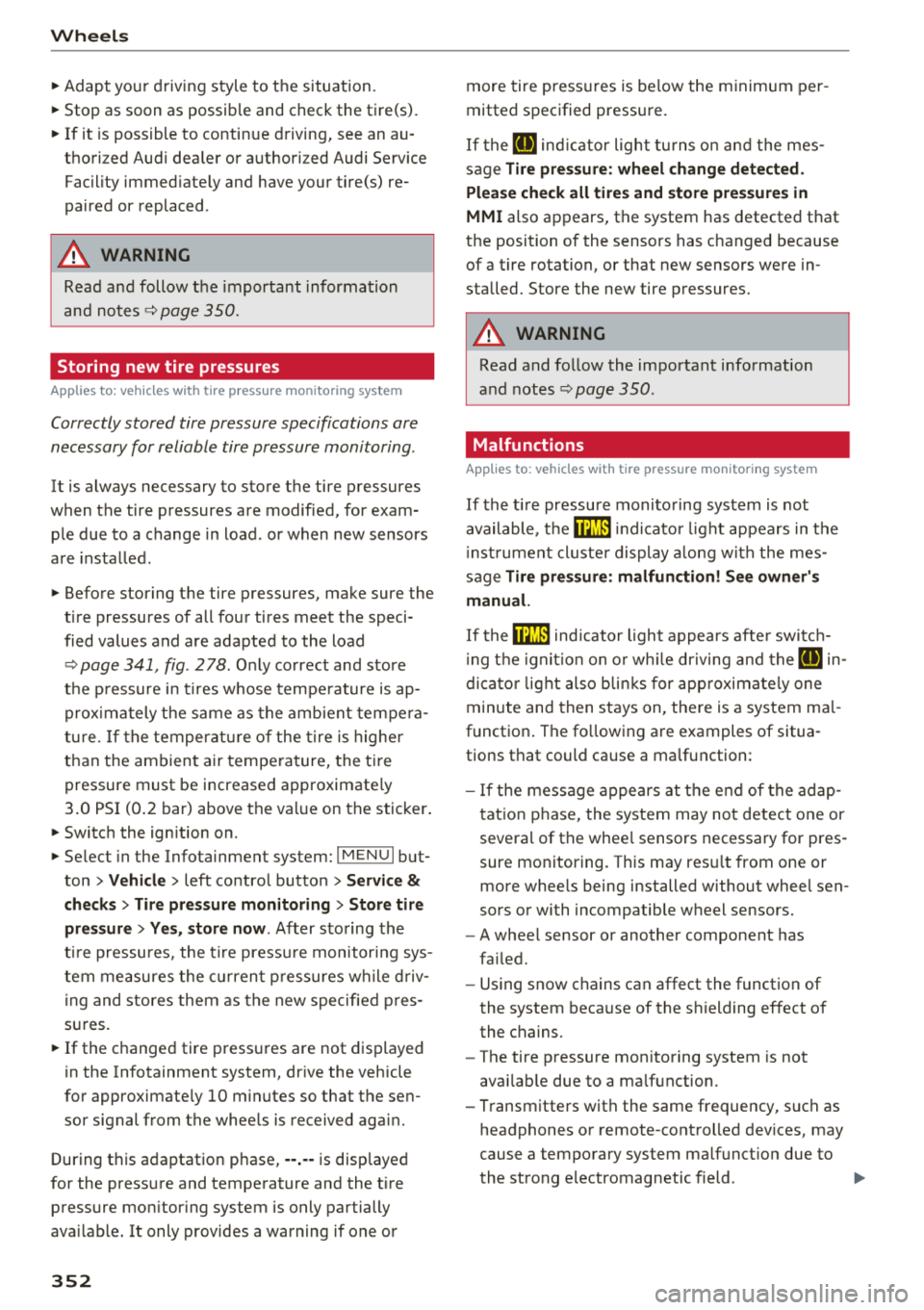
~ Select in the Infotainment system: IMENUI but
ton
> Vehicle > left control button > Service &
checks > Tire pressure monitoring > Store tire
pressure > Yes, store now .
After storing the
tire pressu res, the t ire pressu re monitoring sys
tem measures the current pressures wh ile driv
in g and stores them as the new specified pres
sures.
~ If the changed tire pressures are not displayed
in the Infotainment system, drive the vehicle
for approximate ly 10 minutes so that the sen
sor signal from the wheels is received again.
During this adaptation phase, --.-- is displayed
for the pressure and temperature and the tire
pressure mon itor ing system is only partially
ava ilable. It only provides a warning if one or
352 more
tire pressures is below the minimum per
mitted specified pressure.
If the
[I] ind icator light turns on and the mes
sage
Tire pressure : wheel change detected .
Please check all tires and store pressures in
MMI also appears, the system has detected that
the position of the sensors has changed because
of a tire rotation, or that new sensors were in
stalled. Store the new tire pressures.
A WARNING
Read and follow the important information
and notes
~pag e 350.
Malfunctions
Applies to: vehicles with t ire pressure mo nitori ng syste m
If the tire pressure monitoring system is not
available, t he
mm in dicator light appears in the
instr umen t cluste r display along with the mes
sage
Tire pressure : malfun ction! See owner's
manual.
-
If the ffim ind icator light appears after switch
in g the ignitio n on or wh ile dr iving and the
[IJ in
dicator light also blinks for approximately one
minute and then stays on, there is a system ma l
function . The fo llowing are examples of situa
tions that could cause a malfunction:
- If the message appears at the end of the adap
tation phase, the system may not detect one or
several of the whee l sensors necessary for pres
sure monitoring. This may res ult from one or
more whee ls being installed without wheel sen
sors or with incompatible wheel sensors.
- A wheel sensor or another component has
fa iled.
- Using snow chains can affect the function of
the system because of the shielding effect of
the chains.
- The tire pressure monitoring system is not
avai lab le due to a ma lfunction.
- Transmitters with the same frequency, such as
headphones or remote-controlled devices, may
cause a temporary system malfunct ion due to
the strong electromagnetic field.
.,.