warning light AUDI S3 SEDAN 2018 Owner's Manual
[x] Cancel search | Manufacturer: AUDI, Model Year: 2018, Model line: S3 SEDAN, Model: AUDI S3 SEDAN 2018Pages: 404, PDF Size: 62.3 MB
Page 59 of 404
LL co ..... N
" N ..... 0 N > co
(D Note
-Only fold the windshield wipers away when
they are in the service position. Otherwise,
you risk damaging the paint on the hood or
the windshield wiper motor.
- You should not drive your vehicle or press
the windshield wiper lever when the wiper arms are folded away from the windshield .
The windshield wipers would move back in
to their orig inal position and could damage
the hood and windshield .
(D Tips
- You can also use the service position, for ex
ample, if you want to protect the windsh ield
from icing by using a cover.
- You cannot activate the service position
when the hood is open .
Replacing rear wiper blade
Applies to: vehicles wit h rear w indow wiper
Fig. 59 Rea r window w iper: removing t he wiper b lade
Removing the wiper blade
.. Fold the wiper arm away from the rear window .
.. Hold the wiper blade below the center -arrow-
¢ fig. 59 and pull it out of the retainer . Hold
the windshield wiper arm securely wh ile doing
this.
Installing the wiper blade
.. Press the wiper blade mount into the retainer.
Securely hold the wiper arm at the upper plas
t ic end .
Lights and Vision
.. Fold the window wiper arm back onto the rear
window.
A WARNING
For safety reasons, the windshield wiper
blades should be replaced once or twice each
year .
Digital compass
Switching the compass on and off
Appl ies to: veh icles w ith dig ital compass
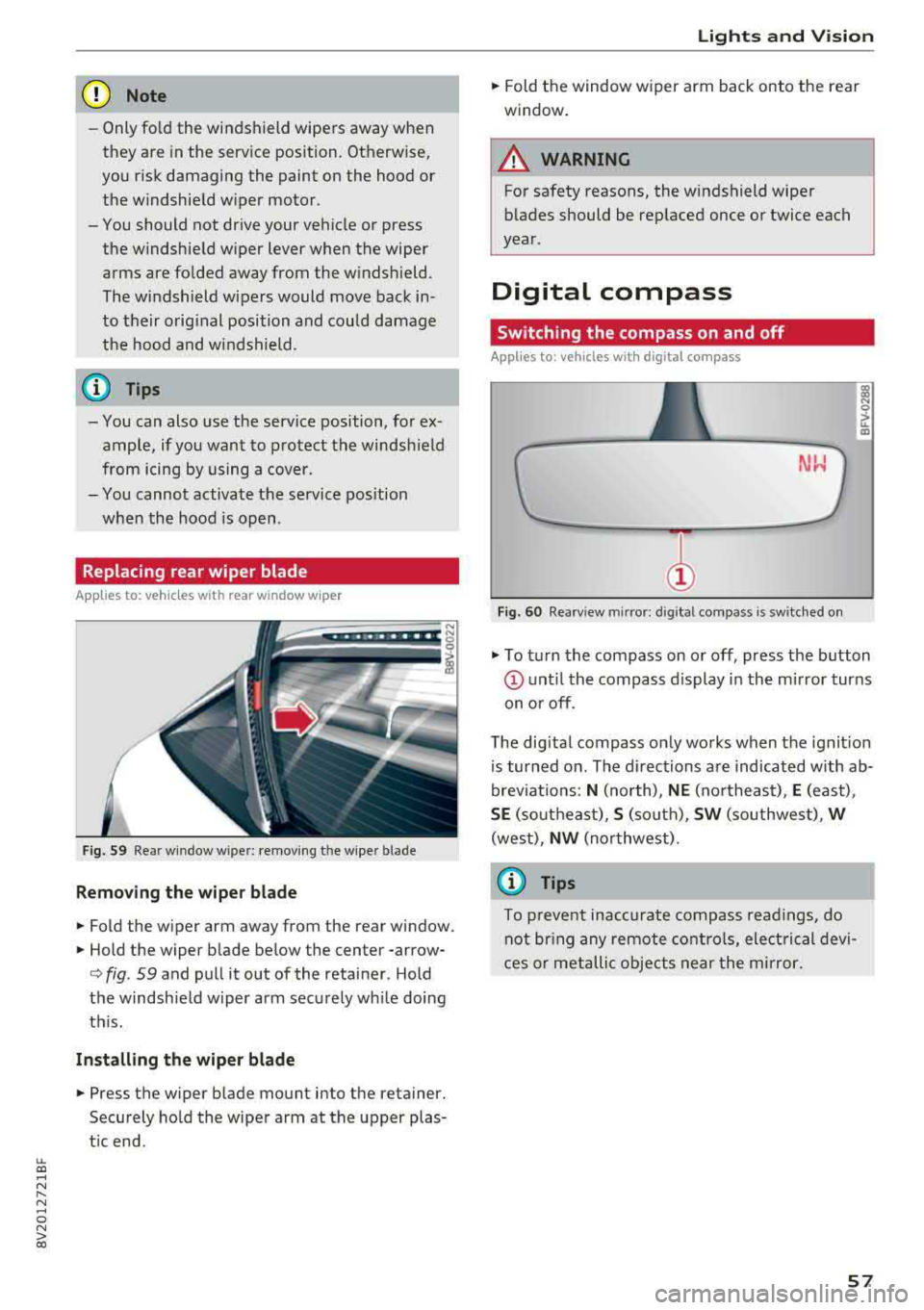
Fig. 60 Rearview m irror: digital compass is sw itched on
gi N 0
> u.. m
.,. To turn the compass on or off, press the button
(D u nt il the compass d isplay in the mirror turns
on or off.
T he dig ital compass only works when the ignit ion
is turned on . The directions are indicated with ab
brev iat ions:
N (north), NE (northeast), E (east),
SE (so utheast), S (so uth), SW (southwest), W
(west), NW (northwest) .
(j) Tips
To prevent inaccurate compass readings, do
not br ing any remote controls, electrical devi
ces or metallic objects near the mirror.
57
Page 60 of 404
Lights and Vision
Adjusting the magnetic zone
Applies to: ve hicles w ith d ig ital compass
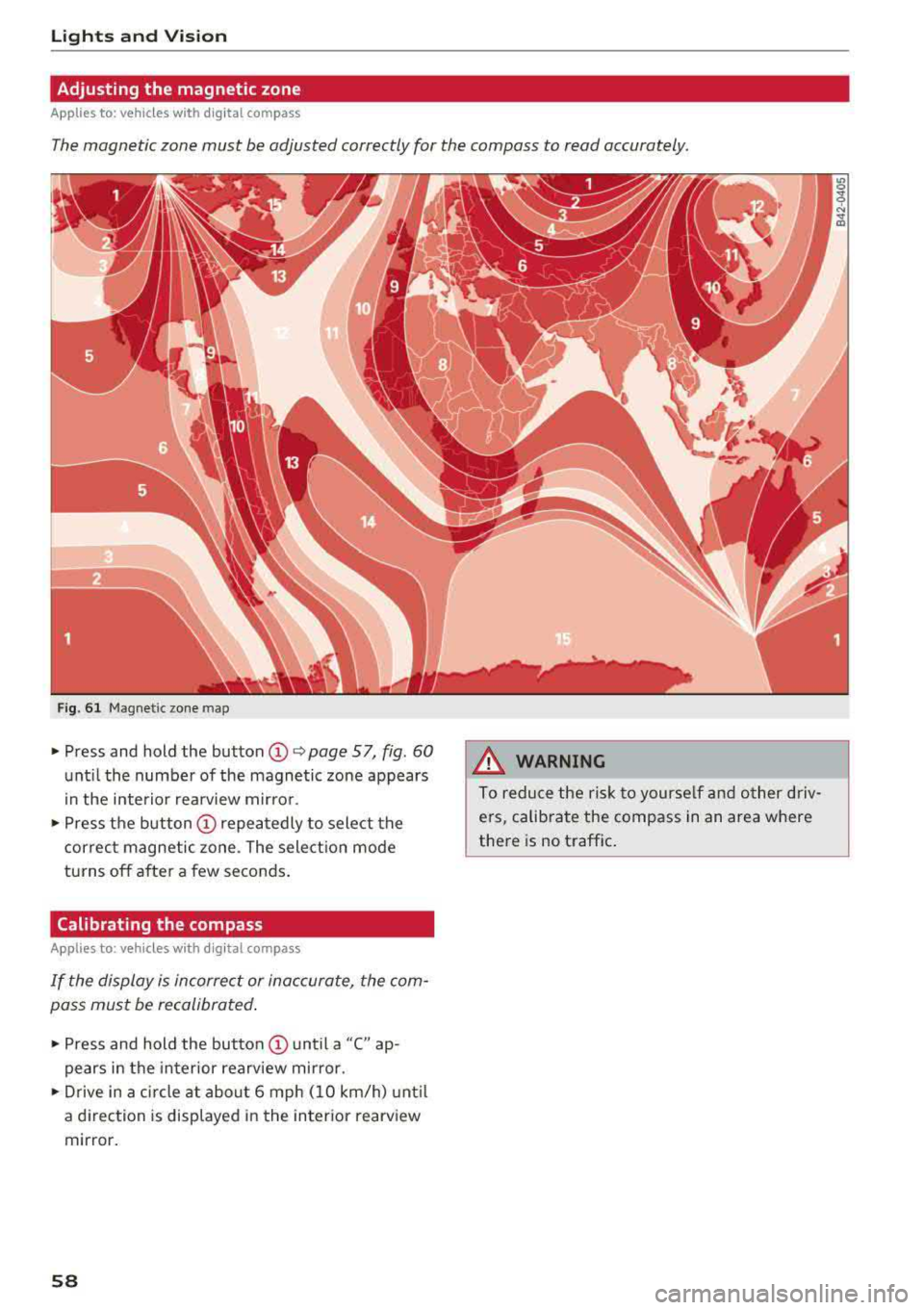
The magnetic zone must be adjusted correctly for the compass to read accurately.
Fig. 61 Magnetic zone map
~ Press and hold the button CD~ page 57, fig . 60
until the number of the magnetic zone appears
in the interior rearview mirror.
~ Press the button CD repeatedly to select the
correct magnetic zone . The selection mode
turns off after a few seconds.
Calibrating the compass
A pp lies to: ve hicles w ith d ig ital compass
If the display is incorrect or inaccurate, the com
pass must be recalibrated.
~ Press and hold the button CD until a "C" ap
pears in the interior rearview mirror.
~ Drive in a circle at about 6 mph (10 km/h) until
a dir ection is displayed in the in terior rearview
mirror.
58
A WARNING
To reduce the risk to yourself and other driv·
ers, calibrate the compass in an area where
there is no traffic.
Page 65 of 404
~ Then push the arm against the beverage con
tainer so that the arm lies closely against it.
~ To close the cup holders, push them back into
the slot.
A WARNING
-
- Do not put any hot beverages in the cup
holder while the vehicle is moving . Hot bev
erages could spill, wh ic h increases the risk
of injury.
- Do not use any breakable beverage contain
ers (for example, made out of glass or por celain). You cou ld be injured by them in the
event of an accident .
CD Note
Beverage containers in the cup holders should
always have a lid. If not, beverages could sp ill
and cause damage to vehicle equipment, such
electronics or seat covers.
Other storage
Applies to: sedan
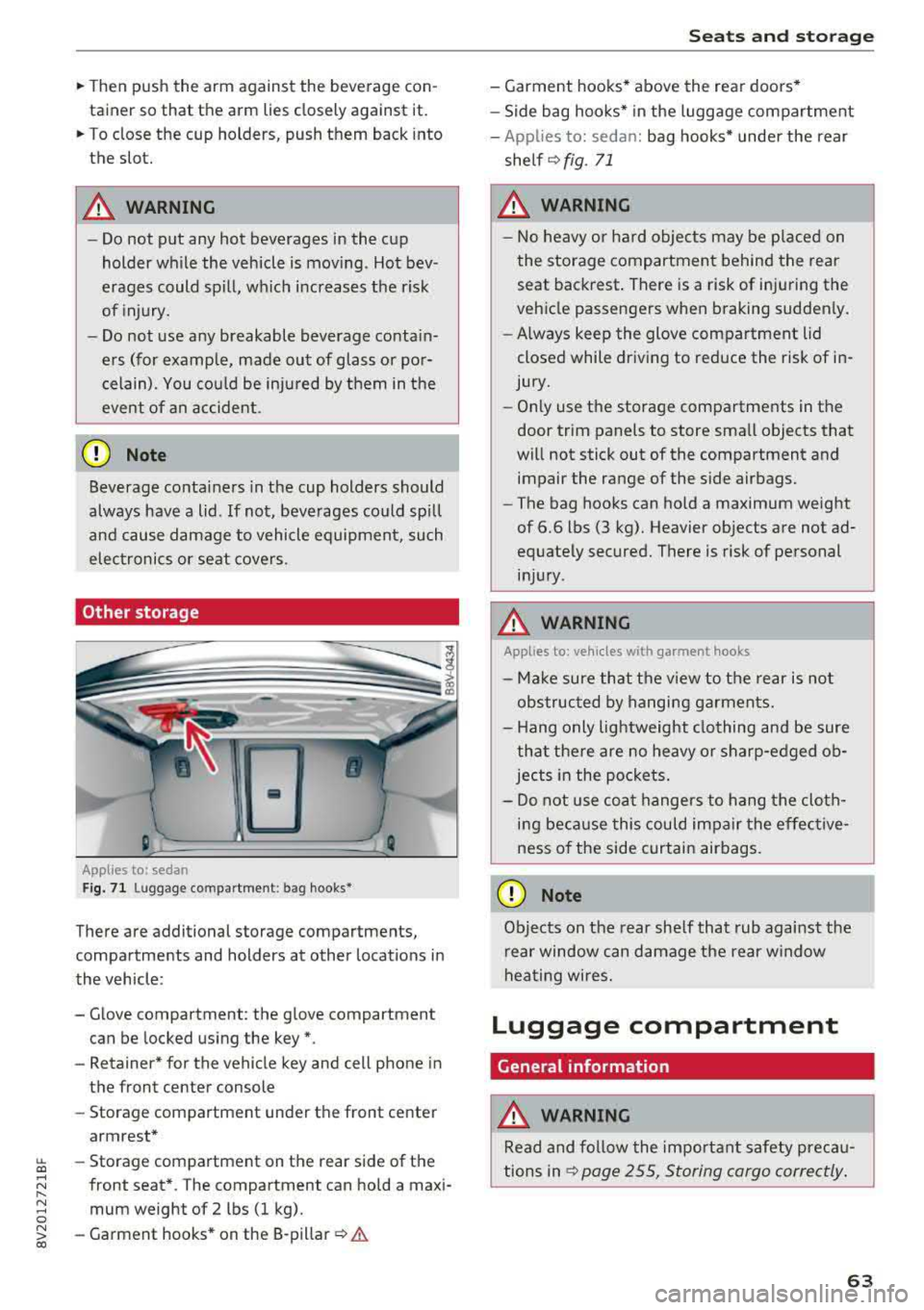
F ig. 7 1 Lugg age comp artment : bag hooks*
There are additional storage compartments,
compartments and holders at other locations in
the vehicle :
- Glove compartment : the glove compartment
can be locked us ing the key*.
- Retaine r* for the vehicle key and cell phone in
the front center console
- Storag e compartment under th e front center
armrest*
~ - Storage compartment on the rear side of the
.... ~ front seat* . The compartment can hold a maxi -
8 mum weight of 2 lbs (1 kg).
~ -Garment hooks * on the 8-pillar ¢ .& co
S eats and storag e
- Garment hooks* above the rea r doo rs *
- Side bag hooks* in the luggage compartment
- App lies to: sedan: bag hooks* unde r the rear
shelf ¢
fig. 71
A WARNING
-No heavy or hard objec ts may be p laced on
the storage compartment behind the rear seat backrest . There is a risk of injuring the
veh icle passengers when braking sudden ly .
- Always keep the glove compartment lid
closed while dr iv ing to red uce the risk of in
jury.
- On ly use the storage compartments in the
door trim panels to store sma ll objects that
will not stick out of the compartment and impair the range of the side airbags.
- The bag hooks can ho ld a maximum weight
of 6.6 lbs (3 kg). Heavier objects are not ad
equate ly secured. There is risk of personal
in jur y.
A WARNING ,_
Applies to: vehicles with garment hooks
- Ma ke sure that t he view to the rear is not
obs truc ted by hanging ga rments.
- H ang only lightweight clothing and be sure
that the re are no heavy o r sharp-edged ob
jec ts in the po ckets.
- Do not use coat hangers to hang t he cloth
i n g beca use this could impair the effective
ness o f the side curtain airbags .
CD Note
Objects on the rear she lf that rub against the
r ear window can d amage the rear w indow
hea ting wires.
Luggage compartment
General information
.&, WARNING
Read and follow the impo rtant s afety preca u
tions in
~ page 255, Storing cargo correctly .
63
Page 66 of 404
Seats and stor age
Luggage compartment cover
App lies to: ve hicles w ith luggage co mpartme nt cover
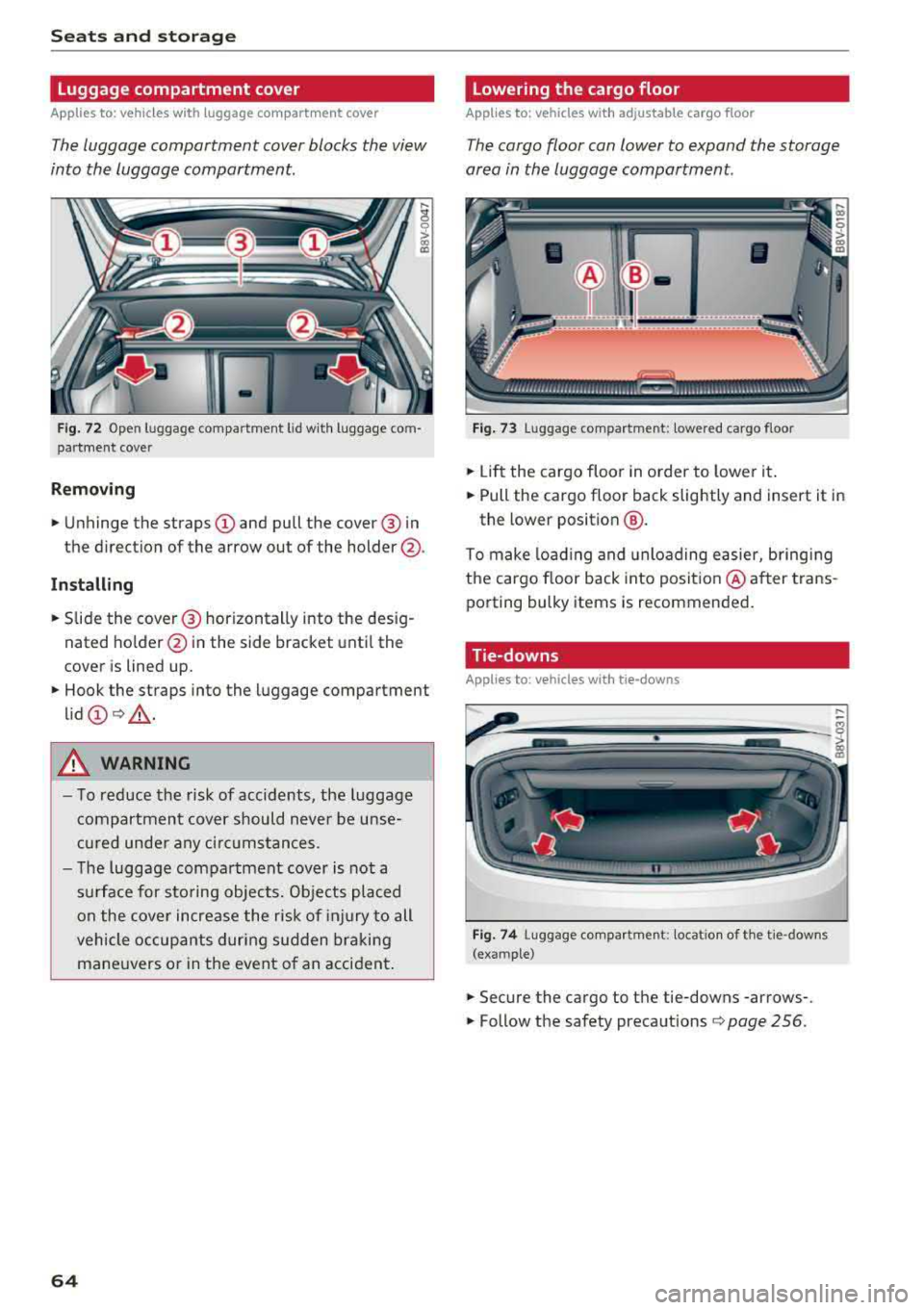
The luggage compartment cover blocks the view
into the luggage compartment.
F ig. 72 Open luggage compartment lid wit h luggage com
par tme nt cover
Remo ving
.. Unhinge the straps CD and pull the cover @ in
the direction of the arrow out of the holder @.
Install ing
.. S lide the cover @ horizontally into the des ig
nated ho lder @in the side bracket unt il the
cover is lined up.
.. Hook the straps into the luggage compartment
lid
CD Q _A .
A WARNING
- To reduce the risk of accidents, the luggage
compartmen t cover should never be unse
cu red unde r any ci rc u mstances.
- The luggage compartment cover is not a
s u rface for sto ring objects. Objects placed
on the cover increase the risk of injury to all
vehicle occupants during sudden bra king
mane uvers o r in the event o f an accident .
64
Lowering the cargo floor
Applies to : vehicles with adjustable cargo floor
The cargo floor can lower to expand the storage
area in the luggage compartment.
Fig . 73 Luggage compartment: lowered cargo floor
.. Li ft the cargo floor in order to lower it .
.. Pull the cargo floor back slightly and insert it in
the lower position
@ .
To make load ing and unloading easier, bringing
the cargo floor back into posit io n @ after trans
porting bulky items is recommended .
Tie-downs
App lies to : vehicles wi th tie- downs
Fig . 74 Luggage compartment: locat io n of th e tie -downs
(example)
.. Secure the cargo to the tie-downs -arrows-.
.. Follow the safety precautions Q page 256.
Page 67 of 404
LL co .... N
" N .... 0 N > co
Luggage compartment net/cargo bag
Applies to: vehicles with luggage compartment cargo net/car
go bag
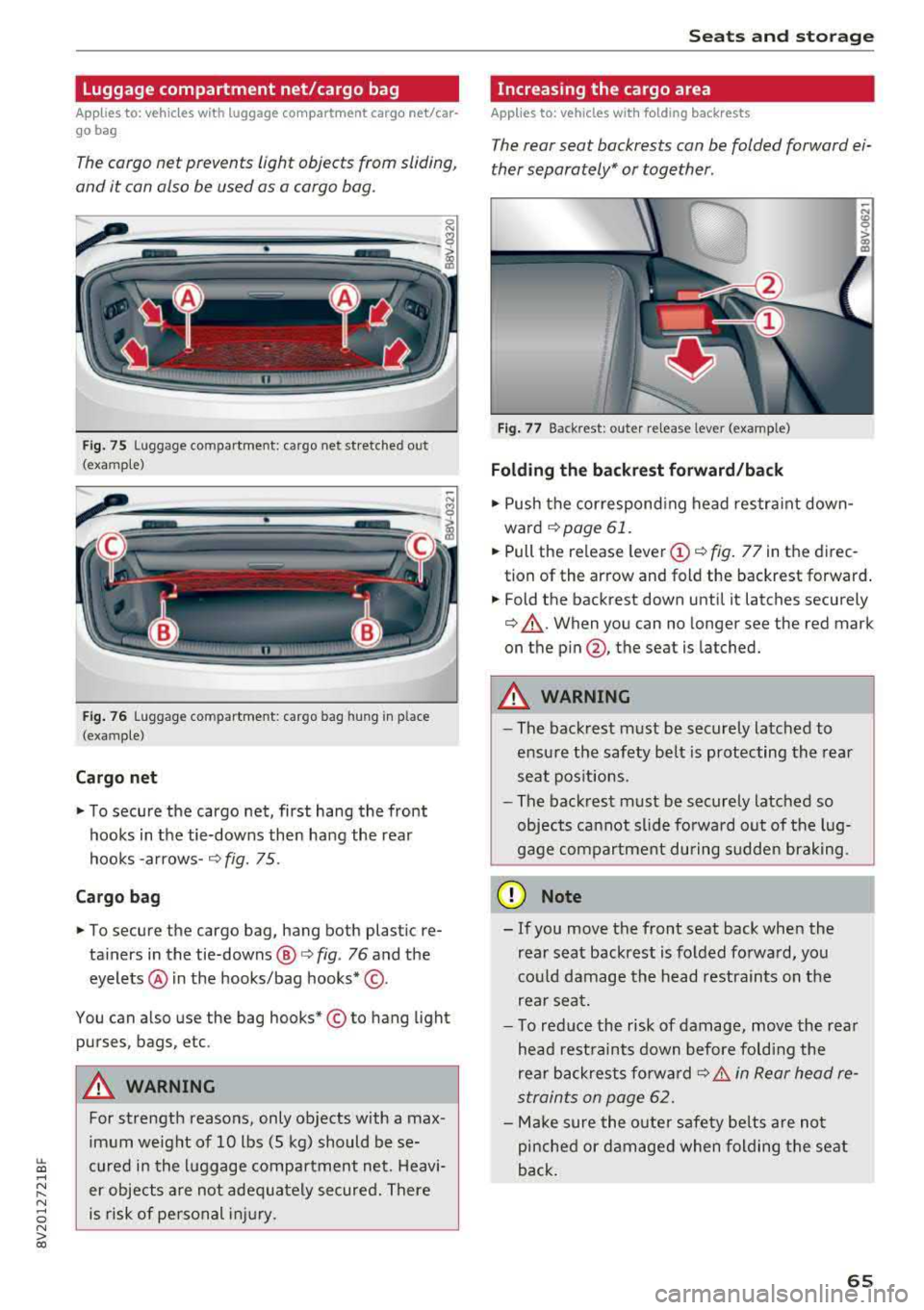
The cargo net prevents light objects from sliding,
and it can also be used as a cargo bog.
Fig. 75 Luggage compartment: cargo net stretched out
(examp le)
F ig . 76 Luggage compartment: cargo bag hung in place
(examp le)
Cargo net
" To secure the cargo net, first hang the front
hooks in the tie-downs then hang the rear
hooks
-arrows- ¢ fig. 75.
Cargo bag
" To secure the cargo bag, hang both plastic re
ta iners in the tie-downs @
c> fig. 76 and the
eyelets @ in the hooks/bag hooks* ©-
You can also use the bag hooks* © to hang light
purses, bags, etc .
A WARNING
For strength reasons, only objects with a max
imum weight of 10 lbs (5 kg) should be se
cured in the luggage compartment net. Heavi
er objects are not adeq uately secured. There
is risk of personal injury .
Seats and storag e
Increasing the cargo area
Applies to: vehicles with folding backrests
The rear seat backrests con be folded forward ei
ther separately* or together .
Fig. 77 Backrest: outer re lease lever (example)
Folding th e backr est forward /back
" Push the correspond ing head restra int down
ward
¢page 61.
" Pull the release leve r (D ¢ fig. 77 in the direc
tion of the arrow and fold the backrest forward .
.. Fold the backrest down until it latches securely
¢ &_. When you can no longer see the red mark
on the
p in @ , the seat is latched.
A WARNING ~ -
- The backrest must be securely latched to
ensu re the safety belt is protecting the rear
seat pos itions.
- The backrest must be securely latched so
objects cannot slide fo rwa rd out of the lug
gage compartment during sudden brak ing.
@ Note
- If you move the front seat back when the
rear seat backrest is folded forwa rd, yo u
cou ld damage the head restrain ts on the
rear seat.
- To red uce the risk of damage, move the rea r
head rest raints down before fo ld ing the
rear backrests fo rwa rd
¢ &. in Rear head re
straints on page
62.
- Make sure the oute r safety be lts are not
pinche d or damaged when folding the seat
back.
65
Page 74 of 404
Drivin g
Driving
General information
Breaking in
A new vehicle must be broken in for the first 1,000 mi les (1,500 km). Do not dr ive at speeds
t hat will exceed 2/3 of the max imum pe rm itted
engine speed (RPM) for the first 600 miles
(1,000 km), and avoid fu ll acceleration during
this period . You may gradually start increasing
the RPM and the speed between 600 miles (1,000 km) and 1,000 miles (1,500 km) .
During the first hours of use, the engine has a
higher internal friction than later on when all
moving parts have settled into place with each
other.
How the vehicle is driven d uring the first 1,000
miles (1 ,500 km) a lso affects the engine quality .
Drive at moderate engine speeds after the initial
break-in per iod, part icu larly when running a cold
eng ine . Th is will reduce eng ine wear and improve
the m ileage .
Do not drive at too
low of an engine speed (RPM).
Shift down if the engine stops running "smooth ly". Extremely high eng ine speeds are automati
cally reduced .
Reducing the risk of vehicle damage
@ Note
When driving on poo r roads, by cu rbs and on
s teep ramps, make su re t hat low-hang ing
compone nts such as the spo ile r and exha ust
system do not come into contact with these
or they could be damaged. This especially ap
plies to vehicles with low ground clearance
and veh icles that are heavily loaded.
Warming up/cooling down
Applies to: RS models
By warming up/cooling down the engine carefu l
ly, you can help reduce unnecessary stra in o n
your veh icle when driving in a sporty sty le .
72
The tires only reach t heir full road ho ld ing capa
bility once they have warmed up under load.
Yo ur vehicle also has an afte r-run cooli ng fea
tu re . Howeve r, cooling down is st ill import ant.
The eng ine and t he brakes as we ll as the exhaust
system and the transmission become very hot
when driving in a sporty style. Before you shut
the veh icle off, you should cool down the vehicle
by driving a few miles at low speeds with light ac
ce leration .
Driving through water on roads
Note the following to reduce the risk of veh icle
damage when dr iving throug h wate r, fo r example
o n flooded roads:
-The water must not be any higher than the bot
tom of the vehicle body .
-Do not drive faster than walk ing speed .
A WARNING
After driving thro ugh water or m ud, the effec
tiveness of t he b rakes may be reduced due to
mo istu re o n the bra ke rotors and brake pads.
A few ca reful br ake app lica tions sho uld d ry
off the bra kes and restore the fu ll b raking ef
fect.
@ Note
-Vehicle components such as the e ng ine,
t ra nsmiss ion, sus pens io n or elect rical sys
tem can be severely damaged by d riving
throug h water.
-Alw ays sw itch the S tart/Stop system* o ff
when driving thro ugh wa ter
r=;, page 79.
(j) Tips
-De ter mine the dep th before dr iving throug h
w ate r.
-Do not stop the vehi cle, d rive in reverse or
switch t he e ngine off whe n driving through
water .
-Keep in mind that o ncom ing vehicles may
c re ate w aves th at r aise the wa ter level and
make i t too deep for yo ur vehicle to drive
throug h safe ly.
Page 76 of 404
Driving
When not being used, a roof rack should be re
moved to decrease the wind resistance of the ve
hicle. This will save you approximately 12% fuel
at speeds from 62
-75 mph (100 -120 km/h).
Save energy
The engine drives the generator, which generates
electricity; the fuel consumption also increases
with the demand for electricity. Therefore, switch
electrical equipment
off when you no longer
need it. Examples of equipment that uses a lot of
energy are air blowers at a high setting, the rear
window defogger and seat heating* .
(D Note
-Do not leave engine idling unattended after
starting. If warning lights should come on
to indicate improper operation, they would
go unheeded. Extended idling also produces
heat, which could result in overheating or
other damage to the vehicle or other prop erty.
- Have your vehicle maintained properly and
in accordance with the service recommenda
tions in your Warranty
& Maintenance book
let . Lack of proper maintenance as well as
improper use of the vehicle will impair the
function of the emission control system and
could lead to damage.
- Do not alter or remove any component of
the Emission Control System unless ap
proved by the manufacturer.
- Do not alter or remove any device, such as
heat shields, switches, ignition wires,
valves, which are designed to protect your
vehicle's Emission Control System and other
important vehicle components.
@ Tips
The consumpt ion estimates as published by
ENVIRONMENTAL PROTECTION AGENCY
(EPA) and Transport Canada may not corre
spond to your actual consumption on the
road, which will vary depending upon vehicle
load and speed, road and weather conditions,
trip length, etc.
74
Steering
Adjusting the steering wheel position
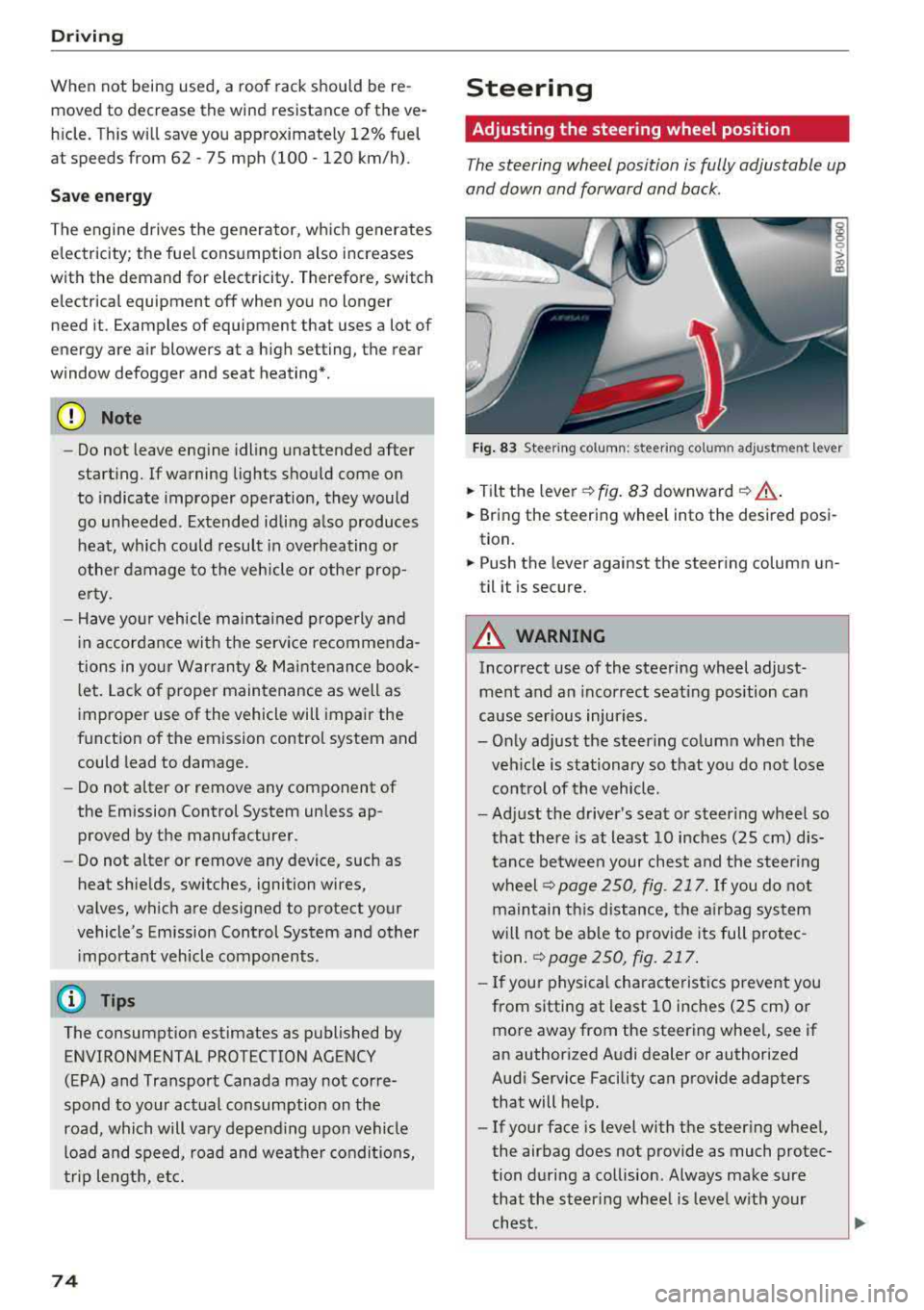
The steering wheel position is fully adjustable up
and down and forward and back.
Fig . 83 Steering column : steering column adjustment lever
.. Tilt the lever -c> fig. 83 downward¢ ,&..
.. Bring the steering wheel into the desired posi
tion.
.. Push the lever against the steering column un
til it is secure.
A WARNING
Incorrect use of the steering wheel adjust
ment and an incorrect seating position can
cause serious injuries.
- Only adjust the steering column when the veh icle is stationary so that you do not lose
control of the vehicle.
-
-Adjust the driver's seat or steer ing wheel so
that there is at least 10 inches
(25 cm) dis
tance between your chest and the steering
wheelr::!>page250, fig. 217. If you do not
maintain this distance, the airbag system
will not be able to provide its full protec tion.
c:> page 250, fig. 217.
- If your physical characteristics prevent you
from sitting at least 10 inches
(25 cm) or
more away from the steering wheel, see if
an authorized Audi dealer or authorized
Audi Service Facility can provide adapters that will help.
- If your face is level with the steering wheel,
the airbag does not provide as much protec
tion during a collision. Always make sure
that the steering wheel is level with your
chest.
Page 77 of 404
-Always hold the steering whee l with your
hands in the 9 o'clock and 3 o'clock posi
tions to reduce the risk of injury if the airbag
deploys.
- Never hold the steer ing wheel in the 12
o'clock position or with both hands on the
rim or the center of the steer ing wheel.
Holding the steering wheel incorrectly s ig
nificantly increases the risk of in jury to the
hands, arms and head if t he a irbag dep loys.
Starting and stopping
the engine (vehicles with an ignition lock)
Starting the engine
A pp lies to: ve hicles with ignitio n lock
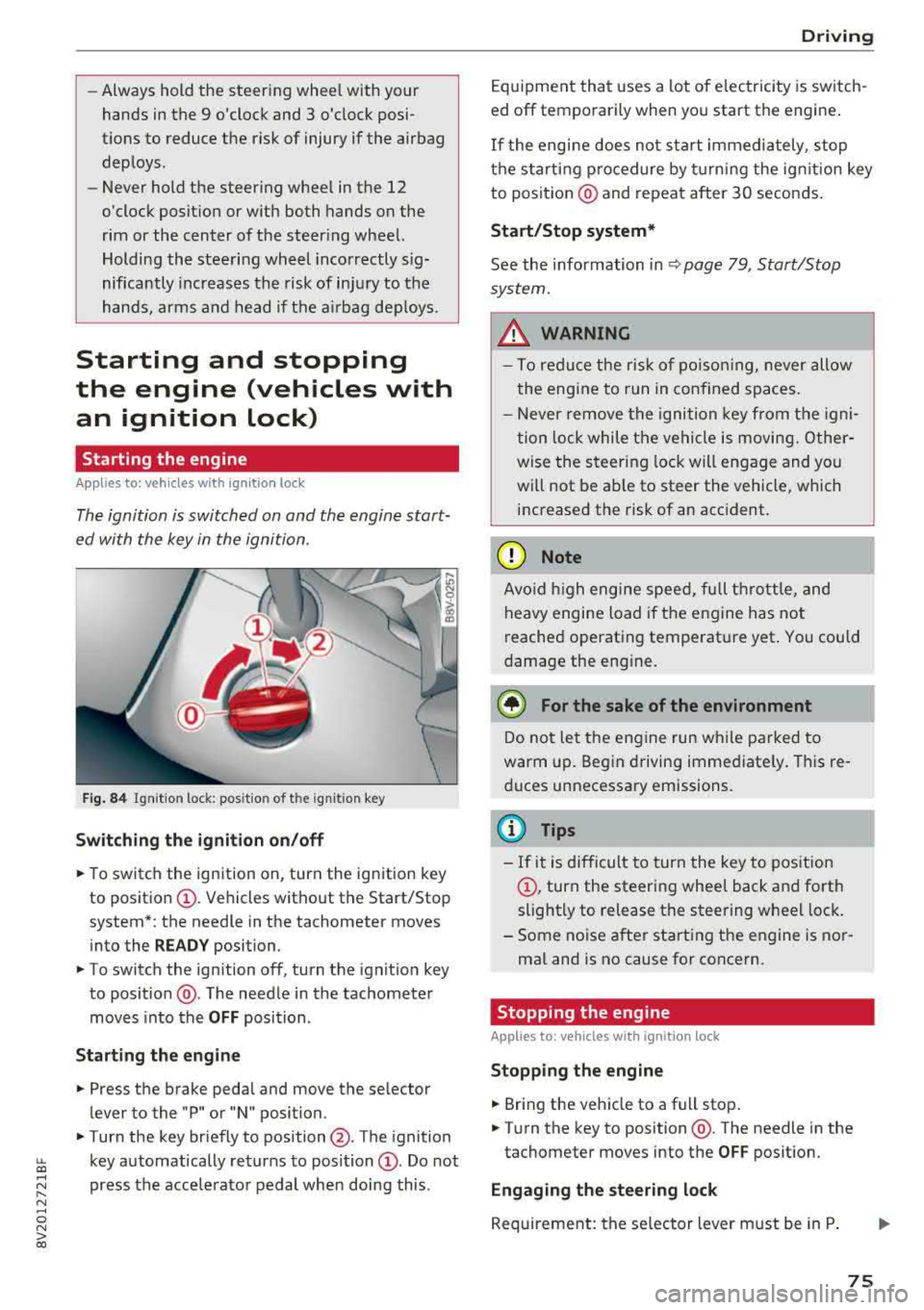
The ignition is switched on and the engine start
ed with the key in the ignition .
Fig. 84 Ignit io n lock: posit io n of the ignit io n key
Switching the ignition on /off
• To switch the ign ition on, turn the ign ition key
to posit io n
CI) . Vehicles without the Start/Stop
system*: the needle in the tachometer moves
into the
READY position.
• To switch the ign ition off, turn the ignit io n key
to posit ion @. The needle in the tachometer
moves into the
OFF position .
Starting the engine
• Press the brake pedal and move the se lector
lever to the "P" or "N" position.
• Turn the key briefly to position @. The ignition
~ key automatically returns to position CI) . Do not
~ press the acce lerato r pedal when doing this .
N ..... 0 N > co
Drivi ng
Equipment that uses a lot of e lectricity is switch
ed off temporarily when you start the engine .
If the engi ne does not start immediately , stop
the starting p rocedure by turning the ign it ion key
to posit ion @ and repeat after 30 seconds .
Start/Stop system*
See the information in Q page 79 , Start/Stop
system.
_&. WARNING
- T o redu ce the r is k of po iso ning, never allow
t he engi ne to run in confined sp aces.
- Never remove the ignition key from the ig ni
t ion lock while the vehicle is moving. Other
wise the steer ing lock will engage and yo u
will not be ab le to steer the vehicle, which
increased the risk of an acc ident.
(D Note
Avo id high engine s peed, fu ll th rottle, and
heavy engine load i f th e e ngine has not
reached operating temperat ure yet . You could
damage the eng ine .
@ For the sake of the environment
Do not let the engine run w hile parked to
warm up. Beg in driving immediate ly . Th is re
d uces unnecessary emissions.
@ Tips
- If it is d ifficult to turn the key to pos ition
CI) , turn the steering wheel back and forth
slightly to release t he steering whee l lock .
- S ome noise after start ing the e ngine is no r
ma l and is no cause for co ncern.
Stopping the engine
Applies to: vehicles wi th ignition lock
Stopping the engine
• Bring the vehicle to a full stop .
• Turn the key to position @. The needle in the
tachometer moves into the
OFF pos ition.
Engaging the steering lock
Requireme nt: the se lector lever must be in P .
75
Page 78 of 404
Driving
,.. Remove the ignition key in position @
9 page 76, fig. 85 9 ,&..
,.. Turn the steering wheel until you hear the
steering wheel lock.
The locked steering helps prevent vehicle theft.
A WARNING
- Never turn off the engine before the vehicle
has come to a complete stop. The full func
tion of the brake booster and the power
steering is not guaranteed. You must use more force to turn or brake . Because you
cannot steer and brake as you usually
would, this co uld lead to accidents and seri-
. . . ous mJunes .
-Never remove the ignit ion key from the ign i
t ion loc k while the vehicle is moving. Other
wise, the steering lock could suddenly en
gage and you would not be able to steer the
vehicle.
- If you leave the veh icle, switch the ignit ion
off and take the vehicle key with you. Other
wise, the engine could be started or electri
cal equipment such as the power windows
could be operated. This can lead to serious
injury.
- For safety reasons, always park the vehicle
with the selector lever in the P position.
Otherwise, there is the risk that the vehicle
could roll unintentionally .
(D Note
If the engine has been under heavy load for
an extended period of t ime, heat builds up in
the engine compartment after the engine is
switched off and there is a risk of damaging
the engine . For this reason, let the engine run
for at idle
for approximately two minutes be
fore shutting it
off.
@ Tips
For up to 10 minutes after stopping the en
gine, the radiator fan may turn on again auto
matically or it may continue to run (even if
the ignition is sw itched
off) for the following
reasons:
76
- The coolant temperature is increasing due
to trapped heat.
- If the engine is warm and the engine com
partment also heats up from strong sun
light.
Starting and stopping
the engine (vehicles with
convenience key)
Starting the engine
App lies to : vehicles wit h co nvenience key
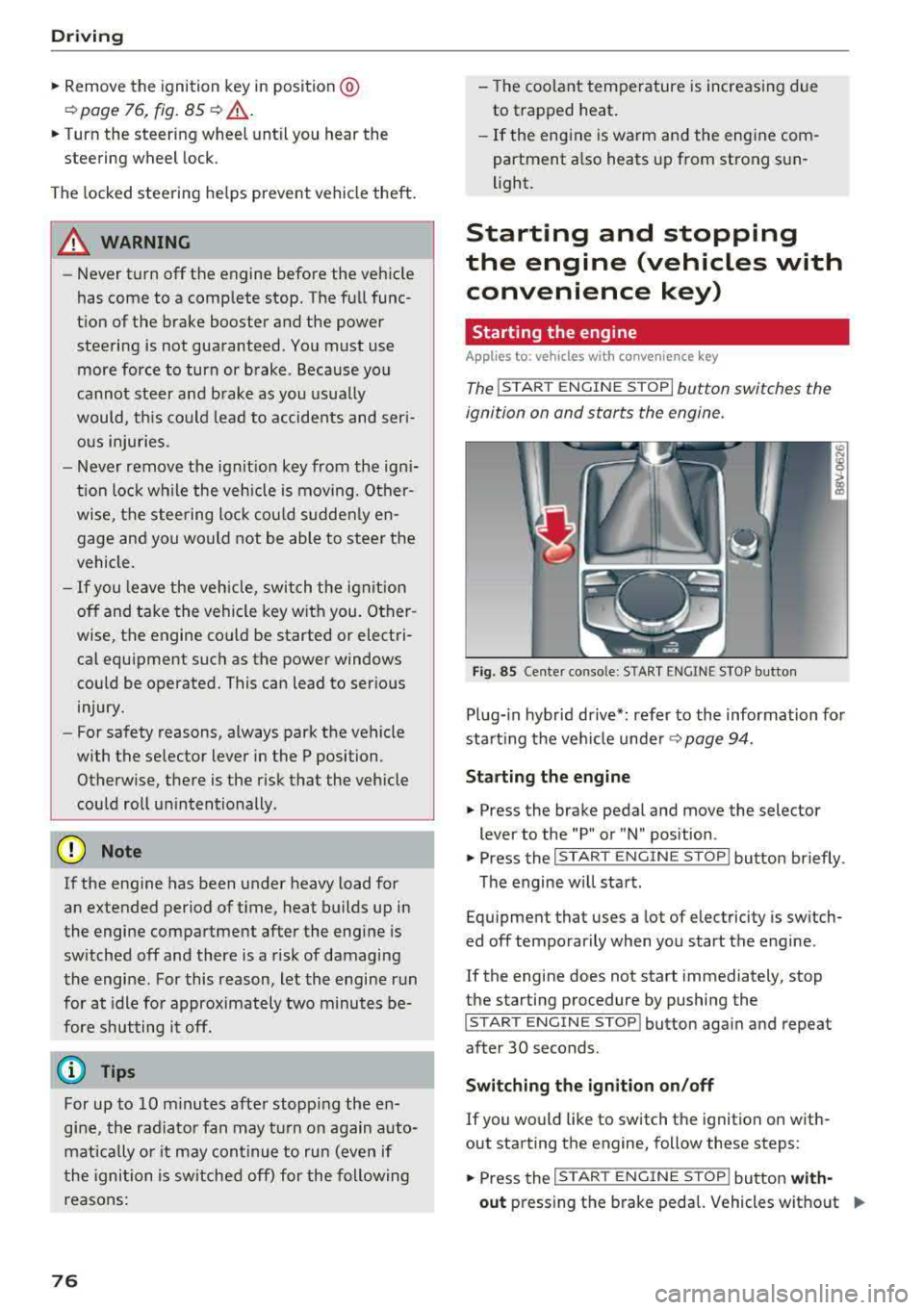
The I START ENGINE STOP I button switches the
ignition on and starts the engine.
Fig. 85 Center conso le: STAR T ENGINE ST OP button
Plug-in hybrid drive*: refer to the information for
start ing the veh icle under
9 page 94.
Starting the engine
.,. Press the brake pedal and move the selector
lever to the "P" or "N" position .
.,. Press the I START ENGIN E STOP I button briefly .
The engine will start.
Equipment that uses a lot of electricity is switch
ed
off temporarily when you start the engine .
If the engine does not start immediately, stop
the starting procedure by pushing the
I START ENGINE STOP! button again and repeat
after 30 seconds .
Switching the ignition on/off
If you would like to switch the ignition on with
out starting the engine, follow these steps:
.,. Press the I ST AR T ENGINE ST OP ! button with-
out
pressing the brake pedal. Vehicles without .,,.
Page 79 of 404
u. 00 .-< N l' N .-< 0 N > 00
the Start/Stop system*: the needle in the
tachometer moves into the
READY position .
~ To switch the ign ition off, press the button
again. The needle in the tachome ter moves into
the
OFF posit ion.
If the
,:rM i ndicator light b links and the message
Please turn steering wheel appears when switch
ing the ign ition on, the steer ing lock has been en
g aged . In this case, turn the steering wheel
slig htly to the left or right .
Start/St op sy stem*
See the information in <=!) page 79, Start/Stop
system.
A WARNING
To red uce the risk of poisoning, never allow
the engine to run in confined spaces.
@ Note
Avoid hig h engine speed, full throttle, and
heavy engine load if the engine has not reached operating temperature yet. You could
damage the engine.
@) For the sake of the environment
Do not let the engine run whi le parked to
warm up. Begin driving immediately . This re
duces unnecessary emissions.
(D Tips
- Some noise after starting the engine is nor
mal and is no cause for concern.
- If you leave your ve hicle with the ignition
switched on, the ignition will switch off af
ter a certa in amount of t ime. Make sure that
electr ical equ ipment s uch as the exter ior
li ghts are sw itched off.
Stopping the engine
Applies to: vehicles with convenience key
-
Plug-in hybrid dr ive*: refer to the informat ion un
de r
<=!) page 94.
~ Bring the vehicle to a ful l stop .
ll This fun ctio n is not a vail abl e in a ll co untries.
Driving
~ Move the selector lever into t he P posit ion .
~ Press the !S T AR T ENGINE ST OP ! button
<=!)page 76, fig . 85 .
Steering lock1>
The steer ing locks when yo u tur n the eng ine off
u sing the
!S TAR T ENG INE S TOPI* button, move
the se lector lever into the P position and open
the driver's door. The locked steering helps pre
vent vehicle theft .
Emergency off function
If it i s absolutely necessa ry , the eng ine c an also
be turned off wh ile d riving at speeds starting at
4 mph (7 km/h) . To switch the engine off, press
the
I S T AR T ENGINE STOPI button twice in a row
briefly or press and ho ld for longer than two sec
onds.
A WARNING
--
- Never turn off the eng ine before the vehicle
has come to a complete stop . The full func
tion of the brake booste r and the power
steer ing is not guaranteed. You must use
mo re fo rce to t urn o r bra ke. Be ca u se you
can not stee r and br ake as yo u usually
wo uld, this could lead to acc idents and seri
ous injuries .
- I f you leave the vehicle, sw itch the ignition
off and take the ve hicle key wi th yo u. Other
wise, the engine could be started or e lectri
cal equipment such as the power windows
could be operated . This can lead to serious
injury .
- For safety reasons, always park the vehicle wit h the selector lever in the P pos ition.
Otherw ise, there is the risk that the vehicle
could roll unintentiona lly .
@ Note
If the engine has been under heavy load for
an extended period of time, heat builds up in
the eng ine compartment after the engine is
switched off and there is a r isk of damag ing
the e ng ine . Fo r thi s reason, let the e ng ine run
.,.
77