window AUDI S3 SEDAN 2018 Owner's Manual
[x] Cancel search | Manufacturer: AUDI, Model Year: 2018, Model line: S3 SEDAN, Model: AUDI S3 SEDAN 2018Pages: 404, PDF Size: 62.3 MB
Page 102 of 404
e-tron
Driving situations Conditions Vehicle behavior
-Intentionally take your foot off of The gasoline engine turns off automati-
the gas pedal to allow for pro- cally and disengages when you release the longed coasting. accelerator pedal completely. The veh icle
Driving on highways glides without being propelled
.
- Reduce the vehicle speed by re-Fuel consumption can be reduced by
and expressways
leasing the accelerator pedal and coasting.
not by braking.
- Use the "S" selector lever position A sporty driving style increases fue l con-
and tiptron ic mode sparingly.
sumption.
- Do not run the gasoline engine to The temperature of the gasoline engine
warm the engine while the vehicle rises very s lowly and the fuel consump-
is parked tion increases considerably.
- Use the rear window/exterior This conserves the energy in the high-volt-
Driving in cold weath- mirror defogger and the seat heat-
age battery so that it is availab le to run
ing sparing ly. the vehicle in electric mode.
er
- Park the vehicle in a garage over-This reduces exposure of the high-voltage
n ight battery to cold temperatures. The re-
quired temperature range for the high-
voltage battery will then be reached more quickly after you start dr iving.
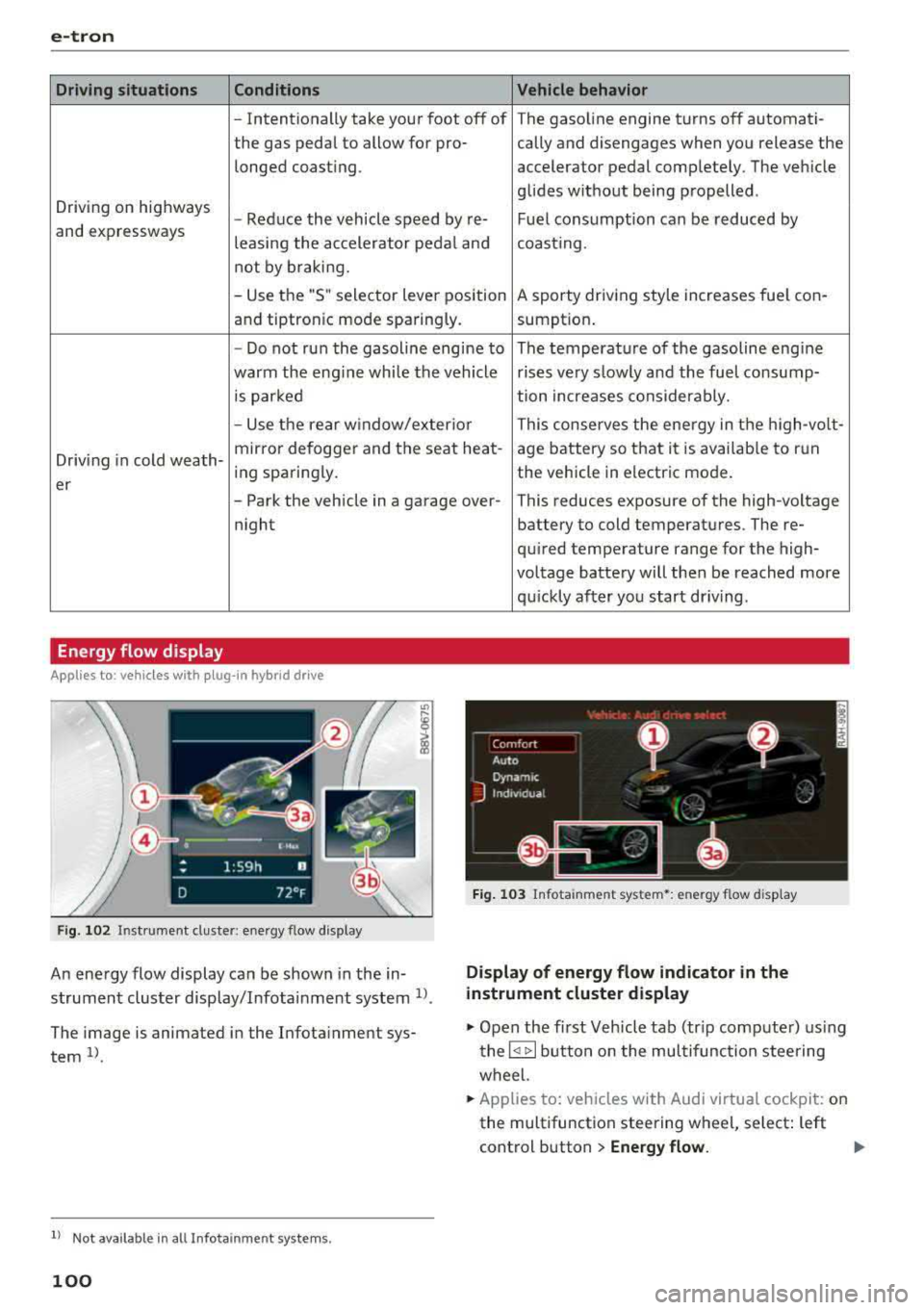
Energy flow display
Applies to : vehicles with plug-in hybrid drive
Fig. 102 Inst rument duster: energy flow display
An energy flow display can be shown in the in
strument cluster display/Infotainment system
1>.
The image is animated in the Infota inment sys
tem
1> .
l l Not available in all Infota inme nt syste ms.
100
Fig. 103 Infota inment system•: energy flow disp lay
Display of energy flow indicator in the
instrument cluster display
.,. Open the first Veh icle tab (tr ip compute r) using
the
l q 1> I button on the multifunction steering
wheel.
.,. Applies to: vehicles with Audi virtual cockpit: on
the multifunction steering wheel, select: left
control button
> Energy flow.
Page 133 of 404
u. 00 .-< N l' N .-< 0 N > 00
-Due to t he interlinking o f various vehicle sys
tems, critica l driving situations can be detected
by
pre sense ba sic and meas ures for preventa
t ive occ upant protection are can be initiated.
- The
pre sense front uses the data from the ra
dar sensors and calc ulates the probab ility of an
acc ident
c::> page 124. An impending collision
with vehicles ca n be detected within the limits
of the system . In this case, the system warns
the driver v isually, acoustically and with a je rk
on the brakes if necessary. If needed, it ca n ini
tiate a part ia l o r full dece le ra tion to reduce the
co llision speed o r to avo id t he coll is io n unde r
ce rtain c ircumstances. In conjunc tion wi th pre
sense basic, the front safety belts are a lso re
versib ly tensioned w hen needed . The pre sense
front is a lso active when adaptive cruise con
trol* is sw itched off.
A WARNING
Also follow the genera l instructions fo und in
c::> .&. in G eneral information on page 124.
(D Tips
- Certain pre sense f unctions switch off when
d riving in reverse.
- The pre sense functions may not be avai la
b le if there is a ma lfunction in the ESC sys
tem or the airbag contro l modu le.
- Note t hat the revers ible belt tensioner on
t h e front passe nger's side deactivates w hen
the front passe nger's a irbag is deact ivated .
- Switch the pre sense off when you are not
us ing public streets or whe n loadi ng the ve
h icle onto a veh icle carrier, train, ship or
othe r type of t ransportation . T his can pre
vent a n un des ired intervent ion from the pre
sense sys te m .
Audi pre sense basic
App lies to: ve hicles with Audi pre sense basic
The pre sense basic funct io ns are activ ated a t a
speed of approximate ly 20 mph (30 km/h) or
h igher .
The fo llow ing funct io ns can be t rigge red unde r
cert ain cond itions withi n the limi ts of the sys
tem :
Ass istance systems
- Tensioning o f the safety belts (for examp le,
during heavy braking) : the front safety belts
have revers ib le be lt tens ione rs . If a collision
does not occu r, the safety belts loosen slig htly
and are ready to tr igger aga in.
- Initiat ing the clos ing of the w indows and the
panorama g lass roof* (for examp le when un
der- or oversteering).
Audi drive select*: the trigger times are adjusted depending on the mode selected .
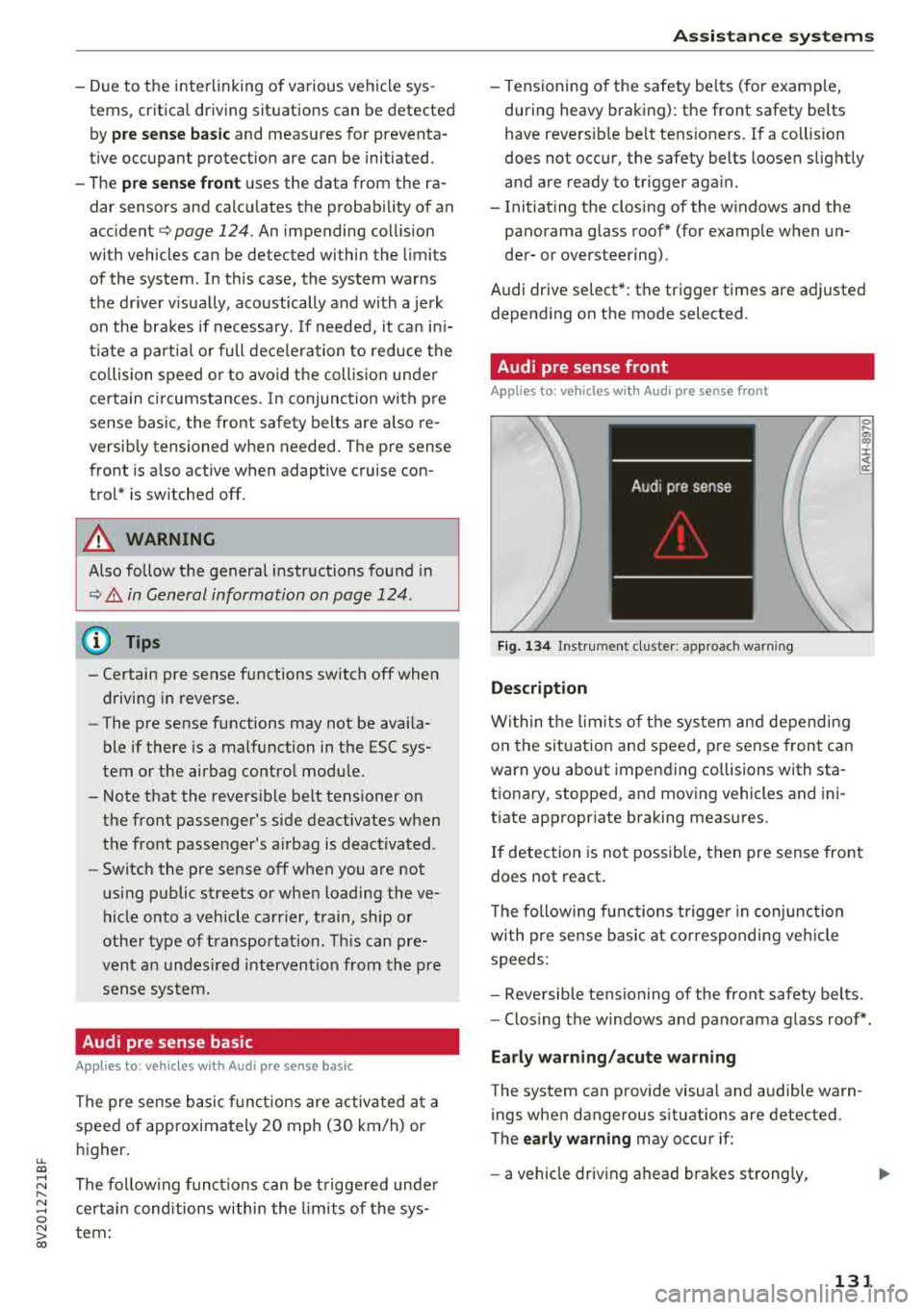
Audi pre sense front
Applies to : vehicles wi th Audi pre sense fro nt
Fig. 134 In str u men t cluster : approac h warni ng
Description
Wi thin the lim its of t he sys tem and depending
on the sit uat ion and spee d, p re sense front can
warn you about impending collisions with sta
t iona ry, stopped, and moving vehicles and ini
tiate app ropr iate braking measu res.
0 .... a, "? :i:: ~ a:
If detection is not possib le, then pre sense front
does not react.
T he following fu nctions t rigge r in conjunction
wi th pre sense basic at co rresponding ve hicle
speeds :
- Reve rsible tens ion ing of the front safety belts.
- Clos ing the windows and pano rama g lass roof* .
Early warning /acute warning
The system can provide visual and audible warn
ings when dangerous situations are detected.
The
early warning may occur if:
- a vehicle driving ahead brakes st rong ly,
131
Page 136 of 404
Assistance systems
Appl ies to: vehicles w ith Audi side assist
If you activate a turn signal when active lane as
sist is ready and it classifies a lane change as crit
ical because of vehicles traveling alongside you or
approaching you, there will be noticeable correc
tive steering shortly before you leave the lane.
This will attempt to keep your vehicle in the lane .
Applies to: veh icles without Audi s ide ass ist
The system will not warn you before crossing a
lane marker line if you have activated the turn
signal. In this case, it assumes that you are
changing lanes intentionally.
A WARNING
-The system warns the driver that the vehicle
is leaving the lane using corrective steering.
The driver is always responsible for keeping
the vehicle within the lane.
- The system can help you keep the vehicle in
the lane, but it does not drive by itself. Al
ways keep your hands on the steering
wheel.
- Corrective steering may not occur in certain
situations, such as during heavy braking.
- There may be cases where the camera does not recognize all lane marker lines . Correc
tive steering can only take place on the side of the vehicle where lane marker lines are
detected.
- Other road structures or objects could possi
bly be identified unintentionally as lane
marker lines. As a result, corrective steering
may be unexpected or may not occur.
- The camera view can be restricted, for ex
ample by vehicles driving ahead or by rain,
snow, heavy spray light shining into the
camera or by dirt on the window. This can
result in active lane assist not detecting the
lane marker lines or detecting them incor
rectly.
- Under certain conditions such as ruts in the
road, an inclined roadway or crosswinds, the
corrective steering alone may not be enough
to keep the vehicle in the middle of the lane.
- For safety reasons, active lane assist must
not be used when there are poor road and/
or weather conditions such as slippery
134
roads, fog, gravel, heavy rain, snow and the
potential for hydroplaning . Using active lane
assist under these conditions may increase
the risk of a crash .
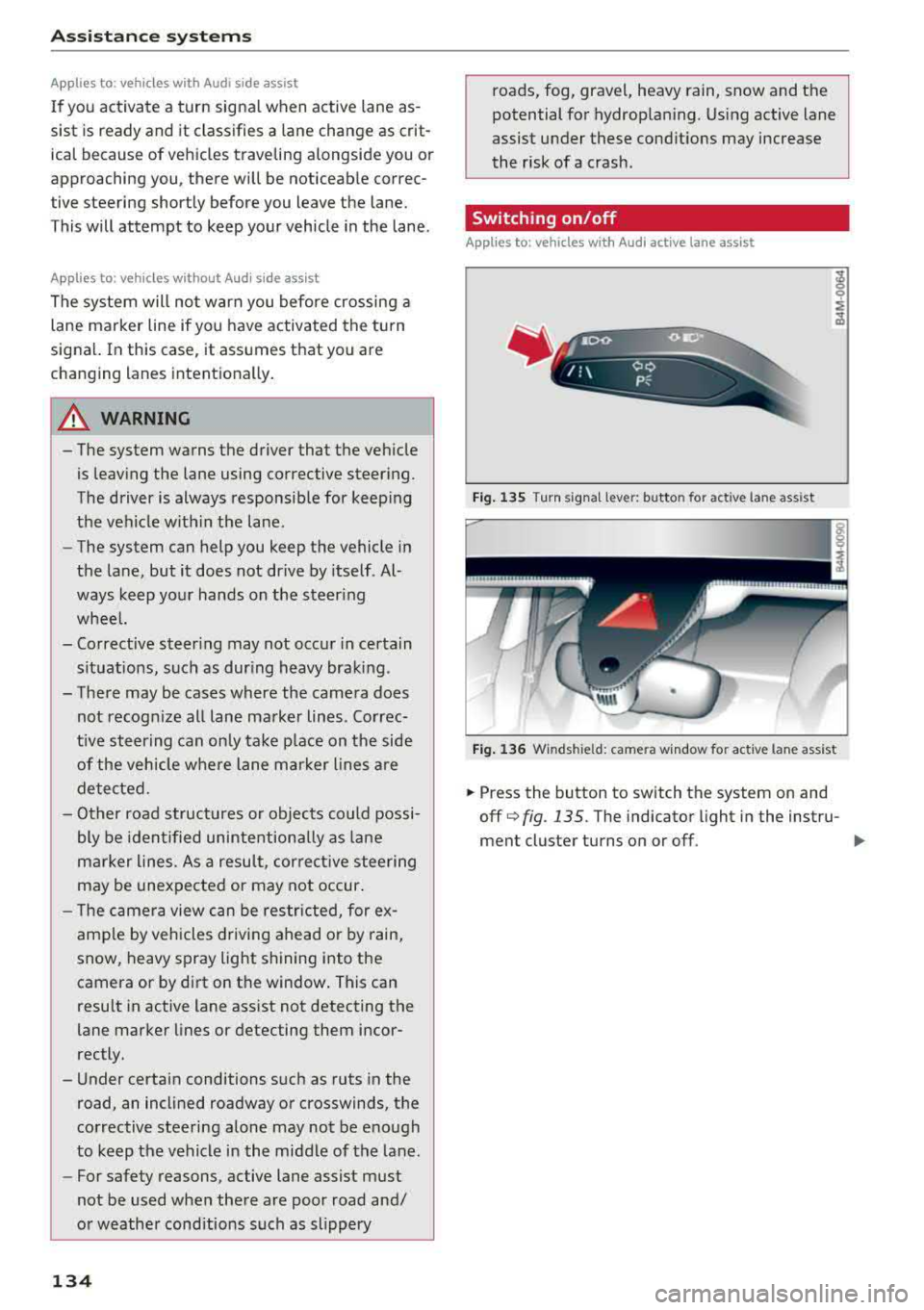
Switching on/off
Applies to: vehicles with Aud i act ive lane ass ist
Fig. 135 Turn signa l lev er: butto n for active lane assist
Fig. 136 Winds hield: ca mera w indo w for active lane assist
.,. Press the button to switch the system on and
off
q fig . 135. The indicator light in the instru-
ment cluster turns on or off .
IJI,
Page 140 of 404
Ass is tanc e system s
-If the lanes are narrow or i f you are driving on
the edge of your lane. If this is the case, the
system may have detected a vehicle in another
lane that is
not adjacent to your current lane.
- If you are driving t hrough a curve. Side assist
may react to a vehicle that is one lane over
from the adjacent lane .
- If side assist reacts to other objects (such as
high or displaced guard rails).
- In poor weather conditions . The side assist
functions are limited.
Do not cove r the radar
sensors¢ fig . 141 with
stickers, deposits, bicycle whee ls or other ob
jects, beca use they wi ll impair the f unction . Do
not use side assist when towing a trailer. For in
formation on cleaning,
see¢ page 354 .
A WARNING
-Always pay atte ntion to traffic and to the
area aro und your vehicle. Side assist cannot
r ep lace a dr ive r's attent ion. The dr ive r alone
is a lways responsible for lane c hanges and
s imi lar d riving maneuvers.
- In some situat ions, the system may not
func tion or its f un ct io n may be lim ited. Fo r
exa mple:
- If vehicles are approach ing or being le ft
beh ind very quickly. The display may not
tur n on in t ime.
- In poor weather conditions s uch as heavy
rain, snow or heavy mist.
- On very wide lanes, in tight curves, or i f
there is a rise in the road su rface. Vehicles
in the adjacent lane may not be detected
because they are outs ide of the sensor
range.
@ Note
The sensors can be displaced by impacts or
damage to the bumpe r, whee l housing and
underbody. Th is can impa ir the system. Have
an au thor ized A udi dealer or au tho rized Aud i
Serv ice Facility c heck their fu nction .
(D Tips
- If the window g lass in the driver 's door o r
front passenger's doo r has been t inted, the
138 -
display in the exterior mirro
r may be incor
rect.
- For an exp lanat io n on co nform ity w it h t he
FCC reg ulations in the United States and the
Industry Canada regulations, see
¢page 386.
Switching on/off
App lies to : vehicles wit h Audi side ass ist
The system can be switched on/off in the Info
tainment system .
If the system is act ivated, the disp lays in the ex
terior mirrors wi ll turn on brief ly when the igni
tion is switched on .
.,. Select in the Infotainment system: IMENU! but
ton
> Vehicle > l eft control button > Driver as
sistance
> Audi side a ssist. Off switc hes the
system off.
Setting the display brightness
App lies to: vehicles wit h Aud i side ass ist
The display brightness can be adjusted in the In
fotainment system.
.,. Select in the Infotainment system: IMENU ! but
ton
> Vehicle > l e ft control button > Driver as
sistance
> Audi side assist.
The disp lay br igh tness adjusts au toma tically to
t h e b righ tness o f the sur ro undings, bo th in the
i nforma tion and in the warning stage. In very
dar k or very bright surroundings, the automatic
adjustment will set the display to the minim um
or max imum level. In such cases, yo u may notice
no change when adjusting the br ightness, or the
change may only be noticeab le once the sur
r ound ings change .
Adjust the br ightness to a leve l whe re the display
i n the information stage will not disrupt your
v iew ahead. If you change the br ightness, the dis
play in the exterior mirror w ill br iefly show the
brightness leve l in the i nfo rmation stage . The
br ightness of the warn ing stage is linked to the
br ightness in the infor mation stage an d is adjus t-
ed a long w ith the info rm ation st age .
..,.
Page 172 of 404
Voice recognition s ystem
Voice recognition system
Operating
A pplies to: ve hicles w ith vo ice recognition system
You con operate many Infotainment functions
conveniently by speaking.
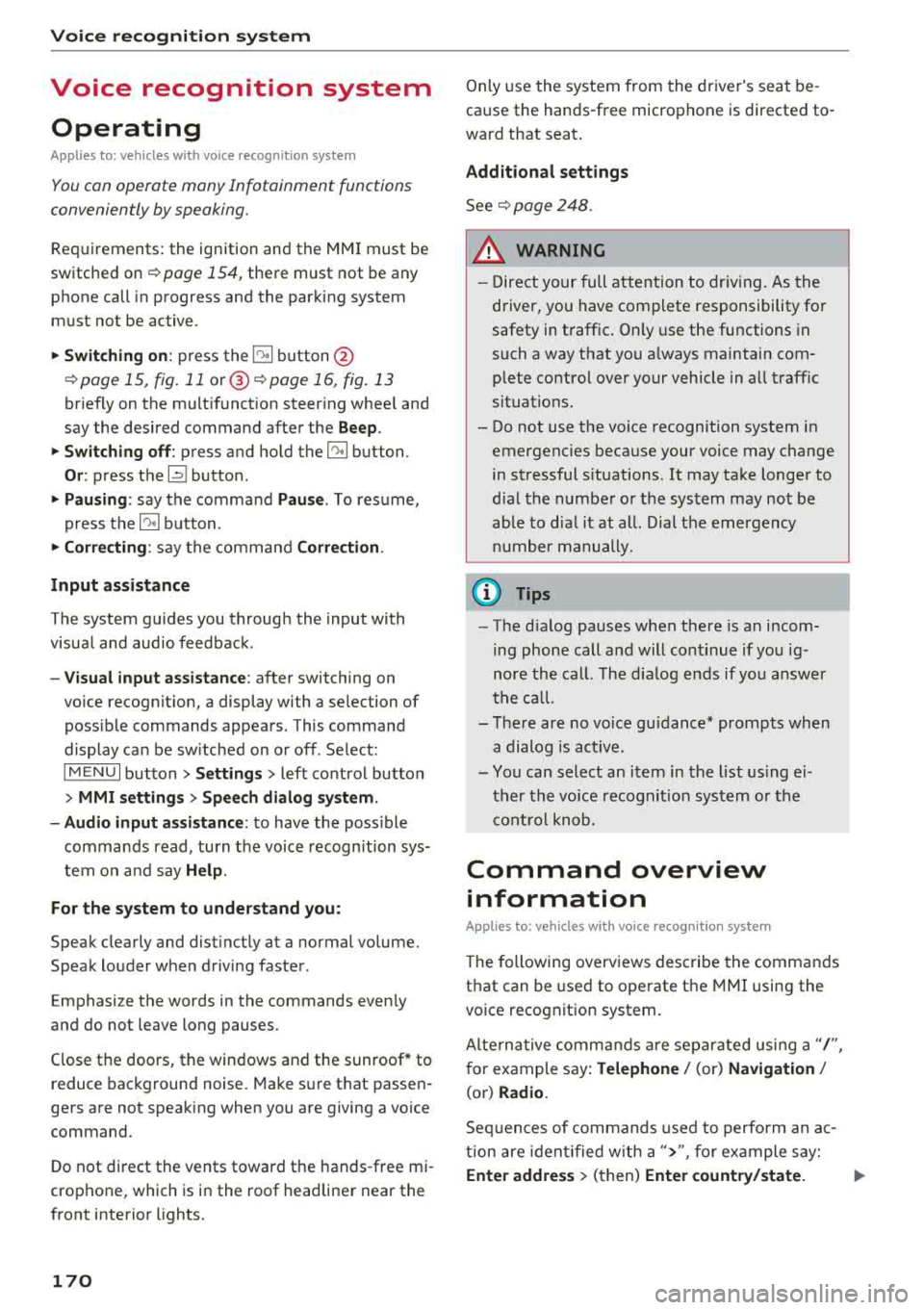
R equirements: the ignition and the MMI must be
switched
on <=> page 154, there must not be any
phone call in progress and the parking system
must not be active .
~ Switching on: press the~ button @
<=> page 15, fig. 11 or@ <=> page 16, fig . 13
briefly on the mult ifunct ion steer ing whee l and
say the desired command after the
Beep .
~ Sw itching off : press and hold the~ button.
Or: press the [21 butto n.
~ Pausing : say the command Pau se . To res ume,
press
the~ button .
~ Correcting : say the command Corre ction .
Input assis tance
The system gu ides you through the input with
visual and audio feedback .
-Visual input a ssistance : after switching on
vo ice recognit ion, a display with a se lection of
poss ible commands appears . This command
display can be sw itched on or off . Select:
IMENU I button> Settings> left control button
> MMI settings > Sp eech dialog system .
- Audio input a ssis tance :
to have the poss ible
commands read, turn the voice recogn ition sys
tem o n and say
Help .
For the s ystem to under stand you:
Speak clearly and dist inct ly at a normal volume.
Speak louder when driving faster .
E mphasi ze the words in the commands even ly
and do not leave long pauses.
Close the doors, the windows and the sunroof* to reduce background noise . Make sure t hat passen
gers are not speaking when you are giving a voice
command.
Do not direct the vents toward the hands -free mi
crophone, which is in the roof headliner near the
front interior lights.
170
Only use the system from the dr iver's seat be
ca use the hands -free microphone is directed to
ward that seat .
Additional settings
See<=> page 248.
_8. WARNING
- Direct yo ur full attention to dr iv ing. As the
d river, you have complete responsibility fo r
safety in t raffic. On ly use the functions in
such a way that you a lways maintain com
plete contro l over your vehicle in a ll traffic
situations.
- Do not use the voice recognition system in
emergencies because your voice may change
in s tressful s ituations .
It may take longer to
d ia l the numbe r or th e system may not be
ab le to d ia l it at all. Dial the emergency
number manually.
(D Tips
- The d ia log pauses when there is a n incom
ing phone call a nd will cont inue if you ig
nore the ca ll. The d ia log ends if yo u answer
t h e ca ll.
- Th ere are no vo ice gu idance* prompts when
a dialog is act ive.
- You can select an i tem in the list using ei
ther the vo ice recognit ion system o r the
cont ro l knob .
Command overview
information
App lies to : vehicles wi th voice recog nitio n system
The following overv iews describe the commands
that can be used to operate the MMI using the
voice recog nition system.
Alte rnative commands a re separ ated using a"/ ",
for example say:
Telephone / (or) Navigati on /
(or) Radio .
Sequences of commands used to perform an ac
t ion are iden tified w ith a
"> ", fo r example say:
Enter addre ss > (t hen) Enter country /state. .,..
Page 239 of 404
u. 00 ... N l' N ... 0 N > 00
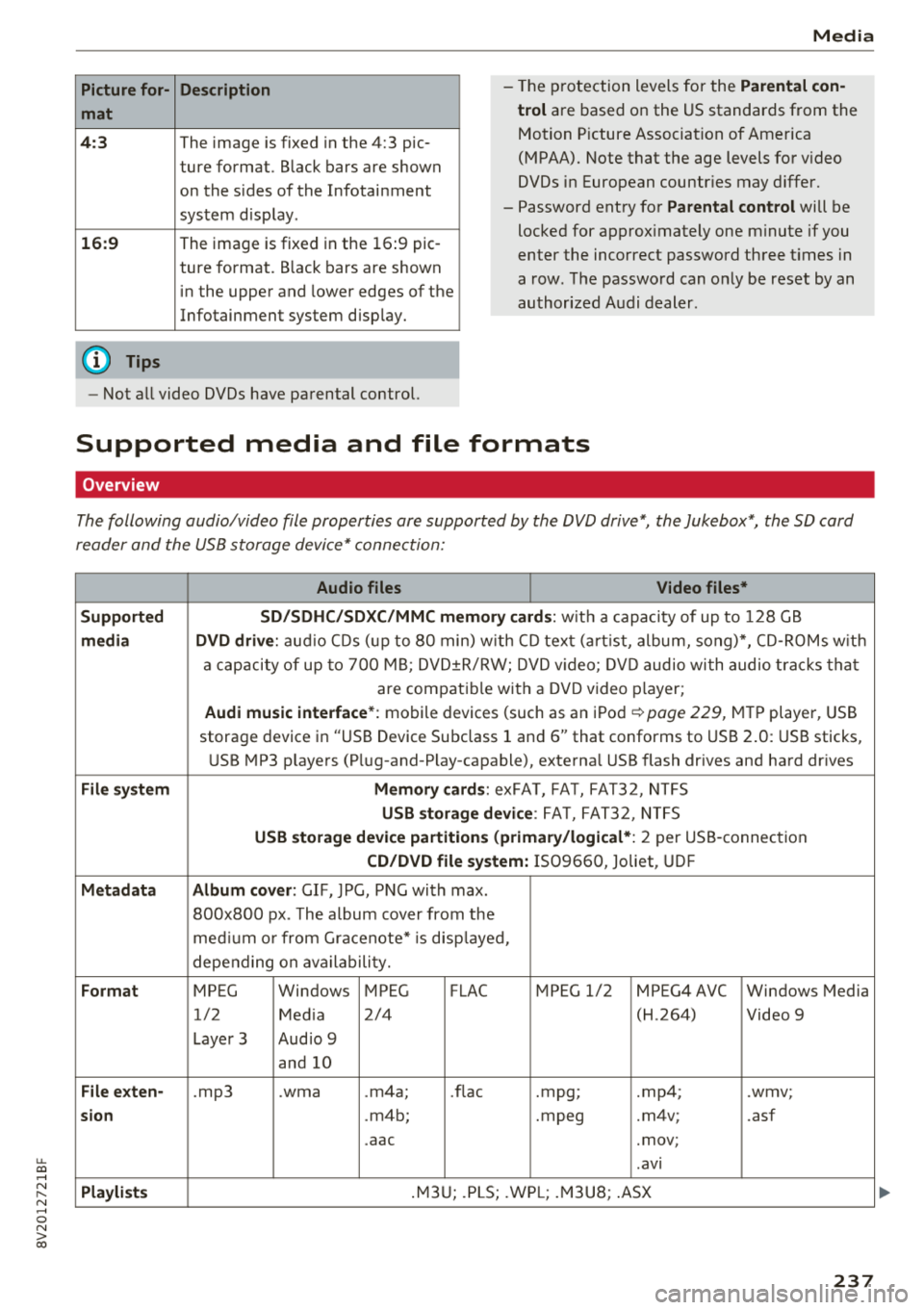
Picture for-
mat
4: 3
16 :9
(D Tips Description
The image is fixed
in the 4:3 pie-
ture format. Black bars are shown
on the sides of the Infotainment
system d isplay.
The image is fixed in the 16 :9 pie -
ture format . B lack bars are shown
in the upper and lower edges of the
Infotainment system disp lay.
Media
-T he p rotection levels for the Parental con
t rol
are based on the US standards from the
Motion P icture Associat ion of America
(MPAA). Note that the age levels fo r video
DVDs in European countr ies may differ.
-Password ent ry fo r Parental control will be
locked for approx imately one m inute if you
enter the incorrect password three t imes in
a row. The password can o nly be reset by an
au thori zed A udi dealer.
-Not a ll video DVDs have parental control.
Supported media and file formats
Overview
The following audio/video file properties are supported by the DVD drive*, the Jukebox*, the SD card
reader and the USB storage device* connection:
Audio files Video files*
Supported SD/SDHC /SDXC /MMC m emory cards :
with a capacity of up to 128 GB
media DVD drive : audi o CDs ( up to 80 min) w ith CD tex t (a rt ist, album, so ng)*, CD -R O Ms w ith
a ca pacity of up to 70 0 M B; D V D± R/RW; DVD video; DV D audio wi th audio t ra ck s tha t
are compatible with a DVD video p layer;
Audi music interface *: mobile devices (such as an i Pod i::> page 229, M TP playe r, USB
storage device in "USB Device Subclass 1 and
6" that conforms to USB 2 .0: USB sticks,
U SB MP3 p laye rs (P lug-and-P lay-capable), external USB flash drives and ha rd dr ives
File system Memory cards : exFA T, FA T, FAT32, NTFS
USB storage device : FA T, FA T32 , NTFS
USB storage device partition s (primary/logical* : 2 per USS-connec tion
CD/DVD file sy stem: IS09660, Joliet, UDF
Metadata Album cover : GIF, )PG, P NG with max.
800x800 px . The album cover from the
me diu m o r from Gracenote* is disp layed,
depe nding on ava ilabili ty.
Format MPEG Windows MPEG FLAC MPEG 1/2 MPEG4 AVC Windows Media
1/2 Med ia 2/4 (H
.264)
Video 9
Laye r 3 Aud io 9
and 10
File e xten-.mp3 .wma .m4a; .nae .mpg; .mp4; .wmv;
sion .m4b; .mpeg .m4v; .asf
.aac .mov;
.avi
Pla ylists .M3 U; .PLS; .WP L; .M3 U8; .ASX
237
Page 240 of 404
Media
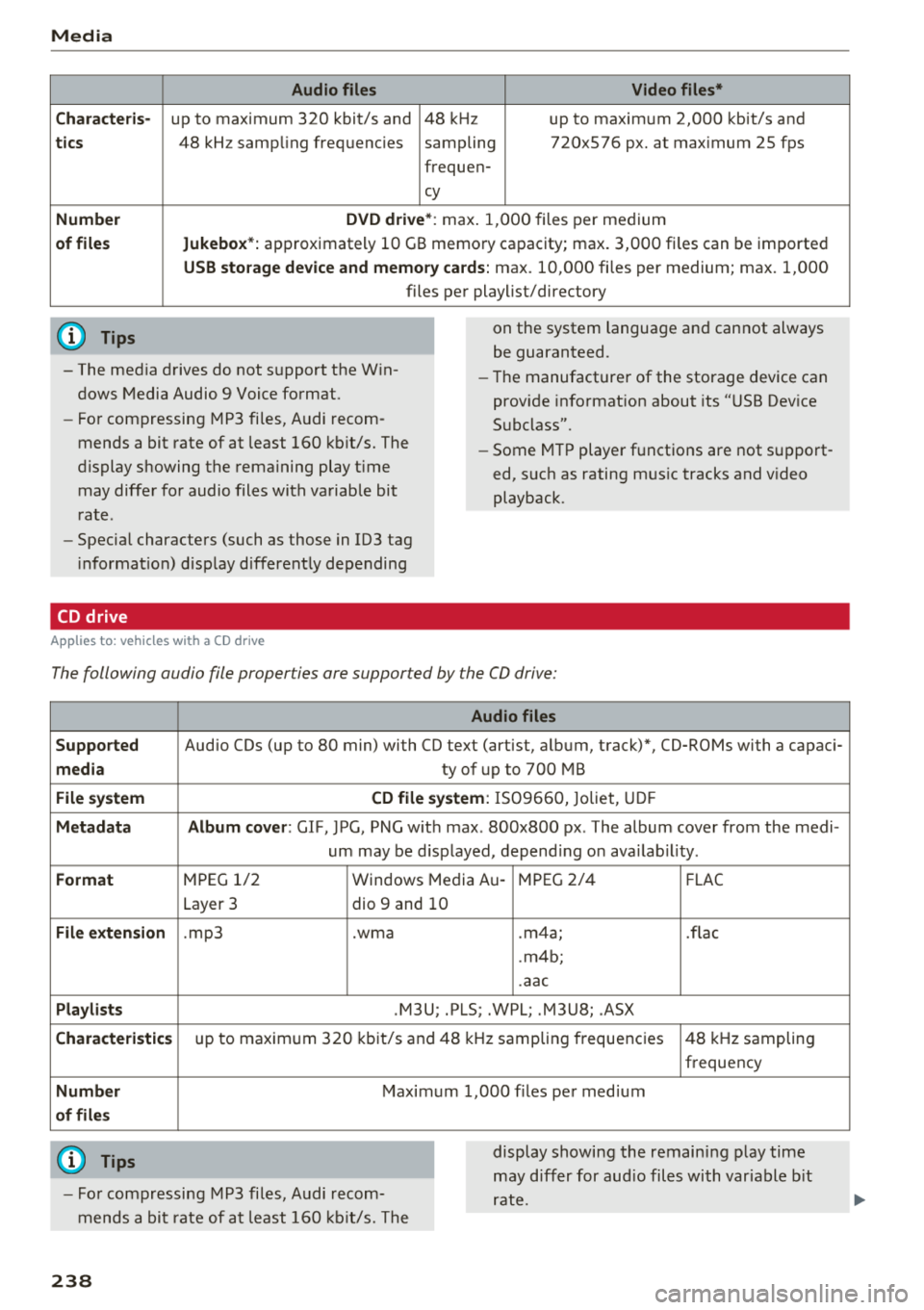
Audio files Video files*
C ha rac te ris-
up to maximum 320 kbit/s and 48 kHz up to maximum 2,000 kbit/s and
tic s 48 kHz samp ling frequencies sampling 720x576 px. at max imum 25 fps
frequen-
cy
Numbe r DVD driv e *: m ax. 1,000 files per medium
of fil es Jukebox*: approximately 10 GB memory capacity; max. 3,000 fi les can be imported
USB stor age de vice and memor y cards: max . 10,000 fi les per medium; max. 1,000
files pe r playlist/directory
(D Tips
- The med ia drives do not support the W in
dows Media Audio 9 Voice format.
- Fo r compressing MP3 fi les, Audi recom
mends a bit rate of at least 160 kb it/s. The
display showing the remaining play t ime
may differ for audio files with variable bit
rate.
- Specia l characters (such as those in 103 tag
i nformat ion) d isplay d ifferent ly depending
CD drive
A pp lies to: ve hicles w it h a CD drive
on the system language and cannot always
be guaranteed.
- The manufacturer of the storage device can
prov ide informat ion about its "USB Dev ice
Subclass".
- Some M TP player functions are not s upport
ed, such as rating mus ic tracks and v ideo
playback.
The following audio file properties are supported by the CO drive:
Audio files
Supp orted
Audio CDs (up to 80 min) with CO text (artist, album, track)*, CO-ROMs with a capaci-
m edia ty of up to 700 MB
File system CD file sy ste m : IS09660, Joliet, UD F
M eta d ata Album co ver : GIF, )PG, PNG w it h max . 800x800 px . The album cover from the medi-
um may be d isplayed, depend ing on ava ilab il ity.
Format M PEG 1/2 Windows Media Au -MPEG 2/4
FLAC
Layer 3 dio 9 and 10
File exte nsion .mp3 .wma .m4a; .flac
. m4b;
.aac
Pla ylis ts .M3U; .PLS; .WPL; .M3U8; .ASX
Chara cte ris tic s up to maxim um 320 kbit/s and 48 k Hz sampling frequencies 48 k Hz sampling
frequency
Numb er Maximum 1,000 f iles per med ium
o f fil es
(D Tips
- Fo r compressing MP3 files, Audi recom
mends a bit rate of at least 160 kb it/s. The display showing the remain
ing play time
may differ for aud io files with var iable b it
rate.
23 8
Page 253 of 404
u. 00 .-< N l' N .-< 0 N > 00
-Pointing the steering wheel toward your
face decreases the ability of the supplemen
tal driver's airbag to protect you in a colli sion.
- Always sit in an upright position and never
lean against or place any part of your body
too close to the area where the airbags are
located.
- Before driving, always adjust the front seats
properly and make sure that all passengers
are properly restrained.
- For adjustable head restraints : before driv
ing, always also adjust the head restraints
properly.
- Never adjust the seats while the vehicle is moving . Your seat may move unexpectedly
and you could lose control of the vehicle.
- Never drive with the backrest reclined or
tilted far back! The farther the backrests are
tilted back, the greater the risk of injury due
to incorrect positioning of the safety belt
and improper seating position.
- Children must always ride in child seats
~ page 294. Special precautions apply
when installing a child seat on the front
passenger seat
i::> page 269 .
Proper seating position for the front
passenger
The proper front passenger seating position is
important for safe, relaxed driving.
For your own safety and to reduce the risk of in
jury in the event of an accident, we recommend that you adjust the seat for the front passenger
to the following position:
.. Adjust the angle of the seatback so that it is in
an upright position and your back comes in full
contact with it whenever the vehicle is moving.
.. For adjustable head restraints: adjust the head
restraint so the upper edge is as even as possi
ble with the top of your head. If that is not pos
sible, try to adjust the head restraint so that it
is as close to this position as possible
~ page 61. Move the head restraint so that it is
as close to the back of the head as possible.
Driving safety
.. Keep both feet flat on the floor in front of the
front passenger seat.
.. Fasten and wear safety belts correctly
<=:>page 264.
For detailed information on how to adjust the
front passenger's seat, see
<=:>page 59.
A WARNING
= -
Front seat passengers who are unbelted, out
of position or too close to the airbag can be
seriously injured or killed by the airbag as it
unfolds . To help reduce the risk of serious
personal injury:
- Passengers must always sit in an upright po
sition and never lean against or place any part of their body too close to the area
where the airbags are located.
- Passengers who are unbelted, out of posi
tion or too close to the airbag can be seri
ously injured by an airbag as it unfolds with
g reat force in the blink of an eye.
- Always make sure that there are at least
10 inches (25 cm) between the front pas
senger's breastbone and the instrument panel.
- Always make sure that there are at least
4 inches (10 cm) between the front passen
ger's knees and the lower part of the instru
ment panel.
- Each passenger must always sit on a seat of
their own and properly fasten and wear the
safety belt belonging to that seat.
- Before driving, always adjust the front pas
senger seat properly.
- For adjustable head restraints: before driv
ing, always also adjust the head restraints
properly .
- Always keep your feet on the floor in front
of the seat. Never rest them on the seat, in
strument panel, out of the window, etc. The
airbag system and safety belt will not be
able to protect you properly and can even in
crease the risk of injury in a crash .
- Never drive with the backrest reclined or
tilted far back! The farther the backrests are
tilted back, the greater the risk of injury due
~
251
Page 255 of 404
u. 00 .-< N l' N .-< 0 N > 00
-Every person in the vehicle must have a
properly adjusted hea d restra int.
- Always make sure each person in the vehicle
properly adjusts their head res traint. Adjus t
t h e head restra int so the upper edge is as
even as possib le with the top of your head.
If that is not possib le, try to adjust the h ead
restra int so that it is as close to th is position
as possib le.
- Applies to: forward/back adjustable head
restra ints: Move the head restra int so that it
is as close to the back of the head as possi
ble.
- Never attempt to adjust head restra int
wh ile driving. If you have dr iven off and
must adjust the dr iver head rest for any rea
son, first s top the veh icle sa fely before at
tempting to ad just the head restraint .
- C hildren mus t always be p roperly res trained
in a ch ild restraint that is appropriate for
their age and size
i::> page 294.
Examples of improper seating positions
The occupant restraint system con only reduce
the risk of injury if vehicle occupants ore properly
seated.
I mp roper seating posi tions can cause se rious in
ju ry o r death. Safety bel ts can only work when
they are p roperly positioned on the body. Im
proper seating positions reduce the effectiveness
of safety belts and w ill even increase the r is k of
in ju ry and death by moving the safety belt to crit
ical areas of t he body. Improper seating posit ions
also increase the risk of ser ious injury and death
when an airbag deploys a nd strikes an occupant
who is not i n the prope r seat ing pos ition . A d rive r
i s respons ib le for the safety of all vehicle occu
pants and especia lly fo r children. Therefo re:
"" Never allow anyone to assume an incorrect
seat ing pos it ion when t he ve hicle is being used
i::, & -
The follow ing bulletins list only some sample po
sitions that will increase the risk of serious in jury
a nd death. O ur hope is that these examp les w ill
make you more aw are of sea ting pos it io ns tha t
ar e dange ro us.
Dri ving saf ety
Th erefore , whenever the vehicle is moving :
-neve r st an d up i n the vehicle
- neve r stand on the seats
- neve r kneel on the seats
- never ride wit h the seatback recl ined
- neve r lie down on the seats
- never lean up against the instrument panel
- never sit on t he edge of the seat
- neve r sit sideways
- neve r lean out t he window
- neve r put your feet out the wi ndow
- never put your feet on the instrument panel
- neve r rest your feet on the seat cushion or back
of the seat
- never ride in the footwell
- never ride in the cargo area
A WARNING
--
Improper seating positions inc rease the risk
of ser ious personal in ju ry and death whenever
a veh icle is being used.
- Always make sure that all veh icle occupants
stay in a proper seating posit ion and are
proper ly restrained whenever the vehicle is
be ing used.
Driver's and front
passenger's footwell
Important safety instructions
Applies to : vehicles wit h knee airbags
A WARNING
Always ma ke su re t hat the knee airbag can i n
fl ate w ithout interfe rence. Objects between
yourself and the airbag can in cre ase the risk
of inju ry in an accident by interfering with the
way the ai rbag dep loys o r by being pushed in
to you as the ai rbag dep loys.
- No persons (ch ildren) or animals should ride
in the footwell in front of the passenger
seat . If the airbag deploys, this can res ult in
serio us or fatal injur ies.
- No objects of any kind should be carried in
the footwell area in front of the dr iver's or
passenger's seat. Bu lky objects (shopping
bags, for examp le) can hamper or prevent
~
253
Page 257 of 404
LL co .... N
" N .... 0 N > co
Storing cargo correctly
Loading the luggage compartment
All luggage and other objects must be properly
stowed and secured in the luggage compart
ment.
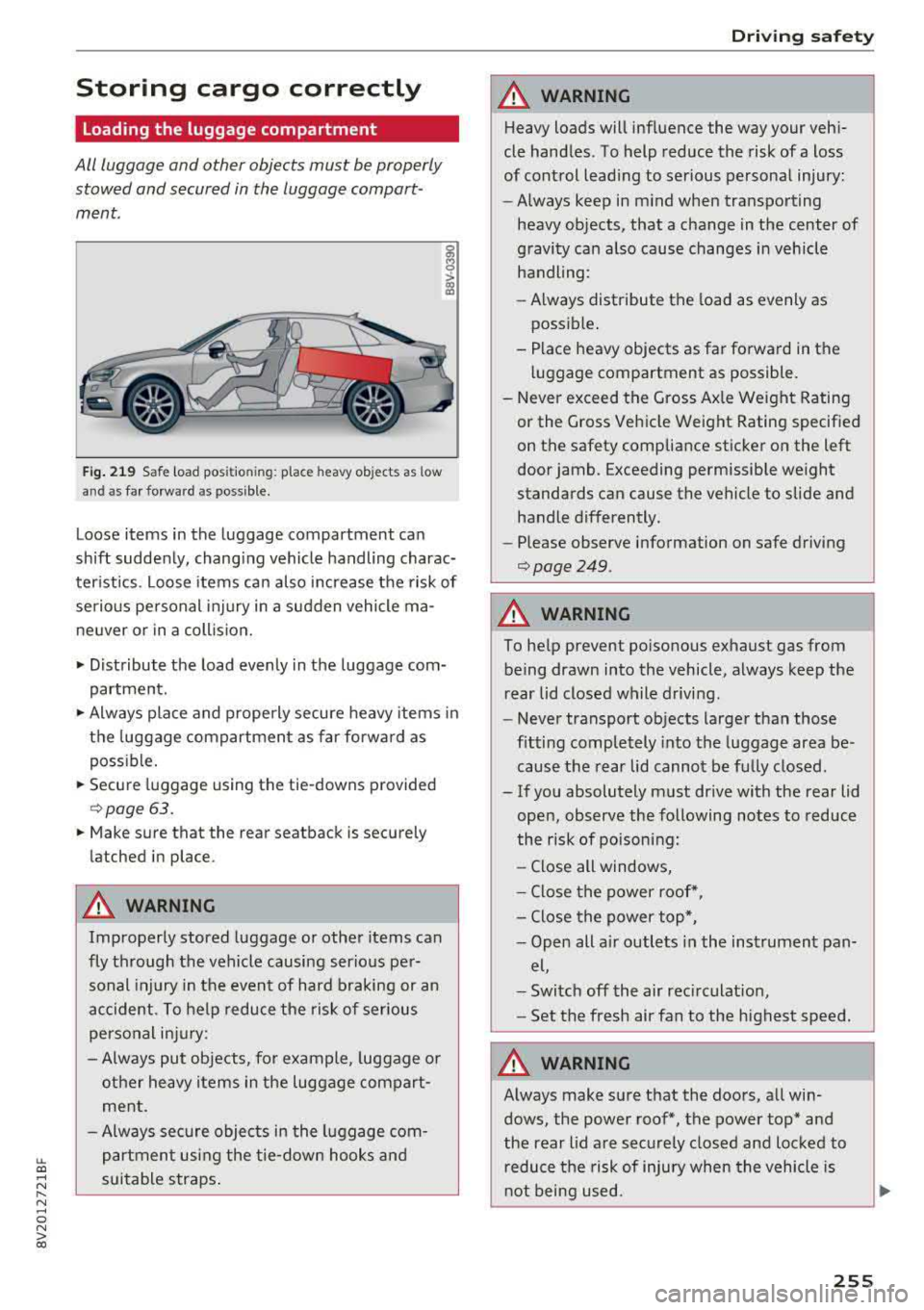
Fig . 219 Safe load pos itio ning : place heavy objects as low
an d as far forward as poss ible.
g M 0
> a, a,
Loose items in the luggage compartment can
shift suddenly, chang ing vehicle handling charac
ter istics . Loose items can also increase the risk of
serio us personal inj ury in a sudden vehicle ma
ne uver or in a coll ision.
• Distribute the load evenly in the luggage com
partment.
• Always place and properly secure heavy items in
the luggage compartment as far forward as
poss ible.
• Secure luggage using the tie-downs provided
¢ page 63.
• Make sure that the rear seatback is securely
latched in place .
A WARNING
Improperly stored luggage or other items can
fly through the vehicle causing serio us per
sonal injury in the event of hard braking or an
accident . To help reduce the risk of serious
personal injury:
- Always put objects, fo r example, luggage o r
other heavy items in the luggage compart ment.
- Always sec ure objects in the luggage com
partment using the tie-down hooks and
s u itable straps .
Driving safety
A WARNING
Heavy loads will influence the way your vehi
cle handles. To help reduce the risk of a loss
of control lead ing to serious personal injury:
- Always keep in m ind when transport ing
heavy objects, that a change in the center of
gravity can a lso cause changes in vehicle
handling :
- Always distribute the load as evenly as
possible .
- Place heavy objects as far forward in the luggage compartment as possible.
- Never exceed the Gross Ax le Weight Rating
or the G ross Vehicle Weight Rating specified
on the safety compliance sticker on the left
door jamb. Exceeding permissible we ight
standards can cause the vehicle to slide and handle differently.
- Please observe information on safe driving
¢page 249 .
A WARNING
-
To help prevent poisonous exhaust gas from
being drawn into the vehicle, always keep the
rear lid closed while driving.
- Never transport objects larger than those
fitting completely into the luggage area be
cause the rear lid cannot be fu lly closed.
- If you absolutely must dr ive with the rear lid
open, observe the following notes to reduce
the risk of poisoning:
- Close all windows,
- Close the power roof*,
- Close the power top*,
- Open alt a ir outlets i n the instrument pan-
el,
- Switch off the air rec irculat ion ,
- Set the fresh air fan to the highest speed.
A WARNING
--
Always make sure that the doors , all win
dows, the power roof*, the power top* and
the rear lid are securely closed and locked to
r educe the risk of injury when the vehicle is
n ot being used.
255