drive mode AUDI S3 SEDAN 2018 Owner's Guide
[x] Cancel search | Manufacturer: AUDI, Model Year: 2018, Model line: S3 SEDAN, Model: AUDI S3 SEDAN 2018Pages: 404, PDF Size: 62.3 MB
Page 108 of 404
e-tron
-When charging the high-vo ltage battery us
ing househo ld/industrial sockets, the elec
trical installat ion can be used at full capaci
ty. Having a qualified electrician regularly
inspect the electrical installations that are
used for charging is recommended.
- The vehicle radio and TV systems may have
limited reception when charging the vehi
cle .
Charging at public
charging stations
Applies to: vehicles with plug-in hybrid drive
Use the charging cable supplied at the public
charging stat ion for charging. Contact an author
ized Audi dealer or authorized Aud i Service Facili
ty for more information.
• Follow the operating instr uctions at the charg
ing station to charge the high-vo ltage battery .
• Unlock the vehicle if necessary ¢ page 31.
• Make sure that the selector lever is in the P po
sition and drive ready mode is switched
off.
• Turn the lock until it is vertical to open the cov
er on the charging unit <:!;> page 110 , fig . 117.
• Slide the cover carefully to the side if necessa
ry .
• Remove the lock on the charg ing port
<:!;>page 110, fig . 118.
• Remove the cap from the charging cable.
• Connect the cable to the veh icle charging port .
• If a charging timer is not set, the charging
process will start automatically depending on
the charging station
¢ page 110, Setting the
charging timer.
• The vehicle operating status is indicated by the status
LED @¢ page 109, fig. 116 or q table
on page 113 .
• Also read the information found in
<:!;>page 112, After charging .
(J) Tips
Only charge your vehicle at charging stations
that conform to the follow ing standards, de
pending on the co untry:
- GB/T 18487 .1 and GB/T 20234 (China)
- IEC 61851 and IEC 62196 (Europe)
- SAE Jl 772 (North America, Japan)
106
@ Tips
-It is not possible to charge using the charg
ing timer at some charg ing stations.
- You can use your Audi e-tron charging sys
tem if there is a househo ld or industrial con
nection available at the charging station.
Charging the battery
with the Audi e-tron
charging system
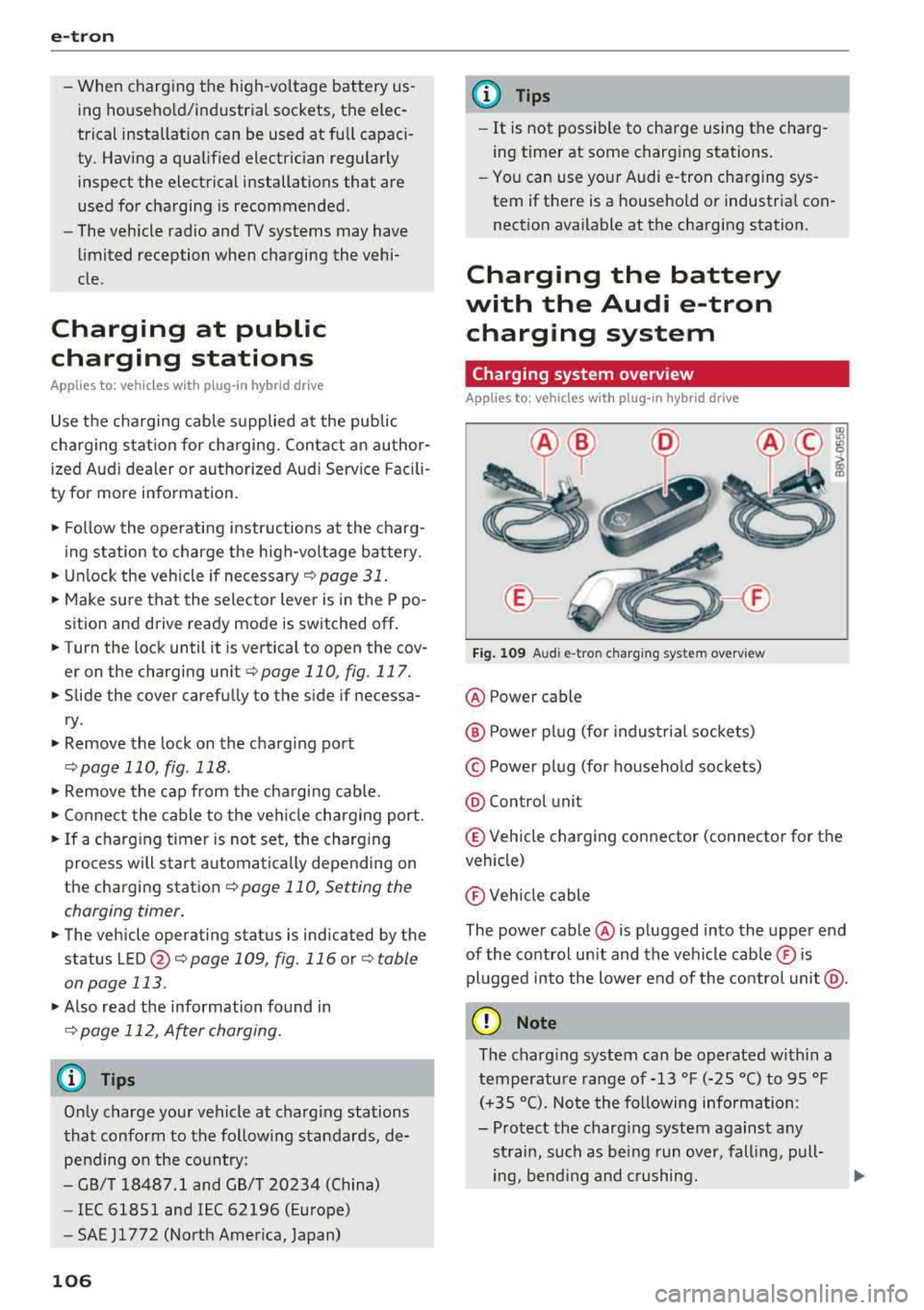
Charging system overview
Applies to: vehicles with plug-in hybr id drive
Fig. 109 A udi e-tro n charging sys te m overv iew
@ Power cable
@ P ower pl ug (for industrial sockets)
© Power plug (for household sockets)
@ Control unit
® Vehicle charging connector (connector for the
vehicle)
® Veh icle cable
The power cable @ is plugged into the upper end
of the control unit and the vehicle cable ® is
pl ugged into the lower end of the control unit @.
(D Note
The charg ing system can be operated within a
temperature range of-13
°f (-25 °C) to 95 °f
(+35 °C). Note the following information:
- Protect the charg ing system against any
st rain, such as being run over, falling, pull-
ing, bending and crushing.
Ill-
Page 112 of 404
e-tron
@ Tips
-The device runs a self test after power has
been restored to the control unit.
- You can activate a PIN for the control unit
¢page 115.
-The vehicle cannot be started if a charging
connector is connected .
Before charging
Applies to: vehicles w ith p lug- in hy brid drive
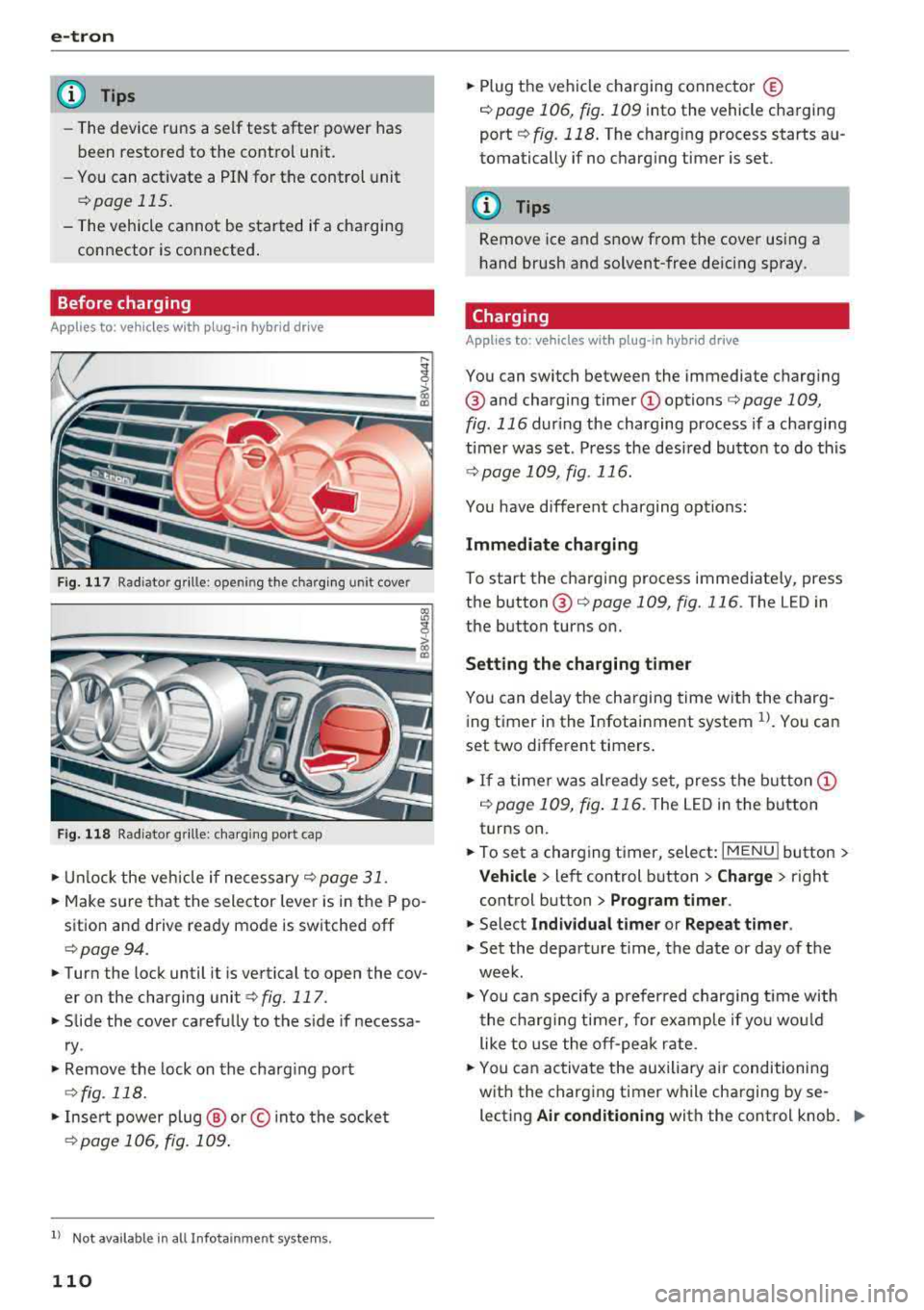
Fig. 117 Radiator grille: opening the charging unit cover
lll
~;:::;::.::.=;;.;;;:;;: --------- !
Fig. 118 Radiator grille: charging port cap
.. Unlock the veh icle if necessary¢ page 31 .
.. Make sure that the selector lever is in the P po
sition and drive ready mode is switched off
¢page 94 .
.. Turn the lock until it is vertical to open the cov
er on the charging
unit ¢ fig. 117.
.. Slide the cover carefully to the side if necessa
ry .
.. Remove the lock on the charging port
¢fig. 118.
.. Insert power plug @ or© into the socket
¢page 106, fig. 109 .
ll Not availab le in a ll Infotainment systems.
110
.. Plug the vehicle charging connector ©
¢ page 106, fig. 109 into the vehicle charging
port
¢ fig. 118. The charging process starts au
tomatically if no charging timer is set.
(D Tips
Remove ice and snow from the cover using a
hand brush and solvent-free deicing spray.
Charging
Applies to: vehicles wit h pl ug -in hybrid drive
You can switch between the immediate charging
@ and charging timer
timer was set . Press the desired button to do this
¢page 109, fig. 116.
You have different charging options:
Immediate charging
To start the charging process immediately, press
the
button @¢ page 109, fig. 116 . The LED in
the button turns on.
Setting the charging timer
You can delay the charging time with the charg
ing timer in the Infotainment system
1>. You can
set two different timers .
.. If a timer was already set, press the button @
i:!.> page 109, fig. 116. The LED in the button
turns on.
.. To set a charging timer, select: I MENU ! button >
Vehicle > left control button > Charge > right
control button
> Program timer.
.. Select Individual timer or Repeat timer.
.. Set the departure time, the date or day of the
week .
.. You can specify a preferred charging t ime with
the charging timer, for example if you would
like to use the off-peak rate.
.. You can activate the auxiliary air conditioning
with the charging timer while charging by se lecting
Air conditioning with the control knob. ..,_
Page 113 of 404
u. 00 .-< N l' N .-< 0 N > 00
A./ appears in the box. This activation is sepa
rate from the Infotainment system settings in
the climate control menu
¢ page 116.
~ Press the I BACKI button.
~ To activate the desired timer, confirm the set
ting with the control knob.
A,/ appears in the
box .
Power save mode
Power save mode is automatically switched on
when the control unit has not been operated for
more than one minute. The
LEO @¢ page 109,
fig. 115 stays on. All other displays turn off.
~ To switch power save mode on or off, press the
~ button @¢page 109, fig. 115.
Power save mode ends automatically when the
vehicle charging connector is plugged into the ve
hicle.
The high-voltage battery is charging when the
LED@ blinks.
(D Tips
-Auxiliary climate control is powered electri
cally if you select climate control using the
charging timer. This may also be used in
confined spaces such as garages.
- Using the auxiliary air conditioning while
charging can also reduce the charge level of
the high-voltage battery.
- The high-voltage battery also charges in
power save mode.
- If the charging process is in progress, it will
not be interrupted when power save mode
switches on.
- The charging process can be interrupted at
any time. Press the active button on the ve
hicle to do this
¢page 109, fig. 116.
-The climate control output while charging
depends on the capacity of the electrical
connection. Additional information on cli
mate control can be found under
¢page 116.
e-tron
Setting the charging power level
App lies to : veh icles w it h pl ug-in hybr id drive
The control unit automatically recognizes the
voltage and the available current strength. You
can set whether you would like to charge with the
full or half of the charging power.
~ Press the I OKI@ ¢ page 109, fig. 115 button
on the control unit.
~ Enter the PIN if necessary.
~ POWER and SET PIN appear in the display
field.
~ Select POWER with the arrow button @.
~ Press the I OK I button @.
~ The charging power display appears. The cur
rent set value (50% or 100%) is marked with a
frame.
~ If necessary, change the setting using the ar
row button © to move downward or upward.
~ Press the I OK I button @.
(D Tips
- If a household socket is used for the charg
ing process, the charging power level is au
tomatically set to 100%. If multiple electri
cal consumers are connected to a circuit
'
the charging power may be limited to 50%
when charging with a household socket in
order to relieve the load on the electrical in
stallation.
- If an industrial socket is used for the charg
ing process, the charging power level is au
tomatically set to 50%. To receive the maxi
mum charging power, the value must be set
to 100% .
- A selected value remains set until the power
cable is connected again.
111
Page 114 of 404
e-tron
After charging
A pplies to: ve hicles w ith p lug -in hybrid drive
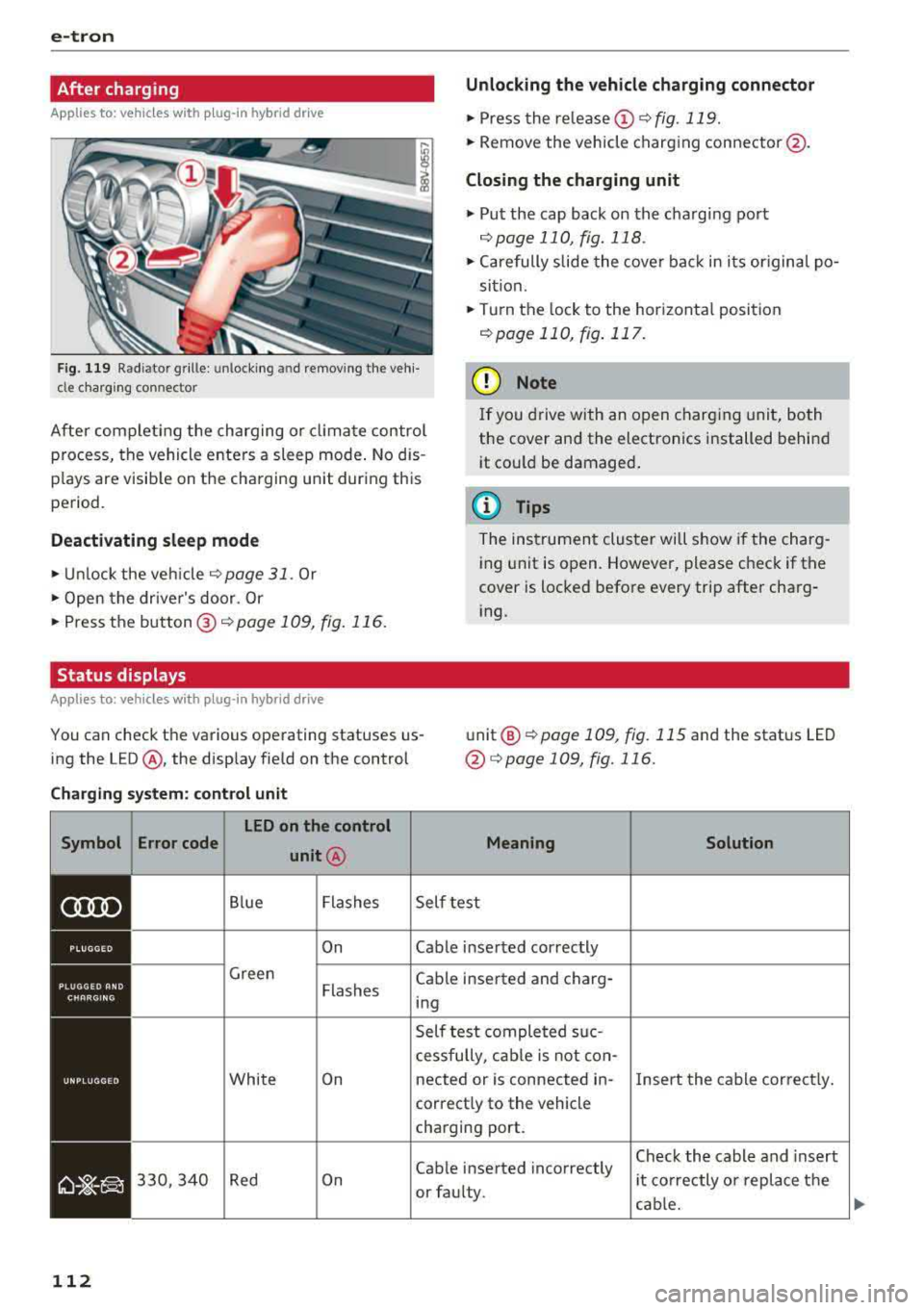
Unlocking the vehicle charging connector
.,. Press the rele ase (i) ¢fig.119 .
.,. Remove the veh icle charg ing conne ctor @.
Closing the charging unit
.,. Put the cap back on the charg ing port
¢ page 110, fig. 118 .
.,. Carefully slide the cove r bac k in i ts or igina l po
si tion .
.,. Tu rn the lock to the hor izonta l position
¢ page 110, fig . 117.
Fig . 119 Rad iator g rille : unl ocking a nd re mov ing the ve hi
cle c harg ing connector
(D Note
Af ter com pleti ng the ch arging or climat e control
p rocess, t he vehicle enters a sleep mode . No d is
p lays are visib le on t he cha rging unit dur ing this
pe riod . I
f yo u drive with an o pen charg ing unit, both
the cover and the electronics installed behi nd
i t co uld be damaged .
(D Tips
Deactivating sleep mode
.,. Unl ock the ve hicle ¢ page 31 . Or
.,. Open the driver's door. Or
.,. Press t he button @¢ page 109, fig. 116 .
Status displays
App lies to: ve hicles w ith p lug- in hybrid drive
The ins trumen t clu ster will show if the charg
ing unit is open. However, please check if the
cover is locked befo re every trip after cha rg
i ng .
You can check the va rious ope rating statuses us
ing the LED @, the disp lay fie ld on the control unit
@
¢ page 109, fig. 115 and the status LE D
@¢ page 109, fig. 116 .
Charging system: control unit
Symbol Error code LED on the control
unit@
Blue Flashes
On
Green Flashes
Whi te On
330, 340 Red On
112
Mean ing
Self test
Cable inse rted correctly
Cable inserted and charg ing
Self test comple ted s uc
cessfully, cab le is not con-
Solution
nected or is connected in- Insert the cable cor rect ly .
correct ly to the vehicle
charging port.
Cable inse rted incorrectly
or fau lty. Check the
cable and insert
i t co rrectly o r rep lace t he
cab le.
1)1,,
Page 122 of 404
Ass is tance sy stem s
Assistance systems
Speed warning system
Description
Applies to: veh icles with speed warning system
The speed warning system helps you to stay be
low a specified maximum speed that can be set,
changed or deleted in the Infotainment system.
The speed warning system warns you if you are
exceeding the maximum speed that you have set .
A warni ng tone will sound as soon as your speed
exceeds the sto red value slight ly. The
[OJ (USA
models) ;[;] (Canada models) indica to r li gh t and
the co rresponding message appear in the inst ru
ment cluster display at the same time. The
[C]
(USA models)/ [ej (Canada mode ls) indicator
light and the message turn off w hen the vehicle
speed drops below the stored maximum speed .
Sett ing a threshold is recommended if you would
like to be reminded when yo u reach a certa in
maximum speed . Situations where you may want
to do so include driving in a country with a ge ner
al speed limit or if there is a specified maximum
speed for winter tires.
Setting the warning thr eshold
.. Select in the Infotainment sys tem : IMENUI but
ton
> Vehicle > left contro l button > Driver a s
sistance
> S peed warning > Manual.
@ Tips
Regardless of the speed warning system, you
should always monitor yo ur speed using the
speedometer and make sure you are following
the legal speed limit.
120
Cruise control system
Switching on
Applies to: vehicles with cruise control system
The cruise control system makes it possible to
drive at a constant speed starting at 15 mph (20km/h) .
0
f
~
0
Fig . 1 21 Ope rat ing lev er : cru ise co ntrol sys te m
0
"' N
~ CD
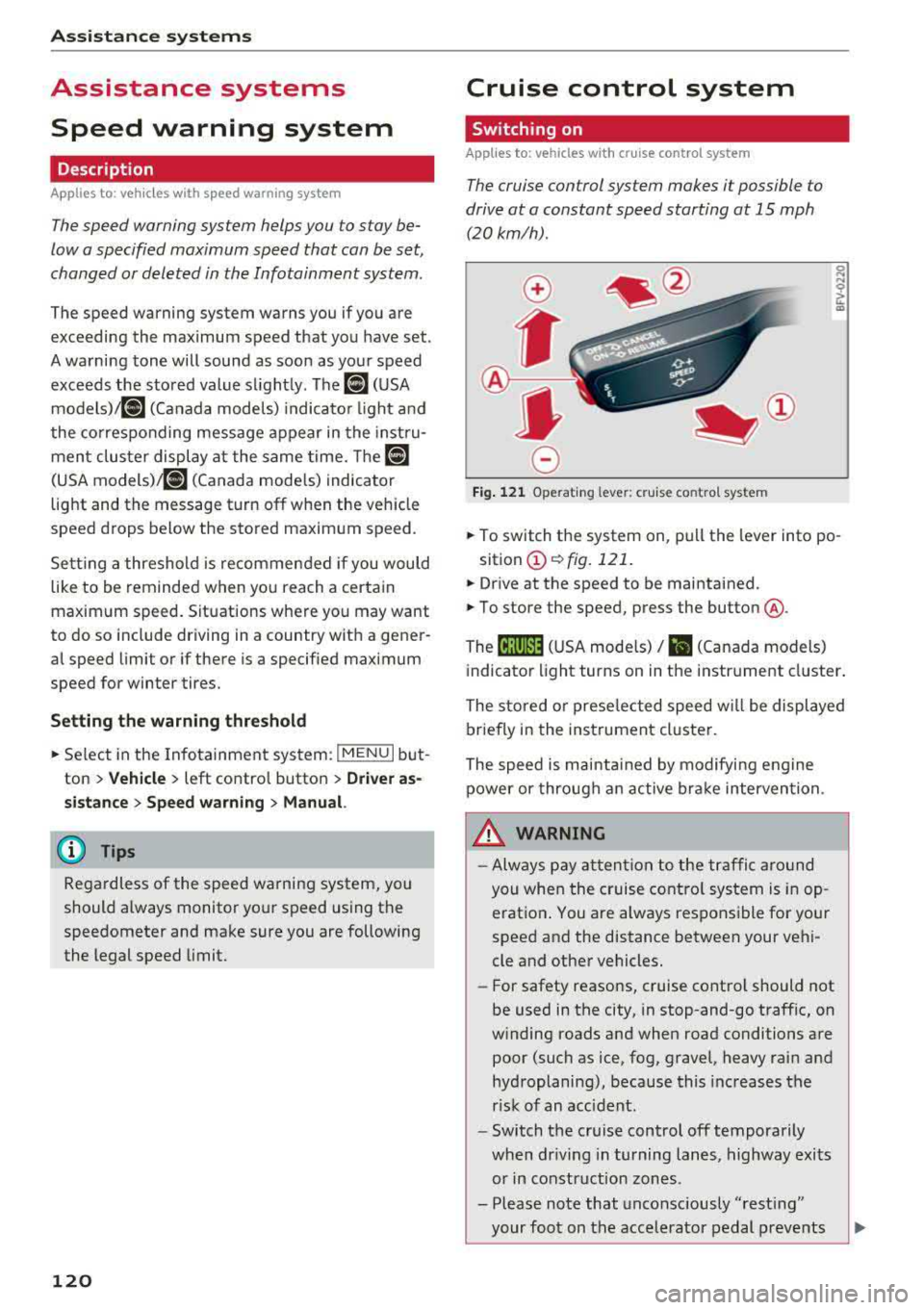
.. To switch t he system on, pull the lever into po -
sition
CD ¢ fig. 121 .
.. Drive at the speed to be maintained .
.. To store the speed, press the button @.
The
[ij;(l)~1j ( U SA mode ls) / 51 (Canada models)
indicator light turns on in the instr ument cluster .
The stored or prese lec ted speed w ill be displayed
briefly in the instrument cluster .
The speed is mainta ined by modifyi ng engine
power or through an active bra ke intervention.
&_ WARNING
- Always pay at ten tion to the traffic a ro und
you whe n the cruise contro l system is in op
erat ion . You are always respons ible fo r your
speed and the distance between your vehi
cle and other vehicles.
-For safety reaso ns, cruise cont rol should not
be used in the city, in stop-and-go traff ic, on
w inding roads and when road conditions are
poor (such as ice, fog, gravel, heavy rai n and
hydroplaning), because this increases the
r isk of an accident.
-Switch t he cr uise control off temporarily
when dr iv ing in turning lanes, highway exits
or in construction zones .
- Please note that unconsciously
"rest ing"
your foot on the accelerator pedal prevents
-
Page 129 of 404
LL co .... N
" N .... 0 N > co
Driving in stop-and-go traffic
A pplies to: ve hicles with Audi adaptive cruise co ntro l
Fig. 12 9 In str ument clust er: s afe star t mo nito r
The adaptive cruise control system assists you in
stop -and -go traffic . If a vehicle that is detected
ahead stops, your vehicle will brake and stay at a
stop , within the lim its of the system.
.,. To resume driving w ith adapt ive cruise control,
tap the accelerator pedal or
.,. P ull the lever toward you into position @
¢page 127 , fig. 130.
Starting to drive with adapti ve cruise
controt
1>
As long as the message ACC: a utomatic go is dis
p layed and the objec t detected ahead starts to
move, your veh icle w ill contin ue
d riving ~.&. . You
can act iva te
A CC: automatic go again for a sho rt
time by pu lling the lever to position @.
The
AC C: autom ati c go sta rt mode ends whe n
the brake pedal is pressed.
For safety reasons, your vehicle will o nly start to
d rive automatically if:
- the driver 's safety belt is fastened
- all doors and the hood are closed
-your vehicle is no t stationary for mo re than
t h ree m inutes
Safe start monitor
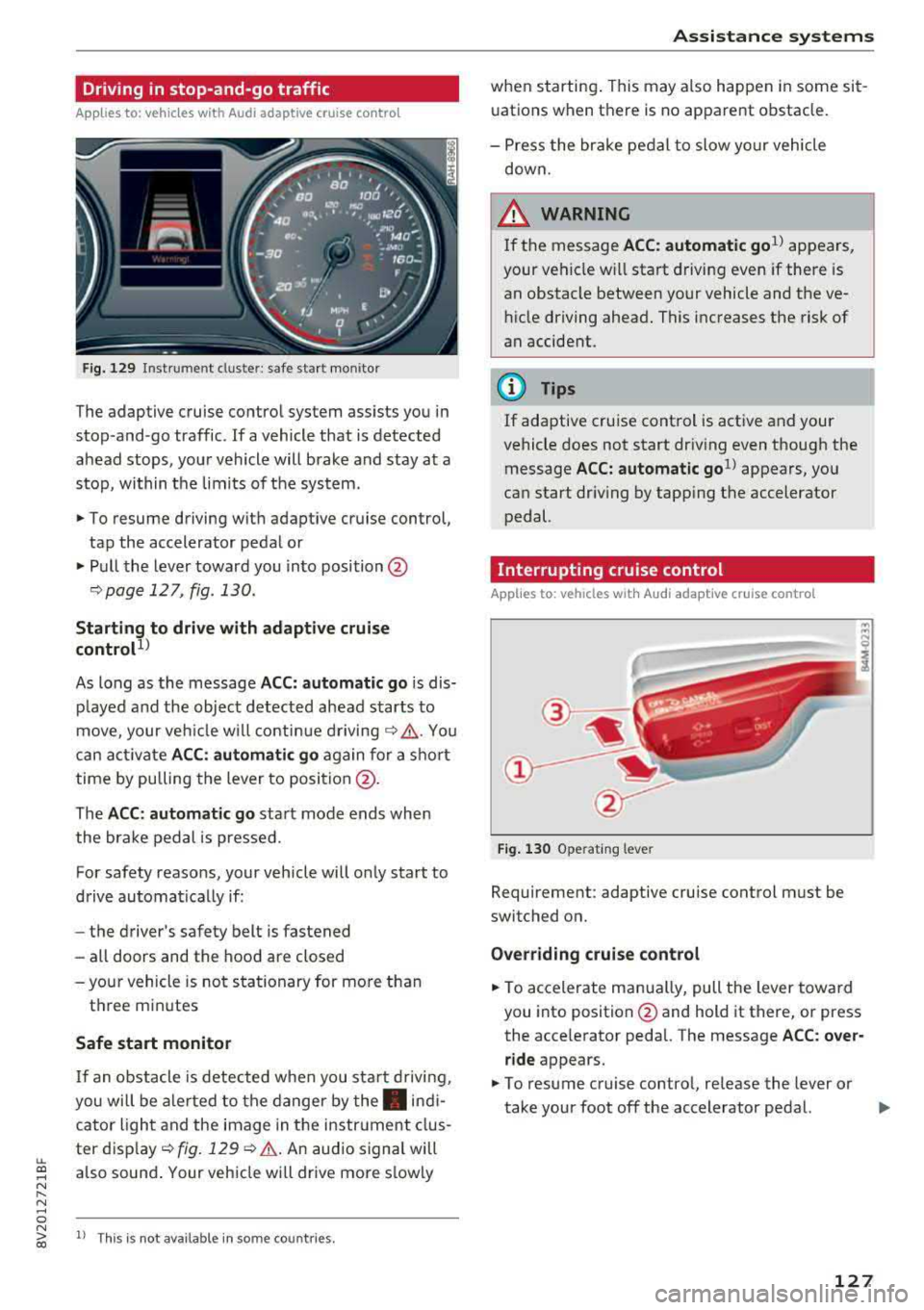
I f an obstacle is detec ted when you sta rt drivi ng,
you will be a le rted to the danger by
the . indi
cator ligh t and the image in the instr ument clus
ter
d isp lay ~ fig. 129 ¢.&. .An aud io signal will
also sound . Your veh icle wi ll drive more s lowly
l) Th is is no t av aila ble in so m e co untries.
A ssi st a nce systems
when starting . This may also happen in some sit
uations when there is no apparent obstacle.
- Press the br ake pedal to slow yo ur vehicle
down.
_& WARNING ~
If the message ACC: automatic go1> appears,
your vehicle w ill start driving even if there is
an obstacle between your vehicle and the ve
hicle driving ahead. This increases the risk of
an accident.
(D Tips
If adaptive cruise control is active and your
vehicle does not start dr iving even though the
message
ACC: automatic go1> appears, yo u
can start driving by tapping the accelerator
pedal.
Interrupting cruise control
Applies to : vehicles wit h Audi ada ptive cr uise control
Fig . 130 Opera ting leve r
Requirement: adaptive cruise control must be
switched on.
Overr iding cruise control
.,. To accelerate man ua lly, pull the lever toward
you into position @and hold it there, or press
the acce lerator pedal. The message
A CC: over
ride
appears.
.,. To resume cruise contro l, re lease the lever or
take your foot off the accelerator pedal.
.,..
127
Page 131 of 404
LL co ..... N
" N ..... 0 N > co
Setting the driving program
Applies to: vehicles with Audi adaptive cruise contro l
Depending on the se lected dr iv ing program and
d istance, dr iv ing behav ior when ac celerating w ill
va ry from dy namic to comfortab le.
Setting the driving program on vehicles
w ithout drive sele ct*
• Se lect in the Infotainment sys tem: IM ENUI but
ton
> Vehicle > left contro l bu tto n > Dri ver a s·
si stan ce
> Audi adapt ive crui se contr ol > Dri v
ing p rogram
> Comfort , Standard or D yn am ic.
Setting the driving mode on vehicles with
d rive s elect *
See i::!) page 141.
@ Tips
Your sett ings are automa tic ally sto red and as
signed to the remote control key being used.
Driver intervention request
Applies to: vehicles with Audi adaptive cruise control
F ig . 132 Ins tru ment clust er: reques t for dr iver in ter ven
tio n
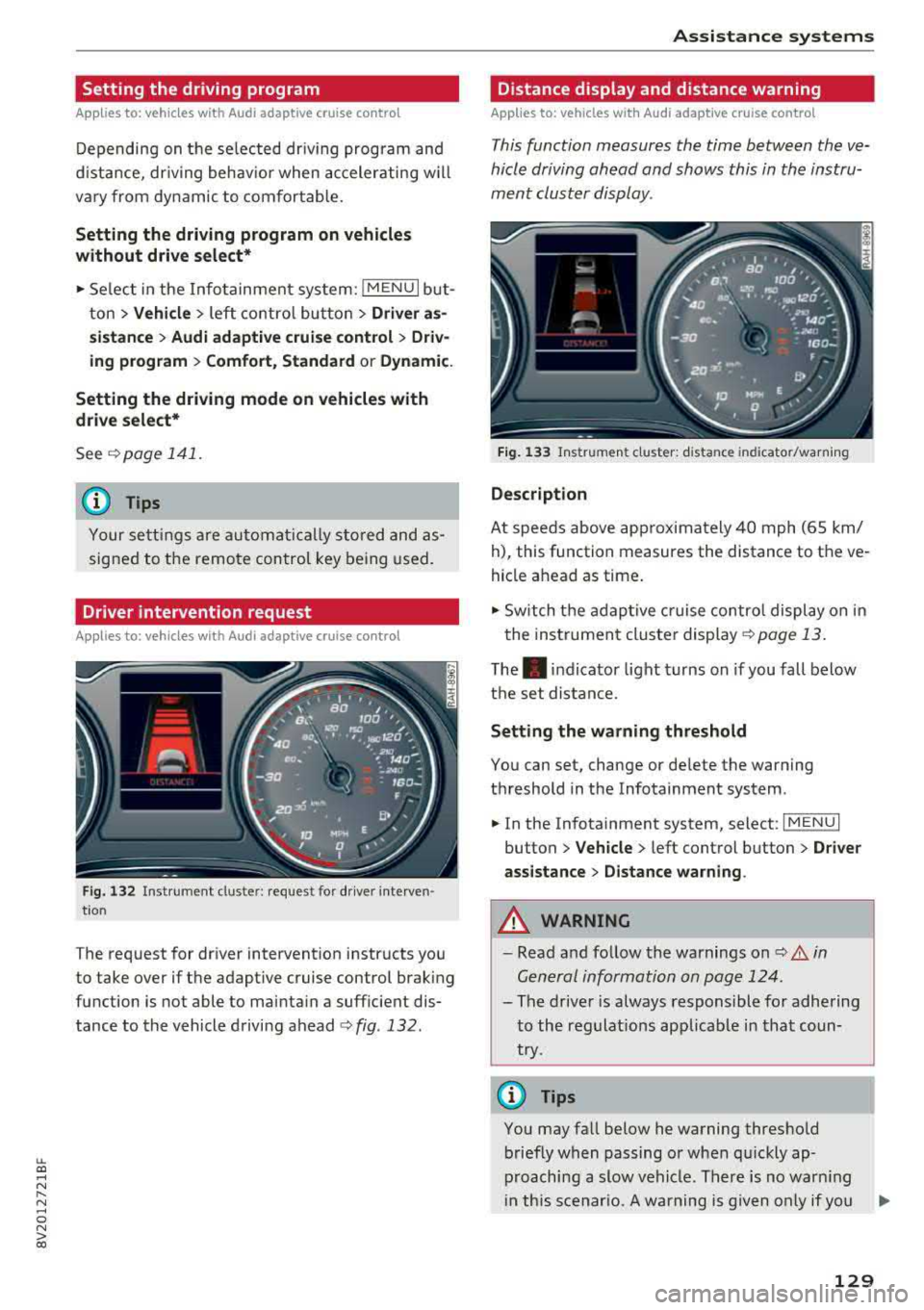
The request for driver intervention instructs you
to take over if the adaptive cruise control brak ing
function is not able to mainta in a suff icient dis
tance to the vehicle driving ahead
¢ fig . 132 .
Assi st a nce systems
Distance display and distance warning
Applies to: vehicles with Audi adaptive cruise control
This function measures the time between the ve
hicle driving ahead and shows this in the instru
ment cluster display.
F ig. 13 3 Instrumen t cluster : dista nce in dicato r/warn ing
D escription
At speeds above app roximately 40 mph (65 km/
h), this function measures the distance to the ve
hicle ahead as time .
• Switch the adaptive cruise contro l display on in
the instrument cluster
display ¢ page 13.
The. indicator light turns on if you fall below
the set distance.
Setting the wa rning threshold
You can set, change or de lete the warning
threshold in the Infotainment system .
• In the Infotainment system, select: I MENU I
button > Vehicle > left control button > Dri ver
assistance
> D istance warning .
A WARNING
-Read and follow the warnings on i::!) A in
Gen eral information on page 124 .
-
- The driver is always responsible for adhering
to the regulat ions applicab le in that coun
try.
(D Tips
You may fall below he warning threshold briefly when passing or when qu ickly ap
proaching a slow vehicle . There is no warn ing
i n th is scenar io. A warning is given only if you
..,.
129
Page 133 of 404
u. 00 .-< N l' N .-< 0 N > 00
-Due to t he interlinking o f various vehicle sys
tems, critica l driving situations can be detected
by
pre sense ba sic and meas ures for preventa
t ive occ upant protection are can be initiated.
- The
pre sense front uses the data from the ra
dar sensors and calc ulates the probab ility of an
acc ident
c::> page 124. An impending collision
with vehicles ca n be detected within the limits
of the system . In this case, the system warns
the driver v isually, acoustically and with a je rk
on the brakes if necessary. If needed, it ca n ini
tiate a part ia l o r full dece le ra tion to reduce the
co llision speed o r to avo id t he coll is io n unde r
ce rtain c ircumstances. In conjunc tion wi th pre
sense basic, the front safety belts are a lso re
versib ly tensioned w hen needed . The pre sense
front is a lso active when adaptive cruise con
trol* is sw itched off.
A WARNING
Also follow the genera l instructions fo und in
c::> .&. in G eneral information on page 124.
(D Tips
- Certain pre sense f unctions switch off when
d riving in reverse.
- The pre sense functions may not be avai la
b le if there is a ma lfunction in the ESC sys
tem or the airbag contro l modu le.
- Note t hat the revers ible belt tensioner on
t h e front passe nger's side deactivates w hen
the front passe nger's a irbag is deact ivated .
- Switch the pre sense off when you are not
us ing public streets or whe n loadi ng the ve
h icle onto a veh icle carrier, train, ship or
othe r type of t ransportation . T his can pre
vent a n un des ired intervent ion from the pre
sense sys te m .
Audi pre sense basic
App lies to: ve hicles with Audi pre sense basic
The pre sense basic funct io ns are activ ated a t a
speed of approximate ly 20 mph (30 km/h) or
h igher .
The fo llow ing funct io ns can be t rigge red unde r
cert ain cond itions withi n the limi ts of the sys
tem :
Ass istance systems
- Tensioning o f the safety belts (for examp le,
during heavy braking) : the front safety belts
have revers ib le be lt tens ione rs . If a collision
does not occu r, the safety belts loosen slig htly
and are ready to tr igger aga in.
- Initiat ing the clos ing of the w indows and the
panorama g lass roof* (for examp le when un
der- or oversteering).
Audi drive select*: the trigger times are adjusted depending on the mode selected .
Audi pre sense front
Applies to : vehicles wi th Audi pre sense fro nt
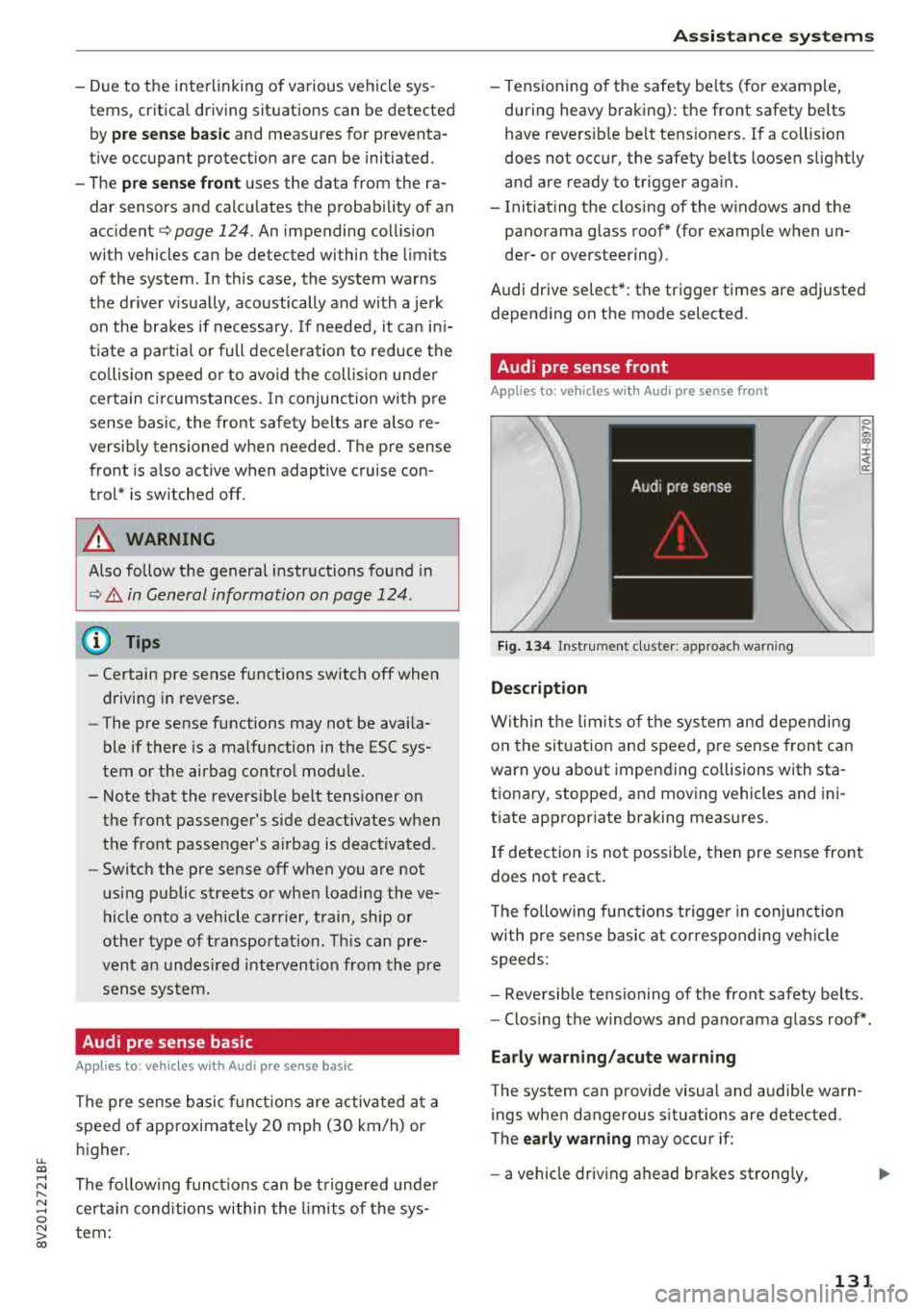
Fig. 134 In str u men t cluster : approac h warni ng
Description
Wi thin the lim its of t he sys tem and depending
on the sit uat ion and spee d, p re sense front can
warn you about impending collisions with sta
t iona ry, stopped, and moving vehicles and ini
tiate app ropr iate braking measu res.
0 .... a, "? :i:: ~ a:
If detection is not possib le, then pre sense front
does not react.
T he following fu nctions t rigge r in conjunction
wi th pre sense basic at co rresponding ve hicle
speeds :
- Reve rsible tens ion ing of the front safety belts.
- Clos ing the windows and pano rama g lass roof* .
Early warning /acute warning
The system can provide visual and audible warn
ings when dangerous situations are detected.
The
early warning may occur if:
- a vehicle driving ahead brakes st rong ly,
131
Page 135 of 404
u. 00 ... N l' N ... 0 N > 00
(D Tips
-You can cancel the braking with increasing
fo rce that is init iated by the system by brak
i ng yourself, by accelerat ing noticeab ly or
by swerving.
- Certain pre sense front functions switch off when ESC is switched off (sport mode) or
when driving in reverse.
- If you rest rict or sw itch off the ESC, the pre
sense a lso switches itself
off¢ page 149.
Settings in the Infotainment system
Applies to: vehicles with Audi pre sense
.,. Select in the Infotainment system: !MENUI but
ton
> Vehicle > left control butto n > Driver a s
s istance > Audi pr e sense .
Sys tem
-the pre sense functions can be switched
on/off .
If the system is switched off, it switches on aga in
automatically once the ignition is sw itched on
again .
Prewa rning -the early warning can be switched
off permanently or the pre sense front warning
point can be set
( Early /Medium /Late ).
Set the warning time for the early warning to
Early at first . If t his causes undesired early warn
ings to appear, then set the warning time to
Me ·
dium .
The Late warning t ime should on ly be set
i n specia l circumstances .
Messages
Applies to: vehicles with Audi pre sense
II Audi pre sen se: malfunction! Plea se contact
Servic e
This message appears when the pre sense func
tion is affected. For example, this could be
caused by a faulty sensor. If the message stays
on, dr ive immed iately to an author ized Audi deal
e r o r author ized Audi Serv ice Facility to have the
malfunc tion cor re cted.
II Audi pre sense: currentl y limited . Sensor
view limited du e to surrounding s.
Ass istance systems
T his message appears if the senso r view is ob
structed, for examp le by leaves, snow, heavy
spray or dirt. Clean the sensor if necessa ry
¢ page 124, fig. 123.
liJ Audi pre sen se: currently limited
T his message appears if the ESC is rest ricted or
swit ched off, fo r example.
liJ Audi pre sen se: currently limited . See own
er 's manual
This message appears when there is a temporary
failure in a s ubsystem, such as the ESC. If this
message appears repeatedly, drive to an author
ized Audi dea ler or author ized Audi Se rvice Facili
ty to have the ma lf u nction co rrected.
liJ Audi pre s en se: emerg ency braking system
off
This message appears if the pre sense functions
are switched off throug h the Infotainment sys
tem or if the system is not ready .
Audi active lane assist
Description
Applies to: vehicles with Audi active lane assist
Active lane assist (lane departure warning) de
tects lane marker lines within the limits of the
system using a camera in the windshie ld. If you
are approaching a detected lane marker line and
it appears likely that you w ill leave the lane, the
system will warn you with corrective steering.
You can overr ide this steer ing at any time. If you
pass over a line, the stee ring wheel will vib rate
li gh tly. In order for this wa rning vib rat ion to
oc
c ur , it must firs t be swi tc h ed o n in the I nfot ain
ment system. Active lane assist is ready for oper
ation when the lane marker line is detected on at
l east one side of the vehicle.
T he system is des igned for dr iving on express
ways and hig hways and t herefo re o nly ac tiva tes
at speeds above approximate ly 40 mph (65 km/
h). ....
133
Page 142 of 404
Assistance systems
-The rear cross-traffic assist will not provide
alerts if the veh icle is in a paralle l parking
space or an angled parking space.
(LlJ Note
Also read the information in <=:>@ in General
information on page 138 .
(D Tips
-You can cancel the automa tic brake activa
tion with increasing braking force if you ap
ply the brakes yourse lf or accelerate consid
erab ly.
- In some situations, rear cross-traffic assist
may warn you even if there is no cross traffic
i n a critical area, for example when backing
i nto a parking space or maneuver ing.
- The rear cross-traffic assist also switches off when you switch off the ESC.
- The system is not available when towing a
trailer.
Messages
A pp lies to: ve hicles w ith Audi side assis t
If the side assist sw itches off automatically, a
message appears in the instrument cluster dis
play.
@j Aud i side assist: malfunction! Please contact
Service
The system cannot guarantee that it wi ll detect
veh icles correctly and it has switched off. The
sensors have been moved or are faulty. Have the
system checked by an authorized Audi dealer or
author ized Audi Service Facility soon .
(ij Audi side assist: currently unavailable. No
sensor view
(ij Audi side assist: currently unavailable. Sen
sor vision restricted due to surroundings. See
owner 's manual
The radar sensor vis ion is impaired . Do not cover
the area in front of the sensors with bike wheels,
stickers, dirt or other objects. C lean the area in
front of the sensors, if necessary
c> page 13 7,
fig . 141.
140
(ij Audi side assist: currently unavailable
Sid e assist cannot be switched on at this time be
cause there is a malfunction (for ex am ple, the
battery charge level may be too low).
@j Audi side assist: unavailable in towing mode
(ij Audi side assist: unavailable in towing mode
Side assist switches off automatically after a
short time when a factory-insta lled trai ler hitch
i s connected to the electr ica l connector on the
trailer. There is no guarantee the system will
switch off when using a retrofitted trailer hitch .
Do not use side assist when tow ing a tra iler .
[I! Rear parking aid : obstacle detection restrict
ed
The rear cross-traffic assist is not available . Ei
ther t he ESC is switched off, or the radar sensors
may be covered by a bike rack, stickers, leaves,
snow or other objects. Switc h the ESC on, or
clean the area in front of the sensors if necessary
<=:>page 137 , fig . 141. If th is message continues
to be displayed, dr ive immed iate ly to an author
iz ed Audi dealer or authorized Audi Se rvice Facili
ty to have the malfunction repaired.
Audi drive select
Introduction
App lies to : vehicles wi th Audi drive se lec t
Audi drive select makes it poss ible to experience
different types of vehicle settings in one vehicle.
The dr iver can select from three modes,
Comfort ,
Auto
and Dynamic , using the ~.'/:.1 button in the
center console or by using the Infotainment sys
tem. This allo ws you to switch between a sporty
and a comfo rtable driving mode, for example. In
the
Individual* mode, the settings can be adjust
ed to your personal preferences . This makes it
possible to comb ine settings such as a sporty en
gine setting with light steering.
Description
Applies to: vehicles wit h Audi drive se lect
The vehicle setup in each mode depends on the
vehicle 's features. However, the engine and
steering are a lways affected .