lock AUDI S4 2008 User Guide
[x] Cancel search | Manufacturer: AUDI, Model Year: 2008, Model line: S4, Model: AUDI S4 2008Pages: 342, PDF Size: 15.01 MB
Page 34 of 342
Driver information system
32Alternator fault
If the symbol
flashes in the instrument cluster display, there is an
alternator fault or a fault in the vehicle's electrical system. In addi-
tion, a message will appear. This message will disappear after about
5 seconds, but you can call it up again at any time by pressing the button.
You should normally be able to dr ive to the next available qualified
workshop. However, you should avoid using electrical equipment
that is not absolutely necessary be cause this will drain the battery.
Caution
If the coolant warning lamp
in the instrument display lights up
as well as the alternator warning lamp while driving ⇒page 33 , stop
the vehicle immediately and switch off the engine. In this case the
coolant pump is no longer being driven, and there is a risk of engine
damage.
Fault in the brake system
A fault in the brake system should be corrected as soon as
possible.If the symbol
flashes in the display, there is a fault in the
brake system. The symbol is accompanied by a driver
message giving you more information about the fault. This
message will disappear after about 5 seconds, but you can
call it up again at any time by pressing the button:
Stop vehicle and check brake fluid level
– Stop the vehicle.
– Check the brake fluid level ⇒ page 262.
– Obtain professional assistance if necessary. Warning! Fault in ABS brake system. Contact
workshop
– Drive carefully to the nearest qualified workshop and
have the fault rectified ⇒.
Parking brake ! Please contact workshop
– If the symbol appears after you switch on the ignition when the vehicle is stationary, please check whether you
can release the parking brake. If this is possible, you
should drive without delay to the nearest qualified work-
shop and have the fault rectified. If the parking brake
cannot be released you should obtain professional
assistance.
– If this symbol should appear while driving, there may be a malfunction in the drive-away assist or the emergency
brake functions. You may not be able to apply the parking
brake. It is also possible that you cannot release the
parking brake after it has been applied. Drive the vehicle
to a qualified workshop and have the fault repaired.
If the ABS fails, the ABS warning lamp
will light up together with
the brake warning symbol
⇒ .
WARNING
•
Before opening the bonnet and ch ecking the brake fluid level,
observe the warning information on ⇒page 255, “Working on
components in the engine compartment”.
•
If the brake fluid level in the reservoir is too low, this could
result in an accident. Do not drive on. You should obtain profes-
sional assistance.
•
If the brake warning lamp lights up together with the ABS
warning lamp, this can mean that the control function of the ABS
is out of action. As a result the rear wheels can lock relatively
SET
SET
document_0900452a81b1b9de.book Seite 32 Donnerstag, 26. Juli 2007 9:16 09
--4 -
-T
0
-+
•
+-
D
Page 36 of 342
Driver information system
34
will disappear after about 5 seconds, but you can call it up
again at any time by pressing the button:Switch off engine and check oil level
– Stop the vehicle.
– Switch off the engine.
– Check the engine oil level ⇒page 258 .
– Obtain professional assistance if necessary.If the engine oil level is too low
If the engine oil level is too low, add more oil ⇒page 259 .
If the engine oil level is correct
If the
symbol flashes and the engine oil level is correct, obtain
professional assistance. Do not drive on. Do not continue to run the
engine, not even at idle speed .
Note
The oil pressure warning lamp
is not an indicator for the oil
level. The oil level should therefore be checked regularly.
Add engine oil immediately
WARNING! Please add oil immediately
If the symbol lights up, you must add oil immediately
⇒ page 259 .
Fault in the steering system
The steering wheel cannot be unlocked if there is a fault
in the electronic steering lock.If the symbol
flashes in the display, there is a malfunc-
tion in the electronic steerin g lock. The symbol is accompa-
nied by a driver message giving you more information
about the fault. This message will disappear after about
5 seconds, but you can call it up again at any time by
pressing the button:
Do not drive vehicle. Steering defective
– You should obtain professional assistance.
– Do not have the vehicle towed away.
WARNING
The vehicle must not be towed if th ere is a fault in the electronic
steering lock: the steering will be locked and the vehicle cannot be
steered. Towing a vehicle with lo cked steering can cause an acci-
dent.
Note
On some models the symbol may look slightly different.Ignition lock defective
A fault in the ignition lock must be rectified immediately.If the symbol
flashes in the display, there is a malfunc-
tion in the electronic ignition lock. The symbol is accompa-
nied by a driver message giving you more information
about the fault. This message will disappear after about
SET
SET
document_0900452a81b1b9de.book Seite 34 Donnerstag, 26. Juli 2007 9:16 09
--4 -
-T
-+
rn
. ~I& --
+-
[I]
•
•
Page 37 of 342
Driver information system35
Controls
Safety
Driving tips
General maintenance
Self-help
Technical data
5 seconds, but you can call it up again at any time by
pressing the button:
Ignition lock defective. Contact workshop!
– Do not switch off the engine.
– Drive the vehicle without delay to a qualified workshop and have the fault repaired.The ignition cannot be switched off if there is a fault in the elec-
tronic ignition lock. For this reason, you should drive the vehicle
without delay to a qualified work shop and have the cause of the
fault repaired.
If the vehicle is equipped with the advanced key* feature, you
should not switch off the engine with the Stop/Start button because
it cannot be started again after the ignition has been switched off.
Note
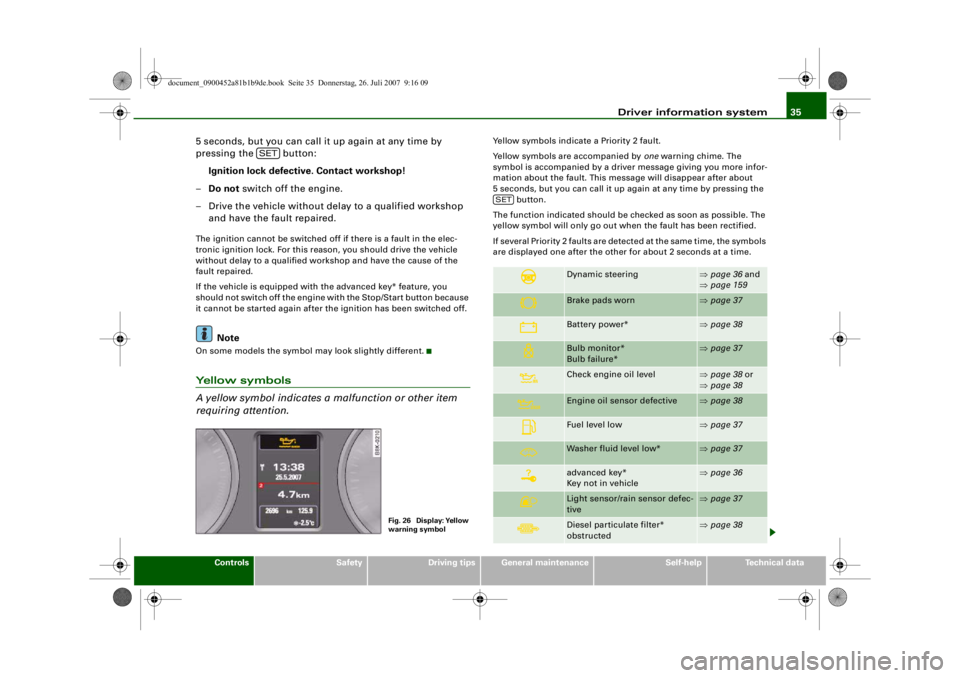
On some models the symbol may look slightly different.Yellow symbols
A yellow symbol indicates a malfunction or other item
requiring attention.
Yellow symbols indicate a Priority 2 fault.
Yellow symbols are accompanied by one warning chime. The
symbol is accompanied by a driver message giving you more infor-
mation about the fault. This me ssage will disappear after about
5 seconds, but you can call it up again at any time by pressing the button.
The function indicated should be checked as soon as possible. The
yellow symbol will only go out when the fault has been rectified.
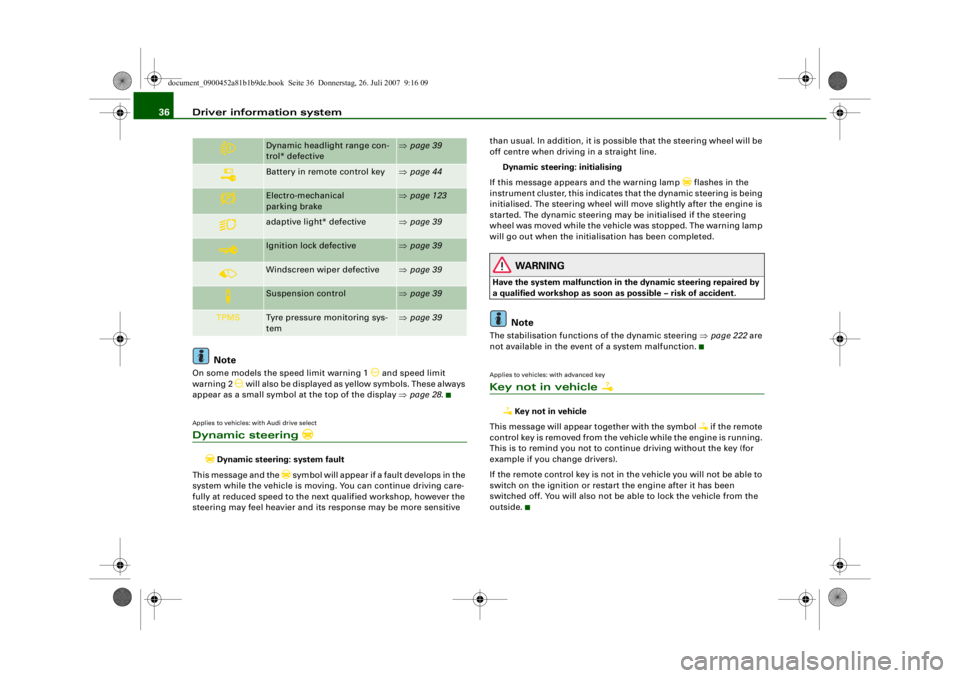
If several Priority 2 faults are detected at the same time, the symbols
are displayed one after the other for about 2 seconds at a time.
SET
Fig. 26 Display: Yellow
warning symbol
Dynamic steering
⇒ page 36 and
⇒ page 159
Brake pads worn
⇒page 37
Battery power*
⇒page 38
Bulb monitor*
Bulb failure*
⇒page 37
Check engine oil level
⇒page 38 or
⇒ page 38
Engine oil sensor defective
⇒page 38
Fuel level low
⇒page 37
Washer fluid level low*
⇒page 37
advanced key*
Key not in vehicle
⇒page 36
Light sensor/rain sensor defec-
tive
⇒page 37
Diesel particulate filter*
obstructed
⇒page 38
SET
document_0900452a81b1b9de.book Seite 35 Donnerstag, 26. Juli 2007 9:16 09
--4 -
-T
D
•
- +--
Page 38 of 342
Driver information system
36
NoteOn some models the speed limit warning 1
and speed limit
warning 2
will also be displayed as yellow symbols. These always
appear as a small symbol at the top of the display ⇒page 28 .
Applies to vehicles: with Audi drive selectDynamic steering
Dynamic steering: system fault
This message and the
symbol will appear if a fault develops in the
system while the vehicle is moving. You can continue driving care-
fully at reduced speed to the next qualified workshop, however the
steering may feel heavier and its response may be more sensitive than usual. In addition, it is possible that the steering wheel will be
off centre when driving in a straight line.
Dynamic steering: initialising
If this message appears and the warning lamp
flashes in the
instrument cluster, this indicates that the dynamic steering is being
initialised. The steering wheel will move slightly after the engine is
started. The dynamic steering may be initialised if the steering
wheel was moved while the vehicle was stopped. The warning lamp
will go out when the initialisation has been completed.
WARNING
Have the system malfunction in the dynamic steering repaired by
a qualified workshop as soon as possible – risk of accident.
Note
The stabilisation functions of the dynamic steering ⇒page 222 are
not available in the event of a system malfunction.Applies to vehicles: with advanced keyKey not in vehicle
Key not in vehicle
This message will appear together with the symbol
if the remote
control key is removed from the vehicle while the engine is running.
This is to remind you not to continue driving without the key (for
example if you change drivers).
If the remote control key is not in the vehicle you will not be able to
switch on the ignition or restar t the engine after it has been
switched off. You will also not be able to lock the vehicle from the
outside.
Dynamic headlight range con-
trol* defective
⇒ page 39
Battery in remote control key
⇒page 44
Electro-mechanical
parking brake
⇒page 123
adaptive light* defective
⇒page 39
Ignition lock defective
⇒page 39
Windscreen wiper defective
⇒page 39
Suspension control
⇒page 39
TPMS
Tyre pressure monitoring sys-
tem
⇒page 39
document_0900452a81b1b9de.book Seite 36 Donnerstag, 26. Juli 2007 9:16 09
--4 -
-T
-+
rn
[I]
•
+-
•
•
Page 41 of 342
Driver information system39
Controls
Safety
Driving tips
General maintenance
Self-help
Technical data
Applies to vehicles: with dynamic headlight range controlHeadlight range control defective
Headlight range control defective
This symbol
indicates a malfunction in the dynamic headlight
range control. Take the vehicle to a qualified workshop to have the
dynamic headlight range control function repaired.
Applies to vehicles: with adaptive lightadaptive light defective
adaptive light defective
This symbol
indicates that the adaptive light is defective. Take
the vehicle to a qualified workshop to have the headlights and/or
the control unit for the adaptive light repaired.
Ignition lock defective
Ignition lock defective
If the symbol
lights up in the display, there is a malfunction in
the electronic ignition lock. Take the vehicle to a qualified workshop
to have the problem remedied.
Applies to vehicles: with Audi drive selectSuspension control
This warning lamp monitors the damping effect of the
shock absorbers.
Suspension: system fault
If the symbol lights up in the display, there is a malfunction in the
vehicle suspension. Take the vehicle to a qualified workshop to have
the problem remedied.
Windscreen wipers defective
Windscreen wipers defective
This symbol
indicates a malfunction in the electronics for the
windscreen wipers. Take the vehicle to a qualified workshop to have
the windscreen wiper system repaired.
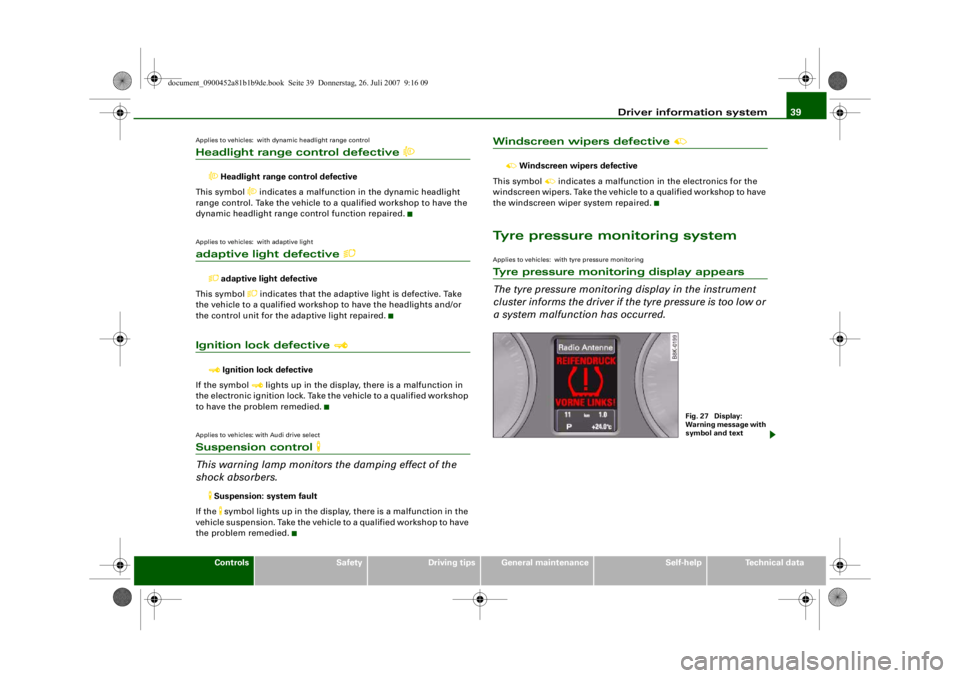
Tyre pressure monitoring systemApplies to vehicles: with tyre pressure monitoringTyre pressure monitoring display appears
The tyre pressure monitoring display in the instrument
cluster informs the driver if th e tyre pressure is too low or
a system malfunction has occurred.
Fig. 27 Display:
Warning message with
symbol and text
document_0900452a81b1b9de.book Seite 39 Donnerstag, 26. Juli 2007 9:16 09
--4 -
-T
•
•
-+
•
+-
•
•
Page 44 of 342
Doors and windows
42Doors and windowsCentral locking systemDescriptionThe vehicle can be locked and unlocked via the central locking
system. You can use any of the following:•
Remote control key ⇒page 47
•
Door handles in conjunction with advanced key* ⇒page 47
•
Lock on driver's door ⇒page 48
•
Interior central locking switch ⇒page 49
Unlocking one side of the vehicle only
When you lock the vehicle, the central locking system will lock the
doors and the boot lid. When you unlock the vehicle, the central
locking system will unlock either the driver's door only, or all the
locks on the vehicle, depending on the setting you have selected on
the sound system or MMI* ⇒page 50 .
Automatic locking function (Auto Lock)
The Auto Lock function locks the doors and the boot lid when the
vehicle exceeds a speed of about 15 km/h.
The vehicle is unlocked again when the ignition key is removed.
Alternatively, the vehicle can al so be unlocked via the central
locking switch or by pulling one of the inside door handles. The Auto
Lock function can be switched on and off on the sound system or
MMI* ⇒page 50 .
In the event of an accident in which the airbags inflate, the doors
will be automatically unlocked to facilitate access and assistance.
Deadlock mechanism
The central locking system is combined with a deadlock mecha-
nism. Once the vehicle has been locked from the outside, the door handles on the inside are deactivated. This makes it more difficult
to break into the vehicle.
Anti-theft alarm system*
If the anti-theft alarm system senses interference with the vehicle it
triggers an audible and visible alarm.
The anti-theft alarm system switches on automatically when the
vehicle is locked. It switches off automatically if you unlock the
vehicle using the
remote control.
If you unlock the vehicle by inserting the key in the driver's door, the
ignition must be switched on within 15 seconds, otherwise the
alarm will be triggered. On some export versions, the alarm is trig-
gered immediately when you open a door.
To deactivate the alarm, press th e unlock button on the remote
control key or switch on the ignition . The alarm will also switch itself
off when it comes to the end of its cycle.
Switch off the interior monitor and tow-away protection if you wish
to prevent the alarm from being triggered accidentally ⇒page 50 .
Turn signals
The turn signals will flash twice when the vehicle is unlocked and
once when the vehicle is locked. If the turn signals do not flash, one
of the doors, the bonnet or the boot lid is still open.
Accidental lock-out
The central locking system prevents you from being locked out of
the vehicle in the following situations:
•
When the driver's door is open, it cannot be locked together with
the other doors by pressing the central locking switch and then
closing the door ⇒ page 49.
•
On vehicles with advanced key*, the boot lid will be released
again automatically if the remote co ntrol key that was last in use is
left inside the boot when the boot lid is closed ⇒page 51 .
document_0900452a81b1b9de.book Seite 42 Donnerstag, 26. Juli 2007 9:16 09
--4 -
-T
-+ +-
Page 45 of 342
Doors and windows43
Controls
Safety
Driving tips
General maintenance
Self-help
Technical data
To prevent yourself from being locked out, do not lock the vehicle
with the remote control key
before closing the doors or boot lid. If
you accidentally press the locking button on your remote control
key when any of the doors (except for the driver's door) are open,
then put the key down inside the ca r and forget to take it with you
when you close the doors, you can still open the doors for about one
minute before the vehicle is locked.
WARNING
Do not leave anyone (especially chil dren) in the car if it is locked
from the outside and the deadlock mechanism is activated: the
doors and windows cannot then be opened from the inside.
Locked doors could delay assistance in an emergency, potentially
putting lives at risk.
Note
•
Never leave any valuable items in the vehicle unattended. Even a
locked vehicle is not a safe.
•
If the diode on the driver's wi ndow sill lights up for about
30 seconds when the vehicle is locked, the central locking system or
anti-theft alarm* is not working properly. Please have the malfunc-
tion repaired by an Audi dealer or qualified workshop.
•
The interior monitor of the anti-theft alarm* system will only
function as intended if the windows and the tilting panorama roof*
are closed.
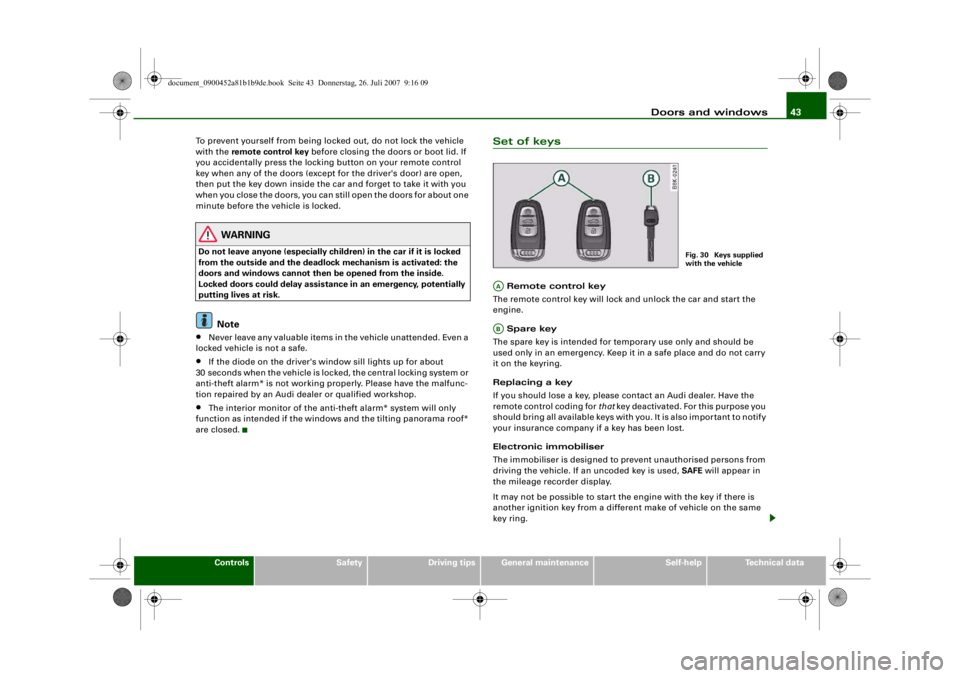
Set of keys Remote control key
The remote control key will lock and unlock the car and start the
engine.
Spare key
The spare key is intended for temporary use only and should be
used only in an emergency. Keep it in a safe place and do not carry
it on the keyring.
Replacing a key
If you should lose a key, please contact an Audi dealer. Have the
remote control coding for that key deactivated. For this purpose you
should bring all available keys with you. It is also important to notify
your insurance company if a key has been lost.
Electronic immobiliser
The immobiliser is designed to prevent unauthorised persons from
driving the vehicle. If an uncoded key is used, SAFE will appear in
the mileage recorder display.
It may not be possible to start the engine with the key if there is
another ignition key from a different make of vehicle on the same
key ring.
Fig. 30 Keys supplied
with the vehicle
AAAB
document_0900452a81b1b9de.book Seite 43 Donnerstag, 26. Juli 2007 9:16 09
--4 -
-T
-+
II]
+-
•
Page 46 of 342
Doors and windows
44Data stored on remote control key
Data related to the service and maintenance of the vehicle are
stored continuously on your remote control key. Your Audi dealer
can read out the data and will then be able to tell you what service
work is required. This also applies to vehicles with advanced key.
Personal convenience settings
If two people use the same car regularly, it is a good idea for each
person to have his or her “own” remote control key. When you
switch off the ignition or lock the vehicle, your personal settings for
the following convenience features are stored and assigned to the
remote control key:•
Air conditioner
•
Central locking system
•
Windows
•
parking system*
•
adaptive cruise control*
•
Audi drive select*
•
Seat memory*
The stored settings are then recalled automatically the next time the
vehicle is unlocked, the doors are opened or the ignition is switched
on.
WARNING
•
Always take the key with you when leaving the vehicle - even if
you only intend to be gone for a short time. This is especially
important if children are left in the car. They might otherwise be
able to start the engine or use power-operated equipment such as
the electric windows - this could lead to injuries.
•
Wait for the vehicle to come to a standstill before removing the
ignition key from the lock. Otherwise the steering lock could
engage suddenly, causing an accident.
Note
The function of the remote control key may be impaired by interfer-
ence from other nearby radio sign als (for example from a mobile
telephone or TV transmitter) if these are in the same frequency
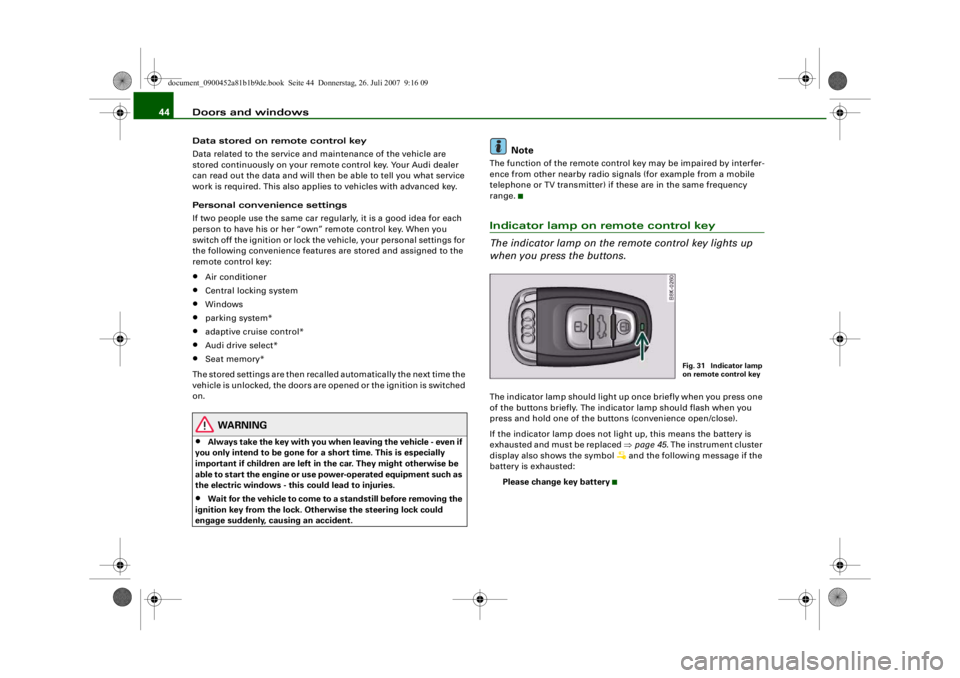
range.Indicator lamp on remote control key
The indicator lamp on the remote control key lights up
when you press the buttons.The indicator lamp should light up once briefly when you press one
of the buttons briefly. The indicator lamp should flash when you
press and hold one of the buttons (convenience open/close).
If the indicator lamp does not li ght up, this means the battery is
exhausted and must be replaced ⇒page 45 . The instrument cluster
display also sh ows the symbol
and the following message if the
battery is exhausted:
Please change key battery
Fig. 31 Indicator lamp
on remote control key
document_0900452a81b1b9de.book Seite 44 Donnerstag, 26. Juli 2007 9:16 09
--4 -
-
[I]
T
•
-+ +-
•
Page 47 of 342
Doors and windows45
Controls
Safety
Driving tips
General maintenance
Self-help
Technical data
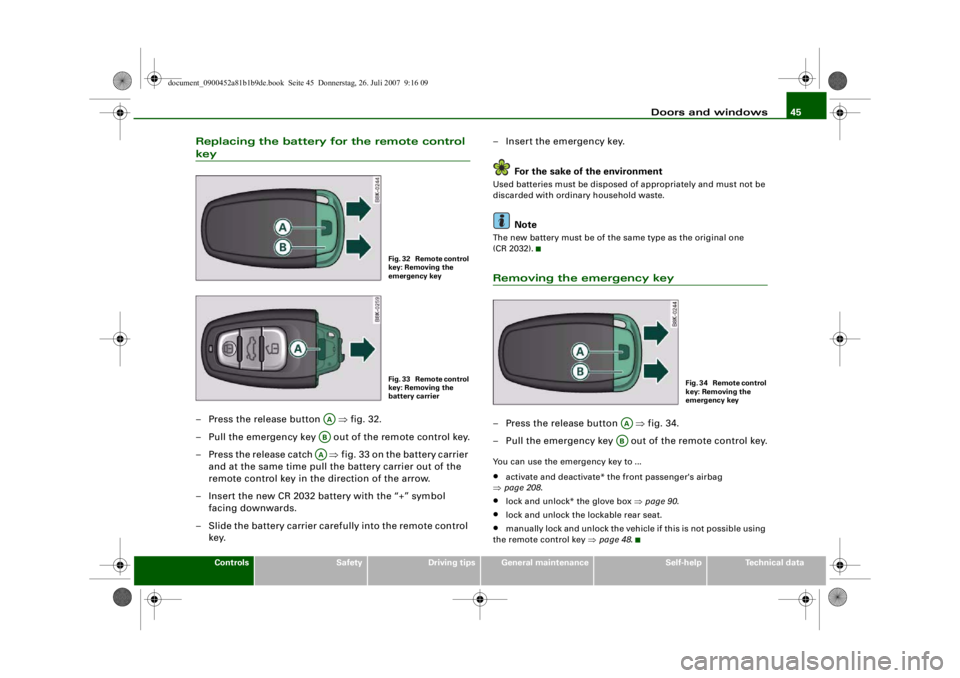
Replacing the battery for the remote control key– Press the release button ⇒fig. 32.
– Pull the emergency key out of the remote control key.
– Press the release catch ⇒ fig. 33 on the battery carrier
and at the same time pull the battery carrier out of the
remote control key in the direction of the arrow.
– Insert the new CR 2032 battery with the “+” symbol facing downwards.
– Slide the battery carrier carefully into the remote control key. – Insert the emergency key.
For the sake of the environment
Used batteries must be disposed of appropriately and must not be
discarded with ordinary household waste.
Note
The new battery must be of the same type as the original one
(CR 2032).Removing the emergency key– Press the release button ⇒fig. 34.
– Pull the emergency key out of the remote control key.You can use the emergency key to ...•
activate and deactivate* the front passenger's airbag
⇒ page 208 .
•
lock and unlock* the glove box ⇒page 90 .
•
lock and unlock the lockable rear seat.
•
manually lock and unlock the vehicle if this is not possible using
the remote control key ⇒page 48 .
Fig. 32 Remote control
key: Removing the
emergency keyFig. 33 Remote control
key: Removing the
battery carrier
AAABAA
F i g . 3 4 R e m o t e c o n t r o l
key: Removing the
emergency key
AAAB
document_0900452a81b1b9de.book Seite 45 Donnerstag, 26. Juli 2007 9:16 09
--4 -
-T
[I]
•
-+
•
+-
Page 48 of 342
Doors and windows
46Emergency release for ignition key
In the event of a malfunction in the vehicle's electrical
system, it may no longer be possible to remove the igni-
tion key.If you are not able to remove the ignition key because the
vehicle battery has discharged (for example), remove the
key as follows:
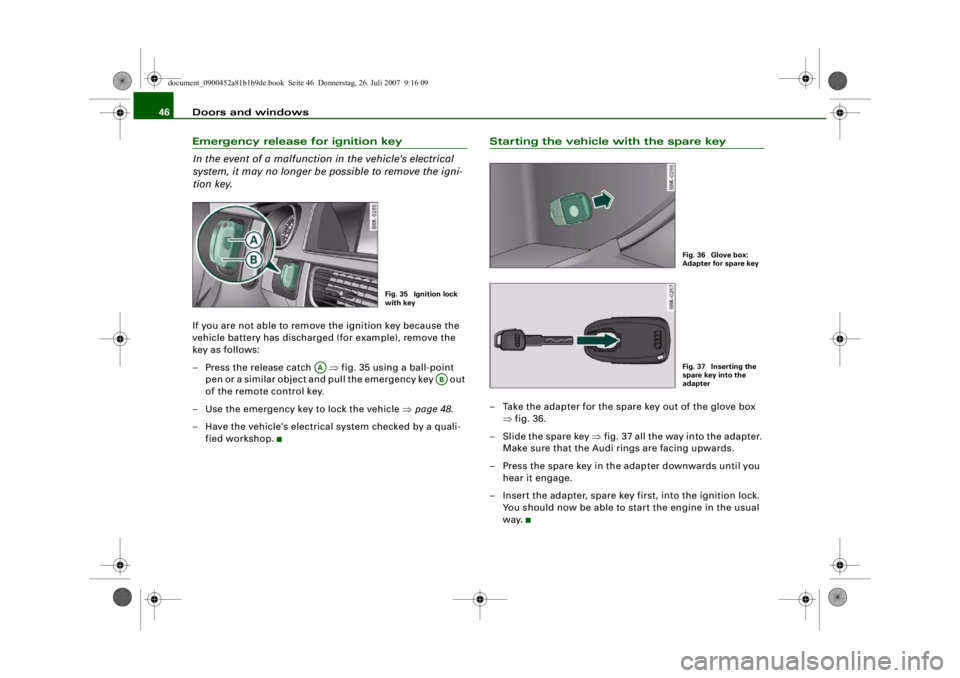
– Press the release catch ⇒fig. 35 using a ball-point
pen or a similar object and pull the emergency key out
of the remote control key.
– Use the emergency key to lock the vehicle ⇒page 48 .
– Have the vehicle's electrical system checked by a quali- fied workshop.
Starting the vehicle with the spare key– Take the adapter for the spare key out of the glove box ⇒fig. 36.
– Slide the spare key ⇒fig. 37 all the way into the adapter.
Make sure that the Audi rings are facing upwards.
– Press the spare key in the adapter downwards until you hear it engage.
– Insert the adapter, spare key first, into the ignition lock. You should now be able to start the engine in the usual
way.
Fig. 35 Ignition lock
with key
AA
AB
Fig. 36 Glove box:
Adapter for spare keyFig. 37 Inserting the
spare key into the
adapter
document_0900452a81b1b9de.book Seite 46 Donnerstag, 26. Juli 2007 9:16 09
--4 -
-T
-+ +-
•
•