turn signal AUDI S4 2008 User Guide
[x] Cancel search | Manufacturer: AUDI, Model Year: 2008, Model line: S4, Model: AUDI S4 2008Pages: 342, PDF Size: 15.01 MB
Page 153 of 342
Audi side assist151
Controls
Safety
Driving tips
General maintenance
Self-help
Technical data
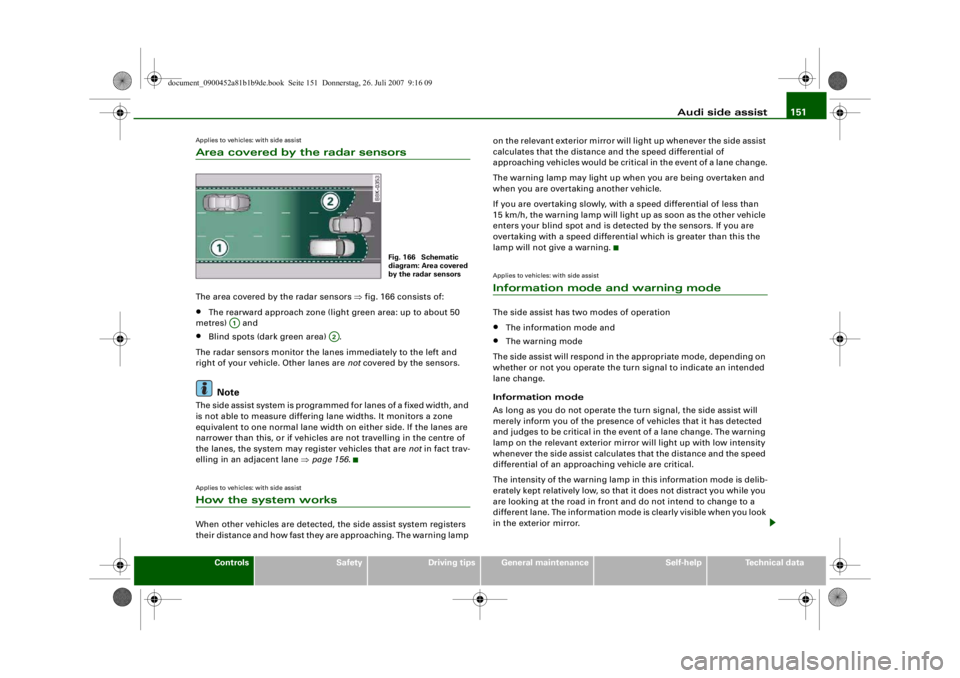
Applies to vehicles: with side assistArea covered by the radar sensorsThe area covered by the radar sensors ⇒fig. 166 consists of:•
The rearward approach zone (light green area: up to about 50
metres) and
•
Blind spots (dark green area) .
The radar sensors monitor the lanes immediately to the left and
right of your vehicle. Other lanes are not covered by the sensors.Note
The side assist system is programmed for lanes of a fixed width, and
is not able to measure differing lane widths. It monitors a zone
equivalent to one normal lane width on either side. If the lanes are
narrower than this, or if vehicles are not travelling in the centre of
the lanes, the system may register vehicles that are not in fact trav-
elling in an adjacent lane ⇒page 156 .Applies to vehicles: with side assistHow the system worksWhen other vehicles are detected, the side assist system registers
their distance and how fast they are approaching. The warning lamp on the relevant exterior mirror will light up whenever the side assist
calculates that the distance and the speed differential of
approaching vehicles would be critical in the event of a lane change.
The warning lamp may light up when you are being overtaken and
when you are overtaking another vehicle.
If you are overtaking slowly, with a speed differential of less than
15 km/h, the warning lamp will light up as soon as the other vehicle
enters your blind spot and is detected by the sensors. If you are
overtaking with a speed differential which is greater than this the
lamp will not give a warning.
Applies to vehicles: with side assistInformation mode and warning modeThe side assist has two modes of operation•
The information mode and
•
The warning mode
The side assist will respond in the appropriate mode, depending on
whether or not you operate the turn signal to indicate an intended
lane change.
Information mode
As long as you do not operate the turn signal, the side assist will
merely inform you of the presence of vehicles that it has detected
and judges to be critical in the event of a lane change. The warning
lamp on the relevant exterior mirror will light up with low intensity
whenever the side assist calculates that the distance and the speed
differential of an approaching vehicle are critical.
The intensity of the warning lamp in this information mode is delib-
erately kept relatively low, so that it does not distract you while you
are looking at the road in front and do not intend to change to a
different lane. The information mode is clearly visible when you look
in the exterior mirror.
Fig. 166 Schematic
diagram: Area covered
by the radar sensors
A1
A2
document_0900452a81b1b9de.book Seite 151 Donnerstag, 26. Juli 2007 9:16 09
--4 -
-T
•
-+ +-
(I]
•
Page 154 of 342
Audi side assist
152Warning mode
If you operate the turn signal when the side assist has detected a
vehicle on that side that it judges to be critical in the event of a lane
change, the warning lamp on the relevant exterior mirror will flash
brightly several times. This is the warning mode: if the lamp flashes
brightly it warns you th at you should check the situation again in the
mirror and by looking back over your shoulder ⇒ in “Safety
notes” on page 157.
Note
You can adjust the brightness of the warning lamps on the exterior
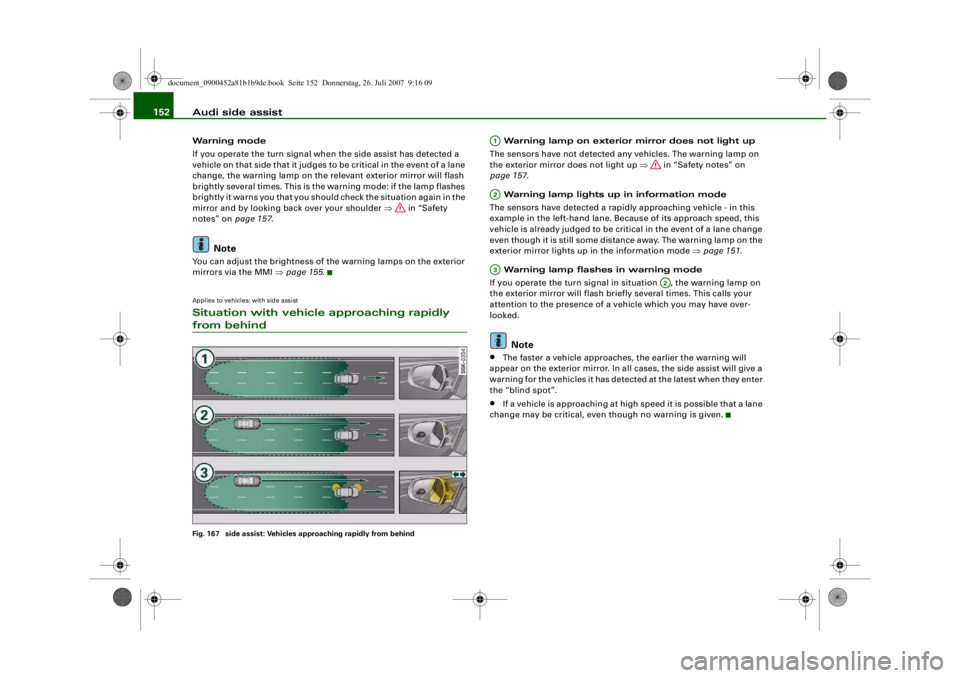
mirrors via the MMI ⇒ page 155.Applies to vehicles: with side assistSituation with vehicle approaching rapidly from behindFig. 167 side assist: Vehicles approaching rapidly from behind
Warning lamp on exterior mirror does not light up
The sensors have not detected any vehicles. The warning lamp on
the exterior mirror does not light up ⇒ in “Safety notes” on
page 157 .
Warning lamp lights up in information mode
The sensors have detected a rapidly approaching vehicle - in this
example in the left-hand lane. Because of its approach speed, this
vehicle is already judged to be critical in the event of a lane change
even though it is still some distance away. The warning lamp on the
exterior mirror lights up in the information mode ⇒page 151 .
Warning lamp flashes in warning mode
If you operate the turn signal in situation , the warning lamp on
the exterior mirror will flash briefly several times. This calls your
attention to the presence of a vehicle which you may have over-
looked.Note
•
The faster a vehicle approaches, the earlier the warning will
appear on the exterior mirror. In all cases, the side assist will give a
warning for the vehicles it has detected at the latest when they enter
the “blind spot”.
•
If a vehicle is approaching at high speed it is possible that a lane
change may be critical, even though no warning is given.
A1A2A3
A2
document_0900452a81b1b9de.book Seite 152 Donnerstag, 26. Juli 2007 9:16 09
--4 -
-T
[I]
•
-+
---
-
[I]
+-
t
=
IJll!II)
=~
~
~
•
Page 155 of 342
Audi side assist153
Controls
Safety
Driving tips
General maintenance
Self-help
Technical data
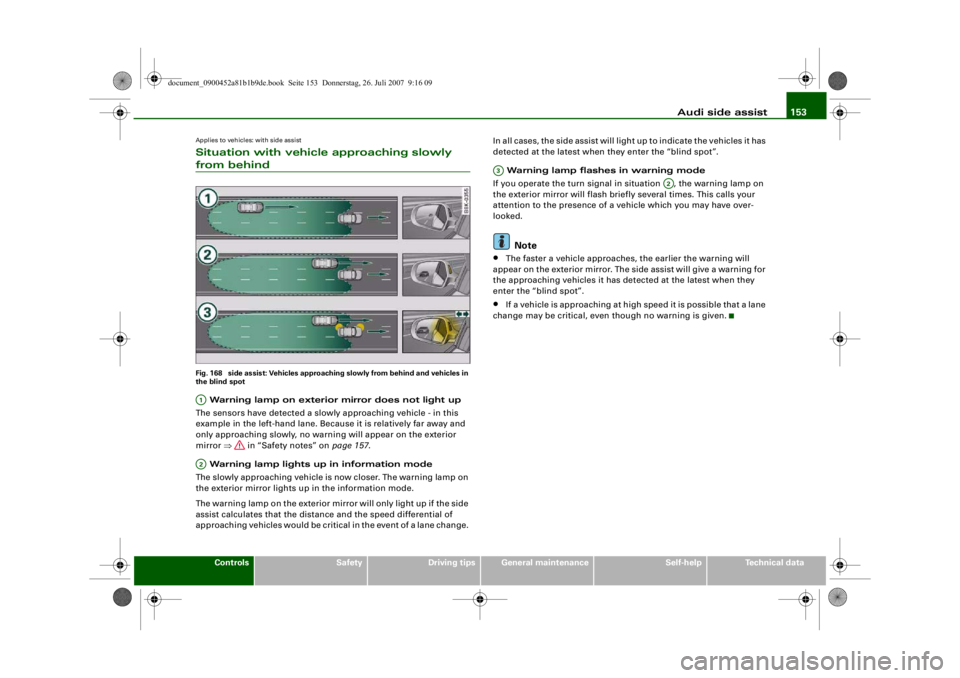
Applies to vehicles: with side assistSituation with vehicle approaching slowly from behindFig. 168 side assist: Vehicles approaching slowly from behind and vehicles in
the blind spot Warning lamp on exterior mirror does not light up
The sensors have detected a slowly approaching vehicle - in this
example in the left-hand lane. Because it is relatively far away and
only approaching slowly, no warning will appear on the exterior
mirror ⇒ in “Safety notes” on page 157.
Warning lamp lights up in information mode
The slowly approaching vehicle is now closer. The warning lamp on
the exterior mirror lights up in the information mode.
The warning lamp on the exterior mirror will only light up if the side
assist calculates that the distance and the speed differential of
approaching vehicles would be critic al in the event of a lane change. In all cases, the side assist will light up to indicate the vehicles it has
detected at the latest when they enter the “blind spot”.
Warning lamp flashes in warning mode
If you operate the turn signal in situation , the warning lamp on
the exterior mirror will flash briefly several times. This calls your
attention to the presence of a ve hicle which you may have over-
looked.
Note
•
The faster a vehicle approaches, the earlier the warning will
appear on the exterior mirror. The si de assist will give a warning for
the approaching vehicles it has detected at the latest when they
enter the “blind spot”.
•
If a vehicle is approaching at high speed it is possible that a lane
change may be critical, even though no warning is given.
A1A2
A3
A2
document_0900452a81b1b9de.book Seite 153 Donnerstag, 26. Juli 2007 9:16 09
--4 -
-T
[I]
-----~
-
l)@!I •- ' -;-_~
=
_ 0.., 1
=- ~
I ,
-+
•
+-
Page 156 of 342
Audi side assist
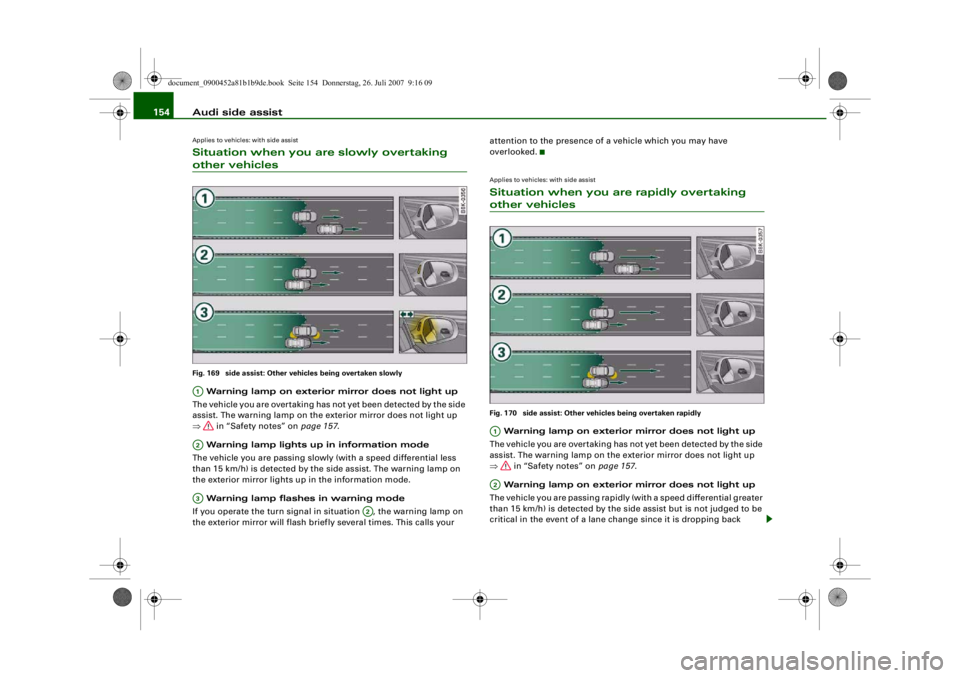
154Applies to vehicles: with side assistSituation when you are slowly overtaking other vehiclesFig. 169 side assist: Other vehicles being overtaken slowly Warning lamp on exterior mirror does not light up
The vehicle you are overtaking has not yet been detected by the side
assist. The warning lamp on the exterior mirror does not light up
⇒ in “Safety notes” on page 157.
Warning lamp lights up in information mode
The vehicle you are passing slowly (with a speed differential less
than 15 km/h) is detected by the side assist. The warning lamp on
the exterior mirror lights up in the information mode.
Warning lamp flashes in warning mode
If you operate the turn signal in situation , the warning lamp on
the exterior mirror will flash briefly several times. This calls your attention to the presence of a vehicle which you may have
overlooked.
Applies to vehicles: with side assistSituation when you are rapidly overtaking other vehiclesFig. 170 side assist: Other vehicles being overtaken rapidly Warning lamp on exterior mirror does not light up
The vehicle you are overtaking has not yet been detected by the side
assist. The warning lamp on the exterior mirror does not light up
⇒ in “Safety notes” on page 157.
Warning lamp on exterior mirror does not light up
The vehicle you are passing rapidly (with a speed differential greater
than 15 km/h) is detected by the side assist but is not judged to be
critical in the event of a lane change since it is dropping back
A1A2A3
A2
A1A2
document_0900452a81b1b9de.book Seite 154 Donnerstag, 26. Juli 2007 9:16 09
•
-
I =
(j•1•
=-:=
=
------(ii! J~= =----- --- - ------
- (j•»• -_-;:-
- @111111
~= -
--~ - . : -~ ===- -
-(1. ,i: 1--.. == - --------
-+
-~11111 -
=-:--
-(1.U --..= =- --------~---------
+-
Page 157 of 342
Audi side assist155
Controls
Safety
Driving tips
General maintenance
Self-help
Technical data
quickly. The warning lamp on the ex
terior mirror does not light up
⇒ in “Safety notes” on page 157.
Warning lamp on exterior mirror does not light up
If you operate the turn signal in situation , the warning lamp on
the exterior mirror will still not give any warning ⇒ in “Safety
notes” on page 157.
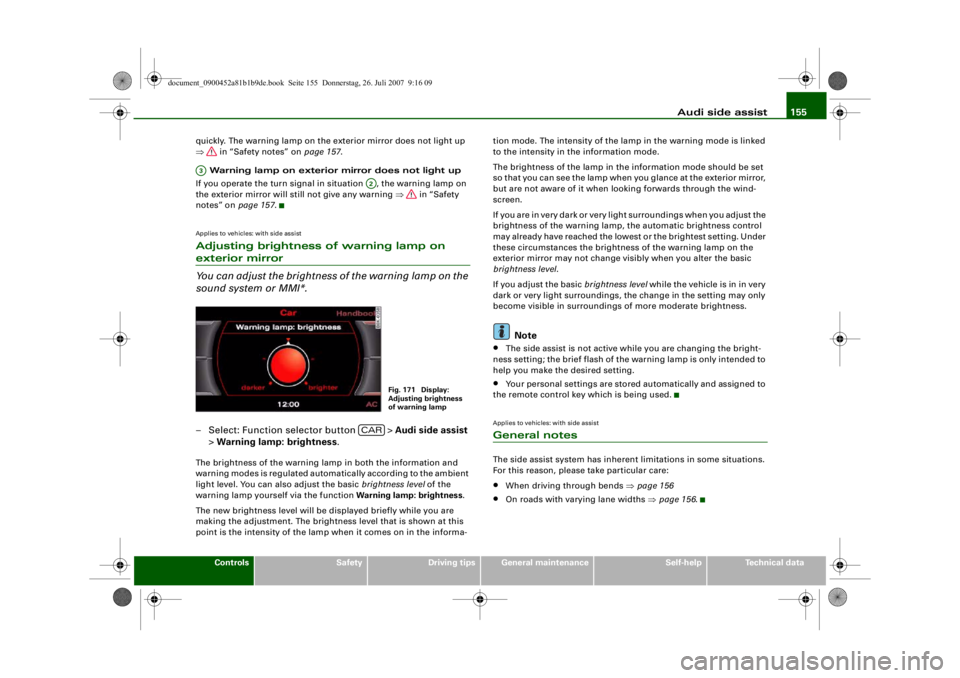
Applies to vehicles: with side assistAdjusting brightness of warning lamp on exterior mirror
You can adjust the brightness of the warning lamp on the
sound system or MMI*.– Select: Function selector button > Audi side assist
> Warning lamp: brightness .The brightness of the warning lamp in both the information and
warning modes is regulated automatically according to the ambient
light level. You can also adjust the basic brightness level of the
warning lamp yourself via the function Warning lamp: brightness.
The new brightness level will be displayed briefly while you are
making the adjustment. The brightne ss level that is shown at this
point is the intensity of the lamp when it comes on in the informa- tion mode. The intensity of the lamp in the warning mode is linked
to the intensity in the information mode.
The brightness of the lamp in the
information mode should be set
so that you can see the lamp when you glance at the exterior mirror,
but are not aware of it when l ooking forwards through the wind-
screen.
If you are in very dark or very light surroundings when you adjust the
brightness of the warning lamp, the automatic brightness control
may already have reached the lowest or the brightest setting. Under
these circumstances the brightne ss of the warning lamp on the
exterior mirror may not change visibly when you alter the basic
brightness level .
If you adjust the basic brightness level while the vehicle is in in very
dark or very light surroundings, the change in the setting may only
become visible in surroundings of more moderate brightness.
Note
•
The side assist is not active while you are changing the bright-
ness setting; the brief flash of the warning lamp is only intended to
help you make the desired setting.
•
Your personal settings are stored automatically and assigned to
the remote control key which is being used.
Applies to vehicles: with side assistGeneral notesThe side assist system has inherent limitations in some situations.
For this reason, please take particular care:•
When driving through bends ⇒page 156
•
On roads with varying lane widths ⇒page 156 .
A3
A2
Fig. 171 Display:
Adjusting brightness
of warning lamp
CAR
document_0900452a81b1b9de.book Seite 155 Donnerstag, 26. Juli 2007 9:16 09
--4 -
-T
•
-+ +-
•
•
Page 178 of 342
Parking aid
176
– Press the control button for Mode ⇒ fig. 194 on the
MMI control console. Park ing mode 2 is displayed.
– Reverse and align your vehicle in such a way that the blue
area marking borders onto the vehicle behind or onto
the parking space line marking. The blue marking is an
extension of the vehicle outline and reaches about five
metres to the rear of the vehicle. The long side of the blue
marking should border onto the kerb. The complete blue
area marking must fit into the parking space.
– When the vehicle is stationary turn the steering wheel to the left as far as it will go.
– Reverse into the parking space.
– Stop the vehicle as soon as the blue curve touches the kerb ⇒page 175, fig. 195.
– When the vehicle is stationary turn the steering wheel to the right as far as it will go.
– Continue to reverse into the parking space until the vehicle is standing parallel to the kerb. indicates the
rear bumper. You should stop reversing, at the latest,
when the red orientation line is bordering on an
object ⇒! Keep a close watch on the front of your
vehicle ⇒.Parking next to obstacles
If an obstacle (such as a wall) is located next to the parking space,
the clearance at the side of the vehicle must be larger. Position the
long side of the blue marking so that there is sufficient clearance
from the kerb. The marking must not touch the kerb. You must also
start turning the steering wheel much earlier. The blue curve
⇒page 175, fig. 195 must not touch the kerb - make sure there is
sufficient clearance from the kerb.
WARNING
•
The reversing camera does not show the complete area behind
the vehicle. It is part icularly important to ensure that there are no
small children or animals near the vehicle, as the reversing camera
may not always be able to detect them (accident risk).
•
Please note that objects which are not touching the ground
may appear to be further away th an they actually are (e.g. the
bumper of a parked vehicle, a towi ng bracket or the rear end of a
truck). In this case you should not use the orientation lines as a
guide when parking th e car - accident risk!Caution
The MMI display shows the path of the rear end of the vehicle if you
were to reverse using the current steering angle. NB: The front end
of the vehicle swings out further th an the rear. Please make sure you
keep a sufficient distance between the vehicle and any obstacles to
make sure that the exterior mirror or edge of the vehicle do not
collide with the obstacle (accident risk).
Note
The orientation lines and markings ap pear on the left or right side,
depending on which turn signals are on.
A1
A2
A3
A4
document_0900452a81b1b9de.book Seite 176 Donnerstag, 26. Juli 2007 9:16 09
--4 -
-T
CD
-+ +-
[I]
&
•
CD
Page 182 of 342
HomeLink
180
At the operating unit
1. Switch on the ignition (do not start the engine).
2. Press and hold down the two outer HomeLink buttons ⇒page 179, fig. 197 until the indicator diode
⇒ page 179, fig. 197 begins to flash after about
20 seconds. This procedure will delete the standard
factory settings and does not need to be repeated when
programming the other buttons.
3. Press the particular HomeLink button which you would like to program.
4. Wait until the diode begins to flash. The HomeLink module now remains in trai ning mode for 5 minutes.
5. Now step in front of your vehicle with the original hand-
held transmitter for the garage door opener or any other
device you wish to assign to the HomeLink control
button.
At the radiator grille
6. Hold the original hand-held transmitter at or near the
centre of your car's radiator grille ⇒ page 179, fig. 198.
7. Press the activator button on the original hand-held
transmitter .
8. As you do so, watch the tu rn signals on your vehicle.
HomeLink confirms successful programming by flashing
all four turn signals three times.
9. If the turn signals fail to flash three times, repeat the procedure with the transmitter held at a different
distance from the radiator grille.
The proper distance between the hand-held transmitter and the
HomeLink module at the radiator grille depends on the system you
want to train. It may require several attempts.
The turn signals will flash once if the time limit for the programming
mode has been exceeded. In this case the programming procedure
needs to be performed again. Repe at the sequence at the operating
unit starting with step 3.
The programming instructions above also apply to the other control
buttons. Start with step 3 if you wish to proceed and program the
other two buttons.
If the garage door or other devices st ill fail to be activated with the
HomeLink control buttons after programming is completed, it is
possible that these systems might be working with a rolling code
instead of the normal fixed security code. If this is the case, a rolling
code programming is required in addition to the steps described
above. ⇒page 180Applies to vehicles: with HomeLinkRolling code programming
Some devices require rolling code programming of the
HomeLink universal transmitter.Identifying a rolling code
– Press the already programmed HomeLink button again
and hold it down.
–Watch HomeLink diode ⇒ page 179, fig. 197. If the
diode starts flashing rapidly and turns into a constant
light after about 2 seconds, this indicates that the device
you wish to operate (e.g. a garage door opener) is
equipped with a rolling code.
– Program the rolling code as follows:
AA
AA
AA
document_0900452a81b1b9de.book Seite 180 Donnerstag, 26. Juli 2007 9:16 09
--4 -
-T
-+
•
+-
Page 183 of 342
HomeLink181
Controls
Safety
Driving tips
General maintenance
Self-help
Technical data
Activating the garage door opener drive unit
– Locate the programming button on the garage door
drive. The exact location and colour of the button may
vary depending on the type of garage door opener.
– Press the programming button on the door drive unit (this will normally cause a “programming mode indicator
lamp” on the unit to light up). You now have about 30
seconds to start and complete the programming of the
HomeLink control button on the operating unit.
Programming at the operating unit in the
headliner
– Press and release the already programmed HomeLink button.
– Press the HomeLink button again to complete rolling code programming.After programming at the operating unit in the headliner, the
garage door opener should rec ognize the HomeLink signal and
respond when the HomeLink button is pressed. Now the other
control buttons can be programmed as required.
Note
•
Having a second person assist you makes programming of the
rolling code easier and faster. For some makes of garage door
openers the HomeLink button may have to be pressed a third time
to complete the tr aining sequence.
•
If you encounter problems progr amming the rolling code you
may find helpful information in the operating instructions of the
garage door opener or other device you wish to operate.
Applies to vehicles: with HomeLinkOperating HomeLink
The programmed devices are activated by means of the
HomeLink control buttons in the headliner.– Make sure that the ignition is on.
– Press the programmed HomeLink button ⇒page 179,
fig. 197. The device assigned to that button (e.g. garage
door) will be activated.The HomeLink indicator diode ⇒page 179, fig. 197 will light up
when you press the button.Applies to vehicles: with HomeLinkErasing the button programming
You can erase the complete HomeLink programming by
pressing the two outer buttons.– Switch on the ignition (do not start the engine).
– Press and hold down the two outer buttons until the indi- cator diode starts to flash ⇒ page 179, fig. 197.
– Then release the buttons.After the programming of the HomeLink buttons has been erased,
the system will return to the training mode and is ready to be re-
programmed at any time.
Note
•
Programmed buttons cannot be erased individually.
•
For security reasons it is advisable to erase the programming of
the HomeLink buttons prior to selling your vehicle.
document_0900452a81b1b9de.book Seite 181 Donnerstag, 26. Juli 2007 9:16 09
--4 -
-T
•
-+ +-
[I]
[I]
•
•
Page 184 of 342
HomeLink
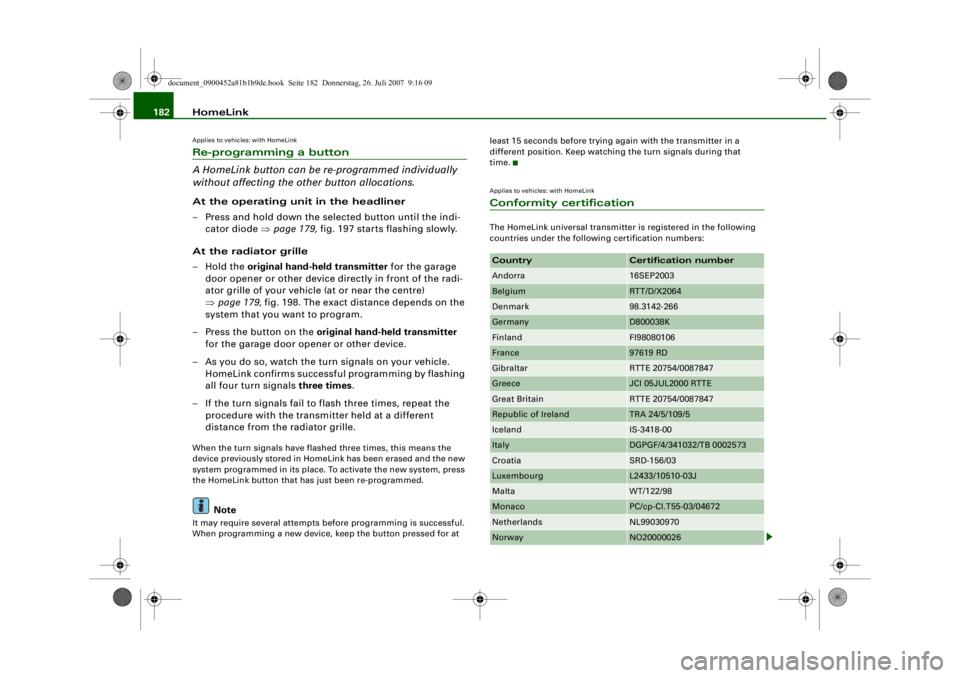
182Applies to vehicles: with HomeLinkRe-programming a button
A HomeLink button can be re-programmed individually
without affecting the other button allocations.At the operating unit in the headliner
– Press and hold down the selected button until the indi-
cator diode ⇒ page 179, fig. 197 starts flashing slowly.
At the radiator grille
–Hold the original hand-held transmitter for the garage
door opener or other device directly in front of the radi-
ator grille of your vehicle (at or near the centre)
⇒ page 179, fig. 198. The exact distance depends on the
system that you want to program.
– Press the button on the original hand-held transmitter
for the garage door opener or other device.
– As you do so, watch the turn signals on your vehicle. HomeLink confirms successful programming by flashing
all four turn signals three times.
– If the turn signals fail to flash three times, repeat the procedure with the transmitter held at a different
distance from the radiator grille.When the turn signals have flashed three times, this means the
device previously stored in HomeLink has been erased and the new
system programmed in its place. To activate the new system, press
the HomeLink button that has just been re-programmed.
Note
It may require several attempts before programming is successful.
When programming a new device, keep the button pressed for at least 15 seconds before trying
again with the transmitter in a
different position. Keep watching the turn signals during that
time.
Applies to vehicles: with HomeLinkConformity certificationThe HomeLink universal transmitter is registered in the following
countries under the following certification numbers:Country
Certification number
Andorra
16SEP2003
Belgium
RTT/D/X2064
Denmark
98.3142-266
Germany
D800038K
Finland
FI98080106
France
97619 RD
Gibraltar
RTTE 20754/0087847
Greece
JCI 05JUL2000 RTTE
Great Britain
RTTE 20754/0087847
Republic of Ireland
TRA 24/5/109/5
Iceland
IS-3418-00
Italy
DGPGF/4/341032/TB 0002573
Croatia
SRD-156/03
Luxembourg
L2433/10510-03J
Malta
WT/122/98
Monaco
PC/cp-CI.T55-03/04672
Netherlands
NL99030970
Norway
NO20000026
document_0900452a81b1b9de.book Seite 182 Donnerstag, 26. Juli 2007 9:16 09
--4 -
-T
•
-+ +-
[I]
Page 189 of 342
Safe driving187
Controls
Safety
Driving tips
General maintenance
Self-help
Technical data
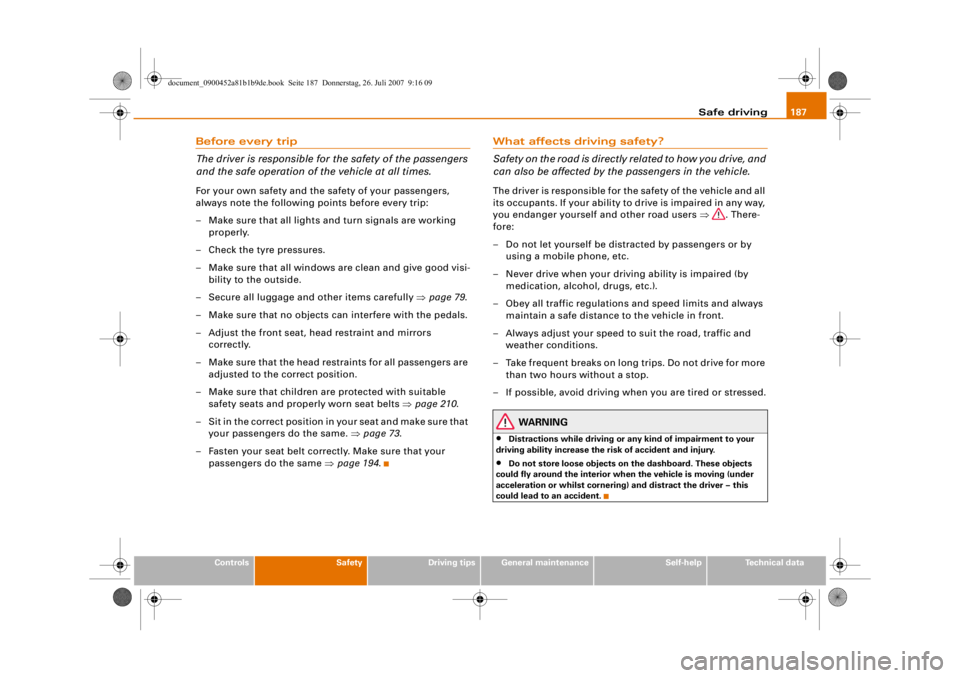
Before every trip
The driver is responsible for the safety of the passengers
and the safe operation of the vehicle at all times.For your own safety and the safety of your passengers,
always note the following points before every trip:
– Make sure that all lights and turn signals are working
properly.
– Check the tyre pressures.
– Make sure that all windows are clean and give good visi- bility to the outside.
– Secure all luggage and other items carefully ⇒page 79 .
– Make sure that no objects can interfere with the pedals.
– Adjust the front seat, head restraint and mirrors correctly.
– Make sure that the head restraints for all passengers are adjusted to the correct position.
– Make sure that children are protected with suitable safety seats and properly worn seat belts ⇒ page 210.
– Sit in the correct position in your seat and make sure that
your passengers do the same. ⇒page 73 .
– Fasten your seat belt correctly. Make sure that your passengers do the same ⇒page 194.
What affects driving safety?
Safety on the road is directly related to how you drive, and
can also be affected by the passengers in the vehicle.The driver is responsible for the safety of the vehicle and all
its occupants. If your ability to drive is impaired in any way,
you endanger yourself and other road users ⇒. There-
fore:
– Do not let yourself be distracted by passengers or by using a mobile phone, etc.
– Never drive when your driving ability is impaired (by medication, alcohol, drugs, etc.).
– Obey all traffic regulations and speed limits and always maintain a safe distance to the vehicle in front.
– Always adjust your speed to suit the road, traffic and weather conditions.
– Take frequent breaks on long trips. Do not drive for more than two hours without a stop.
– If possible, avoid driving when you are tired or stressed.
WARNING
•
Distractions while driving or any kind of impairment to your
driving ability increase the risk of accident and injury.
•
Do not store loose objects on the dashboard. These objects
could fly around the interior when the vehicle is moving (under
acceleration or whilst cornering) and distract the driver – this
could lead to an accident.
document_0900452a81b1b9de.book Seite 187 Donnerstag, 26. Juli 2007 9:16 09
--4 -
-T
-+ +-
•
•