wheel AUDI S4 2008 User Guide
[x] Cancel search | Manufacturer: AUDI, Model Year: 2008, Model line: S4, Model: AUDI S4 2008Pages: 342, PDF Size: 15.01 MB
Page 42 of 342
Driver information system
40The tyre pressure monitoring system makes use of the ABS sensors
to compare the rolling circumfe rence and the vibration of the
wheels. The display in the instrument cluster alerts the driver if
changes are detected on one or more wheels. If only one tyre is
affected, the display will indicate its position ⇒fig. 27.
Each time you change a tyre or the tyre pressures on your vehicle,
you must store the new tyre pressures via the sound system or
MMI* ⇒page 41 .
The rolling circumference and vibration can change if:•
The tyre pressure is too low
•
The tyre has suffered structural damage
•
The air pressure in one or more tyres was changed and the new
tyre pressures were not stored ⇒page 41, “Storing the tyre pres-
sures”
•
The wheels were changed and the new tyre pressures were not
stored ⇒page 41, “Storing the tyre pressures”
•
There is a greater load on the wheels of one axle (e.g. if you are
carrying more passengers or luggage)
•
The road surface under the left wheels is different to the road
surface under the right wheels for a long period
Warning lamp
/ TPMS Tyre pressure ! System malfunction
If the warning lamp flashes for about a minute and then remains
lit after you switch on the ignition, there is a fault in the system. TPMS
(Tyre Pressure Monitoring System) Tyre pressure ! System
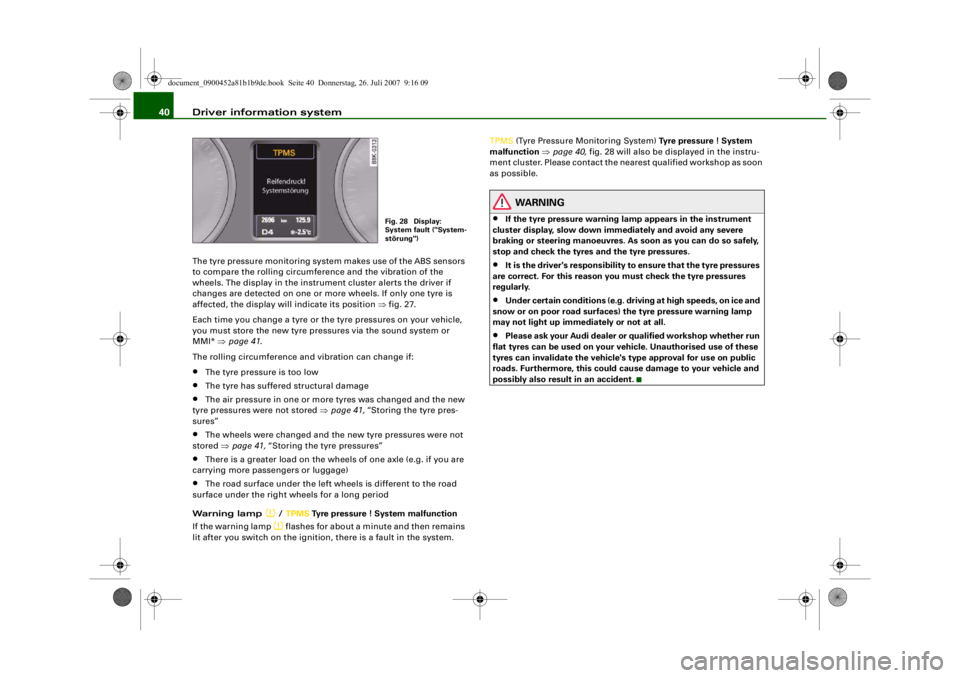
malfunction ⇒ page 40, fig. 28 will also be displayed in the instru-
ment cluster. Please contact the ne arest qualified workshop as soon
as possible.
WARNING
•
If the tyre pressure warning lamp appears in the instrument
cluster display, slow down i mmediately and avoid any severe
braking or steering manoeuvres. As soon as you can do so safely,
stop and check the tyres and the tyre pressures.
•
It is the driver's responsibility to ensure that the tyre pressures
are correct. For this reason yo u must check the tyre pressures
regularly.
•
Under certain conditi ons (e.g. driving at high speeds, on ice and
snow or on poor road surfaces) the tyre pressure warning lamp
may not light up immediately or not at all.
•
Please ask your Audi dealer or qualified workshop whether run
flat tyres can be used on your vehicle. Unauthorised use of these
tyres can invalidate the vehicle's type approval for use on public
roads. Furthermore, this could cause damage to your vehicle and
possibly also result in an accident.
Fig. 28 Display:
System fault ("System-
störung")
document_0900452a81b1b9de.book Seite 40 Donnerstag, 26. Juli 2007 9:16 09
--4 -
-T
-+ +-
•
Page 62 of 342
Lights and vision
60
– Turn the button clockwise +” to increase the brightness of the instrument lighting in dark conditions.
– Turn the button anti-clockwise -” to reduce the bright- ness of the instrument lighting in dark conditions.
– Press the knob in again to prevent the setting from being changed unintentionally.The instrument lighting (dials and needles), the centre console illu-
mination and the illumination of the displays are regulated by a
light sensor incorporated in the instrument cluster. In bright condi-
tions any changes made to the brig htness of the instrument lighting
have no effect.
Note
The instrument lighting (illumination of dials and needles) is
switched on when the ignition is on and the vehicle's lights are off.
The instrument lighting is dimme d automatically as the daylight
starts to fade; it is switched off completely when the light condi-
tions become very poor. This function is intended to remind the
driver to switch on the dipped-beam headlights in good time when
light conditions become poor.
Applies to vehicles: with headlight range controlHeadlight range control
When the dipped beam headlights are switched on, the
range of the headlights can be adjusted to suit the load
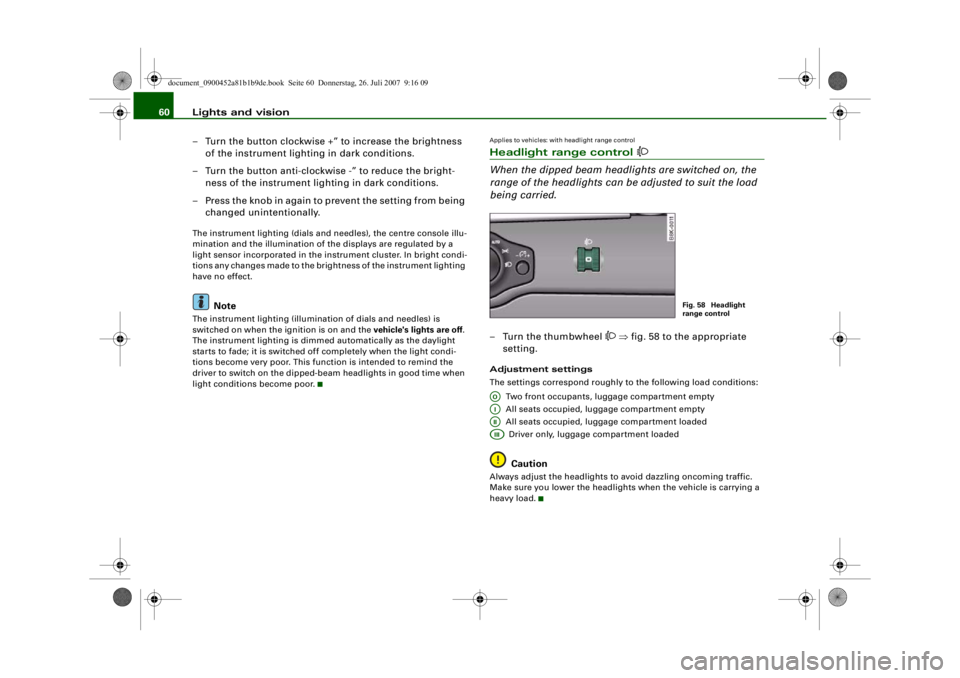
being carried.– Turn the thumbwheel
⇒ fig. 58 to the appropriate
setting.
Adjustment settings
The settings correspond roughly to the following load conditions:
Two front occupants, luggage compartment empty
All seats occupied, luggage compartment empty
All seats occupied, luggage compartment loadedDriver only, luggage compartment loaded
Caution
Always adjust the headlights to avoid dazzling oncoming traffic.
Make sure you lower the headlights when the vehicle is carrying a
heavy load.
Fig. 58 Headlight
range control
AOAIAIIAIII
document_0900452a81b1b9de.book Seite 60 Donnerstag, 26. Juli 2007 9:16 09
--4 -
-T
II]
-+ +-
•
CD
•
Page 63 of 342
Lights and vision61
Controls
Safety
Driving tips
General maintenance
Self-help
Technical data
Applies to vehicles: with xenon headlight bulbsDynamic headlight range controlHeadlights with xenon gas-discharge bulbs automatically adapt to
suit the load being carried when the engine is switched on. The
headlights are also automatically adjusted when the vehicle is in
motion (e.g. when accelerating and braking).Applies to vehicles: with adaptive lightadaptive light
This feature provides better illumination when you drive
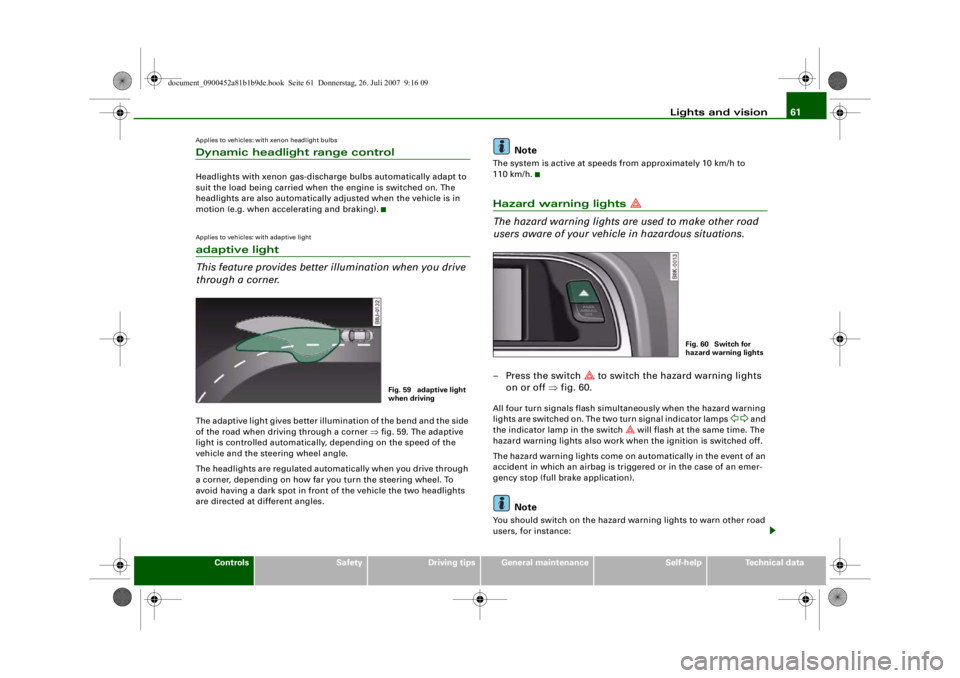
through a corner.The adaptive light gives better illumination of the bend and the side
of the road when driving through a corner ⇒fig. 59. The adaptive
light is controlled automatically, depending on the speed of the
vehicle and the steering wheel angle.
The headlights are regulated automatically when you drive through
a corner, depending on how far you turn the steering wheel. To
avoid having a dark spot in front of the vehicle the two headlights
are directed at different angles.
Note
The system is active at speeds from approximately 10 km/h to
110 km/h.Hazard warning lights
The hazard warning lights ar e used to make other road
users aware of your vehicle in hazardous situations.– Press the switch
to switch the hazard warning lights
on or off ⇒fig. 60.
All four turn signals flash simultaneously when the hazard warning
lights are switched on. The two turn signal indicator lamps
and
the indicator lamp in the switch
will flash at the same time. The
hazard warning lights also work when the ignition is switched off.
The hazard warning lights come on automatically in the event of an
accident in which an airbag is triggered or in the case of an emer-
gency stop (full br ake application).
Note
You should switch on the hazard warning lights to warn other road
users, for instance:
Fig. 59 adaptive light
when driving
Fig. 60 Switch for
hazard warning lights
document_0900452a81b1b9de.book Seite 61 Donnerstag, 26. Juli 2007 9:16 09
--4 -
-
[I]
T
•
•
-+ +-
[I]
Page 64 of 342
Lights and vision
62•
When reaching the tail end of a traffic jam
•
If your vehicle breaks down or there is an emergency
•
If your vehicle is being towed away, or if you are towing another
vehicle.
Turn signal and main beam lever
The turn signal and main beam lever also operates the
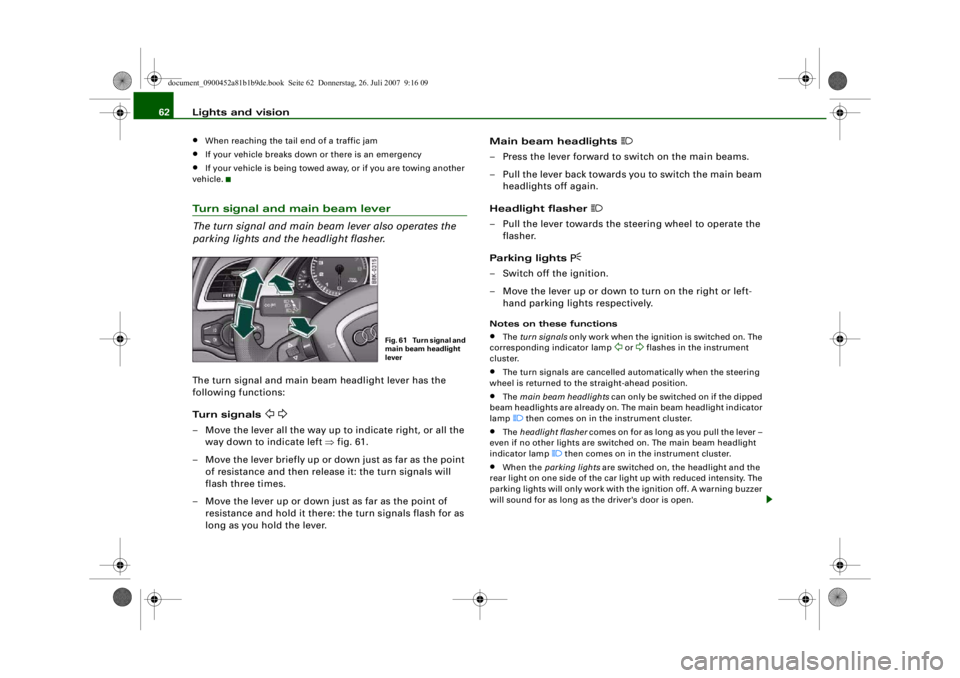
parking lights and the headlight flasher.The turn signal and main beam headlight lever has the
following functions:
Turn signals
– Move the lever all the way up to indicate right, or all the way down to indicate left ⇒fig. 61.
– Move the lever briefly up or do wn just as far as the point
of resistance and then release it: the turn signals will
flash three times.
– Move the lever up or down just as far as the point of resistance and hold it there: the turn signals flash for as
long as you hold the lever. Main beam headlights
– Press the lever forward to switch on the main beams.
– Pull the lever back towards you to switch the main beam
headlights off again.
Headlight flasher
– Pull the lever towards the steering wheel to operate the flasher.
Parking lights
– Switch off the ignition.
– Move the lever up or down to turn on the right or left- hand parking ligh ts respectively.Notes on these functions•
The turn signals only work when the ignition is switched on. The
corresponding indicator lamp
or
flashes in the instrument
cluster.
•
The turn signals are cancelled automatically when the steering
wheel is returned to the straight-ahead position.
•
The main beam headlights can only be switched on if the dipped
beam headlights are already on. The main beam headlight indicator
lamp then comes on in the instrument cluster.
•
The headlight flasher comes on for as long as you pull the lever –
even if no other lights are switched on. The main beam headlight
indicator lamp
then comes on in the instrument cluster.
•
When the parking lights are switched on, the headlight and the
rear light on one side of the car light up with reduced intensity. The
parking lights will only work with the ignition off. A warning buzzer
will sound for as long as the driver's door is open.
Fig. 61 Turn signal and
main beam headlight
lever
document_0900452a81b1b9de.book Seite 62 Donnerstag, 26. Juli 2007 9:16 09
--4 -
-T
•
-+ +-
Page 76 of 342
Seats and storage
74
Adjusting height of lumbar support*
– Press the top or bottom part of the adjuster switch to move the lumbar support upwards or downwards as
required.
Raising or lowering the seat
– Pull the lever ⇒page 73, fig. 75 up or down repeat-
edly (i.e. pump the lever).
Adjusting backrest angle
– Lean forwards to take your weight off the backrest.
– Turn the adjuster wheel ⇒ page 73, fig. 75 to set the
angle of the backrest as required.
WARNING
•
Never adjust the driver's seat wh en the vehicle is moving - this
could lead to an accident.
•
Be careful when adjusting the seat height. Careless or uncon-
trolled use of the seat adjustment can cause injuries.
•
Do not drive with the backrests of the front seats reclined too
far as otherwise the seat belt and airbag could fail to restrain the
wearer properly in an accident, possibly leading to injury.
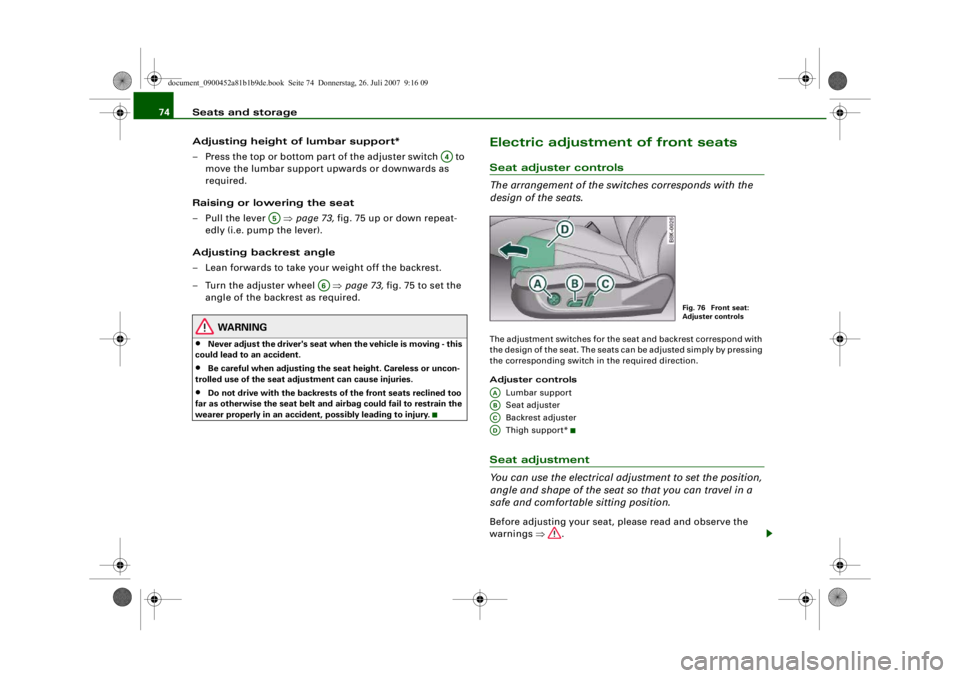
Electric adjustment of front seatsSeat adjuster controls
The arrangement of the switches corresponds with the
design of the seats.The adjustment switches for the se at and backrest correspond with
the design of the seat. The seats can be adjusted simply by pressing
the corresponding switch in the required direction.
Adjuster controls
Lumbar support
Seat adjuster
Backrest adjuster
Thigh suppor t*Seat adjustment
You can use the electrical adjustment to set the position,
angle and shape of the seat so that you can travel in a
safe and comfortable sitting position.Before adjusting your seat, please read and observe the
warnings ⇒.
A4
A5
A6
Fig. 76 Front seat:
Adjuster controls
AAABACAD
document_0900452a81b1b9de.book Seite 74 Donnerstag, 26. Juli 2007 9:16 09
--4 -
-T
-+ +-
•
•
Page 101 of 342
Heating and cooling99
Controls
Safety
Driving tips
General maintenance
Self-help
Technical data
Note
If the LED in the AC button should continue to light up when the AC
mode has been switched off (i.e. the air conditioner has been
switched off) this is due to a defect in one of the air conditioner
components. If a malfunction should occur, please contact a quali-
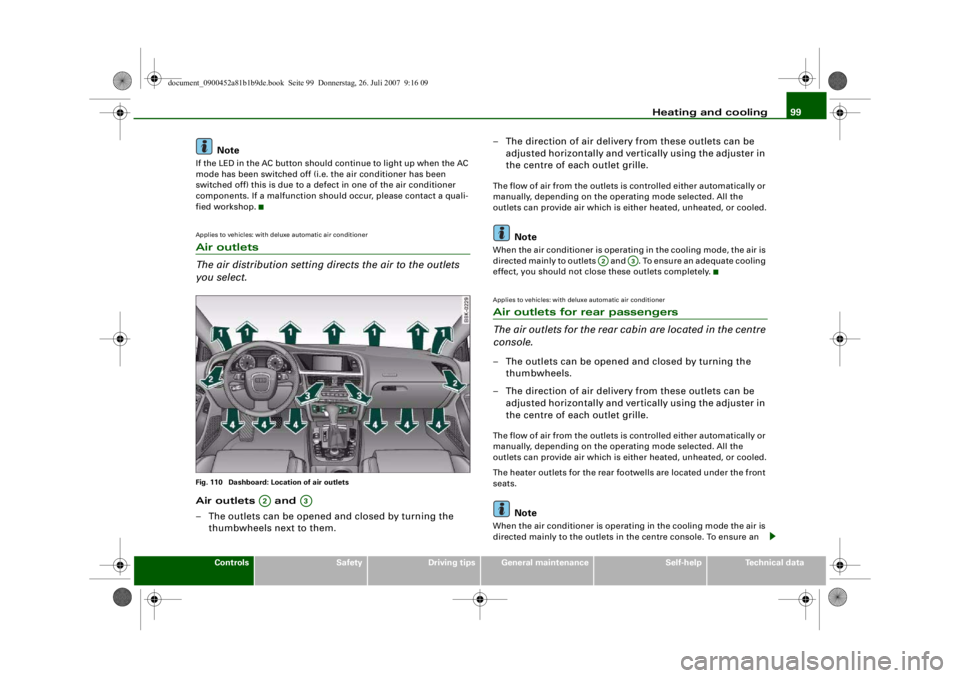
fied workshop.Applies to vehicles: with deluxe automatic air conditionerAir outlets
The air distribution setting directs the air to the outlets
you select.Fig. 110 Dashboard: Location of air outletsAir outlets and
– The outlets can be opened and closed by turning the
thumbwheels next to them. – The direction of air delivery from these outlets can be
adjusted horizontally and vert ically using the adjuster in
the centre of each outlet grille.
The flow of air from the outlets is controlled either automatically or
manually, depending on the oper ating mode selected. All the
outlets can provide air which is either heated, unheated, or cooled.
Note
When the air conditioner is operating in the cooling mode, the air is
directed mainly to outlets and . To ensure an adequate cooling
effect, you should not close these outlets completely.Applies to vehicles: with deluxe automatic air conditionerAir outlets for rear passengers
The air outlets for the rear ca bin are located in the centre
console.– The outlets can be opened and closed by turning the
thumbwheels.
– The direction of air delivery from these outlets can be adjusted horizontally and vert ically using the adjuster in
the centre of each outlet grille.The flow of air from the outlets is controlled either automatically or
manually, depending on the oper ating mode selected. All the
outlets can provide air which is either heated, unheated, or cooled.
The heater outlets for the rear footwells are located under the front
seats.
Note
When the air conditioner is operating in the cooling mode the air is
directed mainly to the outlets in the centre console. To ensure an
A2
A3
A2
A3
document_0900452a81b1b9de.book Seite 99 Donnerstag, 26. Juli 2007 9:16 09
--4 -
-
(I]
T
•
(I]
•
-+ +-
(I]
Page 109 of 342
Heating and cooling107
Controls
Safety
Driving tips
General maintenance
Self-help
Technical data
remain on until the ignition is switched off. When the rear window
heating is switched on, this setting will remain activated for 15
minutes after switching off the ignition.
If the engine is started again during this period of 15 minutes, the
rear window heating will be switched on for about 10 to 20 minutes,
depending on the exterior temperature. This means you do not have
to manually switch on the rear window heating again if the vehicle
has only been parked for a short time.
For the sake of the environment
Switch off the heated rear window manually as soon as the rear
window is clear. By saving electrical power you can also save fuel.Applies to vehicles: with deluxe automatic air conditioner plusAC mode Deactivating the AC mode
– Press the button.
Activating the AC mode
– Press the button again.In the AC mode, the air cooling system is switched on and the
heating and ventilation are regulated automatically.
Note
If the LED in the AC button should continue to light up when the AC
mode has been switched off (i.e. the air conditioner has been
switched off) this is due to a defect in one of the air conditioner
components. If a malfunction should occur, please contact a quali-
fied workshop.
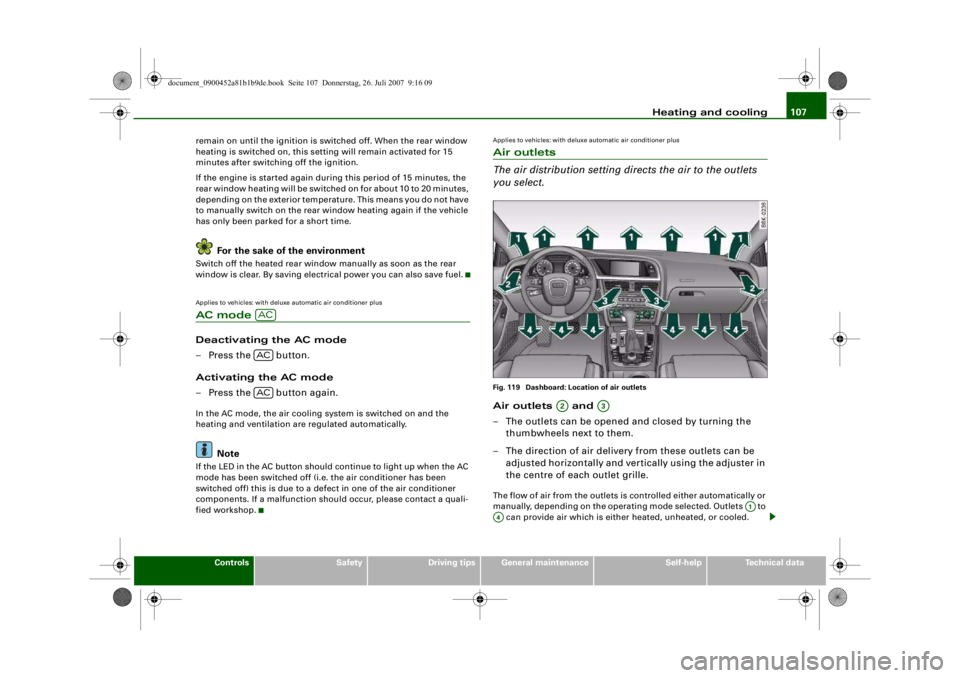
Applies to vehicles: with deluxe automatic air conditioner plusAir outlets
The air distribution setting directs the air to the outlets
you select.Fig. 119 Dashboard: Location of air outletsAir outlets and
– The outlets can be opened and closed by turning the
thumbwheels next to them.
– The direction of air delivery from these outlets can be adjusted horizontally and vert ically using the adjuster in
the centre of each outlet grille.The flow of air from the outlets is controlled either automatically or
manually, depending on the operating mode selected. Outlets to
can provide air which is either heated, unheated, or cooled.
ACACAC
A2
A3
A1
A4
document_0900452a81b1b9de.book Seite 107 Donnerstag, 26. Juli 2007 9:16 09
-+
[I]
D D
D •
--4 -
-T +-
Page 110 of 342
Heating and cooling
108
NoteWhen the air conditioner is operating in the cooling mode, the air is
directed mainly to outlets and . To ensure an adequate cooling
effect, you should not close these outlets completely.Applies to vehicles: with deluxe automatic air conditioner plusAir outlets for rear passengers
The air outlets for the rear cabin are located in the centre
console.– The outlets can be opened and closed by turning the thumbwheels.
– The direction of air delivery from these outlets can be adjusted horizontally and vertically using the adjuster in
the centre of each outlet grille.The flow of air from the outlets is controlled either automatically or
manually, depending on the operating mode selected. All the
outlets can provide air which is either heated, unheated, or cooled.
The heater outlets for the rear footwells are located under the front
seats.
Note
When the air conditioner is operating in the cooling mode the air is
directed mainly to the outlets in the centre console. To ensure an
adequate cooling effect, you sh ould not close these outlets
completely.
Applies to vehicles: with deluxe automatic air conditioner plusEconomical operation of the air conditioner
Economical operation of the air conditioner will help to
save fuel.When the air conditioner is operating in the cooling mode it
reduces engine power and incr eases fuel consumption. To
ensure that the cooling mode is activated only when really
necessary, please note the following points:
– Switch off the cooling mode by pressing the AC button (LED off) if you wish to save fuel.
– You should also switch off the cooling mode by pressing the AC button (LED off) if you open the windows or the
tilting panorama roof* while driving.
– If the vehicle has heated up after standing in the sun, open the windows and doors for a short time to cool the
vehicle.
For the sake of the environmentBy saving fuel you also reduce the amount of pollutants emitted
from your vehicle.
A2
A3
document_0900452a81b1b9de.book Seite 108 Donnerstag, 26. Juli 2007 9:16 09
--4 -
-T
•
-+ +-
•
•
Page 117 of 342
Heating and cooling115
Controls
Safety
Driving tips
General maintenance
Self-help
Technical data
Applies to vehicles: with seat heating for rear seatsSeat heating for rear seats
The seat cushions and backrests of the two outer rear
seats can be heated electrically.– Turn the left thumbwheel (on the centre console) to
switch on and regulate the heating for the left rear seat.
– Turn the right thumbwheel (on the centre console) to switch on and regulate the heating for the right rear seat.The heating is switched off when the thumbwheel is set to 0.
Possible settings range from 1 to 6.
The heating for the rear seats only operates when a sensor registers
the weight of the occupant in the seat. If nobody is travelling on the
rear seats, please switch off the re ar seat heating to avoid activating
it unintentionally.
Caution
To avoid damaging the heating elements of the seat heating, please
do not kneel on the seat or apply sharp pressure at a single point.
document_0900452a81b1b9de.book Seite 115 Donnerstag, 26. Juli 2007 9:16 09
--4 -
-T
-+
CD
+-
•
Page 118 of 342
Driving
116DrivingSteeringApplies to vehicles: with manually adjustable steering columnAdjusting the steering wheel position
The height and reach of the steering wheel can be
adjusted as required to suit the driver.– Pull the lever ⇒fig. 129 -arrow- ⇒ up.
– Move the steering wheel to the desired position.
– Then push the lever towards the steering column until the catch engages.
WARNING
•
Never adjust the position of the steering wheel when the
vehicle is moving - this could cause an accident.
•
For safety reasons, the lever must be pushed securely against
the steering column to prevent the steering wheel from acciden-
tally changing position wh ile driving (accident risk).
Ignition lockStarting the engine with the key
You can use the ignition key to switch on the ignition and
start the engine.– Insert the key into the ignition lock.
– Manual gearbox: Press the clutch pedal all the way down
and move the gear lever into neutral.
– Automatic gearbox: Press the brake pedal and move the
selector lever to position P or N.
– Press in the key ⇒fig. 130 to start the engine.
– Diesel engines can take a few seconds longer than usual to star t on cold days. Please keep your foot on the clutch
or brake pedal until the engine starts. The glow plug indi-
cator lamp
lights up in the instrument cluster while
the glow plugs are preheating.
Fig. 129 Lever beneath
steering column
Fig. 130 Ignition key
document_0900452a81b1b9de.book Seite 116 Donnerstag, 26. Juli 2007 9:16 09
--4 -
-T
-+ +-
•