wheel AUDI S4 2008 Owner's Manual
[x] Cancel search | Manufacturer: AUDI, Model Year: 2008, Model line: S4, Model: AUDI S4 2008Pages: 342, PDF Size: 15.01 MB
Page 123 of 342
Driving121
Controls
Safety
Driving tips
General maintenance
Self-help
Technical data
start running again after some time
if the coolant temperature rises
due to a build-up of heat, or if the engine is hot and the engine
compartment is heated up further by direct sunlight.
Electro-mechanical parking brakeOperation
The electro-mechanical parking brake replaces the hand-
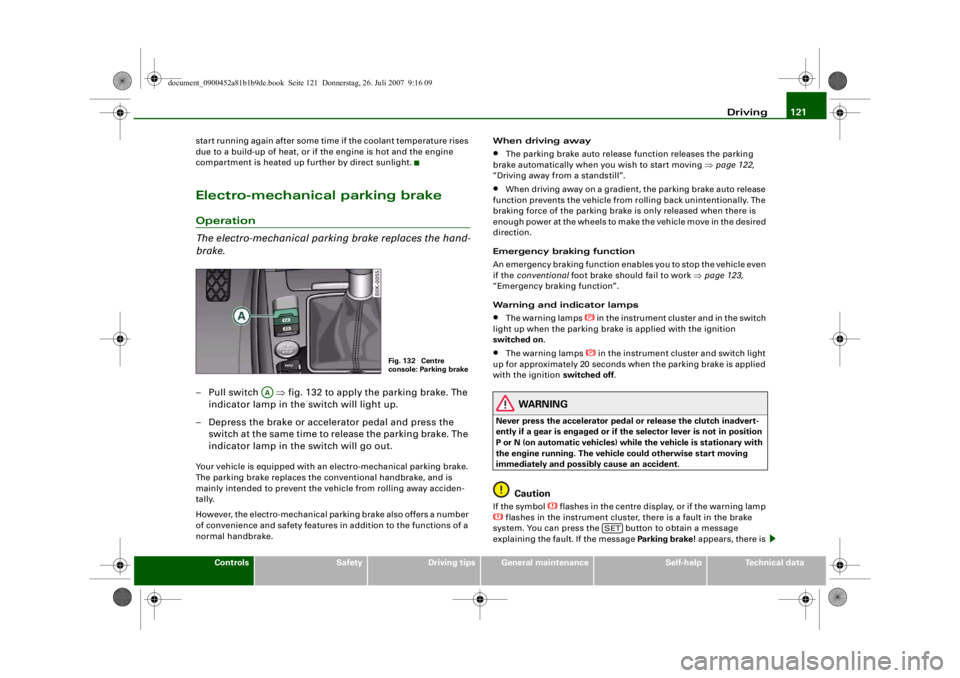
brake.– Pull switch ⇒fig. 132 to apply the parking brake. The
indicator lamp in the switch will light up.
– Depress the brake or accelerator pedal and press the switch at the same time to release the parking brake. The
indicator lamp in the switch will go out.Your vehicle is equipped with an electro-mechanical parking brake.
The parking brake replaces the co nventional handbrake, and is
mainly intended to prevent the vehicle from rolling away acciden-
tally.
However, the electro-mechanical pa rking brake also offers a number
of convenience and safety features in addition to the functions of a
normal handbrake. When driving away
•
The parking brake auto release function releases the parking
brake automatically when you wish to start moving ⇒page 122,
“Driving away from a standstill”.
•
When driving away on a gradient, the parking brake auto release
function prevents the vehicle from rolling back unintentionally. The
braking force of the parking brake is only released when there is
enough power at the wheels to make the vehicle move in the desired
direction.
Emergency braking function
An emergency braking function enables you to stop the vehicle even
if the conventional foot brake should fail to work ⇒page 123,
“Emergency braking function”.
Warning and indicator lamps
•
The warning lamps
in the instrument cluster and in the switch
light up when the parking brake is applied with the ignition
switched on .
•
The warning lamps
in the instrument cluster and switch light
up for approximately 20 seconds when the parking brake is applied
with the ignition switched off .
WARNING
Never press the accelerator pedal or release the clutch inadvert-
ently if a gear is engaged or if the selector lever is not in position
P or N (on automatic vehicles) while the vehicle is stationary with
the engine running. The vehicl e could otherwise start moving
immediately and possibly cause an accident.
Caution
If the symbol
flashes in the centre display, or if the warning lamp
flashes in the instrument cluster, there is a fault in the brake
system. You can press the button to obtain a message
explaining the faul t. If the message Parking brake ! appears, there is
Fig. 132 Centre
console: Parking brake
AA
SET
document_0900452a81b1b9de.book Seite 121 Donnerstag, 26. Juli 2007 9:16 09
--4 -
-T
•
-+ +-
CD
D
Page 124 of 342
Driving
122a fault in the parking brake. Have the fault repaired by a qualified
workshop without delay ⇒page 32 .
Note
•
The parking brake can be applied at any time - even when the
ignition is switched off. However, the ignition must be switched on
before the parking brake can be released.
•
Any slight noise which may be heard when the parking brake is
applied or released is quite normal and no cause for concern.
•
The parking brake runs an automatic test cycle at regular inter-
vals when the vehicle is parked. This may also cause a slight noise,
which is normal.
Parking
Please note the following points to ensure there is no risk
of the car rolling away accidentally after it is parked.Parking t he c ar
– Use the foot brake to stop the vehicle.
– Pull the switch to apply the parking brake.
– Automatic gearbox: Move the selector lever to P.
– Switch off the engine ⇒ .
– Manual gearbox: Engage the first gear.
When parking on slopes
– Turn the steering wheel so that the vehicle would roll into
the kerb if it did start to move accidentally.
WARNING
•
Always take the key with you when leaving the vehicle – even
if you only intend to be gone for a short time. This is especially
important if children are left in the car. They might otherwise be
able to start the engine, releas e the parking brake or use power-
operated equipment such as the elec tric windows - this could lead
to injuries.
•
Do not leave anyone (especially chi ldren) in the vehicle when it
is locked. Locked doors could delay assistance in an emergency,
potentially putting lives at risk.
Driving away from a standstill
The parking brake auto release function releases the
parking brake automatically when you wish to start
moving.Applying the parking brake when stopping
– Pull the switch to apply the parking brake.
Releasing the parking brake when driving away
– Drive off in the normal way: the parking brake will be released automatically and the vehicle will start moving.On vehicles with automatic gearbox, you can apply the parking
brake when stopping at traffic lights, etc. Then you do not have to
hold the car with the footbrake, as the parking brake will stop it
creeping forward while a gear is engaged in the automatic transmis-
sion. When you drive off in the normal way, the parking brake will be
released automatically and the vehicle will start moving.
Driving away on a slope
When driving away on a gradient, the parking brake auto release
function prevents the vehicle from rolling back unintentionally. The
document_0900452a81b1b9de.book Seite 122 Donnerstag, 26. Juli 2007 9:16 09
--4 -
-T
[I)
•
•
-+ +-
Page 125 of 342
Driving123
Controls
Safety
Driving tips
General maintenance
Self-help
Technical data
braking force of the parking brake is only released when there is
enough power at the wheels to make the vehicle move in the desired
direction.
Note
For safety reasons the parking brake will only release automatically
if the driver's seat belt
is engaged in its buckle.Driving away when towing a trailer
Please note the following po ints to prevent the vehicle
from rolling back unintentionally on a gradient.– Pull and hold the parking brake switch and press the
accelerator. The parking brake will remain engaged and
prevent any tendency to roll back down the slope.
– You can release the parking brake switch as soon as the engine is delivering enough power to the wheels.Depending on the weight of the vehicle and trailer and the steep-
ness of the slope, there may be a tendency to roll back downhill
when driving away from a standstill. You can prevent this by pulling
out the parking brake switch as you press the accelerator (in the
same way as with a conventional handbrake).Emergency braking function
This feature enables you to stop the vehicle if the main
brake system should fail or if the pedal is obstructed.– Pull out and hold the parkin g brake switch to stop the
vehicle with the parking brake in an emergency.
– The brakes will be released immediately if you release the switch or press down the accelerator.
If you pull out and hold the park ing brake switch at a road speed
above about 8 km/h, this will initiate an emergency brake applica-
tion. The brakes are then applied hy draulically at all four wheels.
The effect is the same as an emergency stop (full brake application)
⇒
To prevent the emergency braking function from being used acci-
dentally, a warning buzzer sounds when the switch is operated. The
brakes are released immediately when you release the switch or
press down the accelerator.
WARNING
You should only use the emergency braking function in a real
emergency, for example if the brake system should fail or if the
brake pedal is obstructed. If you use the emergency braking func-
tion by activating the parking brak e switch, the effect is similar to
a full brake application (emergenc y stop). Please remember that
the ESP (with its combined ABS, EDL and traction control func-
tions) is still subject to certain physical limits. In a corner or in bad
road or weather conditions an emergency stop can cause the
vehicle to skid or lose steering control.Driver messages in the instrument cluster displayCaution: Vehicle parked too steep
This message can appear when you apply the parking brake if the
car is parked on a gradient steeper than about 30%.
In this case the parking brake may not be strong enough to prevent
the vehicle from rolling back accidentally.
Please release parking brake
However, please remember that, for safety reasons, the parking
brake will only release automatically if the driver's seat belt is
buckled.
document_0900452a81b1b9de.book Seite 123 Donnerstag, 26. Juli 2007 9:16 09
--4 -
-T
[I]
•
-+
•
+-
•
Page 130 of 342
adaptive cruise control (ACC)
128adaptive cruise control (ACC)Speed and distance control systemApplies to vehicles: with adaptive cruise controlDescription
The adaptive cruise control is a combined speed and
distance control system to assist the driver.Adaptive cruise control allows you to maintain any desired constant
speed between 30 and 200 km/h. In addition, the system controls
the distance maintained to the vehicle in front (subject to certain
limitations as described below).
The system can be used to greatest effect on long motorway jour-
neys or on other main roads with long straight sections.
How is the system operated?
The adaptive cruise control system is operated via a control lever on
the steering wheel ⇒page 131, “Setting the speed” and
⇒ page 133, “Setting the distance”. Driver messages
When the system is being used, important information is displayed
in the speedometer and on the instrument cluster display screen
⇒
page 134, “Driver messages”.
Please note the following points:
The adaptive cruise control has ce rtain limits determined by the
system itself. This means that the driver may in some situations
have to intervene and control the speed and distance to the vehicle
in front himself ⇒page 138, “Driver intervention prompt” and
⇒ page 140, “System limitations”.
WARNING
Please always direct yo ur full attention to the road, even when you
are using adaptive cruise control. It is always the driver who is
responsible for determining the speed and for keeping a safe
distance to the other vehicles on the road.•
For safety reasons, the adaptive cruise control must not be
used in city traffic, stop-go traffic, roads with a lot of bends or in
difficult driving condition s (such as ice, fog, loose grit or gravel,
heavy rain, aquaplaning) - this could cause an accident!
•
When you take a turn-off, drive along a motorway exit lane or
pass through roadwork sections, please temporarily switch off the
adaptive cruise control in order to avoid the vehicle accelerating to
the selected speed.
•
The adaptive cruise control can only control the distance to
vehicles in front. As a rule, it cannot recognize vehicles travelling
in other lanes. For this reason, please temporarily switch off the
system if you are travelling in th e inside lane and vehicles in the
overtaking lane are travelling at a slower speed than you are.
Otherwise, you would overtake these vehicles on the inside.
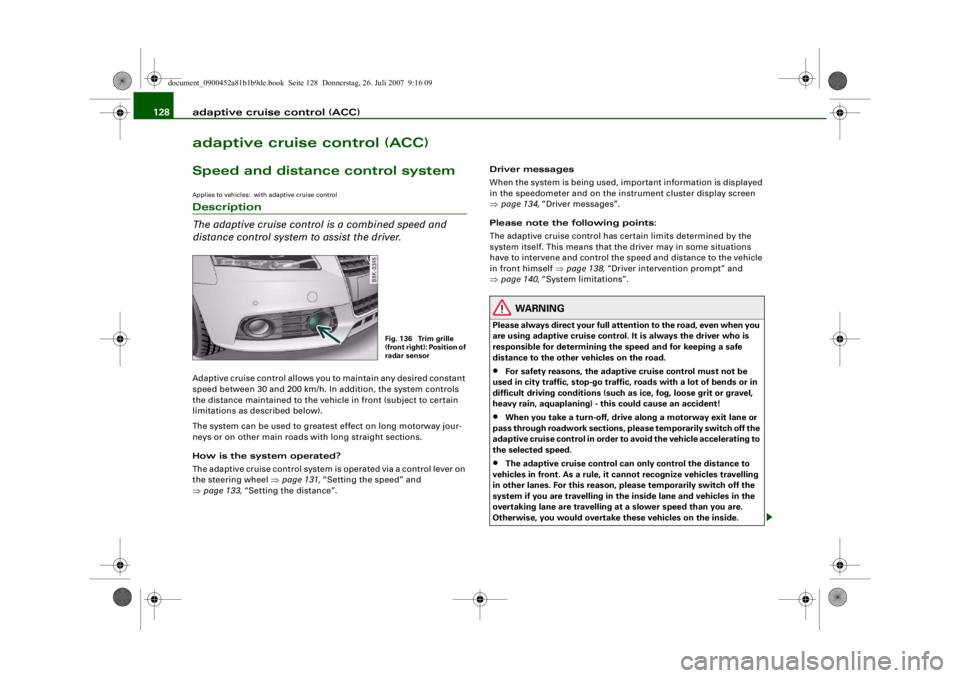
Fig. 136 Trim grille
(front right): Position of
radar sensor
document_0900452a81b1b9de.book Seite 128 Donnerstag, 26. Juli 2007 9:16 09
--4 -
-T
-+ +-
Page 147 of 342
Audi lane assist145
Controls
Safety
Driving tips
General maintenance
Self-help
Technical data
Audi lane assistAudi lane assistApplies to vehicles: with lane assistDescription
The lane assist system assist s the driver in keeping the
vehicle in the right lane.The system uses a camera to detect the markings of the lane you are
driving in. If the vehicle approaches one of the detected lane mark-
ings, the steering wheel vibrates to warn the driver that the vehicle
might be about to cross one of the markings. The lane assist system
is functional when it has detected lane markings on both sides of
the lane you are driving in. The green lamp
in the instrument
cluster indicates that the function is activated and fully functional.
If you operate the turn signal before crossing one of the lane mark-
ings (while the lane assist system is functional), the system will
detect that the lane change is in tended and will not warn the driver.
As the system is designed for driving on motorways and other major
roads, it is only active above a speed of about 65 km/h.
WARNING
•
The lane assist system does not keep the vehicle in its lane. It
merely warns the driver when the vehicle is in danger of crossing
the markings of the lane. As the driver you are always responsible
for staying in your own lane.
•
The camera cannot det ect all lane markings. Therefore it is
possible that variations in the road surface or objects might be
detected as lane markings, which can lead to false warnings, or
warnings not being given.
•
The camera's view might be obst ructed, for example by vehi-
cles travelling in front, rain, snow, a lot of water on the road or adverse light. This can result in
the system not detecting the lane
markings correctly.
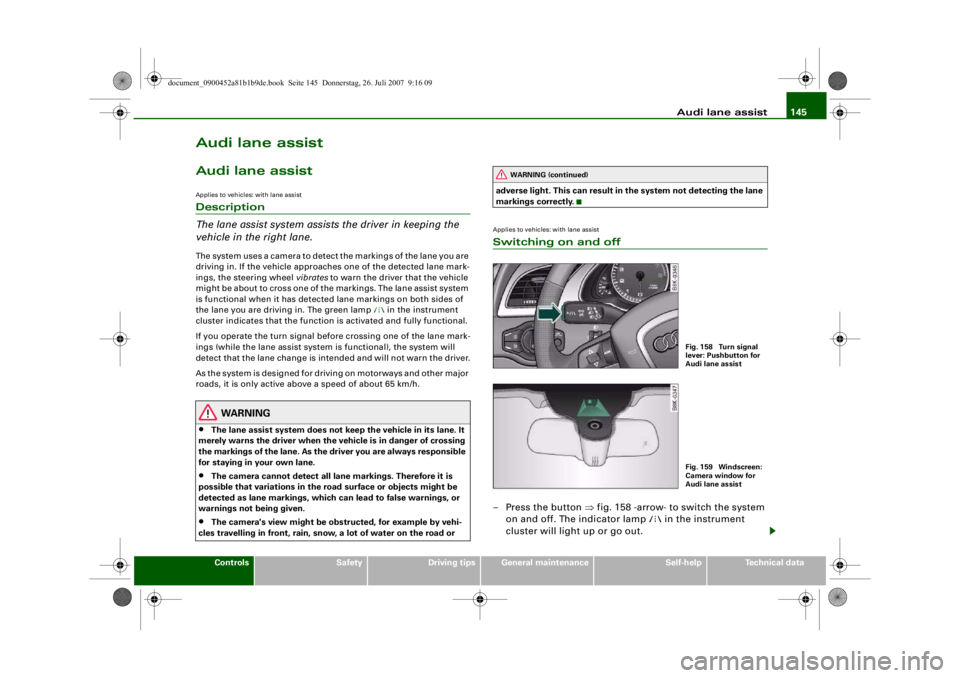
Applies to vehicles: with lane assistSwitching on and off– Press the button ⇒fig. 158 -arrow- to switch the system
on and off. The indicator lamp
in the instrument
cluster will light up or go out.
WARNING (continued)
Fig. 158 Turn signal
lever: Pushbutton for
Audi lane assistFig. 159 Windscreen:
Camera window for
Audi lane assist
document_0900452a81b1b9de.book Seite 145 Donnerstag, 26. Juli 2007 9:16 09
--4 -
-T
•
-+ +-
Page 149 of 342
Audi lane assist147
Controls
Safety
Driving tips
General maintenance
Self-help
Technical data
•
Unfilled lines: The lane assist is switched on but not ready for
warning ⇒page 146, fig. 161,
Version : High-resolution display
•
Solid white lines: The lane assist is switched on and ready to
warn.
•
Solid red line (left or right): The lane assist warns you before you
cross the lane demarcation ⇒page 146, fig. 160.
•
Unfilled lines: The lane assist is switched on but not ready for
warning ⇒page 146, fig. 161.
Messages in the instrument cluster display
Should the lane assist be deacti vated automatically, the indicator
lamp in the instrument cluster will go out and one of the following
messages will appear in the instrument cluster display:
Audi lane assist not available: currently no sensor vision
This message is displayed when the camera is no longer functional
after the system has continuously failed to detect the lane mark-
ings. This can have the following causes:
•
The outside of the camera window ⇒page 145, fig. 159 is dirty
or frosted. Please remove dirt or ice from this area of the wind-
screen.
•
The inside of the camera window is misted up. In this case,
please wait for the camera window to demist before switching on
the lane assist system again.
•
Due to the conditions (e.g. snow-covered road) the system has
not been able to detect the lane markings for a long period. Do not
switch the lane assist system on again before the lane markings are
discernible.
Audi lane assist currently not available
A temporary error is preventing the lane assist system from fully
functioning. Try switching on the lane assist system again later. Audi lane assist: system fault The system should be checked by an Audi dealership or other qual-
ified workshop.
Applies to vehicles: with lane assistSetting the warning time and steering vibration
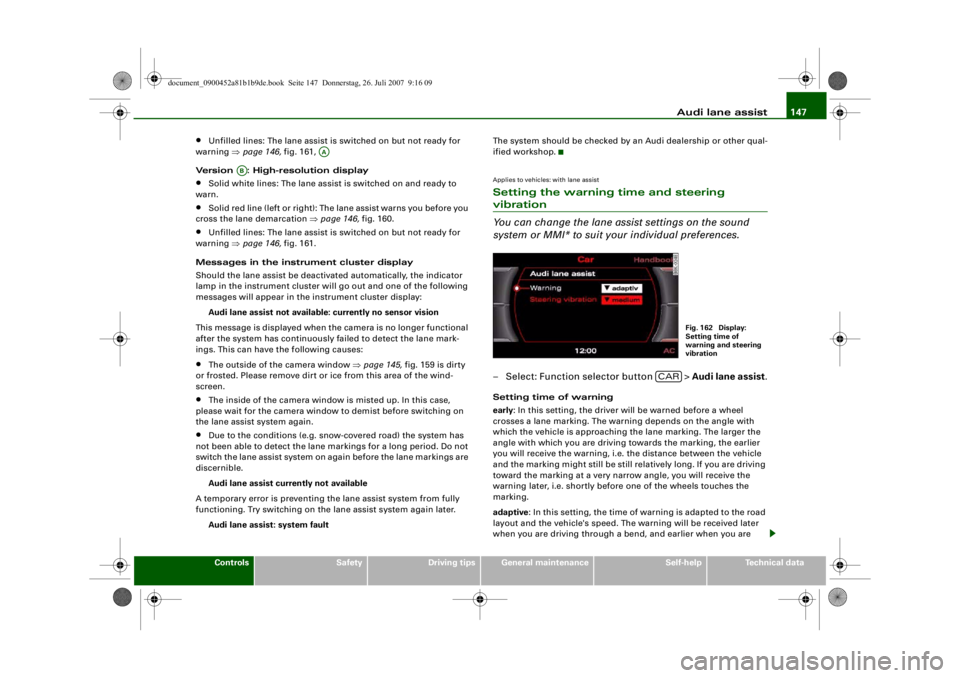
You can change the lane assist settings on the sound
system or MMI* to suit
your individual preferences.– Select: Function selector button > Audi lane assist.Setting time of warning
early: In this setting, the driver wi ll be warned before a wheel
crosses a lane marking. The warning depends on the angle with
which the vehicle is approaching the lane marking. The larger the
angle with which you are driving towards the marking, the earlier
you will receive the warning, i.e. the distance between the vehicle
and the marking might still be still relatively long. If you are driving
toward the marking at a very narrow angle, you will receive the
warning later, i.e. shortly before one of the wheels touches the
marking.
adaptive : In this setting, the time of warning is adapted to the road
layout and the vehicle's speed. The warning will be received later
when you are driving through a bend, and earlier when you are
AA
AB
Fig. 162 Display:
Setting time of
warning and steering
vibration
CAR
document_0900452a81b1b9de.book Seite 147 Donnerstag, 26. Juli 2007 9:16 09
--4 -
-T
•
-+ +-
Page 150 of 342
Audi lane assist
148driving on a straight section. On narrow roads, the system will give
off warnings later than on wide roads.
late : In this setting, the driver will be warned when a wheel crosses
a lane marking.
Setting steering wheel vibration
You can set the steering vibration to low, medium or strong . The
steering wheel will vibrate so that you can check your selection.
Note
•
The lane assist is not active while you are changing the setting;
the brief vibration of the steering wheel is only intended to help you
make the desired setting.
•
Your personal settings are stored automatically and assigned to
the remote control key which is being used.
document_0900452a81b1b9de.book Seite 148 Donnerstag, 26. Juli 2007 9:16 09
--4 -
-T
-+
•
+-
Page 165 of 342
Automatic gearbox163
Controls
Safety
Driving tips
General maintenance
Self-help
Technical data
– To prevent the vehicle from rolling away, apply the
parking brake before moving off on steep gradients
⇒ .
– As soon as you accelerate as normal, the parking brake will automatically be released and the vehicle will start
moving.
Pa rking the c ar
– Press and hold the brake pedal ⇒.
– Apply the parking brake.
– Press and hold the interlock button, move the selector lever to P and release the interlock button.The engine c an only be started when the selector lever is at P or N.
On level ground it is sufficient to move the selector lever to P. On a
gradient the parking brake should be applied first and the selector
lever should be moved to P. This reduces the load on the locking
mechanism and makes it easier to move the selector lever out of
position P.
Vehicles with multitronic® gearbox: Your vehicle is equipped with
the hill hold assist function which makes it easier to drive away on
a slope. The system is activated when you press and hold the brake
pedal for a few seconds . When you release the brake pedal the
braking force will be maintained for a moment in order to prevent
the vehicle rolling back when you drive away.
WARNING
•
Do not press the accelerator while selecting a gear with the
vehicle stationary and the engine running, as this could cause an
accident.
•
Please note that some power will still be transmitted when you
stop temporarily with the selector lever in position D, S or R. For this reason, to avoid ri
sking an accident, appl y the footbrake firmly
when stopping to prevent the vehicle rolling away.
•
Never move the selector lever to R or P when driving, as this
could cause an accident.
•
Vehicles with multitronic® gearbox: Please note that some
power will still be transmitted when you stop temporarily with the
selector lever in position D, S or R. For this reason, to avoid risking
an accident, apply the footbrake fi rmly when stopping to prevent
the vehicle rolling away.
Applies to vehicles: with multitronic® or tiptronicSelector lever positions
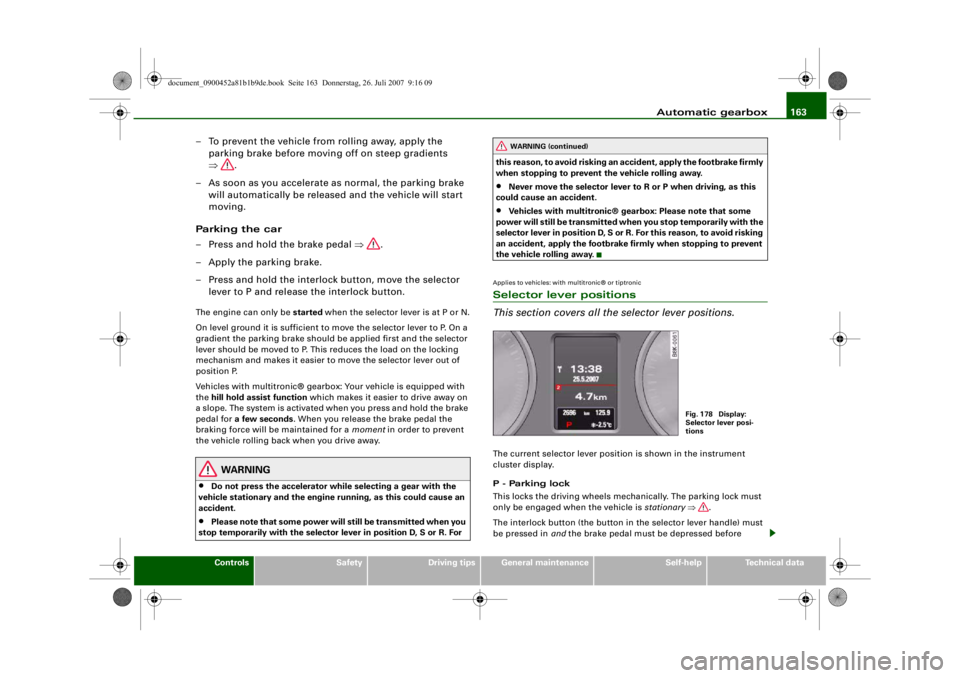
This section covers all the selector lever positions.The current selector lever position is shown in the instrument
cluster display.
P - Parking lock
This locks the driving wheels mechanically. The parking lock must
only be engaged when the vehicle is stationary ⇒.
The interlock button (the button in the selector lever handle) must
be pressed in and the brake pedal must be depressed before
WARNING (continued)
Fig. 178 Display:
Selector lever posi-
tions
document_0900452a81b1b9de.book Seite 163 Donnerstag, 26. Juli 2007 9:16 09
--4 -
-T
•
-+ +-
Page 168 of 342
Automatic gearbox
166
WARNING
Please note that if the road sur face is slippery or wet, the kick-
down feature could ca use the driving wheels to spin, which could
result in skidding.Applies to vehicles: with multitronic® or tiptronicDynamic gear control program (DCP)
The automatic gearbox is controlled electronically.The vehicle is equipped with an electronically controlled gearbox.
The gear ratios are selected automatically according to preset gear-
shift programmes.
When you drive at moderate speeds the gearbox will select the most
economical shift programme. It will then change up early and delay
the downshifts to gi ve better fuel economy.
If you drive at higher speeds with heavy acceleration, if you open the
throttle quickly, or if you use the kick-down or the car's maximum
speed, the gearbox will automaticall y select the more “sporty” shift
programmes.
The gearbox is self-adapting, and continuously selects the most
suitable shift programme. At the same time, the driver can also
make the gearbox switch to a more "sporty" programme by pressing
the accelerator quickly. Depending on road speed, this makes the
gearbox shift down early into a lower gear ratio for more rapid accel-
eration (for instance to pass another vehicle), without having to
press the accelerator all the way down into the kick-down position.
After the gearbox has shifted back up it returns to the original
programme, depending on your style of driving.
Vehicles with multitronic® gear box: The gearbox continuously
adapts the gear ratios on uphill gradients. If the brake pedal is
pressed on a downhill gradient the gearbox automatically shifts to
a lower gear ratio. This increases the engine braking effect. Vehicles with tiptronic gearbox:
The gearbox adapts the gearshifts
for uphill and downhill gradients. This prevents the gearbox from
shifting up and down unnecessarily on uphill gradients.
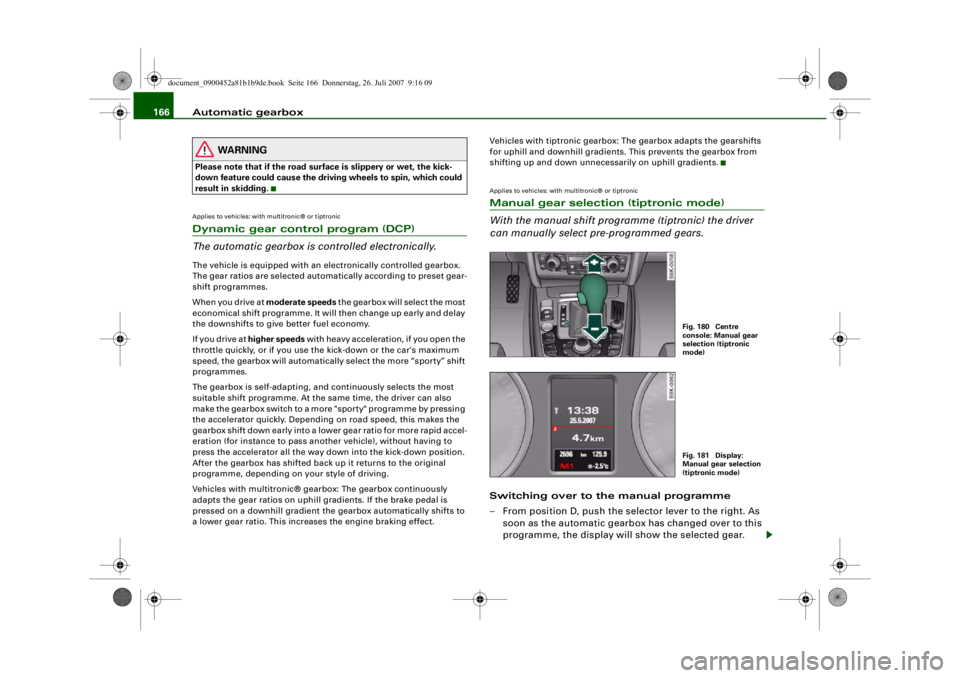
Applies to vehicles: with multitronic® or tiptronicManual gear selection (tiptronic mode)
With the manual shift programme (tiptronic) the driver
can manually select pre-programmed gears.Switching over to the manual programme
– From position D, push the selector lever to the right. As soon as the automatic gearbox has changed over to this
programme, the display will show the selected gear.
Fig. 180 Centre
console: Manual gear
selection (tiptronic
mode)Fig. 181 Display:
Manual gear selection
(tiptronic mode)
document_0900452a81b1b9de.book Seite 166 Donnerstag, 26. Juli 2007 9:16 09
--4 -
-T
•
•
-+ +-
Page 169 of 342
Automatic gearbox167
Controls
Safety
Driving tips
General maintenance
Self-help
Technical data
Shifting up a gear
– Briefly push the selector lever forwards (in the tiptronic
gate) ⇒page 166, fig. 180 .
Shifting down a gear
– Briefly pull the selector lever backwards (in the tiptronic gate) .With the tiptronic system the driver can manually choose between
7 different pre-programmed gears. The manual programme can be
selected either with the vehicl e stationary or on the move.
When accelerating, the gearbox automa tically shifts up into the next
gear shortly before the maxi mum engine speed is reached.
If you select a gear which is lower than the gear shown in the instru-
ment display ⇒page 166, fig. 181, the gearbox will only shift down
when there is no longer a risk of overrevving the engine.
When the vehicle slows down (for instance when braking), the
gearbox automatically shifts down into the next gear when the
minimum engine speed is reached.
Changing down to a lower gear increases the engine braking effect
on downhill gradients.
When the accelerator pedal is pressed right down past the point of
resistance at full throttle, the ge arbox will select a lower gear,
depending on road speed and engine speed.Applies to vehicles: with multitronic® or tiptronicBack-up programme
A back-up system is in place should a fault occur in the
control system.The automatic gearbox switches to the back-up programme if a fault
should occur in the control system. This is indicated by all segments of the display panel either ligh
ting up together or going out
completely.
It is still possible to move the selector lever to all positions. The
manual shift programme (tiptronic) is not available when the back-
up programme is active.
Vehicles with tiptronic gearbox: When the selector lever is in posi-
tion D or S or in the manual shift programme, the gearbox will
remain in 3rd gear if 1st, 2nd or 3rd gears were engaged when the
fault occurred. The gearbox will remain in 5th gear if 4th, 5th or 6th
gears were engaged. The gearbox wi ll then engage 3rd gear when
you drive away from a standstill or after the engine is restarted.
It will still be possible to use reverse gear in the normal way.
However, the electronic lock for reverse gear will be switched off.
Caution
Should the gearbox ev er switch into the back-up programme, you
should take the vehicle to an Audi dealer or qualified workshop as
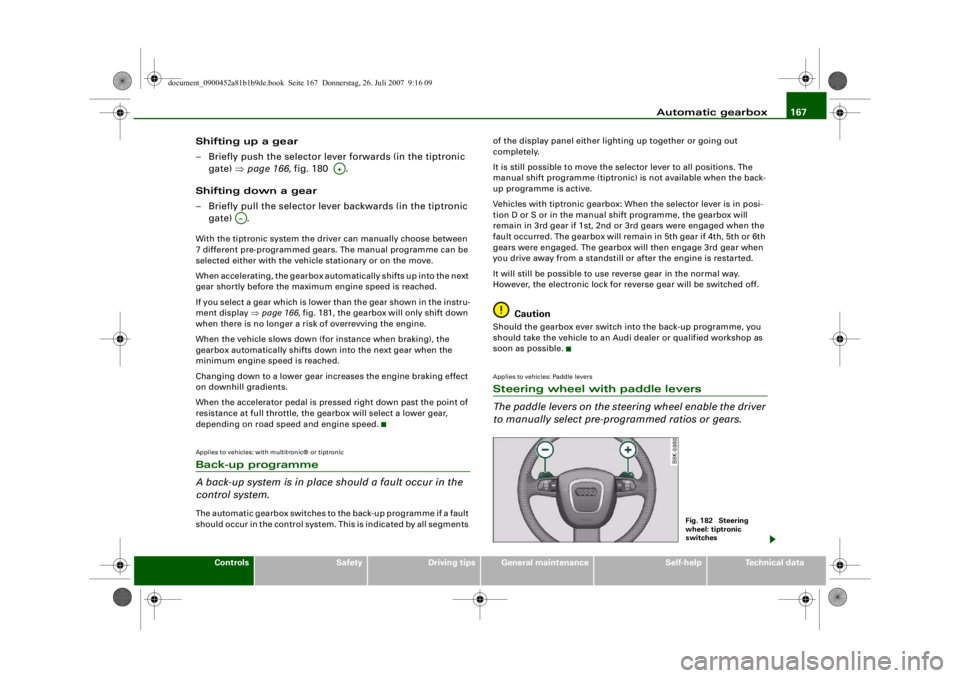
soon as possible.Applies to vehicles: Paddle leversSteering wheel with paddle levers
The paddle levers on the steering wheel enable the driver
to manually select pre-programmed ratios or gears.
A+
A…
Fig. 182 Steering
wheel: tiptronic
switches
document_0900452a81b1b9de.book Seite 167 Donnerstag, 26. Juli 2007 9:16 09
--4 -
-T
-+
CD
•
+-
•