cooling AUDI S4 2008 Owner's Manual
[x] Cancel search | Manufacturer: AUDI, Model Year: 2008, Model line: S4, Model: AUDI S4 2008Pages: 342, PDF Size: 15.01 MB
Page 111 of 342
Heating and cooling109
Controls
Safety
Driving tips
General maintenance
Self-help
Technical data
Deluxe automatic air conditioner plus
- basic settingsApplies to vehicles: with deluxe automatic air conditioner plusGeneral notes
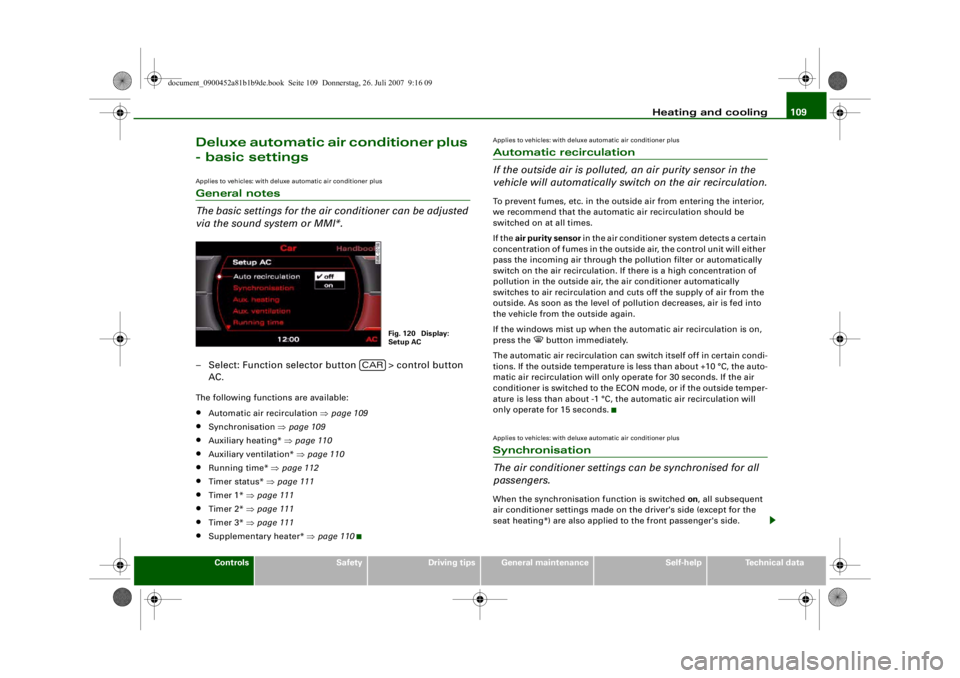
The basic settings for the air conditioner can be adjusted
via the sound system or MMI*.– Select: Function selector button > control button
AC.The following functions are available:•
Automatic air recirculation ⇒page 109
•
Synchronisation ⇒page 109
•
Auxiliary heating* ⇒page 110
•
Auxiliary ventilation* ⇒page 110
•
Running time* ⇒page 112
•
Timer status* ⇒page 111
•
Timer 1* ⇒page 111
•
Timer 2* ⇒page 111
•
Timer 3* ⇒page 111
•
Supplementary heater* ⇒page 110
Applies to vehicles: with deluxe automatic air conditioner plusAutomatic recirculation
If the outside air is polluted, an air purity sensor in the
vehicle will automatically switch on the air recirculation.To prevent fumes, etc. in the outside air from entering the interior,
we recommend that the automati c air recirculation should be
switched on at all times.
If the air purity sensor in the air conditioner system detects a certain
concentration of fumes in the outside air, the control unit will either
pass the incoming air through the pollution filter or automatically
switch on the air recirculation. If there is a high concentration of
pollution in the outside air, the air conditioner automatically
switches to air recirculation and cuts off the supply of air from the
outside. As soon as the level of pollution decreases, air is fed into
the vehicle from the outside again.
If the windows mist up when the automatic air recirculation is on,
press the
button immediately.
The automatic air recirculation can switch itself off in certain condi-
tions. If the outside temperature is less than about +10 °C, the auto-
matic air recirculation will only operate for 30 seconds. If the air
conditioner is switched to the ECON mode, or if the outside temper-
ature is less than about -1 °C, th e automatic air recirculation will
only operate for 15 seconds.
Applies to vehicles: with deluxe automatic air conditioner plusSynchronisation
The air conditioner settings can be synchronised for all
passengers.When the synchronisation function is switched on, all subsequent
air conditioner settings made on the driver's side (except for the
seat heating*) are also applied to the front passenger's side.
Fig. 120 Display:
Setup AC
CAR
document_0900452a81b1b9de.book Seite 109 Donnerstag, 26. Juli 2007 9:16 09
--4 -
-T
-+ +-
•
Page 112 of 342
Heating and cooling
110The synchronisation is cancelled as soon as any adjustments are
made on the front passenger's side.Applies to vehicles: with diesel engineSupplementary heater– Set the Supplementary heater to auto or off .Models with a diesel engine are equipped with a supplementary
heater to help warm up the interior more quickly. At outside temper-
atures below about +5 °C the sup plementary heater is switched on
(and off) automatically when the engine is running, depending on
the coolant temperature, the temperature in the vehicle interior and
the temperature the heater is set to.Auxiliary heating and auxiliary
ventilationApplies to vehicles: with auxiliary heating - under development at the time of printingDescription
The auxiliary heating and ventilation systems heat and
cool the interior independently of the engine.The auxiliary heating
works in conjunction with the air condi-
tioner system, but does not rely on heat from the engine. Instead of
this, the system burns fuel. The system's main function is to warm
up the interior of the vehicle and to defrost the windows in cold
weather.
The auxiliary heating system can be used both when the vehicle is
stationary and when driving (to pr ovide extra heat while the engine
is warming up). The
auxiliary ventilation
also operates independently of the
engine. This feature can be used to cool the interior with the blower
when the vehicle is left parked in the sun.
The system will automatically activa te either the auxiliary heating or
the auxiliary ventilation mode, depending on the actual tempera-
ture measured inside the car and the temperature you have set with
the air conditioner controls. It is possible to alter the temperature
setting while the auxiliary he ating/ventilation is running.
Switching on and off
There are two different ways of switching on the auxiliary
heating/ventilation system.
•
Immediate start: You can switch the auxi liary heating/ventilation
on and off at any time vi a the sound system or MMI ⇒page 111 . You
can also switch the system on and off using the remote control
⇒ page 113 .
•
Switching on via timer: You can programme various start times
using the timers ⇒page 111 . However you must first activate the
timer before the auxiliary heating/ventilation system will switch on
automatically.
The auxiliary heating/ventilation will switch itself off at the end of
the programmed running time. The running time can be set to 15,
30, 45 or 60 minutes ⇒page 112 .
WARNING
•
The auxiliary heating must not be allowed to run when the
vehicle is in a confined space because it can give off toxic fumes.
•
To avoid any possible fire risk, never have the auxiliary heating
switched on when refuelling the vehicle.
•
Because of the high temperatur es which occur when the auxil-
iary heating is running, make su re when parking the car that the
exhaust outlet under the car is not obstructed in any way and that
the exhaust gases do not come into contact with flammable mate-
rials (fire risk).
document_0900452a81b1b9de.book Seite 110 Donnerstag, 26. Juli 2007 9:16 09
--4 -
-T
• •
-+ +-
~
~---
Page 113 of 342
Heating and cooling111
Controls
Safety
Driving tips
General maintenance
Self-help
Technical data
Note
•
It is advisable to open the air outlets when using the auxiliary
heating/ventilation.
•
The auxiliary heating/ventilation will not switch on if the fuel in
the tank has reached the reserve zone.
•
The auxiliary heating/ventilation wi ll not switch on if the battery
charge level is low.
•
The symbols
(auxiliary ventilation) or
(auxiliary heating)
flash in the instrument cluster next to the clock display when the
auxiliary heating/ventilation is switched on. Both symbols light
continuously when the timer is activated.
•
At low outside temperatures some visible water vapour may
form in the engine compartment. This is a normal phenomenon,
and no reason for concern.
Applies to vehicles: with auxiliary heating - under development at the time of printingSwitching on/off immediately
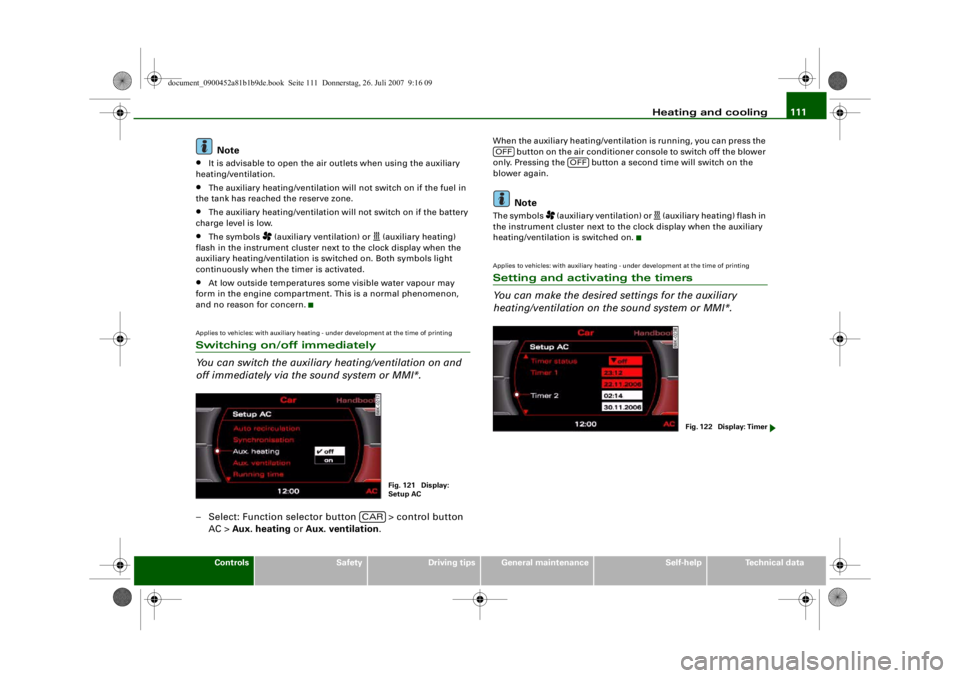
You can switch the auxiliary heating/ventilation on and
off immediately via the sound system or MMI*.– Select: Function selector button > control button AC > Aux. heating or Aux. ventilation .
When the auxiliary heating/ventilat ion is running, you can press the
button on the air conditioner co nsole to switch off the blower
only. Pressing the button a second time will switch on the
blower again.
Note
The symbols
(auxiliary ventilation) or
(auxiliary heating) flash in
the instrument cluster next to the clock display when the auxiliary
heating/ventilation is switched on.
Applies to vehicles: with auxiliary heating - under development at the time of printingSetting and activating the timers
You can make the desired settings for the auxiliary
heating/ventilation on the sound system or MMI*.
Fig. 121 Display:
Setup AC
CAR
OFF
OFF
Fig. 122 Display: Timer
document_0900452a81b1b9de.book Seite 111 Donnerstag, 26. Juli 2007 9:16 09
--4 -
-
(I]
T
(I]
•
•
-+ +-
Page 114 of 342
Heating and cooling
112
Setting the timers
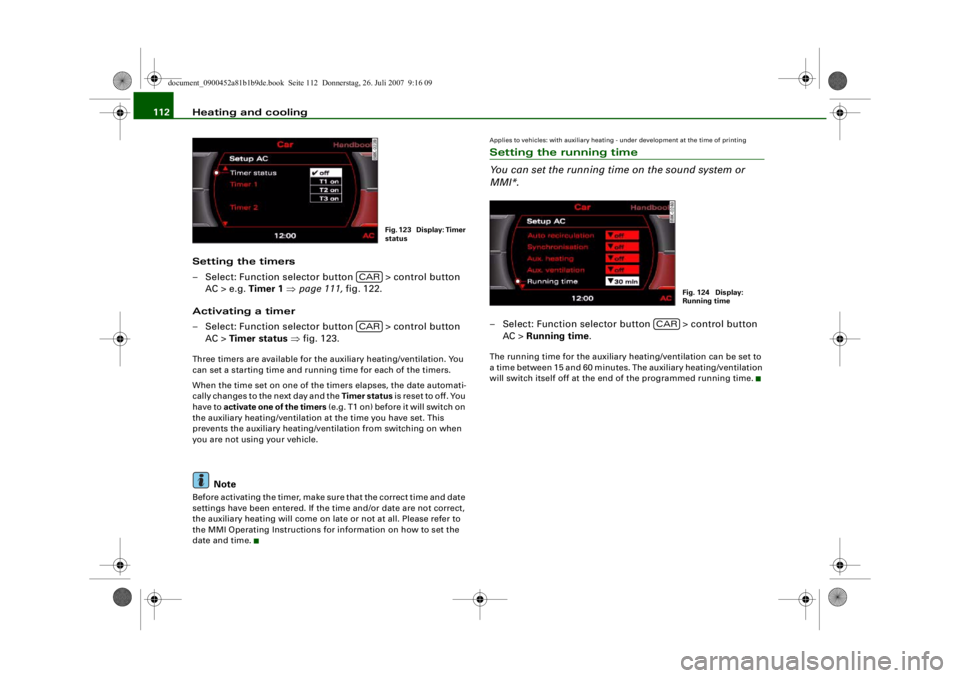
– Select: Function selector button > control button AC > e.g. Timer 1 ⇒ page 111, fig. 122.
Activating a timer
– Select: Function selector button > control button AC > Timer status ⇒ fig. 123.Three timers are available for the auxiliary heating/ventilation. You
can set a starting time and running time for each of the timers.
When the time set on one of the ti mers elapses, the date automati-
cally changes to the next day and the Timer status is reset to off. You
have to activate one of the timers (e.g. T1 on) before it will switch on
the auxiliary heating/ventilation at the time you have set. This
prevents the auxiliary heating/ventilation from switching on when
you are not using your vehicle.
Note
Before activating the timer, make su re that the correct time and date
settings have been entered. If the time and/or date are not correct,
the auxiliary heating will come on late or not at all. Please refer to
the MMI Operating Instructions for information on how to set the
date and time.
Applies to vehicles: with auxiliary heating - under development at the time of printingSetting the running time
You can set the running time on the sound system or
MMI*.– Select: Function selector button > control button AC > Running time .The running time for the auxiliary heating/ventilation can be set to
a time between 15 and 60 minutes. The auxiliary heating/ventilation
will switch itself off at the end of the programmed running time.
Fig. 123 Display: Timer
status
CARCAR
Fig. 124 Display:
Running time
CAR
document_0900452a81b1b9de.book Seite 112 Donnerstag, 26. Juli 2007 9:16 09
--4 -
-T
-+ +-
•
[I]
•
Page 115 of 342
Heating and cooling113
Controls
Safety
Driving tips
General maintenance
Self-help
Technical data
Applies to vehicles: with auxiliary heating - under development at the time of printingRemote control
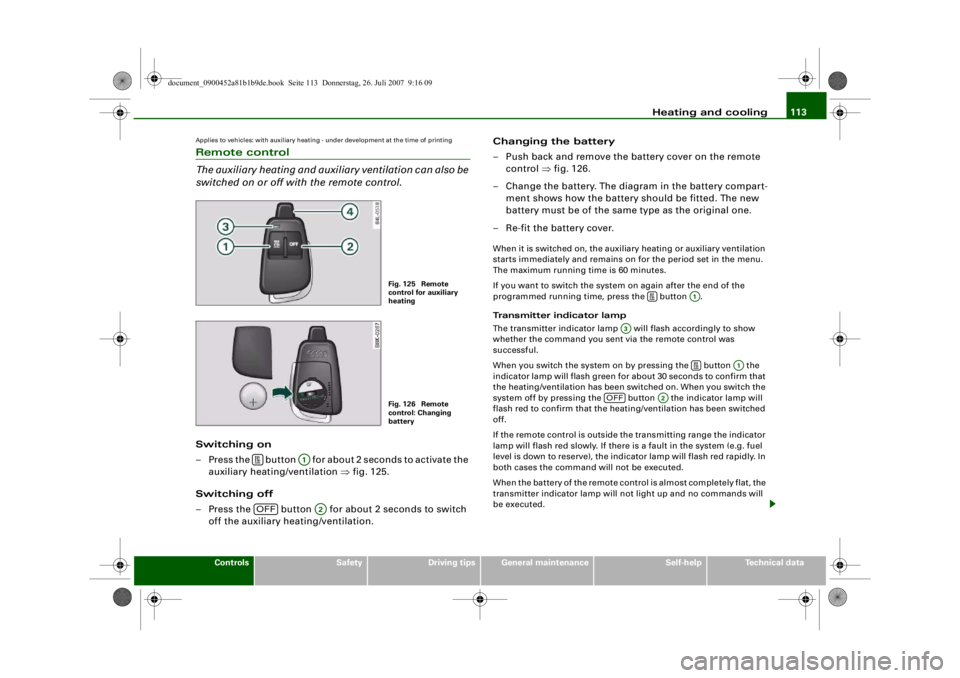
The auxiliary heating and auxiliary ventilation can also be
switched on or off with the remote control.Switching on
– Press the button for about 2 seconds to activate the
auxiliary heating/ventilation ⇒fig. 125.
Switching off
– Press the button for about 2 seconds to switch off the auxiliary heating/ventilation. Changing the battery
– Push back and remove the battery cover on the remote
control ⇒fig. 126.
– Change the battery. The diagram in the battery compart- ment shows how the battery should be fitted. The new
battery must be of the same type as the original one.
– Re-fit the battery cover.
When it is switched on, the auxili ary heating or auxiliary ventilation
starts immediately and remains on for the period set in the menu.
The maximum running time is 60 minutes.
If you want to switch the system on again after the end of the
programmed running time, press the button .
Transmitter indicator lamp
The transmitter indicator lamp will flash accordingly to show
whether the command you sent via the remote control was
successful.
When you switch the system on by pressing the button the
indicator lamp will flash green for about 30 seconds to confirm that
the heating/ventilation has been switched on. When you switch the
system off by pressing the button the indicator lamp will
flash red to confirm that the heat ing/ventilation has been switched
off.
If the remote control is outside th e transmitting range the indicator
lamp will flash red slowly. If there is a fault in the system (e.g. fuel
level is down to reserve), the indicator lamp will flash red rapidly. In
both cases the command will not be executed.
When the battery of the remote cont rol is almost completely flat, the
transmitter indicator lamp will not light up and no commands will
be executed.
Fig. 125 Remote
control for auxiliary
heatingFig. 126 Remote
control: Changing
battery
A1
OFF
A2
A1
A3
A1
OFF
A2
document_0900452a81b1b9de.book Seite 113 Donnerstag, 26. Juli 2007 9:16 09
--4 -
-T
0
-+
0
+-
D
D
Page 116 of 342
Heating and cooling
114Transmitting range
The range of the remote control transmitter is about 600 metres.
However, this can be greatly redu ced by obstacles (buildings, etc.)
between the remote control transm itter and the vehicle. Hold the
aerial upright when using the remote control.
You should not normally use the remote control at a distance of less
than 3 metres from the vehicle. If you are closer than this, or if you
use the remote control inside the vehicle, this can cause signal over-
load.
For the sake of the environment
Please dispose of old batteries in the proper manner so that they do
not harm the environment.Seat heatingApplies to vehicles: with front seat heating/ventilationSeat heating / ventilation
The seat cushions and backrests of the front seats can be
heated and ventilated* electrically.
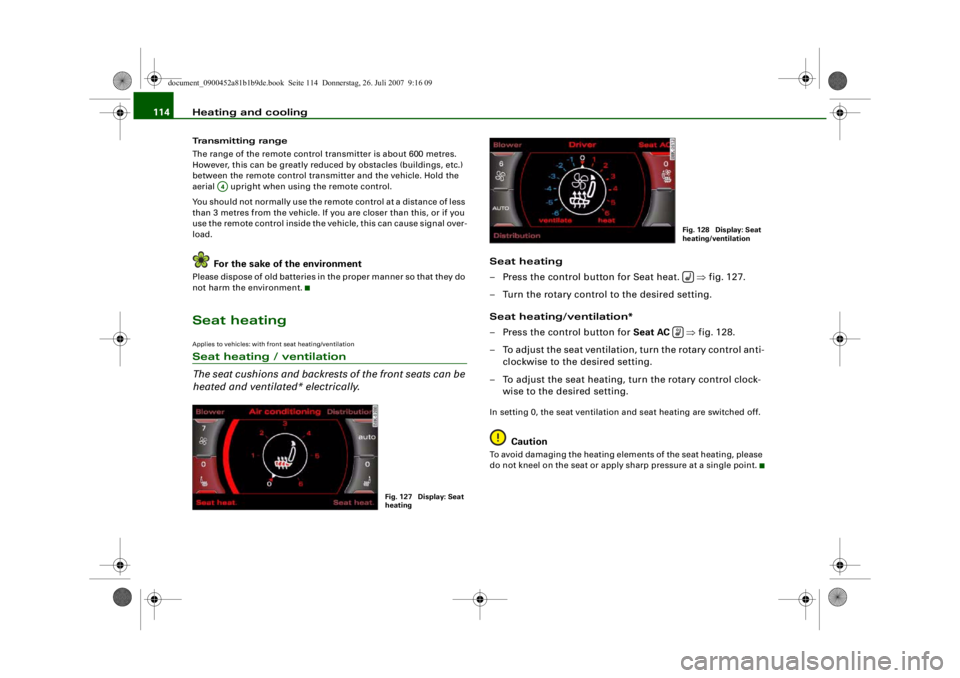
Seat heating
– Press the control button for Seat heat. ⇒fig. 127.
– Turn the rotary control to the desired setting.
Seat heating/ventilation*
– Press the control button for Seat AC ⇒fig. 128.
– To adjust the seat ventilation, turn the rotary control anti- clockwise to the desired setting.
– To adjust the seat heating, turn the rotary control clock- wise to the desired setting.In setting 0, the seat ventilation and seat heating are switched off.
Caution
To avoid damaging the heating elements of the seat heating, please
do not kneel on the seat or apply sharp pressure at a single point.
A4
Fig. 127 Display: Seat
heating
Fig. 128 Display: Seat
heating/ventilation
document_0900452a81b1b9de.book Seite 114 Donnerstag, 26. Juli 2007 9:16 09
-4 -
-
~
.1
0
'
T
6 88 .
(l)
0
-
-
I
AUTO
0
.··-
D
•
-+
D
+-
~I
-=---
'.auto
7
(l)
&j
-- .
0
0 J
fr.,
D
CD
•
,· ·-
Page 117 of 342
Heating and cooling115
Controls
Safety
Driving tips
General maintenance
Self-help
Technical data
Applies to vehicles: with seat heating for rear seatsSeat heating for rear seats
The seat cushions and backrests of the two outer rear
seats can be heated electrically.– Turn the left thumbwheel (on the centre console) to
switch on and regulate the heating for the left rear seat.
– Turn the right thumbwheel (on the centre console) to switch on and regulate the heating for the right rear seat.The heating is switched off when the thumbwheel is set to 0.
Possible settings range from 1 to 6.
The heating for the rear seats only operates when a sensor registers
the weight of the occupant in the seat. If nobody is travelling on the
rear seats, please switch off the re ar seat heating to avoid activating
it unintentionally.
Caution
To avoid damaging the heating elements of the seat heating, please
do not kneel on the seat or apply sharp pressure at a single point.
document_0900452a81b1b9de.book Seite 115 Donnerstag, 26. Juli 2007 9:16 09
--4 -
-T
-+
CD
+-
•
Page 234 of 342
Towing a trailer
232Towing a trailerDriving the vehicle with a trailer or
caravanTechnical requirements
The towing bracket must comply with certain technical
requirements.Your car is intended mainly for transporting passengers and
luggage. However, if suitably equipped, it can also be used to tow a
trailer or caravan.
If the car is supplied with a factory-fitted towing bracket it will
already have the necessary technical modifications and meet the
statutory requirements.
A 13-pin socket is provided to make the electrical connection
between the car and the trailer. If the trailer has a 7-pin plug you can
use an adapter cable. This is available from Audi dealers.
WARNING
If a towing bracket is retrofitted, the installation should be carried
out by a qualified workshop.•
In particular in high outside tem peratures it is not possible to
drive up long steep gradients with out a suitable cooling system.
The engine would then overheat.
•
Incorrect installation can result in a safety risk.
Points to check before towingTrailer weights
Never exceed the maximum permitted trailer weights ⇒page 323 .If you do not load the trailer up
to the maximum permitted trailer
weight, you can then climb correspondingly steeper gradients.
The maximum trailer weights listed are only applicable for altitudes
up to 1000 m above sea level. With increasing altitude the engine
power and therefore the car's climbing ability are impaired because
of the reduced air density, so the maximum trailer weight has to be
reduced accordingly. The weight of the car and trailer must be
reduced by 10% for every further 1000 m (or part thereof). This
figure refers to the combined weight of the (loaded) vehicle and
(loaded) trailer.
The figures for the draw bar weight that appear on the identification
plate of the towing bracket are for certification purposes only. The
correct figures for your specific vehicle, which may be lower than
these figures for the towing bracket, are given in the registration
documents. Also refer to ⇒page 323 .
Distributing the load
Distribute loads in the trailer so th at heavy objects are as near to the
axle as possible. Loads carried in the trailer must be secured to
prevent them slipping.
Where possible, operate the trai ler with the maximum permitted
draw bar weight on the ball joint of the towing bracket, but do not
exceed the specified limit.
Tyre pressure
Check the tyre pressures on your car and adjust for “full load” condi-
tions (refer to the sticker listing the tyre pressures on the end face
of the driver's door). It may also be necessary to adjust the tyre pres-
sures on the trailer according to the recommendations of the trailer
manufacturer.
Exterior mirrors
Check whether you can see enough of the road behind the trailer
with the standard mirrors. If this is not the case you should have
document_0900452a81b1b9de.book Seite 232 Donnerstag, 26. Juli 2007 9:16 09
--4 -
-T
-+ +-
•
Page 242 of 342
Towing a trailer
240Applies to vehicles: with towing bracketTowing bracket (retrofitting)
If required, the vehicle can be retrofitted with a towing
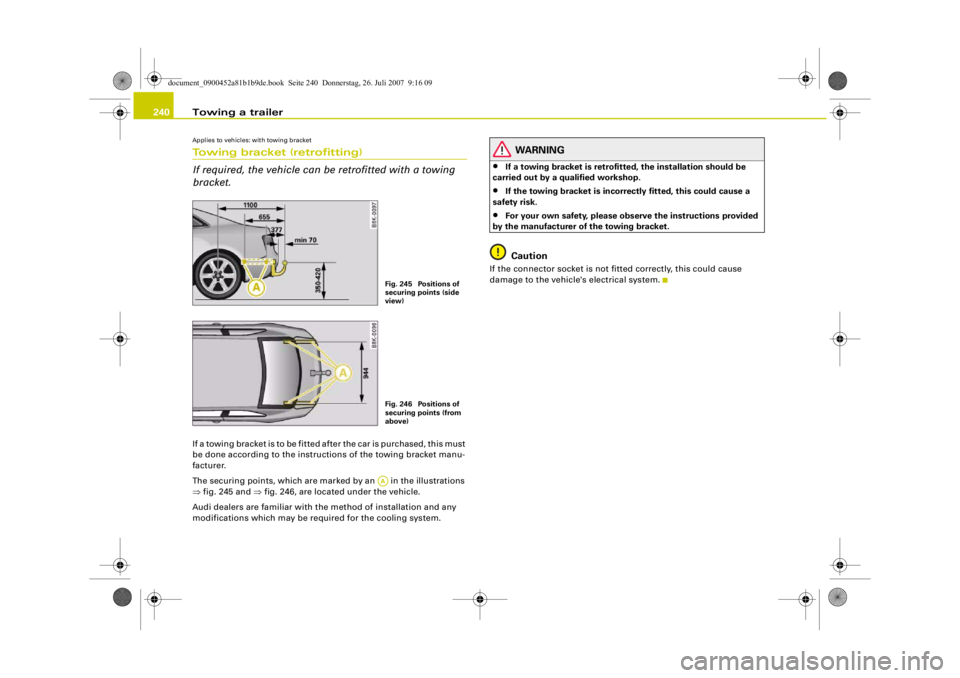
bracket.If a towing bracket is to be fitted after the car is purchased, this must
be done according to the instructions of the towing bracket manu-
facturer.
The securing points, which are marked by an in the illustrations
⇒ fig. 245 and ⇒ fig. 246, are located under the vehicle.
Audi dealers are familiar with th e method of installation and any
modifications which may be required for the cooling system.
WARNING
•
If a towing bracket is retrofitted, the installation should be
carried out by a qualified workshop.
•
If the towing bracket is incorrectly fitted, this could cause a
safety risk.
•
For your own safety, please ob serve the instructions provided
by the manufacturer of the towing bracket.Caution
If the connector socket is not fi tted correctly, this could cause
damage to the vehicle's electrical system.
Fig. 245 Positions of
securing points (side
view)Fig. 246 Positions of
securing points (from
above)AA
document_0900452a81b1b9de.book Seite 240 Donnerstag, 26. Juli 2007 9:16 09
--4 -
-T
! "'
CD
•
-+
-
~
-
='-..
'"
~
I
1
...,~
l +
I
i
+-
A
,
I
j
- "'
~
-
_-:,_/
-
Page 257 of 342
Checking and topping up fluids255
Controls
Safety
Driving tips
General maintenance
Self-help
Technical data
Working on components in the engine compartment
Extra caution is necessary when working on components
in the engine compartment.Always be aware of the danger of injury and scalding as well as the
risk of accident or fire when working in the engine compartment
(e.g. when checking and refilling fluids). Always observe the warn-
ings listed below and follow al l normal safety precautions. The
engine compartment of any motor vehicle is a potentially
hazardous area . ⇒ .
WARNING
•
Switch off the engine.
•
Remove the ignition key.
•
Apply the parking brake.
•
Put the gear lever in neutral or selector in P.
•
Wait for the engine to cool down.
•
Keep children away from engine compartment.
•
Never spill fluids on hot engine components. These fluids can
cause a fire (e.g. radiator anti-freeze).
•
Take care not to cause short circ uits in the electrical system,
especially when working on the battery.
•
Do not touch the radiator fan when the engine is hot. The fan
may start running suddenly.
•
Do not unscrew the cap on the ex pansion tank when the engine
is hot. The cooling system is under pressure.
•
Protect face, hands and arms by covering the cap with a large,
thick rag to protect against escaping coolant and steam.
•
If any tests have to be performed with the engine running,
there is an extra safety risk from the rotating parts, such as the
drive belts, alternator and radiator fan, etc., and from the high-
voltage ignition system.
•
Vehicles with automatic gearbox: Never open the throttle inad-
vertently (for instance by hand from the engine compartment) if a
gear is engaged while the vehicle is stationary with the engine
running. The vehicle could otherwise start moving immediately
and possibly cause an accident.
•
Observe the following a dditional warnings if work on the fuel
system or the electrical system is necessary:
−Always disconnect the battery.
− Do not smoke.
− Never work near naked flames.
− Always keep an approved fire extinguisher immediately
available.Caution
When topping up fluids make sure the correct fluid is put into the
correct filler opening. This can otherwise cause serious malfunc-
tions or engine damage.
For the sake of the environment
Inspect the ground un derneath your vehicle regularly so that any
leaks are detected at an early stag e. If you find oil spots or other
fluids, have your vehicle inspected by a qualified workshop.
Note
On right-hand drive vehicles* some of the containers / reservoirs
mentioned below are located on the other side of the engine
compartment.
WARNING (continued)
document_0900452a81b1b9de.book Seite 255 Donnerstag, 26. Juli 2007 9:16 09
--4 -
-T
-+
CD
+-
[I]
•