seats AUDI S4 2008 Owner's Manual
[x] Cancel search | Manufacturer: AUDI, Model Year: 2008, Model line: S4, Model: AUDI S4 2008Pages: 342, PDF Size: 15.01 MB
Page 92 of 342
Seats and storage
90•
If the power drawn by the connected appliances is above 150 W,
the inverter in the socket will get warm. The inverter will trip out if
the temperature exceeds a certain limit. The inverter can trip out on
hot days even when an appliance with a suitable power rating is
used. The inverter will switch on again automatically after it has
cooled down. Appliances whic h are already connected and
switched on will be activated again automatically ⇒ .
•
Do not connect lamps which contain a neon tube. For technical
reasons, this may damage the lamp.
•
Do not connect 115 Volt appliances to the 230 Volt Euro socket.
This may cause irreparable damage to the appliance. Check the type
plate on the appliance if you are unsure of the voltage rating.
•
With some power supplies (e.g. on laptop computers), the inte-
grated surge suppressor prevents the equipment from being
switched on because the starting current is too high. If this
happens, please disconnect the power supply unit from the load
and wait for about 10 seconds before re-connecting.Note
•
Unshielded equipment can cause interference on the radio, TV
and vehicle's electrical system.
•
The Euro socket has an integrated child safety device. There is no
power at the socket until the Euro connector is fully inserted.
•
Some appliances may not function normally due to the lower
power rating (wattage).
•
The socket can be operated with 115 Volt power supplies, as is
the case in certain countries. In this case, a different type of inverter
must be installed in the vehicle. Retrofit kits are available from your
Audi dealer. Do not connect 115 Volt appliances to the 230 Volt Euro
socket.
•
Interference can occur on the radio's AM waveband if electrical
appliances are used near the rear window aerial.
Storage compartmentsOverview
There are several storage compartments at various points
in the vehicle.Glove box
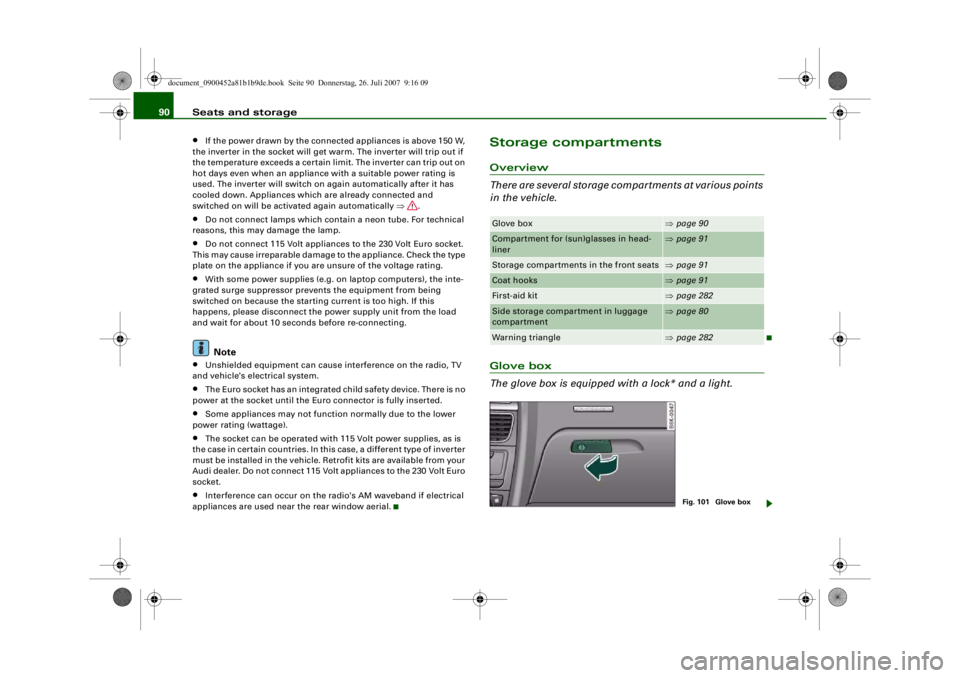
The glove box is equipped with a lock* and a light.Glove box
⇒page 90
Compartment for (sun)glasses in head-
liner
⇒page 91
Storage compartments in the front seats
⇒page 91
Coat hooks
⇒page 91
First-aid kit
⇒page 282
Side storage compartment in luggage
compartment
⇒page 80
Warning triangle
⇒page 282
Fig. 101 Glove box
document_0900452a81b1b9de.book Seite 90 Donnerstag, 26. Juli 2007 9:16 09
--4 -
-T
-+
rn
•
Page 93 of 342
Seats and storage91
Controls
Safety
Driving tips
General maintenance
Self-help
Technical data
Opening glove box
– Pull the catch on the lid in the direction indicated (arrow)
⇒page 90, fig. 101 and open the lid.
Closing glove box
– Close the lid and push it in until it engages.The glove box lid has separate holders for a pen and a note pad.
On the right-hand side of the glove box there is a holder with a key
shell. In order to start the engine with the spare key, it has to be
clipped into this shell.
WARNING
To avoid the risk of injuries, al ways keep the glove box lid closed
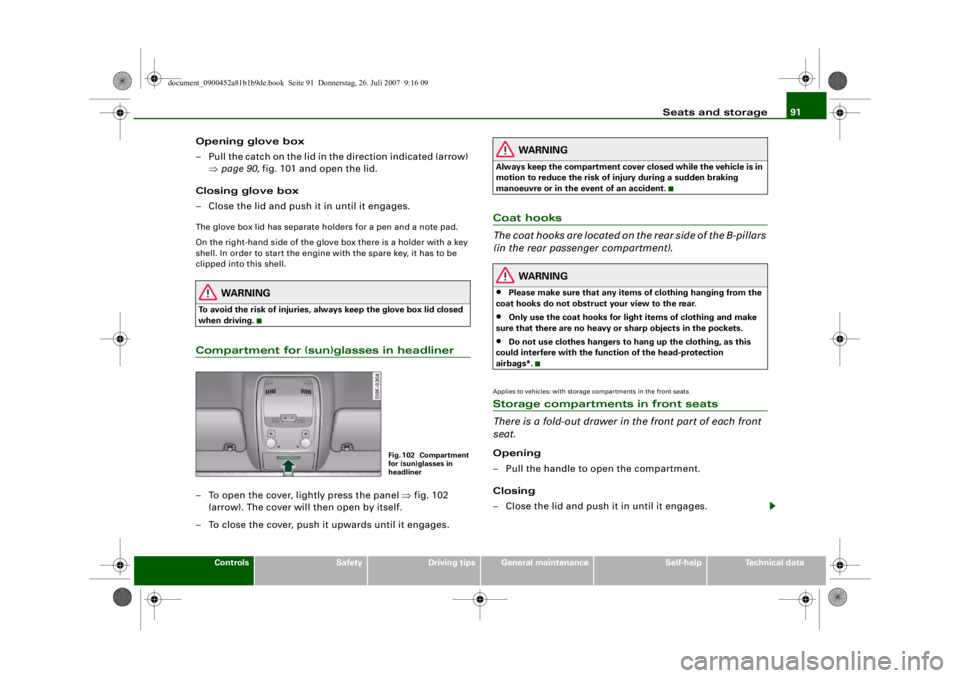
when driving.Compartment for (sun)glasses in headliner– To open the cover, lightly press the panel ⇒fig. 102
(arrow). The cover will then open by itself.
– To close the cover, push it upwards until it engages.
WARNING
Always keep the compartment cover closed while the vehicle is in
motion to reduce the risk of injury during a sudden braking
manoeuvre or in the event of an accident.Coat hooks
The coat hooks are located on the rear side of the B-pillars
(in the rear passenger compartment).
WARNING
•
Please make sure that any items of clothing hanging from the
coat hooks do not obstruct your view to the rear.
•
Only use the coat hooks for light items of clothing and make
sure that there are no heavy or sharp objects in the pockets.
•
Do not use clothes hangers to ha ng up the clothing, as this
could interfere with the function of the head-protection
airbags*.
Applies to vehicles: with storage compartments in the front seatsStorage compartments in front seats
There is a fold-out drawer in the front part of each front
seat.Opening
– Pull the handle to open the compartment.
Closing
– Close the lid and push it in until it engages.
Fig. 102 Compartment
for (sun)glasses in
headliner
document_0900452a81b1b9de.book Seite 91 Donnerstag, 26. Juli 2007 9:16 09
--4 -
-T
•
-+
Ir-& -.
--1
•
+-
Page 94 of 342
Seats and storage
92
NoteThe storage compartment will hold a maximum weight of 1 kg.
document_0900452a81b1b9de.book Seite 92 Donnerstag, 26. Juli 2007 9:16 09
--4 -
-T
•
-+ +-
Page 101 of 342
Heating and cooling99
Controls
Safety
Driving tips
General maintenance
Self-help
Technical data
Note
If the LED in the AC button should continue to light up when the AC
mode has been switched off (i.e. the air conditioner has been
switched off) this is due to a defect in one of the air conditioner
components. If a malfunction should occur, please contact a quali-
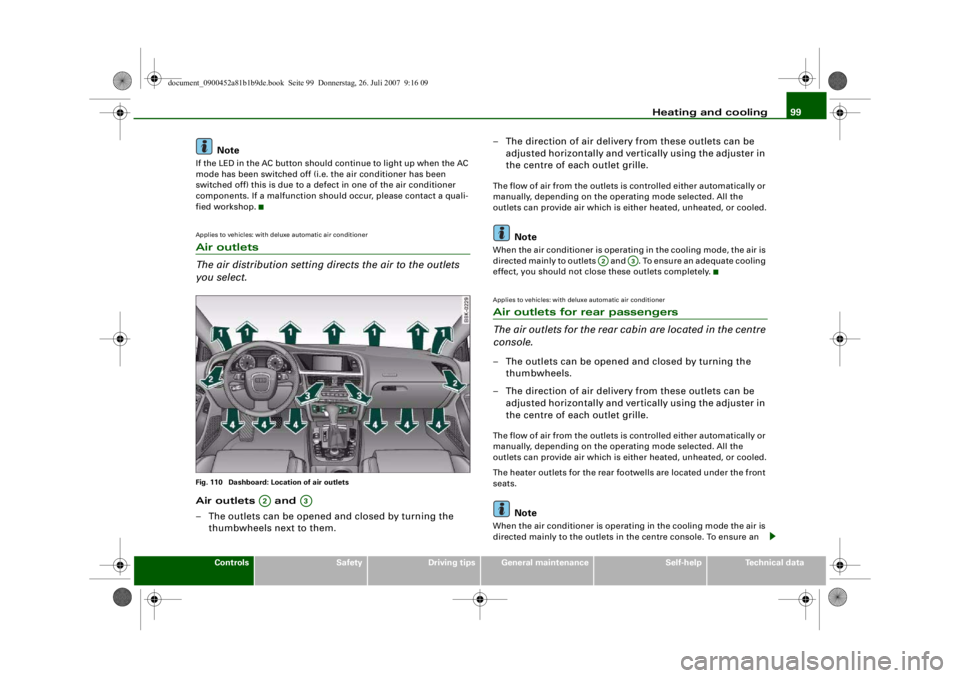
fied workshop.Applies to vehicles: with deluxe automatic air conditionerAir outlets
The air distribution setting directs the air to the outlets
you select.Fig. 110 Dashboard: Location of air outletsAir outlets and
– The outlets can be opened and closed by turning the
thumbwheels next to them. – The direction of air delivery from these outlets can be
adjusted horizontally and vert ically using the adjuster in
the centre of each outlet grille.
The flow of air from the outlets is controlled either automatically or
manually, depending on the oper ating mode selected. All the
outlets can provide air which is either heated, unheated, or cooled.
Note
When the air conditioner is operating in the cooling mode, the air is
directed mainly to outlets and . To ensure an adequate cooling
effect, you should not close these outlets completely.Applies to vehicles: with deluxe automatic air conditionerAir outlets for rear passengers
The air outlets for the rear ca bin are located in the centre
console.– The outlets can be opened and closed by turning the
thumbwheels.
– The direction of air delivery from these outlets can be adjusted horizontally and vert ically using the adjuster in
the centre of each outlet grille.The flow of air from the outlets is controlled either automatically or
manually, depending on the oper ating mode selected. All the
outlets can provide air which is either heated, unheated, or cooled.
The heater outlets for the rear footwells are located under the front
seats.
Note
When the air conditioner is operating in the cooling mode the air is
directed mainly to the outlets in the centre console. To ensure an
A2
A3
A2
A3
document_0900452a81b1b9de.book Seite 99 Donnerstag, 26. Juli 2007 9:16 09
--4 -
-
(I]
T
•
(I]
•
-+ +-
(I]
Page 110 of 342
Heating and cooling
108
NoteWhen the air conditioner is operating in the cooling mode, the air is
directed mainly to outlets and . To ensure an adequate cooling
effect, you should not close these outlets completely.Applies to vehicles: with deluxe automatic air conditioner plusAir outlets for rear passengers
The air outlets for the rear cabin are located in the centre
console.– The outlets can be opened and closed by turning the thumbwheels.
– The direction of air delivery from these outlets can be adjusted horizontally and vertically using the adjuster in
the centre of each outlet grille.The flow of air from the outlets is controlled either automatically or
manually, depending on the operating mode selected. All the
outlets can provide air which is either heated, unheated, or cooled.
The heater outlets for the rear footwells are located under the front
seats.
Note
When the air conditioner is operating in the cooling mode the air is
directed mainly to the outlets in the centre console. To ensure an
adequate cooling effect, you sh ould not close these outlets
completely.
Applies to vehicles: with deluxe automatic air conditioner plusEconomical operation of the air conditioner
Economical operation of the air conditioner will help to
save fuel.When the air conditioner is operating in the cooling mode it
reduces engine power and incr eases fuel consumption. To
ensure that the cooling mode is activated only when really
necessary, please note the following points:
– Switch off the cooling mode by pressing the AC button (LED off) if you wish to save fuel.
– You should also switch off the cooling mode by pressing the AC button (LED off) if you open the windows or the
tilting panorama roof* while driving.
– If the vehicle has heated up after standing in the sun, open the windows and doors for a short time to cool the
vehicle.
For the sake of the environmentBy saving fuel you also reduce the amount of pollutants emitted
from your vehicle.
A2
A3
document_0900452a81b1b9de.book Seite 108 Donnerstag, 26. Juli 2007 9:16 09
--4 -
-T
•
-+ +-
•
•
Page 116 of 342
Heating and cooling
114Transmitting range
The range of the remote control transmitter is about 600 metres.
However, this can be greatly redu ced by obstacles (buildings, etc.)
between the remote control transm itter and the vehicle. Hold the
aerial upright when using the remote control.
You should not normally use the remote control at a distance of less
than 3 metres from the vehicle. If you are closer than this, or if you
use the remote control inside the vehicle, this can cause signal over-
load.
For the sake of the environment
Please dispose of old batteries in the proper manner so that they do
not harm the environment.Seat heatingApplies to vehicles: with front seat heating/ventilationSeat heating / ventilation
The seat cushions and backrests of the front seats can be
heated and ventilated* electrically.
Seat heating
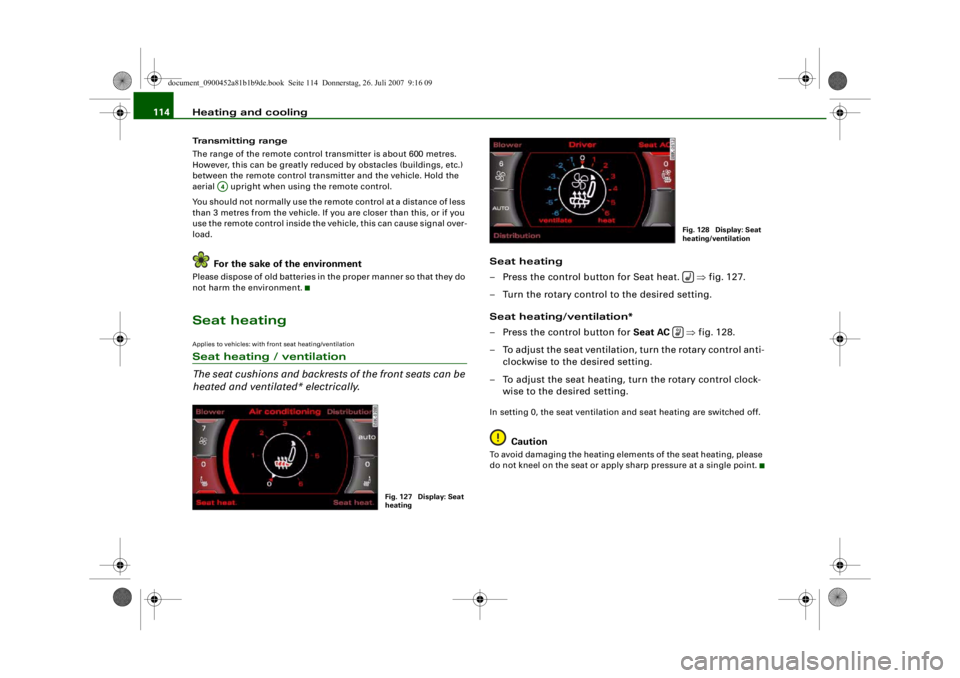
– Press the control button for Seat heat. ⇒fig. 127.
– Turn the rotary control to the desired setting.
Seat heating/ventilation*
– Press the control button for Seat AC ⇒fig. 128.
– To adjust the seat ventilation, turn the rotary control anti- clockwise to the desired setting.
– To adjust the seat heating, turn the rotary control clock- wise to the desired setting.In setting 0, the seat ventilation and seat heating are switched off.
Caution
To avoid damaging the heating elements of the seat heating, please
do not kneel on the seat or apply sharp pressure at a single point.
A4
Fig. 127 Display: Seat
heating
Fig. 128 Display: Seat
heating/ventilation
document_0900452a81b1b9de.book Seite 114 Donnerstag, 26. Juli 2007 9:16 09
-4 -
-
~
.1
0
'
T
6 88 .
(l)
0
-
-
I
AUTO
0
.··-
D
•
-+
D
+-
~I
-=---
'.auto
7
(l)
&j
-- .
0
0 J
fr.,
D
CD
•
,· ·-
Page 117 of 342
Heating and cooling115
Controls
Safety
Driving tips
General maintenance
Self-help
Technical data
Applies to vehicles: with seat heating for rear seatsSeat heating for rear seats
The seat cushions and backrests of the two outer rear
seats can be heated electrically.– Turn the left thumbwheel (on the centre console) to
switch on and regulate the heating for the left rear seat.
– Turn the right thumbwheel (on the centre console) to switch on and regulate the heating for the right rear seat.The heating is switched off when the thumbwheel is set to 0.
Possible settings range from 1 to 6.
The heating for the rear seats only operates when a sensor registers
the weight of the occupant in the seat. If nobody is travelling on the
rear seats, please switch off the re ar seat heating to avoid activating
it unintentionally.
Caution
To avoid damaging the heating elements of the seat heating, please
do not kneel on the seat or apply sharp pressure at a single point.
document_0900452a81b1b9de.book Seite 115 Donnerstag, 26. Juli 2007 9:16 09
--4 -
-T
-+
CD
+-
•
Page 188 of 342
Safe driving
186Safe drivingGeneral notesSafety is the first priority
Your safety is our first priority.This chapter contains important information, tips, sugges-
tions and warnings that you should read and observe for
your own safety and the safety of your passengers.
WARNING
•
The information in this chapter is important for the driver of
the vehicle and all passengers. Th e other chapters in this manual
(and, where applicable, in the ot her literature supplied with the
vehicle) contain further importan t notes which you should read
and observe for your own safety and that of your passengers.
•
Ensure that the complete vehicle wa llet is always in the vehicle.
This is especially imp ortant when you lend or sell the vehicle to
others.
Safety features
The safety features listed he re are part of the vehicle's
occupant restraint system. They work together to help
reduce the risk of injury in a wide variety of accident situ-
ations.Your safety and the safety of your passengers should not be left to
chance. In the event of an accident, the safety features incorporated
in your vehicle are capable of reducing the risk of injury. These are
just a few of the safety features in your Audi:•
Optimised three-point seat belts for all seats,
•
Belt force limiters for the front seats,
•
Belt pre-tensioners for the front seats,
•
Head restraints for all seats,
•
Optimised protection against injuries of the cervical vertebrae,
•
Front airbags,
•
Side airbags in the front seat backrests and on the outer rear
seats*,
•
Head-protection airbags (sideguard system),
•
“ISOFIX” mountings* for “ISOFIX” child safety seats on the rear
seats,
•
Height-adjustable head restraints on the seats,
•
Adjustable steering column.
These individual safety features are harmonised to provide you and
your passengers with the best possible protection in accident situ-
ations. However, they can only be effective if you and your passen-
gers sit in the correct position and adjust and use the safety equip-
ment properly.
For these reasons, this chapter explains why these safety features
are so important, how they can protect you, what you need to
remember when using them, and how you and your passengers can
gain the most benefit from them. There are also a number of impor-
tant safety warnings which you and your passengers should always
observe in order to minimise the risk of injury.
Safety is everyone's responsibility!
document_0900452a81b1b9de.book Seite 186 Donnerstag, 26. Juli 2007 9:16 09
--4 -
-T
-+ +-
•
•
Page 189 of 342
Safe driving187
Controls
Safety
Driving tips
General maintenance
Self-help
Technical data
Before every trip
The driver is responsible for the safety of the passengers
and the safe operation of the vehicle at all times.For your own safety and the safety of your passengers,
always note the following points before every trip:
– Make sure that all lights and turn signals are working
properly.
– Check the tyre pressures.
– Make sure that all windows are clean and give good visi- bility to the outside.
– Secure all luggage and other items carefully ⇒page 79 .
– Make sure that no objects can interfere with the pedals.
– Adjust the front seat, head restraint and mirrors correctly.
– Make sure that the head restraints for all passengers are adjusted to the correct position.
– Make sure that children are protected with suitable safety seats and properly worn seat belts ⇒ page 210.
– Sit in the correct position in your seat and make sure that
your passengers do the same. ⇒page 73 .
– Fasten your seat belt correctly. Make sure that your passengers do the same ⇒page 194.
What affects driving safety?
Safety on the road is directly related to how you drive, and
can also be affected by the passengers in the vehicle.The driver is responsible for the safety of the vehicle and all
its occupants. If your ability to drive is impaired in any way,
you endanger yourself and other road users ⇒. There-
fore:
– Do not let yourself be distracted by passengers or by using a mobile phone, etc.
– Never drive when your driving ability is impaired (by medication, alcohol, drugs, etc.).
– Obey all traffic regulations and speed limits and always maintain a safe distance to the vehicle in front.
– Always adjust your speed to suit the road, traffic and weather conditions.
– Take frequent breaks on long trips. Do not drive for more than two hours without a stop.
– If possible, avoid driving when you are tired or stressed.
WARNING
•
Distractions while driving or any kind of impairment to your
driving ability increase the risk of accident and injury.
•
Do not store loose objects on the dashboard. These objects
could fly around the interior when the vehicle is moving (under
acceleration or whilst cornering) and distract the driver – this
could lead to an accident.
document_0900452a81b1b9de.book Seite 187 Donnerstag, 26. Juli 2007 9:16 09
--4 -
-T
-+ +-
•
•
Page 190 of 342
Safe driving
188Correct sitting positionsCorrect sitting position for driver
The correct driving position is important for safe and
fatigue-free driving.For your own safety, and to reduce the risk of injury in the
event of an accident, we re commend the following driving
position.
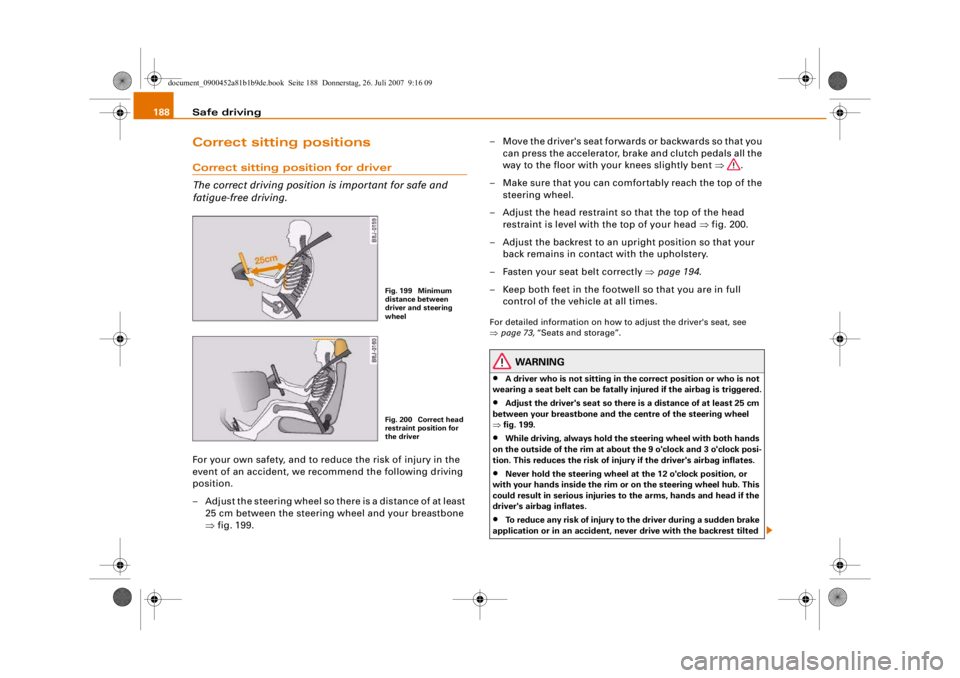
– Adjust the steering wheel so there is a distance of at least 25 cm between the steering wheel and your breastbone
⇒fig. 199. – Move the driver's seat forwards or backwards so that you
can press the accelerator, brake and clutch pedals all the
way to the floor with your knees slightly bent ⇒.
– Make sure that you can comfortably reach the top of the steering wheel.
– Adjust the head restraint so that the top of the head restraint is level with the top of your head ⇒fig. 200.
– Adjust the backrest to an upright position so that your back remains in contact with the upholstery.
– Fasten your seat belt correctly ⇒page 194 .
– Keep both feet in the footwe ll so that you are in full
control of the vehicle at all times.
For detailed information on how to adjust the driver's seat, see
⇒ page 73, “Seats and storage”.
WARNING
•
A driver who is not sitting in the correct position or who is not
wearing a seat belt can be fatally injured if the airbag is triggered.
•
Adjust the driver's seat so there is a distance of at least 25 cm
between your breastbone and th e centre of the steering wheel
⇒ fig. 199.
•
While driving, always hold the steering wheel with both hands
on the outside of the rim at about the 9 o'clock and 3 o'clock posi-
tion. This reduces the risk of injury if the driver's airbag inflates.
•
Never hold the steering wheel at the 12 o'clock position, or
with your hands inside the rim or on the steering wheel hub. This
could result in serious injuries to the arms, hands and head if the
driver's airbag inflates.
•
To reduce any risk of injury to the driver during a sudden brake
application or in an accident, neve r drive with the backrest tilted
Fig. 199 Minimum
distance between
driver and steering
wheelFig. 200 Correct head
restraint position for
the driver
document_0900452a81b1b9de.book Seite 188 Donnerstag, 26. Juli 2007 9:16 09
--4 -
-T
-+ +-