change wheel AUDI S4 2014 Owners Manual
[x] Cancel search | Manufacturer: AUDI, Model Year: 2014, Model line: S4, Model: AUDI S4 2014Pages: 296, PDF Size: 73.56 MB
Page 11 of 296
CD
@
®
©
®
®
(j)
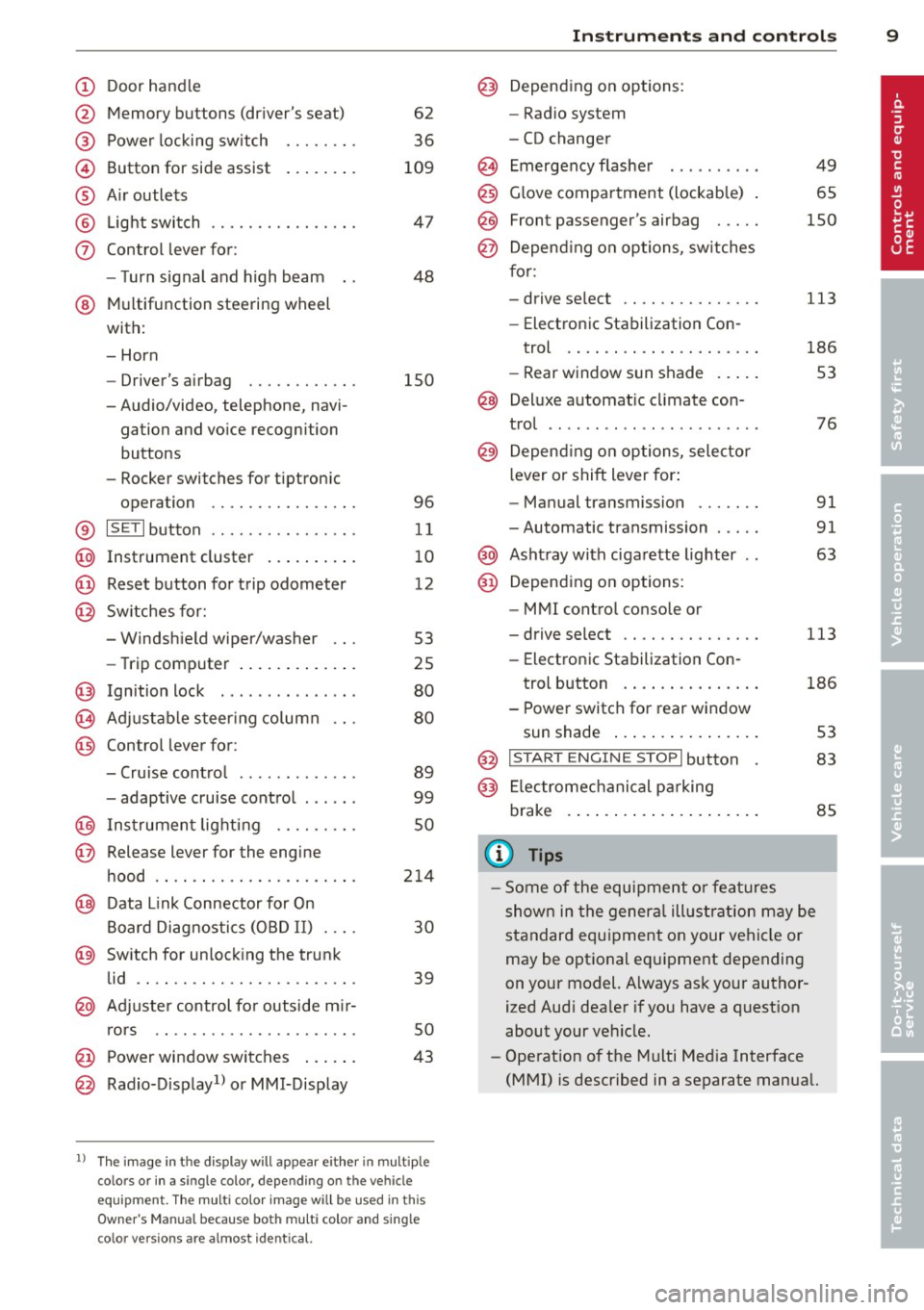
Door handle
Memory buttons (dr iver's seat)
Power locking sw itch
Button for side ass ist
A ir outlets
L ight switch
Control lever for :
- T urn signal and high beam
@ Multifunction steering wheel
with:
- Horn
- Driver's airbag
- Audio/video, telephone, navi-
gation and vo ice recognition
buttons
- Rocker switches for tiptron ic
opera tion ........... .... .
® ISET I button ...... ..... .... .
@ Instrument cluster .. ... .. .. .
@ Reset button for trip odometer
@ Sw itches for:
- Windsh ield wiper/washer
- Trip computer ..... ... .. .. .
@ Ignition lock ............. . .
(8) Adjustable s teer ing column
@ Control lever for :
- Cruise contro l ......... ... .
- adaptive cruise contro l .... . .
@ Ins trumen t lighting .... .. .. .
@ Release lever for the engine
hood .. .. .. .. ........... .. .
@ Data L ink Connector for On
B oard Diag nostics (OBD II) . .. .
@ Sw itch for unlock ing the trunk
lid .. .. .. ................. .
@ Adjuster control fo r outside m ir-
r ors .. .. .. .. ........... .. .
@ Power window switches ... .. .
@ Rad io-Display1l or MMI-Display
62
36
109
4 7
48
150
96
11
10
12
53
25
80
80
89
99
so
214
30
39
50
43
l) T he image in t he d is pl ay will app ear e it h er in mu lt iple
c o lor s or in a singl e co lor , de pen din g o n th e vehicl e
e q ui pment. T he m ulti co lo r im age w ill b e used i n this
O w ner's M anual becau se bo th mu lt i co lo r and si ng le
c o lor ver sio ns are almos t ide ntic al.
In strument s and control s 9
@) Depend ing on options:
- Rad io system
- CD changer
Emergency flashe r
G love compartment (lockab le)
Front passenger's airbag .....
Depend ing o n op tions, sw itches
f or:
49
65
150
- drive select .. .. .......... .
113
- Electronic Stabilization Con-
trol . ... .. .. .. . .. ... .... .
- Rear window sun shade .. .. . 186
53
@ Deluxe automat ic cl imate con-
trol ...... .. .... .......... .
@) Depending on options, selecto r
lever or shift lever for :
- Manual transmission ...... .
- Automatic transmission .... .
@ Asht ray with ciga rette lighter
@ Depend ing on options:
- MMI contro l console or
76
91
91
63
- drive select . . . . . . . . . . . . . . . 113
- Electronic Stabilizat ion Con-
trol button . . . . . . . . . . . . . . . 186
- Power switch for rear window sun shade . . . . . . . . . . . . . . . . 53
@ I STA RT ENGI NE STOPI button 83
@) Electromec hanical p arking
brake . . . . . . . . . . . . . . . . . . . . . 85
(D Tips
-Some of the equipment o r fea tures
show n in the gener al illustration m ay be
standard equ ipment on your vehicle or
may be optional eq uipment depending
on your model. Always as k your author
ized Aud i dea ler if you have a quest ion
about your ve hicle.
- Operat ion of the Multi Med ia Interface
(MMI) is described in a separate manua l.
Page 112 of 296
110 Audi side assist
General information
App lies to vehicles: with Audi side assist
®
©
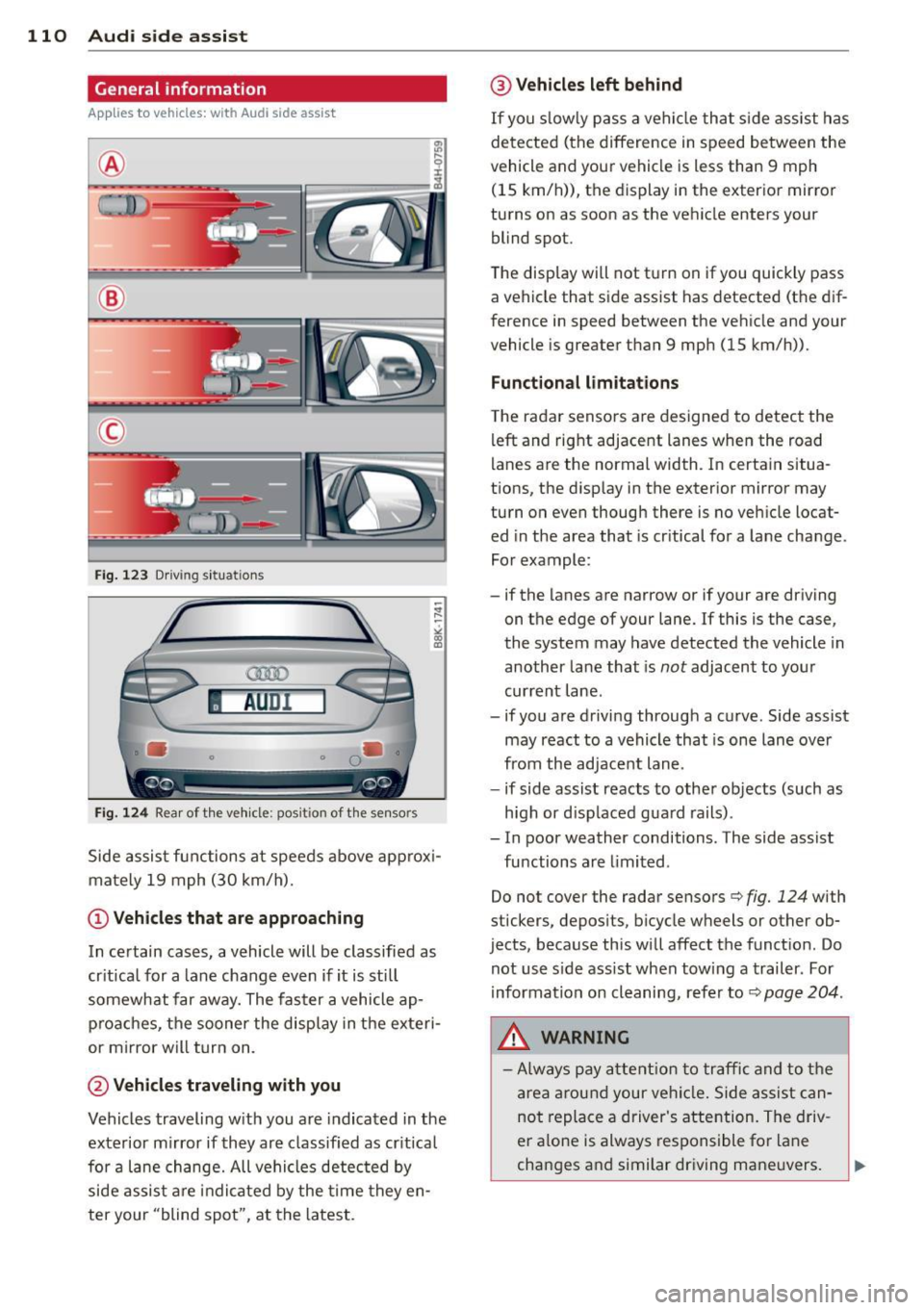
Fig. 12 3 Driving s it u at ions
AU Dr- l
• •
Fig . 124 Rear of th e ve hicle: pos it io n of t he se nso rs
Side assis t fu nctions at speeds above ap prox i
ma tely 19 mph (30 km/h).
(D V ehicles that are approaching
In certain cases, a vehicle will be classified as
cr itical for a lane change
even if it is still
somewhat far away. The fas ter a vehicle ap
p ro aches, the sooner the disp lay in the exteri
or m irror will t urn on.
@ Vehicles traveling with you
Vehicles traveling w ith you are indicated in the
exterior m irror if they are classified as cr it ical
for a lane change. All vehicles detec ted by
side assis t are in dicated by the time they en
ter your "blind spot", at the latest.
@ Vehicles left behind
If you s low ly pass a ve hicl e tha t sid e ass ist has
dete cted ( the difference in s peed between the
vehicle and you r vehicle is less than 9 mph
(15 km/h)), the display in the exter io r mirro r
turns on as soon as the vehicle enters your blind spot.
The disp lay wi ll not t urn on if you quickly pass
a vehicle that s ide assist has detected (t he d if
f erence in speed between the ve hicle and your
vehicle is greater than 9 mph (15 km/h)).
Functional limitations
T he radar senso rs are des igned to detect the
left and right adjacent lanes whe n the road
l anes a re the normal width. In certain situa
t ions, the d isp lay in the exterior mirror may
turn on even though there is no ve hicle locat
ed in the area that is cr itical fo r a lane cha nge.
For example:
- if the lanes are narrow or if your are driving on the edge of your lane. If this is the case,
the system may have detected the vehicle in
another la ne that is
not adjacent to your
cur rent lane .
- if you a re driving through a c urve . Side assis t
may react to a vehicle that is one lane ove r
from the ad jacent lane .
- if side assist reacts to other objects (such as
high or d isp laced gua rd rails) .
- In poor weather conditions. The side assist fu nctions are limited .
Do not
cover the radar sensors c::> fig. 124 with
stickers, depos its, bicycle wheels or other ob
jects , because this will affect the funct ion. Do
not use s ide ass ist when tow ing a trail er. For
information on cleaning, refe r to
c::> page 204 .
&_ WARNING
-Always pay a tten tion t o traffic and to the
ar ea around your ve hicl e. Side a ssist can
no t repla ce a driver's attention. The driv
er a lone is always respons ible fo r lane
cha nges a nd similar driving mane uvers.
Page 113 of 296
-Improper reliance on the side assist sys
tem can cause collisions and serious
personal injury:
- Never rely only on side assist when
changing lanes.
- Always check rear view mirrors to make
sure that it is safe to change lanes.
- Side assist cannot detect all vehicles un
der all conditions- danger of accident!
- Please note that side assist indicates
there are approaching vehicles, or
vehicles in your blind spot, only after
your vehicle has reached a driving speed
of at least 19 mph (30 km/h).
- In certain situations, the system may not
function or its function may be limited.
For example:
- if vehicles are approaching or being left
behind very quickly. The display may
not turn on in time.
- in poor weather conditions such as
heavy rain, snow or heavy mist .
- on very wide lanes, in tight curves or if
there is a rise in the road surface .
Vehicles in the adjacent lane may not
be detected because they are outside
of the sensor range.
(D Note
The sensors can be displaced by impacts or
damage to the bumper, wheel housing and
underbody. This can affect the system .
Have your authorized Audi dealer or au
thorized Audi Service Facility check their
function.
(D Tips
- If the window glass in the driver's door
or front passenger's door has been tint
ed, the display in the exterior mirror may be misinterpreted.
- For Declaration of Compliance to United
States FCC and Industry Canada regula
tions
~page 278.
Audi side assist 111
Activating and deactivating
App lies to vehicles : wi th Aud i side ass ist
Fig. 125 Driver 's doo r: Side ass ist button
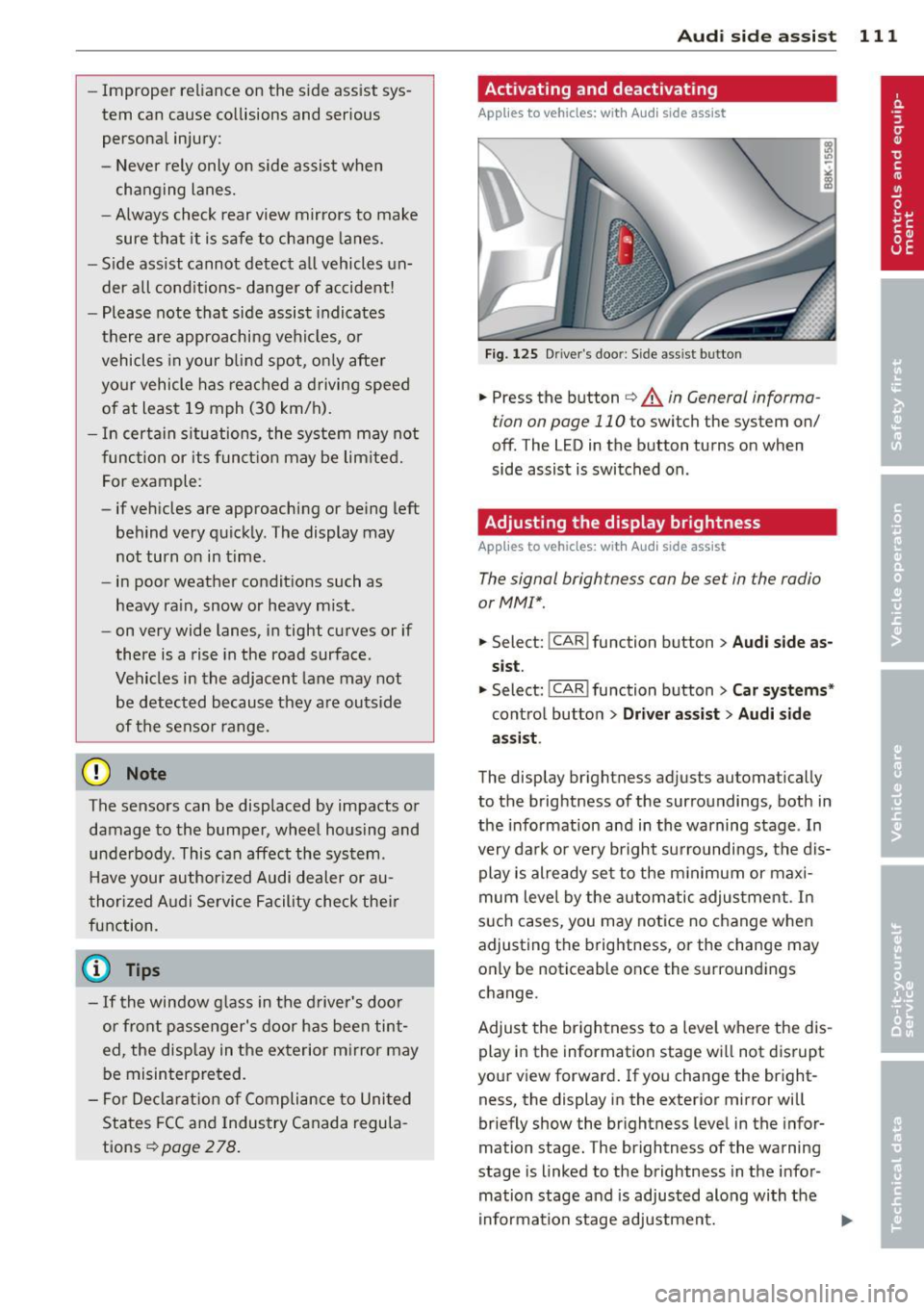
.,. Press the button ~ A in General informa
tion on page 110
to switch the system on/
off . The LED in the button turns on when
side assist is switched on.
Adjusting the display brightness
A pp lies to vehicles: wi th Audi side ass ist
The signal brightness can be set in the radio
orMMI* .
.,. Select: !CAR ! function button > Audi side as
sist.
.,. Select: I CAR I function button > Car systems*
control button > Driver assist > Audi side
assist .
The display brightness adjusts automatically
to the brightness of the surroundings, both in
the information and in the warning stage . In
very dark or very bright surroundings, the dis play is already set to the minimum or maxi
mum level by the automatic adjustment. In
such cases, you may notice no change when
adjusting the brightness, or the change may
only be noticeable once the surroundings
change.
Adjust the brightness to a level where the dis
play in the information stage will not disrupt
your view forward. If you change the bright
ness, the display in the exterior mirror will
briefly show the brightness level in the infor
mation stage. The brightness of the warning
stage is linked to the brightness in the infor
mation stage and is adjusted along with the
information stage adjustment.
Page 122 of 296
120 Park ass is t
Sw it c hing off
.,. Drive faster than 9 mph (15 km/h), or
.,. take the vehicle out of reverse gear. The
acoustic parking system is immediately de
activated, and the rear view camera picture
is deactivated automatically after a per iod
of about 15 seconds, or
.,. switch off the ignition.
The delay in deactivating the camera provides an uninterrupted view behind the vehicle es
pec ially when maneuvering in tight parking
spaces and prevents the picture from turning
off the every time you sh ift out of reverse .
If the warning message appears in the display but not the rear view camera picture, read and
confirm the warning message. The acoustic
d istance signal is always active .
If you press a function button on the MMI
control console, the rear view camera picture
d isappears. The rear view camera picture reap
pears the next time you park.
Further information on the warn ing message
and the MMI control console can be found in
the MMI instruction booklet .
A WARNING
-Only use the rearview camera to assist
you if it shows a good, clea r picture. For
example, the image may be affected by
the sun sh in ing into the lens, dir t on the
lens or if there is a defect .
- Use the rearview camera only with the
rear lid completely closed. Make sure any
objects you may have mounted on the
rear lid do not block the rearview cam
era .
(D Tips
-The rear v iew camera picture is ava ila b le
as soon as the MM I Display or the MM I is
switched on, or the start-up phase is
completed.
- The sensors must be kept clean and free
of snow and ice for the park assist to op
erate. -
Yo u can change the vo lume and pitch of
the s ignals as we ll as the disp lay
¢ page 122 .
-What appea rs in the disp lay is time-de
layed.
· Reverse Parking
Applies to vehicles: with parking system (rear, with rear
v iew camera}
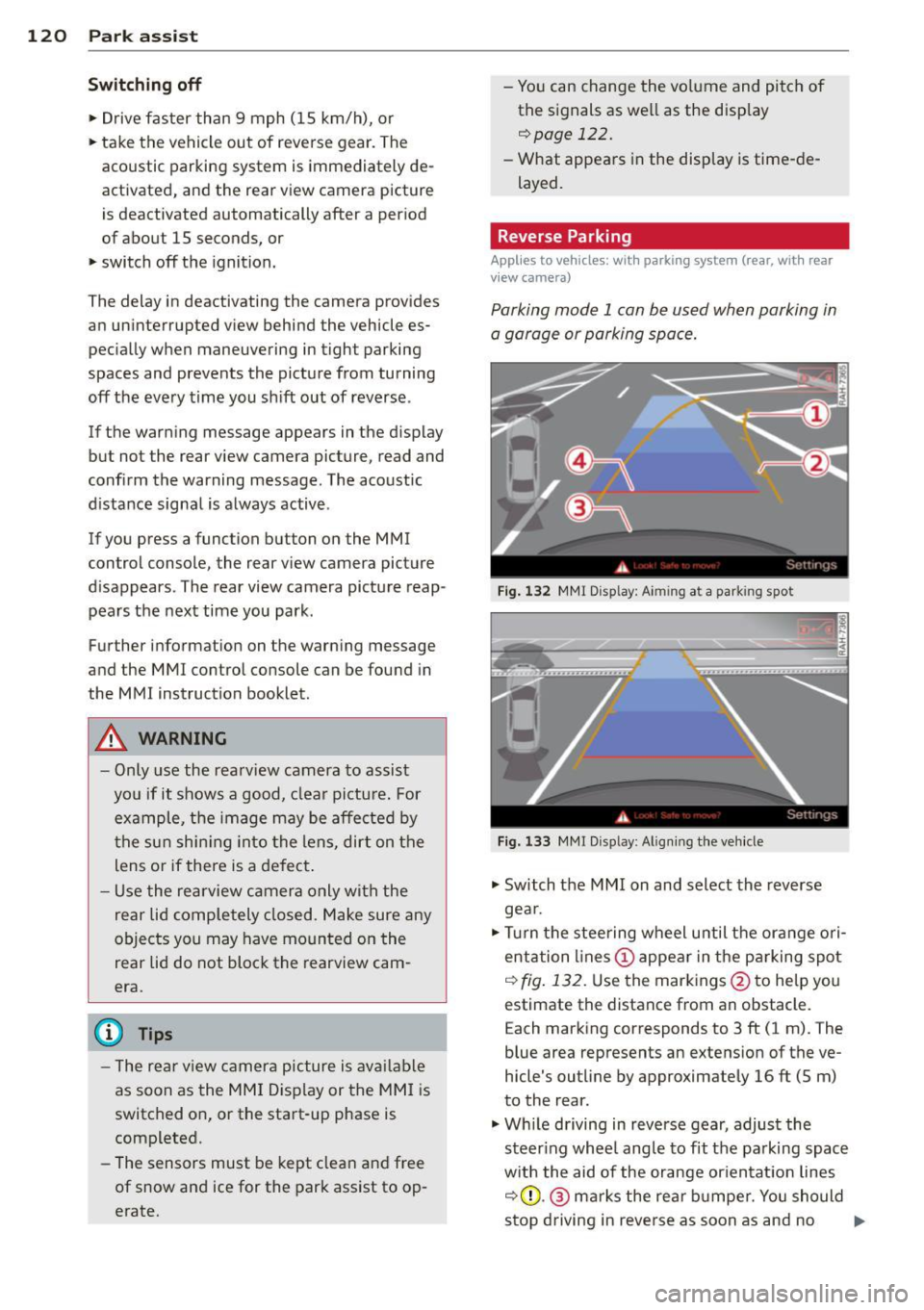
Parking mode 1 can be used when parking in
a garage or parking space.
F ig . 1 32 MMI Disp lay : A im ing a t a park ing spo t
Fig. 133 MMr Disp lay : A lig nin g the ve hicle
.,. Switch the MMI on and select the reverse
gea r.
.,. Turn the stee ring wheel u ntil the ora nge ori
entation lines(!) appea r in the pa rking spot
q fig . 13 2. Use the markings @to help you
estimate the distance from an obstacle. E ach marking corresponds to 3 ft (1 m). The
blue area represents an extens ion of the ve
hicle's outline by approximately 16 ft (5 m)
to the rear.
.,. Wh ile driving in reverse gear, adjust the
steer ing whee l angle to fit the parking spac e
w ith the aid of the orange or ien tat ion lines
q (D .@ marks the rear b umpe r. You should
stop driving in reve rse as soon as and no .,.
Page 162 of 296
160 Airbag system
-Never attach any objects such as cu
pholders or telephone mountings to the
surfaces covering the airbag units.
- For cleaning the horn pad or instrument
panel, use only a soft, dry cloth or one
moistened with plain water. Solvents or
cleaners could damage the airbag cover
or change the stiffness or strength of the
material so that the airbag cannot de
ploy and protect properly.
- Never repair, adjust, or change any parts
of the airbag system .
- All work on the steering wheel, instru
ment panel, front seats or electrical sys
tem (including the installation of audio
equipment, cellular telephones and CB
radios, etc.) must be performed by a
qualified technician who has the training
and special equipment necessary.
- For any work on the airbag system, we
strongly recommend that you see your
authorized Audi dealer or qualified work
shop.
- Never modify the front bumper or parts
of the vehicle body.
- Always make sure that the side airbag
can inflate without interference:
- Never install seat covers or replace
ment upholstery over the front seat
backs that have not been specifically
approved by Audi.
- Never use additional seat cushions that
cover the areas where the side airbags
inflate.
- Damage to the original seat covers or
to the seam in the area of the side air
bag module must always be repaired
immediately by an authorized Audi
dealer.
- The airbag system can be activated only
once. After an airbag has inflated, it
must be replaced by an authorized Audi
dealer or qualified technician who has
the technical information, training and
special equipment necessary.
- The airbag system can be deployed only once. After an airbag has been deployed,
it must be replaced with new replace- ment parts designed and approved espe
cially for your Audi model version . Re
placement of complete airbag systems
or airbag components must be per
formed by qualified workshops only. Make sure that any airbag service action
is entered in your Audi Warranty
& Main
tenance booklet under
AIRBAG REPLACE
MENT RECORD.
- In accidents when an airbag is deployed,
the vehicle battery separates the alterna
tor and the starter from the vehicle elec
trical system for safety reasons with a pyrotechnic circuit interrupter.
- Work on the pyrotechnic circuit inter rupter must only be performed by a
qualified dealer -risk of an accident!
- If the vehicle or the circuit interrupter
is scrapped, all applicable safety pre
cautions must be followed.
@ For the sake of the environment
Undeployed airbag modules and preten
sioners might be classified as Perchlorate
Material -special handling may apply, see
www .dtsc.ca.gov/hazardouswaste/per
chlorate. When the vehicle or parts of the restraint system including airbag modules
safety belts with pretensioners are scrap
ped, all applicable laws and regulations
must be observed. Your authorized Audi
dealer is familiar with these requirements
and we recommend that you have your
dealer perform this service for you.
Other things that can affect Advanced
Airbag performance
Changing the vehicle's suspension system can
change the way that the Advanced Airbag Sys
tem performs in a crash. For example, using
tire-rim combinations not approved by Audi, lowering the vehicle, changing the stiffness of
the suspension, including the springs, suspen
sion struts, shock absorbers etc. can change
the forces that are measured by the airbag sensors and sent to the electronic control
unit. Some suspension changes can, for
Page 189 of 296
ESC includes and/or works together with the
anti-lock brake system (ABS), brake assist sys
tem, anti -slip regulation (ASR) , e lectronic dif
ferential lock (EDL), dynamic steering* and electronic i nteraxle differential lock* /selective
wheel torque control* . ESC is switched on all
the t ime. I n certain s ituations when you need
less traction, you can switch
off ASR by press
i ng the button~~
page 188, fig. 174 or
~ page 188, fig. 175. Be sure to sw itch ASR
on again when you no longer need less trac
tion.
Anti-lock b ra king s ystem (ABS)
ABS prevents the wheels from locking up
when braking. The vehicle can still be steered
even d uring hard brak ing . Apply ste ady p res
sure to the brake pedal. Do not pump the ped
a l. A pulsing in the brake peda l indicates t hat
the system is he lping you to brake the vehicle .
Brake assist system
The brake assist system can decrease bra king
d istance. It increases braking power when the
d river presses the brake pedal quick ly in eme r
gency situations . You must press and hold the
brake peda l until the situation is over. In
veh icles w ith adaptive cru ise contro l*, the
brake assist system is more sensit ive if the
d istance detected to the veh icle ahead is too
small.
Anti- slip regulati on (ASR)
ASR reduces engine power when the drive
wheels begin to spin and adapts the force to
the road condit ions. This makes it eas ier to
start, accelerate and drive up hills.
Elect ronic diffe renti al lo ck (EDL )
The ED L brakes wheels that are spinning and
transfers the drive power to the other drive
wheel or wheels if the vehicle is equipped with
all-wheel drive*. This function is available up
to about 60 mph (100 km/h) .
In extreme cases, EDL automatica lly switches
off to help keep the brake on the braked whee l
from overheating. EDL w ill switch on again au-
Intellig ent technolog y 187
tomat ica lly when conditions have returned to
norma l.
Dynamic steering*
On vehicles with dynam ic steering*, ESC helps
stab il ize the s teer ing in crit ica l sit uat io ns.
Electronic interaxle differential lock* /
selective wheel torque control*
T he electronic i nteraxle differential lock (front
whee l dr ive) or the se lective whee l to rque
control (all-whee l dr ive) opera tes when dr iv
ing thro ugh curves. The front wheel on the in
side of the c urve or both whee ls on the inside
of the curve are braked selectively as needed .
This min imizes sliding in the front wheels and
allows for more precise driving through
cu rves . The applicable system may not acti
vate when dr iv ing in wet or snowy conditions.
A WARNING
- ESC, ABS , ASR, EDL dynam ic steering*
a nd the elect ronic interaxle differential
loc k* /se lective wheel torque control*
cannot overcome the laws of physics .
This is especially important on slippery
or wet roads. If the systems begin acting
to stabilize your veh icle, yo u should im
mediately change your speed to match
the road and traff ic conditions. Do not
let the increased safety provided by
these systems tempt you to take r isks.
Doing so will increase the risk of a loss of
veh icle contro l, col lision and ser ious per
sonal injuries.
- Always adapt your speed to road, traffi c
and wea ther conditions. The risk of los
ing con tro l of the vehicle increases when
driving too fast, espec ially through
curves and on slippery or wet roads, and
when dr iv ing too close to vehicles up
ahead. ESC, ABS, the brake ass ist sys
tem, ASR, EDL dynam ic steering* and the
electronic interaxle differentia l lock*/se
lective whee l torque control* cannot p re-
vent co llisions . ..,.
•
•
Page 205 of 296
Trailer towing tips
Important to know
Your vehicle hand les different ly when tow ing
a trailer because o f the addit ional weight and
d iffe ren t weight distribution . Safety, perform
ance and economy w ill greatly depend on how
caref ully you load your trailer and operate
your rig.
B efore you actua lly tow your trailer, pr actice
turning, stopp ing and bac king up in an area
away from traffic. Keep practicing until you have become comp lete ly fam iliar with the way
your veh icle-trailer comb ination behaves and
responds.
Backing up is d ifficu lt a nd requires practice .
Backing up with a tra iler genera lly requires
steer ing action opposite to that when backing
up your vehicle without a trailer.
M aintain a g reater distance betwee n your ve
h icle and the one in front o f you . You will need
mo re room to stop. To compensate for the
trailer, you will need a larger than normal
turning radius .
W hen pass ing, remember that yo u cannot ac
celerate as fast as yo u normally wo uld be
cause of the added load. Make sure you have
e nough room to pass . After passing , allow
p lenty o f room fo r your tra iler before chang
in g la nes aga in .
Avoid jerky starts, sharp turns or rap id lane
changes.
(D Tips
- Do not tow a tra iler during the break-in
period of you r vehicle.
- If you tow a trailer, your A udi may re
quire more frequent maintenance due to
the extra load
o page 275.
Trailer towin g 203
Parking on a slope
Do not park on a slope with a trailer . If it can
not be avoided, do so only after doing the fol lowing:
When parking:
.. App ly the foot brake.
.. Have someone p lace chocks under both the
veh icle and the tra iler wheels .
.,. With chocks in place, slowly release t he
bra kes unt il t he whee l chocks absorb the
load .
.. Tu rn the whee ls towards the curb.
.,. App ly the par king b rake .
.. Place an a utomatic transm ission* in P, re
spectively a manual transmission in first or
reverse gear.
When restarting after parking:
.,. App ly th e foot br ake .
.. Start the en gine.
.. Move the selector lever to D/S, respect ively
a man ual transmiss ion in first gea r.
.. Release the parking bra ke and s low ly pull
out and away from the wheel chocks .
.. Stop and have someone retr ieve the wheel
chocks.
@ Tips
If you move the selector leve r of the auto
matic transmissio n* to P before applying
the pa rking brake and before blocking the
whee ls, you may hav e to use mor e forc e
l ater to move the le ver out of the P posi
tion.
•
•
Page 234 of 296
232 Tires and wheels
Gross Vehicle Weight Rating ("GVWR" )
means the maximum total loaded weight o f
the vehicle.
Groove
means the space between two adjacent tread
ribs.
Load rating (code)
means the maximum load that a tire is rated
to carry for a given inflat ion pressure. You
may not find this informat ion on all tires be
cause it is not requ ired by law .
Ma ximum load rating
means the load rating for a t ire at the maxi
mum permissible inflation pressure for that
tire .
Maximum loaded vehicle weight
means the sum of:
(a) Curb weight
(b) Accessory weight
(c) Vehicle capacity we ight, and
(d) Production opt ions weight
Maximum (permissible) inflation pressure
means the maximum cold inflation pressure
to which a tire may be inflated . Also called
"maximum inflation pressure."
Normal occupant weight
means 150 lbs. (68 kilog rams) times the
number of occupants seated in the vehicle up
to the tota l seating capacity of your vehicle.
Occupant distribution
means dist ribution of occupants in a veh icle.
Outer diameter
means the overall diameter of an inflated new
tire.
Overall width
means the linear distance between the exteri
ors of the sidewalls of an inflated tire, includ
ing elevations due to labeling, decorations, or
protective bands or ribs .
Ply
means a layer of rubbe r-coated parallel cords.
Production options weight
means the combined weight of those installed
regular production opt ions we ighing over 5
lbs. ( 2.3 kg) in excess of those standa rd items
wh ich they replace, not previously cons idered
in curb weight or accessory weight, including
heavy duty brakes, ride levelers, roof rack,
heavy duty battery, and special tr im.
Radial ply tire
means a pneumat ic tire in which the ply cords
that extend to the beads are laid at substan
tially 90 deg rees to the center line of the
tread.
Recommended inflation pressure
see c:::> page 231, Cold tire inflation pressure .
Reinforced tire
means a tire design to operate at higher loads
and at higher inflation pressures than the cor
responding standard tire. Reinforced tires
may be identified as "XL", "xl", "EXTRA LOAD",
or "RF" on the sidewall.
Rim
means a metal support for a tire or a t ire and
tube assembly upon which the tire beads are
seated .
Rim diameter
means nominal diameter of the bead seat. If
you change your wheel s ize, you w ill have to
purchase new tires to match the new rim di
ameter .
Rim size designation
means rim diameter and width.
Rim width
means nom inal distance between rim flanges.
Sidewall
means that portion of a tire between the
tread and bead .
Page 237 of 296
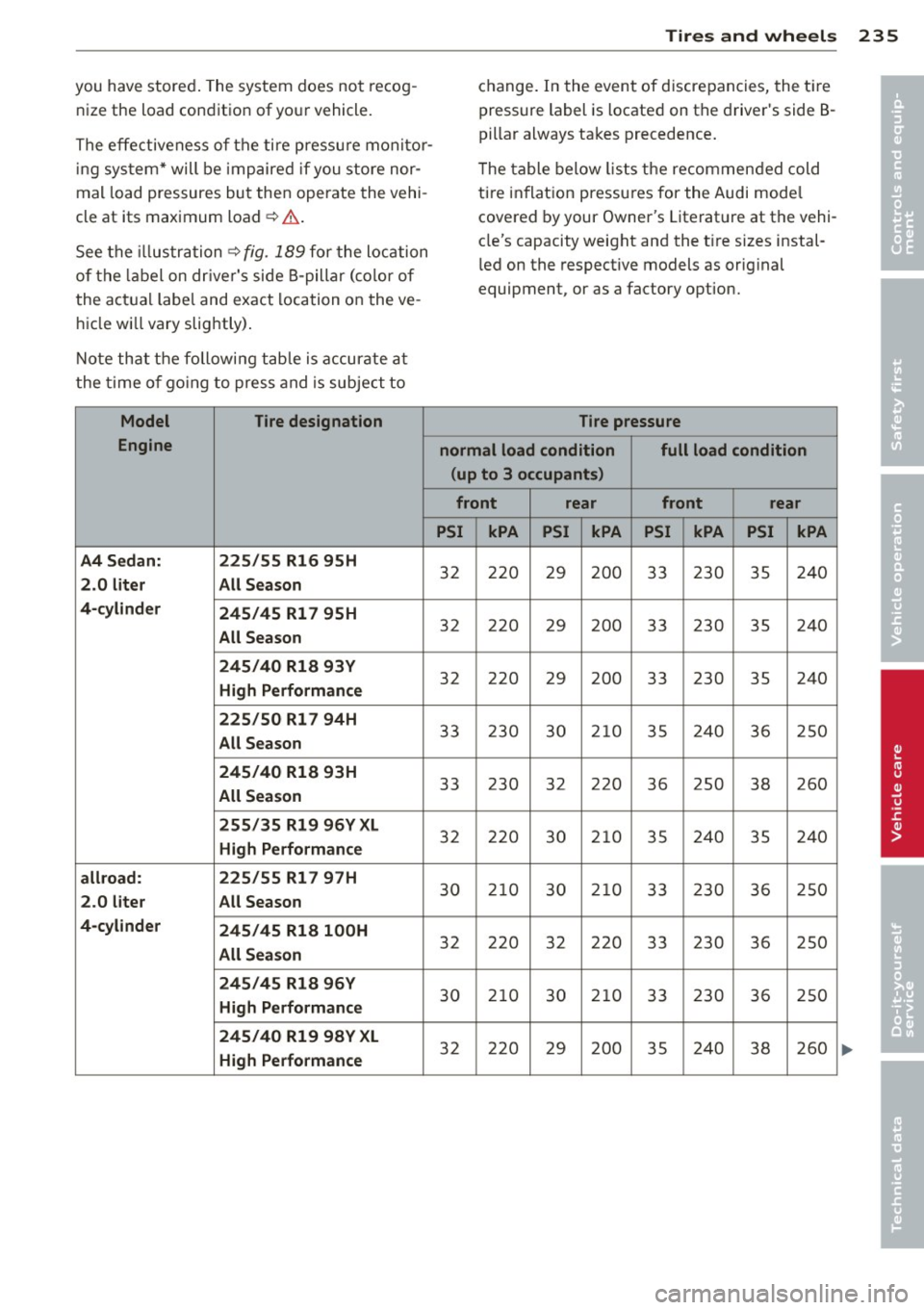
you have stored. The system does not recog
nize the load condition of your vehicle.
The effectiveness of the ti re pressu re monitor
ing sys tem* will be impaired if you store nor
mal load pressures but then operate the vehi
cle at its maximum load¢,& .
See the illustration ¢
fig. 189 for the location
of the label on dr iver's side B-pillar (color of
the actual labe l and exact location on the ve
hicle wi ll vary slig htly) .
Note that the fo llowing tab le is accurate at
the t ime o f go ing to press and is subject to
Model Tire designation
Engine
A4 Sedan: 225/55 Rl6 95H
2 .0 lit er All Se ason
4 -cy linder
245/45 Rl 7 95H
All Se ason
2 4 5/ 40 Rl8 93Y
Hi gh P erf or mance
2 25/5 0 Rl 7 94H
All Sea son
2 4 5/ 40 Rl 8 93H
All Se ason
2 55 /35 Rl9 96Y XL
Hig h Perf ormanc e
a llro ad: 225/55 Rl 7 97 H
2.0 l it e r All Season
4 -cy lind er
245 /45 Rl 8 l00H
All Sea so n
2 45 /45 Rl8 96 Y
Hig h Perf or mance
245 /40 Rl9 98Y XL
High P erf or mance
Tire s an d wheel s 235
change. In the event of discrepancies, the ti re
pressure label is located on the driver's side B
pillar always takes precedence .
T he table below lists the recommended cold
ti re inflation pressures for the Audi mode l
covered by your Owner's Literature at the vehi
cle's capacity weight and the t ire sizes instal
l ed on the respective models as orig inal
equipment, or as a factory option.
Tire pressure
normal load condition full load condition
( up to 3 occupants )
f r ont rear front rear
PSI kPA PSI kPA PSI kPA PSI kPA
32 220 29 200 33 230 35 240
32 220 29 200 33 230 35 240
32 220 29 200 33 230 35 240
33 230 30 210 35 240 36 250
33 230
32 220
36 250
38 260
32 220 30 210 35 240 35 240
30 2 10 30 2 10 33 230 36 250
32 220 32 220 33 230 36 250
30 210 30 2 10 33 230 36 250
32 220 29 200 35 240
38 260
•
•
Page 240 of 296
238 Tire s and whee ls
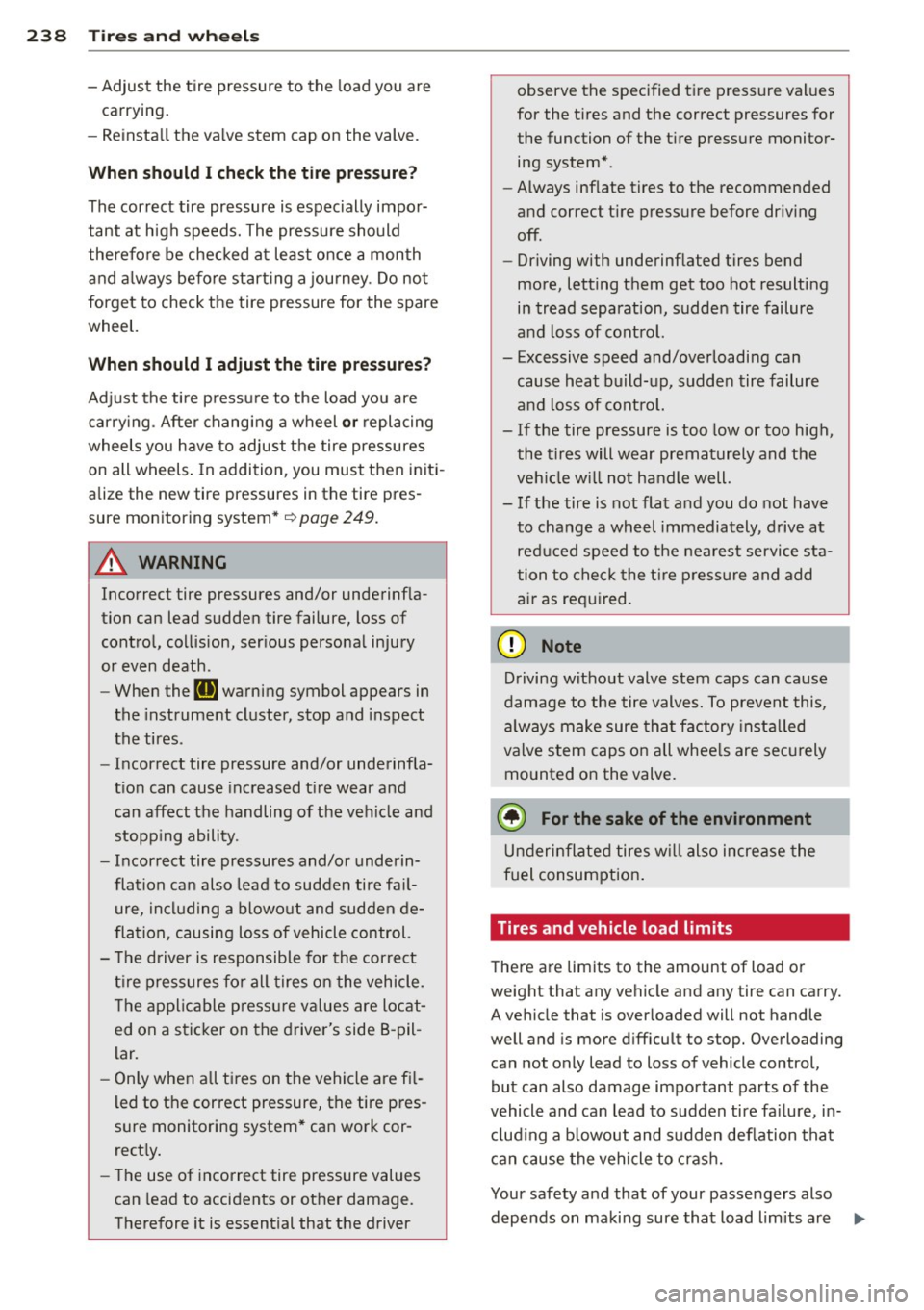
- Adjust the tire pressure to the load you are
carrying.
- Reinsta ll the va lve stem cap on the valve .
When should I ch eck the tire pres sur e?
The correct tire pressure is especially impor
tant at high speeds. The pressure should
therefore be checked at least once a month
and a lways before starting a journey. Do not
forget to check the tire pressure for the spare
wheel.
When should I adj ust the tire p re ss ures?
Adjust the tire pressure to the load you are
carry ing . After changing a wheel
o r replacing
wheels you have to adjust the tire pressures
on all wheels . In addition, you must then initi
alize the new tire pressures in the tire pres
sure monitoring system*~
page 249.
A WARNING
Incorrect tire pressures and/or underinf la
tion can lead sudden tire failure, loss of
control, collision, ser ious personal injury
or even death.
- When the
RI] warning symbol appears in
the instrument cluster, stop and inspect
the tires .
- Incorrect tire pressure and/or underinfla
t ion can cause increased t ire wear and
can affect the handling of the veh icle and
stopp ing ability.
- Incorrect tire pressures and/or underin
flation can also lead to sudden tire fa il
ure, including a blowout and sudden de
flation, causing loss of vehicle control.
- The driver is responsible for the correct
t ire pressures fo r all tires on the vehicle .
T he applicable p ressure va lues are locat
ed on a sticker on the driver's side B-pil
lar.
- Only when a ll ti res on the vehicle are fi l
led to the correct pressure, the tire pres
sure monitoring system* can work cor
rect ly.
- The use of incorrect tire pressure values
can lead to accidents or other damage.
Therefore it is essential that the driver observe the specified t
ire pressure values
for the tires and the correct pressures for
the function of the ti re pressure monitoring system*.
- Always inflate tires to the recommended
and correct t ire pressure before dr iv ing
off.
- Driving with underinflated tires bend
more, letting them get too hot resulting
in tread separation, sudden tire failure
and loss of control.
- Excessive speed and/overloading can
cause heat build-up, sudden tire failure
and loss of cont rol.
- If the tire pressure is too low or too high,
the t ires will wear prematurely and the
veh icle w ill not handle well.
- If the tire is not flat and you do not have
to change a wh eel immediately, drive at
reduced speed to the nearest service sta
tion to check the t ire p ressure and add
air as required.
Q) Note
D riving without valve stem caps can cause
damage to the tire valves. To prevent this,
a lways make sure tha t factory insta lled
valve stem caps on all whee ls are sec urely
mounted on the valve.
@ For the sake of the environment
U nderinflated tires w ill also incre ase the
fuel consumption .
Tires and vehicle load limits
There are limits to the amount of load or
weight that any veh icle and any tire can carry.
A vehicle that is over loaded will not handle
well and is more d iff icult to stop. Overloading
can not only lead to loss of vehicle control,
but can also damage important parts of the
vehicle and can lead to sudden tire fa ilure, in
clud ing a b lowout and sudden deflation tha t
can cause the vehicle to crash.
Your safety and that of your passengers also depends on making sure that load limits are .,..