warning AUDI S4 2015 Owners Manual
[x] Cancel search | Manufacturer: AUDI, Model Year: 2015, Model line: S4, Model: AUDI S4 2015Pages: 304, PDF Size: 74.86 MB
Page 123 of 304
'"" N
0 ::.,: co ,...., \!) 1.1'1 ,...., 1.1'1 ,....,
not affect the continuous signal tone). Ap
proaching another obstacle will cause the dis
tance signa l to sound again at the normal
volume.
R ear view came ra co verage area
The MM I d isplay shows the area covered by
the rear view camera <=:>
fig. 133 (D . Objects
that are not in the area covered @are not
shown on the MMI display.
We recommend that you p ractice parking with
the rear view camera in a traffic -free location
or parking lot to become familiar with the sys
tem, the orientation lines, and their function.
When do ing th is, there shou ld be good light
and weather conditions.
In t he MMI disp lay, objects or vehicles appear
closer or further away if:
- yo u are driving in reverse gear from a level
surface onto an incline, or a downward
s lope,
- you are driving in reverse gear toward pro
truding objects,
- the vehicle is carrying too much load in the
rear .
The accuracy of the or ientat ion lines and blue
surfaces d imin ishes if:
- the rear view camera does not prov ide a reli
able image, for examp le, in poor visibility
condit ions or if the lens is dirty,
- the image on the screen is not visible due to
sun g lare and reflect ion.
Caring for the rear view came ra lens
The rear view camera is located above the rear
license plate bracket . Fo r the parking assist to
operate, the lens <=:>
fig. 134 must be kept
clean:
- Dampen the lens with a household alcoho l
based glass cleaner, and clean the lens with
a dry cloth <=:>
CD.
- Remove snow with a hand brush and ice
preferably with a de -icing spray
c::> (D .
Park a ssis t 12 1
A WARNING
-The parking aid cannot replace the driv
er's attent ion. The dr iver alone is respon
sible for park ing and similar driving ma
neuvers .
-Always keep your eyes on the vehicle 's
surroundings, us ing the rea r view m irror
as well.
- Do not allow yourself to be dist racted
from traffic by the rear view camera p ic
tures.
- If the position and the installation angle
of the camera has changed, for examp le,
after a rear end collision, do not conti nue
to use the system for s afety re asons .
H ave it checked by a qualified dea le rship.
CJ) Note
- Low obstacles a lready s ignaled by a
wa rning can disappear from the system's
detect ion range as they are app ro ached
and w ill not continue to be signaled. Ob
jects such as barrier chains, trailer d raw
bars, thin painted vertica l poles or fen
ces may not be detected by the system,
posing risk of damage.
- Never use warm or hot water to remove
snow or ice from the rear view camera
lens -danger of crack format ion on the
lens!
- When cleaning the lens, never use prod
ucts that are abrasive .
Switching on/off
Applies to vehicles: wit h parking system (rear, wit h rear
v iew camera)
The rear view camera switches on automati
cally together with the acoustic pork assist when you put the vehicle in reverse.
Switching on
.,. Put the ve hicle in reverse gear, the acoust ic
parking system wi th rear view camera is ac
tivated a utomatica lly. Activation of the
acoust ic parking system is confirmed by a
brief acknowledgement sound . ..,_
Page 124 of 304
122 Park ass is t
Sw it c hing off
.,. Drive faster than 9 mph (15 km/h), or
.,. take the vehicle out of reverse gear. The
acoustic parking system is immediately de
activated, and the rear view camera picture
is deactivated automatically after a per iod
of about 15 seconds, or
.,. switch off the ignition.
The delay in deactivating the camera provides an uninterrupted view behind the vehicle es
pec ially when maneuvering in tight parking
spaces and prevents the picture from turning
off the every time you sh ift out of reverse .
If the warning message appears in the display but not the rear view camera picture, read and
confirm the warning message. The acoustic
d istance signal is always active .
If you press a function button on the MMI
control console, the rear view camera picture
d isappears. The rear view camera picture reap
pears the next time you park.
Further information on the warn ing message
and the MMI control console can be found in
the MMI instruction booklet .
A WARNING
-Only use the rearview camera to assist
you if it shows a good, clea r picture. For
example, the image may be affected by
the sun sh in ing into the lens, dir t on the
lens or if there is a defect .
- Use the rearview camera only with the
rear lid completely closed. Make sure any
objects you may have mounted on the
rear lid do not block the rearview cam
era .
(D Tips
-The rear v iew camera picture is ava ila b le
as soon as the MM I Display or the MM I is
switched on, or the start-up phase is
completed.
- The sensors must be kept clean and free
of snow and ice for the park assist to op
erate. -
Yo u can change the vo lume and pitch of
the s ignals as we ll as the disp lay
¢ page 124 .
-What appea rs in the disp lay is time-de
layed.
· Reverse Parking
Applies to vehicles: with parking system (rear, with rear
v iew camera}
Parking mode 1 can be used when parking in
a garage or parking space.
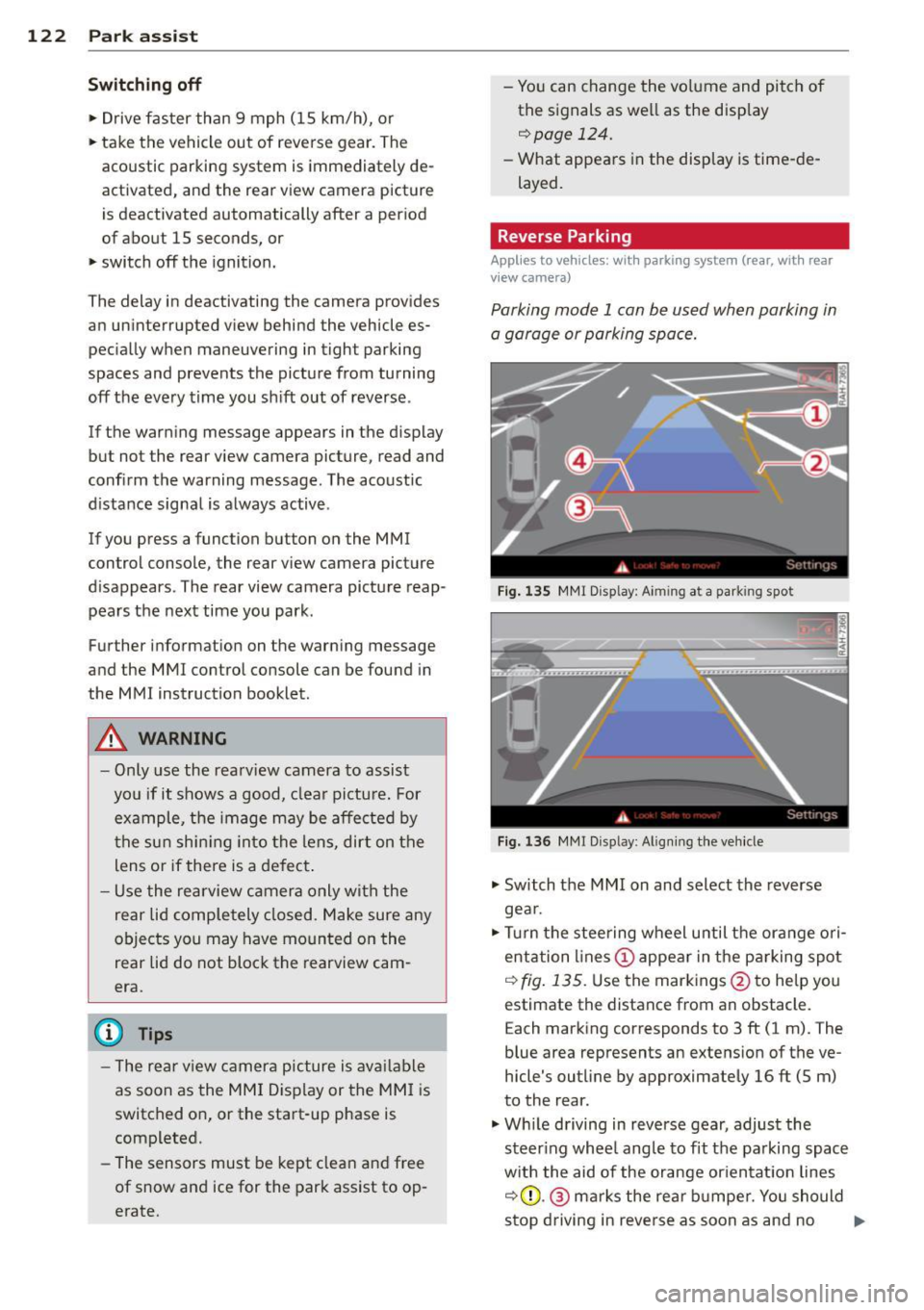
F ig . 1 35 MMI Disp lay : A im ing a t a park ing spo t
Fig. 136 MMr Disp lay : A lig nin g the ve hicle
.,. Switch the MMI on and select the reverse
gea r.
.,. Turn the stee ring wheel u ntil the ora nge ori
entation lines(!) appea r in the pa rking spot
c:> fig . 135. Use the markings @to help you
estimate the distance from an obstacle.
E ach marking corresponds to 3 ft (1 m). The
blue area represents an extens ion of the ve
hicle's outline by approximately 16 ft (5 m)
to the rear.
.,. Wh ile driving in reverse gear, adjust the
steer ing whee l angle to fit the parking spac e
w ith the aid of the orange or ien tat ion lines
c:> (D .@ marks the rear b umpe r. You should
stop driving in reve rse as soon as and no .,.
Page 125 of 304
M N
~ co
rl I.O
"' rl
"' rl
later than when the red orientation line©
abuts an object¢,&.!
A WARNING
- The rear view camera does not show the
entire area behind the vehicle
¢
page 120, fig. 133. Watch out espe
c ially for small children and animals. The
rear view camera cannot always detect
them, posing risk of an accident!
- Please note that objects not touch ing the
ground can appear to be further away
than they really are (for example, the
bumper of a parked vehicle, a trailer
hitch, or the rear of a truck). In this case,
yo u should not use the help lines to he lp
with parking, which poses danger of an
accident!
{[) Note
-Low obstacles already signaled by a
warning can disappear from the system's
detection range as they are approached
and will not continue to be signaled. Ob
j ects such as barrier chains, trailer draw
bars, thin pa inted vertical poles or fen
ces may not be detected by the system, posing risk of damage.
- In the MMI display, the direction of trav
el of the vehicle rear is represented de
pending on the steering wheel angle.
The vehicle front swings out more than
the vehicle rear. Maintain plenty of dis
tance from an obstacle so that your out
s ide mirror or a corner of your vehicle
does not collide with any obstacles -dan
ger of accident!
Park assist 123
Parallel Parking
Applies to vehicles: with parking system (rear, with rear
v iew camera)
Use parking mode 2 to help you park on the
edge of a street.
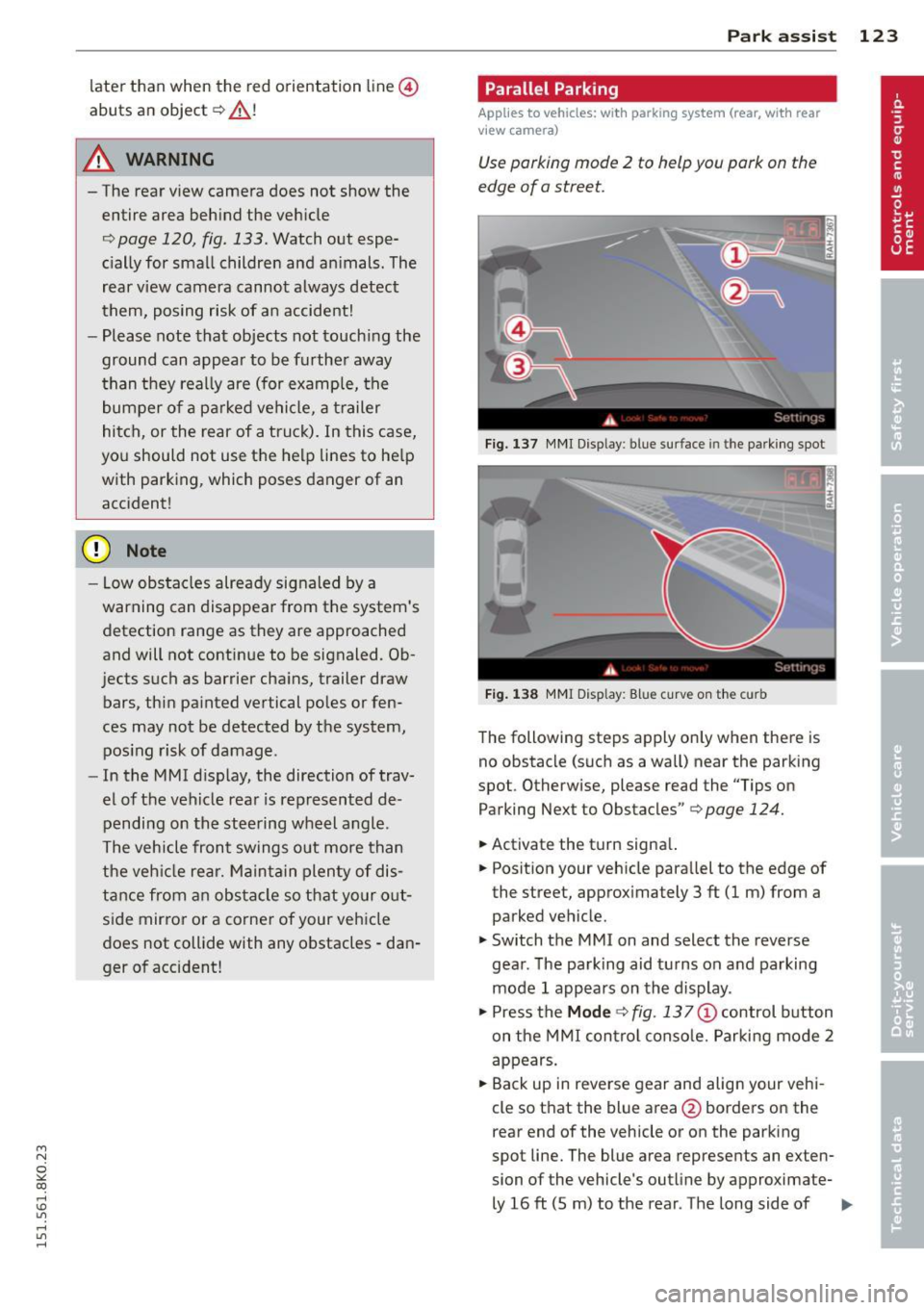
Fig. 137 MMI Display: blue surface in the parking spot
Fig. 138 MMI Display: Blue curve on the curb
The following steps apply only when there is
no obstacle (such as a wall) near the parking
spot. Otherwise, please read the "Tips on Parking Next to Obstacles"¢
page 124.
.,.. Activate the t urn signa l.
.,.. Position your vehicle parallel to the edge of
the street, approximately 3
ft (1 m) from a
parked vehicle.
.,.. Switch the MMI on and select the reverse
gear. The parking aid turns on and parking
mode 1 appears on the display .
.,.. Press the
Mode ¢ fig. 13 7 (!) control button
on the MMI contro l conso le. Parking mode 2
appears .
.,.. Back up in reverse gear and align your vehi
cle so that the blue area @borders on the
rear end of the vehicle or on the parking
spot line. The blue area represents an exten
sion of the vehicle's outline by approximate-
ly 16
ft (5 m) to the rear. The long side of liJJ,
Page 126 of 304
124 Park assis t
the b lue area should be on the curb. The en
ti re b lue area must fit into the parking spot.
• While the vehicle is stationary, turn the
steering wheel to the right as far as it will
go.
• Back into the park ing spot . Stop the vehicle
as soon as the blue curve touches the curb
¢ fig . 138.
• While the vehicle is stationa ry, turn the
steering wheel to t he left as far as i t wi ll go.
• Conti nue to bac k up into the park ing spot
unti l the vehicle is pa rked parallel to the
c ur b.® marks the rear bumper . You sho uld
stop dr iving in reverse as soon as and no lat
er than when the red orientation line@
abuts an object¢,&! Keep an eye on the
front of your veh icle wh ile doing this
c> (D .
Pa rking ne xt to obstacle s
When there is an obstacle (such as a wall)
next to the parking spot, choose a spot w ith
more space on the sides. Pos ition the long
side of the blue area so that there is sufficient
space from the curb . T he area must not be on
the curb . Yo u will also need to start turn ing
the steer ing whee l much ear lie r. T he re s hou ld
be a suff ic ient amoun t of sp ace between the
curb and the b lue curve, and the blue c urve
¢
fig . 138 must not touch the curb .
8_ WARNING
-The rea r view came ra does not show the
entire area beh ind the veh icle
¢
page 120, fig. 133. Watch o ut espe
cially for small children and an imals. The
rear view camera cannot a lways detect
them, pos ing risk of a n accide nt!
- Please note that objects not touch ing the
ground can appear to be further away
than they really are (for examp le, the
bumper of a pa rked vehicle, a t railer
hit ch, or the rear of a t ru ck ). In this case,
yo u shoul d no t use the help li nes to he lp
with par king, which poses danger of an
acc ident!
(D Note
In the M MI dis p lay, the direction of travel
of the vehicle rear is represented depend
i ng on the steering wheel angle . The vehi
cle front swings out more than the vehicle
rear. Mainta in plenty of dista nce from an
obstacle so that your outs ide mir ro r or a
corner of you r vehicle does not coll ide with
any obstacles - dange r of accide nt!
(D Tips
The left o r right orie ntation lines and su r
faces will be disp layed, depending on t he
t u rn s ignal being used .
Adjusting the display and warning tones
Applies to vehicles: with parking system (rear, with rear
view camera)
The display and warning tones are adjus ted in
the radio or MMI*.
.. Select: !CAR I function button> Parking sys
tem .
Or
--.. Select: !C AR I func tion but ton> Car systems "
control butto n> Driver assist > Parking aid .
Di splay
- Off -when the parking system is switched
on, on ly aud ib le signals are given .
-On -when the par king system is switched
on, the picture from the rear view camera is
disp layed.
Warning tones
- Rear volum e -
rear sensor vo lume
- Rear frequency -rear senso r frequency
- Music volume whil e parking -when the
parking system is sw itched on, the volume
of the active audio sour ce is lowered.
The newly ad justed value is briefly heard from
the sig nal generato r. The sett ings are auto
matically stored and assigned to the remote
control key. ..,
Page 127 of 304
"' N
0 ::.,: co ,...., \!) ..,.,
,...., ..,., ,....,
A WARNING ,~
- Always make sure that the volume and
frequency of the warning tones is adjust
ed so that you can easily hear the acous
tic distance signal even if the radio is playing, the air-conditioner blower is on
High or there is a high level of outside
noise.
- Check the settings whenever someone
else has driven the vehicle before you.
@ Tips
-The warning tones can also be adjusted
directly from the rear view camera im
age. Simply press the Settings* control
button.
- Changed settings are activated when
parking assist is switched on again.
Error messages
App lies to vehicles: with pa rk in g system (rea r, with rea r
view camera)
If a warning tone is audible for about five sec
onds when you turn on the ignition, there is a
malfunction in the system . Have the problem
corrected by your authorized Audi dealer.
Keep the sensors in the rear bumper clean and
free from ice so that the acoustic park assist
system can function properly.
Park assist 125
Page 128 of 304
126 Driving Saf ely
Driving Safely
General notes
Safe driving habits
Please remember -safety first!
This chapter contains important information,
tips, instructions and warnings that you need
to read and observe for your own safety, the
safety of your passengers and others . We have
summarized here what you need to know
about safety belts, a irbags, ch ild restra ints as
well as child safety. Your safety is for us
priori
ty number 1.
Always observe the info rmat ion
and warn ings in th is sect ion -fo r yo ur own
safety as well as that of your passengers .
The information in this se ction app lies to all
model ve rsions of your veh icle . Some of the
feat ures described in this sec tions may be
standard equipment on some models, or may
be optional equipment on others. If you are
not sure, ask your authorized Audi dealer.
A WARNING
-Always make sure that you follow the in
struct ions and heed the WARNINGS in
this Manual. It is in your interest and in
the inte rest of you r passengers.
- Always keep the complete Owner's Liter
ature in your Audi when you lend or sell
your vehicle so that this important info r
mation will always be ava ilable to the
dr iver and passengers.
- Always keep the Owner's literature handy
so that you can find i t eas ily if you have
ques tions.
Safety equipment
The safety features are part of the occupant
restraint system and work together to help
redu ce the risk of injury in a wide variety of
accident situations.
Your safety and the safety of your passenge rs
should not be left to chance. Advances in
technology have made a varie ty o f fea tures
avai la bl e to he lp re duce the risk of injury in an accident
. The following is a list of just a few of
the safety features in your Audi:
- sophis tic ated s afety be lts fo r drive r and a ll
passenger sea ting pos it ions,
- be lt fo rce limi ters fo r the front seats,
- belt p retensioners for the seats,
- head restra ints for each seating positio n,
- front airbags,
- side airbags in the front seats,
- side curtain a irbags,
- specia l LATCH anchorages for child re-
s tr aints,
- ad justab le steer ing colum n.
These ind iv idual safety features, can work to
gether as a system to he lp protect you and
you r passengers in a w ide range of accidents .
T hese fe atures canno t work as a system if
they a re not always correct ly adjusted and co r
rect ly used.
Safety i s everybody' s respon sibility!
Important things to do before driving
Safety is everybody's job! Vehicle and occu
pant safety always depends on the informed and careful driver.
Fo r yo ur safety and the safety of your passen
gers,
before driv ing alway s:
.,. Make sure that all lights and signa ls are op
erati ng correctly .
.,. Make su re that the t ire p ressu re is co rrect .
.,. Make s ure that all windows are clean and af
ford good v is ibili ty to the outs ide.
.,. Sec ure all lugg age and o ther items c aref ully
qpage 66 .
.,. Ma ke s ure that nothing can inte rfere with
the peda ls .
.,. Ad just front seat, head restraint and mirrors
correctly for your height .
.,. Instruct rear seat passengers to adjust the
head restra ints according to their he ight .
.,. Make s ure to use the r ight child restraint
co rrectly to p rotect chi ldren ¢
page 165,
Child Safety. "'
Page 129 of 304
M N
~ co
rl I.O
"' rl
"' rl
.. Sit properly in your seat and make sure that
your passengers do the same
¢ page 60,
Seats and storage.
.. Fasten your safety belt and wear it properly.
Also instruct your passengers to fasten their
safety belts properly¢
page 136 .
What impairs driving safety?
Safe driving is directly related to the condi
tion of the vehicle , the driver as well as the
driver's ability to concentrate on the road
without being distracted .
The driver is responsible for the safety of the
vehicle and all of its occupants. If your ability
to drive is impaired, safety r isks for everybody
in the vehicle increase and you a lso become a
hazard to everyone else on the road
~ .&_.
Therefo re:
.. Do not let yourself be distracted by passen
gers or by using a cellular telephone .
.. NEV ER dr ive when your driving ability is im
paired (by medicat ions, alcohol, drugs, etc.).
.. Observe all traffic laws, rules of the road
and speed limits and plain common sense .
.. ALWAYS adjust your speed to road, traffic
and weather conditions .
.,. Take frequent breaks on long trips. Do not
drive for more than two hours at a stretch.
.. Do NOT drive when you are t ired, under
pressure or when you are stressed .
& WARNING
Impaired driving safety increases the risk
of serious personal injury and death when
ever a veh icle is being used.
Driving Safely 12 7
Proper occupant
seating positions
Proper seating position for the driver
The proper driver seating position is impor
tant for safe, relaxed driving.
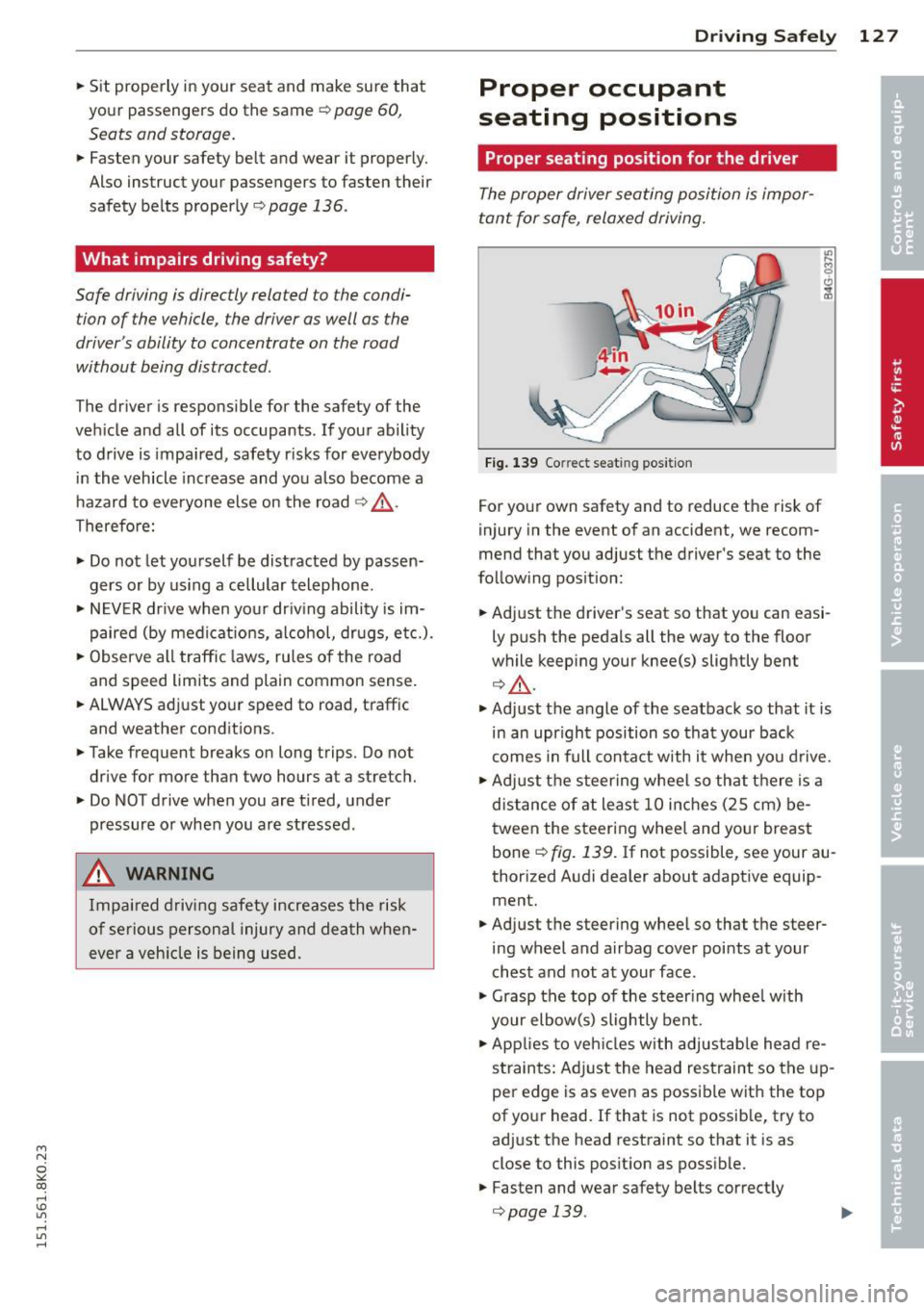
Fig. 139 Co rrect seat ing pos ition
For your own safety and to reduce the risk of
injury in the event of an accident, we recom
mend that you adjust the driver's seat to the
following position:
.. Adjust the driver's seat so that you can easi
ly push the pedals all the way to the floor
wh ile keeping your knee(s) slightly bent
¢&_ .
.. Adjust the angle of the seatback so that it is
in an upr ight position so that your back
comes in full contact w ith it when you drive.
.. Adjust the steering wheel so that th ere is a
distance of at least 10 inches (25 cm) be
tween the steering wheel and yo ur breast
bone
~ fig. 139. If not possible, see your au
thorized Audi dealer about adaptive equip
ment.
.. Adjust the steering wheel so that the steer
ing wheel and airbag cover points at your
chest and not at your face .
.,. Grasp the top of the steer ing whee l with
your elbow(s) slightly bent .
.. App lies to veh icles with adjustable head re
straints: Ad just the head restraint so the up
per edge is as even as possible with the top
of your head. If that is not possible, try to
adjust the head restraint so that it is as
close to this posit ion as possible.
.. Fasten and wear safety belts correctly
¢ page 139 . .,._
Page 130 of 304
128 Driving Safely
• Always keep both feet in the footwell so
that you are in control of the vehicle at all
times.
For detailed information on how to adjust the
driver's seat, see
¢ page 62 .
A WARNING
Drivers who are unbelted, out of position
or too close to the airbag can be seriously
injured by an airbag as it unfolds. To help
reduce the risk of serious personal injury:
- Always adjust the driver's seat and the
steering wheel so that there are at least
10 inches (25 cm) between your breast
bone and the steering wheel.
- Always hold the steering wheel on the
outside of the steering wheel rim with
your hands at the 9 o'clock and 3 o'clock positions to help reduce the risk of per
sonal injury if the driver's airbag inflates.
- Never hold the steering wheel at the
12 o'clock position or with your hands at
other positions inside the steering wheel
rim or on the steering wheel hub. Hold
ing the steering wheel the wrong way
can cause serious injuries to the hands,
arms and head if the driver's airbag de
ploys.
- Pointing the steering wheel toward your
face decreases the ability of the supple
mental driver 's airbag to protect you in a
collision .
- Always sit in an upright position and nev
er lean against or place any part of your
body too close to the area where the air
bags are located.
- Before driving, always adjust the front
seats and head restraints properly and
make sure that all passengers are prop
erly restrained.
- Never adjust the seats while the vehicle
is moving . Your seat may move unexpect
edly and you could lose control of the ve
hicle.
- Never drive with the backrest reclined or
tilted far back! The farther the backrests
are tilted back, the greater the risk of in- jury due to incorrect positioning of the
safety belt and improper seating posi
tion.
- Children must always ride in child safety
seats ¢
page 165. Special precautions
apply when installing a child safety seat
on the front passenger seat¢
page 144 .
Proper seating position for the front
passenger
The proper front passenger seating position
is important for safe, relaxed driving .
For your own safety and to reduce the risk of
injury in the event of an accident, we recom
mend that you adjust the seat for the front
passenger to the following position :
• Move the front passenger seat back as far as
possible . There must be a minimum of
10 inches (25 cm) between the breastbone
and the instrument panel¢,&. .
• Adjust the angle of the seatback so that it is
in an upright position and your back comes
in full contact with it whenever the vehicle is
moving.
• Applies to vehicles with adjustable head re
straints: Adjust the head restraint so the up
per edge is as even as possible with the top
of your head. If tha t is not possible, try to
adjust the head restraint so that it is as
close to this position as possible.
• Keep both feet flat on the floor in front of
the front passenger seat.
• Fasten and wear safety belts correctly
¢page 139.
For detailed information on how to adjust the
front passenger's seat, see
¢ page 60.
A WARNING
-
Front seat passengers who are unbelted,
out of position or too close to the airbag
can be seriously injured or killed by the air
bag as it unfolds. To help reduce the risk of
serious personal injury:
Page 131 of 304
'"" N
0 ::.,: co ,...., \!) 1.1'1 ,...., 1.1'1 ,....,
-Passengers must always sit in an upright
position and never lean against or place
any part of their body too close to the
area where the airbags are located.
- Passengers who are unbelted, out of po
sition or too close to the airbag can be
seriously injured by an airbag as it un
folds with great force in the blink of an
eye .
- Always make sure that there are at least
10 inches (25 cm) between the front
passenger's breastbone and the instru
ment panel.
- Each passenger must always sit on a seat
of their own and properly fasten and
wear the safety belt belonging to that seat.
- Before driving, always adjust the front
passenger seat and head restraint prop
erly.
- Always keep your feet on the floor in
front of the seat. Never rest them on the
seat, instrument panel, out of the win
dow, etc. The airbag system and safety
belt will not be able to protect you prop
erly and can even increase the risk of in
jury in a crash .
- Never drive with the backrest reclined or
tilted far back! The farther the backrests
are tilted back, the greater the risk of in
jury due to incorrect positioning of the
safety belt and improper seating posi
tion.
- Children must always ride in child safety
seats <=:>
page 165 . Special precautions
apply when installing a child safety seat
on the front passenger seat <=:>
page 144.
Proper seating positions for passengers
in rear seats
Rear seat passengers must sit upright with
both feet on the floor consistent with their
physical size and be properly restrained
whenever the vehicle is in use.
To reduce the risk of injury caused by an incor
rect seating position in the event of a sudden
braking maneuver or an accident, your pas-
Driving Safely 129
sengers on the rear bench seat must always
observe the following:
.,. Make sure that the seatback is securely
latched in the upright position <=:>
page 71.
.,. If there is a passenger on the rear center
seating position, slide the center head re
straint upward at least to the next notch.
.,. Keep both feet flat in the footwell in front of
the rear seat .
.,. Fasten and wear safety belts properly
<=:> page 139 .
.,. Make sure that children are always properly
restrained in
a child restraint that is appro
priate for their size and age
<=:> page 165.
& WARNING ~
Passengers who are improperly seated on
the rear seat can be seriously injured in a
crash.
- Each passenger must always sit on a seat
of their own and properly fasten and
wear the safety belt belonging to that seat.
- Safety belts only offer maximum protec
tion when the seatback is securely latch
ed in the upright position and the safety
belts are properly positioned on the
body. By not sitting upright, a rear seat
passenger increases the risk of personal
injury from improperly positioned safety
belts!
- Always adjust the head restraint properly
so that it can give maximum protection . •
•
Page 132 of 304
130 Driving Saf ely
Proper adjustment of head restraints
Appl ies to vehicles: with a djustable head restra ints
Correctly adjusted head restraints are an im
portant part of your vehicle's occupant re
straint system and can help to reduce the risk of injuries in accident situations.
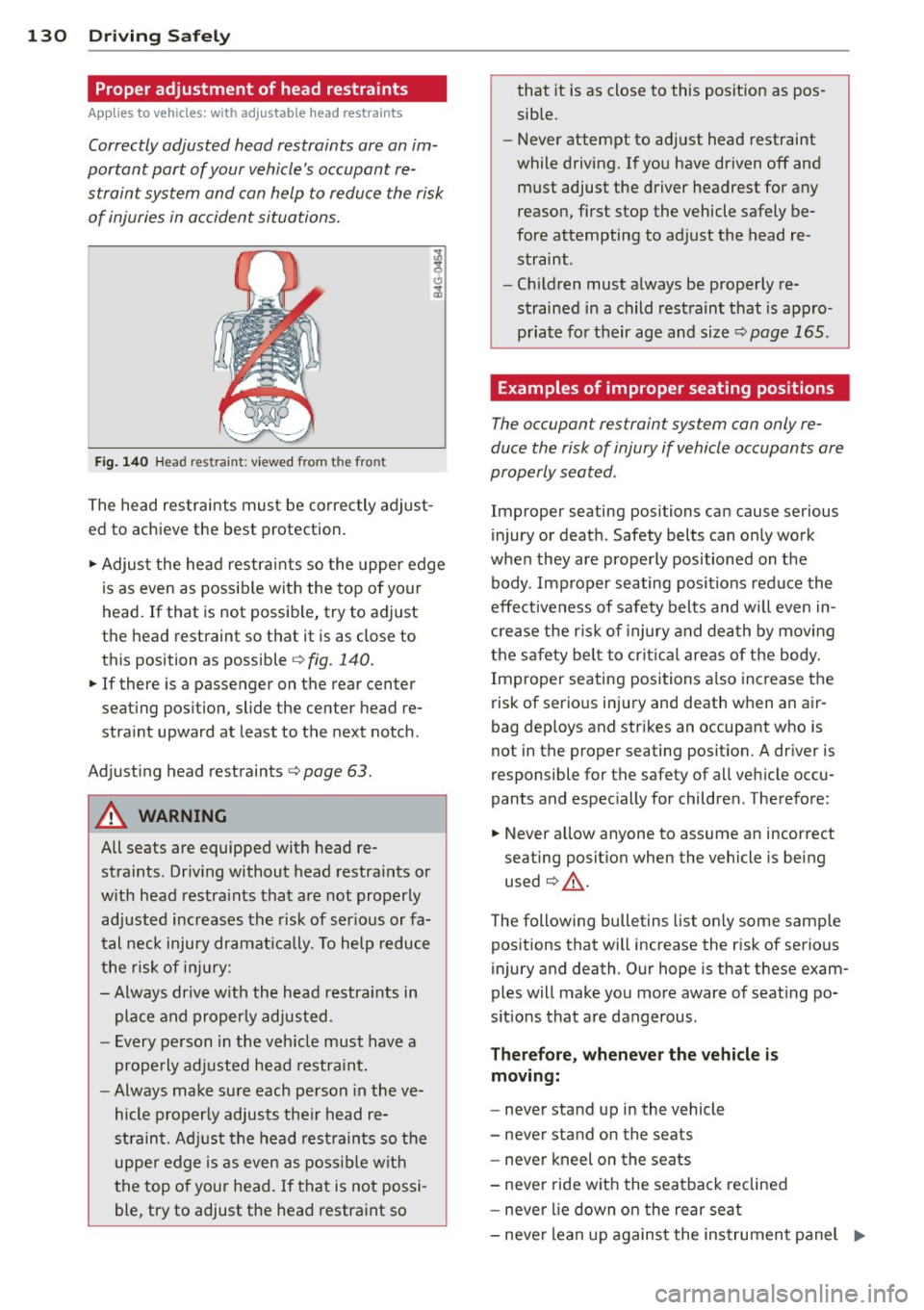
F ig . 14 0 Head restrain t: viewed from the front
The head restraints must be correctly adjust
ed to achieve the best protection.
• Adjust the head restraints so the uppe r edge
is as even as possible with the top of your
head. If that is not possib le, try to adjust
the head restraint so that it is as close to
this position as possible
c:> fig. 140.
• If there is a passenger on the rear center
seat ing pos ition, slide the center head re
stra int upward at least to the next notch .
Ad justing head restraints
<:>page 63.
A WARNING
All seats are equipped with head re
straints. Dr iv ing without head restraints or
w ith head restra ints that are not properly
adjusted increases the risk of ser ious or fa
t al nec k injury dramat ica lly. To help reduce
t he risk of inju ry:
- Always drive with the head restra ints in
place and properly adjusted.
- Every pe rson in the veh icle must have a
properly adjusted head restra int.
- Always make sure each pe rson in the ve
hicle properly adjusts the ir head re
stra int. Adjust the head rest raints so the
upper edge is as even as possib le with
the top of your head. If that is not possi
ble, try to adjust the head restra int so that
it is as close to this posit ion as pos
sible.
- Never attempt to ad just head restraint
while driving. If you have driven off and
must adjust the driver headrest for any
reason, first stop the vehicle safely be
fore attempting to adjust the head re
straint.
- Chil dren must a lways be prope rly re
strained in a child restraint that is appro
p ria te fo r their age and size
c:> page 165.
Examples of improper seating positions
The occupant restraint system can only re
duce the risk of injury if vehicle occupants are
properly seated.
Improper seating positions can cause serious
injury or death. Safety belts can only work
when they are properly positioned on the
body . Improper seating positions reduce the
effectiveness of safety belts and w ill even in
c rease the r is k of i njury and dea th by moving
the safety be lt to cr itical are as of the body.
Improper seating posi tions a lso increase the
risk of serio us injury and death when an air
bag deploys and str ikes an occupant who is
not in the proper seating posit ion. A dr iver is
responsible for the safety of all veh icle occu
pants and espec ially for children. Therefore :
• Never allow anyone to assume an incorrect
seating position when the vehicle is being
used
c:> ,& .
The following bulletins list on ly some samp le
pos itions that will increase the risk of serious
injury and death. Our hope is that these exam
ples will make you more aware of seat ing po
s itions that are dangerous .
Therefore, whenever the vehicle is
moving:
- neve r stand up i n the vehicle
- never stand on the seats
- never kneel on the seats
- never ride wit h the sea tback reclined
- neve r lie down o n the rear seat
- neve r lean up against the instrument panel ..,.