automatic transmission AUDI S4 2015 User Guide
[x] Cancel search | Manufacturer: AUDI, Model Year: 2015, Model line: S4, Model: AUDI S4 2015Pages: 304, PDF Size: 74.86 MB
Page 96 of 304
94 Transmi ssion
vehicle to accelerate without a noticeable in
terruption in traction.
tiptronic tran smission
In the tiptronic transmission, power is trans
ferred by a torq ue converter.
Selector lever positions
Applies to vehicles: with multitronic/5 tronic/tiptronic
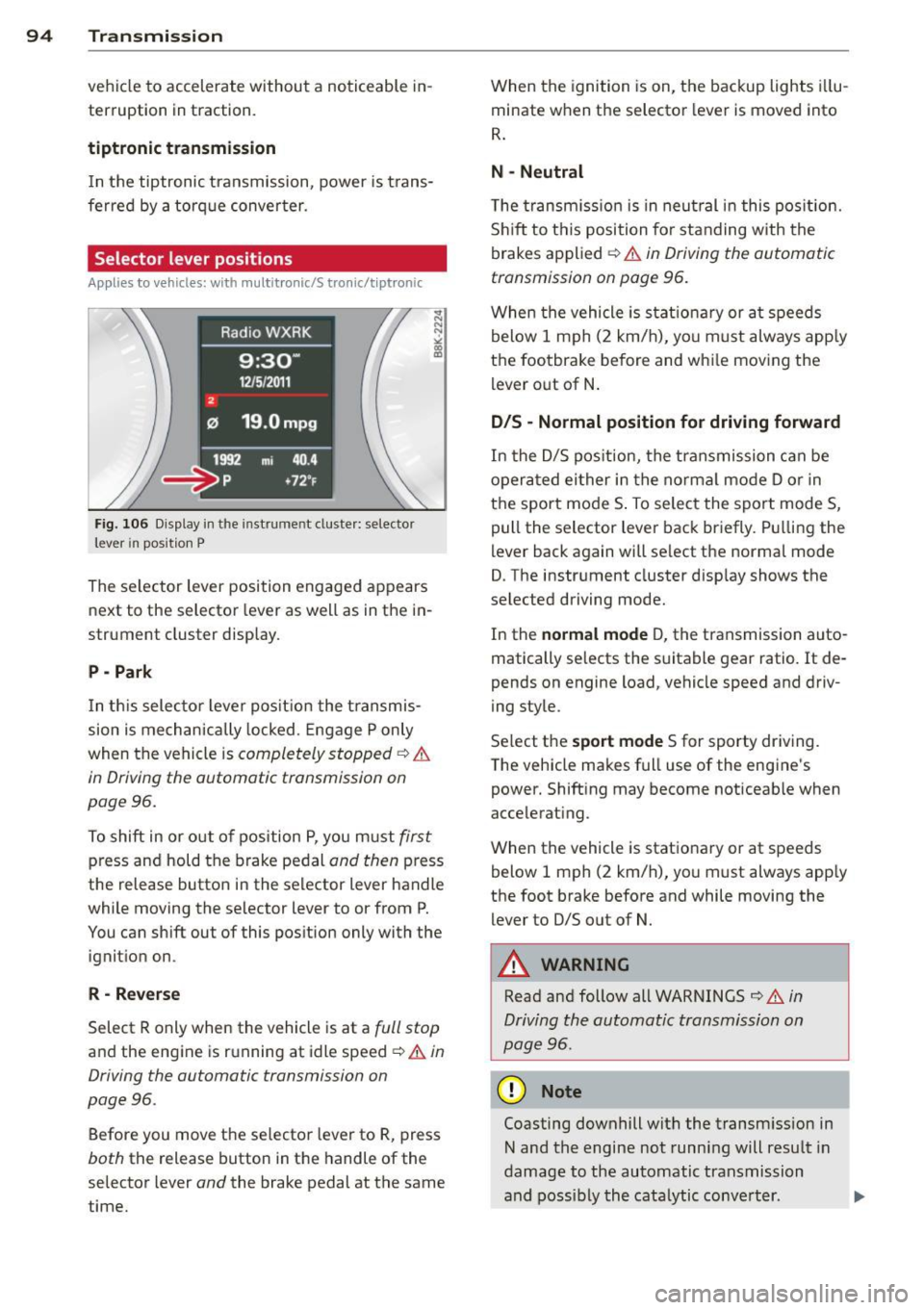
Fig. 106 D isplay in the instrume nt duste r: selector
lever in position P
The se lector lever position engaged appears
next to the selector lever as well as in the in
strument cluster display.
P - Park
In th is selector lever pos it ion the transmis
sion is mechanically locked. Engage P only
when the vehicle is
completely stopped ¢ &
in Driving the automatic transmission on
page 96.
To shift in or o ut of pos ition P, you must first
press and hold the brake pedal and then press
the release button in the selector lever handle
while moving the se lector lever to or from P.
You can shift out of this position only with the ignition on .
R-Re verse
Select R only when the vehicle is at a full stop
and the engine is running at idle speed ¢ & in
Driving the automatic transmission on
page 96.
Before you move the selector lever to R, press
both the release button in the handle of the
selector lever
and the brake pedal at the same
time. When the
ignition is on, the backup lights i llu
minate when the selector lever is moved into
R .
N -Neutral
The transm iss io n is in neut ral i n this pos ition.
S hi ft to this position fo r standing with the
brakes applied ¢
& in Driving the automatic
transmission on page 96.
When the vehicle is stat ionary or a t speeds
below 1 mph (2 km/h), yo u must always app ly
the footbrake before and whi le moving the
lever o ut of N .
D/S - Normal position for driving forward
In the D/S pos ition, the transmission can be
opera ted ei ther in the norma l mode D or in
the sport mode S . To select the sport mode S,
pull the selector lever back briefly. P ulling the
lever back again will se lect the normal mode
D. The instrument cluster disp lay shows the
selected driving mode.
In the
normal mode D, the transmission auto
matically selects the suitable gear ratio.
It de
pends on engine load, vehicle speed and driv
ing style.
Se lect the
s port mode S for sporty dr iving.
T he vehicle makes full use of the engine's
power. Shift ing may become noticeable when
acce lerating.
When the vehicle is stationary or at speeds below 1 mph (2 km/h), you must always app ly
the foot brake before and while moving the lever to D/S out of N.
A WARNING
Read and follow all WARNINGS ¢ .& in
Driving the automatic transmission on
page 96 .
(D Note
Coasting downhill with the transm ission in
N and the engine not running will result in
damage to the automatic transmission
and possibly the cata lytic conve rter. .,..
Page 97 of 304
M N
~ co
rl I.O
"' rl
"' rl
@ Tips
-On vehicles with drive select*, you can
adjust the sporty shift characteristics in
the
Dynamic driving mode.Swill appear
i n the instrument cluster display instead
ofD.
- If you accidentally select N while driv ing,
take your foot off the acce lerator pedal
i mmediately and wait for the engine to
s low down to idle before selecting D/S.
- If there is a power failure , the selector
l ever will not move out of t he P position .
The eme rgency release can be used if
th is happens ~
page 100.
Automatic Shift Lock (ASL)
Applies to vehicles: with multitronic/5 tronic/tiptron ic
The Automatic Shift Lock safeguards you
against accidentally shifting into a forward or
the reverse gear and causing the vehicle to
move unintentionally.
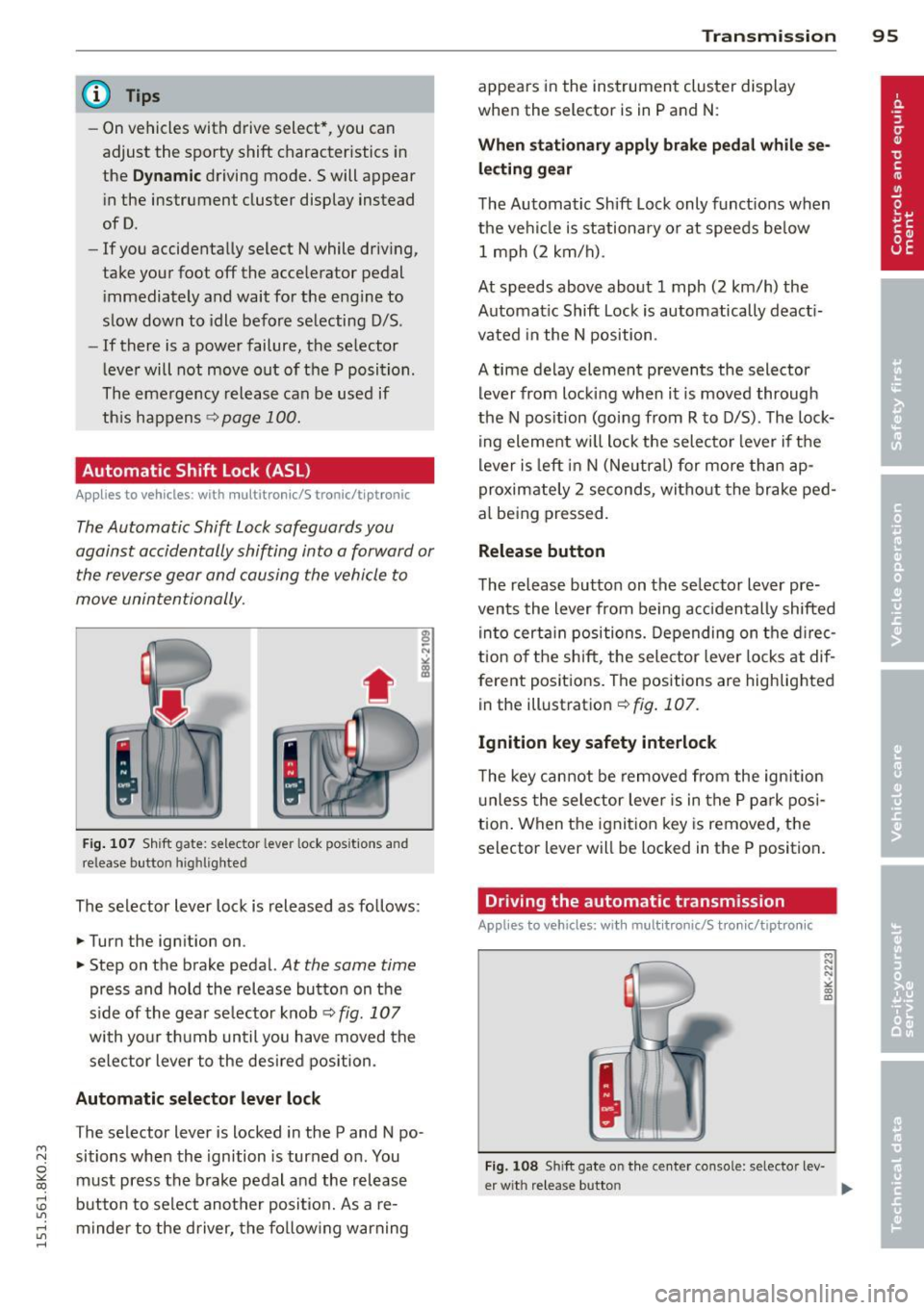
F ig. 10 7 Sh ift gate: selecto r lever lock posit io ns and
release butto n highlighted
The selector lever lock is released as fo llows:
... Turn the ign ition on .
... Step on t he brake pedal.
At the same time
press and hold the release button on the
side of the gea r se lector knob ¢
fig. 107
with yo ur t hu mb until you have moved the
sele ctor lever to the des ired position .
Automatic selector lever lock
The selector lever is locked in the P and N po·
sitions when the ignition is turned on . You
must press the brake pedal and the release
button to select another posi tion. As a re·
m inder to the driver, the fo llow ing warning
Transm ission 95
appears in the ins trument cluster display
whe n the selector is in P and N:
When stationary appl y brake pedal while se
lec ting gear
The Automatic Shift Lock only funct ions when
the ve hicl e is stationary or at speeds be low
1 m ph (2 km/h) .
At speeds above about 1 mph (2 km/h) the
Automat ic Shift Lock is automatically deact i
vated in the N position .
A time delay element prevents the selector lever from lock ing when it is moved through
the N pos ition (going from R to D/S) . The lock
ing element w ill lock t he selec to r l ever if the
lever is left in N (Neutr al) for more than ap
proximate ly 2 seconds, wi tho ut the brake ped
al being pressed.
Release button
The release button on the se lector lever pre
vents the lever from be ing acciden tally shifted
in to certa in positions. Depending on the d irec
t ion of the shift, the sele ctor leve r locks at dif
ferent positions. The positions are highlig hted
in the illust ration¢
fig . 107.
Ignition key safety interlock
T he key cannot be removed from the ign ition
u nless the selector lever is in the P par k posi
tion . When the ignit ion key is removed, the
selector lever will be loc ked in the P position .
Driving the automatic transmission
Applies to vehicles; with mult itronic/S tronic/tiptronic
Fig. 108 Sh ift gate on the ce nter console: selector lev-
er w it h re lease butto n ..,_
Page 98 of 304
96 Transmission Starting the engine
.. The selecto r lever must be in P or N.
Starting off
.. Press and hold the brake pedal.
.. Press and hold the release button in these
lector lever handle, se lect t he des ired selec
tor lever position such as D/S and release
the button .
.. Wait briefly unti l the transmission has shift
ed (you will feel a slight movement) .
.. Remove your foot from the brake pedal and
acce lerate.
Stopping temporarily
.. Keep the vehicle stationary usin g the brak
ing peda l, for examp le at traffic lights .
.. Do not press the accelerator pedal when do
ing this .
.. To prevent the veh icle from rolling when you
start driving, set the parking brake when
stopping on steep inclines
c> _& .
.. The parking brake will release automatically
and the vehicle w ill start moving once you
press the accelerator pedal.
Stopping/parking
If the selector lever is not in the P position
when you open the dr iver's door, the vehicle
could roll. The message
Transmission: Car
may roll! Shift to park!
appears.
.. Press and hold the brake pedal until the ve-
hicle has come to a complete stop .
.. Apply the parking brake
c> page 88, Parking .
.. Select the P selector lever position c> _&.
Stopping on an incline
.. Always press the brake pedal to hold the ve
hicle in place and prevent it from "rolling
back"
c> _& . Do not try to prevent the vehi
cle from "roll ing back" when a gear is en
gaged by increasing the eng ine speed
c> (D.
Starting on an incline
.. Activate the parking brake.
.. With the driving gear se lected, press the ac
celerator pedal carefully. The park ing brake will release automatically if your seat
belt is
fastened .
Under certain circumstances, such as driving
in the mo untains, it may be usefu l to switch
temporarily to the manual shift program in or
der to adjust the gears to the driving cond i
tions by hand
c> page 98.
On slopes, activate the parking brake first and
then move the selector lever to the P position .
This prevents too much stress from being
placed on the locking mechanism .
Vehicles with multitronic transmission: Your
vehicle is equipped with
hill hold assist allow
ing you to start while on an incline. The sys
tem is activated when the brake pedal is
pressed down and he ld
for a few seconds . The
brake pressure will hold for
a moment after
the brake pedal loosens to prevent the vehicle
from roll ing backwards wh ile starting up .
A WARNING
-The vehicle can also roll when the engine
is stopped.
- Unintended vehicle movement can cause
serious injury.
- Never leave your vehicle with the engine
r un ning while in gear. If you must leave
your veh icle when the engine is running,
activate the parking brake and move the
selecto r lever to P.
- Power is still transmitted to the wheels
when the engine is running at idle. To
prevent the vehicle from "creeping", you
must keep your foot on the brake when
the engine is running and the selector
lever is in D/S or R or "tiptronic" mode is
selected .
- Do not press the accelerator pedal when changing the selector lever position
while the veh icle is stationary and the
engine is running.
- Never shift into R or P while driving.
- Before driving down a steep s lope, re-
duce your speed and shift into a lower
gear with "tiptronic".
Page 99 of 304
"" N
0 ::.,: co ,...., \!) 1.1'1 ,...., 1.1'1 ,....,
-Do not ride the brakes or press the brake
pedal too often or too long when driving
down a hill. Constant braking causes the
brakes to overheat and substantially re
duces braking performance, increases
braking distance or causes complete fail
ure of the brake system.
- To prevent the vehicle from rolling back
when stopping on inclines, always hold it
in place with the brake pedal or parking
brake.
- Never hold the vehicle on an incline with
a slipping clutch. The clutch opens auto
matically when it becomes too hot from
the overload. An indicator lamp
mJ illu
minates and a driver message appears
¢ page 99 when the clutch is overload
ed .
- If the engine must remain running, never
have any driving position engaged when
checking under the hood. Make sure the
selector lever has securely engaged and
is locked in P with the parking brake set
¢ page 212. Otherwise, any increase in
engine speed may set the vehicle in mo
tion, even with the parking brake ap plied .
0 Note
-S tronic- and tiptronic transmission:
When stopping on an incline, do not try
to hold the vehicle in place by pressing
the accelerator pedal while a driving gear
is selected. This can cause the transmis
sion to overheat and can damage it. Acti
vate the parking brake or press the brake
pedal to prevent the vehicle from rolling.
- S tronic- and tiptronic transmission: Al
lowing the vehicle to roll when the en
gine is stopped and the selector lever is in N will damage the transmission be
cause it is not lubricated under those cir
cumstances .
(D Tips
For safety reasons, the parking brake is re
leased automatically only when the driv
er's safety belt is engaged in the buckle.
Transmission 97
Hill descent control
App lies to vehicles : wi th mult itronic/ S tro nic/tiptro nic
The hill descent control system assists the
driver when driving down declines .
Hill descent control is activated when these
lector lever is in D/S and you press the brake
pedal. The transmission automatically selects
a gear that is suitable for the incline. Hill de scent control tries to maintain the speed ach
ieved at the time of braking, within physical
and technical limitations. It may still be nec
essary to adjust the speed with the brakes.
Hill descent control switches off once the de
cline levels out or you press the accelerator
pedal.
On vehicles with the cruise control system*
¢ page 91 , hill descent control is also activat
ed when the speed is set.
.&_ WARNING
-
Hill descent control cannot overcome
physical limitations, so it may not be able
to maintain a constant speed under all
conditions. Always be ready to apply the brakes .
Page 100 of 304
98 Transmission
Manual shift program
Appl ies to vehicles: with multitronic/5 tronic/t iptronic
Using the manual shift program you can
manually select gears .
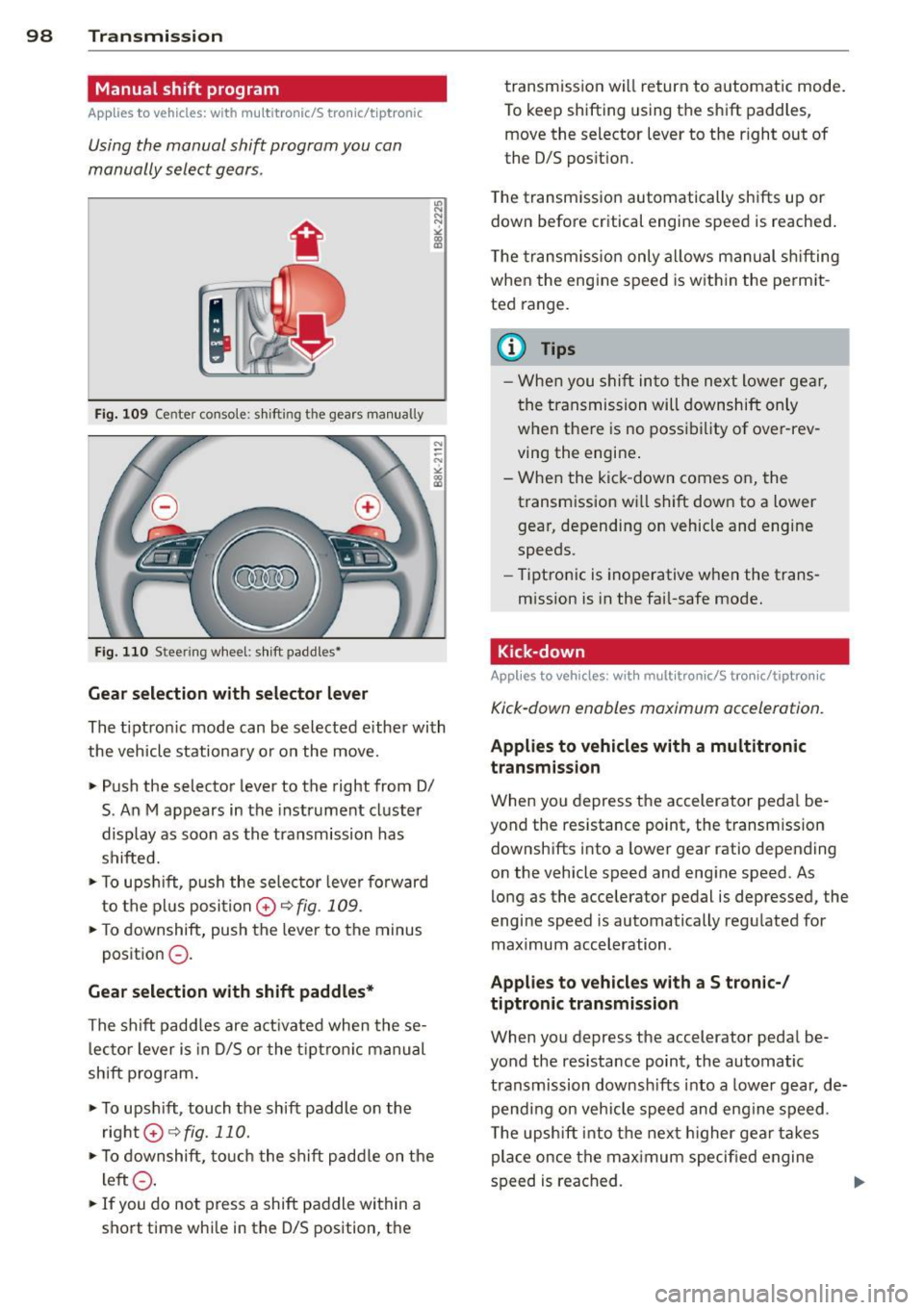
Fig . 10 9 Center co nsole: s hifti ng t he gears manu ally
Fig . 110 Stee ring w hee l: shi ft paddle s•
Gear selection with selector lever
"' N
N
~
" a> CD
The tiptron ic mode can be selected e ither with
the vehicle stationa ry or on the move.
• Push the selector lever to the right from 0/
S. An M appears in the instrument cl uster
display as soon as the transmission has
shifted.
• To u pshi ft, p ush the selec tor leve r forward
to the pl us posi tion
0 r:::, fig . 109.
• To downshift, push the leve r to the minus
p osit ion
0 -
Gear selection with shift paddles*
The s hift padd les are a ct ivated when these
l ec to r lever is in 0/5 or the t ip tron ic manu al
shift program .
• To ups hift, touch the shift paddle on the
right G)¢fig.110.
• To downshift, touch t he shift p add le on t he
l eft
0 .
• If you do not press a shift pa ddle within a
sho rt time whi le in the 0/5 position, t he transmission will return to a
utomatic mode .
To keep shifting using t he sh ift paddles,
move the selector lever to the r ight out of
the 0/5 pos ition.
T he transm iss io n automatically sh ifts up or
down before critical engine speed is reached .
T he tra nsm iss io n only a llows m anual sh ifting
when the eng ine speed is w it hi n the pe rm it
ted range .
@ Tips
- When you s hift into the ne xt l ower ge ar,
the transmissi on will downshift only
w hen the re is no poss ib ility of ove r-rev
ving the engine .
- W hen the kic k-down comes on, the
transm ission w ill shift dow n to a lower
gear, depending on vehicle and engine
speeds .
- Tip tro ni c is inoperative when the trans
m ission is in the fai l-safe mode .
Kick-down
Applies to vehicles : wit h mult itronic/5 t ro ni c/tip tro nic
Kick-down enables maximum acceleration.
Applies to vehicles with a multitronic
transmission
W hen you depress the accelerator peda l be
yond the res istance point, the transm ission
downsh ifts into a lower gear ratio depend ing
on the vehicle speed and engine speed. As
lo ng as the accelerator pedal is depressed, the
engine speed is automatically regu lated for
maximum acceleration .
Applies to vehicles with a S tronic-/
tiptronic transmission
When you depress the accelerator peda l be
yond the resistance point, the automatic transmission downsh ifts into a lowe r gear, de
pend ing on veh icle s peed an d eng ine speed .
T he upsh ift into t he nex t higher gea r takes
place once the max imum speci fied engine
s p eed is reached.
Page 117 of 304
Audi drive select Driving settings
Introduction
App lies to vehicles: with Audi drive select
Drive select provides the possibility to experi
ence diffe rent types of vehicle sett ings in one
vehicle. For instance, using the three
Com
fort, Auto and Dynamic modes, the driver can
switch from a sporty to a comfortab le driving
mode with the press of a button.
Addit ionally, in vehicles with
MM I*, the vehi
cle setup for
Individual* mode can be cus
tomized by you. This makes it possib le to
combine settings such as a sporty engine tun
ing with comfortable steering.
A WARNING
Improper use of the Audi drive select can
cause collisions, other acc idents and seri
ous personal injury.
Description
Applies to vehicles: with Audi drive select
The vehicle setup in each mode depends on
the vehicle's features . However, the engine,
automatic t ransmission* and steering are al
ways involved.
-
Engine and automatic transmission*
Depending on the mode, the engine and the
automatic transmission respond quicker or in
a more ba lanced manner to acce lerator pedal
movements. In the sporty dynamic mode, the
automatic transmission shifts at higher RPMs .
Steering
The steering adapts in terms of steering effort
and steering ratios . Indirect steer ing that
moves easily, like the steering in comfort
mode , is best su ited to long dr ives on a high
way. In contrast, dynamic mode prov ides
~ sporty, di rect steering.
0
11'5 The follow ing applies to vehicles with dynam ic ,....,
~ steer ing*: the steering ratio changes based on
~ vehicle speed in order to maintain optimum ,....,
Audi drive select 115
steering effort for the driver at all times. This
sets the steering to be less sensitive at higher
speeds in order to provide improved vehicle
control. At reduced speeds, however, steering
is more direct in order to keep the steering ef
fort as minimal as possible when the driver is
maneuveri ng the veh icle . At low and average
speeds, dynamic steering addit iona lly pro
vides more responsive steering performance.
Adaptive dampers*
The adaptive dampers* use sensors to record
information regarding steering movements,
braking and acceleration operations by the
driver , road surface, driving speed, and load.
T his makes it possible to adapt damp ing to
the driving situation v irtually i n rea l time.
Drive select also makes it possible to satisfy
the desire for sporty suspension (Dynamic)
and comfortab le suspension (Comfort) with
out giving up balanced tuning (Auto) .
Sport differential*
As a component of the all whee l dr ive system
(quattro)
~ page 190, the sport differential*
distributes the driving power to the rear axle
depending on the situation . The distribution
of power varies depending on the mode se lected. The goal is a high level of agility and
ability to accelerate on curves . The vehicle is
very respons ive to steering .
Audi adaptive cruise control*
The behavior when accelerating can be adjust
ed from comfortab le to sporty, depending on
the drive select mode. Adaptive cruise control
also responds to the driving behavior of the
vehicle ahead in a more conservative or sporty
manner .
Engine sound*
The sound of the engine is adapted to the se
lected mode and ranges from subtle to sporty.
0) Tips
-In some models, the maximum vehicle
speed can only be reached in the
Auto
and Dynamic modes.
Page 118 of 304
116 Audi drive select
- Fo r vehicles wi th an automatic t ransmis
s io n, select ing t he
Dynamic mode re
s ul ts in sporty shift ing characteristics .
The S gear posit io n engages a utomat i
ca lly.
- In vehicles that have dynamic steering *,
operating noise is heard when starting or
st opping th e eng ine . Th is does not ind i
cate a problem .
Selecting the driving mode
Applies to vehicles: with Audi drive select
You can choose between Comfort, Auto, Dy
namic
and Individual * modes.
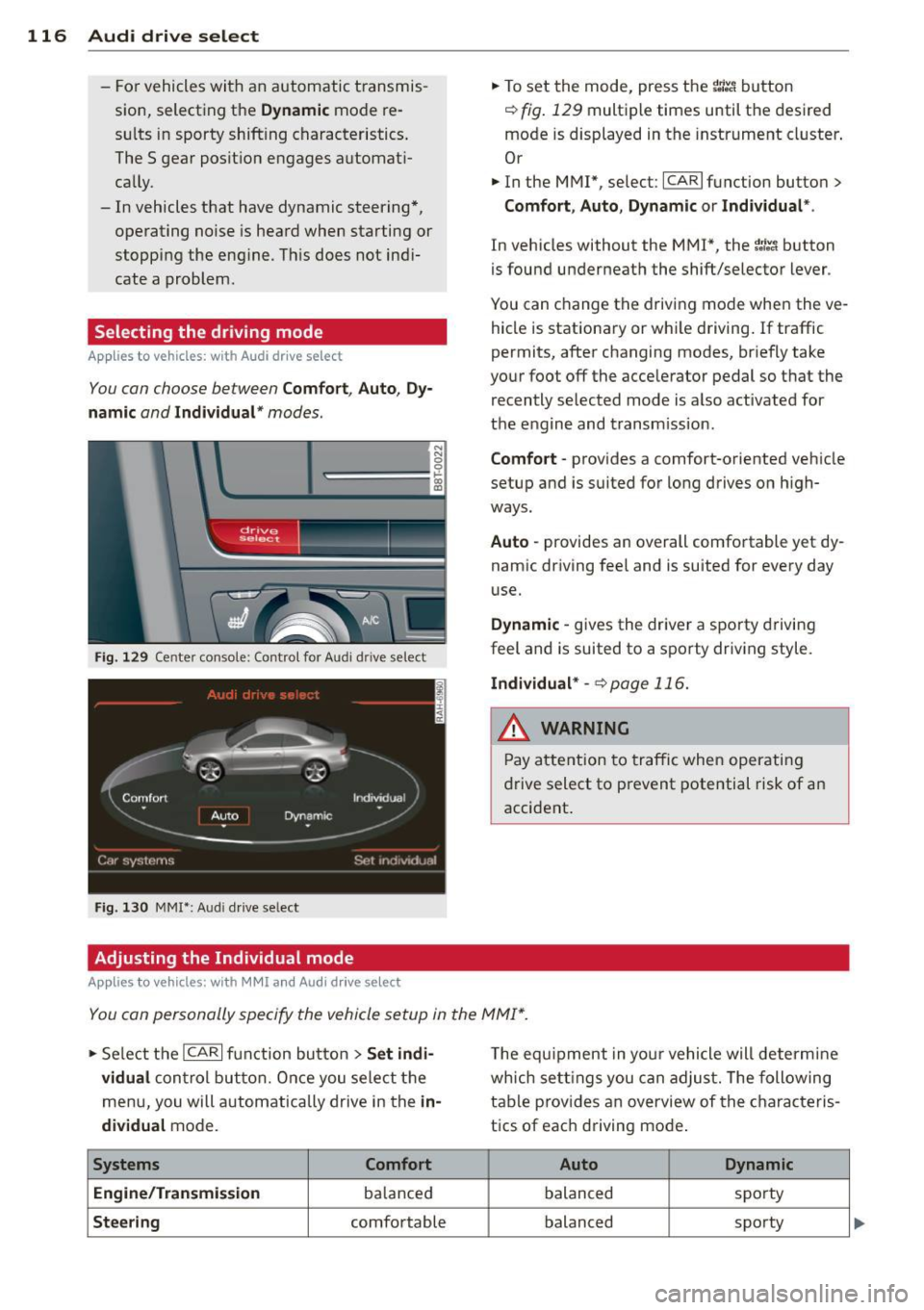
drive I select ! __
Fig . 129 Cen te r co nsole: Contro l for Au di dri ve select
Fi g. 130 MM I•: Aud i dri ve se lect
Adjusting the Individual mode
Applies to vehicles: with MMI and Aud i drive select
.,. To set the mode, press the r.:i:.~ button
~ fig . 129 multi ple times until the des ired
mode is displayed in the instrument cl uster .
Or
.,. In the MMI", se lect:
ICA RI function butto n>
Comfort , Auto , Dynamic or Individual *.
In vehicles without the M MI* , the~: /;,~ button
is found underneat h the shift/se lecto r lever .
You can c hange t he d rivi ng mode whe n the ve
hicle is stationa ry or wh ile driving . If traffic
permits, after changing modes, br iefly take
yo ur foot off the acce le rator pedal so t hat the
r ecently selected m ode is a lso act ivated for
t h e e ngine and transm ission .
Comfort -provides a comfort-oriented veh icle
setup and is s uited fo r lo ng drives o n high
ways.
Auto -provides an overall comfortable yet dy
nam ic dr iving fee l and is suited for every day
u se.
Dynamic -gives the dr iver a sporty d rivin g
f eel and is suited to a s porty driv ing style.
Individual * -¢page 116.
& WARNING
Pa y a tte ntion t o tra ffic whe n operati ng
dr ive select to pre vent potential risk of an
accident .
You can personally specify the vehicle setup in the MMI* .
.,. Se le ct th e ICAR I f unc tion bu tton > Set indi·
vidual
con trol but ton. Once y ou se le ct th e
m enu, you will automat ica lly d rive in the
in·
dividual
mode.
Systems Comfort
Engine /Transmission
ba lance d
Steering comfortable T
he e qui pment in you r vehicle will determi ne
wh ich se ttings yo u can adjust. The foll owing
t ab le p rov ides an o verview of the chara cteris
t ics of eac h driving mo de.
Auto Dynamic
balanced spo
rty
balanced sporty
Page 265 of 304
"" N
0 ::.,: co ,...., \!) 1.1'1 ,...., 1.1'1 ,....,
~ Unscrew the va lve stem from the s pare tire .
~ Screw the tire filler hose from the compres
sor firm ly onto the valv e of the spare tire.
~ In se rt the p lug from the compress or into a
socket of the vehicle¢
page 66.
~ Switc h the compressor on .
~ Let the compressor run until the valu e speci
fied on the tire pressure label is reached ¢
page 234, fig . 190. Sw itch the compres
so r off afte r runn ing for 12 minutes at the
most -danger of overhea ting!
A WARNING
The compressor and the tire filler hose can
become extremely hot while they are run
ning -danger of burns!
(D Note
Switch the compressor off after running
for 12 minutes at the most -danger of
overheating! Allow the compressor to cool
down for a few minutes before you use it
again.
Changing a wheel
Before changing a wheel
Observe the following precautions for your
own and your passenger' s safety when chang
ing a wheel .
~ After you experience a tire fa ilure, pu ll the
ca r well away from moving traffic and try to
r e ach
level gro und before yo u stop ¢ LI)..
~ All p assengers sho uld leave the car and
move to a safe loca tion (for instance, beh ind
the guardrai l) ¢
A .
~ Engage the parking brake to prevent your
vehicle from ro lling un intentionally ¢
A.
~ Shift into 1st gear on vehicles with manua l
transmission, o r move the
selector lever to
the P po sition
on veh icles with au toma tic
t ransmission .
~ If you are tow ing a tra ile r: u nhi tch the trail
er from your veh icle.
~ T ake the jack ¢ page 260 and the spare tire
¢ page 261 out of the luggage compart
ment.
What do I do now? 263
A WARNING
You or your passengers could be injured
while c hanging a wheel if you do not fo l
low these safety precaut ions:
- If you have a flat tire, move a safe d is
tance off the road . T urn off the engine,
tur n the eme rg ency flashers on and use
other wa rn in g devices to a le rt othe r mo
torists.
- Ma ke sur e that passengers wait in a safe
p lace away from the vehicle and well
away from the ro ad and traffic.
- T o help prevent the vehicle from moving
suddenly and possib ly sli pping off the
j a ck, alw ay s fu lly se t the par king br ake
an d block the wheel d iagonally opposi te
the whee l be ing changed w ith the fol d
ing chocks or other objects. When one
front wheel is lifted off the ground, plac ing the Automatic Transmission in "P"
(Park) will
not prevent the vehicle from
moving .
- Before you change a wheel, be sure the
grou nd is level and firm. I f necessary,
use a sturdy board unde r the jack .
- Always sto re the vehicle tool kit, the
jack* and the replaced tire in the luggage compa rtment
¢page 132.
(D Note
If you are changing the whee l on a steep
i ncline, use a rock or s imilar object to
block the opposite whee l to prevent the
vehicle from moving.
(D Tips
Obey all laws.
Changing a wheel
When you change a wheel , follow these
quence described below step-by-step and in
exactly that order .
l. Remove the decorative wheel cover* or
-
the wheel bolt caps* . For more details see..,.
•
•
Page 267 of 304
M N
~ co
rl I.O
"' rl
"' rl
Refitting
• Place th e caps over the wheel bo lts and
push th em back on.
The caps are to protect and keep the wheel bolts clean.
Loosening and tightening the wheel
bolts
The wheel bolts must be loosened before ra is
ing th e vehicle .
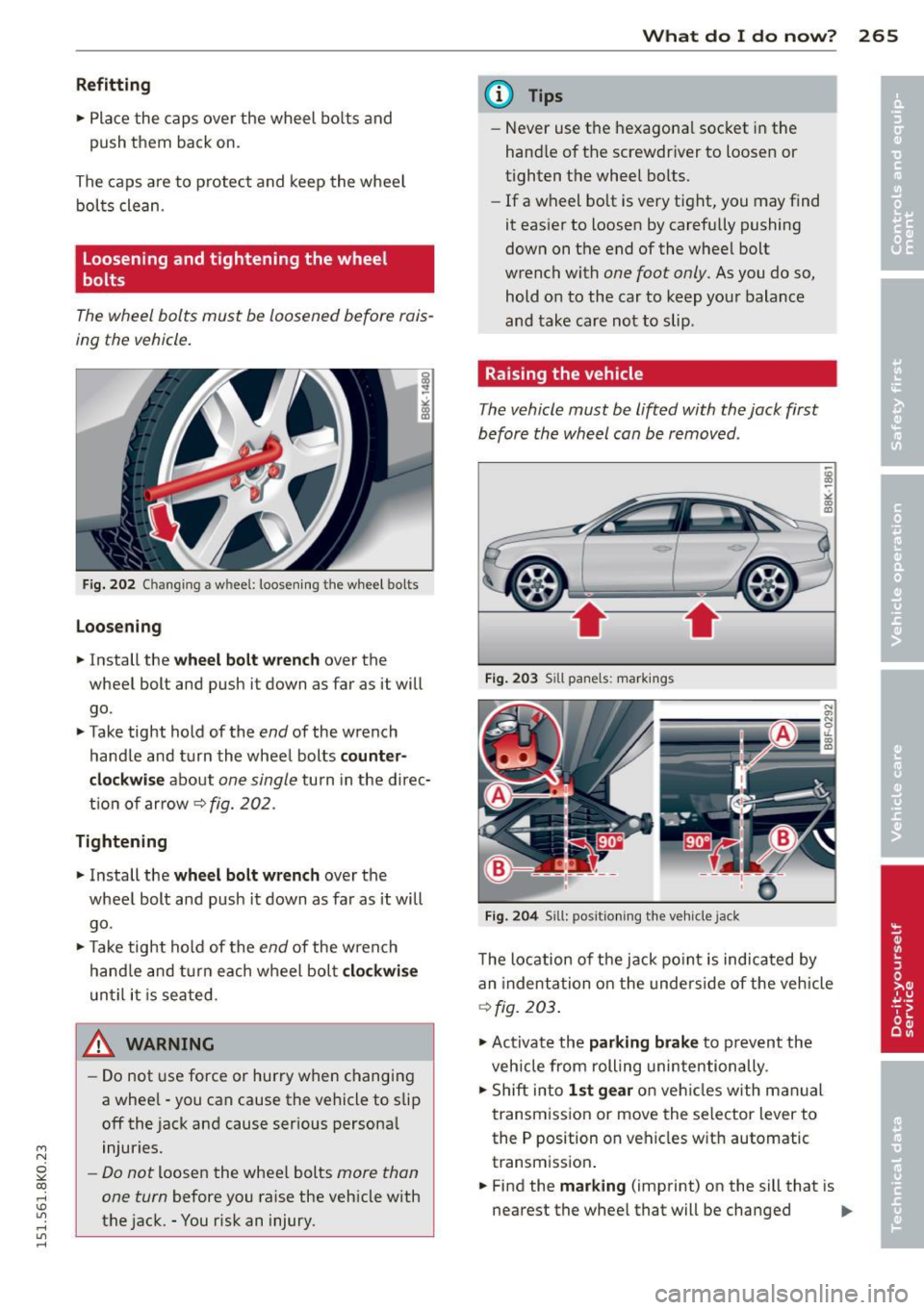
Fig. 20 2 Changin g a w hee l: l oosening t he w heel bolts
Loo sening
• In stall the w heel bo lt wre nch over the
wheel bolt and push it down as far as it will
go .
• Take tight hold of the
end of the wrench
handle and turn the whee l bolts
co unter
cl ock wise
about one single turn in the direc
t ion of arrow
9 fig. 202 .
Tightening
• Install the whe el b olt wrench over the
wheel bolt and push it down as far as it will
go .
• Take tight hold of the
end of the wrench
hand le and turn each wheel bolt
cl ockwi se
until it is seated .
_& WARNING
-Do not use force or hurry when changing
a whee l -you can cause the vehicle to slip
off the jack and cause serious persona l
injuries.
- Do not loosen the wheel bolts more than
one turn
before you raise the veh icle with
the jack. -You risk an injury .
What do I do now ? 265
@ Tips
-Never use the hexagona l socket in the
hand le of the screwdr iver to loosen or
tighten the wheel bolts.
- If a wheel bo lt is very tight, you may find
it eas ier to loosen by carefully pushing
down on the end of the wheel bolt
wrench with
one foot only . As you do so,
hold o n to the car to keep your balance
and take care not to slip .
Raising the vehicle
The vehicle must be lifted with the jack first
before the wheel can be removed .
Fig . 203 Sill panels: mark ings
Fig. 20 4 Sill: positi on ing the v eh icle ja ck
The location of the jack po int is indicated by
an indentation on the underside of the vehicle
9 fig . 203 .
• Activate the parking brake to prev ent the
veh icle from rolling unintentionally .
• Shift into
1st ge ar on veh icles with manual
transmiss ion or move the selector lever to
the P position on vehicles w ith automatic
transmission .
• Find the
mark ing (imprint) on the sill that is
nearest the wheel that will be changed .,..
Page 277 of 304
M N
~ co
rl I.O
"' rl
"' rl
@ Tips
The discharged battery must be properly
connected to the vehicle's electrical sys
tem. When jump starting or charg ing the
battery, never connect the negative
ground cable to the battery negat ive post
because the ba ttery manager system must
be ab le to detect the battery's state of
charge. Always connect the negative
g round cab le to the negative ground pos t
of t he battery manager cont ro l unit.
Use of jumper cables
Make sure to connect the jumper coble
clomps in exactly the order described b elow!
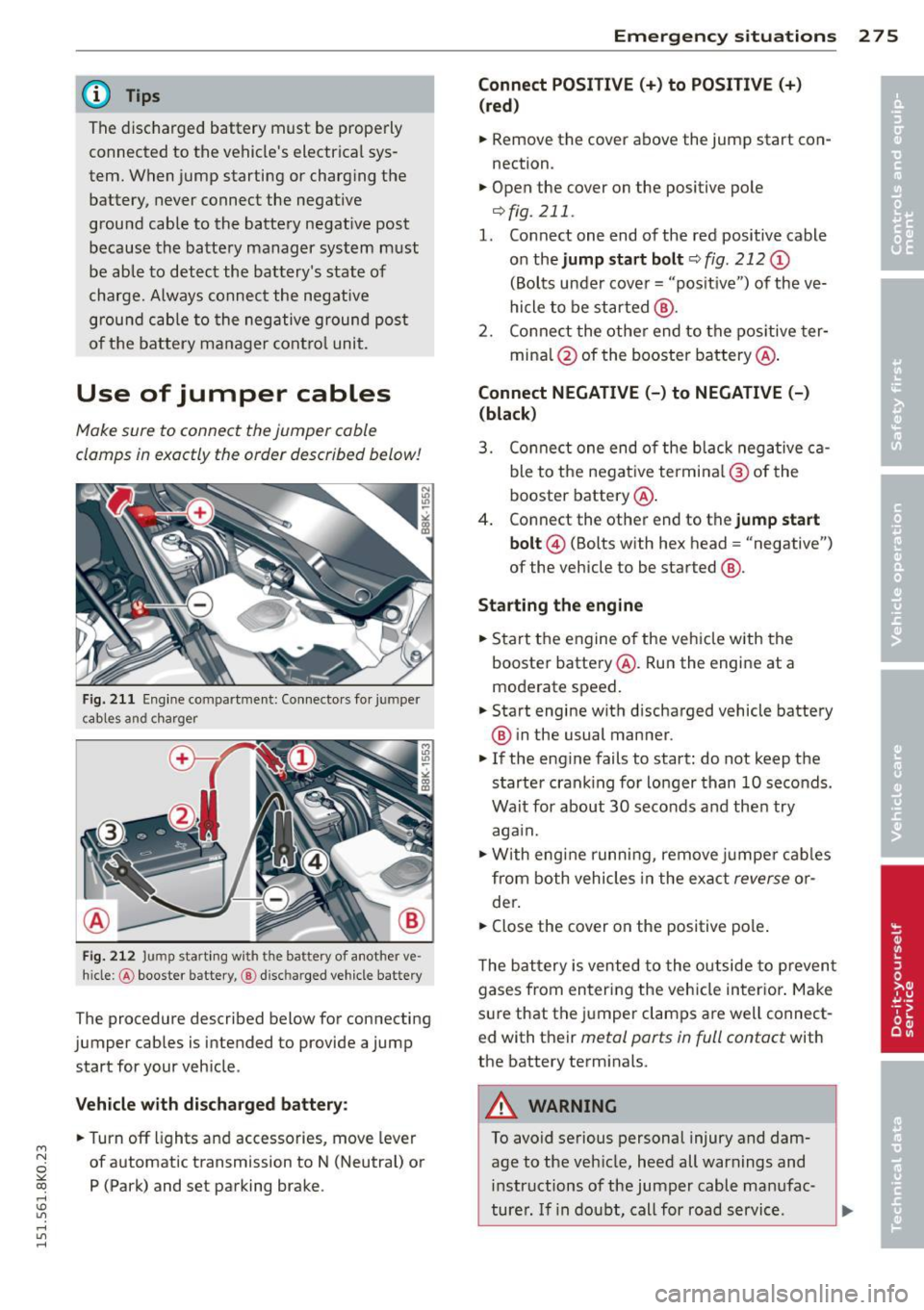
Fi g. 21 1 Eng ine co mpar tment: Co nnecto rs fo r jum per
c ab les a nd c har ge r
F ig. 212 Jump start in g w ith t he ba ttery of a not her ve ·
hi cle :@ booster battery, @ disc harged veh icle battery
The procedure described below for connecting
jumper cables is intended to provide a jump
start for your veh icle .
Vehicle with di scharged battery :
~Turnoff lights and accessories , move lever
of automatic transmission to N (Neutral) or P (Park) and set parking brake .
Emergency situ ation s 2 7 5
Connect POSITIVE(+) to POSITIVE(+ )
(red )
~ Remove the cover above the jump start con
nection .
~ Open the cover on the positive pole
¢fig . 211 .
1. Connect one end of the red positive cable
on the
jump sta rt bolt c::;, fig. 212 (D
(Bolts under cove r= "posit ive ") of the ve
hicle to be started @.
2 . Conne ct the othe r end to the pos itive ter -
mina l@ of the booster battery @.
Connect NEGATIVE (-) to NEGATIVE (-)
(black )
3. Co nnect one end o f the b lack neg ative c a
ble to the nega tive te rmi na l@ of the
booster battery @.
4 . Connect the other end to the
jump start
bolt @
(Bolts with hex head = "negative")
of the vehicle to be started @.
Starting the engine
~ Start the engine of the ve hicle with the
booste r battery @. Run the engine at a
moderate speed.
~ Start engine with d ischarged vehicle battery
® in the usual manner .
~ If the engine fails to start: do not keep t he
starter cran king for lo nger than 10 seconds .
Wait for about 30 seco nds and the n try
aga in.
~ W ith engi ne runni ng, remove jumpe r cab les
from both vehicles in the exa ct
reverse o r
der .
~ Close the cover on the positive pole .
T he b attery is vented to the o utside to p reven t
gases from en tering the veh icle in ter ior . Ma ke
s ur e that the j umper clamps a re well connect
e d with their
metal ports in full contact with
the batte ry term inals.
A WARNING
To avoid serious personal injury and dam
age to the vehicle, heed all warnings and
in structions of the jumper cable ma nufac-
turer . If i n dou bt, call for road servic e.
Ill>