warning AUDI S4 2015 Owner's Manual
[x] Cancel search | Manufacturer: AUDI, Model Year: 2015, Model line: S4, Model: AUDI S4 2015Pages: 304, PDF Size: 74.86 MB
Page 34 of 304
32 Opening and clo sing
- If the power locking system should ma l
function, you can lock the driver's door us ing the mechanical key
c:> page 3 7.
- If the power locking system should fail,
you can sti ll open the fue l tank flap in an
emergency
c:> page 211.
- You are we ll advised not to keep valua
bles inside an unattended vehicle, visib le
or not. Even a properly locked vehicle
cannot provide the security of a safe.
- If the LED in the upper edge of the driv
er's door panel comes on for abo ut 30
seconds after the vehicle is locked, there i s a ma lfunction in the power locki ng or
the anti-theft warning system. Have the
malfunction corrected by an author ized
A udi dealersh ip or qua lified repai r fac ili
ty.
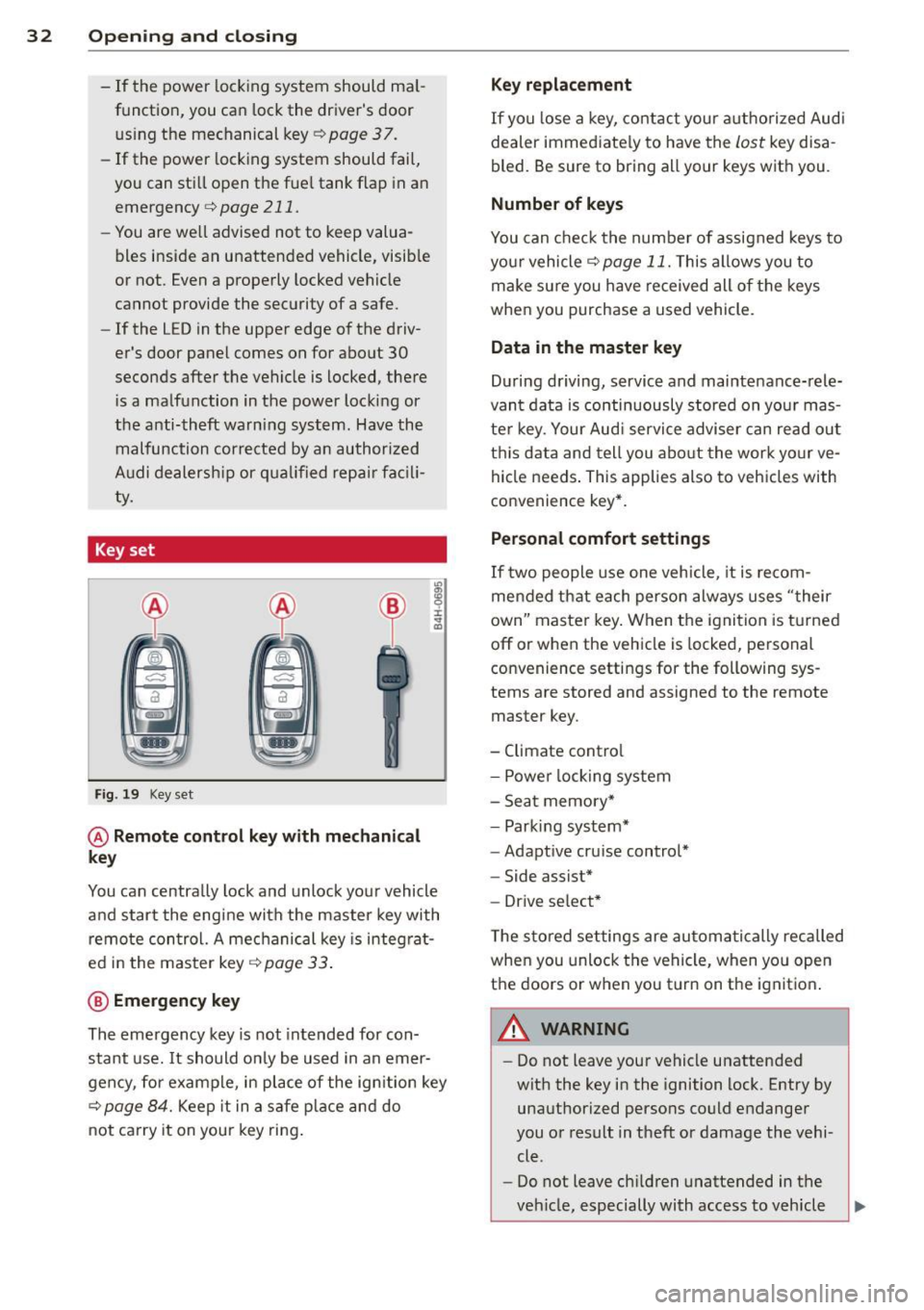
Key set
F ig . 19 Key set
@ Remote cont rol key with mechanical
key
You can centrally lock and unlock your vehicle
and start the engine with the master key with
remo te con trol. A mec hanical key is integ rat
ed i n the master key
c:> page 33 .
@ Emergency key
The emergency key is not intended for con
stant use.
It should on ly be used in an emer
gen cy, fo r example, in place of the ign ition key
cc> page 84. Keep it in a s afe p lace and do
not ca rry it on your key ring .
Key replacement
If you lose a key, contact you r authorized Audi
dealer immed iate ly to have the
Lost key disa
bled. Be sure to bring all your keys with you .
Number of keys
You can check the number of assigned keys to
yo ur vehicle
c:> page 11. This allows you to
make su re you have re ceived all of the keys
when you purchase a used vehicle.
Data in the master key
D uring d riving, s ervice and maintenance-rele
vant data is continuously stored on your mas
te r k ey. Your Aud i service adviser can read out
t hi s data and tell you abo ut the work yo ur
ve
hicle needs . This applies also to vehicles with
convenience key*.
Personal comfort settings
If two people use one veh icle, it i s r ecom
men ded that e ach person alw ays uses "t heir
own" maste r key. When the ignition is tu rne d
off or when the vehicle is locked, personal
convenience setti ngs for the following sys
tems are stored and assigned to the remote
master key.
- Climate contro l
- Powe r lock ing system
- Seat memory *
- Parking system*
- Adapt ive cru ise control*
- Side assist*
- Drive se lect*
T he s to red settings are au toma tically recalled
whe n you unlock the vehicle, when yo u open
t h e doors or w hen you t urn on t he ignitio n.
A WARNING
-Do not leave your vehicle unattended
wit h the key in the ignition lock. Entry by
unaut horized persons co uld endanger
you or result in theft or damage the vehi
cle.
- Do not leave ch ildren unattended in the
veh icle, especially with access to vehicle
Page 36 of 304
34 Openin g and clo sing
• Install the mechanical key.
@, For the sake of the environment
Dispose of dead batteries properly so as
not to po llute the environment .
(D Tips
The replacement battery must be the
same specification as the or iginal.
Emergency unlocking of the ignition key
In the event of malfunctions in the electrical
system, it may happen that you cannot re
move the ignition key.
• Remove the mechanical key¢ page 33.
• Lock the veh icle using the mechan ica l key
¢page 37.
• Have the e lectrical system inspected by an
authorized Audi dealership.
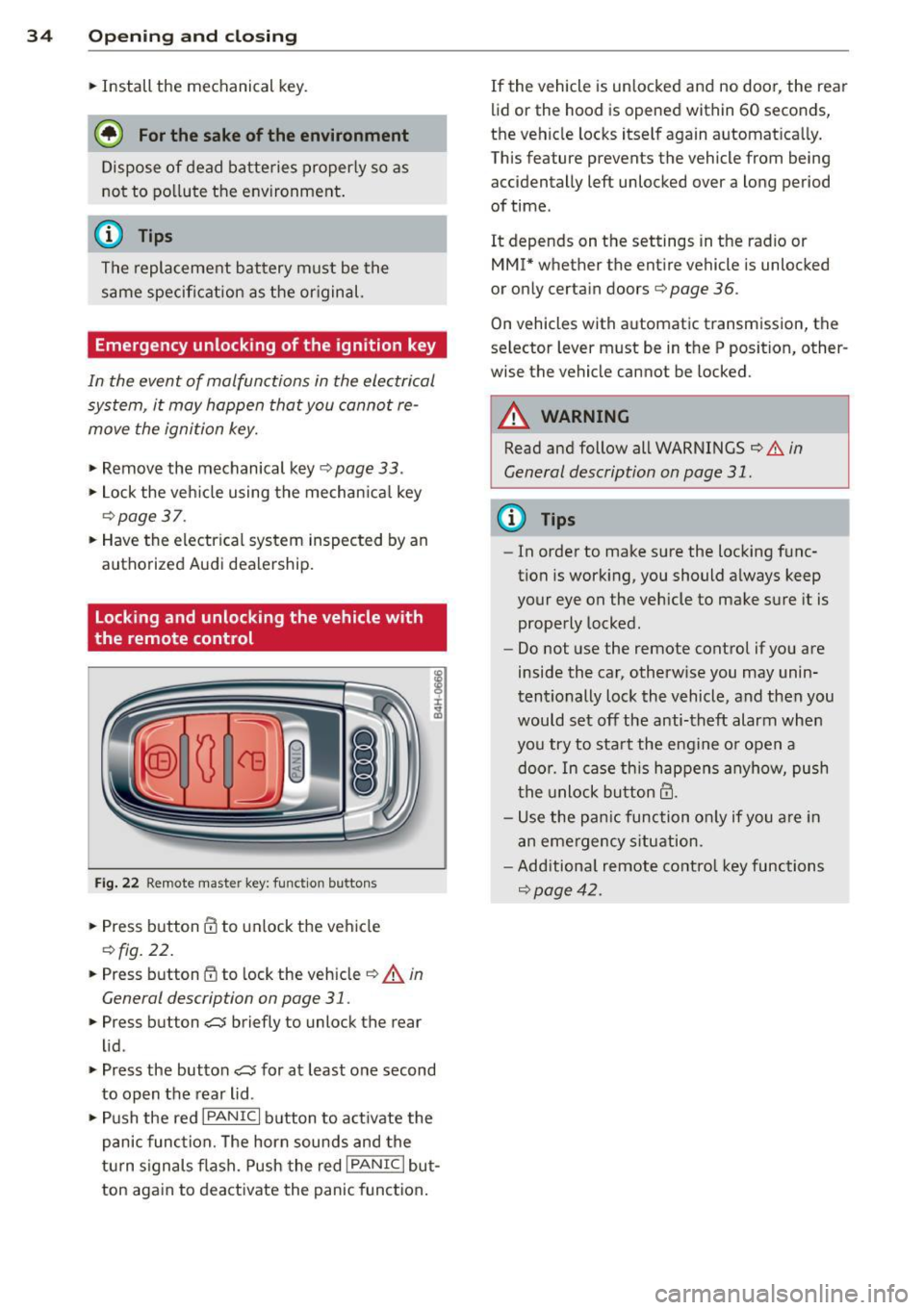
Locking and unlocking the vehicle with
the remote control
F ig. 2 2 Remote master key: function buttons
• Press b utton III to unlock the veh icle
¢ fig . 22.
• Press b utton tfl to lock the vehicle ¢ A in
General description on page
31 .
• Press button ,c:J briefly to unlock the rear
li d.
• Press the button
,c:J for at least o ne second
to open the rear lid .
• Push the red
IPANICI button to a ct ivate the
panic fun ction. The horn sounds and the
t ur n s ignals flash. Push the red
I PANIC I but
ton again to deactivate the panic function . If the vehicle is un
locked and no door, the rea r
lid or the hood is opened within 60 seconds,
the vehicle locks itself again automatica lly.
Th is feature prevents the vehicle from being
accidentally left unlocked over a long period
of time .
It depends on the settings in the radio or
MM!* whether the ent ire vehicle is unlocked
or on ly certain doors¢
page 36.
On vehicles with automatic t ransmission, the
selector lever must be in the P position , other
wise the vehicle cannot be locked.
A WARNING
Read and follow all WARNINGS ¢ .&. in
General description on page
31 .
@ Tips
- In orde r to make sure the locking f unc
tion is work ing, you should a lways keep
your eye on the vehicle to make s ure it is
properly locked.
- Do not use the remote control if you are
inside the car, otherw ise you may unin
tentionally lock the vehicle , and then you
would set off the anti-theft alarm when
you try t o sta rt the engine o r open a
door. In case this h ap pens anyhow, push
t he unlock button@.
- Use the pa nic function o nly if yo u are in
a n eme rgency s ituation.
- Add itiona l remote co ntro l key functions
¢page 42.
Page 37 of 304
Locking and unlocking with convenience
key
Applies to vehicles: with convenience key
The doors and the rear lid can be unlocked
and locked without operating the master key .
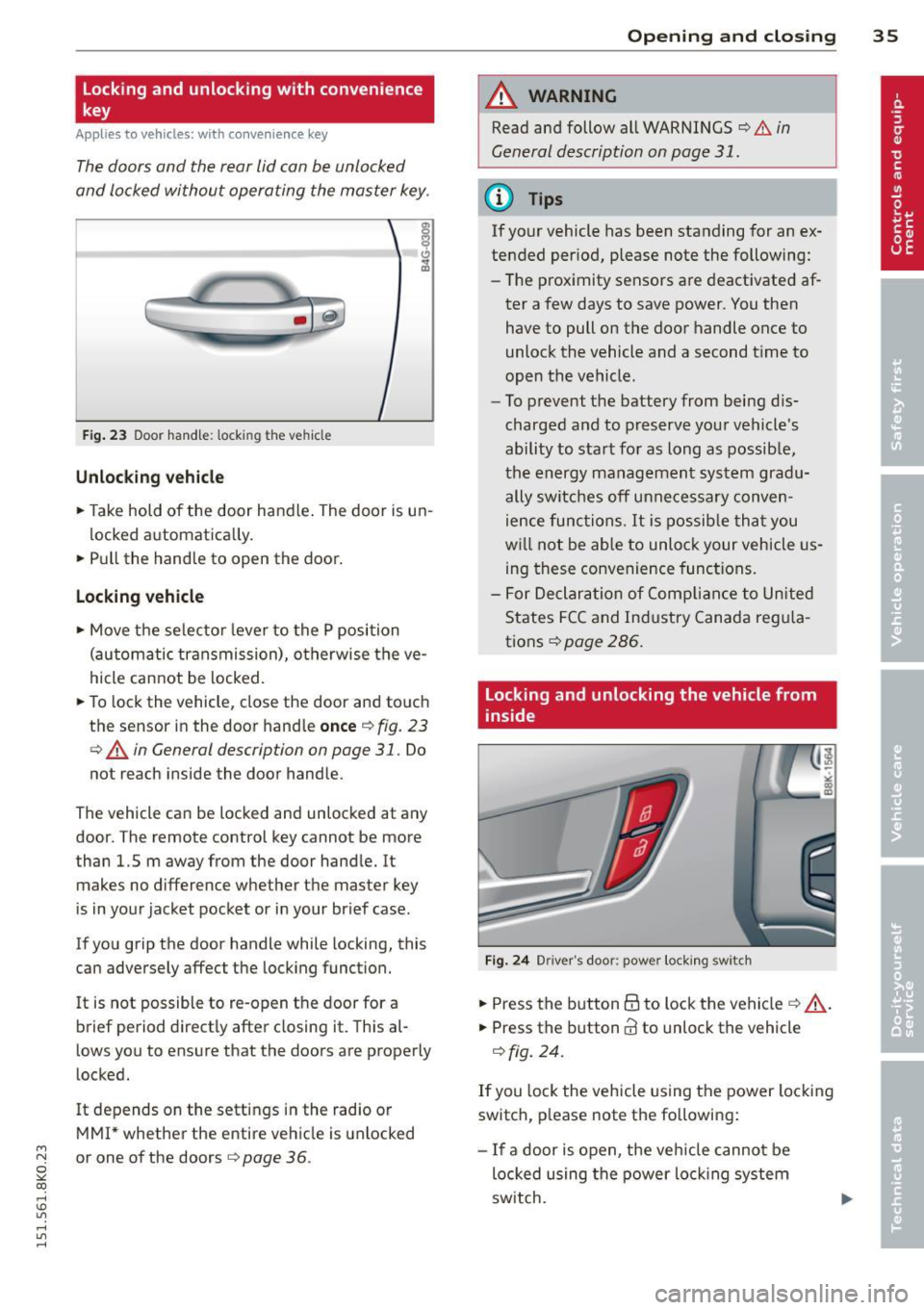
Fig . 23 Door handle : lock ing t he ve hicle
Unlocking vehicle
.. Take hold of the door handle . The door is un-
locked automatically.
.. Pull the handle to open the door.
Locking vehicle
.. Move the selector lever to the P position
(automatic transmission), otherwise the ve
hicle cannot be locked.
.. To lock the vehicle, close the door and touch
the sensor in the door hand le
once Q fig. 23
¢ A in General descript ion on page 31. Do
not reach inside the door handle .
The vehicle can be locked and unlocked at any
door. The remote control key cannot be more
than 1.5 m away from the door handle. It makes no difference whether the master key
is in your jacket pocket or in your brief case .
If you grip the door handle while locking, this
can adversely affect the locking function.
It is not possible to re-open the door for a
brief period directly after closing it. This al
lows you to ensure that the doors are properly
locked.
I t depends on the settings in the radio or
MMI* whether the entire vehicle is unlocked
M N or one of the doors¢ page 36.
~ co
rl I.O
"' rl
"' rl
Opening and closing 35
A WARNING
Read and follow all WARNINGS ¢.&. in
General description on page 31 .
(D Tips
If your vehicle has been standing for an ex
tended period, please note the following:
- The proximity sensors are deactivated af-
ter a few days to save power . You then
have to pull on the door handle once to
unlock the vehicle and a second t ime to
open the vehicle.
- To prevent the battery from being dis
charged and to preserve your vehicle's
ability to start for as long as possible,
the energy management system gradu
ally switches off unnecessary conven
ience functions. It is possib le that you
w ill not be able to unlock your vehicle us
ing these convenience functions.
- For Declaration of Compliance to United
States FCC and Industry Canada regula
tions ¢
page 286.
Locking and unlocking the vehicle from
inside
Fig. 24 Drive r's doo r: pow er locking sw itch
.. Press the button@ to lock the vehicle¢ _A.
.. Press the button@ to unlock the vehicle
¢fig. 24.
If you lock the vehicle using the power locking
switch, please note the following:
- If a door is open , the veh icle cannot be
locked using the power locking system
switch.
Page 38 of 304
36 Openin g and clo sing
- You cannot open the doors or the rear lid
from the
outside (increased security, for ex
amp le when you are stopped at a red light).
- The diodes in the power locking switch illu
minate when all the doors are closed and
locked.
- Front doors: you can un lock and open the
doors from the inside by pu lling on the door
hand le.
- Rear doors: pu ll the door handle
once to re
lease the lock. Pull the hand le
again to open
the door.
- If you hav e a crash and the airbag is activat
ed, the doors automatically un lock.
A WARNING
- The power locking sw itch works w ith the
ignition off and automatically locks the
entire vehicle when it is actuated .
- On a vehicle locked from the outs ide the
power locking system switch is inopera
t ive .
- Locked doors make it more difficult for
emergency workers to get into the vehi
cle, which puts lives at risk . Do not leave
anyone beh ind in the vehicle, especially
children.
(D Tips
Your vehicle is locked automatically at a speed of
9 mph (15 km/h) (Auto Lock)
r:::;, page 31. You can un lock the veh icle
aga in using the opening f unction in the
power locking sys tem switch
@I .
Setting power locking
In the radio/MM!* , you can set which doors
t he central locking system will unlock.
~ Select : I CAR! funct ion button > Central lock
ing .
Or
~ Select : ~I C-A-R~ ! fu nct ion but ton > Car sys tem s*
control b utton > Vehicle setting s > (Central
loc king )*.
Single door un locking/Unl ock door s* -
you
can specify which doo rs un lock when you open
the veh icle. -
Selecting
off /All and pressing the Iii button
on the remote control key unlocks the entire
veh icle.
- Selecting
on/Dri ver and pressing the Iii but
ton on the remote control key once un locks
only the driver's door. In vehicles with a con
ven ience key*, only the door whose handle
you pull w ill unlock. I f you press the
Iii but
ton tw ice, the entire vehicle will unlock . If
you press the [@] button, the enti re vehicle
w ill always lock .
Luggage com p. loc k/Lock ext erior tr unk han
dl e -
If you select On , you can no longer open
the luggage compartment using the rear lid
hand le
r:::;, page 38, fig. 2 7. In this case, the
r ear lid can be opened with the
l=I bu tton on
the master key
r:::;, page 34, fig. 22 or w ith the
l= I* button in the driver 's doo r r:::;,page 39,
fig .
29.
Fold mirrors * if you selec t On , the outs ide
mirrors will fo ld in au tomati cally when yo u
press the
Iii button on the remote cont ro l key
r:::;, page 52.
To ne when lo cking -if you selec t On, a tone
will sound when yo u lock t he vehicle.
Auto Lo ck /Loc k when dri ving -if you select
On, the enti re vehicle w ill lock automatically
whe n the speed reaches
9 mph (1 5 km/h).
Page 39 of 304
M N
~ co
rl I.O
"' rl
"' rl
Emergency locking
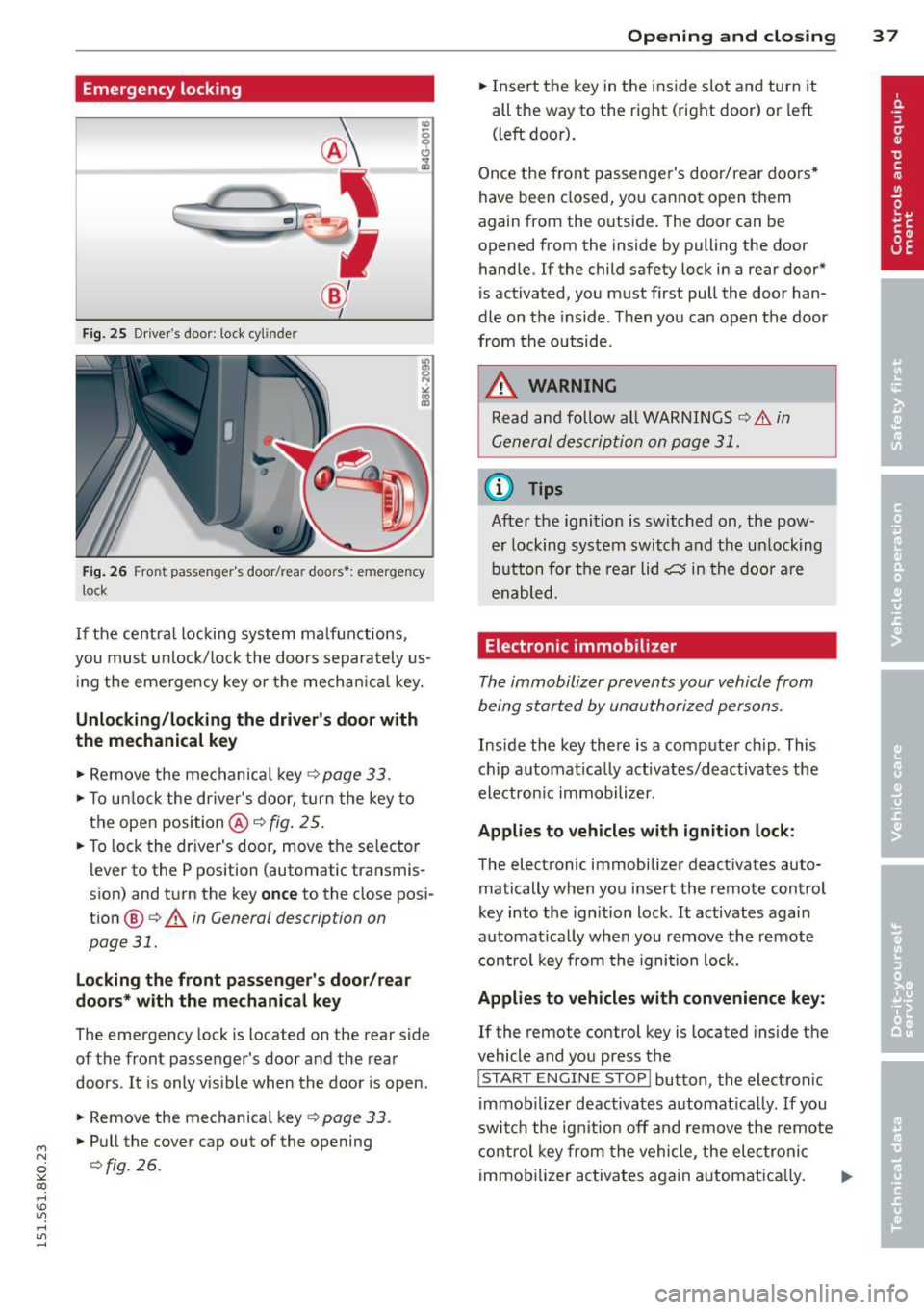
Fig . 2 5 Driver's door: lock cylinde r
Fig. 2 6 Front passenger's door/rea r doo rs *: emergency
loc k
If the centra l locking sys tem ma lfunctions,
you mu st unlo ck/ lo ck the d oo rs separa tely us
in g the eme rgency key or the mechan ic al key.
Unlocking /locking the driver's door with
the mechanical key
.,. Re move the me chanical key~ page 33.
.,. To u nlock the driver's door, turn the key to
the open position @~
fig. 25.
.,. To lock the dr ive r's door, move the se lector
lever to the P position (automatic transmis
s ion) and t urn the key
once to the close posi
tio n
@ <=> .& in General description on
page 31.
Locking the front passenger's door /rear
doors* w ith the mechanical key
The emergency lock is located on the rear side
of the front passenger's door and the rear
doors .
It is only v is ible when the door is open.
.,. Remove the mechanical key
<=> page 33.
.,. Pull the cover cap out of the opening
<=>fig. 26.
Opening and clo sin g 3 7
.. Insert the key in the ins ide s lot and turn it
all the way to the right (right door) or left (left door).
Once t he front passenge r's door/rea r doo rs *
have been closed, yo u ca nn ot o pen th em
again from the o utside . The door can be
opened from the inside by pulling the door handle. If the child safety lock in a rear door*
is activated, you must first pull the door han
dle on the inside . Then you can open the door
from th e outside .
.&_ WARNING
Read an d foll ow all WAR NING S ¢.& in
G enera l des crip tion on p age 3 1.
© Tips
-
Afte r the ignition is switche d on, the pow
er locking sys tem switch and the u nloc king
bu tton for the rear lid
cs in the d oo r a re
e na bled.
Electronic immobilizer
The immobiliz er pr eve nts your vehicle from
being star ted by unau tho riz ed persons.
Inside the key there is a com pute r ch ip. This
c hi p a utomat ica lly activates/deactiva tes the
electron ic immobili zer.
Applies to vehicles with ignition lock:
The electronic immobilizer deact ivates auto
matically when yo u insert the remote contro l
key into the ign ition lock .
It activates again
a utomat ica lly when you remove the remote
control key from th e i gni tion lock.
Applies to vehicles with convenience key:
If the remote control key is located inside the
vehicle and you press the
!S TART ENGI NE STO P I button, the elect ro ni c
immobi lizer deactiva tes a uto mat ica lly . If you
swi tch t he ig nition o ff and rem ove the remo te
c o ntrol key from the vehicle, the elec tronic
immo bili zer activates again a utomat ically. .,..
Page 40 of 304
38 Openin g and clo sing
& WARNING
Always take the key with you when you
leave the vehicle . The key can disarm the
electronic engine immobilizer and perm it
an unauthor ized person to start the engine
and enable ope rat ion of the vehi cle sys
tems such as powe r window or power sun
roof leading to ser ious personal in jury .
- The vehicle cannot be started if an unau
thorized key is used. The vehi cle may not
star t if another radio device such as a key
for another vehicle o r a tra nsponder is
l ocated on the key ring.
- For De clarat ion of Compli ance to Uni ted
States FCC and Indus try Canada regu la
tions¢
page 286.
Rear lid
Opening/closing rear lid
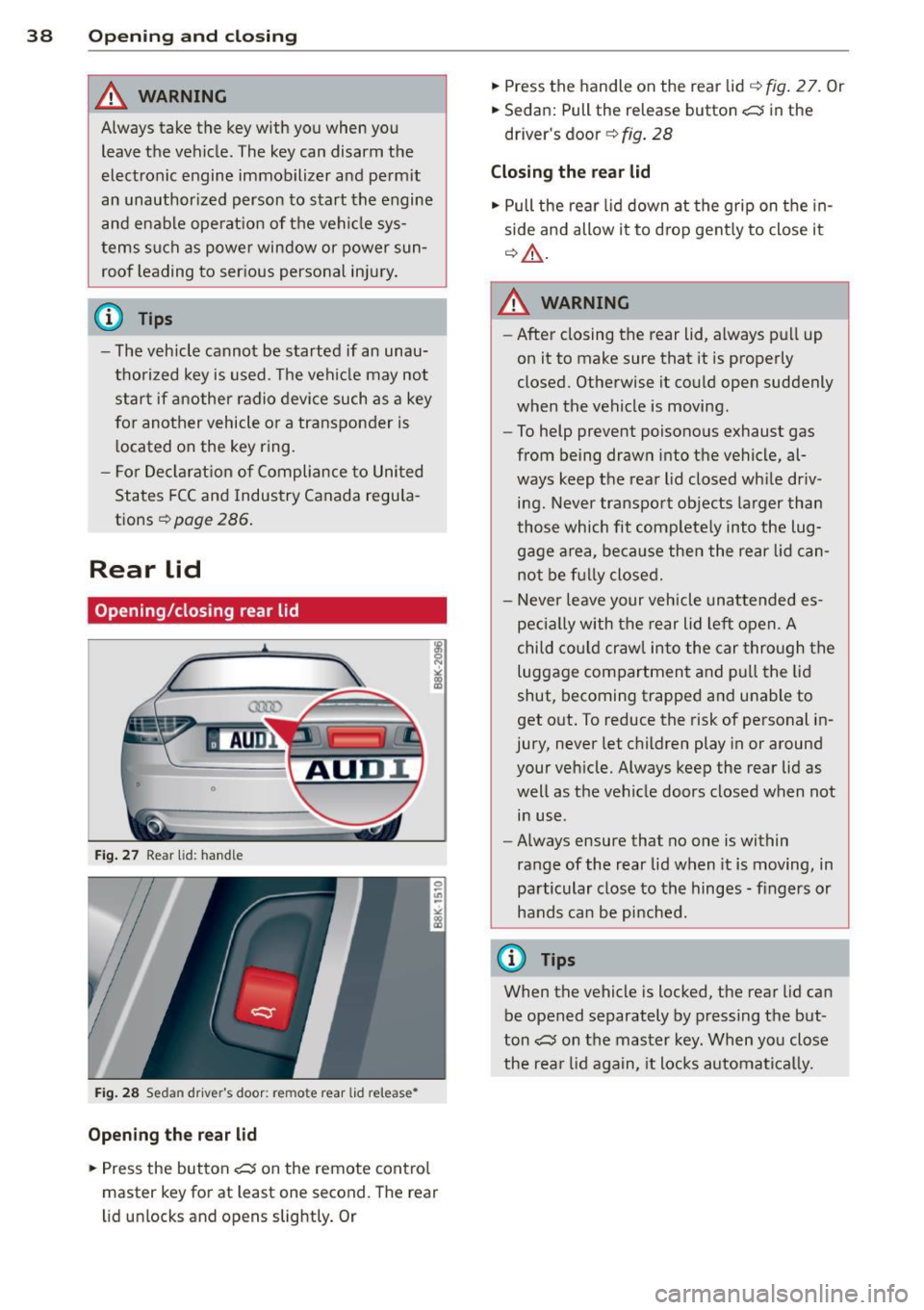
Fig . 27 Rear lid : hand le
F ig. 2 8 Sedan drive r's door: remote rear lid release •
Opening the rear lid
.,. Press the but ton c:s on the remote cont ro l
master key for at least one second. The rear
l id unlocks and opens slightly. Or .,.
Press the handle on the rear lid
q fig . 2 7. Or
.,. Sedan: Pull the release button
c:s in the
driver's door ¢
fig. 28
Closing the rear lid
.,. Pull the rear lid down at the grip on t he in
side and allow it to drop gent ly to close it
q _&. .
A WARNING
-After closing the rear lid, a lways p ull up
on it to make sure that it is properly
closed. Otherwise it could open suddenly
when the vehicle is moving.
- To help prevent poisono us exhaust gas
from being drawn into t he vehicle, al
ways keep t he rear lid closed wh ile driv
ing. Never transport objects la rger than
those which fit complete ly into the lug
gage a rea, beca use then the rear lid can
no t be f ully closed.
- Never leave your vehicle unattended es
peci ally with the rear lid left open. A
chi ld cou ld craw l into the car through the
luggage compartment and p ull the lid
shut, becoming trapped a nd u nable to
get o ut. To reduce the risk of personal in
jury, never let c hildren play in or around
your veh icle. Always keep the rear lid as
well as the vehicle doors closed when not
in use.
- Always ensure that no one is within
range of the rear lid when it is moving, in
particular close to th e hinges -fingers or
hands can be pi nched.
@ Tips
When the vehicle is locked, the rear lid can
be opened separately by pressing the but
ton
c:s on the master key. When yo u close
the rea r lid again, it locks automatica lly.
Page 42 of 304
40 Opening and closing
& WARNING
-Never close the rear lid inattentively or
without checking first. Although the
closing force of the rear lid is limited,
you can still seriously injure yourself or
others.
-Always ensure that no one is within
range of the rear lid when it is moving, in
particular close to the hinges and the up
per and lower edges -fingers or hands
can be pinched.
- To help prevent poisonous exhaust gas
from being drawn into the vehicle, al
ways keep the rear lid closed while driv ing. Never transport objects larger than
those which fit completely into the lug gage area, because then the rear lid can
not be fully closed .
- Never leave your vehicle unattended es pecially with the rear lid left open. A
child could crawl into the car through the
luggage compartment and pull the lid
shut, becoming trapped and unable to get out . To reduce the risk of personal in
jury, never let children play in or around
your vehicle . Always keep the rear lid as
well as the vehicle doors closed when not in use.
- If there is a luggage rack or bicycle rack
mounted on the rear lid, it may not be
able to open completely or an opened rear lid may close by itself because of the
added weight . So the open rear lid must
be supported or the weight must be re
moved from the luggage rack first .
(D Tips
-When the vehicle is locked, the rear lid
can be unlocked separately by pressing
the button
~ on the master key. When
the rear lid is closed again, it locks auto
matically .
- The following applies to vehicles equip
ped with the convenience key* feature: if
the remote control key is left in the lug
gage compartment, luggage compart
ment will automatically unlock itself af- ter you
lock the vehicle. This prevents
you from unintentionally locking your
key in the luggage compartment.
- If the vehicle battery charge drops be
low a certain level, you can still open or
close the rear lid manually, however, you
will need to apply more force to close it.
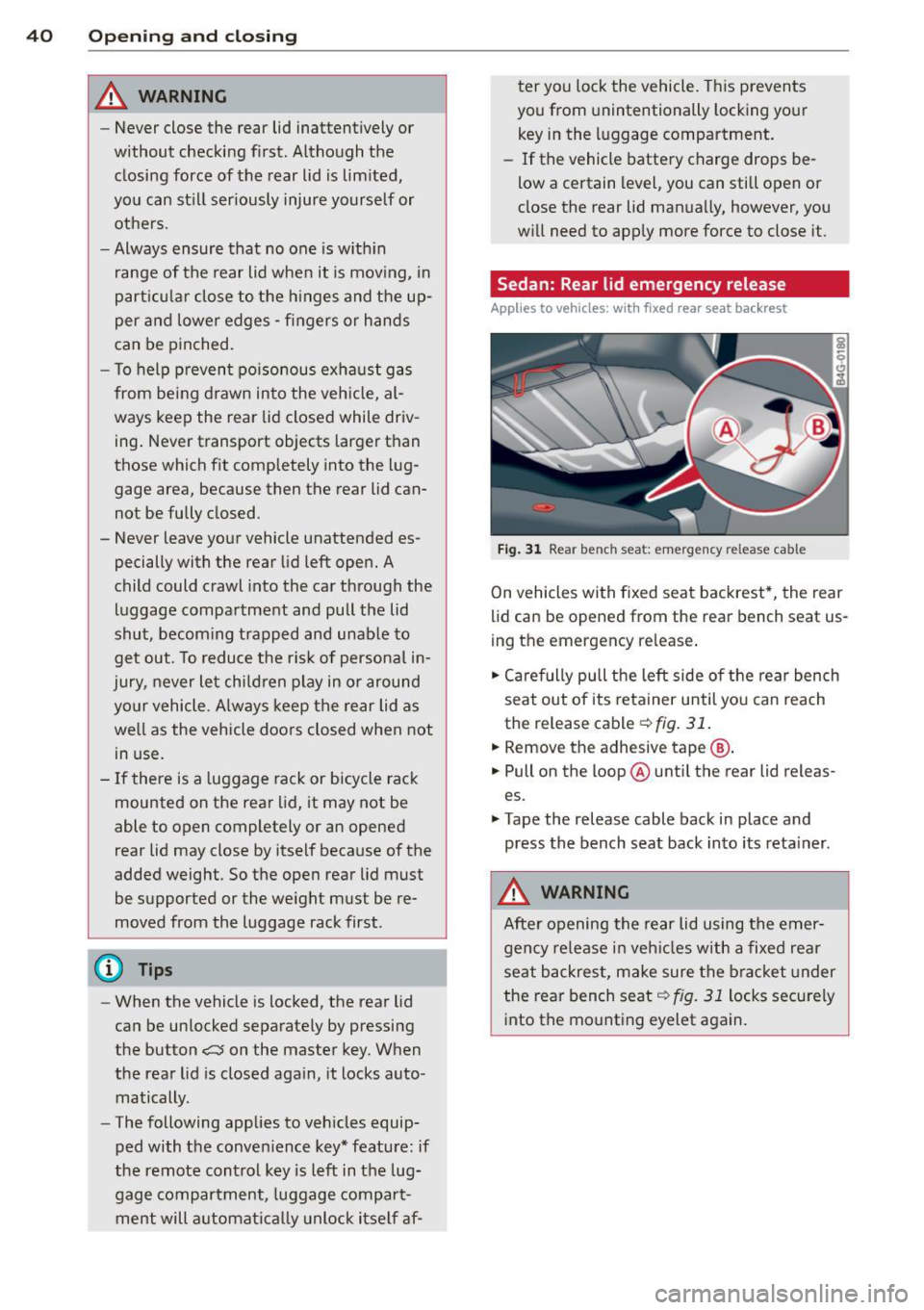
Sedan: Rear lid emergency release
Applies to vehicles: with fixed rear seat backrest
Fig. 31 Rear ben ch s eat: e merg ency r ele ase ca ble
On vehicles with fixed seat backrest*, the rear
lid can be opened from the rear bench seat us
ing the emergency release.
.,. Carefully pull the left side of the rear bench
seat out of its retainer until you can reach
the release cable
¢ fig. 31.
.,. Remove the adhesive tape @.
.,. Pull on the loop @ until the rear lid releas
es.
.,. Tape the release cable back in place and
press the bench seat back into its retainer .
& WARNING
After opening the rear lid using the emer
gency release in vehicles with a fixed rear
seat backrest, make sure the bracket under
the rear bench seat
qfig. 31 locks securely
into the mounting eyelet again.
Page 43 of 304
M N
~ co
rl I.O
"' rl
"' rl
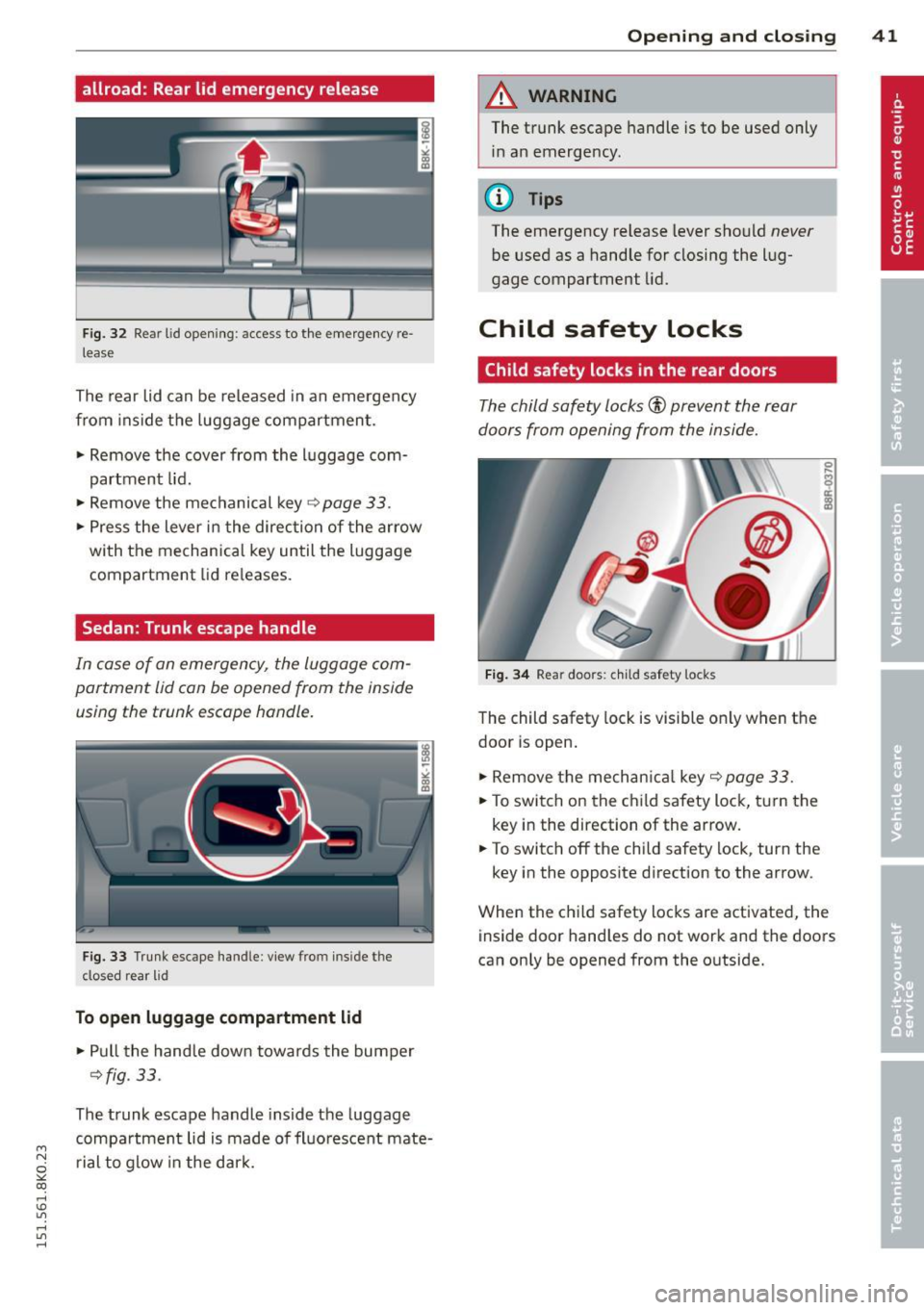
allroad: Rear lid emergency release
Fig. 32 Re ar lid open ing: a ccess to the emergency re
l ease
The rear lid can be released in an emergency
from inside t he luggage compartment.
.. Remove the cover from the luggage com
partment lid .
.. Remove the mechanical key
Qpoge 33 .
.. Press the lever in the direction of the arrow
with the mechanical key until the luggage
compartment lid re leases.
Sedan: Trunk escape handle
In case of on emergency, the luggage com
portment lid con be opened from the inside using the trunk escape handle.
F ig. 33 Trunk escape han dle: view fro m in sid e t he
cl osed rear lid
To open luggage compartment lid
.. Pull the handle down towards the bumper
Qfig. 33 .
The trunk escape handle inside the luggage
compartment lid is made of fluorescent mate
r ial to glow in the dar k.
Opening and closing 41
A WARNING
The trunk escape handle is to be used only
in an emergency .
(D Tips
The emergency release lever should never
be used as a handle for closing the lug
gage compartment lid.
Child safety Locks
Child safety locks in the rear doors
The child safety locks® prevent the rear
doors from opening from the inside .
Fig. 34 Rear doors : chi ld saf ety locks
The child safety lock is visible on ly when the
door is open .
.. Remove the mechan ica l key
q page 33 .
.. To switch on the child safety lock, turn the
key in the direction of the arrow .
.. To switch off the chi ld safety lock , turn the
key in the opposite direction to the arrow .
When the child safety locks are activated, the
inside door handles do not work and the doors
can on ly be opened from the outside.
Page 44 of 304
42 Opening and closing
Power windows
Controls
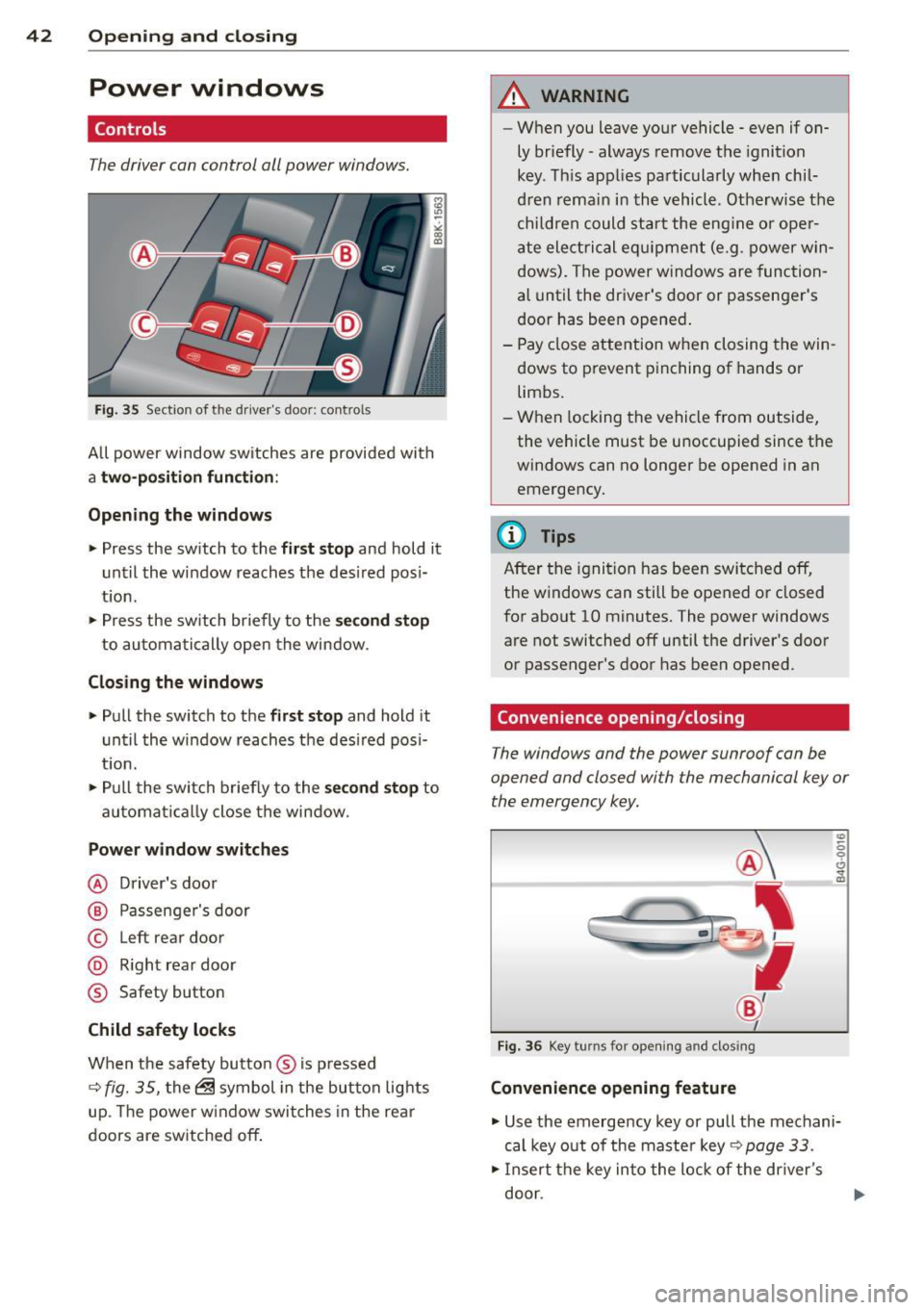
The driver can control all power windows.
Fig . 35 Section of the d rive r's doo r: co ntro ls
A ll power window sw itches are provide d wit h
a two-position function :
Opening the windows
.. Press the sw itch to the first stop and hold it
unt il the w indow reaches t he des ired pos i
t ion .
.. Press the sw itch br ie fly to the
s e cond stop
to autom ati cally open the window .
Closing the windows
.. Pull the switch to the first stop and hold it
u ntil the window reaches the des ired pos i
t io n.
.. Pu ll the swit ch briefly to the
s econd stop to
automa tica lly close the window .
Power window switches
@ Driver's door
@ Passenge r's door
© Left rear door
@ R ight rea r doo r
® Safety button
Child safety locks
When the safety butto n ® is pr essed
~ fig. 35, the ~ symbol in the bu tton lig hts
up . Th e power w indow swi tches in the re ar
doors are sw itche d off.
A WARNING
-
- W hen you leave your v ehicle - even if on-
ly br iefly- always remove t he ignition
key . Th is app lies pa rtic ularly whe n chil
dr en remai n in t he vehicl e. Otherwis e th e
chi ld re n c ould s ta rt t he e ng in e or ope r
a te ele ctrica l e qui pment (e.g . po wer w in
dows). T he power w indows are func tion
a l until the dr iver's door or passen ger's
d oor has bee n opened .
- Pay close attention w hen closing the win
dows to prevent pinching o f hands o r
limbs.
- Wh en locking the vehicle from outside,
the vehicle must be u noccupied since t he
wind ows can no longer be opened in an
emergency .
(D Tips
Aft er the ignition ha s been switched off,
the wi ndows can still be opened o r closed
for abo ut 1 0 minutes. The power windows
are not switched off until t he driver 's doo r
or passenger's door has been opened .
Convenience opening/closing
The windows and the power sunroof can be
opened and closed wi th the mechanical key or
the emergency key.
•
Fig . 36 Key turns fo r ope nin g a nd clos ing
Convenience opening feature
.. Use the eme rgency key or pull the mechani
cal key out of the maste r key ~
page 33 .
.. In sert the key in to the l ock of the driver' s
door .
Page 45 of 304
M N
~ co
rl I.O
"' rl
"' rl
.. Turn the key to position ¢ fig. 36@ until a ll
the windows have reached the desired posi
t ion and the power sunroof is open.
Conv enience closing feature
.. Use the emergency key or pull the mechani
ca l key out of the master key¢
page 33 .
.. Turn the key in the lock of the driver's door
to the lock position @ until the windows
and the power sunroof are closed
q &, .
F or vehicles w ith Panoramic sliding sunroof*:
When you open or close the Panoramic sliding
sunroof*, the power sunshade wi ll also open
or close.
A WARNING
- Never close the windows and the power
sunroof inattentive ly and without check
ing -there is risk of injury.
- You must always watch when the win
dows are being ra ised so that no one can
be trapped.
If you release the key, the
closing action is immed iate ly canceled .
- Always read and heed WARNING
¢.&. in
General description on page 31 .
Correcting window regulator
malfunction
After disconnecting the vehicle battery, the
one-touch up and down feature must be acti
vated again.
.,. Pull and hold the power w indow switch until
the window is completely closed .
.. Release the switch and pull the switch again
f or one second.
Opening and closing 43
Sunroof
Operation sliding/tilting sunroof
Applies to vehicles: with sliding/tilting sunroof
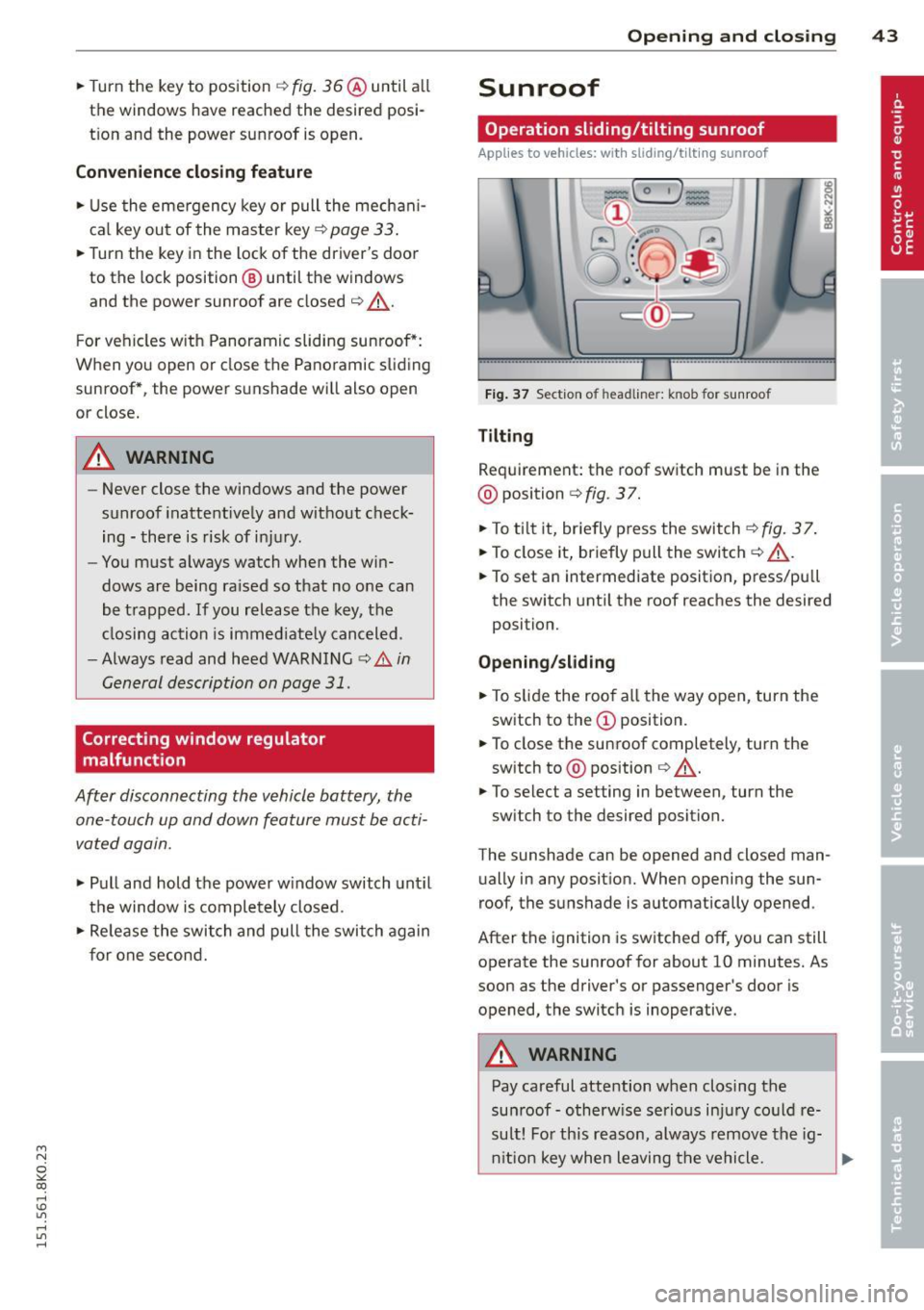
Fig. 37 Section of h ead lin er: k nob fo r sunroo f
Tilting
Requirement: the roof switch must be in the
@ position
<=>fig. 37.
.. To t ilt it, br iefly press the switch ¢fig. 37.
.. To close it, briefly pull the switch<=>&, .
.. To set an intermediate posit ion, press/pull
the switch unti l the roof reaches the desired
position.
Opening/sliding
.. To s lide the roo f all the way open, turn the
switch to the
(D position.
.. To close the sunroof completely, turn the
sw itch to @ position
¢ &, .
.. To select a setting in between, turn the
switch to the desired position.
The sunshade can be opened and closed man
ually in any posit ion. When opening the sun
roof, the sunshade is automatically opened.
After the ignition is switched
off, you can still
operate the sunroof for about 10 minutes. As
soon as the driver's or passenger's door is
opened, the switch is inoperative.
A WARNING
-
Pay careful attention when closing the
sunroof- otherwise serious injury could re
sult! For this reason, always remove the ig-
nition key when leaving the vehicle.
II)>