steering AUDI S4 2015 Owners Manual
[x] Cancel search | Manufacturer: AUDI, Model Year: 2015, Model line: S4, Model: AUDI S4 2015Pages: 304, PDF Size: 74.86 MB
Page 5 of 304
"" N
0 ::.,: co ,...., \!) 1.1'1 ,...., 1.1'1 ,....,
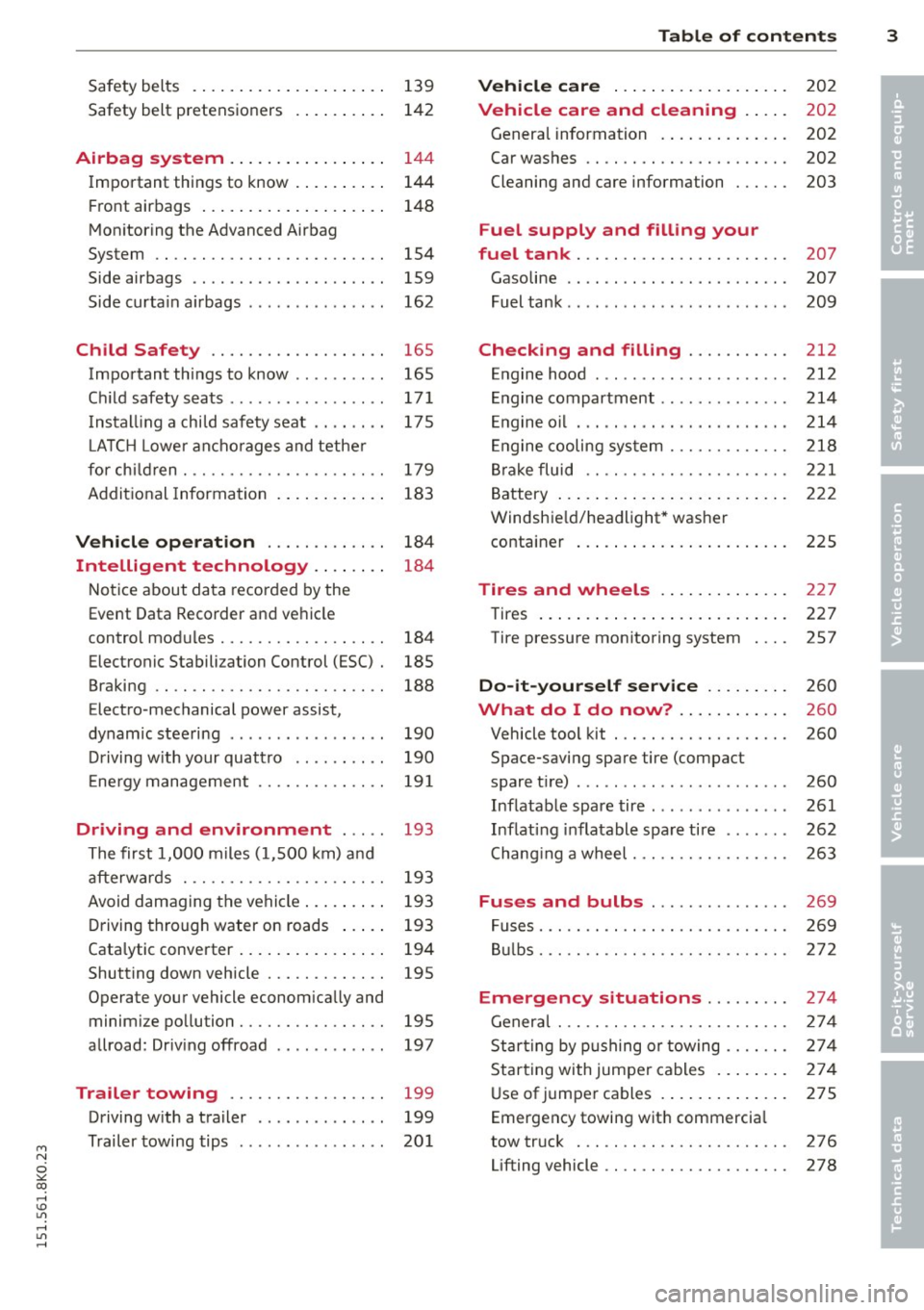
Safety belts . . . . . . . . . . . . . . . . . . . . . 139
Safety belt pretensioners . . . . . . . . . . 142
Airbag system . . . . . . . . . . . . . . . . . 144
Important things to know . . . . . . . . . . 144
Front airbags . . . . . . . . . . . . . . . . . . . . 148
Monitoring the Advanced Airbag
System . . . . . . . . . . . . . . . . . . . . . . . . . 154
Side airbags . . . . . . . . . . . . . . . . . . . . . 159
Side curtain airbags . . . . . . . . . . . . . . . 162
Child Safety . . . . . . . . . . . . . . . . . . . 165
Important things to know . . . . . . . . . . 165
Child safety seats ............ .. ... 171
Installing a child safety seat .. .. .. .. 175
L ATCH Lower anchorages and tether
for child ren. ............. .. .. .. .. 179
Additional Information
183
Vehicle operation . . . . . . . . . . . . . 184
Intelligent technology . . . . . . . . 184
Notice about data recorded by the
Event Data Recorder and vehicle
control modules . . . . . . . . . . . . . . . . . . 184
Electronic Stabili zation Control (ESC) . 185
Braking . . . . . . . . . . . . . . . . . . . . . . . . . 188
Electro -mechanical power assist,
dynamic steering . . . . . . . . . . . . . . . . . 190
Driving with your quattro . . . . . . . . . . 190
Energy management . . . . . . . . . . . . . . 191
Driving and environment . . . . . 193
The first 1,000 miles (1,500 km) and
afterwards . . . . . . . . . . . . . . . . . . . . . . 193
Avoid damaging the vehicle. . . . . . . . . 193
Driving through water on roads . . . . . 193
Catalytic converter . . . . . . . . . . . . . . . . 194
Shutting down vehicle . . . . . . . . . . . . . 195
Operate your vehicle economically and minimize pollution . . . . . . . . . . . . . . . . 195
allroad: Driving offroad . . . . . . . . . . . . 197
Trailer towing . . . . . . . . . . . . . . . . . 199
Driving with a trailer . . . . . . . . . . . . . . 199
Trailer towing tips . . . . . . . . . . . . . . . . 201
Table of contents 3
Vehicle care . . . . . . . . . . . . . . . . . . .
202
Vehicle care and cleaning . . . . . 202
General information . . . . . . . . . . . . . . 202
Car washes . . . . . . . . . . . . . . . . . . . . . . 202
Cleaning and care information . . . . . . 203
Fuel supply and filling your
fuel tank . . . . . . . . . . . . . . . . . . . . . . .
207
Gasoline . . . . . . . . . . . . . . . . . . . . . . . . 207
Fuel tank . . . . . . . . . . . . . . . . . . . . . . . . 209
Checking and filling . . . . . . . . . . . 212
Engine hood . . . . . . . . . . . . . . . . . . . . . 212
Engine compartment ... ......... .. 214
Engine oil . . . . . . . . . . . . . . . . . . . . . . . 214
Engine cooling system . . . . . . . . . . . . . 218
Brake fluid . . . . . . . . . . . . . . . . . . . . . . 221
Battery ... .. .... .. ............. .
222
Windshield/headlight* washer container . . . . . . . . . . . . . . . . . . . . . . . 225
Tires and wheels . . . . . . . . . . . . . . 227
Tires . . . . . . . . . . . . . . . . . . . . . . . . . . . 227
Tire pressure monitoring system 257
Do-it-yourself service . . . . . . . . . 260
What do I do now? . . . . . . . . . . . . 260
Vehicle tool kit . . . . . . . . . . . . . . . . . . . 260
Space-saving spare tire (compact
spare tire) . . . . . . . . . . . . . . . . . . . . . . . 260
Inflatable spare tire . . . . . . . . . . . . . . . 261
Inflating inflatable spare tire . . . . . . . 262
Changing a wheel. . . . . . . . . . . . . . . . . 263
Fuses and bulbs . . . . . . . . . . . . . . . 269
Fuses..... .... .... .............. 269
Bulbs. . . . . . . . . . . . . . . . . . . . . . . . . . . 272
Emergency situations ... ... .. . 274
General... .... .................. 274
Starting by pushing or towing . . . . . . . 274
Starting with jumper cables . . . . . . . . 274
Use of jumper cables . . . . . . . . . . . . . . 275
Emergency towing with commercial
tow truck . . . . . . . . . . . . . . . . . . . . . . . 276
Lifting vehicle . . . . . . . . . . . . . . . . . . . . 278
•
•
Page 11 of 304
'"" N
0 ::.,: co ,...., \!) ..,.,
,...., ..,., ,....,
CD
@
®
©
®
®
(j)
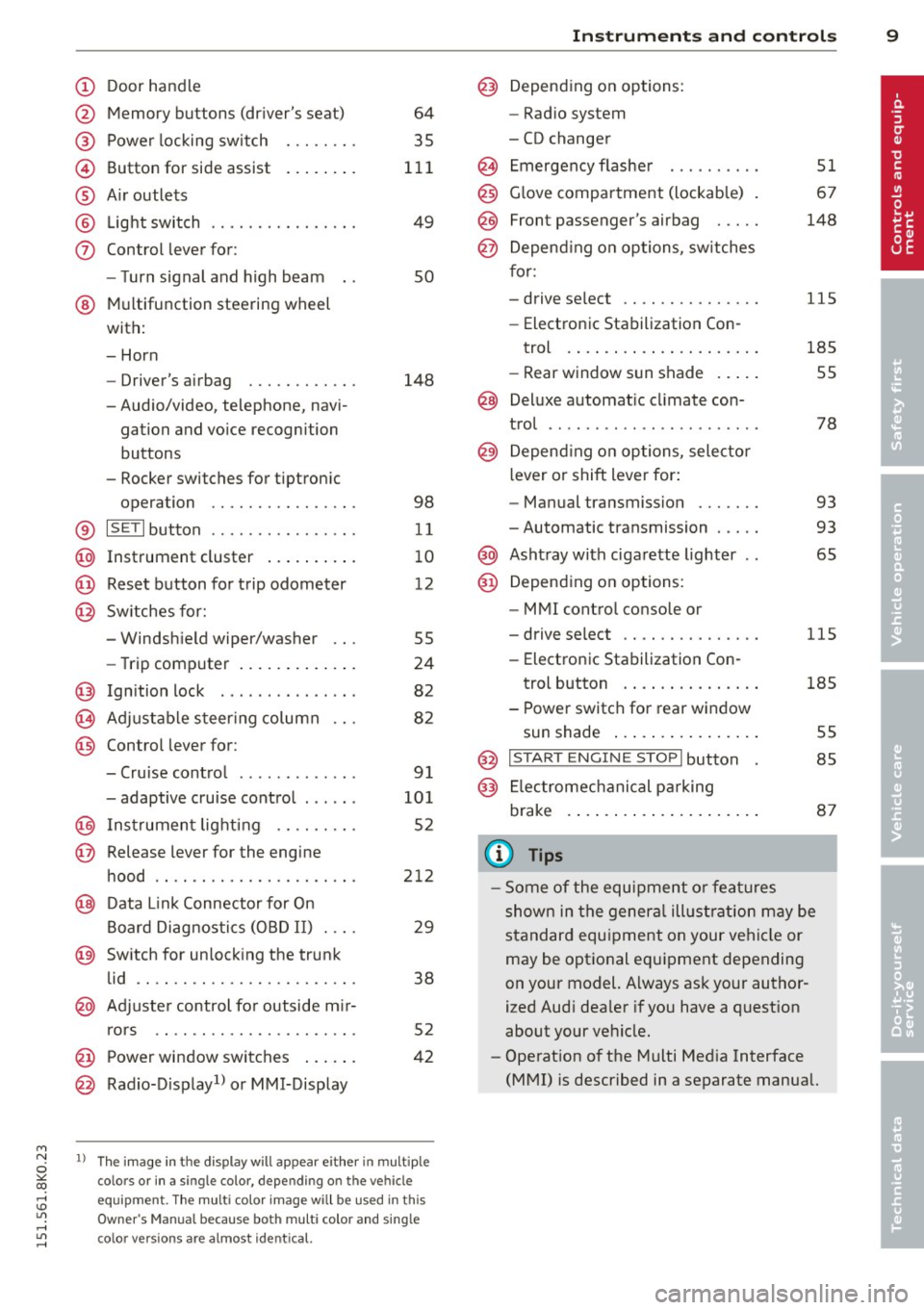
Door handle
Memory buttons (dr iver's seat)
Power locking sw itch
Button for side ass ist
A ir outlets
L ight switch
Control lever for :
- T urn signal and high beam
@ Multifunction steering wheel
with:
- Horn
- Driver's airbag
- Audio/video, telephone, navi-
gation and vo ice recognition
buttons
- Rocker switches for tiptron ic
opera tion ........... .... .
® ISET I button ...... ..... .... .
@ Instrument cluster .. ... .. .. .
@ Reset button for trip odometer
@ Sw itches for:
- Windsh ield wiper/washer
- Trip computer ..... ... .. .. .
@ Ignition lock ............. . .
(8) Adjustable s teer ing column
@ Control lever for :
- Cruise contro l ......... ... .
- adaptive cruise contro l .... . .
@ Ins trumen t lighting .... .. .. .
@ Release lever for the engine
hood .. .. .. .. ........... .. .
@ Data L ink Connector for On
B oard Diag nostics (OBD II) . .. .
@ Sw itch for unlock ing the trunk
lid .. .. .. ................. .
@ Adjuster control fo r outside m ir
r ors
@ Power window switches ... .. .
@ Rad io-Display1l or MMI-Display
64
35
1 11
49
so
148
98
11
10
12
55
24
82
82
9 1
101
52
212
29
38
5 2
42
l) T he image in t he d is pl ay will app ear e it h er in mu lt iple
c o lor s or in a singl e co lor , de pen din g o n th e vehicl e
e q ui pment. T he m ulti co lo r im age w ill b e used i n this
O w ner's M anual becau se bo th mu lt i co lo r and si ng le
c o lor ver sio ns are almos t ide ntic al.
In strument s and control s 9
Depend ing on options:
- Rad io system
- CD changer
Emergency flasher
G love compartment (lockab le)
Front passenger's airbag .....
Depend ing o n op tions, sw itches
f or:
- drive select .. .. .......... .
- Electronic Stabilization Con-
trol . ... .. .. .. . .. ... .... .
- Rear window sun shade .. .. .
@ Deluxe automat ic cl imate con-
trol ...... .. .... .......... .
@) Depending on options, selecto r
lever or shift lever for :
- Manual transmission ...... .
- Automatic transmission .... .
@ Asht ray with ciga rette lighter
@ Depend ing on options:
- MMI contro l console or
- drive select .. .... ........ .
- Electronic Stabilizat ion Con- 51
67
148
115
185
55
78
93
93
65
115
trol button . . . . . . . . . . . . . . . 185
- Power switch for rear window sun shade . . . . . . . . . . . . . . . . 55
@ I STA RT ENGI NE STOPI button 85
@) Electromec hanical pa rking
brake . . . . . . . . . . . . . . . . . . . . . 87
(D Tips
-Some of the equipment o r fea tures
show n in the gener al illustration m ay be
standard equ ipment on your vehicle or
may be optional eq uipment depending
on your model. Always as k your author
ized Aud i dea ler if you have a quest ion
about your ve hicle.
- Operat ion of the Multi Med ia Interface
(MMI) is described in a separate manua l.
Page 15 of 304
"" N
0 ::.,: co ,...., \!) 1.1'1 ,...., 1.1'1 ,....,
Instrument s and warnin g/indic ator ligh ts 13
misfiring and fuel could enter into the ex
haust system . The catalytic converter
could then overheat and be damaged .
Warning/indicator
lights
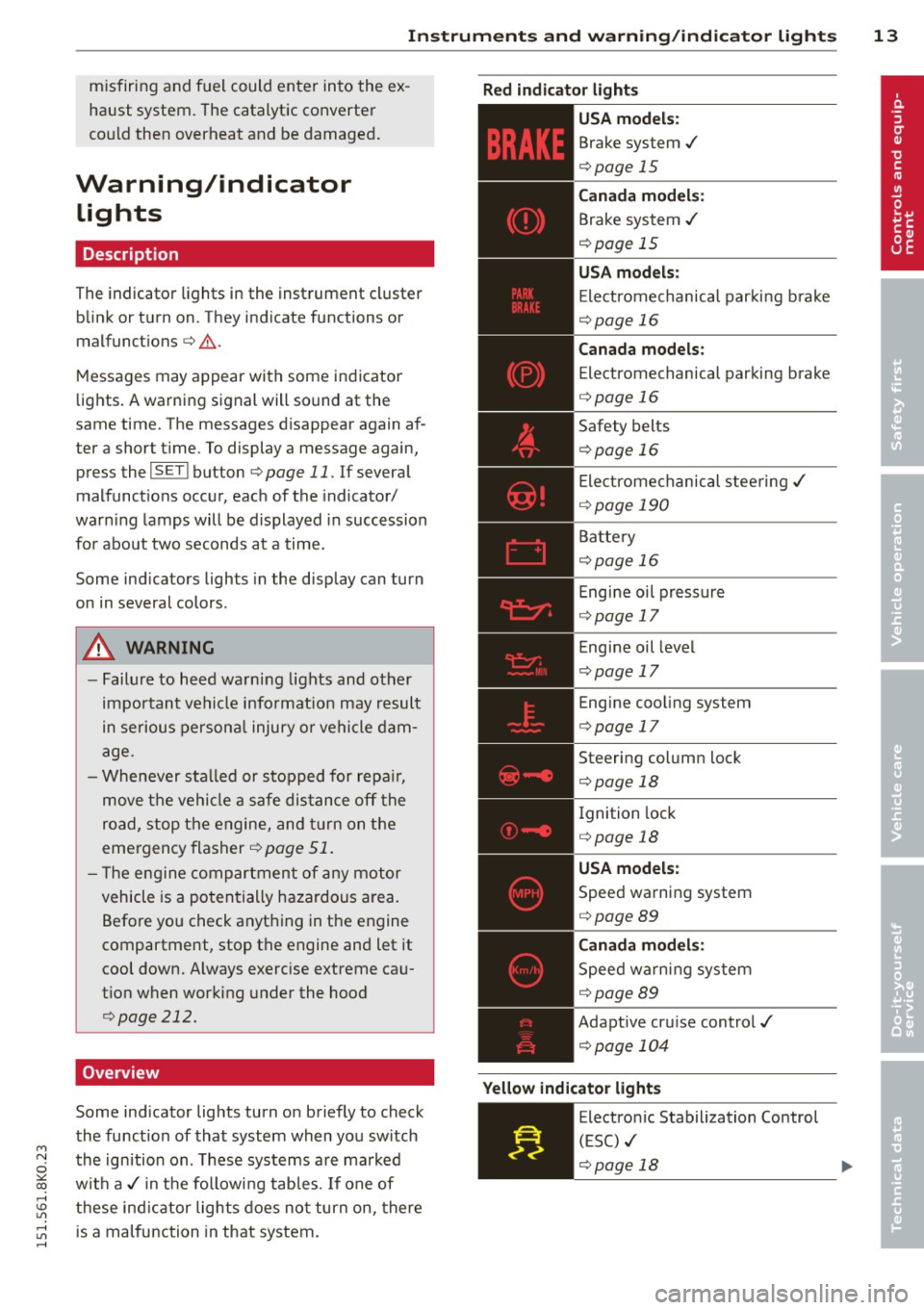
Description
The indicator lights in the instrument cluster
blink or turn on. They indicate functions or
m alfunctions
c::> .&. .
Messages may appear with some indicator
lights. A warning signal will sound at the
same time . The messages disappear again af
ter a short t ime. To display a message again,
press the
I S ET I bu tton c::> page 11 . If several
malfunction s occur, each of the indicator/
warn ing lamps will be d isplayed in succession
for about two seconds at a time.
Some ind icators ligh ts in the display can turn
on in several colors.
A WARNING
- Failure to heed warning lights and other
important vehicle info rmation may result
in serious personal injury o r vehicle dam
age.
- Whenever sta lled or s topped for repa ir,
move the vehicle a safe dis tance off the
road, stop the engine, and turn on the
emergency flasher
c::> page 51.
- T he engine compartment of any motor
vehicle is a poten tially hazardous a rea.
Before you check anything in the engine
compartment, stop the engine and let it
cool down. Always exercise extreme ca u
t ion when working under the hood
c::> page 212.
Overview
Some ind icator lights turn on briefly to check
the function of that system when you switch
the ignition on . T hese systems are marked
with a./ in t he followi ng tab les. If one of
these ind icator lights does no t turn on, there
is a malfunction in that system.
R ed indicator lights
-------------
U S A models:
Brake system ./
c::> page 15
Canada model s:
Brake system ./
c::>page 15
USA m odel s:
Electromechanical par king b rake
c::> page 16
Canada models :
Electromechanical parking brake
c::> page 16
Safety belts
c::> page 16
Electrome chanical stee ring ./
c::> page 190
Batte ry
c::> page 16
Eng ine oil pressure
c::> page 17
E ngine oil level
c::> page 17
Engine cool ing system
c::> page 17
Steering column lock
c::> page 18
Ignition lock
c::> page 18
USA model s:
Speed warning system
c::> page 89
Canada model s:
Speed warning system
c::> page 89
Adaptive cru ise control./
c::> page 104
Y ellow indic ator light s
-------------
Electro nic Stabilization Control
(ESC) ./
c::> page 18 ..,.
Page 16 of 304
14 Instruments and warning/indicator lights
TPMS
smsoR
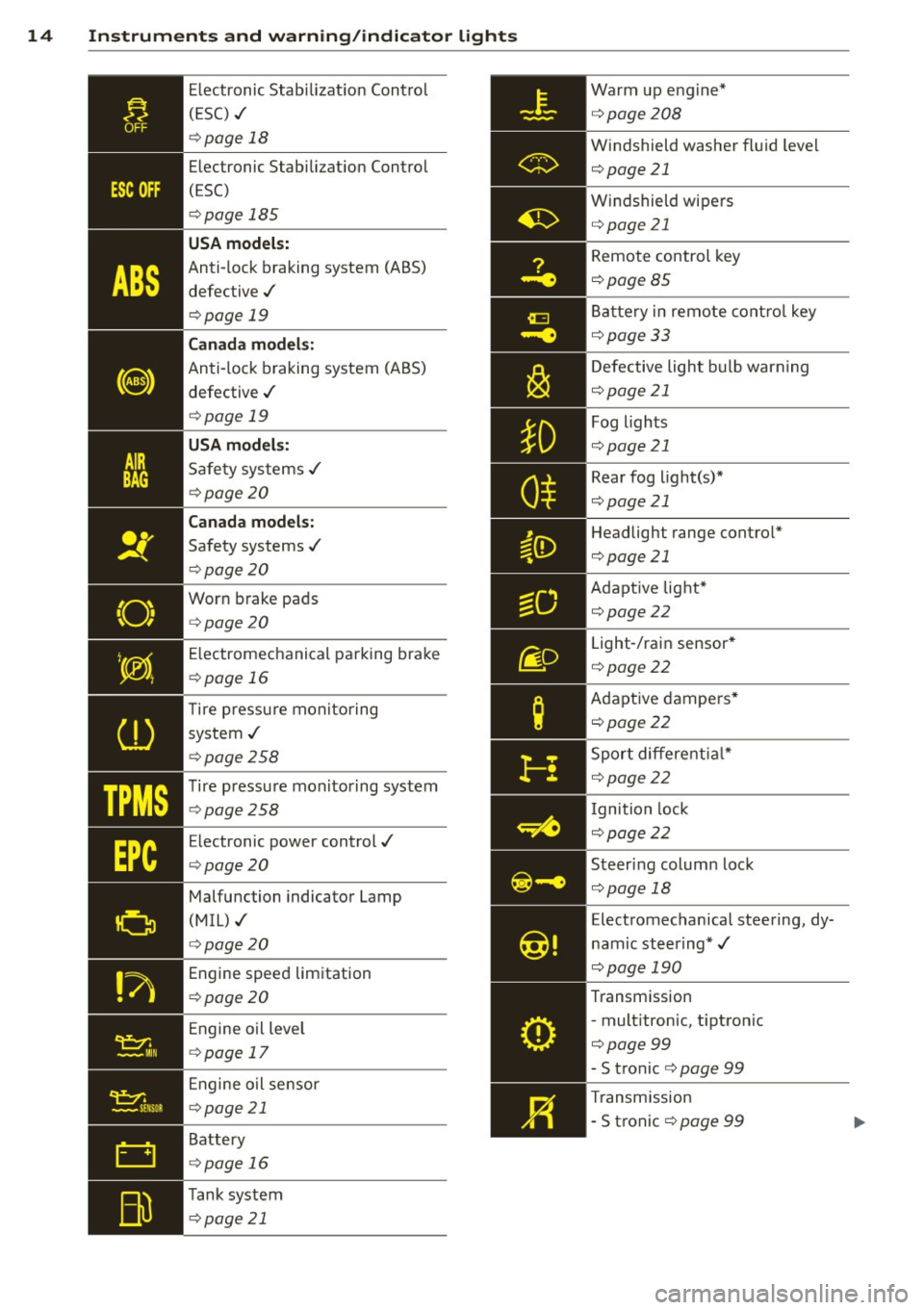
Electronic Stabilization Control
( ES C) ./
¢page 18
Electronic Stabilization Control
(ESC)
¢ page 185
USA models:
Anti-lock braking system (ABS)
defective ./
¢ page 19
Canada models:
Anti-lock braking system (ABS)
defective ./
¢ page 19
USA models:
Safety systems ./
¢page20
Canada models:
Safety systems ./
¢ page20
Worn brake pads
¢ page 20
E lectromechanical parking brake
¢ page 16
T ire pressu re monitoring
system ./
¢ page258
Tire pressure monitoring system
¢page258
E lectronic power control./
¢ page20
Malfunction indicator Lamp
(MIL) ./
¢ page 20
Engine speed limitation
¢ page20
Engine oil leve l
¢ page 17
Engine oil sensor
¢page 21
Battery
¢ page 16
Tank system
¢ page 21 Warm
up eng ine*
¢ page208
Windshield washer fl uid leve l
¢page21
Windshield wipers
¢page 21
Remote control key
¢page85
Battery in remote control key
¢page33
Defective light bulb warning
¢ page21
Fog lights
¢page 21
Rear fog light(s)*
¢page21
Headligh t range control*
¢page21
Adaptive light*
¢page22
Light-/rain sensor *
¢ page22
Adaptive dampers*
¢page22
Sport differential*
¢page22
I gnition lock
¢page 22
Steering column lock
¢page 18
Electromechanical steering, dy
namic steering *./
¢pag e 190
Transmission
- mult itronic, t iptron ic
¢page99
- S tronic
¢ page 99
Transmission
- S tronic
¢ page 99
Page 20 of 304
18 Instrum ent s and w arn ing /indic ato r light s
-Never open the hood if you see or hear
steam or coolant escaping from the en
gine compartment -you risk being scald
ed . Wait until you can no longer see or
hear steam or coo lant escaping.
- The engine compartment of any veh icle
is a dangerous area . Before you perform
any work in the engine compartment,
turn of the eng ine and allow it to cool.
Follow the wa rning sticke rs
qpage 212.
{[) Note
Do not co ntinue driving if the. symbol
illuminates . There is a malfunct ion in the
engine cooling system -you could damage
your eng ine .
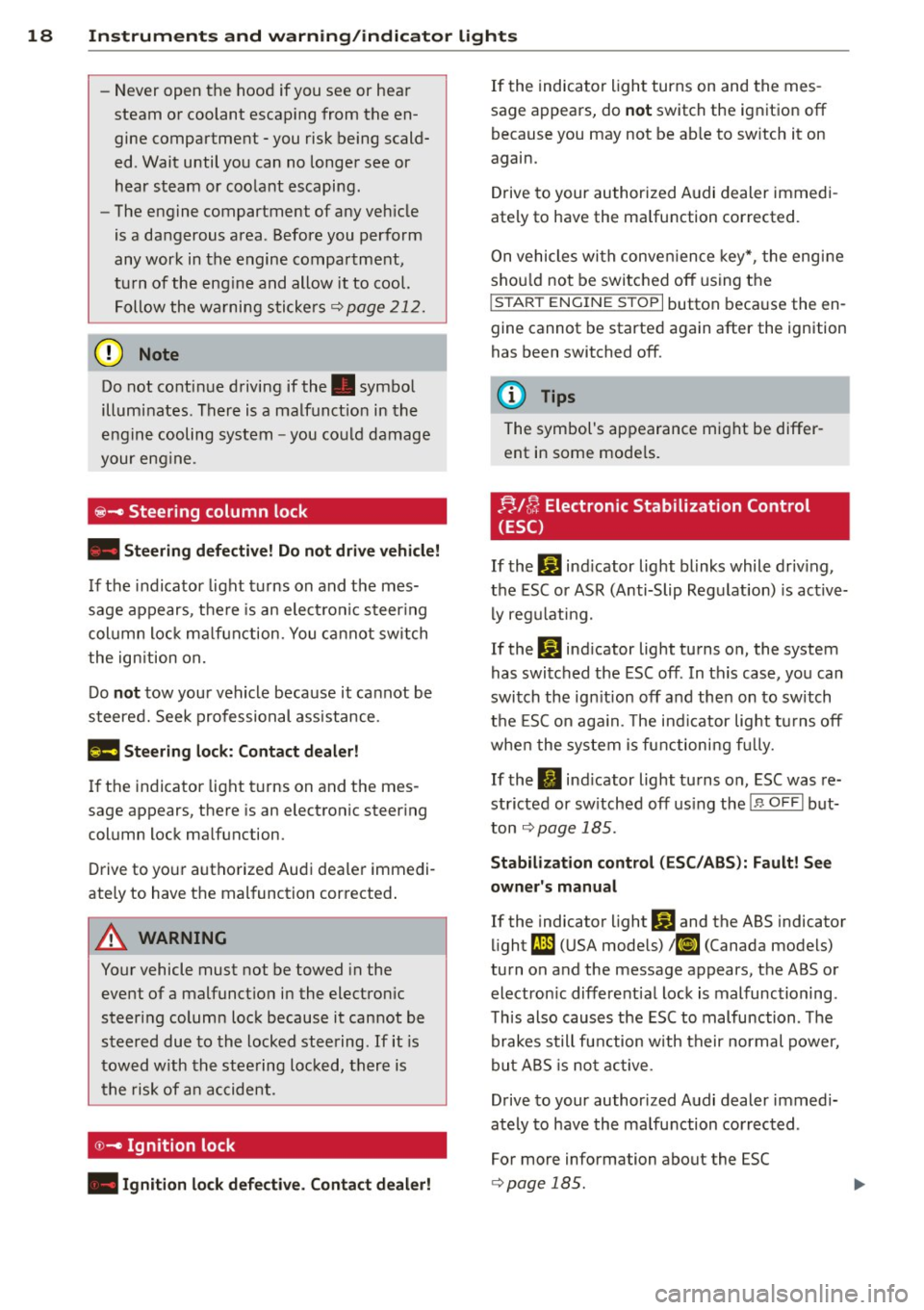
@-Steering column lock
• Stee ring def ective! D o not drive vehicle!
If the indicator light turns on and the mes
sage appears, the re is an elect ronic steer ing
col umn lock ma lfunction. You ca nnot switch
the ign ition on.
Do
not tow your vehicle because it ca nnot be
steered. Seek professional ass istance.
Ill! Ste ering lock: Contact d ealer!
If the indicator light t urns on and the mes
sage appears, there is an electronic steer ing
column lock malfunction.
Drive to yo ur authorized Audi dea le r immedi
ately to have the malfunction corrected .
A WARNING
-
Your vehicle must not be towed in the
event of a malfunct ion in the electron ic
steering column lock because it cannot be
steered due to the locked steering .
If it is
tow ed w ith th e stee ring lock ed, there is
the risk of a n accident .
©-Ignition lock
• Ignition lock d efe ctive. Contact d eal er! If
the indicator light turns on and the mes
sage appears, do
not switch the ignition off
because you may not be ab le to sw itch it on
again.
Drive to your authorized Audi dealer immedi
ately to have the ma lfunction corrected.
On vehicles with conve nience key*, the engine
shou ld not be switched off using the
I STAR T ENGINE ST OPI button because the en
gine cannot be started again after the ignition
has been switched off.
(D Tips
The symbol's appearance might be differ
ent in some mode ls.
FJ,/ ~ Electronic Stabilization Control
(ESC)
If the Jj] ind icator light blinks while driv ing ,
the ESC or ASR (Anti-Slip Regulation) is active
ly regu lating.
If the D] ind icator light turns on , the system
has switched the ESC off . In this case, you can
switch the ign ition off and then on to switch
the ESC on aga in. The ind icator lig ht tu rns off
whe n the system is functioning f ully.
If the
II ind icator light turns on, ESC was re
stricted or sw itched off us ing the !.$
O FFI but
ton
q page 185 .
Stabilizat ion control (ESC /ABS ): Fault! See
own er' s m anual
If the indicator light DJ and the ABS indicator
light
fJD (USA models) ; tiJ (Canada models)
turn on and the message appears, the ABS or
electron ic different ial lock is malfunctioning .
Th is also causes the ESC to malfunction . The
brakes still function with their normal power,
but A BS is not active.
D rive to your author ized Audi dealer immedi
ately to have the malfunction corrected .
For more info rmation about the ESC
q page 185 .
Page 35 of 304
keys. Unguarded access to the keys pro
vides children the opportunity to start
the engine and/or activate veh icle sys
tems such as the power windows etc. Un supervised operation of any vehicle sys
tem by ch ildren can result in serious in
jury.
- Do not remove the key from the ignition
lock until the vehicle has come to a com
plete stop. Otherw ise the steering col
umn lock cou ld suddenly engage -caus
ing the risk of an accident.
(D Tips
- The operation of the remote contro l key
can be temporarily disrupted by interfer
ence from transmit ters in the vici nity of
the vehicle working in the same frequen
cy range (e .g . a ce ll phone, radio equip
ment).
- Fo r security reasons, replacement keys
are on ly available from authorized A udi
dealer.
- For Declaration of Compliance to United
States FCC and Industry Canada regula
tions¢
page 286.
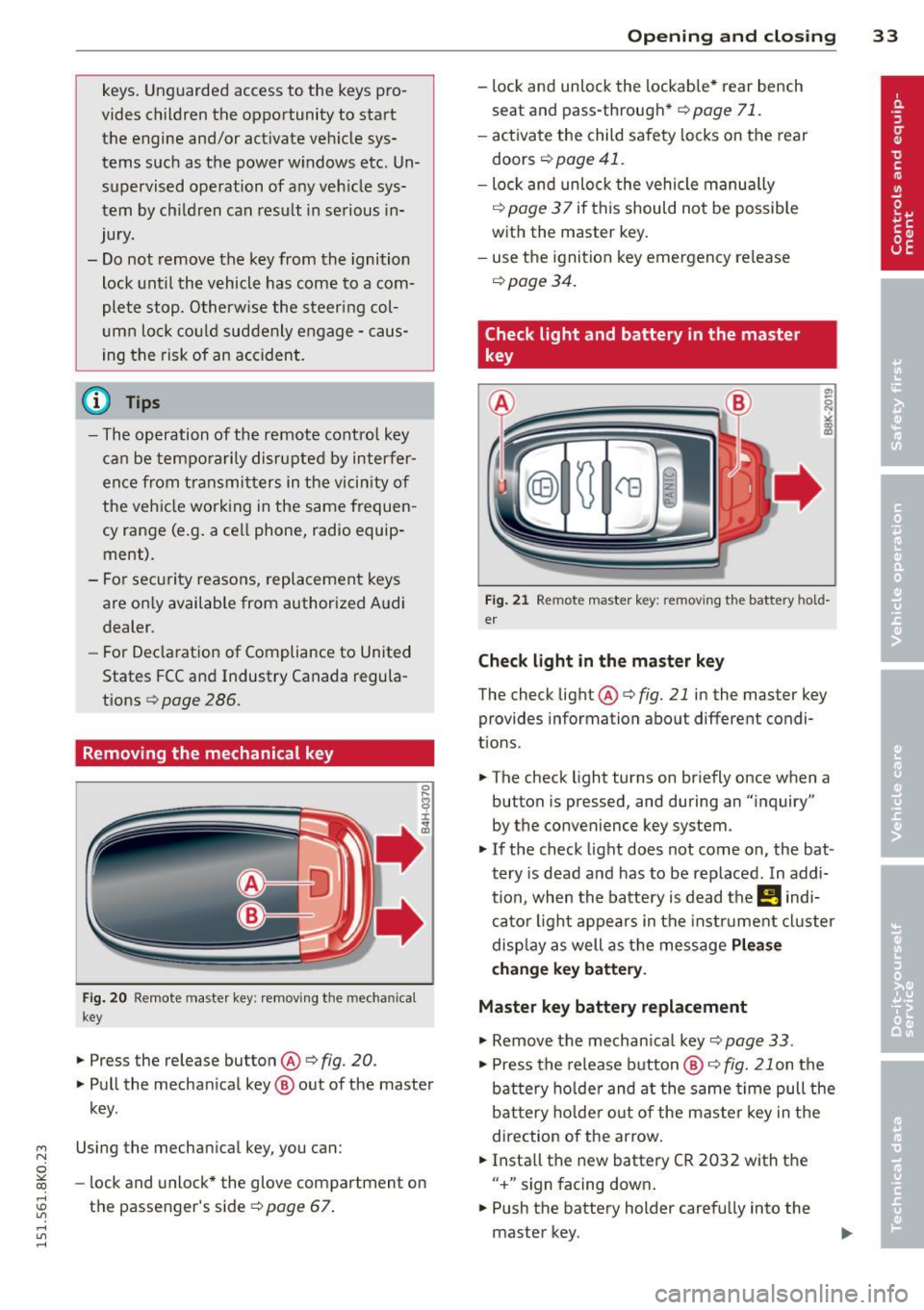
Removing the mechanical key
Fi g. 20 Remote master key: removing the mechanical
key
.,. Press the release button@¢ fig. 20.
.,. Pull the mechan ical key @ out of the master
key.
~ Using the mechanical key, you can:
~ co -lock and unlock* the glove compartment on
rl :5: the passenger's side 9 page 67.
rl l/1 rl
Op enin g an d clos ing 33
- lock and unlock the lockable * rear bench
seat and pass-through*
r=;, page 71.
- activate the child safety locks on the rear
doors
r=;, page 41.
- lock and unlock the vehicle manua lly
r=;, page 3 7 if this should not be possible
with the master key.
- use the ignition key emergency release
r=:> page 34.
Check light and battery in the master
key
Fig . 21 Remote master key: removing the battery hold
er
Che ck light in the ma ster ke y
The check light @ r=:> fig. 21 in the master key
provides information about different condi
t ions .
.,. The check light turns on briefly once when a
button is pressed, and during an "inquiry"
by the convenience key system .
.,. If the check light does not come on, the bat
tery is dead and has to be replaced. In addi
tion, when the battery is dead the
!I indi
cator light appears in the instrument cluster
disp lay as well as the message
Plea se
c hange k ey batt ery.
Master key battery replacement
"'Remove the mechan ical key r=;, page 33 .
"' Press the release button @ i=:> fig. 21 on the
battery ho lder and at the same time pull the
bat tery ho lder out o f the maste r key in the
direction of the arrow.
.,. Insta ll the new battery CR 2032 with the
" + " sign facing down .
.,. Push the battery holder carefu lly into the
master key.
Page 51 of 304
M N
~ co
Clear vision Lights
Switching the lights on and off
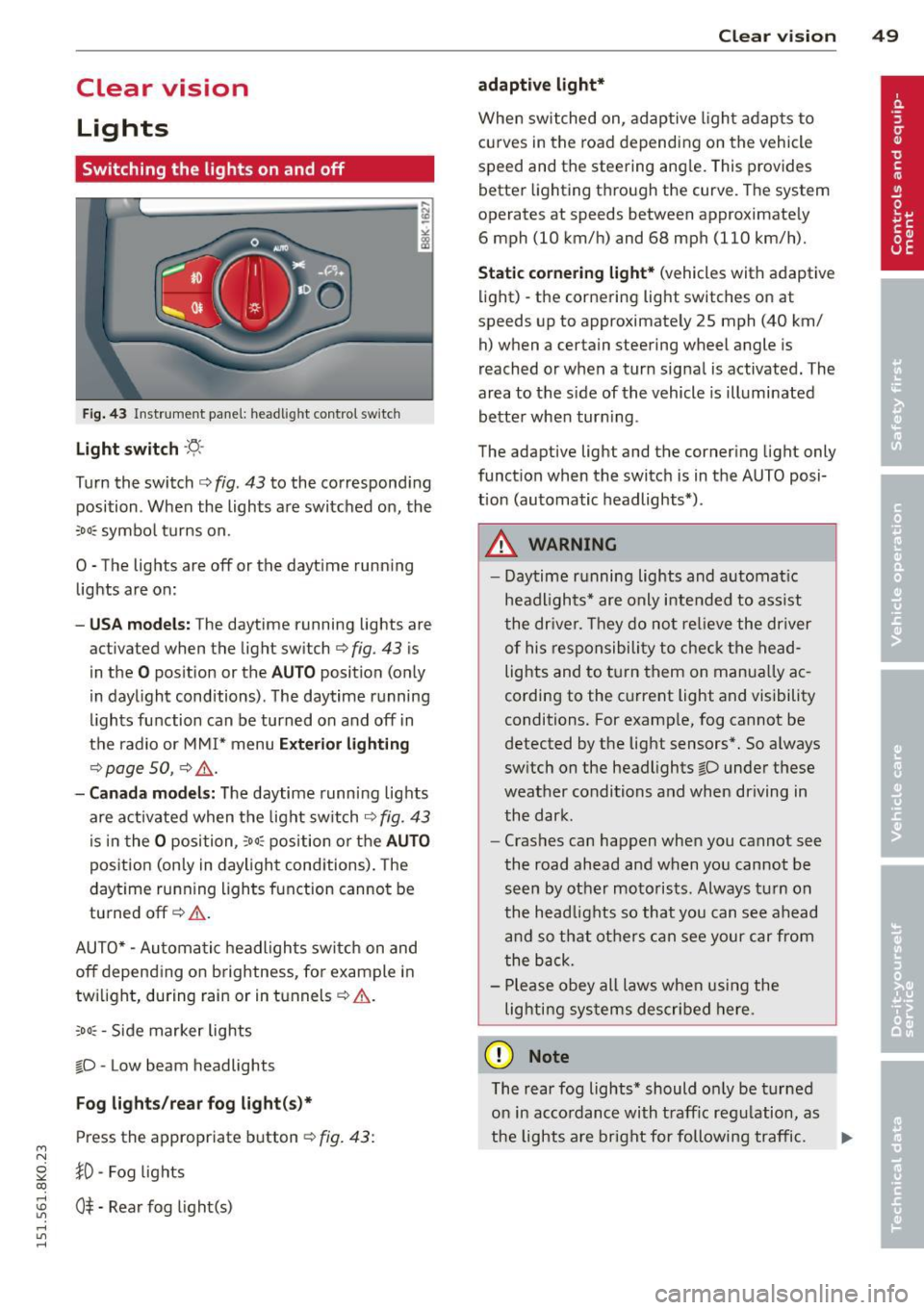
F ig . 43 Instrument pane l: headlight control switch
Light switch ·'t/,·
Turn the switch c> fig . 43 to the correspond ing
position . When the lights are switched on, the
:oo: symbol turns on.
0 • The lights are off or the dayt ime running
lights are on:
- USA mod els : The daytime running lights are
activated when the light sw itch
c> fig . 43 is
in the
O position or the AUTO position (only
in daylight conditions) . The daytime running
lights function can be turned on and off in
the radio or MMI* menu
E xteri or li ghtin g
¢ page SO, c> &_ .
-Ca nad a mod els: The daytime runn ing lights
are activated when the light sw itch
¢ fig . 43
is in the O position, :oo: position or the AUTO
posit ion (only in daylight conditions). The
daytime running lights function cannot be
turned off¢&. .
AUTO* -Automatic headlights switch on and
off depending on b rightness, for example in
tw ilight, during rain or in tunnels¢,& .
:oo: -Side marker lights
~D -Low beam headlights
Fog light s/rea r fog ligh t(s)*
Press the appropriate button c> fig. 43:
1D -Fog lights
; 0$ -Rear fog light(s)
,...., l/1 ,....,
Clear vi sion 49
adaptive light *
When switched on, adaptive ligh t adap ts to
curves in the road depend ing on the vehicle
speed and the steering ang le. This provides
better lighting through the curve. The system
operates at speeds between approximately 6 mph (10 km/h) and 68 mph (110 km/h).
St atic corner ing light * (vehicles with adaptive
light) -the cornering light switches on at
speeds up to approximately 25 mph (40 km/ h) when a certain steering wheel angle is
reached or when a turn signal is activated. The
area to the s ide of the vehicle is illuminated
better whe n turn ing .
The adaptive light and the cornering light only
function when the switch is in the AUTO posi
tion (automatic headlights*) .
A WARNING
-Daytime running lights and automatic
headlights* are only intended to ass ist
the driver . T hey do no t re lieve the driver
of his responsibility to chec k the head
lights and to t urn them on manua lly ac
cording to the current light and visibility
conditions. For examp le, fog cannot be
detected by the light sensors*. So a lways
switch on the headlights
~D under these
weather conditions and when driving in
the dark .
- Crashes can happen when you cannot see
the road ahead and when you cannot be
seen by other motorists. Always turn on
the head lights so that you can see ahead
and so that others can see your car from
the back.
- Please obey all laws when using the
lig hting sys tems described here.
(D Note
The rear fog lights* should on ly be turned
on in accordance with t raff ic regulation, as
the lights are bright for following traffic. ..,.
Page 62 of 304
60 Seats and stor age
Seats and storage
General recommen
dations
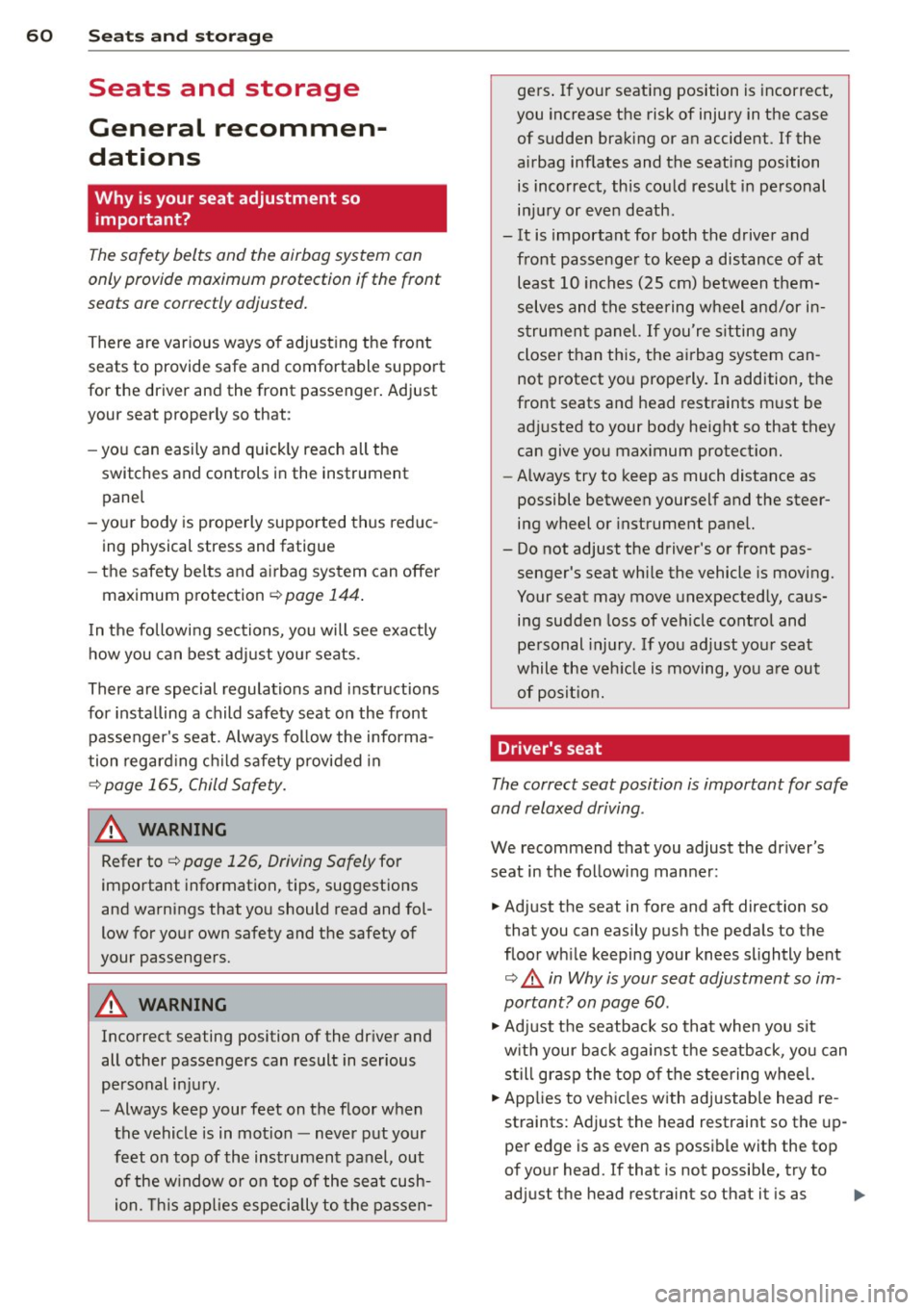
Why is your seat adjustment so
important?
The safety belts and the airbag system can
only provide maximum protection if the front
seats are correctly adjusted.
There are various ways of adjusting the front
seats to provide safe and comfortable support
for the driver and the front passenger. Adjust
you r seat prope rly so that :
- you can easily and quickly reach all the
switches and controls in the instrument
panel
-your body is properly supported thus reduc
ing physical stress and fatigue
- the safety be lts and airbag system can offer
maximum protection ¢
page 144.
In the following sections, you will see exactly
how you can best adjust your seats .
There are special regulations and instructions
for installing a child safety seat on the front
passenger's seat. Always follow the informa
tion regarding child safety provided in
¢ page 165, Child Safety.
WARNING
Refer to¢ page 126, Driving Safely for
important information, tips, suggestions
and warnings that you should read and fol
low for your own safety and the safety of
your passengers.
A WARNING
, -
Incorrect seating position of the driver and
all other passengers can result in serious
personal injury .
- Always keep your feet on the floor when
the vehicle is in motion -never put your
feet on top of the instrument panel, out of the w indow or on top of the seat cush
ion. This applies especially to the passen- gers
. If your seating position is incorrect,
you increase the risk of injury in the case
of sudden braking or an accident. If the
airbag inflates and the seating position is incorrect, this could result in personal
injury or even death.
- It is important for both the driver and front passenger to keep a distance of at
least 10 inches (25 cm) between them
selves and the steering wheel and/or in
strument panel.
If you're sitting any
closer than this, the airbag system can
not protect you properly. In addition, the
front seats and head restraints must be
adjusted to your body height so that they
can give you maximum protection.
- Always try to keep as much distance as
possible between yourself and the steer
ing wheel or instrument panel.
- Do not adjust the driver's or front pas
senger 's seat while the vehicle is moving.
Your seat may move unexpectedly, caus
ing sudden loss of veh icle control and
personal injury. If you adjust your seat
while the veh icle is moving, you are out
of posit ion.
Driver's seat
The correct seat position is important for safe
and relaxed driving .
We recommend that you adjust the driver's
seat in the following manner :
.. Adjust the seat in fore and aft direction so
that you can easily push the pedals to the
floor wh ile keeping your knees slightly bent
o &. in Why is your seat adjustment so im
portant? on page
60 .
.,. Adjust the seatback so that when you sit
w ith your back against the seatback , you can
still grasp the top of the steering wheel.
.. Applies to vehicles with adjustable head re
straints: Adjust the head restraint so the up
per edge is as even as possible with the top
of your head. If that is not possible, try to
adjust the head restraint so that it is as .,.
Page 84 of 304
82 On the road
On the road
Steering
Manually adjustable steering wheel
The steering wheel position is fully adjustable
up and down and forward and bock .
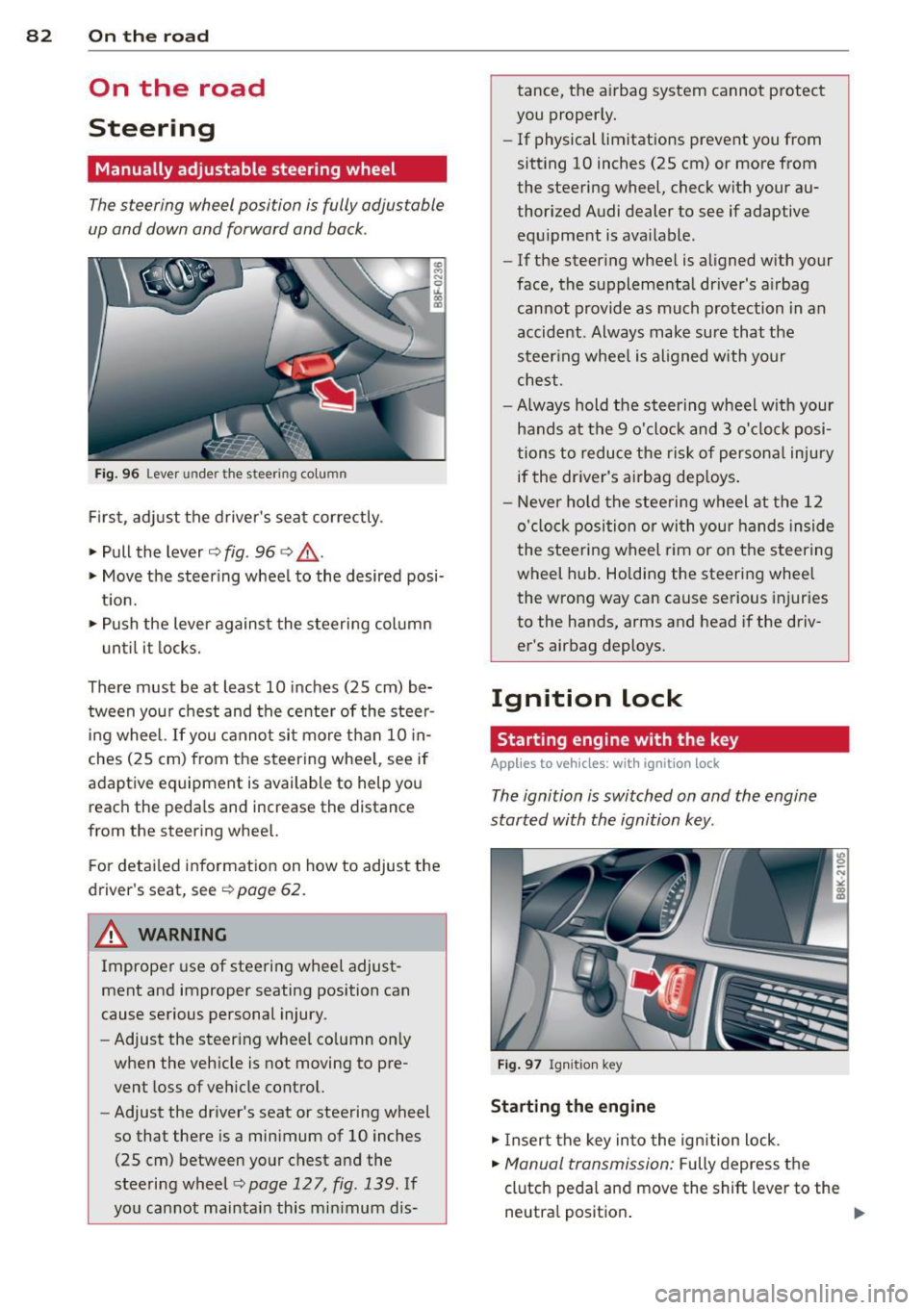
Fig. 96 Lever under the steering column
First, adjust the driver's seat correctly .
• Pull the lever
c> fig . 96 <=> &_ .
• Move the steer ing whee l to the desired posi
t ion.
• Push the lever against the steering column
until it locks.
There must be at least 10 inches (25 cm) be tween your chest and the center of the steer
ing wheel. If you cannot sit more than 10 in
ches (25 cm) from the steering whee l, see if
adaptive equipment is available to help you
reach the pedals and increase the distance
from the steering wheel.
F or detai led information on how to adjust the
driver's seat, see
c> page 62.
A WARNING
Improper use of steeri ng wheel adjust
ment and improper seating position can
cause serious personal injury.
- Adjust the steering whee l co lumn on ly
when the veh icle is not moving to pre
vent loss of veh icle control.
- Adjust the driver's seat or steering wheel
so that there is a minimum of 10 inches
(25 cm) between your chest and the
steering wheel
¢ page 127, fig . 139. If
yo u cannot mainta in this min imum dis- tance, the airbag system cannot protect
you proper ly.
- If physical limitations prevent you from
sitting 10 inches (25 cm) or more from
the steering wheel, check with your au
thorized Audi dealer to see if adaptive
equ ipment is ava ilable .
- If the steer ing wheel is aligned with your
face, the supplementa l driver's a irbag
cannot provide as much protection in an
accident . Always make sure that the
steer ing wheel is aligned with your
chest.
- Always hold the steering wheel w ith your
hands at the 9 o'clock and 3 o'clock posi
tions to reduce the risk of persona l injury
if the driver's airbag dep loys .
- Never hold the stee ring wheel at the 12
o'clock position or with your hands inside
the steeri ng wheel rim or on the steering
wheel hub . Holding the steering wheel
the wrong way can cause serious injuries
to the hands, arms and head if the driv
er's airbag deploys.
Ignition lock
Starting engine with the key
Applies to vehicles : w ith ign ition lock
The ignition is switched on and the engine
started with the ignition key .
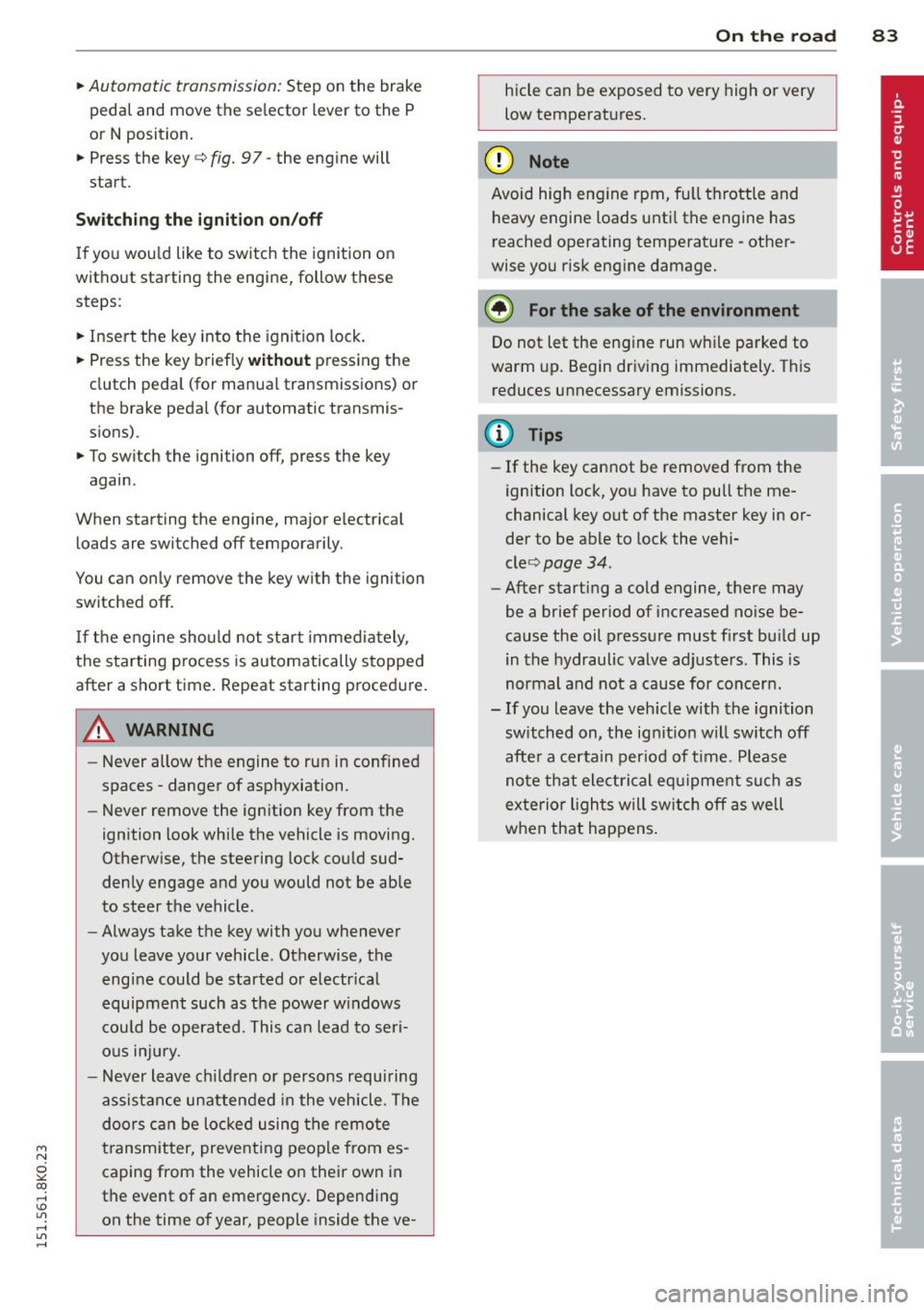
Fig. 97 Ignit ion key
Sta rting th e engine
• Insert the key into the ignition lock .
• Manual transmission: Fully depress the
clutch pedal and move the shift lever to the
neutra l position .
Page 85 of 304
'"" N
0 ::.,: co ,...., \!) ..,.,
,...., ..,., ,....,
~ Automatic transmission: Step on the brake
peda l and move the se lector lever to the P
or N position .
~ Press the key c::> fig. 97 -the eng ine will
start.
Sw itching the i gnition on /off
If you wou ld like to switch the ignition on
without sta rting the engine, follow t hese
steps :
~ Insert the key into the ignition lock .
~ Press the key briefly without pressing the
clutch peda l (for manual transmissions) or
the brake peda l (for automatic transmis
s ions) .
~ To switch the ignition off, press the key
again .
When starting the engine, major e lectr ica l
loads are switched off temporarily .
You can on ly remove the key with the ignition
switched off.
If the engine sho uld not sta rt immedia tely,
the starting process is automatically stopped
after a short time. Repeat starting proced ure .
A WARNING
-Never allow the engine to run in confined
spaces -danger of asphyxiation.
- Never remove the ign ition key from the
ignition look while the vehicle is moving.
Otherw ise, the steering lock could sud
denly engage and you would not be able
to steer the vehicle.
- Always take the key with you whenever
you leave your vehicle . Otherwise, the
engine could be started or e lectr ical
equipment such as the power w indows
cou ld be operated. This ca n lead to seri
o us inj ury.
- Never leave ch ild ren or persons requiring
assistance unattended in the veh icle. The
doors can be loc ked using the remote
transmitter, preventing people from es caping from the vehicle on their own in
the event of an emergency. Depend ing
on the time of year, people inside the ve-
On th e ro ad 83
hicle can be exposed to very high or very
low temperatures.
(D Note
Avoid high eng ine rpm, fu ll throttle and
heavy engine loads unti l the engine has
reached operating tempe rat ure -other
wise you r isk eng ine damage.
@ For the sake of the environment
Do not let the engine run while parked to
warm up. Begin driving immediately. This
reduces unnecessary emissions.
@ Tips
- If the key cannot be removed from the
ignition lock, you have to pull the me
chanical key out of the master key in or
der to be able to lock the vehi-
cle <=:>
page 34.
-After starting a cold engine, there may
be a brief period of increased no ise be
cause the oil pressure must first bu ild up
in the hydraulic valve adjusters. This is
normal and not a cause for concern.
- If you leave the veh icle with the ignition
switched on, the ign it ion w ill switch off
afte r a certa in per iod of t ime . Please
note that ele ctrical equ ipment such as
exterior lights will sw itch off as well
when that happens .