lights AUDI S4 2017 Owner's Manual
[x] Cancel search | Manufacturer: AUDI, Model Year: 2017, Model line: S4, Model: AUDI S4 2017Pages: 386, PDF Size: 96.32 MB
Page 60 of 386
Lights and Vision
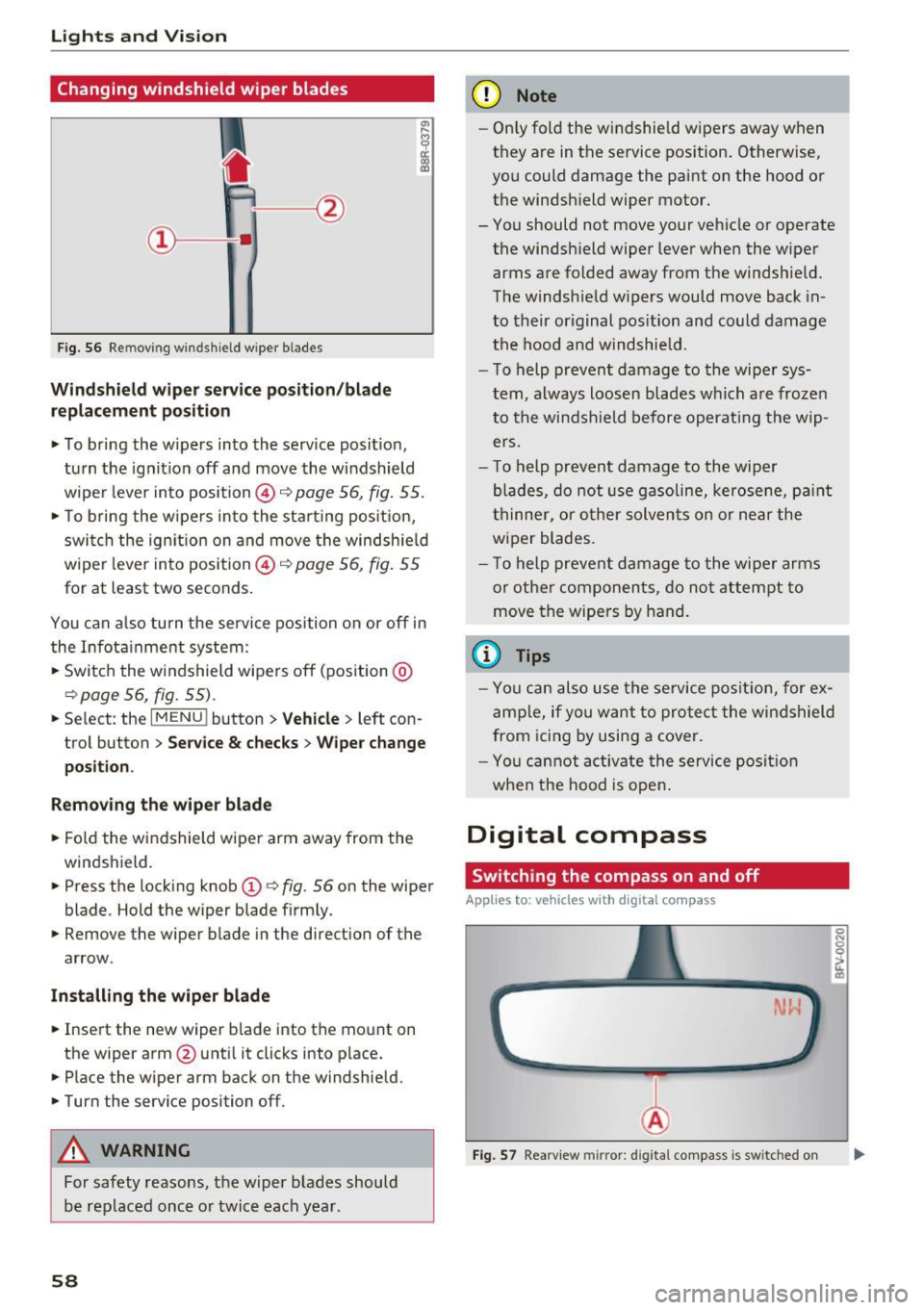
Changing windshield wiper blades
Fig. 56 Remov ing w indshi eld w iper blades
Windshield wiper service position/blade
replacement position
• To bring the wipers into the service position ,
turn the ignition off and move the windshield
wiper lever into position @~
page 56, fig. 55.
• To bring the wipers into the starting position,
switch the ignition on and move the windshield
wiper lever into position @~
page 56, fig. 55
for at least two seconds .
You can also turn the service position on or off in
the Infotainment system :
• Switch the windshield wipers off (position @
~page 56, fig. 55).
• Select : th e IMENU i button> Vehicle> left con
trol button >
Service & checks > Wiper change
position .
Removing the wiper blade
• Fold the windshield wiper arm away from the
windshield.
• Press the locking knob
(D ~ fig. 56 on the wiper
blade . Hold the wiper blade firmly.
• Remove the wiper blade in the direction of the
arrow .
Installing the wiper blade
• Insert the new wiper blade into the mount on
the wipe r arm @until it clicks into place.
• Place the wiper arm back on the windshield.
• Turn the service position off.
A WARNING
For safety reasons, the wiper blades should
be replaced once or twice each year .
58
-
(D Note
-Only fold the windshield wipers away when
they are in the service position. Otherwise,
you could damage the paint on the hood or
the windshield wiper motor.
- You should not move your vehicle or operate the windshield wiper lever when the wiper
arms are folded away from the windshield.
The windshield wipers would move back in
to their original position and could damage
the hood and windshield.
- To help prevent damage to the wiper sys
tem, always loosen blades which are frozen
to the windshield before operating the wip
ers.
- To help prevent damage to the wiper
blades, do not use gasoline, kerosene, paint
thinner, or other solvents on or near the
wiper blades.
- To help prevent damage to the wiper arms
or other components, do not attempt to
move the wipers by hand.
{l) Tips
-You can also use the service position, for ex
ample, if you want to protect the windshield
from icing by using a cover.
- You cannot activate the service position
when the hood is open.
Digital compass
Switching the compass on and off
App lies to: vehicles with digital compass
Fig. 57 Rearview mirror: d ig ital compass is sw itched on
Page 61 of 386
.. To turn the compass on or off, press the button
@ until the compass in the mirror appears or
disappears.
The digital compass only works when the ign ition
is switched on. The direction is shown in abbrevi
ated form:
N (North), NE (Northeast), E (East),
SE (Southeast), S (South), SW (Southwest), W
(West), NW (Northwest) .
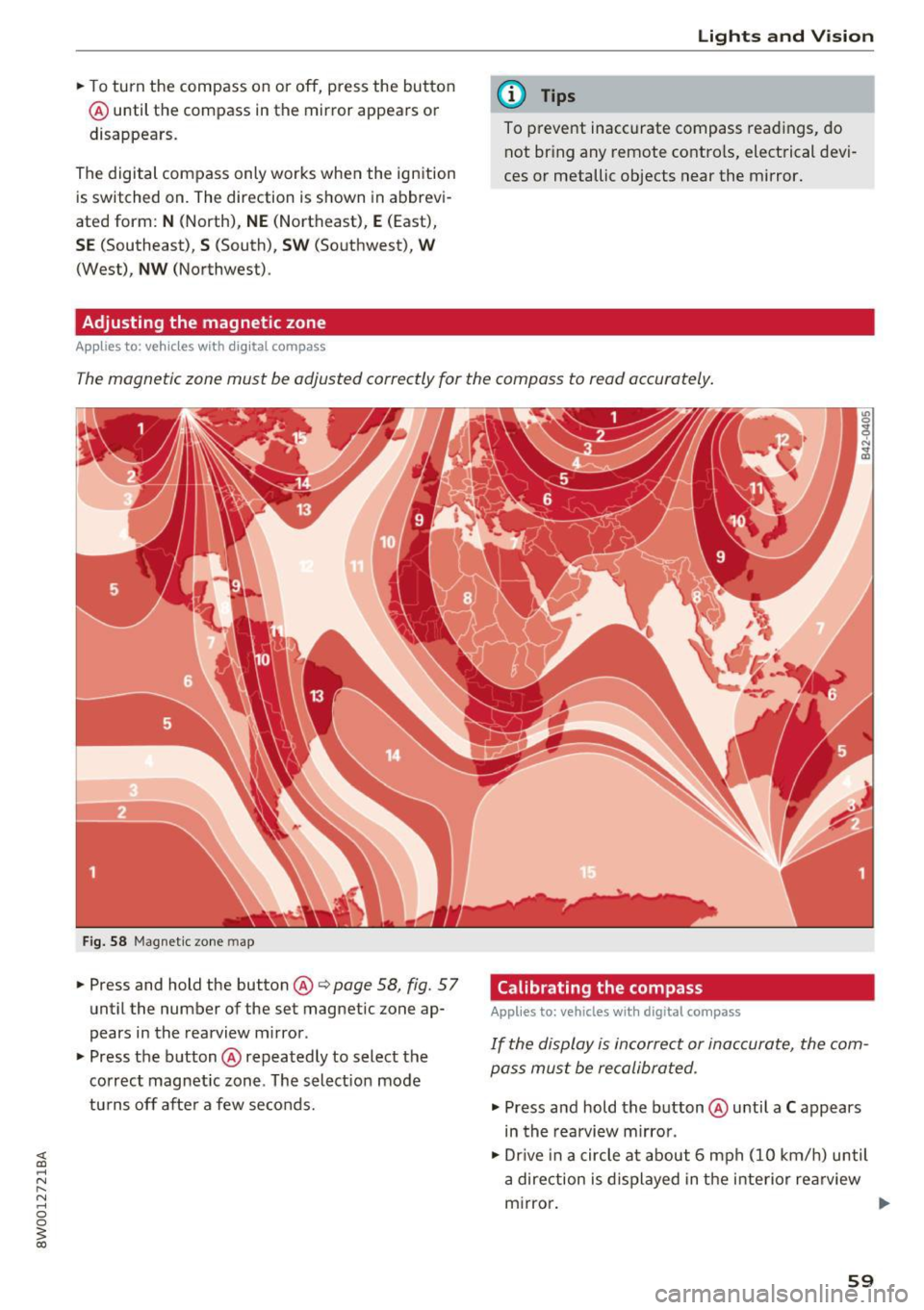
Adjusting the magnetic zone
Applies to: vehicles with digital compass
Lights and V ision
(D Tips
To p revent inaccurate compass readings, do
not br ing any remote controls, electrical devi
ces or metallic objects near the mirror.
The magnetic zone must be adjusted correctly for the compass to read accurately.
Fig. 58 Magnet ic zone map
.. Press and hold the button@¢ page 58, fig. 57
until the number of the set magnetic zone ap
pears in the rearview mirror .
.. Press the button@repeatedly to select the
correct magnetic zone . The select ion mode
turns off after a few seconds. Calibrating the compass Applies
to: vehicles with digital compass
If the display is incorrect or inaccurate, the com
pass must be recalibrated.
.. Press and hold the button @until a C appears
in the rearview mirror .
.. Dr ive in a circle at about 6 mph (10 km/h) until
a direction is displayed in the interior re arview
mirror. .,.
59
Page 62 of 386

Lights and Vi sion
A WARNING
To reduce the risk to yourself and other dr iv
ers, calibrate the compass in an area where
t here is no traffic .
60
Page 76 of 386

Driving
next traffic light is red . This produces an engine
braking effect, which helps to protect the brakes
and tires and reduces the emissions and fue l con
sumpt ion to zero (fuel shut-off during decelera
t ion).
Shift effici ently
An effective way to save fuel is to upshift earlier.
Staying in a gear too long uses fue l unnecessari
ly .
P ress down o n the acce lerator peda l slowly and
avoid "kick -down".
Avoid full acceleration
You shou ld rare ly t rave l at the maximum vehicle
speed. High speeds cause a disp roportiona tely
h igh inc rease in fuel consump tion, emissions and
traffic no ise . Slower driving saves fuel.
Reduce idling time
The Start/Stop system* he lps to reduce the idling
time automatically. In vehicles witho ut the Start/
S top system* , it is efficient to swit ch the eng ine
off when stopped at r,;1ilro,;1d crossi ngs and long
red lights . Stopping the engine for 30 -40 sec
onds already saves more fuel than the amount of
extra fuel needed to restart the engine.
It t akes a very long time in idle to war m the en
g ine up to opera ting tempera ture . Wea r and
emissions are especially high in the warm -up
p hase . Therefore, yo u should begin driving im
mediately after starting the engine. Avoid high
RPMs while do ing th is.
Have maintenance performed regularly
By having ma intenance performed regularly on
your vehicle, you can help to reduce f uel con
sumpt ion befo re yo u even start to dr ive. The
maintenance condition of your vehicle not only
affects t raffic safety and long-term value but a l
so impacts
fuel consumpt ion . A poorly main
tained engine can lead to f uel consumption that
is 10% higher than normal.
Avoid short trips
The engine and exhaust cleaning system m ust
reach the ir opt imal
operating temperature to ef
fectively reduce consumption and em iss ions.
74
A cold engine uses a d isproportionately high
amount of fue l. The engine reaches operating
temperat ure and cons umption norma lizes on ly
after approximate ly
four ki lometers.
Check the tire pres sure
To save fue l, make sure the t ires are always in
flated to the correct press ure
¢ page 32 7. The
fuel consumpt ion can increase by S% if the pres
s u re is only 0.5 bar too low. Due to the increased
roll ing resistance, low tire pressures w ill also
l ead to greater tire
wear and will affect dr iving
behavior.
Do not drive on
winter tires year-round, as this
will consume up to 10% more f uel.
Eliminate unnecessary we ight
Since eve ry kil og ram o f extra weight in creases
fuel consumption, a quick inspection of the lug
gage compartment may be worth it to avoid un
necessary we ight.
When no t be ing used, a roof rack sho uld be re
moved to decrease the wind resistance of the ve
hicle . You will save approx imately
12% of your
fuel when at speeds from 62-75 mph (100-120 km/h).
Save energy
The eng ine drives the generator, which generates
electricity; the fuel consumption also inc reases
with the demand for e lectricity. Therefore, switch
e lectrical equ ipment off when you no longer
need it. Examples of eq uipment that uses a lot of
energy are air blowers at a high setting, the rear
window defogger and seat heating* .
(D Note
Do not leave engine idling unattended after
starting . If warning lights shou ld come on to
i ndica te improper operation, they would go
unheeded . Extended idling also prod uces
h eat, w hic h could result i n overheating o r
o ther damage to the veh icle o r othe r prope r
ty .
Page 82 of 386
Driving
Engine automatically r esta rt s
The standard Start/Stop mode will be canceled
during a stop phase in the follow ing situations.
The engine restarts without any action by the driver .
- The vehicle rolls, for examp le while on a slope.
- The inter io r temperatu re differs from the tem-
perature se lected in the A/C system.
- The w indshield is being defrosted.
- The brake pedal is pressed several t imes in a
row .
- The battery charge level becomes too low .
- Power consumption is high .
The engine can turn off again when the condi
tions for Start/Stop mode are met .
Ignition is swit ched off aut omaticall y
To prevent the battery from dra ining, the ignition
will sw itch off
aut omati cally under the following
conditions:
- T he Sta rt/Stop system has stopped the engine.
- The vehicle must be stationary .
- You left the veh icle and the engine was not re-
started within approximately 30 seconds.
If this happens, you will see the message
I gni
tion turn s off automatically in the instrument
cluster and the activated low beams are replaced
by the parking light. The parking lights will
sw itch off after approximately 30 minutes or
when you lock the vehicle .
The ignition also switches off when you lock the
veh icle from the outs ide dur ing a stop phase.
If the Start/Stop system has not turned off the
engine or if you have sw itched the Start/Stop sys
tem off manually, the ignition will not be auto
mat ically switched off and the engine w ill cont in
ue to run~& .
.&, WARNING
To red uce the risk of poisoning, neve r allow
t he engine to r un in confined spaces.
80
-
@ Tips
-If you leave the ve hicle with the D/S or R se
lector lever position engaged, the parking
brake is automatically set.
- If you select the D or N selector lever posi
tion after shifting into reverse, the vehicle must be driven faster than 6 mph (10 km/h)
in order for the engine to switch off again.
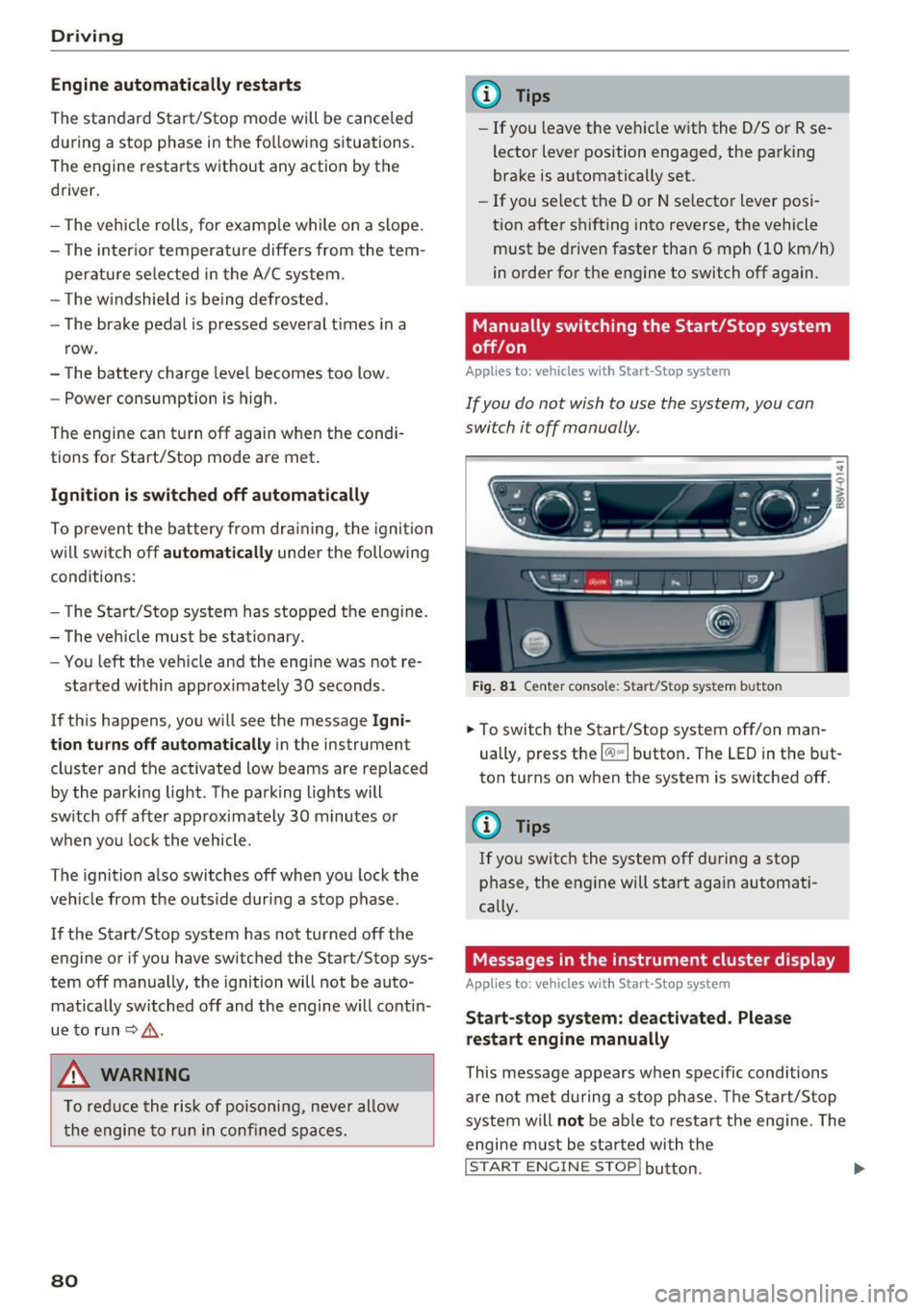
Manually switching the Start/Stop system
off/on
App lies to: vehicles wit h Start -Stop system
If you do not wish to use the system, you can
switch it off manually.
- -
. !.. r' '!. .:-,/'"~ ~
tJ .,. -,J
-----::::I
F ig . 81 Cen te r conso le: S tart/Stop system butto n
..
.,. To switch the Start/Stop system off/on man
ually, press the
l (A) "'I button . The LED in the but
ton turns on when the system is switched off.
(l} Tips
If you switch the system off during a stop
phase, the engine will start again automati
cally.
Messages in the instrument cluster display
App lies to: vehicles wit h Start-Stop system
St art- stop system: de activated . Please
restart engin e manually
This message appears when spec ific conditions
a re not met during a stop phase . The S tart/Stop
system will
not be ab le to res tart the eng ine . The
engine m ust be sta rted with t he
I STAR T ENGINE STOP! button. ....
Page 92 of 386

Trailer towing
Trailer towing
Driving with a trailer
General information
Your Audi was designed primarily for passenger
transportation.
If you plan to tow a trailer, please remember that
the additional load will affect durability, economy and performance.
Trailer towing not on ly places more stress on the
ve hicle, it also ca lls for more concentration from
the dr iver.
F or this reason, always follow the operating and
driving instructions provided and use common
sense.
Technical requirements
Trailer hitch
Use a weight-carrying hitch conforming to the
gross tra iler weight. The hitch must be suitab le
for your veh icle and tra iler and must be mounted
securely on the vehicle's chassis at a technically
sound
locat ion . Use on ly a trailer hitch with a re
movable ba ll mount . Always che ck with the t rail
er hitch man ufac tur er to make s ure t hat you are
using the co rrect hi tc h.
Do not use a bumper hitch.
The hitch must be installed in such a way that it
does not interfere with the impact -absorbing
bumper system. No mod ificat ions should be
made to the vehicle exhaust and b rake systems .
Fr om t ime to t ime, che ck that all hitch mo unti ng
bol ts rem ain securely f aste ned.
W hen you are not tow ing a tra iler, remove the
tra ile r hitc h ba ll mount . This prevents the hit ch
from caus ing damage s hou ld your veh icle be
s truck from be hind ¢
,&..
Trailer brakes
If you r trailer is equipped with a brak ing system,
check to be su re that it conforms to all regula
tions .
90
The t rai ler hydraulic bra ke system must not be
directly connected to the vehicle's hydraulic
bra ke system ¢&. .
Safety chains
Always use s afety chains be tween you r vehi cle
and t he tra ile r.
Trailer lights
Traile r lights must meet all regula tions . B e s ure
to check w ith your author ized Audi dealer for cor
r ec t wir ing, swi tches and relays.
Mirrors
If you are unable to see t he traffic behind you us
i ng t he regular outs ide mirrors, then yo u
must in
stall ex tended mirrors . It is impo rtant that you
al ways have clear vision to the rear.
.&_ WARNING
Afte r remov ing the tra ile r hi tc h, do not s tore
it i n y our vehicle. In case o f su dden brak ing,
the hitch could fly fo rward and injure you or
your passengers.
Operating instructions
Maximum trailer weight
A tra iler f or yo ur vehicle is lim ite d to a typical
class 1 or class 2 trailer.
Trailer load distribution
Be sure the load in the t rai le r i s he ld se curely in
pla ce to p reve nt i t from shi fting forwar d, bac k
ward or si deways.
Never allow a passenger to ride in a trailer ¢ &.
in Driver messages on page 91.
Engine cooling system
Towi ng a tra iler makes the engine work harder. It
is important that the cooling system's perform
ance is up to the additional load . Make sure tha t
the coo ling system has enoug h fluid.
Tire pressure
When towing a trailer, inflate the tires of your
vehicle to the cold tire p ressure listed under "Full
load" on the t ire press ure label. The t ire pressure
1111-
Page 93 of 386

label is located on the driver's side B-pillar. In
f late trai ler tires to trailer and tire manufactur
ers' specifications.
Lights
The headlight settings should be checked with
the trailer attached before driving off. Check to
make sure both vehicle and trailer lights are
working properly.
Safety chains
Be sure trailer safety chains are properly connect
ed from the tra iler to the hitch on the vehicle.
L eave enough slack in the chains to permit turn
ing corners. When you install safety chains, make
sure they wi ll not drag on the road when you are
driving.
The chains shou ld cross under the trailer tongue
to prevent it from dropping in case of separation
from the hitch.
Driver messages
Driving with a trailer requires extra caution .
Weight distribution
Towing a loaded trailer w ith an empty car results
in a high ly unstable dist ribution of weight . If this
cannot be avo ided, drive at very low speeds only
to avoid the risk of losing steering control.
A "balanced" rig is easier to operate and cont rol.
This means that the tow vehicle should be loaded
to the extent possible and permissible, while
keeping th e trailer as light as possib le under the
circumstances . Whenever possib le, transfer
some cargo to the luggage compartment of the
tow vehicle whi le observing tong ue load require
ments and vehicle loading considerations.
Speed
The higher the speed, the more difficult it be
comes for the driver to contro l the rig. Do not
drive at the maximum permissible speed. Reduce
your speed even more if load, weather or wind
<( conditions are unfavorable -particularly when a,
;::; going downhill. ,....
N .... 0 0
3 a,
Trailer towing
Reduce vehicle speed immediately if the trailer
shows the slightest sign of swaying.
Do not try
to stop the swaying by accelerating.
Observe speed limits. In some areas, speeds for
vehicles towing trailers are lower than for regular
vehicles .
Always apply brakes early. When driving down
hill, shift into a lower gear to use the eng ine
braking effect to slow the vehicle . Use of the
brakes alone can cause them to overheat and fail.
Coolant temperature
T he coolant temperature gauge~ page 11 must
be obse rved carefully. The coolant temperature
can increase if you drive on long inclines in a low
gear at high engine speeds . Reduce your speed
immediately if the LEDs in the top part of the dis
play turn on.
For more information about indicator lights, re
fer to.
~ page 31 .
A WARNING
= -
Anyone not properly restrained in a moving
vehicle is at a much greater risk in an acci
dent. Never let anyone ride in your car who is
not properly wearing the restraints provided
by Aud i.
Trailer towing
information
Important to know
Your vehicle handles differently when towing a
trailer because of the addit ional weight and dif
ferent weight distribution . Safety, performance
and economy will greatly depend on how careful
ly you load your trailer and operate you r rig.
Before you actually tow your trailer, pract ice
turning, stopping and backing up in an area away
from traffic . Keep pract ic ing until you have be
come complete ly familiar w ith the way your vehi
cle-trailer combination behaves and responds.
91
Page 96 of 386

Ass is t
The stored speed and the [ij;ji j~i4 (USA models)/
Ill (Canada mode ls) indicator light appear in the
instrument cluster disp lay . An add itiona l indica
tor appears in the Head -up display*.
The speed is maintained by modifying engine power or through an active brake intervention.
A WARNING
- Always pay attention to the traffic around
you when the cruise control system is in op
eration. You are always responsible for your
speed and the distance between your vehi
cle and other veh icles .
- For safety reasons, cruise control should not
be used in the city, in stop-and-go traffic, on
winding roads and when road condit ions are
poo r (such as ice, fog, gravel, heavy rain and
hydroplaning), because t his increases the
risk of an accident.
- Switch the cruise cont rol off temporar ily
when d riving i n turn ing lanes, h ighway exits
or in construction zones .
- Please note tha t unconsciously "resting"
yo ur foot on the accelerator pedal prevents
the cruise control from braking. This is be
cause pressing the acce lerato r pedal ove r
rides the cruise contro l system.
- If a brake system ma lf u nction such as over
heating occurs when the cruise control sys
tem is sw itched on, the braking function in
the system may be sw itched off. The rest of
the cruise control system functions remain
active as long as the
[ij;(l)~i4 (USA models) I
i:I (Canada models) indicator light is on.
(D Note
Before driving a long d istance on a steep
downward hill, decrease your speed and se
lect a lower driving gea r. This makes use of
the engine b raking effect and relieves the
brakes.
(0 Tips
The b rake lights turn on when the brakes are
app lied automatically .
94
· Changing the speed
Applies to: vehicles with cruise control system
.,. To increase/decrease the speed in 1 mph (1
km/h) incremen ts, briefly
tap the lever toward
0 10 c::> page 93, fig . 88 to the first level.
.. To increase/decrease the speed in
S mph (10
km/h) increments, briefly tap the lever toward
0 10 to the second leve l.
.. To increase or decrease the speed qu ickly,
hold
the lever toward 0 10 to the first or second
level unt il the desired speed is reached .
Overriding the speed
Applies to: vehicles with cruise control system
You can press the acce lerator pedal down to in
c rease yo ur speed, for example if you want to
pass someone. The speed yo u sto red earl ie r w ill
r esume as soon as yo u release the acceler ator
pedal.
Howeve r, if yo u are exceedi ng the stored speed
by a considerable amount fo r a long time, the
c ruise contro l system will temporarily switch off.
The m:iJm (U SA mode ls) ! Ill (Canada models) in
dicator light in the instrument cl uster turns off
and the stored speed is retained.
Preselecting a speed
App lies to: vehicles wit h cruise control system
You can pre -select your desired speed when the
vehicle is stationary.
.,. Switch o n the ignition.
.. Pull the lever into pos ition
(I) c::> page 93,
fig. 88 .
.. To increase or decrease the speed, tap the lever
in the
0 10 direction.
This function makes it possible, for example, to
save the speed you want before driving on the highway. Once on the expressway, act ivate the
cruise contro l by pull ing the lever into posit ion
(I) .
Page 100 of 386
Assist
(D Note
The sensors can be displaced by impacts or
damage to the bumper , whee l housing and
underbody. This can impair the adaptive
cruise control. Have an authorized Audi dea ler
or authorized Audi Service Fac ility check their
function .
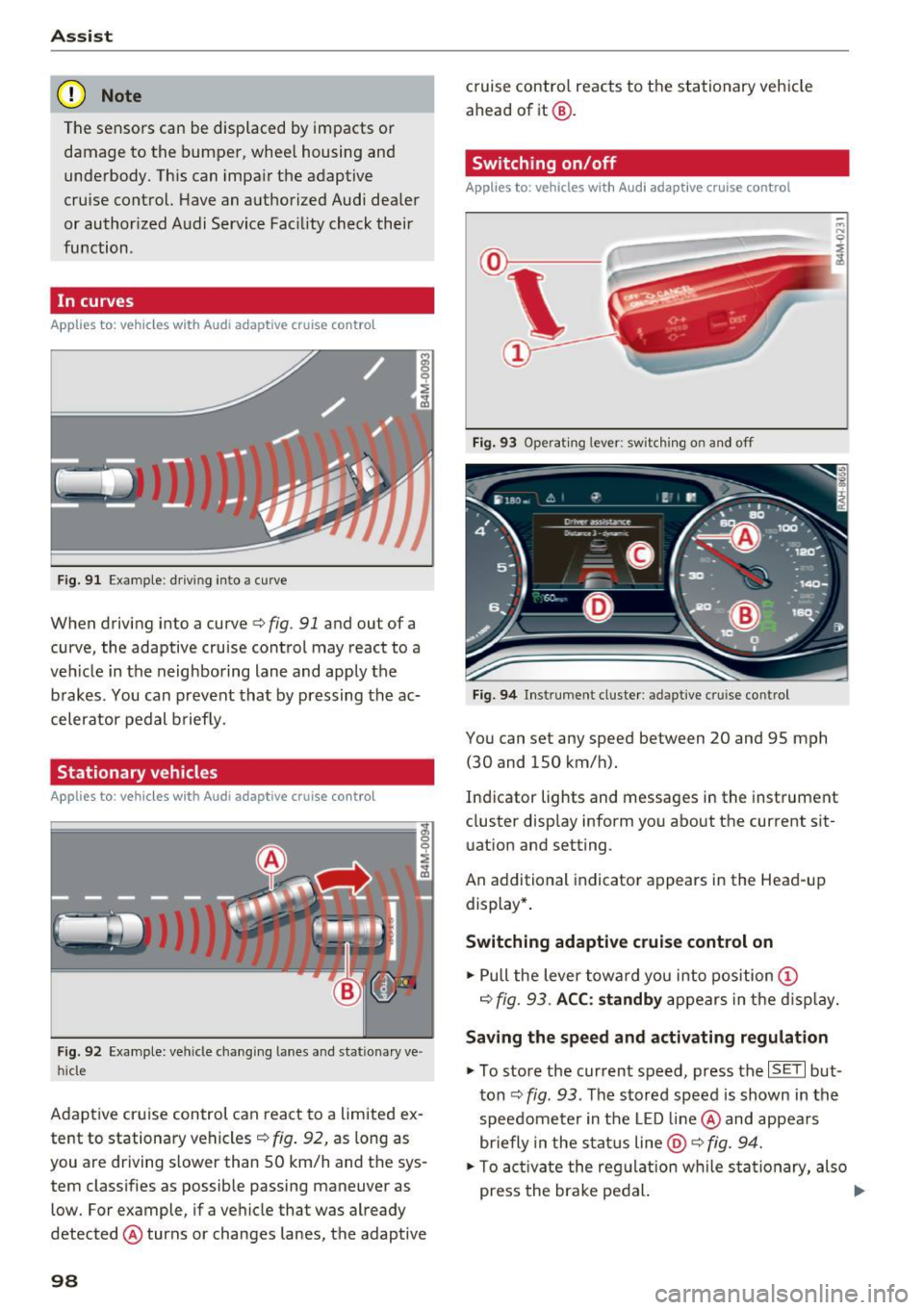
In curves
Applies to: vehicles with Audi adaptive cruise control
Fig . 9 1 Exa mple: drivin g in to a curve
When driving into a curve<=> fig. 91 and ou t of a
curve, the adaptive cruise control may react to a
veh icle in the neighboring lane and apply the
brakes . You can prevent that by pressing the ac
celerator pedal b rief ly.
Stationary vehicles
Applies to : vehicles with Aud i adaptive cruise contro l
Fig. 92 Example: vehicl e chang ing lane s and sta tiona ry ve
hi cle
Adaptive cruise control can react to a limited ex
tent to stationary vehicles
c:> fig . 92, as long as
you are driving slow er than SO km/h and the sys
tem classifies as possible passing maneuver as
low . For example, if a vehicle that was already
detected @turns or changes lanes, the adaptive
98
cruise contro l reacts to the stationary vehicle
ahead of it@ .
Switching on/off
Applies to: vehicles with Audi adaptive cruise control
Fig. 93 Operating lever : sw itc hin g on and off
Fig. 94 Inst rument cluster : adap tive cr uise cont rol
You can set any speed between 20 and 9S mph
(30 and lSO km/h).
Indicator lights and messages in the instrument
cluster display inform you about the cu rrent sit
uation and setting .
An add itional indicator appears in the Head-up
display *.
Switching adaptive cruise control on
.. Pull the lever toward you into position (D
c=> fig. 93. ACC: standby appears in the display.
Saving the speed and activating regulation
.. To store the current speed, press the ISE TI but
ton
c:> fig . 93 . The stored speed is shown in the
speedometer in the LED line@ and appears
briefly in the status line
@ c:> fig. 94.
.. To activate the regulation while sta tionary, also
press the brake pedal. .,.
Page 101 of 386

Switching adaptive cruise control off
• Push the lever away from you into position @
unti l it clicks into place. The message
ACC: off
appears.
@ Indicato r lights
I'll -adaptive cru ise control is switched on. No
vehicles are detected ahead. The stored speed is
maintained.
• -A vehicle driving ahead was detected. The
adapt ive cr uise control system regulates the
speed and distance to the vehicle dr iv ing ahead
and accelerates/brakes automatically.
• -adaptive cru ise cont rol is switched on . Ave
h icle was detected ahead. Yo ur vehicle is stat ion
ary and will not star t driving automatically.
(-j -adaptive cru ise control is switched on . No
vehicles we re detected ahead . Your vehicle is sta
tionary and will not start dr iving automati cally.
• -T he automatic brak ing is not enough to
maintain a sufficient distance to a veh icle dr iving
ahead . You must intervene
¢ page 102, Request
for driver intervention.
© In strum ent cluster display
If Dr ive r assis t is not shown in the instrument
cluster display, you can open it using the multi
function steering wheel buttons
¢ page 12.
Based on the graphic display, you can determine
if the system is maintaining a distance to the ve
h icle dr iving ahead and what that distance is .
No vehicle -no vehicle was detected driving
ahead .
Silver vehicle -a vehicle was detected driv ing
ahead.
Red vehicle -request for the dr iver to take action
¢page 102.
The five distance bar s on the gauge© rep resent
the set d istance (refer to
~ page 101 for infor
mat io n on how to change the dis tance) . If you
fa ll below the se lected distance, the distance
bars become red from the bottom upward.
A ss ist
A WARNING
If you press the !SET ! button when driv ing at
speeds below 20 mph (30 km/h), the veh icle
accelerates automatically up to 20 mph (30
km/h), wh ich is the minim um speed that can
be set.
@ Tips
- If you switch the ignition or the adaptive
cruise cont rol sys tem off, the set speed is
erased for safety reasons.
- The e lectronic stabilization control (ESC)
and the an ti-slip-regula tion (ASR) are auto
matically switched on when the adap tive
cruise cont rol is swit ched on.
Changing the speed
Appl ies to: vehicles wit h Aud i ada ptive cru ise control
0
f
'
0
Fi g. 95 Operat ing lever: changing the speed
"'To increase/decrease the speed in 1 mph (1
km/h) increments, b riefly
t a p the lever toward
0 10 ¢ fig. 95 to the firs t level.
• To increase/dec rease the speed in 5 mph
(5 km/h or 10 km/h) increments, brief ly
tap
the lever toward 0 10 to the second level.
• To increase or decrease the speed quick ly,
hold
the lever toward 0 10 up to the first or second
level unt il the red LED@ reaches the desired
speed¢
page 98, fig . 94 .
You can also preselect the speed when adaptive
cruise contro l is not act ive by moving the lever in
the des ired direction
0 10 . Activate the previ
ously selected speed by pulling the lever into po
sition
(D ¢ page 98, fig . 93 .
After every adjustment, the new stored speed ap
pears briefly in the status line ¢
page 98, fig. 94 ..,.
99