drive select AUDI S4 2017 Workshop Manual
[x] Cancel search | Manufacturer: AUDI, Model Year: 2017, Model line: S4, Model: AUDI S4 2017Pages: 386, PDF Size: 96.32 MB
Page 119 of 386

<( a, .... N ..... N .... 0 0
3 a,
are indicated, at the latest, by the time they en
ter your "blind spot".
© Vehicles you are passing
If you slowly pass a vehicle that side assist has
detected (the difference in speed between the
veh icle and your vehicle is less than approximate
ly 9 mph (15 km/h)), the display in the exterior
mirror turns on as soon as the vehicle enters your
blind spot.
The display will not turn on if you quickly pass a
vehicle that side assist has detected (the differ
ence in speed is greater than approximately 9 mph (15 km/h)).
Functional limitations
The radar sensors are designed to detect the left
and right adjacent lanes when the road lanes are
the normal width. In some situations, the display
in the exterior mirror may turn on even though
there is no vehicle located in the area that is criti
cal for a lane change. For example:
- If the lanes are narrow or if your are driving on
the edge of your lane. If this is the case, the system may have detected a vehicle in another
lane that is
not adjacent to your current lane.
- If you are driving through a curve. Side assist
may react to a vehicle that is in the same lane
or one lane over from the adjacent lane.
- If side assist reacts to other objects (such as
roadside structures like guard rails).
- In poor weather conditions . The side assist
functions are limited.
Do not cover the radar sensors ¢
fig. 112 with
stickers, deposits, bicycle racks or other objects,
because this will impair their function. Do not
use side assist when towing a trailer. For infor
mation on cleaning, refer to¢
page 33 7.
A WARNING
- Always pay attention to traffic and to the
area around your vehicle. Side assist cannot
replace a driver's attention. The driver alone
is a lways responsible for lane changes and
similar driving maneuvers.
Assist
-In some situations, the system may not
function or its function may be limited. For
example:
- If vehicles are approaching or being left
behind very quickly. The display may not
turn on in time.
- In poor weather conditions such as heavy
rain, snow or heavy m ist.
- On very wide lanes, in tight curves, or if
there is a rise in the road surface. Vehicles
in the adjacent lane may not be detected
because they are outside of the sensor
range.
(D Note
The sensors can be displaced by impacts or
damage to the bumper, wheel housing and
underbody. This can adversely affect the sys
tem. Have an authorized Audi dealer or au
thorized Audi Service Facility check their func
tion.
(D Tips
If the window glass in the driver's door or
front passenger's door has been tinted, the
display in the exterior mirror may be incor
rect.
Switching on and off
App lies to : vehicles wi th Audi sid e ass ist
The system can be switched on/off in the Info
tainment system.
If the system is activated, the displays in the ex
terior m irrors will turn on briefly when the igni
tion is switched on.
.,. Select in the Infotainment system:
I MENU ! but
ton
> Vehicle > left control button > Driver as
sist
> Audi side assist. Off switches the system
off.
(D Tips
When you switch side assist on or off, the exit
warning system activates or deactivates
¢ page 118.
117
Page 123 of 386
<( a, .... N ,....
N .... 0 0
3 a,
The rear cross-traffi c assist is not ava ila ble . E i
ther the ESC is switched off, or the radar sensors may be covered by a b ike rack, stickers, leaves,
snow or other objects. Switch the ESC on, or
clean the area in front of the sensors if necessary
c> page 116, fig. 112 . If this message cont inues
to be d isplayed, d rive immed iate ly to an au thor
iz ed A udi dealer o r autho rized Audi Servi ce Fac ili
ty to have t he malfunc tion repa ired.
Audi drive select
Introduction
Applies to: vehicles with Audi drive select
Drive se lect makes it possible to experience dif
fe rent types of vehicle settings in one vehicle.
The dr ive r can se lect
Comfort , Auto a nd Dynamic
modes in the I nfota inme nt system to switch be
tween , fo r exa mple, a sporty and a co mfo rtable
d riving mo de. Settings ca n be ad justed to your
p e rs o nal pr efe ren ces in
Individual m ode. This
makes it poss ible to comb ine settings su ch as a
sporty eng ine setting w ith smooth stee ring.
Descript ion
Applies to: vehicles with Audi drive select
The fo llow ing systems, among other things, are
i nfluenced by drive select:
Engine and automatic transmission
D epending on the mode, the en gine and auto
mat ic transmission respond more quickly o r in a
mo re balanced ma nner to accelerator pe dal
movements . In the spo rty
Dynamic mode, the
transmission shifts at higher speed ranges.
Steering
The power s teering adapts. Ind irect s teer ing t hat
moves easi ly as in
comfort mode is espec ia lly
suited to long drives on highways . The
dynamic
mode p rovides sporty, d irect steering.
The fo llow ing applies to vehicles wi th dynam ic
steer ing* : the stee ring rat io chan ges base d on
ve hicle speed in or der to ma inta in optim um
steer ing effort for the drive r at all times. This
sets the steer ing to be less sensitive at higher
speeds i n order to prov ide improved vehicle con-
Assist
t ro l. At r educed spee ds, steeri ng is more direct in
o rder to kee p the steering effort as minima l as
poss ib le when the drive r is maneuvering t he vehi
cle. Dynam ic steer ing* also p rovides more re
spons ive steering performance at low and aver
age speeds .
Suspension control*
The ada ptive dampers * use sensors to reco rd in
f ormat ion regard ing steering movements, b rak
ing and accele ration operations by the dr iver,
road s urface, driving speed, and load. This makes
it possible to adapt damping to the d riv in g situa
t io n virtu ally in rea l ti me . Wi th drive select, you
can ad just th e adap tiv e dam pers to sporty
(Dy
nami c),
comfo rtable (Comfort ) or balan ced (Au
to ).
Cornering light*
T he co rne ring light adapts the high beams to the
direction of the curve de pending on the speed .
T he pivo ting ac tion and the lighting also a dapt to
t h e mode.
Adaptive cruise cont rol (ACC)*
The behavio r whe n accelerati ng ca n be adjusted
from comfortable to s porty, depending on the
dr ive selec t mode . Adap tive cruise control also
r espon ds to the dr iv ing behav ior of t he vehicle
ahea d in a m ore conse rv a tive or sporty m an ner.
Engine sound*
The eng ine sound adapts to the c urrent mode
and can be subtle to sporty .
(D Tips
The S selector leve r posit ion automatically en
gages whe n the
Dynamic mode is select ed.
121
Page 124 of 386
Assist
Selecting the driving mode
Applies to: vehicles with Audi drive select
:... ~ -'!. .:· ~ .:
LI , Ill .. tJ
------
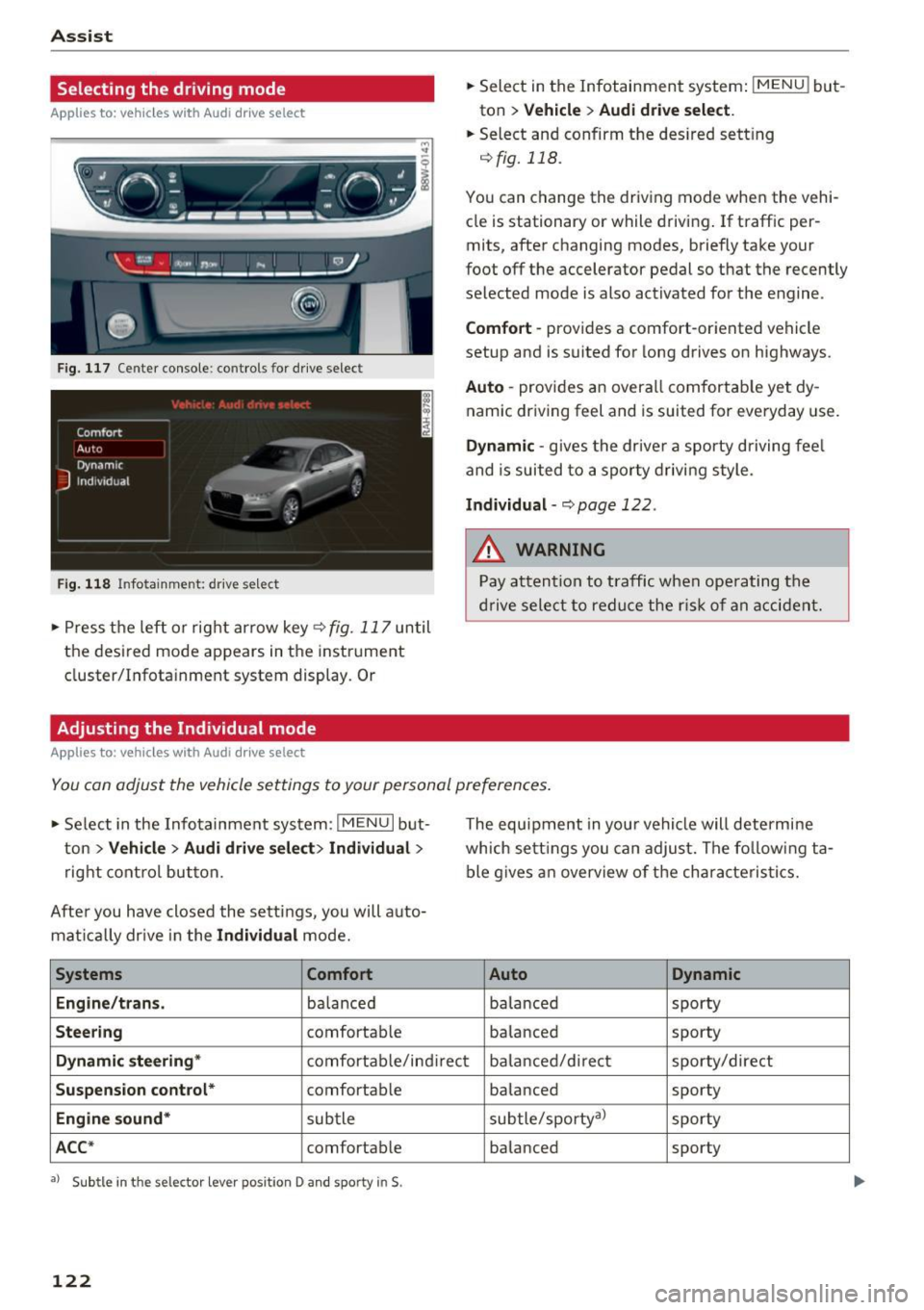
Fig. 117 Center console: controls for drive select
Fig. 118 Infotainment: drive select
• Press the left or rig ht arrow key<=> fig. 117 until
the desired mode appears in the instrument
cluster/Infotainment system display. Or
Adjusting the Individual mode
Applies to: vehicles with Audi drive select
• Select in the Infotainment system: IMENU ! but
ton
> Vehicle > Audi drive select.
• Select and confirm the des ired sett ing
qfig. 118.
You can change the driv ing mode when the vehi
cle is stationary or while driving . If traffic per
mits, after changing modes, briefly take your
foot off the accelerator pedal so that the recently
selected mode is also activated for the engine.
Comfort -provides a comfort-oriented vehicle
setup and is suited for long drives on highways.
Auto -provides an overall comfortab le yet dy
namic driving feel and is suited for everyday use.
Dynamic -gives the dr ive r a sporty driving fee l
and is suited to a sporty driving style.
Individual-q page 122.
&_ WARNING
Pay attention to traffic when ope rating the
drive select to reduce the risk of an accident.
-
You can adjust the vehicle settings to your personal preferences .
• Se lect in the Infotainment system: I MENU I but
ton
>V ehicle > Audi drive select> Individual >
right control button.
After you have closed the sett ings, you will a uto
mat ically drive in the
Individual mode.
Systems Comfort
Engine/trans .
balanced
Steering comfortable The equipment in you
r vehicle will determine
which sett ings you can adjust. The fo llowing ta
ble gives an overview of the characteristics.
Auto Dynamic
balanced sporty
balanced sporty
Dynamic
steering* comfortable/indirect balanced/direct sporty/direct
Suspension control* comfortab le
balanced sporty
Engine
sound* subtle subtle/sporty
a)
sporty
ACC* comfortab le balanced sporty
•> Subtle in the selector lever position D and sporty in$.
122
Page 131 of 386

General information
Applies to: vehicles with peripheral cameras
Fig. 128 Loca tion of peripheral c amera s
The four periphe ral cameras are located in the ra
diator grille, in the luggage compartment lid and
on both exterior mirrors
q fig . 128 . Make sure
that the lenses are not covered by deposits or any
other obstructions as this may impair the system.
For information on cleaning, refer to
¢page 337.
Black corners are shown in the vehicle silhouette
when in
Surrounding mode. Objects in these
areas are outside of the camera's field of view
and are not detected .
A WARNING
-Always read and follow the applicable warn
ings
~ &. in General information on
page 124.
- If the position or the installation angle of a
camera was changed, for example after a
collision, do not continue to use the system
for safety reasons . Have it checked by an au
thorized Audi dealer or authorized Audi
Service Facility .
- Keep in mind that the image in the display is
incorrect if the exterior mirror housing has
been manually adjusted .
- Use the
Rear mode and the corner view
(rear)
mode only when the luggage com
partment lid is fully closed. Otherwise the
image in the display will be incorrect.
- The vehicle surroundings are shown using
the camera images . The vehicle image is
shown by the system. Objects and obstacles
above the camera are not displayed.
Parking systems
-Camera lenses enlarge and distort the field
of vision. The objects appear both altered
and inexact on the screen .
(D Note
-Always read and follow the applicable warn
ings
~ CD in General information on
page 124.
- The Infotainment display shows the direc
tion in which the rear of the vehicle is travel ing based on the steering wheel angle. The
front of the vehicle swings out more than
the rear of the vehicle . Maintain plenty of
distance so that an exterior mirror or a cor
ner of the vehicle does not collide with any
obstacles.
(D Tips
If the 8/fl;!J/c::5 symbol appears in the dis
play and the respective display area is grayed
out, then the power exterior mirrors were
folded in or the driver's door/front passeng
er's door/luggage compartment lid was
opened.
Switching on/off
Applies to: vehicles with peripheral cameras
-----------
' :_~ '.!! _:-,~~
~ !i'! .. ' !J -,1~ ===:.===. ,
Fig. 129 Center console: button P.a
Fig. 130 In fo tai nment syste m: select the mode
129
Page 132 of 386

Parking systems
Switching on
.. Shift into reverse , or
.. Press the
P1JJA button in the center console
c::> fig. 129 . A short conf irmation tone sounds
and the LED in the button turns on .
Selecting the mode
.. Turn the con trol knob to the symbol fo r the de
s ir ed mode @thr ough @¢
fig. 130 and press
the control knob .
Switching off
.. Drive faster than 6 mph (10 km/h), or
.. Press the P
1#A button, or
.. Switch the ignition off .
You may select from the following modes:
@ -Corner view (front) ¢
page 130
@-Front ¢ page 130
©-Surround ing ¢ page 130
@-Rear c::> page 131
© -Corner view (rear) ¢ page 130
You can also sw itch to trailer view¢ page 128.
Corner view (front)/corner view (rear)
Applies to: veh icles w ith per ip heral cameras
F ig . 131 In fotainme nt system: corner v iew (front)
Fig. 132 Infotainment sys tem: corner v iew (rear)
130 This view can assist you fo
r example, when you
are exiting from an area with poor visibility. The
area at the front and rear sides of the veh icles is
displayed.
.. To show the side view toward the front, select
the symbol @
c::> fig. 131 with the control knob
and press the control knob .
.. To show the side view toward the rear, select
the symbol ©
c::> fig. 132 with the control knob
and press the control knob .
Front
Applies to : ve hicles with pe ripheral cameras
Fig. 133 Infota inment sys tem: front mode
This view assists you fo r example, in using the
full maneuvering range in front of the vehicle.
The area in front of the vehicle is displayed . The
vehicle surround ings are shown in the right area
of the display. You can switch between the opti
cal display and camera image¢
page 131 .
.. Select the@ symbo l w ith the control knob. The
orange orientation lines mark the expected
path of the vehicle. Stop the vehicle at the lat
est when the red orientation line* borders an
object¢ &.
in General information on
page 129.
Peripheral
App lies to : vehicles with per ipheral cameras
Fig. 134 Infota inment system : peripheral mode
Page 133 of 386
This view is ideal for maneuvering. The vehicle
surroundings are shown using the camera im
ages . The vehicle image is shown by the system .
... Se lect the © symbol with the control knob and
press the control knob.
Rear
Appl ies to: ve hicles with perip heral ca meras
F ig. 135 Infotainment system : rea r mode
This view assists you for example, in using the
full maneuvering range behind the vehicle. The
area behind the vehicle is displayed. The vehicle
surroundings are shown in the right area of the
display. You can switch between t he optical dis
play and camera image
¢page 131.
... Select the @symbol with the control knob.
Perpendicular parking
Appl ies to: ve hicles with per ip heral came ras
This view may be used when parking in a garage
or in a parking space .
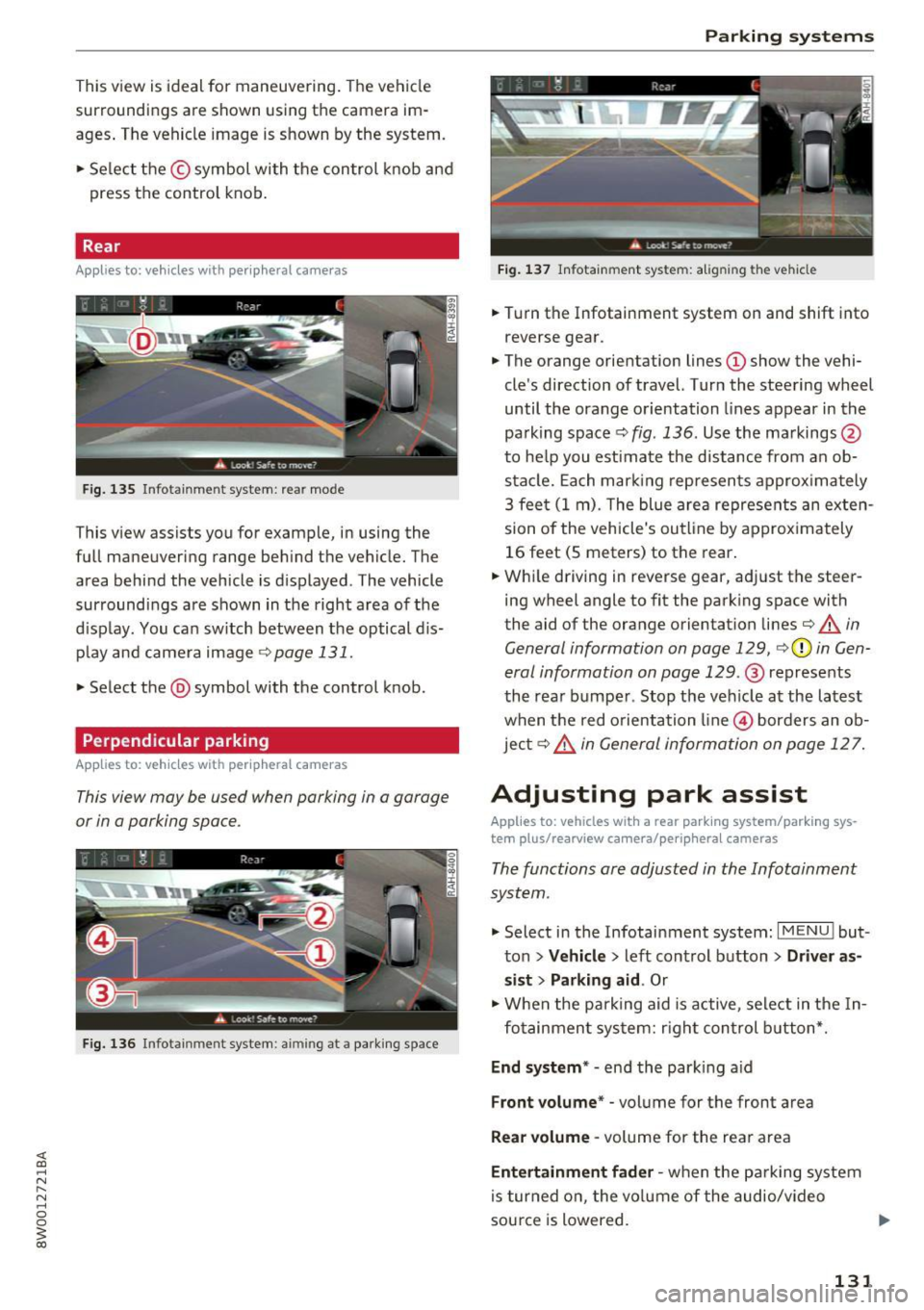
Fig. 136 Infotai nment system : aimin g at a park ing space
Parking systems
Fig. 137 Infotainme nt system: a lig n in g the vehicle
... Turn the Infotainment system on and shift into
reverse gear .
... The orange orientation lines
(D show the vehi
cle's direction of travel. Turn the steering wheel
until the orange orientation lines appear in the
pa rking space
c::> fig . 136. Use the markings @
to help you estimate the d istance from an ob
stacle. Each marking represen ts approximately
3 feet (1 m) . The blue area represents an exten
sion of the vehicle's outline by approximately
16 feet (5 meters) to the rear.
... Wh ile driving in reverse gear, adj ust the steer
ing wheel angle to
fit the park ing space with
the aid of the orange orientation lines
c::> &. in
General information on page 129,
c::> (D in Gen
eral information on page 129.@
represents
the rear bumper . Stop the vehicle at the latest
when the red orientation line@ borders an ob
jec t
c::> ,& in General information on page 12 7.
Adjusting park assist
Applies to : vehicles wit h a rear par kin g system/par king sys
t e m plus/ rea rview ca mera/ periph eral cameras
The functions are adjusted in the Infotainment
system .
... Select in the Infotain ment system: I MENU ! but
ton
> Vehicle > left control button > Driver as
sist
> Parking aid . Or
... When the parking aid is active, select in the In-
fo tainmen t system: right control button*.
End system* -end the parking aid
Front volume * -vol ume for the front area
Rear volume -volume for the rea r area
Entertainment fader -when the parking system
is turned on, the vo lume of the audio/video
sou rce is lowered.
131
Page 136 of 386

Intelligent Technology
Intelligent Technology
Electronic Stabilization
Control (ESC)
Description
Elect ronic Stabilization Control (ESC) suppo rts
driver safety.
It red uces the risk of slipping and
improves dr iving stability. ESC detects crit ica l sit
uations such as when the vehicle is oversteering
a nd understeering or the wheels are spinning.
The vehicle is stabilized by applying the brakes or reducing eng ine torq ue. When the ESC engages,
the
Ji) i n d icator light blinks in the instrument
cluste r.
The fo llow ing systems are integrated in the ESC :
Anti-lock braking system (ABS)
ABS p revents the whee ls from locking whe n brak
ing. The vehicle can sti ll be steered even during
hard brak ing. Apply steady press ure to the brake
pedal. Do not pump the pedal. A puls ing in t he
b rake pedal indicates that the system is acting to
s tabilize the vehicle .
Brake assist system
The brake assist system can decrease brak ing dis
tance . It increases brak ing power when the d river
presses the brake pedal q uick ly in emergency sit
uations . You must press and hold t he b rake pedal
until the dangerous sit uat io n is over . In veh icles
with adapt ive c ruise control*, the bra ke as sist
sy stem is more sensitive if t he di sta nce detec ted
t o the vehicle dr iv ing ahead is too small.
Anti-slip regulation (ASR)
ASR reduces eng ine power when the drive wheels
beg in sp inning a nd adapts the force to the road
conditions . T his makes it easie r to sta rt, acceler
a te and dr ive up h ills.
Electronic differential lock (EDL)
The EDL brakes w heels that a re spinning and
transfers the drive power to the other drive
wheel or whee ls if t he ve hicle is equipped with a ll
wheel drive*) . T his funct ion is no t av ail able at
h igher spee ds.
134
In extreme cases, EDL automat ically switches off
to keep the b rake on the bra ked whee l from over
heating. The veh icle is still working correct ly. ED L
will switc h on again automatically when condi
tions have returned to normal.
Steering recommendation
The E SC he lps to stabili ze the vehicle by changing
the steer ing torque.
I n veh icles with dyn amic steer ing *, ES C also
helps to sta bilize the s teer ing in cr it ic al situa
tions.
Selective wheel torque control
Se lective wheel to rque cont rol is used when d riv
i ng on curves. The fron t whee l on the ins ide of
t h e curve or both wheels on t he i nsi de of the
curve are braked se lective ly as needed. This al
l ows mo re precise driving in c urves.
Automatic post -collision braking system
The "a utomat ic post-collis io n braking system"
c a n help to reduce t he risk of sliding and of addi
tiona l co llisions after an acc ident. If th e airbag
contro l modu le de te cts a collision, t he ve hicle is
bra ked by the ESC.
The veh icle does not br ake automatically if:
- the dr iver presses the acce lera tor pedal, or
- the ESC, the brake system or the veh icle electri-
cal system are not functioning.
&_ WARNING
- The ESC and i ts integ ra ted systems cannot
overcome the lim its imposed by natura l
phys ical laws. This is es pec ially impo rtan t
o n s lippery or we t road s. If the sy stems be
gin ac ting to s tabilize yo ur vehicle, you
should immediately a lter your speed to
match the road and traffic conditions . Do
not let t he inc reased safety provided tempt
you into taking risks. This could increase
your r isk of a coll is ion.
- Please note the r is k of a coll is ion increases
when dr iv ing fast, especially t hrough c urves
and on sli ppery or wet roads, and when dr iv
ing too close to objects ahead . T he ESC a nd
its integrated systems cannot always
Page 137 of 386

prevent collisions -there is still a risk of ac
cidents!
- Press the accelerator pedal carefully when
accelerating on smooth, slippery surfaces
such as ice and snow. The drive wheels can spin even when these control systems are
installed and this can affect driving stability
and increase the risk of a coll ision.
Switching on /off
Intelligent Technology
(D Tips
- The ABS and ASR only function correctly
when all four wheels have a sim ilar wear
condition. Different tire sizes can lead to a
reduction in engine power.
- You may hear noises when the systems de
scribed are working.
£SC turns on automatically when you start the engine.
--- --function of the ESC is limited or switched off . The
amount of stabilization control wi ll differ de
pending on the level.
--~
· :.__r" ,? .:'~~
,; ~ ... ,1
·· ----- ~
Fig. 138 Center co nso le w it h button ~ OFF
The following examples are unusua l situations
where it may make sense to switch sport mode on in order to allow the wheels to spin:
- Rocking the vehicle to free it when it is stuck
- Driving in deep snow or on loose ground
- Dr iving with snow chains
E SC is designed to function in levels. Depending
on the level that is selected, the stabilization
ESC levels
Sport mode on
Behavior
The ESC and ASR stabiliza-
tion funct ions are limited
~ .&. .
Operation Press the lfl OFFI button
briefly .
Indicator II turns on.
lights
Messages Stabilization control (ESC):
sport. Warning! Reduced
stability
A WARNING
You should only switch sport mode on or
switch ESC/ ASR off if your driving abilities and road conditions permit.
ESC/ASR off Sport mode off or
ESC/ASR on
The stabilization function is The full stabilization func-
no longer available ~.&. . tion of the ESC and ASR is
ESC and ASR are switched available again.
off.
Press and hold the
! fl O FFI Press the lfl OFFI button
button longer than 3 sec- again.
onds.
II and lf'tl•U~ turn on. fl turns off or fl and
lf'tl•l~~ turn off.
Stabilization control (ESC):
Stabilization control
off. Warning! Reduced sta- (ESC): on
bil ity
-The stabilization function is limited when
sport mode is switched on. The driving
wheels could spin and the vehicle could swerve, especially on slick or slippery road
surfaces.
135
Page 158 of 386

Voice recognition system Function Say:
Search areas for Aud i connect (Info- Near destination / Nea rby / In new city
ta inment) services
C orrecti ng data inp ut No I meant
(XV )
{l) Tips
Always read the chapter¢ page 178, Audi
c onnect (Infotainmen t) information.
Messages (Audi connect (Infotainment))
Applies to: vehicles with voice recognition system and Audi connect (Infotainment)
Requirement: a cell phone w ith an active MAP
(Message Access Profi le) must be connected to
the MMI
¢ page 165.
Function
T ext editing commands
Readi ng out a new message
Reading a message
Replying to the open tex t message
Forward ing the open text message
Co rrect ing data inp ut
(D Tips
Say:
Read out / Ad d / Delete / Reco rd e ver ything again / Replace
with (XV)/ Add recipient / Send
R ead out new text mes sag e/ Read out new e-mail
Read out te xt message / Read out e -mail
R eply
Forward
> Add recipient / Insert t emplat e/ Send
No I meant (XV)
or contact your a uthorized Aud i dea ler or
authori zed A udi Servi ce Fac ility.
- Fo r more inform ation on suppo rted ce ll
phones, v is it www .audiu sa .com /bluetooth -
Always read the chapter¢
page 178, Audi
connect (Infotainment) information.
Navigation
Applies to: vehicles with voice recognitio n system and navigation system
Req uiremen t: the Navigati on men u m ust be
open ¢
table on page 154 .
You can say the following commands for entering
a destination depending on the se lec ted men u
item:
Function Say:
Open ing the list of previous naviga -
La st destinations
t ion destinations
Access ing favorites Navigat ion favorites
Selecting the home address Home addre
ss or Drive home
Ente ring a n add ress with guidance Enter address
> follow the system prompts
from the system
Individual commands for entering a Enter country / Ente r city/ Ent er ZIP code / Enter street
I E n-
destination ter house n umber
156
Page 179 of 386
<( a, .... N ,....
N .... 0 0
3 a,
License s ubs cript ion
The validity and expiration date of you r licenses
are displayed. When
W arnin g befor e licen se ex
pir es
is activat ed, a m essage will be display ed
warning you that your license is about to expire .
Refresh
The content of the selected Audi connect (Info
tainment) service o r the entire Audi connect list
is updated .
Wi-Fi hotspot
Appl ies to: ve hicles with Wi -Fi hotspot
You con us e the MMI as a Wi-Fi hotspot to con
n ect up to eight Wi-Fi d evic es to th e Intern et.
While driving , re stri cted use of unsecured, light,
s mall wirele ss device s is only po ssible from the
rear of the vehicle .
Requirement: the ignition must be switched on.
.. Se lect :
I MENU I button >Telep hon e> right con -
tro l button
> Wi-Fi opti ons.
The fo llow ing settings can be modified :
Wi-Fi mode
The MMI Wi-Fi hotspot is deactivated at the fac
tory . Switch the Wi-Fi hotspot to
H otspot before
establishing a connection between your vehicle
and your Wi- Fi dev ice.
- Hotspot : the MMI Wi- Fi hotspot is active and
v is ible to other devices. A connection can be es
tabl ished with new w ire less devices .
-Hot spot and clie nt1l: the MM I W i- F i hotspot is
active. An Internet connection to a personal
Wi-Fi hotspot (such as a smartphone) can be establ ished . Using
Netw ork search
~ page 177, you can sea rch fo r you r persona l
hotspot and connect to the MM I.
-Off : the MM I W i-Fi hotspot is deac tivated. An
Internet connection for Wi-Fi devices is not
possible .
1) Not avail able in al l veh icl es.
Audi c onn ect ( Inf ota inm ent )
Network search
A list of ava ilab le Wi- Fi netwo rks in your area is
displayed.
A WARNING ~
- As the driver, do not allow usage of the Wi-
Fi hotspot to distract you from driving, as
this cou ld increase the risk of an accident.
- It is only safe to use tablets, laptops, mo
b ile dev ices and other similar devices when
the vehicle is stationary because, like all loose objects, they could be thrown around
the inside of the vehicle in a crash and cause
serious injuries . Store these types of devices
securely while driving.
- Do not use any wireless devices on the front seats within range of the airbags while dr iv
i n g. Also read the warnings in the chapte r
~page 236.
(D Note
You are responsible for all precaut ions taken
fo r data p rotection, anti-v irus protect ion and
protection aga inst loss of data on mobi le de
v ices that a re used to access the Internet
th ro ugh the W i- Fi hotspot.
(D Tips
-In vehicles w ithout Audi connect* , the use
of the W i-F i hotspot is on ly possible for t he
Wi-Fi audio player*. A data connect ion to
the Internet cannot be established.
- A separate, paid mob ile subscr ipt ion may be
needed to use the Wi -Fi hotspot. You can
obtain more info rmation from your cell
phone serv ice provider .
- Depending on your cell phone plan, receiv
ing data packages through the Wi-Fi hot
spot may result in additional charges, par
ticu larly when in another country . The use
of a f lat rate data plan is highly recom
mended . You can obtain more information
from your cell phone service provider .
177