drive select AUDI S4 2017 User Guide
[x] Cancel search | Manufacturer: AUDI, Model Year: 2017, Model line: S4, Model: AUDI S4 2017Pages: 386, PDF Size: 96.32 MB
Page 27 of 386
Operation
Applies to: vehicles with camera -based traffic sign recogni
tion
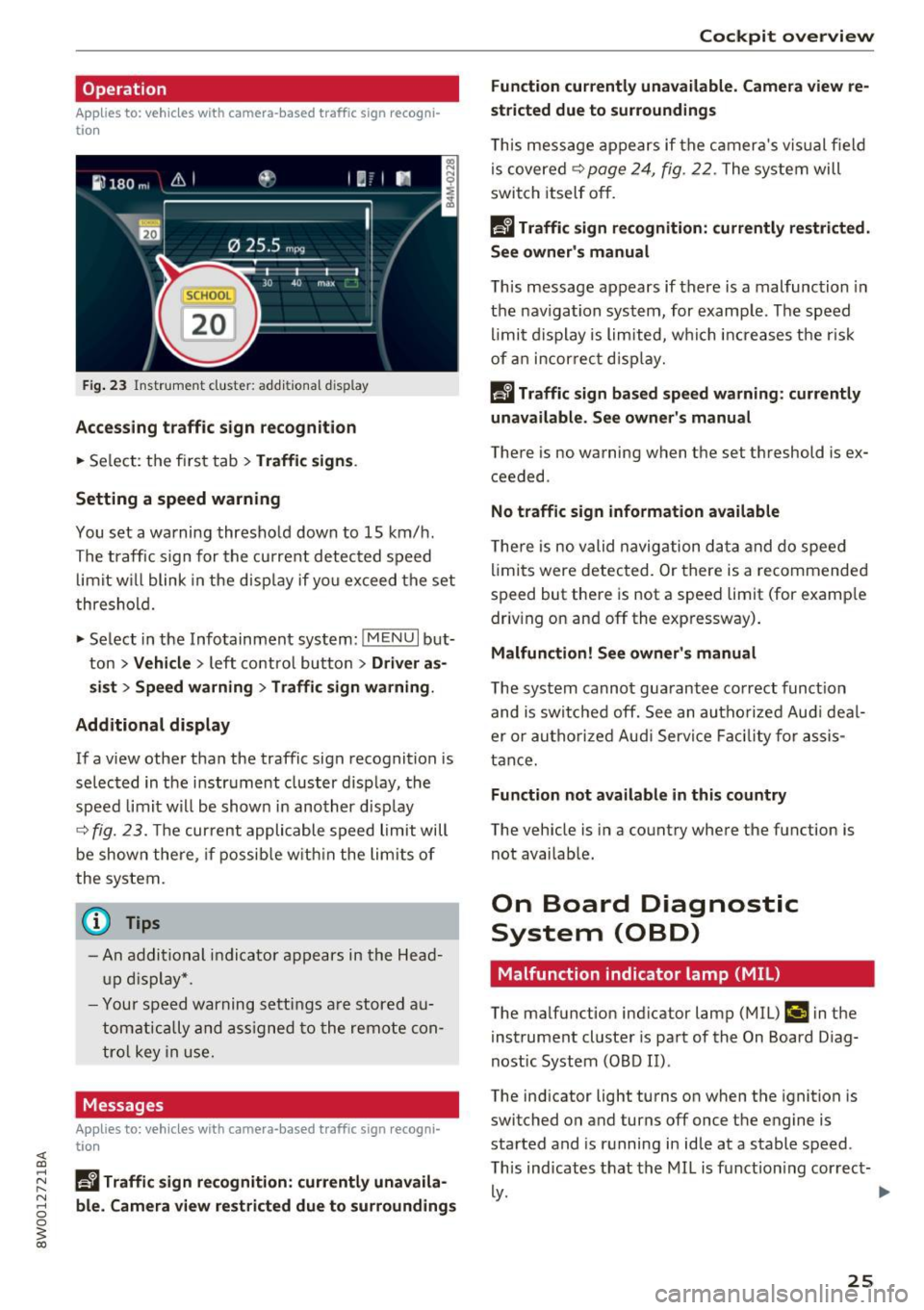
F ig. 23 Instr ume nt cluster: add itiona l d isplay
Accessing traffic sign recognition
.. Se lect: the f irst tab> Traffic signs .
Setting a speed warning
You set a warning thresho ld down to 15 km/ h.
The traffic s ign for the curre nt detec ted speed
limit w ill blink in the d isp lay if yo u excee d the set
thresho ld.
.,. Select in the Info tainment sys tem:
!MEN U I but
ton >
Vehicle > left contro l bu tton > Driver as
s ist > Speed warning
> Traffic sign warning .
Additional display
If a v iew othe r th an the traffic sign recognition is
se lec ted in t he i nstr ument cluster d isp lay, the
speed limit w ill be shown in another disp lay
~ fig. 23. The cur rent applicable speed limit will
be shown the re, if pos sibl e w it hi n the lim its of
the system.
{t) Tips
- An a ddi tio nal i ndic a tor a pp ears in the Head
up disp lay*.
- Y our spe ed w arning s ettin gs a re stor ed a u
t om atica lly an d assigned to the rem ote con
t ro l key in us e.
Messages
Applies to: vehicles with camera-based traffic sign recogni
tion
~ Ii Traffic sign recognition: currently unavaila
r-1 8 ble_ Camera view restricted due to surroundings
0
~ co
Cockpit overview
Function currently unavailable. Camera view re
stricted due to surroundings
T hi s mess age app ea rs if th e ca mera 's v is u al fiel d
is covere d~
page 24 , fig. 22 . The system will
switch itself o ff.
Ii Traffic sign recognition: currently restricted.
See owner's manual
T h is message appears if there is a mal function in
t h e nav igation system, for examp le . Th e speed
li mi t d isplay is lim ite d, w hich incr eases the r is k
of an in cor re ct displa y.
la Traffic sign based speed warning : currently
unavailable. See owner's manual
There is no wa rning when t he set t hreshold is e x
ceeded .
No traffic sign information available
The re is no valid navig ation d ata and do speed
li mits were detec ted. Or th ere is a recommende d
s p eed but there is not a speed limit (for examp le
dr iv ing on and off the exp ressway) .
Malfunction! See owner 's manual
T he system canno t gua rantee correct funct ion
and is swi tc hed off. See an a uthoriz e d Au di deal
er o r autho riz e d Au di Servi ce Facili ty for as sis
t ance.
Function not available in this country
The vehicle is in a co untry where the function is
not avai lab le.
On Board Diagnostic
System (OBD)
Malfunction indicator lamp (MIL)
The malfunction ind icator lamp (MIL) ¢;j in the
i nstrument cluste r is par t of the On Board D iag
nost ic System (O BD II) .
The ind icator light turns on when the ignition is
switched on and turns off once the engine is
sta rted and is r unning in id le at a stable speed .
T his ind icates that the MIL is f unction ing cor rec t-
~-~
25
Page 28 of 386
Cockpit overview
If the light does not turn off after starting the
engine
or turns on while driving, this may indi·
cate that there is a malfunction in the eng ine. If
the indicator turns on , the catalytic converter
may be damaged.
Drive
with reduced engine performance (avoid
h ig h speeds for extended periods of time and/ or
fast acce leration) and have the malfunction cor
rected. See an authorized Aud i dealer or author
ized Audi Service Fac ility .
The electronic speed limiter may be faulty if the
indicator light turns on. For additional informa
tion, refer to
¢ page 93, Electronic speed limit
er .
The MIL indicator light may also turn on if the
fuel filler cap is not closed correctly
¢page 298.
On-Board Diagnostics
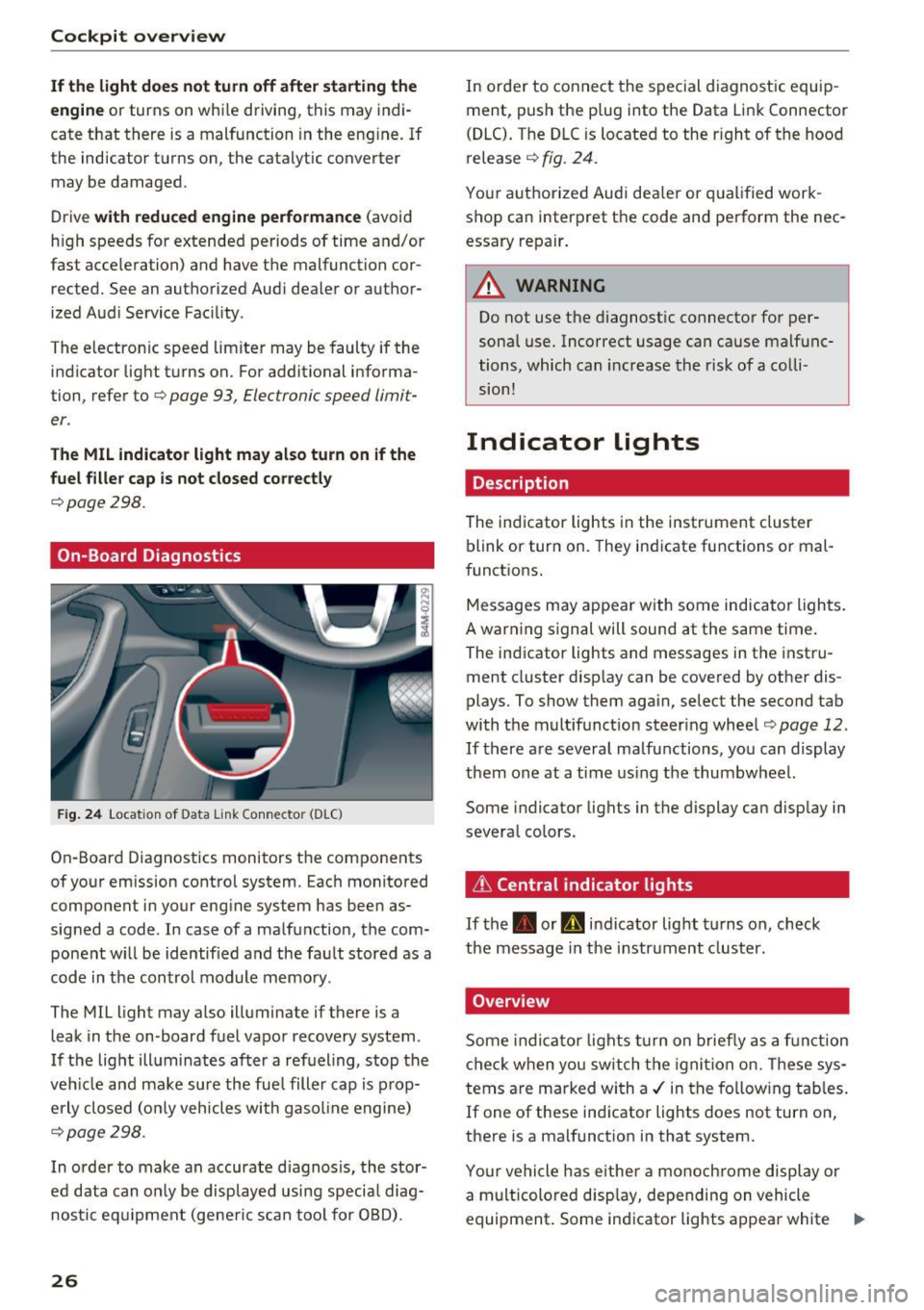
Fig . 24 Locat ion of Data Link Connector (D LC)
On-Board Diagnostics monitors the components
of your emission control system. Each monitored
component in your engine system has been as
signed a code . In case of a malfunction, the com
ponent w ill be identified and the fault stored as a
code in the control module memory.
The MIL light may also illuminate if there is a
leak in the on-board fuel vapor recovery system .
If the light illuminates after a refuel ing, stop the
veh icle and make sure the fue l filler cap is prop
erly closed (on ly vehicles with gasol ine engine)
¢page 298.
In order to make an accurate d iagnosis, the stor
ed data can only be disp layed using specia l diag
nostic equipm ent (ge ne ric scan tool for OBD) .
26
In order to connect the special diagnostic equip
ment, push the plug into the Data Link Connector
(DLC). The DLC is located to the r ight of the hood
release
¢ fig. 24.
Your authorized Audi dea le r or qualified work
shop can interpret the code and perform the nec
essary repair.
_& WARNING
Do not use the diagnostic connector for per
sonal use. Incorrect usage can cause malfunc
tions, which can increase the risk of a colli
sion!
Indicator lights
Description
The indicator lights in the instrument cluster
blink or tur n on. They indicate functions or mal
funct ions.
-
Messages may appear with some indicator lights .
A warning signal will sound at the same time.
The ind icator lights and messages in the instru
ment cluster disp lay can be covered by other dis
plays. To show them again, select the second tab
with the multifunction steering wheel ¢page 12.
If there are several ma lfunctions, you can display
them one at a time using the thumbwheel.
Some indicator lights in the display can display in
several colors.
& Central indicator lights
If
the . or Q indicator lig ht turns on, check
the message in the instrument cluster.
Overview
Some indicator lights turn on briefly as a function
check when you switch the ignition on. These sys
tems are marked with a ./ in the fo llow ing tables.
If one of these ind icator lights does not turn on,
there is a malfunction in that system.
Your vehicle has e ither a monoch rome display or
a multicolored display, depending on vehicle
equipment . Some indicator lights appear white
1111-
Page 32 of 386
Cockpit over view
Do not cont inue driving . See an authorized Audi
dealer or a uthorized Audi Service Facility for as
sistance ¢& .
1111 (U SA models ) / . (Cana da m od els) Park
ing br ake: malfun ction! Safel y stop veh icle . See
owner 's manual
-If the indicato r light a nd the message appear
when the vehi cle is st ationary or aft er sw itch
ing the ignition on ,
check if you can release the
parking brake . If you cannot re lease the park
i ng brake, see yo ur authorized Aud i dea ler or
authori zed Aud i Serv ice Facility . If you can re
lease the park ing brake and the message still
appears , see an authorized Audi dealer or au
thorized Aud i Serv ice Facility immediately to
have the malfunction corrected .
-If the indicator light and message appear w hile
driving ,
the hill start assist or emergency brak
ing function may be malfunctioning .
It may not
be possib le to set the pa rking brake or release
it once it has been set. Do not pa rk your veh icle
on h ills. See an author ized Audi dealer or au
thorized Audi Serv ice Facility fo r ass istance .
Brake servo: re strict ed . You can continue driv
ing . Pleas e contact Servic e
There is a malfunction in the brake booster . The
brake booster is available, but its effectiveness is
reduced . Braking behav ior may be diffe rent from
how it no rma lly fu nctions and t he b rake pedal
may v ibrate .
Dr ive to an authorized Aud i dea le r or authorized
Aud i Serv ice Facility immediately to have the
malfunct io n corrected.
_&. WARNING
- Read and follow the warn ings in
¢ page 304, Working in the engine com
partment
before opening the hood and
check ing the brake fl uid level.
- If the brake system indicator light does no t
turn off o r it turns on while driving, the
brake fluid level in the reservoir is too low,
and this increases the risk of an accident.
Stop the vehicle and do not continue dr iv-
30
ing . See an autho rized Audi dea ler or au
thorized A udi Service Fac ility for assistance.
- If the brake system indicator light turns on
together w ith the ABS and ESC indicator
lights, the ABS/ESC regu lating function may
be malfunct ion ing. Functions that stabilize
the vehicle are no longer available . This
could cause the vehicle to swerve, which in
creases the risk that the vehicle will slide. Do not co ntin ue d rivi ng. See an autho rized
Aud i dea le r or a ut horized Audi Serv ice Facili
ty fo r ass istance .
PARK/<®)/!®)' Electromechanical parking
brake
If the -(USA mode ls) I. (Canada models)
i ndicator l ight turns on, the parking brake was
set .
If the -(USA mode ls)/ . (Canada models) in
dicator light blinks, the braking force is not build
i ng up enough or not building up at a ll. Se lect the
P selector lever posit ion to help secure the vehi
cle. Make sure the indicator light is off before you
start driving .
£dJ Parking brake: mal function! Please contact
S ervice
There is a ma lf u nction in the parking brake. Drive
to an authorized Aud i dea ler or authorized Audi
Service Facility immediate ly to have the malfunc
tion corrected.
• (USA models )/ lC~) (Canada model s) Parking
brake: caution! Vehicle parked too steep
There is not eno ugh braking force to ho ld the ve
hicle in p lace . T he brakes have overheated. The
vehicle could roll away even on a small incline.
• (USA model s)/¢~) (C a nada model s) Parking
brake: applied
If this message appea rs, press the b rake pedal
first and then release the parking brake if ne ces
sary .
II (USA model s)/¢~) (Canada mode ls) Parking
brake: emerg ency braking
The emergency braking funct ion was triggered . ..,.
Page 35 of 386
<( a, .... N ,....
N .... 0 0
3 a,
If the II indicator light turns on, ESC was
switch ed off us ing the
!~0" 1 button ¢ page 134.
Stabili zation c ontrol (ESC / ABS) : malfun ction!
See owne r's manual
If the: G1 indicato r light and the~ (USA mod
els)/ [iJ (Canada models) A BS i ndicator light tur n
on and the message appears, the re is a malf unc
tion in the ABS or the elect ronic differen tial lock.
This a lso ca uses the ESC to malfunct ion . The
brakes still function with their norma l power, but
ABS is not active.
Drive to an autho rized Aud i dea ler o r a uthorized
Aud i Service Facility immediately to have the
malfunction corrected.
@ Tips
For addit ional information on ESC and A BS,
refer to ¢
page 134.
!f Safety systems
The El indicator light monitors the safety sys
tems.
If the El indica tor light turns on or blinks, there
is a malfunction in a safety system .
Drive to an autho rized Aud i dea le r or a uthorized
Aud i Service Fac ility immediately to have the
malfunct ion corrected.
A WARNING
-
Have the safety systems inspecte d immedi
ately. Otherwise, there is a risk that the sys
tems may not activate during a collision,
which increases the risk of serious injury or
death .
(CD ) Brake system
[I] Brake s ov erheating . Plea se shift to D
T here was a heavy load on the b rakes. Place the
selector lever in the D/S posi tion in o rder to use
the eng ine braking e ffect and reduce the load on
the brakes .
Cockpit o ve rv iew
'IJ!t:t /(0) Brake pads
II (USA model s)/Ei] (Canada mod els ) Brake
pad s: wear limit rea ch ed. You can continue dri v
ing . Pl ea se conta ct Service
T he brake pads are worn.
Drive to an au thorized Audi dealer or authorized
Audi Service Facility as soon as possible to have
the malfunc tion corrected .
~ Engine control
II Drive sy stem : malfun cti on! Pleas e contact
Servi ce
T here is an eng ine control malfunction .
Drive slowly to an a uthori zed Audi dea ler or a u
thori zed Audi Serv ice Facility to have the engine
checked.
W Engine control (diesel engine)
App lies to : vehicles wit h diese l eng ines
The eng ine is preheating if the El ind icator light
turns on when the ignition is switched on .
If the indica tor light does not turn on or blinks
while driving, there is an engine control malfunc
t io n.
Immed iate ly drive s low ly to an authori zed Audi
dealer or au thorized Audi Service Fac ility to have
the malfunction corrected .
io Malfunction indicator lamp (MIL)
The malfunction indicator lamp (MIL) is part of
t h e On Board Diagnost ic system (OBD II) . T he
¢..ij c;ymbo l tur ns on when the igni tion is sw itched
o n a nd turns off aga in once the igni tion swi tc h es
on and running at a steady id le speed . This i ndi
cates that the MIL is functioning correctly.
T he ind icator light tu rns o n if there is a malfu nc
t ion in the engine elec tronics . See an au thor ized
Audi dealer or authorized A udi Service Fac ility to
have the malfunction corrected. For additional
information, r efer to ¢
page 25 .
The ind icator light can also tu rn o n if the fuel fill
er cap was not sealed correctly ¢
page 298.
33
Page 37 of 386
<(
a,
.... N ,....
N .... 0 0
DD Tank syst em : m alfunction ! Plea se conta ct
Se rvice
If the indi cator lig ht t urns on and the message
appears:
- there is a malfunct ion in the fuel ta nk system,
o r
- in vehicles with d iesel eng ines, water may have
collected in the fue l filter .
Drive to an authori zed Aud i dea ler or authori zed
Aud i Service Facility immediately to have the
malfunct ion corrected .
(D Note
Applies to veh icles w ith a diesel engine: if the
diese l fuel quality is poor, it may be necessary
to have the wate r drai ned from the water sep
arator
l) in the fuel filter more often than
specified in the m aintenance schedule. This
can help red uce eng ine malfu nctions .
(D Tips
For mo re information on fueli ng, ref er to
o=:> page298 .
• Washer fluid level
E;:2 Please add washer fluid
Fill the washer fluid for the w indshield washer
system and the headlight washer system* when
the ignition is swi tched off~
page 316.
El Wind shield wiper s: malfunction! Plea se con
tact Se rvice
There is a malfunction wi th t he w indsh ie ld w ip
e rs.
Dr ive to an autho rized Aud i dealer or a uthorized
Aud i Service Facility immediately to have the
malfunct ion corrected.
~ l) Th is func tion is no t av ail able in a ll countri es.
Coc kpit o ve rv iew
~ Driver's door
IJ1 Driver 's door: malfun ction! Shift to P before
leaving v ehicle . See owner's manual
T he re is a ma lfunction in the drive r's door . Select
the P selector leve r pos ition to secure the vehicle .
Drive to an au thori zed Audi dealer or authori zed
Audi Service Facility immed iate ly to have the
malfu nction corrected.
·:<;X· Defective light bulb warning
If the II ind icator light tu rns o n, a bulb has
failed. The message indica tes the location of the
bulb . Replace the bulb immedi ately .
Vehicle lights: m alfunction! Please contact
Servi ce
There is a ma lfunction in the headlights or the
l ight switch . Dr ive to an authorized Audi dealer or
autho rized Aud i Serv ice Facility immediately to
have t he malfunc tion cor rected.
.&_ WARNING
- Light bul bs are under p ressure a nd can ex
p lode when b ulbs are replaced, w hich in
creases the r isk of injury.
- W ith HID he ad lights (xenon he adlights), the
high-vo ltage component must be handled
correct ly. Otherwise, there is a risk of fatal
i n jur y.
~0 Dynamic headlight range control system
Iii Headlight range control: malfunction! See
owne r's manual
T he re is a ma lf u nction in the headlight range
contro l system , which may cause glare for other
drive rs.
D rive to an authori zed Audi dealer or au thori zed
Audi Service Facility immed iate ly to have the
malfunction corrected.
.
35
Page 39 of 386
Opening and closing
Central Locking
Description
You can lock and unlock the veh icle centrally . You
have the following choices:
- Remote control key¢
page 40,
-Sensors in the door handles * ¢ page 40
- Lock cylinder on the driver's door¢ page 42,
or
- Interior central locking switch ¢
page 41.
Turn signals
The turn s ignals flash twice when you unlock the
veh icle and flash once when you lock the veh icle.
If they do not flash, then one of the doors, the
rear lid or the hood is not closed.
Automatic locking (Auto Lock)
The Auto Lock funct ion locks all doors and the
luggage compartment lid once the speed has ex
ceeded approximately 9 mph (15 km/h).
The vehicle can be unlocked if the opening func
tion in the central locking system sw itch is used
or one of the door handles is pulled.
In the event of a crash with airbag deployment,
the doors will a lso automat ically unlock to allow
access to the vehicle.
Selective door unlocking
The doors and luggage compartment lid will lock
when they close . You can set in the Infotainment
system whether
only the driver's door or the en
tire vehicle should be unlocked when unlocking
¢page 41.
Unintentionally locking yourself out
The following conditions prevent you from lock
ing your remote control key in the vehicle:
- If the driver's door is open, the vehicle cannot
be locked by pressing the~ button on the re
mote control key or by touching the locking
<( a:i sensor* on a door . .... N ,....
N .... 0 0
3 a,
Opening and closing
- When locking using the~ button in the central
locking switch, the vehicle will not lock if a door
is open ¢
page 41.
-On vehicles with a convenience key*, the lug
gage compartment lid unlocks again after clos
ing if the most recently used key is in the lug
gage compartment. The emergency flashers blink four times.
Do not lock your vehicle with the remote control
key or convenience key* until all doors and the
luggage compartment lid are closed. This helps
to prevent you from locking yourself out acciden
tally .
A WARNING
-
-When you lock your vehicle from outs ide,
nobody -espec ially children -should rema in
inside the vehicle. Remember, when you
lock the vehicle from the outside the win
dows cannot be opened from the inside .
- When you leave the vehicle, always take the
ignition key with you. This will prevent pas
sengers (children, for examp le) from acci
dentally being locked in the vehicle should
they accidentally press the power locking
switch in the doors.
- Do not leave children inside the vehicle un
supervised. In an emergency it would be im
possible to open the doors from the outside
without the key.
(D Tips
- Do not leave valuables unattended in the ve
hicle. A locked vehicle is not a safe!
- The LED in the driver's door rail blinks when
you lock the vehicle. If the LED lights up for
approximately 30 seconds after locking,
there is a malfunction in the central locking
system . Have the problem repaired by an
authorized Audi dealer or authorized Audi
Service Facility.
37
Page 43 of 386
The door cannot be opened for a brief period directly after locking it. This way you have the op
portunity to check if the doors locked correctly .
The settings in the Infotainment system deter
mine if the entire vehicle or only one of the doors
is unlocked when unlocking the vehicle
~ page 41.
A WARNING
Read and follow all WARNINGS¢&. in De
scription on page 37.
@ Tips
If your vehicle is left standing for a long peri
od of time, note the following:
- The proximity sensor switches off after a
few days to save energy. You then have to
pull once on the door handle to unlock the
vehicle and a second time to open it.
-
- The energy management system gradually
turns off unnecessary convenience functions
to prevent the battery from draining and to
maintain the vehicle's ability to start for as
long as possible. You may not be able to un
lock your vehicle using the convenience key.
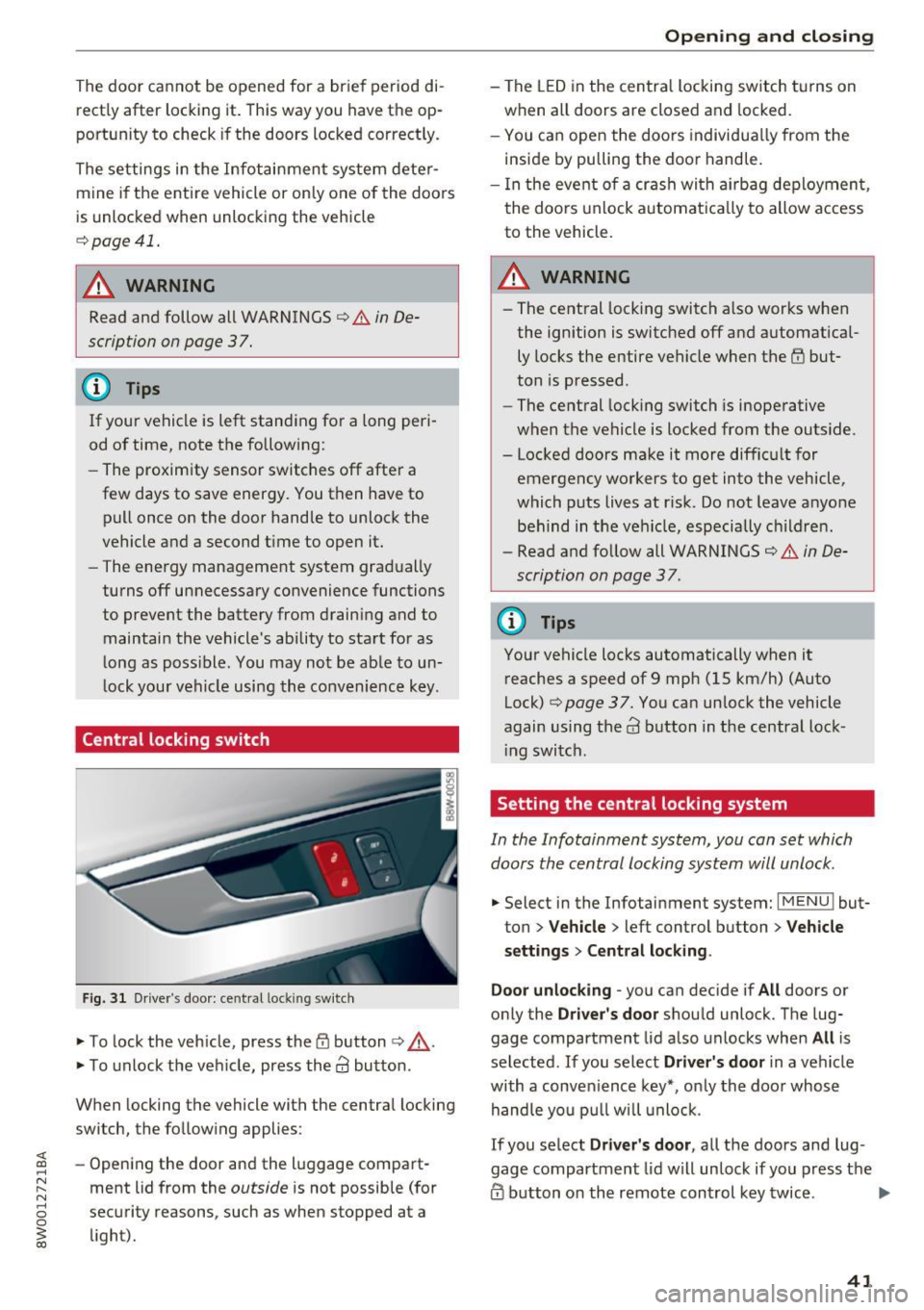
Central locking switch
Fig. 31 Driver 's door: central lock ing switch
.,. To lock the vehicle, press the tfl button ¢,& .
.,. To unlock the vehicle, press the
63 button.
When locking the vehicle with the central locking
switch, the following applies :
- Opening the door and the luggage compart
ment lid from the
outside is not possible (for
security reasons , such as when stopped at a
light).
Opening and closing
- The LED in the central locking switch turns on
when all doors are closed and locked.
- You can open the doors individually from the
inside by pulling the door handle.
- In the event of a crash with airbag deployment,
the doors unlock automatically to allow access
to the vehicle.
A WARNING
-- The central locking switch also works when
the ignition is switched off and automatical
ly locks the entire vehicle when the
tfl but
ton is pressed.
- The central locking switch is inoperative
when the vehicle is locked from the outside.
- Locked doors make it more difficult for
emergency workers to get into the vehicle,
which puts lives at risk. Do not leave anyone
behind in the vehicle, especially children.
- Read and follow all WARNINGS¢&.
in De
scription on page 3 7.
@ Tips
Your vehicle locks automatically when it
reaches a speed of 9 mph (15 km/h) (Auto
Lock)¢
page 37. You can unlock the vehicle
again using the
63 button in the central lock-
ing switch.
Setting the central locking system
In the Infotainment system, you can set which
doors the central locking system will unlock .
.,. Select in the Infotainment system: I MENU ! but
ton
> Vehicle > left control button > Vehicle
settings> Central locking .
Door unlocking
-you can decide if All doors or
only the
Driver's door should unlock. The lug
gage compartment lid also unlocks when
All is
selected . If you select
Driver's door in a vehicle
with a convenience key*, only the door whose
handle you pull will unlock.
If you select
Driver's door, all the doors and lug
gage compartment lid will unlock if you press the
@ button on the remote control key twice. .,.
41
Page 44 of 386
Opening and closing
Lock exterior trunk handle -If you select On, the
luggage compartment lid hand le is locked. In
this case, the luggage compartment lid can be
opened with the
<=S button on the remote con
trol key or with the
<=S button in the driver's
door. In vehicles w ith a convenience key*, you can
still open the luggage compartment lid using the
handle if an author ized remote control key is
near the proximity sensor* .
Fold mirrors* -If you select On, the exterior rear
v iew mirrors fold in automatically when you press
the@ button on the remote control key or touch
the sensor* in the hand le.
Tone when locking1> -If you se lect On , a tone
will sound when you lock the ve hicle.
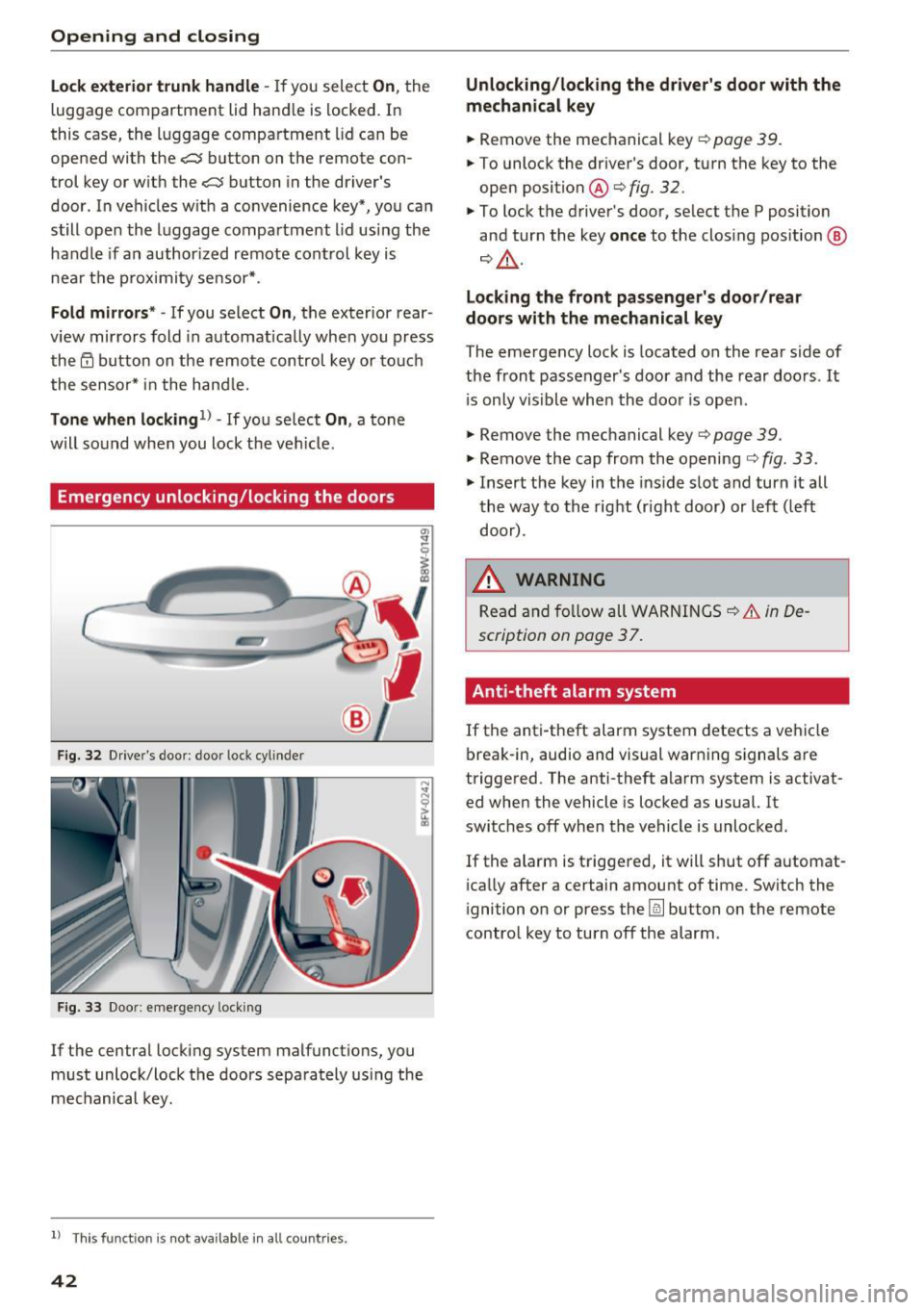
Emergency unlocking/locking the doors
Fig . 32 Drive r's door : door lock cylinder
Fig. 33 Doo r: eme rgency locking
If the central locking system malfunct ions, you
must unlock/lock the doors separately using the
mechanical key.
l) This fun ctio n is not availab le in all c ount ries.
42
Unlocking/locking the driver's door with the
mechanical key
... Remove the mechanical key¢ page 39.
... To unlock the driver's door, turn the key to the
open position @¢fig .
32.
... To lock the driver's door, select the P position
and turn the key
once to the clos ing position @
¢&, .
Locking the front passenger's door /rear
doors with the mechanical key
The emergency lock is located on the rear side of
the front passenger 's door and the rear doors . It
i s only visible when the door is open.
... Remove the mechanical key¢
page 39.
... Remove the cap from the opening ¢ fig. 33 .
... Insert the key in the inside slot and turn it all
the way to the right (right door) or left (left
door) .
.&_ WARNING
Read and follow all WARNINGS~.&. in De
scription on page 3
7.
Anti-theft alarm system
If the anti-theft alarm system detects a vehicle
break-in, audio and visual warning signals are
triggered. The anti -theft alarm system is activat
ed when the vehicle is locked as usual. It
switches off when the vehicle is unlocked.
If the alarm is triggered, it will shut off automat
ically after a certain amount of time. Switch the
ignition on or press the @] button on the remote
control key to turn off the alarm .
Page 47 of 386
,&_ WARNING
After opening the luggage com partment lid
using the emergency release in vehicles with a
fixed rear seat backrest, make s ure the brack
et under the rea r bench seat loc ks sec urely in
to the mounting eyelet again.
Child safety Lock
-
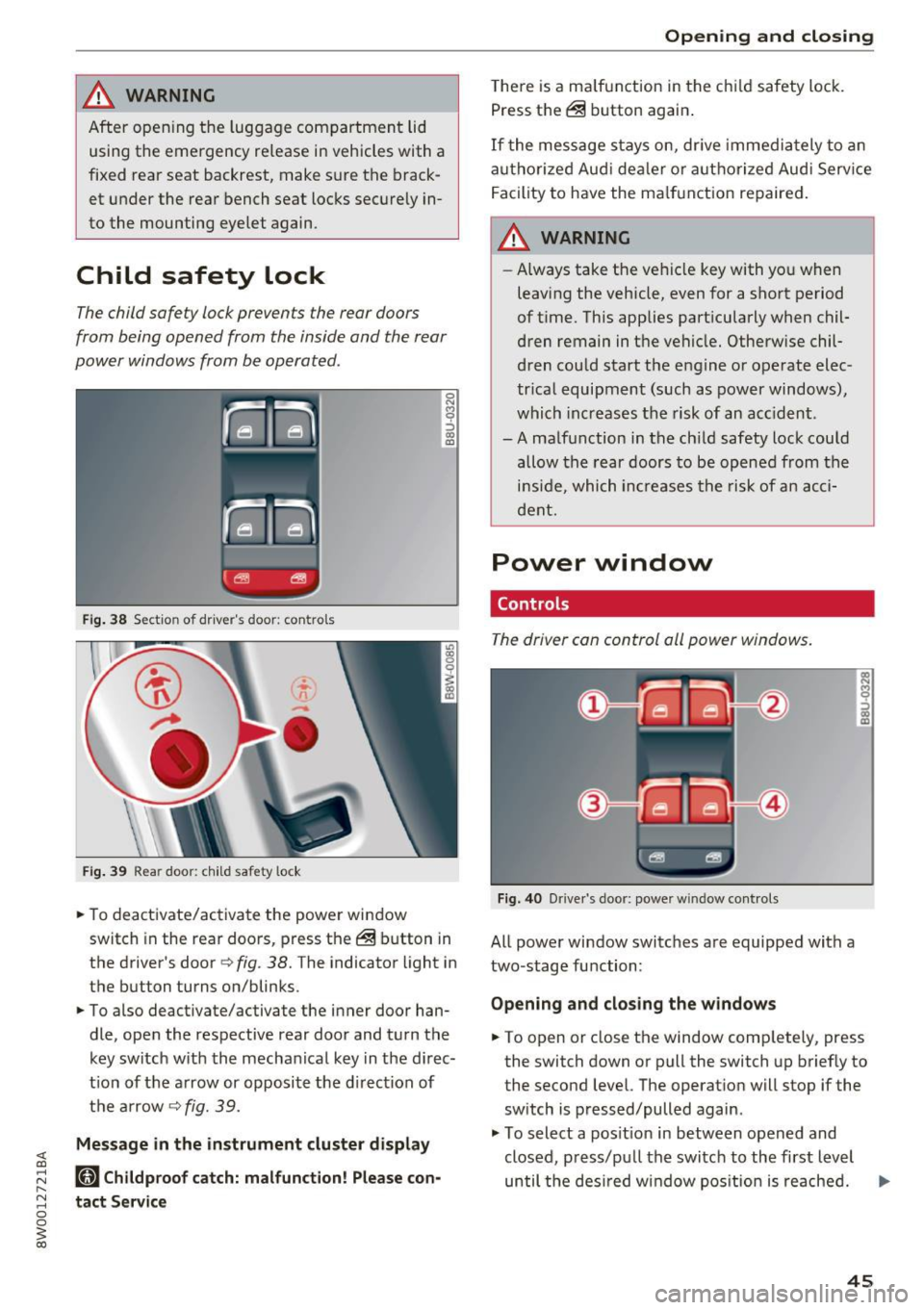
The child safety lock prevents the rear doors
from being opened from the inside and the rear
power windows from be operated.
F ig. 38 Section of driver's door: co ntrols
Fi g. 39 Rear door: child safety lock
0
N
9 :::, a, a,
"'To deactivate/ac tivate the power wi ndow
switch in the rear doo rs, press the @ button in
the driver's door
r=> fig . 38. The indicator light in
the button turns on/blinks.
"' To also deactivate/activate the inner door han
dle, open the respective rear door and turn t he
key switch w ith the mecha nical key in the d irec
t ion of the a rrow or opposi te the d irec tion of
t h e ar row
r=> fig. 39.
Message in the instrument cluster display
(81 Childproof catch: malfunction! Please con
tact Service
Open ing and closing
T he re is a ma lf u nction in the c hild safety lock.
Press th e @ button again .
If the me ssage s tay s on, dr ive immedia tely to an
a uth o rized Aud i de aler o r a uth o rized Aud i Serv ice
F acility to have the ma lf u n ction repaired .
,&_ WARNING
-Always take the ve hicl e key with yo u when
leavi ng the vehicle, even for a sho rt period
of t ime. This applies part icularly when chil
dren remain in t he vehicle. Otherwise chil
d ren cou ld start t he e ngine o r operate elec
tr ica l equipment (such a s power windows) ,
which inc reas es t he risk of an ac cident.
-A ma lf u nction in the ch ild safety lock cou ld
allow the rear doors to be opened from the
i n si de, which inc reases the ris k of an acc i
d ent.
Power window
Controls
The driver can control all power windows.
Fig. 40 Drive r's door: power w indow controls
All power window switc hes are equipped with a
two-stage fu nction:
Opening and clos ing the w indows
-
"' To open or close the window comp letely, press
the switch down or pull the switch up briefly to
the second level. The operat ion will stop if the
sw itch is pressed/pulled again.
"' To select a pos it ion in between opened and
closed, p ress/p ull the switch to the first level
until the des ired w indow pos ition is reache d. ..,.
45
Page 48 of 386
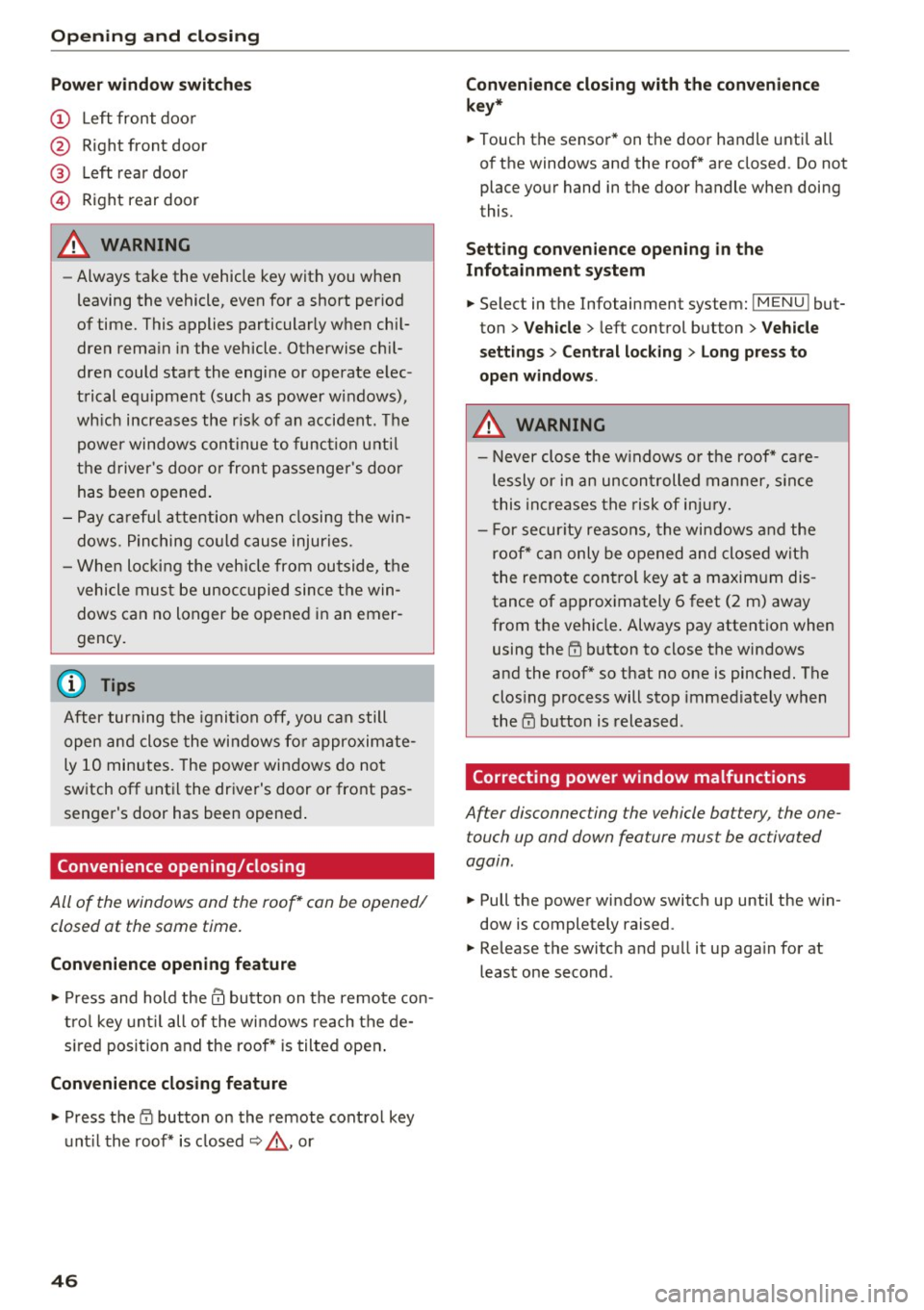
Opening and closin g
Pow er wind ow s witch es
® Left rear door
© Right rear door
A WARNING
- Always take the vehicle key with you when
leaving the vehicle, even for a short period
of time. This applies particularly when chil
dren rema in in the vehicle . Otherwise ch il
dren could start the engine or operate elec
trical equipment (such as power windows),
wh ich increases the r isk of an accident. The
power windows continue to function unti l
the driver 's door or front passenger 's doo r
has been opened .
- Pay carefu l attention when closing the win
dows . Pinching co uld cause injuries.
- When loc king the vehicle from outside, the
vehicle must be unoccupied since the win dows can no longer be opened in an emer
gency .
(D Tips
After turning the ignition off, you can still
open and close the windows for approximate
ly 10 minutes. The power windows do not
switch off unt il the driver's door or front pas
senger's door has been opened .
Convenience opening/closing
-
All of the windows and the roof* can be opened/
closed at the same time.
Conv eni ence opening feature
.,.. Press and hold them button on the remote con
tro l key unt il all of the windows reach the de
s ired position and the roof* is tilted open .
Conveni ence closing feature
.. Press the i'.D button on the remote control key
unt il the roof* is closed¢,& , or
4 6
Conveni ence closing with the convenience
k ey*
.. Touch the sensor* on the door handl e until all
of the windows and the roof* are closed . Do not
place your hand in the door handle when doing
this .
Setting conv en ience openin g in the
Infota inment system
.. Select in the Infotainment system: IMENU l but
ton
> Veh icle > left control button > V ehicle
se tting s
> Centr al lo cking > Lon g press to
op en windo ws.
A WARNING
-Never close the w indows or the roof* ca re
lessly or in an uncontrolled manner, s ince
this increases the risk of inju ry.
- For secur ity reasons, the windows and the
roof* can only be opened and closed with
the remote control key at a maxim um dis
tance of approximately 6 feet (2 m) away
from the vehicle . Always pay attention when
using the
rn button to close the windows
and the roof* so that no one is pinched. The
clos ing process will stop immediately when
the
l'.D button is released .
Correcting power window malfunctions
After disconnec ting the vehicle bat tery , the one
touch up and down fea ture mus t be ac tiva ted
again .
.. Pull the power window switch up until the win
dow is completely raised .
.. Release the switch and pull it up aga in for at
least one second .
-