brake AUDI S4 2017 Repair Manual
[x] Cancel search | Manufacturer: AUDI, Model Year: 2017, Model line: S4, Model: AUDI S4 2017Pages: 386, PDF Size: 96.32 MB
Page 348 of 386
Emerg ency assis ta nce
The vehicle jack mode* switches off automatical
ly at speeds above 6 mph (10 km/h).
A WARNING
If you are changing a tire on a steep hill, use a
block or similar object to block the opposite
wheel to prevent the vehicle from moving.
A WARNING
You or your passengers could be injured wh ile
chang ing a wheel if you do not follow these
safety precautions :
- If you have a flat t i re, move a safe d ista nee
off the road . Turn off the engine, turn the
emergency flashers on and use other warn
ing devices to alert other motorists.
- Make s ure that passengers wa it in a safe
place away from the vehicle and well away
from the road and traffic.
- To help prevent the vehicle from moving
suddenly and possibly slipp ing off the jack,
always fully set the parking brake and block
the wheel diagona lly oppos ite the wheel be
ing changed with the folding chocks or oth
er objects . When one front wheel is lifted
off the ground, placing the Automatic
Transmission in "P" (Park) will
not prevent
the vehicle from moving.
- Before you change a wheel, be sure the
ground is level and firm. If necessary, use a
sturdy board under the jack.
- Always store the veh icle tool k it, the jack
and the replaced tire in the luggage com
partment
c::> page 242.
@ Tips
Obey all laws.
346
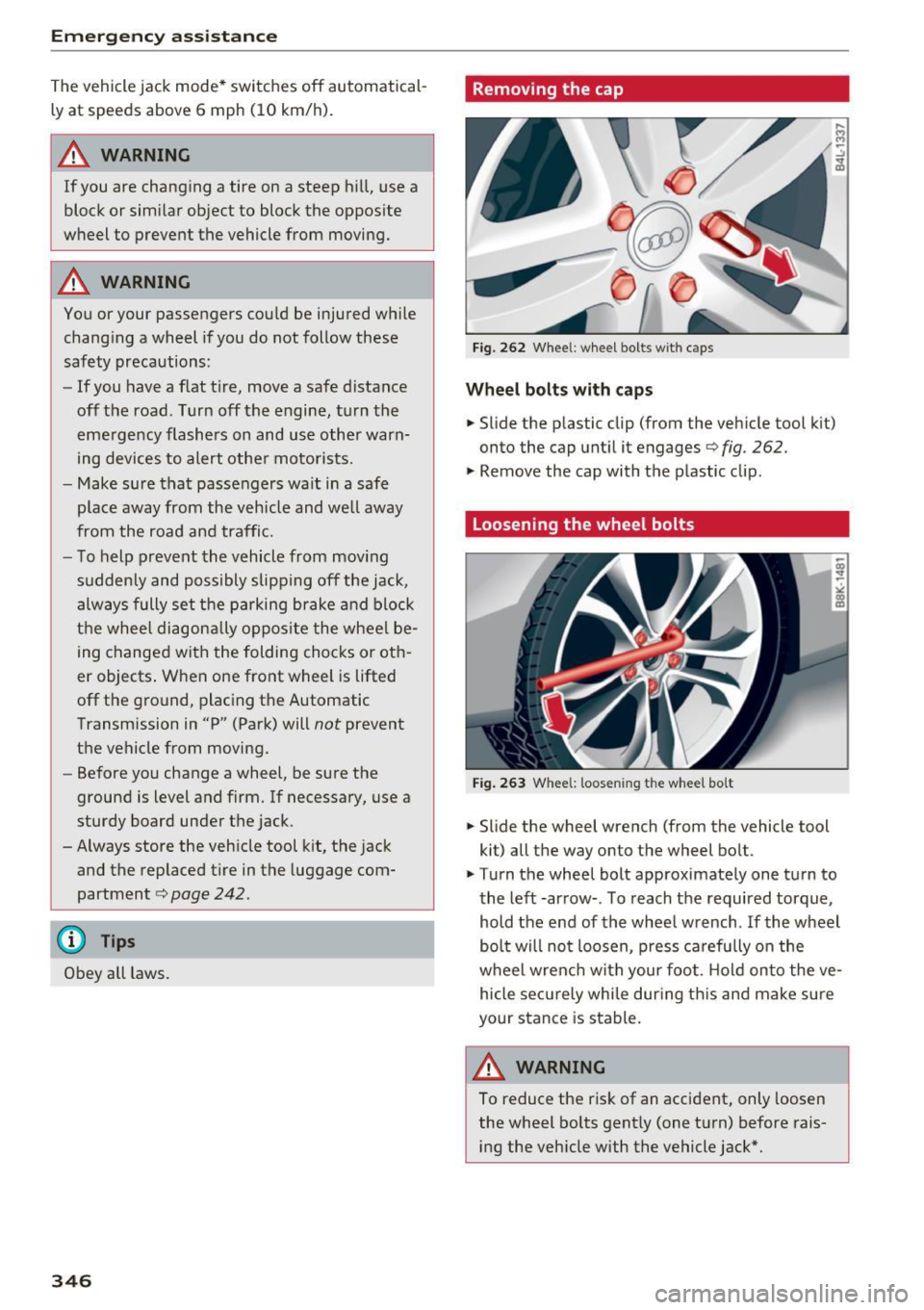
Removing the cap
Fig. 262 Whee l: wheel bolts with c aps
Whee l bolts with cap s
.. Slide the p lastic clip (from the vehicle tool k it)
onto the cap until it engages
c::> fig . 262.
.,. Remove the cap with the plastic clip.
Loosening the wheel bolts
Fig . 263 Whee l: loosen ing t he whee l bolt
.. Slide the wheel wrench (from the vehicle tool
kit) all the way onto the wheel bolt .
.. Turn the wheel bolt approximately one turn to
the left -arrow- . To reach the required torque,
hold the end of the wheel wrench . If the wheel
bolt will not loosen, press ca refu lly on the
wheel wrench with your foo t. H old onto the ve
hicle securely whi le dur ing th is and make sure
your stance is stable.
A WARNING
To reduce the risk of an accident, only loosen
the wheel bolts gent ly (one turn) before rais
i ng the veh icle with the vehicle jack*.
Page 350 of 386

Emergency assistance
Removing and installing a wheel
Fig. 266 Wheel: internal hex socket to turn the whee l
bolts
Fig. 267 Whee l: alignment pin in the top ho le
Removing a wheel
., Remove the top wheel bolt complete ly using
the hex socket in the screwdriver hand le (in the
vehicle tool kit)
c::> fig. 266 and place it on a
clean surface .
., Install the alignment pin (from the vehicle tool
kit) by hand into the empty hole
c::> fig. 267 .
., Remove the rest of the wheel bolts.
., Remove the wheel. The alignment pin remains
in the hole while doing this.
Install a wheel
Read the directions on c:> page 348 when instal
ling unidirectional tires.
., Slide the wheel on over the alignment pin.
., Install the wheel bolts and tighten gent ly using
the hex socket.
., Remove the alignment pin and also tighten the
remaining wheel bo lt .
., Carefully lower the vehicle using the vehicle
jack* .
., Tig hte n the wheel bolts i n a diagona l pattern
using the wheel wren ch.
348
The wheel bolts must be clean and loosen/tight
en easily . Check the contact surfaces for the
wheel and hub. Contam inants on these surfaces
must be removed before installing the wheel.
A WARNING
Never use the hex socket in the screwdriver
handle or the hex socket wrench w ith the
ratchet to loosen or tighten the wheel bolts.
This increases the risk of an accident, because
you will not reach the tightening specification
required.
(D Note
When removing or instal ling the wheel, the
r im could hit the brake rotor and damage t he
rotor. Work carefully and have a second per
son help yo u.
@ Tips
- When mounting tires with unidirectional
tread design
make sure the tread pattern is
pointed the right way
c::> page 348.
- The wheel bolts should be clean and easy to
turn. Check for dirt and corrosion on the
mati ng surfaces of both the wheel and the
hub. Remove all dirt from these sur faces be
fore remounting the whee l.
Unidirectional tires
A unidirectional tire profile is identified by arrows
that point in the running direction on the tire
s idewall. You must always adhere to the speci
fied running direction . Th is is necessary ensure
the tire's opt imum performance in regard to ad
hesion, running noise, friction and hyd roplaning.
To benefit fully from the advantages of the uni
directional tire design, you should replace faulty
tires as soon as possible and restore the correct
r un ning direction on all of the tires.
Finishing
., Re install the caps on the wheel bolts if neces
sary .
., Store the vehicle tool kit in its designated
place . ..,.
Page 355 of 386
<( a, .... N ,....
N .... 0 0
3 a,
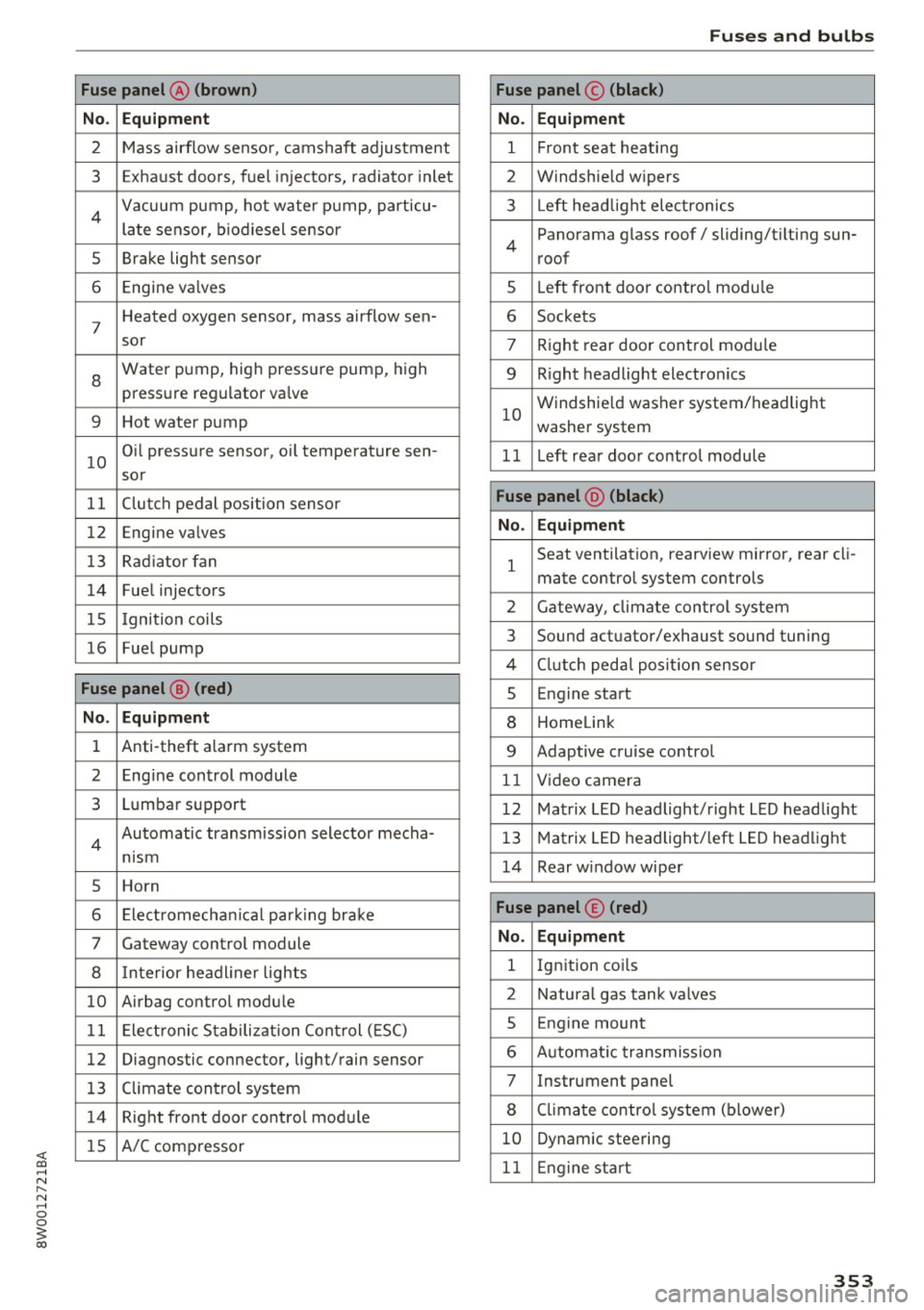
Fuse panel @ (brown)
No . Equipment
2 Mass airflow sensor, camshaft adjustment
3 Exhaust doors, fuel in jectors, radiator inlet
4 Vacuum pump, hot water pump, particu -
late senso r, biodiesel sensor
5 Brake light sensor
6 Engine va lves
7
Heated oxygen sensor, mass airflow sen-
sor
8
Water pump, high pressure pump, high
pressure regulator va lve
9 Hot water pump
10
Oil pressure sensor, oi l temperature sen-
sor
11 Clutch pedal position sensor
12 Engine valves
13 Radiator fan
14 Fuel injectors
15 I gnition coils
16 Fuel pump
Fuse panel @ (red)
No . Equipment
1 Anti-theft alarm system
2 Engine control module
3 Lumbar support
4
Automatic transmission selector mecha-
nism
5 Horn
6 Electromechan ical park ing brake
7 Gateway control module
8 I nterior headl iner lights
10 Airbag control module
11 Electronic Stabilization Control (ESC)
12 Diagnostic connector, light/rain sensor
13 Climate control system
14 Right front door control module
15 A/C compressor
Fuses and bulbs
Fuse panel © (black)
No . Equipment
1 Front seat heating
2 Windshield w ipers
3 L eft head light electronics
4
Panorama glass roof/ sliding/t ilting sun-
roof
5 L eft front door control module
6 Sockets
7 Right rear door control module
9 Right headlight electronics
10
Windshield washer system/headlight
washer system
1 1 Left rear door control module
Fuse panel @ (black)
No . Equipment
1
Seat ventilation, rearv iew mirror, rear cl i-
mate control system controls
2 Gateway , climate control system
3 Sound actuator/exhaust sound tuning
4 Clutch pedal pos ition sensor
s Engine start
8 Homelink
9 Adaptive cruise control
11 Video camera
12 Matrix LED headlight/right LED headlight
13 Matrix LED headlight/left LED headlight
14 Rear window wiper
Fuse panel © (red)
No . Equipment
l Ignition coi ls
2 Natural gas tank valves
5 Engine mount
6 Automat ic transmission
7 Instrument panel
8 Cli mate control system (blower)
10 Dynamic steering
11 Engine start
353
Page 359 of 386
When jump starting or charging the battery,
never connect the negative ground cable to
the battery negative post because the battery
manager system must be able to detect the
battery's state of charge . Always connect the
negative ground cable to the negat ive ground
post of the battery manager control unit .
Using the jump start
cable
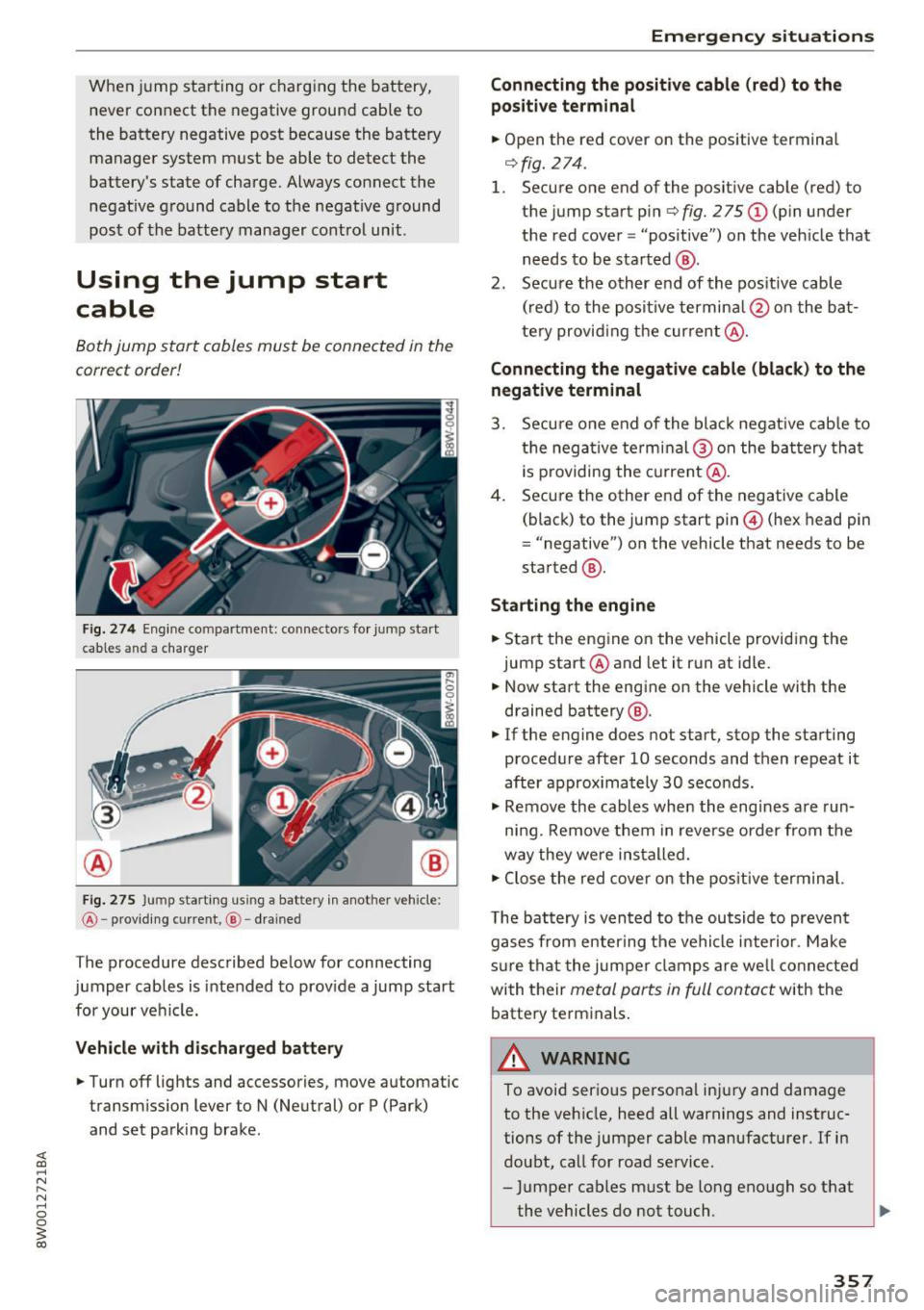
Both jump start cables must be connected in the
correct order!
Fig. 274 Engine co mpa rtment: connecto rs for jump start
cables and a charger
@
Fig. 275 Ju mp sta rting us ing a battery in another vehicle:
@ -providing cu rre nt, @ - drained
The procedure described below for connecting
jumper cables is intended to provide a jump start
for your vehicle.
Vehicle with discharged battery
.. Turn off lights and accessories, move automatic
transmission lever to N (Neutral) or P (Park)
and set parking brake .
Emergency situations
Connecting the positive cable (red) to the
po sitive terminal
.. Open the red cover on the positive terminal
r=>fig.274 .
1. Secure one end of the positive cable (red) to
the jump start pin
r=> fig. 275 (D (pin under
the red cover = "posit ive") on the vehicle that
needs to be started @.
2. Secure the other end of the pos itive cable
(red) to the positive termina l@ on the bat
tery provid ing the current @.
Connecting the negative cable (black) to the
negative terminal
3. Secure one end of the black negat ive cab le to
the negative terminal @on the battery that
i s p roviding the current@.
4. Secure the other end of the negative cable
(black) to the jump start pin@ (hex head pin
= "negative") on the vehicle that needs to be
started @.
Starting the engine
.. Start the engine on the vehicle providing the
jump start @and let it run at idle .
.. Now start the engine on the vehicle with the
drained battery @ .
.. If the engine does not start, stop the starting
procedure after 10 seconds and then repeat it
after approx imately 30 seconds .
.. Remove the cables when the engines are run
ning. Remove them in reverse order from the
way they were installed.
.. Close the red cover on the positive terminal.
T he battery is vented to the outside to prevent
gases from enter ing the vehicle interior . Make
s ur e that the jumper clamps are well connected
with their
metal ports in full contact with the
battery terminals.
_& WARNING
-To avoid serious personal injury and damage to the vehicle, heed all warnings and instruc
tions of the jumper cable manufacturer. If in
doubt, call for road service.
- Jumper cables must be long enough so that
the vehicles do not touch . ..,_
357
Page 360 of 386
Emergency situations
-When connecting jumper cables, make sure
that they cannot get caught in any moving
parts in the engine compartment.
- Do not bend over the batteries -danger of
chemical burns!
- The battery cell locking screws must be
tightened securely.
- Before you check anything in the engine
compartment, always read and heed all
WARNINGS
c> page 304.
(D Note
Improper hook-up of jumper cables can ruin
the generator.
- Always connect POSITIVE(+) to POSITIVE
(+), and NEGATIVE(-) to NEGATIVE(-)
ground post of the battery manager control
unit.
- Check that all screw p lugs on the battery
cells are screwed in firmly. If not, tighten
plugs prior to connect ing clamp on negative
battery terminal.
- Please note that the procedure for connect
i ng a jumper cable as described above ap
plies specifically to the case of your vehicle
being jump started . When you are giving a
ju mp start to another vehicle, do
not con
nect the negative (-) cable to the negative
(-) terminal on the discharged batte ry @
c> fig. 2 75. Instead, securely connect the
negative( -) cab le to either a solid metal
component that is firm ly bolted to the en
gine block or to the engine block itself. If
the battery that is being charged does not
vent to the outside, escap ing battery gas
could ignite and explode!
Towing with a tow truck
General hints
Your Audi requires special handling for towing.
The following information is to be used by com
mercial tow truck operators who know how to op
erate the ir equipment safely.
-Never tow your Audi, towing will cause dam
age to the engine and transmission.
358
-Never wrap the safety chains or winch cables
around the brake lines .
- To prevent unnecessary damage, your Audi
must be transported with a flat bed truck .
- To load the vehicle on to the flat bed, use the
towing loop found in the vehicle tools and at
tach to the front or rear anchorage
i:> page 358 and c> page 359 .
A WARNING
A vehicle being towed is not safe for passen
gers. Never allow anyone to ride in a vehicle
being towed, for any reason.
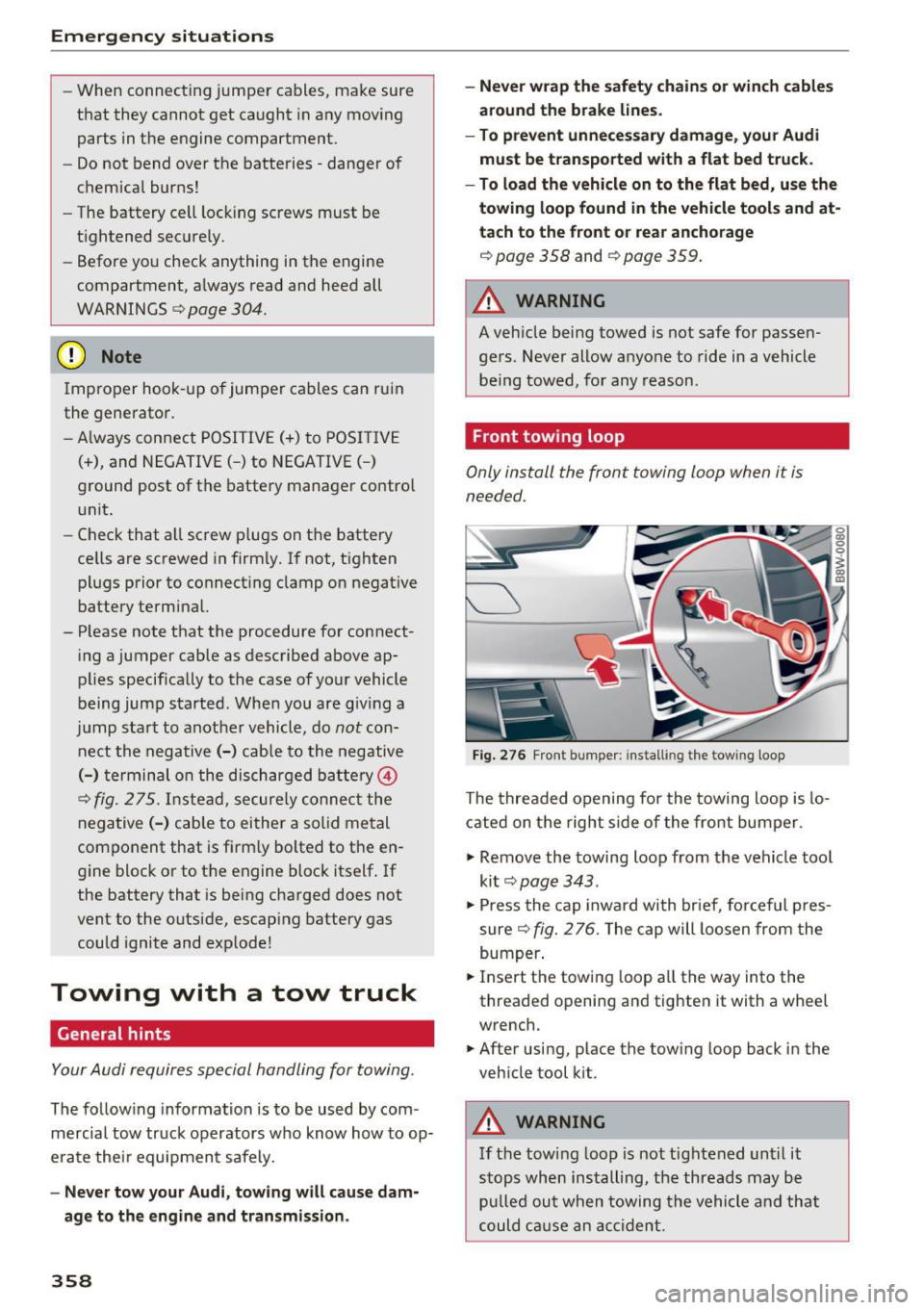
Front towing loop
Only install the front towing loop when it is
needed.
Fig. 276 Front bumper: installing the towing loop
The threaded opening for the towing loop is lo
cated on the right s ide of the front bumper.
.,. Remove the towing loop from the vehicle too l
ki t
c> page 343 .
.,. Press the cap inward with brief, forceful p res
sure
c> fig. 2 76. The cap will loosen from the
bumper .
.,. Insert the towi ng loop all the way into the
threaded opening and tighten it with a wheel
wrench.
.,. After using, place the towing loop back in the
vehicle tool kit .
A WARNING
If the towing loop is not tightened until it
stops when installing, the threads may be
pulled out when towing the vehicle and that
could cause an accident.
-
Page 367 of 386
<( a, .... N ,....
N .... 0 0
3 a,
@ For the sake of the environment
-Changing the engine settings will adversely
affect emission levels. This is detrimental to
the environment and increases fuel con
sumption.
- Always observe environmental regulations
when disposing of old engine oil, used brake
fluid, dirty engine coolant, spent batteries
or worn out tires .
- Undeployed airbag modules and pretension
ers might be classified as Perchlorate Mate
rial -special handling may apply, see
www .dtsc.ca.gov/hazardouswaste/perchlo
rate . When the vehicle or parts of the re
straint system including airbag modules
safety belts with pretensioners are scrap
ped, all applicable laws and regulations
must be observed. Your authorized Audi
dealer is familiar with these requirements
and we recommend that you have your deal er perform this service for you.
Accessories and
technical changes
Additional accessories and parts replacement
Always consult an authori zed Audi dealer before
purchasing accessories.
Your vehicle incorporates the latest safety design
features ensuring a high standard of active and passive safety.
Th is safety could be compromised by non-ap
proved changes to the vehicle. For this reason, if
parts have to be replaced, please observe the fol
lowing points when installing additional accesso
ries :
Approved Audi accessories and genuine Audi parts are available from authorized Audi dealers.
These dealers also have the necessary facilities, tools and trained specialists to install the parts
and accessories properly .
Consumer information
A WARNING
Using the wrong spare parts or using non-ap
proved accessories can cause damage to the
vehicle and serious personal injury.
- Use only accessories expressly approved by
Audi and genuine Audi spare parts
- These parts and accessories have been spe
cially designed to be used on your vehicle.
- Never install accessories such as telephone
cradles or beverage holders on airbag covers
or within the airbag deployment zones . Do
ing so will increase the risk of injury if air
bags are triggered in an accident!
- Before you check anything in the engine
compartment, always read and heed all
WARNINGS
9 page 304.
(D Note
- If items other than genuine Audi spare
parts, add-on equipment and accessory
items are used or if repair work is not per
formed according to specified methods, this
can result in severe damage to your vehi
cle's engine and body (such as corrosion)
and adversely affect your vehicle's warranty.
- If emergency repairs must be performed
elsewhere, have the vehicle examined by an
authorized Audi dealer as soon as possible.
- The manufacturer cannot be held liable for
damage which occurs due to failure to com
ply with these stipulations.
Technical Modifications
Our guid elines must be complied with when t ech
nical modifications are made.
Always consult an authorized Audi dealer before
starting work on any modifications.
This will help ensure that vehicle function, per
formance and safety are not impaired
9 ,& .
Attempting to work on electronic components
and the software used with them can cause mal
functions. Because of the way electronic compo
nents are interconnected with each other, such
malfunctions can also have an adverse affect on
other systems that are not directly involved. This ..,.
365
Page 370 of 386
Index
Audi connect ( Infotainment) .. ... .. . 172, 178
Data protection
Pe rsonal hotspot 179
172
Services overv iew . . . . . . . . . . . . . . . . . . . . 173
Starting . . . . . . . . . . . . . . . . . . . . . . . . . . . 173
Aud i d rive select
refer to Drive select . . . . . . . . . . . . . . . . . . 121
Aud i Enterta inment mobi le ...... .... .. . 217
Aud i mus ic interface ............ .... .. . 215
Aud i m usic s tream
refer to Wi -Fi . . . . . . . . . . . . . . . . . . . . . . . 213
Aud iofi les ..... .. ................ ... . 217
Aud io player
Bluetooth audio pl ayer . . . . . . . . . . . . . . . 212
W i-F i aud io player . . . . . . . . . . . . . . . . . . . 213
Audio track 220
Aud i Serv ice Repair Man uals and Lite rature 363
Aud i smar tphone interface ...... ... 227,231
Aud i virtual cockp it
refer to Instr ument cluster . . . . . . . . . . . . . 10
AUTO Automatic headlights . . . . . . . . . . . . . . . . . SO
Climate con trol system . . . . . . . . . . . . . . . . 70
Auto Lock (central locking system) . . . . . . . . 3 7
Automatic belt ret ractor . . . . . . . . . . . . . . . 248
Automatic transm ission . . . . . . . . . . . . . . . . . 83
E me rgency mode . . . . . . . . . . . . . . . . . . . . . 87
H ill descent contro l . . . . . . . . . . . . . . . . . . . 85
Kick -down . . . . . . . . . . . . . . . . . . . . . . . . . . . 87
Launch contro l program . . . . . . . . . . . . . . . 87
Manual sh ifting . . . . . . . . . . . . . . . . . . . . . . 86
Parking lock emergency re lease . . . . . . . . . 89
Selector lever pos itions . . . . . . . . . . . . . . . . 83
Automatic wipe/wash system . . . . . . . . . . . . 56
Auto Safety Hotline . . . . . . . . . . . . . . . . . . . 243
Auxiliary heater (climate control system) . . . 71
AUX inp ut . .. .. .. ............. .... .. . 215
Average consumption . . . . . . . . . . . . . . . . . . . 16
Average speed . . . . . . . . . . . . . . . . . . . . . . . . 1 6
Avoid damaging the vehicle . . . . . . . . . . . . . . 73
B
BACK button
Balance (sound)
Basic
Bass (sound)
368
141
233 108
233 Battery .
... .. .. .. .. .. ... . .. .... ... .. 312
Battery location inside the luggage compart-
ment . . . . . . . . . . . . . . . . . . . . . . . . . . . . . . 313
Charge leve l . . . . . . . . . . . . . . . . . . . . . . . . 138
Charging . . . . . . . . . . . . . . . . . . . . . . . . 31, 314
E nergy management . . . . . . . . . . . . . . . . . 138
Impo rtant warnings when working on the
batte ry . . . . . . . . . . . . . . . . . . . . . . . . . . . . 313
Ind icator lig ht . . . . . . . . . . . . . . . . . . . . . . . 31
Jump start ing . . . . . . . . . . . . . . . . . . . . . . . 356
Replacing . . . . . . . . . . . . . . . . . . . . . . . . . . 315
Winter operation ... .. ... . .. .... ... . .
Working on the battery . ... .. .... ... . .
Befo re dr iv ing
Be lt tens ioner
. .. .. .. .. ............. ..
B lended gasoline . ... .. .. .. .. .... ... . .
Blind
......... ... ... ............. ....
3 12
313
236
251
296
56
B lower (climate control system) . . . . . . . . . . 70
B luetoot h
Audio p layer . . . . . . . . . . . . . . . . . . . . . . . . 2 12
Connecting a cell phone . . . . . . . . . . . . . . 160
Settings . . . . . . . . . . . . . . . . . . . . . . . . . . . 231
Booster seats
Brake flu id 28
7
Changi ng the brake flu id .. ... .... ... .. 311
Check ing the brake fluid level ......... . 311
Brakes Ind icator light . . . . . . . . . . . . . . . . . . . . . . . 35
B rake system
B rake flu id
311
Brake fl uid spec ifications for refill and re
placement . . . . . . . . . . . . . . . . . . . . . . . . . 311
Fluid reservo ir . .. .. .. ............. .. 311
B raking . . . . . . . . . . . . . . . . . . . . . . . . . . . . . 136
A utomat ic post-collision braking system . 134
Brake assist system . . . . . . . . . . . . . . . . . . 134
Brake booster . . . . . . . . . . . . . . . . . . . . . . . 136
E me rgency braking function . . . . . . . . . . . . 82
Ind icator light . . . . . . . . . . . . . . . . . . . . 29, 33
New brake pads . . . . . . . . . . . . . . . . . . . . . 136
Parking brake . . . . . . . . . . . . . . . . . . . . . . . . 81
Wo rn brake pads . . . . . . . . . . . . . . . . . . . . . 33
Braking in New brake pads 136
B re aking in
New engine . . . . . . . . . . . . . . . . . . . . . . . . . 73
New ti res . . . . . . . . . . . . . . . . . . . . . . . . . . 324
Page 373 of 386
Switching displays . . . . . . . . . . . . . . . . . . . . 12
View . . . . . . . . . . . . . . . . . . . . . . . . . . . . . . . 14
Driver Information System . . . . . . . . . . . . . . 16
Service interval display ...... .. .. .... . 316
Driver seat
refer to Seating position . . . . . . . . . . . . . . 237
Driver's door (indicator light) . . . . . . . . . . . . . 35
Drives
refertoMed ia ............... .. .
209,217
Drive select . . . . . . . . . . . . . . . . . . . . . . . . . . 121
Driving economically . . . . . . . . . . . . . . . . . . . 73
Driving safely . . . . . . . . . . . . . . . . . . . . . . . . 236
Driving through water . . . . . . . . . . . . . . . . . . 73
Driving time . . . . . . . . . . . . . . . . . . . . . . . . . . 16
DVD drive (media dr ives) . ..... ... ... .. . 210
Dynamic steering
Indicator light
Dynamic volume 121
137
refer to System volume . . . . . . . . . . . . . . . 234
E
E-mail
E . l conom1ca route ............ ... ... .. .
166
194
eco (climate control system) . . . . . . . . . . . . . 69
EDL
refer to Electronic Differentia l Lock . . . . . 134
Electromechanical parking brake
refer to Parking brake . . . . . . . . . . . . . . . . . 81
Electromechanical power steering . . . . . . . 137
Indicator light . . . . . . . . . . . . . . . . . . . . . . 13 7
E lectronic differential lock . . . . . . . . . . . . . .
134
Electronic Differential Lock
Indicator light . . . . . . . . . . . . . . . . . . . . . . .
32
Electronic immobilizer . . . . . . . . . . . . . . . . . . 38
Electronic Stabilization Control . . . . . . . . . . 134
Indicator light . . . . . . . . . . . . . . . . . . . . . . . 32
Sport mode . . . . . . . . . . . . . . . . . . . . . . . . 135
Emergency assistance . . . . . . . . . . . . . . . . . 343
Emergency call
Audi connect emergency call and service .
184
Emergency flashers . . . . . . . . . . . . . . . . . . . . 53
Indicator light . . . . . . . . . . . . . . . . . . . . . . . 36
<( ~ Emergency locking the front passenger's door .42
N ~ Emergency starting . . . . . . . . . . . . . . . . . . . 356
.... 0 0
3
Emissions control system
Catalytic converter . . . . . . . . . . . . . . . . . . .
303
Diesel particulate filter . . . . . . . . . . . . . . . 303
Emissions data . . . . . . . . . . . . . . . . . . . . . . . 361
Energy consumers . . . . . . . . . . . . . . . . . . . . . 17
Energy management . . . . . . . . . . . . . . . . . . 138
Indicator light . . . . . . . . . . . . . . . . . . . . . . . 31
Engine
Coolant . . . . . . . . . . . . . . . . . . . . . . . . . . . .
310
preheating . . . . . . . . . . . . . . . . . . . . . . . . . . 76
Start/Stop system . . . . . . . . . . . . . . . . . . . . 78
starting . . . . . . . . . . . . . . . . . . . . . . . . . . . . . 76
Starting with jumper cables . . . . . . . . . . . 356
Stopping . . . . . . . . . . . . . . . . . . . . . . . . . . . . 76
Engine compartment
Closing the hood . . . . . . . . . . . . . . . . . . . .
305
Opening the hood . . . . . . . . . . . . . . . . . . . 305
Overv iew . . . . . . . . . . . . . . . . . . . . . . . . . . . 306
Safety precautions . . . . . . . . . . . . . . . . . . . 304
Engine control (indicator light) . . . . . . . . . . . 33
Engine oil . . . . . . . . . . . . . . . . . . . . . . . . . . . 306
adding . . . . . . . . . . . . . . . . . . . . . . . . . . . . 308
Chang ing . . . . . . . . . . . . . . . . . . . . . . . . . . 309
Checking oil leve l . . . . . . . . . . . . . . . . . . . . 308
Consumption . . . . . . . . . . . . . . . . . . . . . . .
308
Indicator light . . . . . . . . . . . . . . . . . . . . 32, 34
Oil consumption . . . . . . . . . . . . . . . . . . . . . 307
Oil grades . . . . . . . . . . . . . . . . . . . . . . . . . . 306
Specification and viscosity . . . . . . . . . . . . . 306
Engine sound . . . . . . . . . . . . . . . . . . . . . . . . 121
Engine speed limitation (indicator light) 34
Engine Start/Stop mode
refer to Start/Stop system . . . . . . . . . . . . . 80
Engine warm-up request
Indicator light . . . . . . . . . . . . . . . . . . . . . . .
34
Enhanced view .. .. .. ... ....... ... .. .. . 14
Entering characters/numbers (speller) ... . 148
Entering letters (speller) . . . . . . . . . . . . . . . 148
Entertainment sliding menu . . . . . . . . . . . . 146
Entry/exit lighting . . . . . . . . . . . . . . . . . . . . . 52
Environment
Proper disposal of drained brake fluid ...
311
Proper disposal of drained engine oil . . . . 309
Unleaded fuel . . . . . . . . . . . . . . . . . . . . . . . 296
Event Data Recorder (EDR) . . . . . . . . . . . . . 139
Exterior lighting . . . . . . . . . . . . . . . . . . . . . . . 50
External speech dialog system . . . . . . . . . . 159
371
Page 377 of 386
<( a, .... N ,....
N .... 0 0
3 a,
MP3
refer to Jukebox . . . . . . . . . . . . . . . . . . . . . 211
Multifunction steering wheel
Operating .. .. .. ........... .. .. ... 12, 15
Sw itching displays . . . . . . . . . . . . . . . . . . . . 12
Switching tabs . . . . . . . . . . . . . . . . . . . . 12, 15
Voice recognition system . . . . . . . . . . . . . . 14
Multi Media Interface . . . . . . . . . . . . . . . . . . 141
Music collec tion
referto)ukebox ... .. .. ....... .. .. .. . 211
Mute
r e fer to Muting . . . . . . . . . . . . . . . . . . . . . . 233
Muting .. .. .. .. ............. .. .. .. .. . 233
myAudi . .. .. .. ............... .. . 173,191
Logging in inside the vehicle . . . . . . . . . . . 173
PIN . . . . . . . . . . . . . . . . . . . . . . . . . . . . . . . 173
N
Natural leather care and cleaning . . . . . . . . 340
NAV/MAP button . . . . . . . . . . . . . . . . . . . . . 187
Navigation . . . . . . . . . . . . . . . . . . . . . . . . . . . 187
Announcements . . . . . . . . . . . . . . . . . . . . . 196
Driver information system . . . . . . . . . . . . . . 22
also refer to Map . . . . . . . . . . . . . . . . . . . . 196
Navigation (instrument cluster) .... 19, 20, 21
Net . . . . . . . . . . . . . . . . . . . . . . . . . . . . . . . . . 64
Network connection (W i-F i) . . . . . . . . . . . . . 177
NHTSA Contacting . . . . . . . . . . . . . . . . . . . . . . . . . 243
Nitrogen oxide (NOx) catalytic converter
re fer to Ad Blu e . . . . . . . . . . . . . . . . . . . . . . 300
Number of seats . . . . . . . . . . . . . . . . . . . . . . 245
0
Occupant protection . . . . . . . . . . . . . . . . . . . 107
Occupant seating positions . . . . . . . . . . . . . 237
Octane rating . . . . . . . . . . . . . . . . . . . . . . . . 296
Odometer . . . . . . . . . . . . . . . . . . . . . . . . . . . . 12
OFF (climate control syst em) . . . . . . . . . . . . . 69
O il
refer to Engine oil . . . . . . . . . . . . . . . . . . . 306
On-board computer . . . . . . . . . . . . . . . . . . . . 16
On-Board Diagnostic System (OBD)
Data Link Connector (DLC) . . . . . . . . . . . . . . 26
E lectronic speed limiter. . . . . . . . . . . . . . . . 93
Index
On/Off knob (MMI) . . . . . . . . . . . . . . . . . . . . 141
On Board Diagnostic System (OBD) Malfunction indicator lamp (MIL) . . . . . . . . 25
Online Audi Service enquiry Audi connect emergency call and service 186
Online destinations
refer to Point of interest search . . . . . . . . 190
Online map . . . . . . . . . . . . . . . . . . . . . . . . . . 199
Online map upd ate . . . . . . . . . . . . . . . . . . . . 200
Online media. ..... .. ................ . 214
Online roads ide assistance
Audi connect emergency call and service 185
Online services
refer to Audi connec t (Info tainment) . . . . 172
Opening..... ..... .. ................ .. 37
Fuel filler door . . . . . . . . . . . . . . . . . . . . . . 298
Operat ing
Mult ifunct ion steering wheel . . . . . . . . 12, 15
Multi Media Interface . . . . . . . . . . . . . . . . 142
Voice recognition system . . . . . . . . . . . . . 153
Options menu ..... .. .......... 13, 143, 147
Other equipment . . . . . . . . . . . . . . . . . . . . . . 17
Outs ide mirrors . . . . . . . . . . . . . . . . . . . . . . . . 54
Outside temperature display . . . . . . . . . . . . . 10
Overvi ew (cockpit) . . . . . . . . . . . . . . . . . . . . . . 8
p
Paint damage
Paint number
Parental control 339
361
DVD .. .... .. .. .. .. ............... .. 220
Parking aid
Cleaning sensors/camera . . . . . . . . . . . . . 338
Parking brake . . . . . . . . . . . . . . . . . . . . . . . . . 81
Emergency braking function . . . . . . . . . . . . 82
Indicator light . . . . . . . . . . . . . . . . . . . . . . . 30
Parking . . . . . . . . . . . . . . . . . . . . . . . . . . . . . 81
Releasing/setting . . . . . . . . . . . . . . . . . . . . 81
Starting from a stop . . . . . . . . . . . . . . . . . . 82
Starting to drive w ith a trailer . . . . . . . . . . . 82
also refer to Parking brake . . . . . . . . . . . . . 81
Parking lights . . . . . . . . . . . . . . . . . . . . . . . . . 50
Parking location Audi connect vehicle control . . . . . . . . . . . 182
375