wheel AUDI S4 2018 Owners Manual
[x] Cancel search | Manufacturer: AUDI, Model Year: 2018, Model line: S4, Model: AUDI S4 2018Pages: 403, PDF Size: 66.81 MB
Page 368 of 403
a co .... N ,....
N .... 0 0
3 co
-Always store damaged wheel, jack* and
tools securely in the luggage compartment.
Otherwise, in an accident or sudden maneu
ver they could fly forward, causing injury to
passengers in the vehicle.
Space-saving spare tire
App lies to: ve hicles with space-saving spare t ire (co mpact
spare tire)
The spare tire is intended for short -term use on
ly. Have the damaged tire checked and replaced,
if necessary, by an authorized Audi dealer or au
thorized Audi Service Facility as soon as possible.
There are some restrictions on the use of the
compact spare tire . The compact spare tire has
been designed specifically for your type of vehi
cle. Do not replace it with the spare tire from an
other type of vehicle.
The compact spare tire is located in the luggage
compartment under the cargo f loor cover
c::>page360.
The tire pressure must be 61 PSI (420 kPA).
Snow chains
For technical reasons, the use of snow chains on
the compact spare tire is not permitted.
If you have to drive with snow chains and a front
tire fails, mount the spare t ire in place of a rear
tire. Install the snow chains on the rear tire that
you removed, and insta ll that in place of the
front tire that failed.
A WARNING
-After installing a spare tire, the tire pres
sure must be checked as soon as possible.
-Do not drive faster than 50 mph (80 km/h)
with a compact spare tire. Driving faster
than that increases the risk of an accident.
-T o reduce the risk of an accident, avoid full
thrott le acceleration, heavy braking, and
fast cornering with the compact spare tire.
-To reduce the risk of an accident, never drive
with more than one compact spare tire.
-Normal summer or winte r tires must not be
mounted on the compact spare wheel rim.
Emergency assistance
Collapsible spare tire
Applies to: vehicles with collapsible spare tire
The collapsible spare tire is intended for short
term use only . Have the damaged tire checked
and rep laced, if necessary, by an authorized A udi
dealer or authorized Audi Service Facility as soon
as possible.
There are some restrictions on the use of the co l
l apsible spare tire. The collapsible spare tire has
been designed spec ifically for your type of vehi
cle. Do not replace it with the collaps ible spare
t ir e from another type of vehicle .
The co llapsible spare tire is located in the lug
gage compartment under the cargo floor cover.
Requirement: the vehicle too l kit
c::> page 360 and
the compressor must be laid out .
Removing
"' Remove the cargo floo r cover c::> page 360,
fig. 279.
"' Turn the handwheel counter-clockwise and re-
move it.
"' Remove the co llapsible spare tire.
You must inflate the collapsible spare tire be
fo rehand in order to use it.
Inflating
"' Remove the valve cap from the collapsible
spare tire.
"'Tighten the comp ressor hose on the collapsible
spare tire valve.
"'Connect the comp ressor hose to a vehicle soc k
et and switch it on .
"'Let the compressor run until the specified value
on the tire pressure sticker is reached
c::> page 344, fig. 277 c::>(D.
"'Screw the valve cap back onto the valve.
Returning to storage
"'R emove the valve cap to drain the air .
"'Wait severa l hours before placing the collapsi
ble spare tire in the spare wheel well. Only then
w ill it fold down comp letely so that you can
store it securely .
"' Then screw the valve cap back onto the valve . ..,_
367
Page 372 of 403

a co .... N ,....
N .... 0 0
3 co
Fuse panel @ (brown)
No . Equipment
2
Mass airflow sensor, camshaft adjust-
ment, charge air cooler pump
3 Exhaust doors, fuel injectors, radiator inlet
4 Vacuum pump, hot water pump, particu-
late sensor, biodiesel sensor
5 Brake light sensor
6 Engine va lves, camshaft adjustment
7
Heated oxygen sensor, mass airflow sen-
sor
8
Water pump, high pressure pump, high
pressure regulator va lve
9 Hot water pump
10
Oil pressure sensor, oil temperature sen-
sor
11 Clutch pedal position sensor
12 Engine valves
13 Radiator fan
14 Fuel injectors
15 Ignition coils
16 Fuel pump
Fuse panel @ (red)
No . Equipment
1 Anti-theft alarm system
2 Eng ine control module
3 Lumbar support
Automatic transmission selector mecha -
4
nism
5 Horn
6 Electromechanical park ing brake
7 Gateway control module
8 Interior headliner lights
10 Airbag control module
11 Electronic Stabilization Control (ESC)
12 Diagnostic connector, light/rain sensor
13 Climate control system
14 Right front door control module
15 A/C compressor
Fuses and bulbs
Fuse panel © (black)
No . Equipment
1 Front seat heating
2 Windshield wipers
3 Left head light electronics
4
Panorama glass roof I sliding/t ilting sun-
roof
5 L eft front door control module
6 Sockets
7 Right rear door control module
8 All wheel drive
9 Right headlight electronics
10
Windshield washer system/headlight
washer system
11 Left rear door control module
Fuse panel @ (black)
No. Equipment
Seat ventilation, rearv iew mirror, climate
1 control system, rear climate control sys-
tern controls, windshield defogger
2 Gateway, climate control system
3 Sound actuator/exhaust sound tuning
4 Clutch pedal posit ion sensor
5 Engine start
7 Rear USB charg ing port
8 Homelink
9 Adaptive cruise contro l
11 Video camera
12 Matrix LED headlight/right LED headlight
13 Matrix LED headlight/left LED headlight
14 Rear window wipe r
Fuse panel © (red)
No . Equipment
1 Ignition coils
5 En gine mount
6 Automat ic transmission
7 Instrument panel
8 Climate control system (blower)
10 Dynamic steering
11 Engine start
371
Page 373 of 403
Fuses and bulbs
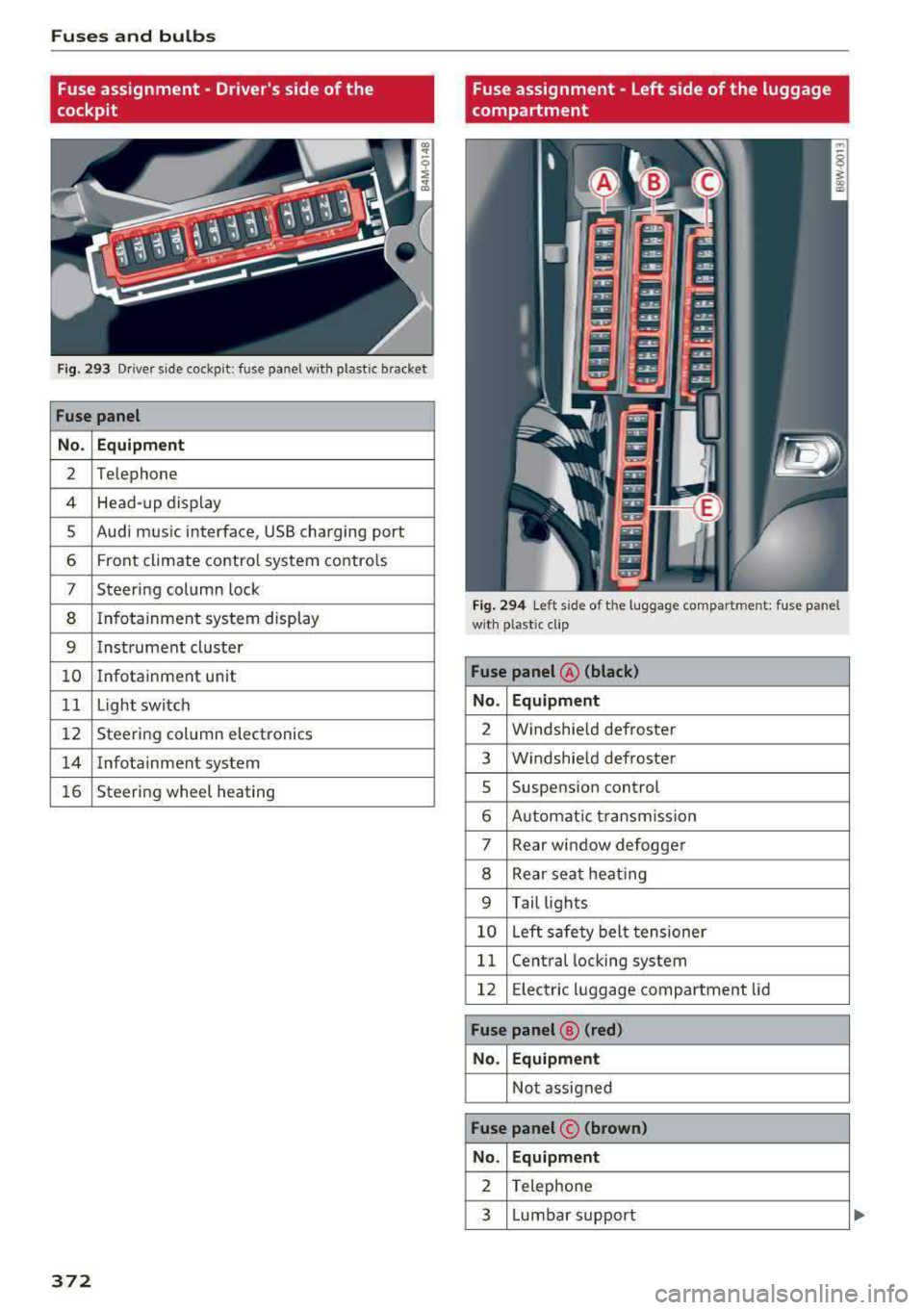
Fuse assignment - Driver's side of the
cockpit
Fig. 293 Driver sid e coc kp it : fuse pa nel w ith plastic bracket
Fuse panel
No. Equipment
2 Telephone
4 Head-up display
5 Audi mus ic interface, USB charging port
6 Front climate control system contro ls
7 Steering column lock
8 I nfotainment system display
9 Instrument cluster
10 Infotainment unit
11 Light switch
12 Steering column electronics
14 Infotainment system
16 Steering wheel heating
372
Fuse assignment - Left side of the luggage
compartment
Fig. 294 Left side of t he luggage compartme nt: fuse pane l
w ith plastic cl ip
Fuse panel @ (black)
No. Equipment
2 Windshield defroster
3 Windshield defroster
5 Suspension control
6 Automat ic transmission
7 Rear window defogger
8 Rear seat heating
9 Tail lights
10 Left safety belt tensioner
11 Central locking system
12 Electric luggage compartment lid
Fuse panel® (red)
No. Equipment
Not assigned
Fuse panel © (brown)
No. Equipment
2 Telephone
3 Lumbar support
Page 377 of 403
Emergency situations
-When connecting jumper cables, make sure
that they cannot get caught in any moving
parts in the engine compartment.
-Do not bend over the batteries -danger of
chemical burns!
-The battery cell locking screws must be
tightened securely.
-Before you check anything in the engine
compartment, always read and heed all
WARNINGS
c> page 323.
(D Note
Improper hook-up of jumper cables can ruin
the generator.
- Always connect POSITIVE(+) to POSITIVE
(+), and NEGATIVE(-) to NEGATIVE(-)
ground post of the battery manager control
unit.
- Check that all screw p lugs on the battery
cells are screwed in firmly. If not, tighten
plugs prior to connect ing clamp on negative
battery terminal.
-Please note that the procedure for connect
i ng a jumper cable as described above ap
plies specifically to the case of your vehicle
being jump started . When you are giving a
ju mp start to another vehicle, do
not con
nect the negative (-) cable to the negative
(-) terminal on the discharged batte ry @
c> fig. 296. Instead, securely connect the
negative( -) cab le to either a solid metal
component that is firm ly bolted to the en
gine block or to the engine block itself. If
the battery that is being charged does not
vent to the outside, escap ing battery gas
could ignite and explode!
Towing with a tow truck
General hints
Your Audi requires special handling for towing.
The following information is to be used by com
mercial tow truck operators who know how to op
erate the ir equipment safely.
-Never tow your Audi, towing will cause dam
age to the engine and transmission.
376
-Never wrap the safety chains or winch cables
around the brake lines .
- To prevent unnecessary damage, your Audi
must be transported with a flat bed truck .
- To load the vehicle on to the flat bed, use the
towing loop found in the vehicle tools and at
tach to the front or rear anchorage
i:>page 376 and i:>page 377 .
A WARNING
A vehicle being towed is not safe for passen
gers. Never allow anyone to ride in a vehicle
being towed, for any reason.
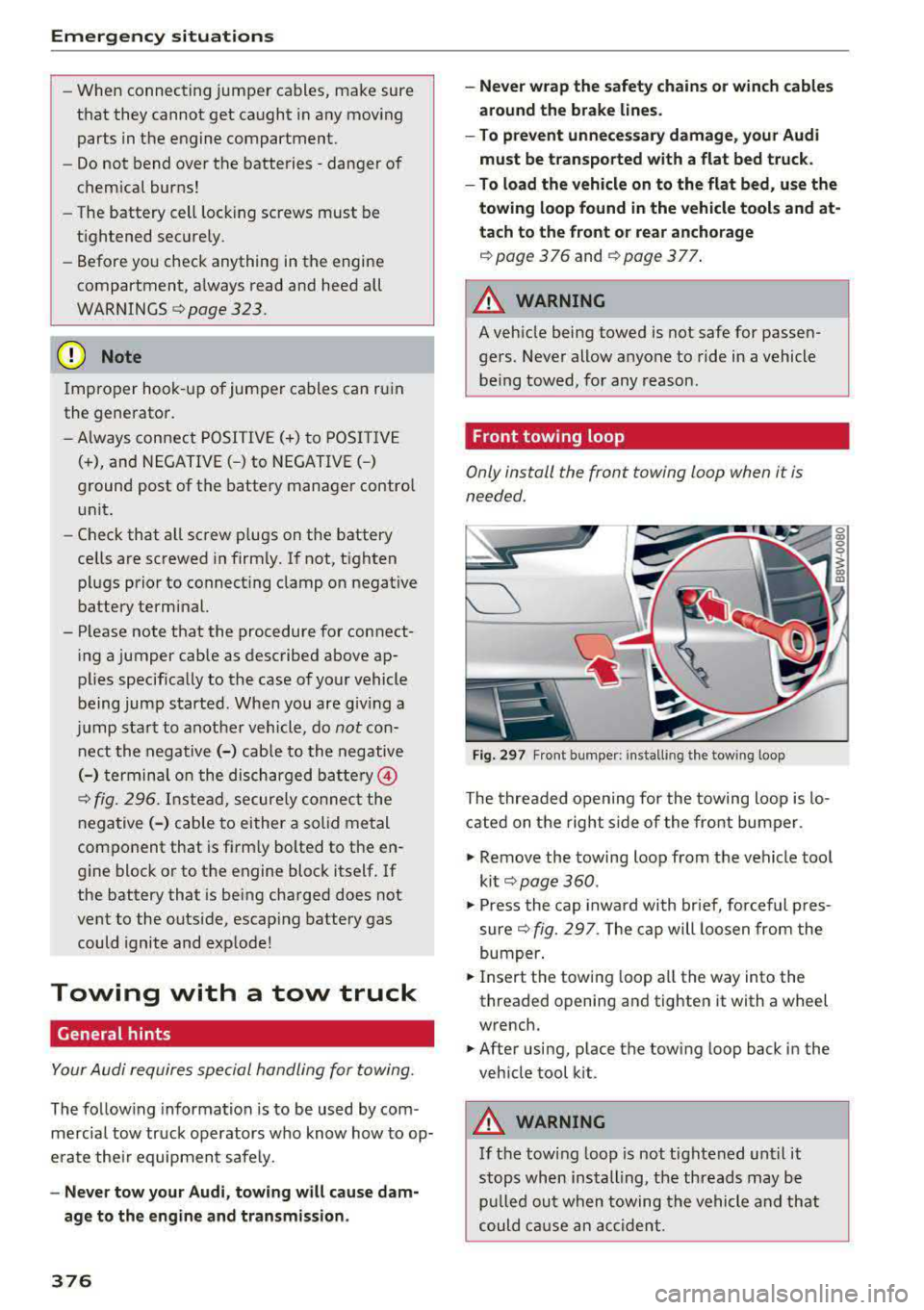
Front towing loop
Only install the front towing loop when it is
needed.
Fig. 297 F ront bumper: installing the towing loop
The threaded opening for the towing loop is lo
cated on the right s ide of the front bumper.
.,. Remove the towing loop from the vehicle too l
ki t
c> page 360 .
.,. Press the cap inward with brief, forceful p res
sure
c> fig. 297 . The cap will loosen from the
bumper .
.,. Insert the towi ng loop all the way into the
threaded opening and tighten it with a wheel
wrench.
.,. After using, place the towing loop back in the
vehicle tool kit .
A WARNING
If the towing loop is not tightened until it
stops when installing, the threads may be
pulled out when towing the vehicle and that
could cause an accident.
-
Page 378 of 403
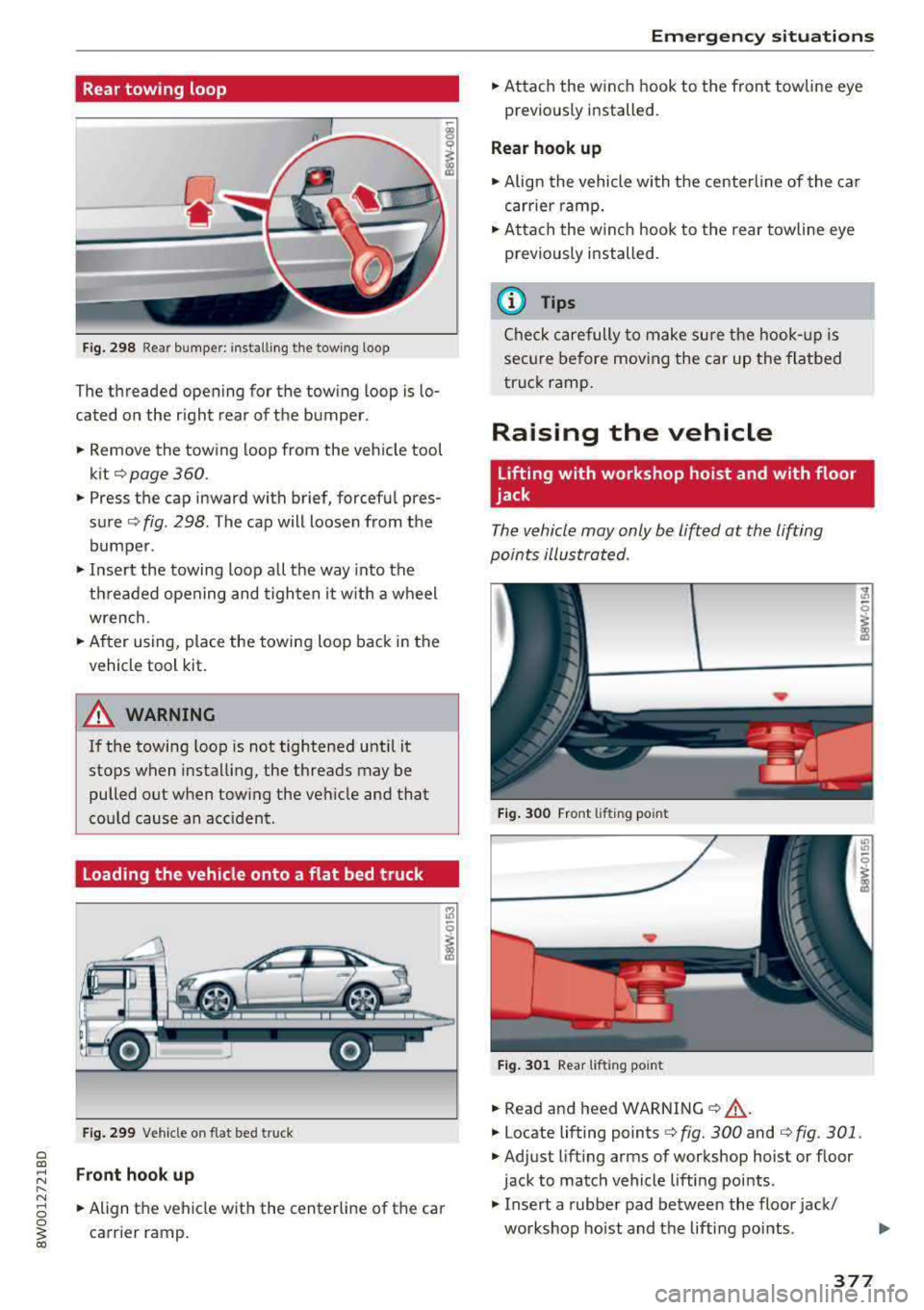
Rear towing loop
Fig. 298 Rea r bumper: install ing the tow ing loop
The threaded opening for the towing loop is lo
cated on the r ight rear of the bumper.
.. Remove the towing loop from the vehicle tool
kit¢ page 360.
.. Press the cap inward with brief, forcefu l pres
sure ¢ fig. 298. The cap will loosen from the
bumper .
.,. Insert the towing loop all the way into the
threaded opening and tighten it w ith a wheel
wrench .
.. After using, place the towing loop back in the
vehicle tool kit.
A WARNING
If the towing loop is not tightened until it
stops when installing, the threads may be
pulled out when tow ing the vehicle and that
cou ld cause an accident .
Loading the vehicle onto a flat bed truck
Fig. 299 Vehicle on flat bed truck
Front hook up
-
.. Align the vehicle with the centerline of the car
carrier ramp.
Emergency situations
.. Attach the winch hook to the front towline eye
previously installed.
Rear hook up
.. Align the vehicle with the centerline of the car
carrier ramp .
.. Attach the w inch hook to the rear towline eye
previously installed.
(D Tips
Check carefully to make sure the hook-up is
secure before moving the car up the flatbed
truck ramp.
Raising the vehicle
Lifting with workshop hoist and with floor
jack
The vehicle may only be lifted at the lifting
points illustrated .
Fig. 300 Front lifting point
Fig. 301 Rear lif tin g po int
.. Read and heed WARNING ¢&, .
.. Locate lifting points¢ fig. 300 and ¢ fig. 301.
.,. Adjust lifting arms of workshop hoist or floor
jack to match vehicle lifting points .
.. Insert a rubber pad between the floor jack/
workshop hoist and the lifting points .
.,.
377
Page 382 of 403
a co ..... N ,....
N ..... 0 0
3 co
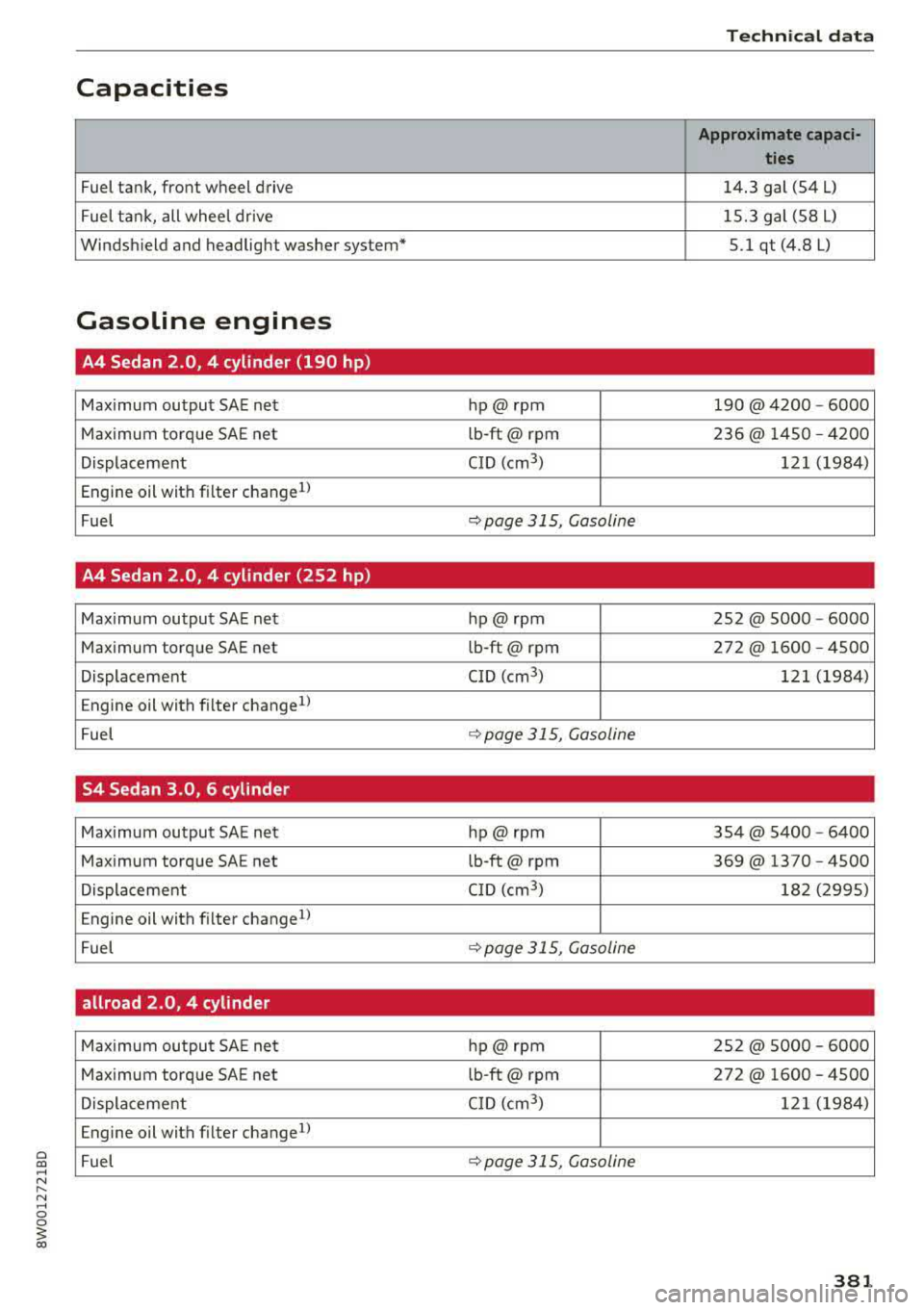
Capacities
Fuel tank, front wheel drive
Fuel tank, all wheel drive
Windshield and headlight washer system*
Gasoline engines
A4 Sedan 2.0, 4 cylinder (190 hp)
Maximum output SAE net
Maximum torque SAE net
Displacement
Engine oil with filter change
1 )
Fuel
A4 Sedan 2.0, 4 cylinder (252 hp)
Maximum output SAE net
Maximum torque SAE net
Displacement
Engine oil with filter changell
Fuel
S4 Sedan 3.0, 6 cylinder
Maximum output SA E net
Maximum torque SAE net
Displacement
Engine oil with filter change
1
)
Fuel
allroad 2.0, 4 cylinder
Maximum output SA E net
Maximum torque SAE net
Displacement
Engine oil with fil ter change
1
)
Fuel
Techn ical data
Approximate capaci-
ties
14.3 gal (54 L)
15.3 gal (58 L)
5.1 qt (4.8 L)
hp@ rpm 190@ 4200 -6000
l b-ft@ rpm 236@ 1450 -4200
CID (cm
3 ) 121 (1984)
q page 315, Gasoline
hp@ rpm 252@ 5000 -6000
l b-ft@ rpm 272@ 1600 -4500
CID (cm
3 ) 121 (1984)
q page 315, Gasoline
hp@ rpm 3 54 @ 5400 -6400
lb-ft@ rpm 369@ 1370 -4500
CID (cm
3 ) 182 (2995)
q page 315, Gasoline
hp@ rpm 252@ 5000 - 6000
lb-ft@ rpm 272@ 1600 - 4500
CID (cm
3 ) 121 (1984)
q page 315, Gasoline
381
Page 385 of 403
Consumer Info rmation
today's a utomo biles, have steadily reduced the
scope of maintenance and repairs which can be
carried out by veh icle owners.
Also , sa fet y and
en vironmental
concerns place very strict limits
on the nature of repairs and adjustmen ts to en
g ine and transmission parts wh ich an owner can
perform .
Maintenance, adjustments and repairs usually re
qu ire special tools, testing devices and other
equ ipment available to specially trained work
shop personnel in order to assure proper per
forma nce, re liability and safety of the veh icle and
its many systems .
Improper maintenance, adjustments and repairs
can impair the operation and reliab ility of your
ve hicle and eve n void your vehicle warranty .
Therefo re, proof of se rvicing in a ccordance w ith
the m aintenance sched ule may be a condition for
up ho ld ing a possible wa rranty claim made within
the wa rranty pe riod.
Above all , ope rational safety can be adversely af
fected, cre ating unne cessa ry risks fo r you and
your passengers.
I f in doubt about any servicing, have it done by
your author ized Audi dealer or any other properly
eq uipped and qualified workshop . We strongly
urge you to g ive your author ized Audi dealer the
opportunity to perform a ll scheduled mainte
nance and necessa ry repairs. Your dealer has the
facilities, origina l parts and tra ined specialists to
keep your veh icle runn ing prope rly.
Performing limited maintenance yourself
The fo llow ing pages describe a limited number of
procedures whic h can be performed on your vehi
cle with ordinary tools, should the need arise and
tra ined personnel be unava ilable. Before per
forming any of these procedures, always thor
ough ly read all of the app licab le text and carefu l
ly follow the instructions g iven . A lways rigorously
observe the
WARNINGS prov ided .
Befo re yo u check anything in the engine com
partment, always read and heed all WARNINGS
c::> & and c::> & in Working in the engine compart
ment on page 323 .
384
A WARNING
-
-Ser ious personal in jury may occur as a result
of imp roperly performed maintenance, ad
justments or repairs .
- Always be extreme ly careful when work ing
on the vehicle . Always follow commonly ac
cepted safety practices and general com mon sense. Never r is k personal in jury.
- Do not attempt any of the mainte nance,
checks or repairs described on the following pages if you are no t fu lly fam iliar with these
or other proce dures with respect to the ve
hicle, o r are uncert ain how to p ro ceed.
- Do not do any work wi thout the prope r tools
a nd equi pmen t. H ave the necess ary wo rk
done by your authorized Au di dealer or an
other properly equipped and qualified work
shop.
- The engine compartment of any motor veh i
cle is a potentially hazardous area . Never
reach into the a rea around or touch the radi
ator fan. It is temperature controlled and
can switch on suddenly - even when the en
gine is off and the ignition key has been re
moved. The rad iator fan switches on auto
mat ica lly when the coolant reaches a certain
temperature and will con tinue to ru n until
the coolant temperat ure drops.
- Always remove the igni tion key before any
one gets u nder the vehicle.
- Always support your vehicle with safety
stands if it is necessary to work underneath
the vehicle. The ja ck* s upplied w ith the vehi
cle is no t ad equate fo r thi s pu rpose and
could collapse causing se rious personal in
jury .
- If you must wor k underne ath the vehicle
with the wheels on t he ground, always make
sure the vehicle is on level ground, that the
wheels a re always sec urely blocked and that
the engine cannot be started.
- Always make sure the transmission se lector
lever (automatic t ransm iss ion) is in P (Park
position) and the park b rake is applied.
Page 388 of 403

a co .... N ,....
N .... 0 0
3 co
A
A/C MAX (button) ................ .... .. 78
A/C (button) ... .. . ..... ..... ... ... .. . 77
ABS .. .. ... . .. .. ............. .. .. .. . 146
Accessories 68 ,385
Active lane assist
Cleaning the camera area . . . . . . . . . . . . .
355
also refer to Audi active lane assist . . . . . 125
Adaptive cruise control . . . . . . . . . . . . . . . . . 108
Cleaning sensors . . . . . . . . . . . . . . . . . . . . 355
Distance indicator and distance warning . 118
Messages . . . . . . . . . . . . . . . . . . . . . . . . . . 118
Predictive control . . . . . . . . . . . . . . . . . . . . 115
Traffic jam assist . . . . . . . . . . . . . . . . . . . . 116
AdBlue .. .. .. .. ............... .. ..... 319
Messages
Additional accessories
Adjusting air distribution (automatic climate
control)
. .. .. .. ............... .. .. .. ..
Adjusting the sound ............ .. .. .. .
319
385
78
252
Adjusting the temperature (automatic climate
control) . . . . . . . . . . . . . . . . . . . . . . . . . . . . . .
78
Advanced key
refer to Convenience key . . . . . . . . . . . . . . . 83
Airbag .. .. .. .. ............... .. ..... 271
Airbag system . ................. .. 271,291
Advanced Airbag System components . . . 278
Care . . . . . . . . . . . . . . . . . . . . . . . . . . . . . . 286
Children . . . . . . . . . . . . . . . . . . . . . . . . . . . 297
Child restraints . . . . . . . . . . . . . . . . . . . . . 297
Components (front airbags) .. ..... ... .
Danger of fitting a child safety seat on the
front passenger seat ................ .
D. l 1sposa ... .. ............... .. .. .. .
Front airbags . .. ........... .. .. .... .
H ow do the front airbags work? ....... .
How many airbags does my vehicle have?
How the Advanced Airbag System compo-
nents work together ........ .. .. .... .
Important safety instructions on the knee
airbag system .... .. ..... ..... .. .... .
Indicator light ............ ...... ... .
Knee airbags .. ............ ...... ... .
Monitoring . .. ............. .. .. .... .
PASSENGER AIR BAG light ....... .. .. .
Repairs .. .. .. .. ........... .. .. .... .
278
272
286
276
281
278
280
289 283
287
283
283
286
Index
Safety instructions . . . . . . . . . . . . . . . . . . . 285
When must the system be inspected? 283
Air pressure
Tires ..... .. .. .. .. ............. .. ..
344
Alignment pin (changing the wheel) . . . . . . 360
All season tires . . . . . . . . . . . . . . . . . . . . . . . 349
All weather lights . . . . . . . . . . . . . . . . . . . . . . 54
All wheel drive
Indicator light . . . . . . . . . . . . . . . . . . . . . . .
35
also refer to quattro . . . . . . . . . . . . . . . . . 150
AMI
refer to Audi music interface . . . . . . . 233, 234
Android Auto
refer to Audi smartphone interface . .. ..
Anti -freeze
Windshield washer system ........... .
Anti- lock braking system
refer to ABS ..... .. ................ .
Anti-Slip Regulation
refer to ASR ... .. .................. .
Apple CarP lay
refer to Aud i smartphone interface ... ..
Arrow view
ASR
Audi active lane assist Messages
Audi connect emergency call and service ..
Online roadside assistance .......... . .
Audi connect vehicle contro l ........... .
Parking location .. .................. .
Remote locking and unlocking ..... .. . .
Vehicle status report ............... . .
246
332 146
146
246 23
146
125
127
202
203
198
199
199
199
Audi connect (Infotainment) . . . . . . . . 188, 195
Data protection . . . . . . . . . . . . . . . . . . . . . 196
Services overview ' .. ................ .
Starting ...... .. .. ................ .
Audi drive select
... .. ............. .. ..
Audi Entertainment mobile ...... ... .. . .
Audi music interface
.................. .
Audi music stream
refer to Wi-Fi .... .. ............... . .
Audio files
. . .... .. .. ............... . .
Audio player
B luetooth audio player .............. .
Wi-Fi audio player . ................. .
Audio track
189
189
133
235
233
231
236
230
231
239
387
Page 391 of 403
Index
Cooling mode (automatic climate
control) . . . . . . . . . . . . . . . . . . . . . . . . . . .
77, 78
Cooling system
Coolant . . . . . . . . . . . . . . . . . . . . . . . . . . . .
329
Coolant temperature indicator . . . . . . . . . . 11
Crosshairs . . . . . . . . . . . . . . . . . . . . . . . . . . . 206
Cruise control system . . . . . . . . . . . . . . . . . . 102
Cup holders . . . . . . . . . . . . . . . . . . . . . . . . . . . 69
Current consumption . . . . . . . . . . . . . . . . . . . 17
D
Data connection . . . . . . . . . . . . . . . . . . . . . . 195
Data protection . . . . . . . . . . . . . . . . . . . 196, 227
Data recorder . . . . . . . . . . . . . . . . . . . . . . . . 153
Date ..... ..... .. ................ . 17,248
Date display . . . . . . . . . . . . . . . . . . . . . . . . . 248
Daytime running lights . . . . . . . . . . . . . . . . . 54
Declaration of compliance
Audi adaptive cruise control . . . . . . . . . . .
386
Audi side assist . . . . . . . . . . . . . . . . . . . . . 386
Ce ll phone package . . . . . . . . . . . . . . . . . . 386
Convenience key . . . . . . . . . . . . . . . . . . . . . 386
Electronic immobilizer.. . . . . . . . . . . . . . . 386
Garage door opener (Home Link) . . . . . . . .
386
Remote control key . . . . . . . . . . . . . . . . . . 386
D EF
refer to AdBlue ... ............ .... .. . 319
Defrosting (windows) . . . . . . . . . . . . . . . . . . . 78
DEF (instrument cluster) . . . . . . . . . . . . . . . . 12
Demo mode
refer to Presentation mode . . . . . . . . . . . . 212
Destination on the map
Using the MMI touch . . . . . . . . . . . . . . . . .
206
Determining correct load limit . . . . . . . . . . 348
Diesel
Diese l particulate filter . . . . . . . . . . . . . . .
322
Prewarming . . . . . . . . . . . . . . . . . . . . . . . . . 83
Diesel Exhaust Fluid (DEF)
refer to AdBlue.. ................ .... 319
Diesel fuel ... .. .. ... .......... .. .. .. . 316
Digita l compass . . . . . . . . . . . . . . . . . . . . . . . 63
Digital Rights Management . . . . . . . . . . . . . 227
Dimensions . . . . . . . . . . . . . . . . . . . . . . . . . . 380
Dimming the exterior mirrors . . . . . . . . . . . . 59
Dimming the rearview mirror . . . . . . . . . . . . 59
390
Directory
refer to Contacts . . . . . . . . . . . . . . . . . . . . 183
D isplay . . . . . . . . . . . . . . . . . . . . . . . . . . . . . . 13
Cleaning . . . . . . . . . . . . . . . . . . . . . . . . . . . 356
Infotainment system display . . . . . . 156, 249
Instrument cluster . . . . . . . . . . . . . . . . . . . . 16
Multifunction steering wheel . . . . . . . . . . . 13
Versions (MMI) . . . . . . . . . . . . . . . . . . . . . . 156
D istance . . . . . . . . . . . . . . . . . . . . . . . . . . . . . 17
Doors
Emergency locking . . . . . . . . . . . . . . . . . . . .
42
Driver information system . . . . . . . . . . . . . . . 17
Changing views . . . . . . . . . . . . . . . . . . . . . . 13
Energy consumers . . . . . . . . . . . . . . . . . . . . 18
On-board computer . . . . . . . . . . . . . . . . . . . 17
Outside temperature display . . . . . . . . . . . . 10
Service interval display . . . . . . . . . . . . . . . 333
View . . . . . . . . . . . . . . . . . . . . . . . . . . . . . . . 15
Driver seat
refer to Seating position 255
Drives
refer to Media ... .. .. ........... 227, 236
Drive select
refer to Aud i drive select . . . . . . . . . . . . . . 133
Driving economically . . . . . . . . . . . . . . . . . . .
80
Driving offroad . . . . . . . . . . . . . . . . . . . . . . . . 90
Driving safe ly . . . . . . . . . . . . . . . . . . . . . . . . 254
Driving through water . . . . . . . . . . . . . . . . . . 80
Driving time . . . . . . . . . . . . . . . . . . . . . . . . . . 17
DVD drive (med ia drives) . . . . . . . . . . . . . . . 228
Dynam ic steering . . . . . . . . . . . . . . . . . . . . . 134
Dynamic volume
refer to System volume . . . . . . . . . . . . . . . 252
E
E-mail . . . . . . . . . . . . . . . . . . . . . . . . . . . . . . 182
Economical rou te .. .. .. ............. .. 211
eco (button) . . . . . . . . . . . . . . . . . . . . . . . . . . 77
EDS . . . . . . . . . . . . . . . . . . . . . . . . . . . . . . . . 146
Electromechanical parking brak e . . . . . . . . . 88
Electromechanical steering . . . . . . . . . . . . . 1 SO
Electronic immobili zer . . . . . . . . . . . . . . . . . .
38
E lectronic stabilization control
refer to ESC . . . . . . . . . . . . . . . . . . . . 146, 147
Emergency assistance . . . . . . . . . . . . . . . . . 360
Emergency braking function . . . . . . . . . . . . . 88
Page 395 of 403
Index
Menu language
refer to Setting the language 248
Menus/symbols . . . . . . . . . . . . . . . . . . . . . . 165
Messages . . . . . . . . . . . . . . . . . . . . . . . . . . . 180
Mirrors Adjusting exterior mirrors . . . . . . . . . . . . . . 58
Compass ... .... ................ ..... 63
Dimming .................... ........ 59
Vanity mirror . . . . . . . . . . . . . . . . . . . . . . . . 60
MMI
refer to Multi Media Interface . . . . . . . . . . 155
MMI search
refer to Free text search . . . . . . . . . . 164, 238
MMI touch . . . . . . . . . . . . . . . . . . . . . . . . . . . 158
MODE button . . . . . . . . . . . . . . . . . . . . . . . . . 16
Monitor ing the Advanced Airbag System 283
MP3
refer to Jukebox . . . . . . . . . . . . . . . . . . . . . 229
Multifunction steering wheel
Changing views . . . . . . . . . . . . . . . . . . . . . . 13
Operating . . . . . . . . . . . . . . . . . . . . . . . . 13, 16
Switching tabs . . . . . . . . . . . . . . . . . . . . 13, 16
Voice recognition system . . . . . . . . . . . . . . 15
Multi Media Interface . . . . . . . . . . . . . . . . . . 155
Music collection
refer to Jukebox . . . . . . . . . . . . . . . . . . . . . 229
Mute
refer to Muting . . . . . . . . . . . . . . . . . . . . . . 252
Muting ... ..... .................. .... 252
myAudi . . . . . . . . . . . . . . . . . . . . . . . . . 188, 208
Logging in in the vehicle . . . . . . . . . . . . . . 188
PIN . . . . . . . . . . . . . . . . . . . . . . . . . . . . . . . 188
N
Natural leather care/cleaning . . . . . . . . . . . 357
NAV/MAP button . . . . . . . . . . . . . . . . . . . . . 204
Navigating (instrument cluster) . . . . . . . 21, 22
Navigation . . . . . . . . . . . . . . . . . . . . . . . . . . . 204
Announcements . . . . . . . . . . . . . . . . . . . . . 213
Better route . . . . . . . . . . . . . . . . . . . . . . . . 220
Driver information system . . . . . . . . . . . . . . 23
also refer to Map . . . . . . . . . . . . . . . . . . . . 214
Navigation (instrument cluster) . . . . . . . . . . 21
Net . . . . . . . . . . . . . . . . . . . . . . . . . . . . . . . . . 69
Network connection (W i-F i) . . . . . . . . . . . . . 194
394
NH TSA
Contacting
N itrogen oxide (NOx) catalytic converter 261
refer to Ad
Blue. .. .. .. ............... 319
Number of seats . . . . . . . . . . . . . . . . . . . . . . 263
0
Occupant protection . . . . . . . . . . . . . . . . . . . 120
Occupant seating positions . . . . . . . . . . . . . 255
Octane rating ........................ 315
Odometer . . . . . . . . . . . . . . . . . . . . . . . . . . . . 12
Offroad . . . . . . . . . . . . . . . . . . . . . . . . . . . . . . 90
Offroad mode . . . . . . . . . . . . . . . . . . . . . . . . 147
OFF (button) . . . . . . . . . . . . . . . . . . . . . . . . . . 77
Oil
refer to Engine oil . . . . . . . . . . . . . . . 325, 327
On-board computer . . . . . . . . . . . . . . . . . . . . 17
On-Board Diagnostic System (OBD) Data Link Connector (DLC) . . . . . . . . . . . . . . 25
E lectronic speed limiter . . . . . . . . . . . . . . . 102
Malfunction indicator lamp (MIL) . . . . . . . . 24
On/Off knob (MMI) . . . . . . . . . . . . . . . . . . . . 155
Online destinations
refer to Point of interest search . . . . . . . . 208
Online map . . . . . . . . . . . . . . . . . . . . . . . . . . 216
Online map update . ................... 218
Online media . . . . . . . . . . . . . . . . . . . . . . . . . 232
Online roadside assistance Audi connect emergency call and service 203
Online serv ices
refer to Aud i connect ( Infotainment) . . . . 188
Opening...... .... .... ..... .... ....... 37
Fuelfillerdoor ...................... 317
Operating Multifunction steering wheel . . . . . . . . 13, 16
Multi Media Interface . . . . . . . . . . . . . . . . 157
Voice recogn ition system . . . . . . . . . . . . . 168
Options menu ... .. .. .. ........ 14, 157, 161
Other consumers . . . . . . . . . . . . . . . . . . . . . . 18
Outside temperatu re display . . . . . . . . . . . . . 10
Overv iew (Cockp it) . . . . . . . . . . . . . . . . . . . . . . 8
p
Paint damage
Paint number 356
379