ad blue AUDI S4 2018 User Guide
[x] Cancel search | Manufacturer: AUDI, Model Year: 2018, Model line: S4, Model: AUDI S4 2018Pages: 403, PDF Size: 66.81 MB
Page 177 of 403
a co .... N ,....
N .... 0 0
3 co
Telephone Introduction
A pp lies to: ve hicles with telep hone
To make phone coils in your vehicle using the
MMI, connect your cell phone to the
MMI via
Bluetooth.
H and sfree
Afte r you have connected your cell phone to the
MMI via Bluetooth, you can use the handsfree
system and operate telephone functions through
your MMI. You can make calls using the antenna
on your cell phone.
A WARNING
- Medical experts warn that cell phones can
interfere w ith the function of pacemakers.
Always ma inta in a m inimum distance of 20
centimeters between the cell phone anten
na and the pacemaker.
- Do not carry the cell phone in a pocket di
rectly over the pacemaker when the phone
is switched on.
- Sw itch the cell phone off immediately if
you suspect it may be interfering with the pacemaker.
- Do not use the voice recognition system*
c::> page 168 in emergencies because your
voice may change in stressful situations. It may take longer to dial the number or the
system may not be able to dia l it at all. Dial
the emergency n umber manua lly.
- Switch your cell phone off in areas where
there is a risk of an exp losion. These loca
tions are not always clea rly marked. This
may include gas stations, fuel and chemical
storage facilities or transport vehicles, or lo
cations where fuel vapors (such as propane
or gasoline vapor in vehicles or bu ildings),
chem icals or large quantities of dust parti
cles (such as flour, sawdust or metal) may
be present in the air. Th is also applies to all
other locations where you would normally
tu rn your vehicle engine off.
- The demands of traffic requ ire your full at
tent io n. Always read t he chapter
c::> page 155, Traffic safety information.
-
T e le ph on e
(D Note
Always fo llow the information found in Q (!) in
Wi-Fi hotspot on page 194.
(D Tips
- The Bluetooth connect ion range is limited
to inside the vehicle. It can also be affected
by local condit ions and interference with
other devices.
- To learn which Bluetooth connections and
wh ich of the functions in your cell phone are
supported, check with your cell phone serv
ice provider or the database for mobile devi
ces at
www .audiu sa.com /bl uetooth .
Setup
Connecting a cell phone using Bluetooth
Applies to: vehicles wi th telepho ne
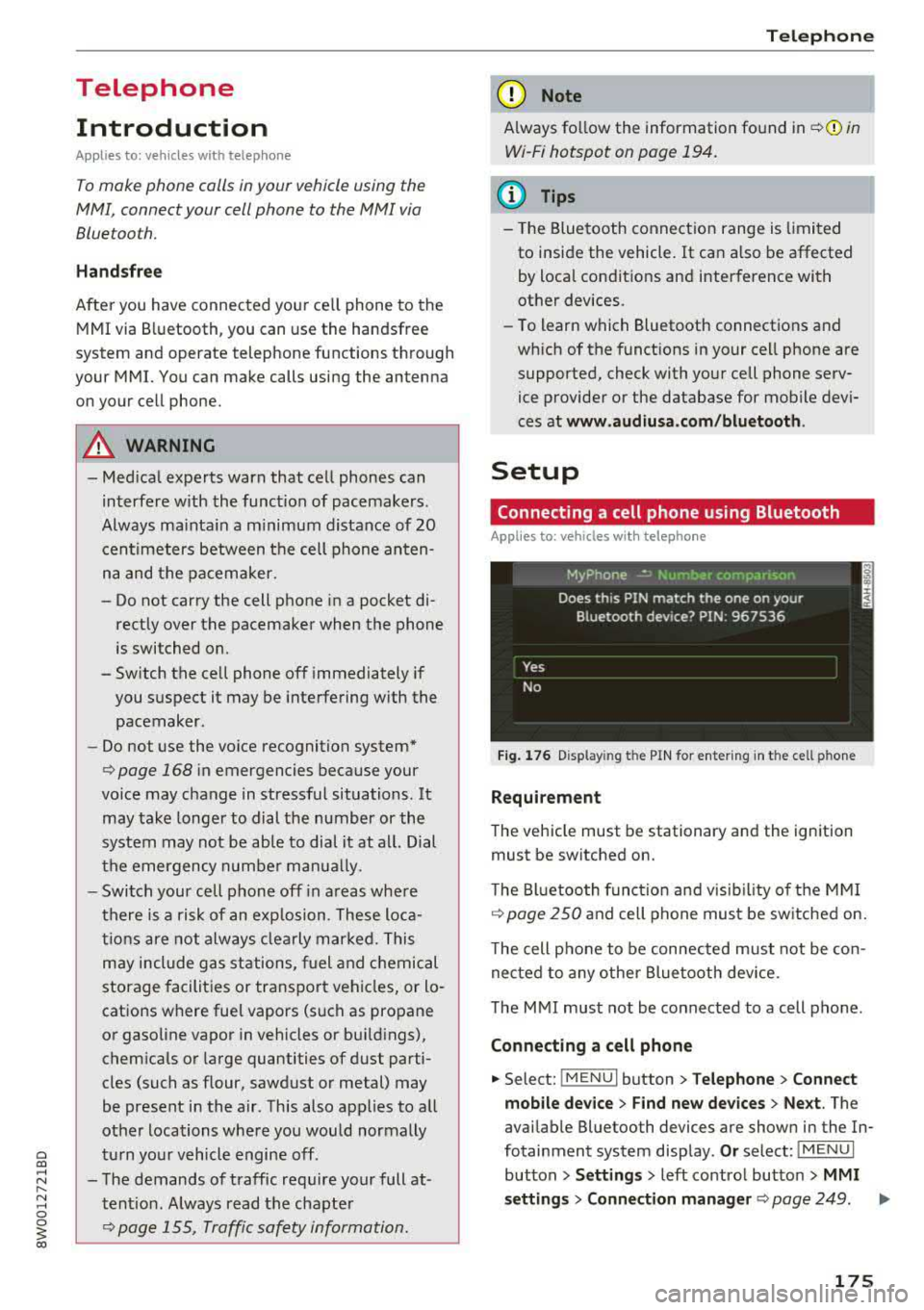
Fig . 17 6 Display ing t he PIN for enter ing in t he cell ph one
R equirem ent
The vehicle must be stationary and the ignition
must be switched on.
T he Bl uetoo th funct ion and v isib ility o f the MMI
¢ page 250 and cell phone must be sw itched on.
T he cell phone to be connected must not be con
nected to any other Bluetooth device.
T he
MMI must not be connected to a cell phone .
Connecting a cell phone
.,. Select: !MENUI button> T elephone > Co nnect
mobile dev ice
> Find new de vices > Ne xt. The
avai lable Bluetooth devices are shown in the In
fotainment system display .
Or select: !MENUI
button > S etting s> left contro l button > MMI
s etting s
> Connec tion manag er ¢ page 249 . .,..
175
Page 178 of 403
Telephone
"'Se lect and confirm the desired ce ll phone from
the list of disp layed Bluetooth devices.
"' The MMI generates a PIN for the connect ion
setup
¢ fig. 176 .
"' Select and confirm Y es.
"' Enter the PIN for connecting on your cell
phone .
Or: when the PIN is d isplayed on your
ce ll phone, confirm the PIN on you r ce ll phone
and in the MMI. The time a llowed for ente ring
the PIN is l im ited to app rox imately 30 seconds.
"' Pay attention to any additiona l system prompts
displayed on your cell phone, for example if the
system should connect automatically in the fu
ture . Depending on the ce ll phone, you may
have to confirm downloading the directory sep
arately .
After connect ing succ essfull y
After connecting successfully, information about
the connected profiles will appear . You can a lso
change the profiles later. Select:
! MENUI button>
S ett ings > left control button > MMI sett ings >
C onn ection m ana ger
c:::;, page 249.
In addition, the cell phone contacts are automat
ically loaded in the MMI directory. This process
can take several minutes, depend ing on the num
ber of contacts.
You can a lso make your connected cell phone the
default phone by select ing
S et as def ault tele ·
phone
in the Connect ion manager c:::;, page 250.
(D Note
Always follow the information found in ¢ @ in
Wi-Fi hotspot on page 194.
(D Tips
-Making phone calls through the MMI is only
possib le using the
Handsfree Bluetooth pro
file.
- You can apply additional settings to con
nected mobile devices using the
C onnection
m anager
c:::;, page 249.
- You can also search for the MMI in your ce ll
phone us ing the Bluetooth device search.
- You only have to pair your device one time.
Bluetooth dev ices that are already paired
automat ically connect to the MMI when the
176
Bluetooth f unct ion is switched on, they are
within range and the ignition is switched on.
The last connected cell phone is given first
pr iority.
- Authorizing the MMI connection in your cell
phone w ill make automatic connection pos
sible.
- Pay attention to any system prompts dis
played on your cell phone, for example if
the system should connect automatically in
the future . Depend ing on the cell phone,
you may also need to download the directo ry and confirm access to your text messages
separately.
- Whe n leavi ng the vehicle, the Bluetooth
connect ion to the cell phone will automati
c ally d isconnect. Dependi ng on your cell
phone, phone calls in prog ress may be auto
matically redirected from the MM I to you r
cell phone and you can continue the ca ll on
your phone.
- Yo u can obtain more information from your
cell phone service provider or from yo ur ce ll
phone user guide. For information on us ing
the te lephone, v isit
w ww. audiu sa.com /
bluetooth
or contact an authorized Audi
dealer or author ized Audi Service Facility.
- Applies to: vehicles without secondary
phone: Several cell phones can be paired to
the MMI, but only one cell phone can be ac
t ively connected to the MMI.
- Applies to: vehicles without secondary
phone: If a Bluetooth device is already con
nected to the MMI, it will be d isconnected
when anothe r device connects to the MM I.
Operating two telephones through the
MMI
You can connect two cell phones to the MMI, for
example your business cell phone as the primary
phone and your private cell phone as the secon
dary phone . You can be reached in your vehicle
through both cell phones.
The first connected ce ll phone is d isplayed as the
primary phone in the MMI. The second cell phone
is connected as the secondary phone .
.,.
Page 179 of 403
The directory from the connected primary phone
will always be disp layed . If you wou ld like to use
the directory from the secondary phone , you
must switch the primary and secondary phone
¢page 177 .
Connecting a cell phone as th e prima ry
phone
Connect yo ur cell phone to the MMI via Blue
tooth. The f irst connected cell phone is displayed
as the
Main phon e in the MMI.
See
¢ pag e 175 , Connecting a cell phone using
Bluetooth.
Conn ecting a cell phone as the secondary
phone
Requirement : a cell phone must be connected to
the
MMI as the primary phone .
Select :
IMENU ! button> Telephone > right con
trol button >
Connect a ddition al telephone.
See ¢ page 175, Connecting a cell phone using
Bluetooth.
Example: you have connected your business ce ll
phone to the MMI as the prima ry phone and your
p rivate ce ll phone as the secondary phone. To be
ab le to call contacts from you r private cell phone
directo ry , you must switch the primary and sec
ondary phone, s ince the directory from the pri
mary phone is always displayed.
Switching the pr imary and secondary phone
Requirement : a prima ry phone and a secondary
phone must be connected .
Switch main and add it ional phone : select:
IMENU ! button> Teleph one > right contro l but
ton >
Swit ch main and additional phon e.
@ Tips
-Please note that only the directory from the
primary phone is always displayed.
- You can see
if a cell p hone is connected as
the prima ry phone or secondary phone in
the
Conne cti on mana ger ¢ page 249. Or:
the dev ice name of the connected primary
phone is shown in the
Telepho ne menu
(such as MyPhone).
Teleph one
- If the primary phone does not connect auto
matically to the MMI when the ignition is
switched on, for example because it is out
of the veh icle range or the Bluetooth func
tion is switched off, t hen a previously paired
secondary phone is automatically connected
as the prima ry phone.
- You can send and receive messages on your
pr imary phone as well as on your secondary
phone
¢ page 177, fig . 177 . You do not
need to switch your primary phone and sec
ondary phone fo r th is.
- You can also make your connected cell
phone the default phone by se lecting
Set a s
def ault telephone
in the C on nec tion man
ager ¢ page 250.
Using the telephone
Opening the telephone
Applies to: vehicles with telephone
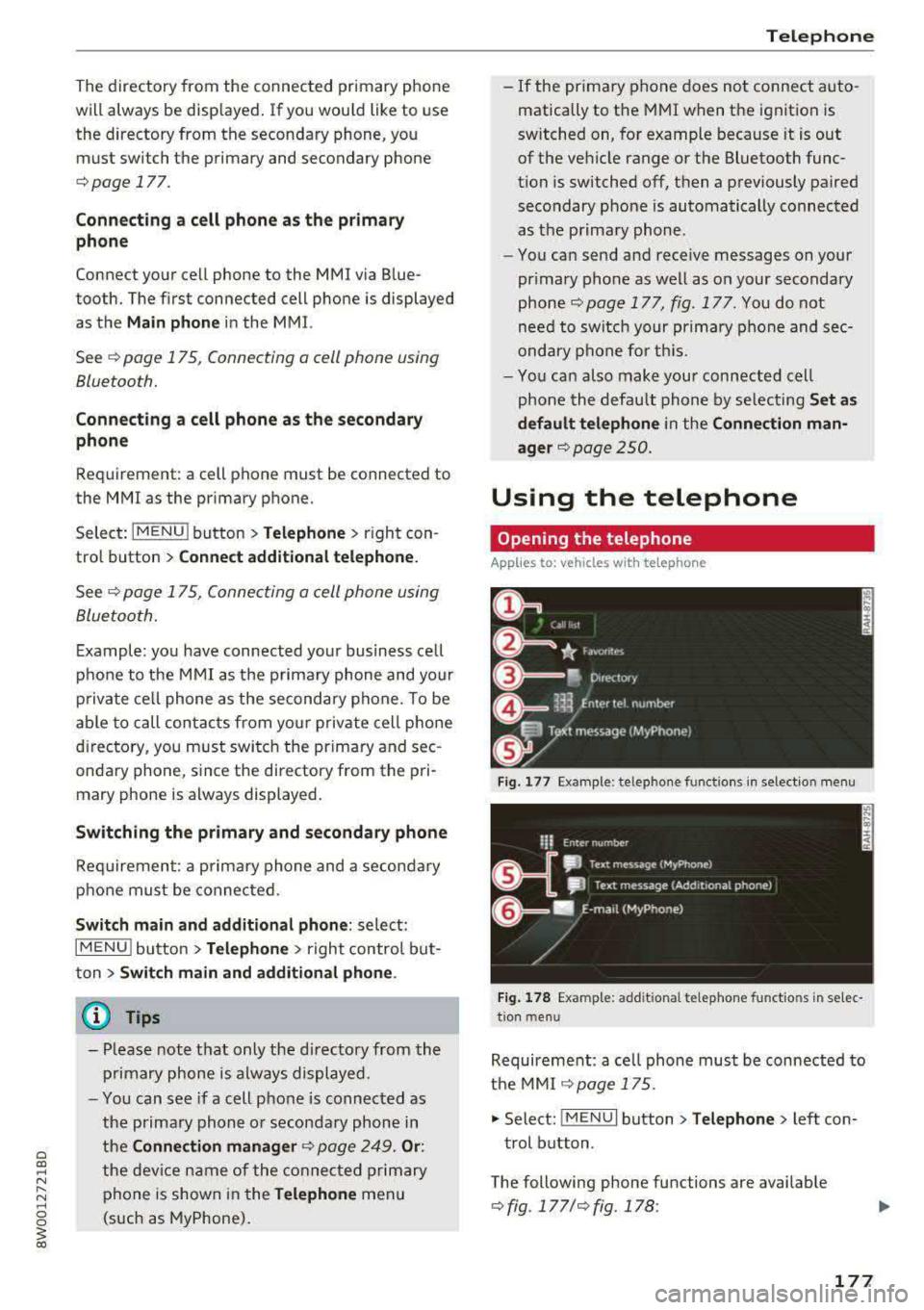
Fig. 177 Example: te lep hone funct ions in select io n menu
Fig . 17 8 Examp le: add it iona l te lephone fu nctio ns in se lec
t ion men u
Requirement: a ce ll phone must be connected to
the MMI
¢page 175.
.,. Select: !M ENU! button> Telephone > left con
trol button .
The following phone functions are available
¢ fig . 177/¢fig. 178 :
177
Page 180 of 403
Telephone
CD Call list .... .... ... ..... .. ... .
@
®
@
®
Favorites
Dir ectory .. .... ........... .. .
Enter number . .... ..... .. ... .
Text message (MyPhone)* /Text message (secondary phone)* ....
@ E-ma il (My Phone)*/E -mail (secon -
da ry phone)* ... .. .. .... ... .. .
17 8
180
183
178
180
182
T he devi ce name for your cell p hone is disp laye d
i n t he
Telephone me nu, for e xam ple text mes
sage (MyPhone )
r=:, fig. 178.
Dialing a phone number
A pp lies to: ve hicles with telep hone
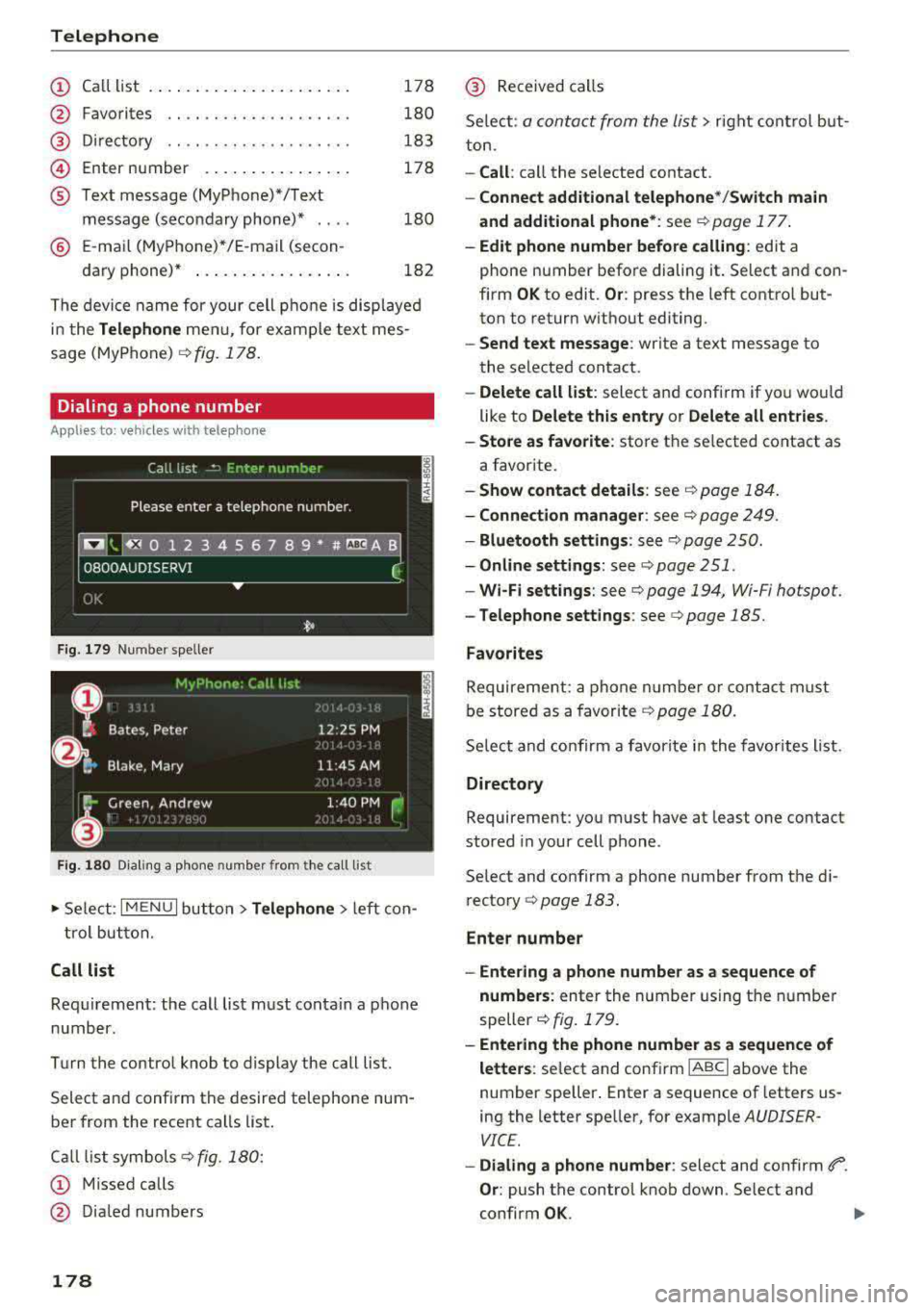
F ig . 179 Number speller
Fig. 180 D iali ng a p hone num ber from t he call list
~ Se le ct: I M ENU I but ton> Telephone > left co n
tro l bu tton.
Call list
Req uirement: the call list m ust con ta in a p hone
numb er.
Turn the control knob to display the call list.
Select an d confirm th e desire d telephone num
be r from the recent calls list .
C all li st symbols
r=:, fig. 180:
CD Missed calls
@ D ia led numbers
178
@ Received ca ll s
Se lec t:
a conta ct from the list> rig ht con trol b ut
to n.
-Call : call the se lected contact.
-Connect additional telephone */Switch main
and additional phone* :
see¢ page 1 77 .
-Edit phone number before calling : edit a
phone number befo re dialing it. Se lect a nd con
firm
OK to edit . Or: press t he left contro l but
ton to retur n w ithout editing.
-Send text message : write a text message to
the selected contact.
-Delete call list : select and confi rm if yo u wo uld
like to
Delete this entry or Delete all entries .
-Store as favorite: store the selected contact as
a favor ite.
-Show contact details : see r=:,page 18 4.
-Connection manager : see r=:, page 249 .
-Bluetooth settings : seer=:, pag e 25 0.
-Online settings : see ¢page 251.
-Wi-Fi settings : seer=:, page 194, Wi-Fi hotspot.
-Telephone settings : see c> page 185.
Favorites
Requirement: a phone n um be r or con tact m us t
b e st ored as a favorite
r=:, p age 180.
Se lec t and co nfirm a favori te i n t he f avorites list.
Directory
Requirement: yo u must have at least one contact
stored in your cell pho ne.
Se lect and confirm a phone number from t he d i
r ecto ry
r=:, page 183 .
Enter number
-Entering a phone numbe r as a sequence of
numbers :
enter the num ber u sing t he nu mbe r
speller
r=:, fig . 179.
-Entering the phone number as a sequence of
letters :
select and confirm IABC I above the
number speller . Enter a sequence of letters us
ing the letter spe ller, for example
A UDISER
VICE.
-Dialing a phone number : select and confirm 6'°.
Or: push the contro l kno b down . Select and
confirm
OK .
Page 181 of 403
a co .... N ,....
N .... 0 0
3 co
-Deleting individual character s: select and con
firm
0 .
-Deleting all characters entered at once : tur n
the control knob wit h the character se lection to
0 a nd p ress and ho ld the control knob. Or: se
lect the right contro l button
> Clear input field .
Accepting/ending a call
Applies to: veh icles with telephone
-Accepting a call : select and confirm Answer.
-Declining a call : select and confirm Decline.
-Muting the active call : select and confirm
Mute .
-Ending a phone call/cancel dialing : selec t an d
confirm End call.
Caller information : the
name, phone number or
Unknown appears in the Info tainment sys tem
d is pl ay depending on if the ca ller has been s tored
i n the directory and if the phone number has
been transm itted. A p icture may also be dis
p layed, depending on whether you have assigned
a picture to a contact in your d irectory and if it
was transfer red to your MM I. Yo u can find out if
your cell phone su ppo rts this func tion from yo ur
cell phone network provider, yo ur cell ph one
owner's manual o r at www.audiusa .com/blue
tooth .
(D Tips
-The ra dio or media playback is muted during
a p ho ne c all.
- M issed ca lls are disp laye d with a sy mbol in
the s tat us line o f the Info tainmen t sy stem
disp la y @ 9page 165, fig. 174.
During a phone call
Applies to: vehicles with telephone
Requ iremen t: the re mus t be a call i n progress.
" End call : yo u can end a phone cal l.
" Send tone sequence : yo u can en ter tone se
quences (DTMF ) directly us ing the number
s p elle r and send to the other person on the
ca ll.
"Other call options : press the right cont rol but
ton .
Telephone
T he following op tions a re poss ib le d uring a ca ll
depen ding on the cell phone be ing used and the
type of connect ion :
-Answeri ng an ad diti onal c all: if there is an in
coming call while another call is active, you can
select Answer to put the existing ca ll on ho ld
and answer the incoming call. I f you select De
cline , the incoming ca ll w ill be declined.
-Accepting an incoming call when there is an ac
tive ca ll and a ca ll on ho ld: select Replace. The
active ca ll is replaced with the incoming cal l.
- Muting the incoming call: select and conf irm
Mute .
-Additional call : select: Find contact > Call list /
Directory /Favorites
> an entry from the list.
Mute : if you sele ct and confirm this fun ct ion, the
other person on the phone cannot hear you. You
can hear t he other person. To turn the m ic ro
phone back on, select and con firm Un mute .
Hold call /Resume held call : yo u can pla ce the ex
isting call on hold and resume it aga in . To re
s u me the ca ll, se lect and confirm the call you
would like to res ume .
Transfer call to mobile devi ce* : sele ct and con
firm Transfer call to mobile device to transfer
the exist ing ca ll from the M MI to your cell p hone .
Switch to hands-free mode *: Requir emen t: you
mus t have a p ho ne c all in p rogress on you r ce ll
phone. Se lect and confirm Switch to hands-free
mode to transfer the call from your cell p hone
back to the M MI.
Swap call : alternate between two phone calls
whi le one of the calls is on hold. Se lecting End
call will end the active phone cal l. A phone ca ll on
ho ld can be resumed using the right contro l but
ton
> Resume .
Connection manager: see
9 page 249.
Telephone settings: see 9 page 18 5.
@ Tips
-To be not ified of a n in com ing ca ll dur ing a
phon e call, th e
call waiting funct ion i n your
cell p hone m ust be swit ched on whe n using
t he Handsfree profil e.
ll>-
179
Page 182 of 403
Telephone
-You can o btai n mo re information from your
ce ll phone service prov ider or from your cell
phone user guide .
- W hen leaving the vehicle, the Bl uetooth
connection to the ce ll phone wi ll automat i
cally disconnect. Depending on your cell phone, phone ca lls in progress may be a uto
matically redirected from t he MMI to your
cell phone and yo u can cont inue the call on
your phone.
- The display of a n in coming phone call in the
Infotainment system d is pl ay may still be
v is ib le for a few seconds after a call is an
swered/ ig nored depe nding on the cell
p hone in use .
Making an emergency call
Applies to: vehicles with telephone
~ Se lect: I M ENU I but ton > Telephone > left con
trol button >
Enter number > Enter emer gency
ca ll number (for examp le, 911) >
OK.
A WARNING
- Beca use your phone wo rks with radio s ig
nals, a connection cannot be guaranteed un
der all ci rc u ms tances. Do not rely on only
yo ur phone when it comes to essent ial com
mun ication (s uch as a medica l emer ge ncy).
-Always follow the ins truct ions gi ven by the
em ergency perso nnel during an eme rgency
c a ll and only e nd th e call whe n they inst ruct
y ou to d o so .
{1) Tips
Eme rg en cy numbers are not the same eve ry
wher e. Fin d ou t which eme rgency number is
used in yo ur cur rent lo ca ti on.
Favorites
Applies to: vehicles with telephone
Up to 5 0 contacts, in addition to the voicemail
num ber, can be stored in any order in the favor
ites lis t.
~ Select: I M ENU I button> Telephone > lef t con
tro l but ton.
180
Storing an existing phone number as a
favorite:
- Select and confirm Call list /Directory.
- Sele ct a contac t or phone n umbe r from the list.
- Select: r ig ht con trol button>
Store as favorite .
-Enter a name for the favor ite or select a s ug-
gestion.
- Select and confirm
Store .
Renaming stored favorites
- Select: Favorites > a favorite from the list.
-Select the right contro l button > Rename fa-
vorite .
Moving stored favorites
- Sele ct: Favorites > a favorite from the lis t.
- Sele ct the rig ht cont ro l bu tton > Move favorite .
-Select and confirm t he location of the se lected
favor ite.
Deleting a stored favorite
- Select: Favorites > a favorite from the list.
-Select the right contro l button > Delete f avor-
ite
> Delete this favor ite or Delete all fa vor
i tes .
Messages
Text messages
Applies to: cell phones with Bluetooth Message Access Profile
(MAP)
Depending on the cell phone being used and the
cell phone network contract, you can receive and
send text messages using the MMI .
Requirement
A cell phone must be connected to t he MM I via
B luetoot h MAP ( Message Access Profi le)
¢ page 175.
~ Select: !ME NUI button> Telephone > le ft con
trol button >
Text message (MyPhone )/Text
message (secondary phone)* .
Write new text message
Se lec t and confi rm Write new text message .
- Using a template :
select and confirm the de
sired template from the list .
Page 183 of 403
a co .... N ,....
N .... 0 0
3 co
-Writing your own text*: select and confirm Do
not use template.
Enter text using the MMI
touch contro l pad* or the letter speller.
-Enter one or more recipients.
-Select and confirm Send .
lnbox
Displays all received text messages .
Sent
Displays all sent text messages.
Outbox
Displays all text messages to be sent.
Drafts
Displays all text messages that have not yet been
sent and stored text messages .
(D Tips
-Please note that you may have to act ivate
the receiving and send ing of text messages
i n your cell phone depending on the SIM
card being used (for example, when using a
Multi-SIM). You can obtain mo re informa
tion from your cell phone service provider or
from your cell phone user guide.
- Fo r more information on supported cell
phones, vis it
www.audiusa.com/bluetooth
or contact an authorized Audi dealer or au
thorized Audi Service Facility.
- You need a cell phone with Message Access
Profile that also supports the sending func
tion to be able to send text messages
through the MMI.
Message options
Applies to: ce ll phones wit h Bl ue tooth Message Access Profile
(MAP)
~ Select : ITELI button> left control button > text
message (MyPhone)/text message (secondary
phone)* > lnbox/Sent/Outbox
> right control
button.
The following options may be avai lab le depend
ing on the se lected menu .
l) Not available in all la nguage s.
Telephone
Storing a text message as a template
Ten text message templates are stored in the
MM I. You can
save up to ten additiona l tem
plates .
-Create a text message.
-Select and confirm Store as template .
Resume last text message
The last ed ited text message can be resumed .
Reply*
A reply can be sent for the selected message in
the
lnbox.
Forward
T he selected text message can be forwarded to a
diffe rent recipient.
Send again*
The selected text message can be resent.
Delete this text message*
The selected text message can be de leted .
Read out1
)
You can have the MMI read an open text mes
sage .
Text messaging settings*
To display when a new text message is received,
activate the
Text message notifications . New
text messages are indicated w ith an envelope
121
in the Infotainment system display status line .
Connection manager
See¢ page 249.
Wi-Fi settings
See ¢page 194.
Telephone settings
See ¢page 185.
181
Page 184 of 403
Telephone
(D Tips
Messages that are deleted in the MMI are a lso
de leted in the ce ll phone automatica lly .
E-mail*
Applies to: cell phones with Bluetooth Message Access Profile
(MAP)
Depending on the type of cell phone being used,
you can receive and send e-mails through the
MMI .
Requirement: a cell phone must be connected to
the MMI via B luetooth MAP (Message Access Pro
fi le)
r:=:> page 175 . You can find o ut in your cell
phone owner's manua l if your ce ll phone sup
ports this f unction .
.,. Select : I MENU I button> Tel ephon e> left con
trol but ton >
E -m ail (MyPhone )/E-mail ( se con
dar y phone )*.
Write new e-mail
Select and confirm W rit e new e -mail .
- Us ing a templat e:
select and confirm the de
sired template from the list.
-Writing your o wn te xt*: select and confirm Do
not use templ ate .
Enter text using the MMI
touch control pad* or the letter speller .
- Enter one or more recipients.
- Se lect and confirm
Send .
Inbox
All received e-ma ils are d isplayed.
Sent
All sent e-ma ils are d isplayed .
Outbox
All e-mails that will be sent are displayed.
Drafts
All saved e -mails that have not been sent yet a re
d isp layed.
(D Note
Always follow the info rmation found in r:=;, (j) in
Wi-Fi hotspot on page 194.
182
(D Tips
- For more information on supported cell
phones, visit
www.audiusa. com /bluetooth
or contact an authorized Audi dealer or au
thorized Aud i Service Facility.
- To ensure that your sent e-ma ils are re
ceived, connect your cell phone to the Wi-Fi
hotspot* in the vehicle so that the e-mail
app on your cell phone conti nues to have In
ternet access . If you are still not receiving e
ma ils even tho ugh yo u have a successfu l
c onnect io n, then contact you r e-mail se rvice
prov ider o r yo ur ce ll phone serv ice prov ider.
Message options
Appl ies to: cell phones with Bluetooth Message Access Profile
(MAP)
.,. Select: ! ME NUI button> Telephon e> left con
trol b utton >
E-mail (MyPhone )/E-mail (secon
dary phone) *
> Inbox/Sent /Outbox > righ t
control button.
The following options may be ava ilable depend
i ng on the selected menu .
Store as template
Ten e-mail templates are stored in the MMI. You
can save up to ten additional templates.
- Create an e-mail.
- Select and confirm
Store a s template.
Resume last edited e-mail
The last e-ma il in prog ress can be resumed.
Repl y*
A reply can be sent for the selected e-mail in the
lnbo x.
Repl y to all*
A reply can be sent for the se lected e-mai l in the
In bo x and it will be sent to all of the entered re
c ipients.
Forward
The selected e -mail can be forwarded to a differ
ent recipient.
Page 186 of 403
Telephone
-The contact display in the MMI depends on
the cell phone used. For more information
on supported cell phones, visit
www.audiusa.com/bluetooth or contact an
authorized Audi dealer or authorized Audi
Service Facility.
- Please note that only the directory from the
primary phone* is always displayed.
- The contacts from the cell phone may not be transferred in alphabetical order. If there
are too many entries, contacts with differ
ent first letters may be missing in the MMI.
- The contacts in the local MMI memory are
always visible and can be accessed by other
users.
Free text search for a contact
Applies to: vehicles with telephone
.. Select: I MENU I button> Telephone> left con
trol button >
Directory .
.. To limit the search, enter the initials of the con
tact being searched with each initial separated
by a space in the input field. Enter additional
letters if necessary.
.. Select and confirm a contact from the directo
ry. The phone numbers for the selected contact
are displayed.
.. To make the call, select and confirm a phone
number .
- You can scroll through long lists quickly by
turning the control knob quickly. The scroll
ing speed depends on the number of list en
tries.
-Additional information on free text searches
can be found under
<:}page 164.
184
· Showing contact details*
Applies to: vehicles with telephone
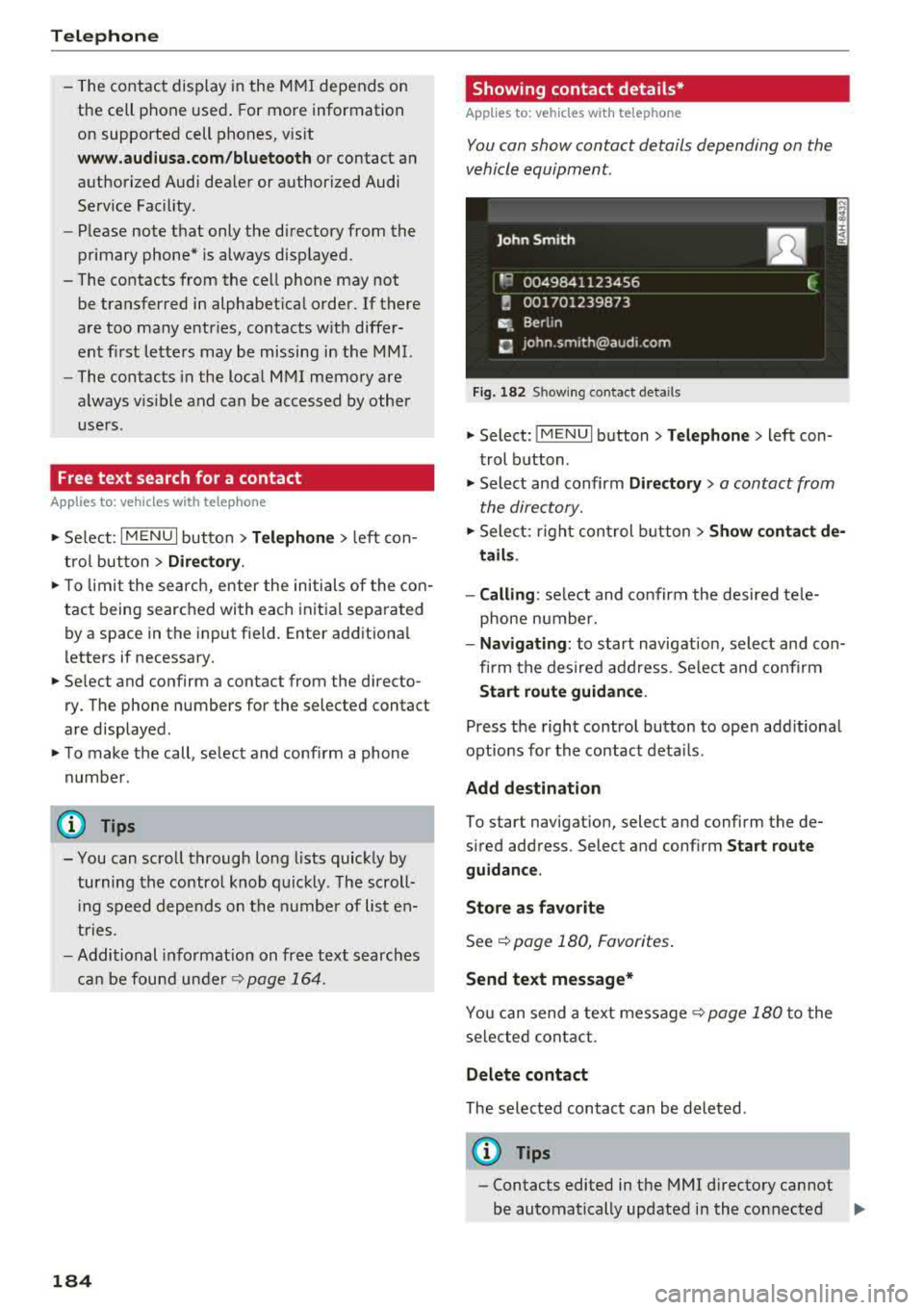
You con show contact details depending on the
vehicle equipment.
Fig. 182 S h owing contact deta ils
.. Select: !MENUI button> Telephone> left con
trol button .
.. Select and confirm Directory> a contact from
the directory .
.. Select: right control button> Show contact de
tails.
- Calling :
select and confirm the desired tele
phone number.
- Navigating: to start navigation, select and con
firm the desired address . Select and confirm
Start route guidance.
Press the right control button to open additional
options for the contact details .
Add destination
To start navigation, select and confirm the de
sired address. Select and confirm
Start route
guidance.
Store as favorite
See c::> page 180, Favorites.
Send text message*
You can send a text message c::> page 180 to the
selected contact .
Delete contact
The selected contact can be deleted .
(D Tips
-Contacts edited in the MMI directory cannot
be automatically updated in the connected
.,,.
Page 188 of 403
Telephone
using the Ringtone fu nction . Select and confirm
an entry from the list. Fo r the
Ringtone volume /
Message volume
sett ings, refer to ¢ pag e 253 .
The Microphone input level can be ad justed d ur
ing a phone call using the contro l knob .
(D Tips
-Seve ra l cell ph ones can be paire d to the
MM I, but only two* cell phones ca n be ac
tive ly connected.
- To delete all paired Bluetooth devices, the
Bluetooth funct ion can be reset to the fac
tory default sett ings
c:> page 249.
Additional options
... Se lect : I MENU I button> Telephone > right co n-
t ro l butto n.
Connection manage r
See c:> page 249.
Bluetooth settings*
See c:> page 25 0.
Online settings*
See c:> page 251 .
Wi-Fi settings*
See c:> page 194, Wi-Fi hotspot .
Directory settings
A ppl ies to: ve hicles w ith tele phone
... Select : I MENU I button> Telephone > left con
trol button
> Directory > right control button>
Directory settings .
186
Memory capacity
Sho ws the Memory capacity fo r t he direct ory.
You can ma nage up to 17 ,00 0 co nta cts wi th the
d irectory. Yo u can load up to 4, 000 contacts
from your cell phon e into each directory. Yo u ca n
a ls o im por t up to 1,00 0 c ontacts fr om a storage
d evice.
Sort order
You can so rt the contacts in your directo ry alpha
b eti call y acco rdi ng to
Last name or First name .
Import contacts/Export contacts
See c:> page 185.
Download directory
To update the contacts in the MMI, yo u ca n man
u ally down loa d your cell phon e contacts . De
pending on the ce ll phone, the Bluetooth connec
tion may need to be disconnected and reconnect
ed to upda te t he contacts.
Hide contacts without phone number
W hen t his fu ncti on i s s witch ed o n~ , conta cts
that do not have any num bers assig ned to them
will be g rayed ou t in the directory.