buttons AUDI S4 2018 User Guide
[x] Cancel search | Manufacturer: AUDI, Model Year: 2018, Model line: S4, Model: AUDI S4 2018Pages: 403, PDF Size: 66.81 MB
Page 74 of 403
Seats and storage
Folding the backrest back into the upright
position
.. Fo ld the backrest back up again until it latches
or the red marking
q page 71, fig. 77 is no lon
ger visible c::, A in Increasing the si ze of the ve
hicle interior on page 71.
CD Note
Move the rear head restraints down before
folding the rear backrests forward
q page 67.
This is especially true if the Rear Seat Enter
tainment (RSE)* is installed, because it could
be damaged.
Partition net (upright backrest position)
Applies to: vehicles with partition net
The partition net prevents objects from sliding
from the Luggage compartment into the passen
ger compartment.
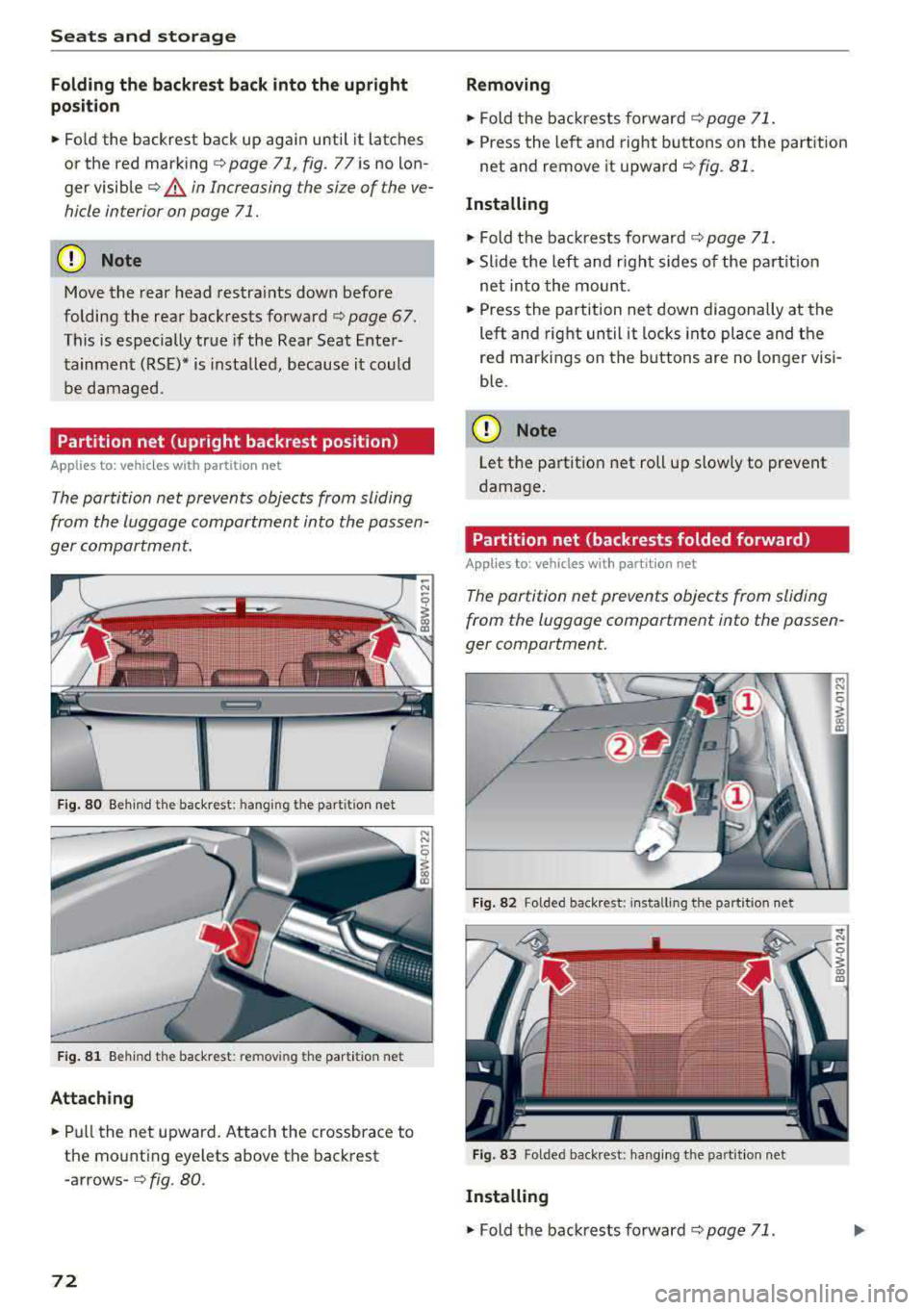
Fig. 80 Behind th e back rest : hang in g the parti tion net
Fig. 81 Behind the backrest : rem ov ing the parti tion net
Attaching
.. Pull the net upward. Attach the crossbrace to
the mo unting eyelets above the backrest
-arrows-c::, fig. 80.
72
Removing
.. Fold the backrests forward c::, page 71 .
.. Press the left and right buttons on the part ition
net and remove it upward
c::, fig. 81.
Installing
.. Fold the backrests forward c::, page 71.
.. Slide the left and right sides of the partition
net into the mount .
.. Press the partition net down diagonally at the
left and right until it locks into place and the
red markings on the buttons are no longer visi
ble.
CD Note
Let the partitio n net roll up slowly to prevent
damage.
Partition net (backrests folded forward)
Applies to: vehicles with part ition net
The partition net prevents objects from sliding
from the Luggage compartment into the passen
ger compartment.
Fig. 8 2 Folded back rest : in st a lling t he part it ion net
Fig. 83 Folded backrest : hanging the part it io n net
Installing
.. Fold the backrests forward c::, page 71.
Page 79 of 403

Warm and cold
3 zone deluxe automatic climate control
Operation
.... M
~ a,
Fig. 90 3-zone de lu xe a uto mat ic cl imate contro l; cockpit controls
Fig. 9 1 3-zone de luxe automatic cl imate control system: rear controls
Press the knobs, buttons or rocker switches to
turn the functions on or off . When the funct ion is
sw itched on, the LED in the respect ive button or
knob t urns
on ¢ fig. 90. The rocker switc hes are
se nsitive to to uch. The drive r and front passenger
sett ings can be ad justed sepa rately.
You can adjust the settings for the rea r of the ve
hi cle using the controls in the rear
~ fig. 91 .
On right-hand dr ive vehicles*, the functions of
the rocker sw itched ® and ® are switched .
OFF
clima te control sy stem
You can switc h the cl imate control system on and
off using the OFF button.
It also sw itches on when you press another button or a knob. A
irflow
from outside is b locked when the clima te control
system is sw itched off.
A/C Cooling mode
You can switch the coo ling mode on or off using
the rocker switch ®· The air is not coo led and hu
mid ity is not removed when cooling mode is
switched off. This can cause fog on the w indows .
Cooling mode switches off automatically when
t h e outs ide tempe ra ture is below zero .
A/Ceco cooling mode*
You can switch the eco cooling mode on or off us-
ing the rocker switch ®· The climate control
..,.
77
Page 113 of 403

a co .... N ,....
N .... 0 0
3 co
In d ic at or ligh ts and messages in the instr ument
cluster display inform you about the current sit
uation and setting.
A n ad dit iona l in di ca tor appears in the head -up
d isp lay*.
Switching adaptive cruise control on
" Pull the lever toward you in to posi tion @
¢fig. 111.
Storing the speed and activating regulation
" To store the cu rrent speed , press the ISET ! but
ton
¢ fig . 111 . The stored speed is shown in the
speedomete r in the LED
line @ and appears
br iefly i n the status
line @¢fig . 112 .
"Applies to: vehicles with automat ic transmis
s ion: To acti va te the cont ro l when st ation ary,
also press the bra ke peda l.
Switching adaptive cruise control off
" Push the lever away from you in to posi tion @
u nti l it clicks into place. The message ACC:
off
appears.
@ Indicator lights
fll-Adaptive cru ise con trol is switched on . No
ve hicles are detected ahead. The stored speed is
m ain tained .
•-A vehicle d rivi ng a head was detected. The
adapt ive cr uise control system regulates the
speed and distance to the veh icle dr iv ing ahea d
a n d accelerates/brakes automatically .
• - Automatic transmission: adaptive cruise
control must be sw itched on . A veh icle was de
tec ted ahead . Yo ur vehicle is s tat io nary and w ill
n ot sta rt driving au tomatically .
tii-Automatic transmission : adaptive cruise
control must be sw itched on . No vehicles were
detected ahead . Your veh icle is stationary a nd
w ill no t start dr iv ing automa tica lly .
• -The automatic braking is not enough to
maintain a sufficient distance to a veh icle dr iv ing
ahead . You must
in tervene ¢ page 114, Driver
intervention request .
Assistance systems
© Instrument cluster display
If the Driver assistance di spl ay is not shown in
t h e instr ument cluster d isp lay, you can open it
u sing the m ultif unct ion steering whee l buttons
¢ page 13.
Ba sed on the gr aphic dis pla y, you can dete rmine
i f th e sys tem is maintain ing a d istance to the ve
hicle d riving ahead a nd what t hat distance is .
No vehicle -no vehicle was detec ted dr iv ing
ahe ad.
Silver vehicle -a vehicle was detected driving
ahea d.
Red veh icle -request for drive r interve ntion
¢ page 114.
The five distance bars on the gauge © represent
t h e set distance (refer
to ¢ page 113 for infor
mation o n how to change the d ista nce). If you
fall be low the selected d ista nce, the distance
bars become red from the bo ttom upwa rd.
.&, WARNING
Applies to: vehicles w ith automatic transm is
sion: If you pre ss t he
I SET ! butt on whe n driv
i ng at speeds below 20 mp h (30 km /h) , the
ve hicle accelerates au toma tic ally up to 20
mph ( 30 km/h), which is the m inimum speed
that can be set.
@ Tips
- If you swit ch the ig nitio n or the ad ap tive
c ruise cont rol sys tem o ff, the set s peed is
erased fo r safety reasons .
- The e lec troni c sta biliz ation control ( ESC)
and the an ti- slip -regul ation (AS R) are auto
matically switc hed on when t he adaptive
cruise cont rol is switched on.
111
Page 129 of 403
Display in the instrument cluster
App lies to: ve hicles with Audi active lane assist
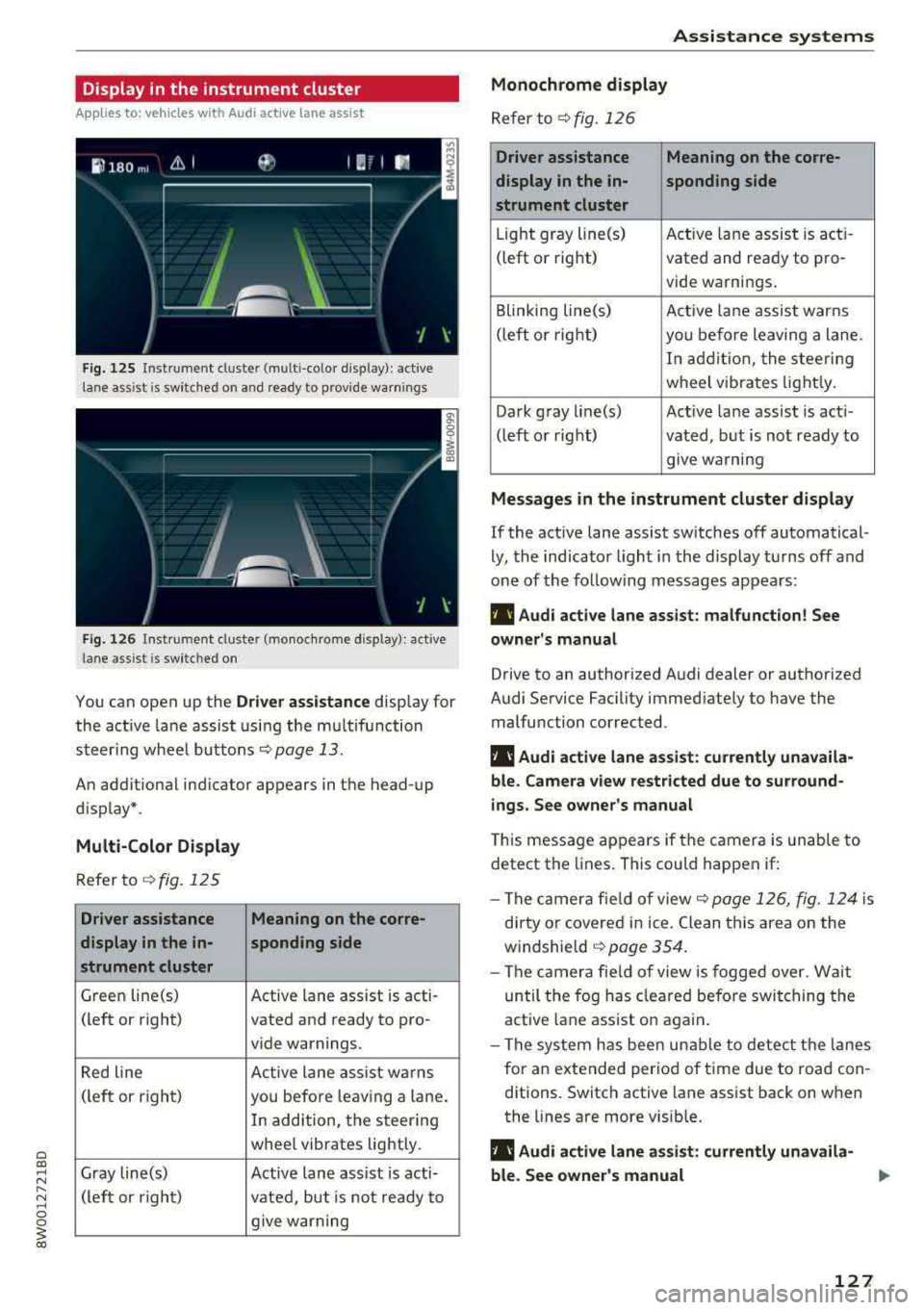
Fig. 125 Instrument cluster (multi-color display): ac tive
lane ass ist is sw itched on and ready to provide warnings
Fig. 126 Instrument cl uster (monoc hrome display): active
lane ass ist is switched on
You can open up the Dr ive r assistance display for
the act ive lane assist using the multifunction
steer ing whee l buttons
c::> page 13.
An additional ind icator appears in the head-up
display*.
Multi-Color Display
Refer to¢ fig. 125
Driver assistance Meaning on the corre-
display in the in-sponding side
strument cluster
Green line(s) Active lane assist is acti -
(left or right) vated and ready to pro-
vide warnings.
Red line Active lane assist warns
(left or right) you before leav ing a lane.
In addition, the steering
whee l vibrates lightly.
Gray line(s) Active lane assist is acti-
(left or right)
vated, but is not ready to
give warning
Assistance systems
Monochrome display
Refer to¢ fig. 126
Driver assistance Meaning on the corre-
display in the in-
sponding side
strument cluster
Light gray line(s) Act ive lane assist is acti-
(left o r right) vated and ready to pro-
vide warnings .
Blinking line(s)
Active lane assist warns
(left or right)
you before leaving a lane.
In addition, the steering
wheel vibrates lightly.
Dark gray line(s) Active lane assist is acti-
(left or right) vated, but is not ready to
. . give warning
Messages in the instrument cluster display
If the active lane assist switches off automatical
ly, the indicator light in the display turns off and
one of the following messages appears:
fl! Audi active lane assist: malfunction! See
owner's manual
Drive to an authorized Audi dealer or authorized
Audi Service Facility immediately to have the
malfunction corrected.
fl! Audi active lane assist: currently unavaila
ble . Camera view restricted due to surround
ings. See owner's manual
This message appears if the camera is unable to
detect the lines. This could happen if:
- The camera fie ld of view
c::> page 126, fig. 124 is
dirty or covered in ice. Clean this area on the
windshie ld
¢ page 354.
- The camera field of view is fogged over. Wait
until the fog has cleared before switching the
active lane assist on again.
- The system has been unable to detect the lanes
for an extended period of time due to road con
ditions. Switch active lane assist back on when
the lines are more visible.
fl! Audi active lane as sist: currently unavaila
ble. See owner's manual
127
Page 157 of 403
Multi Media Interface
Traffic safety information
Audi recommends performing certain Infotain
ment system functions, such as entering a desti
nation, only when the vehicle is stationary . Al
ways be prepared to stop operating the Infotain
ment system in the interest of your safety and
the safety of other road users.
A WARNING
Only use the Infotainment system when traf
fic conditions permit and always in a way that
allows you to maintain complete control over
your vehicle.
@ Tips
Certain functions are not available while driv
ing .
Introduction
The Multi Media Interface, or MMI for short,
combin es various systems for communication,
navigation* and entertainment in your Audi. You
can operate the MMI using the MMI control pan
el, the multifunction steering wheel or the voice
recognition system*.
Applies to: vehicles with automatic transmiss ion:
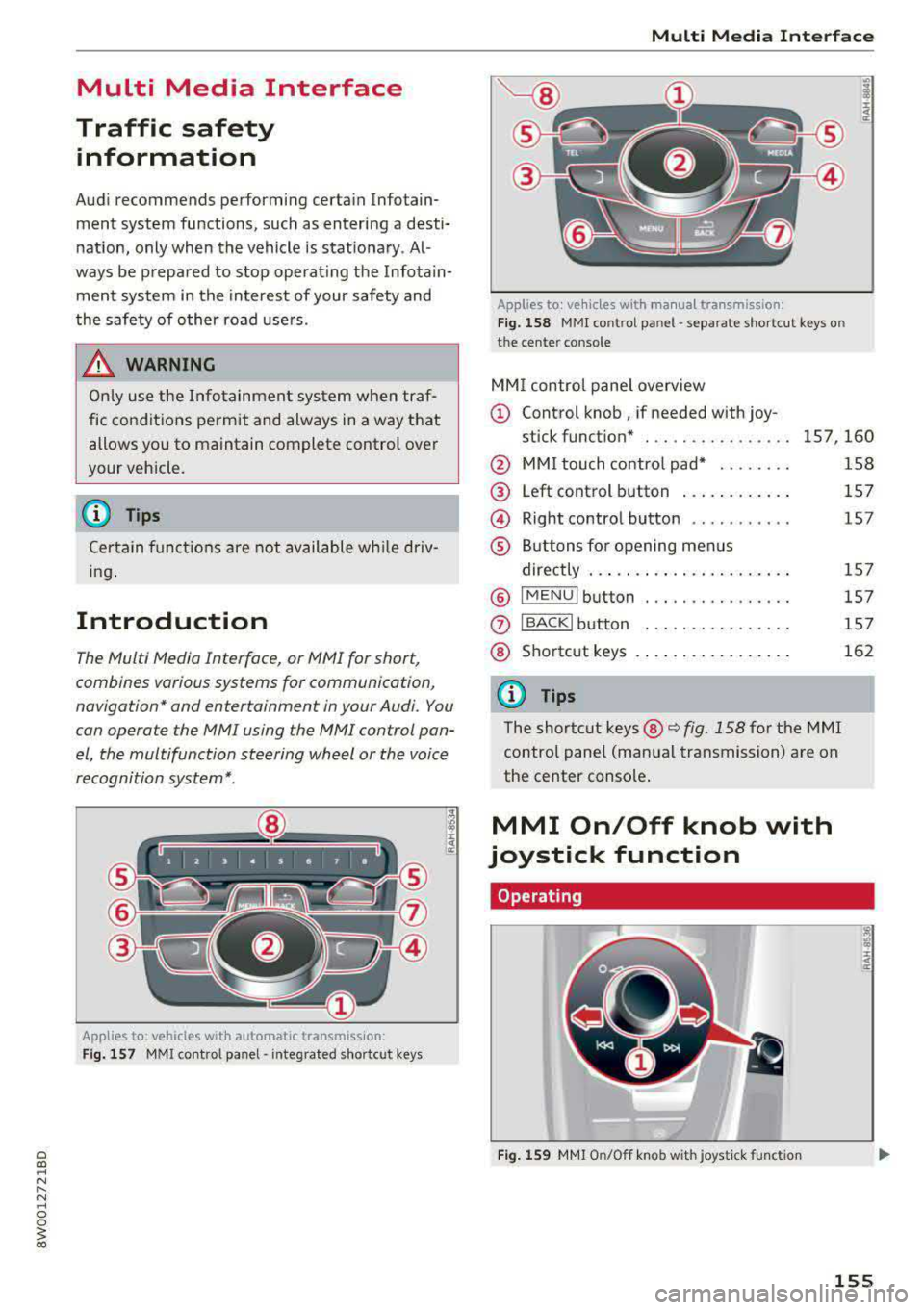
Fig. 157 MMI contro l panel· integrated shortc ut keys
Multi Media Interface
Applies to: ve hicles w ith manua l transmission:
Fig . 158 MMI cont rol p anel
-separa te shortcut keys o n
t he ce nte r conso le
MM I control panel overview
(D Control knob , if needed with joy-
stick funct ion* . .. .. .... .. .... . 157 ,160
@ MMI touch control pad* ....... .
@
@
®
Left control button ........... .
Right control button .......... .
Buttons for opening menus
directly .. ... .. .. ............ .
® IMENUI button . .. .. .... ...... .
0
®
I BA CKI button
Shortcut keys
@ Tips
The shortcut keys @~ fig. 158 for the MMI
control panel (manual transmission) are on
the center console .
MMI On/Off knob with
joystick function
Operating
Fig. 159 MMI On/O ff knob with jo ystick f unction
158
157
1 5 7
15 7
157
157
162
155
Page 158 of 403
Multi Media Interface
Switching the MMI on /off : the M MI can be
switched on/off manua lly.
- Switching on manu ally : press the On/Off knob
@ c> fig. 159 briefly . Or: press the I MENU ! but
ton ®
c> page 155 , fig. 157 or c> page 155,
fig . 158,
or one of the buttons to open the me
nus d irectly @.
-Switching off manually : press and hold the
On/Off knob
@ c> fig. 159 until the MMI
switches
off. If the MMI has bee n switched off
manually, it does not switch on again au tomati
ca lly the next time the ignit io n is switched on .
Additional functions :
- Adjusting the volume :
tu rn the On/Off k nob @
.:>fig. 159.
-Muting : press the O n/Off knob @.:> fig. 159
briefly.
-Selecting the previou s/next function (for ex
ample, a radio stat ion /tra ck ):
press the On/Off
kn ob @ .:> fig. 159 briefly toward the le ft l«l or
rightt>C>I .
-Fast forwarding /re winding (for example
song s):
p ress and hold the On/ Off knob @
c> fig. 159 toward the left l«l or right t>C>I.
A WARNING
Adjust the volume of t he a udi o system so that
signa ls from outside t he ve hicle, such as po
lice and fire sirens, can be heard easily at all
times .
@ Tips
The MMI sw itches off automatically if the en
gine is not r unning and the vehicle battery is
low .
Infotainment system
display
Switching on and off
- Switching on and off manually :
press the roJ
button @ c> page 8, fig. 2.
When the M MI i s switched o n and the disp lay is
sw itched off, you can operate certa in f unct io ns
using the On/Off knob with t he M MI joystick
function
.:> page 155.
156
Information on display images
The display version depends on vehicle equip
ment .
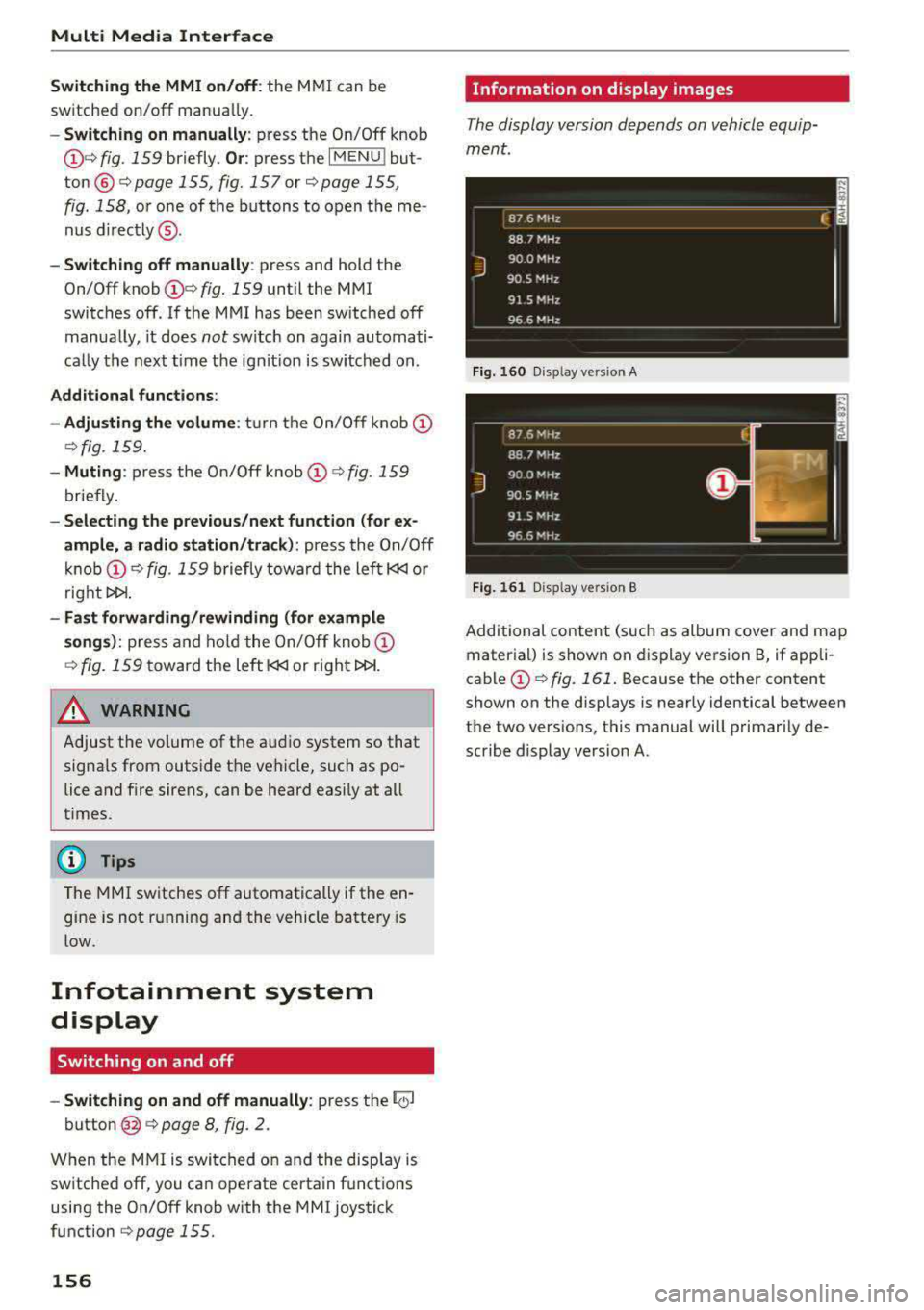
Fig. 16 0 Disp lay ve rs ion A
F ig. 161 Disp lay ve rs ion B
Additional content (such as album cover and map
mater ial) is shown on display ve rsion
B, if appli
cable@.:> fig. 161 . Because the other content
shown on the displays is nearly identical between
the two vers ions, this manual will p rimari ly de
scribe display version A .
Page 159 of 403
MMI operation
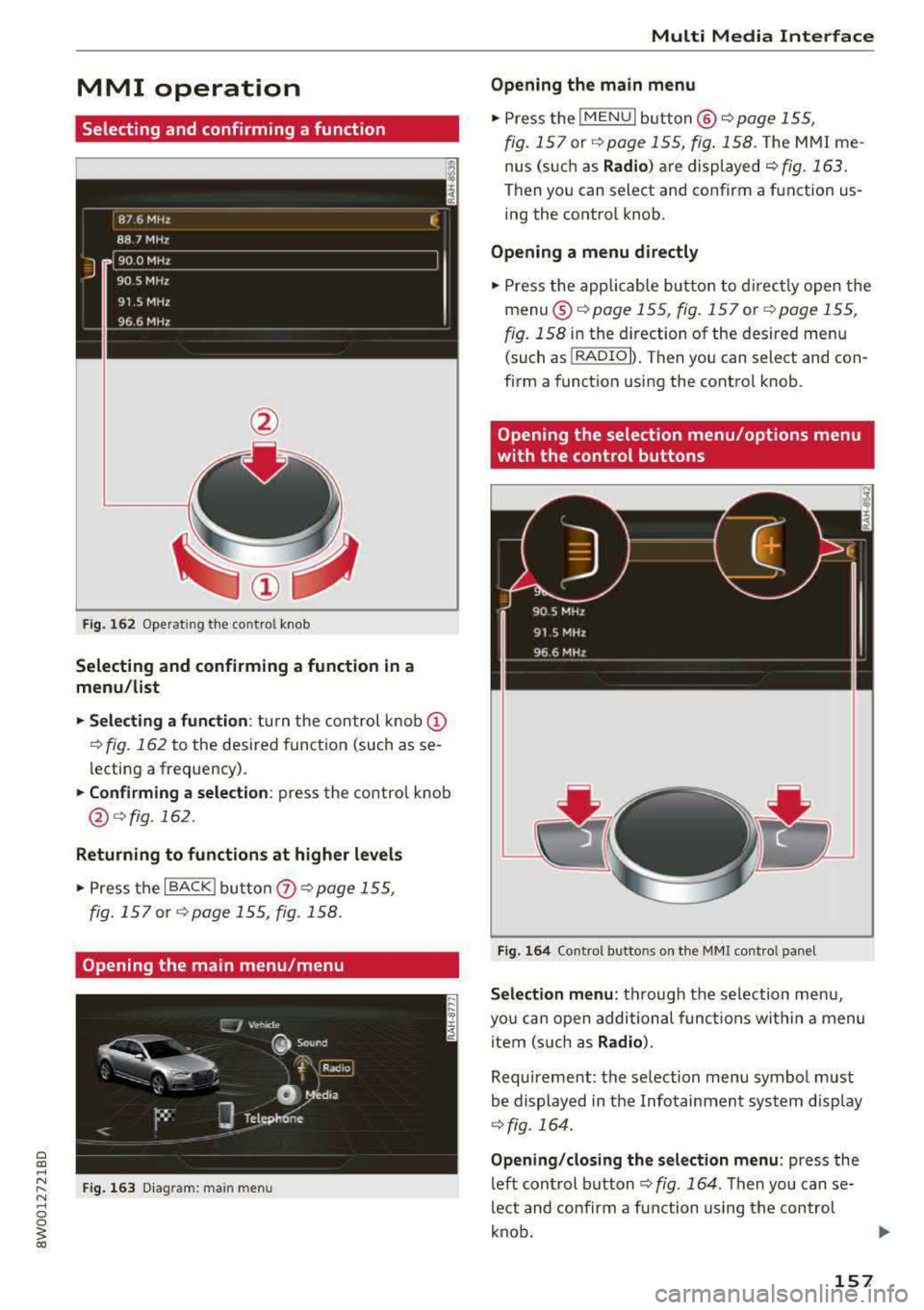
Selecting and confirming a function
Fig. 16 2 Operat ing t he cont ro l knob
Selecting and confirming a function in a
menu /list
.,. Selecting a function : turn the control k no b(!)
¢ fig. 162 to the desired function (such as se
l ecting a frequ ency) .
.,. Confirming a selection : press the control knob
@ r::!vfig.162 .
Returning to functions at higher levels
.,. Press the I BACK I bu tto n 0 ¢ page 155,
fig . 157
or r::!v page 155, fig. 158 .
Opening the main menu/menu
Fig. 163 D ia gram: main m en u
Multi Media Interface
Opening the main menu
.,. Press the I MEN u I b utt on @ ¢ page 155,
fig . 157
or ¢ page 155, fig . 158 . The MMI me
nus (s uch as
Radio ) are displayed ¢ fig. 163.
Then yo u can sel ect and confirm a f unction us
ing the contro l knob .
Opening a menu directly
.,. Press the applicab le bu tto n t o d irec tly open the
menu ®¢ pag e 155, fig . 157 o r c;> pag e 155 ,
fig . 158
in the direction of the desired me nu
( such as
I RADIO I) . T hen you can s ele ct and con
firm a funct ion using the contro l knob .
Opening the selection menu/options menu
with the control buttons
Fig . 164 Co ntro l b utto ns on t he MM I co ntr ol p an el
Selection menu : thr ough the s election men u,
yo u can open additional funct ions wit hin a menu
item (s uch as
Radio) .
Requireme nt: the se lection menu symbo l must
b e display ed in the Info tainmen t system disp lay
¢ fig . 164.
Opening /closing the selection menu : press the
left cont rol button
¢ fig . 164 . Then you can se
lect and confirm a function us ing the con trol
k nob.
157
Page 254 of 403
a co .... N ,....
N .... 0 0
Telephone
Applies to: vehicles with telephone
Mute telephone : messages and ring tones are se t
to mute .
Ringtone : see¢ page 185, Ringtone and volume
se ttings .
Ringtone volume :
you can adjust the volume of
the selected ringtone by turning the co ntro l
knob.
Message volume : you can ad just the volume of
the no tifica tion for an i ncoming tex t message by
turn ing t he control knob .
Microphone input level : you can adjust the call
volume during a phone ca ll by tu rning the co ntro l
knob .
Navigation
Applies to: veh icles with navigation system
Voice guidance : see ¢page 213.
Voice guidance during phone call : see
¢page 213.
Voice guidanc e volume : you can adjust the voice
g ui dance vo lume by turn ing t he con trol knob. Or:
you can adj ust the vo ice gu idan ce vo lume durin g
active rou te gu idance by tu rning the On/Off
knob.
Entertainment fader: t he v olume of audi o play
ba ck can be tempo rarily lowe red when the p ark
in g system or voi ce g uidance is active.
Voice recognition system
App lies to: vehicles with voice recognition system
Command display : see¢ page 248 .
Short dialog : see¢ page 248.
Volume: see ¢ page 248.
Individual speech training : see ¢page 248 .
Parking aid*
You can ad just the vo lume of the signal tone by
turn ing t he control knob.
3 1) Not avai lab le in all ve hicle s. co
System settings
-Adjusting th e Front volume : select and con
fi rm
High , Medium or Low .
- Adjusting
the Rear volume : select and con firm
High , Medium or Low .
MMI touch volume*
Yo u can adjus t the vol ume of t he p romp ts fo r the
MM I touch* by turnin g the cont rol k nob.
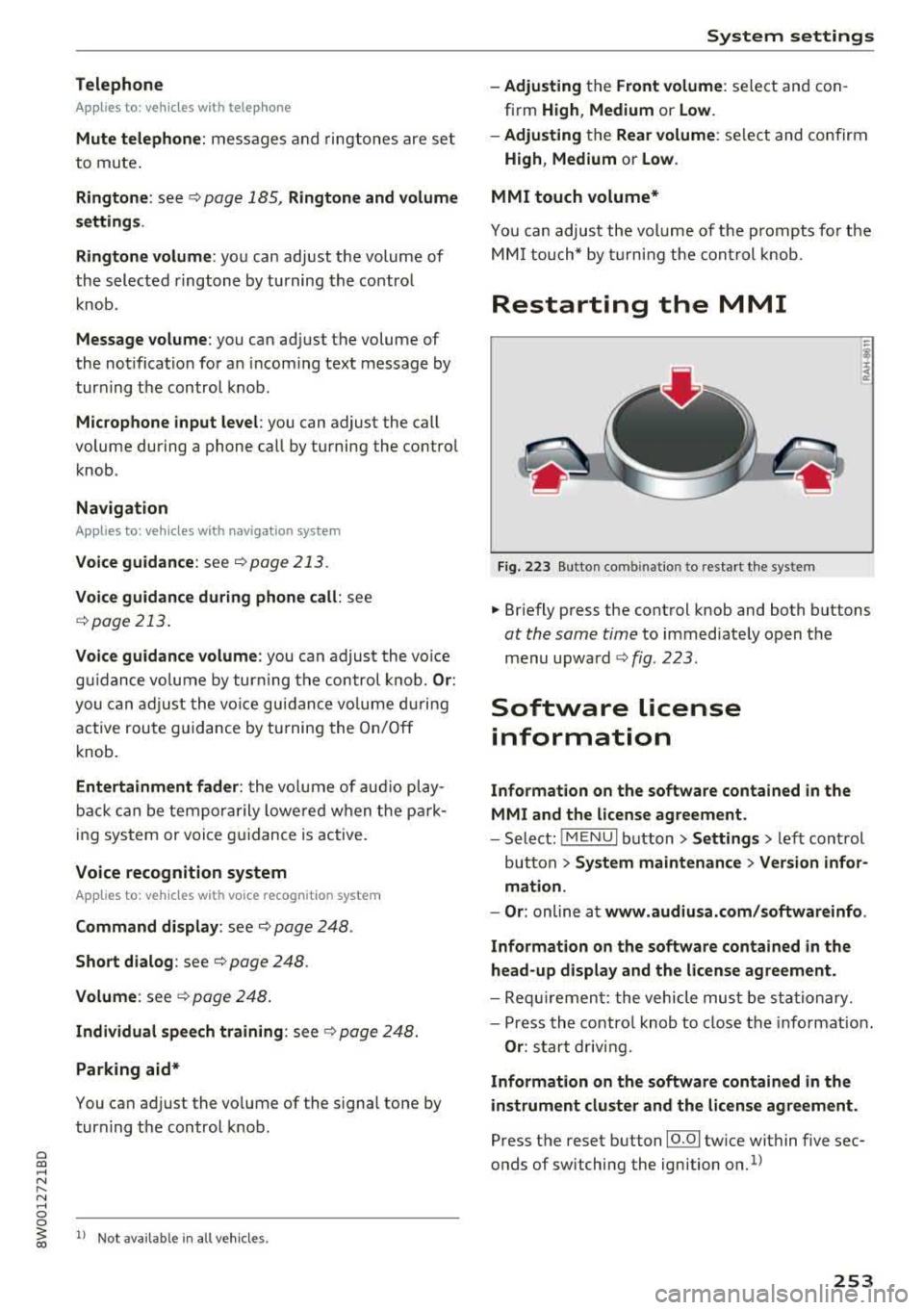
Restarting the MMI
Fig . 223 Button co mbinatio n to res ta rt t he syste m
.,. Briefly p ress the cont rol knob and both buttons
at the same time to immediate ly open t he
menu upward
<:;> fig. 223 .
Software license
information
Information on the software contained in the
MMI and the license agreement.
- Select : !ME NUI bu tton> Settings > le ft con trol
button >
System maintenance > Version infor
mation.
- Or :
online a t www.audiusa.com /softwareinfo .
Information on the software contained in the
head-up display and the license agreement .
-Re quir emen t: the vehicle mus t be sta tion ary.
- Press th e co ntro l knob to close the info rmat ion .
Or : sta rt dr ivin g.
Information on the software contained in the
instrument cluster and the license agreement.
Press t he reset button 10.01 twice within five sec
onds of switching the ign ition
on.1>
253
Page 311 of 403
Child safety
push-on connectors attached to adjustable
straps.
I n addition to the LATCH lower anchorages, these
chi ld restraint systems usually require the use of
tether straps to he lp keep the child restraint
firm ly in place.
A WARNING
Improper installation of child restraints will
increase the risk of injury and death in a
crash.
- Always follow the instructions provided by
the manufacturer of the child restraint you intend to install in your veh icle.
- Never install a child restraint without a properly attached top tether strap if the
child restraint manufacturer's instruct ions
requ ire the top tether strap to be used.
- Improper use of child restra int LATCH lower
anchorage points can lead to injury in a colli
s ion . The LATCH lower anchorage points are
designed to withstand on ly those loads im
posed by cor rect ly fitted child restraints .
- Never mount two child restraint systems on
one LATCH lower anchorage point.
- Never secure or attach any luggage or other
item to the LATCH lower anchorages.
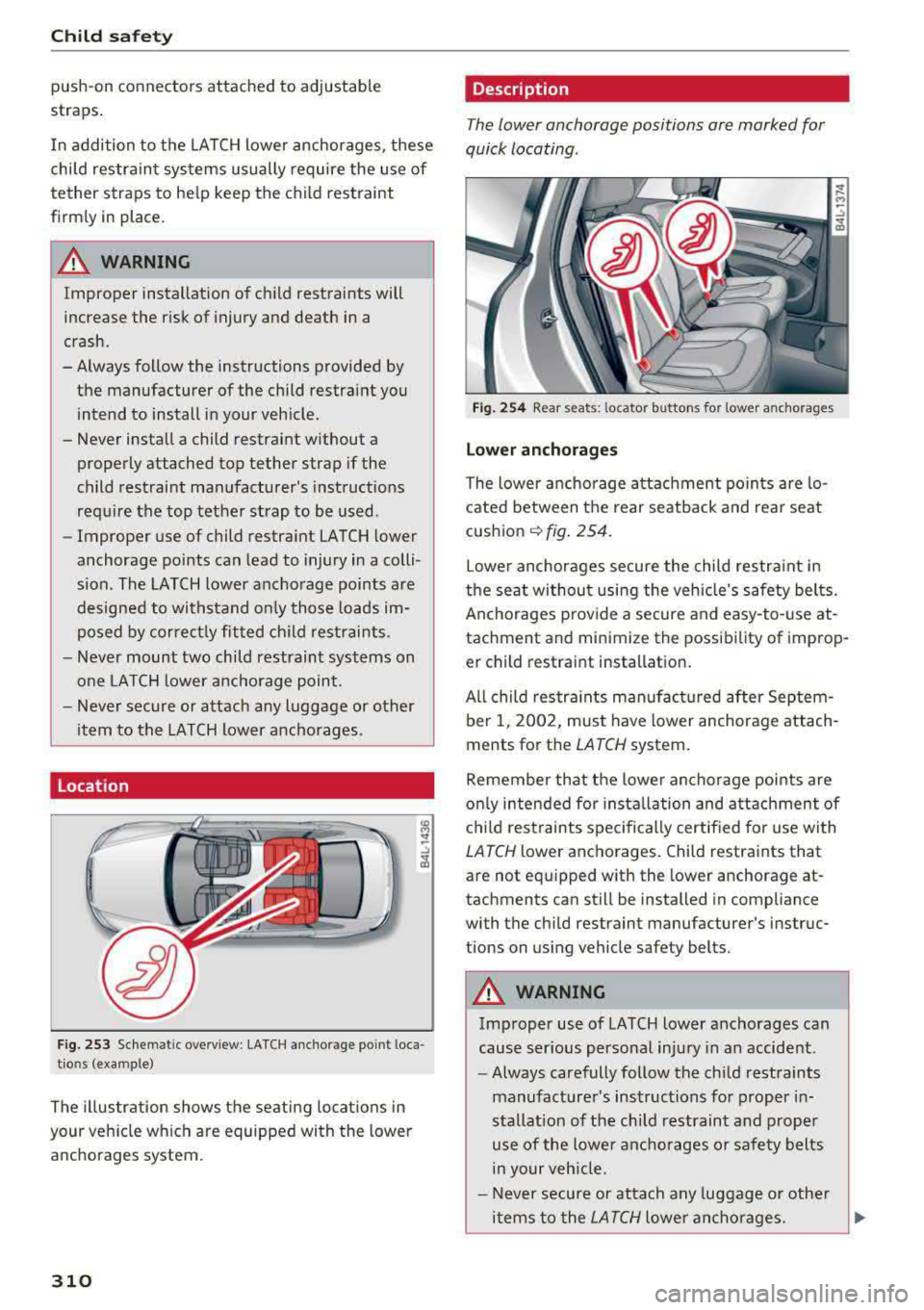
Location
F ig. 253 Schematic overview : LA TCH anchorage point loca
t ions (example)
The illustration shows the seating locations in
your veh icle which are equipped with the lower
anchorages system.
310
Description
The lower anchorage positions are marked for
quick locating .
Fig. 254 Rear seats: locator buttons for lower anchorages
L o wer anchorage s
The lower anchorage a ttac hment points are lo
cated between the rear seatback and rear seat
cushion
c:::> fig . 254 .
Lower anchorages secure the child restra int in
the seat without using the vehicle's safety belts.
Anchorages p rovide a secure and easy-to-use at
tachment and minimize the possibility of improp er child restraint installation.
All child restra ints manufact ured after Septem
ber 1, 2002, must have lower anchorage attach
ments for the
LATCH system.
Remember that the lowe r ancho rage points are
on ly intended fo r insta llation and attachment of
child restraints spec ifically cert ified for use with
LATCH lower anchorages. Child restraints that
are not equipped with the lower anchorage at
tachments can still be installed in compliance
with the child restraint manufacturer's instruc
tions on using vehicle safety belts.
A WARNING
Improper use of LATCH lower anchorages can
cause ser ious personal injury in an accident.
- Always carefully follow the ch ild restraints
manufacturer's instructions for proper in
stallation of the child restraint and proper
use of the lower ancho rages or safety belts
in your vehicle.
- Never secure or attach any luggage o r other
items to the
LATCH lower an chorages. ..,
Page 389 of 403
Index
Audi p re sense . . . . . . . . . . . . . . . . . . . . . . . 120
Messages . . . . . . . . . . . . . . . . . . . . . . . . . . 124
Sett ings . . . . . . . . . . . . . . . . . . . . . . . . . . . 124
Aud i Serv ice Repair Ma nuals and Literature 383
Aud i side assist . . . . . . . . . . . . . . . . . . . . . . . 128
Aud i smartphone interface . . . . . . . . . 246, 250
Aud i virt ua l cockp it
refer to Instr ume nt cl uster . . . . . . . . . . . . . 10
AUTO Automatic headlights . . . . . . . . . . . . . . . . . 54
Auto Lock (centra l locki ng system) . . . . . . . . 37
Automatic belt ret ractor . . . . . . . . . . . . . . . 266
Automatic climate control . . . . . . . . . . . . . . . 76
Aud i drive select. . . . . . . . . . . . . . . . . . . . . 134
Operation . . . . . . . . . . . . . . . . . . . . . . . . . . . 77
Automatic climate control system Setup . . . . . . . . . . . . . . . . . . . . . . . . . . . . . . 79
Automatic transm ission . . . . . . . . . . . . . . . . . 9 1
E me rgency prog ram . . . . . . . . . . . . . . . . . . 96
Hill descent contro l . . . . . . . . . . . . . . . . . . . 94
Kick -down . . . . . . . . . . . . . . . . . . . . . . . . . . . 95
Launch control program . . . . . . . . . . . . . . . 95
Manual sh ift ing . . . . . . . . . . . . . . . . . . . . . . 94
Parking lock emergency re lease . . . . . . . . . 97
Selector lever pos itions . . . . . . . . . . . . . . . . 91
Automatic wipe/wash system . . . . . . . . . . . . 60
Auto Safety Hotline . . . . . . . . . . . . . . . . . . . 26 1
AUTO (button) Automatic climate control . . . . . . . . . . . . . . 78
Auxiliary heater (automatic climate control) 79
AUX input . . . . . . . . . . . . . . . . . . . . . . . . . . . 234
Average consumption . . . . . . . . . . . . . . . . . . . 17
Ave rage spee d . . . . . . . . . . . . . . . . . . . . . . . . 17
B
BACK button . . . . . . . . . . . . . . . . . . . . . . . . . 155
Balance (sound) . . . . . . . . . . . . . . . . . . . . . . 252
Bass (sound) . . . . . . . . . . . . . . . . . . . . . . . . . 252
Ba tte ry
J u mp starting . . . . . . . . . . . . . . . . . . . . . . . 374
also refer to Veh icle bat tery . . . . . . . . . . . 33 1
Before driving . . . . . . . . . . . . . . . . . . . . . . . . 254
Belt tensione rs . . . . . . . . . . . . . . . . . . . . . . . 269
Blended gasoline . . . . . . . . . . . . . . . . . . . . . 315
Blower (automatic cl imate control) . . . . . . . . 78
388
B luetoot h
Audio player . . . . . . . . . . . . . . . . . . . . . . . . 230
Connect ing a cell phone . . . . . . . . . . . . . . 175
Settings . . . . . . . . . . . . . . . . . . . . . . . . . . . 2SO
Boost...... .. .. .. .. .. ............. ... 11
Booster seats . . . . . . . . . . . . . . . . . . . . . . . . 305
Boost pressure indicator . . . . . . . . . . . . . . . . 11
B rake fl uid
Check ing the b rake fluid level . . . . . . . . . . 330
Brakes . . . . . . . . . . . . . . . . . . . . . . . . . . . . . . 149
Brake ass ist . . . . . . . . . . . . . . . . . . . . . . . . 146
B rake fl uid . . . . . . . . . . . . . . . . . . . . . . . . . 330
El ec trome chanical parking b rake . . . . . . . . 88
E mergency b raking function . . . . . . . . . . . . 88
New brake pads . . . . . . . . . . . . . . . . . . . . . 149
Worn brake pads . . . . . . . . . . . . . . . . . . . . . 33
Breaking in New bra ke pads . . . . . . . . . . . . . . . . . . . . . 149
New engine . . . . . . . . . . . . . . . . . . . . . . . . . 80
New t ires . . . . . . . . . . . . . . . . . . . . . . . . . . 3 41
Browser
refer to M edia center . . . . . . . . . . . . . . . . . 237
Bu lbs ............................... 373
Buttons Cont ro l panel (M MI) . . . . . . . . . . . . . . . . . 155
Multifunctio n steering whee l . . . . . . . . 13, 16
P rogramming (multifunction steering
whee l) . . . . . . . . . . . . . . . . . . . . . . . . . . . . . . 15
C
Cable ( USB adapter/AUX connector cab le) 233
Californ ia Pr opos ition 65 Wa rning . . . . . . . 3 24
Battery specific . . . . . . . . . . . . . . . . . . . . . 331
Call list . . . . . . . . . . . . . . . . . . . . . . . . . . . . . 178
Call options . . . . . . . . . . . . . . . . . . . . . . . . . . 185
Capacities AdBl ue ... .. .. .. .. .. ... .......... .. 319
Fuel t ank . . . . . . . . . . . . . . . . . . . . . . . . . . . 381
Washer fluid reservoir . . . . . . . . . . . . . . . . 381
Care . . . . . . . . . . . . . . . . . . . . . . . . . . . . . . . . 354
Cargo area
refer to Loading the luggage compart-
ment .............................. 259
C atalytic converter . . . . . . . . . . . . . . . . . . . . 322
CD d rive (med ia d rives) . . . . . . . . . . . . . . . . 229