ignition AUDI S4 2018 User Guide
[x] Cancel search | Manufacturer: AUDI, Model Year: 2018, Model line: S4, Model: AUDI S4 2018Pages: 403, PDF Size: 66.81 MB
Page 43 of 403

.. To lock the vehicle, close the door and touch
the sensor in the door handle
on ce c::> fig. 28 . Do
not hold the door handle while doing this .
You can u nlock/ lock the vehicle at every door.
The remote control key cannot be more than ap
proximately 4 feet (1.5 m) away from the door
handle. It makes no difference whether the mas
ter key is in your jacket pocket or in your brief
case, for example .
If you hold the door handle while locking, this
can impair the locking function.
The doo r cannot be opened for a br ief period di
rect ly after locking it. This way you have the op
portunity to check if the doors locked correctly.
The settings in the Infotainment system deter
mine if the entire vehicle or on ly one of the doors
is unlocked when unlocking the vehicle
c::> pag e 41.
A WARNING
Read and following all WARNINGS c::> &. in De
scription on page 3
7.
@ Tips
If your vehicle is left standing for a long peri
od of time, note the following:
-The energy management system grad ually
turns off unnecessary convenience functions
to prevent the vehicle battery from draining
and to mainta in the vehicle's ab ility to start
for as long as possible. You may not be able
to unlock your vehicle us ing the convenience
key .
Central locking switch
Fig. 29 Drive r's door : central loc king switch
Openin g an d clos ing
.. To lock the vehicle, press the l'.D button c::> &_ .
.. To unlock the vehicle, press the @ button.
When locki ng the vehicle with the central lock ing
switch, the following applies:
-Opening the door and the luggage compart
ment lid from the
outside is not poss ible (for
secur ity reaso ns, such as when stopped at a
light) .
-The LED in the centra l locking sw itch t urns on
when all doors are closed and locked .
- You ca n open the doors individua lly from the
inside by pu lling the doo r handle.
- In the event of a crash with a irbag deploymen t,
the doo rs unlock automat ica lly to allow access
t o the vehicle .
~~ WARNING
-
- The central locking switch a lso works when
the ignition is switched off and automatica l
ly locks the entire vehicle when the
l'.D but
ton is pressed.
-The central locking switch is inope rative
when the vehicle is locked from the outs ide.
-Locked doors make it more difficult for
emergency workers to get into the vehicle,
which puts lives at r isk. Do not leave anyone
behind in the vehicle, especially children.
-Read and fo llowing a ll WARNINGS c::> &. in
Description on page 3
7.
(D Tips
Your vehicle locks automatically when it reaches a speed of 9 mph (15 km/h) (Auto
Lock)
c::> page 37. You can unlock the vehicle
again using the
ca button in the central lock
i ng switch.
Setting the central locking system
In the Infotainment system, you can set which
doors the central locking system will unlock .
.. Select in the Infotainment system: I MENU! but
ton
> V ehicle > left control b utton > Vehicle
settings > Central lock ing .
Door unlo cking
-you can decide if All doors or
only the
Dri ver 's door shou ld unlock. The
41
Page 45 of 403

triggered. The anti-theft alarm system is activat
ed when the vehicle is locked as usua l.
It
switches off when the vehicle is unlocked.
If the a larm is trigge red, it w ill shu t off automat
ically a fter a ce rtain amount of time . Switch the
ignition on or press
the m button on the remote
control key to turn
off the alarm.
Luggage compartment
Lid
Opening /closing the luggage compartment
lid
Fig . 32 Driver 's door: opening the luggage compartment
lid
Applies to: vehicles with automatic transmission:
The luggage compartment lid can only open
when the selector lever is in P.
Applies to: vehicles with manual transmission:
The luggage compartment lid can only open
when the parking brake is set. Pull the
«el) sw itch
~ page 88 to set the parking brake.
Opening th e luggage compartment lid
.,. Press and hold the c:;; button on the remote
contro l key for at least one second . The luggage
compartment lid unlocks and opens slightly . Or
.,. Press the handle in the luggage compartment
l id. Or
.,. Pull the c:>* switch in the dr iver's door.
Cl osing the luggage compartment lid
.,. Use the inside gr ip to pull the luggage com
partment lid down and allow it to close using a
gentle p ush
~ ,&. .
Op enin g an d clos ing
A WARNING
--After closing the luggage compartment lid,
make sure that it is latched . Otherw ise the
luggage compartment lid could open sud
denly when dr iving, which increases the r isk
of an a cc ident.
- Never drive with the luggage compartment
lid ajar or open, because poisono us gases
can enter the vehicle interior and create the
risk of asphyx iat ion.
- Never leave your veh icle unattended when
the luggage compartment lid is open. A
child cou ld climb into the veh icle through
the luggage compartment. If the luggage compartment lid was then closed, the child
would be trapped in the vehicle and unable
to escape. To reduce the risk of injury, do
not allow children to play in or around the
veh icle . Always keep the luggage compart
ment lid and the doors closed when the ve h icle is not in use.
-Always make sure no one is in the luggage
compartment lid's range of motion when it
is closing, especially near the hinges. Fin
gers or hands could be pinched.
© Tips
- When the vehicle is locked, the luggage compartment lid can be unlocked separately
by pressing the
c:5 button on the remote
control key. The luggage compartment lid
locks automa tically when it is closed again.
- T he settings in the Infotainment system de
termine if the luggage compartment lid can be opened using the
hand le~ page 41 .
- In case of an emergency or a fau lty handle,
t he luggage compartment lid can be opened
manually from t he
ins ide ~ page 46.
43
Page 46 of 403

Opening and clo sin g
Automatic luggage compartment lid
Applies to: vehicles with automatic luggage compartment lid
The luggage compartment lid can be opened and
closed electrically.
F ig. 33 Driver's doo r: opening the luggage compartment
lid
Fig. 34 Luggage compartment lid: @clos ing button*, @
l ock button (vehicles with convenience key*)
Applies to: vehicles with automatic transmission:
The luggage compartment lid can only open
when the se lector lever is in
P .
Applies to: vehicles with manual transmission:
The luggage compartment lid can only ope n
when the parking brake is set. Pull
the© switch
¢ page 88 to set the parking brake .
Opening the luggage compartment lid
... Press and hold the ~ b utton on the remote
contro l key fo r at leas t one second . Or
... Pu ll the~ switch in the driver 's door briefly
¢ fig. 33 . Or
... Press the handle in the luggage compartment
lid.
Cl osing th e luggage compartment lid
... When the ignition is sw itched on, pull the~
switch in the driver's door until the luggage
compartment lid is closed
¢ ,& . Or
44
... Press the~ button in the luggage compart
ment lid
¢ fig. 34. The luggage compartment
lid wi ll automat ica lly lower and
close ¢,& . Or
... Applies to: vehicles with convenience key: Press
the~ button on the remote control key until
the luggage compartment l id
closes ¢.&, .
Make sure there is enough distance between
you and the luggage compartment lid . The re
should be a maxim um 9 feet (3 m) of distance.
Or
... Applies to: vehicles with convenience key: Press
the
tf) button in the luggage compartment lid
¢ fig. 34 . The remote control key m ust not be
more than approx imately
4 feet (1.5 m) away
from the luggage compartment and it must not
be inside the vehicle. The luggage compart
ment lid will automatically lower and close. The
veh icle
locks ¢.&_ . Or
... Lightly p ull the luggage compartment lid at the
in ner gr ip. The luggage compartment lid wi ll
automatically lowe r and close
¢ .&_ . Or
... Press the hand le in the luggage compartment
lid. The luggage compartment lid will automat
ically lower and close
¢ .&, .
Storing the luggage compartment lid
opening position
... Bring the luggage compartment lid into the de
sired open position. The position must be at a
certain height or higher to store .
... Press and hold the~ button for at least four
seconds to store the new open position . A visu
al and audio s ignal will follow .
... To set a higher open pos it ion, wa it at least five
seconds and then carefully p ress the luggage
compa rtment lid upward .
... Press and hold the~ butto n aga in fo r at leas t
four seconds to store the desired opening posi
tion.
The opening/clos ing process will stop immedi
ate ly if:
- You pu ll/re lease
the~ sw itch in the drive r's
door, or
- Applies to: vehicles with convenience key:
Press/re lease
the~ b utton o n the remote
con trol key, o r
Page 51 of 403

_& WARNING
-Always take the vehicle key with you when
leaving the vehicle, even for a short period
of time . This applies particularly when chil
dren remain in the vehicle . Otherwise chil
dren could start the engine or operate e lec
trical equipment (such as power windows),
which increases the risk of an accident . The
power windows continue to function until
the driver's door or front passenger's door
has been opened.
- Pay careful attent ion when closing the win
dows . Pinching could cause serious injuries .
- When locking the vehicle from outside, the vehicle must be unoccupied since the win
dows can no longer be opened in an emer
gency .
@ Tips
You can still open and close the w indows for
approximately 10 minutes after turning the
ignition
off . The power windows do not switch
off until the driver's door or front passenger's
door has been opened.
Convenience opening/closing
Applies to: vehicles with convenience key
All of the windows and the roof* con be opened/
closed at the some time .
Convenience opening feature
.. Press and hold the CD button on the remote con
trol key until all of the windows reach the de
sired position and the
roof* is tilted open.
Convenience closing feature
.. Press the @ button on the remote control key
until the roof* is closed
c::> .&,, or
.. Touch the sensor* on the door handle until a ll
of the windows and the roof* are closed. Do not
place your hand in the door handle when doing
this.
Setting convenience opening in the
Infotainment system
.. Select in the Infotainment system: !MENUI but
ton
> Vehicle > left control button > Vehicle
Open ing and closing
settings > Central locking > Long press to
open windows.
_& WARNING
- To reduce the r isk of injury, never close the
windows or the roof* carelessly or in an un
controlled manner .
- For secur ity reasons, the windows and the
roof* can only be opened and closed with
the remote control key at a maximum dis
tance of approx imately 6.5 feet (2 m) away
from the vehicle. Always pay attent ion when
using
the@ button to close the windows
and the roof* so that no one is pinched. The
closing process will stop immediately when
the@ button is released.
(D Tips
Applies to: vehicles with panorama glass roof:
the power sunshade also opens/closes when
opening/closing the roof.
Correcting power window malfunctions
You can reactivate the one-touch up/down func
tion if it malfunctions.
"' Pull the power window switch up until the win
dow is comple tely raised .
.. Release the switch and pull it up again for at
least one second.
Sliding/tilting sunroof
Operating
Applies to: vehicles with sliding/tilting sunroof
Fig. 43 Section of front head lin er: sliding/tilt ing sunroof
button
....
49
Page 54 of 403
Opening and clo sin g
When the valet parking function is switched on,
the message
V alet pa rking acti vated appears in
the instrument cluster display when you switch
the ignition on.
(D Tips
Please note that the luggage compartment
can still be accessed from the vehicle interior
in vehicles with fixed rear seat backrests or
ones that cannot be locked, even when the
valet parking function is switched on.
Garage door opener (HomeLink)
Description
Applies to: veh icles with garage door opener (Homelink)
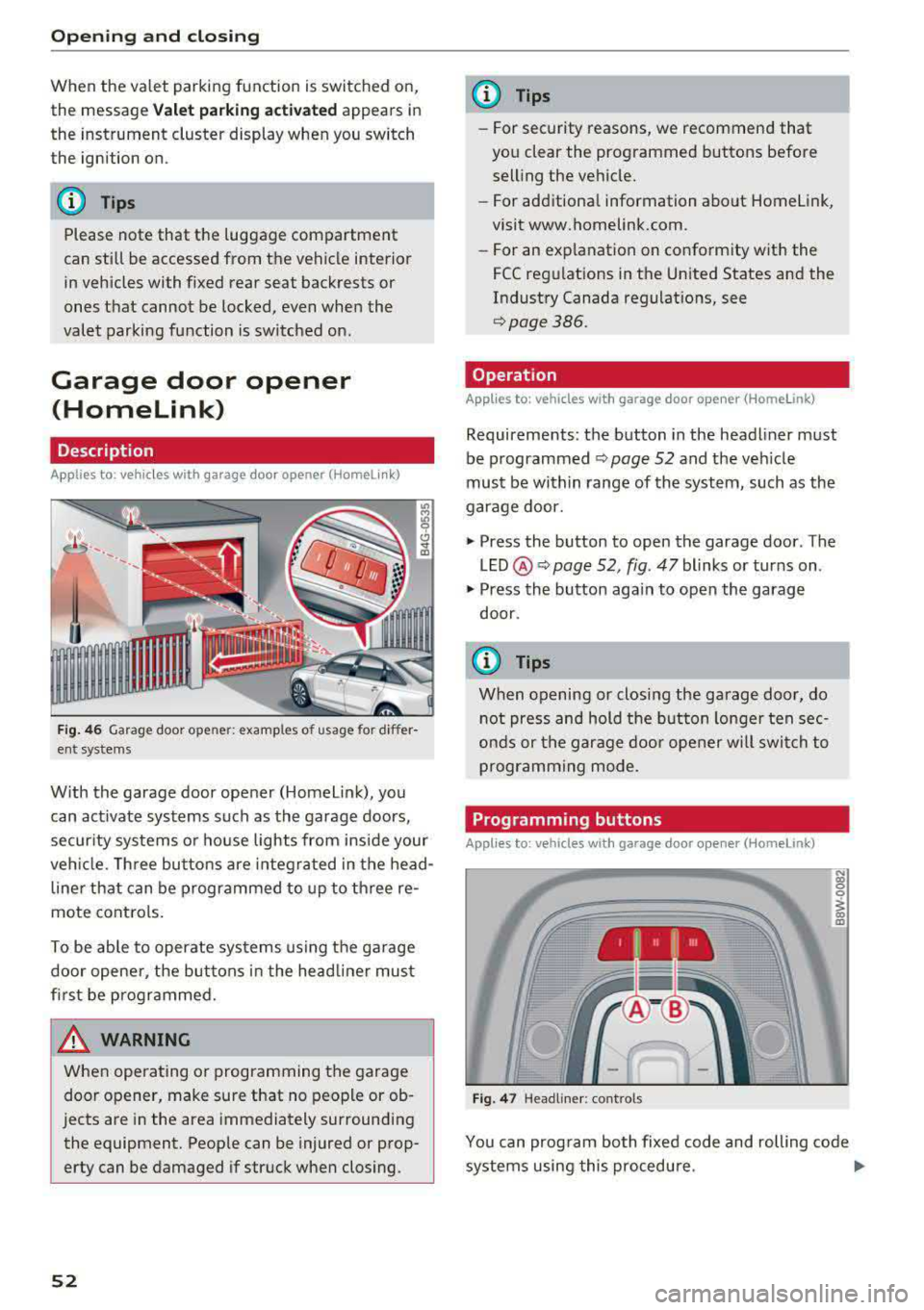
Fig. 46 Garag e door ope ner: exa mples o f usage for di ffer
ent systems
W ith the garage door opener (Homel ink), you
can act ivate systems such as the garage doors,
security systems or house lights from inside your
veh icle. Three buttons are integ ra ted in the head
line r that can be programmed to up to th ree re
mote controls.
To be ab le to operate systems using the garage
door opene r, the buttons in the head line r must
first be programmed.
A WARNING
When ope rating o r programming the garage
door opener, make sure that no people or ob
jects are in the area immediately surrounding
the equipment. Peop le can be injured or prop
erty can be damaged if struck when closing.
52
@ Tips
- For security rea.sons, we recommend that
you clear the programmed buttons before
selling the vehicle.
- For additiona l information about Homelink,
visit www.homelink.com.
- For an exp lanation on conformity w ith the
FCC regulations in the Un ited States and the
Industry Canada regulat ions, see
q page386.
Operation
Applies to : vehicles with garage door opener (Homelink)
Requirements : the button in the headliner must
be programmed ¢
page 52 and the vehicle
must be w ithin range of the system, such as the
garage door.
.,. Press the button to open the garage door . The
LED @ Q page 52, fig. 47 blinks or turns on .
.,. Press the button aga in to open the garage
door .
{D Tips
When opening or closing the garage door, do
not press and hold the button longe r ten sec
onds or the garage doo r opener w ill swi tch to
programming mode.
Programming buttons
Applies to: vehicles with garage door opener (Home link)
I 111 111
Fig. 47 Headline r: cont rols
N (0 0 0
1 m
You can prog ram bo th fixed code and rolling code
systems using this procedure .
..,.
Page 55 of 403
a co .... N ,....
N .... 0 0
Programming/reprogramming buttons
Requirement: the vehicle must be in range of the
system, such as the garage door, that you would
like to program .
• Switch the ignition on.
• Press and hold the button in the headliner that
you wou ld like to program for at least two sec
onds. Or
• Se lect in the Infotainment syst em: !MENUI but
ton
> Vehicle > left contro l button > Vehicle
settings > Garage door opener > Program ga
rage door opener> Program button I/Program
button II /Program button
III (reprogram).
The yellow LED @ blin ks.
• Follow the instructions in the I nfota inment sys-
tem .
Synchronizing a button1
)
Requirement: the button must already be pro
grammed and must be synchronized with the
system that you would like to program .
• Switch the ign ition on.
• Press the button in the headliner that you
would like to synchronize .
• Follow the instructions in the Infota inment sys
tem .
Deleting button programming
The programmed buttons cannot be deleted ind i
vidually . They must be deleted all at once . Repro
gram the buttons if necessary .
• Switch the ignition on.
• Select in the Infotainmen t system: !M ENUI but
ton
> Vehicle > left control button > Vehicle
settings > Garage door opener > Delete button
programming > Yes, delete now.
Displaying the version/status/country code
• Select in the Infotainment system: ! MENUI but
ton
>Ve hicle > left contro l bu tton >Ve hicle set
tings > Garage door opener > Version informa
tion .
~ l) Only appl ies to rolling cod e sys tems
Opening and closing
{!) Tips
-The garage door opener may need to be
synchron ized with the system motor after
the programming. Follow the manufactur
er's instruct ions for doing this .
- The programming process can take up to 30
seconds. The hand transmitter may need to be operated again during the process .
- Make sure the batteries in the hand trans
m itter are charged before start ing the pro
gramming process .
- In some cases, the system must be pro
grammed using an alternative mode. Select
in the Infotainment system:
!MENU I > Vehi
cle
> left control button > Vehicle settings>
Garage door opener > Program garage door
opener >
right control button > UR-Mode /
D-Mode .
53
Page 56 of 403
Lights and Vision
Lights and Vision
Exterior lighting
Switching the lights on and off
--- --------...... ~
I
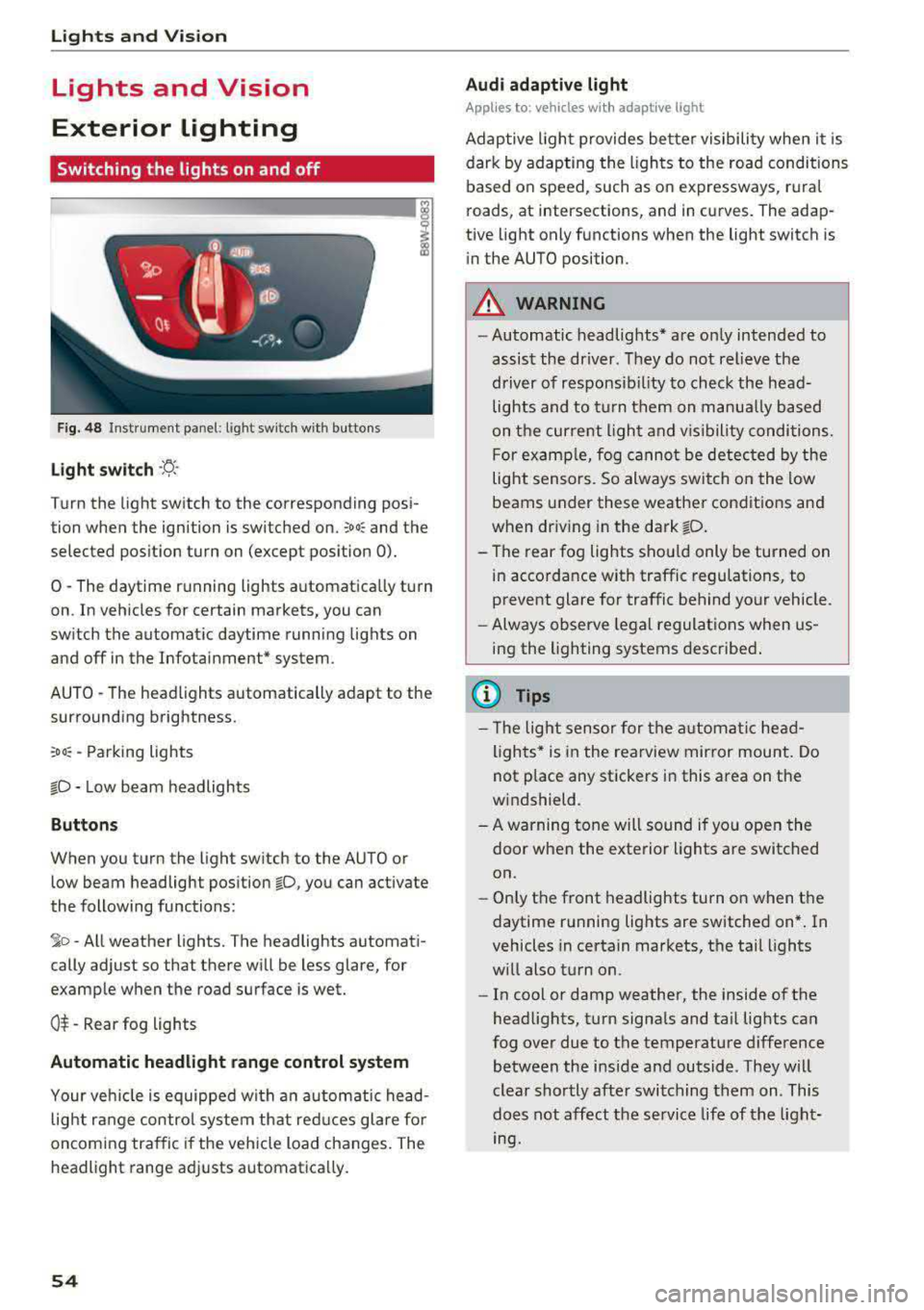
Fig. 48 Instrument panel: light sw itch w ith buttons
Light switch ·ti :
Turn the light switch to the corresponding posi
tion when the ignition is switched on.
;oo: and the
selected pos ition turn on (except pos ition 0).
0 -The daytime r unning lights a utomat ica lly turn
on . In veh icles for certain markets, you can
switch the automatic daytime runn ing lights on
and off in the Infotai nment* system.
AUTO -T he head lights automatically adapt to the
surrounding brightness.
:oo: -Parking lights
io -Low beam headlights
Buttons
When you turn the light sw itch to the AUTO or
low beam headlight position
io, you can activate
the following functions:
jo -All weather lights. The headlights automati
cally adjust so that there will be less glare, for
examp le when th e road surface is wet.
0$ -Rear fog lights
Automatic headlight range control system
Your veh icle is equipped wi th a n automatic head
light r ange control system th at red uces glare fo r
oncoming tra ffic if the vehicle load changes. The
headlight range ad justs automatica lly.
54
Audi adaptive light
App lies to: vehicles wi th adaptive light
Adap tive ligh t provides be tter visibility when it i s
dark by adapting the ligh ts to the road conditions
based on speed, such as on expressways, r ura l
roads, at intersections, and in curves. The adap
tive light only functions when the light switch is
i n the AUTO position.
A WARNING
-Automatic headlig hts* are on ly intended to
assist the driver. They do not relieve the
driver of responsib il ity to check the head
lights and to t urn them on manua lly ba sed
on t he curre nt ligh t and v is ibility conditions.
F or examp le, fog cannot be detec ted by the
light sensors. So always switch on the low
beams under these weather condit ions and
when dr iv ing in the dark
fD .
- The rear fog lights shou ld only be turned on
in accordance w ith traffic regulations, to
prevent glare for traffic behind your vehicle.
- Always observe legal regulat ions when us
ing the lighting systems desc ribe d.
{l) Tips
- Th e light sensor for the a utomat ic he ad
lights * is in the rearview mir ror mount. Do
not p lace any stickers in this area on the
w indshield.
- A warning tone will sound if yo u ope n the
door when the exte rior lights a re switched
on.
- On ly the front headlights turn on when t he
daytime running lights are switched on* . In
vehicles in certain markets, t he tail lights
w ill also t urn on.
- In cool or damp weather, the inside of the
head lights, t urn signa ls and ta il lig hts can
fog over due to the temperature difference between the inside and outside. They w ill
clear shortly afte r switching them on. This
does not affect the service life of t he light
mg.
Page 59 of 403

The emergency flashers also work when the igni
tion is turned off.
@ Tips
You should switch the emergency flashers on
if:
- you are the last car in a traffic jam so that
all other vehicles approaching from behind
can see you, or if
-your vehicle has broken down or you are
having an emergency, or if
-your vehicle is being towed or if you are tow
ing another vehicle
Interior Lighting
Front interior lighting
Fig. 51 Hea dlin er: fr ont inte ri or lig htin g
Press the corresponding button ~ fig. 51:
-!;I -Door contact switch on/off . The interior light
ing is controlled automatically.
-M --Interior lighting on/off
Applies to: vehicles with to uch-se nsitive reading
l ights : To turn the respective reading light on or
off , touch the surface @ briefly . To activate the
manual dimming function , touch the surface @
when the light is switched off and keep touching
it until the desired brightness is reached.
Lights and Vision
Rear interior lighting
Fig. 52 Headliner: re ar readi ng ligh ts
.. To turn a reading light on or off, press the "<~
button.
.. To activate the manua l dimming function*,
touch the surface when the light is switched off
"@-and keep touching it until the desired
brightness is reached .
Interior lighting
Applies to: ve hicles w ith interio r light ing
.. Select in th e Infota inment system : I MENU! but
ton
> Vehicle > l e ft control button > Vehicle
settings
> Interior lighting.
The interior lighting turns on when you switch
the headlights on while the ignition is on.
Version 1
To adjust the brightness of individual zones, se
lect
Front brightness*, Door brightness or Foot
well brightness.
Turn the control knob to the left
or to the right. Press the control knob to confirm
the brightness.
Version 2
Select and confirm one of the displayed profiles
by pressing the control knob.
Individual: you can customize the brightness and
color of individual zones. Press the right control
button . Press the control knob again to confirm
the settings .
Audi drive select : the interior and contour light
ing color changes depending on the driving mode
selected in drive select*
~ page 133 . ..,.
57
Page 60 of 403

Lights and Vision
@ Tips
The setting is automatica lly stored and as
signed to the remote control key that is be ing
used.
Instrument illumination
The brightness of th e illumination for the instru
ments , display and head-up display* can be ad
jus ted.
F ig . 53 Instru ment i llumi natio n
"' Press the knob to release it.
"'T urn the knob toward"-" o r"+" to reduce or in
crease the brightness .
,,, Press the knob again to return it to its or iginal
pos ition .
(D Tips
Depending on vehicle equipment, the inst ru
ment illumination (needles and gauges) may
turn on when the lights are off and the igni
tion is switched on . The illumination for the
gauges reduces automatically and eventually
tur ns off as brightness outside increases . This
function reminds the driver to turn the low
beams on at the app ropr iate time.
58
Vision
Adjusting exterior mirrors
Fig. 54 Driver 's doo r: kno b fo r t he e xterio r mirrors
Turn the knob to the des ired position:
0
-a ll adjustment functions are deactivated.
q / P -adjus ts the left/right exter io r mirror.
Move the knob in the desired direct ion.
(@ -Heats* the mir ror glass depend ing on the
outside temperature.
8 -F olds the exterior mirrors* . To fold the m ir
rors out, turn the knob to one of the other posi
tions . In the I nfota inment system, you can select
i f the m irro rs fo ld in au tomatically when yo u lock
the
ve hicl e~ page 41 .
Front passenger's exterior mirror tilt
function *
To help you see the curb when backing into a
parki ng space, the su rface of the m irro r til ts
slight ly. For this to happen, the knob must be in
the position for the front passenger's exterior
mirror.
Yo u can adjust the tilte d mir ror s urface by t urn
i ng t he knob in the desired di rect io n. When you
move out of reverse and into another gear, the
new m irror position is stored and assigned to the
key you are using .
The m irror goes back into its or iginal pos ition
once you drive forward faster than 9 mp h
(15 km/h) or turn the ignition off.
&_ WARNING
Cu rved mi rror sur faces (for example convex)
enla rge the field of vision. However, they
Page 63 of 403

a co .... N ..... N .... 0 0
3 co
®-Clean the windshield . The wipers wipe one
time after severa l seconds of driving to remove
water drop lets. You can switch this function off
by moving the lever to position ® within 10 sec
onds of the afterwipe. The afterwipe function is
reactivated the next time you switch the ignition
on .
C lean the headlights*. The headlight washer sys
tem" operates only when the low beam head
lights are on . If you move the lever into position
@, the headlights will be cleaned at fixed inter
va ls .
Applies to: allroad:
@ -Wiping the rear window.
T he number of wipes depends on the windsh ield
wiper movement .
The rear wiper automatically switches on when
the reverse gear is selected and the front wind
shield wipers are on and running .
Applies to: allroad:
0 -Clean ing the rear win
dow. The number of wipes depends on how long
the lever is held in position
(J).
A WARNING
-The rain sensor is only intended to assist the
dr iver . The driver may still be responsible
for manually sw itching the w ipers on based
on v is ibi lity conditions.
- The windshie ld may not be treated with wa
ter-repelling windshield coating agents . Un
favorable conditions, such as wetness, dark
ness or low sun, can result in increased
glare, which increases the risk of an acc i
dent . Wiper blade chatter is also possible.
- Properly functioning windsh ield wiper
blades are required for a clear view and safe
driving
¢ page 62, Replacing wiper
blades.
(D Note
- If there is frost, make sure the windshie ld
wiper blades are not frozen to the wind
shield. Switching on the windshield wipers
when the blades are frozen to the wind
shield can damage the wiper blades .
- The windshield wiper system must be
switched off ( lever in position 0) before us-
Lights and Vision
ing a car wash. This prevents the wipers
from switching on unintentionally and caus ing damage to the windsh ield wiper system .
(D Tips
- The windshie ld wipers switch off when the
ignition is switched off . You can activate the
windshield wipers after the ignition is
switched back on by moving the w indshield
wiper lever to any position.
- Worn or dirty windshie ld wiper blades resu lt
in streaking. Th is can affect the rain sensor
function . Check your windshield w iper
blades regularly .
- The washer fluid nozzles for the windshield
washer system are heated at low tempera
tures when the ign ition is on .
- When stopping temporarily, such as
at a
traffic light, the speed of the windshield
w ipers automatically reduces by one level.
Cleaning the wiper blades
Clean the wiper b lades when you see w iper
streaks. Use a soft cloth and a glass cleaner.
Windshield wiper
.,. Place the windshield wiper arms in the service
position
¢ page 62.
.,. Fold the windsh ie ld wiper arms away from the
w indshie ld.
Rear window wiper
Applies to : all road
.,. Fold the wiper arm away from the rear window.
A WARNING
D irt y windshield wiper blades can impa ir vi
sion, wh ich i ncreases the risk of an accident .
-
61