seats AUDI S4 2018 User Guide
[x] Cancel search | Manufacturer: AUDI, Model Year: 2018, Model line: S4, Model: AUDI S4 2018Pages: 403, PDF Size: 66.81 MB
Page 81 of 403

a co .... N ,....
N .... 0 0
3 co
20 minutes, depending on the outside
temperature.
To keep the rear window defogger on contin uous
l y, press and hold the
QWREAR button longer
than
3 seconds. This is stored unti l the ignition is
switched off .
SYNC Synchronization
Use the rocker switc h® to sele ct the funct ion.
When synch ronization is switched on, the set
tings for the driver's side are applied to the front
passenger's side and the rear (except for seat
heating/venti lation*) . When the settings on the
front passenger's side or in the rear are changed,
the synchron iz at ion is automatically sw itched off
and
3 -z one appears in the display .
SET REAR function
Use t he rocker switch ® to select the function .
When the function is switched on, you can adjust
all settings for the rear us ing the climate control
system controls in the cockpit. The rear climate
control system controls cannot be operated at
the same time . This function switches off auto
mat ically after a certain period of time or after
leaving the menu.
Vent s
You can open or close the center and rear vents in
the cockpit and the vents in the rear center con
sole us ing the r idged thumbwheels . The levers
adjust the d irection of the airflow from the vents.
The wide vent is opened and closed using the
r ocker switch
® ·
Residu al heat
You can activate the residual heat funct ion when
the ignition is switched off by pressing the knob
(D . The res idual heat from the coolant is used to
h eat the vehicle inte rior. The residual heat func
tion swi tches off automatically afte r abou t 15
minu tes .
A WARNING
- You should not use the recirculation mode for an exten ded period of time, because no
fresh a ir is drawn in and the w indows can
Warm and c old
fog when cooling mode is switched off. This
increases the r isk of an accident.
- Individuals with reduced sensitivity to pain
or temperature could develop burns when
using the seat heat ing* function. To reduce
the risk of injury, these individua ls should
not use seat heating*.
(D Note
To avoid damaging the seat heat ing* ele
ments, do not knee l on the seats or place
heavy pressure on one area of the seat.
Setup
The climate control system basic settings ore ac
cessed in the Infotainment system .
.,. Select in the Infotainment system : I MENU! but
ton
> Vehicle > l eft control button > Ai r co ndi
tioning
Auto recircu lation
When switched on, a utomat ic rec irculat ion con
trols the recircu lation mode automatically . You
must press the
®MAX button if fog forms on
the windows.
Automatic auxiliary heater*
T he aux iliary hea ter he lps to wa rm the vehicle in
terior more q uickly.
Steering wheel heating
Applies to: vehicles with steering wheel heating
The steering wheel rim con be heated.
.,. Press the bu tton on the m ultif unct ion steeri ng
wheel to switch the steering whee l heating on
and
off~ r=:> poge 15, fig . 11 . The message
Steering wheel heating : on /Steering wheel
heating: off
appears in the instrument cluster
disp lay.
The temperature is maintained at a constant lev el when steering wheel heating is switched on .
T he s teer ing whee l heating se tt ings a re stored
automat ica lly and assigned to the remo te control
key that is in use.
79
Page 194 of 403
Audi connect (Infotainment)
You must have connected your vehicle with
myAudi
¢ page 188.
.,. Se lect: I MENU I button> Audi connect> Twitter
> left contro l button > desired function (for ex
amp le,
Trends ).
The following categories can be selected in the
Twitter menu:
- My tweets : News Feed and the Tweets you have
posted are listed.
- Home: the Tweets for everyone you follow are
displayed .
-Trends: topics on Twitter that are currently
popular within a country .
Different functions are available depending on
the Twitter category you have selected:
- New tweet : you can post a new tweet using
pre-made templates or using myAudi tem
plates that you have created yourself.
- Refresh : the selected Twitter function is re
freshed.
- Favorite: set a Tweet as favorite to show you
liked it.
-Retweet : you can quote a Tweet to share it with
others.
(D Tips
- Other settings such as account, language,
Tweet security and location settings
cannot
be changed in the MMI. These changes must
be made on the Twitter website.
- You can only connect
one Twitter account
with your myAudi account.
- Audi connect (Infotainment) makes it possi
ble to access Tw itter . Permanent avai lability
cannot be guaranteed, because that de
pends on Twitter.
Travel (travel guide)
Ap plies to veh icles with Audi co nnect (Infotainment)
You can use the Audi MMI connect opp to store
points of interest on your mobile device (such as
a smartphone) and then use them for route
guidance in the
MMI.
Requirement:
192
The Audi MMI connect app must be installed and
open on your mobi le device .
You must be logged into your myAudi account in
the
Audi MMI connect app and you must have se
l ected your vehicle.
The Wi-Fi function on your mobile device and on
the
MMI must be switched on.
The
MMI must be connected to the network .
"'Press: !MENU ! button> Audi connect> left con-
trol button >
Information category > Travel.
After opening the travel guide, trave l tips in your
area wi ll be displayed including current ratings as
well as the corresponding category .
"' Press the left control button to change the cat
egory (such as bars nearby).
A WARNING
-
-It is o nly safe to use tablets, laptops, mo
bi le devices and other similar devices when
the vehicle is stationary because, like all
loose objects, they could be thrown around
the inside of the vehicle in a crash and cause
serious injuries. Store these types of devices
secure ly while driving.
- Do not use any wire less devices on the front
seats within range of the airbags while driv
ing. Also read the warnings in the chapter
¢ page 275, Front airbags .
Q) Note
Always fo llow the information found in ¢@ in
Wi-Fi hotspot on page 194.
(D Tips
Units of measurement, language settings and
time are shown in the Infotainment system
display based on how they were set in the
MMI system settings ¢ page 248.
Audi connect (Infotainment) in navigation
App lies to : vehicles wit h a navigation system and Audi co n·
nec t (In fo ta inm ent)
... Select: !MENUI button> Audi connect > left
control button >
Navigation .
Page 196 of 403
a co .... N ,....
N .... 0 0
3 co
Configuring the data
connection
Applies to vehicles with Aud i connect (Infotainment)
The data connection for Audi connect Infotain·
ment services is pre-configured at the factory .
However , if a configuration should be necessary,
you can adjust the following settings .
.,. Select: I MENU I button > right control button>
Connection manager .
.,. Select: right control button > Online settings>
Data connection settings .
Using the Data connection settings menu, you
can set when an Internet connection should be
made . T he Internet connect ion disconnects auto
matica lly on ce the requested Audi connect Info
tainment service no longer requires any data.
The fol low ing settings can be selected:
Audi connect (MMI)
With the Audi connect (MMI) f unction, you can
Allow or Deny the use of Audi connect Infotain ·
ment services if the connection is set to No re·
quest or With request .
Wi-Fi devices*
Using the Wi-Fi devices function, you can Allow
or Deny a connection to the In ternet.
A WARNING
-As the driver, do not allow usage of the Wi
Fi hotspot to distract you from driving, as
this could increase the risk of an accident.
-It is only safe to use tablets, laptops, mo·
bile devices and other s imilar dev ices when
the vehicle is stationary because, like all
loose objects, they could be thrown around
the inside of the vehicle in a crash and cause
serious injuries . Store these types of devices
securely whi le driving.
-Do not use any wireless devices on the front
seats within range of the airbags while driv·
ing. Also read the warnings in the chapter
t::> page 275, Front airbags.
Audi connect (Infotainment)
(D Note
Always fo llow the information found in ~0 in
Wi-Fi hotspot on page 194.
Audi connect (Infotainment) general
information
Audi connect Infotainment services
Applies to vehicles wit h Aud i connect (Infota inment)
@ Tips
-You can only use services supported by Aud i
connect (Infotainment) if you have the
op·
tional MMI Navigation plus equipment w ith
MMI touch* and Audi connect (Infotain
ment).
-Use of the L TE* mobile network standard is
not available in every country. Contact an
authorized Audi dealer or authorized Audi
Service Facility or your cell phone service
provider for additional information.
-Usage of Audi connect Infotainment serv
ices depends on the ava ilability of services
through third party providers.
-Audi connect Infotainment services are only
availab le within the cell phone network cov
erage from your cell phone service provider.
-Audi connect Infotainment services are
available in the USA. Audi connect Infotain·
ment services are currently not availab le in
Canada or in Mexico.
- Also read the information in the chapter
t::> page 175, Telephone.
- Availability, scope, providers, screen display
and costs of services may vary depending on
the country, model, model year, end device
and rates. For add itional information, v is it
www.audiusa.com .
-An initial registration/activation on the
myAudi platform at
www.audiusa.com/
myaudi
is requ ired to use individual serv
ices . You can contact an authorized Audi
dealer or Aud i connect (Infotainment) cus
tomer service at (87 7) SOS-AUDI (2834) to
195
Page 232 of 403
@ Tips
-Check for any connection requests on your
Bluetooth device.
- Multiple Bluetooth audio players can be
connected to the MMI, but only one mobile
device can be active.
- Bluetooth protocols AVRCP (1.0/1.3/1.4)
and A2DP are supported.
- Note the volume setting on your Bluetooth device. Audi recommends setting your
mo
bile device to the maximum volume when
using it as a Bluetooth audio player.
- The supported media functions (such as
shuffle) depend on the Bluetooth device
be
ing used.
- For more information on the supported
de
vices, visit www.audiusa.com/bluetooth or
contact an authorized Audi dealer or author
ized Audi Service Facility.
Wi-Fi audio player
Applies to: vehicl es with Wi ·F i audio player
Using the Wi-Fi audio player media source on the
MMI, you can connect and operate your Wi-Fi-ca
pable media player (such as a smartphone) to
wirelessly play music from your media player
li
brary. The media player is connected through the
vehicle's Wi-Fi hotspot. A UPnP Server app or an
integrated UPnPIDLNA server on your media
player is required to access your media player
li
brary.
Requirement: the Wi-Fi function on your media
player must be switched on. The
Audi MMI con·
nect
app or a UPnP server app must be installed
on your media player .
Or: you must be using a
media player with an integrated UPnP/DLNA
server.
- Connecting a media player: press the I MEDIA !
button. Press the left control button until the
sources
overview¢ page 236 is displayed . Se
lect and confirm Wi-Fi audio player (J)
¢page 236, fig . 216 .
~ -If necessary, select and confirm Wi-Fi off>
;::; Turn on Wi-Fi to activate Wi-Fi in the MMI. Se-,....
:::l Leet Wi·Fi settings, if necessary. Select the 0 0
3
same settings on the wireless media player
that are used for the Wi-Fi hotspot.
-Starting the Wi-Fi audio player: start the Audi
MMI connect
app or a UPnP server app, or set
media permissions on your media player.
Operating the media player: the media player is
operated through the MMI.
- Press the left control button repeatedly until
the
Folders menu item appears. Select and con
firm
Folders.
-Playing music from the media player: select
and confirm
Media center .
Web radio:
see ¢ page 232.
A WARNING
= -
-As the driver, do not allow usage of the Wi
Fi hotspot to distract you from driving, as
this could increase the risk of an accident.
- It is only safe to use tablets, laptops, mo·
bile devices and other similar devices when
the vehicle is stationary because, like all
loose objects, they could be thrown around
the inside of the vehicle in a crash and cause
serious injuries . Store these types of devices
securely while driving.
- Do not use any wireless devices on the front
seats within range of the airbags while driv
ing. Also read and follow the warnings in
¢ page 2 75, Front airbags.
(D Note
Always follow the information found in ¢Q) in
Wi-Fi hotspot on page 194.
(D Tips
-Always read the chapter¢ page 195, Audi
connect (Infotainment) general informa
tion.
- Please note that a Wi-Fi connection does
not automatically make it possible to use
the Internet. For additional information,
see
¢ page 188.
- To avoid interruptions during playback, de
activate the power saving function on the
media player or connect it to a charger.
231
Page 234 of 403
-Do not use any wireless devices on the front
seats within range of the airbags while driv
ing. Also read and follow the warnings in
c::> page 275, Front airbags.
CJ) Note
- Always follow the information found in c::>0
in Wi-Fi hotspot on page 194.
- Please note that there genera lly are addi
tional costs when using an online media
service account, especially when it is used internationally .
@ Tips
-Depending on the Internet connection and
network traffic, a connection loss can occur
during playback of on line media services.
-Online media and Internet radio usage de
pends on the service availability of the third
party provider.
- Audi AG simply makes the access to on line
media services possible through the MMI
and does not take any responsibility for the
contents of the on line media services.
- Always read the chapter
c::> page 195, Audi
connect (Infotainment) general informa
tion.
- Depending on the mobile device used, there
may be interruptions during media playback
and when using the
Audi MMI connect app.
To avoid interruptions when using a mobile
device, do not lock the screen on your mo
bile device and keep the
Audi MMI connect
app in the foreground .
- Contact an authorized Audi dealer or au
thorized Audi Service Facility for additional
information about online media.
Media
Multimedia connections
USB adapter for Audi music interface
You can connect your mobile devices (such as a
smartphone or
MP3 player) to the Audi music in
terface and charge them using a special
USB
adapter .
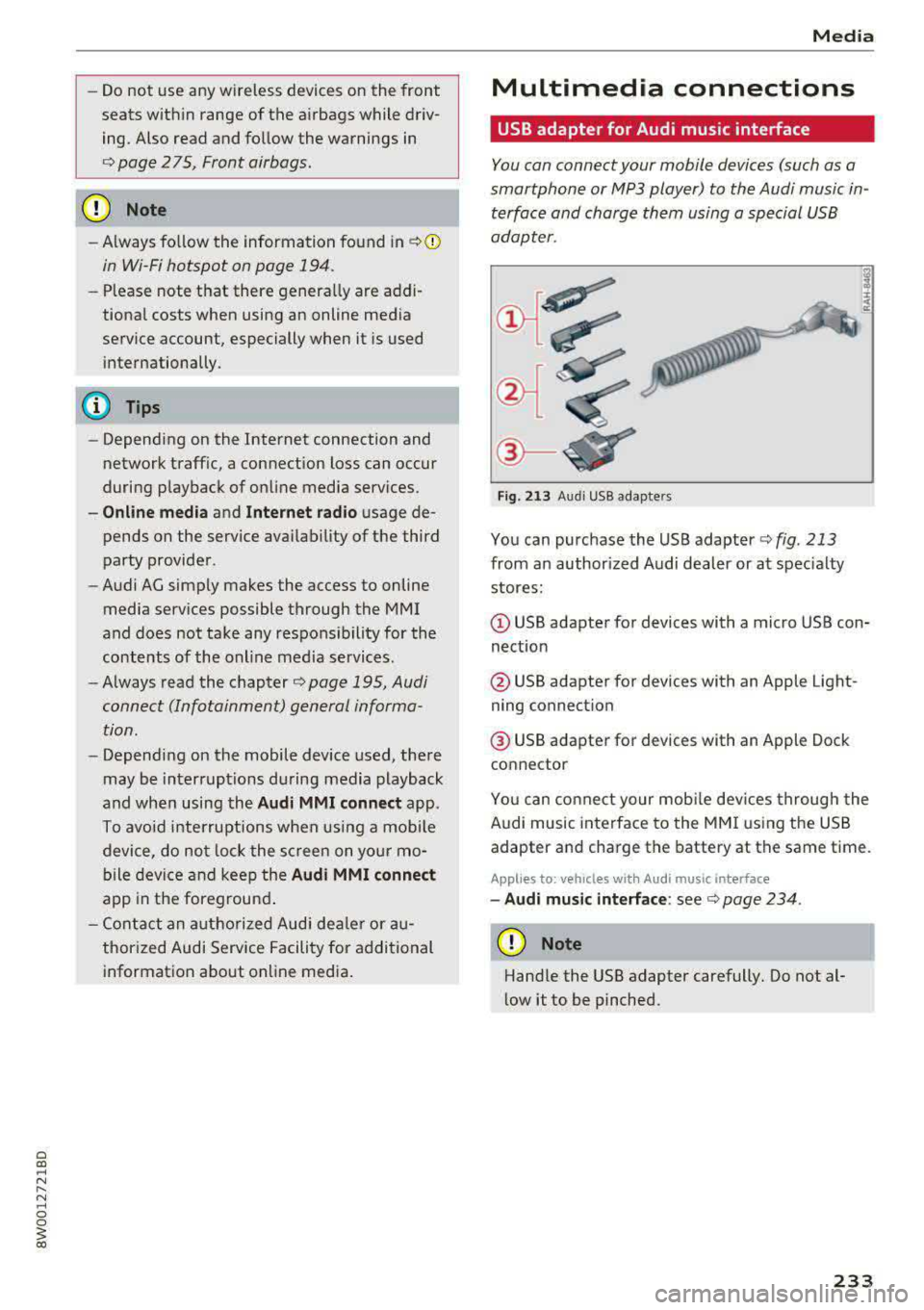
Fig. 213 Audi USB adap ters
You can purchase the USB adapter c::> fig. 213
from an author ized Audi dealer or at specialty
stores:
(D USB adapter for devices with a micro USB con
nection
@ USB adapter for devices with an Apple Light
ning connect ion
@ USB adapter for devices with an Apple Dock
connector
You can connect your mobile dev ices through the
Audi music interface to the MMI using the USB
adapter and charge the battery at the same time.
Applies to : veh icles w it h Aud i music interface
- Audi music interface: see c::> page 234.
(D Note
Handle the USB adapter carefully. Do not al
low it to be pinched.
233
Page 255 of 403
Driving sa fe ty
Driving safety
Basics
Safe driving habits
Please remember -safe ty first!
The individua l safety features of your vehicle can
work together as a system to help protect you
and your passengers in a wide range of accidents.
These features cannot work as a system if they
are not always correctly adjusted and correctly
used .
This chapter contains important informat ion,
tips, instruct ions and warn ings that you need to
read and observe for your own safety, the safety
of your passengers and others . We have summar
ized here what you need to know about safety
be lts , a ir bags, child restra ints as well as child
safety. Yo ur sa fe ty is for us
priority number 1 . Al
ways observe the information and wa rnings in
this section - for your own safety as well as that
of your passengers.
The informa tion in this section applies to all
model ve rsions of your vehicle . Some of the fea
tures described in th is sections may be standard
equipment on some models, or may be optional
equ ipment on others. If you are not sure, ask
your author ized Audi dealer.
A WARNING
- Always make sure that you follow the in
structions and heed the WARNINGS in th is
manual. It is in your inte rest and i n the in
te res t of your passengers .
- Always keep all of the Owner 's L iterature
man uals in yo ur Audi when you lend o r sell
yo ur vehicle so that this importan t info rma
t ion w ill always be availab le to the dr iver
and passenge rs.
- Alw ays keep t he Owner 's L ite ra tu re han dy
so that you can find i t easi ly if yo u have
questions .
254
· Important things to do before driving
Safety is everybody 's job! Vehicle and occupant
safety always depends on the informed and care
ful driver .
For your safety and the safety of your passen
gers,
before driving always:
.. Make sure that a ll lights and signals are operat
ing correctly .
.. Make sure tha t the tire pressure is correct .
.. Make sure that all windows are clean and afford
good vis ibility to the outs ide .
.,. Sec ure all luggage and othe r items ca refully
¢ page 259 .
.,. Mak e sure tha t noth ing ca n interfere with the
pedals .
.. Adjust front seat, head restraint and mirrors
correctly for your height.
.. Applies to: adjustable head restraints: Instruct
passengers to adjust the head restraints ac
cording to the ir height .
.. Make sure to use the rig ht child restraint cor
rectly to protect
chi ldren ~ page 295 , Child
safety.
.,. Si t properly in yo ur seat a nd make su re t hat
your passengers do the same ¢
page 65, Front
seats.
.. Fasten your safety belt and wear it properly . Al
so instruct your passenge rs to fasten thei r sa fe
ty belts properly ¢
page 263.
What impairs driving safety?
Safe driving is directly related to the condition of
the vehicle , the driver as well as the driver's abili
ty to concentra te on the road withou t being dis
tracted.
The driver is responsib le for the sa fety of the ve
hicle and a ll of its occupants . If your ability to
drive is impa ired, safety risks for everybody in the
vehicle increase and you a lso become a hazard to
everyone else on the road ¢
,&.. There fore:
.. Do not let yourse lf be distracted by passengers
or by using a cellular telephone .
.. NEVER dr ive whe n your driving ab ility is im -
paired (by med ications, alcohol, drugs, e tc.) .
..,.
Page 257 of 403
Driving safety
-Always sit in an upright position and never
lean against or place any part of your body
too close to the area where the airbags are located .
- Before driving, always adjust the front seats
and head restraints properly and make sure
that all passengers are properly restrained .
- Never adjust the seats while the vehicle is
moving . Your seat may move unexpectedly
and you could lose control of the vehicle.
- Never drive with the backrest reclined or
tilted far back! The farther the backrests are
tilted back, the greater the risk of injury due
to incorrect positioning of the safety belt and improper seating position .
- Children must always ride in child safety
seats
c::> page 295 . Special precautions ap
ply when installing a child safety seat on the
front passenger seat
c::> page 2 71 .
Proper seating position for the f ront
passenger
The proper front passenger seating position is
important for safe, relaxed driving.
For your own safety and to reduce the risk of in
jury in the event of an accident, we recommend
that you adjust the seat for the front passenger
to the following position:
.. Adjust the angle of the seatback so that it is in
an upright position and your back comes in full
contact with it whenever the vehicle is moving.
.. Applies to: adjustable head restraints: Adjust
the head restraint so the upper edge is as even
a s possible with the top of your head . If that is
not possible, try to adjust the head restraint so
that it is as close to this position as possible
c::> page 66 .
.. Keep both feet flat on the floor in front of the
front passenger seat.
.. Fasten and wear safety belts correct
ly <=:> page 266.
For detailed information on how to adjust the
front passenger's seat, see
c::> page 65.
256
A WARNING , _
Front seat passengers who are unbelted, out
of position or too close to the airbag can be
seriously injured or killed by the airbag as it
unfolds. To help reduce the risk of serious
personal injury:
- Passengers must always sit in an upright po
sition and never lean aga inst or place any
part of their body too close to the area
where the airbags are located.
- Passengers who are unbelted, out of posi
tion or too close to the airbag can be seri
ously injured by an airbag as it unfolds with
great force in the blink of an eye.
- Always make sure that there are at least
10 inches (25 cm) between the front pas
senger's breastbone and the instrument
panel.
- Always make sure that there are at least 4 inches (10 cm) between the front passen
ger's knees and the lower part of the instru
ment panel.
- Each passenger must always sit on a seat of
their own and properly fasten and wear the
safety belt belonging to that seat.
- Before driving, always adjust the front pas
senger seat and head restraint properly.
- Always keep your feet on the floor in front
of the seat. Never rest them on the seat, in
strument panel, out of the window, etc . The
airbag system and safety belt will not be
able to protect you properly and can even in
crease the risk of injury in a crash .
- Never drive with the backrest reclined or
tilted far back! The farther the backrests are
tilted back, the greater the r isk of injury due
to incorrect positioning of the safety be lt
and improper seat ing position.
- Ch ildren must always ride in child safety
seats
c::> page 295. Special precautions ap
ply when installing a child safety seat on the
front passenger seat
c::> page 2 71.
Page 258 of 403
Proper seating positions for passengers in
rear seats
Rear seat passengers must sit upright with both
feet on the floor consistent with their physical
size and be properly restrained whenever the ve
hicle is in use.
To reduce the r isk of injury caused by an incorrect
seating position in the event of a sudden b raking
maneuver or an accident, your passengers on the
rear bench seat must a lways obse rve the follow
ing:
• Applies to: adjustable head restraints: If there
are passengers on the outer rear seats, adjust
the head restraints so the upper edge is as even
as possible with the top of your head . If that is
not possible, try to adjust the head restraint so
that it is as close to this position as possible. If
there is a passenger in the center rear seat,
slide the head restraint upward
r=> page 67 .
• Make sure that the seatback is sec urely latched
in the upright position
r=> page 71.
• Keep both feet flat in the footwell in front of
the rear seat .
• Fasten and wear safety be lts properly
r=> page 266 .
• Make sure that children are always properly re
strained in a child restraint that is appropriate
for their size and
ager=> page 295 .
_&. WARNING
Passengers who are improperly seated on the
rea r seat can be ser iously injured in a crash.
- Each passenger must always sit on a seat of
their ow n and properly fasten and wear the
safety belt be long ing to that seat.
- Safety belts only offer maximum p rotection
when the seatback is securely latched in the
upr ight position and the safety be lts a re
prope rly positioned on the body. By not sit
t ing upright, a re ar sea t passenger increases
the risk of personal inj ury from improperly
posit ioned safety be lts !
- Always adjust the head rest raint properly so
that it ca n give max imum protection.
Dr iving safety
Proper adjustment of head restraints
Correctly adjusted head restraints are an impor
tant part of your vehicle's occupant restraint sys
tem and can help to reduce the risk of injuries in
accident situations.
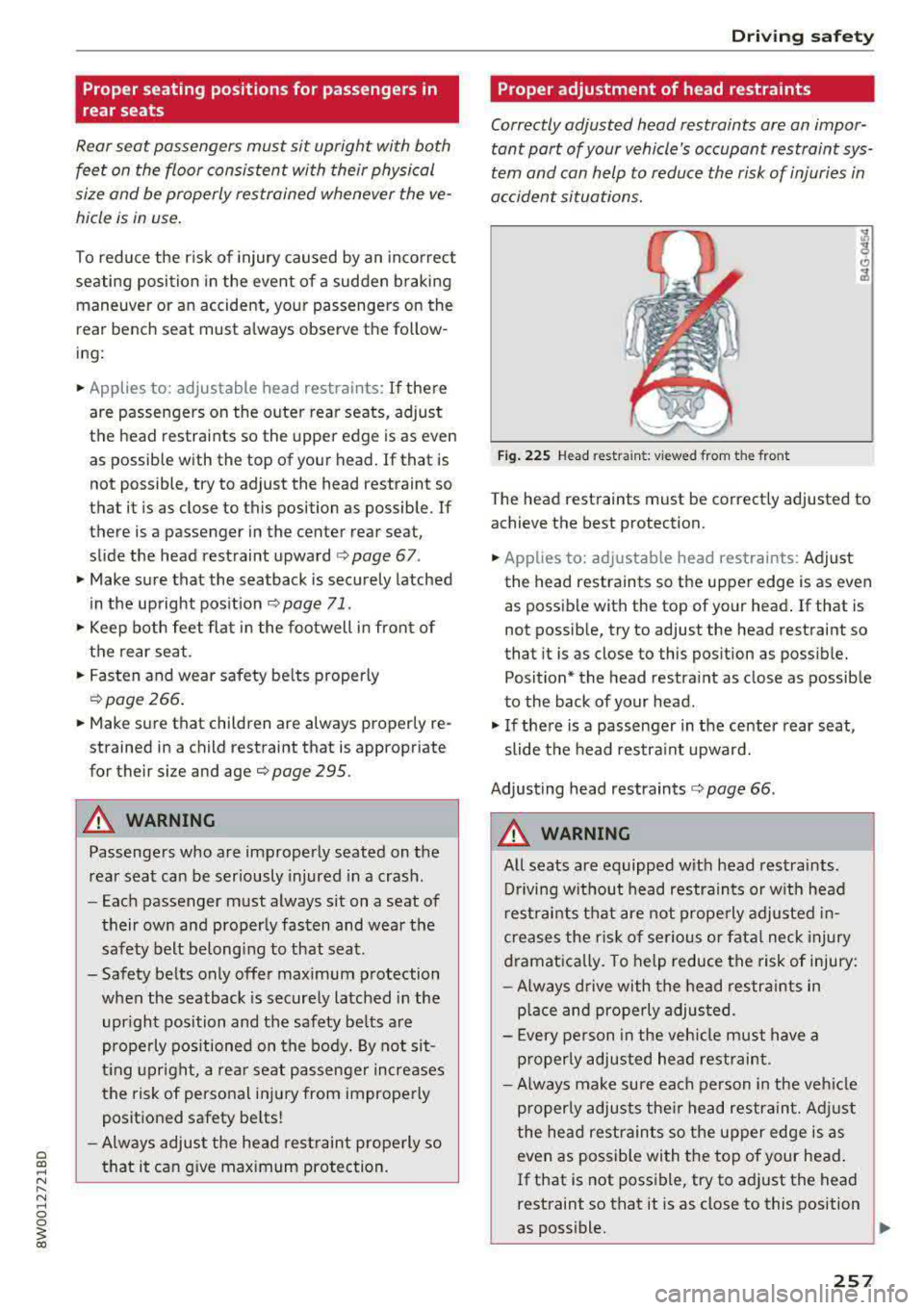
F ig . 225 Head restra int: v iewed from t he front
The head rest raints must be correctly adjusted to
achieve the best protection.
• Applies to: adjustable head restraints: Adjust
the head restraints so the upper edge is as even
as possible with the top of your head .
If that is
not possib le, try to adjust the head restraint so
that it is as close to this pos ition as poss ible.
Position* the head restra int as close as possible
to the back of your head .
• If the re is a passenger in the center rear seat,
slide the head restra int upward.
Adjusting head restraints
r=> page 66.
_&. WARNING
-A ll seats are eq uipped with head restraints .
Driving w ithout head restraints or w it h head
r est raints t hat are not prope rly adjusted in
creases the r is k of se rious or fata l neck injury
dramat ically. To help reduce the risk of injury:
- Always d rive with the head restra ints in
p la ce and pro perly adjus ted.
- E very pe rson in the veh icle must have a
p roper ly adjusted hea d restraint.
- Always make sure each person in the veh icle
p roperly adjusts the ir he ad restrain t. Adj ust
the hea d restrain ts so the upper edge is as
even as possible wi th the top of your head .
If that is not poss ible, try to ad just the head
restraint so that it is as close to this position
as poss ible.
-
257
Page 259 of 403
Driving sa fe ty
-Never attempt to adjust head restraint
wh ile driving. If you have dr iven
off and
must adjust the driver headrest for any rea
son, first stop the vehicle safely before at
tempting to adjust the head restra int.
- Children must always be properly restrained
in a child restraint that is appropriate for
their age and size
¢ page 295.
Examples of improper seating positions
The occupant restraint system can only reduce
the risk of injury if vehicle occupants are properly
seated .
Improper seating positions can cause serious in
jury or deat h. Safety belts can only work when
they are properly positioned on the body . Im
proper seating positions reduce the effect iveness
of safety belts and w ill even increase the r isk of
i njur y and dea th by moving the safety be lt to crit
ical areas of the body. Impro per sea ting posit ions
a lso increase the risk of ser ious injury and dea th
when an airbag deploys and strikes an occupant
who is not in the proper seat ing position. A driver
is responsib le for the safety of all vehicle occu
pants and especially for children. Therefore :
~ Never allow anyone to assume an incorrect
seat ing pos ition when the vehicle is being used
c> .&, .
The fo llowing bulletins list only some sample po
sitions that will increase the risk of serio us inj ury
and death. Our hope is that these examp les will
make you more aware of seating posit ions that
are dangerous.
The ref ore, when ever th e vehicle i s moving:
- never stand up in the ve hicle
- never s tand on the seats
- never knee l on the seats
- never r ide with the seatback reclined
- never lie down on t he seats
- never lean up against the instrument pane l
- never sit on the edge of the seat
- never sit s ideways
- never le an out the w indow
- never put yo ur feet out the window
258
- never put your feet on the instrument panel
- neve r rest your feet on the seat c ushion or back
o f the seat
- neve r ride in the footwell
- neve r ride in the ca rgo area
A WARNING
I mp roper seating positions inc re ase the risk
of ser iou s personal inju ry and de ath whenever
a veh icle is being used.
- Always make sure that all veh icle occupants
s tay in a proper sea ting posit ion and are
pro perly restrained whenever the vehicle is
be ing used .
Driver's and front
passenger's footwell
Important safety instructions
A WARNING
A lways make sure that the knee airbag can in
flate w ithout interference. Objects between
yourself and the airbag can inc rease the risk
of injury in an accident by interfering with the
way the ai rbag dep loys o r by being pushed in
to you as the airbag dep loys.
- No persons (ch ild ren) or animals should ride
in the footwell in front of the passenger
seat . If the airbag deploys, this can res ult in
serio us or fat al injuries.
- No objects of any kind should be carried i n
the footwell area in front of the dr iver's or
passenger's seat. Bu lky objects (shopping
bags, for examp le) can hamper or prevent
proper dep loyment of the airbag . Sma ll ob
jects can be thrown thro ugh the vehicle if
the airbag deploys and injure you or your passengers.
Page 264 of 403
Safety belts
General information
Always wear safety belts!
Wearing safety belts correctly saves lives!
This chapter explains why safety belts are neces
sary, how they work and how to adjust and wear
them correctly.
.. Read all the information that follows and heed
all of the instructions and WARNINGS.
A WARNING
Not wearing safety belts or wearing them im
properly increases the risk of serious personal
injury and death.
- Safety belts are the single most effective
means available to reduce the risk of serious
injury and death in automobile accidents.
For your protection and that of your passen
gers, always correctly wear safety belts
when the vehicle is moving.
- Pregnant women, injured, o r physically
im
paired persons must also use safety belts.
Like all vehicle occupants, they are more
likely to be seriously injured if they do not
wear safety belts. The best way to protect a
fetus is to protect the mother
-throughout
the entire pregnancy.
Number of seats
Your Audi has a total of five seating positions:
two in the front and three in the rear. Each seat
ing position has a safety belt.
A WARNING
Not wearing safety belts or wearing them im
properly increases the risk of serious personal
injury and death.
- Never strap more than one person, includ
ing small children, into any belt.
It is espe
cially dangerous to place a safety belt over a
~ child sitting on your lap.
~ -Never let mo re people ride in the vehicle
:::l than there are safety belts available. 0 0
3
-Be sure everyone riding in the vehicle is
properly restrained with a separate safety
belt or child restraint.
Safety belt warning light
Your vehicle has a warning system for the driver
and front seat passenger to remind you about the importance of buckling-up.
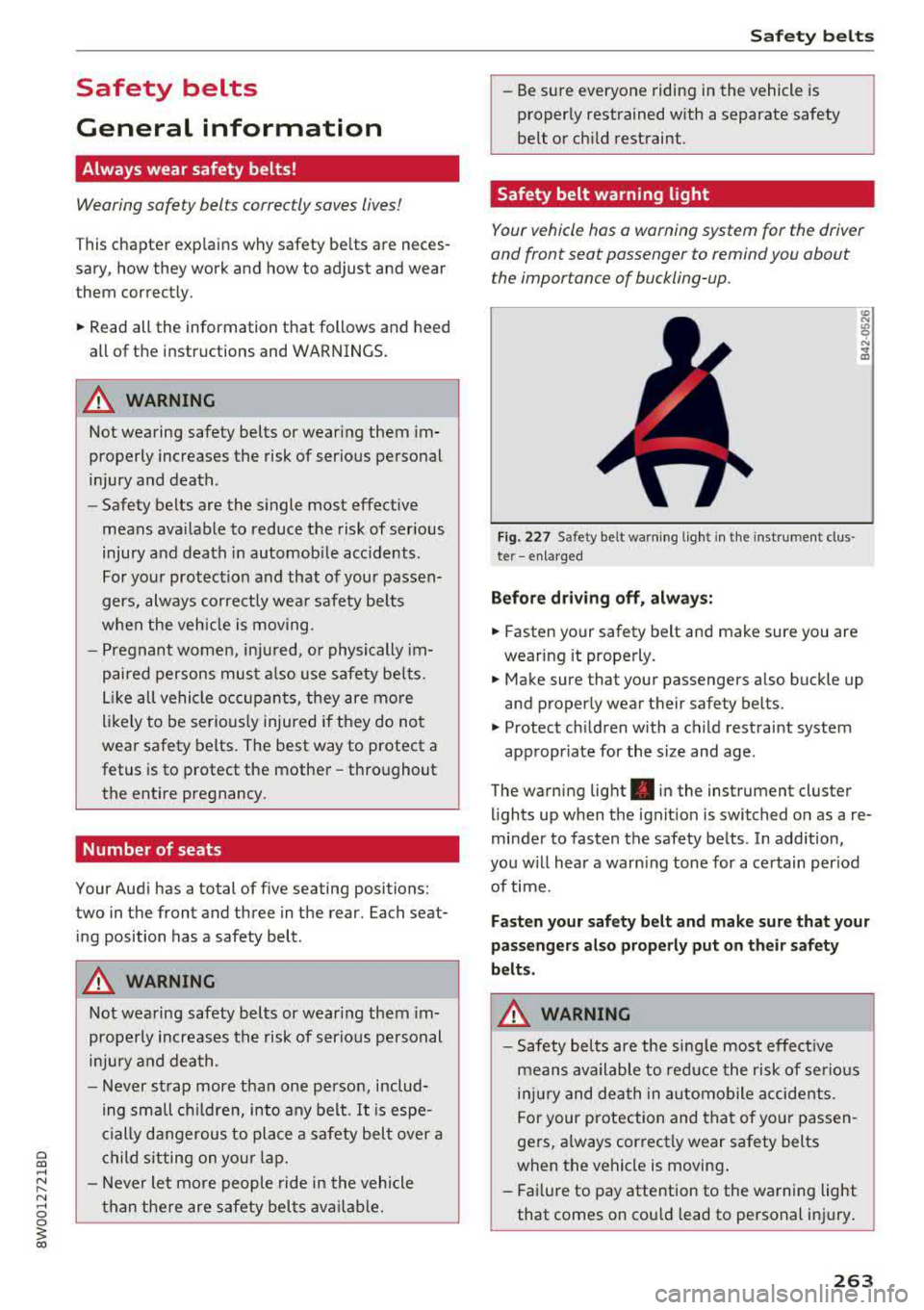
Fi g. 227 Safety belt warn ing light in the instrument clus ·
te r
-enlarged
Before driving off, always:
.. Fasten your safety belt and make sure you are
wearing it properly.
.,. Make sure that your passengers also buckle up
and properly wear their safety belts.
.,. Protect children with a child restraint system
appropr iate for the size and age.
The warning light . in the instrument cluster
lights up when the ignit ion is switched on as a re
minder to fasten the safety belts . In addition,
you w ill hear a warn ing tone for a certain period
of time.
Fasten your safety belt and make sure that your
passengers also properly put on their safety
belts.
A WARNING
-
- Safety belts are the sing le most effective
means available to reduce the risk of serious
injury and death in automobile accidents.
For your protection and that of your passen
gers, a lways correctly wear safety belts
when the vehicle is moving .
- Failure to pay attention to the warning light
that comes on could lead to personal injury.
263