towing AUDI S4 2018 User Guide
[x] Cancel search | Manufacturer: AUDI, Model Year: 2018, Model line: S4, Model: AUDI S4 2018Pages: 403, PDF Size: 66.81 MB
Page 125 of 403

a co .... N ,....
N .... 0 0
3 co
(D Note
The radar sensors can be displaced by impacts
or damage to the bumper, wheel housing and
underbody. Pre sense rear can be impaired by
this. Have an authorized Audi dealer or au
thorized Audi Service Facility check their func
tion .
(D Tips
-The pre sense rear functions switch off
when towing a trailer .
- The pre sense rear functions may also
switch off if there is a malfunction in the
side assist* system.
Audi pre sense city
Description
Applies to: vehicles with Audi pre sense city
Within the limits of the system, pre sense city
can warn you of impending collisions with
vehicles and pedestrians and initiate the applica
ble braking maneuver if needed. Pre sense city is
active at speeds of approximately 6 mph (10 km/ h) and higher.
A pedestrian warning can occur at speeds up to
50 mph (85 km/h), and vehicle warnings can oc
cur at speeds up to 155 mph (250 km/h) . A pre
sense city braking maneuver is poss ible at speeds
up to 50 mph (85 km/h).
Warnings
Applies to: vehicles with Audi pre sense city
The system recognizes various dangerous s itua
tions. The
early warning occurs if:
- a vehicle driving ahead brakes suddenly,
- your own vehicle approaches a significantly
slower vehicle or stationary veh icle in the direc
t ion of travel.
- a pedestrian is standing in the lane or is moving
i nto the lane .
When this warning occurs, it may only be possi ble to avoid a collision by swerving or braking
strongly. The message
Audi pre sense .
Assistance systems
¢page 121, fig. 122 and a warning tone will
warn you about the danger.
Additionally, a jerk on the brakes may occur as an
acute warning when there is an imp ending colli
sion . If you do not react to the acute warning, pre
sense city can brake to the point of complete de
celeration within the limits of the system . T his
reduces the vehicle speed in the event of a colli
sion. The message
Audi pre sense . also ap
pears.
The following functions are triggered in conjunc
tion with pre sense basic/rear:
- Reversible tensioning of the front safety belts.
- Closing the windows and sunroof* .
- Inflating the side bolsters* on the seat back-
rest.
Audi drive select*: the function is not act ive de
pending on the mode selected.
A WARNING
- Pre sense city cannot overcome the laws of
physics.
It is a system designed to assist and
it cannot prevent a coll is ion in every circum
stance. The driver must always intervene.
The driver is always responsible for braking
at the correct time. Do not let the increased
safety provided tempt you into taking risks.
This could increase your risk of a collision.
- The system can dep loy incorrectly due to
system-specific limits.
- To reduce the risk of an accident, please
note that the camera does not always detect
every object.
- Pre sense city does not react to anima ls,
crossing or oncoming vehicles, objects such
as bars, railings or railcars, and objects that
are difficult to
detect ¢ A in General infor
mation on page 109 .
-In trailer mode, the braking behavior of the
tra iler can be d ifferent than usual during au
tomatic braking.
A WARNING
-Pre sense city may be restricted or not availa-
ble in the following example situations:
- in heavy fog, ra in, spray or snow
~
123
Page 126 of 403

Assistance systems
-when there are visual obstr uctions, such as
glare, reflections or variations in light
- when it is dark
- if the camera window or the windshie ld is
dirty, iced over, damaged or covered
- when driving on snow, ice or loose ground
- in curves
- if the ESC was restricted or switched off
- when towing a tra iler
- when the driver's seat belt is unfastened
- up to ten seconds after switching on the ig-
nition
(D Note
Impacts or damage to the camera mount on
the windshield can disp lace the sensor . Pre
sense city can be impa ired by this. Have an au
thorized Audi dealer or authorized Aud i Serv
ice Facility check the ir funct ion.
{D) Tips
- You can cancel the system braking interven
tion if you accelerate considerably or swerve
away.
- Keep in mind that pre sense city can brake
unexpectedly. Always secure any cargo or
objects that you are transport ing to reduce
the r isk of damage or injury.
- Specific pre sense city funct ions sw itch off
when the ESC is limited or switched
off
¢ page 147 or the hill descent assist* is
switched on
¢page 148.
-When there is a malfunction in the camera,
the pre sense city funct ions also switch off.
Settings in the
Infotainment system
A pp lies to: ve hicles w ith Audi p re se nse
.,. Select in the Infotainment system: IMENU I but
ton
> Vehicle > left control button > Driver as
sistance
> Audi pre sense.
Turn on/off Audi pre sense
-the pre sense func
tions can be turned on and
off.
124
If the system is switched off, it switches on again
automatica lly once the ignition is switched on
again.
Early warning -the early warning can be switch
ed
off or the pre sense city/front warning point
can be set
( Early /Medium /Late ).
Set the warning time for the early warning to
Early at first . If this causes undesi red early warn
ings to appear, then set the warning time to
Me
dium .
The Late warning time should only be set
i n spec ial circumstances, for example, when driv
i ng with a very dynamic style.
(D Tips
Your settings are automatically stored and as
signed to the remote control key being used.
Messages
Applies to: vehicles wi th Audi pre sense
II Audi pre sense: malfunction! Please contact
Service
This message appears when the pre sense func
tion is affected . For example, th is could be
ca used by a faulty sensor. Drive to an authorized
Audi dealer or authorized Audi Service Facility im mediately to have the malfunction corrected.
II Audi pre sense currently restricted . Restrict
ed sensor vision due to surroundings. See own
er 's manual
This message appears if the radar sensor and
camera view is obstructed, for example by leaves,
snow, heavy spray or dirt. If necessary, clean the
sensors and the area around the camera
¢ page 109, fig . 108 or ¢page 129, fig. 130 .
II Audi pre sense: currently restricted. Towing
mode
For vehicles wi th a trailer hitch installed at the
factory, the pre sense rear functions switch
off
when the electrical connector at the socket is
plugged in. There is no guarantee the functions
will switch
off when using a retrofitted trailer
hitch.
II Audi pre sense: currently restricted
Page 132 of 403

Ass is tan ce sys tems
-If the lanes are narrow or if your are driving on
the edge of your lane. If this is the case, the system may have detected a vehicle in another
lane that is
not adjacent to your current lane.
-If you are driving through a curve . Side assist
may react to a vehicle that is in the same lane
or one lane over from the adjacent lane.
-If side assist reacts to other objects (such as
roadside structures like guard rails).
- In poor weather condit ions . The side assist
funct ions are limited.
Do not cover the radar
sensors ¢ fig. 130 with
stickers, deposits, bicycle wheels or other ob
jects, because this will impair the function. Do
not use side assist when towing a trailer. For in
formation on cleaning,
see¢ page 354 .
A WARNING
-Always pay attention to traffic and to the
area around your vehicle. Side assist cannot
replace a dr iver's attention . The driver alone
is a lways responsible for lane changes and
similar d riving maneuvers.
-In some situat ions, the system may not
function or its funct ion may be limited. For
example :
-If vehicles are approach ing or being left
behind very quickly. The display may not
turn on in t ime .
-In poor weather conditions such as heavy
rain, snow or heavy mist.
-On very wide lanes, in tight curves, or if
there is a rise in the road surface. Vehicles in the adjacent lane may not be detected because they are outs ide of the sensor
range .
(D Note
The sensors can be displaced by impacts or
damage to the bumper, whee l housing and
underbody. Th is can impa ir the system. Have
an authorized A udi dealer or authorized Audi
Serv ice Facility check their function .
(i) Tips
-If the window glass in the driver's door or
front passenger's door has been tinted, the
130
-
display in the exterior mirror may be incor
rect.
-For an exp lanation on conform ity with the
FCC reg ulations in the United States and the
Industry Canada regulations, see
¢ page 386.
Switching on/off
App lies to: vehicles with A udi side ass ist
The system con be switched on/off in the Info
tainment system .
If the system is activated, the displays in the ex
terior mirrors wi ll turn on briefly when the igni
tion is switched on .
.,. Select in the Infotainment system: IMENU! but
ton
> V ehicl e > left control button > D riv er as·
s is tance
> Audi side a ssist. Off switches the
system off.
(D Tips
When yo u switch side assist on or off, the ex it
warning system activates or deact ivates
¢ page 131.
Setting the display brightness
App lies to: vehicles wit h Aud i side ass ist
The display brightness con be adjusted in the In
fotainment system.
.,. Select in the Infotainment system: IMENU ! but
ton
> Veh icle > left control button > Dri ver as
s ist ance
> Audi side a ssist.
The disp lay br igh tness adjusts au tomatically to
the brightness of the surroundings, both in the
information and in the warning stage. In very
dark or very bright surround ings, the automatic
adjustment will set the display to the minim um
or max imum level. In such cases, you may notice
no change when adjusting the br ightness, or the
c h ange may only be noticeable once the sur
r oundings change .
Adjust the br ightness to a leve l where the display
i n the information stage will not disrupt your
view ahead . If you change the br ightness, the dis-
play in the exterior mirror w ill briefly show the
.,.
Page 134 of 403

Ass is tance sy stems
- The display brightness for the ex it warning
system cannot be adjusted.
- The system is not available when towing a
trailer.
Rear cross-traffic assist
A pp lies to: ve hicles w ith rea r cross-tra ffic ass ist
F ig. 1 33 Example d is play
F ig . 134 In fo ta in me nt system : re ar cro ss -tra ffic ass ist dis
p lay
The rear cross -traffic assis t can warn the drive r of
a po tential collis ion with approaching cross -traf
f ic when driv ing i n reverse . Within its limits, the
system monitors the areas beh ind and n ext to
the vehicle using the radar sensors when leaving
a park ing space
c::> page 129, fig. 130. Moving ob
jec ts tha t are approach ing, such as cars, are de
tected
c::> fig . 133 .
If the system detects cr itical cross traffic when
ba cking out of a parking space, it will react as fol
lows :
-Visual indicator : an indicator appea rs in the In
fotainment system display with a red arrow
symbol. The arrow points in the direction from
which the object is approach ing
c::> fig. 134 .
-Audible warning signal : a continuous tone may
sound as an additional indicator when driving in reverse .
132
-Automat ic brake acti vati on: a brief activation
of the brakes may also warn you of a potentia l
co llision w ith an approaching object .
Requirements for using the rear cross -traffic
a ss is t :
-The parking aid must be switched on
<=> pag e 136.
-Reverse gear must be engaged.
- The speed mus t not be higher th an approxi-
mate ly 9 mph (15 km/h) .
&_ WARNING
-The rear cross-traffic assist is an assist sys
tem and cannot prevent a collision by itself.
The drive r must always intervene. The driver
is always responsible for braking at the cor
rect t ime .
-Please note that the rear cross-traff ic assist
may activate the brakes unexpected ly. Se
cure any cargo that you are transporting to
reduce the ris k of damage or injury .
-An add itiona l brake activation may be trig
ge red w ith in 20 seconds after an automatic
brake activation .
-If there is an acoust ic warning signal from
the rea r cross-traffic assist, then the park
ing system may no t warn you of detected
obs tacles under certain circumstances.
- The v iew of the radar sensors may be im
pa ired by leaves, snow, heavy sp ray o r dirt .
C lean the area in front of the sensors
c::> page 129, fig. 130 .
&_ WARNING
The re ar cross- traffi c assist is subject to limi
tations and cannot warn yo u before every im
pending collision:
- I f the ve hicle is too wide for the parking
space and covered by the neighboring
veh icles.
- People, such as cyclists, joggers, inline skat
ers and pedestrians, may not be detected
under certain circumstances.
- If you are in a paralle l parking space or diag
onal parking space .
Page 135 of 403

a co .... N ..... N .... 0 0
3 co
(D Note
Also read the informat ion in c::> (D in General
information on page 130 .
@ Tips
-You can can ce l the au toma tic b rake activa
tion w ith increasing braki ng fo rce if you ap
p ly the brakes yourse lf or accelerate cons id
erab ly.
-In some situations, rea r cross-traffic assist
may warn yo u even if there is no cross t raffic
i n a cr itical area, for examp le when back ing
i nto a parki ng space or maneuver ing.
-The rea r cross-traffic ass ist also switches of f
when you switch off the ESC.
-The rea r cross traffic assist switc hes on and
off thro ugh t he pa rking aid
c::>page 136.
-The system is not available when towin g a
trailer.
Messages
App lies to: ve hicles with Audi side assist
A message appears in the instrument cluster dis
p lay if the s ide assist switches off automatically .
@t Audi side assist: malfunction! Please contact
Service
@t Audi side assist and exit warning : malfunc
tion! Please contact Service
The system c annot guarantee th at it will detec t
ve hicl es co rrectly and i t has switched off. The
sensors have been moved o r are faul ty. Have the
system checked by an a uth orized Audi dea ler or
author ized Audi Service Facility soon.
@t Audi side a ssist: currently unavailable. Sen
sor vision restricted due to surround ings . See
owner 's manual
at Audi side a ssis t and exit warning : currently
unavailable. Sensor vision restricted due to sur roundings
The rada r se nso r vis io n is impaire d. T he ar ea in
fr on t of the senso rs must no t be covered by b ike
ra ck s, st ick ers, leaves, snow or any othe r o bj ects.
C lea n the area i n front of the senso rs, if necessa
ry
c::> page 129, fig . 130 .
Assistance systems
@t Audi side assist : currently unavailable. See
owne r's manual
at Audi side assist and exit warning: currently
unavailable. See owner's manual
S id e assist ca nnot be sw itched on at this time be
c a u se the re is a ma lfun ction ( for ex ample, the
ba ttery ch arge leve l may be too low).
@t Audi side assist: unavailable in towing mode
(it Audi side assist and exit warning: currently
unavailable. Towing mode
Sid e assist switches off automatically when the
electrica l connecto r in the factory-installed t rail
er hitch is connected. There is no guarantee the
system will sw itch off when using a retrofitted
t railer h itch . Do not use side assist and the ex it
warning w hen tow ing a traile r.
111 Rear parking aid: obstacle detection restrict
ed
T he rear cross-traffic ass ist is not available. E i
t h er the ESC is sw itched off, or the rada r senso rs
may be cove red by a bike rack, sticke rs, leaves,
snow or other objects. Switc h the ESC on , or
clean the area in front of the senso rs if necessary
c::> pag e 129, fig . 130 . If thi s m essage continues
to be displayed, dr ive immedia tely to an author
i z ed Audi de aler or author ized Audi Se rvice Facili
ty to ha ve the mal fu ncti on re paire d.
Audi drive select
Introduction
Applies to : vehicles with Aud i drive se lect
Drive select makes it possib le to exper ience dif
ferent types of ve hicle sett ings in one ve hicle .
T he driver can select
Offroad *, Comfort , Auto
and Dynamic mod es in the Info tainm ent system
t o swi tch b etwee n a sp orty and a comfo rtable
dr iv ing mo de, fo r ex ample . In t he
Individual
mode, the settings can be a djusted to you r per
sona l p references . This makes it possible to com
bine settings such as a sporty engine setting with
li ght steer ing.
133
Page 138 of 403

Parking systems
Parking systems
General information
A ppl ies to: ve hicles w ith a rea r parking sys te m /pa rking sys
tem p lus/rearv iew camera/peripheral ca meras
Depending on your vehicle's equipment , various
parking aids will help you when parking and ma
neuvering.
The
rear parking system is an audible parking aid
that warns you of obstacles
behind the vehicle
¢ page 137.
The
parking system plus assists you when park
ing by audibly and visually indicating objects de
tected
in front of and behind the veh icle
¢ page 137.
The
rearview camera shows the area behind the
vehicle in the Infotainment system display . The
lines in the rearview camera image help you to
park or
maneuver ¢ page 138. The parking sys
tem plus functions are also available
¢ page 137.
The
peripheral cameras give various views to
help you when parking or maneuvering
¢ page 140. The parking system plus functions
are also available
¢page 137.
A WARNING ,..__ -
- Always look for traffic and check the area
around your vehicle by looking at it directly
as well. The parking system cannot replace
the driver's attention. The driver is always
responsible when entering or leaving a park
ing space and during similar maneuvers.
- Please note that some surfaces , such as
clothing, are not detected by the system .
- Sensors and cameras have blind spots in
which people and objects cannot be detect
ed . Be especially cautious of small children
and animals .
- Always keep your eyes on the vehicle's sur
roundings, using the rearview mirror as
well.
- The sensors can be displaced by impacts or
damage to the radiator grille, bumper,
wheel housing and the underbody. The park ing system may be impa ired as a result.
136
Have an authorized Audi dealer or author
ized Audi Service Facility check their func
tion.
(D Note
- Some objects are not detected or displayed
by the system under certain circumstances:
- objects such as barrier chains, trailer draw
bars, vertical poles or fences
- objects above the sensors such as wall ex
tensions
- objects with certain surfaces or structures
such as chain link fences or powder snow
- If you continue driving closer to a low ob
ject, it may disappear from the sensor
range. Note that you will no longer be
warned about this obstacle.
- Keep enough distance from the curb to re
duce the risk of damage to the rims.
{i) Tips
- The system may provide a warning even
though there are no obstacles in the cover
age area in some situations, such as:
- certain road surfaces or when there is tall
grass
- external ultrasonic sources such as from
cleaning vehicles
-in heavy rain, snow, or thick vehicle ex
haust
- We recommend that you practice parking in
a traffic-free location or parking lot to be
come familiar with the system . When doing
this, there should be good light and weath
er conditions.
- You can change the volume of the signals
and the display ¢
page 143.
- Please refer to the instructions for towing a
trailer located in
¢page 144.
- What appears in the infotainment display is
somewhat time-delayed.
- Th e sensors must be kept clean and free of
snow and ice for the parking aid to operate .
- Th e rearv iew camera is automatically
cleaned when cleaning the rear window*
¢ page 60 .
Page 364 of 403
-If the t ire is too severely damaged , see an
authorized Aud i dealer or authorized Aud i
Service Facility for assistance .
@ For the sake of the environment
You can give the used tire sealant bottle to an
author ized Audi dealer or authorized A udi
Serv ice Facility for disposal.
@ Tips
Remember to obtain a new bottle of sea lant
from an authorized Audi dea ler or authorized
Audi Service Facility after repair ing a tire.
Replacing a wheel
Preparation
You must complete the preparation before
changing a tire .
.,. Read and follow the important safety precau
tions ~ page 360 .
.,. Set the parking brake .
Applies to: ve hicles with man ua l transmiss ion
.,. Shift in to 1st gear.
Applies to: ve hicles with automat ic t ra n smi ssio ns
.,. Select the P selector leve r pos ition .
.,. When towing a trailer: disconnect the tra iler
from your veh icle .
.,. Lay out the veh icle tool kit 9 page 360 and the
spare
tire ~ page 367 .
.,. Switch the ignition off .
A WARNING
When using the vehicle jack* on a road with a
steep hill or offroad, you must take extra pre
cautions to prevent the vehicle from rolling .
Use suitab le objects to b lock the front and
back of the wheel that is diagonal from the
wheel with the flat tire.
A WARNING
You or your passengers could be in ju red wh ile
chang ing a wheel if you do not follow these
safety precautions :
Emergen cy a ssis tanc e
-If you have a flat tire, move a safe distance
off the road. Turn off the eng ine, turn the
emergency flashers on and use other warn
ing dev ices to alert other motorists .
- Make sure that passengers wait in a safe
place away from the vehicle and well away
from the road and traff ic .
- To help prevent the veh icle from moving
suddenly a nd possib ly slipping off the jack*,
always fully set the park ing brake and block
the front and back of the wheel diagonally opposite the wheel being changed. When
one front wheel is lif ted off the gro und,
p la cing the Automa tic Transmission in P
(Park) will
not prevent the vehicle from
moving.
- Before you change a wheel, be sure the
g ro und is leve l and firm. If necessary, use a
sturdy board under the jack *.
- Always store the vehicle tool kit, the jack *
a nd the replaced tire in the luggage com
partment
~ page 259 .
(D Tips
Obey all laws .
Removing the caps
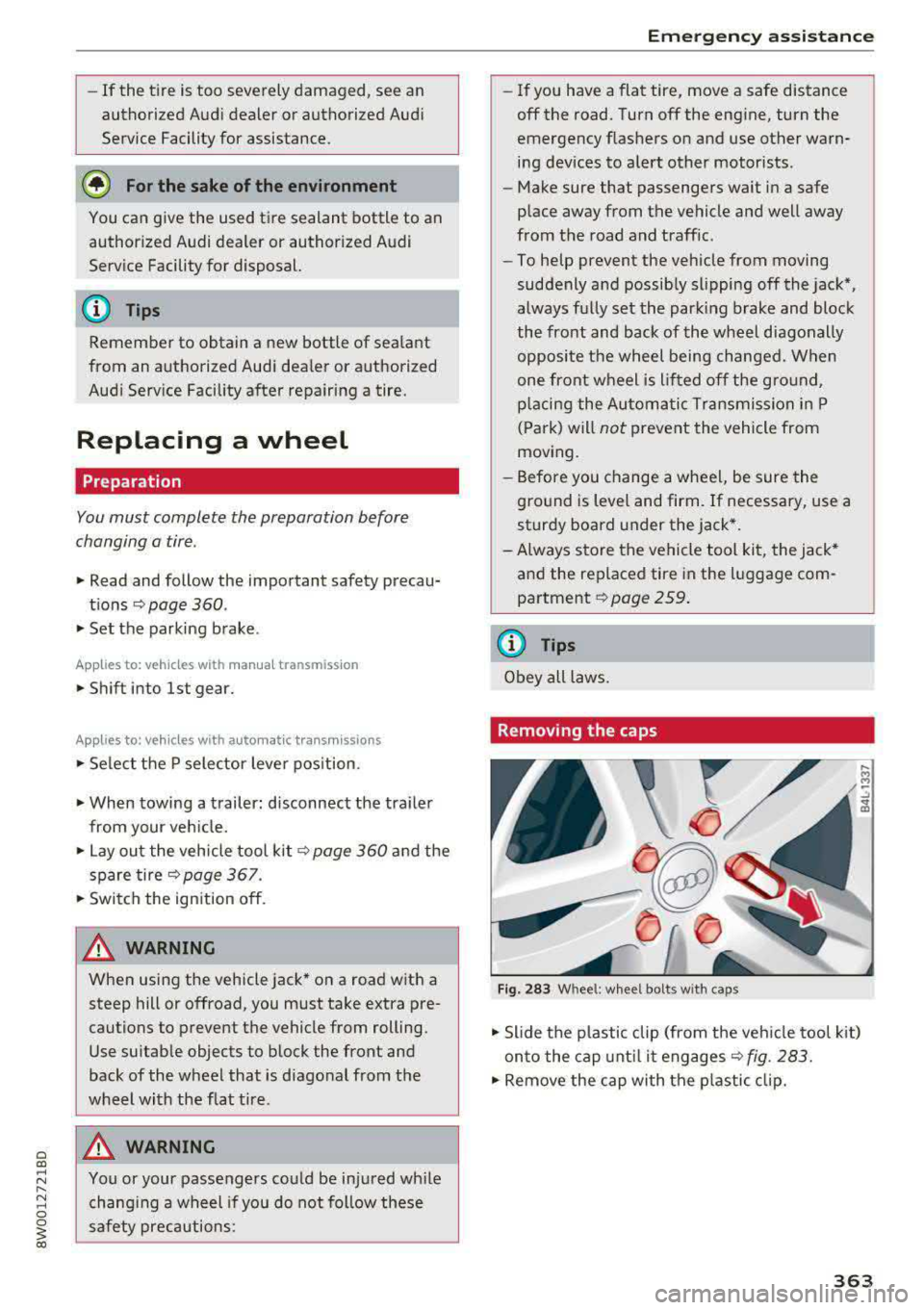
Fig. 283 W hee l: whee l bolt s w ith ca ps
.,. Slide the p lastic clip (from the veh icle tool k it)
on to the cap unt il it
engages ~ fig. 283.
.,. Remove the cap with the p lastic clip.
363
Page 375 of 403

Emergency situations
Emergency situations
General
This chapter is intended for trained emergency crews and working personnel who have the nec
essary tools and equipment to perform these
operations.
Starting by pushing or
towing
(D Note
Vehicles with an automatic transmission
cannot be started by pushing or towing.
Starting with jumper
cables
If necessary, the engine con be started by con
necting it to the battery of another vehicle.
If the engine should fail to start because of a dis
charged or weak battery, the battery can be con
nected to the battery of
another vehicle, using a
pair of jumper cables to start the engine.
Jumper cables
Use only jumper cables of sufficiently large cross
section
to carry the starter current safely. Refer
to the manufacturer's specifications.
Use only jumper cables with
insulated terminal
clamps which are distinctly marked :
plus(+) cable in most cases colored red
minus(-) cable
in most cases colored black.
A WARNING
Batteries contain electricity, acid, and gas.
Any of these can cause very serious or fatal in
jury. Follow the instructions below for
safe
handling of your vehicle's battery.
-Always shield your eyes and avoid leaning
over the battery whenever possible.
-A dead battery can freeze at temperatures
around 32 °F (0 °C) . If the vehicle battery is
frozen, you must thaw it before connecting
the jump start cables.
If you do not, this in-
374
creases the risk of an explosion and chemi
cal burns. After jump starting the vehicle,
drive to an authorized Audi dealer or author ized Audi Service Facility immediately to
have the vehicle battery checked.
- Do not allow battery acid to contact eyes or
skin . Flush any contacted area with water
immediately.
- Improper use of a booster battery to start a
vehicle may cause an explosion .
- Vehicle batteries generate explosive gases.
Keep sparks, flame and lighted cigarettes
away from batteries.
- Do not try to jump start any vehicle with a
low acid level in the battery.
- The voltage of the booster battery must also
have a 12-Volt rating. The capacity (Ah) of
the booster battery should not be lower
than that of the discharged battery. Use of
batteries of different voltage or substantial
ly different
"Ah" rating may cause an explo
sion and personal injury.
- Never charge a frozen battery. Gas trapped
in the ice may cause an explosion.
- Never charge or use a battery that has been
frozen. The battery case may have be weak
ened.
- Use of batteries of different voltage or sub
stantially different capacity (Ah) rating may
cause an explosion and injury. The capacity (Ah) of the booster battery should not be
lower than that of the discharged battery.
- Before you check anything in the engine
compartment, always read and heed all
WARNINGS
r=:> poge 323.
([) Note
-Applying a higher voltage booster battery
will cause expensive damage to sensitive electronic components, such as control
units, relays, radio, etc.
- There must be no electrical contact between
the vehicles as otherwise current could al
ready start to flow as soon as the positive
(+) terminals are connected.
Page 377 of 403
Emergency situations
-When connecting jumper cables, make sure
that they cannot get caught in any moving
parts in the engine compartment.
-Do not bend over the batteries -danger of
chemical burns!
-The battery cell locking screws must be
tightened securely.
-Before you check anything in the engine
compartment, always read and heed all
WARNINGS
c> page 323.
(D Note
Improper hook-up of jumper cables can ruin
the generator.
- Always connect POSITIVE(+) to POSITIVE
(+), and NEGATIVE(-) to NEGATIVE(-)
ground post of the battery manager control
unit.
- Check that all screw p lugs on the battery
cells are screwed in firmly. If not, tighten
plugs prior to connect ing clamp on negative
battery terminal.
-Please note that the procedure for connect
i ng a jumper cable as described above ap
plies specifically to the case of your vehicle
being jump started . When you are giving a
ju mp start to another vehicle, do
not con
nect the negative (-) cable to the negative
(-) terminal on the discharged batte ry @
c> fig. 296. Instead, securely connect the
negative( -) cab le to either a solid metal
component that is firm ly bolted to the en
gine block or to the engine block itself. If
the battery that is being charged does not
vent to the outside, escap ing battery gas
could ignite and explode!
Towing with a tow truck
General hints
Your Audi requires special handling for towing.
The following information is to be used by com
mercial tow truck operators who know how to op
erate the ir equipment safely.
-Never tow your Audi, towing will cause dam
age to the engine and transmission.
376
-Never wrap the safety chains or winch cables
around the brake lines .
- To prevent unnecessary damage, your Audi
must be transported with a flat bed truck .
- To load the vehicle on to the flat bed, use the
towing loop found in the vehicle tools and at
tach to the front or rear anchorage
i:>page 376 and i:>page 377 .
A WARNING
A vehicle being towed is not safe for passen
gers. Never allow anyone to ride in a vehicle
being towed, for any reason.
Front towing loop
Only install the front towing loop when it is
needed.
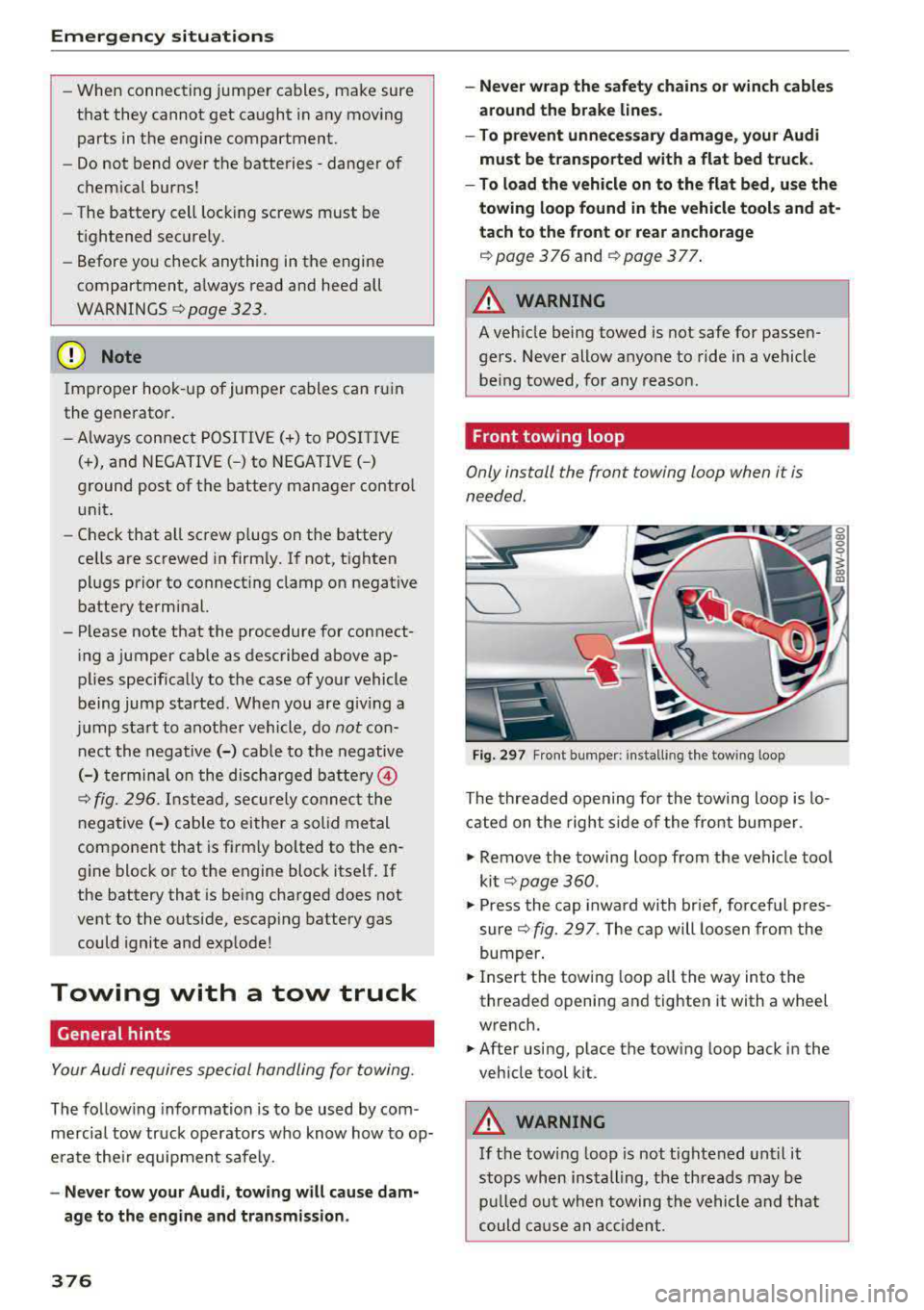
Fig. 297 F ront bumper: installing the towing loop
The threaded opening for the towing loop is lo
cated on the right s ide of the front bumper.
.,. Remove the towing loop from the vehicle too l
ki t
c> page 360 .
.,. Press the cap inward with brief, forceful p res
sure
c> fig. 297 . The cap will loosen from the
bumper .
.,. Insert the towi ng loop all the way into the
threaded opening and tighten it with a wheel
wrench.
.,. After using, place the towing loop back in the
vehicle tool kit .
A WARNING
If the towing loop is not tightened until it
stops when installing, the threads may be
pulled out when towing the vehicle and that
could cause an accident.
-
Page 378 of 403
Rear towing loop
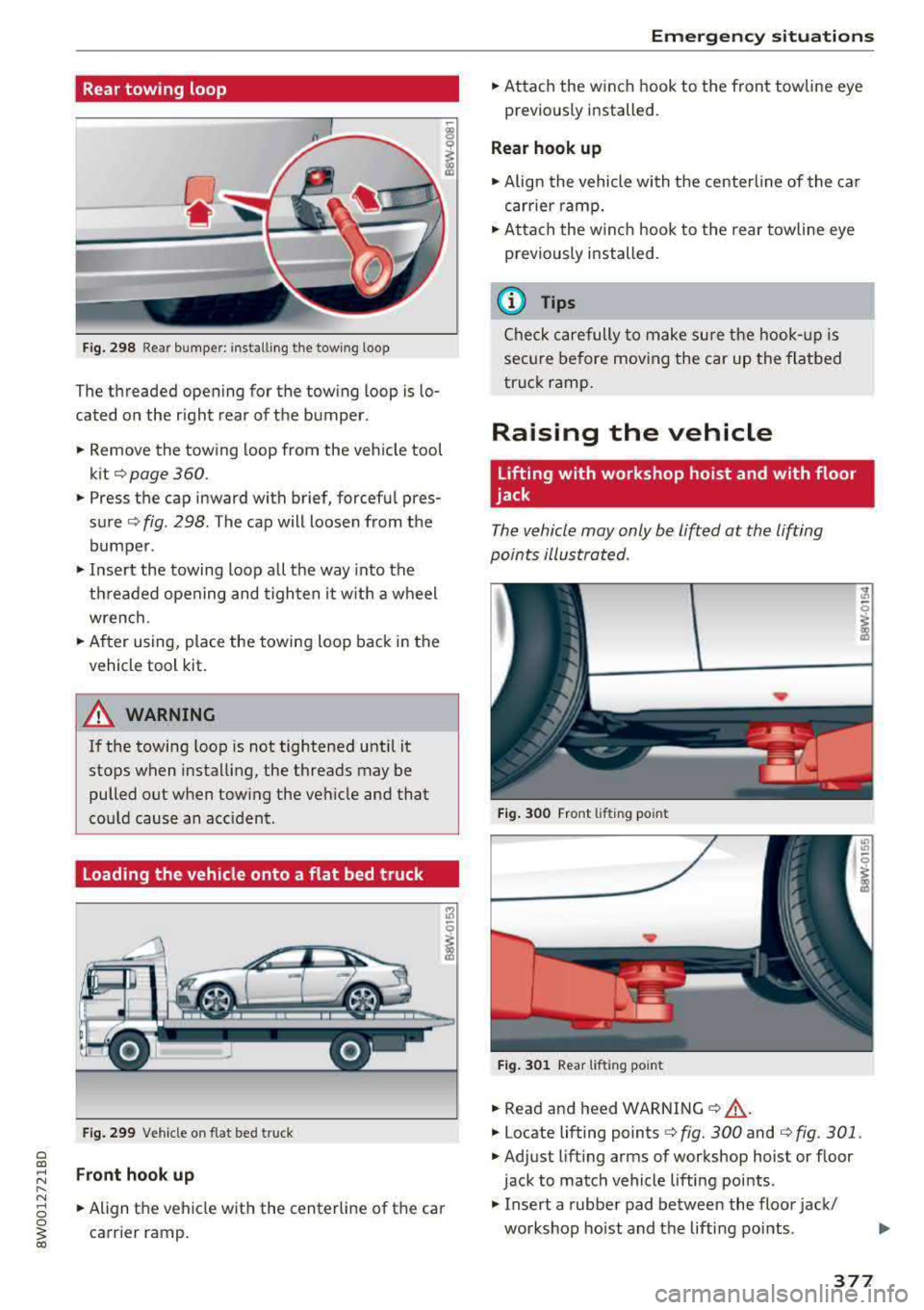
Fig. 298 Rea r bumper: install ing the tow ing loop
The threaded opening for the towing loop is lo
cated on the r ight rear of the bumper.
.. Remove the towing loop from the vehicle tool
kit¢ page 360.
.. Press the cap inward with brief, forcefu l pres
sure ¢ fig. 298. The cap will loosen from the
bumper .
.,. Insert the towing loop all the way into the
threaded opening and tighten it w ith a wheel
wrench .
.. After using, place the towing loop back in the
vehicle tool kit.
A WARNING
If the towing loop is not tightened until it
stops when installing, the threads may be
pulled out when tow ing the vehicle and that
cou ld cause an accident .
Loading the vehicle onto a flat bed truck
Fig. 299 Vehicle on flat bed truck
Front hook up
-
.. Align the vehicle with the centerline of the car
carrier ramp.
Emergency situations
.. Attach the winch hook to the front towline eye
previously installed.
Rear hook up
.. Align the vehicle with the centerline of the car
carrier ramp .
.. Attach the w inch hook to the rear towline eye
previously installed.
(D Tips
Check carefully to make sure the hook-up is
secure before moving the car up the flatbed
truck ramp.
Raising the vehicle
Lifting with workshop hoist and with floor
jack
The vehicle may only be lifted at the lifting
points illustrated .
Fig. 300 Front lifting point
Fig. 301 Rear lif tin g po int
.. Read and heed WARNING ¢&, .
.. Locate lifting points¢ fig. 300 and ¢ fig. 301.
.,. Adjust lifting arms of workshop hoist or floor
jack to match vehicle lifting points .
.. Insert a rubber pad between the floor jack/
workshop hoist and the lifting points .
.,.
377