Transmission AUDI S4 2018 Owner's Manual
[x] Cancel search | Manufacturer: AUDI, Model Year: 2018, Model line: S4, Model: AUDI S4 2018Pages: 403, PDF Size: 66.81 MB
Page 97 of 403

a co .... N ,....
N .... 0 0
3 co
.,. To shift down a gear, tap the 0 shift paddle.
.. To engage the lowest gear, hold the 0 shift
paddle.
.. If you do not press a shift button within a short
time while in the D/S position, the transmission
will return to automatic mode. To keep shifting using the shift paddles, move the selector lever
to the right out of the D/S position .
.,. When you want to shift out of tiptronic mode,
press and hold the
0 shift paddle for a longer
period of time or move the selector lever back
and release it.
The transmission automatically shifts up or down before critical engine speed is reached.
The transmission only allows manual shifting
when the engine speed is within the permitted
range.
@ Tips
- If you shift to the next lowest gear, the
transmission will only shift if the engine will
not be over-revved.
- With kick-down, the transmission shifts to a
lower gear, depending on vehicle speed and
engine speed.
- tiptronic does not work if the transmission
is running in emergency mode.
Kick-down
Applies to: vehicles with automatic transm issions
Kick-down enables maximum acceleration.
When you press the accelerator pedal down be
yond the resistance point, the automatic trans
mission downshifts into a lower gear and the en
gine utilizes its full power , depending on vehicle
speed and engine RPM. It shifts up into the next
higher gear once the maximum specified engine
RPM is reached.
A WARNING
Please note that the wheels could spin on
slick or slippery roads when kick-down is ac
tive .
-
Driving
Launch control program
Applies to: vehicles with S tronic transmission
The launch control program provides the best
possible acceleration when starting from a stop .
Requirement: the engine must be at operating
temperature and the steering wheel must not be
turned .
.. Deactivate the Start/Stop system* c> page 87 .
The LED in the ICA> ~I button turns on .
.. Applies to: seda n: Press the I.B OFFI button
briefly while the engine is running
c> page 147.
The II indicator light turns on and the mes
sage
Stabilization control (ESC): sport. Warn·
ing! Restricted stability
appears in the instru
ment cluster display .
.. Applies to: allroad: Press the i.i, O FF I button
briefly while the engine is
running ¢ page 147.
The II indicator light turns on and the mes
sage
Stabilization control (ESC): offroad.
Warning! Reduced stability
appears in the in
strument cluster display .
.. Pull the selector lever back out of the D/S posi
tion briefly to select the S position or select the
Dynamic driving mode in drive se-
lect* ¢ page 134 .
.,. Press the brake pedal firmly with your left foot
and hold it all the way down for at least one
second .
.. At the same time, press the gas pedal all the
way down with your right foot until the engine
reaches and stays at a high RPM level.
.. Remove your foot from the brake pedal within
five
seconds ¢,,&. .
A WARNING ~
-Always adapt your driving to the traffic flow.
- Only use the Launch control program when
road and traffic conditions allow it and oth
er drivers will not be endangered or both
ered by your driving and the vehicle's accel
eration.
- Please note that the drive wheels can spin
and the vehicle can break away when sport
mode/offroad mode is switched on, espe
cially when the road is slippery.
95
Page 98 of 403

Driving
-Once the vehicle has started moving, press
the
I ~ OF F! button briefly to turn the sport
mode/offroad mode off.
(D Tips
- The t ransmiss ion temperature may increase
significantly after using t he launch control
program. If that happens, the pr ogram may
not be available for a few m inutes. It w ill be
available again after a cool-down period.
- When acce le rating using the launch control
program, all veh icle parts are subject to
heavy loads. Th is can lead to increased
wear.
Transmission malfunction
A pp lies to: ve hicles w ith a utomat ic tr an smi ssio ns
• Transmission: too hot. Plea se stop vehicle
Do not cont inue drivi ng. Select the P se lector lev
er pos ition and contact an a uthorized Audi dea ler
or author ized Audi Se rvic e Facil ity for assistance .
• Transmission: malfunction! Please stop ve
hicle and shift to P
Do not cont in ue drivi ng . Select the P se lector lev
er position and contact an a uthorized Aud i dea ler
or author ized Audi Service Facility for assistance.
[i1 Selector lever: malfunction! You may contin
ue driving. Please contact Service
T here is a system mal fun ction in t he t ransm is
sion. Drive to an au thorized A udi dealer or au
thor ized Audi Se rvice Facility immediate ly to have
the ma lfunction co rrected .
[O] P button : malfunction! Auto P when engine
off. Please contact Service
T here is a malfunc tion in the P button on these
lec to r l ever. The tran smission a utomat ic a lly en
g ag es in P when you sw itch off the e ng ine . D rive
t o an author ized Audi dealer or author ized Audi
Service Facility immediately to have the malfunc
tion corrected.
[O] Transmis sion : malfunction! Gear change on
ly possible using both paddle levers. Please con
tact Se rvice
96
There is a system malfunc tion in the transmis
s ion . You can continue dr iv ing with restricted
funct io n. The se lector lever is not work ing. Gears
can on ly be selected by tapping both s hift pad
dles at t he same time when the vehicle is stat ion
a ry
r=> page 94, fig. 100 . Pay attention to these
l ected tra nsmissio n position in t he instr ument
cl uster disp lay. The p arking lock eng ages auto
ma tic ally when yo u turn off the engi ne. Drive to
an authorized Aud i de aler or aut horized Au di
Se rvice Fa cility immedi ate ly to have the malfunc
tion corrected .
[i1 Transmission: please press brake pedal and
select gear again
Press the brake pedal and select the desired se
l ector l ever posi tion again . Yo u can then co nti nu e
dr iv ing .
[i1 Transmission: too hot . Please adapt driving
style
The transmission temperature has increased sig nificantly due to the sporty dr iv ing manner. Drive
i n a less spo rty manner unti l the temperatu re re
turns to t he norma l ra nge and t he i ndica tor lig ht
swi tches of.
[i1 Transmission: malfunction! You can contin
ue driving. See owner's manual
There is a system malfunction in the transmis
s ion. Y ou may contin ue dr iving. Dr ive t o an a u
thorized Aud i dea ler or authorized Audi Se rvice
Fac ility soon to have the ma lfunc tion corrected.
[i1 Transmission: malfunction! You can contin
ue dr iving in D until engine off
There is a system mal function in the transmis
s ion . The transm ission is switch ing to eme rge ncy
mode.
If you turn the engine of f, you w ill not be
able t o se lect any othe r se lector lever positions
after sta rting the engine aga in. Drive to an au
t h orized Aud i dea le r or authorized Audi Service
Fac il ity i mmed iate ly to have the malfu nction cor
r ected .
[i1 Transmission: malfunction! You may contin
ue driving (limited functionality ). Please con-
tact Service
..,_
Page 99 of 403

There is a system malfunction in the transmis
sion. The transmission is switching to emergency
mode. This mode only shifts into certa in gears or
will no longer shift at all. The engine may stall.
Drive to an authorized Audi dealer or authorized
Audi Service Facility immediately to have the
malfunct ion corrected.
DD Transm ission: malfunction! You may contin
ue driving. No reverse gear
There is a system malfunction in the transmis
sion. The transmission is sw itching to emergency
mode. This mode only shifts into certa in gears or
will no longer shift at all. The engine may stall.
You cannot engage the reverse gear . Drive to an
author ized Audi dealer or author ized Audi Service
Facility immediately to have the malfunction cor·
r ected.
DD Danger of rolling away! P not possible .
Please apply parking brake
- The parking lock was released using the emer gency release
c'.> page 9 7. Or
- The parking lock can no longer be engaged .
Drive to an authorized Audi dealer or author·
ized Audi Service Facility immediately to have
the malfunction corrected.
DD Move selector lever to automatic position
There is a malfunction in the tiptronic mode. End
tiptronic mode by pushing the selector lever to
the left into the D/5 position.
Driving
Parking lock emergency release
Applies to: vehicles with automatic transmissions
The parking lock must be released with the
emergency release when driving through moun tains/maneuvering.
Fig. 101 Front cup holde r: removing the cover
N
~ co m
Fig. 102 Front cup holde r: parking lock emergency release
The emergency release is located in the front cup
holder under a cover
Releasing the parking lock using the
emergency release
... To prevent the vehicle from rolling unintention
ally, set the parking
brake(®) c::> page 88 or
press the brake pedal.
.,. Remove the rubber mat .
.,. T here is one slit opening on the cover . Use the
screwdr iver (from vehicle tool kit) to pry the
cover off at the opening
c'.> fig. 101 .
.,. Insert the socket wrench (from the vehicle tool
kit) into the ope ning c'.>fig.
102 .
... Tur n the socket wre nch all the way clockwise (D
and press it downward @ until it locks into
p lace .
... Leave the socket wrench inserted c'.> A.
Resetting the parking lock
.,. Press the brake pedal and start the engine.
97
Page 110 of 403

Assistance systems
-No messages are displayed when at speeds
under
20 mph (30 km/h) .
Settings in the Infotainment system
Appl ies to: ve hicles w ith predi ctive e fficiency assis t
~ In the Infotainment system, select: IMENUI
button > Vehicle > left control button > Driver
ass istance
> Eff icie ncy assist .
Predictive messages are shown when this f unc
tion is sw itched on.
(D Tips
No predictive messages are shown on vehicles
w ithout a navigation system .
Audi adaptive cruise
control
Description
A ppl ie s to: ve hicles w ith Audi adaptive cruise co ntro l
Fig. 107 Detect ion range
The adaptive cruise control system is a combina
tion of speed and distance regulation.
It assists
the dr iver by both regulating the speed and
maintaining a distance to the vehicle driving
ahead, within the limits of the system . If the sys
tem detects a vehicle driving ahead, the adaptive
cru ise control can brake and acce lerate your vehi
cle. This increases driving comfort dur ing long
tr ips on highways and in stop-and -go traff ic (au
tomatic transmission*).
What can adaptive cruise control do?
The adaptive cruise contro l system uses video, ra
dar, ultrasound and navigation data. Veh icles
108
driving ahead can be recognized up to 650 feet
(200 m) away.
P red ictive functions offer the driver additional
comfort and contribute to the reduction in fue l
consumption and CO2 emiss ions
r:!> page 115.
On open roads with no traffic , it functions like a
c ruise control system. The stored speed is main
tained . When approaching a vehicle driving
ahead, the adaptive cruise contro l system auto
matically brakes to match that vehicle's speed
and then maintains the set distance . As soon as
the system does not detect a vehicle dr iving
ahead, adaptive cruise control accelerates up to
the stored speed.
App lies to: vehicles wit h auto matic transmissions
In stop-and-go traffic, adaptive cruise control can
brake until the veh icle is stationary and then can
also start driving again automat ically under cer
ta in cond itions
r:!> page 112 .
In traffic jams or s top-and-go traffic, traffic jam
ass ist can ass ist the driver
r:!> page 116.
Which functions can be controlled?
When you switch adapt ive cru ise control on, you
can set the current speed as the "contro l speed"
r:!> page 110, Switching on/off.
When dr iving, you can stop cruise control
c:>page 113 or change the speed c::;,page 112 at
any time .
You can also set the distance to the vehicle driv i ng ahead and set the driving mode of the adap
tive cru ise cont rol
c::;, page 113 .
Page 112 of 403

Assistance systems
In curves
Applies to: vehicles w ith Audi adaptive cruise co ntro l
Fig. 109 Example: dr iv ing into a curve
When driving into a curve ¢ fig. 109 and out of a
curve, the adaptive cru ise control may react to a
veh icle in the neighboring lane and apply the
brakes. You can prevent that by pressing the ac
celerator pedal briefly.
Stationary vehicle s
Applies to: ve hicles with Audi adaptive cruise co ntro l
F ig . 110 Example: veh icle c hanging lanes and stationa ry
ve hicle
Within the limits of the system, adaptive cruise
control can react to stationary vehicles
¢
fig. 110, as long as you are driving slower than
30 mph (SO km/h) and the system class ifies the
possible passing maneuver as low. For example,
if a vehicle that was already detected
@ turns or
changes lanes, the adaptive cruise contro l reacts
to the stat iona ry vehicle ahead of
it @ .
110
Veh icles with manual transmission
App lies to : vehicles wit h Audi adapt ive cruise control and
manual t ra n smi ssio n
The adaptive cru ise control is available from 1st
gear through 6th gear in the normal speed
range.
When the adaptive cruise contro l is turned on,
you must press the clutch to shift gears (as usu
al). When sh ift ing normally or when pressing the
clutch, the adaptive cruise control remains
turned on.
After you have engaged the gear, you do
not
need to press the gas pedal. The adaptive cru ise
contro l accelerates automat ically if necessary .
If you press down on the clutch for too long or
shift/couple improper ly, the adaptive cruise con
trol may turn off automatically .
Switching on/off
Applies to: vehicles with A ud i adapt ive cruise control
Fig. 111 Ope rating leve r: sw itching on and off
Fig. 112 Instrument cl uste r: adapt ive cr uise cont ro l
You can set any speed between 20 and 95 mph
(30 and 150 km/h).
.,._
Page 113 of 403

a co .... N ,....
N .... 0 0
3 co
In d ic at or ligh ts and messages in the instr ument
cluster display inform you about the current sit
uation and setting.
A n ad dit iona l in di ca tor appears in the head -up
d isp lay*.
Switching adaptive cruise control on
" Pull the lever toward you in to posi tion @
¢fig. 111.
Storing the speed and activating regulation
" To store the cu rrent speed , press the ISET ! but
ton
¢ fig . 111 . The stored speed is shown in the
speedomete r in the LED
line @ and appears
br iefly i n the status
line @¢fig . 112 .
"Applies to: vehicles with automat ic transmis
s ion: To acti va te the cont ro l when st ation ary,
also press the bra ke peda l.
Switching adaptive cruise control off
" Push the lever away from you in to posi tion @
u nti l it clicks into place. The message ACC:
off
appears.
@ Indicator lights
fll-Adaptive cru ise con trol is switched on . No
ve hicles are detected ahead. The stored speed is
m ain tained .
•-A vehicle d rivi ng a head was detected. The
adapt ive cr uise control system regulates the
speed and distance to the veh icle dr iv ing ahea d
a n d accelerates/brakes automatically .
• - Automatic transmission: adaptive cruise
control must be sw itched on . A veh icle was de
tec ted ahead . Yo ur vehicle is s tat io nary and w ill
n ot sta rt driving au tomatically .
tii-Automatic transmission : adaptive cruise
control must be sw itched on . No vehicles were
detected ahead . Your veh icle is stationary a nd
w ill no t start dr iv ing automa tica lly .
• -The automatic braking is not enough to
maintain a sufficient distance to a veh icle dr iv ing
ahead . You must
in tervene ¢ page 114, Driver
intervention request .
Assistance systems
© Instrument cluster display
If the Driver assistance di spl ay is not shown in
t h e instr ument cluster d isp lay, you can open it
u sing the m ultif unct ion steering whee l buttons
¢ page 13.
Ba sed on the gr aphic dis pla y, you can dete rmine
i f th e sys tem is maintain ing a d istance to the ve
hicle d riving ahead a nd what t hat distance is .
No vehicle -no vehicle was detec ted dr iv ing
ahe ad.
Silver vehicle -a vehicle was detected driving
ahea d.
Red veh icle -request for drive r interve ntion
¢ page 114.
The five distance bars on the gauge © represent
t h e set distance (refer
to ¢ page 113 for infor
mation o n how to change the d ista nce). If you
fall be low the selected d ista nce, the distance
bars become red from the bo ttom upwa rd.
.&, WARNING
Applies to: vehicles w ith automatic transm is
sion: If you pre ss t he
I SET ! butt on whe n driv
i ng at speeds below 20 mp h (30 km /h) , the
ve hicle accelerates au toma tic ally up to 20
mph ( 30 km/h), which is the m inimum speed
that can be set.
@ Tips
- If you swit ch the ig nitio n or the ad ap tive
c ruise cont rol sys tem o ff, the set s peed is
erased fo r safety reasons .
- The e lec troni c sta biliz ation control ( ESC)
and the an ti- slip -regul ation (AS R) are auto
matically switc hed on when t he adaptive
cruise cont rol is switched on.
111
Page 115 of 403

-Press the brake pedal to slow your vehicle
down.
A WARNING
If the message ACC: automatic go1> appears,
your vehicle will start driving even if there is an obstacle between your vehicle and the ve
hicle driv ing ahead. This increases the risk of
an acc ident .
{!) Tips
If adaptive cruise control is active and your
vehicle does not start driving even though the
message
ACC: automatic go1 l appears, you
can start driving by tapping the accelerator
pedal.
Interrupting cruise control
A pplies to: ve hicles with Audi adaptive cruise contro l
Fig. 115 Selector lever
Requirement: adaptive cruise control must be
switched on.
Overriding cruise control
.. To accelerate manually, pull the lever toward
you into position @and hold it there or press
the accelerator pedal. The message
ACC: over
ride
appears .
.. To resume cruise control, release the lever or
take your foot off the acce lerator pedal.
Canceling cruise control while driving
.. Move the lever into position @. The message
ACC: standby appears . Or
.. Press the brake pedal.
ll Th is is not ava ilab le in some coun tries.
Assistance systems
.. To resume the stored speed, move the lever in-
to position @.
Automatic transmission: canceling cruise
control when stopped
.. Push the lever away from you into position @.
The message
ACC: standby appears.
.. To resume cruise control, press the brake peda l
and pull the lever toward you into position @.
A WARNING
It is dangerous to activate cruise control and
resume the stored speed when the current
road, traffic or weather cond itions do not per
mit this . This increases the risk of an accident.
Setting the distance
App lies to: vehicles wit h Audi adapt ive cr uise control
,
0
Fig. 116 Operating lever: setting the distance
.,. Tap the switch to display the current set dis
tance
qfig . 116.
.,. To increase or reduce the d istance in incre
ments, tap the switch upward/downward
again. The distance between the two vehicles
w ill change in the instrument cluster display.
When approaching a vehicle driving ahead, the
adaptive cruise control system brakes to match
that vehicle's speed and then adjusts to the set
distance. If the vehicle driving ahead accelerates,
then the adaptive cruise control will a lso acce ler
ate up to the speed that you have set .
T he higher the speed, the greater the distance
¢.& .The Distance 3 setting is recommended .
113
Page 136 of 403

Assistance systems
Description
Applies to: vehicl es w ith Aud i drive select
The follow ing systems, among other things, are
influenced by drive select:
Engine and automatic transmission*
Depending on the mode, the engine and auto
mat ic transmission* respond more quickly or in a
mo re balanced manner to accelerator pedal
movements . In the sporty
Dynamic mode , the
transmission shifts at highe r speed ranges.
Suspension control*
The suspension control* uses sensors to record
information regard ing steering movements ,
braking and acceleration operations by the driv
er , road surface, driving speed, and load. This
makes it possible to adapt damping to the driv
ing situation nearly in rea l time. With drive se
lect, you can adjust the suspension control to
sporty
( Dynamic ), comfortab le ( Comfort ) or bal
anced
( Auto ).
Steering
The power steering adapts. Indi rect s teer ing that
moves easily as in
Comfort mode is especia lly
suited to long drives on highways . The
Dynamic
mode provides sporty , direct steering.
The following applies to vehicles with dynamic
steering* : the steering ratio changes based on
vehicle speed in order to maintain optimum
steer ing effort for the driver at all times . This
sets the steering to be less sensitive at higher
speeds in order to prov ide improved vehicle con
trol. At reduced speeds, steering is more direct in
order to keep the steering effort as min imal as
possible when the driver is maneuvering the vehi
cle. At low and average speeds, dynamic steer
ing* additionally provides more responsive steer
ing performance.
Sport differential*
As a component of the all wheel drive system
(quattro)
~ page 1 SO, the sport differential dis
tributes the driving power to the rear axle de
pending on the situation. The distribution of
power varies depending on the selected mode
134
from moderate (Comfort ) to sporty (Dynamic ).
The goal is a high level of agility and ability to ac
ce lerate on curves . The vehicle is very respons ive
to steering.
Adaptive cruise control (ACC)*
The behavior when accelerating can be adjusted
from comfortable to sporty, depending on the
drive select mode. Adaptive cruise control also
responds to the driving behavior of the vehicle
ahead in a more conservative or sporty manner.
Engine sound*
The engine sound adapts to the current mode
and can be subtle to sporty.
@ Tips
The S selector lever position automatically en
gages when the
Dynamic mode is selected .
Selecting the driving mode
Applies to: vehicles with Audi drive se lect
Fig. 135 Center co nsole: controls for drive se lect
.,. Press the left or right a rrow key ~ fig. 135 until
the desired mode appears in the instrument
cluster/ Infotainment system disp lay. Or
.,. Select in the Infotainment system: IMENU j but-
ton
> Vehicle > Audi drive select.
.,. Select and confirm the desired setting.
You can change the driving mode when the vehi
cle is stationary or while driving. If traffic per
mits, after changing modes, briefly take your
foot off the accelerator pedal so that the recently
selected mode is also activated for the engine.
.,.
Page 137 of 403
a co .... N ,....
N .... 0 0
3 co
Offroad* -act ivates offroad funct ions to support
driving on rough terrain. The engine, transmis
sion and steer ing adjust and the Start/Stop
system* switches
off.
Comfort -provides a com fort -oriented ve hicle
setup and is suited for long drives on highways.
Auto -provides an ove rall comfor table yet dy
n a mic driv ing feel and is sui ted fo r every day use.
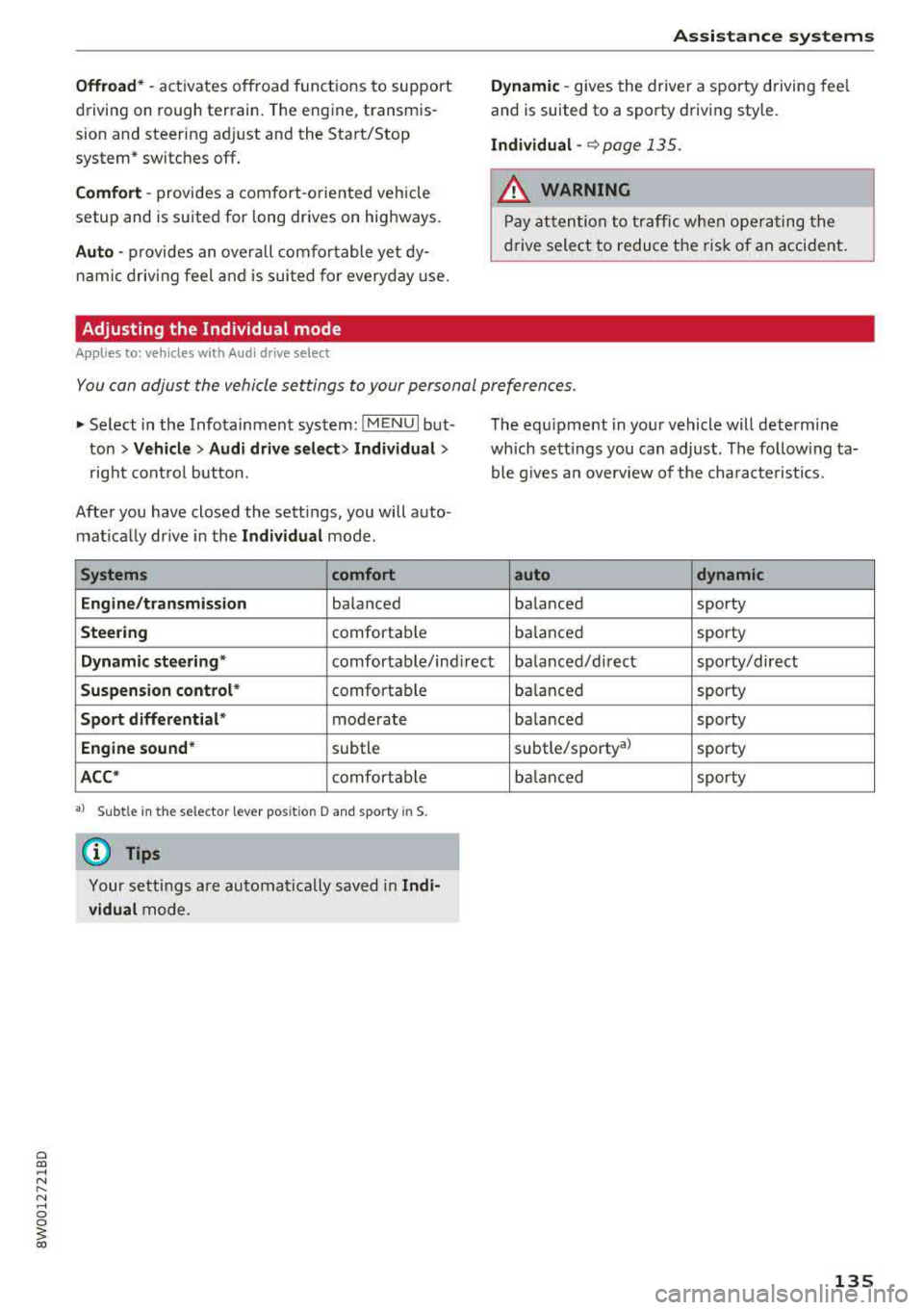
Adjusting the Individual mode
Applies to: vehicles with Audi drive select
Assistance systems
Dynamic -gives the driver a sporty driving fee l
and is suited to a s porty driving style.
Individual -c::> page 135.
.8_ WARNING
Pay att ention to tra ffic w hen ope rating the
dr ive select to reduce the r is k of an acci dent .
You can adjust the vehicle settings to your personal preferences .
.,. Select in the Info tainment sys tem: !M ENUI but
ton
> Vehicle > Audi drive select > Individual >
rig ht cont ro l button.
Afte r you have closed the sett ings, you will a uto
mat ica lly dr ive in the
Individual mode .
Systems comfort
Engine /transmission
ba lanced
Steering comfortab le T
he equ ipment in you r vehicle will determ ine
which se tt ings you can adjust. The fo llow ing ta
ble g ives an overv iew of t he cha ra ct eris tics.
auto dynamic
balanced sporty
ba lance d sporty
Dynamic steering " comfortable/ind irec t balanced/ direct sporty/direct
Suspension control * comfortable
Sport differential * moderate
Engine sound * subtle
ACC* comfortab le
a) Subtle in th e selector lever pos it ion D an d sporty in S.
@ Tips
Yo ur se ttin gs a re automa tically saved in Indi
vidual
m ode . ba
lance d sporty
ba la nced sporty
subtle/sporty al sporty
ba lanced sporty
135
Page 140 of 403
Parking systems
sound was muted, no tone will sound. Pay atten
tion to the vehicle's surroundings when you start
to drive.
Switching on /off
Applies to: ve hicles w ith park ing system plus
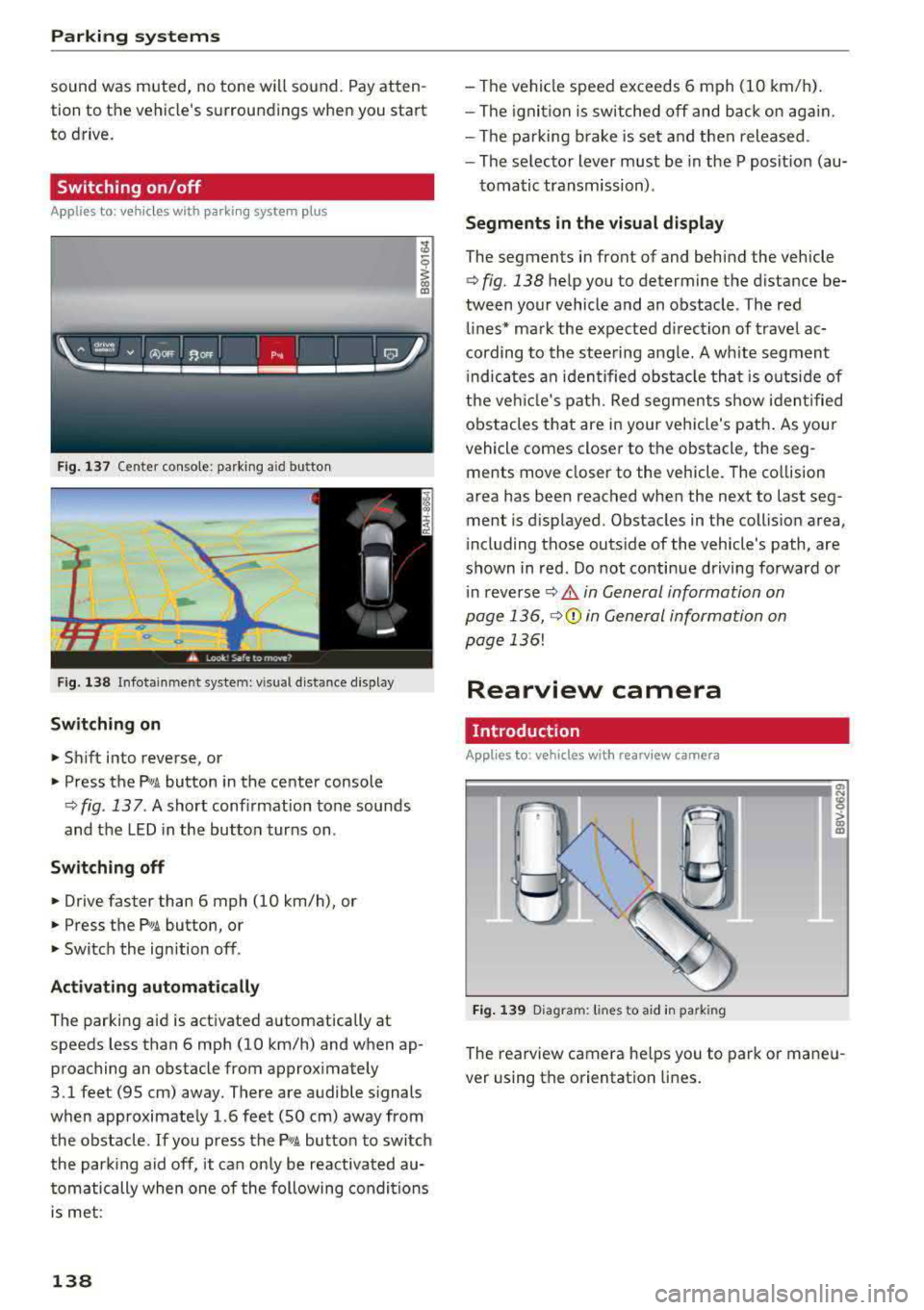
Fig . 137 Center console: parking aid button
Fig. 138 Infotainment system: visual d istance d isplay
Switching on
... Shift into reverse, or
" Press the P'"A button in the center console
q fig. 137. A short conf irmation tone sounds
and the LED in the button turns on .
Switching off
"Drive faster than 6 mph (10 km/h), or
" Press the Pw.6. button, or
" Switch the ign ition off.
Activating automatically
The parking aid is activated automatically at
speeds less than 6 mph (10 km/h) and when ap
proaching an obstacle from approximately
3.1 feet (95 cm) away. There are audible signals
when approximately 1.6 feet (SO cm) away from
the obstacle.
If you press the P,,1A button to switch
the park ing aid off, it can only be reactivated au
tomatically when one of the following conditions
is met :
138
-The vehicle speed exceeds 6 mph (10 km/h).
-The ignition is switched off and back on again.
-The parking brake is set and then released .
-The selector lever must be in the P posit ion (au-
tomatic transmission) .
Segments in the visual display
The segments in front of and behind the vehicle
q fig. 138 help you to determine the distance be
tween your vehicle and an obstacle . The red
lines* mark the expected direction of travel ac
cording to the steering angle. A white segment
i ndicates an identified obstacle that is outside of
the vehicl e's path. Red segments show identified
obstacles that are in your vehicle's path. As your
vehicle comes close r to the obstacle, the seg
ments move clos er to the vehicle. The collision
area has been reached when the next to last seg
ment is displayed. Obstacles in the coll is ion area ,
i ncluding those outside of the vehicle's path, are
shown in red. Do not continue driving forward or
i n reverse
q .&. in General information on
page 136,
q(i) in General information on
page
136!
Rearview camera
Introduction
Applies to: vehicles with rearview camera
Fig. 139 Diagram: lines to aid in park ing
The rearview camera he lps you to park or mane u
ver using the orientation lines .