change time AUDI S4 2019 User Guide
[x] Cancel search | Manufacturer: AUDI, Model Year: 2019, Model line: S4, Model: AUDI S4 2019Pages: 392, PDF Size: 99.53 MB
Page 109 of 392
8W0012721BG
Assistsystems
>Toincrease ordecrease thedistanceinincre-
ments,tap theswitchagaintoward@)or ©).
Thedistancebetweenthetwovehicleswill
changeintheinstrumentclusterdisplay.
Whenapproachingavehicledrivingahead,the
adaptivecruisecontrolsystembrakestomatch
thatvehicle'sspeedandthenadjuststotheset
distance.Ifthevehicledrivingaheadaccelerates,
thentheadaptivecruisecontrolwillalsoacceler-
ateuptothespeedthatyouhaveset.
Thehigherthespeed,thegreaterthedistance
=>A\.TheDistance3settingisrecommended.
Thatisequaltothegeneralrecommendationof
“halfthespeedshownonthespeedometer”.
Thedistancesprovidedare specifiedvalues.De-
pendingonthedrivingsituationandhowtheve-
hicleaheadisdriving,theactualdistancemaybe
moreorlessthanthesetargetdistances.
Ifyouchangethetimegaps,thevalueyouhave
justsetappearsbrieflyintheinstrumentcluster
display,forexampleBiforDistance3.Thisonly
occursiftheDriverassistancedisplayisnotcur-
rentlyshowninthedisplay>page105,fig.105.
Distance1:thissettingcorrespondstoadistance
of92ft(28m)whentravelingat62mph(100
km/h),oratimedistanceof1second.
Distance2: thissettingcorrespondstoadistance
of118ft(36m)whentravelingat62mph(100
km/h),oratimedistanceof1.3seconds.
Distance3:thissettingcorrespondstoadistance
of164ft(SOm)whentravelingat62mph(100
km/h),oratimedistanceof 1.8seconds.
Distance4:thissettingcorrespondstoadistance
of219ft(67m)whentravelingat62mph(100
km/h),oratimedistanceof2.4seconds.
Distance5:thissettingcorrespondstoadistance
of328ft(100m)whentravelingat62mph(100
km/h),oratimedistanceof3.6seconds.
D_Thisisnotavailableinsomecountries.
ZAWARNING
Whensettingthedistance,thedriverisre-
sponsibleforadheringtoanyapplicablelegal
regulations.
@Tips
Dependingontheselecteddrivingprogram
anddistance,drivingbehaviorwhenacceler-
atingwillvaryfromdynamictocomfortable
=>page108.
Drivinginstop-and-gotraffic
Appliesto:vehicleswith Audiadaptivecruisecontrolandau-
tomatictransmission
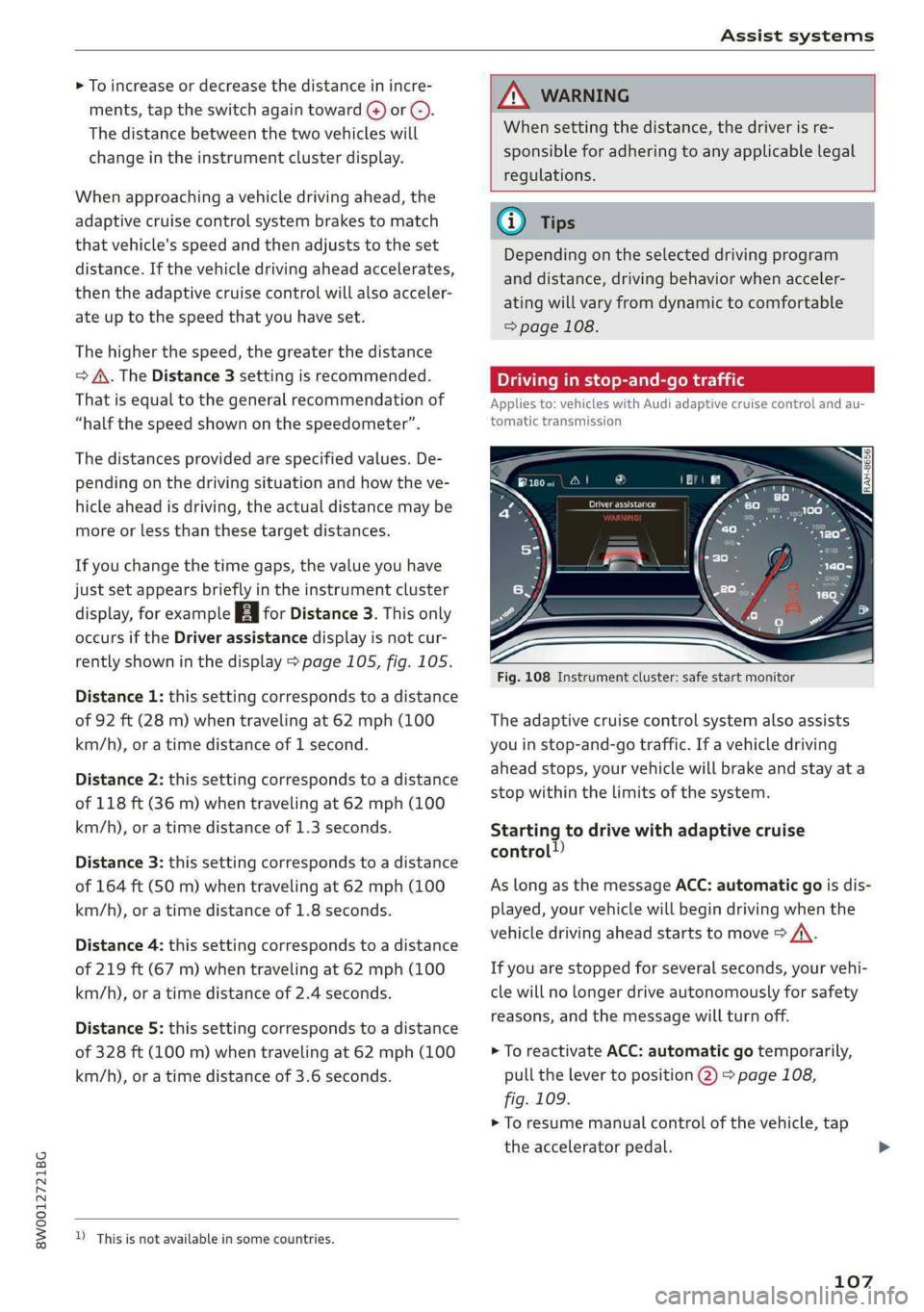
Fig.108Instrumentcluster:safestartmonitor
Theadaptivecruisecontrolsystemalsoassists
youinstop-and-gotraffic.Ifavehicledriving
aheadstops,yourvehiclewillbrakeandstayata
stopwithinthelimitsofthesystem.
Startingtodrivewithadaptivecruise
control!)
AslongasthemessageACC:automaticgoisdis-
played,yourvehiclewillbegindrivingwhenthe
vehicledrivingaheadstartstomove>A\.
Ifyouarestoppedforseveralseconds,yourvehi-
clewillnolongerdriveautonomouslyforsafety
reasons,
andthemessagewillturnoff.
>ToreactivateACC:automaticgotemporarily,
pullthelevertoposition@)>page108,
fig.109.
>Toresumemanualcontrolofthevehicle,tap
theacceleratorpedal.
107
Page 112 of 392
Assistsystems
Iftrafficjamassistwasdeactivatedthroughthe
Infotainmentsystem,youcancontinueoperating
theactivelaneassistusingthe>fig.111button
=>page118.Thetrafficjamassistfunctionsare
nolongeravailable.
Requirementsforusingtrafficjamassist:
—Trafficjamassistmustbe switchedonintheIn-
fotainmentsystem.
—Adaptivecruisecontrolmustbe switchedon
and
active>page105.
Alwaysswitchofftrafficjamassistinthe
followingsituations:
—Whenincreasedattentionisneededfromthe
driver
—Inpoorweatherconditionssuchassnowor
heavyrain
—Whendrivingonroadsinpoorcondition
—Inconstructionzones
—Incitydriving
Trafficjamassistavailability:
IfyouareintheDriverassistancedisplayinthe
instrumentcluster,theindicatorlightandthe
messageTrafficjamassistavailableappearsif
trafficcongestionisdetected.Youcanopenthe
Driverassistancedisplayusingthemultifunction
steeringwheelbuttons>page15.Toactivate
trafficjamassist,youmustpressthe>fig.111
buttonandswitchontheadaptivecruisecontrol
=>page105.
Indicatorlights
BandBA-trafficjamassistisswitchedon.Ve-
hiclesdrivingaheadweredetected.Yourvehicle
adaptswhiledriving>fig.112.
B-Trafficjamassistswitchesoffifthedriver
doesnottakeoversteeringaftermultipledriver
interventionrequests.Thesystembrakestheve-
hicleuntilitisstationary.
ZA\WARNING
Alwayskeepyourhandsonthesteeringwheel
soyoucanbereadytosteeratanytime.The
driverisalwaysresponsibleforstayingina
laneandforassessingtrafficsituations.Read
andfollowthewarningson>A\inGeneralin-
110
formationonpage103.Neverusetrafficjam
assistinthefollowingsituationsoryouwill
increasetheriskofanaccident:
—Drivingoffroadoronunpavedroads.Traffic
jamassistisonlydesignedforuseonpaved
roads.
—Incitydrivingorinconstructionzones
—Oncurvingstretchesofroad.
—Innarrowlanes
—Inuncleartrafficsituationssuchasatinter-
sectionsortollstations
@Tips
Youarenotnecessarilyguidedtothe center
ofyourlane.
PMENaTemelecile)
Appliesto:vehicleswith Audiadaptivecruisecontrol
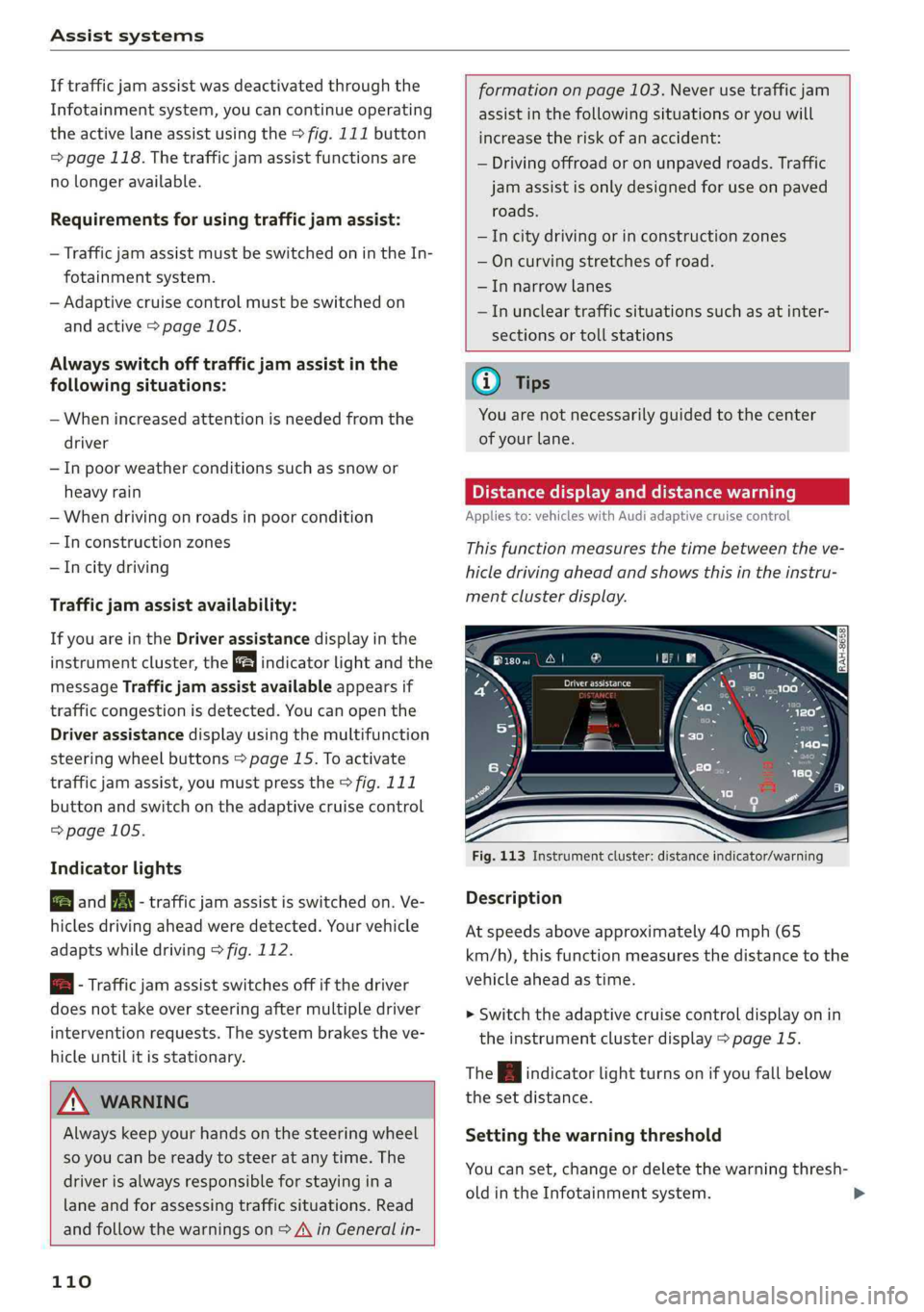
Thisfunctionmeasuresthetimebetweentheve-
hicledrivingaheadandshowsthisintheinstru-
mentclusterdisplay.
Fig.113Instrumentcluster:distanceindicator/warning
Description
Atspeedsaboveapproximately40mph(65
km/h),thisfunctionmeasuresthedistancetothe
vehicleaheadastime.
>Switchtheadaptivecruisecontroldisplayonin
theinstrumentclusterdisplay>page15.
TheBindicatorlightturnsonifyoufallbelow
thesetdistance.
Settingthewarningthreshold
Youcanset,changeordeletethewarningthresh-
oldintheInfotainmentsystem.
Page 119 of 392
![AUDI S4 2019 User Guide 8W0012721BG
Assistsystems
SettingsintheInfotainmentsystem
Appliesto:vehicleswithAudipresense
>SelectintheInfotainmentsystem:[MENU]but-
ton>Vehicle> leftcontrolbutton>Driver
assistance>Audipre](/img/6/57555/w960_57555-118.png "AUDI S4 2019 User Guide 8W0012721BG
Assistsystems
SettingsintheInfotainmentsystem
Appliesto:vehicleswithAudipresense
>SelectintheInfotainmentsystem:[MENU]but-
ton>Vehicle> leftcontrolbutton>Driver
assistance>Audipre")
8W0012721BG
Assistsystems
SettingsintheInfotainmentsystem
Appliesto:vehicleswithAudipresense
>SelectintheInfotainmentsystem:[MENU]but-
ton>Vehicle> leftcontrolbutton>Driver
assistance>Audipre sense.
TurnAudipresenseon/off-thepresensefunc-
tionscanbe turnedonandoff.
Ifthesystemisswitchedoff,itswitchesonagain
automaticallyoncetheignitionisswitchedon
again.
Prewarning-theearlywarningcan be switched
offorthepresensecity/frontwarningpointcan
be
set(Early/Medium/Late).
Setthewarningtimefortheearlywarningto
Earlyatfirst.Ifthiscausesundesiredearlywarn-
ingstoappear,thensetthewarningtimetoMe-
dium. TheLatewarningtimeshouldonlybeset
inspecialcircumstances.
@Tips
Yoursettings areautomaticallystoredandas-
signedtothevehiclekeybeingused.
Messages
Appliesto:vehicleswithAudipresense
Bhaudipresense:malfunction!Pleasecontact
Service
Thismessageappearswhenthepresensefunc-
tionisaffected.Forexample,thiscouldbe
causedbyafaultysensor.Drivetoanauthorized
AudidealerorauthorizedAudiServiceFacilityim-
mediatelytohavethemalfunctioncorrected.
Audipresense:currentlylimited.Sensor
viewlimitedduetosurroundings.Seeowner's
manual
Thismessageappearsiftheradarsensorand
cameraviewisobstructed,forexamplebyleaves,
snow,heavysprayordirt.Ifnecessary, cleanthe
sensorsandtheareaaroundthecamera
=>page103,fig.101or>page122,fig.122.
Audipresense:currentlylimited
ThismessageappearsiftheESCisrestrictedor
switchedoff,forexample.
Audipresense:currentlylimited.Seeown-
er'smanual
Thismessageappearswhenthereisatemporary
failureinasubsystem,suchastheESC.Ifthis
messageappearsrepeatedly,drivetoanauthor-
izedAudidealerorauthorizedAudiServiceFacili-
tytohave themalfunctioncorrected.
Audipresense:emergencybrakingsystem
off This
messageappearsifthepresensefunctions
areswitchedoffthroughtheInfotainmentsys-
temorifthesystemisnotready.
Audiactivelaneassist
Appliesto:vehicleswithAudiactivelaneassist
Active laneassist(lanedeparturewarning)de-
tectslanemarkerlineswithinthelimitsofthe
systemusingacamerainthewindshield.Ifyou
areapproachingadetectedlanemarkerlineand
itappearslikelythatyouwillleavethelane,the
systemwillwarnyouwithcorrectivesteering.
Youcanoverridethissteeringatanytime.Ifyou
passoveraline,thesteeringwheelwillvibrate
lightly.Inorderforthiswarningvibrationtooc-
cur,itmustfirstbeswitchedonintheInfotain-
mentsystem.Activelaneassistisreadyforoper-
ationwhenthelane markerlineisdetectedonat
leastonesideofthevehicle.
Thesystemisdesignedfordrivingonexpress-
waysandhighwaysandthereforeonlyactivates
atspeedsaboveapproximately40mph(65
km/h).
Appliesto:vehicleswithsideassist:ifyouacti-
vateaturnsignalwhenactivelaneassistisready
anditclassifiesalanechangeascriticalbecause
ofvehiclestravelingalongsideyouorapproach-
ingyou,therewillbenoticeablecorrectivesteer-
ingshortlybeforeyouleavethelane.Thiswillat-
tempttokeepyourvehicleinthelane.
Appliesto:vehicleswithoutsideassist:Whenthe
systemisready,itwillnotwarnyouifyouacti-
vateaturnsignalbeforecrossingthelanemarker>
117
Page 124 of 392

Assistsystems
Generalinformation
Appliesto:vehicleswith Audisideassist
B4M-0101
B8W-0101
Fig.122Rearofthevehicle:positionofthesensors
Sideassistfunctionsatspeedsaboveapproxi-
mately9mph(15km/h).
@Vehiclesthatareapproaching
Incertaincases,avehiclewillbeclassifiedas
criticalforalanechangeevenifitisstillsome-
whatfaraway.Thefasteravehicleapproaches,
thesoonerthedisplayintheoutsidemirrorwill
turnon.
Vehiclestravelingwithyou
Vehiclestravelingwithyouareindicatedinthe
exteriormirroriftheyareclassifiedascriticalfor
alanechange.Allvehiclesdetectedbysideassist
122
areindicatedbythetimetheyenteryour“blind
spot”,
atthelatest.
©Vehiclesyouarepassing
Ifyouslowlypassavehiclethatsideassisthas
detected(thedifferenceinspeedbetweentheve-
hicleandyourvehicleislessthanapproximately
9mph(15km/h)),thedisplayintheexteriormir-
rorturnsonassoonasthevehicleentersyour
blind spot.
Thedisplaywillnotturnonifyouquicklypassa
vehiclethatsideassisthasdetected(thediffer-
enceinspeedisgreaterthanapproximately9
mph(15km/h)).
Functionallimitations
Theradarsensorsaredesignedtodetecttheleft
andrightadjacentlaneswhentheroadlanesare
thenormalwidth.Insomesituations,thedisplay
intheexteriormirrormayturnoneventhough
thereisnovehiclelocatedintheareathatiscriti-
calforalanechange.Forexample:
—Ifthelanesarenarroworifyouaredrivingon
theedgeofyourlane.Ifthisisthecase,the
systemmayhavedetectedavehicleinanother
lanethatisnotadjacenttoyourcurrentlane.
—Ifyouaredrivingthroughacurve.Sideassist
mayreacttoavehiclethatisinthesamelane
or
onelaneoverfromtheadjacentlane.
—
Ifsideassistreactstootherobjects(suchas
roadsidestructureslikeguardrails).
—Inpoorweatherconditions.Thesideassist
functionsarelimited.
Donotcovertheradarsensors>fig.122with
stickers,deposits,bicyclewheelsorotherob-
jects,becausethiswillimpairthefunction.For
informationoncleaning,see>page342.
ZA\WARNING
—Alwayspayattentiontotrafficandtothe
areaaroundyourvehicle.Sideassistcannot
replaceadriver'sattention.Thedriveralone
isalwaysresponsibleforlanechangesand
similardrivingmaneuvers.
—Insomesituations,thesystemmaynot
functionoritsfunctionmaybelimited.For
example:>
Page 125 of 392

8W0012721BG
Assistsystems
—Ifvehiclesareapproachingorbeingleft
behindveryquickly.Thedisplaymaynot
turnonintime.
—Inpoorweatherconditionssuchasheavy
rain,snoworheavymist.
—Onverywidelanes,intightcurves,orif
thereisariseintheroadsurface.Vehicles
intheadjacentlanemaynot be detected
becausetheyareoutsideofthesensor
range.
C)Note
Thesensorscanbedisplacedbyimpactsor
damagetothebumper,wheelhousingand
underbody.Thiscanimpair thesystem.Have
anauthorizedAudidealerorauthorizedAudi
ServiceFacilitychecktheirfunction.
@Tips
—Ifthewindowglassinthedriver'sdooror
front
passenger'sdoorhasbeentinted,the
displayintheexteriormirrormaybeincor-
rect:
—Foranexplanationonconformitywiththe
FCCregulationsintheUnitedStatesandthe
IndustryCanadaregulations,see
=>page370.
SietemieRela
Appliesto:vehicleswithAudisideassist
Thesystemcanbeswitchedon/offintheInfo-
tainmentsystem.
>SelectintheInfotainmentsystem:[MENU]but-
ton>Vehicle> leftcontrolbutton>Driveras-
sistance>Audisideassist.Offswitchesthe
systemoff.
Ifthesystemisactivated,thedisplaysintheex-
terior
mirrorswillturnonbrieflywhentheigni-
tionisswitchedon.
@Tips
Whenyouswitchsideassistonoroff,theexit
warningsystemactivatesordeactivates
=>page124.
Settingthedisplaybrightness
Appliesto:vehicleswith Audisideassist
ThedisplaybrightnesscanbeadjustedintheIn-
fotainmentsystem.
>SelectintheInfotainmentsystem:[MENU]but-
ton>Vehicle>leftcontrolbutton>Driveras-
sistance>Audisideassist.
Thedisplaybrightnessadjustsautomaticallyto
thebrightness ofthesurroundings,bothinthe
informationandinthewarningstage.Invery
darkorverybrightsurroundings,theautomatic
adjustmentwillsetthedisplaytotheminimum
ormaximumlevel.Insuchcases,youmaynotice
nochangewhenadjustingthebrightness, orthe
changemayonlybenoticeableoncethesur-
roundingschange.
Adjustthebrightnesstoalevelwherethedisplay
intheinformationstagewillnotdisruptyour
view
ahead.Ifyouchangethebrightness,thedis-
playintheexteriormirrorwillbrieflyshowthe
brightnesslevelintheinformationstage.The
brightnessofthewarningstageislinkedtothe
brightnessintheinformationstageandisadjust-
edalongwiththeinformationstage.
(i)Tips
—Thesideassistfunctionsarenotactivedur-
ingtheadjustmentprocess.
—Theexitwarningindicatorsturnonduring
theadjustmentprocess.
—
Yoursettingsareautomaticallystoredand
assignedtothevehiclekeybeingused.
123
Page 129 of 392
8W0012721BG
Assistsystems
Suspensioncontrol*
Thesuspensioncontrol*usessensorsto record
informationregardingsteeringmovements,
brakingandaccelerationoperationsbythedriver,
roadsurface,drivingspeed,andload.Thismakes
itpossibletoadaptdampingtothedrivingsitua-
tionnearlyinrealtime.Withdriveselect,youcan
adjustthesuspensioncontroltosporty(Dynam-
ic),comfortable(Comfort)orbalanced(Auto).
Steering
Thepowersteeringadapts.Indirectsteeringthat
moveseasilyasinComfortmodeisespecially
suitedtolongdrivesonhighways.TheDynamic
modeprovidessporty,directsteering.
Thefollowingappliestovehicleswithdynamic
steering*:thesteeringratiochangesbasedonve-
hiclespeedinordertomaintainoptimumsteer-
ing effortforthedriver atalltimes.Thissetsthe
steering tobelesssensitiveathigherspeedsin
ordertoprovideimprovedvehiclecontrol.Atre-
ducedspeeds,steeringismoredirectinorderto
keepthesteeringeffortasminimalaspossible
whenthedriverismaneuveringthevehicle.At
lowandaveragespeeds,dynamicsteering*addi-
tionallyprovidesmoreresponsivesteeringper-
formance.
Sportdifferential*
Asacomponentoftheallwheeldrivesystem
(quattro)>page143,thesportdifferentialdis-
tributesthedrivingpowertotherearaxlede-
pendingonthesituation.Thedistributionof
powervariesdependingontheselectedmode
frommoderate(Comfort)tosporty(Dynamic).
Thegoalisahighlevelofagilityandabilitytoac-
celerateoncurves.Thevehicleisveryresponsive
tosteering.
Adaptivecruisecontrol(ACC)*
Thebehaviorwhenacceleratingcanbeadjusted
fromcomfortabletosporty,dependingonthe
driveselectmode.Adaptivecruisecontrolalso
respondstothedrivingbehaviorofthevehicle
aheadinamoreconservativeorsportymanner.
Enginesound*
Theenginesoundadaptstothecurrentmode
andcan besubtletosporty.
@Tips
The"S"selectorleverpositionautomatically
engageswhentheDynamicmodeisselected.
Selectingthedrivingmode
Appliesto:vehicleswithAudidriveselect
B8W-0171
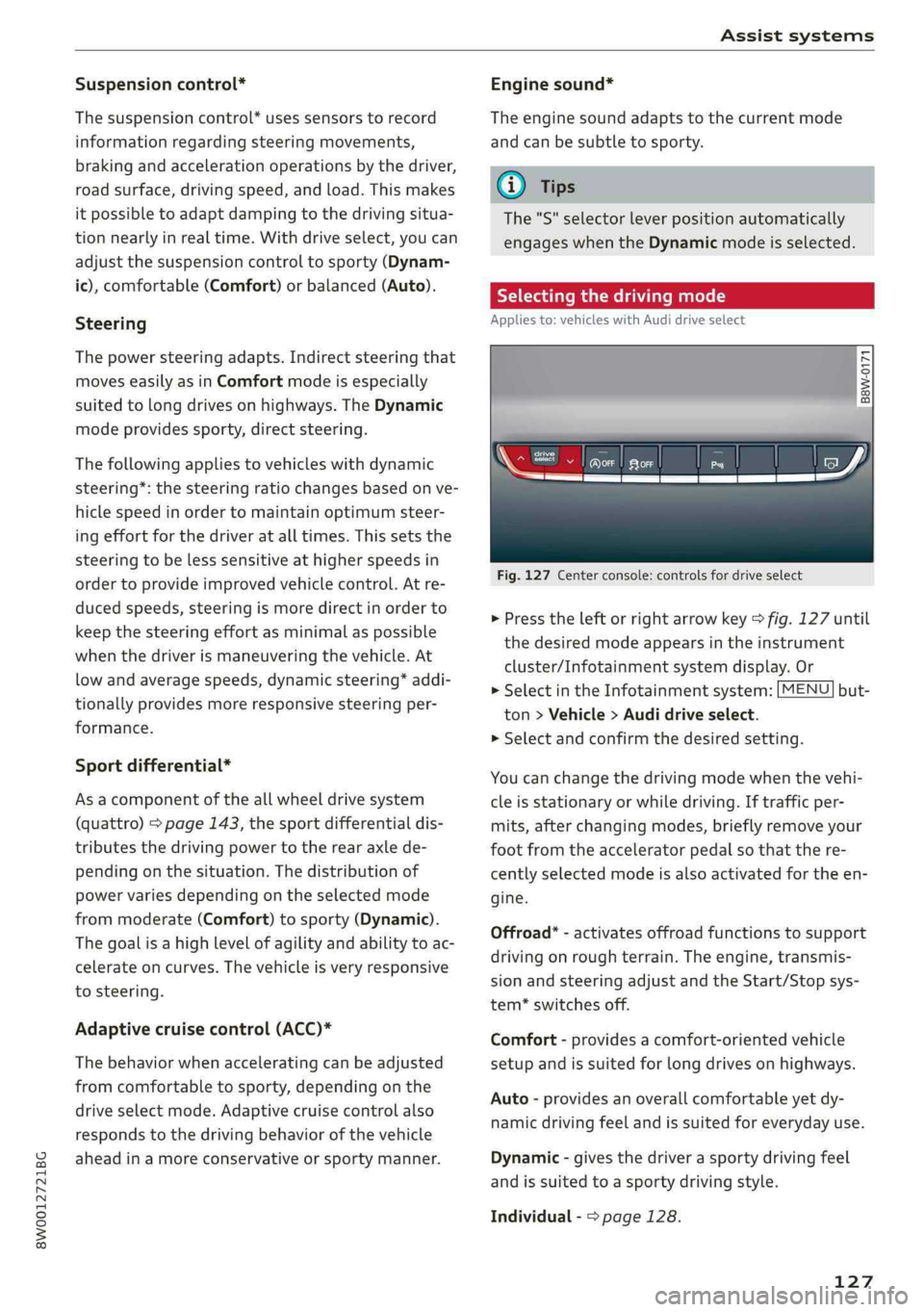
Fig.127Centerconsole:controlsfordriveselect
>Presstheleftorrightarrowkey>fig.127until
thedesiredmodeappearsintheinstrument
cluster/Infotainmentsystemdisplay.Or
>SelectintheInfotainmentsystem:[MENU]but-
ton>Vehicle>Audidriveselect.
>
Selectandconfirmthedesiredsetting.
Youcanchangethedrivingmodewhenthevehi-
cleisstationaryorwhiledriving.Iftrafficper-
mits, afterchangingmodes,brieflyremoveyour
footfromtheacceleratorpedalso thatthere-
centlyselectedmodeisalsoactivatedfortheen-
gine.
Offroad”-activatesoffroadfunctionstosupport
drivingonroughterrain.Theengine,transmis-
sionandsteeringadjustandtheStart/Stopsys-
tem*switchesoff.
Comfort-providesacomfort-orientedvehicle
setupandissuitedforlongdrivesonhighways.
Auto-providesanoverallcomfortableyetdy-
namicdrivingfeelandissuitedforeverydayuse.
Dynamic-givesthedriverasportydrivingfeel
andissuited toasportydrivingstyle.
Individual->page128.
127
Page 131 of 392
8W0012721BG
Parkingaid
Parkingaid
Generalinformation
Appliesto:vehicleswitharearparkingsystem/parkingsys-
templus/rearviewcamera/peripheralcameras
Dependingonyourvehicle'sequipment,various
parkingaidswillhelpyouwhenparkingandma-
neuvering.
Therearparkingsystemisanaudible parkingaid
thatwarnsyouofobstaclesbehindthevehicle
=>page130.
Theparkingsystemplusassistsyouwhilepark-
ingbyaudiblyandvisuallywarningyouofobjects
detectedinfrontofandbehindthevehicle
=>page130.
Therearviewcamerashowstheareabehindthe
vehicleintheInfotainmentsystemdisplay.The
linesintherearviewcameraimagehelpyouto
parkormaneuver>page132.
Theperipheralcamerasgivevariousviewsto
helpyouwhenparkingormaneuvering
=page133.Theparkingsystemplusfunctions
arealsoavailable>page130.
ZAWARNING
—Alwayslookfortrafficandcheckthearea
aroundyourvehiclebylookingatitdirectly
aswell.Theparkingsystemcannotreplace
thedriver'sattention.Thedriverisalways
responsiblewhenenteringorexitingapark-
ingspaceandduringsimilarmaneuvers.
—Pleasenotethatsomesurfaces,suchas
clothing,arenotdetectedbythesystem.
—Sensorsandcamerashaveblindspotsin
whichpeopleandobjectscannotbedetect-
ed.Beespeciallycautiousofsmallchildren
andanimals.
—Alwayskeepyoureyesonthevehicle'ssur-
roundings,usingtherearviewmirroraswell.
— Thesensorscanbedisplacedbyimpactsor
damagetotheradiatorgrille,bumper,
wheelhousingandtheunderbody.Thepark-
ingsystemmaybeimpairedasaresult.
HaveanauthorizedAudidealerorauthor-
izedAudiServiceFacilitychecktheirfunc-
tion.
C@)Note
—Someobjectsarenotdetectedordisplayed
bythesystemundercertaincircumstances:
—objectssuchasbarrierchains,trailerdraw
bars,verticalpolesorfences
—objectsabovethesensorssuchaswallex-
tensions
—objectswithcertainsurfacesorstructures
suchaschainlinkfencesorpowdersnow
—Ifyoucontinuedrivingclosertoalowob-
ject,itmaydisappearfromthe sensor
range.NotethatyouwillnoLongerbe
warnedaboutthisobstacle.
—Maintainenoughdistancefromthecurbto
reducetheriskofdamagetotherims.
@)Tips
—The systemmayprovideawarningeven
thoughtherearenoobstaclesinthecover-
ageareainsomesituations,suchas:
—certainroadsurfacesor whenthereistall
grass
—externalultrasonicsourcessuchasfrom
cleaningvehicles
—inheavyrain,snow,orthickvehicleex-
haust
—Werecommendthatyoupracticeparkingin
atraffic-freelocationorparkinglotto be-
come
familiarwiththesystem.Practice
parkingingoodlightand weathercondi-
tions.
—Youcanchangethevolumeofthesignals
andthedisplay>page136.
—Whatappearsintheinfotainmentdisplayis
somewhattime-delayed.
—Thesensorsmustbekeptcleanandfreeof
snowandicefortheparkingaidtooperate.
—Appliesto:vehicleswithrearwindowwiper:
Therearviewcamerawillbecleanedwith
therearwindow>page53.
129
Page 158 of 392
MultiMediaInterface
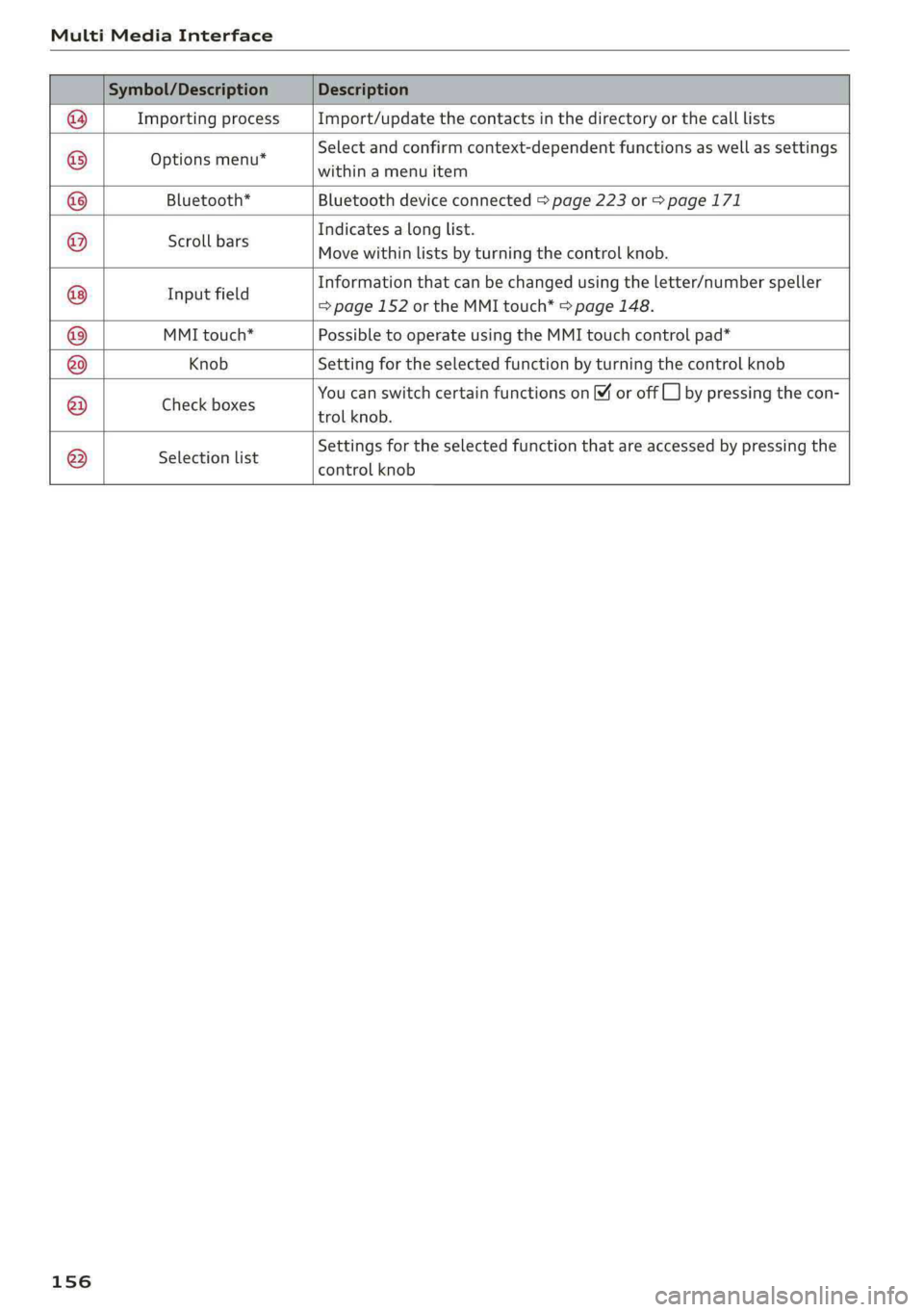
Symbol/DescriptionDescription
ImportingprocessImport/updatethecontactsinthedirectoryorthecalllists
Optionsmenu*
Selectandconfirmcontext-dependentfunctionsaswellas settings
withinamenuitem
Bluetooth*Bluetoothdeviceconnected>page223or>page171
Scrollbars
Indicatesalonglist.
Movewithinlistsbyturningthecontrolknob.
Informationthatcanbechangedusingtheletter/numberspeller
I fi
npuenals=page 152ortheMMItouch*>page148.
MMItouch*PossibletooperateusingtheMMItouchcontrolpad*
KnobSettingfortheselectedfunctionbyturningthecontrolknob
CheckboxesYoucanswitchcertainfunctionsonoroff]bypressingthecon-
trolknob.
®
|
®
|O|O|
©
|
© O ©
|®
Selectionlist
Settingsfortheselectedfunctionthatareaccessedbypressingthe
controlknob
156
Page 163 of 392
8W0012721BG
Multifunctionsteeringwheel
Requirement:adestinationmustbeentered
=>page198,routeguidancemustbestartedand
thenavigationtabmustbedisplayed.
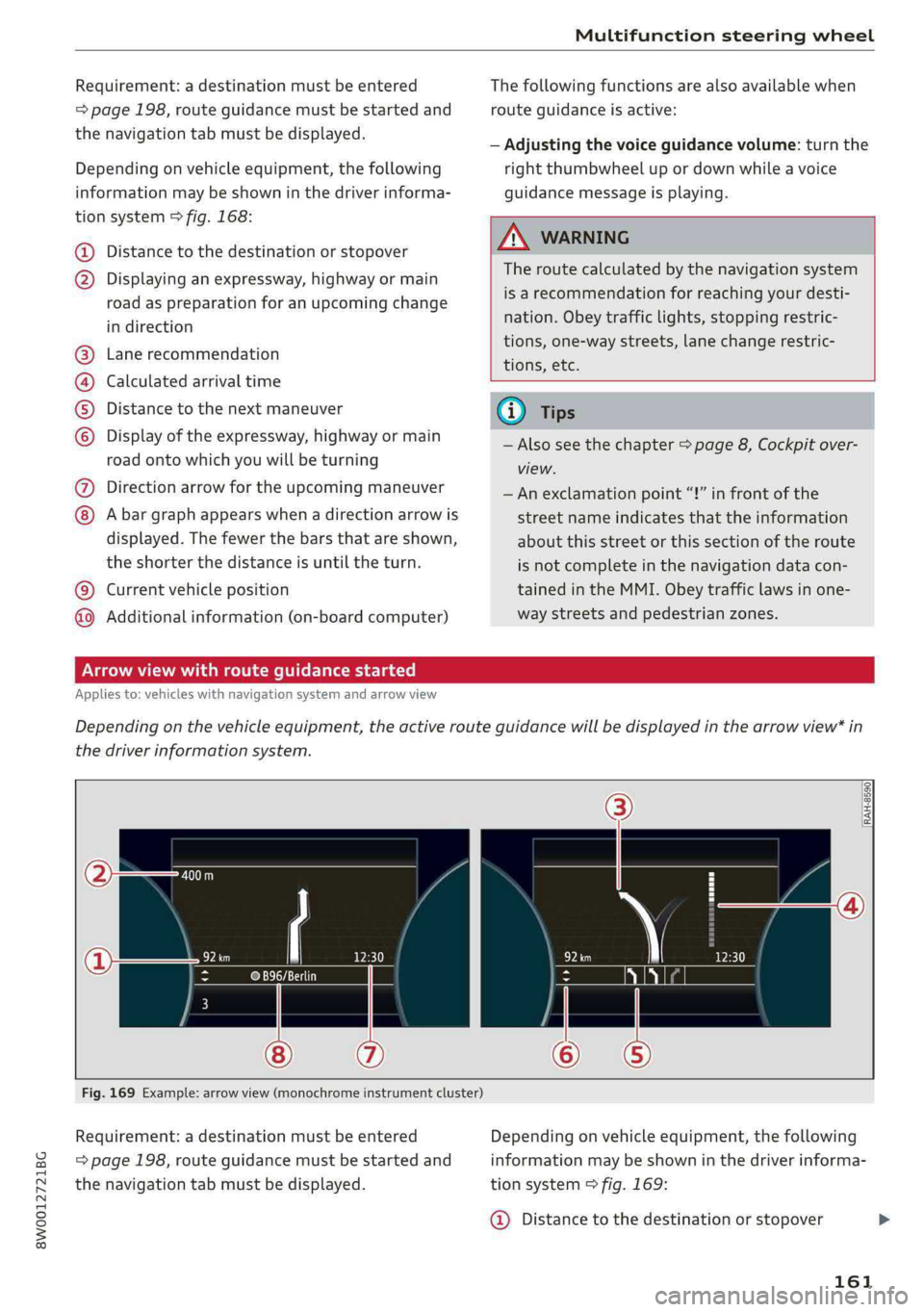
Dependingonvehicleequipment,thefollowing
informationmaybeshowninthedriverinforma-
tionsystem>fig.168:
Distancetothedestinationorstopover
©oDisplayinganexpressway,highwayormain
roadaspreparationforanupcomingchange
indirection
Lanerecommendation
Calculatedarrivaltime
Distancetothenextmaneuver
Display oftheexpressway,highwayormain
roadontowhichyouwillbeturning
Directionarrowfortheupcomingmaneuver
©
O80
Abargraphappearswhenadirectionarrowis
displayed.Thefewerthebars thatareshown,
theshorterthedistanceisuntiltheturn.
Currentvehicleposition©
Additionalinformation(on-boardcomputer)
Thefollowingfunctionsarealsoavailablewhen
routeguidanceisactive:
—Adjustingthevoiceguidancevolume:turnthe
rightthumbwheelupordownwhileavoice
guidancemessageisplaying.
ZA\WARNING
Theroutecalculatedby thenavigationsystem
isarecommendationforreachingyourdesti-
nation.Obeytrafficlights,stoppingrestric-
tions,one-waystreets,lanechangerestric-
tions,etc.
(i)Tips
—Alsoseethechapter>page8,Cockpitover-
view.
— Anexclamationpoint“!”infront ofthe
streetnameindicatesthattheinformation
aboutthisstreetorthissectionoftheroute
isnotcompleteinthenavigationdatacon-
tainedintheMMI.Obeytrafficlawsinone-
waystreetsandpedestrianzones.
TAUAmelhmeereeitanle)
Appliesto:vehicleswithnavigationsystemandarrowview
Dependingonthevehicleequipment,theactiverouteguidancewillbedisplayedinthearrowview*in
thedriverinformationsystem.
om:
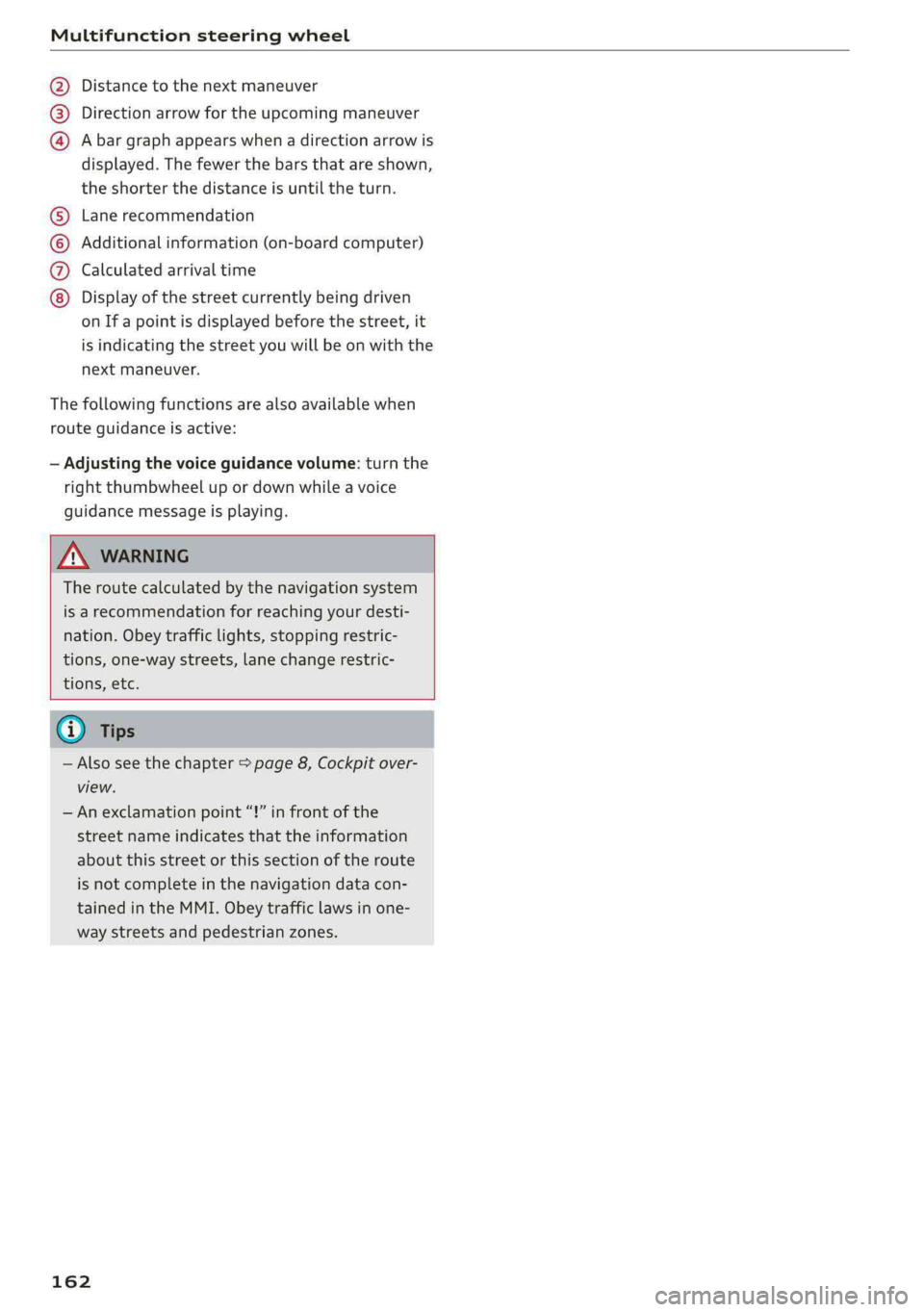
Fig.169Example:arrowview(monochromeinstrumentcluster)
Requirement:adestinationmustbeentered
=page198,routeguidancemustbestartedand
thenavigationtabmustbedisplayed.
Dependingonvehicleequipment,thefollowing
informationmaybeshowninthedriverinforma-
tionsystem>fig.169:
@Distancetothedestinationorstopover
161
Page 164 of 392
Multifunctionsteeringwheel
Distancetothenextmaneuver
Directionarrowfortheupcomingmaneuver
Abargraphappearswhen adirectionarrowis
displayed.Thefewerthebars thatareshown,
theshorterthedistanceisuntiltheturn.
®O®
Lanerecommendation
Additionalinformation(on-boardcomputer)
Calculatedarrivaltime
©0G®@Displayofthestreetcurrentlybeingdriven
onIfapointisdisplayedbeforethestreet,it
isindicatingthestreetyouwillbe onwiththe
nextmaneuver.
Thefollowingfunctionsarealsoavailablewhen
routeguidanceisactive:
—Adjustingthevoiceguidancevolume:turnthe
rightthumbwheelupordownwhileavoice
guidancemessageisplaying.
ZXWARNING
Theroutecalculatedby thenavigationsystem
isarecommendationforreachingyourdesti-
nation.Obeytrafficlights,stoppingrestric-
tions,one-waystreets,lanechangerestric-
tions,etc.
@Tips
—Alsosee thechapter>page8,Cockpitover-
view.
—Anexclamationpoint“!”infront ofthe
streetnameindicatesthattheinformation
aboutthisstreetorthissectionoftheroute
isnotcompleteinthenavigationdatacon-
tainedintheMMI.Obeytrafficlawsinone-
waystreetsandpedestrianzones.
162