change time AUDI S4 2019 Owner's Manual
[x] Cancel search | Manufacturer: AUDI, Model Year: 2019, Model line: S4, Model: AUDI S4 2019Pages: 392, PDF Size: 99.53 MB
Page 170 of 392
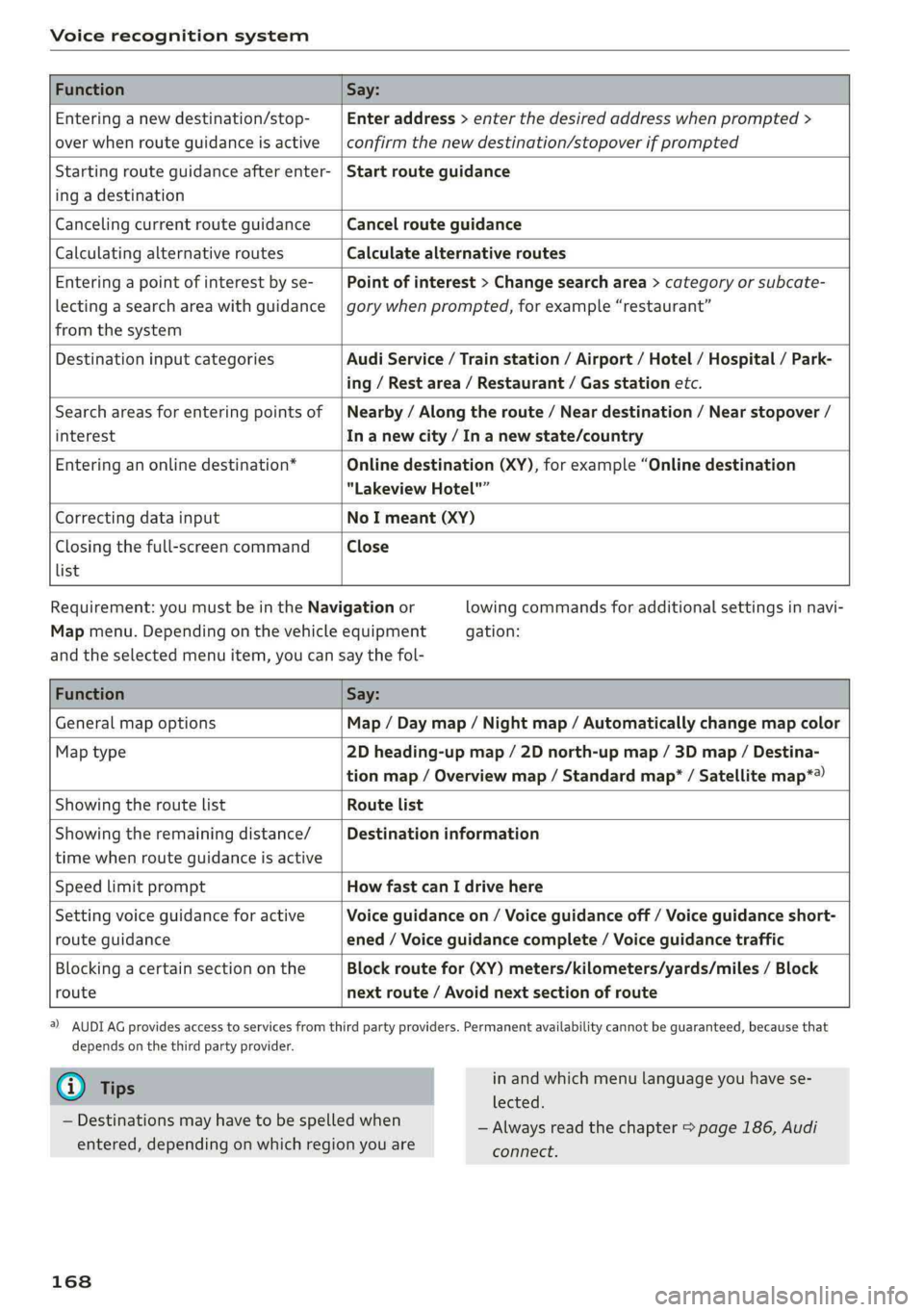
Voicerecognitionsystem
FunctionSay:
Enteringanewdestination/stop-
overwhenrouteguidanceisactive
Enteraddress>enterthedesiredaddresswhenprompted>
confirmthenewdestination/stopoverifprompted
Startingrouteguidanceafterenter-
ingadestination
Startrouteguidance
CancelingcurrentrouteguidanceCancelrouteguidance
CalculatingalternativeroutesCalculatealternativeroutes
Enteringapointofinterestbyse-
lectingasearchareawithguidance
fromthesystem
Pointofinterest>Changesearcharea>categoryorsubcate-
gorywhenprompted,forexample“restaurant”
DestinationinputcategoriesAudiService/Trainstation/Airport/Hotel/Hospital/Park-
ing/Restarea/Restaurant/Gasstationetc.
Searchareasforenteringpointsof
interest
Nearby/Alongtheroute/Neardestination/Nearstopover/
In anewcity/In anewstate/country
Enteringanonlinedestination*Onlinedestination(XY),forexample“Onlinedestination
"LakeviewHotel"”
CorrectingdatainputNoImeant(XY)
Closingthefull-screencommand
list
Close
Requirement: youmustbeintheNavigationor
Mapmenu.Dependingonthevehicleequipment
lowingcommandsforadditionalsettingsinnavi-
gation:
andtheselectedmenuitem,youcansaythefol-
FunctionSay:
GeneralmapoptionsMap/Daymap/Nightmap/Automaticallychangemapcolor
Maptype2Dheading-upmap/2Dnorth-upmap/3Dmap/Destina-
tionmap/Overviewmap/Standardmap*/Satellitemap*®)
Showingtheroute listRoutelist
Showingtheremainingdistance/
timewhenrouteguidanceisactive
Destinationinformation
SpeedlimitpromptHowfastcanIdrivehere
Settingvoiceguidanceforactive
routeguidance
Voiceguidanceon/Voiceguidanceoff/Voiceguidanceshort-
ened/Voiceguidancecomplete/Voiceguidancetraffic
Blockingacertainsectiononthe
route
Blockroutefor(XY)meters/kilometers/yards/miles/Block
nextroute/Avoidnextsectionofroute
)AUDIAGprovidesaccesstoservicesfromthirdpartyproviders.Permanentavailabilitycannotbeguaranteed,becausethat
dependsonthethirdpartyprovider.
@Tips
—Destinationsmayhavetobespelledwhen
entered,dependingonwhichregionyouare
168
inandwhichmenulanguageyouhavese-
lected.
—Alwaysreadthe chapter>page186,Audi
connect.
Page 174 of 392
![AUDI S4 2019 Owners Manual Telephone
Themobiledevicethatwillbeconnectedmust
not beconnectedtoanyotherBluetoothdevice.
TheMMImustnotbeconnectedtoamobilede-
vice.
Connectingamobiledevice
>Select:[MENU]button>Telephone>Conne](/img/6/57555/w960_57555-173.png "AUDI S4 2019 Owners Manual Telephone
Themobiledevicethatwillbeconnectedmust
not beconnectedtoanyotherBluetoothdevice.
TheMMImustnotbeconnectedtoamobilede-
vice.
Connectingamobiledevice
>Select:[MENU]button>Telephone>Conne")
Telephone
Themobiledevicethatwillbeconnectedmust
not beconnectedtoanyotherBluetoothdevice.
TheMMImustnotbeconnectedtoamobilede-
vice.
Connectingamobiledevice
>Select:[MENU]button>Telephone>Connect
mobiledevice>Findnewdevices>Next.The
availableBluetoothdevicesareshownintheIn-
fotainmentsystemdisplay.Orselect:[MENU
button>Settings>leftcontrolbutton>MMI
settings>Connectionmanager©page241.
> Selectandconfirmthedesiredcellphonefrom
thelistofdisplayedBluetoothdevices.
>TheMMIgeneratesaPINfortheconnection
setup>fig.171.
>»SelectandconfirmYes.
>EnterthePINforconnectingonyourcell
phone.Or:whenthePINisdisplayedonyour
cellphone,confirmthePINonyourcellphone
andintheMMI.Thetimeallowedforentering
thePINislimitedtoapproximately30seconds.
>Payattentiontoanyadditionalsystemprompts
displayedonyourcellphone,forexampleifthe
systemshouldconnectautomaticallyinthefu-
ture.Dependingonthecellphone,youmay
havetoconfirmdownloadingthedirectorysep-
arately.
Afterconnectingsuccessfully
Afterconnectingsuccessfully,informationabout
theconnectedprofileswillappear.Youcanalso
changetheprofileslater.Select:[MENU]button>
Settings> leftcontrolbutton>MMIsettings>
Connectionmanager>page241.
Inaddition,thecellphonecontactsareautomat-
icallyloadedintheMMIdirectory.Thisprocess
cantakeseveralminutes,dependingonthenum-
berofcontacts.
Youcanalsomakeyourconnectedcellphonethe
defaultphonebyselectingSetasdefaulttele-
phoneintheConnectionmanager=page243.
@)Note
Alwaysfollowtheinformationfoundin>@in
Wi-Fisettingsonpage193.
172
G)Tips
— MakingphonecallsthroughtheMMIisonly
possibleusingtheHandsfreeBluetoothpro-
file.
—Youcanapplyadditionalsettingstocon-
nectedmobiledevicesusingtheConnection
manager>page241.
—YoucanalsosearchfortheMMIon yourmo-
biledeviceusingtheBluetoothdevice
search.
—Youonlyhavetopairyourdeviceonetime.
Bluetoothdevicesthatarealreadypaired
automaticallyconnecttotheMMIwhenthe
Bluetooth
functionisswitchedon,when
theyarewithinrange,andwhentheignition
isswitchedon.Thelastconnectedmobile
deviceisgivenfirstpriority.
—AuthorizingtheMMIconnectiononyour
mobiledevicewillmakeitpossibletocon-
nectautomatically.
—Payattentiontoanysystempromptsdis-
playedonyourcellphone,forexampleif
thesystemshouldconnectautomaticallyin
thefuture.Depending onthecellphone,
youmayalsoneedtodownloadthedirecto-
ryandconfirmaccesstoyourtextmessages
separately.
—Whenleavingthevehicle,theBluetooth
connectiontothemobiledevicewillauto-
maticallydisconnect.Depending onyour
mobiledevice,phonecallsinprogressmay
beautomaticallyredirectedfromtheMMI
toyourmobiledeviceso thatyoucancon-
tinuethecallonyourphone.
—Youcanobtainmoreinformationfromyour
mobiledeviceserviceproviderorfromyour
mobiledeviceuserguide. Forinformation
onusingthetelephone,visitwww.audiusa.
com/bluetoothorcontactanauthorizedAu-
didealerorauthorizedAudiServiceFacility.
—Appliesto:vehicleswithoutsecondary
phone:Severalcellphonescanbepairedto
theMMI,butonlyonecellphonecanbeac-
tivelyconnectedtotheMMI.
Page 188 of 392
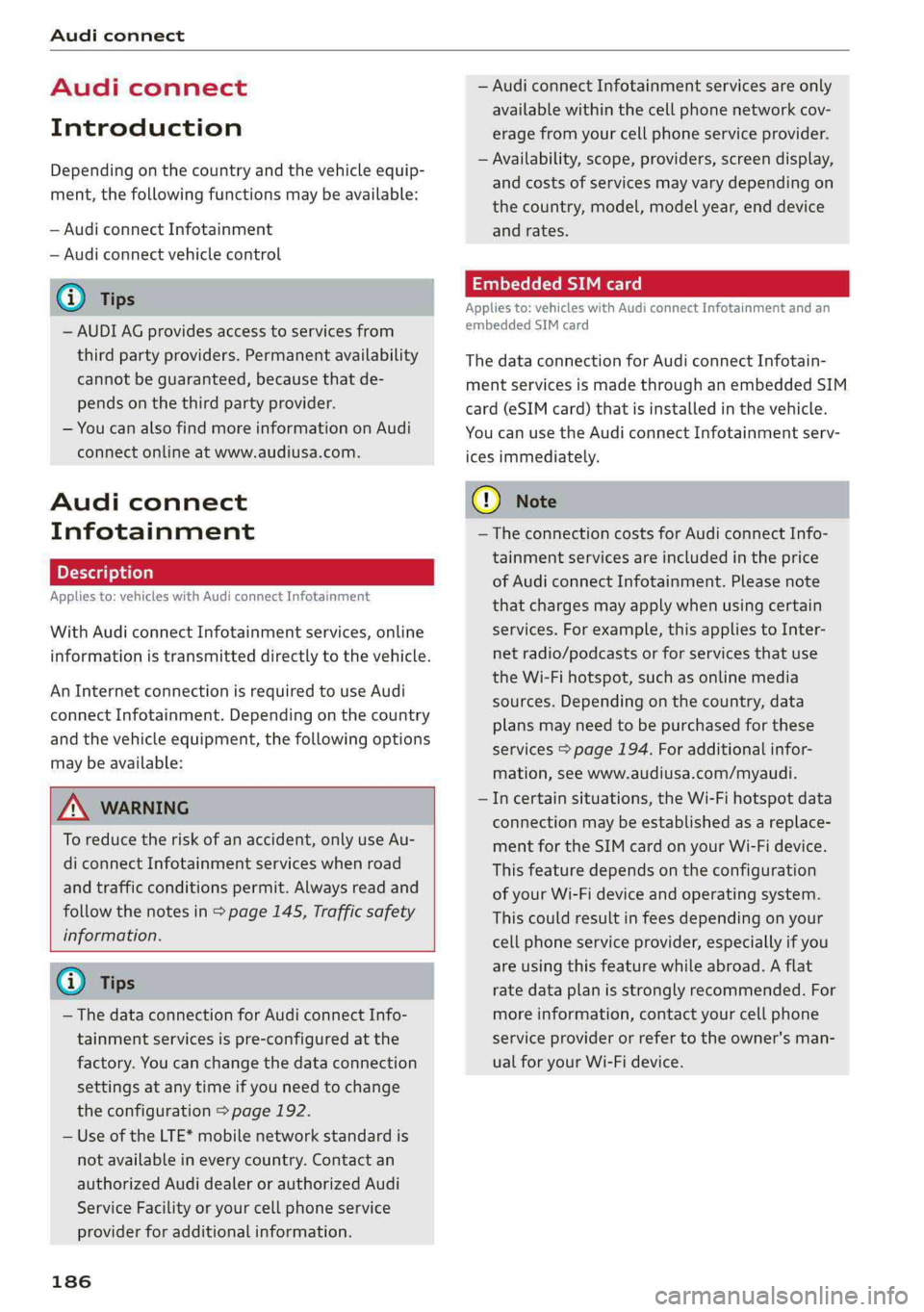
Audiconnect
Audiconnect
Introduction
Dependingonthecountryandthevehicleequip-
ment,thefollowing functionsmaybeavailable:
—AudiconnectInfotainment
—Audiconnectvehiclecontrol
@)Tips
—AUDIAGprovidesaccesstoservicesfrom
thirdpartyproviders.Permanentavailability
cannotbeguaranteed,becausethatde-
pendsonthethirdpartyprovider.
—Youcanalso findmoreinformationonAudi
connectonlineatwww.audiusa.com.
Audiconnect
Infotainment
Appliesto:vehicleswithAudiconnectInfotainment
WithAudiconnectInfotainmentservices,online
informationistransmitteddirectlytothevehicle.
AnInternetconnectionisrequiredtouseAudi
connectInfotainment.Dependingonthe country
andthevehicleequipment,thefollowingoptions
maybeavailable:
ZAWARNING
To reducetheriskofanaccident,onlyuseAu-
diconnectInfotainmentserviceswhenroad
andtrafficconditionspermit.Alwaysreadand
followthenotesin>page145,Trafficsafety
information.
G)Tips
— ThedataconnectionforAudiconnectInfo-
tainmentservicesispre-configuredatthe
factory.Youcanchangethedataconnection
settingsatanytimeifyouneedtochange
theconfiguration>page192.
—UseoftheLTE*mobilenetworkstandardis
notavailableineverycountry.Contactan
authorizedAudidealerorauthorizedAudi
ServiceFacilityoryourcellphoneservice
providerforadditionalinformation.
186
—AudiconnectInfotainmentservicesareonly
availablewithinthecellphonenetworkcov-
eragefromyourcellphoneserviceprovider.
—Availability,scope,providers,screendisplay,
andcostsofservicesmayvarydependingon
thecountry,model,modelyear,enddevice
andrates.
EmbeddedSIMcard
Appliesto:vehicleswithAudiconnectInfotainmentandan
embeddedSIMcard
ThedataconnectionforAudiconnectInfotain-
mentservicesismadethroughanembeddedSIM
card(eSIMcard)thatisinstalledinthevehicle.
Youcan usetheAudiconnectInfotainmentserv-
icesimmediately.
()Note
—TheconnectioncostsforAudiconnectInfo-
tainmentservicesareincludedintheprice
ofAudiconnectInfotainment.Pleasenote
thatchargesmayapplywhenusingcertain
services.Forexample,thisappliestoInter-
netradio/podcastsorforservicesthatuse
theWi-Fihotspot,suchasonlinemedia
sources.Dependingonthecountry,data
plansmayneedtobepurchasedforthese
services>page194.Foradditionalinfor-
mation,seewww.audiusa.com/myaudi.
—Incertainsituations,theWi-Fihotspotdata
connectionmaybeestablishedasareplace-
mentfortheSIMcardonyourWi-Fidevice.
Thisfeature dependsontheconfiguration
ofyourWi-Fideviceandoperatingsystem.
Thiscouldresultinfeesdepending onyour
cellphoneserviceprovider,especiallyifyou
areusingthisfeaturewhileabroad.Aflat
ratedataplanisstronglyrecommended.For
moreinformation,contactyourcellphone
serviceproviderorrefertotheowner'sman-
ualforyourWi-Fidevice.
Page 190 of 392
Audiconnect
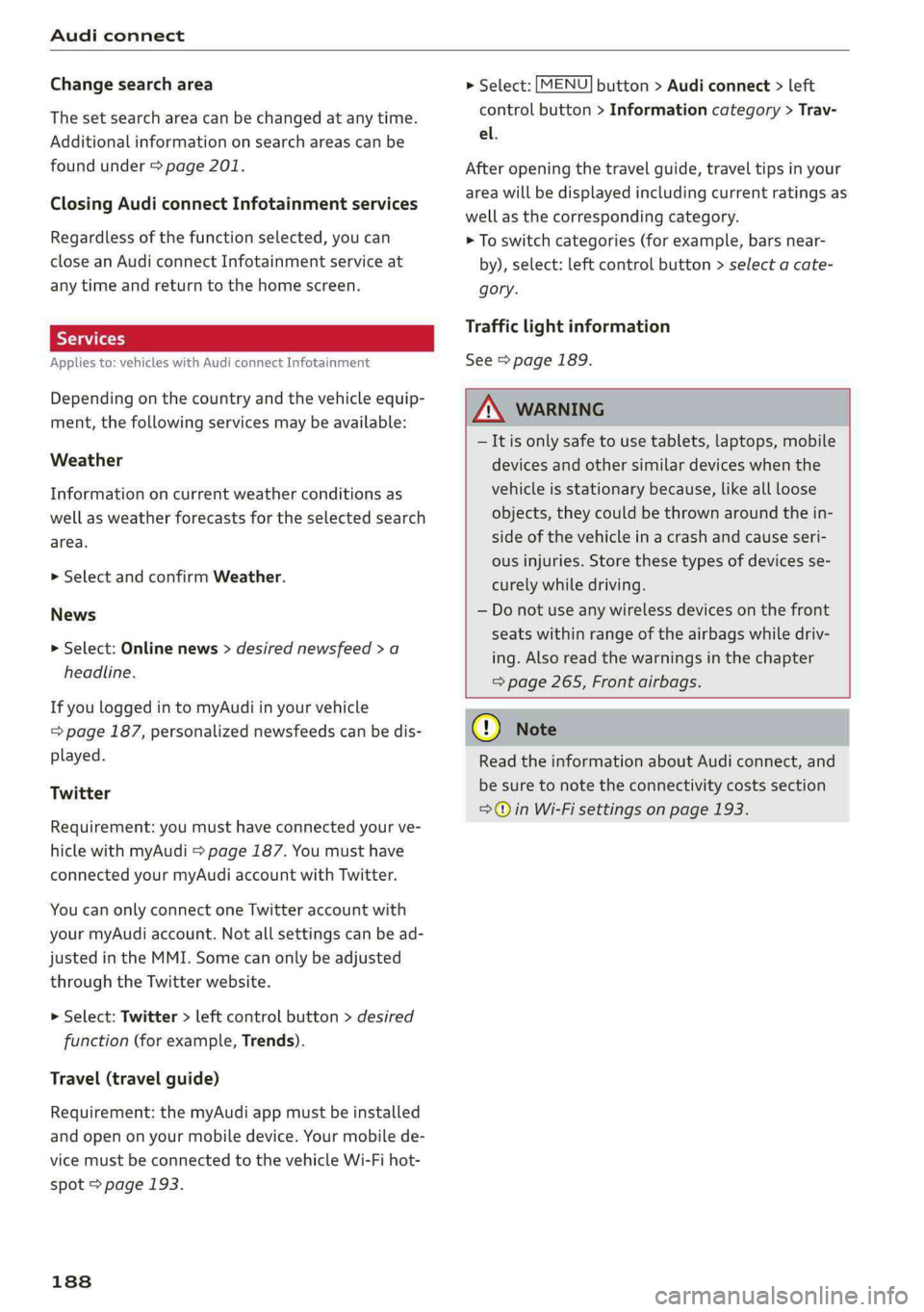
Changesearcharea
Thesetsearchareacanbechangedatanytime.
Additionalinformationonsearchareascan be
foundunder>page201.
ClosingAudiconnectInfotainmentservices
Regardlessofthefunctionselected,youcan
closean AudiconnectInfotainmentserviceat
anytimeandreturn tothehomescreen.
SYA(a1
Appliesto:vehicleswithAudiconnectInfotainment
Dependingonthecountryandthevehicleequip-
ment,thefollowingservicesmaybeavailable:
Weather
Informationoncurrentweatherconditionsas
wellasweatherforecastsfortheselectedsearch
area.
> SelectandconfirmWeather.
News
>Select:Onlinenews>desirednewsfeed>a
headline.
IfyouloggedintomyAudiinyourvehicle
=page187,personalizednewsfeedscanbedis-
played.
Twitter
Requirement: youmusthaveconnectedyourve-
hiclewithmyAudi>page187.Youmusthave
connectedyourmyAudiaccountwithTwitter.
YoucanonlyconnectoneTwitteraccountwith
yourmyAudiaccount.Notallsettingscan bead-
justedintheMMI.Somecanonlybeadjusted
throughtheTwitterwebsite.
>Select:Twitter>leftcontrolbutton>desired
function(forexample,Trends).
Travel(travelguide)
Requirement:themyAudiappmustbeinstalled
andopenonyourmobiledevice.Yourmobilede-
vicemustbeconnectedtothevehicleWi-Fihot-
spot>page193.
188
>Select:[MENU]button>Audiconnect> left
controlbutton>Informationcategory>Trav-
el.
Afteropeningthetravelguide,traveltipsinyour
areawillbedisplayedincludingcurrentratingsas
wellasthecorrespondingcategory.
>Toswitchcategories(forexample,bars near-
by),select:leftcontrolbutton>selectacate-
gory.
Trafficlightinformation
See>page189.
ZA\WARNING
—Itisonlysafe tousetablets,laptops,mobile
devicesandothersimilardeviceswhenthe
vehicleisstationarybecause,likeallloose
objects,theycouldbethrownaroundthein-
sideofthevehicleinacrashandcauseseri-
ousinjuries.Storethesetypesofdevicesse-
curelywhiledriving.
—Donotuseanywirelessdevicesonthefront
seatswithinrangeoftheairbagswhiledriv-
ing.Also readthewarningsinthechapter
=>page265,Frontairbags.
()Note
ReadtheinformationaboutAudiconnect,and
besuretonotetheconnectivitycostssection
=>@©inWi-Fisettingsonpage193.
Page 192 of 392
Audiconnect
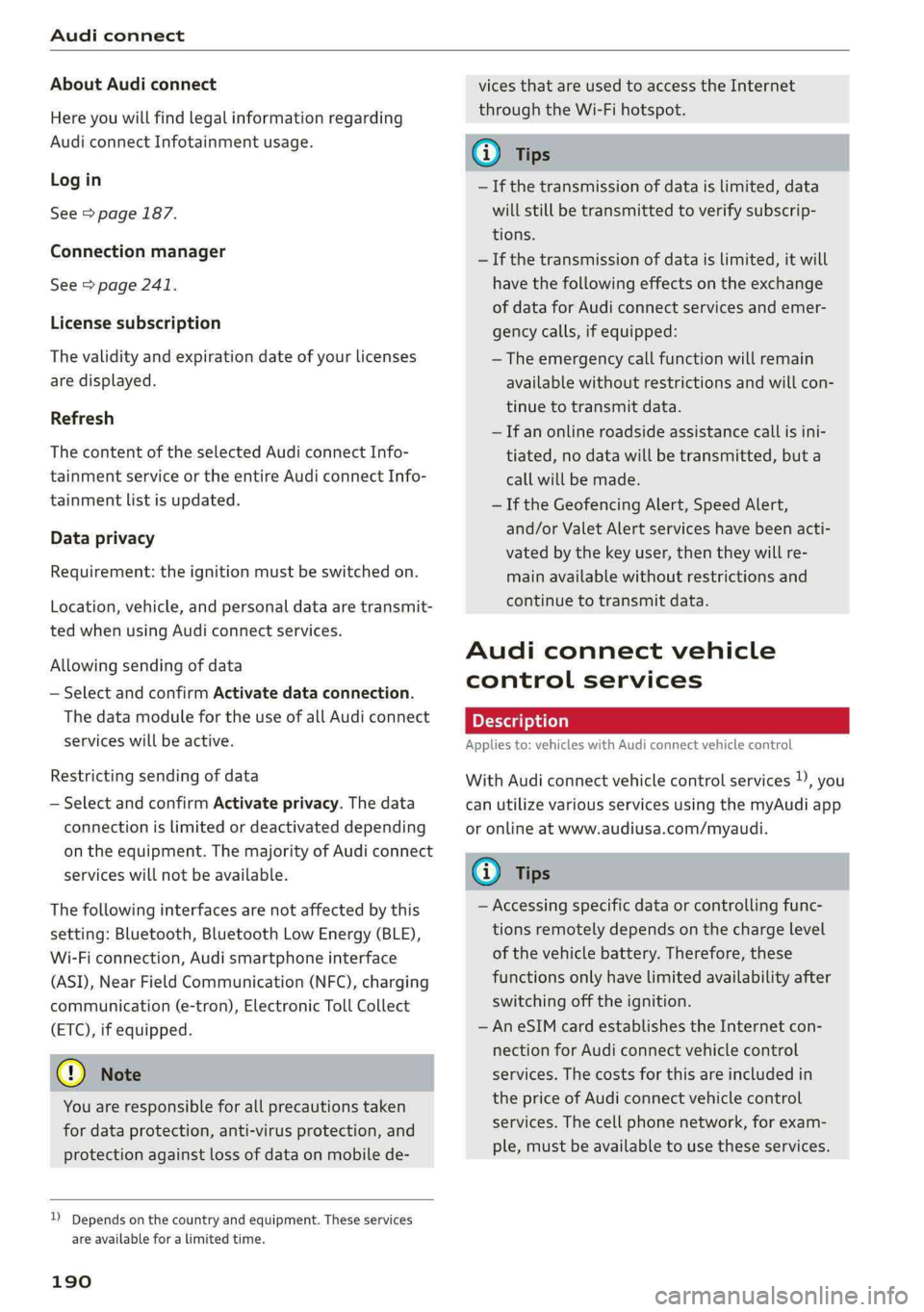
AboutAudiconnect
Hereyouwillfindlegalinformationregarding
AudiconnectInfotainmentusage.
Login
See>page187.
Connectionmanager
See>page241.
Licensesubscription
Thevalidityandexpirationdateofyourlicenses
aredisplayed.
Refresh
ThecontentoftheselectedAudiconnectInfo-
tainmentserviceortheentireAudiconnectInfo-
tainmentlistisupdated.
Dataprivacy
Requirement:theignitionmustbe switchedon.
Location,vehicle,andpersonaldataaretransmit-
tedwhenusingAudiconnectservices.
Allowingsendingofdata
—SelectandconfirmActivatedataconnection.
Thedatamoduleforthe useofallAudiconnect
serviceswillbeactive.
Restrictingsendingofdata
—SelectandconfirmActivateprivacy.Thedata
connectionislimitedordeactivateddepending
ontheequipment.ThemajorityofAudiconnect
serviceswillnotbeavailable.
Thefollowinginterfacesarenotaffectedbythis
setting:Bluetooth,BluetoothLowEnergy(BLE),
Wi-Ficonnection,Audismartphoneinterface
(ASI),NearFieldCommunication(NFC),charging
communication(e-tron),ElectronicTollCollect
(ETC),ifequipped.
@)Note
Youareresponsibleforallprecautionstaken
fordataprotection,anti-virusprotection,and
protectionagainstlossofdataon mobilede-
))Dependsonthecountryand equipment. Theseservices
are availableforalimitedtime.
190
vicesthatareusedtoaccesstheInternet
throughtheWi-Fihotspot.
(i)Tips
—Ifthetransmissionofdataislimited,data
willstillbetransmittedtoverifysubscrip-
tions.
—Ifthetransmissionofdataislimited,itwill
havethefollowingeffectsontheexchange
ofdataforAudiconnectservicesandemer-
gencycalls,ifequipped:
—Theemergencycallfunctionwillremain
availablewithoutrestrictionsandwillcon-
tinuetotransmitdata.
—Ifanonlineroadsideassistancecallisini-
tiated,nodatawillbetransmitted,buta
callwillbemade.
—IftheGeofencingAlert,SpeedAlert,
and/orValetAlertserviceshavebeenacti-
vatedbythekeyuser,thentheywillre-
mainavailablewithoutrestrictionsand
continuetotransmitdata.
Audiconnectvehicle
controlservices
Appliesto:vehicleswithAudiconnectvehiclecontrol
WithAudiconnectvehiclecontrolservices)),you
canutilizevariousservicesusingthemyAudiapp
oronlineatwww.audiusa.com/myaudi.
(i)Tips
—Accessingspecificdataorcontrollingfunc-
tionsremotelydependsonthechargelevel
ofthevehiclebattery.Therefore,these
functionsonlyhavelimitedavailabilityafter
switchingofftheignition.
—AneSIMcardestablishestheInternetcon-
nectionforAudiconnectvehiclecontrol
services.Thecostsforthisareincludedin
thepriceofAudiconnectvehiclecontrol
services.Thecellphonenetwork,forexam-
ple,mustbeavailabletousetheseservices.
Page 200 of 392
![AUDI S4 2019 Owners Manual Navigation
Navigation
Openingnavigation
Appliesto:vehicleswithnavigationsystem
Thenavigationsystemdirectsyoutoyourdesti-
nation,aroundtrafficincidents,andonalterna-
tiveroutes,ifdesired.
[RAH-8617]](/img/6/57555/w960_57555-199.png "AUDI S4 2019 Owners Manual Navigation
Navigation
Openingnavigation
Appliesto:vehicleswithnavigationsystem
Thenavigationsystemdirectsyoutoyourdesti-
nation,aroundtrafficincidents,andonalterna-
tiveroutes,ifdesired.
[RAH-8617]")
Navigation
Navigation
Openingnavigation
Appliesto:vehicleswithnavigationsystem
Thenavigationsystemdirectsyoutoyourdesti-
nation,aroundtrafficincidents,andonalterna-
tiveroutes,ifdesired.
[RAH-8617]
UaColnalLele]15)
Eeehile)
Cliath}
Fig.183Diagram:Enterdestinationmenu
>Pressthe LNAV/MAP]button.
TheEnterdestinationmenuisdisplayedafter
openingnavigation.Thefollowinginformation
canbedisplayedintheInfotainmentsystemdis-
play:
@Inputfieldforfreetextsearch....198
@Homeaddress.................200
@®Lastdestinations...............199
@Storedfavorites................200
Assoonasyouselectanentryfromthelist(de-
pendingonthevehicleequipment),thecorre-
spondingdestinationdisplaysasamappreview*
©fig.183.
Ifyouhaveconnectedamobiledevicetothe
MMI,yourdirectorycontactswillalsobelistedif
they havenavigationdataassignedtothem.
TheFavorites(4)>fig.183menuitemaswellas
thedirectorycontactsareonlyshownintheEn-
terdestinationmenuifyouhaveenteredoneor
morecharactersusingtheinputfield.
Switchingbetweendestinationentryandthe
map:
—Pressthe [NAV/MAP|buttonrepeatedlyuntil
themapisdisplayed.Or:selecttheleftcontrol
button>Switchtomap.
198
ZAWARNING
— Thedemandsoftrafficrequireyourfullat-
tention.Alwaysreadthechapter
=page145,Trafficsafetyinformation.
—Obeyalltrafficlawswhendriving.
— Theroutecalculatedbythenavigationsys-
temisarecommendationforreachingyour
destination.Obeytrafficlights,stoppingre-
strictions,one-waystreets,lanechangere-
strictions,etc.
—Adjustthevolumeoftheaudiosystemso
thatsignalsfromoutsidethevehicle,such
aspoliceandfiresirens,canbeheardeasily
atalltimes.
C)Note
Ifthedrivingdirectionsconflictwithtraffic
laws,obeythetrafficlaws.
G)Tips
—SnowandobstructionsontheGPSantenna
or interferencecausedbytreesandlarge
buildingscanimpairsatellitereceptionand
affectthesystem'sabilitytodeterminethe
vehicleposition.Severaldeactivatedormal-
functioningsatellitescanalsointerruptGPS
receptionandaffectthesystem'sabilityto
determine
thevehicleposition.
—Becausestreetnamessometimeschange,
thenamesstoredintheMMImayinrare
casesdifferfromtheactualstreetname.
Enteringadestination
Freetextsearchfordestinations
Appliesto:vehicleswithnavigationsystem
Withthefreetextsearch,youcanenterthenavi-
gationdestinationdataallatonceinanyorder
usingtheMMItouchcontrolpad*ortheletter/
numberspeller(forexample,20MainSt.,Los
Angeles).Likewise,youcansearchforpointsof
interest,contacts,previousdestinationsorfa-
voritestonavigatetothedesiredaddress.
Pressthe [NAV/MAP]buttonrepeatedlyuntilthe
Enterdestinationmenuisdisplayed>page198,
fig.183.
Page 204 of 392
Navigation
—Searchingforonlinedestinationsinaspecific
category:selectandconfirmSelect category.
SelectandconfirmacategorysuchasRestau-
rants.
Findwhichsearchareasareavailableunder
=page201,Pointofinterestsearch.
Youcansearchforonlinedestinationsusingthe
voicerecognitionsystem>tableonpage167.
G)Tips
Alwaysreadthechapter>page186,Audi
connect.
AccessingdestinationsfrommyAudi
account
Appliesto:vehicleswithanavigationsystem andAudicon-
nectInfotainment
ImportindividualdestinationsfromyourmyAudi
accountintotheMMI.
Requirement:
TherequirementsforAudiconnectInfotainment
mustbemet>page186.
YoumusthavearegisteredmyAudiaccountat
www.audiusa.com/myaudi.Youmusthaveavehi-
cleassignedtoyourmyAudiaccountandyou
musthavestoredoneormoredestinations.
>Pressthe [NAV/MAP]buttonrepeatedlyuntil
theEnterdestinationmenuisdisplayed
=>page198,fig. 183.
>Select:leftcontrolbutton>myAudicontacts.
>Ifnecessary,enteryourmyAudiuserdataor
yourmyAudiPIN>page187.Thecontacts
storedinmyAudiaredisplayed.
—Selectandconfirmacontact.
—Selectandconfirmaprivateorbusinessdesti-
nation.
—SelectandconfirmStartrouteguidance.
@)Tips
—YouonlyneedtoenterthemyAudiuserdata
onetime.
—YoucanreceiveyourmyAudiPINifyouhave
setupamyAudiaccount.
202
—Foradditionalinformation,visitwww.
audiusa.com.
Enteringadestinationusinggeo
leey
Appliesto:vehicleswithnavigationsystem
>Pressthe [NAV/MAP]buttonrepeatedlyuntil
theEnterdestinationmenuisdisplayed
=>page198,fig.183.
>Select:leftcontrolbutton>Geographicalcoor-
dinates.
—SelectLatitude/Longitude.
—Pressthecontrolknobtosettheindividualval-
ues.
—Turn thecontrolknobtotheleft/rightto
change
theselectedvalue.
—SelectandconfirmStartrouteguidance.
Addingastopover
Appliesto:vehicleswithnavigationsystem
You canenteranadditionaldestinationwhen
routeguidanceisactive.
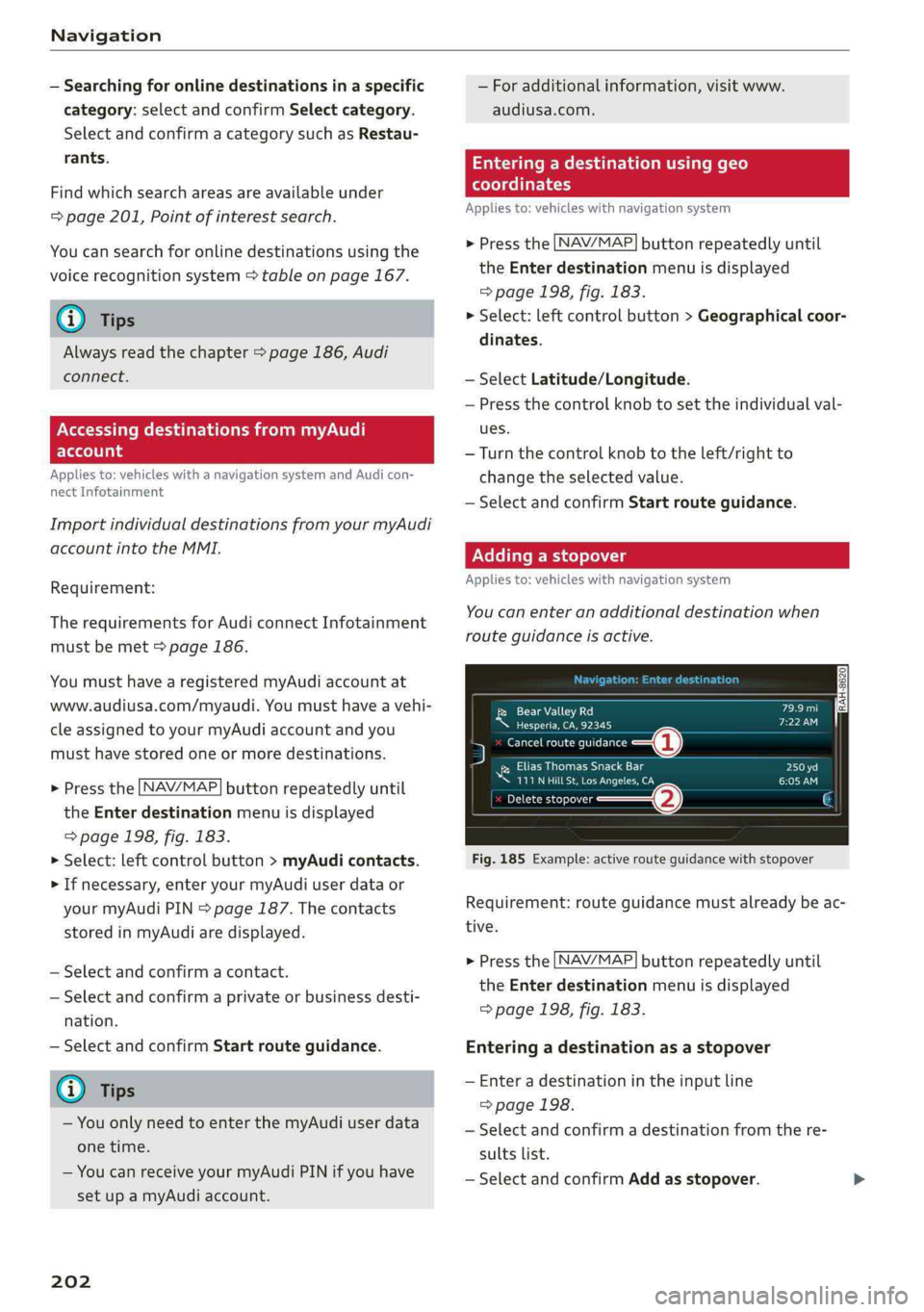
[RAH-8620|DILCael
Neeueeres)
5Cancelrouteguidance—@
NiEliasThomasSnackBar
UUeterUreCome
Precis—@G
Fig.185Example:activerouteguidancewithstopover
Requirement:routeguidancemustalreadybeac-
tive.
>Pressthe [NAV/MAP]buttonrepeatedlyuntil
theEnterdestinationmenuisdisplayed
=>page198,fig.183.
Enteringadestinationas astopover
—Enteradestinationintheinputline
>page198.
—Selectandconfirmadestinationfromthere-
sultslist.
—SelectandconfirmAddasstopover.
Page 236 of 392
Media
Replayvideo!)
Whenthisfunctionisswitchedon¥,thecurrent
videowillreplay.
Show DVDmenu
TheDVDmainmenuopensintheInfotainment
systemdisplay.
—Selectingamenuitem:selectandconfirma
menuitem.Or:moveyourfingerontheMMI
touchcontrolpad*andpressthecontrolknob.
Audiotrack?)
Youcanmanuallysettheaudiotrack(language
andaudioformat).Thelanguageandaudiofor-
matoptionsdependonthevideoDVD.
Subtitles2)
Youcanmanuallyselectsubtitlesforplayback.
ThelanguagesavailabledependontheDVD.
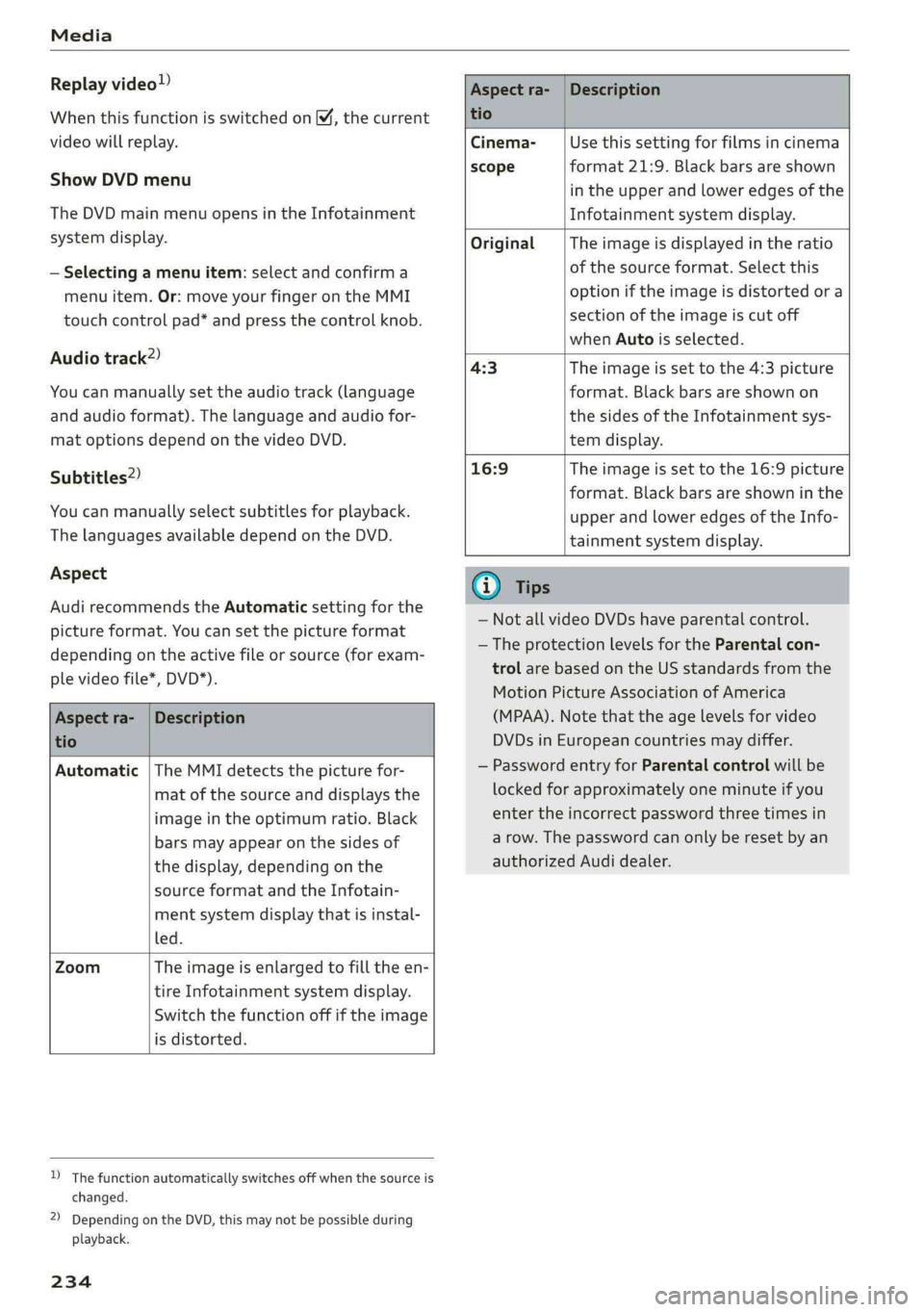
Aspect
AudirecommendstheAutomaticsettingforthe
pictureformat.Youcansetthepictureformat
dependingontheactivefileorsource(forexam-
plevideofile*,DVD*).
Aspectra-
tio
Description
Aspectra-|Description
tio
Cinema-Usethissettingforfilmsincinema
scopeformat21:9. Blackbars areshown
intheupperandloweredgesofthe
Infotainmentsystemdisplay.
OriginalTheimageisdisplayedintheratio
ofthesourceformat.Selectthis
optioniftheimageisdistorted ora
sectionoftheimageiscutoff
whenAutoisselected.
4:3Theimageissettothe 4:3picture
format.Blackbarsareshownon
thesidesoftheInfotainmentsys-
temdisplay.
16:9 Theimageissettothe16:9picture
format.Blackbarsareshowninthe
upperandloweredgesoftheInfo-
tainmentsystemdisplay.
Automatic|TheMMIdetectsthepicturefor-
matofthesourceanddisplaysthe
imageintheoptimumratio.Black
barsmayappearonthesidesof
thedisplay,dependingonthe
sourceformatandtheInfotain-
mentsystemdisplaythatisinstal-
led.
ZoomTheimageisenlargedtofilltheen-
tireInfotainmentsystemdisplay.
Switchthefunctionoffiftheimage
isdistorted.
)Thefunctionautomaticallyswitchesoffwhenthesourceis
changed.
2)DependingontheDVD,thismaynotbepossibleduring
playback.
234
(i)Tips
— NotallvideoDVDshaveparentalcontrol.
— TheprotectionlevelsfortheParental con-
trolarebasedontheUSstandardsfromthe
MotionPictureAssociationofAmerica
(MPAA).Notethattheagelevelsforvideo
DVDsinEuropeancountriesmaydiffer.
—PasswordentryforParentalcontrolwillbe
lockedforapproximatelyoneminuteifyou
entertheincorrectpasswordthreetimesin
arow.Thepasswordcanonlyberesetbyan
authorizedAudidealer.
Page 239 of 392
8W0012721BG
Media
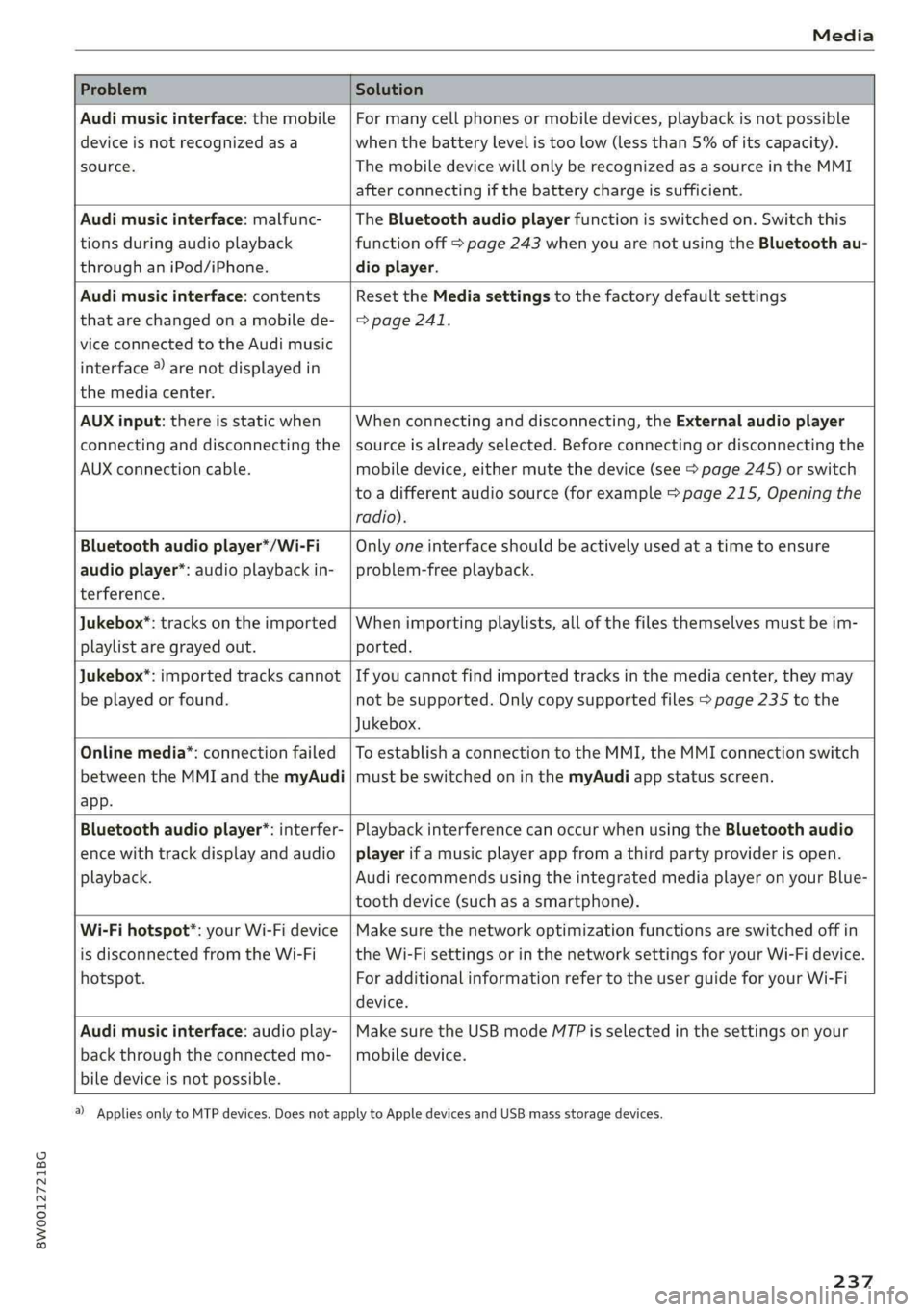
ProblemSolution
Audimusicinterface:themobile
deviceisnotrecognizedasa
source.
Formanycellphonesormobiledevices,playbackisnotpossible
when
thebatterylevelistoolow(lessthan5%ofitscapacity).
ThemobiledevicewillonlyberecognizedasasourceintheMMI
afterconnectingifthebatterychargeissufficient.
Audimusicinterface:malfunc-
tionsduringaudioplayback
throughaniPod/iPhone.
TheBluetoothaudioplayerfunctionisswitchedon.Switchthis
functionoff>page243whenyouarenotusingtheBluetoothau-
dioplayer.
Audimusicinterface:contents
thatarechangedonamobilede-
viceconnectedtotheAudimusic
interface®)arenotdisplayedin
themediacenter.
Reset theMediasettingstothefactorydefaultsettings
>page241.
AUXinput:thereisstaticwhen
connectinganddisconnectingthe
AUXconnectioncable.
Whenconnectinganddisconnecting,theExternalaudioplayer
sourceisalreadyselected.Beforeconnectingordisconnectingthe
mobiledevice,eithermutethedevice(see>page245)orswitch
toadifferentaudiosource(forexample>page215,Openingthe
radio).
Bluetoothaudioplayer*/Wi-Fi
audioplayer*:audioplaybackin-
terference.
Onlyoneinterfaceshouldbeactivelyusedatatimetoensure
problem-freeplayback.
Jukebox®*:tracks ontheimported
playlistaregrayedout.
Whenimportingplaylists,allofthefilesthemselvesmustbeim-
ported.
Jukebox*:importedtrackscannot
beplayedorfound.
Ifyoucannotfindimportedtracksinthemediacenter,theymay
notbesupported.Onlycopysupportedfiles>page235tothe
Jukebox.
Onlinemedia*:connectionfailed
betweentheMMIandthemyAudi
app.
ToestablishaconnectiontotheMMI,theMMIconnectionswitch
mustbe switchedoninthemyAudiappstatusscreen.
Bluetoothaudioplayer*:interfer-
encewithtrackdisplayandaudio
playback.
PlaybackinterferencecanoccurwhenusingtheBluetoothaudio
playerifamusicplayerappfromathirdpartyproviderisopen.
Audi
recommendsusingtheintegratedmediaplayeronyourBlue-
toothdevice(suchasasmartphone).
Wi-Fihotspot*:yourWi-Fidevice
isdisconnectedfromtheWi-Fi
hotspot.
Makesurethenetworkoptimizationfunctionsareswitchedoffin
theWi-FisettingsorinthenetworksettingsforyourWi-Fidevice.
ForadditionalinformationrefertotheuserguideforyourWi-Fi
device.
Audimusicinterface:audioplay-
backthroughtheconnectedmo-
biledeviceisnotpossible.
MakesuretheUSBmodeMTPisselectedinthesettingsonyour
mobiledevice.
2)Applies onlytoMTPdevices.DoesnotapplytoAppledevicesandUSBmassstoragedevices.
237
Page 240 of 392
Audismartphoneinterface
Audismartphone
interface
Setup
Appliesto:vehicleswithAudismartphoneinterface
YoucanconnectyoursmartphonetotheMMIus-
ingtheAudismartphoneinterface.Certaincon-
tenton yoursmartphoneisadaptedtotheInfo-
tainmentsystemdisplaywhiledrivingandcan
beoperatedthroughtheMMIcontrolpanel.
Requirement
Thevehiclemustbestationaryandtheignition
mustbe switchedon.
AniPhonegeneration5ornewerwithLightning
connectorandiOS7.1.2operatingsystemor
higherisrequired.Or:
AsmartphonewiththeAndroidAuto app andAn-
droid5.0Lollipopoperatingsystemorhigheris
required.
>ConnectyoursmartphonetotheAudimusicin-
terface>page226usingtheapplicableUSB
adapter>page226,fig.205.
> SelectandconfirmActivateAppleCarPlayor
ActivateAndroidAutonow.
>Follow thesysteminstructions.
>»Payattentiontoanyadditionalsystemprompts
onyoursmartphone,ifapplicable.
IfyouchosenottouseAppleCarPlayorAndroid
Autowhenconnectingyoursmartphoneforthe
firsttime,youcanstarttheAudismartphonein-
terfacelateronusingtheConnectionmanager.
>Select:[MENU]button>Audismartphonein-
terface>Changetoconnectionmanager.
>ConnectyoursmartphonetotheAudimusicin-
terfaceusingtheappropriateUSBadapter
=>page226,fig.205.
>»SelectandconfirmAudismartphoneinterface
intheConnectionmanager>page241.You
canselectyoursmartphoneinthelistofdevi-
cesthatarealreadypaired>page243.
>Follow thesysteminstructions.
sponsibilityforsafetyintraffic.Neveroperate
mobiledeviceswhiledriving,becausethisin-
creasestheriskofanaccident.
Z\WARNING
Drivingrequiresyourcomplete andundivided
attention.Asthedriver,youhavecompletere-
238
@)Note
Alwaysfollowtheinformationfoundin>@in
Wi-Fisettingsonpage193.
@)Tips
— Thefunctionsthatcanbeuseddependon
thefollowingfactors,amongothers:
—Thebrandofyoursmartphone
—Theversionoftheoperatingsystemin
yoursmartphone
—Thesoftwareversionoftheappused
—TheUSBadaptercableandcorrectconnec-
tion
—Yourcellphoneserviceprovider
—Thecustomizedsettingsonyoursmart-
phone
—Oneofthefactorsaboveoracombination
ofanyofthemcouldcauseyoursmart-
phonetobe incompatiblewiththeAudi
smartphoneinterface.Compatibilitycannot
beguaranteedforalltypesofsmartphones.
Formoreinformationandassistance,refer
totheuserguideandthemanufacturerof
yoursmartphone.
—Iftheconnectedsmartphonehasvoicecon-
trol,youcan operateyoursmartphoneusing
theexternalvoicerecognitionsystem
=>page169.
— ThemenulanguageshownintheMMIis
basedonthesettingsinyoursmartphone.
— ThetimedisplayedintheMMIisbasedon
thesettingsinyoursmartphone.
—SomeMMIfunctionsarenotavailablewhen
AppleCarPlayorAndroidAutoisactive.
—You cannotconnectanymobiledevicesvia
BluetoothwhenanAppleCarPlayconnec-
tionisactive.